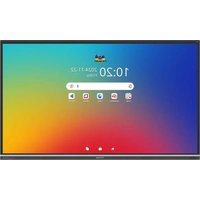
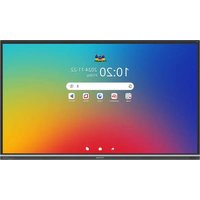
ViewBoard IFP9851 - Touchscreen VIEWSONIC - Free user manual and instructions
Find the device manual for free ViewBoard IFP9851 VIEWSONIC in PDF.


| Product type | Interactive touch screen |
| Brand | ViewSonic |
| Model | ViewBoard IFP9851 |
| Screen size (diagonal) | 98 inches |
| Native resolution | 4K Ultra HD (3840 x 2160) |
| Display technology | LED backlight |
| Touch technology | Multi-touch (gesture support) |
| Built-in operating system | Android (with ViewBoard launcher) |
| Video connectivity | 4x HDMI (including 2 front), 1x DisplayPort, 1x VGA, 1x USB Type C (DP Alt Mode) |
| Touch connectivity | 2x USB Type B (touch back) |
| USB connectivity | USB Type A (front and side), USB Type C (data) |
| Network | Ethernet RJ45 (10/100/1000 Mbps), optional Wi-Fi (dedicated slot) |
| Audio output | 3.5 mm jack, optical SPDIF |
| Audio input | 3.5 mm jack |
| VESA mount | 800 x 600 mm |
| Power supply | AC power (Power cord included) |
| Energy consumption | ENERGY STAR compliant (automatic standby mode) |
| Included accessories | Remote control, 2x styluses, HDMI cables, USB cables, power cord, quick start guide |
| Maintenance and cleaning | Soft dry cloth; ammonia-free and alcohol-free glass cleaner for screen; mild detergent for housing |
| Security | PIN code lock, screen protection, secure mode, factory reset |
| Repairability | OPS slot for integrated PC, Wi-Fi slot; ViewSonic limited warranty |
Frequently Asked Questions - ViewBoard IFP9851 VIEWSONIC
User questions about ViewBoard IFP9851 VIEWSONIC
0 question about this device. Answer the ones you know or ask your own.
Ask a new question about this device
Download the instructions for your Touchscreen in PDF format for free! Find your manual ViewBoard IFP9851 - VIEWSONIC and take your electronic device back in hand. On this page are published all the documents necessary for the use of your device. ViewBoard IFP9851 by VIEWSONIC.
USER MANUAL ViewBoard IFP9851 VIEWSONIC
myViewBoard Whiteboard....166
Protocole RS-232....169
Description 169
RS-232 Hardware Specification 169
LAN Hardware Specification.... 170
RS-232 Communication Setting.... 170
LAN Communication Setting 170
Command Message Reference.... 170
Protocol 171
Set-Function Listing.... 171
Get-Function Listing 179
Remote Control Pass-through Mode 187
Annexe....190
Aperçu du produit
IFP5551
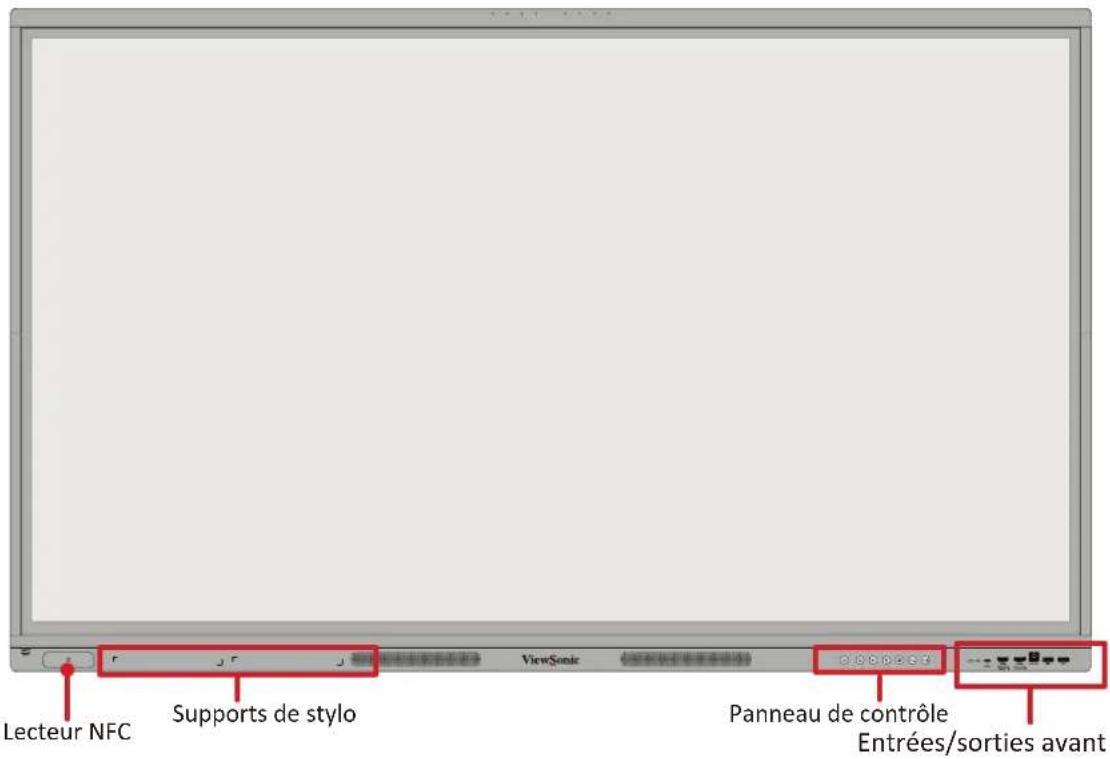
Panneau avant
natural_image
Illustration of a hand holding a smartphone with a small object inserted (no text or symbols visible)(1)
natural_image
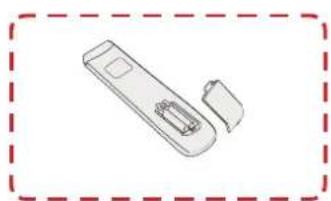
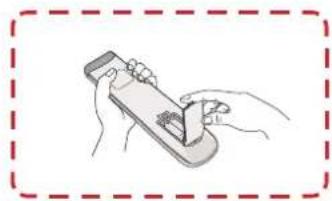
Simple line drawing of a remote control device with two ports and a handle, enclosed in a dashed red border (no text or symbols)(2)
natural_image
Illustration of hands using a handheld device to interact with a device (no text or symbols visible)(3)
natural_image
Simple line drawing of a pointing hand with a red outline (no text or symbols)natural_image
Simple line drawing of a pointing hand (no text or symbols)Double-clic
natural_image
Simple line drawing of a hand pointing with a red arrow (no text or symbols)natural_image
Hand pointing upward with a red arrow, displayed in a software interface (no text or symbols on the hand or background)natural_image
Top-down schematic of a computer monitor chassis showing internal components and ventilation ducts (no text or labels)natural_image
Technical diagram of a computer chassis showing internal components and a zoomed-in view with red arrows indicating movement (no text or symbols present)natural_image
Diagram showing a hand interacting with a device panel, no text or symbols presentEnglish (United States)
Vision settings

Choose your language
Suggested
English (United States)
Écran d'accueil
Comment s'inscrire
natural_image
Simple diagram with a horizontal line and two sun icons on either side (no text or symbols)natural_image
User interface control bar with speaker, playback, and sound waves (no text or symbols)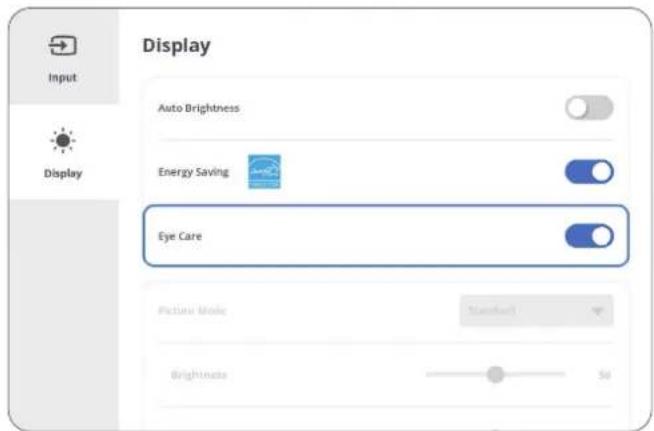
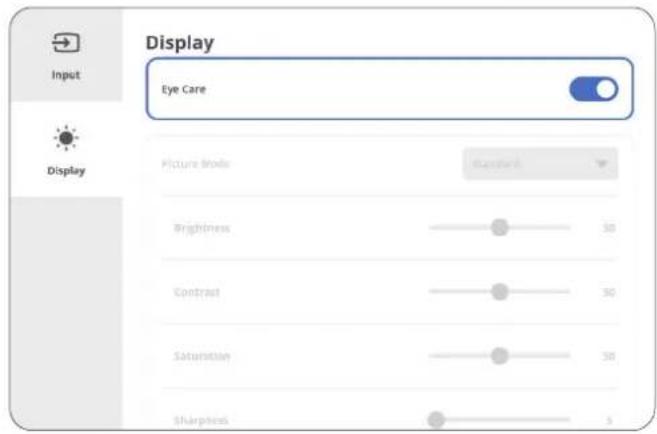
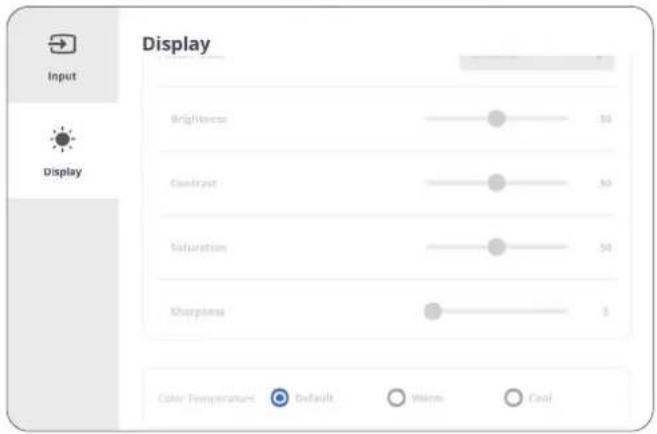
Calcul des pauses
natural_image
Diagram showing eye anatomy with two curved shapes and a double-headed arrow indicating rotation (no text or labels)natural_image
Diagram showing eye anatomy with two curved shapes and a double-headed arrow indicating rotation (no text or symbols)natural_image
Diagram showing two eye shapes with a double-headed arrow indicating rotation or alignment (no text or symbols)REMARQUE :
Ethernet
VPN
- Saisissez le Nom.
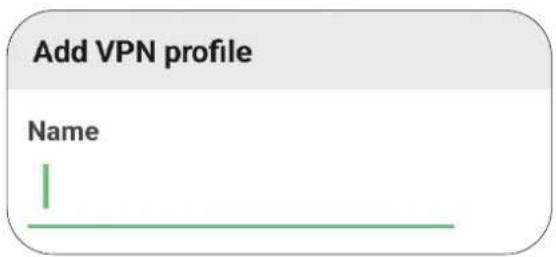
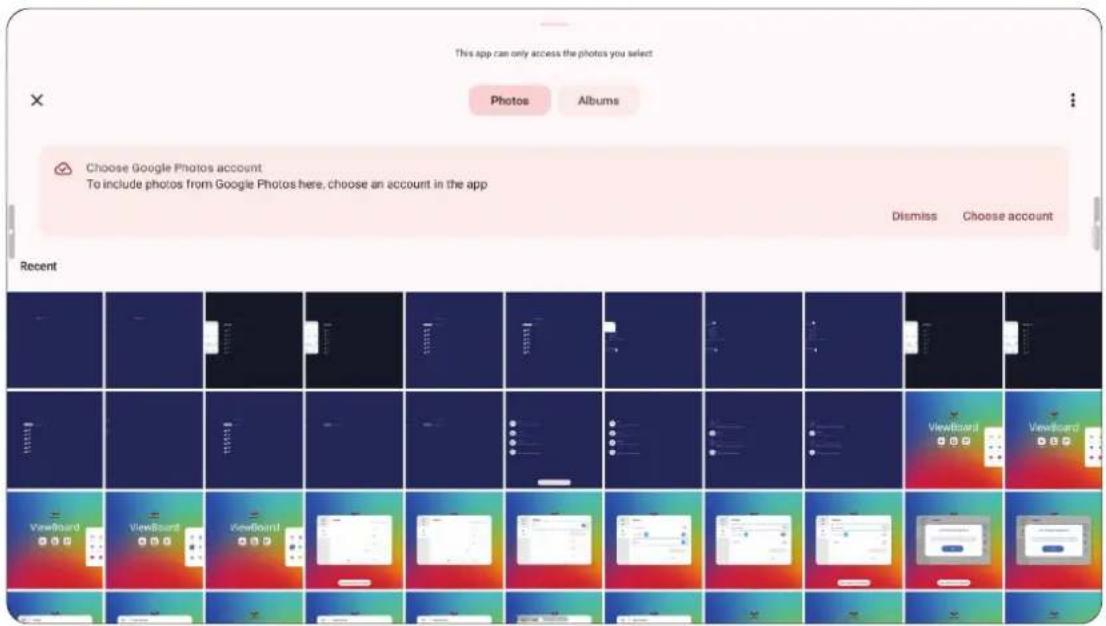
Protection
Sortie HDMI
HDMI-out resolution setting

3840*2160@60HZ

1920*1080@60HZ

720*480@60HZ

AUTO
HDMI IN OUT

It is necessary to plug and unplug the HDMI interface once to take effect.

Disable ViewBoard speakers when using HDMI out
Préférence
Marqueur
Touche
Langue
Date & Heure
Paramètre de son
Source d'entrée
REMARQUE :
Système
Clone OSD/Settings/debug menu to USB

Display ID
Set a number for this device when using RS232 remote control.

Security
Set Certificate and unknown source security.

System update
Firmware update information.

About device
Schéma de lancement
Cloner sur USB
Afficher l'ID
bar
Trusted credential | System | Manually installed | |---|---| | ACCV- Security info ACCVRAIZ1 | ● | | Actalis S.p.A./03358520967- Security info Actalis Authentication Root CA | ● | | AffirmTrust- Security info AffirmTrust Commercial | ● | | AffirmTrust- Security info AffirmTrust Networking | ● | | AffirmTrust- Security info AffirmTrust Premium | ● | | AffirmTrust- Security info AffirmTrust Premium ECC | ● | | Agence Nationale de Certification Electronique- Security info TunTrust Root CA | ● | | Amazon- Security info Amazon Root CA 1 | ● | | Amazon- Security info | ● |Lanceur Android
Réseau et Internet
Avancé
| Menu Sous-menu Option de menu | ||||
| Network & Internet | Ethernet | DHCP | ||
| Static IP | ||||
| IP Address | ||||
| Default gateway | ||||
| Netmask | ||||
| DNS | ||||
| Proxy | ||||
| Mac address | ||||
| Internet | Wi-Fi | Wi-Fi list | ||
| Add network | ||||
| Network Preferences | Turn on Wi-Fi automatically | |||
| Notify for public networks | ||||
| Share Wi-Fi only via a QR code | ||||
| Install certificates | Recent | |||
| Wi-Fi direct | ||||
| Saved Networks O | ther networks | |||
| Non-carrier data usage | ||||
| Network & Internet | Hotspot & tethering | Wi-Fi hotspot | Use Wi-Fi hotspot | |
| Hotspot name | ||||
| Security WPA2-Personal | ||||
| Turn off hotspot automatically | ||||
| Extend compatibility | ||||
| USB tethering | ||||
| Bluetooth tethering | ||||
| Data Saver Unrestricted data | ||||
| VPN | VPN+ | |||
| VPN list | ||||
| Shared network | ||||
| Private DNS | Off | |||
| Automatically | ||||
| Private DNS provider hostname | ||||
| Enter hostname of DNS provider | ||||
| Connected Devices | USB | Connected device | ||
| This device | ||||
| File transfer | ||||
| USB tethering | ||||
| PTP | ||||
| No data transfer | ||||
| Convert video to AVC | ||||
| Charge connected device | ||||
| Pair new device | Device name | |||
| Available devices | ||||
| See all Saved devices | ||||
| Connection preferences | Bluetooth | Use NFC Bluetooth | ||
| Device name | ||||
| Pair new device | ||||
| NFC | Use NFC | |||
| Contactless payments | Default payment app | |||
| Use default payment app | ||||
| Cast Cast list | ||||
| Printing | Default print Service | |||
| Add service | ||||
| Quick share | Account | |||
| Device name | ||||
| Who can share with you | ||||
| Connected Devices | Audio & video devices | Camera | ||
| Mic | Auto | |||
| Off | ||||
| USB-audio touch device | ||||
| Mic | Auto | |||
| Speaker | ||||
| HDMI out | ||||
| Speaker | ||||
| Apps | Recently opened apps | App list | App info | |
| Notifications | ||||
| Permissions | Location | |||
| Phone | ||||
| Camera | ||||
| Pause app activity is unused | ||||
| Storage & cache | Clear storage/cache | |||
| App size | ||||
| User data | ||||
| Cache | ||||
| Total | ||||
| Mobile data & Wi-Fi | Total | |||
| Foreground | ||||
| Background | ||||
| Screen time | App timer | |||
| Manage notifications | ||||
| App used in the background | ||||
| Apps | Recently opened apps | App list | App battery usage | Unrestricted |
| Optimized | ||||
| Restricted | ||||
| Open by default | Open supported links | |||
| Pause app activity if unused | ||||
| Display over other apps | ||||
| Allow display over other apps | ||||
| Modify system settings | Allow modifying system settings | |||
| Version | ||||
| Default apps | Browser app | Default browser app | ||
| Digital assistant app | Use text from screen | |||
| Use screenshot | ||||
| Flash screen | ||||
| Home app | Default home app | |||
| SMS app Default SMS app | ||||
| Opening links | Instant apps | |||
| Instant apps preferences | ||||
| Screen time Activity details | ||||
| Cloud media app | ||||
| Unused apps | ||||
| Menu Sous-menu Option de menu | |||
| Apps | Special app access | All files access | |
| Device admin apps | |||
| Display over other apps | |||
| Do not disturb access | |||
| Media management apps | |||
| Modify system settings | |||
| Device & app notification | |||
| Picture-In-Picture | |||
| Premium SMS access | |||
| Unrestricted data | |||
| Install unknown apps | |||
| Alarms & reminders | |||
| Usage access | |||
| VR helper services | |||
| Wi-Fi control | |||
| Turn screen on | |||
| Full screen notification | |||
| Menu Sous-menu Option de menu | ||||
| Notifications | App notifications | App list | Screen lock | |
| Google Play store | All Google Play store notification | |||
| All "Alerts" notifications | ||||
| Account | ||||
| App auto open | ||||
| Open app reminders | ||||
| Payments, Deals, and Recommendations | ||||
| Updates available | ||||
| Updates completed | ||||
| All "Essentials" notifications | ||||
| Maintenance | ||||
| Play Protect | ||||
| required | ||||
| Security and errors | ||||
| Setup | ||||
| All notification dot | ||||
| Notification history | Use notification history | |||
| Conversations | ||||
| Bubbles | Allow apps to show bubbles | |||
| Device & app notifications | Allowed | |||
| Not allowed | ||||
| Notifications | Notifications on lock screen | Show conversations, default, and silent | ||
| Hide silent conversations and notification | ||||
| Don't show any notifications | ||||
| Sensitive notifications | ||||
| Do not disturb | Turn on now | |||
| People | Messages | Starred contact | ||
| Contacts | ||||
| Priority conversations | ||||
| Anyone | ||||
| None | ||||
| Calls | Starred contact | |||
| Contacts | ||||
| Anyone | ||||
| None | ||||
| Allow repeat callers | ||||
| Apps | Apps | |||
| Add apps | ||||
| Alarms & other interruptions | Alarms | |||
| Media sounds | ||||
| Touch sounds | ||||
| Reminders | ||||
| Calendar events | ||||
| Notifications | Do not disturb | Schedules | Sleeping | User schedule |
| Days | ||||
| Start time | ||||
| End time | ||||
| Alarm can override end time | ||||
| Do Not Disturb behavior | ||||
| Event | User schedule | |||
| During events for | ||||
| Where reply is | ||||
| Do not disturb behavior | ||||
| Add more | ||||
| Duration for quick settings | Until you turn off | |||
| For 1 hour | ||||
| Ask every time | ||||
| Display options for hidden notification | No sound from notification | |||
| No visuals or sound from notification | ||||
| Custom | Don't turn on screen | |||
| Don't wake for notifications | ||||
| Hide notification dots on app icons | ||||
| Hide status bar icons at top of screen | ||||
| Don't pop notifications on screen | ||||
| Hide from pull-down shade | ||||
| Notifications | Flash notifications | Screen flash | ||
| Preview | ||||
| Wireless Emergency Alerts | ||||
| Hide Silent Notifications in Status Bar | ||||
| Allow Notification Snoozing | ||||
| Notification Dot on App Icon | ||||
| Enhanced Notifications | ||||
| Storage | Storage manager | User storage manager | ||
| Remove photos & videos | Over 30 days old | |||
| Over 60 days old | ||||
| Over 90 days old | ||||
| Trash | ||||
| System | ||||
| Apps | ||||
| Documents & other | ||||
| Games | ||||
| Apps | ||||
| Audio | ||||
| Videos | ||||
| Images | ||||
| Sound | Media volume | |||
| Do not disturb | People | Messages | Starred contacts | |
| Contacts | ||||
| Priority conversations | ||||
| Anyone | ||||
| None | ||||
| Calls | Starred contacts | |||
| Contacts | ||||
| Anyone | ||||
| None | ||||
| Apps | Apps | |||
| Add apps | ||||
| Alarms & other interruptions | Alarms | |||
| Media sounds | ||||
| Touch sounds | ||||
| Reminders | ||||
| Calendar events | ||||
| Sound | Do not disturb | Schedules | Sleeping | User schedule |
| Days | ||||
| Start time | ||||
| End time | ||||
| Alarm can override end time | ||||
| Do Not Disturb behavior | ||||
| Event | User schedule | |||
| During events for | ||||
| Where reply is | ||||
| Do not disturb behavior | ||||
| Add more | ||||
| Duration for quick settings | Until you turn off | |||
| For 1 hour | ||||
| Ask every time | ||||
| Display options for hidden notification | No sound from notification | |||
| No visuals or sound from notification | ||||
| Custom | Don't turn on screen | |||
| Don't wake for notifications | ||||
| Hide notification dots on app icons | ||||
| Hide status bar icons at top of screen | ||||
| Don't pop notifications on screen | ||||
| Hide from pull-down shade | ||||
| Sound | Live caption | Use Live Cation | ||
| Language (English only) | ||||
| Hide profanity | ||||
| Show sound labels | ||||
| Live Caption in volume control | ||||
| Help | ||||
| Media | Pin media player | |||
| Show media on lock screen | ||||
| Show media recommendations | ||||
| Default notification sound | None | |||
| Adara/Aldebaran/Selenium/... | ||||
| Add notification | ||||
| Menu Sous-menu Option de menu | |||
| Sound | Default alarm sound | None | |
| Argon | |||
| Barium | |||
| Bee-Beep alarm | |||
| Beep-Beep-Beep alarm | |||
| Buzzer alarm | |||
| Cabon | |||
| Cesium | |||
| Heium | |||
| Krypton | |||
| Neon | |||
| Neptunium | |||
| Osmium | |||
| Oxygen | |||
| Piezo alarm | |||
| Platinum | |||
| Platinum | |||
| Rooster alarm | |||
| Scandium | |||
| Add alarm | |||
| Tap & click sounds | |||
| Menu Sous-menu Option de menu | ||||
| Display | Lock screen | Privacy | Show all notification content | |
| Show sensitive content only when unlocked | ||||
| Don't show notifications at all | ||||
| Add users from lock screen | ||||
| Add text on lock screen | ||||
| Show device controls | ||||
| Use device controls | ||||
| Dynamic clock | ||||
| Wake screen for notifications | ||||
| Double-line clock | ||||
| Screen timeout | 15 seconds | |||
| 30 seconds | ||||
| 1 minute | ||||
| 2 minutes | ||||
| 5 minutes | ||||
| 10 minutes | ||||
| 30 minutes | ||||
| Display | Dark theme | Use dark theme | ||
| Schedule | None | |||
| Turns on at custom time | ||||
| Turns on from sunset to sunrise | ||||
| Turns on bedtime | ||||
| Display size and text | Font size | |||
| Display size | ||||
| Bold text | ||||
| High contrast text | ||||
| Reset settings | ||||
| Screen saver | Use Screen Saver | |||
| Screen saver | Never | |||
| 15 min | ||||
| 30 min | ||||
| 60 min | ||||
| 90 min | ||||
| Choose a screen saver | Clock | |||
| Colors | ||||
| Photos frame | ||||
| Photo table | ||||
| Photo | ||||
| Wallpaper & Style | Wallpaper | Home screen | ||
| Lock screen | ||||
| Change wallpaper | My Photos Select a photo | |||
| On-device wallpapers | Preview | |||
| Cityscapes | ||||
| Life | ||||
| Textures | ||||
| Landscapes | ||||
| Art | ||||
| Earth | ||||
| Solid colors | ||||
| Geometric shapes | ||||
| Seascape | ||||
| Wallpapers | ||||
| Dark theme | ||||
| Themed icons | ||||
| Accessibility | Select to speak | Select to speak shortcut | ||
| Settings | Text to speech settings | Preferred engine | ||
| Language | ||||
| Speech rate | ||||
| Pitch | ||||
| Change reading voice | ||||
| Read in background | ||||
| Read text on images | ||||
| Help & feedback | Popular help resources | |||
| Developer settings | Enable taking snapshot | |||
| Allow snapshot to take detail information | ||||
| Switch access | Use Switch Access | Choose a switch type | ||
| Switch Access shortcut | ||||
| Accessibility | Switch access Settings | Help & feedback | Popular help resources | |
| Open setup guide | Choose a switch type | |||
| Camera switch settings | Use camera switches | |||
| Open mouth | ||||
| Smile | ||||
| Raise eyebrows | ||||
| Look left | ||||
| Look right | ||||
| Look up | ||||
| Enhanced visual feedback | ||||
| Enhanced audio feedback | ||||
| Keep screen on | ||||
| Ignore repeated camera switch triggers | ||||
| Assign switches for scanning | Pause camera Switch | |||
| Auto-scan | ||||
| Reverse auto-scan | ||||
| Select | ||||
| Next | ||||
| Previous | ||||
| Touch & hold | ||||
| Scroll forward | ||||
| Scroll backward | ||||
| Assign switches to shortcuts | New shortcuts | |||
| Accessibility | Switch access Settings | Enable menu customization | ||
| Revert to Default Menu | Restore default menu | |||
| Auto-scan | Auto-scan time | |||
| Delay on first item | ||||
| Number of scans | ||||
| Scanning method | Linear scanning | |||
| Row-column scanning | ||||
| Group selection | ||||
| Point scan | Line speed | |||
| Delay on first item | ||||
| Number of scans | ||||
| Vertical scans | ||||
| Horizontal scans | ||||
| Automatically start scanning | ||||
| Auto-select | ||||
| Scanning highlight style | Highlight color | |||
| Highlight line style | ||||
| Accessibility | Switch access Settings | Speech, sound & vibration | Spoken feedback | |
| Speak descriptive text | ||||
| Verbosity | ||||
| TTS settings | ||||
| Finish speech before moving | ||||
| Maximum spoken time per item | ||||
| Vibration feedback | ||||
| Sound feedback | ||||
| Sound volume | ||||
| Audio ducking | ||||
| Ignore repeated presses | ||||
| Release to perform action | ||||
| Privacy policy | ||||
| Developer settings | Version | |||
| Display speech output | ||||
| Delete all shortcuts | ||||
| Log output level | ||||
| Accessibility | TalkBack | Use TalkBack | ||
| TalkBack shortcut | ||||
| New features in TalkBack | ||||
| Text-to-speech settings | Preferred engine | |||
| Language | ||||
| Speech rate | ||||
| Pitch | ||||
| Play/Reset | ||||
| Verbosity | Choose a preset | |||
| Speak usage hints | ||||
| Speak list and grid info | ||||
| Always speak number of list items | ||||
| Speak element type | ||||
| Speak window names | ||||
| Speak notifications when screen is off | ||||
| Use pitch changes | ||||
| Speak letters with examples | ||||
| Keyboard echo: On-screen keyboard | ||||
| Keyboard echo: Physical keyboard | ||||
| Capital letters | ||||
| Speak all progress updates | ||||
| Speak element IDs | ||||
| Speak punctuation and symbols | ||||
| Accessibility | TalkBack Settings | Sound | Accessibility volume | |
| TalkBack speech rate | ||||
| Sound feedback | ||||
| Sound feedback volume | ||||
| Audio ducking | ||||
| Customize focus | Thick borders | |||
| Color default | ||||
| Red | ||||
| Orange | ||||
| Yellow | ||||
| Green | ||||
| Blue | ||||
| Grey | ||||
| Customize Gestures | Practice gestures | |||
| Reset gesture setting | ||||
| Swipe up/Swipe down/Swipe left/... | ||||
| Customize menus | Customized TalkBack menu | |||
| Customized reading controls | ||||
| Image & icon descriptions | Detailed image descriptions | |||
| Automatic image descriptions | ||||
| Automatic icon descriptions | ||||
| Automatic descriptions for text in image | ||||
| Accessibility | TalkBack Settings | Braille keyboard | Set up braille keyboard | |
| Review all gestures | ||||
| Languages | ||||
| Preferred typing language | ||||
| Preferred braille grade | ||||
| Layout | ||||
| Include all pressed dots | ||||
| Reverse dots | ||||
| Braille display | Use braille display | |||
| Look for new device | ||||
| Languages | ||||
| Preferred reading language | ||||
| Preferred typing language | ||||
| Preferred braille grade | ||||
| Braille display commands | ||||
| Braille elements | ||||
| Auto-connect | ||||
| Auto-scroll | ||||
| Accessibility | TalkBack Settings | Advanced settings | Speak passwords | |
| Custom labels | ||||
| Single-tap to activate | ||||
| Element description order | ||||
| Time format | ||||
| Reduce window announcement delay | ||||
| Typing preference | ||||
| Touch and hold delay when typing | ||||
| Keyboard shortcut | ||||
| Developer settings | ||||
| Privacy policy | ||||
| Terms of service | ||||
| Open Talkback at the Play Store | ||||
| TalkBack tutorial | ||||
| Help & feedback | ||||
| Contact Google disability support | ||||
| Display size and text | Font size | |||
| Display size | ||||
| Bold text | ||||
| High contrast text | ||||
| Reset settings | ||||
| Accessibility | Color and motion | Color correction | Use color correction | |
| Red-green | ||||
| Red-green | ||||
| Blue-yellow | ||||
| Grayscale | ||||
| Color correction shortcut | ||||
| Color inversion | Use color inversion | |||
| Color inversion shortcut | ||||
| Dark theme | Use dark theme | |||
| Schedule | None | |||
| Turns on a custom time | ||||
| Turns on from sunset or sunrise | ||||
| Turns on at bedtime | ||||
| Large mouse pointer | ||||
| Extra dim | Make scree extra dim | |||
| Intensity | ||||
| Keep on after device restarts | ||||
| Extra dim shortcut | ||||
| Accessibility | Magnification | Magnification shortcut | ||
| Magnification type | Magnify full screen | |||
| Magnify part of screen | ||||
| Magnify typing | ||||
| Keep on while switching apps | ||||
| Accessibility menu | Accessibility Menu shortcut | |||
| Settings | Large button | |||
| Help & feedback | ||||
| Time controls | Touch & hold delay | Short | ||
| Medium | ||||
| Long | ||||
| Time to take action | Default | |||
| 10 seconds | ||||
| 30 seconds | ||||
| 1 minute | ||||
| 2 minutes | ||||
| Autoclick | Autoclick off | |||
| Short | ||||
| Medium | ||||
| Long | ||||
| Custom | ||||
| Accessibility | System controls | Navigation mode | Gesture navigation | Swipe to invoke assistant |
| Left edge | ||||
| Right edge | ||||
| Hold Home for Assistant | ||||
| 3-button navigation | ||||
| Side toolbar navigation | ||||
| Live caption | Use live caption | |||
| Languages | ||||
| Hide profanity | ||||
| Show sound labels | ||||
| Live caption in volume control | ||||
| Help | ||||
| Caption preferences | Show captions | |||
| Caption size and style | Text size | Very small | ||
| Small | ||||
| Medium | ||||
| Large | ||||
| Very large | ||||
| Cation style | Set by app | |||
| White on black | ||||
| Black on white | ||||
| Yellow on black | ||||
| Yellow on blue | ||||
| Custom | ||||
| More options Languages | ||||
| Accessibility | Audio description | |||
| Flash notifications | Screen flash | |||
| Preview | ||||
| Audio adjustment | Mono audio | |||
| Accessibility shortcuts | Accessibility button | Location | Floating over other apps | |
| Navigation bar | ||||
| Size | Small | |||
| Large | ||||
| Fade when not in use | ||||
| Transparency when not in use | ||||
| Shortcut from lock screen | ||||
| Text-to-speech output | Preferred engine | |||
| Language | ||||
| Speech rate | ||||
| Pitch | ||||
| Play/Reset | ||||
| Security & Privacy | Device may be at risk | |||
| Add Google Account | ||||
| Check for security updates | ||||
| Check for system updates | ||||
| App security | Google Play protect | |||
| Device unlock Screen lock PIN | Enhanced PIN privacy | |||
| Lock after screen timeout | Immediately | |||
| 5 seconds | ||||
| 15 seconds | ||||
| 30 seconds | ||||
| 1 minute | ||||
| 2 minute | ||||
| 5 minute | ||||
| 10 minute | ||||
| 30 minute | ||||
| Never | ||||
| Account security | Google security Checkup | |||
| Password checkup | ||||
| Device finders | Find my device | Use find my device | ||
| Unknown tracker alerts | ||||
| Security & Privacy | System & updates | Check for security updates | ||
| Check for system updates | ||||
| Security update | ||||
| Google Play system update | ||||
| Backup | ||||
| Privacy | Permission manager | |||
| Privacy dashboard | ||||
| Ads | Ad privacy | Ad topics | ||
| App-suggested ads | ||||
| Ad measurement | ||||
| Reset advertising ID | ||||
| Delete advertising ID | ||||
| Enable debug logging for ads | ||||
| Health connect | ||||
| Data sharing updates for location | ||||
| Camera access | ||||
| Microphone access | ||||
| Show clipboard access | ||||
| Show passwords | ||||
| Security & Privacy | Privacy | Location access | Use location | |
| No apps recently accessed location | ||||
| App location permissions | ||||
| Location services | ||||
| Activity controls | ||||
| More security settings | Accessibility usage | |||
| Notifications on lock screen | Show all notification content | |||
| Show sensitive content only when unlocked | ||||
| Don't show notifications at all | ||||
| Show media on lock screen | ||||
| App content | ||||
| Android system Intelligence | Device learning | |||
| Keyboard | ||||
| On-device recognition | ||||
| Clear data | Last hour | |||
| Last 24 hours | ||||
| All time | ||||
| Security & Privacy | More security settings | Encryption & credentials | Encrypt device | |
| Trusted credentials | ||||
| User credentials | ||||
| Install a certificate | CA certificate | |||
| VPN & app user certificate | ||||
| Wi-Fi certificate | ||||
| Clear credentials | ||||
| Certificate management app | ||||
| Trust agents Extend unlock | ||||
| App pinning | Use app pinning | |||
| Lock device when unpinning | ||||
| Location | Use location | |||
| Recent access | ||||
| App location permissions | App list | |||
| Location services | Earthquake alerts | |||
| Emergency location Service | ||||
| Google location History | ||||
| Google location Sharing | ||||
| Location accuracy | ||||
| Trusted places | ||||
| Wi-Fi scanning | ||||
| Bluetooth scanning | ||||
| Passwords & accounts | Passwords | |||
| Autofill service | ||||
| Accounts for owner | ||||
| Add account | ||||
| Automatically sync app data | ||||
| Digital Wellbeing | Your Digital Wellbeing tools | Unlocks | ||
| Notifications | ||||
| View activity details | ||||
| App limits | ||||
| Night shift | Do not disturb for night shift mode | |||
| Focus | ||||
| Screen time reminders | ||||
| Manage notifications | App notifications | |||
| Do Not Disturb | People | Messages | Starred contacts | |
| Contacts | ||||
| Priority conversations | ||||
| Anyone | ||||
| None | ||||
| Calls | Starred contacts | |||
| Contacts | ||||
| Anyone | ||||
| None | ||||
| Apps | Apps | |||
| Add apps | ||||
| Digital Wellbeing | Do not disturb | Alarms & other interruptions | Alarms | |
| Media sound | ||||
| Touch sounds | ||||
| Reminders | ||||
| Calendar events | ||||
| Schedule | Sleeping | User schedule | ||
| Days | ||||
| Start time | ||||
| End time | ||||
| Alarm can override end time | ||||
| Do not disturb behavior | ||||
| Event | User schedule | |||
| During events for | ||||
| Where reply is | ||||
| Do not disturb behavior | ||||
| Add more | ||||
| Duration for quick settings | Until you turn off | |||
| For 1 hour | ||||
| Ask every time | ||||
| Digital Wellbeing | Do not disturb | Display options for hidden notifications | No sound from notifications | |
| No visuals or sound from notifications | ||||
| Custom | Don't turn on screen | |||
| Don't wake for notifications | ||||
| Hide notification dots on app icons | ||||
| Hide status bar icons at top of screen | ||||
| Don't pop notifications on screen | ||||
| Hide from pull-down shade | ||||
| Heads up | ||||
| Show icon in the app list | ||||
| Parental controls | ||||
| Google services | ||||
| Backup is off for photos & videos | Account storage | |||
| Backup by Google One | ||||
| Backup details | ||||
| Apps | ||||
| Photo & videos | ||||
| Device settings | ||||
| Google account data | Calendar | |||
| Contacts | ||||
| Drive | ||||
| Gmail | ||||
| Google Calendar | ||||
| Google TV | ||||
| Tasks in Calendar | ||||
| Back up using meter Wi-Fi data | ||||
| Find my device | Use find my devices | |||
| Find your offline devices | Off | |||
| Without network | ||||
| With network in high-traffic areas only | ||||
| With network in all areas | ||||
| Find my device app | ||||
| Find my device web | ||||
| Autofill | Use autofill with Google | |||
| Google Account | ||||
| Personal info | ||||
| Google Password Manager | ||||
| Google Pay | ||||
| Preferences | ||||
| Google Wallet | ||||
| Cross-device services | Account | |||
| Device name | ||||
| Who can share with you | Your devices | |||
| Contacts | ||||
| Everyone | ||||
| Family group | Create a family group | |||
| What's new | ||||
| Give feedback | ||||
| Parental Controls | ||||
| Advanced | Startup & shutdown | Boot mode | Normal mode | |
| Secure mode | ||||
| Disable embedded OS | ||||
| Startup input | Last shutdown channel | |||
| ViewBoard | ||||
| HDMI 1 | ||||
| HDMI 2 | ||||
| HDMI 3 | ||||
| HDMI 4 | ||||
| DP | ||||
| VGA | ||||
| TYPE C 1 | ||||
| TYPE C 2 | ||||
| Standby Mode | Hibernate | |||
| Sleep | ||||
| Energy Star mode | ||||
| Add startup/ shutdown task | Startup task/ Shutdown task | |||
| Schedule settings | ||||
| Advanced | Input source | Label input Source | Allow input alias | |
| ViewBoard | ||||
| HDMI 1 | ||||
| HDMI 2 | ||||
| HDMI 3 | ||||
| HDMI 4 | ||||
| DP | ||||
| VGA | ||||
| Type-C 1 | ||||
| Type-C 2 | ||||
| Wake up by active HDMI input | ||||
| Auto search signal | ||||
| Auto switch input ports | ||||
| Manual selection | ||||
| Energy saving | 1 min | |||
| 3 mins | ||||
| 5 mins | ||||
| 10 mins | ||||
| 15 mins | ||||
| 30 mins | ||||
| 45 mins | ||||
| 60 mins | ||||
| Off | ||||
| HDMI CEC | ||||
| HDR | ||||
| Advanced | Security settings | Unknown source security | ||
| Enable password for ViewBoard settings | ||||
| Reset Advanced Settings Password | ||||
| Pen detection | ||||
| Pen detection app | Marker | |||
| myViewBoard whiteboard | ||||
| HDMI OUT format | 3840 x 2160 @ 60 Hz | |||
| 1920 x 1080 @ 60 Hz | ||||
| 720 x 480 @ 60 Hz | ||||
| Auto | ||||
| System | System languages | |||
| App Languages | ||||
| Regional preferences | Regional preferences | |||
| Temperature | Use default | |||
| Celsius (°C) | ||||
| Fahrenheit (°F) | ||||
| First day of week | Use default | |||
| Sunday | ||||
| Monday | ||||
| Tuesday | ||||
| Wednesday | ||||
| Thursday | ||||
| Friday | ||||
| Saturday | ||||
| Voice input | ||||
| System | On-device recognition | Add language | ||
| Auto update languages | ||||
| Advanced | ||||
| Text-to-speech output | Preferred engine | |||
| Languages | ||||
| Speech rate | ||||
| Pitch | ||||
| Play/Reset | ||||
| Launcher Scheme | Scheme A | |||
| Scheme B | ||||
| Sidebar On/Off | ||||
| Keyboard | Gboard | |||
| Google Voice Typing | ||||
| Remoting | ||||
| Use on-screen keyboard | ||||
| Keyboard shortcuts | Caps lock | |||
| Ctrl | ||||
| Action key | ||||
| Alt | ||||
| Reset all | ||||
| Spell checker | Use spell checker | |||
| Languages | ||||
| Default spell checker | ||||
| Personal dictionary | ||||
| Pointer speed | ||||
| System | Gestures | Navigation mode | Gesture navigation | |
| 3-button navigation | ||||
| Side toolbar navigation | ||||
| Press & hold power button | Power menu | |||
| Digital assistant | ||||
| Date & time | Set time automatically | |||
| Date | ||||
| Time | ||||
| Set automatically | ||||
| Time zone | Region | |||
| Time zone | ||||
| Use locale default | ||||
| Use 24-hour format | ||||
| Windows Ink | ||||
| Display ID | ||||
| Backup | ||||
| System Update | ||||
| Multiple Users | Allow multiple users | |||
| User | ||||
| Add user | ||||
| Add guest | ||||
| Delete guest activity | ||||
| Add users from lock screen | ||||
| Menu Sous-menu Option de menu | |||
| System | Reset options | Reset Wi-Fi & Bluetooth | |
| Reset app preferences | |||
| Erase all data (factory reset) | |||
| About Device | Device name | ||
| Legal information | Third-party license | ||
| Google legal | |||
| Google Play system update license | |||
| System Webview license | |||
| Wallpaper credits | |||
| Open source licenses | |||
| Model | Model | ||
| Serial number | |||
| Asset Tagging | |||
| Android version | Android version | ||
| Android security update | |||
| Kernel version | |||
| Build number | |||
| Menu Sous-menu Option de menu | ||
| About Device | IP address | |
| Ethernet address | ||
| Wi-Fi MAC address | ||
| Device Wi-Fi MAC address | ||
| Bluetooth address | ||
| Up time | ||
| Build number | ||
| Tips & Support | myViewBoard Whiteboard | |
| myViewBoard Display | ||
| myViewBoard Manager | ||
| New features | ||
This document describes the hardware interface and software protocols of RS-232 interface communication between the ViewSonic LED Display and computers or other control units with RS-232 protocol.
The protocol contains three command sections:
- Set-Function
- Get-Function
- Remote control pass-through mode
REMARQUE: Below, "PC" represents all the control units that can send or receive the RS-232 protocol command.
Description
RS-232 Hardware Specification
ViewSonic LFD communication port on the rear side:
- Connector type: DSUB 9-Pin Male (female or 3.5 mm barrel connector)
- Use of crossover (null modem) cable for connection
- Pin Assignment:
Male DSUB 9-Pin (preferred)
12345
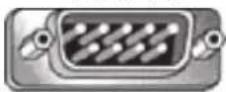
6789
Female DSUB 9-Pin
54321
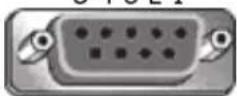
9876
3.5 mm barrel connector (alternative for limited
space)
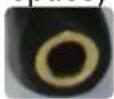
Pin # Signal Remark
| 1 NC | |
| 2 RXD Input to Display | |
| 3 TXD Output from Display | |
| 4 NC | |
| 5 GND | |
| 6 NC | |
| 7 NC | |
| 8 NC | |
| 9 NC | |
| frame GND | |
| Item | Signal | Remark |
| Tip | TXD | Output from Display |
| Ring | RXD Input to Display | |
| Sleeve | GND | |
LAN Hardware Specification
ViewSonic LFD communication port on the rear side:
-
Connector type: 8P8C RJ45
-
Pin Assignment:
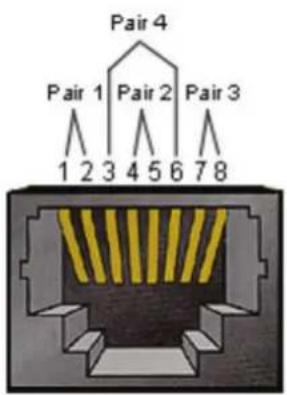
| Pin # Signal Remark | ||
| 1 TX+ Output from Display | ||
| 2 TX- Output from Display | ||
| 3 RX+ Input to Display | ||
| 4 BI_D3+ For 1G case | ||
| 5 BI_D3- For 1G case | ||
| 6 RX- Input to Display | ||
| 7 BI_D4+ For 1G case | ||
| 8 BI_D4- For 1G case | ||
| frame | GND | |
RS-232 Communication Setting
• Baud Rate Select: 9600bps (fixed)
• Data bits: 8 bits (fixed)
- Parity: None (fixed)
- Stop Bits: 1 (fixed)
LAN Communication Setting
| Type: | Ethernet |
| Protocol: | TCP/IP |
| Port: | 5000 (fixed) |
| WOL Port: | 9 (fixed) for UDP _3.2.0 |
| Cross subnet: | No |
| Logon Credentials: | No |
Command Message Reference
PC sends to LFD command packet followed by "CR". Every time PC sends control command to Display, the Display shall respond as follows:
- If the message is received correctly it will send “+” (02Bh) followed by “CR” (00Dh)
- If the message is received incorrectly it will send “-” (02Dh) followed by “CR” (00Dh)
Protocol
Set-Function Listing
The PC can control the Display for specific actions. The Set-Function command allows you to control the Display behavior at a remote site through the RS-232 port. The Set-Function packet format consists of 9 bytes.
Set-Function Description:
Length: Total Byte of Message excluding "CR"
LFD ID Identification for each Display (01\~98; default is 01)
ID "99" means to apply the set command for all connected displays. Under such circumstances, only ID#1 display has to reply.
The LFD ID can be set via the OSD menu for each Display.
Command Type Identify command type,
"s" (0x73h): Set Command
“+” (0x2Bh): Valid command Reply
“-” (0x2Dh): Invalid command Reply
Command: Function command code: One byte ASCII code.
Value[1\~3]: Three bytes ASCII that defines the value.
CR 0x0D
Set-Function Format
Send: (Command Type="s")
Reply: (Command Type="+" or "-" )
REMARQUE : When PC applies command to all displays (ID=99), only the #1 set needs to reply by the name of ID=1.
Example 1: Set Brightness at 76 for Display (#02) and this command is valid Send (Hex Format)
| Name | Length | ID | Command | Type | Command | Value1 | Value2 | Value3 | CR | |
| Hex | 0x38 | 0x300x32 | 0x73 | 0x24 | 0x30 | 0x37 | 0x36 | 0x0D |
Reply (Hex Format)
| Name | Length ID | Command Type | CR | |
| Hex | 0x34 | 0x300x32 | 0x2B | 0x0D |
Example 2: Set Brightness at 75 for Display (#02) and this command is NOT valid Send (Hex Format)
| Name | Length | ID | Command Type | Command | Value1 | Value2 | Value3 | CR |
| Hex | 0x38 | 0x300x32 | 0x73 | 0x24 | 0x30 | 0x37 | 0x35 | 0x0D |
Reply (Hex Format)
| Name | Length ID | Command Type | CR | |
| Hex | 0x34 | 0x300x32 | 0x2D | 0x0D |
A. Basic Function
| Set Function | Length | ID | Command | Command | Value Range | Comments | |
| Type (ASCII) | Code(ASCII) | Code(Hex) | (Three ASCII bytes) | ||||
| Power ON *3.2.1/OFF (standby) | 8 s ! 21 | 000: STBY001: ON | 1. The Power-on via LAN control may work only under specific modes. See display UG for details. *3.1.12. “WOL by MAC address” maybe available as an alternative.*3.2.1 | ||||
| Input Select 8 s ^ | 22 | 000: TV001: AV002: S-Video003: YPbPr004: HDMI1014: HDMI2024: HDMI3034: HDMI4005: DVI006: VGA1016: VGA2026: VGA3007: Slot-in PC (OPS/SDM)/HDBT008: Internal memory009: DP1 *3.2.4023: DP2019: Type-C 1 *3.3.2039: Type-C 200A: Embedded/Main (Android) | 1. No need for USB2. For the case of two or more same sources, the 2nd digital is used to indicate the extension.3. The HEX of 00A is 30 30 41.4. 00Z is reserved for cycle mode *3.3.15. Using 2nd digi to identify DP or Type C. 0 and even numbers stand for DP; odd numbers stand for Type C *3.3.2 | ||||
| Brightness 8 s | $ 24 | 000 ~ 100900: Bright down (-1)901: Bright up (+1)*3.1.1 | |||||
| Backlight *3.2.0 | 8 | A | B | 42 | 000 ~ 100 | 1. For Android platform whose main mode is controlled by backlight and the other sources are controlled by brightness.2. Derived from Color calibration. *3.2.0 | |
| Power lock | 8 s | 4 34 | 000: Unlock001: Lock | *See note in details | |||
| Volume | 8 s | 5 35 | 000 ~ 100900: Volume down(-1)901:Volume up(+1) | ||||
| Mute | 8 s | 6 36 | 000: OFF001: ON (mute) | ||||
| Button lock 8 s | 8 38 | 000: Unlock001: Lock | *See note in details | ||||
| Menu lock 8 s | > 3E | 000: Unlock001: Lock | *See note in details |
| Set Function | Length ID | Command | Command | Value Range | Comments | |
| Number *3.1.1 8 s | @ 40 000~009 | |||||
| Key Pad *3.1.1 8 s A 41 | 000: UP001: DOWN002: LEFT003: RIGHT004: ENTER005: INPUT006: MENU/(EXIT)007: EXIT | |||||
| Remote Control | 8 s B 42 | 000: Disable001: Enable002: Pass through | Disable: RCU will have no functionEnabled: RCU controls normallyPass through: Display will bypass the RC code to connected device via the RS-232 port, but not react itself. | |||
| Restore default | 8 s | ~ 7E 000 | Recover to factory settings |
REMARQUE :
1. Behavior at Lock Modes
| Lock Mode Behavior | |
| Button Lock | 1. Lock all buttons on the front panel and RCU, except for “Power”2. All the SET functions should be workable via RS-232, even the ones with according hot key in RCU like Mute,...etc. |
| MENU Lock | 1. Lock the “MENU” key of front panel and RCU2. The Factory and Hospitality modes should not be blocked for the model using MENU-combined key to enter these two modes. Alternative approach will be indicated separately if any limitation by model. |
| POWER Lock | 1. Lock the “POWER” key on the front and RCU.2. The SET_POWER ON/OFF should be workable via RS-232, but does not mean the POWER lock will be released under this case.3. Can not be unlocked by reset in OSD setting4. Will auto AC power-on in power-lock5. Under power-lock, the set will not enter power saving when no PC signal and neither turn off when no other video signals after 15 minutes. |
| Remote Control Disable | Lock the RCU keys, but keep the front panel buttons workable. |
2. Wake-on-LAN by MAC address as alternative for SET Power on
(Length=126 Bytes)
| 6 Bytes | 6 Bytes (#1) | 6 Bytes (#2) | ... | 6 Bytes (#16) | 24 Bytes |
| 0xFF FF ... FF | MAC address M | AC address ... M | MAC address | 0x00 00 ... 00 |
B. Optional Function
| Set Function Length ID Command Command Value Range Comments | |||||||
| Type (ASCII) | Code (ASCII) | Code (Hex) | Three ASCII bytes) | ||||
| Contrast 8 s # | 23 000 ~ 100 | ||||||
| Sharpness 8 s | % 25 000 ~ 100 | ||||||
| Color 8 s & | 26 000 ~ 100 | ||||||
| Tint 8 s | ' | 27 000 ~ 100 | |||||
| Backlight On_Off | 8 s | ( | 29 | 000: OFF001: ON | |||
| Color mode | 8 s | ) | 29 | 000: Normal001: Warm002: Cold003: Personal | |||
| Surround sound | 8 s | - | 2D | 000: OFF001: ON | |||
| Bass 8 s | . | 2E 000 ~ 100 | |||||
| Treble | 8 s | / | 2F 000 ~ 100 | ||||
| Balance | 8 | s | 0 | 30 | 000 ~ 100 | 050 is central | |
| Picture Size 8 s | 1 | 31 | 000: FULL (16:9)001: NORMAL (4:3)002: REAL (1:1)*3.1.0 | ||||
| OSD language | 8 s 2 | 32 | 000: English001: French002: Spanish | Could be extended for more supported languages by model | |||
| PIP-Mode | 8 s 9 | 39 | 000: OFF001: PIP(POP)002: PBP | ||||
| PIP-Sound select | 8 s | : | 3A | 000: Main001: Sub | |||
| PIP-Position | 8 s | ; | 3B | 000: Up001: Down002: Left003: Right | |||
| PIP-InputTiling-Mode 8 s | 8 s 7P 50 | 37 | *2.9 | 000: TV001: AV002: S-Video003: YPbPr004: HDMI1014: HDMI2024: HDMI3034: HDMI4005: DVI006: VGA1016: VGA2026: VGA3007: Slot-in PC (OPS/SDM)/HDBT008: Internal memory009: DP/Type-C*3.2.400A: Embedded/Main (Android)000: OFF001: ON (for video wall) | Value range is same as SET-Input select | ||
| Tiling-Compensation | 8 s Q 51 | 000: OFF001: ON | (for video wall)Bezel width compensation | ||||
| Tiling-H by V Monitors | 8 s R 52 | 01x~09x: H0x1~0x9: V | (for video wall)1. 2nd digital for H monitors2. 3rd digital for V monitors | ||||
| Tiling-Position 8 s | S 53 001~025 | (for Video wall)Copy the screen of Position# to identified display | |||||
| Date: Year 8 s | V 56 Y17~Y99 | Last 2 digits(20)17~(20)99 | |||||
| Date: Month | 8 s V 56 M01~M12 | 2 digits | |||||
| Date: Day 8 s | V 56 D01~D31 | 2 digits | |||||
| Time: Hour | 8 s | W 57 H00~H23 | 24-hr format.2 digits. | ||||
| Time: Min 8 s | W | 57 M00~M59 | 2 digits | ||||
| Time: Sec | 8 | s | W | 57 | S00~S59 | 2 digits | |
REMARQUE :
3. Tiling definition of H Monitors, V Monitors, and Position
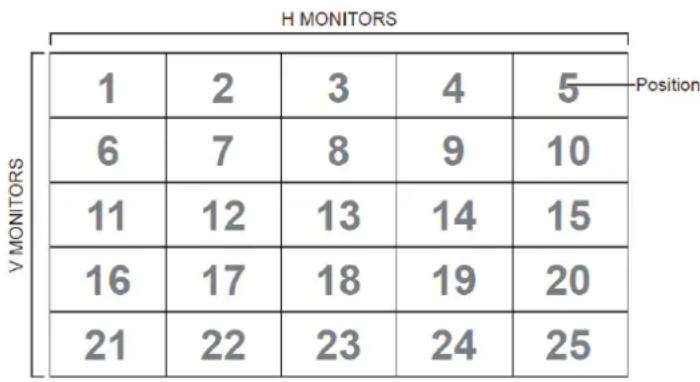
heatmap
H MONITORS | Position | 1 | 2 | 3 | 4 | 5 | | :--- | :--- | :--- | :--- | :--- | :--- | | V MONITORS | 6 | 7 | 8 | 9 | 10 | | V MONITORS | 11 | 12 | 13 | 14 | 15 | | V MONITORS | 16 | 17 | 18 | 19 | 20 | | V MONITORS | 21 | 22 | 23 | 24 | 25 |4. Set Date example
Date: 2017-3/15
Send: 0x 38 30 31 73 56 59 31 37 0D ("Y17")
Send: 0x 38 30 31 73 56 4D 30 33 0D ("M03")
Send: 0x 38 30 31 73 56 44 31 35 0D ("D15")
5. Set Time example
Time: 16:27:59
Send: 0x 38 30 31 73 57 48 31 36 0D ("H16")
Send: 0x 38 30 31 73 57 4D 32 37 0D ("M27")
Send: 0x 38 30 31 73 57 53 35 39 0D ("S59")
Get-Function Listing
The PC can interrogate the LFD for specific information. The Get-Function packet format consists of 9 bytes which is similar to the Set-Function packet structure. Note that the "Value" byte is always = 000.
Get-Function Description:
Length: Total Byte of Message excluding "CR".
TV/DS ID Identification for each of TV/DS (01\~98; default is 01).
Command Type Identify command type, "g" (0x67h) : Get Command "r" (0x72h) : Valid command Reply "-" (0x2Dh) : Invalid command Reply
Command: Function command code: One byte ASCII code.
Value[1\~3]: Three bytes ASCII that defines the value.
CR 0x0D
Get-Function Format
Send: (Command Type="g")
Reply: (Command Type="r" or "-"
If the Command is valid, Command Type = "r"
If the Command is NOT valid, Command Type = “-”
Example 1: Get Brightness from TV-05 and this command is valid. The Brightness value is 67.
Send (Hex Format)
| Name | Length ID | Command Type | Command Value1 | Value2 | Value3 | CR | |
| Hex | 0x38 | 0x300x35 | 0x67 0x62 | 0x30 0x30 0x30 | 0x0D |
Reply (Hex Format)
| Name | Length ID | Command Type | Command Value1 | Value2 | Value3 | CR | |
| Hex | 0x38 | 0x300x35 | 0x72 0x62 | 0x30 0x36 | 0x37 0x0D |
Example 2: Get Color from Display (#05), but the Color command is not supported by this model.
Send (Hex Format)
| Name | Length | ID | Command Type | Command | Value1 | Value2 | Value3 | CR |
| Hex | 0x38 | 0x300x35 | 0x67 | 0x26 | 0x30 0x30 | 0x30 0x0D | ||
Reply (Hex Format)
| Name | Length | ID | Command Type | CR |
| Hex | 0x34 | 0x300x35 | 0x2D | 0x0D |
Get-Function Table
A. Basic Function
| Get Function | Length ID | Command Command | Response Range | Comments | |||
| Type (ASCII) | Code (ASCII) | Code (Hex) | (Three ASCII bytes) | ||||
| Get-Brightness 8 | g b 62 000 | ~ 100 | |||||
| Get-Backlight *3.2.0 | 8 a B | 42 000 | ~ 100 | 1. For Android platform whose main mode is controlled by backlight and the other sources are controlled by brightness.2. Derived from Color calibration. *3.2.0 | |||
| Get-Volume 8 g | f 66 000 | ~ 100 | |||||
| Get-Mute | 8 g g | 67 | 000: OFF001: ON (muted) | ||||
| Get-Input select | 8 g | j 6A | 000~100~ | 1. 1st digit for signal detection: 0 means “no signal”; 1 means “signal detected”2. 2nd & 3rd digit: See Set-function table | |||
| Get-Power status: ON/ STBY | 8 g | I 6C | 001: ON000: STBY | ||||
| Get-Remote control | S | g n 6E | 000: Disable001: Enable002: Pass through | Get RCU mode status | |||
| Get-Power lock | 8 g o | 6F | 000: Unlock001: Lock | ||||
| Get-Button lock | 8 g p | 70 | 000: Unlock001: Lock | ||||
| Get-Menu lock | 8 g | I 6C | 000: Unlock001: Lock | ||||
| Get-ACK | 8 g | z 7A 000 | This command is used to test the communication link | ||||
| Get-Thermal | 8 g 0 | 30 | 000~100:0~+100 deg C-01~-99:-1~-99 deg C | ||||
| Get-Operation hour *3.2.0 | 8 g 1 | 31 000 | 1. Accumulated hours in 6-digit integer (000,001~ 999,999)*3.2.02. Can not be reset when FW update and Factory initiation *3.2.23. Reply in new 32-byte format *3.2.0 | ||||
| Get-Device name | 8 g 4 | 34 000 | Reply in new 32-byte format *3.2.0 | ||||
| Get Function | Length ID | Command Command | Response Range | Comments | ||
| Get-MAC address | 8 g 5 35 000 | (for the models with LAN)Reply in new 32-byte format *3.2.0 | ||||
| Get-IP address *3.2.0 | 8 g 6 36 000 | (for the models with LAN)Reply in new 32-byte format *3.2.0 | ||||
| Get-Serial number *3.2.0 | 8 g 7 37 000 | Reply in new 32-byte format *3.2.0 | ||||
| Get-FW version *3.2.0 | 8 g 8 38 000 | Reply in new 32-byte format *3.2.0 | ||||
REMARQUE :
1. Get Operation Hour example
Assumed the accumulated operation hour is 123,456 hrs
Send: 0x 38 30 31 67 31 30 30 30 0D (Get Operation hour)
Reply: 0x 32 30 31 72 31 31 32 33 34 35 36 00 00 ... 00 00 0D
2. Get Device Name example
Assumed the device name is CDE-5500
Send: 0x 38 30 31 67 34 30 30 30 0D (Get Device Name)
Reply: 0x 32 30 31 72 34 43 44 45 2D 35 35 30 30 00 00 ... 00 00 0D
Assumed the device name is "NMP-302#1"
Send: 0x 38 30 31 67 34 30 30 30 0D (Get Device Name)
Reply: 0x 32 30 31 72 34 4E 4D 50 2D 33 30 32 23 31 00 00 ...00 00 0D
3. Get MAC address example
Assumed the MAC address is 00:11:22:aa:bb:cc
Send: 0x 38 30 31 67 35 30 30 30 0D (Get MAC add)
Reply: 0x 32 30 31 72 35 30 30 31 31 32 32 61 61 62 62 63 63 00 00...00 00 0D
4. Get IP address example
Assumed the IP address is 192.168.100.2
Send: 0x 38 30 31 67 36 30 30 30 0D (Get IP address)
Reply: 0x 32 30 31 72 36 31 39 32 2E 31 36 38 2E 31 30 30 2E 32 00 00...00 00 0D
5. Get Serial number example
Assumed the Serial number is ABC180212345
Send: 0x 38 30 31 67 37 30 30 30 0D (Get Serial number)
Reply: 0x 32 30 31 72 37 41 42 43 31 38 30 32 31 32 33 34 35 00 00...00 00 0D
6. Get FW version example
Assumed the FW version is 3.02.001
Send: 0x 38 30 31 67 38 30 30 30 0D (Get FW version)
Reply: 0x 32 30 31 72 38 33 2E 30 32 2E 30 30 31 00 00...00 00 0D
B. Optional Function
| Get Function | Length | ID | Command Command | Response Range | Comments | ||
| Type (ASCII) | Code (ASCII) | Code (Hex) | Three ASCII bytes) | ||||
| Get-Contrast 8 g a 61 000 ~ 100 | |||||||
| Get-Sharpness 8 g c 63 000 ~ 100 | |||||||
| Get-Color 8 g d 64 000 ~ 100 | |||||||
| Get-Tint 8 g e 65 000 ~ 100 | |||||||
| Get-Backlight On_Off | 8 g h 68 | 000: OFF001: ON | |||||
| Get-PIP mode 8 g t | 74 | 000: OFF001: PIP (POP)002: PBP | |||||
| Get-PIP input | 8 | g | u | 75 | 000 ~ | See Set-input select | |
| Get-Tiling Mode | 8 g v 76 | 000: OFF001: ON | (for Video wall) | ||||
| Get-Tiling Compensation | 8 g | w | 77 | 000: OFF001: ON | (for Video wall)Bezel width compensation | ||
| Get-Tiling H by V monitors | 8 g x 78 | 01x~09x: H monitors0x1~0x9: V monitors | (for Video wall)1. 2nd digital for H monitors2. 3rd digital for V monitors | ||||
| Get-Tiling position | 8 g y 79 | 000: OFF001~025 | (for Video wall)Copy the screen of Position# to identified display | ||||
| Get-Date: Year | 8 g 2 32 Y00~Y00 | Last 2 digits(20)17~(20)99 | |||||
| Get-Date: Month | 8 g 2 32 M00~M00 | 2 digits | |||||
| Get-Date: Day | 8 g 2 32 D00~M00 | 2 digits | |||||
| Get-Time: Hour | 8 g 3 33 H00~H00 | 24-hr format.2 digits | |||||
| Get-Time: Min 8 g 3 33 M00~M00 | 2 digits | ||||||
| Get-Time: Sec | 8 g 3 33 S00~S00 | 2 digits | |||||
REMARQUE :
1. Get Date example
Assumed the current date of display#01 as below:
Date: 2017-3/15
Send: 0x 38 30 31 67 32 59 30 30 0D (Get Date:Year)
Reply: 0x 38 30 31 72 32 59 31 37 0D ("Y17")
Send: 0x 38 30 31 67 32 4D 30 30 0D (Get Date:Month)
Reply: 0x 38 30 31 72 32 4D 30 33 0D ("M03")
Send: 0x 38 30 31 67 32 44 30 30 0D (Get Date:Day)
Reply: 0x 38 30 31 72 32 44 31 35 0D ("D15")
2. Get Time example
Assumed the current time of display#01 as below:
Time: 16:27:59
Send: 0x 38 30 31 67 33 48 30 30 0D (Get Time:Hour)
Reply: 0x 38 30 31 72 33 48 31 36 0D ("H16")
Send: 0x 38 30 31 67 33 4D 30 30 0D (Get Time:Min)
Reply: 0x 38 30 31 72 33 4D 32 37 0D ("M27")
Send: 0x 38 30 31 67 33 53 30 30 0D (Get Time:Sec)
Reply: 0x 38 30 31 72 33 53 35 39 0D ("S59")
3. Get RS232 version example
Assumed the version is 3.0.1
Send: 0x 38 30 31 67 36 30 30 30 0D (Get RS232 version)
Reply: 0x 38 30 31 72 36 33 30 31 0D ("301")
C. Auto Reply \*3.2.1
The display will send out the updated data/status automatically without GET query from the host whenever the following data/status is changed by the user through any of the available ways like: remote control unit, front control panel keys, or touch screen.
- PowerOn/Off
- InputSelect
- Brightness
- Backlight
• Volume - MuteOn/Off
Remote Control Pass-through Mode
When the PC sets the Display to Remote Control Pass through mode, the Display will send a 7-byte packet (followed by "CR") in response to remote control unit (RCU) button activation.
In this mode the RCU will have no effect on the Display function. For example: "Volume+" will not change the volume of the Display, but instead only send the "Volume+" code to the PC over the RS-232 port.
IR Pass Through-Function format
Reply: (Command Type="p")
Example 1: Remote Control Pass-through when "VOL+" key is pressed for Display (#5)
Send (Hex Format)
| Name | Length | ID | Command Type | RCU Code1 (MSB) | RCU Code2 (LSB) | CR |
| Hex | 0x36 | 0x300x35 | 0x70 | 0x31 | 0x30 | 0x0D |
| Key | Code (HEX) | Basic *3.1.1 | Optional *3.1.1 |
| 1 01 V | |||
| 2 02 V | |||
| 3 03 V | |||
| 4 04 V | |||
| 5 05 V | |||
| 6 06 V | |||
| 7 07 V | |||
| 8 08 V | |||
| 9 09 V | |||
| 0 0A V | |||
| - 0B V | |||
| RECALL (LAST) 0C V | |||
| INFO (DISPLAY) 0D V | |||
| 0E | |||
| ASPECT (ZOOM, SIZE) 0F V | |||
| VOLUME UP (+) | 10 V | ||
| VOLUME DOWN (-) | 11 V | ||
| MUTE | 12 V | ||
| CHANNEL/PAGE UP (+)/ BRIGHTNESS+ | 13 V | ||
| CHANNEL/PAGE DOWN (-)/ BRIGHTNESS- | 14 V | ||
| POWER | 15 V | ||
| SOURCES (INPUTS) | 16 V | ||
| 17 | |||
| 18 | |||
| SLEEP | 19 V | ||
| MENU | 1A V | ||
| UP | 1B V | ||
| DOWN | 1C V | ||
| LEFT (-) | 1D V | ||
| RIGHT (+) | 1E V | ||
| OK (ENTER, SET) | 1F | V | |
| EXIT | 20 V | ||
| 21 | |||
| 22 | |||
| 23 | |||
| 24 | |||
| 25 | |||
| 26 | |||
| 27 | |||
| 28 | |||
| 29 | |||
| 2A | |||
| 2B | |||
| RED □ (F1) 2C V | |||
| GREEN □ (F2) 2D V | |||
| YELLOW □ (F3) 2E V | |||
| BLUE □ (F4) 2F V |
REMARQUE :
- This IR-pass-through code is different from the RCU key code.
- Special control sequence for POWER key under IR-pass through mode.
2-1. When Display is OFF and receives the IR POWER code: Display will turn itself ON, then forward the POWER code to the host via RS-232.
2-2. When Display is ON and receives the IR POWER code: Display will forward the POWER code to the host via RS-232, then turn OFF itself.
2-3. When SET-POWER LOCK is enabled, the Display will not respond to POWER key pressing.
- The VOLUME UP and VOLUME DOWN code will repeatedly output when you press and hold the keys.
Annexe
Modes d'affichage
DisplayPort
| Resolution Taux de rafraîchissement (@) | |
| 640 x 480 60, 67, | 72 Hz |
| 800 x 600 56, 60, | 72, 75 Hz |
| 832 x 624 75 Hz | |
| 1024 x 768 60, 70, | 75 Hz |
| 1152 x 864 75 Hz | |
| 1152 x 870 75 Hz | |
| 1280 x 720 60 Hz | |
| 1280 x 960 60 Hz | |
| 1280 x 1024 60, 75 | Hz |
| 1360 x 768 60, 85 | Hz |
| 1366 x 768 60 Hz | |
| 1440 x 900 60 Hz | |
| 1600 x 1200 60 Hz | |
| 1680 x 1050 60 Hz | |
| 1920 x 1080 60 Hz | |
| 1920 x 1200 60 Hz | |
| 3840 x 2160 25, 30, | 50, 60 Hz |
HDMI
| Resolution Taux de rafraîchissement (@) | |
| 640 x 480 60, 67, | 72, 75 Hz |
| 800 x 600 56, 60, | 72, 75 Hz |
| 832 x 624 75 Hz | |
| 1024 x 768 60, 70, | 75 Hz |
| 1152 x 864 75 Hz | |
| 1152 x 870 75 Hz | |
| 1280 x 720 60 Hz | |
| 1280 x 960 60 Hz | |
| 1280 x 1024 60, 75 | Hz |
| 1360 x 768 60, 85 | Hz |
| 1366 x 768 60 Hz | |
| 1440 x 900 60 Hz | |
| 1600 x 1200 60 Hz | |
| 1680 x 1050 60 Hz | |
| 1920 x 1080 60 Hz | |
| 1920 x 1200 60 Hz | |
| 3840 x 2160 25, 30, | 50, 60 Hz |
USB Type C
| Resolution Taux de rafraîchissement (@) | |
| 640 x 480 60, 67, | 72 Hz |
| 800 x 600 56, 60, | 72, 75 Hz |
| 832 x 624 75 Hz | |
| 1024 x 768 60, 70, | 75 Hz |
| 1152 x 864 75 Hz | |
| 1152 x 870 75 Hz | |
| 1280 x 720 60 Hz | |
| 1280 x 960 60 Hz | |
| 1280 x 1024 60, 75 | Hz |
| 1360 x 768 60, 85 | Hz |
| 1366 x 768 60 Hz | |
| 1440 x 900 60 Hz | |
| 1600 x 1200 60 Hz | |
| 1680 x 1050 60 Hz | |
| 1920 x 1080 60 Hz | |
| 1920 x 1200 60 Hz | |
| 3840 x 2160 25, 30, | 50, 60 Hz |
VGA
| Resolution Taux de rafraîchissement (@) | |
| 640 x 480 60, 67, | 72 Hz |
| 800 x 600 56, 60, | 72, 75 Hz |
| 832 x 624 75 Hz | |
| 1024 x 768 60, 70, | 75 Hz |
| 1152 x 864 75 Hz | |
| 1152 x 870 75 Hz | |
| 1280 x 720 60 Hz | |
| 1280 x 960 60 Hz | |
| 1280 x 1024 60, 75 | Hz |
| 1360 x 768 60, 85 | Hz |
| 1366 x 768 60 Hz | |
| 1440 x 900 60 Hz | |
| 1600 x 1200 60 Hz | |
| 1680 x 1050 60 Hz | |
| 1920 x 1080 60 Hz | |
| 1920 x 1200 60 Hz | |
Sortie HDMI
| Resolution Taux de rafraîchissement (@) | |
| 720 x 480 60 Hz | |
| 1920 x 1080 60 Hz | |
| 3840 x 2160 60 Hz | |
Dépannage
- https://www.viewsonicglobal.com/public/products_download/safety_compliance/IFP/VS20432_CE_DoC.pdf
- https://www.viewsonicglobal.com/public/products_download/safety_compliance/IFP/VS20640_CE_DoC.pdf
- https://www.viewsonicglobal.com/public/products_download/safety_compliance/IFP/VS20641_CE_DoC.pdf
- https://www.viewsonicglobal.com/public/products_download/safety_compliance/IFP/VS20434_CE_DoC.pdf
- https://www.viewsonicglobal.com/public/products_download/safety_compliance/IFP/VS20435_CE_DoC.pdf
https://www.viewsonic.com/us/go-green-with-viewsonic
Europe :
https://www.viewsonic.com/eu/environmental-social-governance/recycle
Taiwan :
https://recycle.moenv.gov.tw/
https://www.viewsonic.com/eu/
natural_image
Illustration of three colorful bird figurines perched on a green surface (no text or symbols)ViewSonic®
- Protocole RS-232....169
- Annexe....190
- Aperçu du produit
- IFP5551
- Double-clic
- Écran d'accueil
- Comment s'inscrire
- Calcul des pauses
- REMARQUE :
- Ethernet
- VPN
- Protection
- Sortie HDMI
- Préférence
- Marqueur
- Touche
- Langue
- Date & Heure
- Paramètre de son
- Source d'entrée
- Système
- Schéma de lancement
- Cloner sur USB
- Afficher l'ID
- Lanceur Android
- Réseau et Internet
- Avancé
- Description
- RS-232 Hardware Specification
- LAN Hardware Specification
- RS-232 Communication Setting
- LAN Communication Setting
- Command Message Reference
- Protocol
- Set-Function Listing
- Set-Function Description:
- Set-Function Format
- Example 1: Set Brightness at 76 for Display (#02) and this command is valid Send (Hex Format)
- Reply (Hex Format)
- Example 2: Set Brightness at 75 for Display (#02) and this command is NOT valid Send (Hex Format)
- Behavior at Lock Modes
- Wake-on-LAN by MAC address as alternative for SET Power on
- Tiling definition of H Monitors, V Monitors, and Position
- Set Date example
- Set Time example
- Get-Function Listing
- Get-Function Description:
- Get-Function Format
- Get-Function Table
- Get Operation Hour example
- Get Device Name example
- Get MAC address example
- Get IP address example
- Get Serial number example
- Get FW version example
- Get Date example
- Get Time example
- Get RS232 version example
- Auto Reply \*3.2.1
- Remote Control Pass-through Mode
- IR Pass Through-Function format
- Annexe
- Modes d'affichage
- Dépannage
- Europe :
- Taiwan :
- ViewSonic®
Brand : VIEWSONIC
Model : ViewBoard IFP9851
Category : Touchscreen