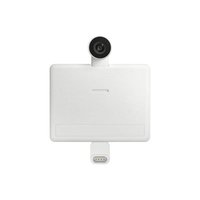
VG-SMCBU2W - Webcam SAMSUNG - Free user manual and instructions
Find the device manual for free VG-SMCBU2W SAMSUNG in PDF.


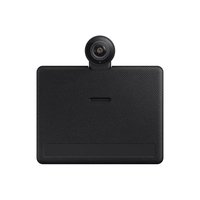
| Product type | Webcam for TV compatible with Samsung QLED TV (Q60+), The Frame, The Serif, Smart Monitor and 2022 gaming monitors |
| Video resolution | 1920 x 1080 (Full HD) at 30 frames per second |
| Viewing angle | 85° |
| Automatic light correction | Yes |
| Privacy cover | Yes |
| Connection | USB Type-C (USB 2.0) |
| Cable length | 1.5 m |
| Supported operating systems | Windows 8.1 and later, macOS 10.10 and later |
| TV compatibility | QLED TV models (Q60 and above), The Frame and The Serif 2022; smart monitors and 2022 gaming monitors with smart functions |
| Power supply | Via USB |
| Maintenance and cleaning | Clean with a soft dry cloth. Avoid chemical products. |
| Installation precautions | Do not install on a tilted TV (risk of falling). Avoid dust, moisture, oil, smoke. |
| Safety | Keep away from radio devices (phone, Wi-Fi, Bluetooth) to avoid interference. |
| Specific features | Does not support screen rotation. Remove the camera before using rotation. |
| General information | Requires a TV update scheduled for April 22 (some functions limited before). |
Frequently Asked Questions - VG-SMCBU2W SAMSUNG
User questions about VG-SMCBU2W SAMSUNG
0 question about this device. Answer the ones you know or ask your own.
Ask a new question about this device
Download the instructions for your Webcam in PDF format for free! Find your manual VG-SMCBU2W - SAMSUNG and take your electronic device back in hand. On this page are published all the documents necessary for the use of your device. VG-SMCBU2W by SAMSUNG.
USER MANUAL VG-SMCBU2W SAMSUNG
VA81-01137A-01

natural_image
Illustration of six different electronic components or devices, including a box, rolled paper, cable, connector, lid, cube, and ring (no text or symbols present)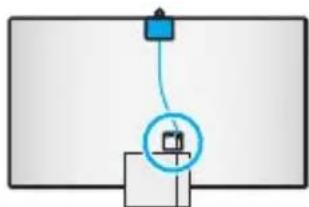
natural_image
Simple diagram showing a device connected to a box, with no visible text or symbols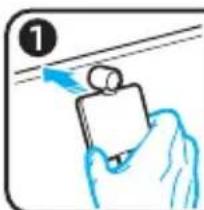
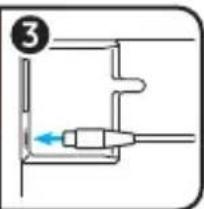
natural_image
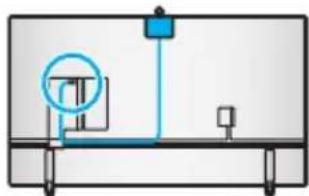
Simple line drawing of a mechanical setup with a circular component and connected components (no text or symbols)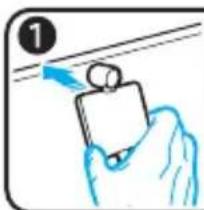
natural_image
Hand holding a small object with blue arrows indicating direction (no text or symbols)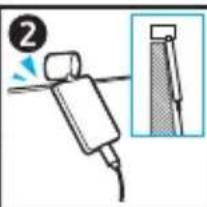
natural_image
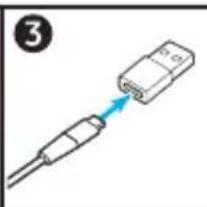
Diagram of a cable connector with a blue arrow pointing to it, no text or symbols present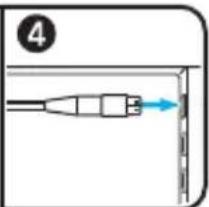

natural_image
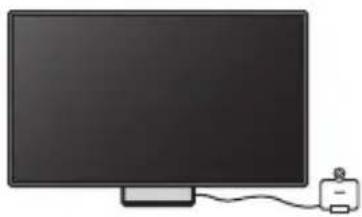
Illustration of a flat-screen monitor connected to a small electronic device (no text or symbols visible)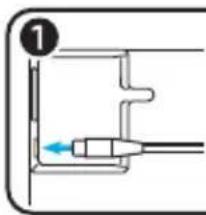
natural_image
Pure diagram of a mechanical or electrical component with no visible text, numbers, or symbols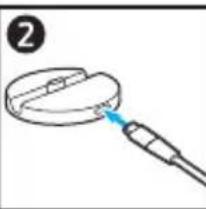
natural_image
Simple line drawing of a magnifying glass with a blue tip, no text or symbols present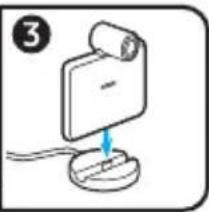
natural_image
Simple line drawing of a device with a scroll and a blue arrow pointing to it, no text or symbols present.
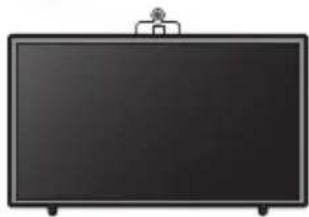
* Used on The Frame / Can be used on models unavailable to mount the camera
natural_image
Front view of a blank blackboard with a small logo on top (no text or symbols visible)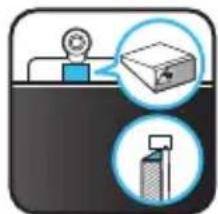
natural_image
Illustration of a reception desk with a worker and a magnifying glass, alongside a stack of books (no text or symbols)
natural_image
Front view of a blank computer monitor with a stand (no text or symbols visible)
natural_image
Two-panel illustration showing a mechanical device with a blue tool and a magnified inset of a component (no text or symbols)

Precautions when using the SlimFit Cam from The Frame
natural_image
Simple diagram of a mechanical setup with a central component and two vertical supports (no text or symbols)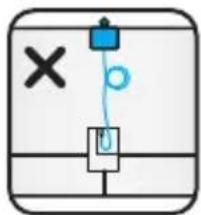
natural_image
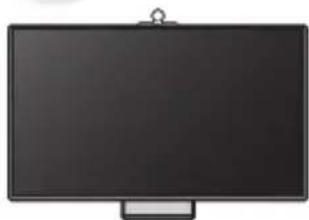
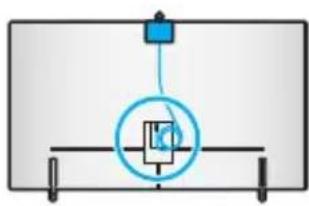
Simple line drawing of a device with a blue upward arrow and a black cable, no text or symbols present.- The SlimFit Cam may fall if it is installed on The Frame that is tilted (because it has been installed on the Studio Stand or for any other reason).
• The SlimFit Cam may become impacted and fall if it is installed on top of The Frame. - To use the SlimFit Cam from The Frame that is wall mounted, you need to reinstall the wall mount. Assistance from the service center for camera installation comes with an installation fee.
| Resolution 1920x1080, 30fps(FHD) | |
| Automatic lighting correction YES | |
| Privacy cover YES | |
| Cable length 1.5m | |
| Viewing angle 85° | |
| Connection USB Type-C (USB 2.0) | |
| Supported OS versions | - Windows 8.1 and later- Mac OS 10.10 and later |
| Supported TV/monitor models - QLED TV (Q60 and later), The Frame, and The Serif models that are released in 2022- Smart monitor and game monitor models released in 2022 that support smart functions. | |
- Do not install the product in a vehicle or a place exposed to dust, moisture (water drips, etc.), oil, or smoke.
- The TV may malfunction if it is used very close to an operating radio communication device, such as a mobile phone, Wi-Fi device, or Bluetooth device.
- Some features may be restricted before the update of the TV scheduled for April 22.
- The SlimFit Cam does not support screen rotation. To use rotation, first remove the SlimFit Cam.


[한국어]
Dispose unwanted electronics through an approved recycler. To find the nearest recycling location, go to our website: www.samsung.com/recycling or call, 1-800-SAMSUNG
![SAMSUNG VG-SMCBU2W - [한국어] - 1](/content/2026/04/727065/images/13f042f0c9a52012bfc71c98562e338a4d0b604c8d325f097f2d432387cdac83.jpg)
WARNING: Cancer and Reproductive Harm - www.P65Warnings.ca.gov
INDIA
This product is RoHS compliant.
This marking on the product, accessories or literature indicates that the product and its electronic accessories (e.g. charger, headset, USB cable) should not be disposed of with other household waste at the end of their working life. To prevent possible harm to the environment or human health from uncontrolled waste disposal, please separate these items from other types of waste and recycle them responsibly to promote the sustainable reuse of material resources.
For more information on safe disposal and recycling visit our website www.samsung.com/in or contact our Helpliane numbers-1800 40 SAMSUNG(1800 40 7267864) (Toll-Free)

CANADA
Canadian Caution
This equipment contains licence-exempt transmitter(s)/receiver(s) that comply with Innovation, Science and Economic Development Canada's licence-exempt RSS(s). Operation is subject to the following two conditions:
- This device may not cause interference.
- This device must accept any interference, including interference that may cause undesired operation of the device.
This equipment and its antenna(s) must not be co-located or operation in conjunction with any other antenna or transmitter.
The equipment could automatically discontinue transmission in case of absence of information to transmit, or operational failure. Note that this is not intended to prohibit transmission of control or signaling information or the use of repetitive codes where required by the technology.

ICES-003 Class A Notice - Avis NMB-003, Classe A
This Class A digital apparatus complies with Canadian ICES-003.
This Class B digital apparatus complies with Canadian ICES-003.
Radiation Exposure Statement:
This equipment complies with IC RSS-102 radiation exposure limits set forth for an uncontrolled environment. This equipment should be installed and operated with minimum distance 20cm between the radiator & your body.
CALIFORNIA USA ONLY (Applicable for networking models only.)
This Perchlorate warning applies only to primary CR(Manganese Dioxide) Lithium coin cells in the product sold or distributed ONLY in California USA "Perchlorate Material - special handling may apply, See www.dtsc.ca.gov/hazardouswaste/perchlorate."
Dispose unwanted electronics through an approved recycler.
To find the nearest recycling location, go to our website: www.samsung.com/recycling Or call, 1-800-SAMSUNG

WARNING: Cancer and Reproductive Harm - www.P65Warnings.ca.gov.


Regulatory Compliance Statements
Your Samsung product compliance class is marked in the user manual
USA
FCC Supplier's Declaration of Conformity
Responsible Party – U.S. Contact Information:
Samsung Electronics America, Inc.
85 Challenger Road.
Ridgefield Park, NJ 07660
Phone: 1-800-SAMSUNG (726-7864)
FCC Compliance Statement :
This device complies with Part 15 of the FCC Rules.
Operation is subject to the following two conditions :
(1) This device may not cause harmful interference, and
(2) this device must accept any interference received, including interference that may cause undesired operation.
FCC Caution :
Any changes or modifications not expressly approved by the party responsible for compliance could void the user's authority to operate this equipment.
Class B FCC Statement
This equipment has been tested and found to comply with the limits for a Class B digital device, pursuant to Part 15 of the FCC Rules. These limits are designed to provide reasonable protection against harmful interference in a residential installation. This equipment generates, uses and can radiate radio frequency energy and, if not installed and used in accordance with the instructions, may cause harmful interference to radio communications. However, there is no guarantee that interference will not occur in a particular
installation. If this equipment does cause harmful interference to radio or television reception, which can be determined by turning the equipment off and on, the user is encouraged to try to correct the interference by one of the following measures:
- Reorient or relocate the receiving antenna.
- Increase the separation between the equipment and receiver.
- Connect the equipment into an outlet on a circuit different from that to which the receiver is connected.
- Consult the dealer or an experienced radio/TV technician for help.
FCC Radiation Exposure Statement:
This equipment complies with FCC radiation exposure limits set forth for an uncontrolled environment.
This equipment should be installed and operated with minimum distance 20cm between the radiator & your body.
This device and its antenna(s) must not be co-located or operation in conjunction with any other antenna or transmitter.
Warning
User must use shielded signal interface cables to maintain FCC compliance for the product.
Provided with this monitor is a detachable power supply cord with IEC320 style terminations. It may be suitable for connection to any UL Listed personal computer with similar configuration. Before making the connection, make sure the voltage rating of the computer convenience outlet is the same as the monitor and that the ampere rating of the computer convenience outlet is equal or exceeds the monitor voltage rating. For 120 Volt applications, use only UL Listed detachable power cord with NEMA configuration 5-15P type(parallel blades) plug cap. For 240 Volt applications use only UL Listed detachable power supply cord with NEMA configuration 6-15P type (tandem blades) plug cap. This television receiver provides display of television closed captioning in accordance with Section 15.119 of the FCC rules. (TV broadcast receivers with picture screens 13 inches or larger in diameter models only)


This page is intentionally left blank.
- Precautions when using the SlimFit Cam from The Frame
- [한국어]
- INDIA
- CANADA
- Canadian Caution
- Radiation Exposure Statement:
- Regulatory Compliance Statements
- USA
- FCC Supplier's Declaration of Conformity
- Responsible Party – U.S. Contact Information:
- FCC Compliance Statement :
- FCC Caution :
- Class B FCC Statement
- FCC Radiation Exposure Statement:
- Warning
- This page is intentionally left blank.
Brand : SAMSUNG
Model : VG-SMCBU2W
Category : Webcam