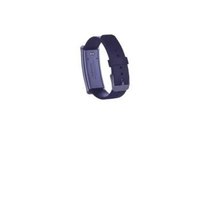
HG02988A - Activity tracker SILVERCREST - Free user manual and instructions
Find the device manual for free HG02988A SILVERCREST in PDF.


| Product type | Activity tracker |
| Brand | SilverCrest |
| Model | HG02988A |
| Dimensions (L x W x H) | 251 x 22 x 10.3 mm |
| Weight | 24.1 g |
| Battery | Rechargeable lithium-polymer, 3.8 V, 70 mAh |
| Battery life | Approximately 4 weeks |
| Charging time | Approximately 2.5 hours |
| Charging voltage | 5 V, 55 mA |
| Connectivity | Bluetooth 4.2 (BLE) |
| Bluetooth range | Approximately 10 meters |
| Sensors | Gravity sensor, UV sensor |
| Protection rating | IP67 (resistant to dust and temporary immersion in water) |
| Display | LED |
| Smartphone compatibility | Android 4.4 or higher, iOS 7.0 or higher |
| Main functions | Step counting, distance, calories, sleep, call and message notifications, smart alarm, UV measurement, bracelet location |
| Package contents | 1 tracker with bracelet, 1 magnetic charging adapter, 1 USB cable, 1 user manual |
| Warranty | 3 years |
| Operating temperature | 0 °C to +45 °C |
| Storage temperature | -20 °C to +60 °C |
| Allowable humidity | 25% to 90% (without condensation) |
Frequently Asked Questions - HG02988A SILVERCREST
User questions about HG02988A SILVERCREST
0 question about this device. Answer the ones you know or ask your own.
Ask a new question about this device
Download the instructions for your Activity tracker in PDF format for free! Find your manual HG02988A - SILVERCREST and take your electronic device back in hand. On this page are published all the documents necessary for the use of your device. HG02988A by SILVERCREST.
USER MANUAL HG02988A SILVERCREST
ACTIVITYTRACKER
GB IE NI
ACTIVITYTRACKER
Operation and Safety Notes
NL BE
ACTIVITEITSTRACKER
GB/IE/NI Operation and Safety Notes
Page
List of pictograms used and warnings Page 4
Introduction Page 4
Intended Use Page 4
Trademark notice Page 4
Warnings and symbols used....Page 4
Scope of delivery Page 4
Description of Parts Page 4
Technical Data Page 4
General Safety instructions Page 4
Safety instructions for rechargeable batteries....Page 5
Using the product for the first time....Page 5
Download SilverCrest SAT 70 Activity Tracker App Page 6
Pairing & connecting the product....Page 6
Functions Page 7
Notifications for incoming calls/messages Page 7
Smart Alarm....Page 7
Activity monitor and sleep data Page 7
Share activity data....Page 7
Measure UV radiation....Page 7
Find my band Page 8
Update strap software....Page 8
Update SilverCrest SAT 70 Activity Tracker....Page 8
Restore factory settings....Page 8
Waterproofing (IP67)....Page 8
Cleaning and care....Page 8
Storage when not in use Page 9
Troubleshooting Page 9
Disposal Page 9
Simplified EU declaration of conformity Page 9
Warranty Page 9
| List of pictograms used and warnings | |
| —— | Direct current |
| Observe caution and safety notes! | |
| Caution! Explosion hazard! | |
| Wear suitable protective gloves! | |
Activity tracker
- Introduction
We congratulate you on the purchase of your new product. You have chosen a high quality product. The instructions for use are part of the product. They contain important information concerning safety, use and disposal. Before using the product, please familiarise yourself with all of the safety information and instructions for use. Only use the product as described and for the specified applications. If you pass the product on to anyone else, please ensure that you also pass on all the documentation with it.
Intended Use
The activity tracker is a product of information electronics. After you have connected the activity tracker with a smartphone, you can use its full scope of functions. The activity tracker records the steps, kilometers, and calories consumed, and records the duration of activities and sleeping. The product is suitable for use with the following systems: iOS from version 7.0, Android™ Version 4.4 or higher, Bluetooth® v4.2. The product is only intended for the private usage, the commercial usage is not permitted.
Trademark notice
- USB is a registered trademark of USB Implementers Forum, Inc.
- The Bluetooth word mark and logos are registered trademarks owned by Bluetooth SIG, Inc. and any use of such marks by OWIM GmbH & Co. KG is under license.
- The SilverCrest trademark and trade name is the property of their respective owners.
-Apple ® and the Apple logo are registered trademarks of Apple Inc., US. - App Store is a service mark of Apple Inc.
- Google Play is a registered trademark of Google Inc.
- iOS and Apple are registered trademarks of Apple Inc in the USA and other countries.
- Any other names and products may be trademarks or registered trademarks of their respective owners.
- Warnings and symbols used
In this user's manual the following warning remarks are used:

DANGER
This symbol with the signal word "DANGER" indicates a hazard with a high level of risk which, if not avoided, will result in serious injury or death.

WARNING!
This symbol with the signal word "WARNING" indicates a hazard with a medium level of risk which, if not avoided, could result in serious injury or death.

CAUTION
This symbol with the signal word "CAUTION" indicates a hazard with a high level of risk which, if not avoided, could result in minor or moderate injury.
NOTE
This symbol with the signal word "NOTE" provides additional useful information.
- Scope of delivery
NOTE: take the product and the instructions for use out of the packaging and remove all packaging material.
1 Activity tracker with strap
1 Charging adapter (magnetic)
1 USB cable
1 Instructions for use
• Description of Parts
1 LED indicator
2 Activity tracker
3 Charging adapter (magnetic)
4 Charging contact
5 USB cable
- Technical Data
ChargingVoltage:5V
Charging current: approx. 55 mA
Bluetooth Specification: Version 4.2
Bluetooth range: approx. 10 meters
Supported Bluetooth profiles: BLE (Bluetooth Low energy *)
If supported by smartphone
Sensors: Gravity Sensor, UV Sensor
Compatibility: Android 4.4 or above, iOS 7.0 or above
Battery Type: Lithium polymer rechargeable battery
3.8 V, 70 mAh
Operating time: approx. 4 weeks
Charging time: approx. 2.5 hours
ProtectionClass: IP67
Working temperature: +0 degree Celsius to +45 degree Celsius
Storage temperature: -20 degree Celsius to +60 degree Celsius
Humidity (Nocondensation): 25 to 90 %
Dimensions (W x D x H): approx. 251 x 22 x 10.3 mm
Weight: approx.24.1g
Frequencybands: 2402MHz \~
2480 MHz
Maximum power transmitted: <0 dbm

General Safety instructions
Before using the product, please read all safety information and instructions. Non-observance of the safety advice and instructions may cause fire and/or serious injuries.
KEEP ALL SAFETY NOTICES AND INSTRUCTIONS FOR FUTURE REFERENCE!
- Check the product before each use, do not operate a damaged product.
This product may be used by children aged 8 years and up, as well as by persons with reduced physical, sensory or mental capacities, or lacking experience and knowledge, so long as they are supervised or instructed in the safe use of the product and understand the associated risks. Do not allow children to play with the product. Cleaning and user maintenance must not be performed by children without supervision.
⚠️ DANGER! RISK OF SUFFOCATION! Never leave children unsupervised with the packaging material. The packaging material poses a suffocation hazard and parts that can be swallowed.
Children frequently underestimate the dangers. The packaging material is not a toy.
The product may never be opened. Improper repairs may result in considerable danger to the user. Always have repairs performed by a appropriate specialist.
Do not operate the product while you are driving a vehicle. It is dangerous to turn your gaze away from the road and to let yourself be distracted. If you need to make changes to a product during a journey, stop or let a passenger carry out these changes.
The product is not suitable for medical use. It helps to calculate the distance covered and the calories burned during training. Consult a doctor before you start regular training.
- Protect the product from strong impacts, vibrations, direct sunlight and dirt.
Please note that the guarantee does not cover damage caused by incorrect handling, non-compliance with the instructions for use or interference with the device by unauthorised individuals.
- Do not insert objects and keep sharp objects away from the product.
If you have a heart pacemaker fitted or an implanted defibrillator, consult your doctor before wearing the tracker for the first time.
■ Protect the charger cable from hot surfaces and sharp edges.
■ Ensure that the charger cable is not stretched tightly or kinked.
- Do not place heavy objects on the product and do not exert pressure on the product.
- Avoid strong magnetic fields (e. g. loudspeakers). Failure to observe this may mean that measurements are inaccurate.
Be aware that salt and thermal water can lead to the corrosion of metal parts. We recommend you remove the product before using saunas, as the temperature difference can cause condensation to build and this can damage the product.

Safety instructions for rechargeable batteries
■ DANGER TO LIFE! Keep the rechargeable batteries out of the reach of children. If swallowed, seek immediate medical attention!
DANGER OF EXPLOSION! The integrated rechargeable battery cannot be removed or exchanged by the user. Do not short-circuit rechargeable batteries and / or open them. Overheating, fire or bursting can be the result.
- Never throw activity tracker with built in rechargeable battery into fire or water.
Do not exert mechanical loads to activity tracker with built-in rechargeable battery.
Risk of leakage of rechargeable batteries
Avoid extreme environmental conditions and temperatures, which could affect activity tracker with built-in rechargeable battery, e.g. radiators/direct sunlight.
Avoid contact leaking chemicals with the skin, eyes and mucous membranes. In the event of contact with battery acid, thoroughly flush the affected area with plenty of clean water and seek immediate medical attention.
WEAR PROTECTIVE GLOVES! Leaked or damaged rechargeable batteries can cause burns on contact with the skin. Wear suitable protective gloves at all times if such an event occurs.
This product has a built-in rechargeable battery which cannot be replaced by the user. The removal or replacement of the rechargeable battery may only be carried out by the manufacturer or their customer service or by a similarly qualified person in order to prevent hazards. When disposing of the product, it should be noted that this product contains a rechargeable battery.
Risk of property damage
This product does not contain any parts which can be serviced by the user. The rechargeable battery cannot be replaced.
- Keep the product away from moisture, dripping and splash water!
- Do not place burning candles or other open fire on or next to the product.
If you notice smoke or unusual noise or odour, switch the product off immediately and remove the USB cable.
■ Sudden temperature changes may cause condensation inside the product. In this case, allow the product to acclimate for some time before using it again to prevent short circuits!
- Do not operate the product near heat sources, e.g. radiators or other devices emitting heat!
- Do not throw the product into fire and do not expose to high temperatures.
DANGER
- Never open this product! It has no internal parts requiring maintenance.
- Do not cover the product during operation or charging. Otherwise the product can be heated.
⚠️ DANGER! Radio interface
■ Never wear the product on aeroplanes, in hospitals, service rooms, or near medical electronic systems. The wireless signals transmitted could impact the functionality of sensitive electronics.
- Keep the product at least 20 cm from pacemakers or implantable cardioverter defibrillators, as the electromagnetic radiation may impair the functionality of pacemakers.
■ The radio waves transmitted could cause interference in hearing aids.
Do not place the product near flammable gasses or potentially explosives areas (e.g. paint shops) with the wireless components on, as the radio waves emitted can cause explosions and fire.
The range of the radio waves varies by environmental conditions. In the event of wireless data transmission, unauthorised third parties receiving the data cannot be excluded.
The OWIM GmbH & Co KG is not responsible for interference with radios or televisions due to unauthorised modification of the product. The OWIM GmbH & Co KG further assumes no liability for using or replacing cables and products not distributed by OWIM. The user of the product is fully responsible for correcting interference caused by such unauthorised modification of the product, as well as replacement of such products.
⚠ WARNING! Ensure that
- The product are not exposed to bright artificial light.
- No foreign objects penetrate the device.
- When using an optional USB power supply, its operating instructions are observed.
- Connected cables are always laid in such a manner that nobody can step on them or trip over them. There is a risk of injury.
- No objects are placed on a connected cable and cables are not connected over sharp edges because they could be damaged otherwise.
● Using the product for the first time
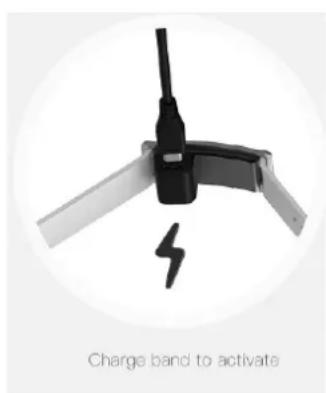
☐ To enable the activity tracker, charge it by connecting the charging adapter 3 with the supplied USB cable 5 to a free USB port or a USB power supply.
Place the charging adapter 3 with the charging contact 4 to the rear of the activity tracker 2
The charging adapter 3 is magnetic and locks into place easily.
Note: Ensure that the metal pin locks exactly into the product's charging contact 4.
☐ The LED display 1 blinks blue and orange, if the activation is successful. After the product is activated, the LED display 1 changes to orange, to show the charging progress.
Charge the battery fully before you use the product for the first time. The LED display 1 lights up blue as soon as charging is complete.
Note: You cannot turn the product on or off. It turns off automatically, when the battery level falls below 1%. It will turn on again when you charge it.
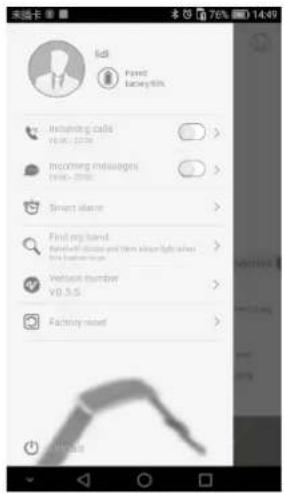
To check the remaining battery level, press 📋 in the SilverCrest SAT 70 Activity Tracker App.
Download SilverCrest SAT 70 Activity Tracker App
☐ Search for SilverCrest SAT 70 Activity Tracker in Google Play or in the Apple App Store to download the app. Alternatively you can scan the app using the QR-code.
The SilverCrest SAT 70 Activity Tracker App uses the Bluetooth® functionality of your smartphone. The app allows you to use all the functions of the tracker.
☐ You can download the free app from the Apple® App Store or Google Play.
Note:
SilverCrest SAT 70 Activity Tracker App compatibility:
▶ Android 4.4 and higher
▶ iOS 7.0 and higher

Download on the
App Store

ANDROID APP ON
Google Play
● Pairing & connecting the product
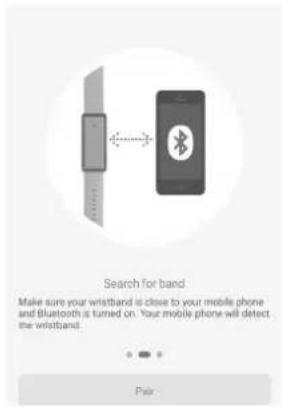
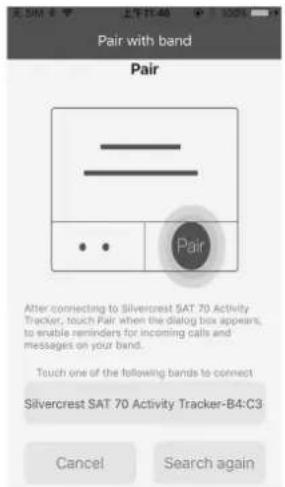
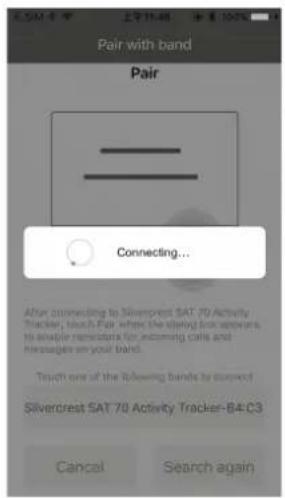
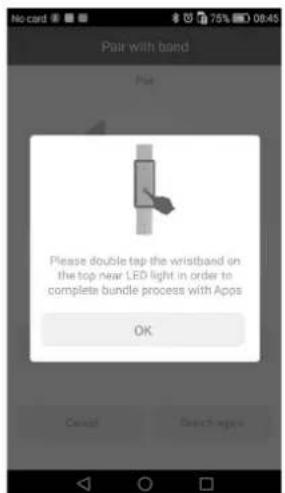
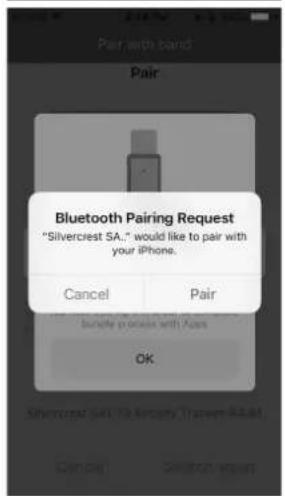
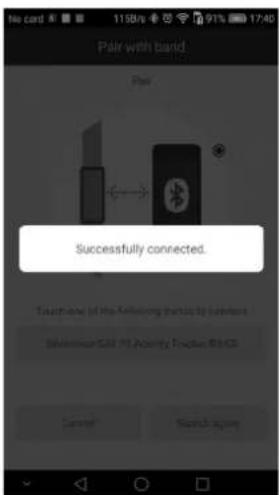
- Turn on Bluetooth ® on your smartphone.
- Tap your screen to open the SilverCrest SAT 70 Activity Tracker App > Pair, search for SilverCrest SAT 70 Activity Tracker and touch it to connect.
- The name "SilverCrest SAT 70 Activity Tracker" will be listed out on APP.
- Select "SilverCrest SAT 70 Activity Tracker".
- The SilverCrest app starts to connecting to wristband.
- Please double tap your wristband on the top near to LED light area in order to complete bundle process with SilverCrest apps.
- Afterwards, your smartphone will pop out a pairing message for the end user confirmation of this connection.
- Once you confirm this connection a SilverCrest apps message will pop up to confirming this pairings "Successfully connected".
●Functions
- Notifications for incoming calls / messages
Never miss a call by setting incoming call notifications. When you enable notifications and set a time to receive notifications, your Silvercrest SAT 70 Activity Tracker will vibrate to notify you of incoming calls. (vibration will shut off automatically if less than 10% of battery is remaining).
Enable notifications

- Press 📁 and then Ⓖ > Incoming calls / Incoming messages.
- Change to Enable notifications and configure the notification period.
- When the product is connected with the smartphone and the Silver-Crest SAT 70 Activity Tracker App is running in the background, the product will vibrate and the LED display 1 will blink blue if you receive an incoming call or message during the prescribed notification period.
SmartAlarm
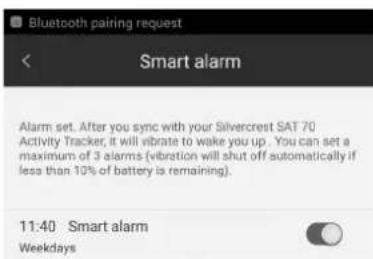
- Firstpress and then to select the smart alarm.
-
Press Add alarm. Configure the alarm settings and then click Save.
-
The product will vibrate at the planned alarm time. Note: to delete the alarm, go into the alarm settings and press Remove.
● Activity monitor and sleep data
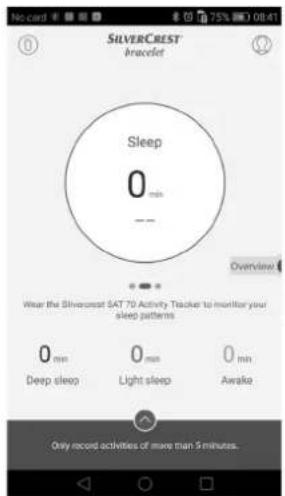
The product shows your movements and sleep data in real time. To monitor your movements, press 🏠 and swipe down to synchronise your data. Then swipe left or right to see your data.
- Share activity data
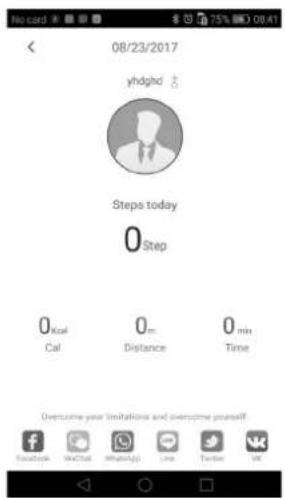
- PressShare to retrieve the share tab.
- Select a network where you want to share the data and follow the instructions on the display.
● Measure UV radiation
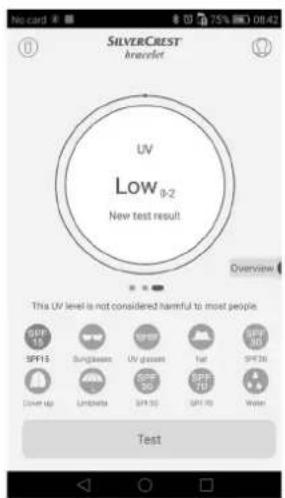
Press and then to select UV monitoring. Make sure that you have chosen the correct strap.
- Open the SilverCrest SAT 70 Activity Tracker App. Swipe left for the UV sensor view.
- Place the product in the sun and press Test. After a few seconds the UV radiation will be shown in the display.
- To see more detailed statistics, press the UV radiation circle.
Find my band
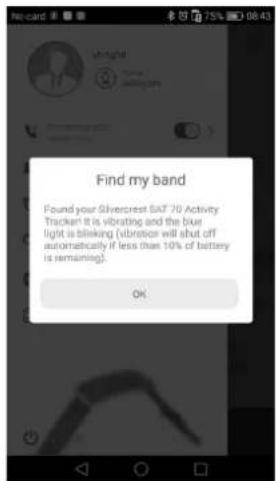
In the SilverCrest SAT 70 Activity Tracker App, press > C > Find strap. Your product will vibrate and the LED 1 view will blink blue.
- Update strap software
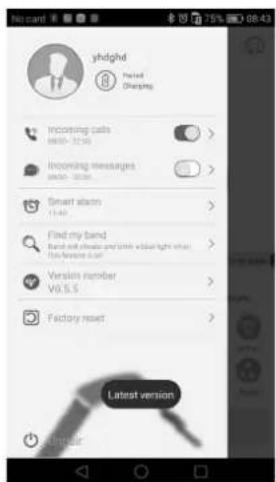
- Ensure that your smartphone is connected with the product and with the internet via mobile data or WiFi.
-
Press > and follow the instructions on the display.
-
Update SilverCrest SAT 70 Activity Tracker
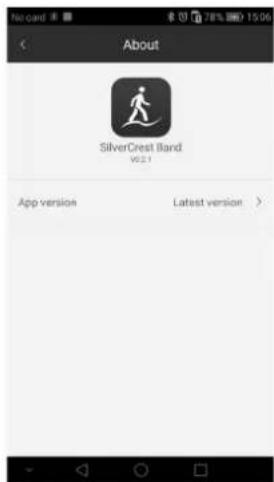
- Ensure that your smartphone is connected with the product and with the internet via mobile data or WiFi.
-
Press > and follow the instructions on the display.
-
Restore factory settings
Android Version
iOS Version
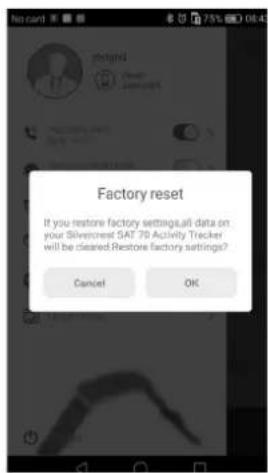
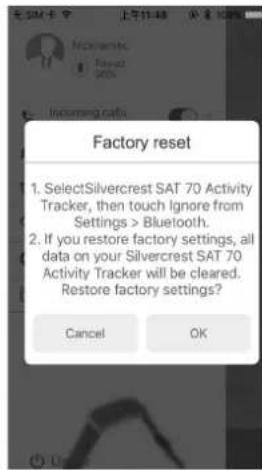
- Press > and select Restore factory settings.
- ClickOK to confirm. The product will restart automatically.
Note: when the battery level falls below 10 % the vibrate function is turned on for all features.
●Waterproofing(IP67)
Note: waterproofing is not a lasting feature, as the built-in seal elements wear in their function and daily use and can also be damaged by impacts or falling.
☐ You can wear the product in every day life. Wash hands, showers, rain or similar situations that activities are not harmful to product. The product is protected against short immersion.
☐ Do not use the product when diving.
- Cleaning and care
Do not use aggressive cleaning agents, brushes with metal or nylon bristles, or sharp or metal cleaning objects such as knives, hard scrapers, or similar.
☐ Only clean product with a soft, damp, lint-free cloth.
● Storage when not in use
Store the product in a dry, dust-free location, protected from direct sunlight. If the product is not used for a long time, the built-in battery should be fully charged to prolong its operating life. Regularly charge the built-in battery if you do not use the product for a long period of time. This is necessary to preserve the battery.
●Troubleshooting
The following table will help you to rectify minor problems:
| Fault Remedy | |
| There is noconnection between the tracker and the smartphone. | ▸ Switch the Bluetooth® function on your smartphone off and back on again. Then restart the connection process to your tracker. |
| ▸ Switch your smartphone off and on again. | |
| ▸ Switch on the visibility of your smart-phone in the Bluetooth® m enu. | |
| ▸ Reinstall the SilverCrest SAT 70 Activity Tracker app on your smartphone. | |
| Not all of the measured data are transferred. | ▸ If you have not synced the tracker within the last 14 days with the SilverCrest SAT 70 Activity Tracker app, any data older than this will be overwritten. Make sure you sync regularly. |
●Disposal

The packaging is made of environmentally friendly materials, which may be disposed of through your local recycling facilities. Contact your municipality for information on how to dispose
of your worn-out product.

The adjacent symbol of a crossed out dustbin on wheels indicates this device is subject to Directive 2012/19/EU. This directive states at the end of the life this device must not be
disposed of through regular household refuse but must be returned to special collection sites, recycling depots or waste management companies.
This disposal is free of charge to you. Protect the environment and dispose properly.
Please contact your local waste management company or the city / municipal administration for more information.
This product has built-in rechargeable batteries which cannot be replaced by the user. For this reason the activity tracker must be handed over entirely at a collecting point for waste electronic equipment for a professional disposal.
● Simplified EU declaration of conformity
Hereby, OWIM GmbH & Co. KG, Stiftsbergstraße 1, DE-74167 Neckarsulm, GERMANY, declares that the product Activity tracker here HG02988A, HG02988B, HG02988C is in compliance with Directives 2014/53/EU and 2011/65/EU. The full text of the EU declaration of conformity is available at the following internet address: www.owim.com
- Warranty
The product has been manufactured to strict quality guidelines and meticulously examined before delivery. In the event of product defects you have
legal rights against the retailer of this product. Your legal rights are not limited in any way by our warranty detailed below.
The warranty for this product is 3 years from the date of purchase. Should this product show any fault in materials or manufacture within 3 years from the date of purchase, we will repair or replace it - at our choice - free of charge to you.
The warranty period begins on the date of purchase. Please keep the original sales receipt in a safe location. This document is required as your proof of purchase. This warranty becomes void if the product has been damaged, or used or maintained improperly.
The warranty applies to defects in material or manufacture. This warranty does not cover product parts subject to normal wear, thus possibly considered consumables (e.g. batteries) or for damage to fragile parts, e.g. switches, rechargeable batteries or glass parts.
CE
Download on the App Store

- ACTIVITYTRACKER
- ACTIVITEITSTRACKER
- LIST OF PICTOGRAMS USED AND WARNINGS PAGE 4
- INTRODUCTION PAGE 4
- GENERAL SAFETY INSTRUCTIONS PAGE 4
- USING THE PRODUCT FOR THE FIRST TIME....PAGE 5
- FUNCTIONS PAGE 7
- CLEANING AND CARE....PAGE 8
- STORAGE WHEN NOT IN USE PAGE 9
- TROUBLESHOOTING PAGE 9
- DISPOSAL PAGE 9
- SIMPLIFIED EU DECLARATION OF CONFORMITY PAGE 9
- WARRANTY PAGE 9
- ACTIVITY TRACKER
- INTRODUCTION
- INTENDED USE
- TRADEMARK NOTICE
- WARNINGS AND SYMBOLS USED
- DANGER
- WARNING
- CAUTION
- NOTE
- SCOPE OF DELIVERY
- DESCRIPTION OF PARTS
- TECHNICAL DATA
- GENERAL SAFETY INSTRUCTIONS
- KEEP ALL SAFETY NOTICES AND INSTRUCTIONS FOR FUTURE REFERENCE
- SAFETY INSTRUCTIONS FOR RECHARGEABLE BATTERIES
- RISK OF LEAKAGE OF RECHARGEABLE BATTERIES
- RISK OF PROPERTY DAMAGE
- ⚠️ DANGER! RADIO INTERFACE
- ⚠ WARNING! ENSURE THAT
- ● USING THE PRODUCT FOR THE FIRST TIME
- ●FUNCTIONS
- NOTIFICATIONS FOR INCOMING CALLS / MESSAGES
- SMARTALARM
- ● ACTIVITY MONITOR AND SLEEP DATA
- SHARE ACTIVITY DATA
- ● MEASURE UV RADIATION
- ●WATERPROOFING(IP67)
- CLEANING AND CARE
- ● STORAGE WHEN NOT IN USE
- ●TROUBLESHOOTING
- ●DISPOSAL
- ● SIMPLIFIED EU DECLARATION OF CONFORMITY
- WARRANTY
- CE
Brand : SILVERCREST
Model : HG02988A
Category : Activity tracker