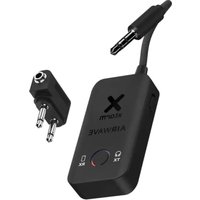
XAWBT01 - Wireless audio adapter Xtorm - Free user manual and instructions
Find the device manual for free XAWBT01 Xtorm in PDF.


| Product Type | Bluetooth Wireless Audio Adapter |
| Brand | Xtorm |
| Model | XAWBT01 |
| Dimensions (L x W x H) | Approx. 5 x 3 x 1 cm |
| Weight | Approx. 50 g |
| Power Supply | Internal lithium-ion battery, recharge via USB-C |
| Battery Life | Up to 9 hours of audio streaming |
| Charging Time | 2 hours (fast charging) |
| Use While Charging | Yes, possible |
| Audio Input | 3.5 mm stereo jack (2-pin adapter included for airplane) |
| Audio Output | Bluetooth (up to 2 headphones simultaneously) |
| Operating Modes | TX (transmission) and RX (reception) |
| Bluetooth Connectivity | Standard Bluetooth, compatible with most audio devices |
| Bluetooth Range | Approx. 10 meters (no obstacles) |
| LED Indicators | Red, orange and blue LEDs depending on mode and status |
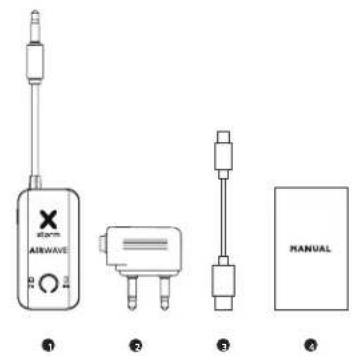
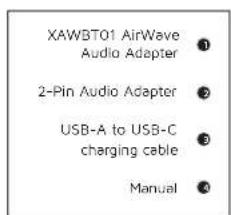
| Box Contents | AirWave adapter, USB-C cable, 2-pin airplane adapter, user manual |
| Care and Cleaning | Clean with a soft, dry cloth. Do not use abrasive products. |
| Safety Instructions | Do not expose to water, moisture or heat source. Keep out of reach of children. Do not use in presence of flammable gas. |
| Warranty | Legal warranty of conformity. Any improper use voids the warranty. |
| Repairability | Not user-serviceable. Contact an authorized service center if faulty. |
| Recycling | Follow WEEE procedures for recycling of batteries and device. |
Frequently Asked Questions - XAWBT01 Xtorm
User questions about XAWBT01 Xtorm
0 question about this device. Answer the ones you know or ask your own.
Ask a new question about this device
Download the instructions for your Wireless audio adapter in PDF format for free! Find your manual XAWBT01 - Xtorm and take your electronic device back in hand. On this page are published all the documents necessary for the use of your device. XAWBT01 by Xtorm.
USER MANUAL XAWBT01 Xtorm
250mAh / 0.925W USB-C 5W (5V/1A)
• 2-pin Audio Adapter • USB-A to USB-C charging cable • Manual
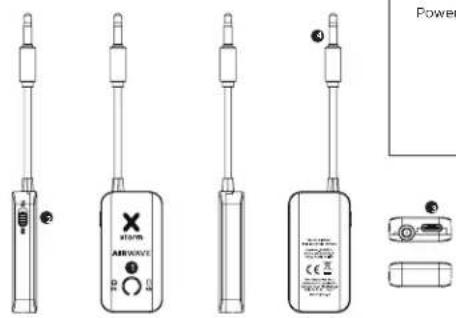
Power Button/Indicator
TX/RX Switch
USB-C Input
Audio Jack
3 SWITCHING BETWEEN TX AND RX MODES
TX MODE (TRANSMITTING MODE) OPERATION
4
TX MODE
Use Transmitting Mode (TX) to transfer audio (music) to Bluetooth earbuds, headphones or other audio devices. This setting can be used on airplane in-flight entertainment systems and also on gym equipment that provide sound.
RX MODE
Use Receiving Mode (RX) to transfer audio (music) from your phone or laptop to devices such as cars, boats and sound systems that do not support a wireless connection.

4.A CONNECTING TO ONE BLUETOOTH HEADSET
-
Switch the AirWave to TX mode (red and orange lights flashing).
-
Put your Bluetooth earbuds, headphones, or other audio device in "pairing mode", then the AirWave will automatically connect to the Bluetooth headset.
-
Once connected, the AirWave Indicator will turn solid orange.
4.B CONNECTING TO TWO BLUETOOTH HEADSETS
-
After connecting to the first Bluetooth headset, press the power button 2 times again.
-
The AirWave will be at TX mode (red and blue lights flashing) and automatically connect to the second Bluetooth headset in pairing mode.
-
Once connected, the AirWave indicator will turn solid orange and blue.
RX MODE (RECEIVING MODE) OPERATION5
BATTERY DURATION AND CHARGING 6
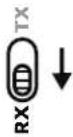
1 Switch the AirWave to RX mode (red and blue lights flashing, orange light off).
2. Search for "XAWBT01" on your phone via Bluetooth and connect.
3. Once connected, the AirWave indicator will turn solid blue.

The internal battery supports up to 9 hours of audio streaming. You can fully recharge the AirWave in 2 hours via USB-C. The AirWave can be charged and used at the same time.
2-PIN AUDIO ADAPTER7
IN THE BOX 8
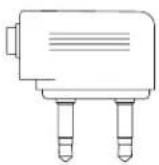
For the in-flight entertainment systems that require
2-pin input, this extra adapter is included. This
2-pin adapter can be simply placed onto the pin
already connected to the AirWave.
EN - ENGLISH
1 SPECIFICATIONS
2 PRODUCT OVERVIEW
3 SWITCHING BETWEEN TX AND RX MODES
TX MODE Use Transmitting Mode (TX) to transfer audio (music) to Bluetooth earbuds, headphones or other audio devices. This setting can be used on airplane In-flight entertainment systems and also on gym equipment that provide sound.
RX MODE Use Receiving Mode (RX) to transfer audio (music) from your phone or laptop to devices such as cars, boats and sound systems that do not support a wireless connection.
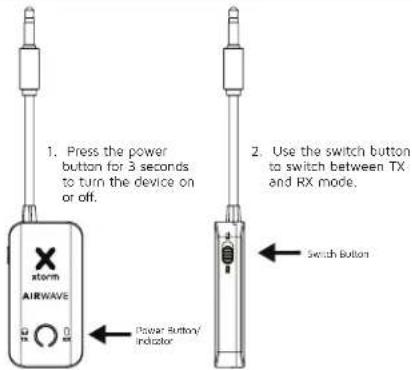
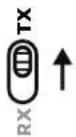
Press the power button for 3 seconds to turn the device on or off. Use the switch button to switch between TX and RX mode.
4 TX MODE (TRANSMITTING MODE) OPERATION
4.A Switch the AirWave to TX mode (red and orange lights flashing). Put your Bluetooth earbuds, headphones, or other audio device in "pairing mode", then the AirWave will automatically connect to the Bluetooth headset. Once connected, the AirWave indicator will turn solid orange.
4.B After connecting to the first Bluetooth headset, press the power button 2 times again. The AirWave will be at TX mode (red and blue lights flashing) and automatically connect to the second Bluetooth headset in pairing mode. Once connected, the AirWave indicator will turn solid orange and blue.
5 RX MODE (RECEIVING MODE) OPERATION
Switch the AirWave to RX mode (red and blue lights flashing, orange light off). Search for "XAWBT01" on your phone via Bluetooth and connect. Once connected, the AirWave indicator will turn solid blue.
6 BATTERY DURATION AND CHARGING
The internal battery supports up to 9 hours of audio streaming. You can fully recharge the AirWave in 2 hours via USB-C. The AirWave can be charged and used at the same time.
7 2-PIN AUDIO ADAPTER
For the in-flight entertainment systems that require 2-pin input, this extra adapter is included. This 2-pin adapter can be simply placed onto the pin already connected to the AirWave.
8 IN THE BOX
NL - NEDERLANDS
1 SPECIFICATIES
2 PRODUCTOVERZICHT
5 FONCTIONNEMENT DU MODE RX (RÉCEPTION)
7 2-PINNERS LYDADAPTER
For underholdningssystemer om bord som krever 2-pinners inngang, er denne ekstra adapteren inkludert. Denne 2-pinners adapteren kan erkelt plasseres på pinnen som allerede er koblet til AirWave.
8 IESKEN
DK - DANSK
1 SPECIFICATIONER
2 PRODUKTOVERSIGT
3 SKIFT MELLEM TX- OG RX-TILSTAND
5 REŽIM RX (REŽIM PŘÍJMU) OBSLUHA
EN When recycling this product, please follow WEEE battery recycling procedures. Contact your local recycling organization for more information.
Don't drop, disasible or attempt to repair the charges by yourself. Avoid exposure to water or high humidity. Don't access to any heat source. Keep out of reach of children. Don't use in the presence of fluctammable gas. The warranty will lapse in the event of improper use. Telco Accessories has tested the product in a test environment. All statements/declarations made by Telco Accessories about the (paration) of the product are based on the results obtained from such tests. These results/statements/declarations cannot be guaranteed, for example in cases of depositing or inudicious use and/or use in a different environment.
NL Waarschuwingen
EU DECLARATION OF CONFORMITY
| Sr. No. | Name |
| 1 | ### |
| 2 | ### |
| 3 | ### |

HIGHER QUALITY
= LOWER IMPACT
CUSTOMER SUPPORT
support@tag.nl
+31 (0)30 635 4800
TELCO ACCESSORIES GROUP
Hoofdveste 19, 3992DH Houten
The Netherlands
MOREENERGY
XTORM.EU


- SWITCHING BETWEEN TX AND RX MODES
- TX MODE (TRANSMITTING MODE) OPERATION
- TX MODE
- RX MODE
- 4.A CONNECTING TO ONE BLUETOOTH HEADSET
- 4.B CONNECTING TO TWO BLUETOOTH HEADSETS
- RX MODE (RECEIVING MODE) OPERATION5
- BATTERY DURATION AND CHARGING 6
- 2-PIN AUDIO ADAPTER7
- IN THE BOX 8
- EN - ENGLISH
- SPECIFICATIONS
- PRODUCT OVERVIEW
- TX MODE (TRANSMITTING MODE) OPERATION
- RX MODE (RECEIVING MODE) OPERATION
- BATTERY DURATION AND CHARGING
- 2-PIN AUDIO ADAPTER
- IN THE BOX
- NL - NEDERLANDS
- SPECIFICATIES
- PRODUCTOVERZICHT
- FONCTIONNEMENT DU MODE RX (RÉCEPTION)
- 2-PINNERS LYDADAPTER
- IESKEN
- DK - DANSK
- SPECIFICATIONER
- PRODUKTOVERSIGT
- SKIFT MELLEM TX- OG RX-TILSTAND
- REŽIM RX (REŽIM PŘÍJMU) OBSLUHA
- NL Waarschuwingen
- HIGHER QUALITY
- MOREENERGY
Brand : Xtorm
Model : XAWBT01
Category : Wireless audio adapter