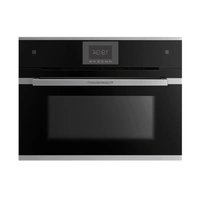
CBD6550.0S - Oven Küppersbusch - Free user manual and instructions
Find the device manual for free CBD6550.0S Küppersbusch in PDF.


| Product type | Multifunction built-in oven |
| Brand | Küppersbusch |
| Model | CBD6550.0S |
| Power supply | 230-240 V, 50 Hz, 16 A |
| Maximum microwave power | 1000 W |
| Cooking functions | Traditional cooking, Maxi Grill, Turbo, Eco, Microwave, Microwave + Hot air, Microwave + Grill, Defrost |
| Cleaning | Do not use steam cleaner; clean with soft cloth, hot water and dishwashing liquid |
| Child safety | Touch lock (long press on OK) |
| Dimensions (H x W x D) | 595 x 595 x 550 mm (standard estimate) |
| Weight | Approximately 35 kg (estimate) |
| Capacity | Approximately 70 L (estimate) |
| Repairability | Any repair by authorized personnel using original parts |
Frequently Asked Questions - CBD6550.0S Küppersbusch
User questions about CBD6550.0S Küppersbusch
0 question about this device. Answer the ones you know or ask your own.
Ask a new question about this device
Download the instructions for your Oven in PDF format for free! Find your manual CBD6550.0S - Küppersbusch and take your electronic device back in hand. On this page are published all the documents necessary for the use of your device. CBD6550.0S by Küppersbusch.
USER MANUAL CBD6550.0S Küppersbusch
natural_image
Simple line drawing of a microwave oven with two outlets and a front panel (no text or symbols)
CBM6330.0
Please read the users and installation instructions carefully before installation of the appliance and before starting to use it.
natural_image
Interior view of an oven with a circular vent and lid, showing no text or symbolsReinigungshinweise
Follow ALL the safety warnings!
Caution, Danger of overheating!
When using the oven, do not cover the bottom with aluminium foil or place pots, frying pans or the like inside. If this happens, the oven will overheat, causing damage to the enamel.
- The oven becomes hot when in use. The cooling fan turns on when the oven overheats. The cooling fan will remain on until the oven has cooled down, even after the appliance has been turned off. The noises made by the fan are normal and do not mean that it is damaged.
- When preparing a dish with alcohol or yeast with settings that use hot air, there may be a vinegary smell. If the smell is unpleasant, use a function that does not include the fan, such as top/bottom heat.
- The electronic clock features Touch-Control technology. To operate, simply touch the glass control symbols with your fi ngertip. The touch control sensitivity continuously adapts to changing conditions. Make sure that the glass surface of the control panel is clean and free of any obstacles when turning on the oven.
- If the oven does not respond correctly when you touch the glass, you will need to turn off the oven for a few seconds and then turn it back on after a few seconds. Doing this causes the sensors to adjust automatically so that they will react once more to fingertip control.
Connection and use
- Only KÜPPERSBUSCH hobs have been manufactured and tested for use over a KÜPPERSBUSCH oven. Do not use other hobs.
- Any handling or repair to the appliance, including replacement of the feed cable, should be carried out by authorised Technical Service Personnel using original spare parts. Repairs or handling by others may damage the appliance or cause malfunctioning that could be hazardous to your safety
- Do not allow children to come near the oven while in use as it can reach very high temperatures.
- Children should be supervised to ensure they do not play with the appliance.
- This appliance is not for use by persons (including children) with reduced physical, sensorial or mental capacity, or those lacking experience and knowledge, except if they have been supervised and instructed regarding use of the device by a person responsible for their safety.
Oven
- The oven must always be operated with the door closed.
- The manufacturer takes no responsibility for any use of the oven other than for the home preparation of food.
- Only use the oven after it has been installed inside the kitchen unit.
- Do not store oil, fats or inflammable materials inside the oven. This may be dangerous if the oven is turned on.
- Do not lean or sit on the open oven door. You could damage it, as well as endangering your safety.
- In order to cook food in the oven, place the tray or grid shelf supplied with it over the shelf runners inside the oven cavity. The tray and grid shelf have a system to make their partial outward movement easy for food handling.
- Do not place containers or food on the bottom surface of the oven. Always use the trays and grid.
- Do not pour water on the bottom surface of the oven when in use; this may damage the enamel. Open the oven door as little as possible during cooking. This will reduce power consumption.
- Use protective oven gloves when performing operations inside the oven.
- It is normal for condensation to occur on the oven door when cooking dishes with a high liquid content.
Before first use
- Remove packaging and the old appliance.
- Remove packaging and recycle in an environmentally-friendly way.
- By returning the packaging material, raw materials are saved and also fewer waste products are generated. Old appliances still contain valuable material. Leave your old appliance at a collection point for valuable materials. Old appliances must be rendered inoperative before disposing of them in order to prevent improper use.
Technical information
If you need to contact the after-sales service or order spare parts, you must provide the technical information supplied.
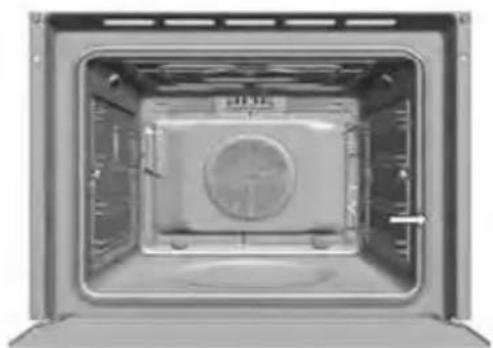
The oven's technical information is on the left, on the side frame. You can see it when the door is open.
natural_image
Interior view of a microwave oven with a central vent and lid (no visible text or symbols)Cleaning and care
Please read this chapter before using the appliance for the first time.
If it is cleaned as it should be and regularly cared for, the oven should stay beautiful and as good as new for many years. Here is a series of instructions that allow you to care for and clean all of the surfaces thoroughly, without damaging them.
For all surfaces
Danger of death
Do not use steam and/or pressure cleaning devices on the oven. The appliance could become damaged and may create a situation where there is danger of death
Danger of burning!
Leave the appliance to cool until you can touch it with your hand before cleaning it.
- Clean the appliance after each use. Stains or baked-on food that have not been removed may burn the next time the appliance heats up. Often, these types of stains or dirt cannot be removed without leaving marks.
- If there are light stains, clean the surfaces with a cloth, brush or soft sponge and hot water and some dishwashing detergent. Rinse with cold water so that there is no detergent left which might decolour the surface or cause more stains. Dry with a cloth immediately after.
Never clean with
- aggressive products or bleaches that contain active oxygen, chlorine or other corrosive ingredients.
- cleaning products that can cause scratches, such as abrasive agents, steel wool, soapy steel wool, hard brushes, metal scourers, plastic sponges or sponges with a surface that scratches (scouring side)
Use of the oven
The oven is determined for the cooking, roast, baking, and keeping warm of dishes.
Use the oven only if inserted in a suitable piece of furniture. Use the oven exclusively as described in these instructions for use. Any other use is not in accordance with the requirements and can lead to material damages or even personal damages. The manufacturer assumes no liability for damages which have originated from not designated use.
The oven is determined exclusively for the use in the private household. A commercial use is excluded. The oven is not suited for heating a room. The light in the oven is planned only to the lighting of the done space and not as a room lighting. The oven door is only the close the oven.
Use the oven only for cooking, roasting, baking, and keeping warm of dishes!
Description of the appliance
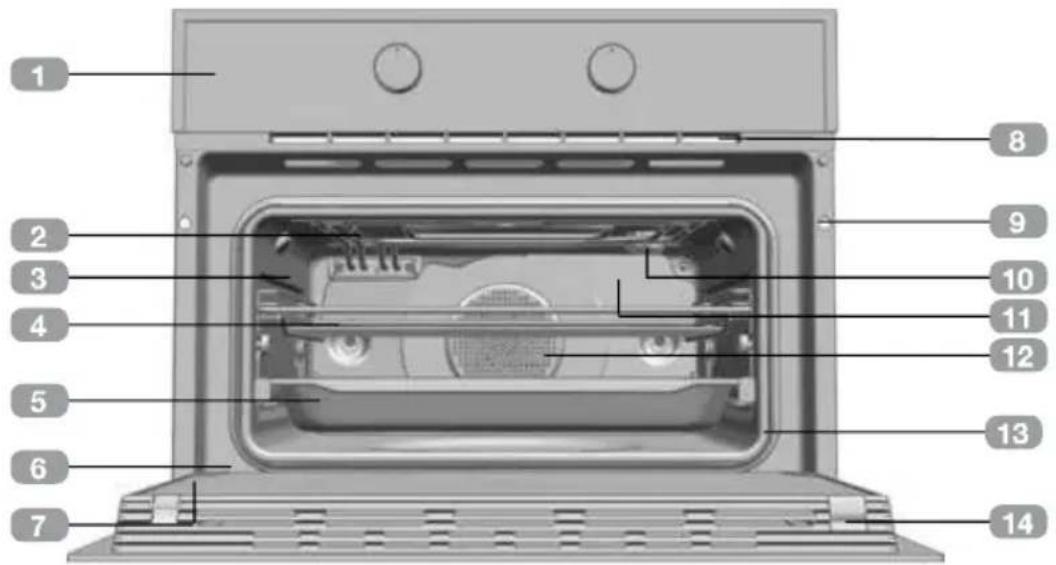
1 Control panel
2 Grill element
3 Tray supports
4 Grid shelf
5 Tray
6 Hinge
7 Inner Glass
8 Air cooling outlet
9 Unit mounting
10 Lamp
11 Back Wall Panel
12 Fan
13 Oven Seal
14 Door
Control panel
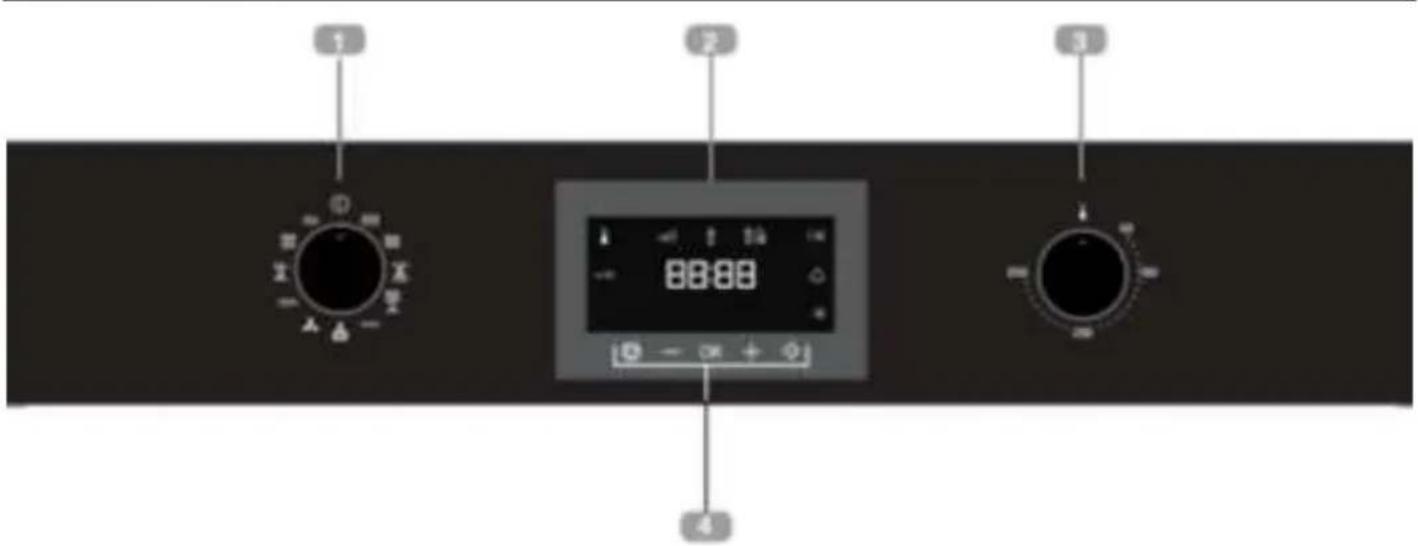
1 Function control dial
2 Display
3 Temperature control dial
4 Touch keys
Control Panel

For a description of how to use each of the features, see the cooking guide that comes with your oven.

OVEN SWITCH-OFF

CONVENTIONAL

MAXIGRILL
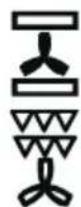
CONVENTIONAL WITH FAN
MAXIGRILL WITH FAN

LOWER ELEMENT

TURBO + LOWER ELEMENT

TURBO

ECO
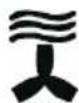
MICROWAVE + HOT AIR

MICROWAVE + GRILL

MICROWAVE
Microwaves Power Levels
| Microwave power output | Foods |
| 200 | Slow defrosting for delicate foods; keeping food hot |
| 400 | Cooking with little heat; boiling riceRapid defrosting, heating baby food |
| 600 | Heating and cooking food |
| 800 | Cooking vegetables and foodCooking and heating carefully,Heating and cooking small portions of food |
| 1000 | Rapidly heating liquids |
Display description
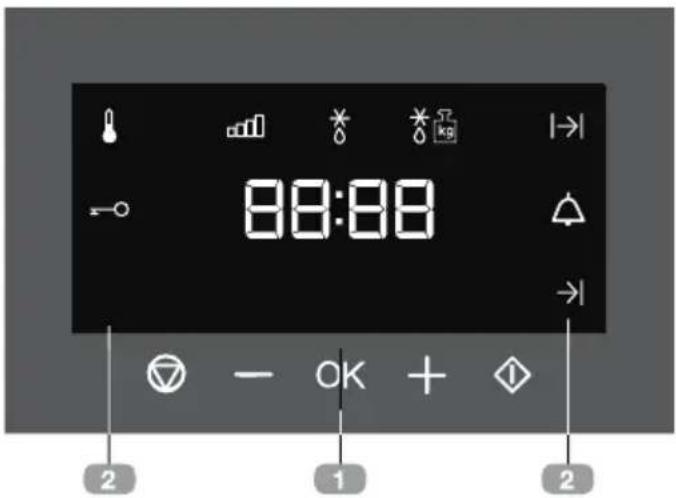
1 KEYS
, and : Enable you to program the functions.
◆: Enable you to start the cooking functions.
☑: Enable you to stop the cooking functions.
2 SYMBOLS
WARNING TIMER: Lights up when the clock/timer is selected. Generates an acoustic signal when the time is up. The oven does not turn off at the end of the timer period. This function can also be used while the oven is cooking.
|→| and →| PROGRAMING: Lights up to indicate that the oven is programmed (cooking time, stop time or total).
- I→I Cooking Time: This program allows you to program the cooking time, after which the oven will turn off automatically.
- → Cooking Stop Time: This setting allows you to program the time for cooking to stop, after which the oven will turn off automatically.
- || and | Cooking Time and Cooking Stop Time: This setting allows you to
program the cooking time and cooking stop time. The oven switches on automatically at the set time and operates for the selected cooking time (Cooking Time). It then switches off automatically at the indicated time (Cooking Stop Time).
- SAFETY BLOCK: Indicates that the touch keys are blocked, preventing modifications by small children.
Other functions
HEATING: Indicates that the oven is transmitting heat to the food.
* DEFROSTING BY TIME: Lights up while the defrosting by time function is on.
DEFROSTING BY WEIGHT: Lights up while the defrosting by weight function is on.
WARNING
The sensitivity of the touch keys adapts continually to environmental conditions. Make sure the surface of the control panel is clean and free of obstacles when plugging in the oven.
If the display does not respond correctly when you touch the keys, unplug the oven for a few seconds and then plug it in again. Doing this causes the sensors to adjust automatically so that they will react once more to fingertip control.
SETTING THE TIME
- When you plug the oven, you will see the clock flashing 12:00.
- Press — or + to adjust the hours.
- Press to confirm the hours.
- Press — or + to adjust the minutes.
- Press to confirm the minutes.
- If you wish to modify the time, press or + until the time starts flashing. Press OK and follow the instructions in the previous points.

WARNING
In the event of power failure, the clock settings will be erased and 12:00 will flash on the clock display. Reset it and program again.
- If you wish to hide the clock press 5 seconds.

- If you wish to see the clock on the display again, press for 5 seconds.
Oven use
OVEN FUNCTIONS
- After setting the clock, the oven is ready for use. Select a cooking function with the function selector dial and temperature with the temperature control dial.

INFORMATION
In models with an electronic temperature control, when the selector switch is turned, the display will show the temperature.
After selecting the temperature, the clock will automatically reappear.
- You will notice that the symbol lights up during cooking to indicate that heat is being transmitted to the food. This symbol disappears when the selected temperature has been reached.
- Set the controls to Ⓘ to turn off the oven.

INFORMATION
When a cooking cycle begins, the oven will automatically display the total the time for the cycle progress, if the cooking time or cooking stop time have not been set.
Programming the buzzer
- Touch — or + until the ⬆ symbol on the display starts flashing, then press OK. The indication "0_00" will appear on the display.
- Select the time after which you want the alarm to sound by pressing — or +. You will hear 2 beeps to confirm that the time has been set and the clock will start counting down from the selected time. The symbol will flash slowly.
- Once the time has expired, an acoustic signal will sound for 90 seconds and the symbol will flash quickly.

NOTE
With the Buzzer function, the oven will not turn off when the time expires.
- Touch any key to stop the alarm. The symbol will then disappear.

If you wish to modify the time on the buzzer, press or until the flash and the hours are not flashing; then press and repeat the steps shown. Upon entering the timer control, the time currently remaining will appear which you will be able to adjust.

NOTE
With the Buzzer function, the remaining time will show permanently on the display. With this programmed function, it is not possible to view the time or the total programmed cooking time.
Programming Cooking Time
- Select a function and a cooking temperature using the oven commands.
- Press or until the symbol on the display starts flashing, then press OK. The indication "0_00" will appear on the display.
- Select the time after which you want the alarm to sound by pressing — or +. You will hear 2 beeps to confirm that the time has been set and the clock will start counting down from the selected time. The I→I symbol will flash.
- Once the cooking time is up, the oven will turn off, an alarm will sound and the I I symbol will flash.
- Press to stop the alarm and turn off the symbol. The oven will switch on again.
- Set the controls to Ⓐ position to turn off the oven.
You can change the remaining cooking time at any time by touching or until the symbol starts to flash. Press OK to change the time.
Programming the Cooking Stop Time
- Select a cooking function and a temperature.
- Press or until the symbol on the display starts flashing, then press OK. The indication "0_00" will appear on the display.
- Select the time after which you want the alarm to sound by pressing — or +. You will hear 2 beeps to confirm that the time has been set and the clock will start counting down from the selected time. The → symbol will flash.
- When the cycle is finished, the oven will turn itself off, an alarm will sound and the symbol will flash.
- Press to stop the alarm and turn off the symbol. The oven will switch on again.
- Set the controls to Ⓐ position to turn off the oven.
You can change the remaining cooking time at any time by touching or until the symbol starts to flash. Press OK to change the time.
Programming the Cooking Time and Cooking Stop Time
- Select a cooking function and a temperature.
- Press or until the symbol on the display starts flashing, then press OK. The indication "0_00" will appear on the display.
- Select the cooking time by touching or +. You will hear 2 beeps, the
remaining time will appear on the display and the symbol will flash.
- Press to select the option.
- Press or until the symbol on the display starts flashing, then press OK. The indication "0_00" will appear on the display.
- Select the cooking end time by pressing —or +
- The oven will remain disconnected with the I and symbols lit up. The oven is now programmed.
- When it is time to start cooking, the oven will turn on and will operate for the programmed time.
- While cooking, the remaining cooking time will be displayed and the symbol will flash slowly.
- When the cooking time is up, the oven will turn off, a buzzer will sound, and the I symbol will flash quickly.
- Press Ⓥ to stop the buzzer and turn off the | | symbol. The oven will switch on again.
- Set the controls to position to turn off the oven.
You can change the remaining cooking time at any time by touching — or + until the |→| symbol starts to flash quickly. Press to change the time.
MICROWAVE
- Select the microwave function.
- The display shows 00:30 (Quick start function) by default. Press or until the display shows 1:00.
- Press to confirm.
- The display shows the default cooking time. Select the desired cooking time by pressing — or +
-
Press to confirm.
-
The display shows the default Power setting. Select the desired power setting by pressing — or +
- Press OK to confirm.
- Press ⚙ to start the microwave function with the desired parameters.
QUICK START
- Select the microwave function.
- Press ⚙ and the microwave starts immediately to operate in the Microwave function at maximum power for 30 seconds.
- If you want to increase the operating time press again. Each time you press this key the operating time will be increased by 30 seconds.
DEFROST BY TIME
- Select the microwave function.
- Press — or + until the Ⓞ symbol appears on the display.
- Press to select the option.
- The display shows the default defrost time. Select the desired cooking time by pressing — or +
- Press ⬆ to start the defrost by time function with the desired parameters.

NOTE
See Cooking Guide for advice on defrosting times.

INFORMATION
When the display shows the word "Turn", open the door, turn the food and press to continue.
DEFROST BY WEIGHT
- Select the microwave function.
-
Press — or + until the symbol appears on the display.
-
Press to select the option.
-
The display Follow as " " blinking default. Select the desired defrost option by pressing or . +
-
Press to confirm.
-
The display shows default weight blinking. Select the desired weight by pressing or . +
-
Press ◆ to start the defrost by weight function with the desired parameters.
The following table shows the defrosting by weight function programs, indicating weight intervals, and defrosting and standing times (in order to ensure the food is of a uniform temperature):
| Prog. | Food | Weight (kg) | Time (min) | Standing time (min) |
| F01 | Meat | 0.10 – 2.00 | 2:10 – 43 | 20 – 30 |
| F02 | Poultry | 0.10 – 2.50 | 2:20 – 58 | 20 – 30 |
| F03 | Fish | 0.10 – 2.00 | 2 – 40 | 20 – 30 |
| F04 | Fruit | 0.10 – 0.50 | 2:36 – 13 | 10 – 20 |
| F05 | Bread | 0.10 – 0.80 | 2:25 – 19 | 10 – 20 |

INFORMATION
When the display shows the word "Turn", open the door, turn the food and press to continue.
COMBINED FUNCTIONS
- Select a microwave + conventional oven function with the function selector.
- The display shows the default cooking time. Press to select.
- Select the desired cooking time by pressing or . +
- Press to confirm.
- The display shows the default Power setting. Select the desired power setting by pressing or . +
- Press to confirm.
- Press ◆ to start the function with the desired parameters.

NOTE
The temperature can be changed anytime rotating the temperature control dial.

NOTE
The maximum power that can be selected is 600 W.
Safety instructions
SAFETY BLOCK
This function can be selected at any time while using the oven.
To activate the function, press OK for a few seconds until you hear a beep and the symbol appears on the display. The oven is locked.
If the oven is off and you activate the safety block function, the oven will not work even if a cooking function is selected.
If this function is activated while you are cooking, it will only lock the display and keys.
To deactivate the safety block function, press OK for a few seconds until you hear a beep.
SHOWROOM MODE
The showroom mode is used in showrooms, to show the clients how the oven works as described in every function, but there's no activation of the heating loads.
To activate the showroom mode press — and OK
To deactivate the function press and OK again.
natural_image
Interior view of an oven with a circular vent and lid, showing no text or symbolsLimpieza y cuidados
For a description of how to use each of the features, see the cooking guide that comes with your oven.

1 TECLAS
natural_image
Interior view of an oven with a circular vent and lid, showing no text or symbolsLimpeza e cuidados
Attention, risque de surchauffe!
Information technique
natural_image
Interior view of an oven with a circular vent and lid, showing no text or symbols1 TOUCHES
FONCTIONNEMENT MANUEL
- Reinigungshinweise
- Follow ALL the safety warnings!
- Caution, Danger of overheating!
- Connection and use
- Oven
- Before first use
- Technical information
- Cleaning and care
- For all surfaces
- Danger of death
- Danger of burning!
- Never clean with
- Use of the oven
- Description of the appliance
- Control panel
- Display description
- KEYS
- SYMBOLS
- Other functions
- WARNING
- SETTING THE TIME
- Oven use
- OVEN FUNCTIONS
- INFORMATION
- Programming the buzzer
- NOTE
- Programming Cooking Time
- Programming the Cooking Stop Time
- Programming the Cooking Time and Cooking Stop Time
- MICROWAVE
- QUICK START
- DEFROST BY TIME
- DEFROST BY WEIGHT
- COMBINED FUNCTIONS
- Safety instructions
- SAFETY BLOCK
- SHOWROOM MODE
- Limpieza y cuidados
- TECLAS
- Limpeza e cuidados
- Attention, risque de surchauffe!
- Information technique
- TOUCHES
- FONCTIONNEMENT MANUEL
Brand : Küppersbusch
Model : CBD6550.0S
Category : Oven