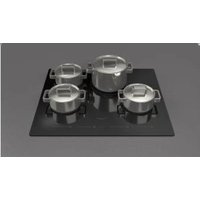
F7RT24B1 - Electric cooktop Fulgor Milano - Free user manual and instructions
Find the device manual for free F7RT24B1 Fulgor Milano in PDF.


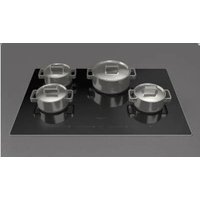
| Product type | Electric ceramic hob |
| Brand | Fulgor Milano |
| Model | F7RT24B1 |
| Width | 24 inches (approx. 61 cm) |
| Number of cooking zones | 4 |
| Zone types | 1 dual-circuit zone (1900/1100/800 W, Ø 7-5/8" / 4-3/4") + 3 single-circuit zones (1200 W each, Ø 5-1/2" or 6-1/2") |
| Maximum total power | 5500 W (at 240 V) |
| Supply voltage | 240 V or 208 V |
| Control type | Touch (slider) |
| Display | 7-segment for each zone and for the timer |
| Special functions | Melt (42 °C), Warm (70 °C), Simmer (94 °C) |
| Child safety | Control lock (lock key) |
| Pause | Yes, with resume after 10 minutes max |
| Timer | Independent (1-59 min) or per zone (automatic shut-off) |
| Residual heat indicator | Yes ("H" display) |
| Accidental activation protection | Automatic shut-off after 10 s of continuous activation |
| Operating time limitation (OTL) | From 1h30 (level 9) to 18h (levels 1-3) |
| Surface material | Ceramic glass |
| Recommended cleaning | Specific hob cream, blade scraper |
| Products to avoid | Abrasive cleaners, caustics, ammonia, bleach |
| Weight (approx.) | Approximately 10 kg |
| Included accessories | Razor blade scraper |
Frequently Asked Questions - F7RT24B1 Fulgor Milano
User questions about F7RT24B1 Fulgor Milano
0 question about this device. Answer the ones you know or ask your own.
Ask a new question about this device
Download the instructions for your Electric cooktop in PDF format for free! Find your manual F7RT24B1 - Fulgor Milano and take your electronic device back in hand. On this page are published all the documents necessary for the use of your device. F7RT24B1 by Fulgor Milano.
USER MANUAL F7RT24B1 Fulgor Milano
natural_image
Four black circles arranged in a 2x2 grid within a square frame (no text or symbols)F7RT24*1
F7RT30*1
ELECTRIC COOKTOP
Thank you for purchasing a Fulgor Milano product. Fulgor Milano is committed to excellence and our signature technologies provide you with professional tools for your kitchen. One of our central philosophies is continuous investment in research that is rooted in developing life enhancing technology. Our goal is to deliver products that are worthy of your family recipes and that will breathe life into your kitchen, the heart of your home. We invite you to enjoy your new Fulgor Milano product with same amount of care and attention that we have put into creating it.
Your Life | Our Passion
Gianni Muneghetti
TABLE OF CONTENTS PAGE
Warnings for electric installation 1
1 - Special Warnings 2
Cooktop safety 2
Personal safety 3
2 - Models and Part Identification 4
3 - User instructions 5
Residual heat indicator 6
Protection in the event of accidental switching on 6
Key LoPrecautions 6
Maintenance 6
Turning the cooking surface on and off 6
Acoustic signal (buzzer) 6
Turning on a cooking area 6
Turning off a cooking area 6
Power level 7
Special functions 7
Control lock (child safety) 7
Unlocking/deactivation child safety 7
Pause 7
Deactivating Pause 7
Timer function 7
Independent timer 7
Turning off/changing the timer 7
Programming the timer for the cooking areas 8
4 - Electric Cooktop Operation 9
Before using the cooktop for the first time 9
5 - Cookware 10
General 10
Cookware Characteristics 10
Observe The Following Points In Canning 10
Special pans 10
6 - Cleaning the Cooktop 11
Frame 11
Daily Cleaning Techniques 11
Use Daily 11
Recommended Cleaners 11
Avoid These Cleaners 11
7 - Troubleshooting 12
Operating time limitation 13
Error codes 13
8 - Assistance or Service 14
Service Data Record 14
Pay attention to these symbols present in this manual:

WARNING
- This is the safety alert symbol. This symbol alerts you to potential hazards that can kill or hurt you and others.
- You can be killed or seriously injured if you don't follow these instructions.
READ AND SAVE THESE INSTRUCTIONS.
Warnings for electric installation

WARNING
- Installation and service must be performed by a qualified installer or service agency.
- The models may be powered at 240V or 208V.

CAUTION
- Always disconnect the electrical plug from the wall receptacle before servicing this unit.
- For personal safety, this appliance must be properly grounded.
Do not under any circumstances cut or remove the third (ground) prong from the power cord plug.

IMPORTANT
Please read all instructions before using this appliance

Cooktop safety

WARNING
Proper Installation
- Be sure your appliance is properly installed and grounded by a qualified technician.
Never Use Your Appliance for Warming or Heating the Room Do Not Leave Children Alone
- Children should not be left alone or unattended in area where appliance is in use. They should never be allowed to sit or stand on any part of the appliance.
Wear Proper Apparel
- Loose-fitting or hanging garments should never be worn while using the appliance.
User Servicing
- Do not repair or replace any part of the appliance unless specifically recommended in the manual. All other servicing should be referred to a qualified technician.
Storage in or on Appliance
- Flammable materials should not be stored in an oven or near surface units.
Do Not Use Water on Grease Fires
- Smother fire or flame or use dry chemical or foam-type extinguisher.
Use Only Dry Potholders
- Moist or damp potholders on hot surfaces may result in burns from steam. Do not let potholder touch hot heating elements. Do not use a towel or other bulky cloth.
Use Proper Pan Size
- This appliance is equipped with one or more surface units of different size. Select utensils having flat bottoms large enough to cover the surface unit heating element. The use of undersized utensils will expose a portion of the heating element to direct contact and may result in ignition of clothing. Proper relationship of utensil to burner will also improve efficiency.
Never Leave Surface Units Unattended at High Heat Settings
- Boil over causes smoking and greasy spillovers that may ignite.
Make Sure Reflector Pans or Drip Bowls Are in Place
- Absence of these pans or bowls during cooking may subject wiring or components underneath to damage.

WARNING
Protective Liners
- Do not use aluminum foil to line surface unit drip bowls or oven bottoms, except as suggested in the manual. Improper installation of these liners may result in a risk of electric shock, or fire.
Glazed Cooking Utensils
- Only certain types of glass, glass/ceramic, ceramic, earthenware, or other glazed utensils are suitable for range-top service without breaking due to the sudden change in temperature.
Not Extend Over Adjacent Surface Units
- To reduce the risk of burns, ignition of flammable materials, and spillage due to unintentional contact with the utensil, the handle of a utensil should be positioned so that it is turned inward, and does not extend over adjacent surface units.
Do Not Soak Removable Heating Elements
• Heating elements should never be immersed in water.
Do Not Cook on Broken Cook-Top
- If cook-top should break, cleaning solutions and spillovers may penetrate the broken cooktop and create a risk of electric shock. Contact a qualified technician immediately.
Clean Cook-Top With Caution
- If a wet sponge or cloth is used to wipe spills on a hot cooking area, be careful to avoid steam burn. Some cleaners can produce noxious fumes if applied to a hot surface.
Personal safety

WARNING
To reduce the risk of injury to persons, in the event of a grease fire, observe the following:
• Grease is flammable and should be handled carefully.
• Do not use water on grease fires.
- Never pick up a flaming pan. Smother sheet or flat tray.
- Flaming grease outside of utensil can be extinguished with baking soda or, if available, a multipurpose dry chemical or foam type extinguisher.
• Let fat cool before attempting to handle it.
• Wipe up spill over immediately.
- If you are "flaming" liquors or other spirits exhaust, turn the fan off. The draft could cause the flames to spread out of control.
- Never leave the surface area unattended at high heat setting. Boil over cause smoking and greasy spill over, which may ignite.

CAUTION
Do not allow aluminum foil, plastic, paper or cloth to come in contact with a hot Surface. Do not allow pans to boil dry.
- Be careful to prevent burns. If the flames do not go out immediately, evacuate and call the fire department.
• Always have a working smoke detector near the kitchen. - Leave the hood ventilator on when flambéing food only if there is smoke without flames.
Use an extinguisher only if
- You know you have a Class ABC extinguisher, and you already know how to operate it.
- The fire is small and contained in the area where it started.
• The fire department is being called.
• You can fight the fire with your back to an exit.
• Never use water on cooking fires. - In the event that personal clothing catches fire, drop and roll immediately to extinguish flames.

WARNING
To reduce the risk of burn injuries during cooktop use, observe the following:
• Never use the cooktop to warm or heat a room.
- Children or pets should not be left alone or unattended in an area where appliances are in use. They should never be allowed to sit or stand on any part of the appliance.

CAUTION
Do not store items of interest to children in cabinets above a range or on the backguard of a range; children climbing on the range to reach items could be seriously injured.
When using the cooktop
- Do not touch surface units or areas near units. Surface areas may become hot enough to cause burns. Surface elements may be hot even though they are dark in color. During and after use, do not touch or let flammable materials contact heating elements until they have had time to cool.
When using the cooktop installed over oven
- Do not touch heating elements or interior surfaces of oven. Heating elements may be hot even though they are dark in color. Interior surfaces of an oven become hot enough to cause burns. During and after use, do not touch, or let clothing or other flammable materials contact heating elements or interior surfaces of oven until they have had sufficient time to cool. Other surfaces of the appliance may become hot enough to cause burns – among these surfaces are (identification of surfaces – for example, oven vent openings and surfaces near these openings, oven doors, and windows of oven doors). - To minimize the possibility of burns, ignition of flammable materials and spillage, the handle of a container should be turned toward the center of the cooktop without extending over any nearby surface units. - Use only certain types of glass, heatproof glass ceramic, ceramic, earthenware, or other glazed utensils that are suitable for cooktop use
24" MODELS
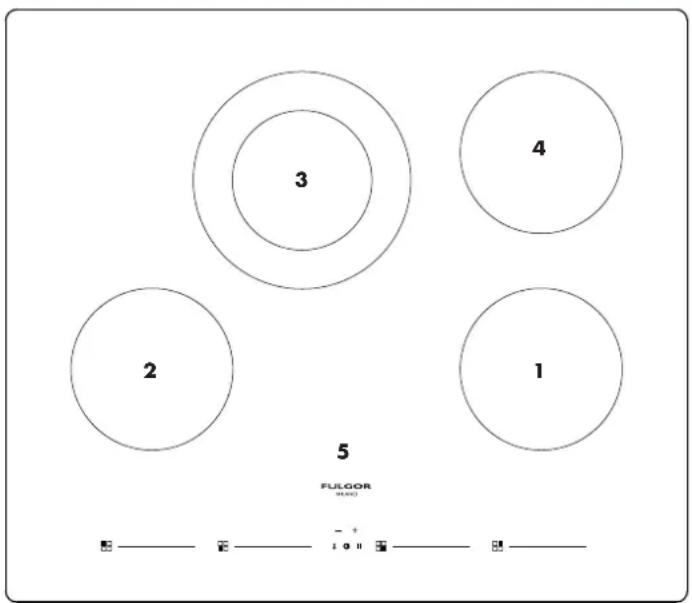
Position 1 - 1200W 5-1/2" single circuit element
Position 2 - 1200W 6-1/2" single circuit element
Position 3 - 1900W/1100W/800W 7-5/8 "/ 4-3/4" double circuit element
Position 4 - 1200W 6-1/2" single circuit element
Position 5 - touch control
30" MODELS
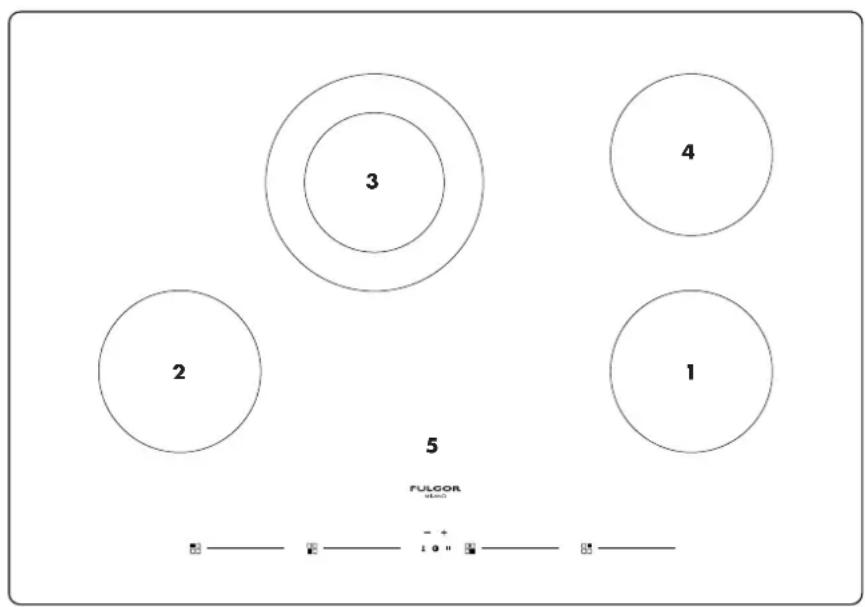
Position 1 - 1200W 5-1/2" single circuit element
Position 2 - 1200W 6-1/2" single circuit element
Position 3 - 1900W/1100W/800W 7-5/8 "/ 4-3/4" double circuit element
Position 4 - 1200W 6-1/2" single circuit element
Position 5 - touch control
24" MODELS 30" MODELS
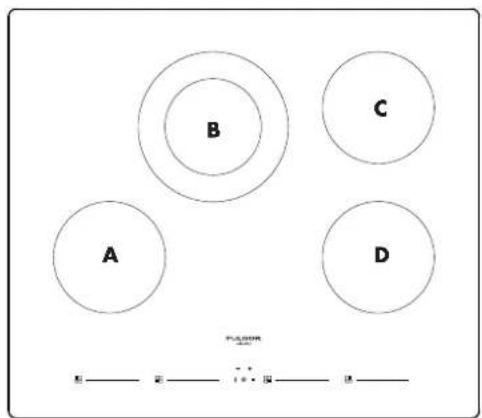
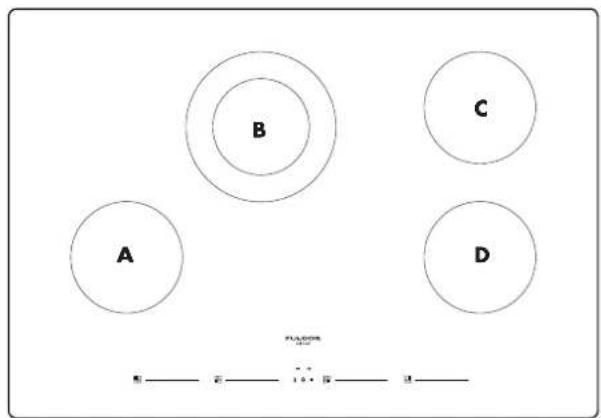
CONTROL PANEL
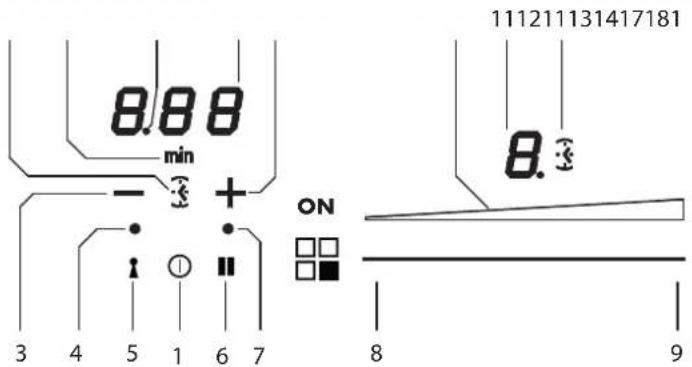
| 1 ON/OFF | 8 Minimum level activation cursor area |
| 2 + TIMER 9 Maximum level activation cursor area | |
| 3 - Timer | 10 Timer for cooking area activation icon |
| 4 Key on led | 11 Cooking area level display |
| 5 Key on button | 12 Cooking level illuminated bar |
| 6 Pause on button | 13 Timer (minutes/seconds) display |
| 7 Pause and Recall involuntary switchoff LED | 14 Separator dot (hours/minutes) |
Residual heat indicator
this tells the user that the glass is at a dangerously high heat in case of contract with the whole area over the cooking zone. The temperature is determined using a mathematical model and any residual heat is indicated with an "H" corresponding seven-segment display.
Heating and cooling are calculated in relation to:
• the power level selected (from "0" to "9");
• the relay activation period.
After switching off the cooking zone, the corresponding display shows an "H" until the temperature in the zone falls below the critical level (60 C) in compliance with the mathematical model.
Protection in the event of accidental switching on
- If the electronic control sense continuous activation of a key for about 10 sec. it switches off automatically. The control gives off an acoustic error signal for 10 seconds, warning the user of the presence of an object on the sensors. The displays show the permanent error code, which will be displayed as long as the electronic control senses the error. If the cooking zone "burns", an "H" will a display, alternating with the error signal.
- If no cooking zone is activated within 10 seconds of switching on the touch control, the control returns to standby mode. (See also paragraph 1.2.
- When the touch control is on, the ON/OFF key takes priority over all the other key, so the touch control can be switched off at any time, even in the case of multiple or continuous activation of the keys.
- In stand-by mode, continuous activation of the keys will have no effect. However, before the electronic control can be switched on again, it must acknowledge that no key is active.
Key LoPrecautions
- If there is even the tiniest crack in the ceramic glass surface, immediately disconnect the hob from the electricity supply;
- during operation, move any magnetic materials such as credit cards, computer disks, calculators, etc., away from the area;
- never use cooking foil or rest products wrapped in foil directly on the hob;
- metallic objects such as knives, forks, spoons and lids must not be rested on the surface of the hob to prevent them from heating up;
- with cooking with non-stick containers, without using water or oil, limit any preheating time to one or two minutes;
- when cooking foods which tend to stick to the bottom of the pan, start at minimum power and gradually increase the heat, stirring frequently;
- after use, switching off correctly (decreasing to avoid relying on the pan sensor.
Maintenance (Fig. 4)
Traces of foil, food residues, splashes of fat, sugar or very sugary foods must be removed immediately from the hob using a scraper to avoid damaging the hob surface.
Then clean with SIDOL or STANFIX and kitchen paper, rinse with water and dry with a clean cloth.
Never use abrasive sponges or clothes and avoid using aggressive chemical cleansers such as OVEN SPRAYS or STAIN REMOVERS.
DO NOT USE STEAM CLEANERS
FIGURE 4
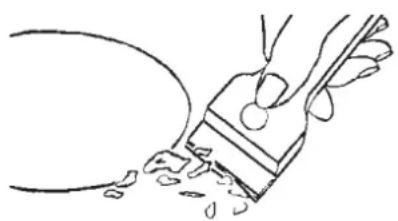
natural_image
Line drawing of a hand holding a paintbrush with droplets, no text or symbols presentTurning the cooking surface on and off
The cooking surface is turned on by pressing the "centre" On/Off button (1), you will hear a short beep and the 5 seven-segment displays light up showing "0". If a cooking zone is "hot", the display will alternate between "H" and "0". After switching on, the touch control remains active for 10 seconds. If you do not select either a cooking zone or the times, the touch control automatically returns to stand-by mode.
Acoustic signal (buzzer)
During use, the following activities are signalled by a buzzer: - Normal pressing of the buttons with a short beep.
- Holding down buttons for more than 10 seconds with a long intermittent sound (an error symbol is displayed and, if you continue, the touch control is turned off)
Turning on a cooking area
Position a pot and touch an area of the cursor for the cooking area where the pot is (9-10), slide your finger to the right to increase the cooking level (10), or slide your finger to the left to decrease it (9).
Turning off a cooking area
A single cooking area can be turned off directly by selecting the "0" position by sliding your finger to the left in the cursor area for the cooking area that is working.
Hot cooking areas will be displayed with a letter "H".
You can turn off all cooking areas immediately at any time using the power On/Off button (1).
If, during cooking, you inadvertently turn off the surface while using the controls, you can turn it on again with the On/Off button and you will have 6 seconds to press the pause button (4) that will be indicated by the (3) flashing of an indicator light above the button; doing so will turn the surface on again with the same settings it had before it was accidentally turned off.
Power level
The power level of the cooking area can be set from level 1 to level 9.
Special functions
By turning on the touch display, you can program a special function by pressing the button indicating the position of the cooking area.
This function is available to "assist cooking" in each cooking area and is indicated by one of the three dedicated icons.
It is possible to activate 3 "cooking" levels:
1) Melting with a temperature of approximately 42 C.
2) Heating with a temperature of approximately 70 C.
3) Simmering with a temperature of approximately 94 C.
These temperatures are approximate and are greatly dependent on the pot and the quantity of food.
Control lock (child safety)
It is only activated when the cooking surface is on but no cooking area is on.
Press the key button (5) and the pause button (6) and then lock the key button (5).
The corresponding control lock LED will light up.
When you try to turn on the cooking surface with the On/Off button (1), the "lock" and "ON" LEDs will light up at the same time and it will not be possible to cook.
Unlocking/deactivation child safety
To permanently remove the "lock", turn the piano on with the button ON, then hold down the "lock" button.
Pause
This cooking surface allows setting a pause (6) during cooking (which is useful, for example, when answering a phone call). When this function is pressed, an LED lights above the button and the symbol "II" is displayed in all the cooking areas and the cooking settings and timers are frozen for a maximum of 10 minutes, after which the cooking surface turns off.
Deactivating Pause
Once activated, the function can be deactivated by pressing the pause button (6) again. The LED for the pause setting turns off and, within 10 seconds, you must slide your finger along the cursor below the illuminated area (from left to right). This allows the surface to resume cooking and the timer starts from the same point at which it was stopped.
Timer function
There are two versions of the timer function:
- An independent timer from 1 to 59 minutes: it beeps when the time has run out. This function is always available and is indicated by the clock symbol (24) which is located
between the - and + buttons (the symbol may be less bright if another cooking area timer has a remaining time that is less than that set on the independent timer).
- A timer from 1 to 59 minutes for each cooking area: it beeps when the time has run out and turns off the cooking area where it was set. The 4 cooking areas can be programmed independently (the symbol may be less bright if another cooking area timer has a remaining time that is less than that set on the independent timer).
The type of timer activated is shown in the dedicated displays (19-20-21-22). The timer with the least time is highlighted and the related clock icon is brighter (13-24). The other timer settings are still active and running, but the clock icon (13-24) will be less bright.
Another icon with the word "min" (23) appears when you set times longer than 10 minutes. For example 0.11 indicates 0 hours and 11 minutes.
The separator dot (21) flashes when the timer is running, while the dot is static while the timer is selected and thus modifiable.
Independent timer
- If the touch display is on, the independent timer can be used by simultaneously pressing the + and - buttons. If all the cooking areas are in position "0", this is the only timer available. The clock icon (24) will turn on and the display will show "0.00". If you do not select any button, the timer deactivates within 5 seconds.
- The time setting (0-1 hour.59 min) can be changed in increments of one minute with the + button from 0 to 99.
- Holding down the + or - button dynamically increases the rate of change up to a maximum value, without beeps.
- If the + (or -) button is released, the rate of increase (decrease) starts again from the initial value.
- The timer can be set by either continuously pressing the + or - buttons or by pressing successively (with beeps).
- After the timer is set, it begins to count down. The expiry of the time is signalled by a beep or by the flashing of the timer display, which will show "00".
- The beep will not stop until the + or - button is pressed. The display stops flashing and turns off.
Turning off/changing the timer
- The timer can be changed or turned off at any time by turning on the touch display again, if no cooking area is on, and pressing the + and - buttons simultaneously to select the timer. At this point, set it to "0" by pressing the - button, to turn it off, or by pressing the + button to increase the time setting.
- The independent timer remains active even when the On/Off button is pressed
Programming the timer for the cooking areas
By turning on the touch display, you can program an independent timer for each cooking area.
- At least one cooking area must be on and set to a certain level.
- By pressing the + and - buttons simultaneously, you can set a countdown for turning off the cooking area. There are illuminated clock icons (13) next to the display of the cooking area. To set the timer on a cooking area when there are more than one cooking area on, you must press the + and - buttons simultaneously. You will note that the clock icon will light and move to the various cooking areas each time you simultaneously press the + and - buttons.
- When the timer of the cooking area is selected, the related clock icon near the display becomes brighter (13). The timers programmed for each cooking zone remain active.
- Other functions of the timer are the same as the independent timer. To increase the time, use the plus button.
- The expiry of the time is signalled by a beep and "00" on the display and the LED of the cooking area assigned to the timer flashes. The cooking area is turned off and an "H" is shown if the area is "hot", otherwise the display shows a hyphen. The beeping and flashing of the display stop.
• Automatically after 2 minutes.
- When you press the + or - buttons, the timer display turns off.
Error codes are displayed by the 7-segment display with "E" or "ER" plus the error number.
| Error message | "flash" E |
| Description | Permanent use of keys; Control unit cuts off after 10 sec |
| Possible error reason | Water or cooking utensils on the glass above the control unit |
| Troubleshooting | Cleaning of the operational surface |
Before using the cooktop for the first time
- All products are wiped clean with solvents at the factory to remove any visible signs of dirt, oil, and grease which may have remained from the manufacturing process.
- If present, remove all packing and literature from the cooktop surface.
- Clean your glass top before the first time you use it. A thorough cleaning with a glass top cleaner is recommended. It only takes a minute and puts a clean, shiny coating on the glass top before its initial use.
- There may be a slight odour during the first several uses: this is normal and will disappear.
- Optimum cooking result depends on the proper cookware being selected and used.
- The cooking surface will hold the heat and remain hot over 20 minutes after the elements have been turned off.
- The glass ceramic cooking surface is a durable material resistant to impact but not unbreakable if a pan or other object is dropped on it.
- Do not use aluminum foil directly on the glass; it will melt and damage the glass surface.
- Do nor allow pans to boil dry. This can damage the pan, element and /or cooktop.
• Never cook food directly on the glass. - Do not slide cookware across cooking surface it may scratch the glass
- Using cast iron cookware on the glass cooktop is not recommended. Cast iron retains heat and may result in cooktop damage.
General
The choice of pan directly affects the cooking performance (speed and uniformity) for best result select pans with the following features.
Flat base
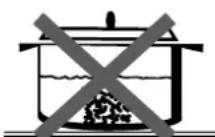
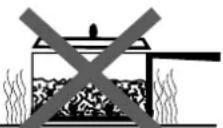
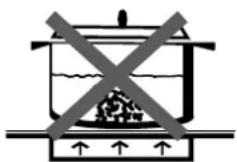
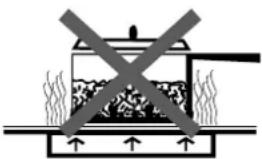
When a pan is hot, the base (pan bottom) should rest evenly on the surface without wobbling (rocking). Ideal cookware should have a flat bottom, straight side, a well fitting lid and the material should be of medium to heavy thickness.
Rough finishes may scratch the cooktop.
Match Pan Diameter to radiant element
The base of the pan should cover or match the diameter of the element being used.
FIGURE 6
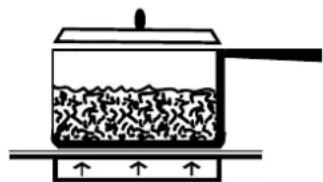
natural_image
Simple line drawing of a container with liquid and a side arm, no text or symbols presentBALANCED PAN
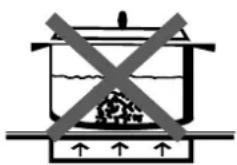
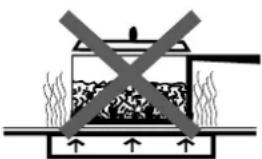
natural_image
Diagram of a cooking pot with steam rising and crossed out by a horizontal line (no text or symbols)UNBALANCED PAN
Cookware Characteristics
Cooking Utensil Guidelines
- Aluminium: heats and cools quickly frying, braising, roasting. May leave metal markings on glass.
- Cast Iron: heats and cools quickly Not recommended. Retains excessive heat and may damage cooktop.
- Copper: tin heats and cools quickly gourmet. cooking, lined wine sauces, egg dishes.
- Enamel ware: response depends on base Not recommended, metal Imperfections in enamel may scratch cooktop.
- Glass Ceramic: heats and cools slowly not recommended. Heats too slowly. Imperfections in enamel may scratch cooktop.
- Stainless Steel: heats and cools at moderate soups, sauces, rate vegetables, general cooking.
Observe The Following Points In Canning
Pots that extend beyond 1 of the surface unit's circle are not recommended for most surface cooking.
However, when canning with water-bath or pressure canner, larger-diameter pots may be used.
This is because boiling water temperatures (even under pressure) are not harmful to the cooktop surfaces surrounding the surface units.
However, do not use large diameter canners or other large-diameter pots for frying or boiling foods other than water.
Most syrup or sauce mixtures, and all types of frying, cook at temperatures much higher than boiling water.
Such temperatures could eventually harm the glass cooktop surfaces.
Be sure the canner fits over:
- the center of the surface unit. If your cooktop or its location does not allow the canner to be centered on the surface unit, use smaller diameter pots for good canning results.
- Flat-bottomed canners must be used. Do not use canners with flanged or rippled bottoms (often found in enamelware) because they don't make enough contact with the surface units and take a long time to boil water.
- When canning, use recipes and procedures from reputable sources. Reliable recipes and procedures are available from the manufacturer of your canner; manufacturers of glass jars for canning, such as Ball and Kerr brand; and the United States Department of Agriculture Extension Service.
- Remember that canning is a process that generates large amounts of steam. To avoid burns from steam or heat, be careful when canning.

CAUTION
Safe canning requires that harmful micro organisms are destroyed and that the jars are sealed completely. When canning foods in a water-bath canner, a gentle but steady boil must be maintained for the required time. When canning foods in a pressure canner, the pressure must be maintained for the required time.
After you have adjusted the controls, it is very important to make sure the prescribed boil or pressure levels are maintained for the required time.
Since you must make sure to process the canning jars for the prescribed time, with no interruption in processing time, do not can on any cooktop surface unit if your canner is not flat.
Special pans
Special pans, such as griddles, roasters, pressure cookers, woks, water (Use only a flat-bottom wok).

CAUTION
Food packaged in aluminum foil should not be placed directly on the glass ceramic surface for cooking; aluminum foil can melt and cause permanent damage.

CAUTION
Plastic, paper, and cloth can melt or burn when in contact with a hot surface. Do not let these items come in contact with the hot glass.

CAUTION
Be sure electrical power is off and all surfaces are cool before cleaning any part of the cooktop.
Apply a small amount of cooktop cleaning specific ceramic crème on a daily basis. this provides a protective film that makes it easy to remove water spots or food spatters. The temperature of the cooking surface reduces the protective qualities of this cleaner.
It must be reapplied before each use. Use a clean cloth and apply cooktop cleaning crème before each use to remove dust or metal marks that can occur on the counter level surface between uses.
Frame
(Stainless steel models)
Always wipe with the grain when cleaning. For moderate/heavy soil, use BonAmi® or Soft Scrub® (no bleach).
Wipe using a damp sponge or cloth, rinse and dry.
Daily Cleaning Techniques
Clean the surface when it is completely cool with the following exception.
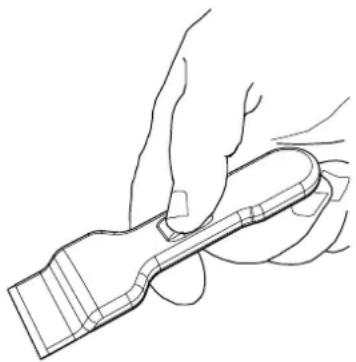
FIGURE 7
natural_image
Line drawing of a hand holding a tool or device (no text or symbols present)Remove these soils immediately with the razor blade scraper:
Dry Sugar
- Sugar Syrup
- Tomato Products
- Milk
Use Daily
Wipe off spatters with a clean, damp cloth; use white vinegar if smudge remains; rinse.
Apply a small amount of the Cooktop Cleaning Crème.
When dry, buff surface with a clean paper towel or cloth.

CAUTION
Do not use any kind of cleaner on the glass while the surface is hot; use only the razor blade scraper. The resulting fumes can be hazardous to your health.
Heating the cleaner can chemically attack and damage the surface.
Recommended Cleaners
- Cooktop Cleaning Crème: Use only a small amount; apply to a clean paper towel or cloth. Wipe on the surface and buff with a clean dry towel.
- BonAmi®:
Rinse and dry.
- Soft Scrub® (without bleach):
Rinse and dry.
- White Vinegar:
Rinse and dry.
- Razor blade scraper
Packaged with cooktop.
Note: The recommended cleaners indicate a type of cleaner and do not constitute an endorsement.
Avoid These Cleaners
- Glass cleaners which contain ammoniac or chlorine bleach. These ingredients may permanently etch or stain the cooktop.
- Caustic Cleaners
Oven cleaners such as Easy Off® may etch the cooktop surface.
- Abrasive Cleaners
Metal scouring pads and scrub sponges such as Scotch Brite® can scratch and / or leave metal marks. Soap-filled scouring pads such as SOS® can scratch the surface.
- Powdery cleaners
Containing chlorine bleach can permanently stain the cooktop.
- Flammable cleaners
Such as lighter fluid or WD-40.
| Problem Cause Possible Remedy | ||
| Nothing works Cooktop not connected to | proper electrical circuit.Fuse is blown or circuit breaker is tripped. | Have electrician verify that the proper rated cooktop voltage is being supplied to the cooktop. Have electrician replace fuse or reset circuit breaker. |
| No electricity to the cooktop. | Have electrician check your power supply. | |
| Cooktop is in lockout mode. | Unlock cooktop. | |
| Cooktop is connected to 120 volt power supply. | Have electrician connect cooktop to the proper rate cooktop voltage. | |
| Heating elements do not heat properly | Power supply connection is loose.Improper cookware is being used. | Have electrician tighten the connections at the junction box.Select proper cookware as outlined in the Cooktop Operation section of this manual. |
| Heating elements cycle off even when elements are turned to their highest settings | Heating element temperature limiters are temporarily shutting off the elements due to exceeding the maximum allowable temperature. | This is a normal operating condition, especially during rapid heat-up operations. The element will cycle back on automatically after it has cooled sufficiently. |
| Glass ceramic surface is seethrough or appears to be red in color. | Under direct or bright lighting, you will sometimes be able to see through the glass and into the chassis due to its transparent quality. You may also notice a red tint under these conditions | These are normal properties of black ceramic glass panels. |
| Lock Key blocked after first connecting or unresponsive touch control. | When first connecting electrically or after a power failure, any direct strong light over the sensor area may affect the touch control functionality. | When powering on the unit make sure that no strong light is shining direct over the touch control zone, it can compromise the start-up sensor calibration resulting in an unresponsive touch control. |
Operating time limitation
The Fulgor Milano induction appliances all feature safety timeouts (Operating Time Limitation or OTL) on the induction cooking zones. The following table shows the various OTL for each inductor before timing out based on what power level is chosen. (Also applies to bridged zones or induction griddle depending on model). Thus, longer, overnight simmering is possible on settings 1, 2, or 3.
| OTL – Operating time limitation | ||
| Level | Specs [h] | Timeout U&C [h:m] |
| Low | 2 | 2:00 |
| 1 | 18 | 18:00 |
| 2 | 18 | 18:00 |
| 3 | 18 | 18:00 |
| 4 | 4.3 | 4:15 |
| 5 | 3.5 | 3:30 |
| 6 | 2.3 | 2:15 |
| 7 | 2.3 | 2:15 |
| 8 | 1.8 | 1:45 |
| 9 | 1.5 | 1:30 |
Error codes
Error codes are displayed by the 7-segment display with "E" or "ER" plus the error number.
| Error message Description Remedy | ||
| B/H | Permanent use of keys;TC switches off after a certain period of time | Water or cooking utensils on the glass; Clean the surface |
| ER20 Internal error in touch | control Replace touch control | |
| ER21 Over temperature Let cooktop cool down | Check heat partitioning for TC | |
| ER22 Internal error in touch | control Replace touch control | |
| ER31 Variant detection error | Download correct configuration | |
| ER36 Internal error in touch | control Replace touch control | |
| ER40 | Power supply voltage too low on secondary side | Check connected components for overloadReplace touch control |
| ER47 LIN communication error | Check LIN cabling | |
| EA Communication error | Check cabling between touch control and power | boardReplace touch controlReplace power board |
| U400 | Overvoltage due to wrong connection | Turn off power supply voltage and connect cooktop properly |
| E2 Over temperature of power board | Allow cooking zone to cool down | |
| E4 Internal error on power board | Replace power board | |
| E5, E8, EA | Relay error on power board | Replace power board |
Before calling for assistance or service, please check "Troubleshooting." It may save you the cost of a service call.
If you still need help, follow the instructions below. When calling, please know the purchase date and the complete model and serial number of your appliance. This information will help us to better respond to your request.
Service Data Record
For authorized service or parts information see "FULGOR WARRANTY for Home Appliances".
The location of the serial tag is below the cooktop box. Now is a good time to write this information in the space provided below. Keep your invoice for warranty validation.
| Model Number | |
| Serial Number | |
| Date of Installation or Occupancy |
TABLE DES MATIÈRES PAGE
natural_image
Simple line drawing of a hand holding a tool near a curved object with droplets (no text or symbols)natural_image
Simple line drawing of a container with liquid and a side arm, no text or symbols presentBALANCED PAN
natural_image
Line drawing of a hand holding a tool or device (no text or symbols present)natural_image
Simple line drawing of a hand holding a tool with a curved handle and falling particles (no text or symbols)natural_image
Simple line drawing of a container with liquid and a side arm, no text or symbols presentBALANCED PAN
natural_image
Simple line drawing of a cooking pot with crossed x marks indicating heating or storage (no text or symbols)UNBALANCED PAN
natural_image
Line drawing of a hand holding a tool or device (no text or symbols present)
- TABLE OF CONTENTS PAGE
- - Special Warnings 2
- - Models and Part Identification 4
- - User instructions 5
- - Electric Cooktop Operation 9
- - Cookware 10
- - Cleaning the Cooktop 11
- - Troubleshooting 12
- - Assistance or Service 14
- Pay attention to these symbols present in this manual:
- WARNING
- READ AND SAVE THESE INSTRUCTIONS.
- Warnings for electric installation
- CAUTION
- IMPORTANT
- Please read all instructions before using this appliance
- Cooktop safety
- Proper Installation
- Never Use Your Appliance for Warming or Heating the Room Do Not Leave Children Alone
- Wear Proper Apparel
- User Servicing
- Storage in or on Appliance
- Do Not Use Water on Grease Fires
- Use Only Dry Potholders
- Use Proper Pan Size
- Never Leave Surface Units Unattended at High Heat Settings
- Make Sure Reflector Pans or Drip Bowls Are in Place
- Protective Liners
- Glazed Cooking Utensils
- Not Extend Over Adjacent Surface Units
- Do Not Soak Removable Heating Elements
- Do Not Cook on Broken Cook-Top
- Clean Cook-Top With Caution
- Personal safety
- When using the cooktop
- When using the cooktop installed over oven
- Residual heat indicator
- Protection in the event of accidental switching on
- Key LoPrecautions
- Maintenance (Fig. 4)
- Turning the cooking surface on and off
- Acoustic signal (buzzer)
- Turning on a cooking area
- Turning off a cooking area
- Power level
- Special functions
- Control lock (child safety)
- Unlocking/deactivation child safety
- Pause
- Deactivating Pause
- Timer function
- Independent timer
- Turning off/changing the timer
- Programming the timer for the cooking areas
- Before using the cooktop for the first time
- General
- Flat base
- Match Pan Diameter to radiant element
- Cookware Characteristics
- Cooking Utensil Guidelines
- Observe The Following Points In Canning
- Special pans
- Frame
- Daily Cleaning Techniques
- Use Daily
- Recommended Cleaners
- Avoid These Cleaners
- Operating time limitation
- Error codes
- Service Data Record
- TABLE DES MATIÈRES PAGE
Brand : Fulgor Milano
Model : F7RT24B1
Category : Electric cooktop