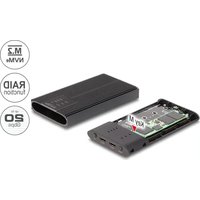
42022 - External hard drive DeLOCK - Free user manual and instructions
Find the device manual for free 42022 DeLOCK in PDF.


| Product Type | External hard drive enclosure for M.2 SSD |
| Brand | DeLOCK |
| Model | 42022 |
| Interface | USB (Type A/C depending on model) |
| SSD Compatibility | M.2 (SATA or NVMe depending on version) |
| Supported RAID Modes | RAID 0, RAID 1, JBOD (selectable via DIP switch) |
| Power Supply | External power adapter (5V DC) via female DC port |
| LED Indicators | Power LED and RAID/SSD LED |
| Safety | Moisture protection; avoid static electricity |
| Maintenance | Clean with a dry, soft cloth; do not use chemical products |
| Installation | Opening the enclosure with push button; fixing the SSD with rubber tip |
| Formatting Required | Initialization via Windows Disk Management: MBR < 2 TB, GPT > 2 TB |
| Operating Systems | Windows, macOS, Linux (generally) |
| Certification | CE |
| Recycling | Device and accessories recyclable; drop off at store or recycling center |
Frequently Asked Questions - 42022 DeLOCK
User questions about 42022 DeLOCK
0 question about this device. Answer the ones you know or ask your own.
Ask a new question about this device
Download the instructions for your External hard drive in PDF format for free! Find your manual 42022 - DeLOCK and take your electronic device back in hand. On this page are published all the documents necessary for the use of your device. 42022 by DeLOCK.
USER MANUAL 42022 DeLOCK
natural_image
Black OX-XX power drive module with ventilation slots and ports (no visible text or symbols)RAID mode table
| SW1 1 2 | |
| PM OFF OFF | |
| JBOD ON OFF | |
| RAID 0 ON ON | |
| RAID 1 OFF ON |



Product-No: 42022
User manual no: 42022-a
www.delock.com
Power supply specification
- Wall power supply
- Input: AC 100 \~ 240 V / 50 \~ 60 Hz / 0.6 A
- Output: 5.0 V / 3.0 A / 15.0 W
System requirements
- Android 11.0 or above
- Chrome OS
• Linux Kernel 5.15 or above
• Mac OS 13.1 or above - Windows 10/10-64/11
- iPad Air (4th Generation) or above
- iPad Pro (3rd Generation) or above
- Surface Pro 7
- Device with a free USB Type-C™ port or with a free Thunderbolt™ 3 or Thunderbolt™ 4 port
Package content
- External enclosure
- Cable USB-C™ male to USB-C™ male, length ca. 45 cm
- Cable USB-C™ male to USB Type-A male, length ca. 45 cm
• External power supply - 2 x thermal conductive pad
- 2 x thermal conductive plate
- 4 x rubber nipple
- User manual
Safety instructions
- Protect the product against moisture
- Avoid anti-static electricity when using the HDD
- Pay attention that the HDD can be hot when it is connected to the device.
Hardware Installation
- Open the housing.
- To do this, press the button on the bottom.
- Now you plug your M.2 SSD into the slot.
-
Fix the module with the help of the rubber nipple.
-
RAID setting
Note: If you use a new hard drive, please make sure that it is already formatted.
Use the DIP switch to set the suitable RAID mode. -
Close the enclosure.
-
Now you can connect the enclosure via the USB interface to your system.
-
Connect the power supply to the DC female port.
-
Switch on your computer.
-
Press and hold the reset button and short press the on / off button.
-
Then the corresponding RAID LED lights up, as well as the Power LED.
-
After detecting the SSD, the corresponding LED of the SSD will light up.
-
Then the new drive must be initialized. Select "MBR" for SSDs smaller than 2 TB and "GPT" for SSDs larger than 2 TB.
-
A new volume must be created in the Disk Management.
-
The external drive will be recognized and you can start using the device immediately.
Support Delock
If you have further questions, please contact our customer support support@delock.de
You can find current product information on our homepage:
www.delock.com
Final clause
Information and data contained in this manual are subject to change without notice in advance. Errors and misprints excepted.
Copyright
No part of this user manual may be reproduced, or transmitted for any purpose, regardless in which way or by any means, electronically or mechanically, without explicit written approval of Delock.
Edition: 06/2023
Sicherheitshinweise
Hardwareinstallation
Declaration of conformity
Products with a CE symbol fulfill the EMC directive (2014/30/EU), the ErP directive (2009/125/EC), LVD directive (2014/35/EU) and RoHS directive (2011/65/EU+2015/863+2017/2102), which were released by the EU-comission.
The declaration of conformity can be downloaded here: https://www.delock.de/produkte/G_42022/merkmale.html
WEEE-notice
The WEEE (Waste Electrical and Electronic Equipment)-directive, which became effective as European law on February 13th 2003, resulted in an all out change in the disposal of disused electro devices. The primarily purpose of this directive is the avoidance of electrical waste (WEEE) and at the same time the support of recycling and other forms of recycling in order to reduce waste. The WEEE-logo on the device and the package indicates that the device should not be disposed in the normal household garbage. You are responsible for taking the disused electrical and electronic devices to a respective collecting point. A separated collection and reasonable recycling of your electrical waste helps handling the natural resources more economical. Furthermore recycling of electrical waste is a contribution to keep the environment and thus also the health of men. Further information about disposal of electrical and electronic waste, recycling and the collection points are available in local organizations, waste management enterprises, in specialized trade and the producer of the device.
Brand : DeLOCK
Model : 42022
Category : External hard drive