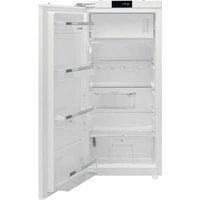
DRS1244ED - Refrigerator DE DIETRICH - Free user manual and instructions
Find the device manual for free DRS1244ED DE DIETRICH in PDF.


| Product type | Combined refrigerator-freezer |
| Brand | De Dietrich |
| Model | DRS1244ED |
| Climate class | SN-T (10 °C to 43 °C) |
| Total volume | 275 L |
| Dimensions (H x W x D) | approximately 1240 x 560 x 540 mm |
| Power supply | 220-240 V, 50 Hz |
| Refrigerant | R600a (isobutane) |
| Interior lighting | LED (energy efficiency class F) |
| Main functions | Super cool, Super freeze, Eco mode, Screen saver, cold zone indicator, door open indicator |
| Temperature setting | Refrigerator: 2 °C, 4 °C, 5 °C, 6 °C, 8 °C; Freezer: via Super freeze mode |
| Defrosting | Manual for freezer (recommended once a year) |
| Maintenance | Clean with lukewarm water and white vinegar or baking soda; condenser every 6 months |
| Spare parts | Available for 10 years (in accordance with EU regulation) |
| Safety | Safety instructions for children and vulnerable persons; flammable refrigerant circuit |
| Standards | CE, WEEE recycling |
Frequently Asked Questions - DRS1244ED DE DIETRICH
User questions about DRS1244ED DE DIETRICH
0 question about this device. Answer the ones you know or ask your own.
Ask a new question about this device
Download the instructions for your Refrigerator in PDF format for free! Find your manual DRS1244ED - DE DIETRICH and take your electronic device back in hand. On this page are published all the documents necessary for the use of your device. DRS1244ED by DE DIETRICH.
USER MANUAL DRS1244ED DE DIETRICH
FR GUIDE D'UTILISATION
EN GUIDE TO INSTALLATION
natural_image
Illustration of various household cleaning tools including screwdriver, ruler, and tool holder (no text or symbols)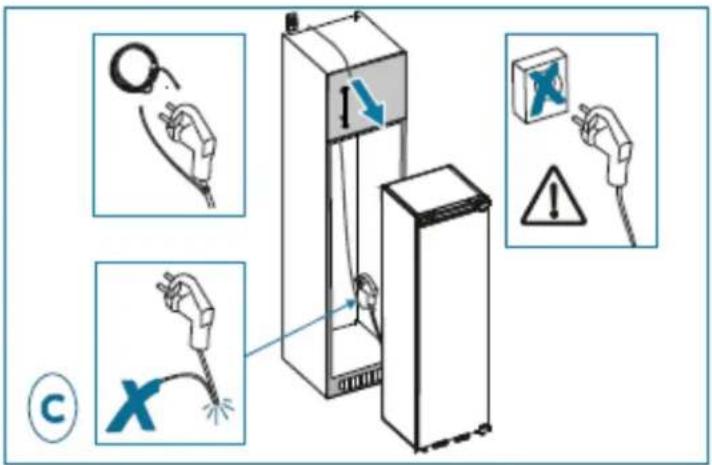
natural_image
Two 3D diagrams of a refrigerator with labeled parts and directional arrows, no text or symbols present.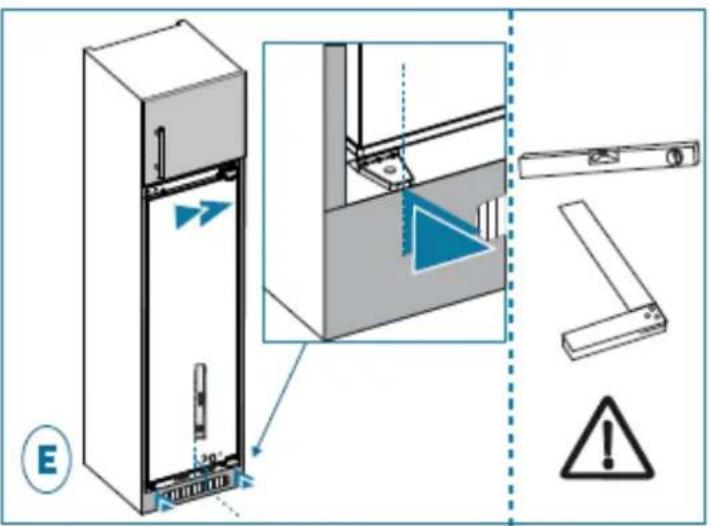
natural_image
Technical illustration of a refrigerator with an inset close-up showing the exterior wall and shelf structure (no text or symbols)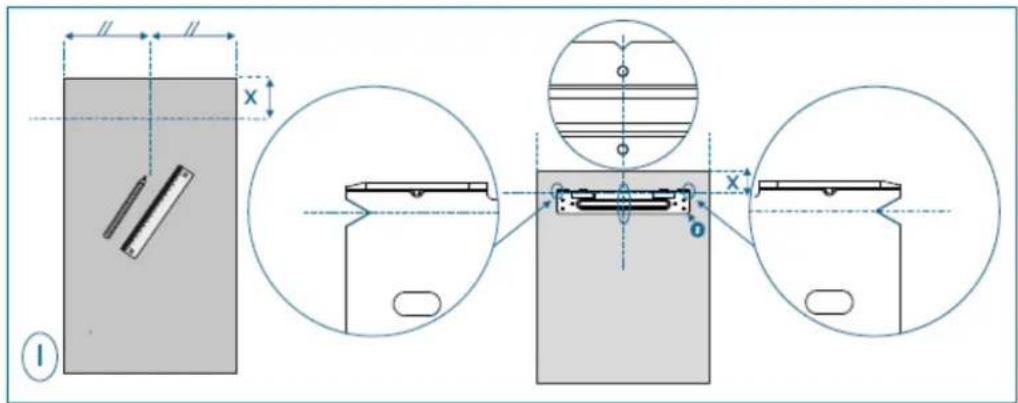
Mode Super congélation
Objectif :
natural_image
Hand interacting with a black background, showing a white square and vertical line (no text or symbols)natural_image
Diagram showing a hand placing a component into a shelf, and a close-up of a mechanical component with upward arrows (no text or symbols)Interventions France
natural_image
Interior view of a refrigerator showing door, front panel, and side panels (no text or symbols)Discovering De Dietrich products is experiencing unique emotions that only valuable objects can produce.
The appeal is immediate at first glance. The quality of the design is illustrated by the timeless aesthetics and the meticulous finishes that make each object elegant and refined in perfect harmony with each other.
Then comes the urge to touch. De Dietrich design is based on robust and prestigious materials; authenticity is favored.
By combining the most advanced technology with noble materials, De Dietrich ensures the creation of high quality products at the service of the culinary art, a passion shared by all kitchen lovers.
We wish you a lot of satisfaction in using this new appliance and will be happy to receive your suggestions and answer your questions. We invite you to express them to our customer service or on our website.
We invite you to register your product on www.de-dietrich.com to enjoy the benefits of the brand.
Thank you for your confidence.
De Dietrich

Find out all the information on the
brand on: www.de-
dietrich.com

Important: Before switching on your appliance, please read this user guide carefully in order to familiarise yourself more quickly with its operation.

This appliance complies with the European directives.
SAFETY GUIDELINES
For your safety and in order to use your appliance correctly, carefully read these instructions (including the warnings and useful advice), before installation and first use.
To avoid damaging the appliance and unnecessary injury, it is important that the persons who use the appliance fully understand how it works and the safety instructions.
Always keep these instructions close to the appliance so that they can accompany it in the event of resale or a change of house. In this way, the appliance will continue to function optimally and any risk of injury will be avoided.
The manufacturer shall not be held liable in the event of misuse of the appliance.
GENERAL SAFETY AND WARNINGS
This appliance is exclusively intended for domestic use in private households. It may only be used in a roofed, enclosed and heated environment such as a kitchen or any other room fulfilling these conditions. Its use on shared or professional premises such as in an office or workshopbreak room, a camp site building, or a hotel, etc., does not comply with the use defined by the manufacturer.
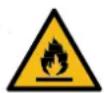
WARNING! Keep your appliance away from any source of flame during installation, servicing and use. The symbol in the margin which is found on the rear of your appliance, means that there are inflammable materials in this area
The refrigerating and insulating agents used in this appliance contain inflammable gases.
When transporting, installing and servicing the appliance, make sure that none of the components of the cooling circuit are damaged. If the cooling circuit is damaged:
√ Avoid naked flames and all sources of inflammation.
√ Ventilate the room in which the appliance is installed.

Installation safety
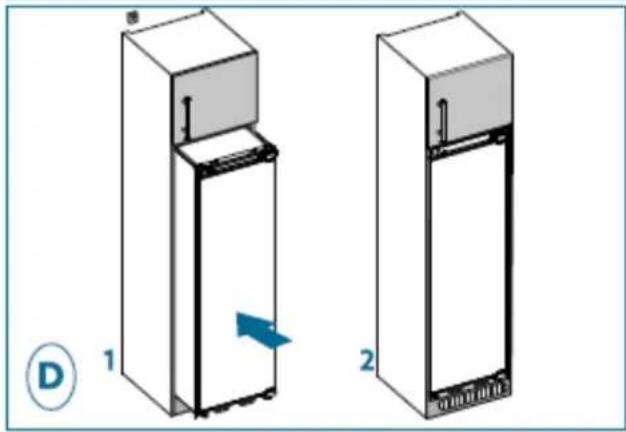
- Your appliance must be installed and, if necessary, secured and used in accordance with the instructions in this manual in order to avoid any risks due to poor installation.
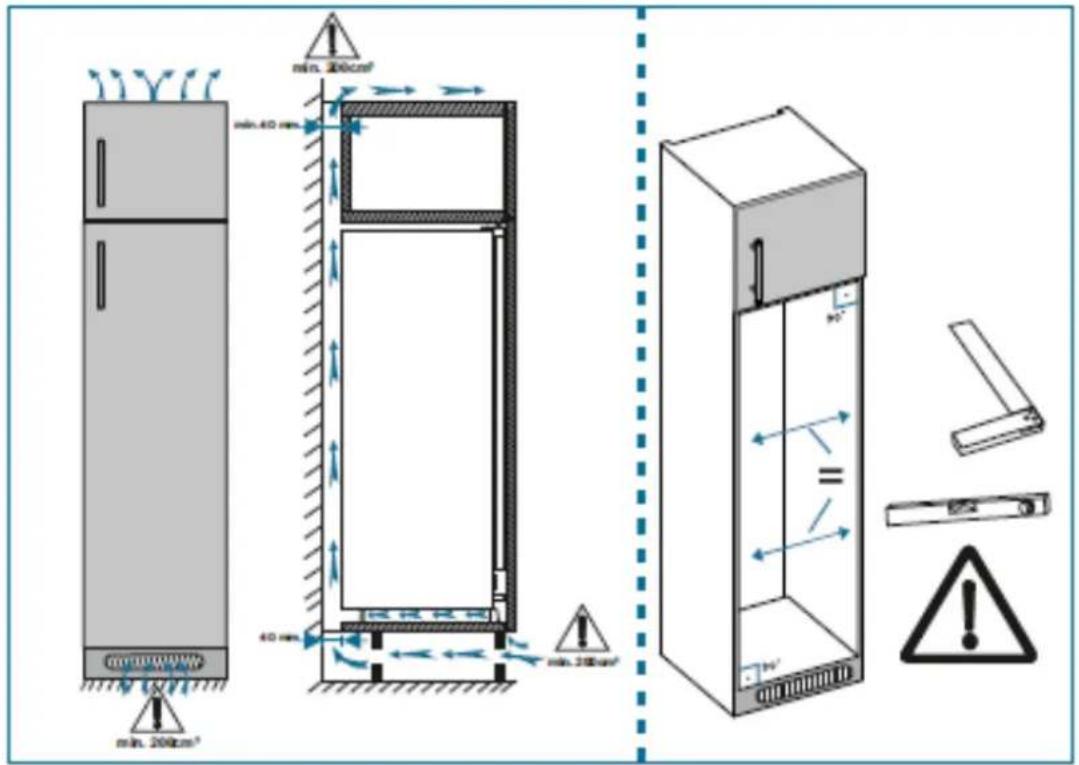
- Maintain clear of obstruction ventilation openings in the appliance enclosure or in the built-in structure.
It is dangerous to change the composition of this model in any way whatsoever. - Ensure that the power cord is not trapped or damaged when you position your appliance.
- Any damage to the power cord may result in a short circuit and/or electrocution.
- If the power cord is damaged, it should be replaced by the manufacturer, its after-sales service department or a similarly qualified person, so as to avoid danger.
- Do not place multiple plugs or portable power supply units behind the appliance.
- For models fitted with a water dispenser or an ice compartment, only fillor connect using a supply of drinking water.

Safety of vulnerable persons
- This appliance may be used by children aged 8 years or more and by people with physical, sensual or metal deficits and lacking experience or knowledge of the device provided that they are correctly supervised or have been provided with instructions regarding the safe use of the appliance and provided that the risks present have been fully
understood.
● Children must not play with the appliance.
Children must not clean and maintain the appliance without supervision.
● Children aged 3 to 8 are allowed to load and unload refrigeration appliances.
- Keep all the packaging materials out of the reach of children, as they can cause suffocation.

Safety of use
- Do not damage the refrigerating circuit.
- Do not use any mechanical or other means, other than those recommended by the manufacturer, to speed up the defrosting process.
- Do not use any electric appliances inside the compartment for food, unless they are of a type recommended by the manufacturer.
- Do not store any explosive substances, such as aerosols containing inflammable propellant gases, inside the appliance.

Food safety
To avoid contaminating food, follow the instructions below:
- Leaving the door open for long periods of time may significantly raise the temperature in the appliance compartments.
● Regularly clean any surfaces that may come into contact with food and accessible drain systems. - Clean water containers if they have not been used for 48 hours. Properlyrinse the water distribution system connected to a fresh water network if no water has been drawn off for five days.
- Store raw meat and fish in the appropriate refrigerator compartments so that the latter products are not in contact with other food and do not driponto other food.
- The "two star" compartments for frozen foods are suitable for storing food that is already frozen, for storing or making ice cream and ice cubes.
The "one, two and three star" compartments are not suitable for freezingfresh foods. - If the refrigerator remains empty for an extended period of time, switch it off, defrost it, clean it, dry it and leave the door open to prevent any mould from forming inside the appliance.
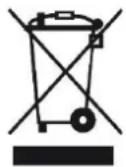
This symbol indicates that this product should not be treated as household waste.
Only dispose of the appliance in certified collection centres.
Your appliance contains a large amount of recyclable material. It is marked with this label to indicate the used appliances must be disposed of in certified collection points.
Contact your town hall or your retailer for the used appliance collection points closest to your home. This way, the appliance recycling organised by your manufacturer will be done under the best possible conditions, in compliance with European Directive on Waste Electrical and Electronic Equipment.
This appliance's packing materials are also recyclable. Help recycle it and protect the environment by dropping it off in the municipal receptacles provided for this purpose.
In accordance with the most recent legislative provisions applying to the protection and respect for the environment, your appliance does not contain any CFCs, but a refrigerant called R600a. The exact type of coolantgas used in your appliance is clearly shown on the ID plate inside the fridgepart of your appliance, at the foot of the left-hand side panel. R600a is a non-polluting gas that does not harm the ozone layer and hardly contributesto the greenhouse effect at all.
Used appliances must be immediately made unusable.
Disconnect the power cord and cut it as close to the appliance as possible. Inhibit the closing mechanism of the door or, even better, detach the door, so that children or pets cannot remain enclosed inside the appliance when playing.
To access the data on your model, stored in the product database in line with regulation (EU) 2019/2016 and data relating to energy labelling, please connect to the dedicated website at https://eprel.ec.europa.eu/
Find the reference of your appliance on the website by entering the service reference shown on the ID plate on your appliance.
Another way to access this information is to flash the QR code found on the energy label on your product.
Layout and presentation of your appliance
• This refrigeration appliance is not intended to be used as a built-in appliance
- Your appliance was designed and tested to optimise its energy use.
- The proposed layout represents the ideal solution for achieving ideal energy consumption and optimum food storage.
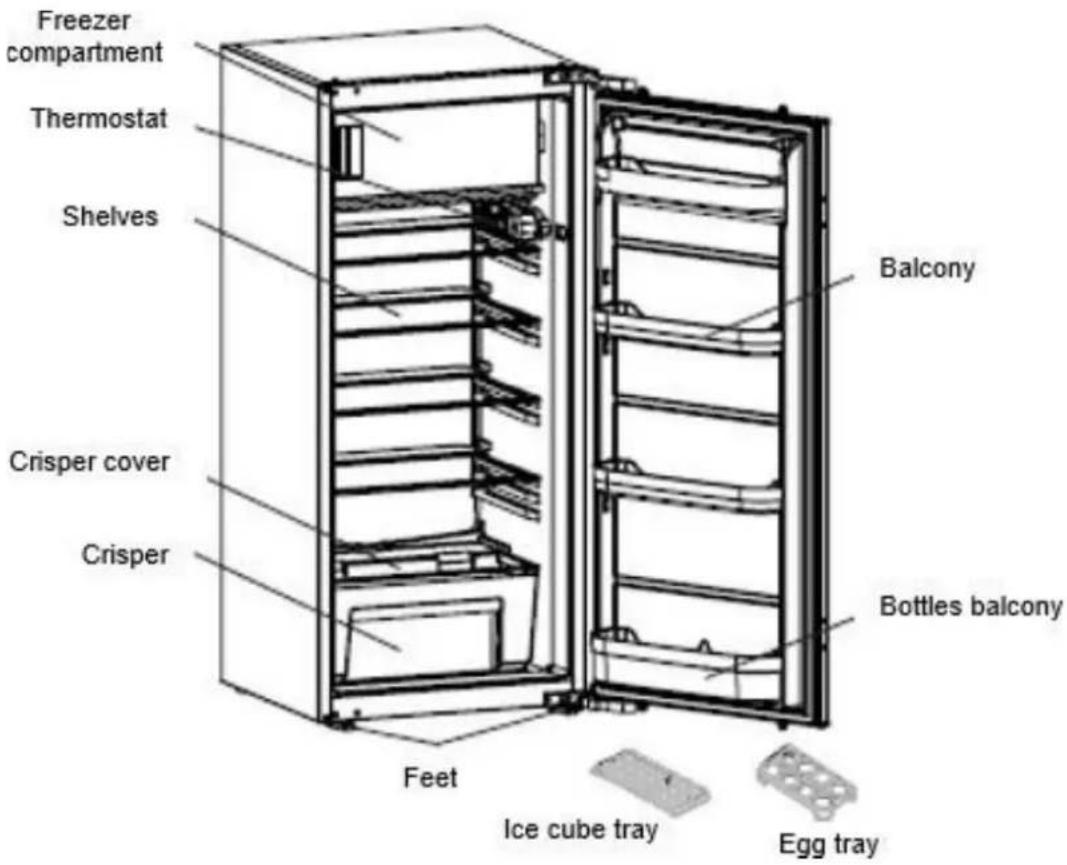
This illustration is only for hinting, the detail please check your appliance.
You can only keep your food in good condition and optimise your energy consumption by following the instructions in this installation and user guide.
Energy-saving measures
In order to reduce the power consumption of your appliance:
• Install it in a suitable location (see "Installing your appliance").
- Leave the doors open for the shortest time possible.
- Never put hot food in the fridge or the freezer, and in particular soups and other preparations that release a lot of steam.
- Check that your appliance is working correctly and do not allow too much ice to accumulate in the freezer (defrost when the ice is more than 5-6 mm thick). Clean the condenser on a regular basis.
- Regularly check the door seals and make sure that the doors can be closed properly. If this is not the case, contact after-sales service.
- Do not adjust the temperature too low.
Storing food
Here are some rules you should follow:
- Maintain the cold chain and select "Booster" mode at least 6 hours before coming home with groceries (if your model has it).
- Clean the refrigerator part at least once a month (see Care and cleaning)
- Defrost the freezer and clean it at least once a year.
- Keep home-made food in the refrigerator after first taking care to leave it to cool.
- Make sure that your appliance is set to the recommended temperatures shown below. The temperatures for every compartment are recommended to optimise storing food and avoid any waste.
| Area | Type of compartment | Recommended temperature |
| Fresh food compartments | Fresh food compartment (refrigerator) | +4°C |
| Frozen food compartments | 0 star compartment (depending on model) | 0°C |
| 1 star compartment (depending on model) | -6°C | |
| 2 star compartment (depending on model) | -12°C | |
| 3 star compartment (depending on model) | -18°C | |
| 4 star freezer drawers/shelves (depending on model) | -18°C |
- Place the food in the locations recommended in the tables below.
Fresh food compartments
| Refrigerator compartments | Type of food |
| Refrigerator door and door racks | Jams, drinks, eggs, condiments.Do not place perishable fresh food in these areas |
| Crisper | Lettuce, fruit, vegetables, herbsDo not put bananas, onions, potatoes or garlic in the refrigerator. |
| Lower shelf | Raw meat, fish, highly perishable food. |
| Intermediate shelf | Milk products |
| Top shelf | Cold cuts, prepared meals, meals to reheat |
Frozen food compartments (compartments available depending on model)
| Freezer compartments | Logos & Markings | Type of food |
| 0 star compartment | To store sorbet for a few hours and make ice cubes.This compartment is not suitable for freezing fresh food. | |
| 1 star compartment |  | To store frozen products for a few hours and make ice cubes.This compartment is not suitable for freezing fresh food. |
| 2 star compartment | 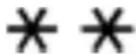 | To store frozen products for a few days, make ice cream and ice cubes.This compartment is not suitable for freezing fresh food. |
| 3 star compartment |  | To store frozen products for a few weeks/months and make ice cubes.This compartment is not suitable for freezing fresh food. |
| 4 star freezer drawers/shelves | 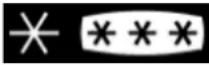 | To freeze food and store:- Meat, fish (lower drawer/shelf).- Vegetables, chips (intermediate drawer/shelf).- Ice cream, fruit, ready-made dishes (upper drawer/shelf) |
Care before installation
Before installing the appliance and connecting it to the power, wash the interior and all internal accessories with lukewarm water and some neutral soap so as to remove the typical smell of a brand new product, then dry thoroughly.
① Never use detergents or abrasive cleaners, they will damage the inside coating.
When using the appliance for the first time or after a period of non-use, before putting the food in the compartment let the appliance run at least two hours on the higher settings.
Location

Warning! Never expose the appliance to a naked flame.
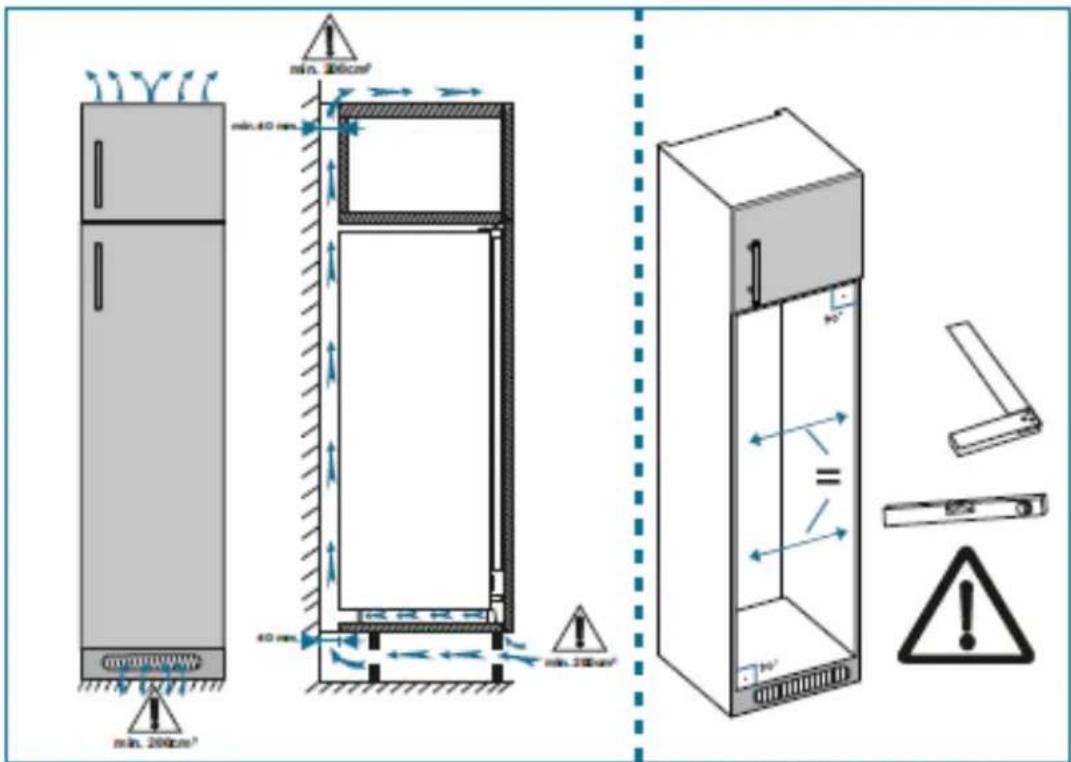
• Install the appliance in a dry and well ventilated place.
- The appliance should be located far from heat sources like radiators, boilers, sunlight, etc.
- Your appliance is designed to function optimally at a given ambient temperature. In this case, it is said to be designed for a particular "climate class". The climate class is clearly shown on the ID plate (see the "Contact" chapter). The refrigerator may not maintain satisfactory inside temperatures if it operates outside of the temperature limits set for the "climate class" it is designed for. Ensure that the chosen location is compliant with these temperature limits:
| Class | Ambient temperature |
| SN | This refrigeration appliance is designed for use at ambient temperatures between 10°C and 32°C |
| SN-ST | This refrigeration appliance is designed for use at ambient temperatures between 10°C and 38°C |
| SN-T | This refrigeration appliance is designed for use at ambient temperatures between 10°C and 43°C |
| N | This refrigeration appliance is designed for use at ambient temperatures between 16°C and 32°C |
| ST | This refrigeration appliance is designed for use at ambient temperatures between 16°C and 38°C |
| T | This refrigeration appliance is designed for use at ambient temperatures between 16°C and 43°C |
- Based on the above, avoid locating your appliance on balconies, verandas, terraces, in garages, etc. Excessively high temperature in summer and excessively low temperatures in winter can prevent it from functioning properly and therefore properly conserving food.
- Appliance levelling is achieved by adjusting one or more adjustable feet located under the unit (refer to the "Levelling the appliance" section).
① If your appliance is fitted with casters, then remember that they should only be used for short movements. Do not move the appliance over long distances on its casters.
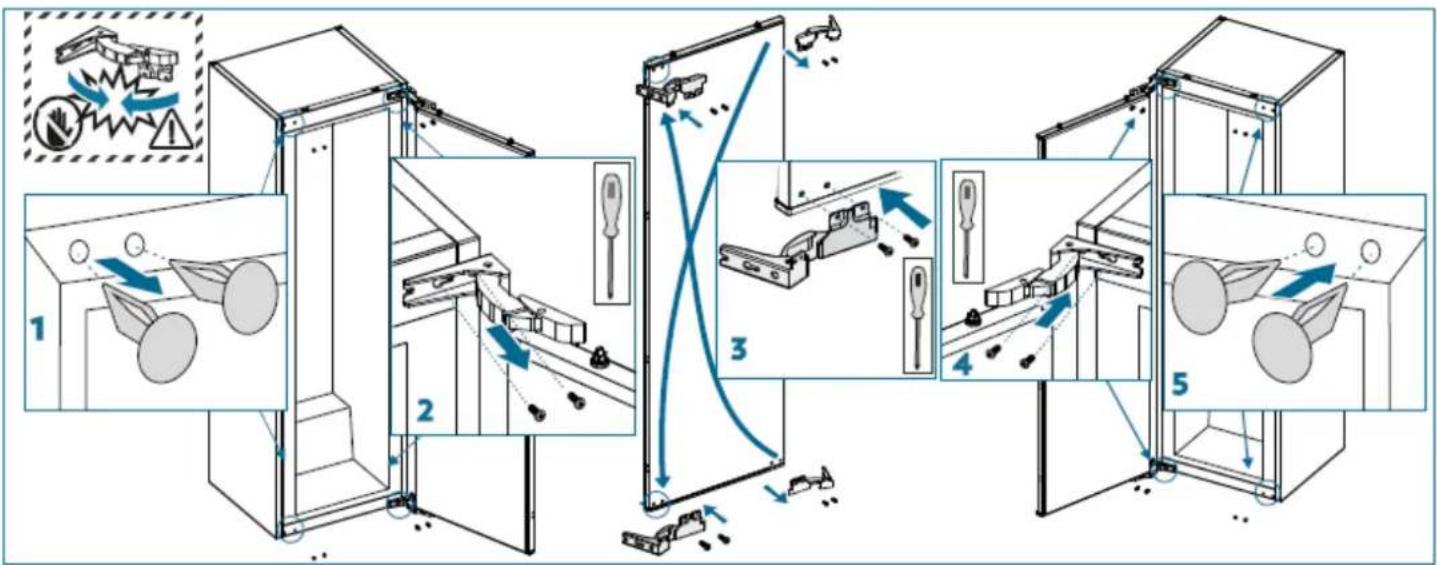
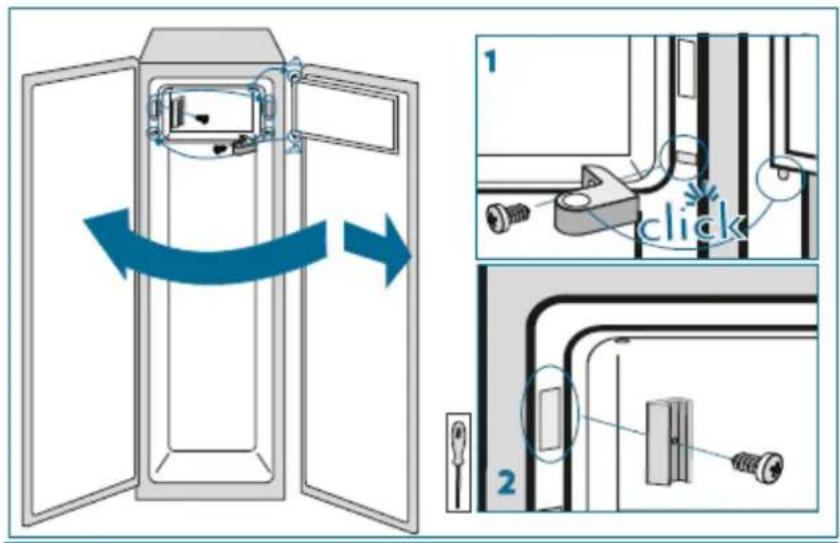
How to reverse the door
- Ensure the unit is unplugged and empty.
- To take the door off, it is necessary to tilt the unit backwards. You should rest the unit on something solid so that it will not slip during the door reversing process.
• All parts removed must be saved to do the reinstallation of the door. - Do not lay the unit flat as this may damage the coolant system.
- It is better that 2 people handle the unit during assembly.
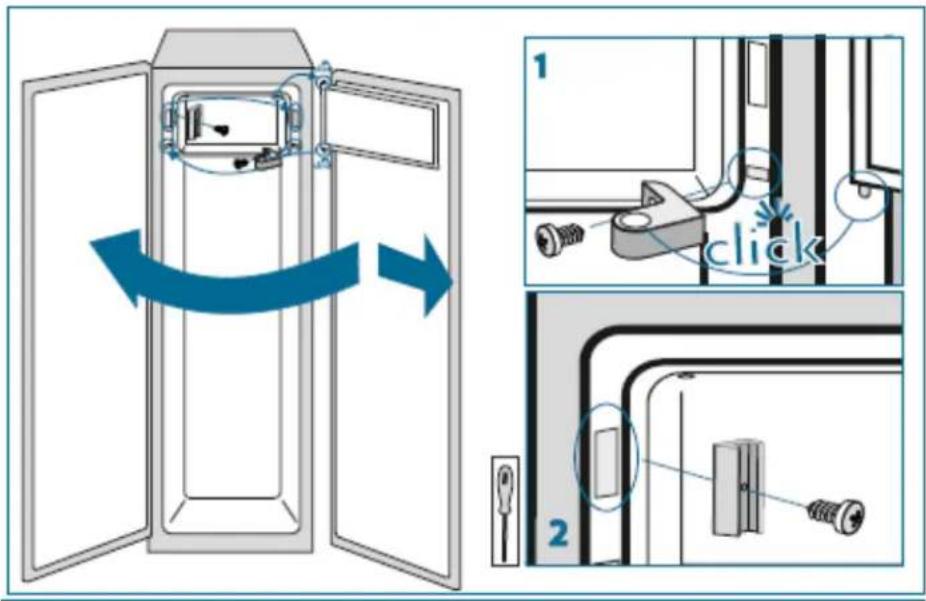
Refer to the drawings below. You must also reverse the door of the inner freezer as follow.
flowchart
graph TD
    A["1: Luggage being loaded"] --> B["2: Bagasse holding"]
    B --> C["3: Bagasse opening with tools"]
    C --> D["4: Bagasse handling with tools"]
    D --> E["5: Bagasse handling with tools"]
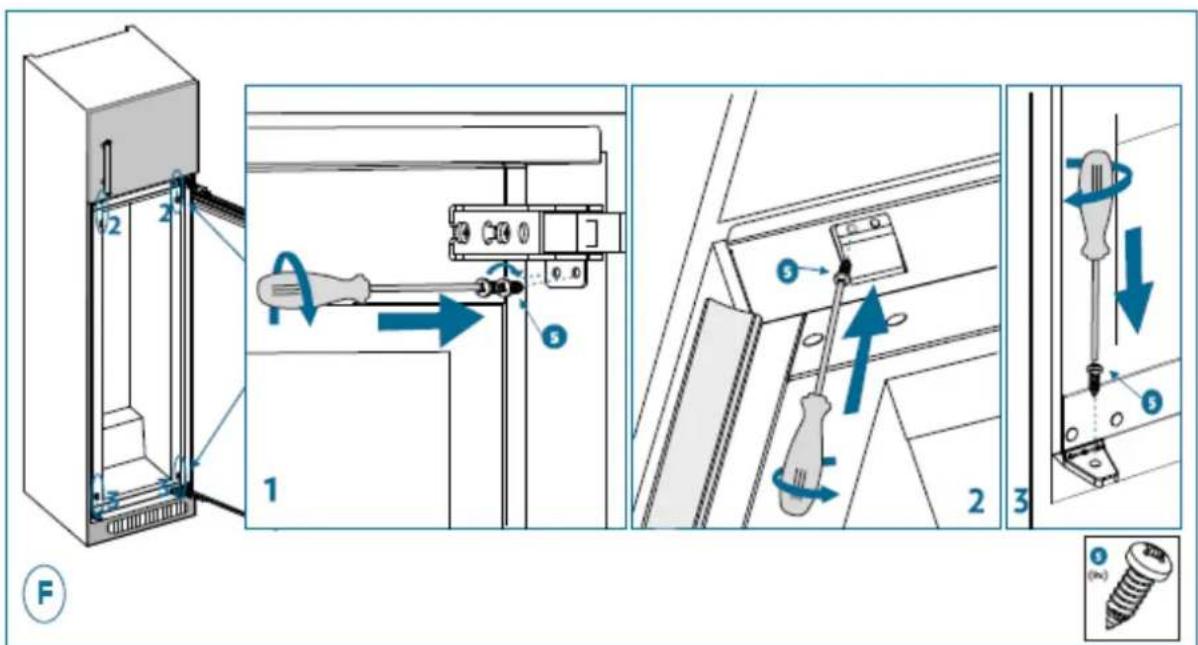
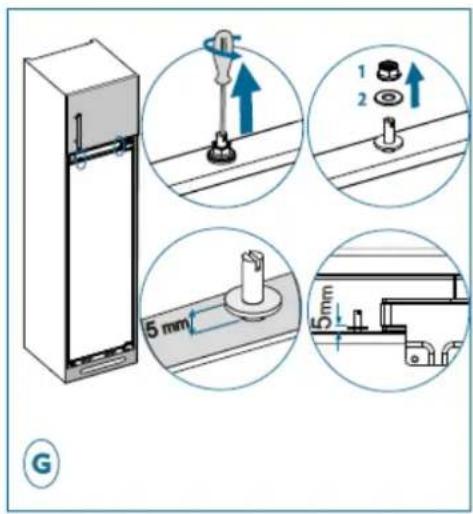
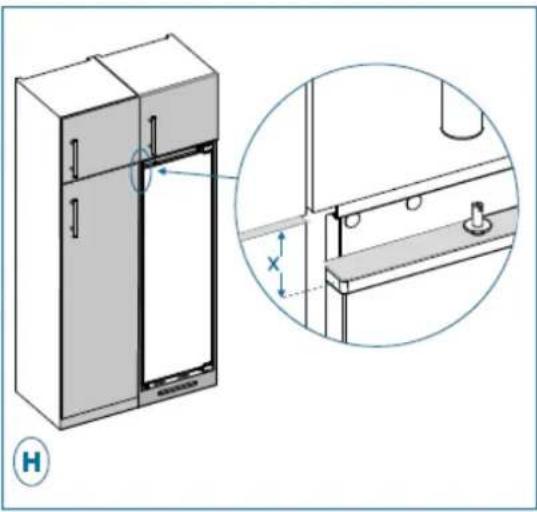
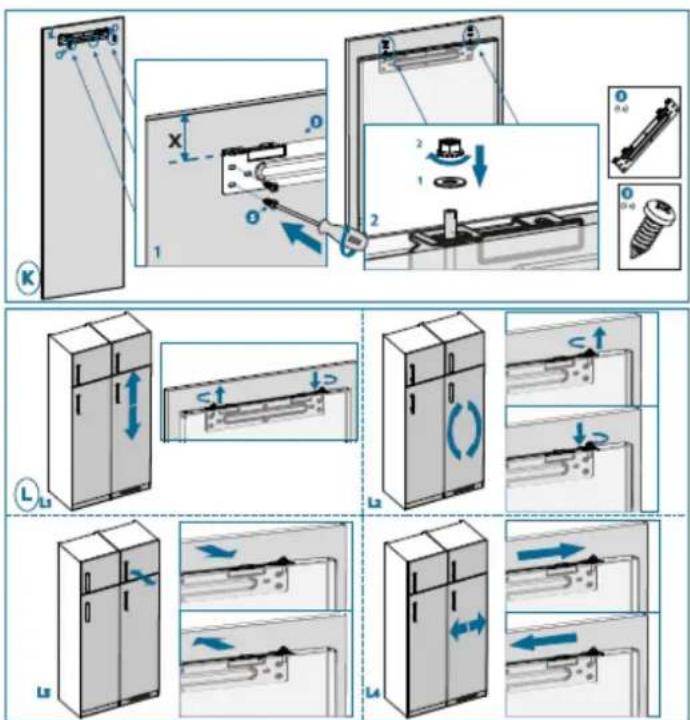
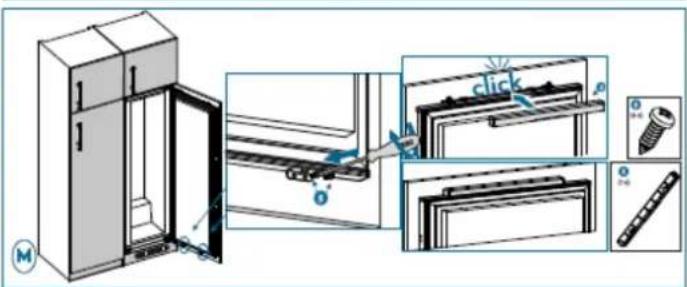
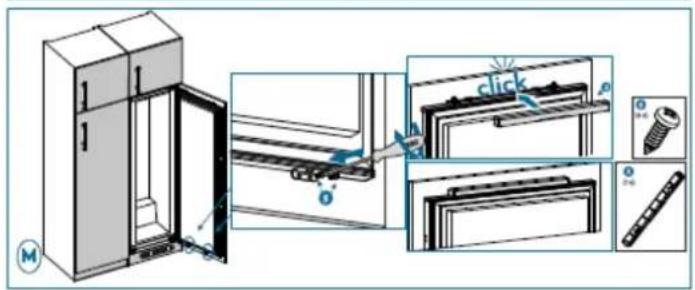
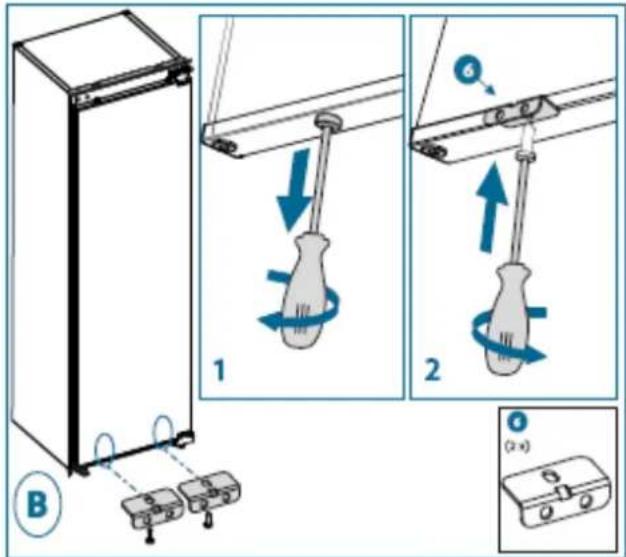
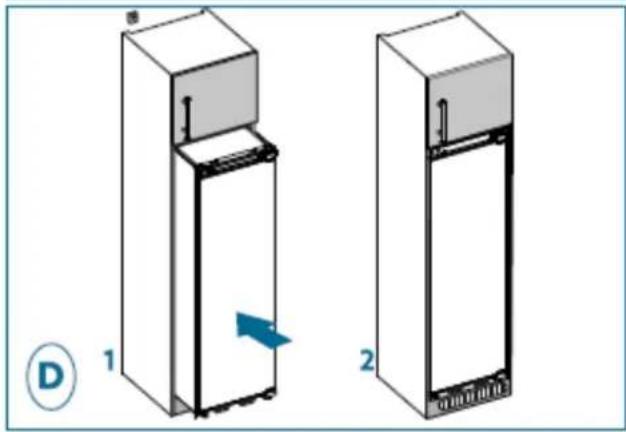
Installation
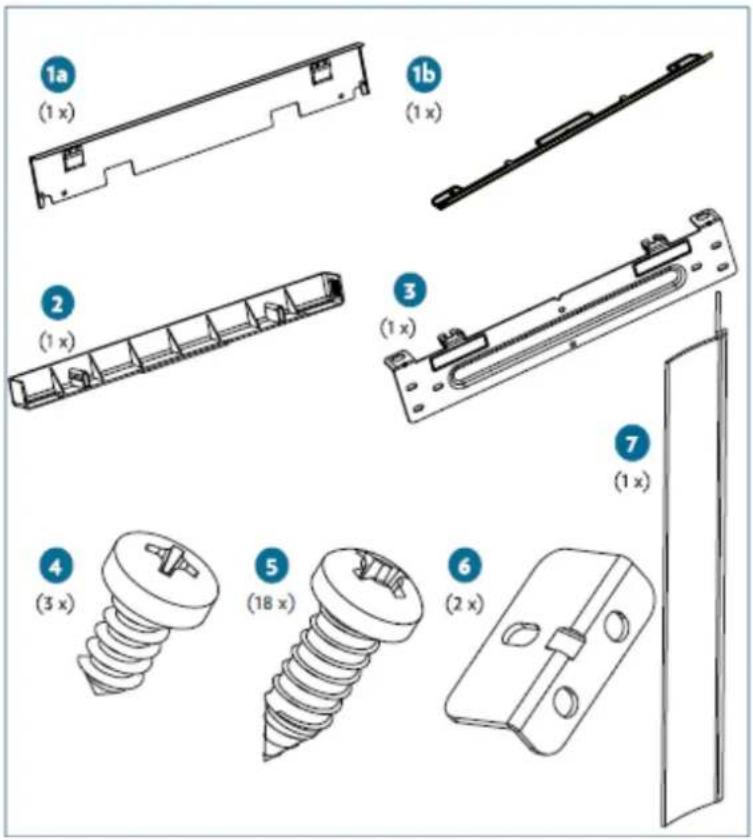
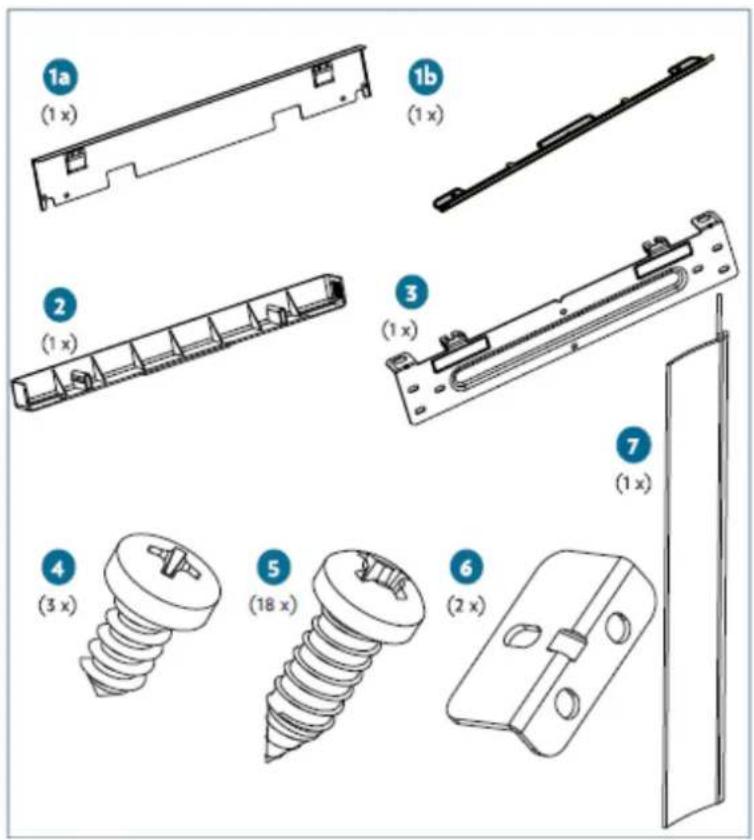
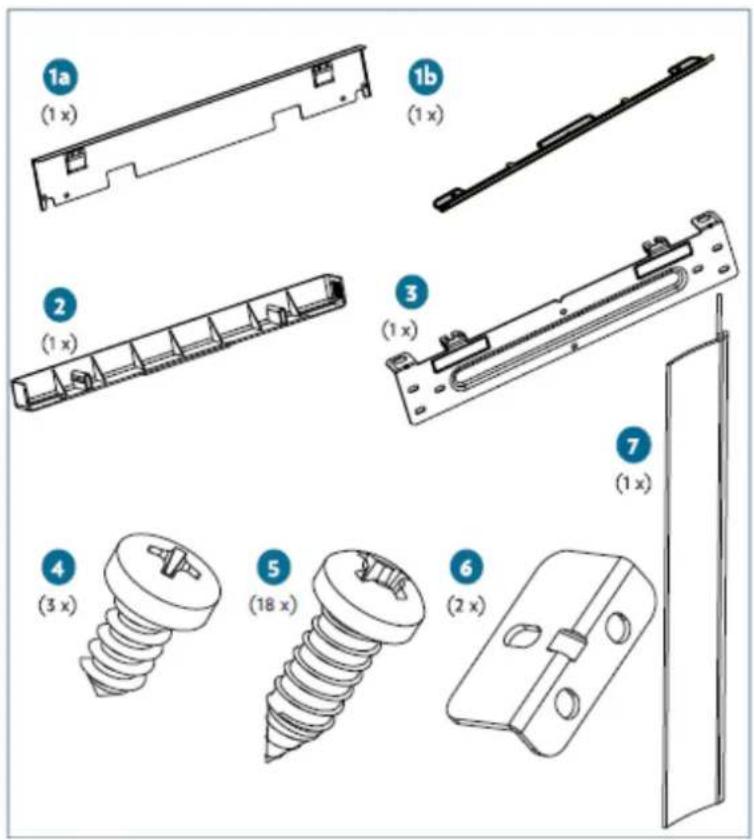
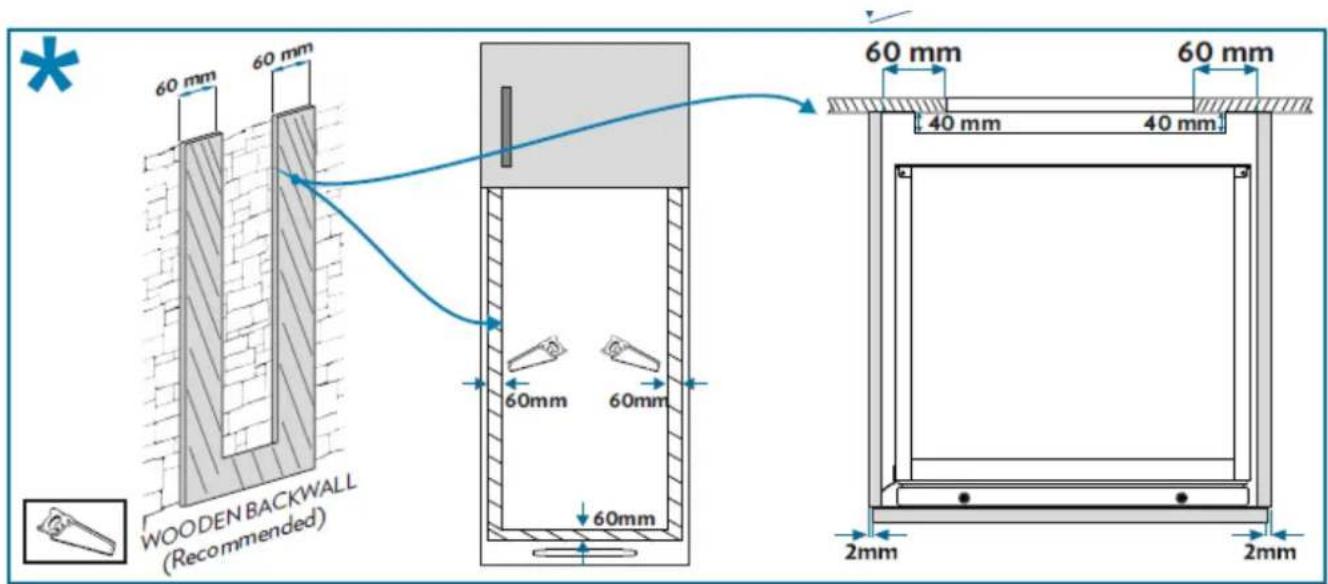
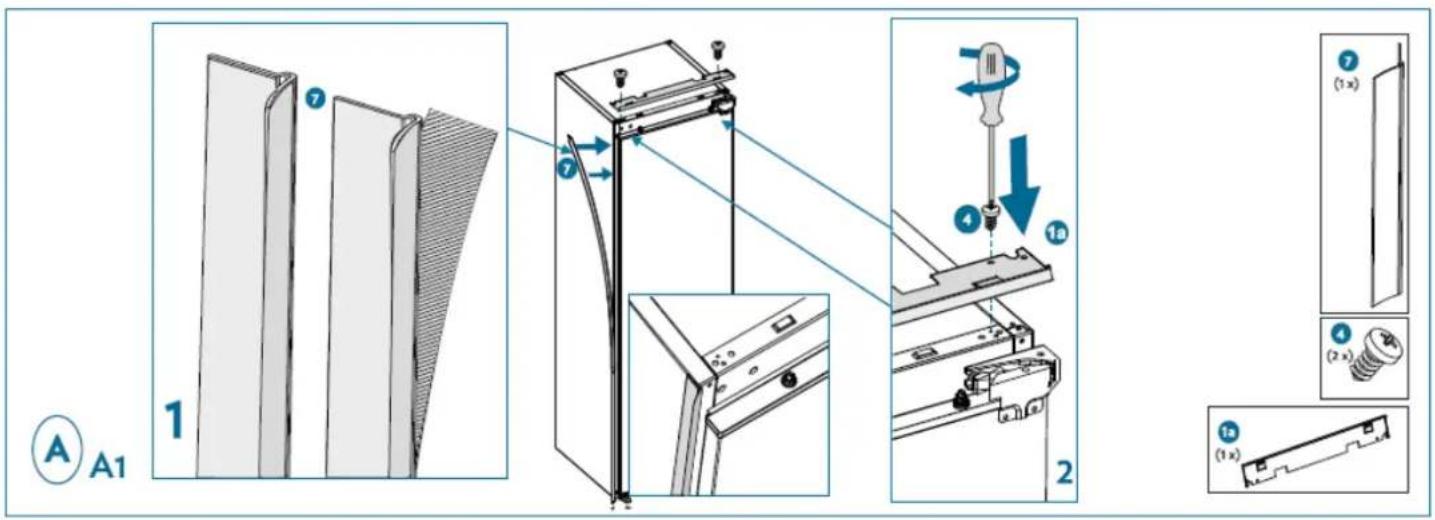
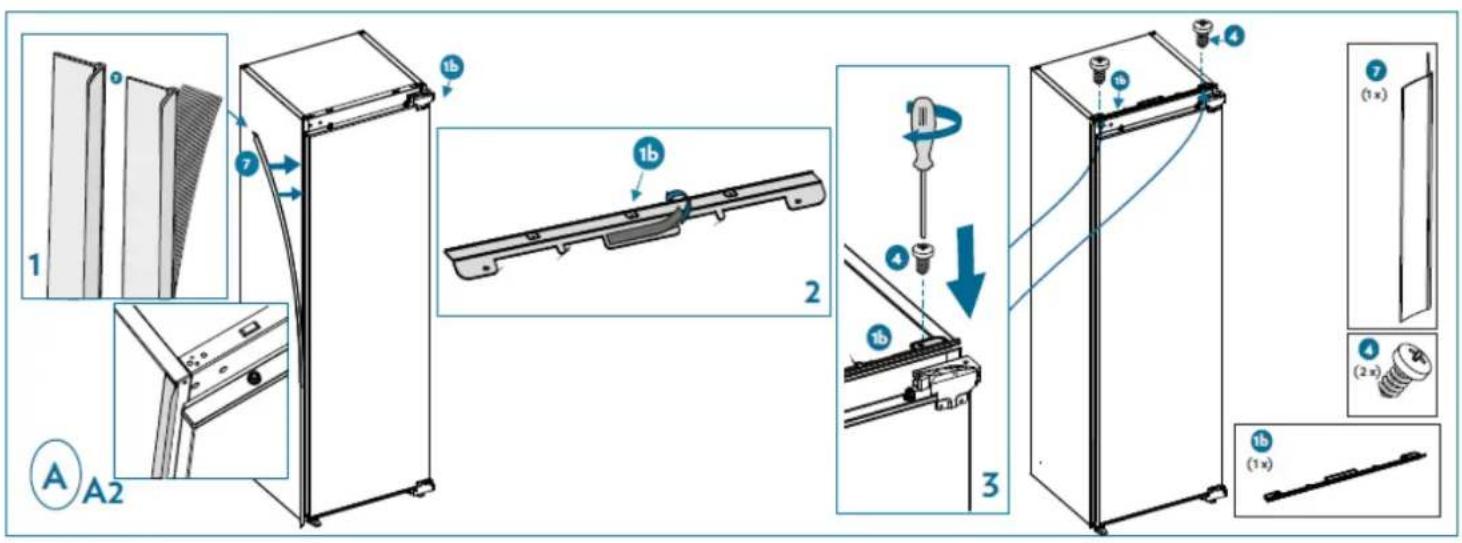
Kits for installation
*Depending on models
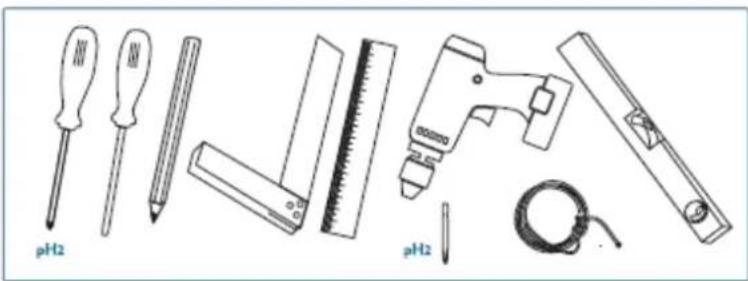
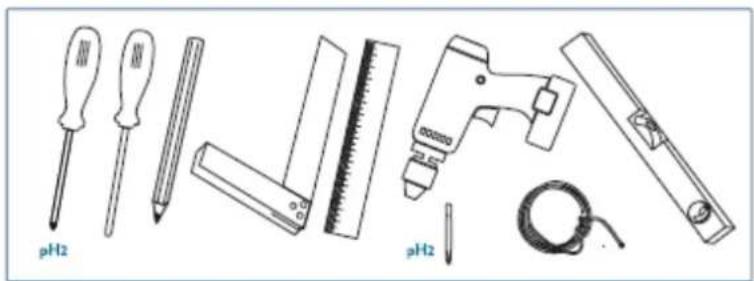
Tools needed
natural_image
Illustration of various tools including screwdriver, ruler, and pH2 tool (no text or symbols on objects)* 1225 - 1233 for metal top cover
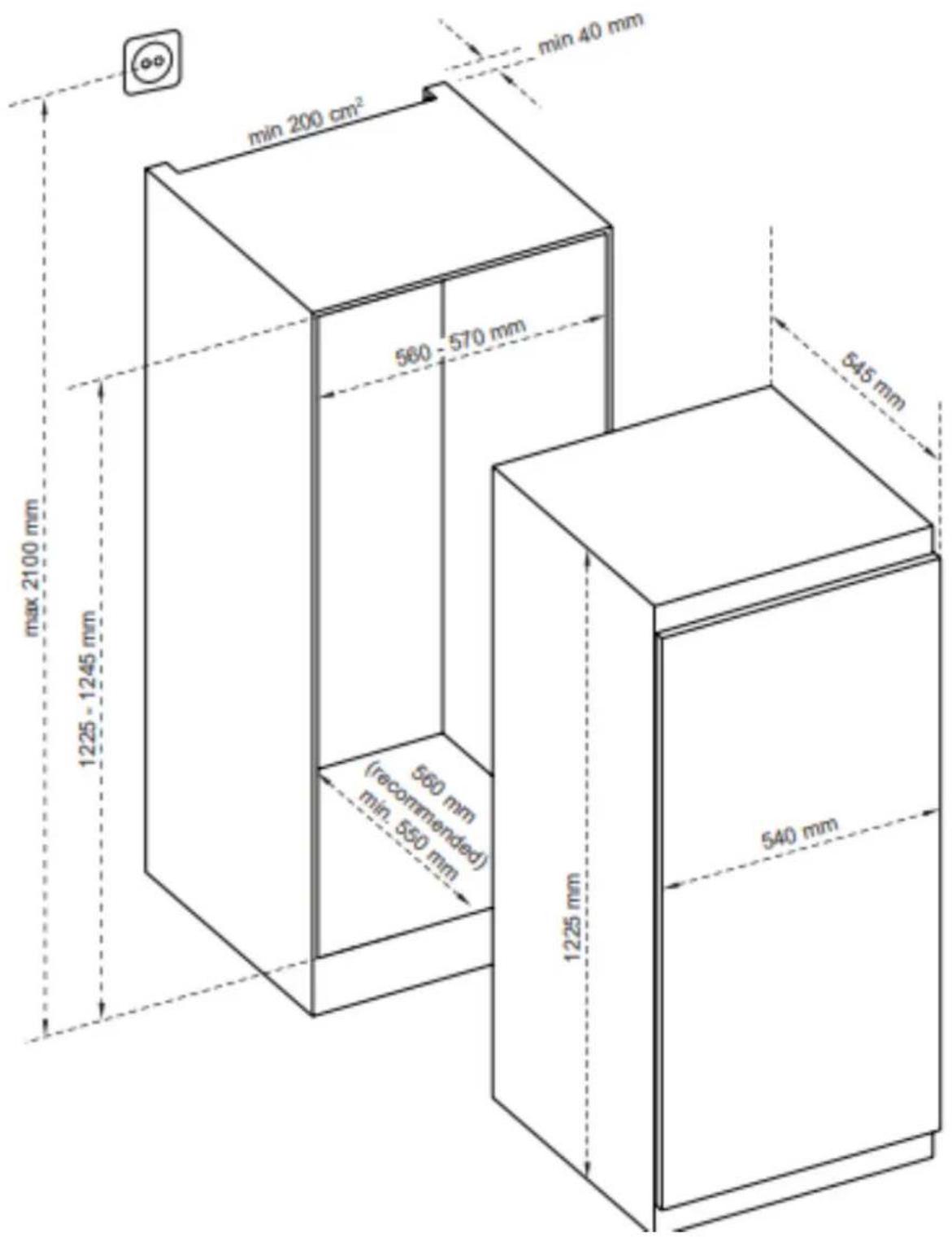
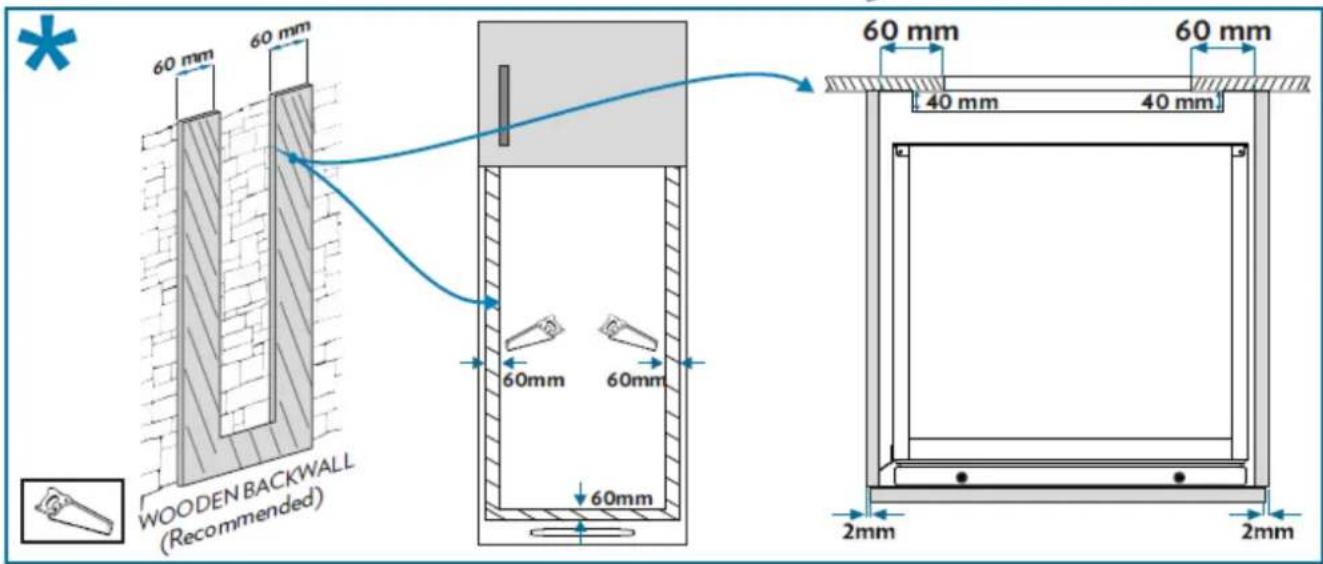
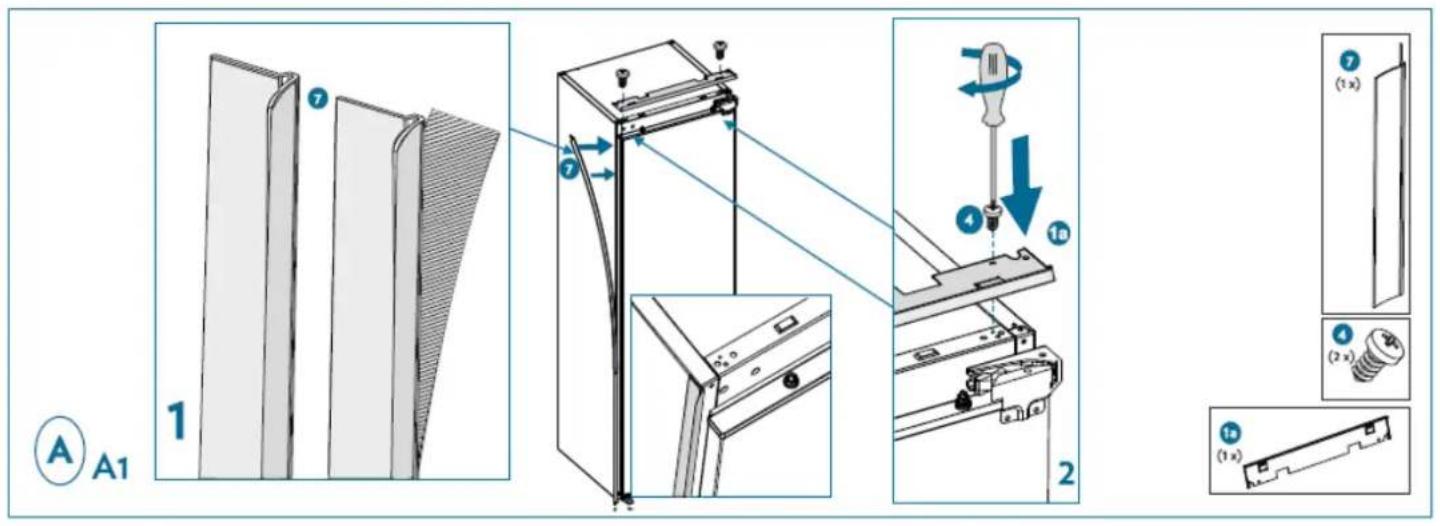
*Depending on models
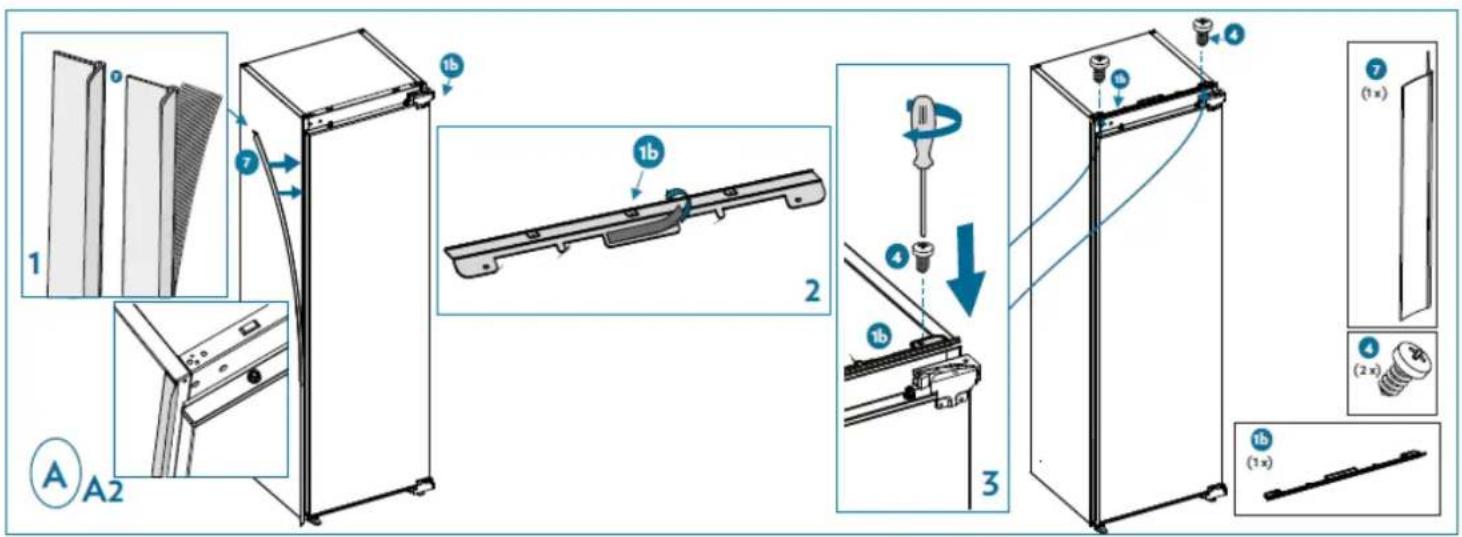
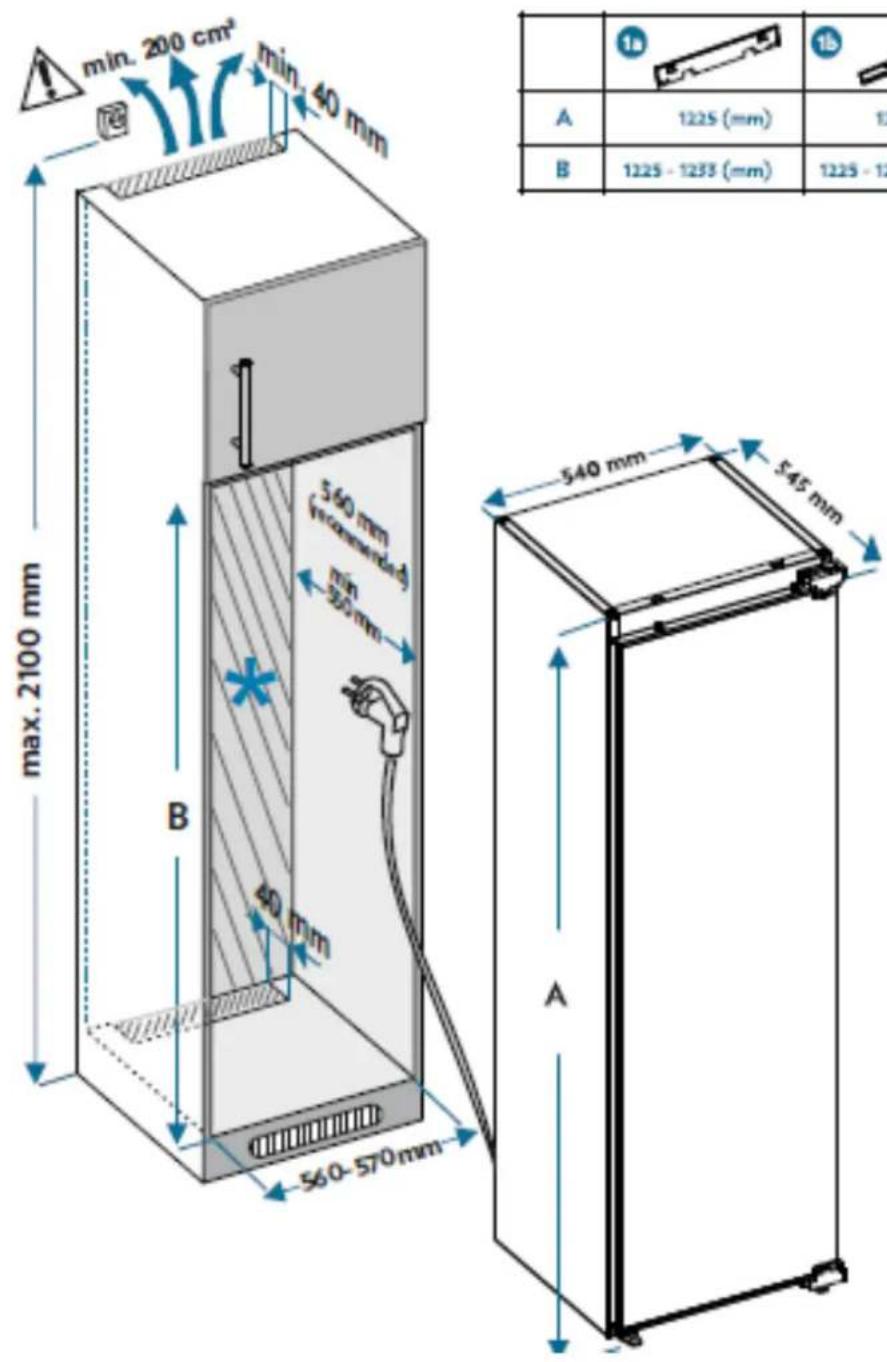
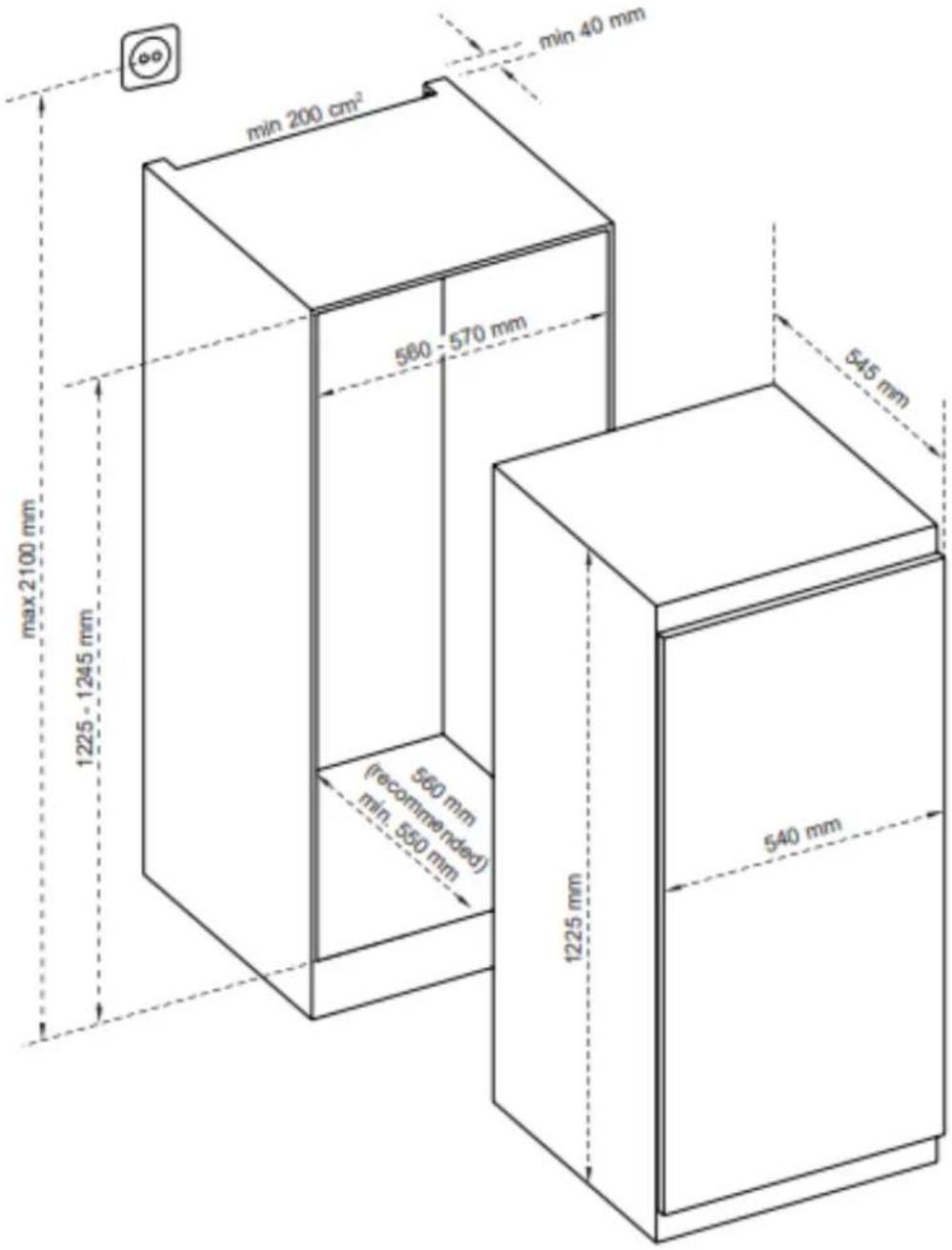
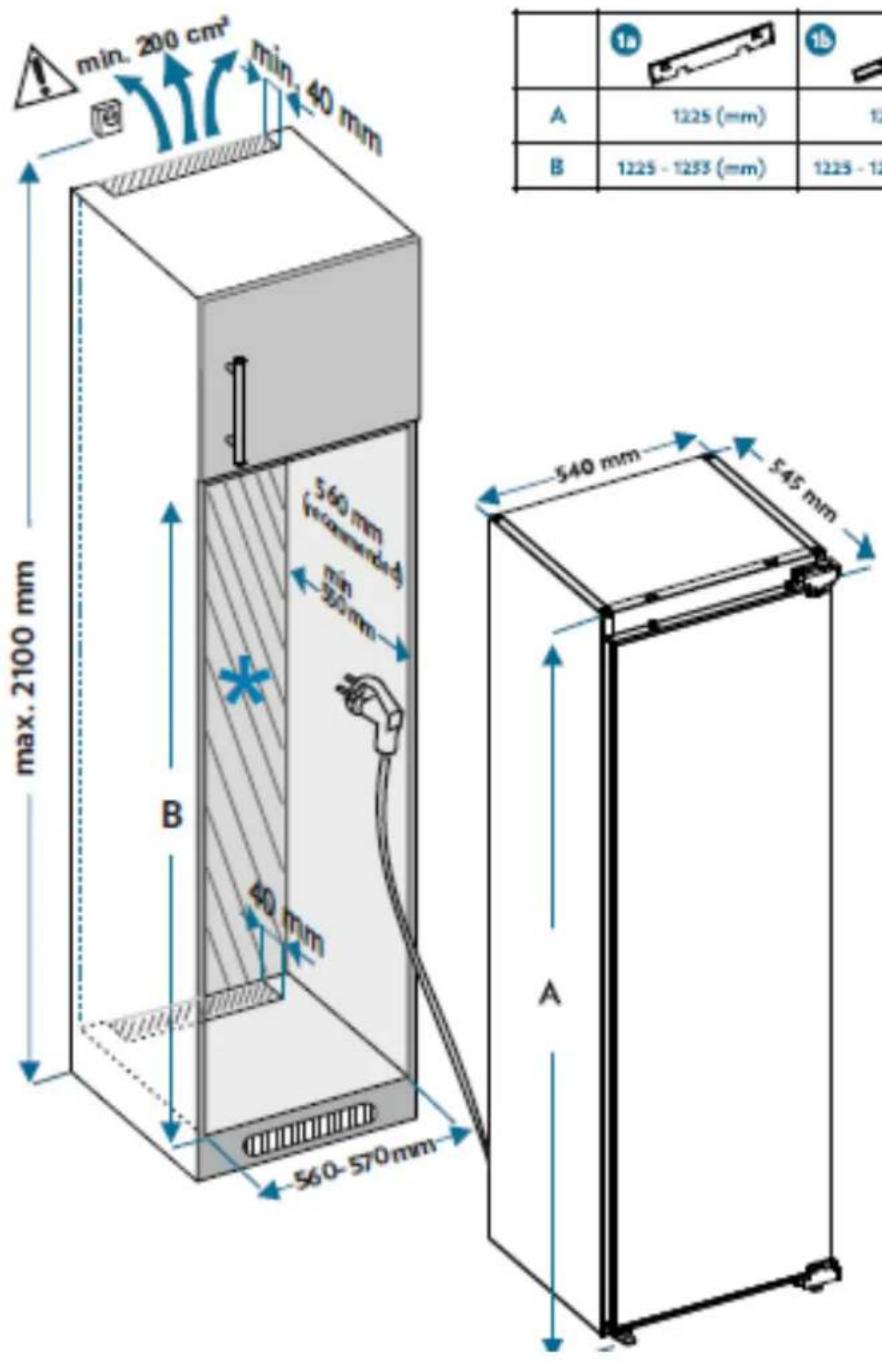
| 1a | 1b | |
| A | 1225 (mm) | 1225 (mm) |
| B | 1225 - 1233 (mm) | 1225 - 1245 (mm) |
*Depending on models
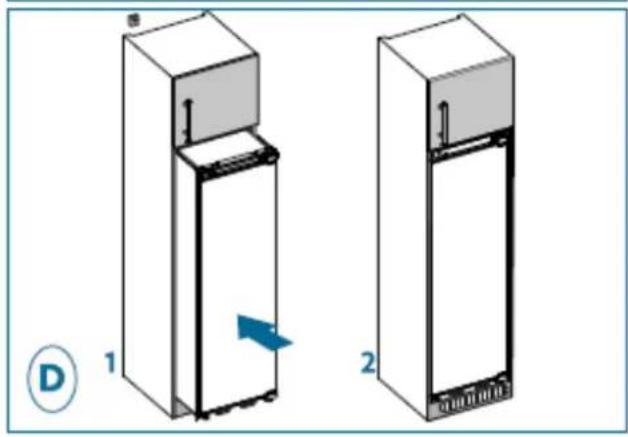
natural_image
Two 3D diagrams of a refrigerator with labeled parts and directional arrows, no text or symbols present.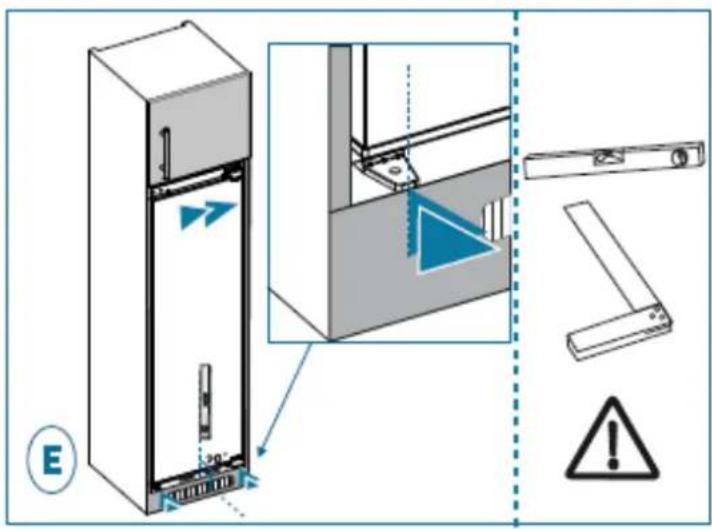
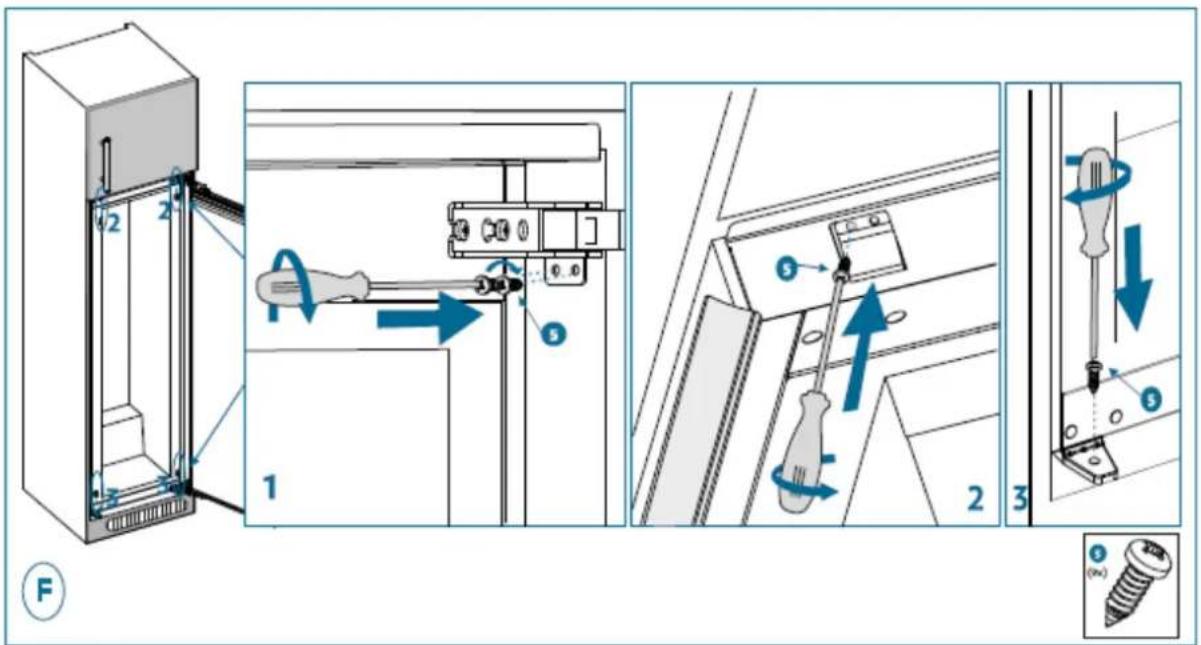
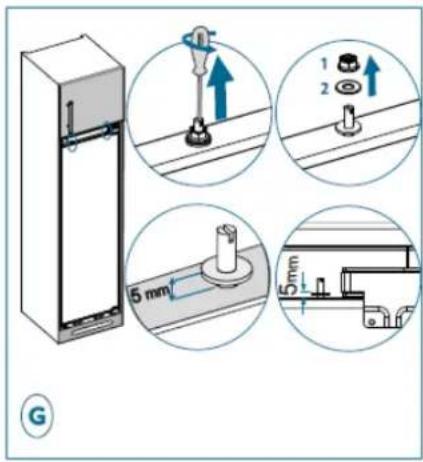
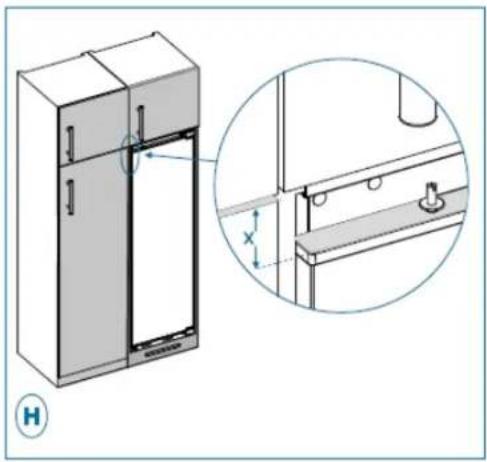
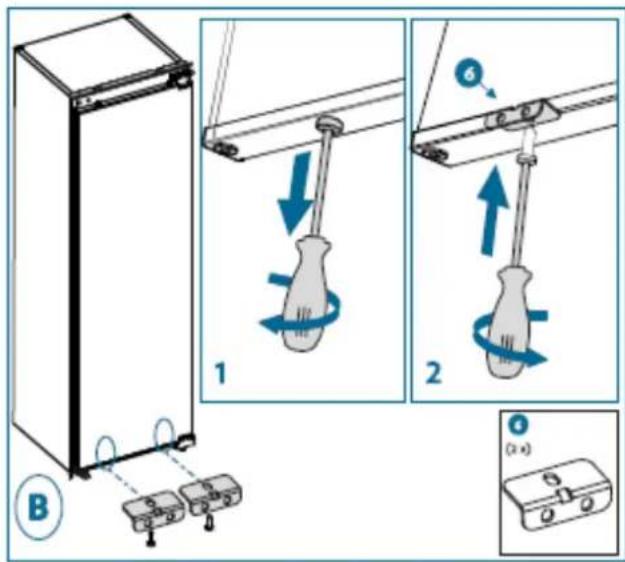
natural_image
Technical illustration of a refrigerator with side panel and close-up detail (no text or symbols)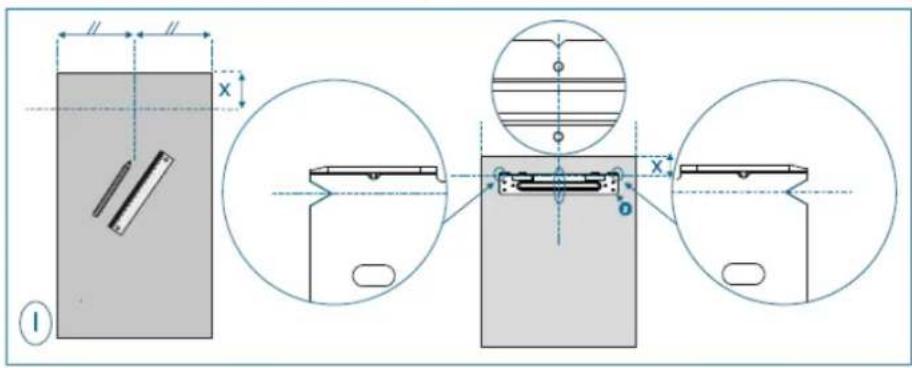
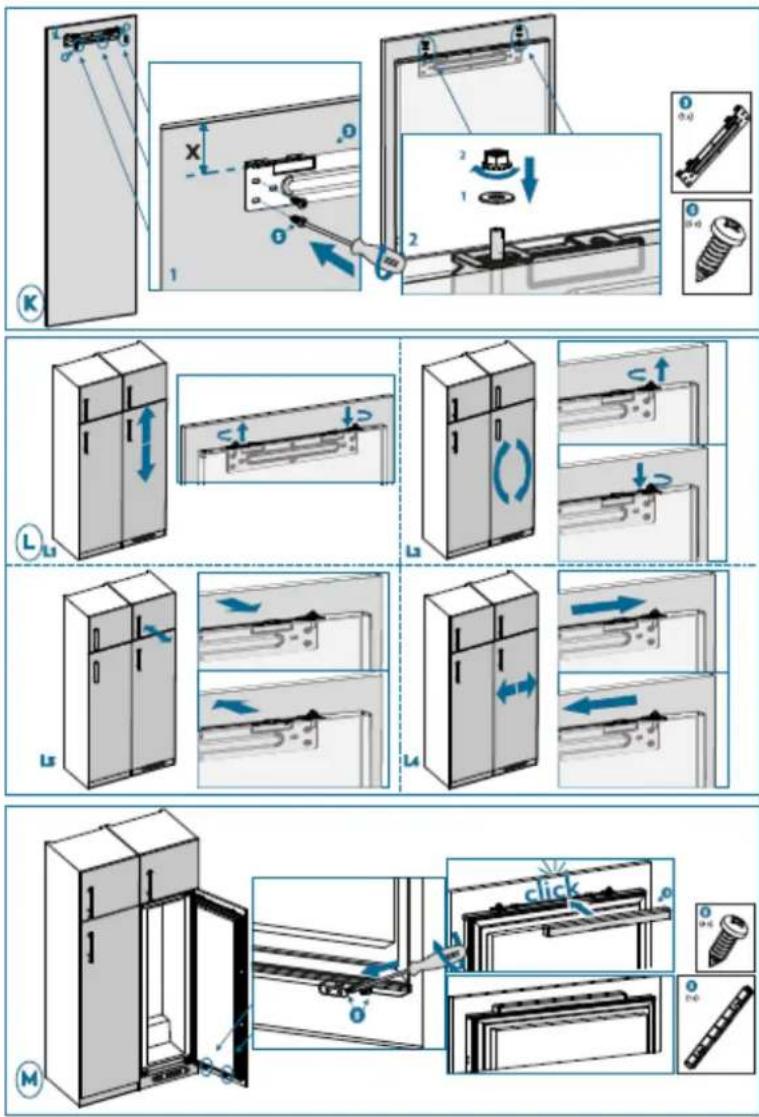
Levelling the appliance
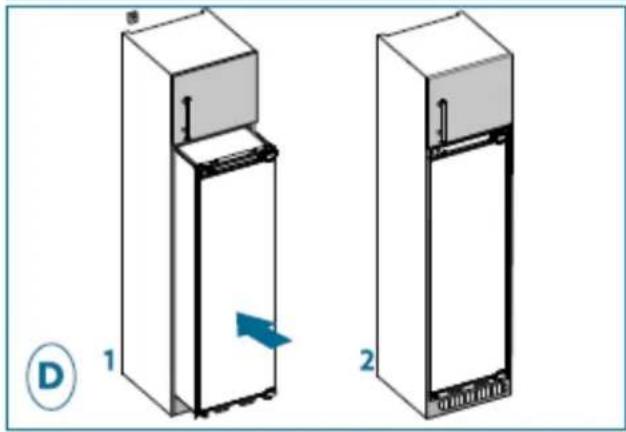
Choose a place to install the refrigerator on a flat surface.
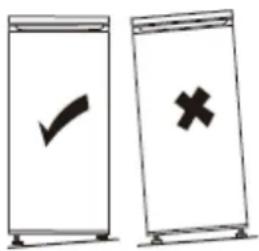
If the appliance is not level, the doors will not be correctly aligned and compartment sealing will not be ensured.
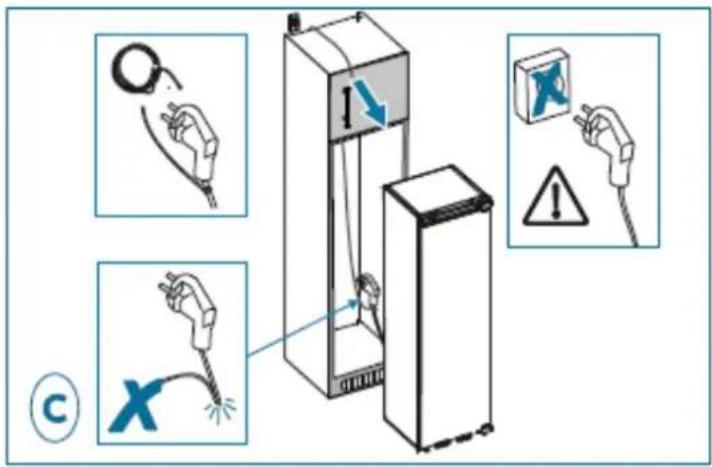
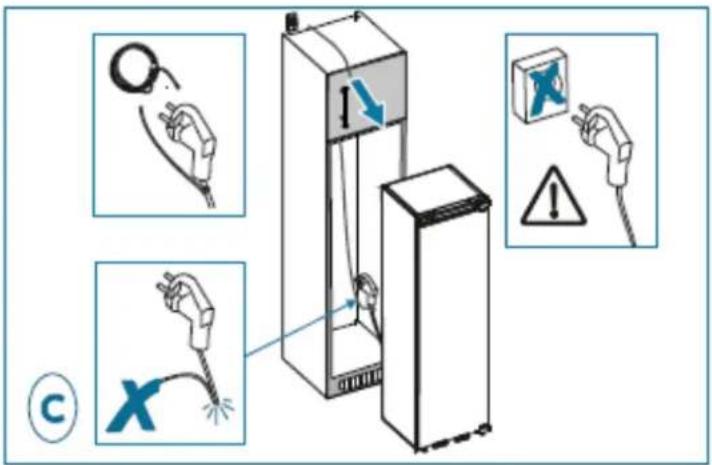
Electrical connections

Warning! It must be possible to unplug the appliance from the mains power, so the plug must remain easy to access after installation.
- The electric connections must meet the applicable standards and be capable of withstanding the maximum power shown on the ID plate.
- The power plug must be easily accessible and out of the reach of children.
- For your safety this appliance must be earthed. If the power plug is not earthed, consult a qualified electrician to connect your appliance in line with applicable regulations.
- Do not use extensions, adapters or multiple plugs.
- Do not place multiple plugs or portable power supply units behind the appliance.
The manufacturer declines all liability if the above-mentioned safety precautions are not complied with. If in doubt, refer to your reseller.
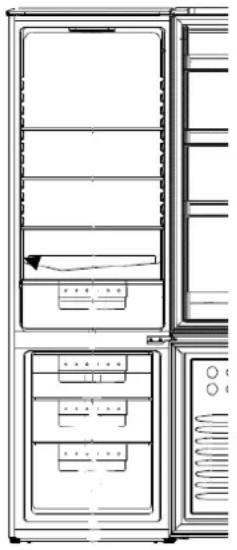
"COLD AREA" indicator

The sign opposite can be found in your fridge.
It clearly shows the coldest zone of your appliance, where the temperature is lower than or equal to +4^ C.
A temperature gauge in this zone allows you to check the settings of your fridge.

Adjust the thermostat
Temperature correct
Warning!
If the door of the fridge is left open for too long, the temperature inside the fridge will rise. Check the temperature gauge within 30 seconds after opening the door to make sure that the reading is correct.
Temperature setting
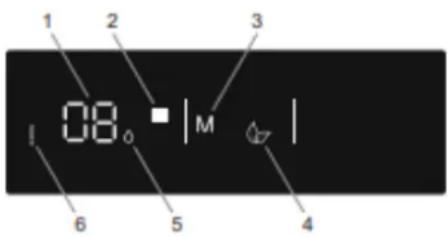
Buttons
3 - Press 3 to activate Eco mode
5 - This is the Super Cool indicator
Indicators
1 - This is the refrigerator's set value screen.
2 - Allows you to change the refrigerator setting and activate the Super Cool mode if required. The refrigerator can be set to 8, 6, 5, 4, 2°C and Super Cool.
4 - Economy mode indicator
6 - Alarm symbol
Super freeze mode
Objective:
- Freeze large quantities of food that cannot be stored on the quick-freeze shelf.
- Freeze prepared foods.
- Freeze fresh food quickly to keep it fresh
How to use:
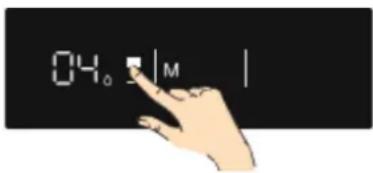
Press the freezer setting button (no. 5 in the control panel diagram) until the "Super Freeze" symbol (no. 2 in the control panel diagram) appears in the display. A signal sounds. The mode is set.
When this mode is activated:
• Economy modes cannot be selected.
- Super freeze mode can be cancelled in the same way as it was selected.
Note: After 24 hours, it returns to the normal setting.
Energy-saving mode:
During periods of less frequent use (when the doors are open) or when you're on the move, such as when you're on vacation, the Eco program can provide optimum temperature and save energy at the same time.
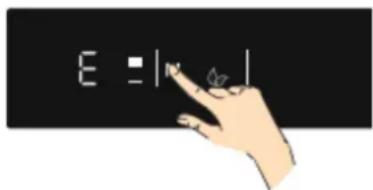
How to use:
Press the Mode button (3 on the control panel diagram) until the Economy mode symbol is displayed.
- If no key is pressed for 1 second. The mode is set. The Economy mode symbol flashes (mark 4 on the control panel diagram) 3 times. When the mode is set, the buzzer sounds.
- The refrigerator temperature segment (#1) displays "E".
- The Economy mode symbol and E light up until the end of the mode.
When this mode is activated:
- The refrigerator can be adjusted. When Economy mode is cancelled, the selected setting values are retained.
- Super cooling mode can be selected. Economy mode is automatically cancelled, and the selected mode is activated.
- To cancel, simply press the Mode button.2
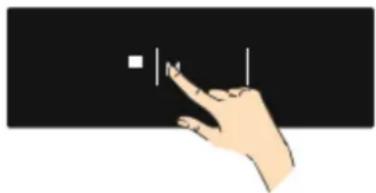
Screen saver mode:
This mode saves energy by switching off all control panel lighting when the panel is inactive.
How to use :
natural_image
Hand interacting with a black background, showing a white square and vertical line (no text or symbols)Screen saver mode is automatically activated after 30 seconds.
- If you press any key while the control panel lighting is off, the current device settings reappear on the screen, giving you the opportunity to make any desired changes.
- If you do not cancel the screen saver mode or press a key for 30 seconds, the control panel remains off.
To deactivate the screen saver mode :
- To remove the screen saver mode, first press any key to activate the keys, then press and hold the mode selector button (marked 3 on the control panel diagram) for 3 seconds.
- To activate Screen Saver mode, simultaneously press and hold the Mode button for 3 seconds.
- To reactivate the screen saver mode, press and hold the mode selector button (3 on the control panel diagram) for 3 seconds.
Refrigerator temperature settings
The initial temperature value of the refrigerator setting indicator is +4°C.
- Press the Refrigerator button once. (Mark 2 on control panel diagram)
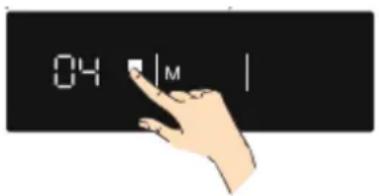
- When this key is pressed for the first time, the last value is displayed. is displayed on the refrigerator setting indicator. (#1).
- Each time this button is pressed, a lower temperature is set. (+8 °C, +6 °C, +5 °C, +4 °C +2 °C and Supercooling)
- When the refrigerator setting button is pressed until the (#5)Super cooling symbol is displayed and no button is pressed for 1 second, Super Cooling flashes.
- If the button is held down, the setting restarts from +8°C.
- The temperature value set before activation of the Supercool or Economy mode remains unchanged once the mode is terminated or cancelled. The unit continues. to operate at the previously selected temperature.
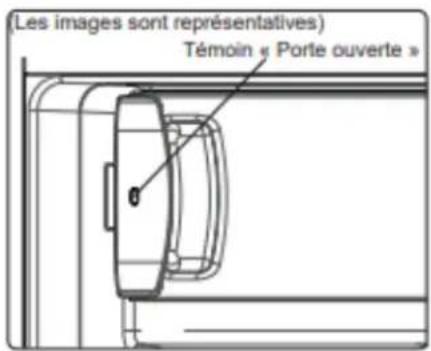
Door open indicator
The freezer's "Door open" indicator shows you whether the door is properly closed or not.
If the LED is red, the door is still open.
If the indicator light is white, the door is correctly closed.
Your refrigerator compartment is equipped with shelves, door racks and drawers to help you store your food in the right place.
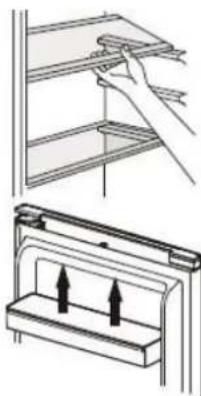
Using the shelves
The walls of the refrigerator are equipped with a series of runners so that the shelves can be positioned as desired.
Positioning the small door trays
The small door trays can be removed to assist cleaning. To do this, progressively pull the door rack in the direction indicated by the arrows until you can remove it completely. After cleaning it, replace it in the desired location.
natural_image
Diagram showing a hand placing a shelf item into a rack, and a close-up of a mechanical component with upward arrows indicating motion (no text or symbols)Bottle shelf
This equipment is dedicated to bottles storage. It allows to optimize space and to save space when the bottle rack is full. For optimum use, recommended position of the bottle shelf is the second one starting from the top of the fridge.
Hints and Tips
- The refrigerator is a domestic appliance suited to short-term conservation of food products like fruit, vegetables, drinks, etc.
- Do not use it as a specialised appliance for storing products that require storage in line with strict temperature rules, like medicines, etc.
• Cooked foods must be cooled to ambient temperature before they are placed in the refrigerator.
• We recommend placing food in sealed containers before storing them in the fridge.
• Never place food right next to the air outlet as this could impede the airflow and freeze the food.
- Never place volatile, inflammable or explosive liquids like solvents, alcohol, acetone or petrol in the fridge. There is an explosion hazard.
- Never leave the door open longer than necessary.
- If the appliance is switched off or unplugged, wait at least 5 minutes before plugging the appliance in or restarting it in order to prevent damage to the compressor.
- The cooling unit of your refrigerator is located at the back of the appliance. Therefore, water droplets or ice may form on the rear surface of your fridge due to the operation of the compressor at specified intervals. This is normal, there is no need to perform a defrosting operation unless there is an excessive amount of ice.
- If you do not intend to use your fridge for a long period of time (such as during the holidays), set the thermostat to “•” position, defrost and clean your fridge, leaving the door open to prevent the formation of mildew and odour.
Hints for refrigeration
- Meat (all types) must be wrapped in sealed polyethylene bags and placed on the glass shelf above the crisper.
- For safety, store in this way only one or two days at the most.
• Cooked foods, cold dishes, etc.: these should be covered and may be placed on any shelf. - Fruit and vegetables: these should be thoroughly cleaned and placed in the special drawer provided.
- Butter and cheese should be placed in special sealed containers, wrapped in aluminium foil or placed in a sealed bag.
- Milk bottles should be capped and stored in the bottle rack in the door.
- To save energy, all of the door shelves and glass shelves should be fitted in their designed location.
Ice cubes
This appliance can accept one or more ice cube trays for making ice cubes.
Freezing tips
To help you optimise the freezing process, here are some important tips:
- The maximum amount of food that you can freeze every 24 hours can be found on the ID plate.
- The freezing process takes 24 hours. Do not add any more food to freeze during this time.
- Only freeze good quality, fresh and properly washed food.
- Prepare food in small portions to enable it to be rapidly and completely frozen and to make it possible to subsequently thaw only the quantity required.
- Wrap up the food in aluminium foil or polyethylene food wraps which are airtight.
- Do not allow fresh, unfrozen food to touch the food which is already frozen to avoid raising their temperature.
- Iced products, if consumed immediately after removal from the freezer compartment, may cause frost burns to the skin.
• We recommend labelling and dating each frozen package.
• To obtain ice cubes faster, we recommend placing the ice cube trays in the top drawer.
Thawing food
Before eating, frozen or deep frozen food may be thawed in the refrigerator compartment or at ambient temperature, depending on the time available.
Some food may also be cooked directly when taken out of the freezer, while it is still frozen. In this case, cooking will take longer.
Important: In the event of accidental thawing, caused for example by a power break, quickly eat the thawed food. Never refreeze thawed food.

Warning! No thawed food may be replaced in the freezer. Place it in the refrigerator then eat it quickly.
Refreezing a thawed product encourages the spread of bacteria. This may become a health hazard if the bacteria that spreads are pathogens, as these may cause more or less serious food poisoning depending on the type of bacteria involved. If any doubt, cook the food involved.
Hints for the storage of frozen food
To guarantee optimum performance, comply with the following instructions:
- Ensure that frozen food has been stored correctly by the food retailer.
- Ensure that frozen food is quickly carried from the retailer to your freezer.
- Do not open the door too often or avoid leaving the door open longer than necessary.
- Once thawed, food will deteriorate rapidly and should never be refrozen.
- Do not exceed the storage states shown on the food.

Warning! Always unplug your appliance before any maintenance work. Never pull on the power cord, but only on the plug itself.
Cleaning
For hygiene reasons, regularly clean the appliance (sidewalls and interior and exterior accessories).
Important! Ethereal oils and organic solvents can damage plastic parts, e.g. lemon juice, butyric acid or acetic acid.
- Do not allow such substances to come into contact with appliance parts.
- Do not use any abrasive cleansers.
- Remove food from the appliance. Store it in a cool place and keep well covered.
- Clean the appliance and the interior accessories with a cloth and lukewarm water with a diluted white vinegar or bicarbonate of soda solution. Do not wash the accessories in a dishwasher.
• After cleaning them, rinse surfaces with clear water and dry them.
• After everything is dry, plug the appliance back into the plug. - Make sure that no water enters the lamp housing and other electrical components.
- Clean the condenser with a brush at least twice a year. This will help you to save energy costs and increase productivity.
① Never clean the appliance with a steam cleaner.
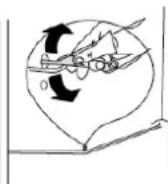
Cleaning the drain
To stop the defrost water from running into the refrigerator, clean the drain at the back of the refrigerator part from time to time. To do this, use a cleaning product as shown in the diagram on the right.
Replacing the light
This product contains a light source with energy efficiency class F.
The interior lamp is LED. To replace it, please contact your after-sales service or an authorized technician.
You'll find all the information you need to contact our authorized technicians and after-sales service in the "CONTACTS & INFORMATION" section.
Defrosting the freezer
A thin coating of frost will slowly form on the inside walls of the freezer. This layer should be removed. Never use a sharp object as it could damage the appliance.
For hygiene and food conservation reasons, we recommend defrosting the freezer at least once a year by proceeding as follows:
- Pull out the mains plug from the mains socket.
- Remove any food from the compartment and place it in a special container to ensure that there is no break in the cold chain (e.g. in an ice box or insulated bag, etc.).
- Leave the freezer door open (NB: leave the refrigerator door closed) and place a basin under the appliance to recover the water from defrosting. You can also speed up this process by placing a bowl of hot water inside the compartment.
- Once defrosting is complete, dry the inside properly.
- Plug the power cord back in to return the appliance to service.
- Wait until the freezer has reached the recommended temperature before putting the food back in it.
Troubleshooting

Warning! If there is any anomaly, unplug your appliance. Only a qualified electrician or competent person may carry out troubleshooting.
If there is any anomaly during operation, check the following points before calling our approved after sales service or a qualified professional.
| ERROR TYPE | MEANING | WHY | WHAT TO DO |
| E01 | Sensor warning | Call Service for assistance as soon as possible. | |
| E02 | Sensor warning | Call Service for assistance as soon as possible. | |
| E03 | Sensor warning | Call Service for assistance as soon as possible. | |
| E06 | Sensor warning | Call Service for assistance as soon as possible. | |
| E07 | Sensor warning | Call Service for assistance as soon as possible. | |
| E08 | Low Voltage Warning | Power supply to the device has dropped to below 170 V. | - This is not a device failure, this error helps to prevent damages to the compressor.- The voltage needs to be increased back to required levelsIf this warning continues an authorised technician needs to be contacted. |
| E10 | Fridge compartment is not cold enough | Likely to occur after:- Long term power failure.- Hot food has been left in the fridge. | 1. Set the fridge temperature to a colder value or set Super Cool. This should remove the error code once the required temperature has been reached. Keep doors closed to improve time taken to reach the correct temperature.2. Please empty the location at the front area of air duct channel holes and avoid putting food close to the sensor.If this warning continues an authorised technician needs to be contacted. |
| E11 | Fridge compartment is too cold | Various | 1. Check is Super Cool mode is activated2. Reduce the fridge compartment temperature3. Check to see if vents are clear and not cloggedIf this warning continues an authorised technician needs to be contacted. |
① Some noises may be heard during normal appliance operation (compressor operating cycle, automatic defrosting, circulation of the refrigerating gas through the appliance, etc.).
If you cannot find the cause of the anomaly, only call our approved after sales service or a qualified professional.
Customer Relations
For more information about our products or to contact us, please:
Visit our website: www.de-dietrich.com
Servicing and repairs,
Any repairs to your appliance must be made by a qualified professional accredited to work on the brand.
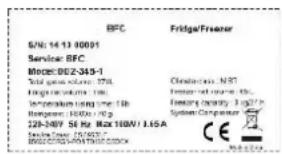
When making contact, mention the complete reference of your appliance (model, type, serial number). This information is provided on the ID plate located at the bottom left of the refrigerator (above the shelf or behind the crisper).
natural_image
Interior view of a refrigerator with doors, refrigerators, and a cooling unit (no text or symbols visible)| Reference | |
| Serial number | |
| Type | |
| Model | |
| Service Reference |
You can find a list of approved service centres on our website www.de-dietrich.com
This website also allows access to information on spare parts.
Original replacement parts

During servicing, ask for only original spare parts to be used.
The minimum length of time for making available spare parts listed in European Regulation 2019-2019-EU and accessible especially to the appliance user is 10 years under the terms set out in the above regulation.
Guarantee
Please contact your reseller to benefit from the guarantee. The manufacturer does not offer any commercial guarantee for the refrigeration appliance.
flowchart
graph TD
    A["1: Luggage being loaded"] --> B["2: Bagasse handling"]
    B --> C["3: Bagasse handling with plastic bag"]
    C --> D["4: Bagasse handling with plastic bag"]
    D --> E["5: Bagasse handling with plastic bag"]
    style A fill:#f9f,stroke:#333
    style E fill:#bbf,stroke:#333
Installationskits
*Je nach Modell
Benötigte Werkzeuge
natural_image
Illustration of various household cleaning tools including screwdriver, ruler, and tool holder (no text or symbols present)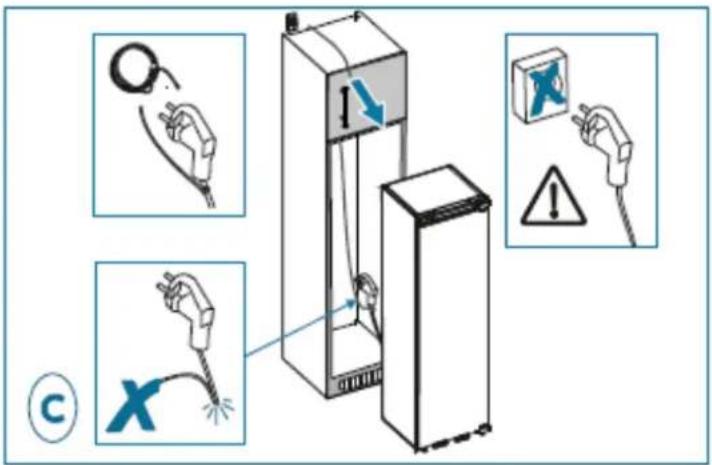
natural_image
Two 3D diagrams of a refrigerator with labeled parts and directional arrows, no text or symbols present.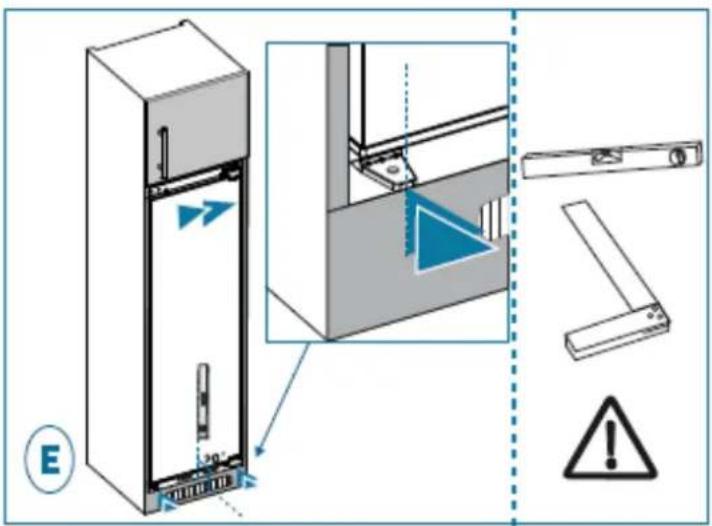
natural_image
Technical illustration of a refrigerator with an inset close-up showing the exterior wall and shelf structure (no text or symbols)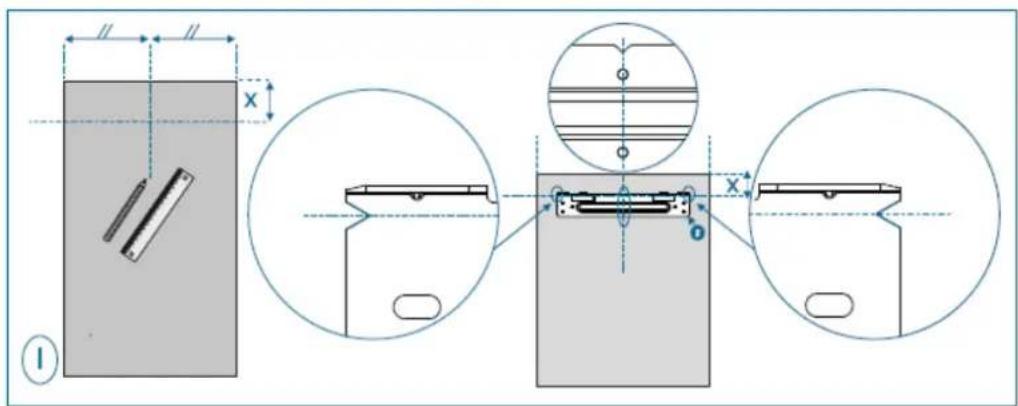
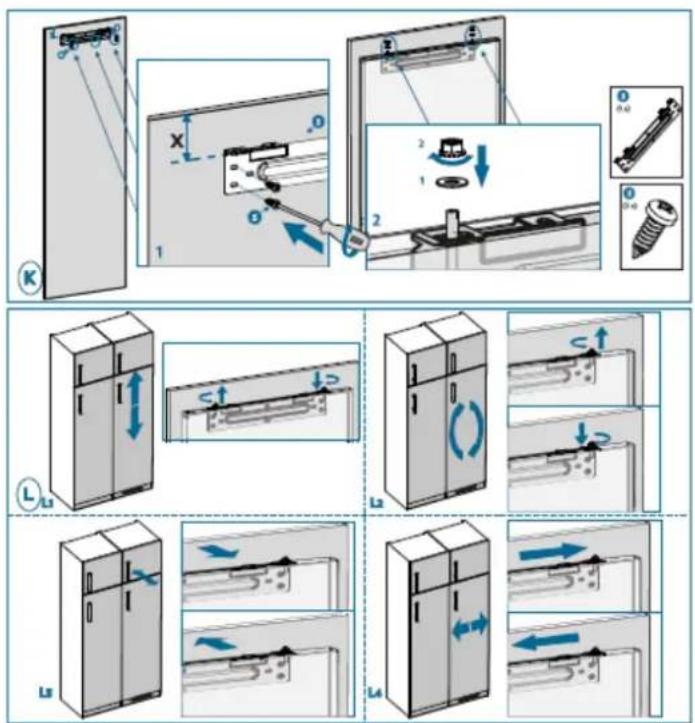
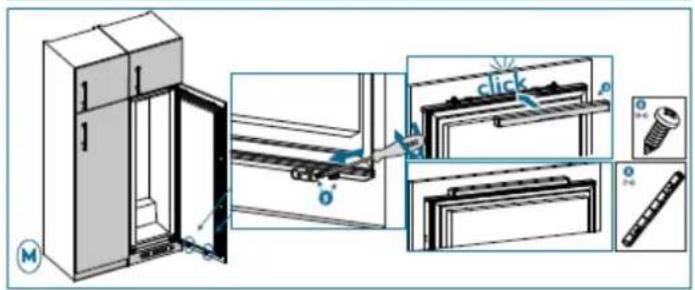
natural_image
Illustration of a hand interacting with a black background, no text or symbols presentnatural_image
Technical illustration showing a hand placing a component above a shelf, and a close-up of a mechanical component with two upward arrows (no text or symbols)natural_image
Interior view of a refrigerator with doors, shelves, and a cooling unit (no text or symbols visible)flowchart
graph TD
    A["1: Luggage being loaded"] --> B["2: Bagasse handling"]
    B --> C["3: Bagasse handling with plastic bag"]
    C --> D["4: Bagasse handling with plastic bag"]
    D --> E["5: Bagasse handling with plastic bag"]
    style A fill:#f9f,stroke:#333
    style E fill:#bbf,stroke:#333
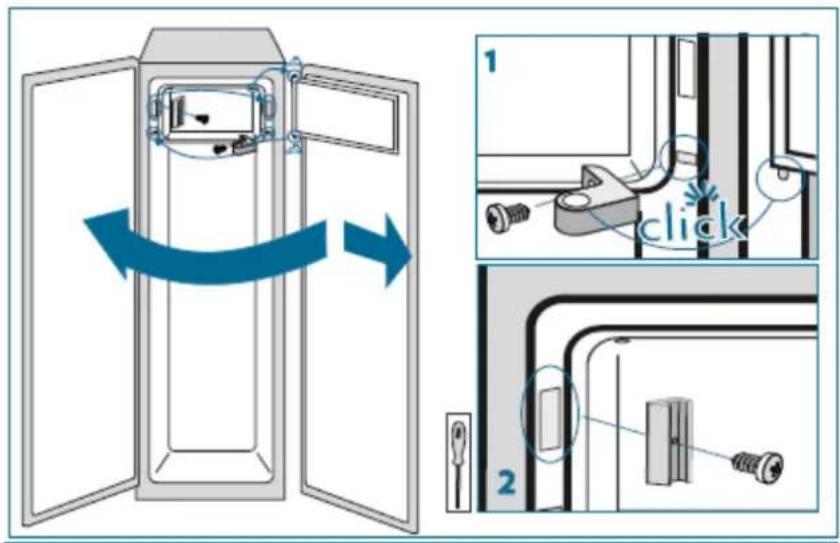
natural_image
Illustration of various household cleaning tools including screwdriver, ruler, and tool holder (no text or symbols)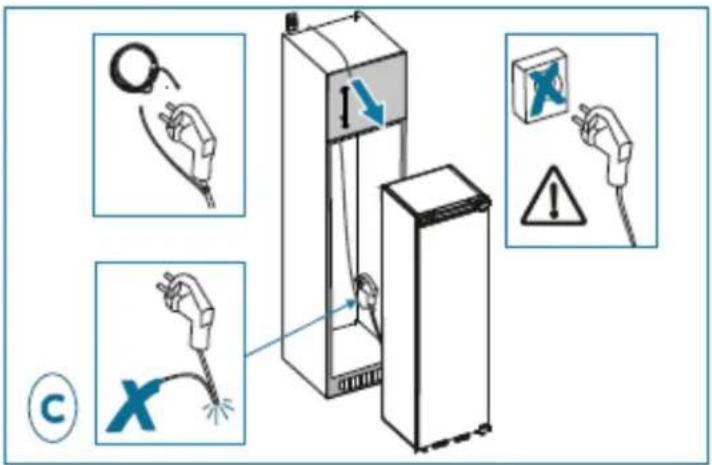
natural_image
Two 3D diagrams of a refrigerator with labeled parts and directional arrows, no text or symbols present.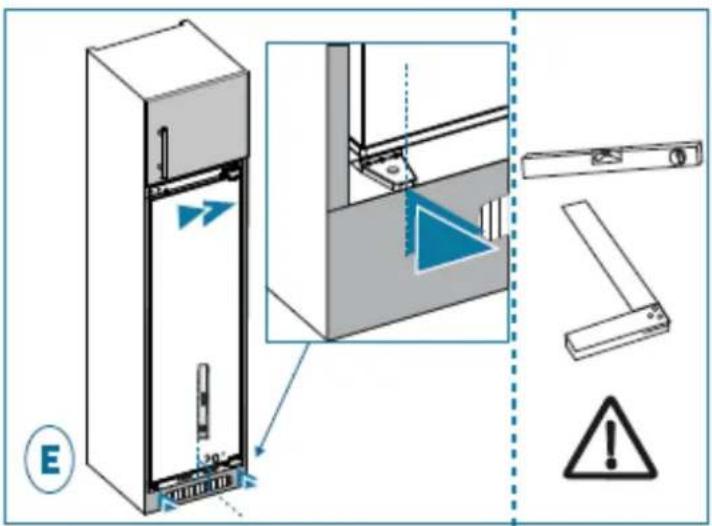
natural_image
Technical illustration of a refrigerator with an inset close-up showing the exterior wall and shelf structure (no text or symbols)
natural_image
Hand interacting with a black background, no text or symbols visiblenatural_image
Technical illustration showing a hand placing a component into a shelf, and a close-up of a mechanical component with two upward arrows (no text or symbols)natural_image
Line drawing of a refrigerator interior showing front and side views with no text or symbolsKits de instalación
*Según el modelo
natural_image
Illustration of various household cleaning tools including screwdriver, ruler, and tool holder (no text or symbols present)* 1225 - 1233 for metal top cover
*Según el modelo
| 1a | 1b | |
| A | 1225 (mm) | 1225 (mm) |
| B | 1225 - 1253 (mm) | 1225 - 1245 (mm) |
*Según el modelo
natural_image
Two 3D diagrams of a refrigerator with labeled parts and directional arrows, no text or symbols present.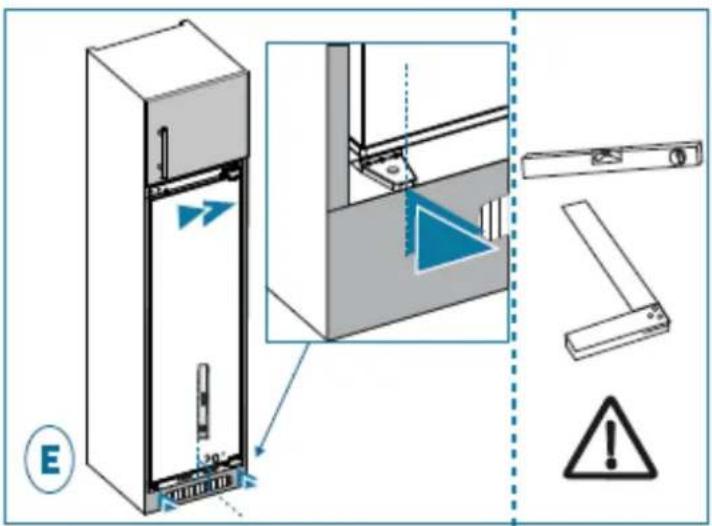
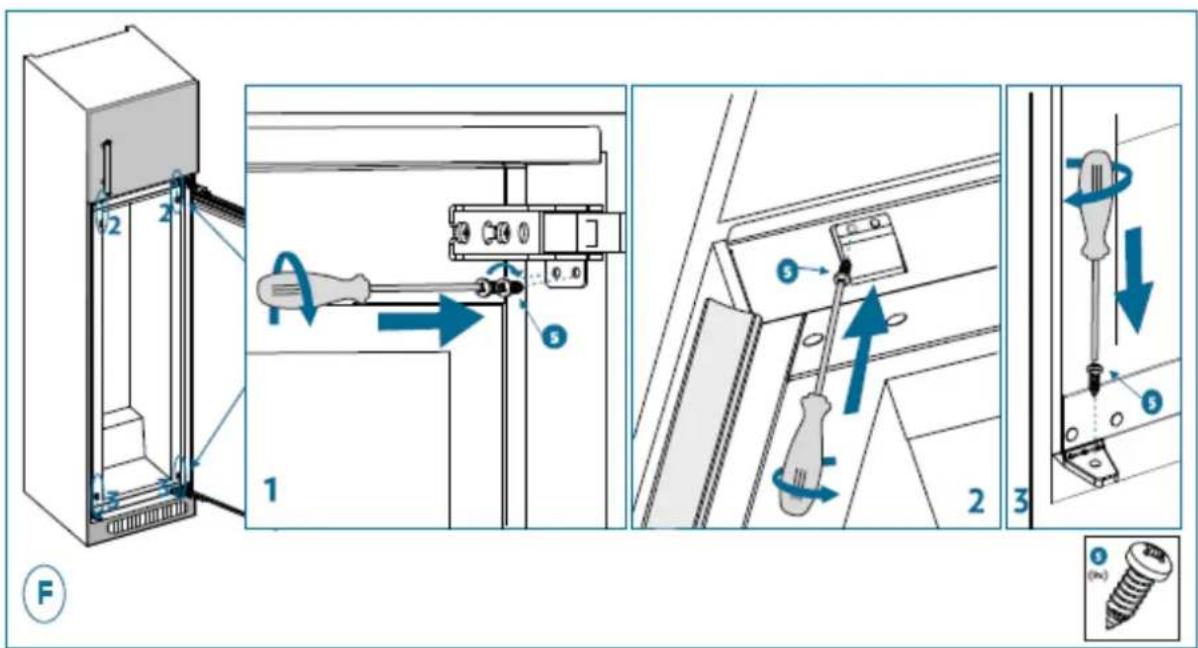
natural_image
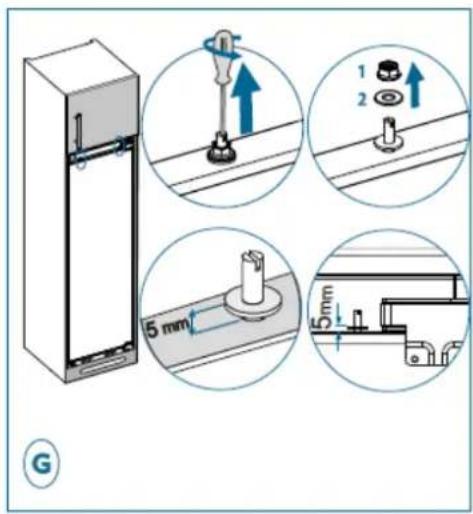
Technical illustration of a refrigerator with an inset close-up showing the exterior wall and shelf structure (no text or symbols)


natural_image
Hand interacting with a black background, showing a finger pressing a white square (no text or symbols)natural_image
Technical illustration showing a hand placing a component into a shelf, and a close-up of a mechanical component with two upward arrows (no text or symbols)natural_image
Interior view of a refrigerator showing door, front panel, and side panels (no text or symbols)
- Mode Super congélation
- Objectif :
- Interventions France
- De Dietrich
- SAFETY GUIDELINES
- GENERAL SAFETY AND WARNINGS
- Installation safety
- Safety of vulnerable persons
- Safety of use
- Food safety
- Layout and presentation of your appliance
- Energy-saving measures
- Storing food
- Care before installation
- Location
- Warning! Never expose the appliance to a naked flame.
- How to reverse the door
- Installation
- Kits for installation
- Tools needed
- Levelling the appliance
- Electrical connections
- "COLD AREA" indicator
- Warning!
- Temperature setting
- Buttons
- Indicators
- Super freeze mode
- Objective:
- Energy-saving mode:
- Screen saver mode:
- Refrigerator temperature settings
- Door open indicator
- Using the shelves
- Positioning the small door trays
- Bottle shelf
- Hints and Tips
- Hints for refrigeration
- Ice cubes
- Freezing tips
- Thawing food
- Hints for the storage of frozen food
- Cleaning
- Cleaning the drain
- Replacing the light
- Defrosting the freezer
- Troubleshooting
- Customer Relations
- Servicing and repairs,
- Original replacement parts
- Guarantee
- Installationskits
- Benötigte Werkzeuge
Brand : DE DIETRICH
Model : DRS1244ED
Category : Refrigerator