
WHFF 6404 W6E - Freezer WHIRLPOOL - Free user manual and instructions
Find the device manual for free WHFF 6404 W6E WHIRLPOOL in PDF.


| Brand | Whirlpool |
| Model | WHFF 6404 W6E |
| Product Type | Freezer |
| Climate Class | SN, N, ST, T (depending on model) |
| Freezing Capacity | 4.5 kg / 100 L in 24 h (EN 62552 standard) |
| Freezer Temperature Range | -15 °C to -24 °C |
| Main Functions | Quick Freezing, compartment conversion (refrigerator/freezer), open door alarm, energy saving, wireless HomeWhiz connection (optional), electronic display |
| Defrost | Automatic |
| Lighting | LED (energy class G, replacement by professional) |
| Door Reversal | Possible, contact authorized service |
| Packaging Material | Recyclable |
| Maintenance and Cleaning | Damp cloth, baking soda, no abrasive products |
| Safety | Unplug before cleaning, do not use metal objects under the appliance |
| Spare Parts | Available for 10 years, self-repair possible for handles, hinges, shelves, baskets, and seals (follow instructions) |
| Warranty | 24 months minimum |
| Power Supply | 220-240 V ~ 50 Hz |
Frequently Asked Questions - WHFF 6404 W6E WHIRLPOOL
User questions about WHFF 6404 W6E WHIRLPOOL
0 question about this device. Answer the ones you know or ask your own.
Ask a new question about this device
Download the instructions for your Freezer in PDF format for free! Find your manual WHFF 6404 W6E - WHIRLPOOL and take your electronic device back in hand. On this page are published all the documents necessary for the use of your device. WHFF 6404 W6E by WHIRLPOOL.
USER MANUAL WHFF 6404 W6E WHIRLPOOL
natural_image
Simple black line drawing of a snowflake and a hexagonal shape (no text or symbols)WHFF 6404 W6E
11 5943 0195/ EN/ NL/ DE/ FR/ AA/ 12.02.25 15:44
7278440613
Dear Customer
Thank you for choosing this product.
Please register your products on www.register10.eu
We would like you to achieve the optimal efficiency from this high quality product which has been manufactured with state of the art technology. To do this, carefully read this manual and any other documentation provided before using the product.
Heed all information and warnings in the user manual. This way, you will protect yourself and your product against the dangers that may occur. Keep the user manual. Include this manual with the product if you hand it over to someone else.
The following symbols are used in the user manual and on the product:

Read the user manual.

ENERG

SUPPLIER'S NAME
MODEL IDENTIFIER→(*)
A

The model information as stored in the product data base can be reached by entering following website and searching for your model identifier (*) found on energy label.
https://eprel.ec.europa.eu/
1 Environmental Instructions ...... 4
1.1 Disposal Of Packaging Materials. 4
2 Your Freezer 4
3 Preparation...... 4
3.1 What To Do For Energy Saving..... 5
3.2 First Use.... 5
3.3 Climate Class and Definitions ..... 6
4 Installation....6
4.1 Right Place For Installation...... 6
4.2 Attaching the Plastic Wedges ..... 6
4.3 Adjusting the Legs.... 6
4.4 Hot Surface Warning...... 6
5 Operating the Product...... 7
6 Use of Your Appliance...... 7
6.1 Control Panel of the Product ..... 7
6.2 Control Panel of the Product ..... 9
6.3 Freezing Fresh Foods.... 9
6.4 Reversing the Door Opening Side. 12
6.5 Door Open Alert 13
6.6 Replacing the Illumination Lamp.. 13
7 Maintenance and Cleaning ...... 13
8 Troubleshooting...... 14
1 Environmental Instructions
EN
1.1 Disposal Of Packaging Materials
The packaging material is recyclable and is marked with the recycle symbol 🌐
The various parts of the packaging must therefore be disposed of responsibly and in full compliance with local authority regulations governing waste disposal.
2 Your Freezer
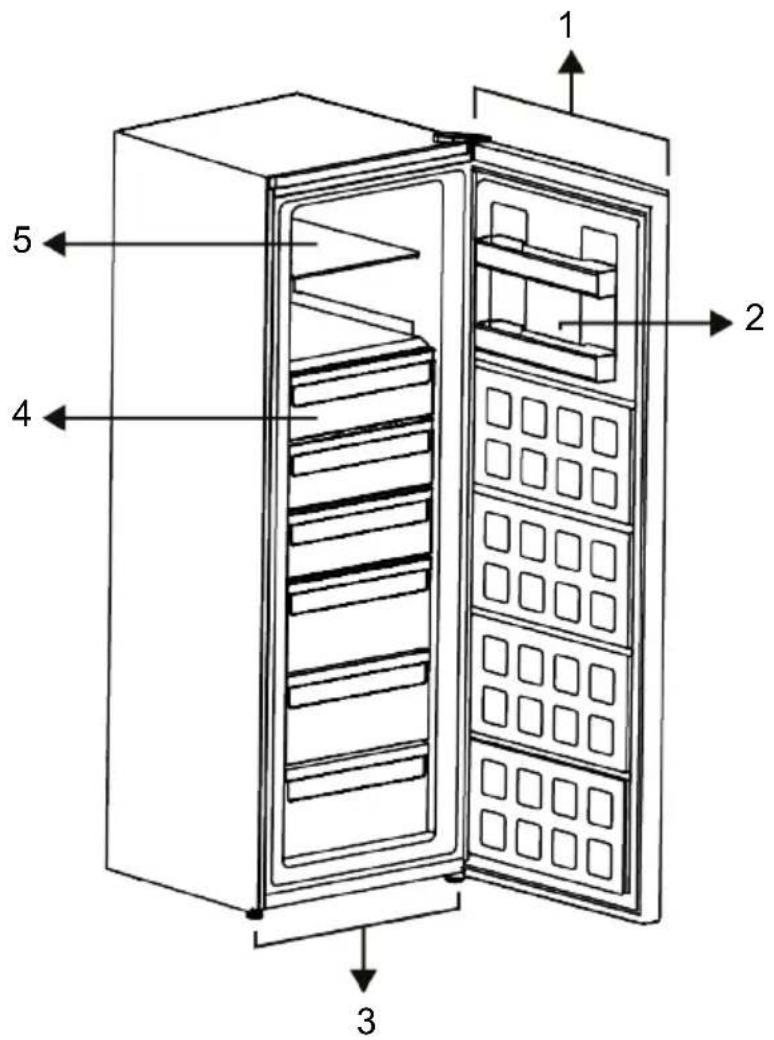
1 Electronic Indicator 2 Door Shelf
3 Adjustable Stands 4 Freezer Compartments
5 Glass Rack
*Optional: Figures in this user manual are schematic and may not exactly match your product. If your product does not comprise the relevant parts, the information pertains to other models.
3 Preparation
Read the "Safety Instructions" first!
3.1 What To Do For Energy Saving
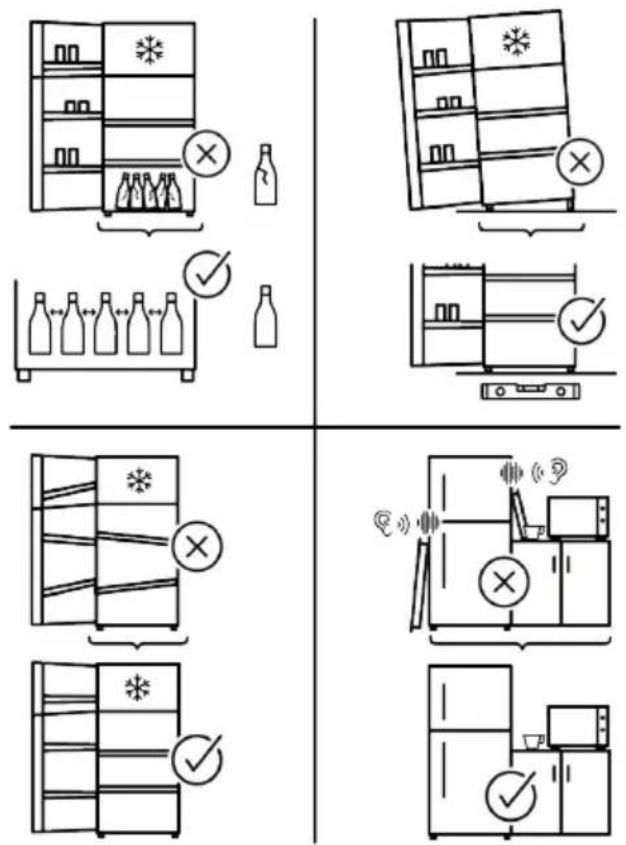
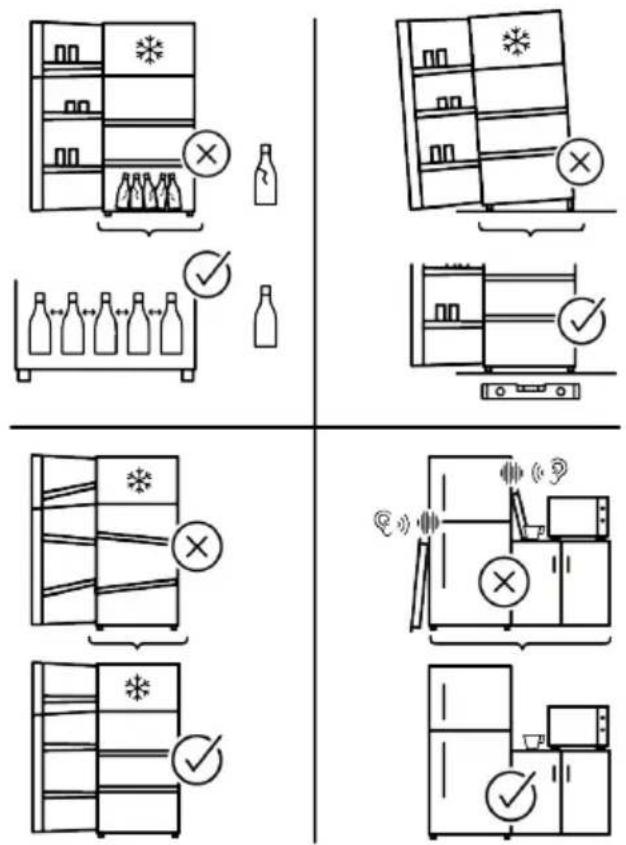
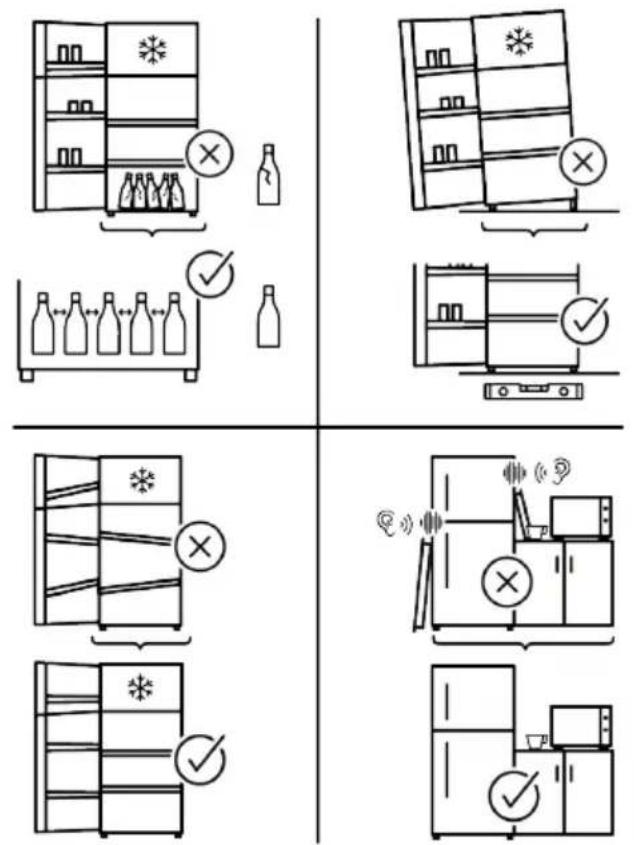
- When loading the food, leave enough space inside the refrigerator to allow sufficient air circulation for cooling.
- Since hot and humid air will not directly penetrate into your product when the doors are not opened, your product will optimize itself in conditions sufficient to protect your food. Under these circumstances, functions and components such as compressor, fan, heater, defrost, lighting, display and so on will operate according to the needs by consuming minimum energy.
- In case that multiple options are present, glass shelves must be placed so that the air outlets at the rear wall are not blocked and preferably, in a way that air outlets remain below the glass shelf. This combination may help improving air distribution and energy efficiency.
- Using the below drawer when storing is strongly recommended.
- For optimum performance, Quick Freezing can be used (if available), 24 hours prior to placing fresh foods in the freezer.
- In most cases, 24 hours is enough for the Quick Freezing function after fresh foods are placed in the freezer. After some time, Quick Freezing function will deactivate automatically.
- When freezing a small amount of food, Quick Freezing function can be deactivated after some time to ensure energy saving.
- Depending on the product's features; defrosting frozen foods in the cooler compartment will ensure energy saving and preserve food quality.
- In order to load the maximum quantity of food into the freezer compartment of your refrigerator, the upper drawers should be taken out and the food should be placed onto the wire/glass shelves.
-
Food shall be stored using the drawers in the cooler compartment in order to ensure energy saving and protect food in better conditions.
-
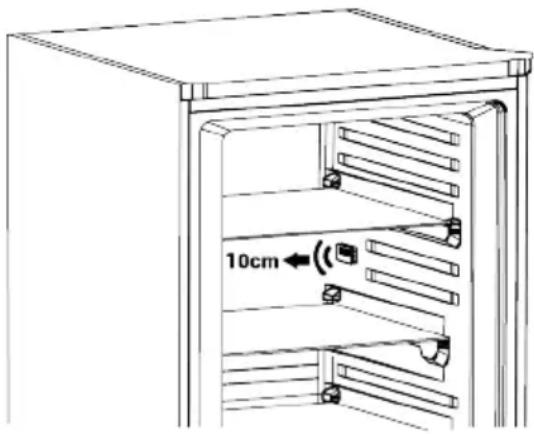
Food packages shall not be in direct contact with the temperature sensor located in the freezer compartment.
• There should be 10 cm of distance between the sensor and the food.
3.2 First Use
Before using your product make sure the necessary preparations are made in line with the instructions in "Safety Instructions" and "Installation" sections.
- Wait for at least 2 hours before operating the product, to ensure the complete efficiency of refrigeration.
- Keep the product running without placing any food inside for 6 hours and the product door should be kept as closed as possible.
- The temperature change caused by opening and closing of the door while using the product may normally lead to condensation on door/body shelves and glassware placed in the product.
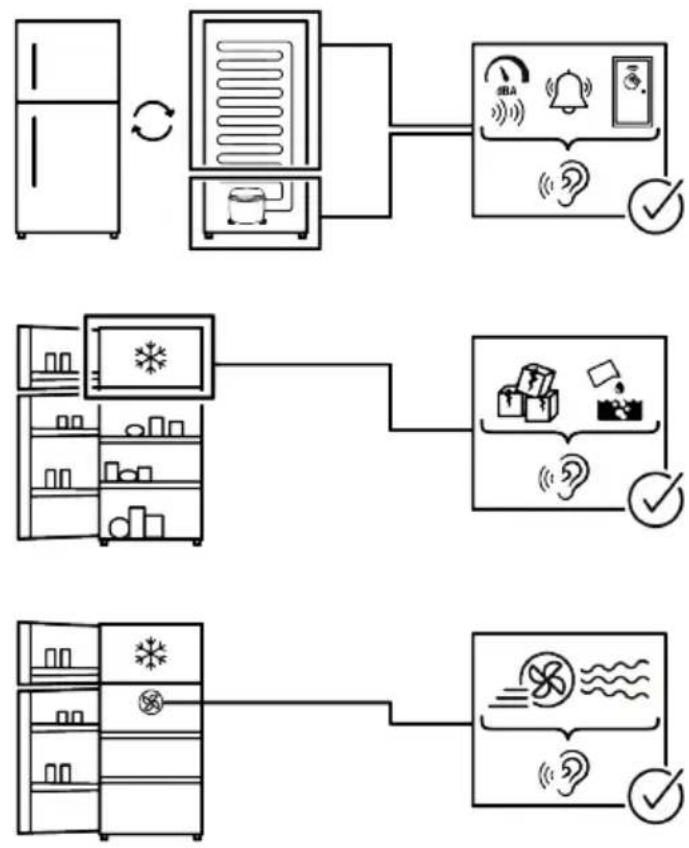
- A sound will be heard when the compressor is engaged. It is normal for the product to make noise even if the compressor is not running, as fluid and gas may be compressed in the cooling system.
- It is normal for the front edges of the product to be warm. These areas are designed to warm up in order to prevent condensation
- For some models, indicator panel turns off automatically 1 minute after the door closes. It will be reactivated when the door is opened or any button is pressed.
3.3 Climate Class and Definitions
Please refer to the Climate Class on the rating plate of your device. One of the following information is applicable to your device according to the Climate Class.
- SN: Long Term Temperate Climate: This cooling device is designed for use at ambient temperatures between 10 °C and 32 °C.
4 Installation
Read the "Safety Instructions" first!
4.1 Right Place For Installation
Contact the Authorized Service for the product's installation. To prepare the product for installation, see the information in the user manual and make sure the electric and water utilities are as required. If not, call an electrician and plumber to arrange the utilities as necessary.
- Place the product on a flat surface to avoid vibration
- Place the product at least 30 cm away from the heater, stove and similar sources of heat and at least 5 cm away from electric ovens.
- When placing two coolers in adjacent position, leave at least 4 cm distance between the two units.
- Keep the product out of direct sunlight and in a dry place.
- Check if the rear wall clearance protection component is present at its location (if provided with the product).
4.2 Attaching the Plastic Wedges
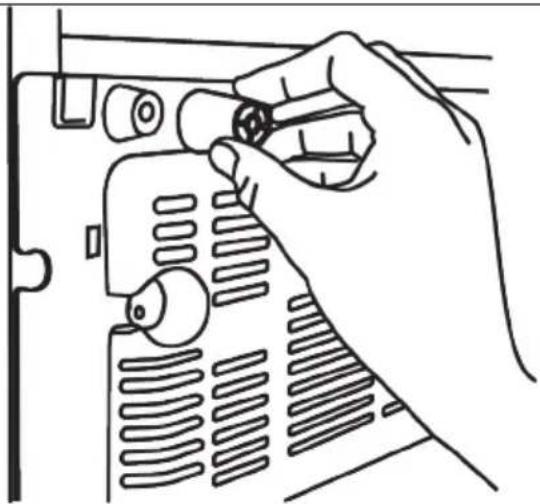
Use the plastic wedges provided with the product to maintain sufficient space for air circulation between the product and the wall.
- Mount 2 pieces of plastic wedges as shown in the following figure.
(The indicated picture is drawn representatively, it is not completely same as your product.)
• N: Temperate Climate: This cooling device is designed for use at ambient temperatures between 16°C and 32°C.
- ST: Subtropical Climate: This cooling device is designed for use at ambient temperatures between 16°C and 38°C.
• T: Tropical Climate: This cooling device is designed for use at ambient temperatures between 16°C and 43°C.
natural_image
Line drawing of a hand using a tool to adjust or install a component with no visible text or symbols4.3 Adjusting the Legs
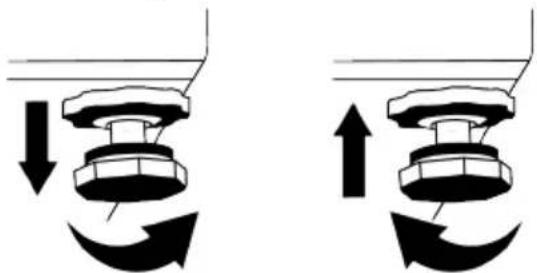
If the product is not in balanced position, adjust the front adjustable legs by rotating them to right or left.
natural_image
Pure mechanical diagram showing two configurations of a valve or knob with directional arrows indicating motion (no text or symbols)4.4 Hot Surface Warning
The side walls of your product are equipped with cooler pipes to enhance the cooling system. High pressure fluid may flow through these surfaces, and cause hot surfaces on the side walls. This is normal and it does not require servicing.
5 Operating the Product
Read the "Safety Instructions" first!
- The product shall be used for storing food only.
- Turn off the water valve if you will be away from home (e.g. at vacation) and you will not be using the Icematic or the water dispenser for a long period of time. Otherwise, water leaks may occur.
Unplugging the Product
- Remove the food to prevent odours,
- Wait for the ice to melt, clean the interior and let it dry, leave the doors open to avoid damaging the inner body plastics.
6 Use of Your Appliance
6.1 Control Panel of the Product
flowchart
graph TD
    A["1"] --> B["2"]
    B --> C["3"]
    C --> D["4"]
    D --> E["5"]
    F["6"] --> G["7"]
    G --> H["8"]
    H --> I["9"]
    I --> J["10"]
    J --> K["11"]
    K --> L["12"]
    L --> M["13"]
    M --> N["14"]
    N --> O["15"]
    O --> P["16"]
    P --> Q["17"]
    Q --> R["18"]
    R --> S["19"]
    S --> T["20"]
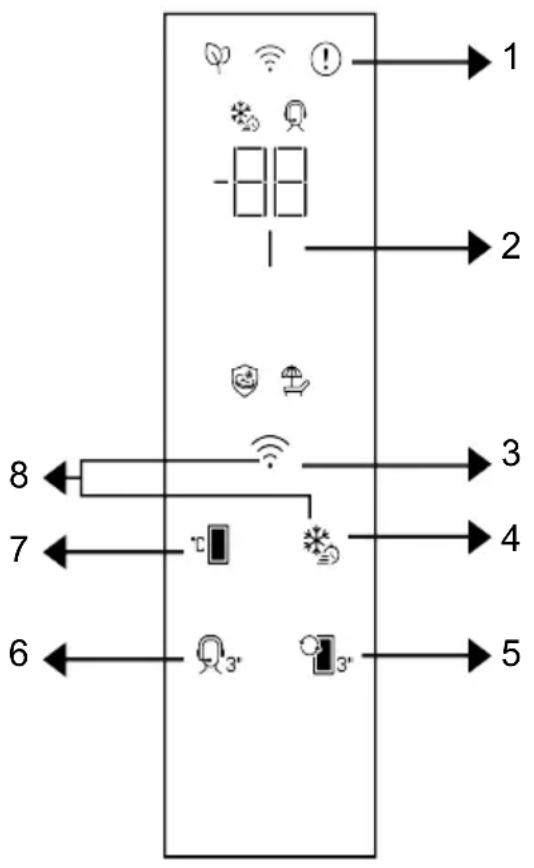
1 Error Status Indicator 2 Energy Saving (Display Off) Indicator
3 * Wireless Key 4 Quick Freezing Key / Quick Cooling
5 Compartment Conversion Key 6 * Support Service Key
7 Temperature Adjustment Key 8 * Key for Resetting Wireless Connection Settings
Read the "Safety Instructions" first! Auditory and visual functions on the indicator panel will assist you in using the refrigerator.
*Optional: Shown functions are optional, there may be differences of shape and location in functions found on your appliance's indicator panel.
1. Fault Status Indicator!
This indicator will be active when your refrigerator cannot perform adequate cooling or in case of any sensor error. "E" will be displayed on the freezer compartment temperature indicator and figures such as 1,2,3... will be displayed on the cooler compartment temperature indicator. These figures provide information to the authorized service on the error that has occurred. Exclamation mark may be displayed when you load warm food to the freezer compartment or keep the door open for a long period of time. This is not a fault, this warning will be removed when the food is cooled down or when any key is pressed.
2. Energy Saving (Display Off) Indicator
Energy saving function is enabled automatically and the energy saving symbol lights up when the door of the product is not opened or closed for some period of time. When the energy saving function is active, all symbols on the screen other than the energy saving symbol shall be turned off. When the energy saving function is active, pressing any key or opening the door will deactivate the energy saving function and the display signals will return to normal. The energy saving function is a function activated ex-factory and cannot be cancelled.
\*3.Wireless Key

This key is utilized to connect wirelessly to your appliance through HomeWhiz mobile application. If the key is pressed for a long time (3 seconds), the wireless connection symbol on the display/indicator will blink slowly (in 0.5 second intervals). The home network is initialized on the product this way. After achieving wireless connection with the product, wireless connection symbol illuminates continuously. You may activate/deactivate the connection after the first setting is completed by pressing this
key. The wireless connection symbol will flash quickly (at 0.2 second intervals) until the connection is established. When the connection becomes active, wireless connection symbol flashes continuously. If the connection cannot be established for a long period, check your connection settings and refer to the "Troubleshooting" section provided in the user manual. HomeWhiz application will be used for wireless connection. The installation steps are described on the application during installation. You may access the application by reading the QR code available on the HomeWhiz label on the product. The application can be obtained from App Store for IOS devices and from Play Store for Android devices. For details visit https://www.homewhiz.com/.
4. Quick Freezing Key / Quick Cooling

When the quick freezing/cooling key is pressed the quick freezing/cooling symbol shall be illuminated and the quick freezing function shall be activated. In the freezer mode, the compartment temperature is set to -27 ^ . In the cooler mode, the compartment temperature is set to 1 ^ . Press the key again to cancel the function. The quick freezing function shall be automatically cancelled after a while. To freeze a large amount of fresh food, press the quick freezing key before placing the food in the freezer compartment.
5. Compartment Conversion Key

Pressing compartment conversion key for 3 seconds, the compartment switches as refrigerant and freezer respectively
\*6.Support Service Key

Press this button for 3 seconds to activate the support service. Detailed information on the support service is provided in the "Support Service Feature" section.
7. Temperature Adjustment Key

Allows adjustment of temperature for the refrigerator. Pressing the key will enable the compartment temperature to be set at
-18, -19, -20, -21, -22, -23, -24 °C in the freezing mode, and 4,3,2,1,8,7,6,5 °C in the cooling mode.
\*8. Key for Resetting Wireless Connec-
tion Settings


To reset wireless connection settings, Quick freezing and wireless connection keys should be pressed simultaneously for 3 seconds. All user information recorded previously are removed on the product where wireless connection settings are reset/restored to factory defaults.
6.2 Control Panel of the Product
The temperature can be set between 1-8°C for the chiller compartment and between -24 and -15°C for the freezer compartment. Adjustable temperature values may vary provided that they are within these ranges according to product specifications.
6.3 Freezing Fresh Foods
- Foods to be frozen must be divided into portions according to a size to be consumed, and frozen in separate packages. In this way, all the food should be prevented from being re-frozen by thawing.
- In order to protect the nutritional value, the aroma and the colour of the foods as much as possible, vegetables should be boiled for a short period of time before freezing. (Boiling is not necessary for foods such as cucumber, parsley.) Cooking time of the vegetables frozen in this way is shortened by 1/3 than that of the fresh vegetables.
- To extend the storage times of frozen foods, boiled vegetables must first be filtered and then hermetically packaged as in the all types of foods.
- Foods should not be placed in the freezer compartment without package.
- The packaging material of the food to be stored should be air-tight, thick and durable and should not deform with cold and humidity. Otherwise, the food that is
hardened by freezing might pierce the package. Sealing the package well is also important in terms of securely storing the food.
EN
The Following Packaging Types Are Suitable to Freeze Food:
Polyethylene bag, aluminium foil, plastic foil, vacuum bags and cold-resistant storage containers with caps.
The Use of Following Types of Packaging Is Not Recommended to Freeze Food:
Packaging paper, parchment paper, cellophane (gelatin paper), garbage bag, used bags and shopping bags.
- Hot foods should not be placed in the freezer compartment without cooling.
- When placing unfrozen fresh foods in the freezer compartment, please note that it does not contact with frozen foods. Cool-pack (PCM) can be placed to the rack immediately below the quick freezing rack for preventing them from being getting warm.
- During the freezing time (24 hours) do not place other food to the freezer.
- Place your foods to the freezing shelves or racks by spreading them so that they will not be cramped (it is recommended that the packaging does not come into contact with each other).
- Frozen foods must be immediately consumed in a short period of time after defrosting and must never be frozen again.
- Do not block the ventilation holes by putting your frozen foods in front of the ventilation holes located on the back surface.
- We recommend you to attach a label onto the package and write the name of the foods in the package and the freezing time.
Foods Suitable for Freezing:
Fish and seafood, red and white meat, poultry, vegetables, fruit, herbaceous spices, dairy products (such as cheese, butter and strained yoghurt), pastries, ready or cooked meals, potato dishes, souffle and desserts.
Foods Not Suitable for Freezing:
Yoghurt, sour milk, cream, mayonnaise, leaved salad, red radish, grapes, all fruits (such as apple, pears and peaches).
- For foods to be frozen quickly and thoroughly, the following specified amounts per package should not be exceeded.
- Fruits and vegetables, 0.5-1 kg
- Meat, 1-1.5 kg
- A small amount of foods (maximum 2 kg) can also be frozen without the use of the quick freezing function.
To obtain the best result, apply the following instructions:
- Activate the quick freezing function 24 hours before placing your fresh foods.
- 24 hours after you have pressed the button, first place your food that you want to freeze to the top shelf with higher freezing capacity. Place your remaining food, if any, to the rightmost part of the second shelf.
- The quick freezing function will be automatically deactivated after 52 hours.
- Do not try to freeze a large quantity of food at a time. Within 24 hours, this product can freeze the maximum food quantity specified as «Freezing Capacity ... kg/24 hours» on its type label. It is not convenient to put more unfrozen/fresh foods to the freezer compartment than the quantity specified on the label.
- You can review the Meat and Fish, Vegetables and Fruits, Dairy Products tables for placing and storing your foods in the deep-freezer.
Advice on Storing Frozen Foods
- While purchasing your frozen foods, make sure that they are frozen at appropriate temperatures and their packages are not broken.
- Put the packages in the freezer compartment as soon as possible after purchasing them.
- Make sure that the expiration date indicated on the packaging is not expired before consuming the packaged ready meals that you remove from the freezer compartment.
Defrosting
The ice in the freezer compartments is automatically thawed.
Freezer Details
The EN 62552 standard requires (according to specific measurement conditions) that at least 4.5 kg of food for each 100 litres of freezer compartment volume can be frozen at 25 °C ambient temperature in 24 hours.
Defrosting the Frozen Foods
Depending on the food diversity and the purpose of use, a selection can be made between the following options for defrosting:
- At room temperature (it is not very suitable to defrost the food by leaving it at room temperature for a long time in terms of maintaining the food quality)
- In the refrigerator
- In the electrical oven (in models with or without fan)
• In the microwave oven
CAUTION!
- Never put acidic beverages in glass bottles and cans into your freezer due to the risk of explosion.
- If there is moisture and abnormal swelling in the packaging of frozen foods, it is likely that they were previously stored in an improper storage condition and their contents deteriorated. Do not consume these foods without checking.
- Since the taste of some spices in cooked meals may change when exposed to long-term storage conditions, you must add lesser amount of spices to your foods to be frozen or the desired spices should be added to the foods after the thawing process.
| Freezer Compartment Setting | Remarks |
| -22 °C | This is the default, recommended setting. This setting is recommended if ambient temperature is below 30°C. |

| Meat and Fish Preparation | Longest storage time (month) | |||
| Meat Products | Veal | Steak | By cutting them 2 cm thick and placing foil between them or wrapping tightly with stretch | 6-8 |
| Roast | By packing the pieces of meat in a refrigerator bag or wrapping them tightly with stretch | 6-8 | ||
| Cubes In small pieces | 6-8 | |||
| Schnitzel, chops | By placing foil between cut slices or wrapping individually with stretch | 6-8 | ||
| Mutton | Chops | By placing foil between meat pieces or wrapping individually with stretch | 4-8 | |
| Roast | By packing the pieces of meat in a refrigerator bag or wrapping them tightly with stretch | 4-8 | ||
| Cubes | By packing the shredded meats in a refrigerator bag or wrapping them tightly with stretch | 4-8 | ||
| Beef | Roast | By packing the pieces of meat in a refrigerator bag or wrapping them tightly with stretch | 8-12 | |
| Steak | By cutting them 2 cm thick and placing foil between them or wrapping tightly with stretch | 8-12 | ||
| Cubes In small pieces | 8-12 | |||
| Boiled meat By packaging in small pieces in a refrigerator bag | 8-12 | |||
| Mince Without seasoning, in flat bags 1-3 | ||||
| Offal (piece) In pieces 1-3 | ||||
| Fermented sausage - Salami | It should be packaged even if it has casing. 1-3 | |||
| Ham By placing foil between cut slices 2-3 | ||||
| Poultry and hunting animals | Chicken and Turkey By wrapping in foil 4-6 | |||
| Goose By wrapping in foil (portions should not exceed 2.5 kg) 4-6 | ||||
| Duck | By wrapping in foil (portions should not exceed 2.5 kg) 4-6 | |||
| Deer, Rabbit, Roe Deer | By wrapping in foil (portions should not exceed 2.5 kg, and their bones should be separated) | 6-8 | ||
| Fish and sea-food | Freshwater fish (Trout, Carp, Crane, Catfish) | After thoroughly cleaning the inside and scales, it should be washed and dried, and the tail and head parts should be cut when necessary. | 2 | |
| Lean fish (Sea bass, Turbot, Sole) | 4-6 | |||
| Fatty fish (Bonito, Mack-erel, Bluefish, Red Mullet, Anchovy) | 2-4 | |||
| Shellfish | Cleaned and in bags | 4-6 | ||
| Caviar | In its packaging, in an aluminium or plastic container | 2-3 | ||
| Fruits and Vegetables Preparation | Longest storage time (month) | |
| String bean and Pole bean | By shock boiling for 3 minutes after washing and cutting into small pieces | 10-13 |
| Green pea By shock boiling for 2 min | minutes after shelling and washing 10-12 | |
| Cabbage By shock boiling for 1-2 min | minute(s) after cleaning 6-8 | |
| Carrot | By shock boiling for 3-4 minutes after cleaning and cutting into slices | 12 |
| Pepper | By boiling for 2-3 minutes after cutting the stem, dividing into two and separating the seeds | 8-10 |
| Spinach By shock boiling for 2 min | utes after washing and cleaning 6-9 | |
| Leek By shock boiling for 5 min | utes after chopping 6-8 | |
| Cauliflower | By shock boiling in a little lemon water for 3-5 minutes after separating the leaves, cutting the core into pieces | 10-12 |
| Eggplant | By shock boiling for 4 minutes after washing and cutting into 2cm pieces | 10-12 |
| Squash | By shock boiling for 2-3 minutes after washing and cutting into 2cm pieces | 8-10 |
| Mushroom By lightly sauteing in oil | and squeezing lemon on it 2-3 | |
| Corn By cleaning and packing in cob | or granular 12 | |
| Apple and Pear By shock boiling for | 2-3 minutes after peeling and slicing 8-10 | |
| Apricot and Peach Divide in half and extract the seeds 4-6 | ||
| Strawberry and Raspberry | By washing and shelling | 8-12 |
| Baked fruit By adding 10% sugar in | the container 12 | |
| Plum, Cherry, Sour Cherry | By washing and shelling the stalks 8-12 | |
| Dairy Products | Preparation | Longest Storage Time (Month) | Storage Conditions |
| Cheese (except feta cheese) | By placing foil thereb-etween, in slices | 6-8 | It can be left in its original packaging for short term storage. For long-term storage it should also be wrapped in aluminium or plastic foil. |
| Butter, margarine | In its own packaging | 6 | In its own packaging or in plastic containers |
6.4 Reversing the Door Opening Side
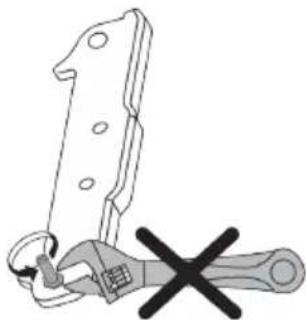
The door opening side of your refrigerator can be reversed according to the place you put it. For the products that include electronic display when you need this, you should definitely call the nearest Authorized Service.
natural_image
Diagram of a wrench tool with a cross mark, no text or symbols present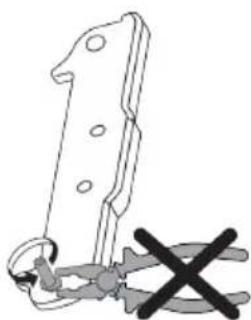
natural_image
Illustration of a mechanical tool with a cross mark, no text or symbols present6.5 Door Open Alert
An audible alert will be heard if the product's door remains open for 1.5 minute. The audible alert will stop when you close the cabinet door or press any button on the display (if available).
An audible alert will be heard if the product's door remains open for 1 minute. The audible alert will stop when you close the cabinet door or press any button on the display (if available).
7 Maintenance and Cleaning
Read the "Safety Instructions" first!
Before cleaning your product, unplug it or de-energize the fuse to which it is connected.
Do not place your hands, feet or metal objects under the refrigerator or between the refrigerator and the floor for whatsoever reason. Jamming may occur or any sharp edge may cause personal injuries.
- Do not use sharp or abrasive tools to clean the product. Do not use materials such as household cleaning agents, soap, detergents, gas, gasoline, thinner, alcohol, wax, etc.
- The dust shall be removed from the ventilation grill on the rear of the product at least once a year (without opening the cover). Clean the product with a dry cloth.
• Take care to keep water away from the lamp's cover and other electrical parts. - Clean the door with a damp cloth. Remove all contents to remove the door and body racks. Remove the door racks by lifting them upwards. Clean and dry the shelves, then attach back in place by sliding from above.
- Do not use chlorinated water or cleaning products on the exterior surface and chrome coated parts of the product. Chlorine will cause rust on such metallic surfaces.
- Do not use sharp and abrasive tools, soap, house cleaning materials, detergents, gas, gasoline, varnish and similar substances to prevent deformation of
6.6 Replacing the Illumination Lamp
Call the Authorized Service when the Bulb/LED used for lighting in your refrigerator will be replaced.
Lamp(s) used in this appliance cannot be used for house lighting. Intended use of this lamp is to help the user place food into the refrigerator / freezer safely and comfortably.
and removal of prints on the plastic part. Use warm water and a soft cloth for cleaning, and then dry it.
- On the products without a No-Frost feature, water droplets and icing up to a thickness of a finger may occur on the rear wall of the cooler compartment. Do not clean, and never apply oils or similar materials.
- Use only a mildly dampened micro-fibre cloth to clean the external surface of the product. Sponges and other types of cleaning clothes may cause scratches.
- To clean all removable components during the cleaning of the interior surface of the product, wash these components with a mild solution consisting of soap, water and carbonate. Wash and dry thoroughly. Prevent contact of water with illumination components and the control panel.
- Do not use vinegar, rubbing alcohol or other alcohol based cleaning agents on any interior surface.
Stainless Steel External Surfaces
Use a non-abrasive stainless steel cleaning agent and apply it with a soft lint-free cloth. To polish, gently wipe the surface with a micro-fibre cloth dampened with water and use dry polishing chamois. Always follow the veins of the stainless steel.
Preventing Odours
The product is manufactured free of any odorous materials. However, inappropriately storing food and improper cleaning of internal surfaces may lead to odours.
• To avoid this, clean the inside with carbonated water every 15 days.
- Keep the foods in sealed holders, as micro-organisms arising from foods kept in unsealed containers will cause bad odour.
- Do not keep expired and spoilt foods in the refrigerator.
Protecting Plastic Surfaces
Oil spilled on plastic surfaces may damage the surface and must be cleaned immediately with warm water.
8 Troubleshooting
Read the "Safety Instructions" first!
Check this list before contacting the service. Doing so will save you time and money. This list includes frequent complaints that are not related to faulty workmanship or materials. Certain features mentioned herein may not apply to your product.
If the problem persists after following the instructions in this section, contact your vendor or an Authorized Service. Do not try to repair the product.
The refrigerator is not working.
- The power plug is not fully settled. >>> Plug it in to settle completely into the socket.
- The fuse connected to the socket powering the product or the main fuse is blown. >>> Check the fuse.
Condensation on the side wall of the cooler compartment (MULTI ZONE, COOL CONTROL and FLEXI ZONE).
- The door is opened too frequently. >>> Take care not to open the product's door too frequently.
- The environment is too humid. >>> Do not install the product in humid environments.
- Foods containing liquids are kept in unsealed holders. >>> Keep the foods containing liquids in sealed holders.
- The product's door is left open. >>> Do not keep the product's door open for long periods.
- The thermostat is set to a very cool temperature. >>> Set the thermostat to an appropriate temperature.
Compressor is not working.
- In case of sudden power failure or pulling the power plug off and putting back on, the gas pressure in the product's cooling system is not balanced, which triggers the compressor thermic safeguard. The product will restart after approximately 6 minutes. If the product does not restart after this period, contact the service.
- Defrosting is active. >>> This is normal for a fully-automatic defrosting product. The defrosting is carried out periodically.
- The product is not plugged in. >>> Make sure the power cord is plugged in.
- The temperature setting is incorrect. >>> Select the appropriate temperature setting.
- The power is out. >>> The product will continue to operate normally once the power is restored.
The refrigerator's operating noise is increasing while in use.
- The product's operating performance may vary depending on the ambient temperature variations. This is normal and not a malfunction.
The refrigerator runs too often or for too long.
- The new product may be larger than the previous one. Larger products will run for longer periods.
- The room temperature may be high. >>> The product will normally run for long periods in higher room temperature.
- The product may have been recently plugged in or a new food item is placed inside. >>> The product will take longer to reach the set temperature when recently plugged in or a new food item is placed inside. This is normal.
- Large quantities of hot food may have been recently placed into the product. >>> Do not place hot food into the product.
- The doors were opened frequently or kept open for long periods. >>> The warm air moving inside will cause the product to run longer. Do not open the doors too frequently.
- The freezer or cooler door may be ajar.
Check that the doors are fully closed.
- The product may be set to a temperature that is too low. >>> Set the temperature to a higher degree and wait for the product to reach the adjusted temperature.
- The cooler or freezer door washer may be dirty, worn out, broken or not properly settled. >>> Clean or replace the gasket. Damaged / torn door washer will cause the product to run for longer periods to preserve the current temperature.
The freezer temperature is very low, but the cooler temperature is adequate.
- The freezer compartment temperature is set to a very low degree. >>> Set the freezer compartment temperature to a higher degree and check again.
The cooler temperature is very low, but the freezer temperature is adequate.
- The cooler compartment temperature is set to a very low degree. >>> Set the cooler compartment temperature to a higher degree and check again.
The food items kept in cooler compartment drawers are frozen.
- The cooler compartment temperature is set to a very low degree. >>> Set the cooler compartment temperature to a higher degree and check again.
The temperature in the cooler or the freezer is too high.
- The cooler compartment temperature is set to a very high degree. >>> Temperature setting of the cooler compartment has an effect on the temperature in the freezer compartment. Wait until the temperature of relevant parts reach the sufficient level by changing the temperature of cooler or freezer compartments.
- The doors were opened frequently or kept open for long periods. >>> Do not open the doors too frequently.
- The door may be ajar. >>> Fully close the door.
- The product may have been recently plugged in or a new food item is placed inside. >>> This is normal. The product will take longer to reach the set temperature when recently plugged in or a new food item is placed inside.
- Large quantities of hot food may have been recently placed into the product. >>> Do not place hot food into the product.
Shaking or noise.
- The surface is not flat or durable >>> If the product is shaking when moved slowly, adjust the stands to balance the product. Also make sure the ground is sufficiently durable to bear the product.
- Any items placed on the product may cause noise. >>> Remove any items placed on the product.
- The product is making noise of liquid flowing, spraying etc.
- The product's operating principles involve liquid and gas flows. >>> This is normal and not a malfunction.
There is sound of wind blowing coming from the product.
- The product uses a fan for the cooling process. This is normal and not a malfunction.
There is condensation on the product's internal walls.
- Hot or humid weather will increase icing and condensation. This is normal and not a malfunction.
- The doors were opened frequently or kept open for long periods. >>> Do not open the doors too frequently; if open, close the door.
- The door may be ajar. >>> Fully close the door.
There is condensation on the product's exterior or between the doors.
- The ambient weather may be humid, this is quite normal in humid weather. >>> The condensation will dissipate when the humidity is reduced.
The interior smells bad.
- The product is not cleaned regularly. >>> Clean the interior regularly using sponge, warm water and carbonated water.
- Certain holders and packaging materials may cause odour. >>> Use holders and packaging materials without free of odour.
- The foods were placed in unsealed holders. >>> Keep the foods in sealed holders. Micro-organisms may spread out of unsealed food items and cause bad odour.
- Remove any expired or spoilt foods from the product.
The door is not closing.
- Food packages may be blocking the door. >>> Relocate any items blocking the doors.
- The product is not standing in full upright position on the ground. >>> Adjust the stands to balance the product.
- The surface is not flat or durable >>> Make sure the surface is flat and sufficiently durable to bear the product.
The crisper is jammed.
- The food items may be in contact with the upper section of the drawer. >>> Reorganize the food items in the drawer.
Temperature on the product surface.
- High temperature may be observed between two doors, on the side panels and on the rear grill area while your product is operated. This is normal and it does not require servicing.
Fan continues to operate when the door is opened.
- Fan may continue to operate when the freezer door is open.
If the problem persists after following the instructions in this section, contact your vendor or an Authorized Service. Do not try to repair the product. This is normal.
flowchart
graph TD
    A["Refrigerator"] --> B["Receiving Refrigerator"]
    B --> C["Receiving Air Conditioner"]
    C --> D["Receiving Ear"]
    D --> E["Receiving Noise"]
    E --> F["Receiving Air Conditioner"]
    F --> G["Receiving Air Conditioner"]
    G --> H["Receiving Air Conditioner"]
    H --> I["Receiving Air Conditioner"]
    I --> J["Receiving Air Conditioner"]
    J --> K["Receiving Air Conditioner"]
    K --> L["Receiving Air Conditioner"]
    L --> M["Receiving Air Conditioner"]
    M --> N["Receiving Air Conditioner"]
    N --> O["Receiving Air Conditioner"]
    O --> P["Receiving Air Conditioner"]
    P --> Q["Receiving Air Conditioner"]
    Q --> R["Receiving Air Conditioner"]
    R --> S["Receiving Air Conditioner"]
    S --> T["Receiving Air Conditioner"]
    T --> U["Receiving Air Conditioner"]
    U --> V["Receiving Air Conditioner"]
    V --> W["Receiving Air Conditioner"]
    W --> X["Receiving Air Conditioner"]
    X --> Y["Receiving Air Conditioner"]
    Y --> Z["Receiving Air Conditioner"]
    Z --> AA["Receiving Air Conditioner"]
    AA --> AB["Receiving Air Conditioner"]
    AB --> AC["Receiving Air Conditioner"]
    AC --> AD["Receiving Air Conditioner"]
    AD --> AE["Receiving Air Conditioner"]
    AE --> AF["Receiving Air Conditioner"]
    AF --> AG["Receiving Air Conditioner"]
    AG --> AH["Receiving Air Conditioner"]
    AH --> AI["Receiving Air Conditioner"]
    AI --> AJ["Receiving Air Conditioner"]
    AJ --> AK["Receiving Air Conditioner"]
    AK --> AL["Receiving Air Conditioner"]
    AL --> AM["Receiving Air Conditioner"]
    AM --> AN["Receiving Air Conditioner"]
    AN --> AO["Receiving Air Conditioner"]
    AO --> AP["Receiving Air Conditioner"]
    AP --> AQ["Receiving Air Conditioner"]
    AQ --> AR["Receiving Air Conditioner"]
    AR --> AS["Receiving Air Conditioner"]
    AS --> AT["Receiving Air Conditioner"]
    AT --> AU["Receiving Air Conditioner"]
    AU --> AV["Receiving Air Conditioner"]
    AV --> AW["Receiving Air Conditioner"]
    AW --> AX["Receiving Air Conditioner"]
    AX --> AY["Receiving Air Conditioner"]
Some (simple) failures can be adequately handled by the end-user without any safety issue or unsafe use arising, provided that they are carried out within the limits and in accordance with the following instructions (see the "Self-Repair" section).
Therefore, unless otherwise authorized in the "Self-Repair" section below, repairs shall be addressed to registered professional repairers in order to avoid safety issues. A registered Professional repairer is a professional repairer that has been granted access to the instructions and spare parts list of this product by the manufacturer according to the methods described in legislative acts pursuant to Directive 2009/125/EC.
However, only the service agent (i.e. authorized professional repairers) that you can reach through the phone number given in the user manual/warranty card or through your authorized dealer may provide service under the guarantee terms. Therefore, please be advised that repairs by professional repairers (who are not authorized by) Whirlpool shall void the guarantee.
Self-Repair
Self-repair can be done by the end-user with regard exclusively to the following spare parts:door handles,door hinges, trays, baskets and door gaskets (an updated list is also available https://parts-selfservice.europeanappliances.com as of 1st March 2021).
Moreover, to ensure product safety and to prevent risk of serious injury, the mentioned self-repair shall be done following the instructions in the user manual for selfrepair or which are available in https://parts-self-service.europeanappliances.com. For your safety, unplug the product before attempting any self-repair.
Repair and repair attempts by end-users for parts not included in such list and/or not following the instructions in the user manuals for self-repair or which are available in https://parts-selfservice.europeanappliances.com, might give raise to safety issues not attributable to Whirlpool, and will void the warranty of the product.
Therefore, it is highly recommended that end-users refrain from the attempt to carry out repairs falling outside the mentioned list of spare parts, contacting in such cases authorized professional repairers or registered professional repairers. On the contrary, such attempts by end-users may cause safety issues and damage the product and subsequently cause fire, flood, electrocution and serious personal injury to occur.
By way of example, but not limited to, the following repairs must be addressed to authorized professional repairers or registered professional repairers: compressor, cooling circuit, main board, inverter board, display board, etc.
The manufacturer/seller cannot be held liable in any case where end-users do not comply with the above.
The spare part availability of the refrigerator that you purchased is 10 years. During this period, original spare parts will be available to operate the refrigerator properly. The minimum duration of guarantee of the refrigerator that you purchased is 24 months.
This product is equipped with a lighting source of the "G" energy class.
The lighting source in this product shall only be replaced by Professional repairer.
See also
2 CLAUSE DE NON-RESPONSABILITÉ [80]
https://eprel.ec.europa.eu/
6.3 Freezing Fresh Foods...... 28
natural_image
Line drawing of a hand inserting a component into a device panel (no text or symbols)natural_image
Pure mechanical diagram showing two configurations of a valve or pump mechanism with directional arrows indicating motion (no text or symbols)6.3 Freezing Fresh Foods
-
Activate the quick freezing function 24 hours before placing your fresh foods.
-
24 hours after you have pressed the button, first place your food that you want to freeze to the top shelf with higher freezing capacity. Place your remaining food, if any, to the rightmost part of the second shelf.
-
The quick freezing function will be automatically deactivated after 52 hours.
-
Do not try to freeze a large quantity of food at a time. Within 24 hours, this product can freeze the maximum food quantity specified as «Freezing Capacity ... kg/24 hours» on its type label. It is not convenient to put more unfrozen/fresh foods to the freezer compartment than the quantity specified on the label.
natural_image
Two identical line drawings of a mechanical clamp or clamp device with a cross mark, no text or symbols present.6.5 Deur open alarm
flowchart
graph TD
    A["Refrigerator"] --> B["Refrigerator with air conditioner"]
    B --> C["Refrigerator with earbell and phone icon"]
    C --> D["Refrigerator with earbell and phone icon"]
    D --> E["Refrigerator with air conditioner and shelf"]
    E --> F["Refrigerator with air conditioner and shelf"]
    F --> G["Refrigerator with air conditioner and shelf"]
    G --> H["Refrigerator with air conditioner and shelf"]
https://eprel.ec.europa.eu/
natural_image
Line drawing of a hand inserting a component into a device panel (no text or symbols)natural_image
Diagram showing two mechanical components with directional arrows indicating motion or force (no text or symbols)6.3 Freezing Fresh Foods
-
Activate the quick freezing function 24 hours before placing your fresh foods.
-
24 hours after you have pressed the button, first place your food that you want to freeze to the top shelf with higher freezing capacity. Place your remaining food, if any, to the rightmost part of the second shelf.
-
The quick freezing function will be automatically deactivated after 52 hours.
-
Do not try to freeze a large quantity of food at a time. Within 24 hours, this product can freeze the maximum food quantity specified as «Freezing Capacity ... kg/24 hours» on its type label. It is not convenient to put more unfrozen/fresh foods to the freezer compartment than the quantity specified on the label.
natural_image
Two identical diagrams showing a tool being adjusted, with no text or symbols present.flowchart
graph TD
    A["Refrigerator"] --> B["Refrigerator with air conditioner"]
    B --> C["Refrigerator with earphones and earplugs"]
    C --> D["Earphones with earphones and earplugs"]
    D --> E["Refrigerator with earphones and earplugs"]
    E --> F["Refrigerator with earphones and earplugs"]
    F --> G["Refrigerator with earphones and earplugs"]
Cher client, chère cliente,
https://eprel.ec.europa.eu/
6.3 Freezing Fresh Foods...... 68
natural_image
Line drawing of a hand using a tool to adjust or install a component, no text or symbols presentnatural_image
Pure mechanical diagram showing two configurations of a valve or pump mechanism with directional arrows indicating motion (no text or symbols)4.4 Attention aux surfaces chaudes
6.3 Freezing Fresh Foods
-
Activate the quick freezing function 24 hours before placing your fresh foods.
-
24 hours after you have pressed the button, first place your food that you want to freeze to the top shelf with hi-
gher freezing capacity. Place your remaining food, if any, to the rightmost part of the second shelf.
- The quick freezing function will be automatically deactivated after 52 hours.
- Do not try to freeze a large quantity of food at a time. Within 24 hours, this product can freeze the maximum food quantity specified as «Freezing Capacity ... kg/24 hours» on its type label. It is not convenient to put more unfrozen/fresh foods to the freezer compartment than the quantity specified on the label.
natural_image
Two identical diagrams showing a tool being inserted into a bracket, with no text or symbols present.- Dear Customer
- Environmental Instructions
- Disposal Of Packaging Materials
- Your Freezer
- Preparation
- What To Do For Energy Saving
- First Use
- Climate Class and Definitions
- Installation
- Right Place For Installation
- Attaching the Plastic Wedges
- Adjusting the Legs
- Hot Surface Warning
- Operating the Product
- Unplugging the Product
- Use of Your Appliance
- Control Panel of the Product
- Fault Status Indicator!
- Energy Saving (Display Off) Indicator
- \*3.Wireless Key
- Quick Freezing Key / Quick Cooling
- Compartment Conversion Key
- \*6.Support Service Key
- Temperature Adjustment Key
- \*8. Key for Resetting Wireless Connec-
- tion Settings
- Control Panel of the Product
- Freezing Fresh Foods
- The Following Packaging Types Are Suitable to Freeze Food:
- The Use of Following Types of Packaging Is Not Recommended to Freeze Food:
- Foods Suitable for Freezing:
- Foods Not Suitable for Freezing:
- Advice on Storing Frozen Foods
- Defrosting
- Freezer Details
- Defrosting the Frozen Foods
- CAUTION!
- Reversing the Door Opening Side
- Door Open Alert
- Maintenance and Cleaning
- Replacing the Illumination Lamp
- Stainless Steel External Surfaces
- Preventing Odours
- Protecting Plastic Surfaces
- Troubleshooting
- The refrigerator is not working.
- Condensation on the side wall of the cooler compartment (MULTI ZONE, COOL CONTROL and FLEXI ZONE).
- Compressor is not working.
- The refrigerator's operating noise is increasing while in use.
- The refrigerator runs too often or for too long.
- The freezer temperature is very low, but the cooler temperature is adequate.
- The cooler temperature is very low, but the freezer temperature is adequate.
- The food items kept in cooler compartment drawers are frozen.
- The temperature in the cooler or the freezer is too high.
- Shaking or noise.
- There is sound of wind blowing coming from the product.
- There is condensation on the product's internal walls.
- There is condensation on the product's exterior or between the doors.
- The interior smells bad.
- The door is not closing.
- The crisper is jammed.
- Temperature on the product surface.
- Fan continues to operate when the door is opened.
- Self-Repair
- Deur open alarm
- Cher client, chère cliente,
- Attention aux surfaces chaudes
Brand : WHIRLPOOL
Model : WHFF 6404 W6E
Category : Freezer