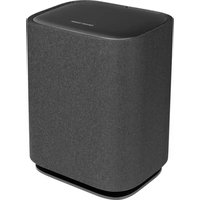
Enchant Sub - Subwoofer HARMAN KARDON - Free user manual and instructions
Find the device manual for free Enchant Sub HARMAN KARDON in PDF.


| Product type | Subwoofer |
| Brand | Harman Kardon |
| Model | Enchant Sub |
| Product dimensions (W x H x D) | 305 x 378 x 225 mm |
| Product weight | 6.7 kg |
| Package dimensions (W x H x D) | 380 x 475 x 295 mm |
| Package weight | 10.1 kg |
| Power supply | 100-240 V AC, ~50/60 Hz |
| Output power (RMS at 1% THD) | 100 W |
| Transducer | 1 x 164 mm (6.5") subwoofer |
| Network standby power consumption | < 2.0 W |
| Operating temperature | 0 °C - 45 °C |
| Wi-Fi network | IEEE 802.11 a/b/g/n/ac/ax (2.4 GHz / 5 GHz) |
| 2.4G Wi-Fi frequency band | 2412 - 2472 MHz |
| 2.4G Wi-Fi transmitter power | < 20 dBm (EIRP) |
| 5G Wi-Fi frequency band | 5.15 - 5.35 GHz, 5.470 - 5.725 GHz, 5.725 - 5.825 GHz |
| 5G Wi-Fi transmitter power | 5.15-5.25 GHz: < 23 dBm EIRP; 5.25-5.35 GHz and 5.470-5.725 GHz: < 20 dBm EIRP; 5.725-5.825 GHz: < 14 dBm EIRP |
| Connection to soundbar | Wireless (Wi-Fi) |
| Setup app | Harman Kardon One (Android and iOS) |
| Network standby activation | After 10 minutes of inactivity |
| Minimum RF exposure distance | 20 cm between device and body |
| Box contents | Subwoofer, power cord, documentation |
Frequently Asked Questions - Enchant Sub HARMAN KARDON
User questions about Enchant Sub HARMAN KARDON
0 question about this device. Answer the ones you know or ask your own.
Ask a new question about this device
Download the instructions for your Subwoofer in PDF format for free! Find your manual Enchant Sub - HARMAN KARDON and take your electronic device back in hand. On this page are published all the documents necessary for the use of your device. Enchant Sub by HARMAN KARDON.
USER MANUAL Enchant Sub HARMAN KARDON
natural_image
Simple line drawing of a cylindrical container with rounded ends and a flat top (no text or symbols)ENCHANT SUB

WHAT'S IN THE BOX

natural_image
Simple line drawing of a rectangular container with rounded ends, no text or symbols present.

* Power cord quantity and plug type vary by regions.

POWER ON


SETUP

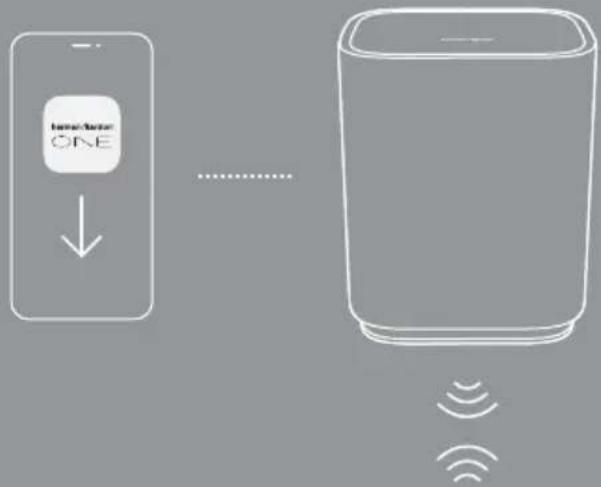
On an Android ^™ or iOS device, follow the Harman Kardon One app instructions to complete setup.

natural_image
Simple 3D rectangular prism illustration with no text or symbolsEnchant 900 / Enchant 1100

Harman Kardon One

GET IT ON
Google Play

Download on the
App Store


ONLINE SUPPORT

TECH SPEC
General Specification
• Model: ENCHANT SUB
• Power supply: 100 - 240 V AC, \~50 / 60 Hz
• Output power (RMS @THD 1%): 100 W
• Transducer: 1x 6.5" (164 mm) subwoofer
• Networked standby power: < 2.0 W
- Operating temperature: 0^ - 45^
Wireless specification
• Wi-Fi network: IEEE 802.11 a/b/g/n/ac/ax (2.4 GHz / 5 GHz)
• 2.4G Wi-Fi transmitter frequency range: 2412 - 2472 MHz (2.4 GHz ISM Band, USA 11 Channels, Europe and others 13 Channels)
• 2.4G Wi-Fi transmitter power: < 20 dBm (EIRP)
- 5G Wi-Fi transmitter frequency range: 5.15 - 5.35 GHz, 5.470 - 5.725 GHz, 5.725 - 5.825 GHz
- 5G Wi-Fi transmitter power: 5.15 - 5.25 GHz < 23 dBm (EIRP), 5.25 - 5.35 GHz & 5.470 - 5.725 GHz < 20 dBm (EIRP), 5.725 - 5.825 GHz < 14 dBm (EIRP)
Note: Band 5.6 - 5.64 GHz will be disabled when shipped to Australia / New Zealand.
Dimensions
- Product dimensions (W x H x D): 305 x 378 x 225 mm / 12.0" x 14.9" x 8.9"
• Product weight: 6.7 kg / 14.7 lbs - Packaging dimensions (W x H x D): 380 x 475 x 295 mm / 15.0" x 18.7" x 11.6"
• Packaging weight: 10.1 kg / 22.3 lbs
FR
CONTENU DE LA BOÎTE
HVAD ER DER I AESKEN
הַתְבָרִיֹתְבָרִיֹתְבָרִיֹתְבָרִיֹתְבָרִיֹתְבָרִיֹתְבָרִיֹתְבָרִיֹתְבָרִיֹתְגּוֹן, iOS 16 Android 17
- Information on power consumption This equipment complies with European Commission Regulation (EC) No 1275/2008 and (EU) No 801/2013.
- Off: N/A
- Standby (when all wireless connections are deactivated): N/A
• Networked standby for the speaker: <2.0 W
- The period of time after which the power management function switches the equipment automatically into:
| Off | N/A | |
| Standby | N/A | |
| Networked standby | When any wireless network connection is activated | Switched to networked standby mode after 10 minutes of inactivity in operational mode |
FR
FCC RF Radiation Exposure Statement Caution: To maintain compliance with the FCC's RF exposure guidelines, place the product at least 20cm from nearby persons.
Use Restriction: This device is restricted to indoor use when operating in the 5150 to 5350 MHz frequency range in following countries:
| BE EL LT PT | ||
| BG ES LU RO | ||
| CZ FR HU SI | ||
| DK HR MT SK | ||
| DE IT NL FI | ||
| EE CY AT SE | ||
| IE LV PL UK{NI} |

Belgium (BE), Greece (EL), Lithuania (LT), Portugal (PT), Bulgaria (BG), Spain (ES), Luxembourg (LU), Romania (RO), Czech Republic (CZ), France (FR), Hungary (HU), Slovenia (SI), Denmark (DK), Croatia (HR), Malta (MT), Slovakia (SK), Germany (DE), Italy (IT), Netherlands (NL), Finland (FI), Estonia (EE), Cyprus (CY), Austria (AT), Sweden (SE), Ireland (IE), Latvia (LV), Poland (PL), United Kingdom (UK) and Northern Ireland (UK (NI)).
This product contains open source software licensed under GPL. For your convenience, the source code and relevant build instruction are also available at https://harman-webpages.s3.amazonaws.com/Harman_One_OS_C_package_license_list.htm
Please feel free to contact us at:
or_OpenSourceSupport@Harman.com_if you have additional question regarding the open source software in the product.




harman/kardon by HARMAN

FSC www.fsc.org
MIX
Paper from responsible sources FSC™ C010953
HA_HK Enchant Sub_QSG_Global_CR_V10
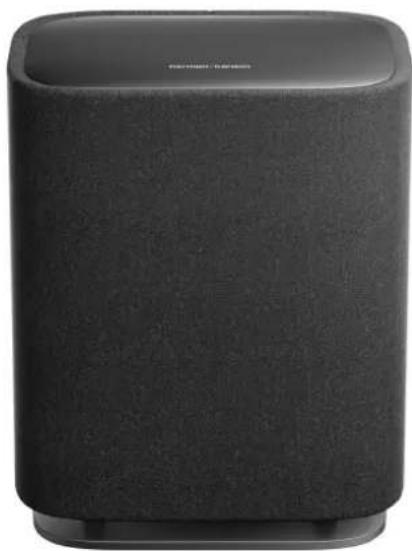
ENCHANT SUB
/
natural_image
Black cylindrical smart speaker with textured backrest and logo (no visible text or symbols on body)OWNER'S
MANUAL
IMPORTANT SAFETY INSTRUCTIONS
Verify Line Voltage Before Use
The Harman Kardon Enchant Sub has been designed for use with 100-240 volt, 50/60 Hz AC current. Connection to a line voltage other than that for which your product is intended can create a safety and fire hazard and may damage the unit. If you have any questions about the voltage requirements for your specific model or about the line voltage in your area, contact your selling dealer before plugging the unit in to a wall outlet.
Do Not Use Extension Cables
To avoid safety hazards, use only the power cable supplied with your unit. We do not recommend that extension cables be used with this product. As with all electrical devices, do not run power cables under rugs or carpets, or place heavy objects on them. Damaged power cables should be replaced immediately by an authorized service center with a cable that meets factory specifications.
Handle the AC Power Cable Gently
When disconnecting the power cable from an AC outlet, always pull the plug; never pull the cable.
If you do not intend to use your soundbar for any considerable length of time, disconnect the plug from the AC outlet.
Do Not Open the Cabinet
There are no user-serviceable components inside this product. Opening the cabinet may present a shock hazard, and any modification to the product will void your warranty. If water accidentally falls inside the unit, disconnect it from the AC power source immediately, and consult an authorized service center.
TABLE OF CONTENTS
IMPORTANT SAFETY INSTRUCTIONS....2
1 INTRODUCTION....4
2 WHAT'S IN THE BOX....6
3 PRODUCT OVERVIEW....7
4 GET STARTED 9
4.1 Placement....9
4.2 Power on....9
5 SETUP....10
6 RESTORE FACTORY SETTINGS....12
7 PRODUCT SPECIFICATIONS....13
8 TROUBLESHOOTING....14
9 TRADEMARK....15
10 OPEN SOURCE LICENSE NOTICE....16
1 INTRODUCTION
This manual includes information of the Harman Kardon Enchant Sub. We encourage you to take a few minutes to read this manual, which describes the product and includes step-by-step instructions to help you set up and get started. Read and understand all the safety instructions before using your product.
This product may have an important software update available. Please follow the instructions to connect the product to Wi-Fi to ensure that your product has the most recent software updates.
Design and specifications are subject to change without notice. Some features require subscriptions or services not available in all countries.
If you have any questions about this product, its installation or its operation, please contact your Harman Kardon retailer or customer service, or visit us at www.harmankardon.com.
Harman Kardon One app
With the Harman Kardon One app on your Android™ or iOS device, you can set up a multi-channel sound system by wirelessly pairing your Enchant Sub with:
- Enchant 900 / 1100 (soundbar, sold separately): to enhance the bass performance.
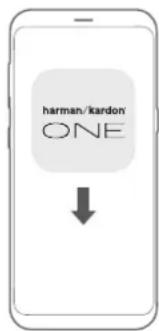


Q Harman Kardon One
For more information, see "5 SETUP".
NOTES:
- *Subscription may be needed and not provided by the Harman Kardon One app.
- App screens may vary due to software updates. Always follow the app instructions.
2 WHAT'S IN THE BOX
Unpack the box carefully and ensure that the following parts are included. If any part is damaged or missing, do not use it and contact your retailer or customer service representative.
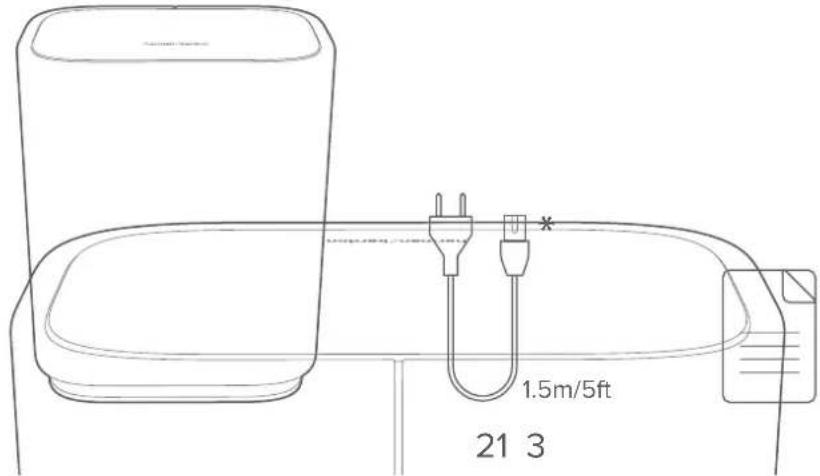
- Subwoofer
- Power cable*
- Product information
*Power cable quantity and plug type vary by regions.
3
PRODUCT
OVERVIEW
Back Panel
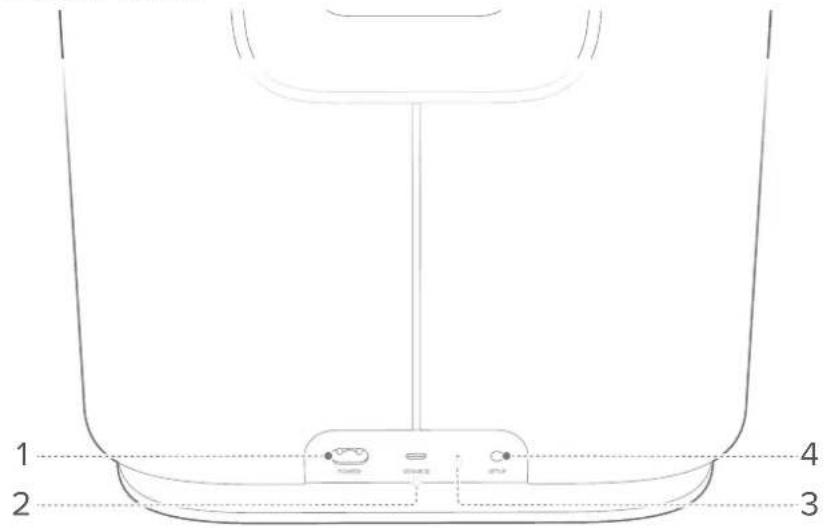
1. POWER
- Connect to power (with the supplied power cord).
2. SERVICE
- USB connector for software update (for service only).
- LED indicator
| Regular pulsing (white) System startup | ||
| (T722) | Slow pulsing (white) | Ready for setup / Disconnected with Enchant soundbar |
| (KAGH) | Solid (white) Connected with Enchant soundbar | |
| (X6X3) | Solid (green) | Subwoofer discovered by the Harman Kardon One app |
| (002W) | Fast pulsing (white) Software updating in progress | |
| (T335) | Solid (amber) Restoring factory settings | |
4. SETUP
- Press twice to enter the setup mode.
- Hold for more than 10 seconds to restore factory settings.
4 GET STARTED
4.1 Placement
Place the subwoofer on any flat and stable surface near an AC (mains) outlet.
For a successful connection, keep a distance of 1 to 5 meters (3.3 to 16.4 feet) between the subwoofer and your Enchant soundbar.
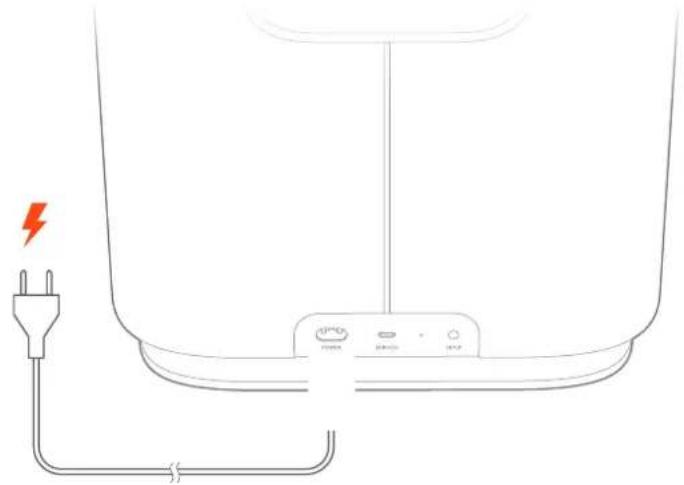
4.2 Power on
natural_image
Line drawing of a battery with a red lightning bolt and power plug, no text or symbols presentPlug one end of the power cord into the POWER connector on the back panel, and the other end into an AC (mains) outlet.
→ The subwoofer will automatically power on.
NOTES:
• Use the supplied power cord only.
- When unplugging the power cord, always pull the plug, never the cord.
5 SETUP
The subwoofer can only work with Enchant soundbar. Follow the steps below to wirelessly connect with the soundbar.
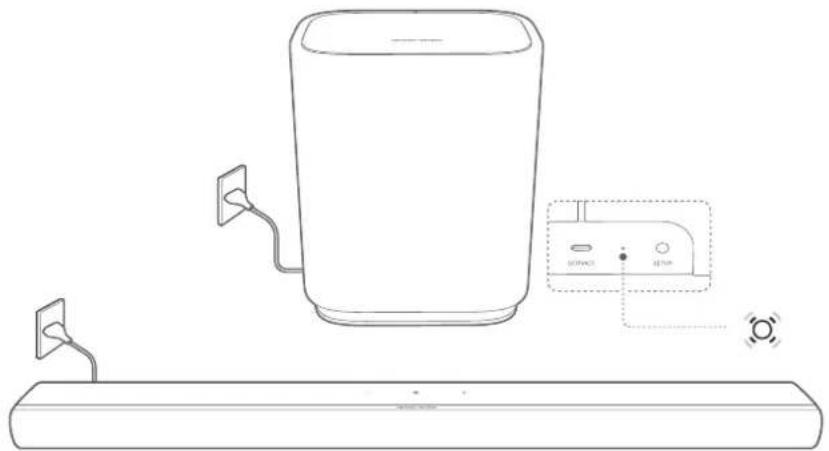
1) Connect the subwoofer and your Enchant soundbar to power.
→ ⚙ (Slow pulsing white): ready for setup.
natural_image
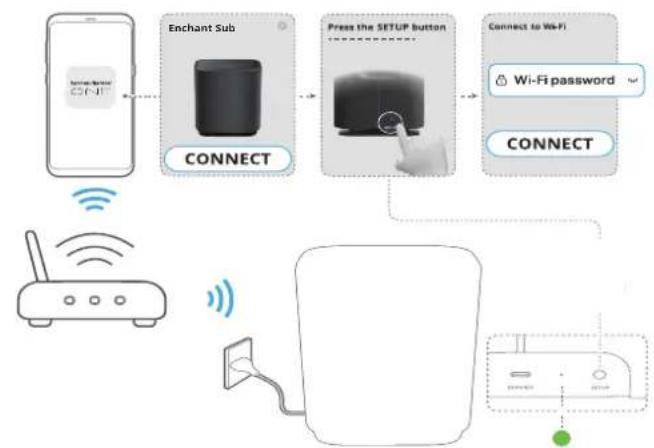
Line drawing of a portable water heater connected to a control panel and a flat base (no text or symbols)2) Connect your Android or iOS device to your home network. Download and launch the Harman Kardon One app.
3) Follow the app instructions to complete the setup.
a) Connect your Enchant soundbar to your home network.
b) Connect the subwoofer to the same network as your Enchant soundbar.
flowchart
graph TD
    A["Mobile Device"] --> B["Connect"]
    B --> C["Enchant Sub"]
    C --> D["Connect to Wi-Fi"]
    D --> E["Wi-Fi password"]
    E --> F["Connect"]
    F --> G["Network"]
    G --> H["Applifier"]
    H --> I["Device"]
NOTE:
- If your subwoofer is not discovered by the Harman Kardon One app, press SETUP twice to re-enter the setup mode.
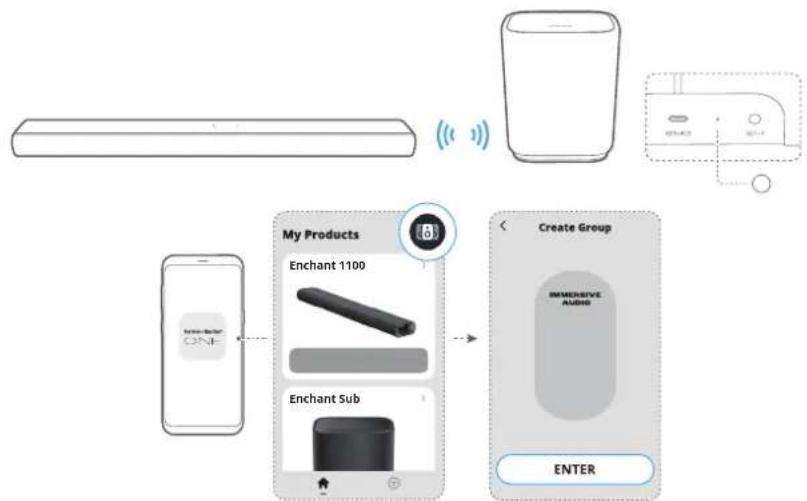
c) Group the subwoofer with your Enchant soundbar as a multi-channel sound system.
flowchart
graph TD
    A["Smartphone"] --> B["Analog Interface"]
    B --> C["Wireless Device"]
    C --> D["Audio Output"]
    D --> E["Create Group"]
    E --> F["INMENSIVE AUDIO"]
    F --> G["ENTER"]
    H["My Products"] --> I["Enchant 1100"]
    H --> J["Enchant Sub"]
→ O (Solid white): The subwoofer is connected to the Enchant soundbar.
6
RESTORE FACTORY SETTINGS
On the subwoofer, hold SETUP for more than 10 seconds to restore the factory default settings.

→ (Solid amber): Restoring factory settings
→ When the factory restore is complete, the subwoofer automatically restarts.
7 PRODUCT SPECIFICATIONS
General Specification
• Model: ENCHANT SUB
• Power supply: 100 - 240 V AC, \~50 / 60 Hz
• Output power (RMS @THD 1%): 100 W
• Transducer: 1x 6.5" (164 mm) subwoofer
• Networked standby power: < 2.0 W
- Operating temperature: 0^ - 45^
Wireless specification
• Wi-Fi network: IEEE 802.11 a/b/g/n/ac/ax (2.4 GHz / 5 GHz)
• 2.4G Wi-Fi transmitter frequency range: 2412 - 2472 MHz (2.4 GHz ISM Band, USA 11 Channels, Europe and others 13 Channels)
• 2.4G Wi-Fi transmitter power: < 20 dBm (EIRP)
- 5G Wi-Fi transmitter frequency range: 5.15 - 5.35 GHz, 5.470 - 5.725 GHz, 5.725 - 5.825 GHz
- 5G Wi-Fi transmitter power:
5.15 - 5.25 GHz < 23 dBm (EIRP),
5.25 - 5.35 GHz & 5.470 - 5.725 GHz < 20 dBm (EIRP),
5.725 - 5.825 GHz < 14 dBm (EIRP)
Dimensions
- Product dimensions (W x H x D):
305 x 378 x 225 mm / 12.0" x 14.9" x 8.9"
• Product weight: 6.7 kg / 14.7 lbs - Packaging dimensions (W x H x D):
380 x 475 x 295 mm / 15.0" x 18.7" x 11.6"
• Packaging weight: 10.1 kg / 22.3 lbs
8
TROUBLESHOOTING
Never try to repair the product yourself. If you have problems using this product, check the following points before you request services.
System
No response to button presses
- Check if the power cord is plugged into power.
- Restore the subwoofer to factory settings (See "6 RESTORE FACTORY SETTINGS").
Sound
No sound from subwoofer
- Make sure that the subwoofer is connected to power.
- Make sure that the subwoofer is wirelessly connected to the Enchant soundbar (See "5 SETUP").
Wi-Fi
Failed to connect to Wi-Fi.
- Make sure that you have selected the right network and entered the correct password.
- Make sure that your router or modem is turned on and within the range.
- Make sure that your subwoofer is connected to the same wireless network as your smartphone or tablet.
- If you have difficulties in setting up Wi-Fi, press SETUP twice to re-enter the setup mode (See "5 SETUP").
9 TRADEMARK

Wi-Fi CERTIFIED 6 ^™ and the Wi-Fi CERTIFIED 6 ^™ Logo are trademarks of Wi-Fi Alliance ^® .
10 OPEN SOURCE LICENSE NOTICE
This product contains open source software licensed under GPL. For your convenience, the source code and relevant build instruction are also available at https://harman-webpages.s3.amazonaws.com/Harman_One_OS_C_package_license_list.htm
Please feel free to contact us at:
or_OpenSourceSupport@Harman.com_if you have additional question regarding the open source software in the product.
harman/kardon®
by HARMAN

Download the full warranty card and safety information and other helpful information from our website: www.harmankardon.com/warrantyandsafetybooks
FRANÇAIS
www.harmankaridon.com
| FOR PRODUCTS THAT INCLUDE BATTERS institutions for Hours on Removal. Requiring and Proposal of Third batteries used lists for the Debris or the Waste. Remaining may not be possible for the use in this total lists for the Debris or the Waste. Remaining may not be possible for the use in this total lists for the Debris or the Waste. Remaining may not be possible for the use in this total lists for the Debris or the Waste. Remaining may not be possible for the use in this total lists for the Debris or the Waste. Remaining may not be possible for the use in this total lists for the Debris or the Waste. Remaining may not be possible forthe use in this total lists for the Debris or the Waste. Remaining may not be possible for the use in this total lists for the Debris or the Waste. Remaining may not be possible for the use in this total lists for the Debris or the Waste. Remaining may not be possible for the use in this total lists for the Debris or the Waste. Remaining may not be possible for theuse in this total lists for the Debris or the Waste. Remaining may not be possible for theuse in this total lists for the Debris or the Waste. Remaining may not be possible for theuse in this total lists for the Debris or the Waste. Remaining may not be possible for theuse in this total lists for the Debris or the Waste. Remaining may not be possible for theuse in this total lists for the Debris or the Waste. Remaining maynot be possible for the use in this total lists for the Debris or the Waste. Remaining may not be possible for theuse in this total lists for the Debris or the Waste. Remaining may not be possible for theuse in this total lists for the Debris or the Waste. Remaining may not be possible for theuse in this total lists for the Debris or the Waste. Remaining may not be possible for theuse in this total lists for the Debris or |


THIS SYMBOL OF THE PRODUCT MEANS THESE IS MINNESLATE. ANSOLIDATED VOLTALE WITH THE PRODUCT EXLOSIBLE THAT MAY PRESENT A MSK OF ELECTRICAL SHOCK.
CAUTION RISK OF ELECTRIC SHOCK, D
- 10 not express this appointment to汇报并经选择性、诊断性和罩术型法不必要时面对墙内
- Do not use this appropriate new words. The following instructions may not apply to muchport devices. Error to your device user manual or quick start guide for more waterproof instructions only.
ENGLISH
harman/kardon
by HARMAN
WARRANTY CARD / FICHE DE LA GARANTIE

WARRANTY CARD
SET UP INFORMATION & PRODUCT REGISTRATION
Congratulations with the purchase of your new Product. We have done our utmost to make your experience the best one possible. If you have any questions when setting up your Product and would like some helpful hints, we recommend that you visit the relevant country specific support website for your Product: www.harmankardon.com. There you will also find relevant contact information. If you cannot find the information you are looking for, please contact the vendor that sold the Product to you or contact the relevant Harman Kardon customer support center by electronic mail or phone.
We recommend that you register your Product via the relevant country specific website for your Product. Your registration will allow us to inform you about updates for certain products, possible new offers and new Products and/or applications. Registering is easy; just follow the instructions on the relevant country specific website for your Product.
NOTE: THIS LIMITED WARRANTY DOES NOT APPLY TO CONSUMERS IN THE EUROPEAN ECONOMIC AREA (EEA) MEMBER STATES, AUSTRALIA AND NEW ZEALAND AS THEY ARE PROTECTED BY LOCAL CONSUMER LAW AND BENEFIT FROM LOCAL STATUTORY WARRANTIES
LIMITED WARRANTY
WHO IS PROTECTED BY THE WARRANTY
This limited warranty (the "Limited Warranty") protects only the original end-user ("you" or "your"), and is not transferable and is applicable only in the country (excluding EEA member states and the Russian Federation) in which you originally purchased your Harman Kardon Product (the "Product"). Any attempt to transfer this warranty shall immediately make this warranty void.
LIMITED WARRANTY
HARMAN International Industries, Incorporated ("HARMAN") is the manufacturer and through its local subsidiary, warrants to you that the Product (including components provided in with the Product) will be free from defects in workmanship and materials for a period of ONE year from the date of retail purchase by you (the "Warranty Period"). During the Warranty Period, the Product (including components), will be repaired or replaced at HARMAN's option, without charge for either parts or labor OR at HARMAN's sole option, the price of the Product may be refunded, subject to depreciation based on your purchase price for the Product pro-rated over the remaining balance of the Warranty Period. Any warranty service or replacement of parts will not extend the Warranty Period.
This Limited Warranty does not cover defects which are a result of: (1) damage caused by accident, unreasonable use or neglect (including the lack of reasonable and necessary maintenance); (2) damage during shipment (claims must be presented to the carrier); (3) damage to, or deterioration of, any accessory or decorative surface; (4) damage resulting from failure to follow instructions contained in your owner's manual; (5) damage resulting from the performance of repairs by someone other than an authorized Harman Kardon service center; (6) deterioration of component parts, the nature of which is to become worn or depleted with use, such as batteries and headphone ear pads.
Furthermore, this Limited Warranty covers only actual defects within the Product itself, and does not cover the cost of installation or removal from a fixed installation, setup or adjustments, claims based on misrepresentation by the seller, performance variations resulting from installation-related circumstances such as source quality or AC power or Product modifications, any unit on which the serial number has been effaced, modified or removed, or units used for other than home use. This Limited Warranty is valid only for Harman Kardon products purchased from an authorized dealer.
Except to the extent expressly prohibited in your jurisdiction by applicable law, all implied warranties, including fitness for a particular purpose and merchantability are hereby excluded and in no event shall HARMAN or any HARMAN subsidiary be liable for any indirect, direct, incidental, special or consequential loss or damages whatsoever (including, without limitation, other pecuniary loss) arising out of the use of or inability to use the Product, even if HARMAN and/or a HARMAN subsidiary have been advised of the possibility of such damages. To any extent that HARMAN cannot lawfully disclaim implied warranties under this Limited Warranty, all such implied warranties are limited in duration to the duration of this warranty. Some jurisdictions do not allow the exclusion or limitation of incidental or consequential damages or exclusions or limitations on the duration of implied warranties or conditions, so the above limitations or exclusions may not apply to you. This warranty gives you specific legal rights, and you may also have other rights that vary by jurisdiction.
HOW TO OBTAIN WARRANTY SERVICE
Contact the dealer who sold you this Product, or contact Harman Kardon customer support using the contact information on the relevant country specific support website for your Product to request warranty service. To validate your right to this Limited Warranty, you must provide the original sales Invoice or other proof of ownership and date of purchase. Do not return your Product without prior authorization from the corresponding dealer or HARMAN. Warranty repair of the HARMAN Product must be carried out by an authorized dealer or service center. Unauthorized warranty repair will void the warranty and is performed at your sole risk.
You are also welcome to consult the relevant country specific HARMAN support website for your Product for helpful hints.
WHO PAYS FOR WHAT
This Limited Warranty covers all expenses for labor and materials required for the repair OR replacement of the Product that is found to be defective, and a reasonable return shipping charge within the country of repair. Please be sure to save the original shipping carton(s), because a charge will be made for additional cartons/packaging.
You will be charged for the cost of examining a unit that is not in need of repair (including resulting shipping costs), or for necessary repairs not covered by this Limited Warranty.
We sincerely thank you for your expression of confidence in Harman Kardon. We wish you many years of listening pleasure.
harman/kardon
by HARMAN
TECH SPEC / SPÉCIFICATIONS TECHNIQUES / ESPECIFICACIONES TÉCNICAS / ESPECIFICACIONES
ENGLISH
General Specification
• Model: ENCHANT SUB
- Power supply: 100 - 240 V AC, \~50 / 60 Hz
• Output power (RMS @THD 1%): 100 W
• Transducer: 1x 6.5" (164 mm) subwoofer
• Networked standby power: < 2.0 W
- Operating temperature: 0°C - 45°C
Wireless Specification
• Wi-Fi network: IEEE 802.11 a/b/g/n/ac/ax (2.4 GHz / 5 GHz)
• 2.4G Wi-Fi transmitter frequency range: 2412 - 2472 MHz (2.4 GHz ISM Band, USA 11 Channels, Europe and others 13 Channels)
• 2.4G Wi-Fi transmitter power: < 20 dBm (EIRP)
- 5G Wi-Fi transmitter frequency range: 5.15 - 5.35 GHz, 5.470 - 5.725 GHz, 5.725 - 5.825 GHz
- 5G WI-FI transmitter power: 5.15 - 5.25 GHz < 23 dBm (EIRP), 5.25 - 5.35 GHz & 5.470 - 5.725 GHz < 20 dBm (EIRP), 5.725 - 5.825 GHz < 14 dBm (EIRP)
Dimensions
- Product dimensions (W × H × D):
305 × 378 × 225 mm / 12.0" × 14.9" × 8.9"
• Product weight: 6.7 kg / 14.7 lbs - Packaging dimensions (W x H x D):
380 x 475 x 295 mm / 15.0" x 18.7" x 11.6"
• Packaging weight: 10.1 kg / 22.3 lbs
FRANÇAIS (CANADA)
FCC RF Radiation Exposure Statement Caution: To maintain compliance with the FCC's RF exposure guidelines, place the product at least 20cm from nearby persons.
This product contains open source software licensed under GPL. For your convenience, the source code and relevant build instruction are also available at https://harman-webpages.s3.amazonaws.com/Harman_One_OS_C_package_license_list.htm Please feel free to contact us at: Harman Deutschland GmbH ATT: Open Source, Gregor Krapf-Gunther, Parkring 3 85748 Garching bei Munchen, Germany or_OpenSourceSupport@Harman.com_if you have additional question regarding the open source software in the product.
- WHAT'S IN THE BOX
- ONLINE SUPPORT
- TECH SPEC
- General Specification
- Wireless specification
- Dimensions
- FR
- CONTENU DE LA BOÎTE
- HVAD ER DER I AESKEN
- ENCHANT SUB
- IMPORTANT SAFETY INSTRUCTIONS
- Verify Line Voltage Before Use
- Do Not Use Extension Cables
- Handle the AC Power Cable Gently
- Do Not Open the Cabinet
- TABLE OF CONTENTS
- IMPORTANT SAFETY INSTRUCTIONS....2
- INTRODUCTION
- Harman Kardon One app
- NOTES:
- WHAT'S IN THE BOX
- 3
- PRODUCT
- OVERVIEW
- POWER
- SERVICE
- SETUP
- GET STARTED
- Placement
- Power on
- SETUP
- NOTE:
- 6
- RESTORE FACTORY SETTINGS
- PRODUCT SPECIFICATIONS
- 8
- TROUBLESHOOTING
- System
- No response to button presses
- Sound
- No sound from subwoofer
- Wi-Fi
- Failed to connect to Wi-Fi.
- TRADEMARK
- OPEN SOURCE LICENSE NOTICE
- FRANÇAIS
- CAUTION RISK OF ELECTRIC SHOCK, D
- ENGLISH
- WARRANTY CARD
- SET UP INFORMATION & PRODUCT REGISTRATION
- LIMITED WARRANTY
- WHO IS PROTECTED BY THE WARRANTY
- HOW TO OBTAIN WARRANTY SERVICE
- WHO PAYS FOR WHAT
- FRANÇAIS (CANADA)
Brand : HARMAN KARDON
Model : Enchant Sub
Category : Subwoofer