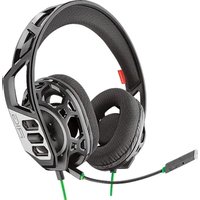
RIG 300HX - Earphones PLANTRONICS - Free user manual and instructions
Find the device manual for free RIG 300HX PLANTRONICS in PDF.


| Product type | Wired gaming headset |
| Brand | Plantronics |
| Model | RIG 300HX |
| Weight | Approximately 200 g |
| Dimensions | Approximately 20 x 18 x 8 cm |
| Connectivity | 3.5 mm jack (separate for audio and mic) |
| Cable length | 1.3 m |
| Compatibility | PC, Xbox, PlayStation, Nintendo Switch, mobile devices |
| Volume control | Built-in wheel on cable |
| Mute function | Yes, secret button (red color) |
| Adjustable headband | Yes, 3 positions (small, medium, large) |
| Swiveling ear cups | Yes |
| Microphone type | Unidirectional, flexible |
| Impedance | 32 ohms |
| Sensitivity | 111 dB |
| Frequency response | 20 Hz - 20 kHz |
| Power | Via the jack plug (no battery) |
| Care and cleaning | Wipe with a soft, dry cloth |
| Safety | Consult the safety guide before use |
| General information | Manufactured by NACON, 396 466 Rue de la Voyette, CRT2 59273 Fretin, France |
Frequently Asked Questions - RIG 300HX PLANTRONICS
User questions about RIG 300HX PLANTRONICS
0 question about this device. Answer the ones you know or ask your own.
Ask a new question about this device
Download the instructions for your Earphones in PDF format for free! Find your manual RIG 300HX - PLANTRONICS and take your electronic device back in hand. On this page are published all the documents necessary for the use of your device. RIG 300HX by PLANTRONICS.
USER MANUAL RIG 300HX PLANTRONICS
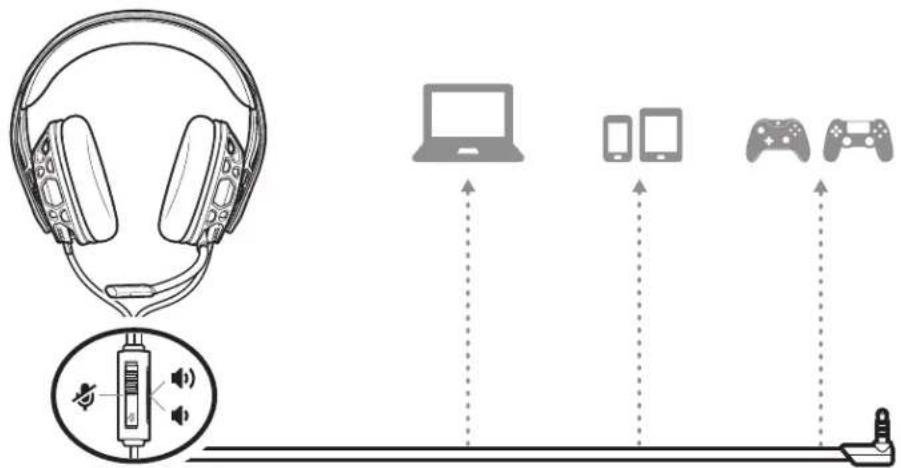
Your headset components easily snap into the headset frame to configure the best fit and sound.
1 Follow the diagram to put your headset together.
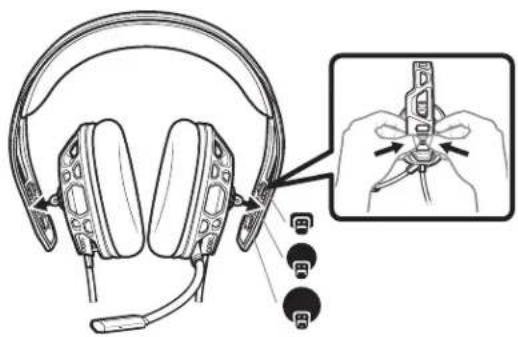
2 The headband adjusts to three sizes (small, medium, large) by moving the earcups. To remove an earcup, press the earcup to detach it from the headband.
Be safe
Please read the safety guide for important safety, charging, battery and regulatory information before using your new headset.
System volume
To adjust system volume, check your console's user guide.
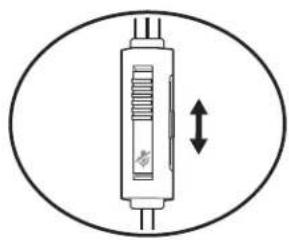
Volume
To adjust the volume, slide the volume control.
natural_image
Simple line drawing of a vertical cylindrical device with internal structure and bidirectional arrow (no text or symbols)Mute
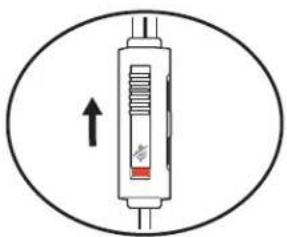
To mute your headset, slide the mute switch to reveal the red color.
Support
NEED MORE HELP?
www.nacongaming.com

nacon
NACONG GAMING, Inc
10400 NE 4 ^th Street, Suite 500,
Bellevue, WA 98004 USA
(+1) 800-617-0174
Headquarter
NACON
©2020 NACON. All trademarks are the property of their respective owners.
Patents pending.
212342-06 (06.20)
RIG
Gamme RIG 300
Soyez prudent
natural_image
Simple line drawing of a vertical connector with a double-headed arrow indicating vertical displacement (no text or symbols)Touche secret
natural_image
Diagram of a syringe with internal components and an upward arrow, enclosed in an oval (no text or symbols)Assistance
BESOIN DE PLUS D'INFORMATIONS ?
www.nacongaming.com

nacon
NACONG GAMING, Inc
10400 NE 4 ^th Street, Suite 500,
Bellevue, WA 98004 USA
(+1) 800-617-0174
Headquarter
NACON
natural_image
Simple line drawing of a vertical connector with a double-headed arrow indicating vertical displacement (no text or symbols)Stummschaltung
natural_image
Diagram of a vertical pressure vessel with an upward arrow indicating force or pressure direction (no text or symbols)Support
Wees veilig
natural_image
Simple line drawing of a vertical cylindrical device with internal components and bidirectional arrow indicating rotation (no text or symbols)Mute
Ondersteuning
HULP NODIG?
www.nacongaming.com

nacon
NACONG GAMING, Inc
10400 NE 4 ^th Street, Suite 500,
Bellevue, WA 98004 USA
(+1) 800-617-0174
Headquarter
NACON
natural_image
Simple line drawing of a vertical connector with a double-headed arrow indicating vertical displacement (no text or symbols)Mute
natural_image
Diagram of a syringe with internal components and an upward arrow, enclosed in an oval (no text or symbols)Asistencia
natural_image
Simple line drawing of a vertical cylindrical device with internal components and bidirectional arrow indicating rotation (no text or symbols)Pomoc
Будьте осторожны!
natural_image
Simple line drawing of a vertical cylindrical object with internal structure, enclosed in an oval (no text or symbols)Отключение звука
natural_image
Diagram of a syringe with internal components and an upward arrow, enclosed in an oval (no text or symbols)Поддержка
ТРЕБУЕТСЯ ПОМОЩЬ?
www.nacongaming.com

nacon
NACONG GAMING, Inc
10400 NE 4 ^th Street, Suite 500,
Bellevue, WA 98004 USA
(+1) 800-617-0174
Headquarter
NACON
natural_image
Simple line drawing of a vertical connector with a double-headed arrow indicating vertical displacement (no text or symbols)Mut
natural_image
Diagram of a syringe with internal components and an upward arrow, enclosed in an oval (no text or symbols)Asistență
AVEȚI NEVOIE DE MAI MULTĂ ASISTENȚĂ?
www.nacongaming.com

nacon
NACONG GAMING, Inc
10400 NE 4 ^th Street, Suite 500,
Bellevue, WA 98004 USA
(+1) 800-617-0174
Headquarter
NACON
natural_image
Simple line drawing of a vertical cylindrical device with a double-headed arrow indicating vertical displacement (no text or symbols)natural_image
Diagram of a syringe with an arrow indicating upward motion (no text or symbols)Brand : PLANTRONICS
Model : RIG 300HX
Category : Earphones