KSM192 - Food Processor KITCHENAID - Free user manual and instructions
Find the device manual for free KSM192 KITCHENAID in PDF.


| Product Type | Stand Mixer |
| Brand | KitchenAid |
| Model | KSM192 |
| Dimensions (approx.) | 35.3 x 22.2 x 36.8 cm |
| Weight (approx.) | 11.3 kg |
| Power | 120 V ~ 60 Hz, 325 W max |
| Bowl Capacity | 2.8 L (stainless steel) |
| Speeds | 10 speeds (1-10) + OFF/0 position |
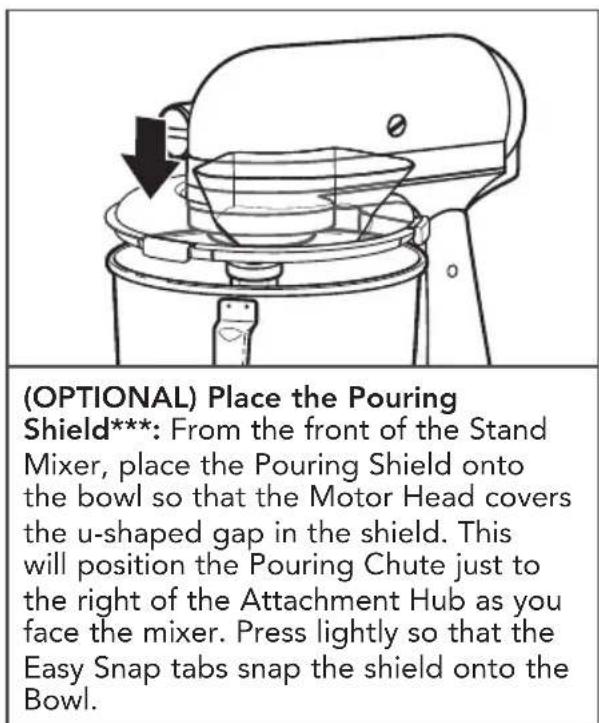
| Included Accessories | Flat beater, dough hook, wire whip, flexible edge beater, pastry beater, pouring shield |
| Main Functions | Mix, beat, whip, knead, cut butter, crush |
| Safety | Grounded plug, unplug before cleaning, do not immerse base |
| Care and Cleaning | Bowl and accessories (except wire whip) dishwasher safe (top rack); wire whip hand wash; base wipe with damp cloth |
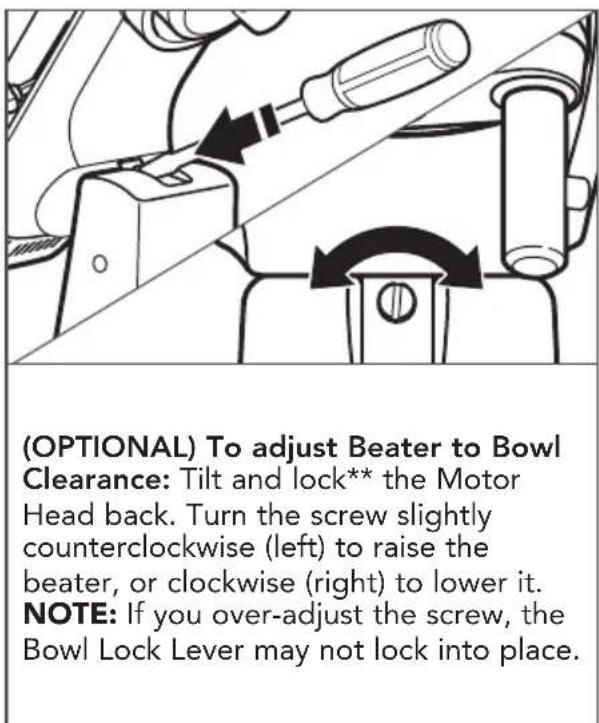
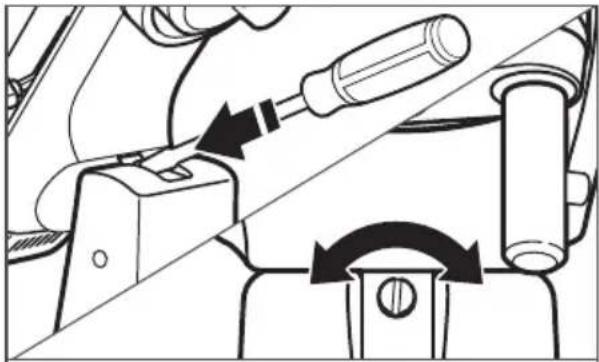
| Beater Clearance Adjustment | Via the screw located under the base |
| Warranty | 1 year (free replacement first year) |
| Country of Manufacture | Not specified (usually made in USA) |
Frequently Asked Questions - KSM192 KITCHENAID
User questions about KSM192 KITCHENAID
0 question about this device. Answer the ones you know or ask your own.
Ask a new question about this device
Download the instructions for your Food Processor in PDF format for free! Find your manual KSM192 - KITCHENAID and take your electronic device back in hand. On this page are published all the documents necessary for the use of your device. KSM192 by KITCHENAID.
USER MANUAL KSM192 KITCHENAID
KSM45 - KSM200 Series
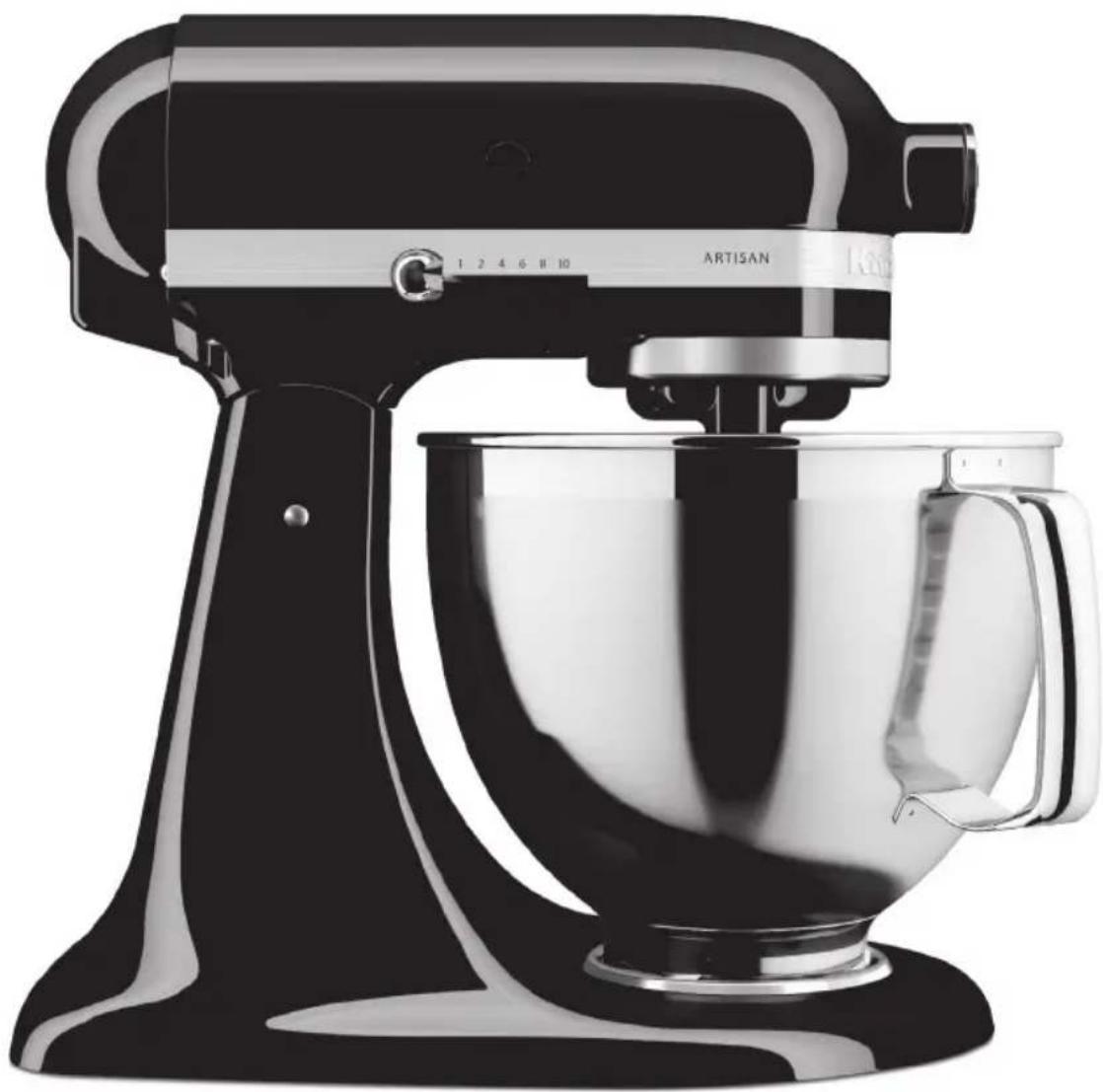
natural_image
Black-and-white photo of a Artisan Kiosk with a modern stand mixer (no visible text or symbols)PARTS AND FEATURES
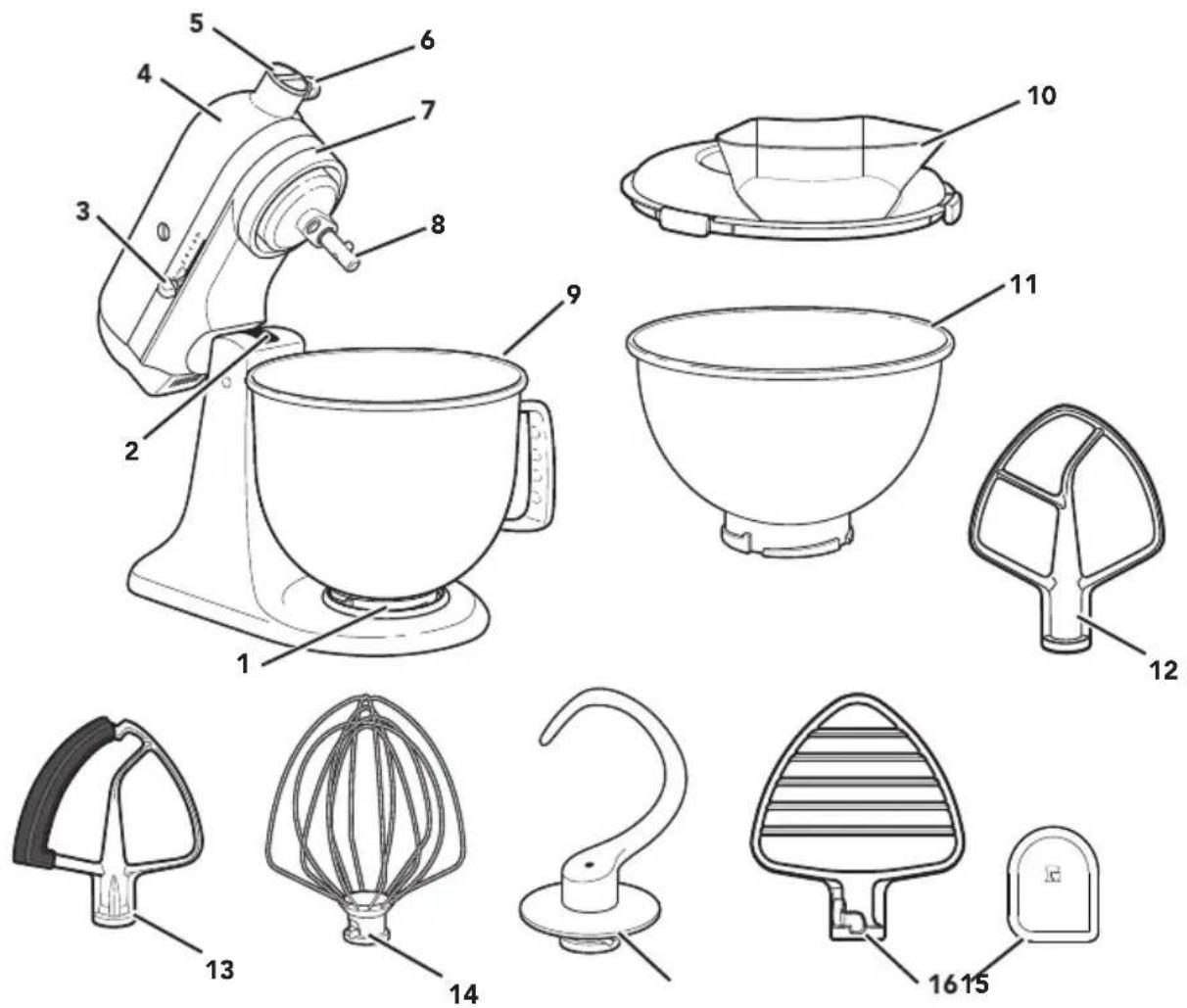
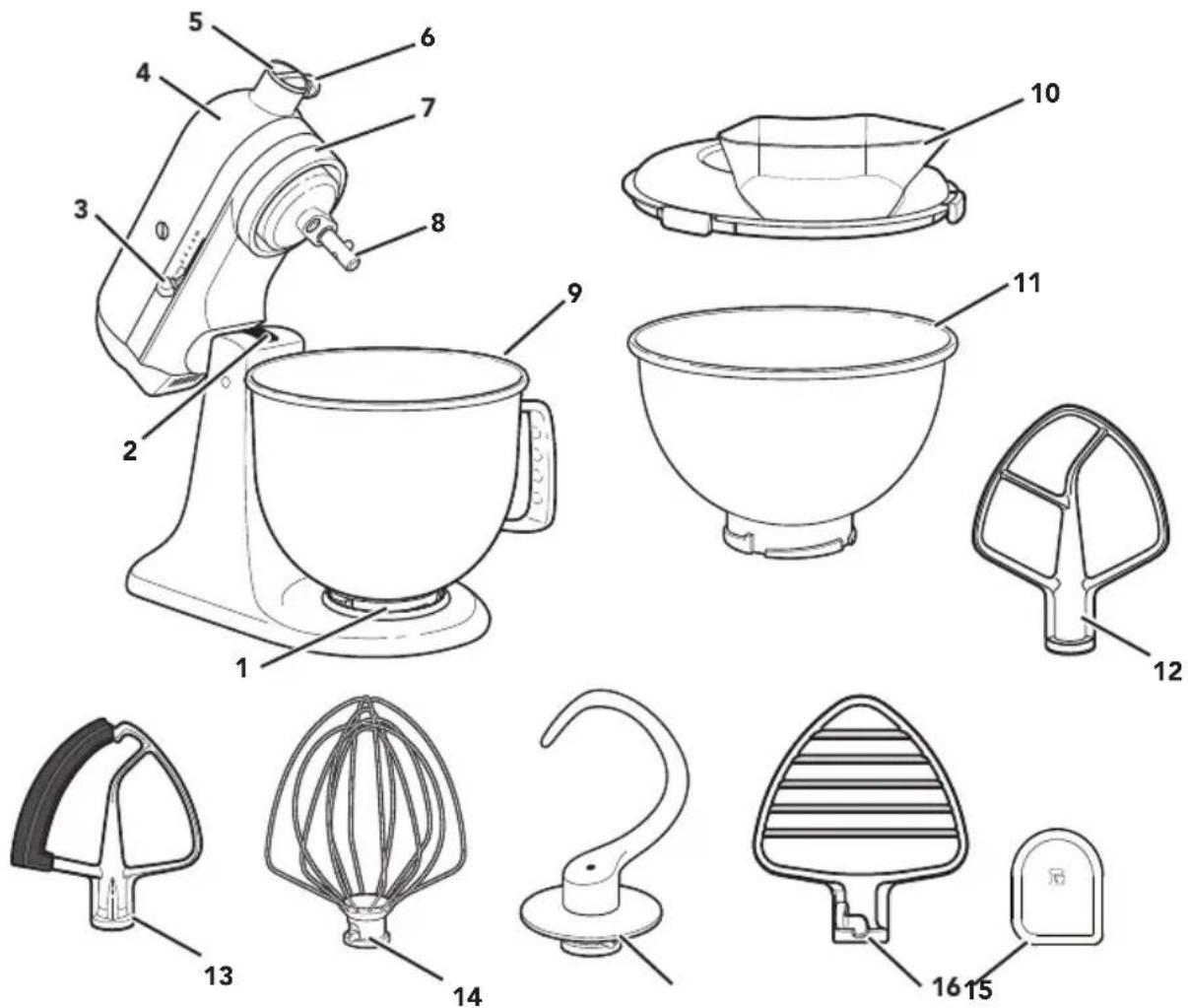
1 Bowl Clamping Plate
2 Beater Height Adjustment Screw (not shown)
3 Speed Control Lever
4 Motor Head
5 Attachment Hub
6 Attachment Knob
7 Motor Head (locking lever not shown)
8 Beater Shaft
9 Bowl**
10 Pouring Shield*
11 2.8 L Stainless Steel Bowl*
12 Flat Beater*
13 Flex Edge Beater*
14 Wire Whip
15 Dough Hook
16 Pastry Beater* and Scraper*** *
Your safety and the safety of others are very important.
We have provided many important safety messages in this manual and on your appliance. Always read and obey all safety messages.

This is the safety alert symbol.
This symbol alerts you to potential hazards that can kill or hurt you and others.
All safety messages will follow the safety alert symbol and either the word "DANGER" or "WARNING." These words mean:
! DANGER
You can be killed or seriously injured if you don't immediately follow instructions.
WARNING
You can be killed or seriously injured if you don't follow instructions.
All safety messages will tell you what the potential hazard is, tell you how to reduce the chance of injury, and tell you what can happen if the instructions are not followed.
IMPORTANT SAFEGUARDS
When using electrical appliances, basic safety precautions should always be followed, including the following:
- Read all instructions.
- To protect against risk of electrical shock, do not put Stand Mixer in water or other liquid.
- This appliance is not intended for use by persons (including children) with reduced physical, sensory, or mental capabilities, or lack of experience and knowledge, unless they are closely supervised and instructed concerning use of the appliance by a person responsible for their safety. Close supervision is necessary when any appliance is used by or near children. Children should be supervised to ensure that they do not play with the appliance.
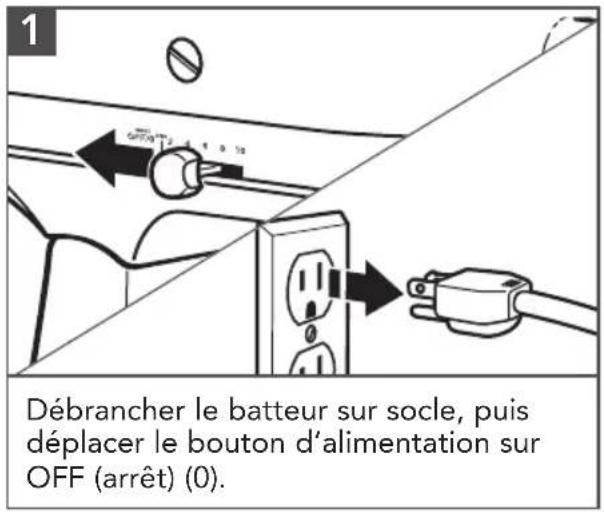
- Turn the appliance OFF/0, then unplug from the outlet when not in use, before assembling or disassembling parts, and before cleaning. To unplug, grasp the plug and pull from the outlet. Never pull from the power cord.
- Avoid contacting moving parts. Keep hands, hair, and clothing, as well as spatulas and other utensils, away from beater during operation to reduce the risk of injury to persons and/or damage to the Stand Mixer.
- Do not operate any appliance with a damaged cord or plug, or after the appliance malfunctions, or is dropped or damaged in any manner. Return appliance to the nearest Authorized Service Facility for examination, repair, or electrical or mechanical adjustment.
- The use of accessories or attachments not recommended or sold by the manufacturer may cause fire, electric shock or injury.
- Do not use the Stand Mixer outdoors.
PRODUCT SAFETY
- Do not let the cord hang over the edge of table or counter.
- Remove the Beaters, Pastry Beater, Wire Whip, or Dough Hook from the Stand Mixer before washing.
SAVE THESE INSTRUCTIONS
This product is designed for household use only.
ELECTRICAL REQUIREMENTS
WARNING

Electrical Shock Hazard
Plug into a grounded 3 prong outlet.
Do not remove ground prong.
Do not use an adapter.
Do not use an extension cord.
Failure to follow these instructions can result in death, fire, or electrical shock.
Voltage: 120 V
Frequency: 60 Hz
Wattage: 275 Watts MAX for models K45, KSM45-KSM80
300 Watts MAX for models KSM85-KSM110
325 Watts MAX for models KSM120-KSM200
NOTE: The power rating for your Stand Mixer is printed on the serial plate.
Do not use an extension cord. If the power supply cord is too short, have a qualified electrician or service technician install an outlet near the appliance.
The maximum rating is based on the attachment that draws the greatest load (power). Other recommended attachments may draw significantly less power.
GETTING STARTED
ACCESSORY GUIDE
| ACCESSORY USE | TO MIX SUGGESTED ITEMS | |
| Flat Beater* Flex Edge Beater* | Normal to heavy mixtures | Cakes, creamed frostings, candies, cookies, biscuits, pie pastry, meatloaf, mashed potatoes. |
| Pastry Beater* | Cut butter into flour | For pie dough, biscuits and other pastries, mashing fruits and vegetables, and shredding meats. |
| Wire Whip | Mixtures that need air incorporated | Eggs, egg whites, heavy cream, boiled frostings, sponge cakes, mayonnaise, some candies. |
| Dough Hook | Mixing and kneading yeast doughs | Breads, rolls, pizza dough, buns. |
*Included with select models only. Also available as an optional accessory.
SPEED CONTROL GUIDE
Note: The Speed Control Lever can be set to obtain speeds 1, 3, 5, 7, and 9 if a finer adjustment is required. Do not exceed Speed 2 when preparing yeast doughs as this may cause damage to the Stand Mixer.
| SPEED ACCESSORY ACTION | DESCRIPTION | ||
| Stir | Flat Beater* Flex Edge Beater* | STIR | For starting all mixing procedures, slow stirring, and combining. |
| 1 | |||
| 2 | Pastry Beater* STIR | Cut butter into flour to make pastry dough; Mash fruits and vegetables. | |
| Flat Beater* Flex Edge Beater* | SLOW MIXING | For slow mixing, mashing, and faster stirring. | |
| Dough Hook | To mix and knead yeast doughs, heavy batters, and candies; mix thin or splashy batters. | ||
| 4 | Flat Beater* Flex Edge Beater* | MIXING, BEATING meats. | For mixing semi-heavy batters, such as cookies, or to combine sugar and shortening. Medium speed for cake mixes. |
| Pastry Beater* For sh | |||
| Wire Whip | For adding sugar to egg whites for meringues. | ||
| 6 | Flat Beater* Flex Edge Beater* | BEATING, CREAMING | For medium-fast beating (creaming), or whipping. Use to finish mixing cake, doughnut, and other batters. High speed for cake mixes. |
| Wire Whip | For medium-fast whipping of ingredients requiring incorporation of air, such as egg whites. | ||
| 8 Wire | Whip | FAST BEATING, WHIPPING | For whipping cream, egg whites, and boiled frostings. |
NOTE: To move the Speed Control Lever with ease, lift slightly up as you move it across the settings in either direction.
PRODUCT ASSEMBLY
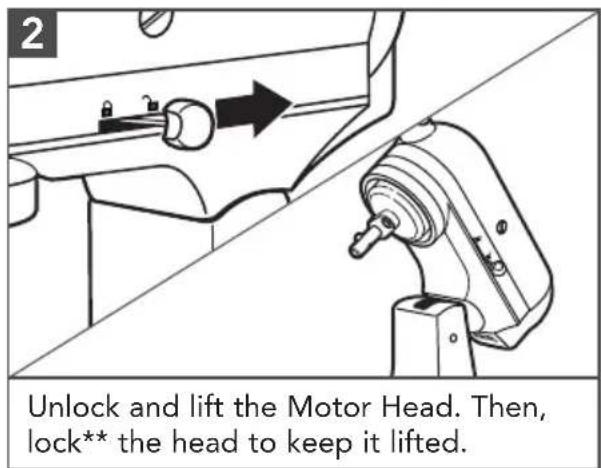
*Included with select models only. Also available as an optional accessory.
**Locking option is available on select models.
PRODUCT ASSEMBLY
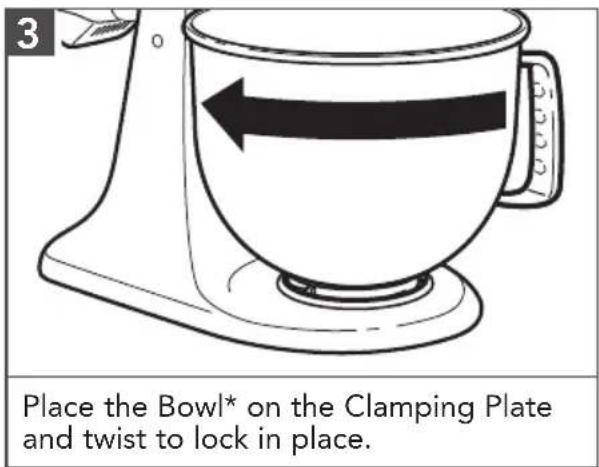
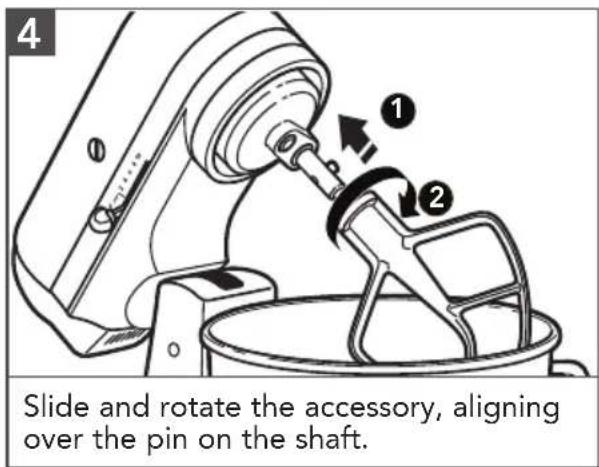
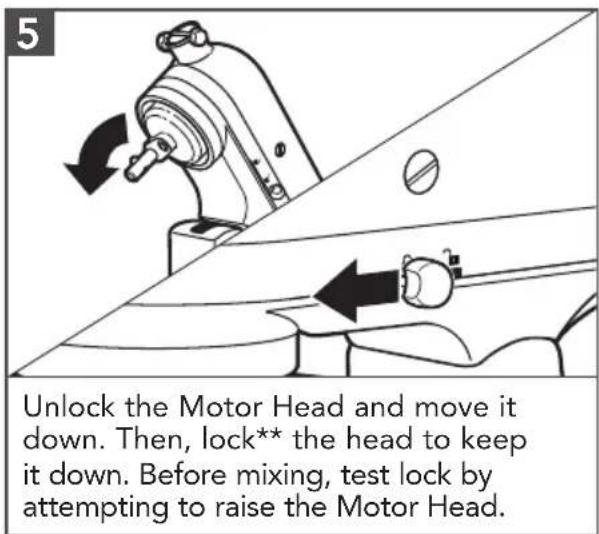
*The Bowl design and material depend on the Stand Mixer model.
**Locking option is available on select models.
***Included with select models only. Also available as an optional accessory.
PRODUCT USAGE
WARNING

Electrical Shock Hazard
Plug into a grounded 3 prong outlet.
Do not remove ground prong.
Do not use an adapter.
Do not use an extension cord.
Failure to follow these instructions can result in death, fire, or electrical shock.
1
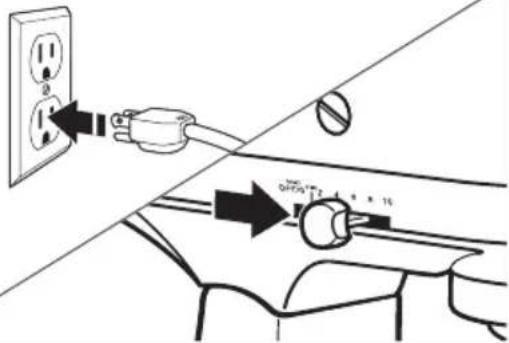
Plug it into a grounded 3 prong outlet. Start with lower speed to avoid splashing, and increase speed gradually.
Refer to the "Speed Control Guide".
WARNING
Injury Hazard
Unplug mixer before touching beaters.
Failure to do so can result in broken bones, cuts, or bruises.
2
natural_image
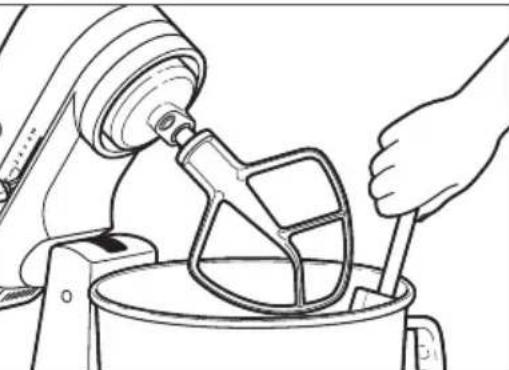
Line drawing of a hand pouring liquid into a mixing bowl using a stand mixer (no text or symbols)Do not scrape the Bowl* while operating. Scraping the Bowl* once or twice during mixing is usually sufficient.
natural_image
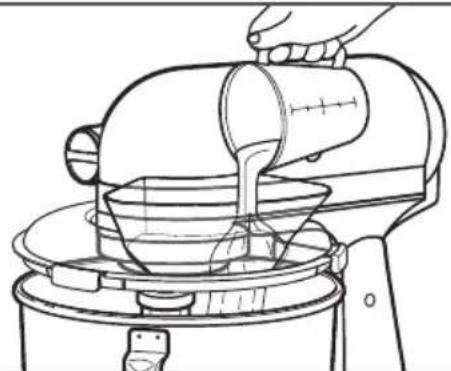
Line drawing of a hand pouring liquid into a mixing bowl using a stand mixer (no text or symbols)(OPTIONAL): Pour ingredients into the Bowl* through the Pouring Chute.
*The Bowl design and material depend on the Stand Mixer model.
PRODUCT DISASSEMBLY
natural_image
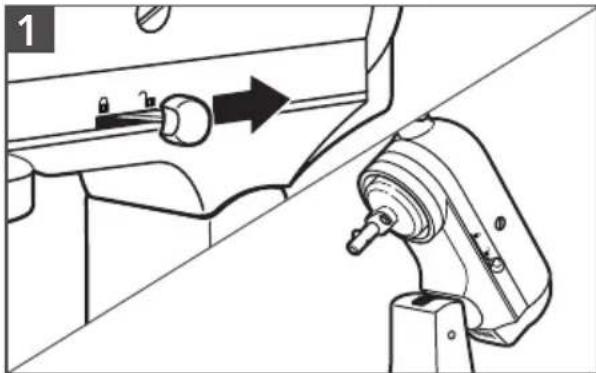
Technical line drawing of a mechanical assembly with directional arrow (no text or symbols)Turn the Stand Mixer "OFF/0" and unplug. Unlock and lift the Motor Head. Then, lock* the head to keep it lifted.
natural_image
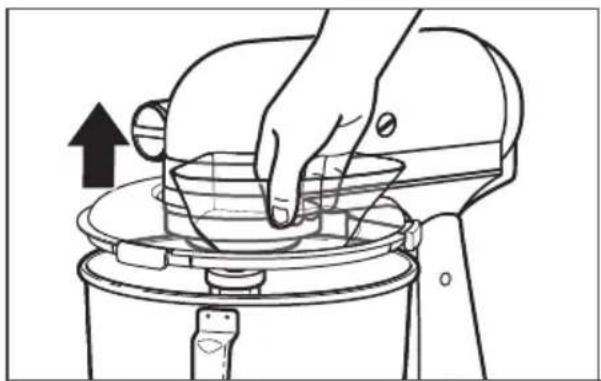
Line drawing of a hand using a kitchen mixer to filter or spread food (no text or symbols)(OPTIONAL): Lift the front of the Pouring Shield** clear of the rim of the Bowl***. Pull away from the Stand Mixer.
natural_image
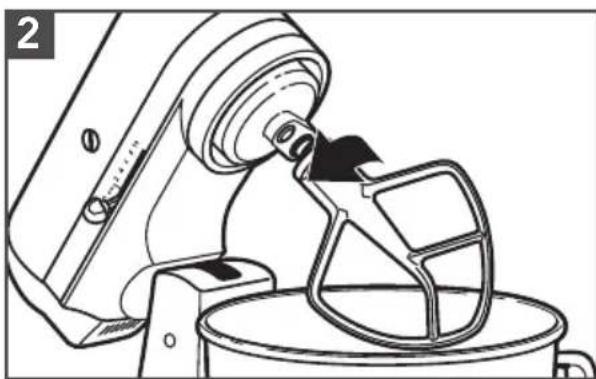
Line drawing of a kitchen mixer with a cloth mixer (no text or symbols)Press the accessory upward, turn it and pull it away from the Beater Shaft.
natural_image
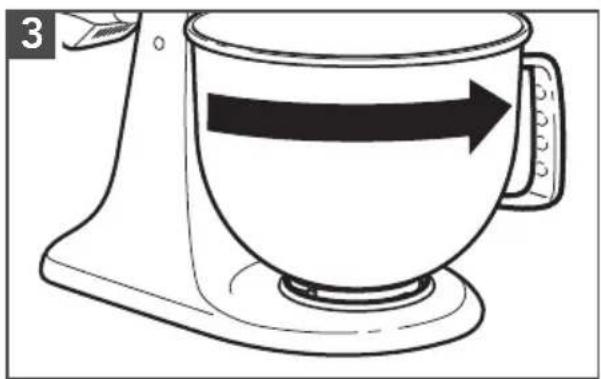
Line drawing of a kitchen mixer with an arrow indicating rotation direction (no text or symbols)Twist to unlock the Bowl*** from the Clamping Plate.
OPTIONAL ATTACHMENTS
KitchenAid offers a wide range of optional attachments such as the Spiralizer, Pasta Cutters, or Food Grinder that may be attached to the Stand Mixer attachment power hub as shown here.
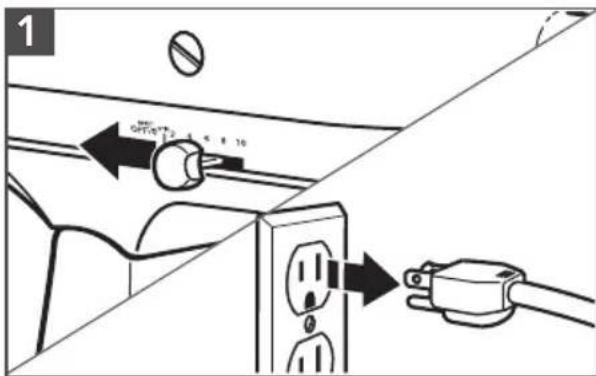
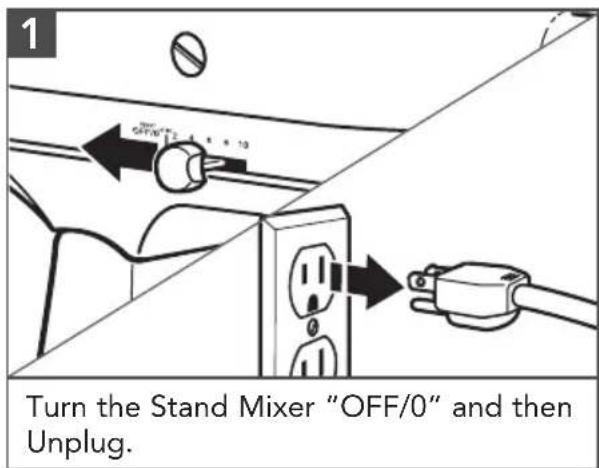
Turn the Stand Mixer "OFF/0" and then Unplug.
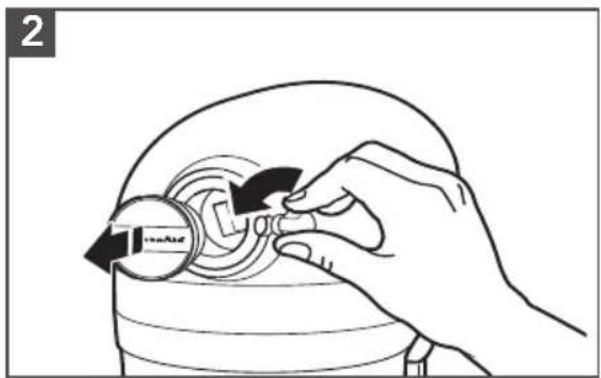
Remove the Attachment Hub cover.
*Locking option is available on select models.
**Included with select models only. Also available as an optional accessory.
***The Bowl design and material depend on the Stand Mixer model.
OPTIONAL ATTACHMENTS
natural_image
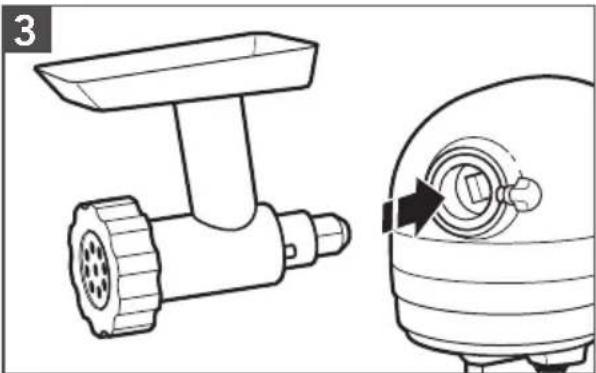
Technical line drawing of a food Turkey feeder and its mechanical component (no text or symbols)Insert attachment into Attachment Hub, making certain that attachment power shaft fits into the square Attachment Hub socket.
natural_image
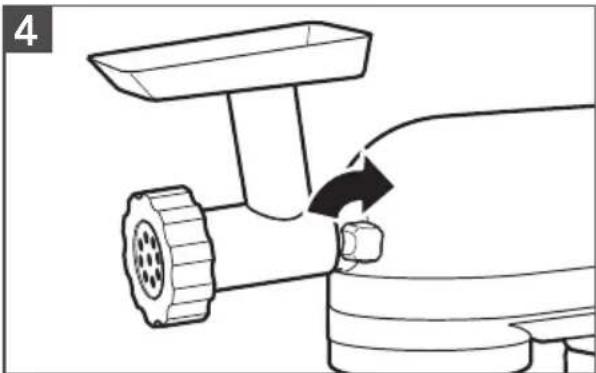
Line drawing of a mechanical tool with a lever and handle, showing a curved arrow indicating motion (no text or symbols)Tighten the Attachment Knob by turning it clockwise until the attachment is secured to the Stand Mixer.
CARE AND CLEANING
IMPORTANT: Do not immerse the Stand Mixer body in water or other liquids.
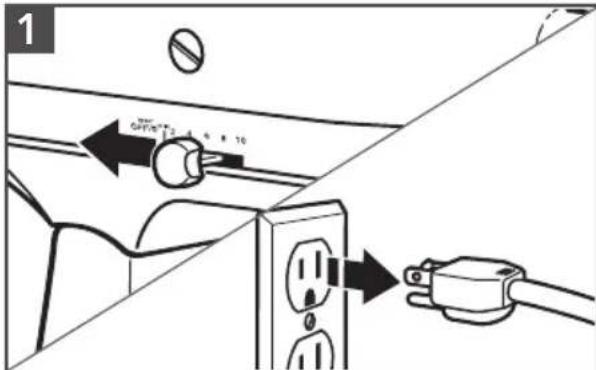
Turn the Stand Mixer "OFF/0" and then Unplug.
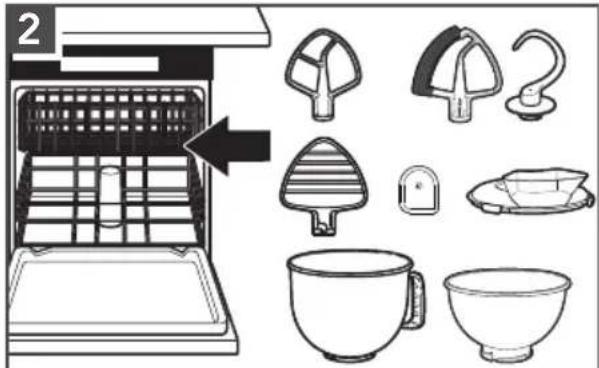
Dishwasher-safe parts, top rack only: Stainless Steel Bowl, Bowl*, Flat Beater**, Dough Hook, Flex Edge Beater**, Pouring Shield**, Pastry Beater**, and Scraper**.
natural_image
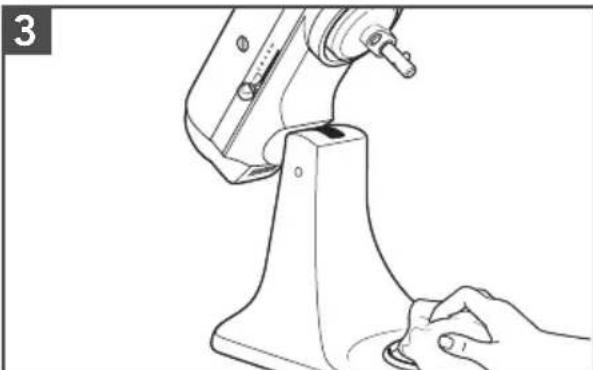
Line drawing of a hand operating a kitchen stand with a tool, no text or symbols presentWipe the Stand Mixer body with a soft, damp cloth.
natural_image
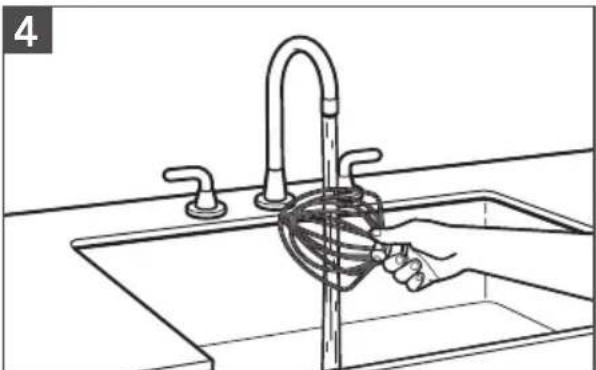
Line drawing of a hand washing a rope from a sink in a kitchen (no text or symbols)Clean the Wire Whip thoroughly with hot sudsy water and hand wash only.

WARNING
Electrical Shock Hazard
Plug into a grounded 3 prong outlet.
Do not remove ground prong.
Do not use an adapter.
Do not use an extension cord.
Failure to follow these instructions can result in death, fire, or electrical shock.
| Problem Solution | |
| If Stand Mixer warms up during use: | Under heavy loads with extended mixing time periods, you may not be able to comfortably touch the top of the unit. This is normal. |
| If the Flat Beater hits the Bowl: | Stop the Stand Mixer. See the “Product Assembly” section and adjust the Beater to Bowl Clearance. |
| The Speed Control Lever does not move smoothly or easily: | To move the Speed Control Lever with ease, lift slightly up as you move it across the settings in either direction. |
| If your Stand Mixer should fail to operate, please check the following: | Is the Stand Mixer plugged in? |
| Is the fuse in the circuit to the Stand Mixer in working order? If you have a Circuit Breaker Box, be sure the circuit is closed. | |
| Turn off the Stand Mixer for 10-15 seconds, then turn it back on. If the Stand Mixer still does not start, allow it to cool for 30 minutes before turning it back on. |
Note: If the problem cannot be corrected, See the "Warranty and Service" section. Do not return the Stand Mixer to the retailer; retailers do not provide service.
WARRANTY AND SERVICE
KITCHENAID STAND MIXER WARRANTY FOR THE 50 UNITED STATES, THE DISTRICT OF COLUMBIA, PUERTO RICO, AND CANADA
This warranty extends to the purchaser and any succeeding owner for Stand Mixers operated in the 50 United States, the District of Columbia, Puerto Rico, and Canada.
| Length of Warranty: One Year Full Warranty from date of purchase. | |
KitchenAid Will Pay for Your Choice of: | Hassle-Free Replacement of your Stand Mixer. See the next page for details on how to arrange for service, or call the Customer eXperience Center toll-free at 1-800-541-6390.ORThe replacement parts and repair labor costs to correct defects in materials and workmanship. Service must be provided by an Authorized KitchenAid Service Center. |
| KitchenAid Will Not Pay for: | A. Repairs when your Stand Mixer is used in other than normal single family home use.B. Damage resulting from accident, alteration, misuse or abuse.C. Any shipping or handling costs to deliver your Stand Mixer to an Authorized Service Center.D. Replacement parts or repair labor costs for Stand Mixer attachments operated outside the 50 United States, District of Columbia, Puerto Rico, and Canada. |
| DISCLAIMER OF IMPLIED WARRANTIES; LIMITATION OF REMEDIESIMPLIED WARRANTIES, INCLUDING TO THE EXTENT APPLICABLE WARRANTIES OF MERCHANTABILITY OR FITNESS FOR A PARTICULAR PURPOSE, ARE EXCLUDED TO THE EXTENT LEGALLY PERMISSIBLE. ANY IMPLIED WARRANTIES THAT MAY BE IMPOSED BY LAW ARE LIMITED TO ONE YEAR, OR THE SHORTEST PERIOD ALLOWED BY LAW. SOME STATES AND PROVINCES DO NOT ALLOW LIMITATIONS OR EXCLUSIONS ON HOW LONG AN IMPLIED WARRANTY OF MERCHANTABILITY OR FITNESS LASTS, SO THE ABOVE LIMITATIONS OR EXCLUSIONS MAY NOT APPLY TO YOU.IF THIS PRODUCT FAILS TO WORK AS WARRANTED, CUSTOMER'S SOLE AND EXCLUSIVE REMEDY SHALL BE REPAIR OR REPLACEMENT ACCORDING TO THE TERMS OF THIS LIMITED WARRANTY. KITCHENAID AND KITCHENAID CANADA DO NOT ASSUME ANY RESPONSIBILITY FOR INCIDENTAL OR CONSEQUENTIAL DAMAGES. This warranty gives you specific legal rights and you may also have other rights which vary from state to state or province to province. | |
WARRANTY AND SERVICE
HASSLE-FREE REPLACEMENT WARRANTY—50 UNITED STATES, DISTRICT OF COLUMBIA, AND PUERTO RICO
We're so confident the quality of our products meets the exacting standards of KitchenAid that, if your Stand Mixer should fail within the first year of ownership, KitchenAid will arrange to deliver an identical or comparable replacement to your door free of charge and arrange to have your original Stand Mixer returned to us. Your replacement unit will also be covered by our one year limited warranty.
If your Stand Mixer should fail within the first year of ownership, simply call our
toll-free Customer eXperience Center at 1-800-541-6390 Monday through Friday. Please have your original sales receipt available when you call. Proof of purchase will be required to initiate the claim. Give the consultant your complete shipping address (no P.O. Box numbers, please).
When you receive your replacement Stand Mixer, use the carton, packing materials, and prepaid shipping label to pack up your original Stand Mixer and send it back to KitchenAid.
HASSLE-FREE REPLACEMENT WARRANTY—CANADA
We're so confident the quality of our products meets the exacting standards of the KitchenAid brand that, if your Stand Mixer should fail within the first year of ownership, we will replace your Stand Mixer with an identical or comparable replacement. Your replacement unit will also be covered by our one year limited warranty. If your Stand Mixer should fail within the first year of ownership, simply call our toll-free Customer eXperience Center
at 1-800-807-6777 Monday through Friday. Please have your original sales receipt available when you call. Proof of purchase will be required to initiate the claim. Give the consultant your complete shipping address.
When you receive your replacement Stand Mixer, use the carton, packing materials, and prepaid shipping label to pack up your original Stand Mixer and send it back to KitchenAid.
ARRANGING FOR SERVICE AFTER THE WARRANTY EXPIRES, OR ORDERING ACCESSORIES AND REPLACEMENT PARTS
In the United States and Puerto Rico:
For service information, or to order accessories or replacement parts, call toll-free at 1-800-541-6390 or write to:
Customer eXperience Center, KitchenAid Small Appliances, P.O. Box 218, St. Joseph, MI 49085-0218
Outside the United States and Puerto Rico:
Consult your local KitchenAid dealer or the store where you purchased the Stand Mixer for information on how to obtain service.
For service information in Canada:
Call toll-free 1-800-807-6777.
For service information in Mexico:
Call toll-free 01-800-0022-767.
PIÈCES ET CARACTÉRISTIQUES
FRANCIALS
ASSEMBLAGE DU PRODUIT
ASSEMBLAGE DU PRODUIT
natural_image
Mechanical assembly diagram showing a tool interacting with a component, no text or symbols presentnatural_image
Line drawing of a kitchen mixer with a downward arrow indicating the pan (no text or symbols present)natural_image
Line drawing of a hand pouring liquid into a mixing bowl using a stand mixer (no text or symbols)natural_image
Line drawing of a hand pouring liquid into a mixing bowl using a stand mixer (no text or symbols)natural_image
Technical line drawing of a mechanical assembly with a lever and adjustment knob (no text or symbols)natural_image
Line drawing of a hand using a kitchen mixer to press or clean a bowl (no text or symbols)natural_image
Line drawing of a kitchen mixer with a cloth mixer, no text or symbols presentnatural_image
Line drawing of a kitchen mixer with an arrow indicating speed (no text or symbols)natural_image
Illustration of a hand adjusting a circular component with arrows indicating rotation (no text or symbols)natural_image
Technical line drawing of a hairdryer and a mechanical component (no text or symbols)natural_image
Line drawing of a mechanical tool with a lever and handle, showing a curved arrow indicating motion (no text or symbols)natural_image
Line drawing of a hand operating a sewing machine (no text or symbols)natural_image
Line drawing of a hand washing a rope from a sink in a kitchen (no text or symbols)ESPAÑOL
natural_image
Line drawing of a kitchen mixer with an arrow indicating left motion (no text or symbols)natural_image
Diagram of a mechanical device with rotating components and directional arrows, no text or symbols presentnatural_image
Mechanical assembly diagram showing a tool interacting with a component, no text or symbols presentnatural_image
Line drawing of a kitchen mixer with a downward arrow indicating the blade (no text or symbols)natural_image
Line drawing of a hand using a mixing bowl to generate a motor (no text or symbols)natural_image
Line drawing of a hand pouring liquid into a mixing bowl using a stand mixer (no text or symbols)natural_image
Line drawing of a hand using a kitchen mixer to clean food (no text or symbols)natural_image
Line drawing of a kitchen mixer with a cloth mixer (no text or symbols)natural_image
Line drawing of a kitchen mixer with an arrow indicating rotation direction (no text or symbols)natural_image
Illustration of a hand adjusting a circular component with arrows indicating direction (no text or symbols)natural_image
Technical line drawing of a food vendor tool and its corresponding view of a computer monitor (no text or symbols present)natural_image
Line drawing of a mechanical tool with a lever and handle, showing a curved arrow indicating motion (no text or symbols)natural_image
Line drawing of a hand operating a kitchen stand with a tool, no text or symbols presentnatural_image
Line drawing of a hand washing a rope from a sink in a kitchen (no text or symbols)Customer eXperience Center, KitchenAid Small Appliances, P.O. Box 218, St. Joseph, MI 49085-0218
natural_image
White silhouette of a telephone handset on black background (no text or symbols)PRODUCT QUESTIONS OR RETURNS
QUESTIONS SUR LE PRODUIT OU LES RETOURS
MEXICO: KitchenAid.com.mx
LATIN AMERICA: KitchenAid-Latam.com

natural_image
Silhouette of a kitchen mixer and bowl (no text or symbols)KitchenAid®
®/™ ©2021 KitchenAid. All rights reserved. KITCHENAID and the design of the stand mixer are trademarks in the U.S. and elsewhere. Used under license in Canada.

- PARTS AND FEATURES
- Your safety and the safety of others are very important.
- ! DANGER
- WARNING
- IMPORTANT SAFEGUARDS
- PRODUCT SAFETY
- SAVE THESE INSTRUCTIONS
- GETTING STARTED
- SPEED CONTROL GUIDE
- PRODUCT ASSEMBLY
- PRODUCT USAGE
- PRODUCT DISASSEMBLY
- OPTIONAL ATTACHMENTS
- CARE AND CLEANING
- Electrical Shock Hazard
- WARRANTY AND SERVICE
- HASSLE-FREE REPLACEMENT WARRANTY—CANADA
- ARRANGING FOR SERVICE AFTER THE WARRANTY EXPIRES, OR ORDERING ACCESSORIES AND REPLACEMENT PARTS
- In the United States and Puerto Rico:
- Outside the United States and Puerto Rico:
- For service information in Canada:
- For service information in Mexico:
- PIÈCES ET CARACTÉRISTIQUES
- ASSEMBLAGE DU PRODUIT
- KitchenAid®
Brand : KITCHENAID
Model : KSM192
Category : Food Processor