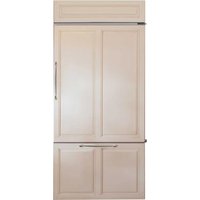
ZIC360NVLH - Refrigerator Monogram - Free user manual and instructions
Find the device manual for free ZIC360NVLH Monogram in PDF.


| Brand | Monogram |
| Model | ZIC360NVLH |
| Product Type | Built-in refrigerator with bottom freezer |
| Dimensions (approx.) | Height: 177.8 cm (70 in), Width: 91.4 cm (36 in), Depth: 71.1 cm (28 in) |
| Weight (approx.) | Approximately 181 kg (400 lb) fully loaded |
| Power Supply | 115 V AC, 60 Hz, 15 or 20 A fuse, grounded |
| Net Volume (approx.) | Refrigerator: 425 L, Freezer: 170 L |
| Main Functions | Automatic ice maker, water dispenser, SmartWater MWF water filter, LED lighting, adjustable humidity drawers, sealed snack drawers, door alarm, Sabbath mode |
| Refrigerator Temperature Range | 1 °C to 5 °C (34 °F to 42 °F) |
| Freezer Temperature Range | -21 °C to -15 °C (-6 °F to 4 °F) |
| Required Water Pressure | 275 to 827 kPa (40 to 120 psi) |
| Care and Cleaning | Use a soft cloth, mild detergent and warm water. Avoid abrasive cleaners, ammonia, vinegar or acetone. Interior cleaning with baking soda (15 ml per liter of water). |
| Safety | Anti-tip device, mandatory grounding, instructions to prevent tipping and pinching, flammable refrigerant R600a (isobutane) |
| Spare Parts and Reparability | Repair by certified technician. Parts available on monogram.com. Replacement filter cartridge: MWF. |
| Warranty | 2 years parts and labor, 5 years sealed system, 6-12 years parts for sealed system (labor extra), 30 days water filter |
| General Information | Manual available in French. Customer support: monogram.com or monogram.ca |
Frequently Asked Questions - ZIC360NVLH Monogram
User questions about ZIC360NVLH Monogram
0 question about this device. Answer the ones you know or ask your own.
Ask a new question about this device
Download the instructions for your Refrigerator in PDF format for free! Find your manual ZIC360NVLH - Monogram and take your electronic device back in hand. On this page are published all the documents necessary for the use of your device. ZIC360NVLH by Monogram.
USER MANUAL ZIC360NVLH Monogram
CARE AND CLEANING 17
PREPARATION....18
TROUBLESHOOTING 19
PERFORMANCE DATA SHEET 22
LIMITED WARRANTY 23
MODEL INFORMATION
MODEL NUMBERS
ZIC360, ZICS360
WRITE DOWN THE MODEL AND SERIAL NUMBERS
These will be on a label in the lower right hand side of the fresh food compartment beneath the climate control drawer.
Use these numbers in any correspondence or service calls concerning your appliance.
Please write these numbers here:
Model Number
Serial Number
CONSUMER SUPPORT
MONOGRAM WEBSITE
Have a question or need assistance with your appliance? Try the Monogram website 24 hours a day, any day of the year! You can also shop for more great Monogram products and take advantage of all our on-line support services designed for your convenience.
In the US: monogram.com
In Canada: monogram.ca
REGISTER YOUR APPLIANCE
Register your new appliance on-line at your convenience! Timely product registration will allow for enhanced communication and prompt service under the terms of your warranty, should the need arise. You may also mail in the pre-printed registration card included in the packing material. In the US: monogram.com/register
In Canada: Prodsupport.mabe.ca/crm/Products/ProductRegistration.aspx
SCHEDULE SERVICE
Expert Monogram repair service is only one step away from your door. Get on-line and schedule your service at your convenience any day of the year.
In the US: monogram.com or call 800.444.1845 during normal business hours
In Canada: monogram.ca or call 800.561.3344
REMOTE CONNECTIVITY
For assistance with wireless network connectivity (for models with remote enable), visit our website at monogram.com/connect or call 800.444.1845 in the US only.
PARTS AND ACCESSORIES
Individuals qualified to service their own appliances can have parts or accessories sent directly to their homes (VISA, MasterCard and Discover cards are accepted). Order on-line today 24 hours every day.
In the US: monogram.com/use-and-care/parts or call 800.444.1845 during normal business hours
Instructions contained in this manual cover procedures to be performed by any user. Other servicing generally should be referred to qualified service personnel. Caution must be exercised, since improper servicing may cause unsafe operation.
Customers in Canada should consult the nearest MC Commercial service center or visit our website at monogram.ca.
CONTACT US
If you are not satisfied with the service you receive from Monogram, contact us on our website with all the details including your phone number, or write to:
In the US: General Manager, Customer Relations | Monogram Appliances, Appliance Park | Louisville, KY 40225 monogram.com/contact or call 800.444.1845
IMPORTANT SAFETY INFORMATION READ ALL INSTRUCTIONS BEFORE USING THE APPLIANCE
WARNING
To reduce the risk of fire, explosion, electric shock, or injury when using your refrigerator, follow these basic safety precautions:
This refrigerator must be properly installed and located in accordance with the Installation Instructions before it is used.
■ Unplug the refrigerator before making repairs, or cleaning.
NOTE: Power to the refrigerator cannot be disconnected by any setting on the control panel.
NOTE: Repairs must be performed by a qualified Service Professional.
■ Replace all parts and panels before operating.
■ Do not use an extension cord.
- Keep flammable materials and vapors away from the refrigerator.
■ Do not store explosive substances such as aerosol cans with a flammable propellant in this appliance.
■ To prevent suffocation and entrapment hazards to children, remove the refrigerator and freezer doors from any refrigerator before disposing of it or discontinuing its use.
■ To avoid serious injury or death, children should not stand on, or play in or with the appliance.
■ Children and persons with reduced physical, sensory or mental capabilities or lack of experience and knowledge can use this appliance only if they are supervised or have been given instructions on safe use and understand the hazards involved.
This appliance is intended to be used in household and similar applications such as: staff kitchen areas in shops, offices and other working environments; farm houses; by clients in hotels, motels, bed & breakfast and other residential environments; catering and similar non-retail applications.
■ Connect to potable water supply only. A cold water supply is required for automatic icemaker operation. The water pressure must be between 40 and 120 psi (275-827 kilopascals).
■ Do not apply harsh cleaners to the refrigerator. Certain cleaners will damage plastic which may cause parts such as the door or door handles to detach unexpectedly. See the Care and Cleaning section for detailed instructions.
CAUTION
To reduce the risk of injury when using your refrigerator, follow these basic safety precautions.
- Do not clean glass shelves or covers with warm water when they are cold. Glass shelves and covers may break if exposed to sudden temperature changes or impact, such as bumping or dropping. Tempered glass is designed to shatter into many small pieces if it breaks.
- Keep fingers out of the “pinch point” areas; clearances between the doors and between the doors and cabinet are necessarily small. Be careful closing doors when children are in the area.
■ Do not touch the cold surfaces in the freezer compartment when hands are damp or wet, skin may stick to these extremely cold surfaces.
■ Do not refreeze frozen foods which have thawed completely.
In freezers with automatic icemakers, avoid contact with the moving parts of the ejector mechanism, or with the heating element that releases the cubes. Do not place fingers or hands on the automatic ice making mechanism while the freezer is plugged in.
READ AND SAVE THESE INSTRUCTIONS
IMPORTANT SAFETY INFORMATION READ ALL INSTRUCTIONS BEFORE USING THE APPLIANCE
INSTALLATION
FIRE OR EXPLOSION HAZARD
Keep flammable materials and vapors away from refrigerator. Failure to do so can result in fire, explosion, or death.
Tip Over Hazard.
These appliances are top heavy, especially with any doors open, and must be secured to prevent tipping forward which could result in death or serious injury. Read and follow the entire installation instructions for securing the appliance with the anti-tip system.
CONNECTING ELECTRICITY
ELECTRICAL SHOCK HAZARD
Plug into a grounded 3-prong outlet
Do not remove the ground prong
Do not use an adapter
Do not use an extension cord.
Failure to follow these instructions can result in death, fire, or electrical shock.
Do not, under any circumstances, cut or remove the third (ground) prong from the power cord. For personal safety, this appliance must be properly grounded.
The power cord of this appliance is equipped with a 3-prong (grounding) plug which mates with a standard 3-prong (grounding) wall outlet to minimize the possibility of electric shock hazard from this appliance.
Have the wall outlet and circuit checked by a qualified electrician to make sure the outlet is properly grounded.
Where a standard 2-prong wall outlet is encountered, it is your personal responsibility and obligation to have it replaced with a properly grounded 3-prong wall outlet. Do not use an adapter.
The refrigerator should always be plugged into its own individual electrical outlet which has a voltage rating that matches the rating plate.
A 115 Volt AC, 60 Hz, 15- or 20-amp fused, grounded electrical supply is required. This provides the best performance and also prevents overloading house wiring circuits which could cause a fire hazard from overheated wires.
Never unplug your refrigerator by pulling on the power cord. Always grip plug firmly and pull straight out from the outlet.
Immediately discontinue use of a damaged supply cord. If the supply cord is damaged, it must be replaced by a qualified service professional with an authorized service part from the manufacturer.
When moving the refrigerator away from the wall, be careful not to roll over or damage the power cord.
PROPER DISPOSAL OF YOUR OLD REFRIGERATOR
SUFFOCATION AND ENTRAPMENT HAZARD
Failure to follow these disposal instructions can result in death or serious injury
IMPORTANT: Child entrapment and suffocation are not problems of the past. Junked or abandoned refrigerators are still dangerous even if they will sit for "just a few days." If you are getting rid of your old refrigerator, please follow the instructions below to help prevent accidents.
Before You Throw Away Your Old Appliance
■ Take off the fresh food and freezer doors.
■ Leave the shelves in place so that children may not easily climb inside.
Refrigerant and Foam Disposal:
Dispose of appliance in accordance with Federal and Local Regulations. Contact your local authorities for the environmentally safe disposal of your appliance.
READ AND SAVE THESE INSTRUCTIONS
RENSEIGNEMENTS IMPORTANTS CONCERNANT LA SÉCURITÉ LISEZ TOUTES LES INSTRUCTIONS AVANT D'UTILISER LE RÉFRIGÉRATEUR
AVERTISSEMENT
HXUUpGXLUHOHULVTXH G LQFHQGLH G H [SORVLRQ GH FKRF pOHFWULTXH RX GH EOHV VXUHV YRWUH UpIULJpUDWHXUGH YHXLOOH] VXLYUH FHV FRQVLJQHV GH VpFXULWp
MJSQUE D'INCENDIE OU D'EXPLOSION
Preset Settings: Allow 24 hours to reach these preset temperatures.
TEMPERATURE CONTROLS
To turn off the cooling system in both the freezer and fresh food compartments, press either (+) pad until both displays show OFF.
To turn the cooling system on, press either (-) pad. The preset temperatures of 0^ F and 37^ F will appear in the display.
NOTE: Frequent door openings or door left open for periods of time may increase the internal temperature of the freezer and fresh food compartments temporarily.
The actual temperature will vary from the set temperature based on factors such as door opening, amount of food, defrost cycling and room temperature.
To change the temperature settings, press the (+) or (-) pads to desired temperature set point for fresh food and freezer separately. Allow 24 hours for the refrigerator to reach the temperature you have set.
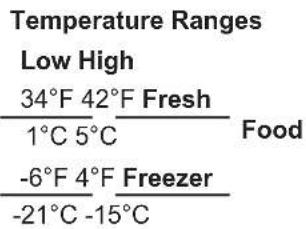
NOTE: Setting the controls to OFF stops cooling, but does not shut off electrical power to the refrigerator.
DOOR ALARM
To turn the Door Alarm feature on, press DOOR ALARM once. The ACTIVE light will come on. To turn it off, press it again.
On models with a dispenser, the Door Alarm feature is located on the dispenser panel on the front of the freezer door.
When the DOOR ALARM is active, the alarm will flash and beep if you keep the door open for more than 2 minutes.
WATER FILTER CARTRIDGE
Water filter cartridge
The water filter cartridge is located behind the top access panel.
When to replace the filter
There is a replacement indicator light for the water filter cartridge on the temperature control panel. This light will turn orange to tell you that you need to replace the filter soon.
The filter cartridge should be replaced when the replacement indicator light turns red or if the flow of water to the dispenser or ice maker decreases.
Removing the filter cartridge
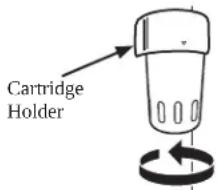
If you are replacing the cartridge, first remove the old one by slowly turning it to the left. Do not pull down on the cartridge. A small amount of water may drip down.
NOTE: To reduce the risk associated with property damage due to water leakage, read and follow instructions before installation and use of this system. Installation and use MUST comply with all state and local plumbing codes.
Installing the filter cartridge
-
Fill the replacement cartridge with water from the tap to allow for better flow immediately after installation.
-
Line up the arrow on the cartridge and the cartridge holder. Place the top of the new cartridge up inside the holder.
Do not push it up into the holder.
-
Slowly turn it to the right until the filter cartridge stops. DO NOT OVERTIGHTEN. As you turn the cartridge, it will automatically raise itself into position. The cartridge will move about 1/2 turn.
-
Press and hold the RESET WATER FILTER pad on the temperature control panel for three seconds to clear the red or amber light.
NOTE: A newly installed water filter cartridge may cause water to spurt into the ice maker.
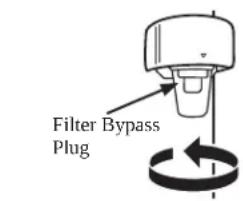
Filter bypass plug
To reduce the risk of water damage due to water leakage, you MUST use the filter bypass plug in the following conditions:
a) If you have a household reverse osmosis water system and / or another form of home water filtration system
b) If a replacement filter is not available
To obtain a free bypass plug, visit monogram.com In Canada, visit monogram.ca The bypass plug is installed in the same way as a filter cartridge.
The icemaker will not operate without the filter or filter bypass plug.
SmartWater
For the maximum benefit of your filtration system, Monogram Appliances recommends the use of GE Appliances-branded filters only. Using GE Appliances-branded filters in Monogram refrigerators provides optimal performance and reliability. GE Appliances filters meet rigorous industry NSF standards for safety and quality that are important for products that are filtering your water. Monogram Appliances has not qualified non-GE Appliances-branded filters for use in Monogram refrigerators and there is no assurance that non-GE Appliances-branded filters meet Monogram standards for quality, performance and reliability.
If you have questions, or to order additional filter cartridges, visit our website at monogram.com or call Monogram Preferred Service, 800.444.1845.
In Canada, monogram.ca or call 888.880.3030.
AUTOMATIC ICEMAKER
WARNING
Connect to potable water supply only.
A cold water supply is required for automatic icemaker operation. The water pressure must be between 40 and 120 psi (275-827 kilopascals).
! AVERTISSEMENT
To minimize the risk of personal injury,
avoid contact with the moving parts of the ejector mechanism, or with the heating element that releases the cubes. Do not place fingers or hands on the automatic ice making mechanism while the refrigerator is plugged in.
ATTENTION
A newly-installed refrigerator may take 12–24 hours to begin making ice.
The icemaker will produce seven cubes per cycle—approximately 15 cycles in a 24-hour period.
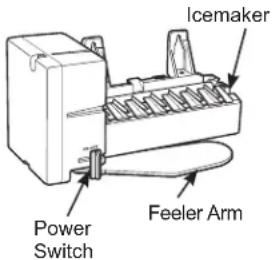
If the refrigerator is operated before the water connection is made to the icemaker, set the power switch to O (OFF). When the refrigerator has been connected to the water supply, set the power switch to I (ON).
Throw away the first full bucket of ice to allow the water line to clear.
Be sure nothing interferes with the sweep of the feeler arm.
When the bin fills to the level of the feeler arm, the icemaker will stop producing ice.
It is normal for several cubes to be joined together.
If ice is not used frequently, old ice cubes will become cloudy, taste stale and shrink.
If ice cubes get stuck in the icemaker, set the power switch to O (OFF) and remove the cubes. Set the power switch to I (ON) to restart the icemaker.
After the icemaker has been turned on again, there will be a delay of about 45 minutes before the icemaker resumes operations.
The ice bucket is conveniently located in the upper freezer basket. Occasionally ice cubes may spill out of the bucket. Should the ice cubes fall to the bottom of the freezer, they are of no concern; they will sublimate away harmlessly.
NOTE: In homes with low water pressure, you may hear the icemaker water valve cycle on several times when making one batch of ice.
NOTE: Icemaker works best between 40 and 120 PSI (275-827 kPa) home water pressure.
SABBATH MODE
Sabbath Mode was designed for use on the Jewish Sabbath and Holidays. The Sabbath Mode feature makes it possible for observant Jews to refrigerate and freeze food during the duration of the holiday.
The Sabbath Mode feature can be set to override typical reactions to actions in your appliance. While in the Sabbath Mode, your appliance will still operate normally. However, the appliance will not respond to your actions.
While in the Sabbath Mode, you may notice the fan running when the door is opened; however, this is not a result of your actions. The fan will operate at random times. The defrost heater will continue to defrost the appliance and freezer and will be activated on a timer. The defrost heater will not defrost as a result of door openings or any consumer actions.
SABBATH MODE – To set Sabbath Mode, press and hold the FREEZER + and - pads at the same time and hold for 5 seconds. The temperature display will show SA for 5 seconds and then the display and lights turn off. The lights and display will be off until Sabbath Mode is turned off. Repeat the process to turn off Sabbath Mode. Sabbath Mode will also automatically exit this feature state after 4 calendar days or 96 hours. Temperature set point will be displayed.
DISPLAYS, ALARMS and LIGHTS—The main temperature control, door alarms and lights will be disabled.
ICEMAKER—The icemaker will continue to operate. The icemaker can be disabled by setting the icemaker power switch to the OFF position (see Accessing the Icemaker). To obtain ice, open the bottom drawer and remove the cubed ice from the ice bin.
STORAGE PANS
SEALED SNACK PANS
The sealed snack pans retain high humidity for the convenient storage of lunch meats and cheese, hors d'oeuvres, spreads and snacks.
Make sure the pans are closed completely to maintain the correct humidity level.
Excess water that may accumulate on the bottom of the drawers should be emptied and the drawers wiped dry.

natural_image
Two identical diagrams showing internal compartments with no text or symbols, depicted in simple line art without any readable text or symbols.These pans must be fully closed before closing the fresh food compartment door.
ADJUSTABLE HUMIDITY PANS
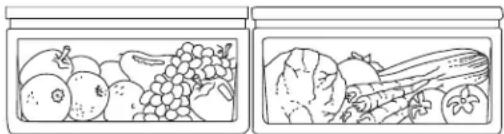
These drawers have individual, adjustable humidity controls that let you control the amount of cold air entering the drawers.
Make sure the drawers are closed completely to maintain the correct humidity level.
Slide the control all the way to the High setting and the drawer provides higher humidity levels recommended for most leafy vegetables.
Slide the control all the way to the Low setting and the drawer provides lower humidity levels recommended for most fruits.
Excess water that may accumulate on the bottom of the drawers should be emptied and the drawers wiped dry.
natural_image
Illustration of two containers filled with various vegetables (no text or symbols)These pans must be fully closed before closing the fresh food compartment door.
HIGH HUMIDITY PANS
Storing unwrapped foods in a high humidity environment keeps foods fresh by retaining the natural moisture content of foods such as:
- Artichokes
- Asparagus
- Beets, topped
- Blueberries
- Carrots
-
Celery
-
Cherries
- Corn
- Cucumbers
- Currants
- Greens, leafy
-
Lettuce
-
Parsley
- Peas, green
- Radishes
- Rhubarb
- Spinach
- Tomatoes, ripe
As in any refrigerated storage area, it is recommended that foods with strong odors be stored wrapped—foods such as:
- Broccoli
-
Brussels sprouts
-
Cabbage
- Cauliflower
-
Green onions
-
Parsnips
- Turnips
LOW HUMIDITY PANS
Lower humidity storage should be used for items such as:
- Apples
- Apricots
- Grapes
- Mushrooms
- Nectarines
-
Oranges
-
Papayas
- Peaches
- Pears
- Pomegranates
- Mangoes
-
Raspberries
-
Squash, summer
- Strawberries
- Tangerines
SHELVES AND BINS
PAN REMOVAL
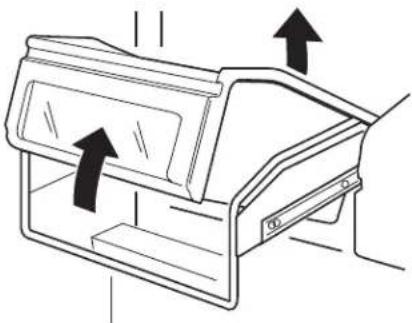
To remove a pan, pull it out and lift the front up and out of the wire holder. Lift the back up and out.
To replace a pan, place the back of the pan in the wire holder, making sure the indentations at the back of the pan fit into the back of the wire holder. Then lower the front of the pan into the wire holder. Press firmly on the top of the pan until it snaps into place.
natural_image
Line drawing of a mechanical component with directional arrows indicating movement or force (no text or symbols)ADJUSTABLE SHELVES
Tempered glass shelves in the fresh food compartment enable you to make efficient shelf arrangements to fit your family's food storage needs.
To remove shelves: Tilt shelf up at front, then lift it up and out of tracks on rear wall of refrigerator.
To replace shelves: Select desired shelf height. With shelf front raised slightly, engage top lugs in tracks at rear of cabinet. Then lower front of shelf until it locks into position.
CAUTION
Handle glass shelves carefully. Glass
shelves and covers may break if exposed to impact, such as bumping or dropping. Tempered glass is designed to shatter into many small pieces if it breaks.
ATTENTION
natural_image
Technical line drawing showing two views of a structural support frame with directional arrows (no text or symbols)SHELVES AND BINS
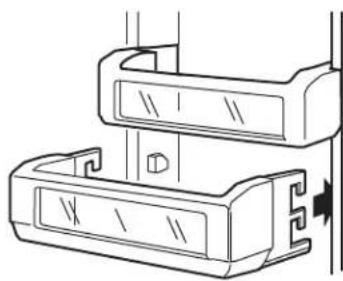
DOOR BINS
Some door bins are adjustable and can be moved up and down to meet your storage needs.
NOTE: The deeper door bins must be placed at the bottom of the door only.
To remove any bin:
Lift the bin up and slide it toward you.
natural_image
Technical line drawing of two mechanical components with a fastener, no text or symbols presentFREEZER DRAWER WITH BASKET
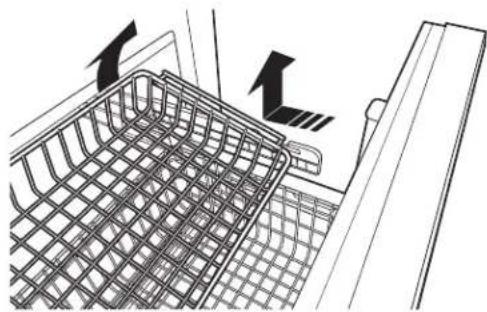
Inside the freezer drawer is a wire slide-out freezer basket. This basket can be pushed back so items on the bottom of the freezer drawer can be reached.
To remove the basket:
1 Open the freezer drawer.
2 Lift up the back of the basket, then slide the basket back until it clears the front hooks.
Ensure that the freezer drawer is fully closed after each opening to maintain normal operating performance.
natural_image
Diagram of a shopping basket with directional arrows indicating movement or flow (no text or symbols present)To remove basket
CARE AND CLEANING
CLEANING OUTSIDE
Directions for Cleaning Outside Surfaces, Door Handles, and Trim
| DO USE DO NOT USE | |
| Soft, clean cloth or sponge Abrasive cloths | , scrubbing sponges (with or without soap), scouring or steel wool pads |
| Mild detergent mixed with warm water Approved stainless steel cleaners; Visit the Monogram Appliances parts store for approved stainless steel cleaners:Monogram.comCleaners with oxalic acid such as Bar Keepers Friend Soft CleanserTM can be used to remove surface rust, tarnish and small blemishes on stainless steel surfaces only | Abrasive powders or spraysWindow Sprays or AmmoniaCitrus or plant oil-based cleanersAcidic or vinegar-based cleanersOven cleanersCleaners containing acetone (propanone)Any cleaner with WARNING about plastic contact |
NOTE: DO NOT allow stainless steel cleaner to come in contact with any plastic parts such as trim pieces, handle hardware and liners. If unintentional contact of cleaners with plastic parts does occur, clean plastic part with a sponge and mild detergent mixed with warm water.
CLEANING INSIDE
To help prevent odors. leave an open box of baking soda in the unit.
Turn off power at the circuit breaker or fuse box before cleaning. If this is not practical, wring excess moisture out of sponge or cloth when cleaning around switches, lights or controls.
Use warm water and baking soda solution—about a tablespoon (15 ml) of baking soda to a quart (1 liter) of water. This both cleans and neutralizes odors. Thoroughly rinse and wipe dry.
Other parts of the refrigerator—including door gaskets, meat and vegetable drawers, ice storage bin and all plastic parts—can be cleaned the same way. After cleaning the door gaskets, apply a thin layer of petroleum jelly to the door gaskets sealing surface on the hinge side. This helps keep the gaskets from sticking and bending out of shape.
Do not wash any plastic refrigerator parts in the dishwasher.
CAUTION
Do not clean glass shelves or covers with
warm water when they are cold. Glass shelves and covers may break if exposed to sudden temperature changes or impact, such as bumping or dropping. Tempered glass is designed to shatter into many small pieces if it breaks.
ATTENTION
There is LED lighting in the fresh food and freezer compartments.
An authorized technician will need to replace the LED lights.
If this assembly needs to be replaced, call Monogram Preferred Service, 800.444.1845. In Canada, call
PREPARING FOR VACATION
Set the icemaker power switch to the OFF position and be sure to shut off the water supply to the refrigerator.
For long vacations or absences, remove food from the refrigerator/freezer. Set the temperature control to OFF, and clean the interior with a baking soda solution of one tablespoon (15 ml) of baking soda to one quart (1 liter) of water. Leave the door open.
For shorter vacations, remove perishable foods and leave controls at regular settings. However, if the room temperature is expected to drop below 60^ F ( 16^ C), follow the same instructions as for long vacations.
PREPARATION
- Do not install the refrigerator/freezer where the temperature will go below 55°F (13°C). It will not run often enough to maintain proper temperatures.
■ Do not install the refrigerator/freezer where temperatures will go above 100^ F ( 37^ C). It will not perform properly.
■ Do not install the refrigerator/freezer in a location exposed to water (rain, etc.) or direct sunlight.
■ Install it on a floor strong enough to support it fully loaded.
For proper installation, the refrigerator/freezer must be placed on a level surface of hard material the same height as the rest of the flooring. This surface should be strong enough to support a fully loaded refrigerator/freezer, or approximately 1,500 lbs. (680.39 kg) each. See the Installation Instructions for complete directions.
TROUBLESHOOTING
| PROBLEM POSSIBLE CAUSE | |
| REFRIGERATOR DOES NOT OPERATE | May be in defrost cycle when motor does not operate for about 45 minutes. |
| Temperature control in the OFF position. | |
| If interior light is not on, refrigerator may not be plugged in at wall outlet. | |
| The house fuse is blown/house circuit breaker is tripped. Replace fuse or reset the breaker. | |
| MOTOR OPERATES FOR LONG PERIODS OR CYCLES ON AND OFF FREQUENTLY (Modern refrigerators with more storage space and a larger freezer require more operating time. They start and stop often to maintain even temperatures.) | Normal when refrigerator is first plugged in. Wait 24 hours for the refrigerator to completely cool down. |
| The new variable speed compressor is designed to run for longer periods of time to optimize efficiency and noise. You may notice the compressor and/or fan speeds accelerate based upon door openings and/or increased food loads. | |
| You may hear the fans spinning at high speeds. This happens when the refrigerator is first plugged in, when the doors are opened frequently or when a large amount of food is added to the refrigerator or freezer compartments. The fans are helping to maintain the correct temperatures. | |
| Door left open or package holding door open. | |
| If either door is open for over 3 minutes, you may hear the fans come on in order to cool the light. | |
| Hot weather or frequent door openings. This is normal. | |
| Temperature controls set at the coldest setting. See Temperature Controls. | |
| THUMPING SOUND WHEN DOOR IS CLOSED T | This is a normal operating sound. |
| The mechanism that closes the door makes a slight thumping sound as it passes over its lever point, at approximately 80 degrees. | |
| Closing the door slowly will minimize the sound. | |
| OPERATING SOUNDS The variable speed compresor changes speeds and sounds may vary. | |
TROUBLESHOOTING
| PROBLEM POSSIBLE CAUSE | |
| DOOR NOT CLOSING PROPERLY Package may be holding door open. | |
| VIBRATION OR RATTLING (Slight vibration is normal.) | Refrigerator may not be properly installed. |
| FRESH FOOD OR FREEZER COMPARTMENT TOO WARM | Temperature control not set cold enough. See Temperature Control. |
| Warm weather or frequent door openings. | |
| Door left open for long time. | |
| Package may be holding door open. | |
| FROST OR ICE CRYSTALS ON FROZEN FOOD (Frost within package is normal.) | Door left open or package holding door open. |
| Frequent or too long door openings. | |
| Freezer door left ajar. | |
| SLOW ICE CUBE FREEZING Door may have been left open. | |
| ICE CUBES HAVE ODOR/TASTE Old cubes need to be discarded. | |
| AUTOMATIC ICEMAKER DOES NOT WORK | Icemaker power switch is in the Off position. |
| Water supply turned off, restricted or not connected. Call your installer for proper water supply line connection. | |
| Water filter clogged. Replace the filter or use the filter bypass plug. | |
| Freezer compartment too warm. | |
| Piled up cubes in storage bin may cause icemaker to shut off too soon. Level cubes in bin. | |
| Ice cubes stuck in icemaker. Turn off the icemaker, remove cubes and turn the icemaker back on. | |
| MOISTURE FORMS ON OUTSIDE OF REFRIGERATOR | Not unusual during periods of high humidity. Wipe surface dry. |
| Door left open or package holding door open. | |
| Control humidity and temperature in the kitchen with air conditioning. | |
| MOISTURE COLLECTS INSIDE Too frequent or long door openings. | |
TROUBLESHOOTING
| PROBLEM POSSIBLE CAUSE | |
| REFRIGERATOR HAS ODOR Foods with | strong odors should be tightly covered. |
| Check for spoiled food. | |
| Interior needs cleaning. See Care and Cleaning. | |
| Defrost water system beneath unit needs cleaning. | |
| Keep open box of baking soda in refrigerator; replace every 3 months. | |
| INTERIOR LIGHT DOES NOT WORK No power at outlet. | |
| SMALL OR HOLLOW CUBES | Water filter clogged. Replace the filter or use the filter bypass plug. |
| Check for a connection to a Reverse Osmosis water system. If an RO is connected, remove the water filter and install the orginal bypass plug that came with the unit. | |
| CLICKING SOUND WHEN FREEZER DRAWER IS OPENED OR CLOSED | This unit is equipped with a hold shut feature, which can be heard when the drawer front is within 2" of the face of the cabinet. |
| FREEZER DRAWER NOT CLOSING PROPERLY | Package holding drawer open. |
| Drawer hold -shut needs reset, open drawer fully and forcefully close. | |
PERFORMANCE DATA SHEET
SmartWater™ Filtration System— MWF Cartridge
The concentration of the indicated substances in water entering the system was reduced to a concentration less than or equal to the permissible limit for water leaving the system as specified in NSF/ANSI Standard 42 and Standard 53. System tested and certified by NSF International against NSF/ANSI Standard 42 and Standard 53 for the reduction of substances listed below.
Capacity 300 Gallons (1,135 Liters). Contaminant Reduction Determined by NSF testing.
| Substance Tested for Reduction | Average Influent | NSF specified Challenge Concentration | Avg % Reduction | Average Product Water Concentration | Max Permissible Product Water Concentration | NSF Reduction Requirements | NSF Test Report |
| Chlorine Taste and Odor | 2.0 mg/L | 2.0 mg/L ± 10% | 97.4% | 0.05 mg/L | N/A | ≥50% | J-00137878 |
| Nominal Particulate Class I, ≥0.5 to < 1.0 μm | 11,333,333 pts/mL | At least 10,000 particles/mL | 99.9% | 5,510 pts/mL | N/A | ≥85% | J-00137881 |
| Cyst* | 101,000 cysts/L | Minimum 50,000 cysts/L | 99.99% | 1 cyst/L | N/A | ≥99.95% | J-00100036 |
| Asbestos | 133 MF/L | 10° to 10° fibers/L; fibers greater than 10 μm in length | >99% | <1 MF/L | N/A | ≥99% | J-00137886 |
| Atrazine | 0.008 mg/L | 0.009 mg/L ± 10% | 91.3% | 0.0007 mg/L | 0.003 mg/L | N/A | J-00137910 |
| Benzene | 0.014 mg/L | 0.015 mg/L ± 10%± | 96.5% | 0.0005 mg/L | 0.005 mg/L | N/A | J-00137912 |
| Carbofuran | 0.08 mg/L | 0.08 mg/L ± 10% | 74.5% | 0.01 mg/L | 0.04 mg/L | N/A | J-00147488 |
| Endrin | 0.007 mg/L | 0.006 mg/L ± 10% | 97.1% | 0.0002 mg/L | 0.002 mg/L | N/A | J-00100039 |
| Lead @ pH 6.5 | 0.148 mg/L | 0.15 mg/L ± 10% | 99.3% | 0.001 mg/L | 0.010 mg/L | N/A | J-00137914 |
| Lead @ pH 8.5 | 0.155 mg/L | 0.15 mg/L ± 10% | 99.3% | 0.001 mg/L | 0.010 mg/L | N/A | J-00137915 |
| Lindane | 0.002 mg/L | 0.002 mg/L ± 10% | 96.5% | 0.00002 mg/L | 0.0002 mg/L | N/A | J-00137924 |
| Mercury @ pH 6.5 | 0.006 mg/L | 0.006 mg/L ± 10% | 87.6% | 0.0004 mg/L | 0.002 mg/L | N/A | J-00137925 |
| Mercury @ pH 8.5 | 0.006 mg/L | 0.006 mg/L ± 10% | 93.2% | 0.0007 mg/L | 0.07 mg/L | N/A | J-00092355 |
| P-Dichlorobenzene | 0.223 mg/L | 0.225 mg/L ± 10% | 99.8% | 0.005 mg/L | 0.075 mg/L | N/A | J-00137926 |
| Tetrachloroethylene | 0.014 mg/L | 0.015 mg/L ± 10% | 96.5% | 0.0005 mg/L | 0.005 mg/L | N/A | J-00137929 |
| Toxaphene | 0.017 mg/L | 0.015 mg/L ± 10% | >93.9% | 0.001 mg/L | 0.003 mg/L | N/A | J-00137928 |
| 2, 4-D | 0.192 mg/L | 0.210 mg/L ± 10% | 77.7% | 0.040 mg/L | 0.07 mg/L | N/A | J-00147489 |
*Based on the use of Cryptosporidium parvum oocysts.
The following pharmaceutical reduction claims have not been certified by NSF International or the state of California. Claims tested and verified by independent laboratory:
| Contaminant Reduction | Average Influent | NSF specified Challenge Concentration | Avg % Reduction | Average Product Water Concentration | Max Permissible Product Water Concentration | NSF Reduction Requirements | NSF Test Report |
| Atenolol 978 ng/L N/A 99 | 5% 5.0 ng/L N/A N/A J-00121587 | ||||||
| Fluoxetine 907 ng/l N/A 99 | 9.4% 5.4 ng/L N/A N/A J-00121587 | ||||||
| Ibuprofen 885 ng/L N/A 94 | 4.1% 52.3 ng/L N/A N/A J-00121588 | ||||||
| Progesterone 1097 ng/L | N/A 99 | 9.5% 5.0 ng/L N/A N/A J-00121589 | |||||
| Trimethoprim | 415 ng/L N/A 99 | 9.5% 2.0 ng/L N/A N/A J-00121587 |
Application Guidelines/Water Supply Parameters
| Service Flow | 0.5 gpm (1.9 lpm) | Water Pressure | 40-120 psi (2.8-8.2 bar) |
| Water Supply | Potable Water | Water Temperature | 33°F-100°F (0.6°C-38°C) |
It is essential that the manufacturer's recommended installation, maintenance and filter replacement requirements be carried out for the product to perform as advertised. See Installation Manual for Warranty information.
Note: While the testing was performed under standard laboratory conditions, actual performance may vary. Contaminant reduction testing is conducted every five years by certifying agency to maintain certification.
Replacement Cartridge: MWF. For estimated costs of replacement elements please visit our website at geapplianceparts.com.
WARNING
To reduce the risk associated with ingestion of contaminants:
- Do not use with water that is microbiologically unsafe or of unknown quality without adequate disinfection before and after the system. Systems certified for cyst reduction may be used on disinfected water that may contain filterable cysts.

Tested and certified by NSF International against NSF/ANSI Standard 42 and Standard 53 in model GE Appliances MWF for the reduction of the claims specified on the performance data sheet.
NOTICE
To reduce the risk associated with property damage due to water leakage:
- Read and follow use instructions before installation and use of this system.
• Installation and use MUST comply with all state and local plumbing codes. - Do not install if water pressure exceeds 120 psi (8.2 bar). If your water pressure exceeds 80 psi (5.5 bar), you must install a pressure-limiting valve. Contact a plumbing professional if you are uncertain how to check your water pressure.
- Do not install where water hammer conditions may occur. If water hammer conditions exist you must install a water hammer arrester. Contact a plumbing professional if you are uncertain how to check for this condition.
- Do not install on hot water supply lines. The maximum operating water temperature of this filter system is 100^ (38°C).
- Protect filter from freezing. Drain filter when temperatures drop below 33°F (0.6°C).
- The disposable filter cartridge should be replaced every 6 months at the rated capacity, or sooner if a noticeable reduction in flow rate occurs.
MONOGRAM LIMITED WARRANTY
Monogram.com
\$OOZDUUDQWVHUYLFHLVSURYLGHGERXUDFWRU6HUYLFH&HQWHUVIRUDDQTEXWIKINLTHSCHNVRPHU&DUService online, visit us at monogram.com/contact or call 800.444.1845. In Canada, visit monogram.ca or call 800.561.3344.
Servicing your refrigerator may require the use of the onboard data port for diagnostics. This gives a Monogram Factory Service technician the ability to quickly diagnose any issues with your appliance and helps Monogram improve its products by providing Monogram with information on your appliance. If you do not want your appliance data to be sent to Monogram, please advise your technician NOT to submit the data to Monogram at the time of service.
| For the period of Monogram Appliances will replace | |
| Limited two-year warranty | For two years from date of original purchase, we will provide, free of charge, parts and service ODERUILLQ\RXU\KRPH\WRUHSDLU\RU\UHSODFH\DQ\SDUW\RI\WKHUHIULJHUDWRU\RU\IUHof a manufacturing defect. |
| Limited five-year warranty | For five years from date of original purchase, we will provide, free of charge, parts and service labor in your home to repair or replace any part of the sealed refrigerating system (the compressor, condenser, evaporator and all connecting tubing) that fails because of a manufacturing defect. |
| Limited additional sixth- through twelfth-year warranty on the sealed system | For the sixth through twelfth year from the date of the original purchase, we will provide, free of charge, replacement parts for any part of the sealed refrigerating system (the compressor, condenser, evaporator and all connecting tubing) that fails because of a manufacturing defect. You pay for the service trip to your home and for service labor charges. |
| Limited thirty-day warranty on water filter cartridge (Water filter, if included) | From the date of the original purchase we will provide, free of charge, replacement parts for any part of the water filter cartridge that fails because of a manufacturing defect. During this limited thirty-day warranty, we will also provide, free of charge, a replacement water filter cartridge. |
What Monogram will not cover:
Ŷ Service trips to your home to teach you how to use the product.
Replacement of house fuses or resetting of circuit breakers.
Damage to the product caused by accident, fire, floods or acts of God.
Failure of the product if it is used for other than its intended purpose or used commercially.
Ŷ Damage caused after delivery.
Ŷ Improper installation, delivery or maintenance. If you have an installation problem, contact your dealer or installer. You are responsible for providing adequate electrical, plumbing and other connecting facilities.
Replacement of the light bulbs, if included, or water filter cartridge, if included, other than as noted above.
Replacement of the water filter cartridge, if included, due to water pressure that is outside the specified operating range or due to excessive sediment in the water supply.
Loss of food due to spoilage (in the USA only).
Ŷ Incidental or consequential damage caused by possible defects with this appliance.
Ŷ Product not accessible to provide required service.
Damage caused by a non-GE Appliances brand water filter.
EXCLUSION OF IMPLIED WARRANTIES
Your sole and exclusive remedy is product repair as provided in this Limited Warranty. Any implied warranties, including the implied warranties of merchantability or fitness for a particular purpose, are limited to one year or the shortest period allowed by law.
This limited warranty is extended to the original purchaser and any succeeding owner for products purchased for home XVH□ZLWKLQ□WKH□86\□,I□WKH□SURGXFW□LV□ORFDWHG□LQ□DQ□DUHD□ZKHUH□VHUYLFH□E□D□RQRJUDP□\SSOLDQFHV□\$X LV□QRW□DYDLODEOH□RX□PD□EH□UHVSRQVLEOH□IRU□DWULS□FKDUJH□RU□RX□PD□EH□UHTXLUHG□WR□EULQJ□WKH□SURC Monogram Appliances Service location for service. In Alaska, the limited warranty excludes the cost of shipping or service calls to your home.
Some states do not allow the exclusion or limitation of incidental or consequential damages. This limited warranty gives you specific legal rights, and you may also have other rights which vary from state to state. To know what your legal rights are, consult your local or state consumer affairs office or your state's Attorney General.
Warrantor: GE Appliances, a Haier company, Louisville KY,40225
Warrantor in Canada: MC Commercial, Burlington, ON, L7R 5B6

MONOGRAM
MANUEL
D'UTILISATION
SOUTIEN AU CONSOMMATEUR ....3
RENSEIGNEMENTS CONCERNANT LA SÉCURITÉ....4
COMMANDES....6
FILTRE D'EAU À CARTOUCHE 7
MACHINE À GLAÇONS AUTOMATIQUE....8
MODE SABBAT 8
TIROIRS DE RANGEMENT....9
TABLETTES ET TIROIRS ....10
ENTRETIEN ET NETTOYAGE....12
PRÉPARATIONN 13
DÉPANNAGE 14
FICHE TECHNIQUE DE PERFORMANCE 17
GARANTIE LIMITÉE DE MONOGRAM....18
RENSEIGNEMENTS CONCERNANT LE MODÈLE
NUMÉROS DE MODÈLES
ZIC360, ZICS360
ÉCRIVEZ LES NUMÉROS DE MODÈLE ET DE SÉRIE
Au Canada: Prodsupport.mabe.ca/crm/Products/ProductRegistration.aspx
SERVICE DE RÉPARATION
natural_image
Two identical diagrams showing internal compartments with no text or symbols, either labeled in standard script.natural_image
Illustration of two containers containing various vegetables and fruits, no text or symbols presentnatural_image
Line drawing of a mechanical device with two upward arrows indicating motion or force (no text or symbols)TABLETTES RÉGLABLES
natural_image
Technical line drawing showing two views of a mechanical assembly with arrows indicating motion (no text or symbols)TABLETTES ET TIROIRS
BALCONNETS
natural_image
Technical line drawing of a mechanical component with no visible text or symbolsnatural_image
Diagram of a shopping basket with arrows indicating direction (no text or symbols)To help prevent odors. leave an open box of baking soda in the unit.
Turn off power at the circuit breaker or fuse box before cleaning. If this is not practical, wring excess moisture out of sponge or cloth when cleaning around switches, lights or controls.
Use warm water and baking soda solution—about a tablespoon (15 ml) of baking soda to a quart (1 liter) of water. This both cleans and neutralizes odors. Thoroughly rinse and wipe dry.
Other parts of the refrigerator—including door gaskets, meat and vegetable drawers, ice storage bin and all plastic parts—can be cleaned the same way. After cleaning the door gaskets, apply a thin layer of petroleum jelly to the door gaskets sealing surface on the hinge side. This helps keep the gaskets from sticking and bending out of shape.
Garant: GE Appliances, a Haier company, Louisville KY,40225
Au Canada, Garant: MC Commercial, Burlington, ON, L7R 5B6
NOTES

MONOGRAM
MANUAL DEL
PROPIETARIO
Refrigeradores con Freezer Inferior Incorporado
ESPAÑOL.
MONOGRAM.COM
ÍNDICE
natural_image
Two identical diagrams showing internal compartments with no text or symbols, either labeled in English or Chinese.natural_image
Illustration of two containers filled with various vegetables (no text or symbols)natural_image
Line drawing of a door frame with arrows indicating direction (no text or symbols)REPISAS AJUSTABLES
natural_image
Technical line drawing showing two views of a structural support frame with arrows indicating direction (no text or symbols)REPISAS Y ESTANTES
REPISAS DE PUERTA
natural_image
Technical line drawing of a mechanical component with no visible text or symbolsnatural_image
Line drawing of a shopping basket with arrows indicating direction (no text or symbols)- MODEL INFORMATION
- WRITE DOWN THE MODEL AND SERIAL NUMBERS
- CONSUMER SUPPORT
- MONOGRAM WEBSITE
- REGISTER YOUR APPLIANCE
- SCHEDULE SERVICE
- REMOTE CONNECTIVITY
- PARTS AND ACCESSORIES
- CONTACT US
- IMPORTANT SAFETY INFORMATION READ ALL INSTRUCTIONS BEFORE USING THE APPLIANCE
- WARNING
- CAUTION
- READ AND SAVE THESE INSTRUCTIONS
- INSTALLATION
- FIRE OR EXPLOSION HAZARD
- Tip Over Hazard.
- CONNECTING ELECTRICITY
- ELECTRICAL SHOCK HAZARD
- PROPER DISPOSAL OF YOUR OLD REFRIGERATOR
- SUFFOCATION AND ENTRAPMENT HAZARD
- Refrigerant and Foam Disposal:
- RENSEIGNEMENTS IMPORTANTS CONCERNANT LA SÉCURITÉ LISEZ TOUTES LES INSTRUCTIONS AVANT D'UTILISER LE RÉFRIGÉRATEUR
- AVERTISSEMENT
- MJSQUE D'INCENDIE OU D'EXPLOSION
- TEMPERATURE CONTROLS
- DOOR ALARM
- WATER FILTER CARTRIDGE
- When to replace the filter
- Removing the filter cartridge
- Installing the filter cartridge
- Filter bypass plug
- AUTOMATIC ICEMAKER
- ! AVERTISSEMENT
- ATTENTION
- SABBATH MODE
- STORAGE PANS
- SEALED SNACK PANS
- ADJUSTABLE HUMIDITY PANS
- HIGH HUMIDITY PANS
- LOW HUMIDITY PANS
- SHELVES AND BINS
- PAN REMOVAL
- ADJUSTABLE SHELVES
- DOOR BINS
- To remove any bin:
- FREEZER DRAWER WITH BASKET
- To remove the basket:
- CARE AND CLEANING
- CLEANING OUTSIDE
- CLEANING INSIDE
- PREPARING FOR VACATION
- PREPARATION
- PERFORMANCE DATA SHEET
- SmartWater™ Filtration System— MWF Cartridge
- To reduce the risk associated with ingestion of contaminants:
- NOTICE
- To reduce the risk associated with property damage due to water leakage:
- MONOGRAM LIMITED WARRANTY
- Monogram.com
- What Monogram will not cover:
- EXCLUSION OF IMPLIED WARRANTIES
- MANUEL
- D'UTILISATION
- RENSEIGNEMENTS CONCERNANT LE MODÈLE
- ÉCRIVEZ LES NUMÉROS DE MODÈLE ET DE SÉRIE
- SERVICE DE RÉPARATION
- TABLETTES RÉGLABLES
- TABLETTES ET TIROIRS
- BALCONNETS
- NOTES
- MANUAL DEL
- PROPIETARIO
- Refrigeradores con Freezer Inferior Incorporado
- ÍNDICE
- REPISAS AJUSTABLES
- REPISAS Y ESTANTES
- REPISAS DE PUERTA
Brand : Monogram
Model : ZIC360NVLH
Category : Refrigerator