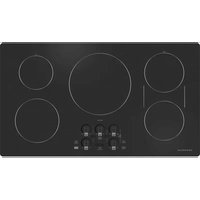
ZHU36RDTBB - Cooker Monogram - Free user manual and instructions
Find the device manual for free ZHU36RDTBB Monogram in PDF.


| Brand | Monogram |
| Model | ZHU36RDTBB |
| Product type | Induction cooktop |
| Dimensions (W x D x H) | 91.4 cm (36 inches) width; standard depth 76.2 cm |
| Weight (approx) | Approximately 28 kg |
| Power supply | Electric (induction) |
| Number of burners | 5 burners (36-inch cooktop) |
| Main features | Induction cooking, Sync Burners, Precision Cooking, pan removal detection, timer, control lock |
| Controls | Touch controls with power level arcs and +/- keys |
| Connectivity | WiFi (SmartHQ app), Bluetooth (Chef Connect, Hestan Cue cookware) |
| Sync Burners | Yes, for the two left burners (covers a large area) |
| Precision Cooking | Yes, compatible with Hestan Cue cookware and Paragon sous vide probe |
| Timer | Independent kitchen timer (up to 99 minutes, audible alarm) |
| Pan removal detection | Yes, automatically turns off if pan removed for more than 25 seconds |
| Lock | Control lock (manual or automatic after 10 minutes) |
| Cooking surface | Ceramic glass |
| Hot surface indicator | Yes, for each burner |
| Cleaning | Ceramic glass cooktop cleaner, scratch-free sponge, scraper for stubborn residue |
| Safety | Automatic pan absence detection, lock, overheat shutdown, protection against flammable materials |
| Spare parts / accessories | Hot plate, sous vide kit, stainless steel cleaner and polish |
| Warranty | 2 years (parts and labor in-home) - Monogram Limited Warranty |
Frequently Asked Questions - ZHU36RDTBB Monogram
User questions about ZHU36RDTBB Monogram
0 question about this device. Answer the ones you know or ask your own.
Ask a new question about this device
Download the instructions for your Cooker in PDF format for free! Find your manual ZHU36RDTBB - Monogram and take your electronic device back in hand. On this page are published all the documents necessary for the use of your device. ZHU36RDTBB by Monogram.
USER MANUAL ZHU36RDTBB Monogram
Electronic Induction Cooktop
Operating The Cooking Elements 8
Turn Burner(s) Off 8
Selecting Cooktop Settings 9
How To Synchronize Left Elements....9
Power Sharing 10
Cooktop Lockout....10
Kitchen Timer 10
Wi-Fi Commissioning 11
Bluetooth® Connectivity 11
Precision Cooking....12
Hot Light Indicator 13
Pan Detection Removal 13
Custom Settings 14
How Induction Cooking Works....15
Cooking Noise 15
Choosing The Correct Cookware To Use 16
Griddle 18
CARE AND CLEANING 19
Cleaning the Glass Cooktop....19
Burned-On Residue 19
Heavy, Burned-On Residue 19
Metal marks and scratches 20
Damage from Sugary Spills and Melted Plastic....20
ACCESSORIES 20
TROUBLESHOOTING 21
LIMITED WARRANTY 23
MODEL INFORMATION
MODEL NUMBERS
ZHU30RDT1BB, ZHU30RST1SS,
ZHU36RDT1BB, ZHU36RST1SS
WRITE DOWN THE MODEL AND SERIAL NUMBERS
You can find them on a label under the cooktop.
These numbers are also on the Consumer Product
Ownership Registration Card packed separately with your appliance
Please write these numbers here:
Model Number
Serial Number
Use these numbers in any correspondence or service calls concerning your appliance.
CONSUMER SUPPORT
MONOGRAM WEBSITE
Have a question or need assistance with your appliance? Try the Monogram website 24 hours a day, any day of the year! You can also shop for more great Monogram products and take advantage of all our on-line support services designed for your convenience. In the US: monogram.com In Canada: monogram.ca/en
REGISTER YOUR APPLIANCE
Register your new appliance on-line at your convenience! Timely product registration will allow for enhanced communication and prompt service under the terms of your warranty, should the need arise. You may also mail in the pre-printed registration card included in the packing material.
In the US: ge.appliancesaccount.io/MyAccount/register-appliance In Canada: service.geappliances.ca/servicio/
SCHEDULE SERVICE
Expert Monogram repair service is only one step away from your door. To request service, call (800) 444-1845 or visit our website at geappliances.com/ge/service-and-support/service.htm
EXTENDED WARRANTIES
Purchase a Monogram extended warranty and learn about special discounts that are available while your warranty is still in effect. You can purchase it on-line anytime. Monogram Service will still be there after your warranty expires. In the US: monogram.com/extended-warranty
REMOTE CONNECTIVITY
For assistance with wireless network connectivity (for models with remote enable), visit our website at monogram.com/ownership/how-to-guides/using-wifi.htm in the US. In Canada, visit monogram.ca/en/connected-kitchen.
PARTS AND ACCESSORIES
Individuals qualified to service their own appliances can have parts or accessories sent directly to their homes (VISA, MasterCard and Discover cards are accepted). Order on-line today 24 hours every day. In the US: monogram.com/ownership/parts
Instructions contained in this manual cover procedures to be performed by any user. Other servicing generally should be referred to qualified service personnel. Caution must be exercised, since improper servicing may cause unsafe operation.
CONTACT US
If you are not satisfied with the service you receive from Monogram, contact us on our website with all the details including your phone number, or write to:
In the US: General Manager, Customer Relations | Monogram Appliances, Appliance Park | Louisville, KY 40225 monogram.com/contact
In Canada: monogram.ca/en/contact
IMPORTANT SAFETY INFORMATION
READ ALL INSTRUCTIONS BEFORE USING THE APPLIANCE
WARNING
Read all safety instructions before using the product. Failure to follow these instructions may result in shock, serious injury or death.
WARNING
GENERAL SAFETY INSTRUCTIONS
■ Use this cooktop only for its intended purpose as described in this Owner's Manual.
■ Be sure your cooktop is properly installed and grounded by a qualified installer in accordance with the provided installation instructions.
- Do not attempt to repair or replace any part of your cooktop unless it is specifically recommended in this manual. All other servicing should be performed by a qualified technician.
■ Before performing any service, unplug the cooktop or disconnect the power supply at the household distribution panel by removing the fuse or switching off the circuit breaker.
■ Do not leave children alone—children should not be left alone or unattended in an area where the cooktop is in use. They should never be allowed to climb, sit or stand on any part of the cooktop.
Do not store items of interest to e cooktop—children climbing on the items could be seriously injured.
CAUTION
■ Use only dry pot holders—moist or damp pot holders on hot surfaces may result in burns from steam. Do not let pot holders touch hot surface units or heating elements. Do not use a towel or other bulky cloth in place of pot holders.
■ Never use your cooktop for warming or heating the room.
- Do not touch surface elements. These surfaces may be hot enough to burn even though they are dark in color. During and after use, do not touch, or let clothing or other flammable materials contact the surface elements or areas nearby the surface elements; allow sufficient time for cooling first.
■ Potentially hot surfaces include the cooktop and areas facing the cooktop.
■ Do not heat unopened food containers. Pressure could build up and the container could burst, causing an injury.
- Cook meat and poultry thoroughly—meat to at least an internal temperature of 160°F and poultry to at least an internal temperature of 180°F. Cooking to these temperatures usually protects against foodborne illness.
WARNING
KEEP FLAMMABLE MATERIALS AWAY FROM THE COOKTOP
Failure to do so may result in fire or personal injury.
■ Do not store or use flammable materials near the cooktop, including paper, plastic, pot holders, linens, wall coverings, curtains, drapes and gasoline or other flammable vapors and liquids.
■ Never wear loose-fitting or hanging garments while
using the cooktop. These garments may ignite if they contact hot surfaces causing severe burns.
■ Do not let cooking grease or other flammable materials accumulate in or near the cooktop. Grease on the cooktop may ignite.
WARNING
COOKTOP SAFETY INSTRUCTIONS
In the event of a fire, do not use water or grease on fires. Never pick up a flaming pan. Turn the controls off. Smother a flaming pan on a surface unit by covering the pan completely with a well-fitted lid, cookie sheet or flat tray. Use a multi-purpose dry chemical or a foam-type fire extinguisher.
■ Never leave the surface units unattended. Boilovers cause smoking and greasy spillovers that may catch on fire.
■ Never leave the surface units unattended. Boilovers cause smoking and greasy spillovers that may catch on fire.
■ Never leave oil unattended while frying. If allowed to heat beyond its smoking point, oil may ignite resulting in fire that may spread to surrounding cabinets. Use a deep fat thermometer whenever possible to monitor oil temperature.
READ AND SAVE THESE INSTRUCTIONS
IMPORTANT SAFETY INFORMATION READ ALL INSTRUCTIONS BEFORE USING THE APPLIANCE
WARNING
COOKTOP SAFETY INSTRUCTIONS (Cont.)
■ To avoid spillover and fire, use a minimum amount of oil when shallow pan-frying and avoid cooking frozen foods with excessive amounts of ice.
■ Use the proper pan size - select cookware having flat bottoms large enough to cover the surface heating element. The use of undersized cookware will expose a portion of the surface unit to direct contact and may
result in ignition of clothing. Proper relationship of cookware to surface unit will also improve efficiency.
■ To minimize the possibility of burns, ignition of flammable materials and spillage, the handle of a container should be turned toward the center of the range without extending over nearby surface units.
WARNING
INDUCTION COOKTOP SAFETY INSTRUCTIONS
■ Use care when touching the cooktop. The glass surface of the cooktop will retain heat after the controls have been turned off.
- Do not cook on a broken cooktop. If the glass cooktop should break, cleaning solutions and spillovers may penetrate the broken cooktop and create a risk of electric shock. Contact a qualified technician immediately.
■ Avoid scratching the glass cooktop. The cooktop can be scratched with items such as knives, sharp instruments, rings or other jewelry, and rivets on clothing.
- Do not place or store items that can melt or catch fire on the glass cooktop, even when it is not being used. If the cooktop is inadvertently turned on, they may ignite. Heat from the cooktop or oven vent after it is turned off may cause them to ignite also.
■ Do not place metallic objects such as knives, forks, spoons, and lids on the cooktop surface as they can get hot.
■ Use ceramic cooktop cleaner and non-scratch cleaning pad to clean the cooktop. Wait until the cooktop cools and the indicator light goes out before cleaning. A wet sponge or cloth on a hot surface can cause steam burns. Some cleaners can produce noxious fumes if applied to a hot surface. Read and follow all instructions and warnings on the cleaning cream label. NOTE: Sugary spills are an exception. They should be scraped off while still hot using an oven mitt and a scraper. See the Cleaning the glass cooktop section for detailed instructions.
CAUTION
Persons with a pacemaker or similar
■ CAUTION Persons with a pacemaker or similar medical device should exercise caution when using or standing near an induction cooktop while it is in operation. The electromagnetic field may affect the working of the pacemaker or similar medical device. It is advisable to consult your doctor or the pacemaker manufacturer about your particular situation.
WARNING
This unit has been tested and found to comply with the limits for a class B digital device, pursuant to Part 18 of the FCC rules. These limits are designed to provide reasonable protection against harmful interference in a residential installation. This unit generates, uses and can radiate radio frequency energy and, if not installed and used in accordance with the instructions, may cause harmful interference to radio communications. However, there is no guarantee that interference will not occur in
a particular installation. If this unit does cause harmful interference to radio or television reception, which can be determined by turning the unit off and on, the user is encouraged to try to correct the interference by one or more of the following measures:
■ Reorient or relocate the receiving antennae.
■ Increase the distance between the unit and receiver.
■ Connect the unit into an outlet or a circuit different from that to which the receiver is connected.
READ AND SAVE THESE INSTRUCTIONS
IMPORTANT SAFETY INFORMATION READ ALL INSTRUCTIONS BEFORE USING THE APPLIANCE
PROPER DISPOSAL OF YOUR APPLIANCE
Dispose of or recycle your appliance in accordance with Federal and Local Regulations. Contact your local authorities for the environmentally safe disposal or recycling of your appliance.
How to Remove Protective Shipping Film and Packaging Tape
Carefully grasp a corner of the protective shipping film with your fingers and slowly peel it from the appliance surface. Do not use any sharp items to remove the film. Remove all of the film before using the appliance for the first time.
To assure no damage is done to the finish of the product, the safest way to remove the adhesive from packaging tape on new appliances is an application of a household liquid dishwashing detergent. Apply with a soft cloth and allow to soak.
NOTE: The adhesive must be removed from all parts. It cannot be removed if it is baked on.
Consider recycling options for your appliance packaging material.
READ AND SAVE THESE INSTRUCTIONS
USING YOUR COOKTOP
Throughout this manual, features and appearance may vary from your model.
COOKTOP FEATURES
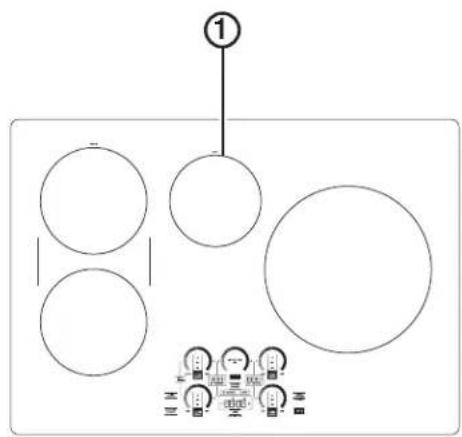
ZHU30R cooktop
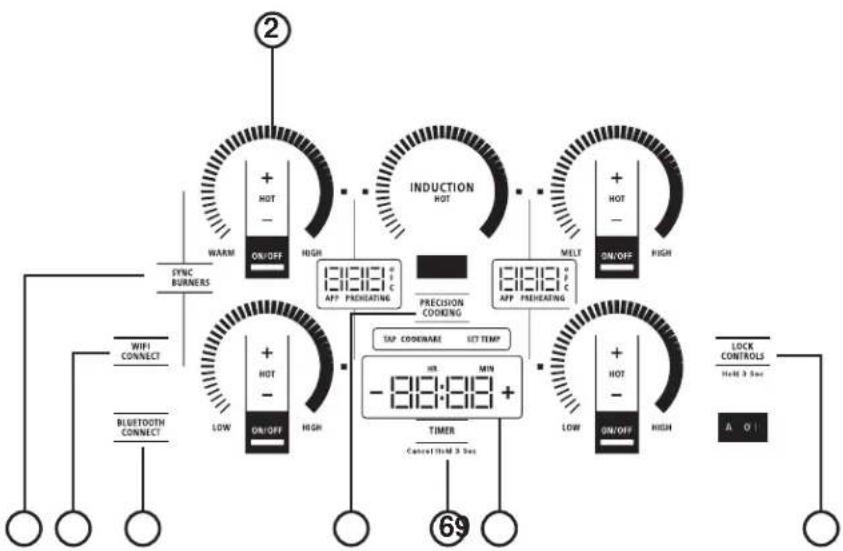
flowchart
graph TD
    A["②"] --> B["WARM"]
    B --> C["SYNC BURNERS"]
    C --> D["+ HOT - HIGH"]
    D --> E["18:31:31 APP PREHEATING"]
    E --> F["INDUCTION HOT"]
    F --> G["+ HOT - HIGH"]
    G --> H["MELT ON/OFF"]
    H --> I["18:31:31 APP PREHEATING"]
    I --> J["TAP CODEWARE SET TEMP"]
    J --> K["- 18:31:31 +"]
    K --> L["TIMER Cancel Time 3 Max"]
    L --> M["69"]
    M --> N["LOCK CONTROLS Held 3 Max"]
    N --> O["A. 0"]
User Interface Controls
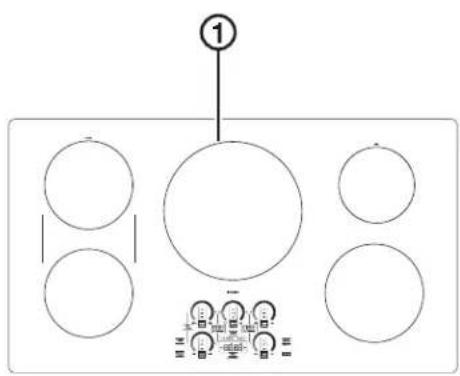
ZHU36R cooktop
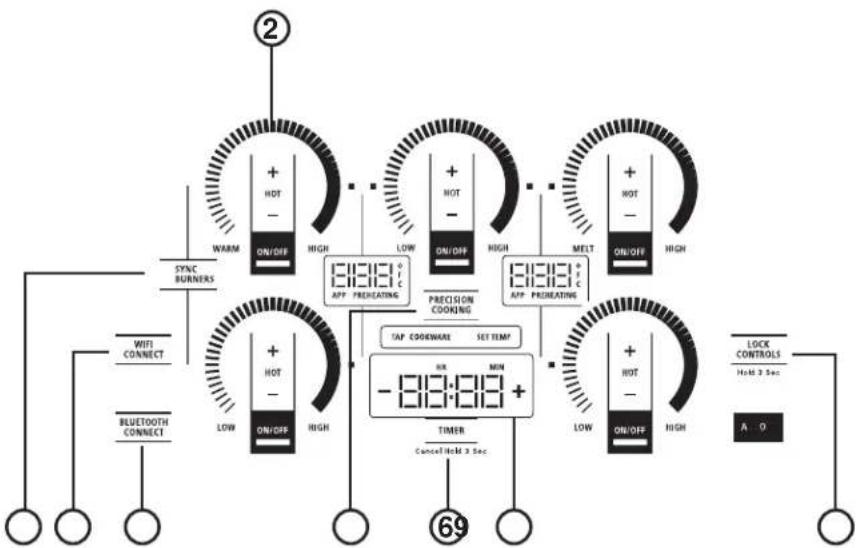
flowchart
graph TD
    A["②"] --> B["WARM ON/OFF HIGH"]
    B --> C["SYNC BURNERS"]
    C --> D["WiFi CONNECT"]
    C --> E["Bluetooth Connect"]
    D --> F["+ HOT -<br>LOW ON/OFF HIGH"]
    E --> G["+ HOT -<br>LOW ON/OFF HIGH"]
    F --> H["18:19:13 APP PREHEATING"]
    G --> I["18:19:13 APP PREHEATING"]
    H --> J["TAP COOKWARE SET TEMP -18:19:13 +"]
    I --> K["TIMER Cancel Hot M 3 Sec"]
    J --> L["+ HOT -<br>LOW ON/OFF HIGH"]
    K --> M["+ HOT -<br>LOW ON/OFF HIGH"]
    L --> N["LOCK CONTROLS Held 3 Sec"]
    M --> O["A 0"]
User Interface Controls
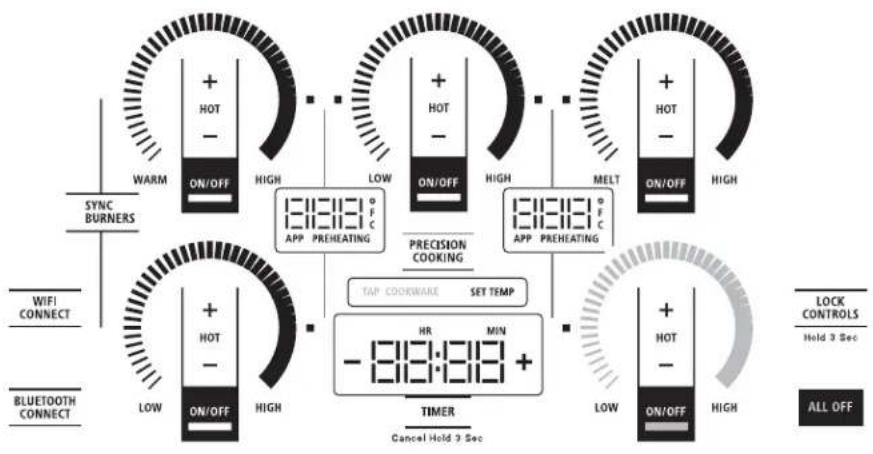
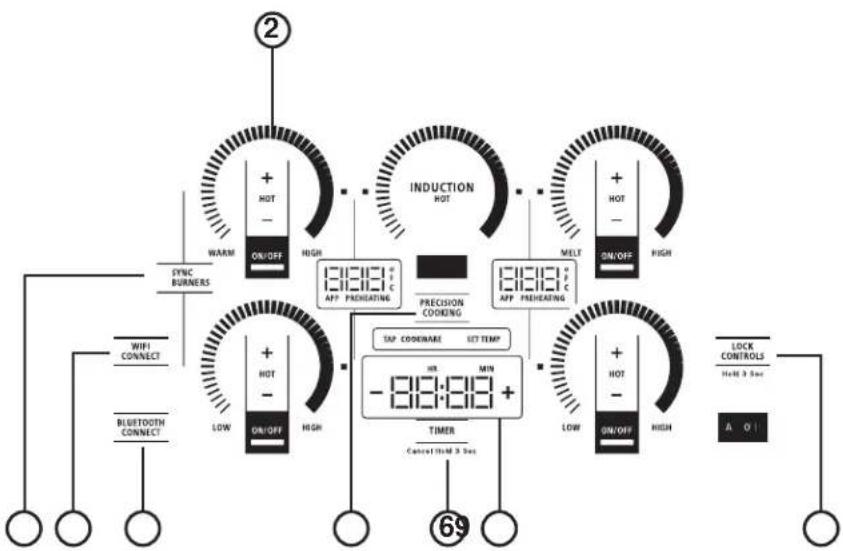
- Cooking Element(s): See page 8.
- Power Level Arc: See page 8.
- Sync Burners: See page 9.
- Precision Cooking: See page 12.
- Lock: See page 10.
- Timer: See page 10.
- Display: See page 10.
- WiFi Connect: See page 11.
- Bluetooth Connect: See page 11.
USING YOUR COOKTOP
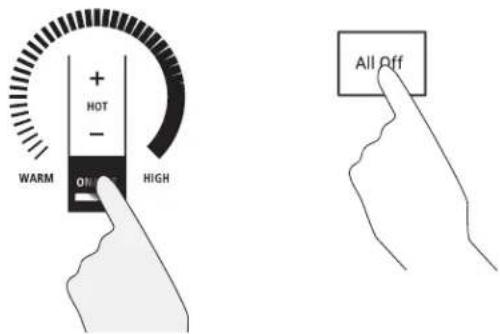
Turn Burner(s) On: Touch and hold On/Off pad about half a second. A chime can be heard with each touch to any pad.
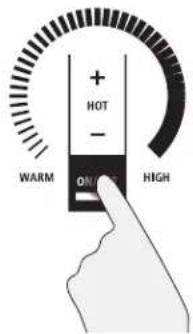
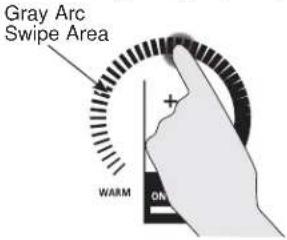
Power level can be selected in any of the following ways:
-
Swipe the gray arc to the desired power level.
-
Touch Anywhere along the gray arc, or;
- Touch + or - pads to adjust power level, or;
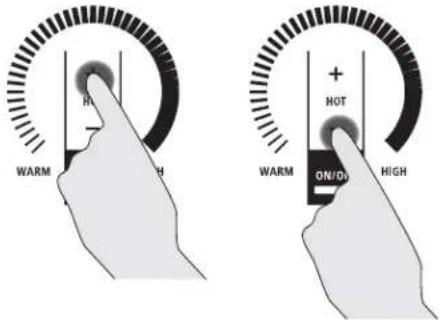
-
Shortcut to Hi: Immediately after turning unit on, touch the + pad, or;
-
Shortcut to Low: Immediately after turning unit on, touch the - pad.
TURN BURNER(S) OFF
Touch On/Off pad for an individual burner or touch the All Off pad.
USING YOUR COOKTOP
SELECTING COOKTOP SETTINGS
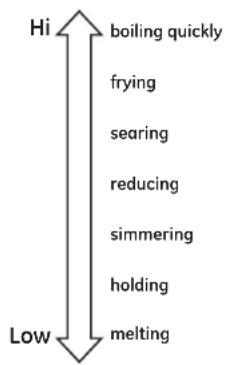
Choose the element/burner that is best fit to the cookware size. Each element/burner on your new cooktop has its own power levels ranging from low to high. Power level settings necessary for cooking will vary depending on the cookware being used, the type and quantity of food, and the desired outcome. In general use lower settings for melting, holding and simmering and use higher settings for heating quickly, searing and frying. When keeping foods warm confirm selected setting is sufficient to maintain food temperature above 140°F. Larger elements and elements marked “Keep Warm” are not recommended for melting.
Hi is the highest power level, designed for large quantity rapid cooking and boiling. Hi will operate for a maximum of 10 minutes. Hi may be repeated after the initial 10 minute cycle by pressing the + pad.
CAUTION
CAUTION Do not place any cookware, utensils or leave excess water spills on control key pads. This may result in unresponsive touch pads and turning off the cooktop if present for several seconds.
SYNCHRONIZE LEFT ELEMENTS
NOTE: Sync Burners is only intended for cookware that spans both burners.
To Turn On
Hold the Sync Burners pad for about half a second to connect the two burners. Operate either element as described on page 8 to adjust power level.
To Turn Off
- Touch the On/Off pad on either burner to turn off the Sync Burners.
or
- Touch the Sync Burners to turn both burners off.

flowchart
graph TD
    A["+ HOT - ON/OFF"] --> B["SYNC BURNERS"]
    C["WARM"] --> D["+ HOT - ON/OFF"]
    E["SYNC BURNERS"] --> F["+ HOT - ON/OFF"]
    G["WARM"] --> H["+ HOT - ON/OFF"]
    I["SYNC BURNERS"] --> J["+ HOT - ON/OFF"]
    K["WARM"] --> L["+ HOT - ON/OFF"]
    M["SYNC BURNERS"] --> N["+ HOT - ON/OFF"]
    O["SYNC BURNERS"] --> P["+ HOT - ON/OFF"]
    Q["WARM"] --> R["+ HOT - ON/OFF"]
    S["SYNC BURNERS"] --> T["+ HOT - ON/OFF"]
    U["SYNC BURNERS"] --> V["+ HOT - ON/OFF"]
    W["WARM"] --> X["+ HOT - ON/OFF"]
    Y["SYNC BURNERS"] --> Z["+ HOT - ON/OFF"]
    AA["WARM"] --> AB["+ HOT - ON/OFF"]
    AC["SYNC BURNERS"] --> AD["+ HOT - ON/OFF"]
    AE["WARM"] --> AF["+ HOT - ON/OFF"]
    AG["SYNC BURNERS"] --> AH["+ HOT - ON/OFF"]
    AI["WARM"] --> AJ["+ HOT - ON/OFF"]
    AK["SYNC BURNERS"] --> AL["+ HOT - ON/OFF"]
    AM["WARM"] --> AN["+ HOT - ON/OFF"]
    AO["SYNC BURNERS"] --> AP["+ HOT - ON/OFF"]
    AQ["WARM"] --> AR["+ HOT - ON/OFF"]
    AS["SYNC BURNERS"] --> AT["+ HOT - ON/OFF"]
    AU["WARM"] --> AV["+ HOT - ON/OFF"]
    AW["SYNC BURNERS"] --> AX["+ HOT - ON/OFF"]
    AY["WIFI CONNECT"] --> AZ["SYNC BURNERS"]
    BA["Bluetooth CONNECT"] --> BB["SYNC BURNERS"]
    BC["WIFI CONNECT"] --> BD["SYNC BURNERS"]
    BE["Bluetooth CONNECT"] --> BF["SYNC BURNERS"]
    BG["WIFI CONNECT"] --> BH["SYNC BURNERS"]
    BI["Bluetooth CONNECT"] --> BJ["SYNC BURNERS"]
    BK["WIFI CONNECT"] --> BL["SYNC BURNERS"]
    BM["Bluetooth CONNECT"] --> BN["SYNC BURNERS"]
    BO["WIFI CONNECT"] --> BP["SYNC BURNERS"]
    BQ["WIFI CONNECT"] --> BR["SYNC BURNERS"]
    BS["Bluetooth CONNECT"] --> BT["SYNC BURNERS"]
    BU["GWIFI CONNECT"] --> BV["SYNC BURNERS"]
    BW["WIFI CONNECT"] --> BX["SYNC BURNERS"]
    BY["GWIFI CONNECT"] --> BZ["SYNC BURNERS"]
    CA["GWIFI CONNECT"] --> CB["SYNC BURNERS"]
    CC["GWIFI CONNECT"] --> CD["SYNC BURNERS"]
    DE["GWIFI CONNECT"] --> DF["SYNC BURNERS"]
    DG["GWIFI CONNECT"] --> DH["SYNC BURNERS"]
USING YOUR COOKTOP
POWER SHARING
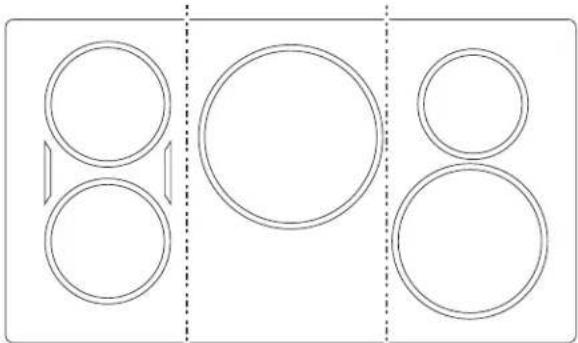
A 36" cooktop has 3 cooking zones and a 30" cooktop has 2 cooking zones. If two elements in the same zone are in use and at least one element is at the maximum power level (Hi), the Hi setting will operate at a reduced
power level. Note that the display will not change. This is how power is shared between two elements in the same cooking zone.

natural_image
Pure diagram of circular shapes with a vertical dashed line dividing them (no text or symbols)30" Wide cooktop. 36" Wide cooktop.
natural_image
Pure diagram of three vertical panels with circular shapes and a central blank circle, no text or symbols present.Left Zone Right Zone Center Zone Left Zone Right Zone
COOKTOP LOCKOUT
Lock
Touch Control Lock pad for 3 seconds.
To Turn Off
Touch Control Lock pad again for 3 seconds.
See Custom Settings section to activate Auto Lock feature.
Cooktop Lockout: locks operation of the controls
KITCHEN TIMER
To Turn On
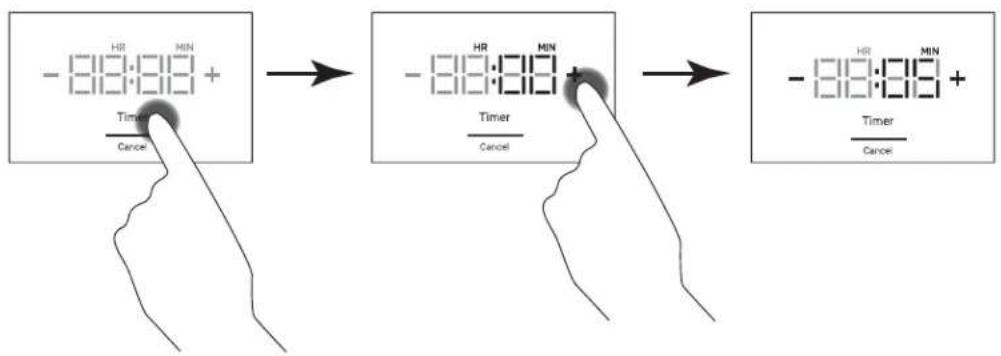
Touch the Timer Select pad. Touch the + or - arrows to choose the desired number of minutes. Timer automatically starts 10 seconds after pad is touched, or if the Timer Select pad it touched. The "ON" LED will appear automatically when timer is set.
To Turn Off
Press and release the Timer Select pad to cancel timer, or hold for 3 seconds. Alarm will sound continuously when time is up until user turns timer off.
NOTE: Use the kitchen timer to measure cooking time or as a reminder. The kitchen timer does not control the cooking elements. Timer turns off if there is no activity for 30 seconds.
flowchart
graph TD
    A["Input: -18:00:00 + Time / Cancel"] --> B["Timer: -18:00:00 + Time / Cancel"]
    B --> C["Output: -18:00:00 + Time / Cancel"]
USING YOUR COOKTOP
Wi-Fi COMMISSIONING
Download the SmartHQ App
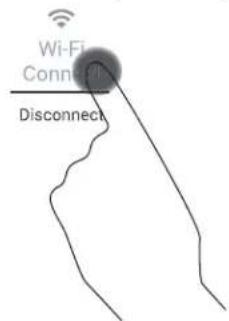
Press the WiFi Connect pad on your cooktop to begin pairing. On the SmartHQ App, select your appliance and follow the instructions to complete the pairing.
Turning Off the WiFi
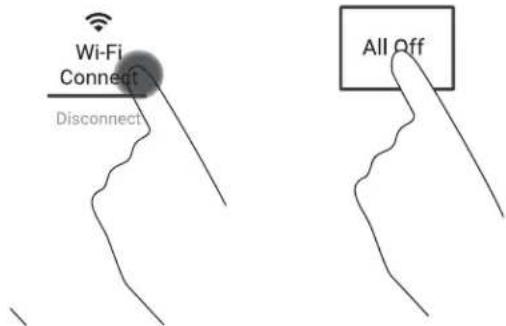
Press and hold the WiFi Connect and the All Off pads for 3 seconds to de-commission the WiFi.
BLUETOOTH® CONNECTIVITY
Your smart range is designed to provide you with Bluetooth connectivity between your appliance and smart device. The following features require a Bluetooth connection:
- Chef Connect
- OTR Microwave
- Vent Hood
- Kitchen Hub
- Precision Cooking
• Hestan Cookware
• Paragon Sous Vide Probe
Your smart range is limited to two active Bluetooth connections at any given time and up to 5 devices can be paired with the range. Due to this, your range will automatically prioritize the devices that should remain in connection and temporarily disconnect all other connections. If multiple Bluetooth functions/devices are active and a 3rd device is attempted to be connected, your range will disconnect one of the active devices to open up space for the new device connection. NOTE: Chef Connect devices do not need to be manually reconnected. The range will scan for known devices and re-establish the connection on its own.
Pairing a Bluetooth® Device
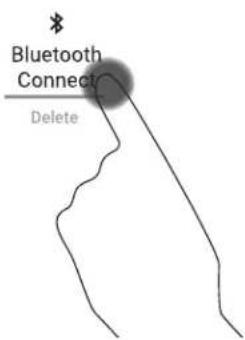
Press the Bluetooth Connect pad on the cooktop. The cooktop will enter Pair mode. Tap cookware or press ChefConnect button on enabled microwave or hood device. When connected, the cooktop will display "donE".
| Supported Devices How to Initiate Pairing |
| Hestan Cue fry pan Tap pan handle twice |
| Hestan Cue pot Tap pot handle twice |
Removing Bluetooth® Devices
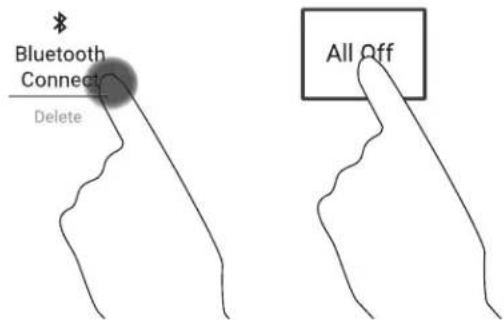
Tap and hold the Bluetooth Connect and All Off pads for 3 seconds.
NOTE: Your unit cannot delete a single or specific device. All of your paired devices are cleared. Devices you wish to use must be paired again.
USING YOUR COOKTOP
PRECISION COOKING
The Precision Cooking feature allows precise temperature control of certain cooking devices for improved results.
Initiating a Precision Cooking Mode
- Press the Power On/Off pad on the desired element.
- Tap Precision Cooking pad.
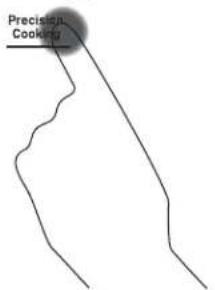
- TAP COOKWARE legend will pulse. Activate cookware and ensure cookware is on desired element.
TAP COOKWARE
-
Precision Cooking Degrees legend will turn on. Use slider or + and - pads to adjust temperature.
-
Cooktop will display target temperature and Preheating. When Preheating legend disappears, target temperature has been reached.

| Supported Devices How to Activate Control with this App | ||
| Hestan Cue®Cookware Tap pan handle | Hestan Cue®(by Hestan Smart Cooking) | |
| Precision Probe Press side button once SmartHQ App | ||
NOTE: Hestan Cue® cookware can also be controlled through the (SmartHQ App), but functionality is limited to temperature control only.
flowchart
graph TD
    A["SYNC BURNERS"] --> B["WARM ON/OFF HIGH"]
    C["WIFI CONNECT"] --> D["+ HOT -"]
    E["BLUETOOTH CONNECT"] --> F["LOW ON/OFF HIGH"]
    G["TAP COOKWARE SET TEMP"] --> H["18:31:0 °F C"]
    I["TIMER Cancel Hold 3 Sec"] --> J["HR MIN -18:31:0 +"]
    K["PRECISION COOKING"] --> L["ON/OFF HIGH"]
    M["ON/OFF HIGH"] --> N["LOW ON/OFF HIGH"]
    O["APP PREHEATING"] --> P["HOT -"]
    Q["APP PREHEATING"] --> R["MELT ON/OFF HIGH"]
    S["ON/OFF HIGH"] --> T["+ HOT -"]
    U["ON/OFF HIGH"] --> V["+ HOT -"]
    W["ON/OFF HIGH"] --> X["+ HOT -"]
    Y["ON/OFF HIGH"] --> Z["+ HOT -"]
    AA["ON/OFF HIGH"] --> AB["+ HOT -"]
    AC["ON/OFF HIGH"] --> AD["+ HOT -"]
    AE["ON/OFF HIGH"] --> AF["+ HOT -"]
    AG["ON/OFF HIGH"] --> AH["+ HOT -"]
    AI["ON/OFF HIGH"] --> AJ["+ HOT -"]
    AK["ON/OFF HIGH"] --> AL["+ HOT -"]
    AM["ON/OFF HIGH"] --> AN["+ HOT -"]
    AO["ON/OFF HIGH"] --> AP["+ HOT -"]
    AQ["ON/OFF HIGH"] --> AR["+ HOT -"]
    AS["ON/OFF HIGH"] --> AT["+ HOT -"]
    AU["ON/OFF HIGH"] --> AV["+ HOT -"]
    AW["ON/OFF HIGH"] --> AX["+ HOT -"]
    AY["SYNC BURNERS"] --> AZ["WARM ON/OFF HIGH"]
    BA["WIFI CONNECT"] --> BB["+ HOT -"]
    BC["BLUETOOTH CONNECT"] --> BD["LOW ON/OFF HIGH"]
    BE["TIMER Cancel Hold 3 Sec"] --> BF["HOR MIN -18:31:0 +"]
    BG["ON/OFF HIGH"] --> BH["LOW ON/OFF HIGH"]
    BI["ON/OFF HIGH"] --> BJ["+ HOT -"]
    BK["ON/OFF HIGH"] --> BL["+ HOT -"]
    BM["ON/OFF HIGH"] --> BN["+ HOT -"]
    BO["ON/OFF HIGH"] --> BP["+ HOT -"]
Precision Cooking Control Modes
There are two control modes available:
■ App Control – the user interacts with an application on a smart phone.
■ Local Control – the user interacts with the burner to set a target temperature and no App use is required.
App Control
After activating your device on your selected burner, open the App designed to control the selected device. Depending on the device and application, the set temperature may be shown in the unit display, in the App, or hidden from view.
Local Control
After activating your device on your selected burner, tap on the burner ring to set the approximate temperature. Small adjustments can be made by tapping the + or - pads. The set temperature will be shown in the display.
USING YOUR COOKTOP
HOT LIGHT INDICATOR
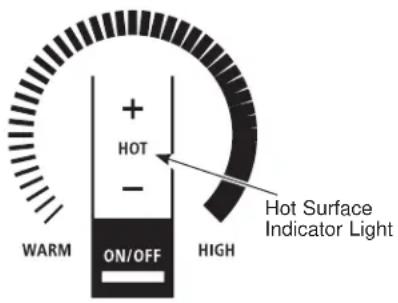
A hot surface indicator light (one for each cooking element) will glow when the glass surface is hot and will remain on until the surface has cooled to a temperature that is safe to touch.
PAN DETECTION REMOVAL
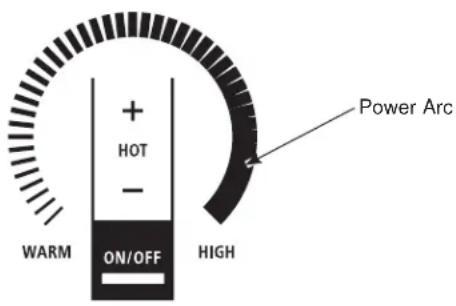
When a pan is removed from the cooktop surface, Burner level turns off; Power arc starts to blink. If a pan is not detected for 25 seconds, the control turns off automatically, lights turn off.
USING YOUR COOKTOP
CUSTOM SETTINGS
- Press and hold All Off and Timer pads together for 3 seconds.
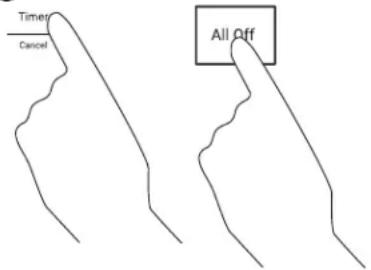
- To activate a Setting, press the Timer pad.
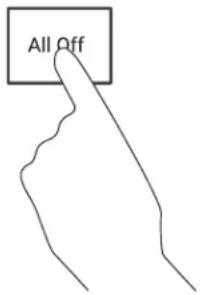
- To exit Settings Menu, press and hold the All Off pad.
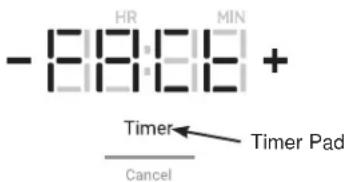
- To navigate through the Settings Menu, use the + and - buttons on the Display. To select a menu, press the Timer pad.
Settings Menu Chart
| Feature Menu Default | Options Requirements | ||||
| 1 | Factory Settings | 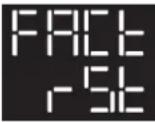 |  |  | "YES": Clears customized settings and restores defaults"No": exits out of the Factory reset menu and takes the user back to the main menu. |
| 2 | Control Lock |  |  |  | "USER": Control lock shall have aas defined in Cooktop Control Lockout"Auto":In addition to the standard lock behavior (Cooktop Control Lockout) the control shall also lock if no burner or timer has been active for 600 seconds as well as there has been no key press for 600 seconds. |
| 3 | LED Light Level |  |  |  | Hi = 100% brightnessrEG = 80% brightnessLo = 60% brightness |
| 4 | Button Volume | 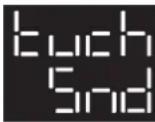 |  |  | "Hi": All touch key sounds activated at 100%"Lo": Touch key sound levels as defined in parametric (ideally 50% of high)."OFF": All touch key sounds off.The sound settings shall not affect alarm tone output levels. |
| 5 | Timer Alarm Volume |  |  |  | "Hi": The DAC level shall be defined in parametric. The product level expectation is to achieve 40dB @ 5 meters from cooktop. 65dB @ 1 meter from cooktop."Lo": The DAC level shall be defined in parametric. The product level expectation is to achieve 40dB @ 1 meter from cooktop. |
| 6 | Timer End Tone | 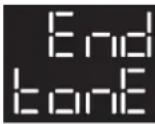 |  | 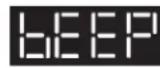 | "Cont" "Timer tone plays continuously until the user acknowledges the timer and tone."bEEP": The timer end tone is played only once. |
| 7 | Temperature Units |  |  |  | |
USING YOUR COOKTOP
HOW INDUCTION COOKING WORKS
The magnetic fields induce a small current in the pan. The pan acts as a resistor, which produces heat, much like a radiant coil.
The cooking surface itself does not heat. Heat is produced in the cooking pan, and cannot be generated until a pan is placed on the cooking surface.
When the element is activated, the pan begins to heat immediately and in turn heats the contents of the pan.
Magnetic induction cooking requires the use of cookware made of ferrous metals—metals to which magnets will stick, such as iron or steel.
Use pans that fit the element size. The pan must be large enough for the safety sensor to activate an element.
The cooktop will not operate if a very small steel or iron utensil (less than the minimum size across the bottom) is placed on the cooking surface when the unit is turned on—items such as steel spatulas, cooking spoons, knives and other small utensils.
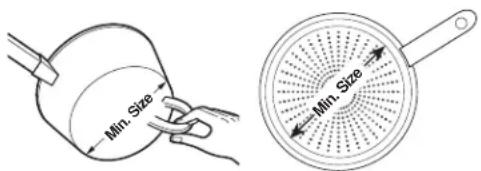
Use the minimum size pan for the element. The pan material is correct if a magnet sticks to the bottom.
COOKWARE "NOISE"
Slight sounds may be produced by different types of cookware. Heavier pans such as enameled cast iron produce less sound than a lighter weight multi-ply stainless steel pan. The size of the pan, and the amount of contents, can also contribute to the sound level.
When using adjacent elements that are set at certain power level settings, magnetic fields may interact and produce a high pitch whistle or intermittent “hum”. These sounds can be reduced or eliminated by lowering or raising the power level settings of one or both of the elements. Pans that completely cover the element ring will produce less sound.
A low “humming” sound is normal particularly on high settings.
Sounds you may hear: You may hear a slight "Buzz" when cooking with Hi mode. This is normal. The sound depends on the type of pot being used. Some pots will "Buzz" louder depending on the material. A "Buzz" sound may be heard if the pan contents are cold. As the pan heats, the sound will decrease. If the power level is reduced, the sound level will go down.
Pans that do not meet the minimum size requirements for the burner can produce louder sounds. They can cause the controller to "search" for the pot and produce a clicking and "zipping" sound. This can happen when one burner is running or only when an adjacent burner is also running. See User Manual for the minimum sized pots for each burner. Only measure the flat, magnetic bottom of the pot.
USING YOUR COOKTOP
CHOOSING THE CORRECT COOKWARE TO USE
Using the correct size cookware
The induction coils require a minimum pan size to function properly. If the pan is removed from the element for more than 25 seconds or not detected the ON indicator for that element will flash and then turn off.
Cookware larger than the element ring may be used; however, heat will only occur above the element.
For best results, the cookware must make FULL contact with the glass surface.
Do not allow the bottom of the pan or cookware to touch the surrounding metal cooktop trim or to overlap the cooktop controls.
For best performance, match the pan size to the element size. Using a smaller pot on a larger burner will generate less power at any given setting.
Suitable Cookware
Use quality cookware with heavier bottoms for better heat distribution and even cooking results. Choose cookware made of magnetic stainless steel, enamel coated cast iron, enameled steel and combinations of these materials.
Some cookware is specifically identified by the manufacturer for use with induction cooktops. Use a magnet to test if the cookware will work.
Flat-bottomed pans give best results. Pans with rims or slight ridges can be used.
Round pans give best results. Pans with warped or curved bottoms will not heat evenly.
For wok cooking, use a flat-bottomed wok. Do not use a wok with a support ring.
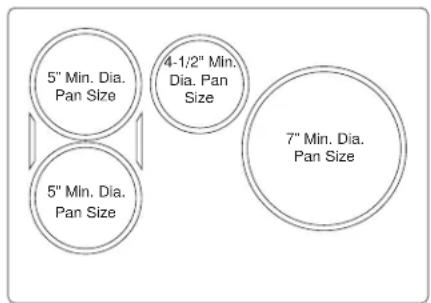
30" wide cooktop.
Use the minimum recommended size pan shown for each cooking element.
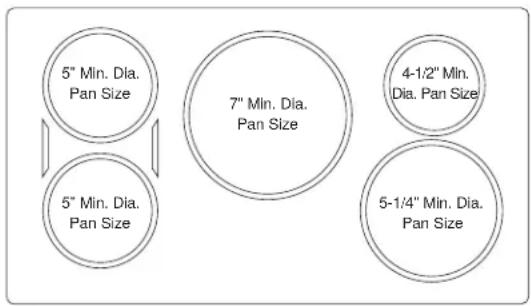
36" wide cooktop.
Use the minimum recommended size pan shown for each cooking element.
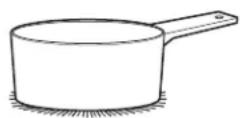
Use flat-bottomed pans.
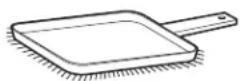
Use a griddle.
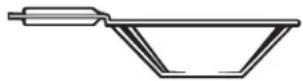
Use a flat-bottomed wok.
USING YOUR COOKTOP
CHOOSING THE CORRECT COOKWARE TO USE (Cont.)
Cookware recommendations
Cookware must fully contact the surface of the cooking element.
Use flat-bottomed pans sized to fit the cooking element and also to the amount of food being prepared.
Induction interface disks are NOT recommended.
Precision Device Minimum Temperatures
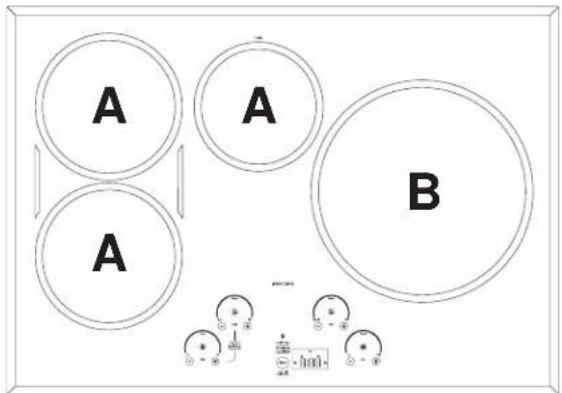
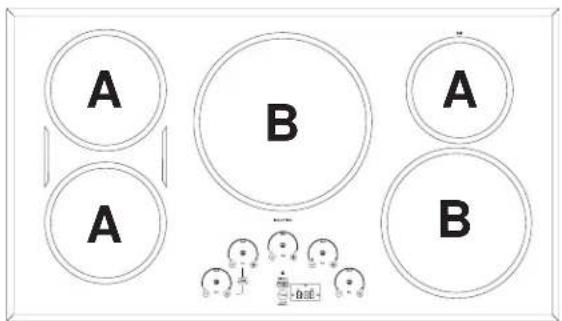
Device temperature ranges are dependent on burner size:
| Device | Small to Medium Burners (A) Large Burners (B) |
| Hestan Cue® cookware 100°F – 500°F | 150°F – 500°F |
| Precision Probe 100°F – 200°F | 120°F – 200°F |
Using the Precision Probe at low temperatures
If you are experiencing trouble maintaining lower set temperatures with a precision probe, try changing your set-up by:
■ Remove the lid from the pot
■ Use a larger diameter pot
■ Use a smaller burner with a pot larger than the burner
INCORRECT
natural_image
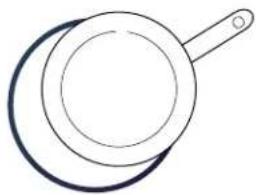
Simple line drawing of a frying pan with a handle (no text or symbols)Cookware not centered on cooking element surface.
Curved or warped pan bottoms or sides.
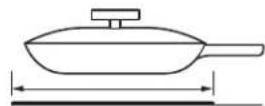
Pan does not meet the minimum size required for the cooking element used.
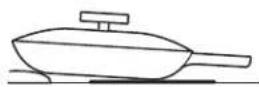
Pan bottom rests on cooktop trim or does not rest completely on the cooktop surface.
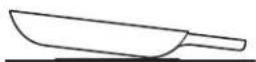
Heavy handle tilts pan.
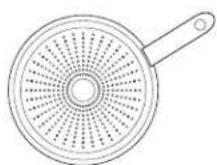
Pan is partially magnetic on the bottom.
CORRECT

natural_image
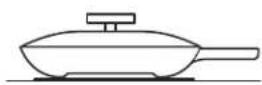
Simple line drawing of a frying pan with a handle (no text or symbols)Cookware centered correctly on cooking element surface.
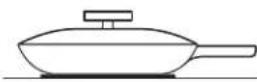
Flat pan bottom.
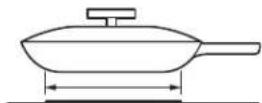
Pan size meets or exceeds the recommended minimum size for the cooking element used.
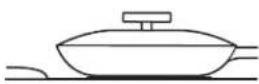
Pan bottom rests completely on the cooktop surface.

Pan is properly balanced.
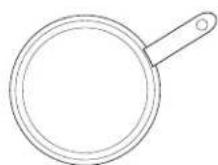
Pan is completely magnetic on the bottom.
USING YOUR COOKTOP
GRIDDLE
Using the Griddle
CAUTION
Burn Hazard
- Griddle surfaces may be hot enough to cause burns during and after use. Place and remove the griddle when it is cool and all surface units are off. Use oven mitts if you will touch the griddle while hot. Failure to do so can result in burns.
■ Place and remove the griddle only when griddle is cool and all surface burners are turned OFF.
Before using this cookware for the first time, wash it to make sure it is clean. Then season it lightly, rubbing cooking oil onto the cooking surface.
How To Place The Griddle
IMPORTANT: Always place and use your griddle at the designated location on the cooktop.
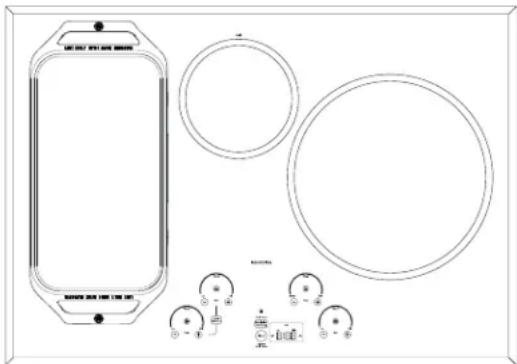
natural_image
Technical line drawing of a device casing with circular components and control buttons (no text or symbols)IMPORTANT NOTES:
■ Clean the griddle with a sponge and mild detergent in warm water. DO NOT use blue or green scrubbing pads or steel wool.
■ Avoid cooking extremely greasy foods and be careful of grease spillover while cooking.
■ Never place or store any items on the griddle, even when it is not in use. The griddle can become heated when using the surrounding surface units.
■ Avoid using metal utensils with sharp points or rough edges, which might damage the griddle. Do not cut foods on the griddle.
■ Do not use cookware as a storage container for food or oil. Permanent staining and/or craze lines could result.
■ Your griddle will discolor over time with use.
■ Do not clean the griddle in a self-cleaning oven.
■ Always allow the cookware to cool before immersing in water.
■ Do not overheat the griddle.
| Type of Food Cook Setting | |
| Warming Tortillas Med-Lo | |
| Pancakes Med-Lo | |
| Hamburgers Med | |
| Fried Eggs | Med-Lo |
| Breakfast Sausage Links Med | |
| Hot Sandwiches(such as Grilled Cheese) | Med-Lo |
Griddle settings are intended to be a guideline and may need to be adjusted based on individual cooking preferences.
Griddle Operation
To turn on the surface units for the entire griddle, use the Sync Burner control feature. Touch the Sync Burner pad and then adjust power level to desired setting as described on page 9.

flowchart
graph TD
    A["Input: WARM, ON/OFF, HIGH"] --> B["Switch State"]
    B --> C["Output: WARM, ON/OFF, HIGH"]
    C --> D["Switch State"]
    D --> E["Output: WARM, ON/OFF, HIGH"]
    E --> F["Output: WARM, ON/OFF, HIGH"]
    F --> G["Output: WARM, ON/OFF, HIGH"]
    G --> H["Output: WARM, ON/OFF, HIGH"]
    H --> I["Output: WARM, ON/OFF, HIGH"]
    I --> J["Output: WARM, ON/OFF, HIGH"]
    J --> K["Output: WARM, ON/OFF, HIGH"]
    K --> L["Output: WARM, ON/OFF, HIGH"]
    L --> M["Output: WARM, ON/OFF, HIGH"]
    M --> N["Output: WARM, ON/OFF, HIGH"]
    N --> O["Output: WARM, ON/OFF, HIGH"]
    O --> P["Output: WARM, ON/OFF, HIGH"]
    P --> Q["Output: WARM, ON/OFF, HIGH"]
    Q --> R["Output: WARM, ON/OFF, HIGH"]
    R --> S["Output: WARM, ON/OFF, HIGH"]
    S --> T["Output: WARM, ON/OFF, HIGH"]
    T --> U["Output: WARM, ON/OFF, HIGH"]
    U --> V["Output: WARM, ON/OFF, HIGH"]
    V --> W["Output: WARM, ON/OFF, HIGH"]
    W --> X["Output: WARM, ON/OFF, HIGH"]
    X --> Y["Output: WARM, ON/OFF, HIGH"]
    Y --> Z["Output: WARM, ON/OFF, HIGH"]
    Z --> AA["Output: WARM, ON/OFF, HIGH"]
    AA --> AB["Output: WARM, ON/OFF, HIGH"]
    AB --> AC["Output: WARM, ON/OFF, HIGH"]
    AC --> AD["Output: WARM, ON/OFF, HIGH"]
    AD --> AE["Output: WARM, ON/OFF, HIGH"]
    AE --> AF["Output: WARM, ON/OFF, HIGH"]
    AF --> AG["Output: WARM, ON/OFF, HIGH"]
    AG --> AH["Output: WARM, ON/OFF, HIGH"]
    AH --> AI["Output: WARM, ON/OFF, HIGH"]
    AI --> AJ["Output: WARM, ON/OFF, HIGH"]
    AJ --> AK["Output: WARM, ON/OFF, HIGH"]
    AK --> AL["Output: WARM, ON/OFF, HIGH"]
    AL --> AM["Output: WARM, ON/OFF, HIGH"]
    AM --> AN["Output: WARM, ON/OFF, HIGH"]
    AN --> AO["Output: WARM, ON/OFF, HIGH"]
    AO --> AP["Output: WARM, ON/OFF, HIGH"]
    AP --> AQ["Output: WARM, ON/OFF, HIGH"]
    AQ --> AR["Output: WARM, ON/OFF, HIGH"]
    AR --> AS["Output: WARM, ON/OFF, HIGH"]
    AS --> AT["Output: WARM, ON/OFF, HIGH"]
    AT --> AU["Output: WARM, ON/OFF, HIGH"]
    AU --> AV["Output: WARM, ON/OFF, HIGH"]
    AV --> AW["Output: WARM, ON/OFF, HIGH"]
    AW --> AX["Output: WARM, ON/OFF, HIGH"]
    AX --> AY["Output: WARM, ON/OFF, HIGH"]
    AY --> AZ["Output: WARM, ON/OFF, HIGH"]
    AZ --> BA["Output: WARM, ON/OFF, HIGH"]
    BA --> BB["Output: WARM, ON/OFF, HIGH"]
    BB --> BC["Output: WARM, ON/OFF, HIGH"]
    BC --> BD["Output: WARM, ON/OFF, HIGH"]
    BD --> BE["Output: WARM, ON/OFF, HIGH"]
    BE --> BF["Output: WARM, ON/OFF, HIGH"]
    BF --> BG["Output: WARM, ON/OFF, HIGH"]
    BG --> BH["Output: WARM, ON/OFF, HIGH"]
    BH --> BI["Output: WARM, ON/OFF, HIGH"]
    BI --> BJ["Output: WARM, ON/OFF, HIGH"]
    BJ --> BK["Output: WARM, ON/OFF, HIGH"]
    BK --> BL["Output: WARM, ON/OFF, HIGH"]
    BL --> BM["Output: WARM, ON/OFF, HIGH"]
    BM --> BN["Output: WARM, ON/OFF, HIGH"]
    BN --> BO["Output: WARM, ON/OFF, HIGH"]
    BO --> BP["Output: WARM, ON/OFF, HIGH"]
    BP --> BQ["Output: WARM, ON/OFF, HIGH"]
    BQ --> BR["Output: WARM, ON/OFF, HIGH"]
    BR --> BS["Output: WARM, ON/OFF, HIGH"]
    BS --> BT["Output: WARM, ON/OFF, HIGH"]
    BT --> BU["Output: WARM, ON/OFF, HIGH"]
    BU --> BV["Output: WARM, ON/OFF, HIGH"]
    BV --> BW["Output: WARM, ON/OFF, HIGH"]
    BW --> BX["Output: WARM, ON/OFF, HIGH"]
    BX --> BY["Output: WARM, ON/OFF, HIGH"]
    BY --> BZ["Output: WARM, ON/OFF, HIGH"]
CARE AND CLEANING
CLEANING THE GLASS COOKTOP
To maintain and protect the surface of your glass cooktop, follow these steps:
- Before using the cooktop for the first time, clean it with a ceramic cooktop cleaner. This helps protect the top and makes cleanup easier.
- Regular use of a ceramic cooktop cleaner will help keep the cooktop looking new.
- Shake the cleaning cream well. Apply a few drops of a ceramic cooktop cleaner directly to the cooktop.
- Use a paper towel or a non-scratch cleaning pad for ceramic cooktops to clean the entire cooktop surface.
- Use a dry cloth or paper towel to remove all cleaning residue. No need to rinse.
NOTE: It is very important that you DO NOT heat the cooktop until it has been cleaned thoroughly.
Clean your cooktop after each spill. Use a ceramic cooktop cleaner.
BURNED-ON RESIDUE
NOTE: DAMAGE to your glass surface may occur if you use scrub pads other than those recommended.
- Allow the cooktop to cool.
- Spread a few drops of a ceramic cooktop cleaner on the entire burned residue area.
- Using a non-scratch cleaning pad for ceramic cooktops, rub the residue area, applying pressure as needed.
-
If any residue remains, repeat the steps listed above as needed.
-
For additional protection, after all residue has been removed, polish the entire surface with a ceramic cooktop cleaner and a paper towel.
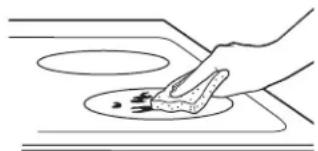
natural_image
Simple line drawing of a hand using a tool to clean or store food on a kitchen (no text or symbols)Use a non-scratch cleaning pad for ceramic cooktops.
HEAVY, BURNED-ON RESIDUE
- Allow the cooktop to cool.
- Use a single-edge razor blade scraper at approximately a 45^ angle against the glass surface and scrape the soil. It will be necessary to apply pressure to the razor scraper in order to remove the residue.
- After scraping with the razor scraper, spread a few drops of a ceramic cooktop cleaner on the entire burned residue area. Use a non-scratch cleaning pad to remove any remaining residue.
- For additional protection, after all residue has been removed, polish the entire surface with a ceramic cooktop cleaner and a paper towel.
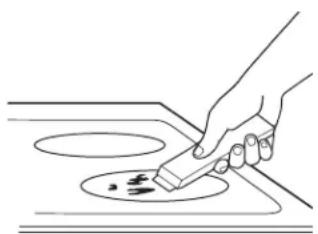
natural_image
Line drawing of a hand using a power tool to clean or store floor tiles (no text or symbols)The ceramic cooktop scraper and all recommended supplies are available through our Parts Center. See instructions under "Assistance / Accessories" section.
NOTE: Do not use a dull or nicked blade.
CARE AND CLEANING
METAL MARKS AND SCRATCHES
- Be careful not to slide pots and pans across your cooktop. It will leave metal markings on the cooktop surface.
These marks are removable using a ceramic cooktop cleaner with a non-scratch cleaning pad for ceramic cooktops.
- If pots with a thin overlay of aluminum or copper are allowed to boil dry, the overlay may leave black discoloration on the cooktop.
This should be removed immediately before heating again or the discoloration may be permanent.
NOTE: Carefully check the bottom of pans for roughness that would scratch the cooktop.
DAMAGE FROM SUGARY SPILLS AND MELTED PLASTIC
Special care should be taken when removing hot substances to avoid permanent damage of the glass surface. Sugary spillovers (such as jellies, fudge, candy, syrups) or melted plastics can cause pitting of the surface of your cooktop (not covered by the warranty) unless the spill is removed while still hot. Special care should be taken when removing hot substances.
Be sure to use a new, sharp razor scraper.
Do not use a dull or nicked blade.
-
Turn off all surface units. Remove hot pans.
-
Wearing an oven mitt:
a. Use a single-edge razor blade scraper to move the spill to a cool area on the cooktop.
b. Remove the spill with paper towels.
- Any remaining spillover should be left until the surface of the cooktop has cooled.
Don't use the surface units again until all of the residue has been completely removed.
NOTE: If pitting or indentation in the glass surface has already occurred, the cooktop glass will have to be replaced. In this case, service will be necessary.
ACCESSORIES
Looking For Something More?
Monogram offers a variety of accessories to improve your cooking and maintenance experiences!
Refer to the Consumer Support page for website information.
The following products and more are available:
Parts
| Griddle |
| Sous Vide Kit |
| Stainless Steel Cleaner and Polisher |
TROUBLESHOOTING
Save time and money! Review the charts on the following pages first and you may not need to call for service.
| Problem Possible Causes What To Do | ||
| Surface elements will not maintain a rolling boil or cooking is slow | Improper cookware being used. Use pans that are recommended for induction, have flat bottoms and match the size of the surface element. | |
| Surface elements do not work properly | Cooktop controls improperly set. Check to be sure the correct control is set for the surface element you are using. | |
| Power arc ON indicator blinking | Wrong pan type. Use a magnet to check that co- kware is induction compatible. | |
| Pan is too small. Blinking "ON" indicator — pan size is below the minimum size for the element. See the Using the correct size cookware section. | ||
| Pan not positioned correctly. Center the pan in the cooking ring. | ||
| +, -, or control lock pads have been touched before an element is turned on. | See the Operating the Cooking Elements section. | |
| Scratches on cooktop glass surface | Incorrect cleaning methods being used. Use reco- mmended cleaning procedures. See the Cleaning the glass cooktop section. | |
| Cookware with rough bottoms being used or coarse particles (salt or sand) were between the cookware and the surface of the cooktop. Cookware has been slid across the cooktop surface. | To avoid scratches, use the recommended cleaning procedures. Make sure bottoms of cookware are clean before use, and use cookware with smooth bottoms. | |
| Areas of discoloration on the cooktop | Food spillovers not cleaned before next use. See the Cleaning the glass cooktop section. | |
| Hot surface on a model with a light-colored glass cooktop. | This is normal. The surface may appear discolored when it is hot. This is temporary and will disappear as the glass cools. | |
| Plastic melted to the surface | Hot cooktop came into contact with plastic placed on the hot cooktop. | See the Glass surface – potential for permanent damage section in the Cleaning the glass cooktop section. |
| Pitting (or indentation) of the cooktop | Hot sugar mixture spilled on the cooktop. Call a qualified technician for replacement. | |
| Pan detection/sizing not working properly | Improper cookware being used. Use a flat induction capable pan that meets the minimum size for the element being used. See the Using The Correct Size Cookware section. | |
| Pan is improperly placed. Make sure the pan is centered on the corresponding surface element. | ||
| Cooktop control improperly set. Check to see that the control is set properly. | ||
| Noise Sounds you may hear: | Buzzing, whistling and humming. | These sounds are normal. See Cooking Noise section. |
| Unresponsive keypad Keypad | is dirty. Clean the keypad. | |
| A fuse in your home may be blown or the circuit breaker tripped. | Replace the fuse or reset the circuit breaker. | |
| Object, such as utensil or debris, is on the control interface. | Remove object from control interface. | |
| Liquid is on the control interface. | Wipe control interface to remove liquid. | |
TROUBLESHOOTING
| Problem Possible Causes | What To Do | |
| Precision Cooking button beeps error tone when pressed one time | There is no precision cooking device paired, so you are unable to start a precision cooking mode. | Connect a precision cooking device. |
| Probe actual temperature is not stable while charger is inserted | Electrical noise is impacting the signal. Probe should be charged before cooking. Do not leave probe plugged in while cooking. | |
| My sous vide probe JXSOUSV1 won't pair | Existing precision probes are not compatible with new precision features. | Connect a model compatible precision probe. |
| My precision probe is not accurately maintaining low temperatures | The pot size, pot set-up, and/or burner size you are using may be unsuitable to hold low temperatures. | Remove the lid, use a larger diameter pot, or use a smaller burner. Please keep your unit connected and install upcoming updates to improve performance. |
| Pan won't pair or activate when tapping handle | Tapping force is too light. Double tap the pan with firm taps (or knock) on the black plastic endcap. | |
| Battery in pan is low or dead. Replace AAA battery, installing with positive end out of handle. | ||
| Using different pan hardware. Check that your pan has a black endcap that unscrews from the end of the handle. Pans with an oval module reading "Hestan Cue®" will not work with Café appliances. | ||
| Experiencing performance or minor technical issues including seeing 20F or 100F as set temperature | Old unit or pan software. Connect your unit to the SmartHQ app and update unit software. Connect your unit and pan to the Hestan Smart Cooking app and update pan software. | |
| The unit cancelled my precision cooking mode | Battery in device is low or dead. Replace AAA battery in pan, or charge probe. | |
| Old unit or pan software. Connect your unit to the SmartHQ app and update unit software. Connect your unit and pan to the Hestan Smart Cooking app and update pan software. | ||
| Your precision cooking device has gone out of range. | This could indicate a problem with the device. If the problem persists, please contact the device manufacturer. | |
| Your precision cooking device had a computation malfunction. | ||
| The unit lost communication with your precision cooking device. | This could indicate a problem with the device or the unit. If the problem persists, please contact the device or unit manufacturer. | |
| Some cooking techniques and set temperatures in combination may trigger a fault in the temperature sensing algorithm. | Re-start the precision cooking mode and if problem persists under the same conditions but is not consistent in other use cases, contact the unit manufacturer. | |
| Unable to reach set temperature in Precision Cooking Mode | Boiling water or cooking liquid based foods at high temperatures will result in temperature stalls close to the set temperature. | Use temperature settings for pan frying, sautéing, and searing when using Hestan Cue cookware or built-in conventional Precision Cooktop Sensor. The Precision Cooking Probe accessory can be used to control liquid temperatures between 100-200° F for slow cooking, simmering, and advanced cooking techniques like Sous Vide. |
LIMITED WARRANTY
Monogram.com
All warranty service is provided by our Factory Service Centers, or an authorized Customer Care® technician. To schedule service online, visit us at monogram.com or call Monogram Preferred Service (800.444.1845). Please have your serial number and your model number available when calling for service. In Canada, visit monogram.ca.
| For the period of Monogram Appliances will replace | |
| Limited two-year warranty | For two years from date of original purchase, we will provide, free of charge, parts and service labor in your home to repair or replace any part of the appliance that fails because of a manufacturing defect. |
What Monogram will not cover:
■ Service trips to your home to teach you how to use the product.
■ Improper installation, delivery or maintenance.
■ Failure of the product if it is abused, misused, modified or used for other than the intended purpose or used commercially.
■ Replacement of house fuses or resetting of circuit breakers.
■ Damage to the product caused by accident, fire, floods or acts of God.
■ Incidental or consequential damage caused by possible defects with this appliance.
■ Damage caused after delivery.
■ Product not accessible to provide required service.
■ Service to repair or replace light bulbs, except for LED lamps.
EXCLUSION OF IMPLIED WARRANTIES
Your sole and exclusive remedy is product repair as provided in this Limited Warranty. Any implied warranties, including the implied warranties of merchantability or fitness for a particular purpose, are limited to one year or the shortest period allowed by law.
This limited warranty is extended to the original purchaser and any succeeding owner for products purchased for home use within the USA. If the product is located in an area where service by an Authorized Servicer is not available, you may be responsible for a trip charge or you may be required to bring the product to an Authorized Service location. In Alaska, the limited warranty excludes the cost of shipping or service calls to your home.
Some states do not allow the exclusion or limitation of incidental or consequential damages. This limited warranty gives you specific legal rights, and you may also have other rights which vary from state to state. To know what your legal rights are, consult your local or state consumer affairs office or your state's Attorney General.
Warrantor: GE Appliances, a Haier company
Louisville KY,40225

MONOGRAM
MANUEL DU PROPRIÉTAIRE
Au Canada : service.geappliances.ca/servicio/
SERVICE DE RÉPARATION
Au Canada : service.geappliances.ca/servicio/
CONNEXION À DISTANCE
Table de cuisson ZHU30R
flowchart
graph TD
    A["②"] --> B["+ HOT -<br>WARM ON/OFF HIGH"]
    B --> C["1813:191 °C APP PREHEATING"]
    C --> D["INDUCTION HOT"]
    D --> E["+ HOT -<br>MELT ON/OFF HIGH"]
    E --> F["1813:191 °C APP PREHEATING"]
    F --> G["TAP CODEWARE SET TEMP"]
    G --> H["- 1813:191 + TIMER Control Time 3 Bus"]
    H --> I["69"]
    I --> J["LOCK CONTROLS Held 3 Bus"]
    J --> K["BLuetooth CONNECT"]
    K --> L["SYNC BURNERS"]
    L --> M["WiFi CONNECT"]
    M --> N["Bluefoot Connect"]
natural_image
Pure geometric diagram with circles and arrows, no text or symbols present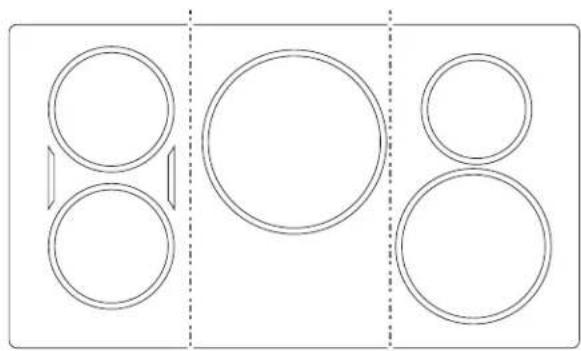
natural_image
Pure diagram of three vertical panels with circular shapes and arrows, no text or symbols presentflowchart
graph LR
    A["+ - 88:88"] --> B["+ - 88:88"]
    B --> C["+ - 88:88"]
UTILISATION DE VOTRE TABLE DE CUISSON
MISE EN SERVICE WI-FI
Désactivation du WiFi
CONNECTIVITÉ BLUETOOTH®
UTILISATION DE VOTRE TABLE DE CUISSON
CUISSON DE PRÉCISION
natural_image
Simple line drawing of a frying pan with a handle and curved blade (no text or symbols)natural_image
Simple line drawing of a frying pan with a handle (no text or symbols)REMARQUES IMPORTANTES :
flowchart
graph TD
    A["Start"] --> B{Switch Condition}
    B -->|Warm/High| C["Connect: WiFi CONNECT, Bluetooth CONNECT"]
    B -->|ON/OFF| D["Connect: WiFi CONNECT, Bluetooth CONNECT"]
    E["Start"] --> F{Switch Condition}
    F -->|Warm/High| G["Connect: WiFi CONNECT, Bluetooth CONNECT"]
    F -->|ON/OFF| H["Connect: WiFi CONNECT, Bluetooth CONNECT"]
    I["End"] --> J{Switch Condition}
    J -->|Warm/High| K["Connect: WiFi CONNECT, Bluetooth CONNECT"]
    J -->|ON/OFF| L["Connect: WiFi CONNECT, Bluetooth CONNECT"]
    M["End"] --> N{Switch Condition}
    N -->|Warm/High| O["Connect: WiFi CONNECT, Bluetooth CONNECT"]
    N -->|ON/OFF| P["Connect: WiFi CONNECT, Bluetooth CONNECT"]
NETTOYAGE ET ENTRETIEN
NETTOYAGE DE LA VITRE DE LA TABLE DE CUISSON
natural_image
Pure geometric diagram with circles and dashed lines, no text or symbols presentnatural_image
Pure geometric diagram of circles and a vertical line with a dashed line, no text or symbols presentApagado del WiFi
CONECTIVIDAD BLUETOOTH®
CÓMO USAR SU ESTUFA
natural_image
Simple line drawing of a frying pan with a handle and curved band (no text or symbols)natural_image
Simple line drawing of a frying pan with a handle (no text or symbols)natural_image
Simple line drawing of a hand cleaning a circular object on a surface (no text or symbols)natural_image
Line drawing of a hand using a tool to clean or store contents on a stove (no text or symbols)- MODEL INFORMATION
- WRITE DOWN THE MODEL AND SERIAL NUMBERS
- CONSUMER SUPPORT
- MONOGRAM WEBSITE
- REGISTER YOUR APPLIANCE
- SCHEDULE SERVICE
- EXTENDED WARRANTIES
- REMOTE CONNECTIVITY
- PARTS AND ACCESSORIES
- CONTACT US
- IMPORTANT SAFETY INFORMATION
- READ ALL INSTRUCTIONS BEFORE USING THE APPLIANCE
- WARNING
- GENERAL SAFETY INSTRUCTIONS
- CAUTION
- KEEP FLAMMABLE MATERIALS AWAY FROM THE COOKTOP
- COOKTOP SAFETY INSTRUCTIONS
- READ AND SAVE THESE INSTRUCTIONS
- IMPORTANT SAFETY INFORMATION READ ALL INSTRUCTIONS BEFORE USING THE APPLIANCE
- COOKTOP SAFETY INSTRUCTIONS (Cont.)
- INDUCTION COOKTOP SAFETY INSTRUCTIONS
- PROPER DISPOSAL OF YOUR APPLIANCE
- How to Remove Protective Shipping Film and Packaging Tape
- USING YOUR COOKTOP
- TURN BURNER(S) OFF
- SELECTING COOKTOP SETTINGS
- SYNCHRONIZE LEFT ELEMENTS
- To Turn On
- To Turn Off
- POWER SHARING
- COOKTOP LOCKOUT
- Lock
- KITCHEN TIMER
- Wi-Fi COMMISSIONING
- Download the SmartHQ App
- Turning Off the WiFi
- BLUETOOTH® CONNECTIVITY
- Pairing a Bluetooth® Device
- Removing Bluetooth® Devices
- PRECISION COOKING
- Initiating a Precision Cooking Mode
- Precision Cooking Control Modes
- App Control
- Local Control
- HOT LIGHT INDICATOR
- PAN DETECTION REMOVAL
- CUSTOM SETTINGS
- HOW INDUCTION COOKING WORKS
- COOKWARE "NOISE"
- CHOOSING THE CORRECT COOKWARE TO USE
- Using the correct size cookware
- Suitable Cookware
- CHOOSING THE CORRECT COOKWARE TO USE (Cont.)
- Cookware recommendations
- Precision Device Minimum Temperatures
- Using the Precision Probe at low temperatures
- GRIDDLE
- Burn Hazard
- How To Place The Griddle
- IMPORTANT NOTES:
- Griddle Operation
- CARE AND CLEANING
- CLEANING THE GLASS COOKTOP
- BURNED-ON RESIDUE
- HEAVY, BURNED-ON RESIDUE
- METAL MARKS AND SCRATCHES
- DAMAGE FROM SUGARY SPILLS AND MELTED PLASTIC
- ACCESSORIES
- TROUBLESHOOTING
- LIMITED WARRANTY
- Monogram.com
- What Monogram will not cover:
- EXCLUSION OF IMPLIED WARRANTIES
- MANUEL DU PROPRIÉTAIRE
- SERVICE DE RÉPARATION
- CONNEXION À DISTANCE
- UTILISATION DE VOTRE TABLE DE CUISSON
- MISE EN SERVICE WI-FI
- Désactivation du WiFi
- CONNECTIVITÉ BLUETOOTH®
- CUISSON DE PRÉCISION
- REMARQUES IMPORTANTES :
- NETTOYAGE ET ENTRETIEN
- NETTOYAGE DE LA VITRE DE LA TABLE DE CUISSON
- Apagado del WiFi
- CONECTIVIDAD BLUETOOTH®
- CÓMO USAR SU ESTUFA
Brand : Monogram
Model : ZHU36RDTBB
Category : Cooker