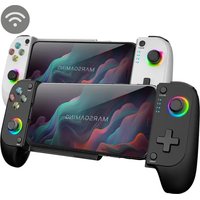
MGPX - Game controller Mars Gaming - Free user manual and instructions
Find the device manual for free MGPX Mars Gaming in PDF.


| Product type | Video game controller |
| Brand | Mars Gaming |
| Model | MGPX |
| Compatible platforms | Nintendo Switch 2, Android (for firmware update) |
| Connectivity | Bluetooth 5.0, wired USB-C |
| Power | Rechargeable lithium-ion battery 600 mAh |
| Battery life | Approximately 8 hours |
| Charging time | Approximately 2-3 hours |
| Weight | Approximately 200 g |
| Dimensions | 150 x 100 x 60 mm |
| Main functions | Dual vibration, gyroscope, accelerometer, programmable buttons |
| Firmware update | Via Shooting Plus V3 app (Android only) |
| Material | ABS plastic with soft touch finish |
| Box contents | Controller, USB-C cable, quick start guide |
| Maintenance and cleaning | Clean with a slightly damp soft cloth. Do not use solvents. |
| Safety | Do not expose to moisture or extreme temperatures. Stop device if overheating. |
| Spare parts and repairability | Batteries are replaceable. Contact support for spare parts. |
Frequently Asked Questions - MGPX Mars Gaming
User questions about MGPX Mars Gaming
0 question about this device. Answer the ones you know or ask your own.
Ask a new question about this device
Download the instructions for your Game controller in PDF format for free! Find your manual MGPX - Mars Gaming and take your electronic device back in hand. On this page are published all the documents necessary for the use of your device. MGPX by Mars Gaming.
USER MANUAL MGPX Mars Gaming
MGPX Firmware Update Guide for Switch 2
Important:
To pair the MGPX controller with Switch 2, you must update the firmware using the Shooting Plus app (v3.0.1.671 or above).
1. Download
- Scan the QR code or visit the product's "Software" page on marsgaming.eu to download Shooting Plus V3 (v3.0.1.671 or higher).
- Note: Android only.

2. Install
- After downloading, install the app on your Android device.
3. Enable Bluetooth
- Make sure Bluetooth is turned on in your Android settings.
4. Enter pairing mode
- With the controller off, hold A and then press HOME.
• LED 1 will start blinking.
5. Connect to phone
- Open your phone's Bluetooth settings and connect to MGP-BT2.
- LED 1 will stay on solid when paired.
6. Update firmware in app
- Open Shooting Plus V3.
- A firmware update alert should appear—follow on-screen instructions.
7. If no alert appears:
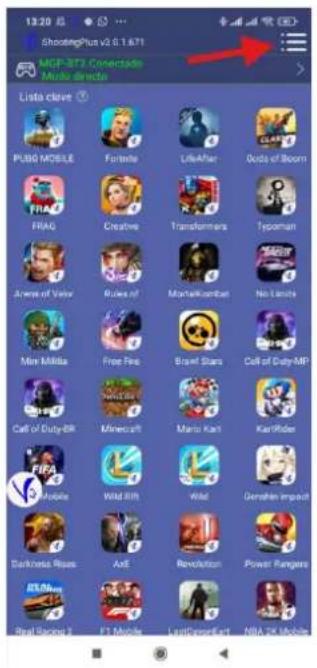
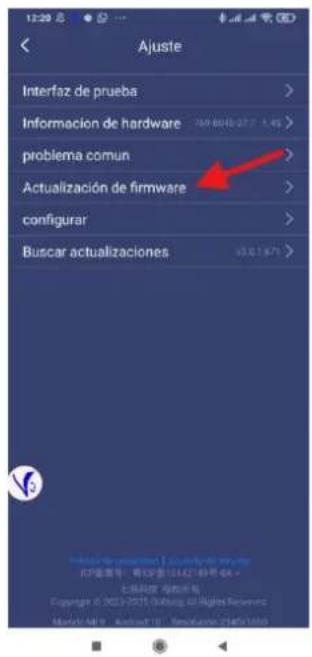
- Tap the three-dot menu (top right) in the app.
- Select "Firmware update."
8. Pair with Switch 2
• After updating, the controller is ready to use.
- Pair it to Switch 2 by connecting via USB cable, orusing Bluetooth: in Switch pairing menu, enter Switch mode by holding L1 + HOME, then press L1 + L2 to complete pairing.
Troubleshooting tips:
- Ensure correct app version.
• Make sure controller is fully charged. - Android must grant all permissions to Shooting Plus V3.
PT Português
2. Instalar
2. Installare
2. Installez
2. Installieren
2. Zainstaluj
2. Installeren
• Android. Crossback (Android) : Respondent, whom be a bit of the technology on jahaz

3. تفعتيل البلوتوث
Brand : Mars Gaming
Model : MGPX
Category : Game controller