WiSpeak grip - Speaker Ecler - Free user manual and instructions
Find the device manual for free WiSpeak grip Ecler in PDF.


| Product type | Professional wireless audio system (CORE transmitter and WiSpeak receivers set) |
| Brand | Ecler |
| Model | WiSpeak grip (CORE system + TUBE/CUBE/GLOBE receivers) |
| Main functions | Wireless audio transmission via RF (5.1-5.8 GHz band), range up to 12 meters, up to 24 receivers, control via WiSpeak grip app (Android/iOS), plug & play pairing, multiple audio inputs (balanced/unbalanced stereo analog, Bluetooth), AUX output, general and individual volume control, audio filtering, receiver overload protection |
| CORE transmitter power supply | External 24 V DC power adapter (100-240 V AC, 50/60 Hz) |
| Receiver power supply | Internal universal 100-240 V AC, 50/60 Hz via lighting track or supplied power cable (depending on model) |
| Lighting track compatibility | Eutrac, Global Trac Pro (4-wire, 3-circuit system) |
| Maximum recommended range | 12 meters line of sight |
| Maximum number of receivers per transmitter | 24 |
| Audio latency | Less than 6 ms |
| CORE transmitter audio inputs | 2 stereo analog inputs (balanced Euroblock, unbalanced RCA), 1 Class 1 Bluetooth input (25 m range) |
| Transmitter audio output | AUX OUT (analog, copy of WiSpeak signal) |
| Remote control | MUTE port (dry contact) and REMOTE port (RJ45 for WPaVOL wall panel) |
| Control app | WiSpeak grip for Android 5.0+ and iOS 11+ |
| Housing material | Fiberglass-reinforced ABS (GLOBE), other depending on model |
| Available colors | White (RAL 9003) and black (RAL 9005) for GLOBE |
| Cleaning | Damp cloth with mild liquid detergent, then wipe with dry clean cloth; avoid solvents and abrasives |
| Safety | Do not expose to rain or moisture; disconnect during storms or prolonged non-use; refer all repairs to qualified personnel; follow safety instructions in the manual |
| Warranty | See www.ecler.com or included warranty card |
| Maintenance and repairability | Maintenance by Ecler authorized technical services; spare parts available from the manufacturer |
| Regulatory information | Compliant with local RF regulations; region selection via app |
Frequently Asked Questions - WiSpeak grip Ecler
User questions about WiSpeak grip Ecler
0 question about this device. Answer the ones you know or ask your own.
Ask a new question about this device
Download the instructions for your Speaker in PDF format for free! Find your manual WiSpeak grip - Ecler and take your electronic device back in hand. On this page are published all the documents necessary for the use of your device. WiSpeak grip by Ecler.
USER MANUAL WiSpeak grip Ecler
natural_image
Two black and white streetlights with adjustable lighting fixtures (no text or symbols visible)TUBE
natural_image
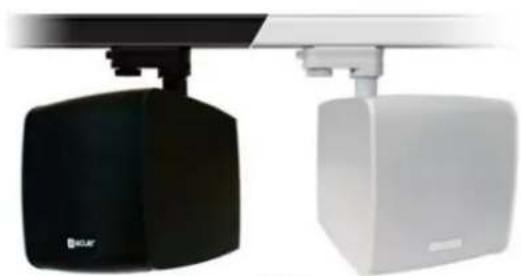
Two black and white industrial lighting fixtures with adjustable arm (no visible text or symbols)CUBE
natural_image
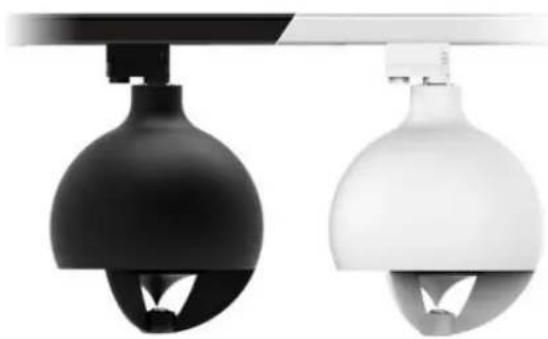
Two identical black and white spherical lighting fixtures with ventilation slots, shown against a white background (no text or symbols)GLOBE | Rail-mount version
natural_image
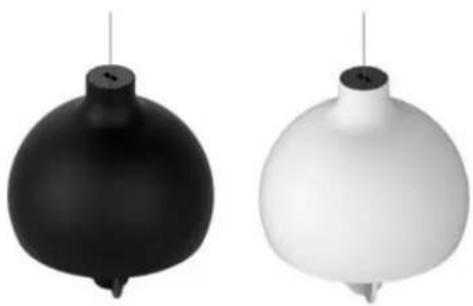
Two abstract spherical objects, one black and one white, suspended vertically against a white background (no text or symbols)GLOBE | Pendant version
natural_image
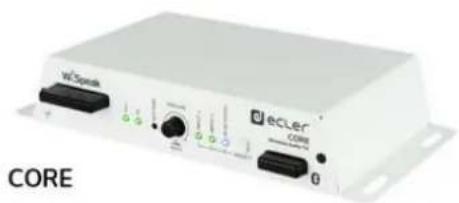
White electronic device labeled 'CORE' with ports and connectors (no readable text beyond branding)natural_image
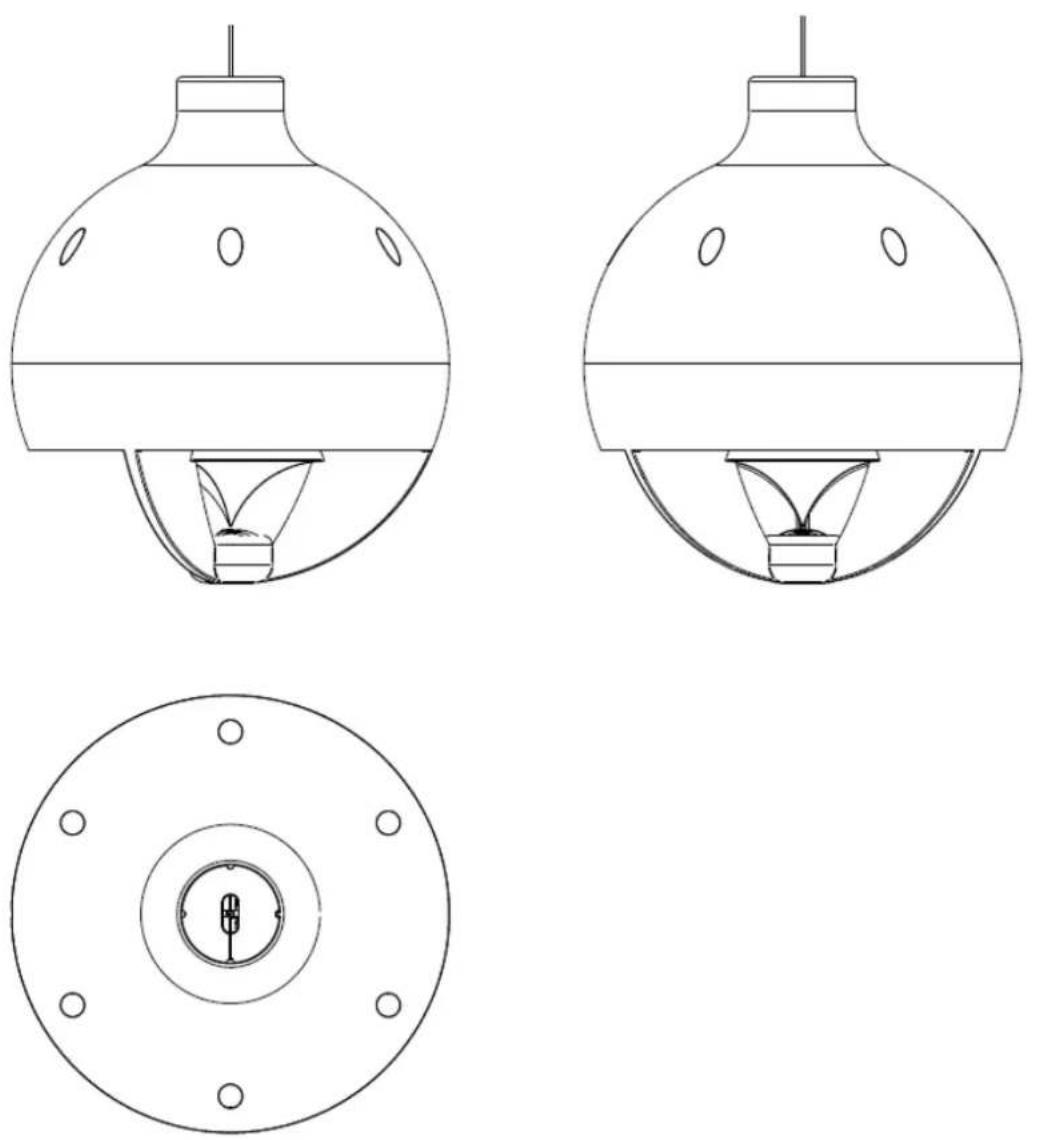
Technical line drawing of two mechanical lighting fixtures with no visible text or symbolsnatural_image
Technical line drawing of two electronic device modules with internal components (no text or symbols)natural_image
Line drawing of a spherical scientific instrument with internal components and a top-mounted sensor (no text or symbols)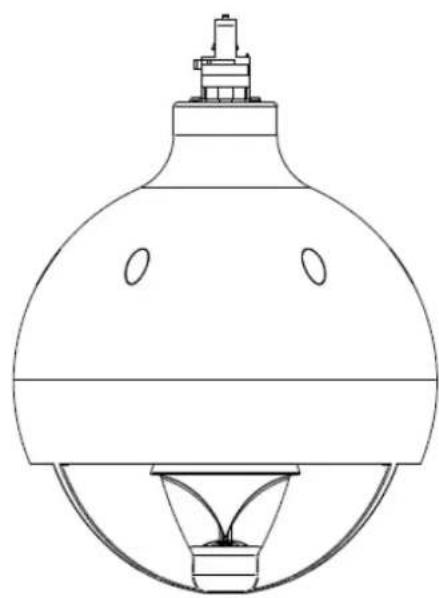
natural_image
Line drawing of a laboratory flask with a stopper and inverted funnel (no text or symbols)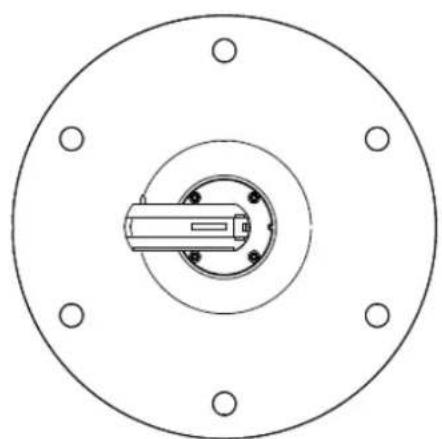
natural_image
Technical diagram of a circular mechanical component with concentric rings and mounting holes (no text or symbols)5.4.2 GLOBE PD model (pendant)
natural_image
Technical line drawing of a mechanical assembly with directional arrows and component footprints (no text or symbols)natural_image
Technical line drawing of a mechanical assembly with an inset close-up showing a component detail (no text or symbols)natural_image
Technical line drawing of a cylindrical structure with internal channels and supports (no text or symbols)natural_image
Technical line drawing of a mechanical assembly with directional arrows and component outlines (no text or symbols)natural_image
Technical line drawing of a mechanical assembly with an inset showing a close-up of a component (no text or symbols present)natural_image
Technical line drawing of a device housing and internal components, showing internal components and assembly (no text or symbols)Follow these steps to install a GLOBE RM unit in a lighting rail:
natural_image
Technical line drawing of a mechanical device with a dome-shaped base and internal components (no text or symbols)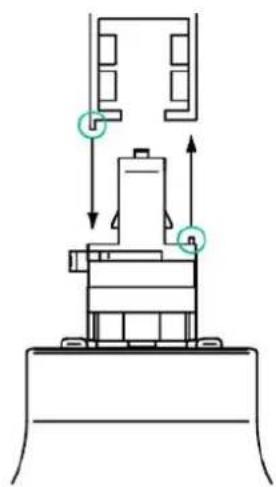
natural_image
Technical diagram of a mechanical assembly with directional arrows and component outlines (no text or labels)Connection to a GLOBAL Trac Pro / Eutrac lighting rail (three-circuit lighting track system)
natural_image
Technical diagram showing a mechanical assembly with a magnified inset highlighting a component detail (no text or symbols present)GLOBE Front panel (PD and RM)
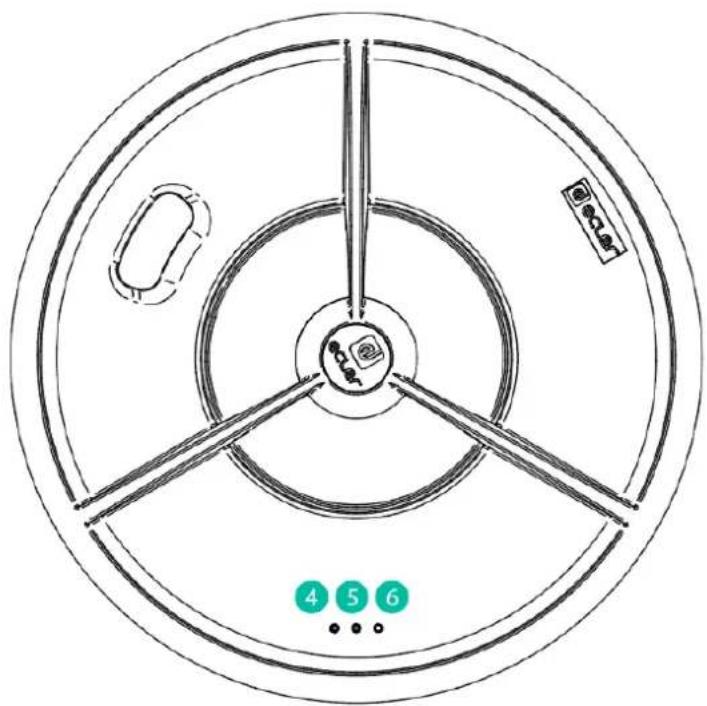
| Inputs | |
| Type | IN1: Balanced, Stereo, Euroblock |
| IN2: Unbalanced, Stereo, RCA | |
| BT: Bluetooth wireless | |
| Input Sensitivity* / Nominal Impedance | IN1: -10dBV to 0dBV / >20kΩ |
| IN2: -10dBV to 0dBV / >20kΩ | |
| BT: -10dBV FS | |
| Gain Control Range ^2 | IN 1&2: 10dB |
| Input Sélecteur (same selection for Ch1&2) | Frontal panel keys /WiSpeak grip control app |
| CMRR | IN2: >60dB @ 1kHz |
| Bluetooth Input | Type: Compliant 5.0, Class 1Range: 25m (ideal conditions) |
| Frequency Response (at TX AUX OUT) | IN1: 10Hz – 20kHz (-1dB) |
| IN2: 10Hz – 20kHz (-1dB) | |
| BT: 10Hz – 20kHz (-1dB) | |
| THD+D (at TX AUX OUT) | IN 1&2: <0.015% |
| Signal Noise Ratio (at TX AUX OUT) | IN 1&2: >95dB |
| Local Output | |
| Type | AUX OUT: Analog, Mono, Balanced, Euroblock |
| Input Selection | CH 1&2: WiSpeak grip control app |
| Nominal Output Level / Min Load | AUX OUT: 0dBV / 10kΩ |
| WiSpeak Channels (RF Wireless Audio) | |
| Channel | CH 1&2: Digital, Mono, RF Wireless Audio |
| General Controls (affects Ch1&2) | Master VOL, MUTE: Frontal panel keys /WiSpeak grip control app |
| Tone Control ^3 (independent for each Ch) | BASS: 100Hz, ±10dB |
| MID: 1k2kHz, ±10dB | |
| TREBLE: 10kHz, ±10dB | |
| High Pass Filter ^3 (independent for each Ch) | OFF / 120Hz / 150Hz |
| Butterworth 12dB/oct | |
| Low Pass Filter ^3 (independent for each Ch) | OFF / 120Hz / 150Hz |
| Butterworth 12dB/oct | |
| RF Wireless Audio | |
| Frequency Band | U-NII 5.1 – 5.8GHz (supported worldwide) |
| Up to 24 non-overlapping RF channels ^4 | |
| DFS support | |
| Transmission Recommended Distance | Up to 12m from a TX to any paired RX, direct line of sight ^1 |
| Audio Transmission | 24bit uncompressed, 48kHz SR |
| Audio Channels | WiSpeak CH 1&2 |
| Latency (I2S digital audio to RX output) | 5.1ms, fixed |
| Inter-channel delay error | ±1us |
| Reconnection time | Up to 120s ^5 |
| Pairing time | Up to 120s ^5 |
| Latency | |
| From TX Analog Audio IN to TX AUX OUT | <700usec |
| From TX Analog Audio IN to TR AUX OUT | <6ms |
| From TX Analog Audio IN to RX Speaker | <6ms |
| DSP | |
| Processor | 25 / 56 bits |
| Sampling Rate | 48kHz |
| Converters | |
| Resolution | ADC/DAC: 24 bits |
| Dynamic Range | ADC: 96dB |
| DAC: 98dB | |
| Miscellaneous | |
| Control Port | USB-C: Service & Firmware updates |
| Supply | |
| DC Supply | 24VDC |
| Mains (using supplied DC adapter) | 100-240AC 50-60Hz |
| Power Consumption | 0.5A at 24V |
| Mechanical | |
| Dimensions (WxHxD) | 225x120x40mm / 8.9"x4.7"x1.6" |
| Weight | 0.8kg / 1.76 lb. |
16.2. TUBE
| WiS (RF WIRELESS DIGITAL AUDIO) | |
| Frequency band | U-NII 5.1 – 5.8GHz (supported worldwide)Up to 24 non-overlapping RF channels ^2 DFS support |
| Coverage range | Up to 12m from a TX to any paired RX, direct line of sight ^1 |
| Audio channels | WiSpeak CH1 / CH2 |
| Audio transmission | 24bit uncompressed, 48kHz SR |
| Digital Audio Sample size | 24 bits |
| Digital Audio Sampling rate | 48kHz |
| Digital Audio Frequency Response | 20Hz – 20kHz (-0.1dB) |
| Digital Audio converters | DAC Resolution: 24 bitDAC Dynamic range: 100dB |
| Latency | From TX IN to RX AUX OUT <6msFrom TX IN to RX Speaker <6msJitter among receivers ±1us |
| Pairing time | Up to 120s ^3 |
| Reconnection time | Up to 120s ^3 |
| SYSTEM | |
| Effective Freq. Range | 105 - 20kHz (-10dB) |
| Coverage angle | 180x180 (HxV) |
| Sensitivity | 83 dB (1W/1m) |
| Maximum SPL | 96 dB continuous / 102 dB peak |
| TRANSDUCERS | |
| Ways | 1-way |
| Driver | 3" driver |
| Nominal impedance | 4Ω |
| POWERED | |
| Power | 18 W RMS / 72 W Peak |
| Audio inputs | CH1 / CH2: Digital, Mono, RF Wireless Audio |
| Audio outputs | Internal Loudspeaker: Analog, Mono, Self poweredAUX OUT: Analog, Mono, Balanced, Euroblock |
| THD + Noise | <0.15% @1kHz Full power |
| Signal Noise Ratio | >95dB at RX AUX OUT |
| Input sensitivity | 0dBV / 10kΩ |
| ELECTRICAL | |
| Power supply | Universal, internal power supply |
| AC mains requirement | 100-240VAC @ 50-60Hz |
| AC mains connector | From lighting rail bracket |
| Power consumption | 15W (rated) |
| MONITORING AND CONTROL | |
| Volume control | via WiSpeak grip app. |
| Other controls | SOLO: via WiSpeak grip appID TEST SIGNAL: via WiSpeak grip appPAIR / UNPAIR: via WiSpeak grip app andPanel button |
| LED Indicators | WiS and STR LEDs |
| Programming and control | WiSpeak grip app |
| PHYSICAL | |
| Connection type | Ceiling rail AC connection |
| Installation options | Ceiling light rails, or surface using TUBE SMA |
| Certifications | FCC, EMC |
| Mounting system | Lighting rail mount compatible |
| Rail fixing system | 4 wire 3 circuit track system compatible |
| Compatible rail systems | Global Track Pro or compatibles |
| Operating temperature | Min: -10°C; 14°F / Max: 40°C; 104°F |
| Operating humidity | <85% HR |
| Storage temperature | Min: -10°C; 14°F / Max: 40°C; 104°F |
| Storage humidity | <90% HR |
| Included accessories | Lighting rail mount |
| Optional accessories | Surface mount accessory (TUBE SMA) |
| Finished colour | White (RAL 9003) or black (RAL 9005) |
| Dimensions (øxD) | ø96x130mm / ø3.8" x 5.1" in. |
| Support arm | Swivel (pan and tilt) |
| Weight | 0.8 kg / 1.76 lb |
| Pieces per box | 1 unit |
| Shipping dimensions (WxHxD) | 195 x 185 x 245 mm / 7.68 x 7.28 x 9.65 in. |
| Shipping weight | 1.12 kg / 2.47 lb |
16.3. CUBE
| WiS (RF WIRELESS DIGITAL AUDIO) | |
| Frequency band | U-NII 5.1 – 5.8GHz (supported worldwide) |
| Up to 24 non-overlapping RF channels ^2 | |
| DFS support | |
| Coverage range | Up to 12m from a TX to any paired RX, direct line of sight ^1 |
| Audio channels | WiSpeak CH1 / CH2 |
| Audio transmission | 24bit uncompressed, 48kHz SR |
| Digital Audio Sample size | 24 bits |
| Digital Audio Sampling rate | 48kHz |
| Digital Audio Frequency Response | 20Hz – 20kHz (-0.1dB) |
| Digital Audio converters | DAC Resolution: 24 bit |
| DAC Dynaimic range: 100dB | |
| Latency | From TX IN to RX AUX OUT <6ms |
| From TX IN to RX Speaker <6ms | |
| Jitter among receivers ±1us | |
| Pairing time | Up to 120s ^3 |
| Reconnection time | Up to 120s ^3 |
| SYSTEM | |
| Effective Freq. Range | 70 - 20kHz |
| Coverage angle | 150x150 (HxV) |
| Sensitivity | 83 dB (1W/1m) |
| Maximum SPL | 98 dB continuous / 104 dB peak |
| TRANSDUCERS | |
| Ways | 2 ways |
| Low frequency driver | 5" woofer |
| High frequency driver | 1" tweeter |
| Nominal impedance | 8Ω |
| POWERED | |
| Power | 32 W RMS / 128 W Peak |
| Audio inputs | CH1 / CH2: Digital, Mono, RF Wireless Audio |
| Audio outputs | Internal Loudspeaker: Analog, Mono, Self powered |
| AUX OUT: Analog, Mono, Balanced, Euroblock | |
| THD + Noise | <0.15% @1kHz Full power |
| Signal Noise Ratio | >95dB at RX AUX OUT |
| Input sensitivity | 0dBV / 10kΩ |
ELECTRICAL
| Power supplyAC mains requirementAC mains connectorPower consumption | Universal, internal power supply100-240VAC @ 50-60HzFrom lighting rail bracket, or standard 2-pin AC plug15W (rated) |
| MONITORING AND CONTROL | |
| Volume controlOther controls | via WiSpeak grip app.SOLO: via WiSpeak grip appID TEST SIGNAL: via WiSpeak grip appPAIR / UNPAIR: via WiSpeak grip app and Panel button |
| LED IndicatorsPrograming and control | WiS and STR LEDsWiSpeak grip app |
| PHYSICAL | |
| Connection typeInstallation options | Standard 2-pin connector for VACSurface, desktop, shelf, table, etc.Or in a ceiling light rail. |
| CertificationsGrille materialMounting systemPan and tilt wall-mountRail fixing systemCompatible rail systemsOperating temperatureOperating humidityStorage temperatureStorage humidityIncluded accessoriesFinished colourDimensions (WxHxD))Support armWeightPieces per boxShipping dimensions (WxHxD)Shipping weight | FCC, EMCAluminiumLighting rail mount compatibleSwivel (pan and tilt)4 wire 3 circuit track systemGlobal Track Pro or compatiblesMin: -10°C; 14°F / Max: 40°C; 104°F<85% HRMin: -10°C; 14°F / Max: 40°C; 104°F<90% HRLighting rail mount, Surface / wall mountWhite (RAL 9003) or black (RAL 9005)173 x 180 x 181 mm / 6.81 x 7.09 x 7.13 inSwivel (pan and tilt)2.1 kg / 4.6 lb1 unit320 x 260 x 220 mm / 12.6 x 10.24 x 8.66 in3.2 kg / 7.05 lb |
16.4. GLOBE
| WiS (RF WIRELESS DIGITAL AUDIO) | |
| Frequency band | U-NII 5.1 – 5.8GHz (supported worldwide)Up to 24 non-overlapping RF channelsDFS support" |
| Coverage range | Up to 12m from a TX to any paired RX, direct line of sight |
| Audio channels | 1 mono audio ch received from the WiS TX network |
| Audio transmission | 24bit uncompressed, 48kHz SR |
| Digital Audio Sample size | 24bit |
| Digital Audio Sampling rate | 48kHz |
| Digital Audio Frequency Response | 20Hz – 20kHz (-0.1dB) |
| Digital Audio converters | DAC Resolution: 24 bitDAC Dynamic range: 100dB |
| Latency | From TX IN to RX AUX OUT <6msFrom TX IN to RX Speaker <6msJitter among receivers ±1us |
| Pairing time | Up to 120s |
| Reconnection time | Up to 120s |
| System | |
| Effective frequency range ^1 | 70 Hz – 20 kHz (-10dB) |
| Coverage angle ^2 | 111° (conical) |
| Sensitivity ^3 | 91 dB (1W/1m) |
| Maximum SPL ^4 | 106 dB Continuous / 112 dB Peak |
| Transducers | |
| Ways | 2-ways full range |
| Driver | 5" woofer + 1" tweeter |
| Low frequency driver | 5" woofer |
| High frequency driver | 1" Silk Dome Tweeter |
| Crossover filter | 4.2KHz |
| Nominal impedance | 8Ω |
| Powered | |
| Power | 32W RMS / 128W peak |
| THD + Noise | <0,15% |
| Signal Noise Ratio | >95dB |
| Electrical | |
| Power supply | Internal. Universal, regulated switch mode with PFC (Power Factor Correction) |
| AC mains requirement | 100-240 VAC @ 50-60Hz |
| AC mains connector | Ceiling rail connection for GLOBE RM Series3C Euroblock connector for GLOBE PD Series |
| Power consumption | TBC |
Physical
| Connection type | Ceiling rail AC connection for GLOBE RM SeriesEuroblock 3C connector for VAC in GLOBE PD Series |
| Installation options | Rail Mount / Pendant options |
| Environmental | IP10 |
| Certifications | FCC, EMC |
| Enclosure material | ABS reinforced with fibreglass |
| Mounting system | Ceiling rail connection for GLOBE RM SeriesSteel wire hanging 5 mts for GLOBE PD Series |
| Rail fixing system | 4 wire 3 circuit track system for GLOBE RM |
| Compatible rail systems | Global Track Pro or compatibles for GLOBE RM |
| Operating temperature | Min: 0°C; 32°F / Max: 35°C; 95°F |
| Operating humidity | <85% HR |
| Storage temperature | Min: -10°C; 14°F / Max: 50°C; 122°F" |
| Storage humidity | <90% HR |
| External diameter | 287 mm / 11.3" |
| Included accessories | For GLOBE PD Series:- 2 x Steel Wire for hanging 5 mts,- 2x plastic cable tie,- 1 x eurobloc 3C connector |
| Finished colour | White (RAL 9003) or black (RAL 9005) |
| Dimensions | ∅287mm x 331mm(H) / ∅11.3 in. x 13 in. (H) |
| Weight | 2.2 Kg / 4.85 lbs |
| Pieces per box | 1 |
| Shipping dimensions (WxHxD) | 360 x 480 x 360 mm / 14.2 x 18.9 x 14.2 in. |
| Shipping weight | 3.7 Kg / 8.15 lb |
^1 10dB below the sound pressure level at specified sensitivity
^2 6dB below the sound pressure level than that at the direction of maximum level, Max. angle between 1 kHz and 4 kHz.
^3 Measured on-axis, far field and referenced to 1 meter by inverse square law. Average from 100 Hz to 10 kHz.
^4 Calculated from sensitivity and power handling specifications, exclusive of power compression
WiSpeak features a unique & intelligent digital wireless transmission system: a solid and stable main channel is always used for the system's audio and control links, together with an alternative backup channel available. The system continuously monitors among 24 transmission channels to resolve the best backup channel option. In case the main channel's integrity is affected by third-party RF interferences, an instantaneous and clean (free of audio drops) switch to the backup one is performed.
Exceptionally, when working in environments with very high radio-electric contamination (presence of frequency inhibitors, WiFi networks saturation, etc.) WiSpeak might at times suffer disturbances in its proper functioning, like intermittent audio drops. In such circumstances, and along the system's installation and setup period, it might even be necessary to decrease the distance from the transmitter to each receiver to reach a solid and stable system performance along time.
Reconnection and pairing time also involve stabilization process to guarantee a solid and stable wireless communication. This time varies depending on adverse conditions described.
WiSpeak
WIRELESS PRO AUDIO
WiSpeak grip
Logiciel
natural_image
Icon of a black and yellow megaphone with radiating sound waves on a teal background (no text or symbols)MODE D'EMPLOI
17. INTRODUCTION WiSpeak grip

18. CONNEXION Bluetooth À L'UNITÉ MAÎTRE
My WiS Master Devices
DISCOVER MASTER DEVICES
← Discovered Devices
Select a device to add to your list

CORE-96

eCOMPACT4BT

TX1WiS-AE

TX1WiS-A7

ANGEL_eCOMPACT4BT
11:15 Tue 28 Jan 84%
< Back
Discovered Devices
Select a device to add to your list

LE_CORE-96


LE_CORE-ALEX

Exemple pour iOS
Selected Input Master
IN1
Local AUX OUT
CH1
other
CORE Factory Default | Model | Count | |---|---| | CUBE-94 | 100 | | TUBE-59 | 100 | | TUBE-79 | 100 | | TUBE-11 | 100 | | TUBE-A7 | 100 | | TUBE-59 | 100 | | TUBE-A5 | 100 |bar
| Inputs | Value | |--------|--------| | IN1 | -3.75 | | IN2 | -3 | | Input Select User Enable | IN1 | | Input Select User Enable | IN2 | | Input Select User Enable | BT |21.2. Outputs (sorties)
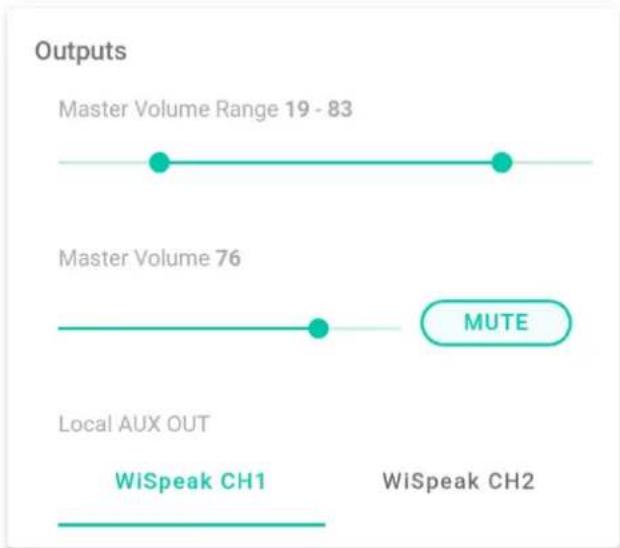
line
| Output Type | Value | | ------------------- | ----- | | Master Volume Range 19 - 83 | 19 - 83 | | Master Volume 76 | 76 | | MUTE | 1 | | Local AUX OUT | 1 | | WiSpeak CH1 | 1 | | WiSpeak CH2 | 1 |line
WiSpeak Ch1 Settings | Setting | Frequency (Hz) | Value | | :--- | :--- | :--- | | Low Pass Filter OFF | 120 | Off | | Low Pass Filter High Pass Filter | 150 | Off | | Equalizer OFF | 120 | Off | | Equalizer TREBLE 0 | +10 | -10 | | Mid 10 | +10 | -10 | | BASS 0 | +10 | -10 || CORE Factory Default | |
| Master Settings | |
| HW MAC Address | 02:EA:5F:00:CC:55 |
| HW Firmware Version | v1.00r0 |
| WiSpeak grip App Version | 1.2.0 |
| Wireless FW Version | v.207.5 |
| Wireless FW Version | v.207.5 |
| Operating Region | |
| EU | |
| Device Alias CORE Factory Default | |
| Bluetooth ID CORE-96 | |
| Bluetooth PIN 1234 | |
| Admin Password admin | |
| User Password user | |
| APPLY CHANGES | |
Brand : Ecler
Model : WiSpeak grip
Category : Speaker