USER MANUAL W8I HT58 TS WHIRLPOOL
Thank you for buying a Whirlpool product.
In order to receive more complete assistance, please register your appliance on: www.whirlpool.eu/register

Before using the appliance, carefully read the Safety and Installation Instructions.
After installation, please remember to remove all transport protection parts from the dishwasher.
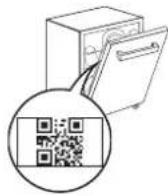
Please scan the QR code on your appliance in order to have more detailed information.
The control panel of this dishwasher activates by pushing the ON/OFF button.
For energy saving, the control panel deactivates automatically after 10 minutes if no cycle has started.
Product description
Appliance
- NaturalDry
- Top rack
- Foldable flaps
- Upper rack
- Upper rack height adjuster
- Upper sprayer arm
- Power Clean® support
- Lower rack
- Cutlery basket
- Power Clean®
- Lower sprayer arm
- Filter Assembly
- Salt reservoir
- Detergent and Rinse Aid dispensers
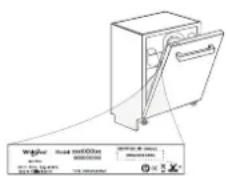
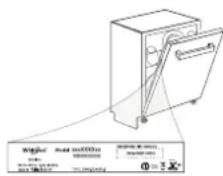
- Rating plate
- Control panel
CONTROL PANEL
- ON-OFF/Reset button with indicator light
- Eco program button with indicator light
- Rapid program button with indicator light/ Prewash program - 3 sec. press
- Crystals program button with indicator light/ Self-Clean program - 3 sec. press
- Auto programs buttons with indicator lights - Auto Intensive 65°/Auto Mixed 55°/ Auto Fast 50°
- Salt reservoir empty indicator light
- Rinse Aid reservoir empty indicator light
- Display
- Program number and remaining time indicator
- Closed water tap indicator light
- DESCALE indicator light
- Extra options buttons with indicator lights - Half Load/ Silent/ Sani Rinse
- Power Clean® option button with indicator light
- Extra Dry option button with indicator light / Settings - 3 sec. press
- Delay option button with indicator light
- START/Pause button with indicator light
DISPLAY ON THE FLOOR
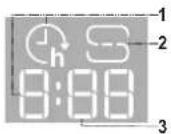
- Delay Time on the floor - indicator of the time left to the start of the cycle, when the Delay option is set
- Salt reservoir empty - indicator light on the floor
- Remaining Time on the floor - indicator of the time left to the end of the cycle
FIRST TIME USE
ADVICE REGARDING THE FIRST TIME USE
After installation, remove the stoppers from the racks and the retaining elastic elements from the upper rack.
- Switch on the appliance by pressing the ON-OFF button.
- Hold the Settings ✉ (Extra Dry + ) button for 3 seconds, until you hear a beep and the display shows „SEt”.
- After one second the first available setting (letter „h“) will be displayed.
- Press Auto programs 📄/Extra options 🕏 buttons to scroll through the list of available settings (see table below), then press START/Pause ▶ to view and change the value of currently selected setting.
- Press Auto programs 📄 / Extra options 🌐 to change the value, then press START/Pause▶to save the new value.
- To change another setting, repeat points 2 and 5.
- Press ON-OFF (or wait 30 seconds to exit the menu).
| LETTER | SETTING | VALUES(Default - in bold) |
| Water Hardness Level(see "SETTING THE WATER HARDNESS" and "WATER HARDNESS TABLE") | 1 | 2 | 3 | 4 | 5 |
| Rinse Aid Level(see "ADJUSTING THE DOSAGE OF RINSE AID") | 0 | 1 | 2 | 3 | 4 | 5 |
| NaturalDry (see "OPTIONS AND FUNCTIONS")“1" = On, "0" = Off | 1 | 0 |
| Time on the floor (see "OPTIONS AND FUNCTIONS")“1" = On, "0" = Off | 1 | 0 |
| Sound“1" = On, "0" = Off | 1 | 0 |
| Factory Settings - press START/Pause to re-store to the factory default all the values of the settings included in the settings menu. | - |
FILLING THE SALT RESERVOIR
The use of salt prevents the formation of LIMESCALE on the dishes and on the machine's functional components. The salt reservoir is located in the lower part of the dishwasher (under the lower rack on the left side).
- It is mandatory that the salt reservoir never be empty.
- It is important to set the water hardness.
- Salt must be filled when the SALT REFILL indicator light on the control panel is lit.
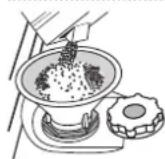
- Remove the lower rack and unscrew the reservoir cap (anticlockwise).
- Position the funnel (see figure) and fill the salt reservoir right up to its edge (approximately 0.5 kg); it is not unusual for a little water to leak out.
- Only the first time you do this: fill the salt reservoir with water.
- Remove the funnel and wipe any salt residue away from the opening. Make sure the cap is screwed on tightly so that no detergent can get into the container during the wash program (this could damage the water softener beyond repair).
Whenever you need to add salt, it is mandatory to complete the procedure before the beginning of the washing cycle to avoid corrosion. Residual saline solution or grains of salt can lead to corrosion, irreparably damaging the stainless steel components.
The guarantee is not applicable if faults are caused by such circumstances. If the salt container is not filled, the water softener and the heating element may be damaged as a result of limescale accumulation. Using salt is recommended with any type of dishwasher detergent.
SETTING THE WATER HARDNESS
To allow the water softener to work in a perfect way, it is essential that the water hardness setting is based on the actual water hardness in your house. This information can be obtained from your local water supplier. The factory setting is "3". See "WATER HARDNESS TABLE".
| Water Hardness Table |
| Level | °dHGerman degrees | °fHFrench degrees | °ClarkEnglish degrees |
| 1 (Soft) 0 - 6 | 0 - 10 | 0 - 7 | |
| 2 (Medium) | 7 - 11 | 11 - 20 | 8 - 14 |
| 3 (Average) | 12 - 16 | 21 - 29 | 15 - 20 |
| 4 (Hard) | 17 - 34 | 30 - 60 | 21 - 42 |
| 5 (Very hard) | 35 - 50 | 61 - 90 | 43 - 62 |
To change, follow instructions in section "SETTING MENU".
Only use salt that has been specifically designed for dishwashers.
After the salt has been poured into the machine, the SALT REFILL indicator light switches off.
If the salt container is not filled, the water softener and the heating element may be damaged as a result of limescale accumulation. Using salt is recommended with any type of dishwasher detergent.
WATER SOFTENING SYSTEM
The water softener automatically reduces water hardness, consequently preventing scale buildup on the heater, contributing also to better cleaning efficiency. This system regenerates itself with salt, therefore it is required to refill the salt container when empty.
The frequency of regeneration depends on the water hardness level setting - regeneration takes place once per 4-6 Eco cycles with the water hardness level set to 3. The regeneration process occurs at the beginning of the cycle with additional fresh water.
- Single regeneration consumes approximately 3 L of water; takes up to 5 additional minutes for the cycle;
- Consumes below 0.005 kWh of energy.
FILLING THE RINSE AID DISPENSER
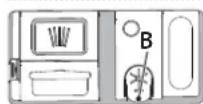
Rinse aid makes dish DRYING easier. The rinse aid dispenser A should be filled when the RINSE AID REFILL indicator light in the control panel is lit.
- Open the dispenser B by pressing and pulling up the tab on the lid.
- Pour in the rinse aid (max. 110 ml), making sure it does not overflow from the dispenser. If this happens, clean the spill immediately with a dry cloth.
- Press the lid down until you hear a click to close it. NEVER pour the rinse aid directly into the appliance tub.
ADJUSTING THE DOSAGE OF RINSE AID
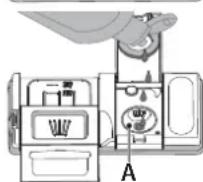
If you are not completely satisfied with the drying results, you can adjust the quantity of rinse aid used.
To change, follow the instructions in the section "SETTING MENU".
If the rinse aid level is set to ZERO, no rinse aid will be supplied. The LOW RINSE AID indicator light will not be lit if you run out of rinse aid.
A maximum of 6 levels can be set according to the dishwasher model.
- If you see bluish streaks on the dishes, set a low number (0-3).
- If there are drops of water or limescale marks on the dishes, set a mid-range number (4-5).
FILLING THE DETERGENT DISPENSER
Only use detergent which has been specifically designed for dishwashers. DO NOT USE washing up liquid.
Using excessive detergent may result in foam residues remaining in the machine after the cycle has ended.
Usage of detergent not designed for dishwashers may cause malfunction or damage to the appliance.
To achieve the best washing and drying results, the combined use of detergent, rinse aid liquid and refined salt is required.
We recommend using detergents that do not contain phosphates or chlorine, as these products are harmful to the environment.
Good washing results also depend on the correct amount of detergent being used.
Exceeding the stated amount does not result in a more effective wash and increases environmental pollution.
The amount can be adjusted to the soil level. In the case of normally soiled items, use approximately either 35g (powder detergent) or 35ml (liquid detergent) and additional tea spoon of detergent directly inside the tub. If tablets are used, one tablet will be enough.
If the crockery is only lightly soiled or if it has been rinsed with water before being placed in the dishwasher, reduce the amount of detergent used accordingly (minimum 25 g/ml) e.g. skip the powder/gel putted inside the tub.
For good washing results also follow the instructions shown on the detergent box.
For further questions please ask the detergent producers.
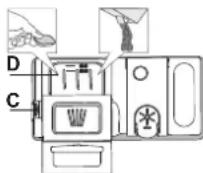
To open the detergent dispenser use the opening device C. Introduce the detergent into the dry dispenser D only. Place the amount of detergent for pre-washing directly inside the tub.
- When measuring out the detergent refer to the mentioned earlier information to add the proper quantity. Inside the dispenser D, there are indications to help the detergent dosing.
- Remove detergent residues from the edges of the dispenser and close the cover until it clicks.
- Close the lid of the detergent dispenser by pulling it up until the closing device is secured in place.
The detergent dispenser automatically opens up at the right time according to the program.
Usage of detergent not designed for dishwashers may cause malfunction or damage to the appliance.
DAILY USE
1. CHECK WATER CONNECTION
Check that the dishwasher is connected to the water supply and that the tap is open.
2. SWITCH ON THE DISHWASHER
Open the door and press the ON/OFF button.
- Load the racks (see LOADING THE RACKS).
4. FILL THE DETERGENT DISPENSER
5. CHOOSE THE PROGRAM AND CUSTOMISE THE CYCLE
Select the most appropriate program in accordance with the type of crockery and its soiling level (see PROGRAMS DESCRIPTION) by pressing the selected PROGRAM button.
Select the desired options (see OPTIONS AND FUNCTIONS). Not all options are compatible with all programs.
6. START
Start the wash cycle by pressing START/Pause button (led is lit) and closing the door within 4 sec. When the program starts you hear a single beep. If the door was not closed within 4sec., the alarm sound will be played. In this case, open the door, press START/Pause button and close the door again within 4 sec.
7. END OF WASH CYCLE
The end of the wash cycle is indicated by sound and the display shows END. Open the door and switch off the appliance by pressing the ON/OFF button.
Wait for a few minutes before removing the crockery - to avoid burns. Unload the racks, beginning with the lower one.
The machine will switch off automatically during certain extended periods of inactivity, in order to minimise electricity consumption.
If the crockery is only lightly soiled or if it has been rinsed with water before being placed in the dishwasher, reduce the amount of detergent used accordingly.
MODIFYING A RUNNING PROGRAM
If a wrong program was selected, it is possible to change it, provided that it has only just begun. RESET the machine: press and hold the ON/OFF button for more than 3. sec., and the machine will switch off. The dashboard will show "0:01". Close the door and wait until drain cycle ends (around 1 minute). Open the door and switch the machine back on using the ON/OFF button and select the new wash cycle and any desired options. Start the cycle by pressing the START/Pause button and closing the door within 4 sec.
Without switching off the machine, open the door first slightly to avoid water splashing out (START/Pause led starts blinking) (Caution!: Hot steam!) and place the crockery inside the dishwasher. Press the START/Pause button and close the door within 4 sec., the cycle will resume from the point at which it was interrupted.
ACCIDENTAL INTERRUPTIONS
If the door is opened during the wash cycle, or if there is a power cut, the cycle stops. ONLY IF YOU PRESS the START/Pause button and close the door within 4 sec., the cycle will resume from the point at which it was interrupted.
ADVICE AND TIPS
TIPS
Before loading the baskets, remove all food residues from the crockery and empty the glasses. You do not need to rinse beforehand under running water. Arrange the crockery so that it is held in place firmly and does not tip over; and arrange the containers with the openings facing downwards and the concave/convex parts placed obliquely, thus allowing the water to reach every surface and flow freely.
Warning: lids, handles, trays and frying pans should not prevent the sprayer arms from rotating.
Place any small items in the cutlery basket.
Very soiled dishes and pans should be placed in the lower basket because in this sector the water sprays are stronger and allow a higher washing performance. After loading the appliance, make sure that the sprayer arms can rotate freely.
UNSUITABLE CROCKERY
- Wooden crockery and cutlery.
- Delicately decorated glasses, artistic handicrafts and antique crockery. Their decorations are not resistant.
- Parts in synthetic material which do not withstand high temperatures.
• Copper and tin crockery.
• Crockery soiled with ash, wax, lubricating grease or ink.
The colours of glass decorations and aluminium/silver pieces can change and fade during the washing process. Some types of glass (e.g. crystal objects) can become opaque after a number of wash cycles too.
DAMAGE TO GLASS AND CROCKERY
- Only use glasses and porcelain guaranteed by the manufacturer as dishwasher safe.
- Use a delicate detergent suitable for crockery.
- Collect glasses and cutlery from the dishwasher as soon as the wash cycle is over.
TIPS ON ENERGY SAVING
- When the household dishwasher is used according to the manufacturer's instructions, washing tableware in a dishwasher usually consumes less energy and water than hand dishwashing.
- In order to maximize dishwasher efficiency, it is recommended to initiate the wash cycle once the dishwasher is fully loaded. Loading the household dishwasher up to the capacity indicated by the manufacturer will contribute to energy and water savings. Information on the correct loading of tableware can be found in the Loading chapter. In case of partial loading, it is recommended to use a dedicated wash option if available (Half load/ Zone Wash/ Multizone), filling up only selected racks. Incorrect loading or overloading of the dishwasher may increase resource usage (such as water, energy and time, as well as increase noise level), reducing cleaning and drying performance.
- Manual pre-rinsing of tableware items leads to increased water and energy consumption and is not recommended.
HYGIENE
To avoid odour and sediment which can be accumulated in the dishwasher, please run a high-temperature program at least once a month. Use a teaspoon of detergent and run it without loading to clean your appliance.
RESISTANCE TO FROST
If the appliance is placed in surroundings exposed to the risk of frost, it must be drained completely. Run the Self-Clean cycle to drain the water tank. Turn off the water tap, remove the inlet and outlet hoses, and let all the water drain away. Make sure that the water softener is full of dissolved regeneration salt in the salt container, to protect the appliance from temperatures of up to -20°C.
If the appliance was stored in frost conditions, the appliance must remain at an ambient temperature of min. 5°C for at least 24 hours before the first run.
PROGRAMS TABLE
| Program | Programs description | Drying phase | NaturalDry | Available options** | Duration of wash program (h: min)*** | Water consumption (litres/cycle) | Energy consumption (kWh/cycle) |
 | Eco 50°- program is suitable to clean normally soiled tableware, that for this use, it is the most efficient program in terms of its combined energy and water consumption, and that it is used to assess compliance with the EU Ecode-sign legislation. | √ | √ | | 4:00 9.5 0.64 | | |
 | Rapid 45° - Program is recommended for limited amount of lightly-soiled dishes with no dried food residues. Does not include the drying phase. | - | √ | | 0:30 - 0:40 10.5 - 15.0 0.55 - 0.65 | | |
 | Crystals 45° - Program for delicate items, which are more sensitive to high temperatures, for example glasses and cups. | √ | √ | | 1:40 - 1:50 12.5 - 17.0 0.95 - 1.20 | | |
 | Auto Intensive 65° - Automatic pro-gram for heavily soiled dishes and pans. | Senses the level of soiling on the dish-es and adjusts the program accordingly. When the sensor is detecting the soil level an animation appears in the dis-play and the cycle duration is updated. | √ | √ | | 2:25 - 3:10 17.0 - 25.0 1.30 - 1.70 | | |
 | Auto Mixed 55° - Automatic pro-gram for normally soiled dishes with dried food residues. | √ | √ | | 1:20 - 3:20 | 7.5 - 20.5 | 0.75 - 1.20 |
 | Auto Fast 50° - Automatic program for normally and lightly soiled dish-es. The everyday cycle that ensures optimal cleaning and drying perfor-mance in shorter time. | √ | √ | | 1:00 - 1:50 | 8.0 - 16.0 | 0.70 - 1.10 |
 | Prewash - Use to refresh crockery planned to be washed later. No detergent is to be used with this program. | - | √ | | 0:12 4.5 0.10 | | |
 | Self-Clean 65° - Program to be used to perform mainte-nance of the dishwasher, to be carried out only when the dishwasher is EMPTY using specific detergents designed for dishwasher maintenance. | - | - | | 1:15 | 12.7 | 1.10 |
ECO program data is measured under laboratory conditions according to European Standard EN 60436:2020. Note for Test Laboratories: For information on comparative EN testing conditions, please send an email to the following address: dw_test_support@europeanappliances.com. Pre-treatment of the dishes is not needed before any of the programs. *) Door is opened before the program has been ended. This is to improve the drying efficiency. Wait until the time has reached 00:00 to unload the dishwasher. **) Not all options can be used simultaneously. ***) Values given for programs other than the program Eco are indicative only. The actual time may vary depending on many factors such as temperature and pressure of the incoming water, room temperature, amount of detergent, quantity and type of load, load balancing, additional selected options and sensor calibration. The sensor calibration can increase program duration by up to 20 min.
OPTIONS AND FUNCTIONS
OPTIONS can be selected/deselected, after choosing the program, directly by pressing the corresponding button (if available - the indicator lights up) (see CONTROL PANEL). If an option is not compatible with the selected program (see PROGRAMS TABLE), the corresponding LED flashes rapidly 3 times and beeps will sound. The option will not be enabled. An option can change time or water or energy consumption for the program.

HALF LOAD - If there are not many dishes to be washed, HALF LOAD is used to save water, electricity or time, depending on the selected program. Remember to halve the amount of detergent.

SILENT - Suitable for night-time operation of the appliance. This option can be used to limit noise emission during wash phases. It will increase cycle time depending on base cycle selection.

SANI RINSE - This option can be used to sanitize washed dishes. It will increase the final rinse temperature and add antibacterial wash to the selected program. Ideal to clean crockery and feeding bottles.
The dishwasher door must be kept shut for the entire duration of the program in order to guarantee reduction of germs. WARNING: the crockery and plates could be extremely hot at the end of the cycle.

POWER CLEAN® - Thanks to the additional power jets this option provides a more intensive and powerful wash in the lower rack, in specific area. This option is recommended for washing pots and casseroles (see refer to the Power Clean® loading section).

EXTRA DRY - The higher temperature during the final rinse and the extended drying phase allow improved drying. The EXTRA DRY option results in the lengthening of the wash cycle.

WATER TAP CLOSED - Alarm - Flashes when there is no inlet water or water tap is closed.

DELAY - The start of the program may be delayed for a period of time between 0:30 and 24 hours.
- Select the program and any desired options. Press the DELAY button (repeatedly) to delay the start of the program. Adjustable from 0:30 to 24 hours. Once the 24 hours setting is reached, press the DELAY another time to deactivate the DELAY function.
- Press the START/Pause button and close the door within 4 sec. The timer will begin counting down.
- Once this time has elapsed, the indicator light switches off and the program begins automatically.
The DELAY function cannot be set once a program has been started.
NaturalDry - It is a convection drying system which automatically opens the door during/after drying phase to ensure exceptional drying performance every day. Door opens at the temperature that is safe to your kitchen furniture, thus door will not be opened when the option of SANI RINSE is on. As additional steam protection, special designed protection foil is added together with the dishwasher.
To see how to mount protection foil please refer to the INSTALLATION GUIDE. This feature is active by default, but it is possible to deactivate it in the "SETTINGS MENU".

SENSING - When the sensor is detecting the soil level an animation appears in the display (around 20 min.) and the cycle duration is updated. SENSING is for the level of soiling on the dishes and is all cycles (excepting Eco) adjusting the program accordingly.

TIME ON THE FLOOR - A LED light projected on the floor indicates the time left to the end of the cycle. The light goes off every time the door is opened. The light goes off at the end of a cycle. This feature is active by default, but it is possible to deactivate it in the "SETTINGS MENU".

DESCALE - Alarm - Limescale accumulation was detected on the internal components of the appliance. Check if the Water Hardness Setting is at the correct value and salt is present in the salt container (see FIRST TIME USE), then use a descaling product (WPro brand is recommended) with Self-Clean program. After a successful descaling, the icon will stop being displayed.
If the actions above are not performed, product performance will deteriorate. DESCALE warning will start blinking and «dES» alarm will appear on the display. If still no action is taken, the appliance will only allow a certain number of cycles to be started (indicated during «dES» alarm display) and then will be BLOCKED to prevent component damage, with only the Self-Clean program available. Performing a full descaling will unblock the product. In the case of extremely high amounts of limescale, descaling may have to be performed twice to be efficient.
LOADING THE RACKS
CAPACITY: 15 standard place-settings
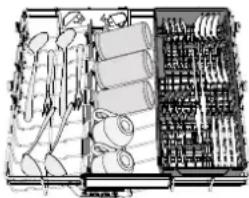
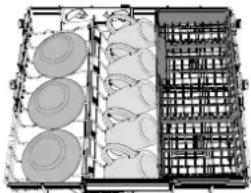
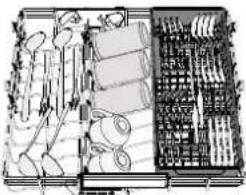
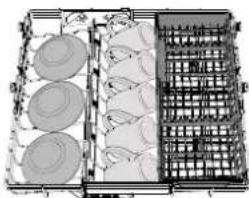
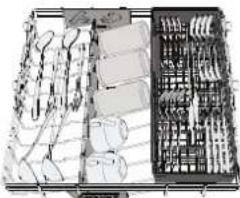
TOP RACK
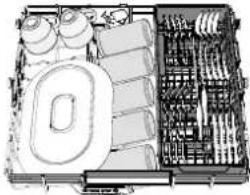
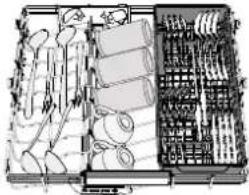
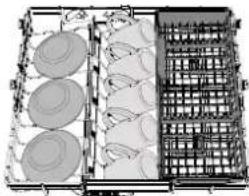
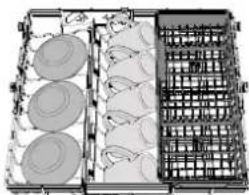
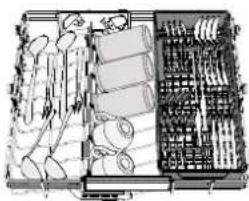
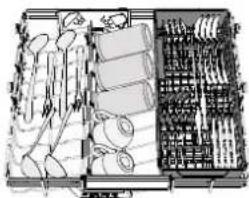
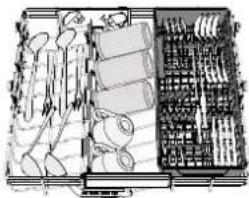
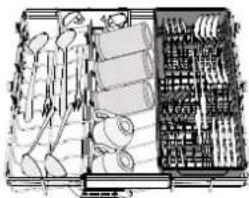
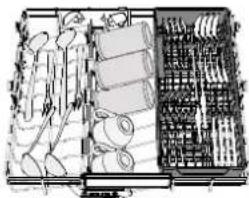
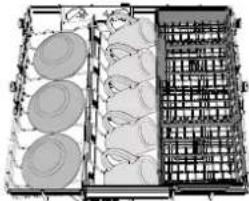
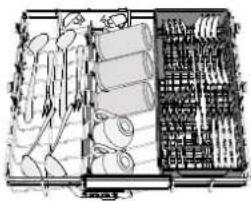
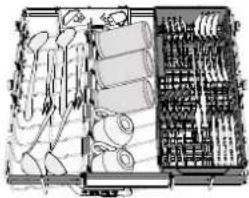
The top rack provides a targeted cleaning Wash Zone for bowls, mugs, even big plates and cutlery that you'd normally load in the lower racks, making extra space for the rest.
A separate arrangement of the cutlery makes collection easier after washing and improves washing and drying performance.
Knives and other utensils with sharp edges must be positioned with the blades facing downwards.
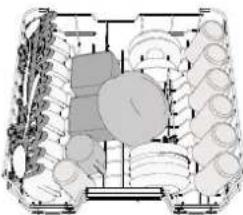
UPPER RACK
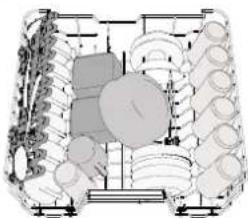
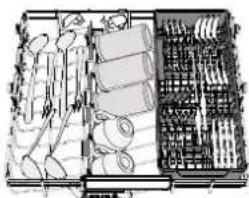
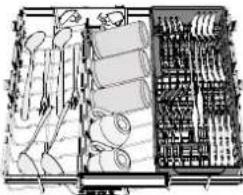
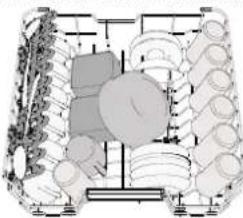
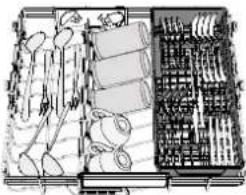
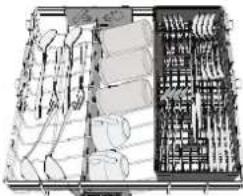
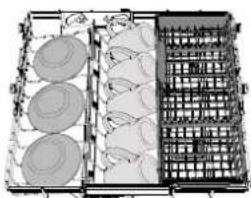
Load delicate and light dishes: glasses, cups, saucers, low salad bowls.
The upper rack has tip-up supports which can be used in a vertical position when arranging tea/dessert saucers or in a lower position to load bowls and food containers.
(loading example for the upper rack)
ADJUSTING THE HEIGHT OF THE UPPER RACK
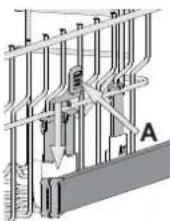
The height of the upper rack can be adjusted: a high position to place bulky crockery in the lower basket and a low position to make the most of the tip-up supports by creating more space upwards and avoiding collision with the items loaded into the lower rack.
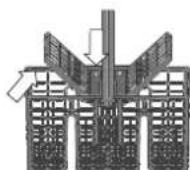
The upper rack is equipped with an Upper Rack height adjuster (see figure). Without pressing the levers, lift it up by simply holding the rack sides, as soon as the rack is stable in its upper position. To restore to the lower position, press the levers A at the sides of the rack and move the basket downwards.
We strongly recommend that you do not adjust the height of the rack when it is loaded. NEVER raise or lower the basket on one side only.
FOLDABLE FLAPS WITH ADJUSTABLE POSITION
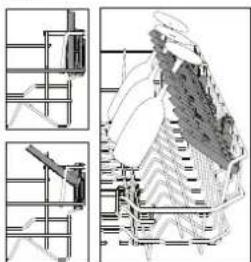
The side foldable flaps can be folded or unfolded to optimize the arrangement of crockery inside the rack. Wine glasses can be placed safely in the foldable flaps by inserting the stem of each glass into the corresponding slots. In the case of the high position of the upper rack, flaps cannot remain in the vertical position. Depending on the model:
- to unfold the flap there is needed to slide it up and rotate or release it from the snaps and pull it down.
• to fold the flap there is needed to rotate it and slide the flap down or pull it up and attach the flap to the snaps.
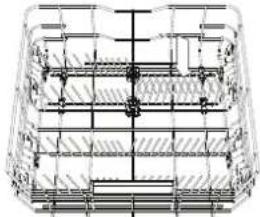
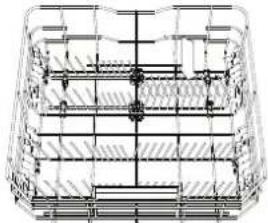
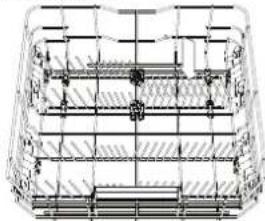
LOWER RACK
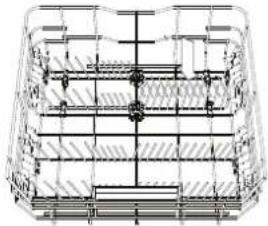
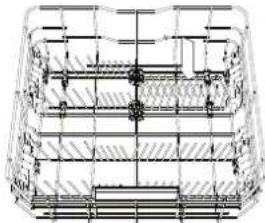
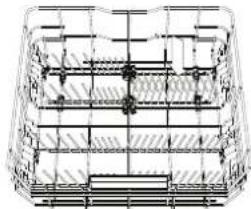
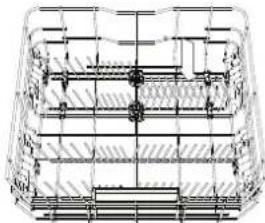
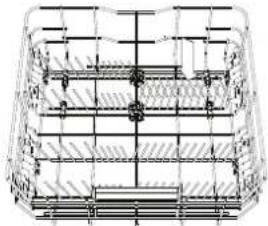
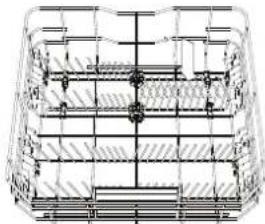
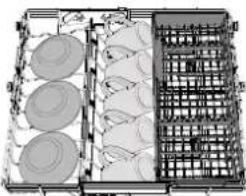
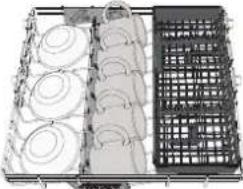
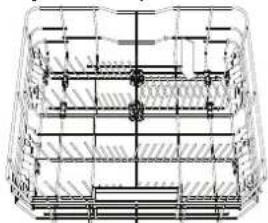
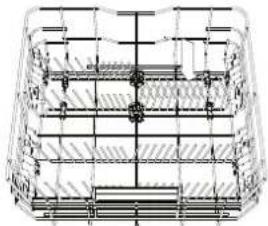
For pots, lids, plates, salad bowls, cutlery etc. Large plates and lids should ideally be placed at the sides to avoid interferences with the spray arm.
The lower rack has tip-up supports which can be used in a vertical position when arranging plates or in a horizontal position (lower) to load pans and salad bowls easily.
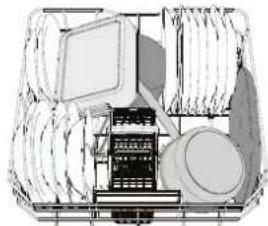
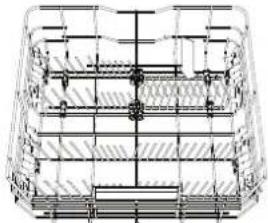
(loading example for the lower rack)
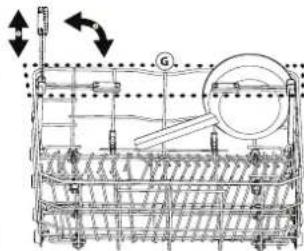
POWER CLEAN®
Power Clean® uses the special water jets in the rear of the cavity to wash more intensively the highly dirty items. The lower rack has a Space Zone, a special pull-out support in the rear of the rack that can be used to support frying pans or baking pans in an upright position, thus taking up less space.
Placing the pots/casseroles faced to the Power Clean® component please activate the POWER CLEAN on the panel. How to use the Power Clean®:
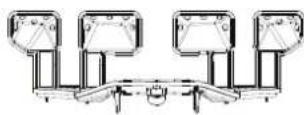
- Adjust the Power Clean® area G folding down the rear plate holders to load pots.
- Load pots and casseroles inclined vertically in the Power Clean® area. Pots have to be inclined towards the powerful water jets.
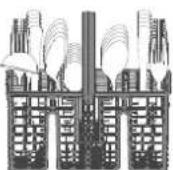
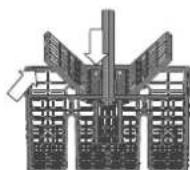
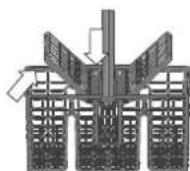
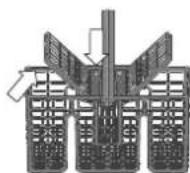
CUTLERY BASKET
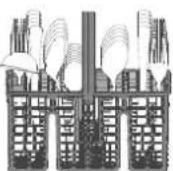
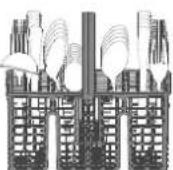
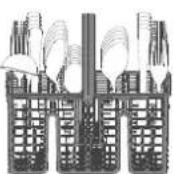
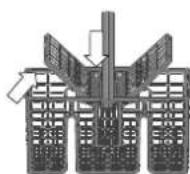
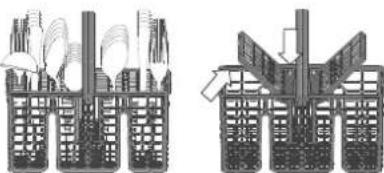
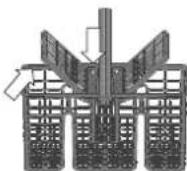
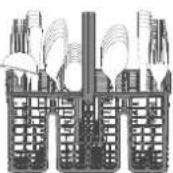
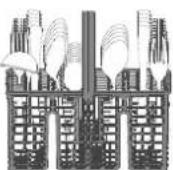
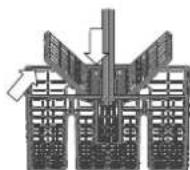
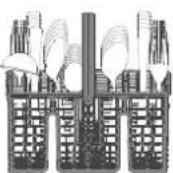
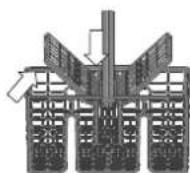
It is fitted with top grids for improved cutlery arrangement. It must only be positioned at the front of the lower rack.
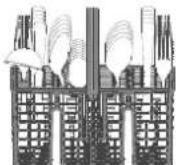
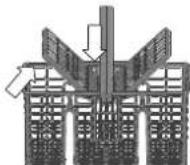
Knives and other utensils with sharp edges must be placed in the cutlery basket with the points facing downwards or they must be positioned horizontally in the tip-up compartments on the upper rack.
CARE AND MAINTENANCE
ATTENTION: Always unplug the appliance when cleaning it and when performing maintenance work. Do not use flammable liquids to clean the machine.
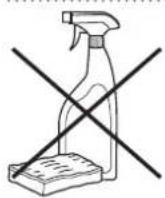
CLEANING THE DISHWASHER
Any marks on the inside of the appliance may be removed using a cloth dampened with water and a little vinegar. The external surfaces of the machine and the control panel can be cleaned using a non-abrasive cloth which has been dampened with water. Do not use solvents or abrasive products.
PREVENTING UNPLEASANT ODOURS
Always keep the door of the appliance ajar in order to avoid moisture from forming and being trapped inside the machine. Clean the seals around the door and detergent dispensers regularly using a damp sponge. This will avoid food becoming trapped in the seals, which is the main cause behind the formation of unpleasant odours.
CHECKING THE WATER SUPPLY HOSE
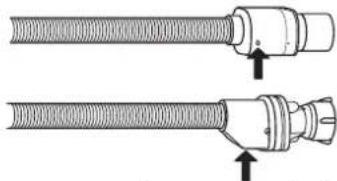
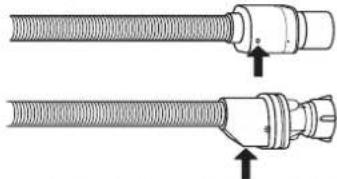
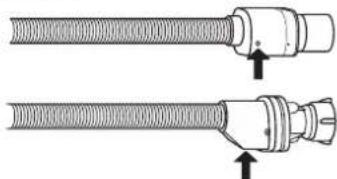
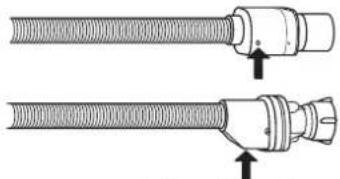
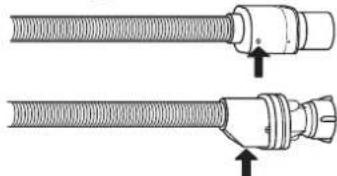
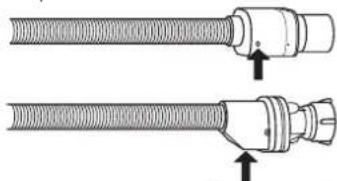
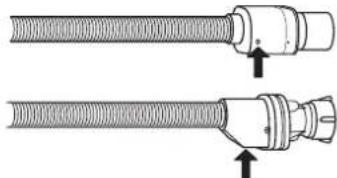
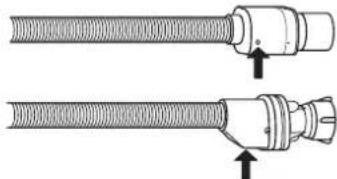
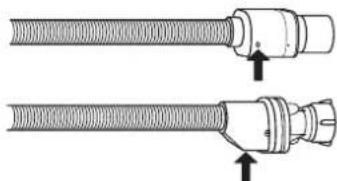
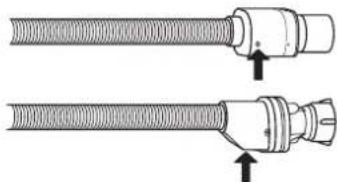
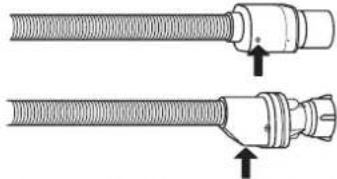
Check the inlet hose regularly for brittleness and cracks. If damaged, replace it by a new hose available through our After-Sales Service or your specialist dealer. Depending on the hose type:
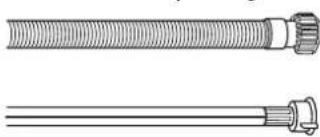
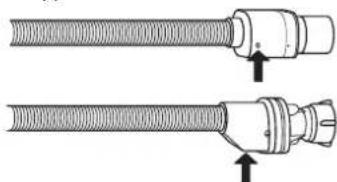
If the inlet hose has a transparent coating, periodically check if the colour intensifies locally. If yes, the hose may have a leak and should be replaced. For water stop hoses: check the small safety valve inspection window (see arrow). If it is red, the water stop function was triggered, and the hose must be replaced by a new one. For unscrewing this hose, press the release button while unscrewing the hose.
CLEANING THE WATER INLET HOSE
If the water hoses are new or have not been used for an extended period of time, let the water run to make sure it is clear and free of impurities before performing the necessary connections. If this precaution is not taken, the water inlet could become blocked and damage the dishwasher.
CLEANING THE FILTER ASSEMBLY
Regularly clean the filter assembly so that the filters do not clog and that the waste water flows away correctly.
Using the dishwasher with clogged filters or foreign objects inside the filtration system or spray arms may cause unit malfunction resulting in loss of performance, noisy work or higher resources usage.
The filter assembly consists of three filters which remove food residues from the washing water and then recirculate the water.
The dishwasher must not be used without filters or if the filter is loose. At least once per month or after every 30 cycles, check the filter assembly and if necessary clean it thoroughly under running water, using a non-metallic brush and following the instructions below:
- Turn the cylindrical filter A in an anti-clockwise direction and pull it out (Fig 1). It is important when reinstalling the filter that the two triangles shown on the zoom meet.
- Remove the cup filter B by exerting a slight pressure on the side flaps (Fig 2).
- Slide out the stainless-steel plate filter C (Fig 3).
- In case you find foreign objects (such as broken glass, porcelain, bones, fruit seeds etc.) please remove them carefully.
- Inspect the trap and remove any food residues. NEVER REMOVE the wash-cycle pump protection (shown by an arrow) (Fig 4).
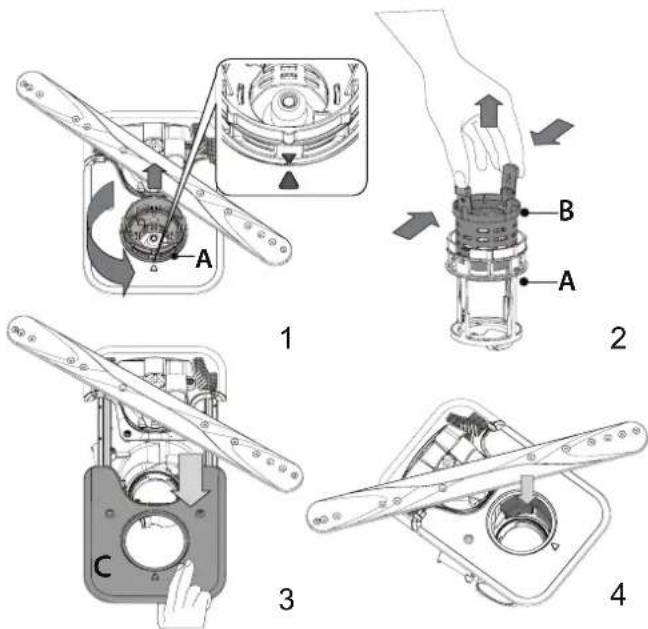
After cleaning the filters, replace the filter assembly and fix it in position correctly; this is essential for maintaining the efficient operation of the dishwasher.
CLEANING THE SPRAY ARMS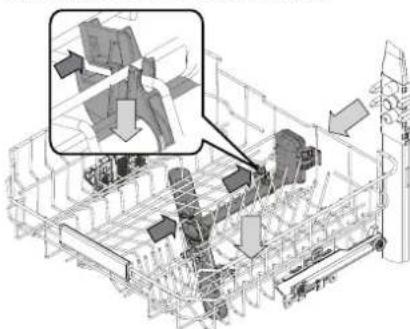
On occasions, food residue may become encrusted onto the spray arms and block the holes used to spray the water. It is therefore recommended that you check the arms from time to time and clean them with a small non-metallic brush.
To remove the upper spray you must remove it together with the manifold.
The Top Rack rack has a fixed wash tube with all the wash nozzles facing upward. To clean it you can slide the rack out and with a tweezer remove items that may be lodged in the nozzles.
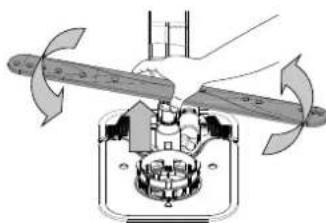
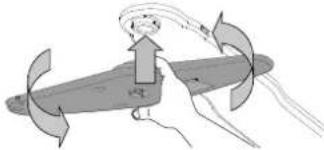
The lower spray arm may be removed by pulling it upwards and rotating it anti-clockwise. Mounting back the spray arm is by pulling it down and rotating it clockwise.
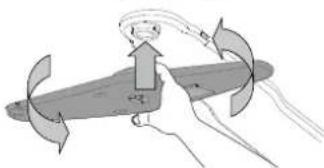
The ceiling spray arm may be removed by pressing it up and then rotating it anti-clockwise. Mounting back the spray arm is by pulling it upwards and rotating it clockwise.
TROUBLESHOOTING
In case your dishwasher doesn't work properly, check if the problem can be solved by going through the following list. For other errors or issues please contact authorized After-sales Service whose contact details can be found in the warranty booklet. Spare parts will be available for a period of either up to 7 or up to 10 years, according to the specific Regulation requirements.
| PROBLEMS POSSIBLE CAUSES SOLUTIONS |
| The salt indicator is lit | Salt reservoir is almost empty. | Refill the reservoir with salt (for more information - see FILLING THE SALT RESERVOIR). Check the water hardness setting if necessary (see WATER HARDNESS TABLE). |
| The salt indicator is blinking | Salt reservoir is empty. | Refill the reservoir with salt as soon as possible. Using the appliance without salt may cause damage to its internal components. |
| The rinse aid indicator is lit or blinking | Rinse aid dispenser is empty. (After refill the rinse aid indicator may remain lit for a short time). | Refill the dispenser with rinse aid (for more information - see FILLING THE RINSE AID DISPENSER). |
| Descale indicator is lit or blinking; "dES" alarm is displayed. | Limescale is accumulating on internal components of the appliance. | Descal the appliance immediately using the Self Clean program and a commercially available descaling product (see OPTIONS AND FUNCTIONS). Refill the reservoir with salt. Check the water hardness setting. If the appliance is not descaled, it will stop functioning. |
| The dishwasher won't start or does not respond to commands. | The appliance has not been plugged in properly. | Insert the plug into the socket. |
| Power outage. | For safety reasons, the dishwasher will not restart automatically when power returns. Open dishwasher door, press START/Pause button and close the door within 4 seconds. |
| The dishwasher door is not closed. NaturalDry pin is not pulled in. | Vigorously push the door until you hear the "click". |
| A cycle is interrupted by door opening for more than 4 seconds. | Press START/Pause and close the door within 4 seconds. |
| The control panel does not respond or F6 E1 is displayed. | Switch off the appliance by pressing the ON-OFF/Reset button, switch it back on after approximately one minute and restart the program. If the problem persists, unplug the appliance for 1 minute, then plug it back in. |
| The dishwasher won't drain. Display shows: F7 E3 or F9 E1 | The filter is clogged with food residues or limescale | Clean the filter and descale the appliance (see CLEANING THE FILTER ASSEMBLY and DESCALE INSTRUCTION). |
| The drain hose is kinked. Check the drain hose | (see INSTALLATION INSTRUCTION). |
| The sink drain pipe is blocked. Clean the sink drain pipe. | |
| The dishwasher makes excessive noise. | Dishes are rattling against each other. | Position the crockery correctly (see LOADING THE RACKS). |
| An excessive amount of foam is present. | The detergent has not been measured out correctly or it is not suitable for use in dishwashers (see FILLING THE DETERGENT DISPENSER). Restart the current cycle by switching OFF the dishwasher, then switch it on again, select a new program, press START/Pause and close the door within 4 seconds. Please do not add any detergent. |
| Crockery has not been arranged properly. | Arrange the crockery correctly (see LOADING THE RACKS). |
| The filter is clogged with food residues or limescale. | Clean the filter assembly (see CARE AND MAINTENANCE). |
| The dishes are not clean. | Crockery has not been arranged properly. | Arrange the crockery correctly (see LOADING THE RACKS). |
| Spray arms cannot rotate freely, being hindered by the dishes. | Arrange the crockery correctly (see LOADING THE RACKS). Check that the upper rack is in the correct position and adjust (lift up) if necessary. |
| The wash cycle is too gentle. Select an appropriate wash cycle (see PROGRAMS TABLE). | |
| An excessive amount of foam is present. | The detergent has not been measured out correctly or it is not suitable for use in dishwashers (see FILLING THE DETERGENT DISPENSER). |
| The cap on the rinse aid compartment has not been closed correctly. | Make sure the cap of the rinse aid dispenser is closed. |
| The filter is clogged with food residues or limescale. | Clean the filter and descale the appliance (see CLEANING THE FILTER ASSEMBLY). |
| The salt reservoir is empty. Fill the salt reservoir (see FILLING THE SALT RESERVOIR). | |
| The dishwasher does not fill the water. The display shows: H2O and is lit; acoustic alarm sounds. | No water in the water supply or the tap is closed. | Make sure there is water in the water supply and the water tap is open. |
| The water inlet hose is kinked. | Check the inlet hose (see INSTALLATION). Open dishwasher door, press START/Pause button and close the door within 4 seconds. |
| The screen in the water inlet hose is clogged; it is necessary to clean it. | Check and clean the screen in the water inlet hose. Open dishwasher door, press START/Pause button and close the door within 4 seconds. |
| The dishwasher finishes the cycle prematurely. The display shows: F8 E3 | The filter is clogged with food residues or limescale. | Clean the filter and descale the appliance (see CLEANING THE FILTER ASSEMBLY and DESCALE INSTRUCTION). |
| Drain hose positioned too low or siphoning into the home sewage system. | Check if the end of the drain hose is placed at the correct height (see INSTALLATION). Check for siphoning into the home sewage system, and install a siphon breaker/air admittance valve if necessary. |
| An excessive amount of foam is present. | The detergent has not been measured out correctly or it is not suitable for use in dishwashers (see FILLING THE DETERGENT DISPENSER). |
| Air in the water supply. Check water supply for leaks or other issues letting air inside. | |
| The dishes are not dried well. | Rinse aid is not present or the dosage is too low. | Make sure the rinse aid dispenser is filled (see FILLING THE RINSE AID DISPENSER). Multifunctional tablets only will not provide as good drying effects as the actual use of liquid rinse aid. |
| The dishes have been unloaded after the door was opened automatically but before the actual cycle end. | Make sure the cycle has ended before starting to unload the dishes (see DAILY USE). For even better drying results, it is recommended to let the dishes sit inside the dish-washer with the door open for additional 15 minutes after the cycle ends. |
| The dishes are sitting too flat. | If you notice puddles of water inside cavities of cups, mugs or bowls, try loading the dishes (especially in the upper rack) providing more inclination to let larger amounts of water drip down before drying starts. |
| The selected cycle does not have the drying phase. | Please check in the PROGRAMS TABLE if the selected program is equipped in the drying phase.A cycle without the drying phase may not deliver desired drying efficiency, so it is recommended to change cycle selection for the one that has the drying phase. |
| The dishes are made of non-stick or plastic. | Some water drops remaining on this type of material are normal. |
| Dishes and glasses have blue streaks or bluish tinges. | Rinse aid dosage is excessive. Adjust the dosage to a lower setting. |
| Dishes and glasses are covered with limescale or a whitish film. | The salt reservoir is empty. | Refill the reservoir with salt as soon as possible. Using the appliance without salt may cause damage to its internal components. |
| The water hardness setting is too low. Increase the setting (see WATER HARDNESS TABLE). |
| The cap of the salt reservoir is not properly closed. | Check and close the salt reservoir cap. |
| The rinse aid reservoir is empty or the rinse aid dosage is insufficient. | Refill the dispenser with rinse aid and check the dosage setting (for more information - see FILLING THE RINSE AID DISPENSER). |
| The dishwasher shows F8 E5 | Valve is blocked or faulty. Close the water tap, if possible. Do not switch off the power supply. Call the service. |
| Detergent leaks. | Depends on the liquid detergent used and can be emphasized in case of delay option is activated. | Small leaks will not cause machine malfunction and can be avoided by changing liquid detergent type or using tablets. |
Policies, standard documentation, ordering of spare parts and additional product information can be found by:
• Using QR code on your product.
- Visiting our website docs.whirlpool.eu/docs and parts-selfservice.europeanappliances.com
• Alternatively, contact our After-sales Service (See phone number in the warranty booklet).
When contacting our After-sales Service, please state the codes provided on your product's identification plate.
The model information can be retrieved using the QR-Code reported in the energy label.
The label also includes the model identifier that can be used to consult the portal of the registry at https://eprel.ec.europa.eu.
*/TM/ © 2025 Whirlpool. Produced under license

THANK YOU FOR PURCHASING A WHIRLPOOL PRODUCT.
1
UPPER RACK
ADJUSTING THE HEIGHT OF THE UPPER RACK
CUTLERY BASKET
CARE AND MAINTENANCE
UPPER RACK
ADJUSTING THE HEIGHT OF THE UPPER RACK
FOLDING SHELVES WITH ADJUSTABLE POSITION
LOWER BASKET
CUTLERY BASKET
®/TM/ © 2025 Whirlpool, Made under license

UPPER RACK
LOWER RACK
TÄNAME, ET OSTSITE WHIRLPOOL TOOTE.
FILLING THE RINSE AID DISPENSER
UPPER RACK
ADJUSTING THE HEIGHT OF THE UPPER RACK
LOWER RACK
MAINTENANCE
THANK YOU FOR CHOOSING A WHIRLPOOL PRODUCT.
OPTIONS AND FUNCTIONS
UPPER RACK
ADJUSTING THE HEIGHT OF THE UPPER RACK
LOWER RACK
CLEANING AND MAINTENANCE
FILLING THE RINSE AID DISPENSER
UPPER RACK
LOWER RACK
UPPER RACK
ADJUSTING THE HEIGHT OF THE UPPER RACK
LOWER RACK
CARE AND MAINTENANCE

FILLING THE RINSE AID DISPENSER
UPPER RACK
ADJUSTING THE HEIGHT OF THE UPPER RACK
LOWER RACK

CARE AND MAINTENANCE
FILLING THE DETERGENT DISPENSER
UPPER RACK
ADJUSTING THE HEIGHT OF THE UPPER RACK
FOLDING SHELVES WITH ADJUSTABLE POSITION
LOWER RACK
CLEANING AND MAINTENANCE
UPPER RACK
ADJUSTING THE HEIGHT OF THE UPPER RACK
FOLDING SHELVES WITH ADJUSTABLE POSITION
CLEANING AND MAINTENANCE

ADJUSTING THE HEIGHT OF THE UPPER RACK
SETTING THE WATER HARDNESS
UPPER RACK
ADJUSTING THE HEIGHT OF THE UPPER RACK
LOWER RACK
TOP BASKET
Store fragile and light containers in it: glasses, cups, saucers, low salad bowls.
ADJUSTING THE HEIGHT OF THE TOP BASKET
BOTTOM BASKET
CARE AND MAINTENANCE
TOP BASKET
BOTTOM BASKET