
MS32DG4504AGE1 - Microwave SAMSUNG - Free user manual and instructions
Find the device manual for free MS32DG4504AGE1 SAMSUNG in PDF.
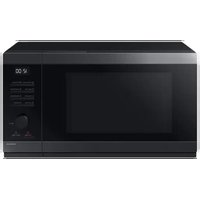


| Product type | Microwave oven |
| Brand | Samsung |
| Model | MS32DG4504AGE1 |
| Capacity | 32 liters |
| External dimensions (L x H x D) | 517 x 297 x 424 mm (handle included) |
| Internal dimensions (L x H x D) | 357 x 255 x 357 mm |
| Net weight | Approx. 14.6 kg |
| Power supply | 230 V ~ 50 Hz AC |
| Power consumption (microwave) | 1500 W |
| Microwave output power | 1000 W (max), 7 levels (100 W - 1000 W) |
| Operating frequency | 2450 MHz |
| Cooking functions | Microwave, Auto Cook (18 recipes), Desserts (10 recipes), Defrost (4 categories) |
| Additional functions | Keep Warm, Deodorization, Favorites, Timer +30s, Stop/Eco |
| Safety | Child lock (3 seconds), automatic shut-off when empty, door locking system |
| Turntable | Yes, with guide ring included |
| Interior light | Yes, turns off automatically in Eco mode |
| Maintenance and cleaning | Regular cleaning with a soft cloth and soapy water; use lemon juice for odors |
| Installation | Flat surface 85 cm from the floor; clearances: 10 cm at the rear and sides, 20 cm above |
| Included accessories | Guide ring, turntable, user manual (online via QR code) |
| Repairability | No user-replaceable parts; contact Samsung after-sales service |
Frequently Asked Questions - MS32DG4504AGE1 SAMSUNG
User questions about MS32DG4504AGE1 SAMSUNG
0 question about this device. Answer the ones you know or ask your own.
Ask a new question about this device
Download the instructions for your Microwave in PDF format for free! Find your manual MS32DG4504AGE1 - SAMSUNG and take your electronic device back in hand. On this page are published all the documents necessary for the use of your device. MS32DG4504AGE1 by SAMSUNG.
USER MANUAL MS32DG4504AGE1 SAMSUNG
Preparation
Wi-Fi MODEL
Connecting SmartThings
Preparation
Wi-Fi model
Connecting SmartThings
Preparation
Wi-Fi MODEL
Preparation
Wi-Fi MODEL
SmartThings Connection
Preparation
Wi-Fi MODEL
Connect SmartThings
| PAÍS CONTACTE-NOS OU VISITE-NOS ONLINE EM | ||
| SLOVENIA | 080 697 267 (brezplačna stevilka) | www.samsung.com/si/support |
| SERBIA | 011 321 5899 www.samsung.com/rs/support | |
| Kosovo | 038 40 30 90 | www.samsung.com/support |
| ALBANIA | 045 520 202 | www.samsung.com/a/support |
| BULGARIA | 0800 111 31 - Безплатен за всички оператори*3000 - Цена на един градски разговорили според тарифата на мобинният оператор09:00 до 18:00 - Понеделник до Петък | www.samsung.com/og/support |
| ROMANIA | 0600672678 - Ape gratuit*3000 - Apel tarifat in reteaProgram Cell CenterLuni - Vineri 9 AM - 6 PM | www.samsung.com/no/support |
| ITALIA | 800 SAMSUNG (800.7267864) | www.samsung.com/it/support |
| CYPRUS | 8009 4000 only from landline, toll free | www.samsung.com/cr/support |
| GREECE | 80111-SAMSUNG (80111 726 7864)from mobile and line(+30) 210 6897691 from mobile and land line | |
| POLAND | 801-172-678*(opdata według taryfy operatora) | http://www.samsung.com/ol/support/ |
| LITHUANIA 8-800 77777 www.samsung.com/it/support | ||
| LATVIA | 8000-7267 | www.samsung.com/iv/support |
| ESTONIA | 800-7267 | www.samsung.com/ee/support |
| UKRAINE 0-800 502 000 www.samsung.com/ua/support | ||
| MOLDOVA | -373-22-667-400 | www.samsung.com/ja/support/molcova |

SAMSUNG
Microwave Oven
Simple User Manual
MS32D*4504A***

- For instructions on how to use the product, please refer to the user manuals provided via QR code or on the Samsung Electronics website (https://www.samsung.com).
Preparation
Wi-Fi MODEL
Connecting SmartThings
- Launch the QR Code Reader app to scan the QR image attached to the product.
- When the SmartThings app is running, tap 'Add' to connect the SmartThings app to the product.
Registering the product / Reading the manual / Customer support
- Launch the QR Code Reader app to scan the QR image attached to the product.
- When the SmartThings app is running, press 'Product support'.
- Select 'Product registration', 'Manual' or 'Customer support'.
* Product registration may not be available in all countries.
NON Wi-Fi MODEL
Registering the product / Reading the manual / Customer support
- Launch the QR Code Reader app to scan the QR image attached to the product.
- Select 'Product registration', 'Manual' or 'Customer support'.
* Product registration may not be available in all countries.

NOTE
- We provide online manuals that can be accessed via your smartphone or our website to contribute in reducing the usage of manuals in paper format, as part of efforts to save the Earth.
Contents
Safety instructions 3
Important safety instructions 3
General safety 5
Microwave operation precautions 6
Limited warranty 7
Product group definition 7
Correct Disposal of This Product
(Waste Electrical & Electronic Equipment) 7
Installation 8
| Accessories | 8 |
| Installation site 8 | |
| Turntable | 8 |
Maintenance 9
| Cleaning | 9 |
| Replacement (repair) 9 | |
| Care against an extended period of disuse 9 |
Oven features 10
Microwave oven 10
Control panel 10
| Oven use | 11 |
Using Home Dessert features 11
Using the Auto Cook features 11
Using the Power Defrost features 11
| Technical specifications | 12 |
2 English
Safety instructions
IMPORTANT SAFETY INSTRUCTIONS
READ CAREFULLY AND KEEP FOR FUTURE REFERENCE.
WARNING: If the door or door seals are damaged, the oven must not be operated until it has been repaired by a competent person.
WARNING: It is hazardous for anyone other than a competent person to carry out any service or repair operation that involves the removal of a cover which gives protection against exposure to microwave energy.
WARNING: Liquids and other foods must not be heated in sealed containers since they are liable to explode.
WARNING: Only allow children to use the oven without supervision when adequate instructions have been given so that the child is able to use the oven in a safe way and understands the hazards of improper use.
This appliance is intended to be used in household only and it is not intended to be used such as:
- staff kitchen areas in shops, offices and other working environments;
- farm houses;
- by clients in hotels, motels and other residential environments;
- bed and breakfast type environments.
Only use utensils that are suitable for use in microwave ovens. When heating food in plastic or paper containers, keep an eye on the oven due to the possibility of ignition.
Do not use this appliance for other purposes than cooking. Drying of clothing and heating of warming pads, slippers, sponges, damp cloth and similar may lead to risk of injury, ignition or fire. Use this appliance only for its intended use as described in the manual. Do not put corrosive chemicals or vapors in or on this appliance. This type of oven is specifically designed to heat, cook, or dry food. It is not designed for industrial or laboratory use.
If smoke is observed (emitted), switch off or unplug the appliance and keep the door closed in order to stifle any flames.
Microwave heating of beverages can result in delayed eruptive boiling, therefore care must be taken when handling the container.
Safety instructions
The contents of feeding bottles and baby food jars shall be stirred or shaken and the temperature checked before consumption, in order to avoid burns.
Eggs in their shell and whole hard-boiled eggs should not be heated in microwave ovens since they may explode, even after microwave heating has ended.
The oven should be cleaned regularly and any food deposits removed.
Failure to maintain the oven in a clean condition could lead to deterioration of the surface that could adversely affect the life of the appliance and possibly result in a hazardous situation.
The microwave oven is intended to be used on the counter top (freestanding) use only, the microwave oven shall not be placed in a cabinet.
Metallic containers for food and beverages are not allowed during microwave cooking.
The care should be taken not to displace the turntable when removing containers from the appliance.
The appliance shall not be cleaned with a steam cleaner.
The appliance should not be cleaned with a water jet.
The appliance is not intended for installation in road vehicles, caravans, and similar vehicles.
This appliance is not intended for use by persons (including children) with reduced physical, sensory, or mental capabilities, or lack of experience and knowledge, unless they have been given supervision or instruction concerning use of the appliance by a person responsible for their safety.
Children should be supervised to ensure that they do not play with the appliance.
This appliance can be used by children aged from 8 years and above and persons with reduced physical, sensory, or mental capabilities or lack of experience and knowledge if they have been given supervision or instruction concerning use of the appliance in a safe way and understand the hazards involved.
Children shall not play with the appliance. Cleaning and user maintenance shall not be made by children without supervision.
If the supply cord is damaged, it must be replaced by the manufacturer, its service agent, or similarly qualified persons in order to avoid a hazard.
This oven should be positioned in the proper direction and height, permitting easy access to the cavity and control area.
Before using your oven for the first time, the oven should be operated with water for 10 minutes and then used.
If the oven generates a strange noise, a burning smell, or smoke is emitted, unplug the power plug immediately and contact your nearest service center.
The microwave oven has to be positioned so that the plug is accessible.
General safety
Any modifications or repairs must be performed by qualified personnel only. Do not heat food or liquids sealed in containers for the microwave function. Do not use benzene, thinner, alcohol, or steam or high-pressure cleaners to clean the oven.
Do not install the oven: near a heater or flammable material; in locations that are humid, oily, dusty, or exposed to direct sunlight or water; or where gas may leak; or on an uneven surface.
This oven must be properly grounded in accordance with local and national codes. Regularly use a dry cloth to remove foreign substances from the power plug terminals and contacts.
Do not pull, excessively bend, or place heavy objects on the power cord. If there is a gas leak (propane, LP, etc) ventilate immediately. Do not touch the power cord.
Do not touch the power cord with wet hands.
While the oven is operating, do not turn it off by unplugging the power cord. Do not insert fingers or foreign substances. If foreign substances enter the oven, unplug the power cord and contact a local Samsung service centre.
Do not apply excessive pressure or impact to the oven.
Do not place the oven over fragile objects.
Ensure the power voltage, frequency, and current matches the product specifications.
Firmly plug the power plug into the wall socket. Do not use multiple plug adapters, extension cords, or electric transformers.
Do not hook the power cord on metal objects. Make sure the cord is between objects or behind the oven.
Do not use a damaged power plug, power cord, or loose wall socket. For damaged power plugs or cords, contact a local Samsung service centre.
Do not pour or directly spray water onto the oven.
Do not place objects on the oven, inside, or on the oven door.
Do not spray volatile materials such as insecticide on the oven.
Do not store flammable materials in the oven. Because alcohol vapours can contact hot parts of the oven, use caution when heating food or drinks containing alcohol.
Children may bump themselves or catch their fingers on the door. When opening/closing the door, keep children away.
English 5
Safety instructions
Microwave warning
Microwave heating of beverages may result in delayed eruptive boiling: always use caution when handling the container. Always allow beverages to stand at least 20 seconds before handling. If necessary, stir during heating. Always stir after heating.
In the event of scalding, follow these First Aid instructions:
- Immerse the scalded area in cold water for at least 10 minutes.
- Cover with a clean, dry dressing.
- Do not apply any creams, oils, or lotions.
To avoid damaging the tray or rack, do not put the tray or rack in water shortly after cooking.
Do not use the oven for deep fat frying because the oil temperature cannot be controlled. This could result in a sudden boil over of hot oils.
Microwave oven precautions
Only use microwave-safe utensils. Do not use metallic containers, gold or silver trimmed dinnerware, skewers, etc.
Remove wire twist ties. Electric arcing may occur.
Do not use the oven to dry papers or clothes.
Use shorter times for small amounts of food to prevent overheating or burning.
Keep the power cord and power plug away from water and heat sources.
To avoid the risk of explosion, do not heat eggs with shells or hard-boiled eggs. Do not heat airtight or vacuum-sealed containers, nuts, tomatoes, etc.
Do not cover the ventilation slots with cloth or paper. This is a fire hazard. The oven may overheat and turn off automatically and will remain off until it cools sufficiently.
Always use oven mitts when removing a dish.
Stir liquids halfway during heating or after heating ends and allow the liquid stand at least 20 seconds after heating to prevent eruptive boiling.
Stand at arms length from the oven when opening the door to avoid getting scalded by escaping hot air or steam.
Do not operate the oven when it is empty. The oven will automatically shut down for 30 minutes for safety purposes. We recommend placing a glass of water inside the oven at all times to absorb microwave energy in case the oven is started accidentally.
Install the oven in compliance with the clearances in this manual. (See Installing your microwave oven.)
Use caution when connecting other electrical appliances to sockets near the oven.
Microwave operation precautions
Failure to observe the following safety precautions may result in harmful exposure to microwave energy.
- Do not operate the oven with the door open. Do not tamper with the safety interlocks (door latches). Do not insert anything into the safety interlock holes.
- Do not place any object between the oven door and front face or allow food or cleaner residue to accumulate on sealing surfaces. Keep the door and door sealing surfaces clean by wiping with a damp cloth and then with a soft, dry cloth after each use.
- Do not operate the oven if it is damaged. Only operate after it has been repaired by a qualified technician.
Important: the oven door must close properly. The door must not be bent; the door hinges must not be broken or loose; the door seals and sealing surfaces must not be damaged.
- All adjustments or repairs must be done by a qualified technician.
Limited warranty
Samsung will charge a repair fee for replacing an accessory or repairing a cosmetic defect if the damage to the unit or accessory was caused by the customer. Items this stipulation covers include:
- Door, handles, out-panel, or control panel that are dented, scratched, or broken.
- A broken or missing tray, guide roller, coupler, or wire rack.
Use this oven only for its intended purpose as described in this instruction manual. Warnings and Important Safety Instructions in this manual do not cover all possible conditions and situations that may occur. It is your responsibility to use common sense, caution, and care when installing, maintaining, and operating your oven.
Because these following operating instructions cover various models, the characteristics of your microwave oven may differ slightly from those described in this manual and not all warning signs may be applicable. If you have any questions or concerns, contact a local Samsung service centre or find help and information online at www.samsung.com.
Use this oven for heating food only. It is intended for domestic use only. Do not heat any type of textiles or cushions filled with grains. The manufacturer cannot be held liable for damage caused by improper or incorrect use of the oven. To avoid deterioration of the oven surface and hazardous situations, always keep the oven clean and well maintained.
Product group definition
This product is a Group 2 Class B ISM equipment. The definition of group 2 which contains all ISM equipment in which radio-frequency energy is intentionally generated and/or used in the form of electromagnetic radiation for the treatment of material, and EDM and arc welding equipment.
For Class B equipment is equipment suitable for use in domestic establishments and in establishments directly connected to a low voltage power supply network which supplies buildings used for domestic purposes.
Correct Disposal of This Product (Waste Electrical & Electronic Equipment)
(Applicable in countries with separate collection systems) This marking on the product, accessories or literature indicates that the product and its electronic accessories (e.g. charger, headset, USB cable) should not be disposed of with other household waste at the end of their working life. To prevent possible harm to the environment or human health from uncontrolled waste disposal, please separate these items from other types of waste and recycle them responsibly to promote the sustainable reuse of material resources.
Household users should contact either the retailer where they purchased this product, or their local government office, for details of where and how they can take these items for environmentally safe recycling.
Business users should contact their supplier and check the terms and conditions of the purchase contract. This product and its electronic accessories should not be mixed with other commercial wastes for disposal.
For information on Samsung's environmental commitments and product regulatory obligations, e.g. REACH, visit our sustainability page available via www.samsung.com
Installation
Accessories
Depending on the model that you have purchased, you are supplied with several accessories that can be used in a variety of ways.
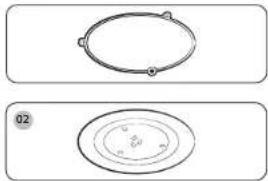
01 Roller ring, to be placed in the centre of the oven. Purpose: The roller ring supports the turntable.
02 Turntable, to be placed on the roller ring with the centre fitting to the coupler. Purpose: The turntable serves as the main cooking surface; it can be easily removed for cleaning.
02 Turntable, to be placed on the roller ring with the centre fitting to the coupler.
Purpose: The turntable serves as the main cooking surface; it can be easily removed for cleaning.
Installation site
DO NOT operate the microwave oven without the roller ring and turntable.
Installation site
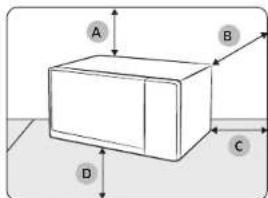
A. 20 cm above B. 10 cm behind C. 10 cm on the side D. 85 cm of the floor
- Select a flat, level surface approx. 85 cm above the floor. The surface must support the weight of the oven.
- Secure room for ventilation, at least 10 cm from the rear wall and both sides, and 20 cm from above.
- Do not install the oven in hot or damp surroundings, such as next to other microwave ovens or radiators.
- Conform to the power supply specifications of this oven. Use only approved extension cables if you need to use.
- Wipe the interior and the door seal with a damp cloth before using your oven for the first time.
Turntable
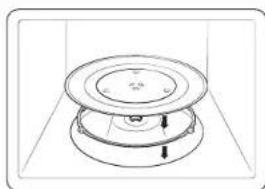
Remove all packing materials inside the oven. Install the roller ring and turntable. Check that the turntable rotates freely.
Maintenance
Cleaning
Clean the oven regularly to prevent impurities from building up on or inside the oven. Also pay special attention to the door, door sealing, and turntable and roller ring (applicable models only).
If the door won't open or close smoothly, first check if the door seals have built up impurities. Use a soft cloth in soapy water to clean both the inner and outer sides of the oven. Rinse and dry well.
To remove stubborn impurities with bad smells from inside the oven
- With an empty oven, put a cup of diluted lemon juice on the centre of the turntable.
- Heat the oven for 10 minutes at max power.
- When the cycle is complete, wait until the oven cools down. Then, open the door and clean the cooking chamber.
CAUTION
- Keep the door and door sealing clean and ensure the door opens and closes smoothly. Otherwise, the oven's lifecycle may be shortened.
• Take caution not to spill water into the oven vents.
- Do not use any abrasive or chemical substances for cleaning.
• After each use of the oven, use a mild detergent to clean the cooking chamber after waiting for the oven to cool down.
Replacement (repair)
WARNING
This oven has no user-removable parts inside. Do not try to replace or repair the oven yourself.
- If you encounter a problem with hinges, sealing, and/or the door, contact a qualified technician or a local Samsung service centre for technical assistance.
- If you want to replace the light bulb, contact a local Samsung service centre. Do not replace it yourself.
- If you encounter a problem with the outer housing of the oven, first unplug the power cord from the power source, and then contact a local Samsung service centre.
Care against an extended period of disuse
- If you don't use the oven for an extended period of time, unplug the power cord and move the oven to a dry, dust-free location. Dust and moisture that builds up inside the oven may affect the performance of the oven.
Oven features
Microwave oven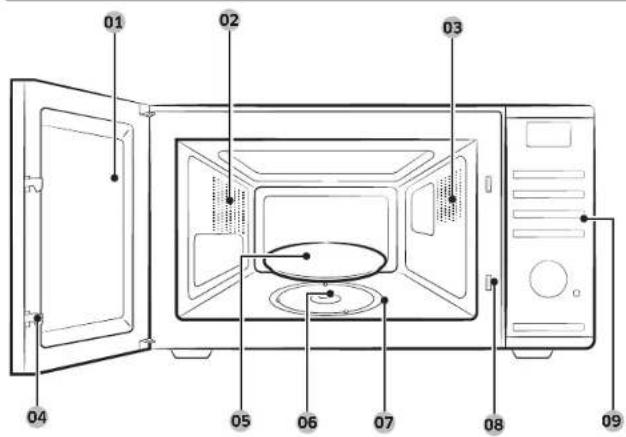
01 Door 02 Ventilation holes 03 Light 04 Door latches 05 Turntable 06 Coupler 07 Roller ring 08 Safety interlock holes 09 Control panel
Control panel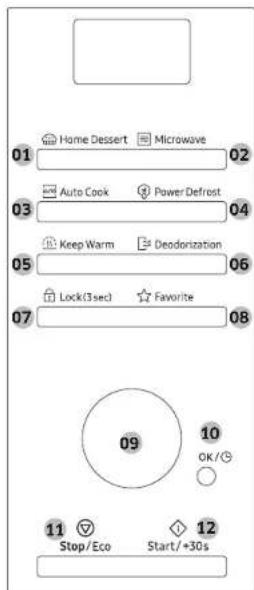
01 Home Dessert Button 02 Microwave Button 03 Auto Cook Button 04 Power Defrost Button 05 Keep Warm Button 06 Deodorization Button 07 Lock (3 sec) Button 08 Favorite Button 09 Dial Knob (Weight/Serving/Time) 10 OK/Clock Button 11 Stop/Eco Button 12 Start/+30s Button
Oven use
Using Home Dessert features
| Code Food Code Food | ||
| 1 Walnut Pound Cake 2 Banana Bread | ||
| 3 Sponge Cake 4 Brownie | ||
| 5 Egg Pudding 6 Chocolate Mug Cake | ||
| 7 Mug Cake 8 Caffe Latte | ||
| 9 Green Tea Latte 10 Milk Tea |
Using the Auto Cook features
| Code Food Code Food | |||
| 1 Ready Meal (Chilled) 2 | Vegetarian Meal (Chilled) | ||
| 3 Broccoli Florets 4 Sliced Carrots | |||
| 5 Green Beans 6 Spinach | |||
| 7 | Corn on the Cob | 8 Peeled Potatoes | |
| 9 | Brown Rice | 10 | Wholemeal Macaroni |
| 11 | Quinoa | 12 | Bulgur |
| 13 | Chicken Breasts | 14 | Turkey Breasts |
| 15 | Fresh Fish Fillets | 16 | Fresh Salmon fillets |
| 17 | Fresh Prawns | 18 | Fresh Trout |
Using the Power Defrost features
| Code Food Code Food | ||
| 1 Meat | 2 Poultry | |
| 3 Fish | 4 Bread/Cake |
Troubleshooting guide
Troubleshooting If you have any of the problems listed below, try the solutions given.
| Problem | Cause | Action |
| The buttons cannot be pressed properly. | Child lock is activated. | Deactivate Child lock. |
| The time is not displayed. | The Eco(power-saving) function is set. | Turn off the Eco function. |
| The microwave oven does not work. | Power is not supplied. | Make sure power is supplied. |
| The door is open, | Close the door and try again.. | |
| When power is connected, the microwave oven immediately starts to work. | The door is not properly closed. | Close the door and check again. |
| The door cannot be opened properly. | Food residue is stuck between the door and microwave oven interior. | Clean the microwave oven and then open the door. |
| There are sparks during cooking. | Metal containers are used during the microwave oven/ thawing functions. | Do not use the metal containers. |
| The microwave oven exterior is too hot during operation. | There is not sufficient ventilation space for the microwave oven. | There are intake/exhaust outlets on the front and rear of the oven for ventilation. Keep the gaps specified in installation guide. |
| The interior light is dim or does not turn on | The door has been left open for a long time. | The interior light may automatically turn off when Eco function operates. Close and open the door or press the Stop/Eco button. |
| The interior light is covered by residue. | Clean the inside of the oven and check again. | |
| Cooking is finished,but the cooling fan is still running. | To ventilate the oven, the cooling fan continues to run for about 3 minutes after cooking is complete. | This is not an oven malfunction. |
Troubleshooting guide
| Problem Cause Action | ||
| There is a popping sound during operation, and the oven doesn't work. | Cooking sealed food or using a container with a lid may causes popping sounds. | Do not use sealed containers as they may burst during cooking due to expansion of the contents. |
| A beeping sound occurs during cooking. | If the Auto Cook function is being used, this beeping sound means it's time to turn over the food during thawing. | After turning over the food, press the Start/+30s button again to restart operation. |
| While turning, the turntable comes out of place or stops turning. | There is no roller ring, or the roller ring is not properly in place. | Install the roller ring and then try again. |
| The turn table rattles while turning and is noisy. | Food residue is stuck to the bottom of the oven. | Remove any food residue stuck to the bottom of the microwave oven. |
| C d0 code is displaying | Control buttons are pressed over 10 seconds. | Clean the keys and check if there is water on the surface around key. If it occurs again, turn off the oven over 30 seconds and try setting again. |

NOTE
- The full contents of the troubleshooting guide are registered in the Full manual, and you can download it on Samsung.com site.
- If the suggested solution does not solve the problem, contact your local SAMSUNG Customer Care Centre.
Technical specifications
SAMSUNG strives to improve its products at all times. Both the design specifications and these user instructions are thus subject to change without notice.
| Model | MS32D*4504A*** |
| Power source 230 V | ~ 50 Hz AC |
| Power consumption Microwave 1500 W | |
| Output power | 100 W / 1000 W - 7 levels (IEC-705) |
| Operating frequency 2450 MHz | |
| Dimensions (W x H x D) Outside Oven cavity | 517 x 297 x 424 mm357 x 255 x 357 mm |
| Volume 32 liter | |
| Weight Net 14.6 kg approx. |
* This product contains a light source of energy efficiency class .
12 English
Memo
Memo
Memo
For full manual, scan QR code or access online at https://www.samsung.com
Please be advised that the Samsung warranty does NOT cover service calls to explain product operation,
correct improper installation, or perform normal cleaning or maintenance.
QUESTIONS OR COMMENTS?
| COUNTRY CALL OR VISIT US ONLINE AT | ||
| UK 0333 000 0333 www.samsung.com/uk/support | ||
| IRELAND (EIRE) 0818 717100 www.samsung.com/ic/support | ||
| GERMANY 08 196 77 555 77 www.samsung.com/de/support | ||
| FRANCE 01 48 63 00 00 www.samsung.com/fr/support | ||
| SPAIN 91 175 00 15 www.samsung.com/cs/support | ||
| PORTUGAL | 210 608 098 Chamada para a rede fixa nacional Dias úteis das 9h às 20h | www.samsung.com/pt/support |
| LUXEMBURG 261 03 710 www.samsung.com/be_fr/support | ||
| NETHERLANDS 088 90 90 100 www.samsung.com/n/support | ||
| BELGIUM 02-201-24-18 | www.samsung.com/be/support (Dutch) www.samsung.com/be_fr/support (French) | |
| NORWAY | 21629099 | www.samsung.com/no/support |
| DENMARK 707 019 70 www.samsung.com/dk/support | ||
| FINLAND 030-6227 515 www.samsung.com/fi/support | ||
| SWEDEN 0771-400 300 www.samsung.com/se/support | ||
| AUSTRIA | 0800 72 67 864 (0800-SAMSUNG) | www.samsung.com/at/support |
| SWITZERLAND | 0800 726 786 | www.samsung.com/ch/support (German) www.samsung.com/ch_fr/support (French) |
| HUNGARY | 0580SAMSUNG (0580-726-7864) | www.samsung.com/hu/support |
| CZECH | 800 - SAMSUNG (800-726786) | www.samsung.com/cz/support |
| SLOVAKIA | 0800 SAMSUNG (0800 726 786) | www.samsung.com/sk/support |
| CROATIA | 072 726 786 | www.samsung.com/hr/support |
| BOSNIA | 055 233 999 www.samsung.com/ba/support | |
| North Macedonia | 023 207 777 | www.samsung.com/mk/support |
| MONTENEGRO | 020 405 888 www.samsung.com/support | |
| SLOVENIA | 080 697 287 (brezplačna številka) | www.samsung.com/si/support |
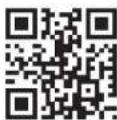
Scan the QR code* or visit www.samsung.com to check helpful information.
* Requires reader to be installed on your smartphone.
| COUNTRY CALL OR VISIT US ONLINE AT | ||
| SERBIA | 011 321 6899 | www.samsung.com/rs/support |
| Kosovo | 038 40 30 90 | www.samsung.com/support |
| ALBANIA 045 620 202 www.samsung.com/al/support | ||
| BULGARIA | 0800 111 31 - Безплатен за всички оператори*3000 - Цена на един градски разговор или според тарифата на мобилният оператор09:00 до 18:00 - Понеделник до Петък | www.samsung.com/bg/support |
| ROMANIA | 0800872678 - Apel gratuit*8000 - Apel tarifat in retea Program Call CenterLuni - Vineri 9 AM - 6 PM | www.samsung.com/ro/support |
| ITALIA | 800-5AMSUNG (800.7267864) | www.samsung.com/it/support |
| CYPRUS | 8009 4000 only from landline, toll free | www.samsung.com/gr/support |
| GREECE | 80111-SAMSUNG (80111 726 7864) from mobile and land line(+30) 210 6897691 from mobile and land line | |
| POLAND | 801-172-678*(optata wedlug taryly operatora) | http://www.samsung.com/pl/support/ |
| LITHUANIA 8-600-77777 www.samsung.com/it/support | ||
| LATVIA | 8000 7267 | www.samsung.com/iv/support |
| ESTONIA 800 7267 www.samsung.com/cc/support | ||
| UKRAINE 0-800-502-000 www.samsung.com/ua/support | ||
| MOLDOVA | -373-22-667-400 | www.samsung.com/ua/support/moldova |

DE68-04755B-00
SAMSUNG
- PREPARATION
- WI-FI MODEL
- CONNECTING SMARTTHINGS
- SMARTTHINGS CONNECTION
- CONNECT SMARTTHINGS
- SAMSUNG
- MICROWAVE OVEN
- SIMPLE USER MANUAL
- REGISTERING THE PRODUCT / READING THE MANUAL / CUSTOMER SUPPORT
- NON WI-FI MODEL
- NOTE
- CONTENTS
- SAFETY INSTRUCTIONS
- INSTALLATION
- MAINTENANCE
- OVEN FEATURES
- IMPORTANT SAFETY INSTRUCTIONS
- GENERAL SAFETY
- MICROWAVE WARNING
- MICROWAVE OVEN PRECAUTIONS
- MICROWAVE OPERATION PRECAUTIONS
- LIMITED WARRANTY
- PRODUCT GROUP DEFINITION
- CORRECT DISPOSAL OF THIS PRODUCT (WASTE ELECTRICAL & ELECTRONIC EQUIPMENT)
- ACCESSORIES
- INSTALLATION SITE
- TURNTABLE
- CLEANING
- TO REMOVE STUBBORN IMPURITIES WITH BAD SMELLS FROM INSIDE THE OVEN
- CAUTION
- REPLACEMENT (REPAIR)
- WARNING
- CARE AGAINST AN EXTENDED PERIOD OF DISUSE
- OVEN USE
- TROUBLESHOOTING GUIDE
- TECHNICAL SPECIFICATIONS
- MEMO
Brand : SAMSUNG
Model : MS32DG4504AGE1
Category : Microwave