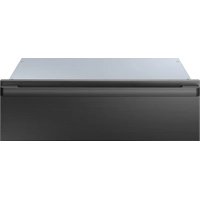
DWR30U900WM/DA - Warming drawers and cabinets Dacor - Free user manual and instructions
Find the device manual for free DWR30U900WM/DA Dacor in PDF.


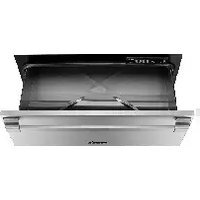
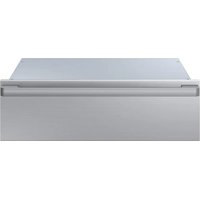
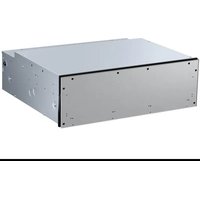
| Product Type | Warming Drawer |
| Brand | Dacor |
| Model | DWR30U900WM/DA |
| Maximum Capacity | 22 kg |
| Power Supply | 120 V AC, 15 A, dedicated grounded outlet |
| Operating Temperatures | Proof (38 °C), Low (60 °C), Medium (75 °C), High (90 °C) |
| Timer | 1 to 4 hours, adjustable in one-hour increments |
| Continuous Mode | Yes, operates until manually turned off |
| Sabbath Mode | Yes, compatible with Jewish holidays |
| Control Panel | Electronic with push buttons and hour display |
| Interior Rack | Removable, allows stacking two layers of dishes |
| Exterior Surface Materials | Stainless steel, glass, brass/chrome depending on finish |
| Maintenance and Cleaning | Mild cleaner and warm water; do not use abrasive products |
| Safety | Automatic timer shut-off, hot surface indicator, child lock not mentioned |
| Minimum Ambient Temperature | 0 °C (32 °F) |
| Warranty | 2 years full (US and Canada), parts and labor; limited outside areas |
| Customer Service | 833-353-5483 (US), 844-509-4659 (Canada) |
Frequently Asked Questions - DWR30U900WM/DA Dacor
User questions about DWR30U900WM/DA Dacor
0 question about this device. Answer the ones you know or ask your own.
Ask a new question about this device
Download the instructions for your Warming drawers and cabinets in PDF format for free! Find your manual DWR30U900WM/DA - Dacor and take your electronic device back in hand. On this page are published all the documents necessary for the use of your device. DWR30U900WM/DA by Dacor.
USER MANUAL DWR30U900WM/DA Dacor
To Our Valued Customer:
Congratulations on your purchase of the very latest in Dacor products! Our unique combination of features, style, and performance make us a great addition to your home. To familiarize yourself with the controls, functions, and full potential of your new Dacor warming drawer, read this manual thoroughly, starting with Before you start.
Dacor appliances are designed and manufactured with quality and pride, while working within the framework of our company values. Should you ever have an issue with your warming drawer, first consult Troubleshooting, where you will find suggestions and remedies that may pre-empt a service call.
Valuable customer input helps us continually improve our products and services, so feel free to contact our Customer Assurance Team for assistance with all your product support needs.
- USA
Samsung Electronics America, Inc.
85 Challenger Road
Ridgefield Park, NJ 07660
- Canada
Samsung Electronics Canada Inc.
2050 Derry Road West, Mississauga.
Ontario L5N 0B9 Canada
Telephone: 833-353-5483(USA), 844-509-4659(Canada)
Hours of Operation: Mon - Fri, 8:00 a.m. to 8:00 p.m. Pacific Time
Website: www.dacor.com
Thanks for choosing Dacor for your home. We are a company built by families for families, and we are dedicated to serving yours. We are confident that your new Dacor warming drawer will deliver top-level performance and enjoyment for decades to come. Sincerely,
The Dacor Customer Assurance Team
Contents
Important safety information 3
California Proposition 65 Warning 4
General safety 5
Overview 6
Layout 5
Control panels and displays 6
Before you start 7
Preheating 7
Using the Warming drawer 7
Operation 7
Using the Sabbath feature 8
Warming Serving Containers 8
Maintenance 9
Control Panel 9
Drawer Handle 9
Glass Surfaces 9
Brass and Chrome Surfaces 9
Painted Surfaces 9
Gasket 9
Drawer Slides 9
Rack 9
Removing the Drawer 10
Re-installing the Drawer 10
Troubleshooting 11
Troubleshooting 11
Warranty and Service 11
Getting Help 11
Warranty 12
Important safety information
INSTALLER: LEAVE THESE INSTRUCTIONS WITH THE APPLIANCE.
CUSTOMER: READ THIS USE AND CARE MANUAL COMPLETELY BEFORE USING YOUR WARMING DRAWER. SAVE IT FOR FUTURE REFERENCE. IT CONTAINS IMPORTANT USE AND CARE INFORMATION.
For service and warranty information see page 11.
If you have any questions (other than warranty questions), call:
Dacor Customer Service
833-353-5483(USA), 844-509-4659(Canada)
Monday – Friday 8:00 a.m. to 8:00 p.m. Pacific Time
Website: www.dacor.com
When you call, have the complete model and serial number for your appliance available. See page 6 for label location. Write these numbers below for future reference.
Model Name
Serial Number
Date of purchase
Since Dacor continuously improves the quality and performance of our products, we may need to make changes to the appliance without updating this manual. Visit www.dacor.com to download the latest version of this manual.
READ ALL INSTRUCTIONS BEFORE USING THIS APPLIANCE
The Important safety information and warnings in this manual can not cover all possible problems and conditions that can occur. Use common sense and caution when installing, maintaining or operating this appliance.
Symbols used in this manual
DANGER
Immediate hazards that WILL result in severe personal injury or death.
WARNING
Hazards or unsafe practices that may result in severe personal injury or death.
CAUTION
Hazards or unsafe practices that may result in minor personal injury or property damage.
NOTE
Useful tips and instructions.
These warning icons and symbols are here to prevent injury to you and others. Please follow them explicitly. After reading this section, keep it in a safe place for future reference.
Important safety information
California Proposition 65 Warning
WARNING
Cancer and Reproductive Harm - www.P65Warnings.ca.gov.
DANGER
IMPORTANT: To avoid the possibility of explosion or fire, do not store or use flammable or explosive vapors and liquids (such as gasoline) inside or in the vicinity of this or any other appliance. Keep items that could explode, such as aerosol cans away from the appliance.
DO NOT store flammable or explosive materials in adjacent cabinets or areas.
WARNING
NEVER use this appliance as a space heater to heat or warm the room.
WARNING
DO NOT use water on grease fires – smother fire or flame or use dry chemical or foam-type extinguisher.
WARNING
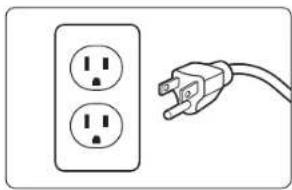
IMPORTANT: This appliance is equipped with a three prong grounding electric plug for protection against possible electric shock hazards. It must be plugged into a dedicated, grounded, electrical outlet. If only a two prong electrical outlet is available, it is the responsibility of the customer to have it replaced with a dedicated, properly grounded three prong electrical outlet.
To avoid an electric shock hazard, do not under any circumstances:
natural_image
Simple line drawing of a two-pin electrical outlet connected to an AC power plug (no text or symbols)- Cut or remove the third (ground) prong from the power cord.
- Use an adapter plug.
- Use a power cord that is frayed or damaged.
- Immerse the power cord or plug in water or other liquid.
- Connect the appliance to an extension cord.
NOTE
Use of a ground fault interrupter (GFI) is not recommended.
General safety
WARNING
To reduce the risk of fire, electric shock, personal injuries, and/or death, observe the following precautions.
- Read this manual completely before operating this appliance.
- Use this appliance only for its intended use as described in this manual. Use it only to warm food and heat plates and utensils. It is not designed for commercial, industrial or laboratory use.
- DO NOT install or operate a product that is damaged, has a damaged power cord or plug, or is malfunctioning in any manner. Return the appliance to the nearest authorized service facility for examination, repair or adjustment.
- Make sure that this appliance has been properly installed and grounded by a qualified installer according to the accompanying installation instructions. Have the installer show you the location of the electrical outlet so that you know where to disconnect power to the appliance.
- DO NOT repair or replace any part of the warming drawer unless specifically recommended in the literature accompanying it. All other service should be done by a qualified technician.
- Use of accessory attachments not recommended by the appliance manufacturer may cause injuries.
- Before cleaning or performing any type of service, make sure that the power plug is disconnected from the electrical outlet and that the unit is cool.
- Keep the electrical cord away from heated surfaces.
- DO NOT TOUCH ANY HOT SURFACES IN OR ON THE WARMING DRAWER DURING OR IMMEDIATELY AFTER USE. Use the handle instead. After use, make sure these surfaces have had sufficient time to cool before touching them. Heating elements may be hot, even though they are dark in color.
- To reduce the risk of fire in the warming drawer, do not overcook food. DO NOT leave it unattended with paper, plastic or other combustible materials inside.
• DO NOT leave door open for a long time when the warming drawer is on. Keep door closed unless necessary for cooking or cleaning purposes.
• DO NOT use outdoors.
- To avoid the possibility of fire or burns, do not allow clothing, pot holders, towels or rags to come into contact with any part of the warming drawer during and immediately after use. DO NOT wear loose or hanging apparel while using this appliance.
- If materials inside the warming drawer should ignite, keep the drawer closed and shut off the power at the circuit breaker panel or fuse box.
- Exercise caution when opening the drawer. Let hot air or steam escape before looking or reaching into the warming drawer.
- Use only dry pot holders when removing food and cookware from the warming drawer. Wet pot holders can cause steam burns.
• DO NOT put items like whole eggs, sealed containers or closed glass jars in the warming drawer. They may explode when heated, causing injury.
- DO NOT place more than 50 pounds in the drawer.
- Properly clean and maintain the unit regularly as instructed in this manual. Clean only those parts listed in this manual, in the manner specified.
- DO NOT use abrasive scrubbers or abrasive/caustic cleaners or detergents on this appliance. They may permanently damage the finishes. DO NOT use aerosol cleaners, because they may be flammable or cause corrosion of metal parts.
- Clean the appliance thoroughly before operating it for the first time.
- Make sure the warming drawer is used only by those individuals who are able to operate it properly.
- DO NOT tamper with the controls.
- Preheat the warming drawer before use.
- NEVER allow anyone, including children to sit, stand or climb on any part of the appliance, including the drawer. Doing so may cause tipping, damage, serious injury or death.
- DO NOT leave children alone or unattended in the area around the appliance. DO NOT allow children to operate it, play with the controls, pull on the handle or touch other parts.
• DO NOT store items of interest to children above the warming drawer. Children could be burned or injured while climbing on the appliance.
Overview
Layout
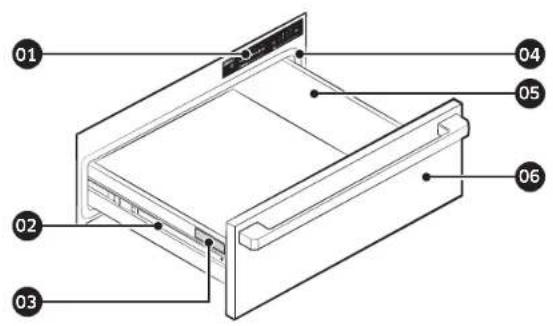
01 Control panel
02 Drawer slide
03 Product data label (On the left external rail of the drawer)
04 Gasket 05 Drawer 06 Drawer front*
* Style varies. Model DWR30U900WS, DWR30U900WM shown.

• Minimum ambient operating temperature: 32 °F (0 °C)
- Drawer capacity: 50 pounds
Control panels and displays
flowchart
graph LR
    A["01t"] --> B["+"]
    B --> C["Proof | Low | Med | High"]
    C --> D["Temperature"]
    D --> E["+"]
    E --> F["Hours"]
    F --> G["1 2 3 4"]
    G --> H["+"]
    H --> I["∞"]
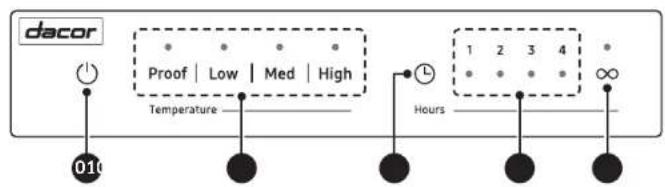
01 Power button
02 Temperature button
03 Hour Select button
04 Hours display 05 Continuous button
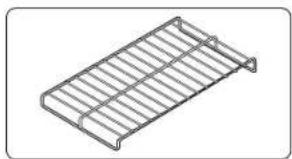
Rack
natural_image
Isometric view of a metal rack structure with no text or symbols- Insert the rack in drawer.
- Preheat with the rack in place.
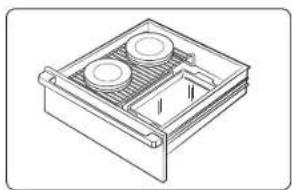
- Use the rack for double stacking of dishes.
natural_image
Technical line drawing of a mechanical housing or enclosure with two circular components and a central recessed component (no text or symbols)- Double stacking items with the rack in position.
Before you start
WARNING
- When the warming drawer is on in continuous mode ( ), it will remain on until turned off manually. To avoid a fire hazard or burns, exercise caution when operating the unit in continuous mode.
- Food safety is an important consideration when using a warming drawer. In the Proof and Low temperature settings, bacteria growth may occur. Use the Med and High settings if holding certain foods for more than two to three hours.
- Please check with the manufacturer of the dishes for their maximum heat tolerance.
- Dishes or plates may be very hot. Use pot holders or mitts when removing hot dishes.
Preheating
For best results, preheat your warming drawer for about 20 minutes before use. If you put hot food into a cool, confined area, any steam that is present will condense. If you preheat your warming drawer, there will be less chance of water due to condensation. Preheat times vary depending on the temperature setting.
Using the Warming drawer
Operation
The warming drawer will keep hot, cooked foods at serving temperature. Always start with hot foods. DO NOT use to heat cold foods other than proofing yeast dough, crisping crackers, chips, dry cereal, warming breads and biscuits, or warming dishes or plates.
The warming drawer is equipped with four temperature settings and a timer that can be set for one to four hours. The warming drawer can also be set for continuous operation. See the table on the next page for suggested settings for different foods.
To turn the unit on:
- Push the Power ( ⏻ ) key.
- Push the key for the desired temperature setting.
| Setting Temperature* |
| Proof 100 °F (38 °C) |
| Low 140 °F (60 °C) |
| Med 167 °F (75 °C) |
| High 194 °F (90 °C) |
Temperatures are approximate
- Select the amount of time you want the warming drawer to be on: Push the Hour Select (⑨) key until the desired number of hours lights up on the control panel.
or Push the Continuous (∞) key to keep the unit on constantly. After Hour select, the warming drawer will begin to heat.
- Push the Power ( ⏻) key to turn the warming drawer off when done.
Using the Warming drawer
Using the Sabbath feature
This warming drawer is designed to allow for operation on the Jewish Sabbath or the Jewish Holidays.

For further assistance, guidelines for proper usage, and a complete list of models with the Sabbath feature, visit : http:\www.star-k.org.
Warming Serving Containers
To warm plates, and other serving containers:
- Place them carefully into the warming drawer and set the temperature to Proof or Low, depending upon your personal preference. Do not drag plates across the drawer. They may scratch the drawer surface.
- Before using any delicate dinnerware in the warming drawer, determine its maximum recommended usage temperature from the plate manufacturer. It is not necessary to preheat the warming drawer when warming serving dishes.
- You can also use plastic wrapping on plates to keep foods hot and moist.
Temperature Control Setting Guidelines
| Food Items Temperature Settings Covered/Uncovered | ||
| Bacon High Uncovered | ||
| Beef - rare Low Covered | ||
| Bread - hard rolls Low Covered | ||
| Bread - proofing Proof Damp towel | ||
| Casseroles Low Uncovered | ||
| Dinner Med | Uncovered | |
| Eggs | Low Covered | |
| Fish / Seafood | Low Covered | |
| Fried food | High Uncovered | |
| Gravy, cream sauces | Low Covered | |
| Ham | Low Covered | |
| Lamb | Low Covered | |
| Pancakes | Low-Mid | Covered |
| Pies - single crust Low Uncovered | ||
| Pizza | Low-Mid | Covered |
| Potatoes - baked High Uncovered | ||
| Poultry | High | Covered |
| Vegetables | Low Covered | |
| Waffles - crisp | High Uncovered | |
Maintenance
WARNING
- To prevent permanent damage to the appliance surfaces, do not use abrasive cleaners or scrubbers.
- Do not allow acids (citrus juices, tomato sauces, etc.) to remain on the warming drawer's surfaces. The finish may stain.
- Do not try to remove heavy spills with a sharp object such as a knife or metal spatula. Sharp objects may scratch the surfaces.
• Always wipe stainless steel surfaces in the direction of the grain.
Control Panel
Clean the control panel with a soft cloth soaked with a solution of mild detergent and hot water. Rinse and dry with a soft cloth. Exercise caution to avoid introduction of liquids into the area behind the control panel. Do not use abrasive cleaners or scrubbers. They may permanently damage the finish or scrape off the letters and graphics.
Drawer Handle
Clean the drawer handle with a solution of mild detergent and hot water. Rinse and dry with a soft cloth.
You may also use Dacor Stainless Steel Cleaner. It is available from your Dacor dealer. Use it according to the directions on the package.
Always wipe stainless steel surfaces in the direction of the grain.
Glass Surfaces
Clean all glass surfaces with a solution of mild detergent and hot water. You may also use a mild glass cleaner to remove fingerprints or smears. Dry completely with a soft, lint-free cloth.
Brass and Chrome Surfaces
Clean brass and chrome surfaces with a solution of mild detergent and warm water. Rinse, dry and polish with a soft, lint-free cloth.
You may also use Dacor Stainless Steel Cleaner. It is available from your Dacor dealer. Use it according to the directions on the package.
Painted Surfaces
For the front face of warming drawers with a painted finish, clean with a solution of mild detergent and hot water. Rinse and dry with a soft cloth. Do not use abrasive cleaners or scrubbers. They may permanently damage the finish.
Gasket
The gasket is located around the edge of the drawer opening, below the control panel.
Gently clean the gasket with a solution of mild detergent and hot water. Rinse and dry with a soft cloth. The gasket material is soft, so be careful not to crush or damage it. Damaging the gasket will cause a poor heat seal and result in poor warming drawer performance.
Drawer Slides
The warming drawer has slides positioned on each side of the drawer. They allow the drawer to slide in and out smoothly. Remove the drawer from the slides to make cleaning easy or to access the serial number plate. The drawer slides themselves do not require maintenance.
Rack
Clean the drawer rack with a solution of mild detergent and hot water. Rinse and dry with a soft cloth.
Maintenance
Removing the Drawer
Remove the drawer from the appliance to allow access to the mounting holes during installation, and to reduce weight:
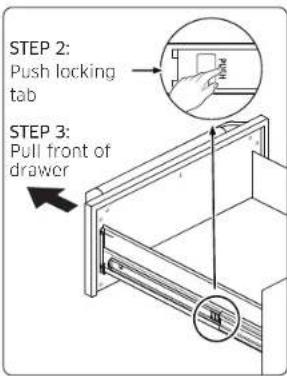
- Pull the drawer out to a fully open position.
- Push on the locking tab on both sides as you pull the drawer.
- For safety, push both drawer slides into the drawer opening.
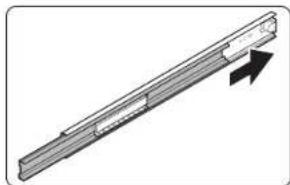
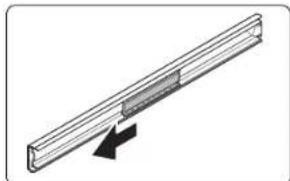
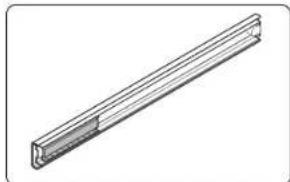
Re-installing the Drawer
natural_image
Pure mechanical component diagram without any text, numbers, or symbols- Push the rail until it reaches the end of the chassis.
natural_image
Pure diagram of a mechanical component with an arrow indicating direction (no text or symbols)- Pull out the retainer to the front of the rail.
natural_image
Technical line drawing of a mechanical part with flanged ends and a central slot (no text or symbols)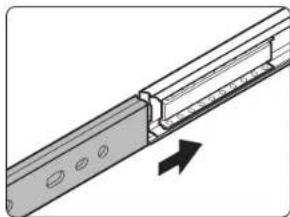
natural_image
Technical diagram of a mechanical assembly with a bracket and directional arrow (no text or symbols)Troubleshooting
Troubleshooting
Dacor works hard to ensure that you don't have problems with your new warming drawer. If you run into unexpected trouble, look first for a solution in the table below. If you're still having trouble after trying the suggested solution, call Dacor Contact Center at 833-353-5483.
| Problem Possible cause Solution | ||
| Nothing works. | Power plug disconnected. | Plug the warming drawer into a 120 Vac, 15 Amp., dedicated electrical outlet. |
| Timer is not set. | Select time duration according to the Using the Warming drawer section. | |
| Tripped circuit breaker or blown fuse. | Check the circuit breaker panel or fuse box Tripped breaker or blown fuse. | |
| Ambient temperature below 32 °F (0 °C). | Temperature around warming drawer must be above freezing. | |
| Drawer does not slide smoothly or drags. | Drawer is incorrectly mounted into slide mechanism. | Remount drawer into slide, per instructions above. |
| Drawer is over-loaded or the load is unbalanced. | Reduce the weight to less than 50 pounds.Redistribute drawer contents. | |
| Excessive condensation. | Warming drawer not preheated. | Preheat the warming drawer before each use. |
| One or more of the indicator lights on the control panel blink on and off (0.5 second on, 0.5 second off). | The control panel computer has detected an error:#1 - Temperature error#2 - Sensor error#3 - Key pad error#4 - Control error | Try resetting the computer. Disconnect the power cord, wait 20 seconds, then reconnect it. Check the control panel. If the indicator light still flashes, call for service. See page 11. |
Warranty and Service
Getting Help
Before you request service:
- Review the Troubleshooting section of this manual.
- Use the helpful tips found in our Troubleshooting.
- Become familiar with the warranty terms and conditions of your product.
- If none of these tips or suggestions resolves your problem, call our Customer Service center at the number below.
Dacor's Customer Service center is available 8:00 a.m. - 8:00 p.m. Pacific Time For warranty repairs or questions and for Dacor Distinctive Service (DDS) in the US and Canada
Phone: 833-353-5483(USA), 844-509-4659(Canada)
For non-warranty repairs or questions in the US and Canada
Phone: 833-353-5483(USA), 844-509-4659(Canada)
Contact us through our Website at: www.dacor.com
Warranty and Service
Warranty
PLEASE DO NOT DISCARD.
What Is Covered
CERTIFICATE OF WARRANTIES: DACOR WARMING DRAWER WITHIN THE FIFTY STATES OF THE U.S.A., THE DISTRICT OF COLUMBIA, AND CANADA:
FULL TWO-YEAR WARRANTY
The warranty applies only to the Dacor appliance sold to the first use purchaser, starting from the date of original retail purchase or closing date for new construction, whichever period is longer. Warranty is valid on products purchased brand new from a Dacor Authorized Dealer, or other seller authorized by Dacor. If your Dacor product fails to function within one year of the original date of purchase, due to a defect in material or workmanship, Dacor will remedy it without charge to you.
All cosmetic damage (such as scratches on stainless steel, paint/porcelain blemishes, etc.) to the product or included accessories must be reported to Dacor within 60 days of the original purchase date to qualify for warranty coverage. Consumable parts such as filters and light bulbs are not covered and are the responsibility of the purchaser.
LIMITATIONS OF COVERAGE
Service will be provided by a Dacor designated service company during regular business hours. Please note service providers are independent entities and are not agents of Dacor.
Dealer display and model home display products with a production date greater than 5 years, products sold "As Is," and products installed for non-residential use, which include but are not limited to religious organizations, fire stations, bed & breakfast, and spas carry a one year parts warranty only. All delivery, installation, labor costs, and other service fees are the responsibility of the purchaser. Warranty will be null and void on product that has altered, defaced, or missing serial numbers and tags.
The owner must provide proof of purchase or closing statement for new construction upon request. All Dacor products must be accessible for service.
Warranty is null and void if non-ETL or non-CUL approved product is transported from the U.S.A.
OUTSIDE THE FIFTY STATES OF THE U.S.A., THE DISTRICT OF COLUMBIA AND CANADA:
LIMITED TWO-YEAR WARRANTY
If your Dacor product malfunctions within one year of the original purchase date, due to material or manufacturing defect. Dacor will furnish a new part, FOB factory to replace the defective part.
All delivery, installation, labor costs, and other service fees shall be paid by the purchaser.
What Is Not Covered
- Slight color variations may be noticed because of differences in painted parts, kitchen lighting, product placement and other factors; this warranty does not apply to color variation.
• Service calls to educate the customer on proper use and care of the product. - Service fees for travel to islands and remote areas, which include but are not limited to, ferries, toll roads or other travel expenses.
- Consequential or incidental damage, including but not limited to food or medicine loss, time away from work or restaurant meals.
- Failure of the product when used for commercial, business, rental or any application other than for residential consumer use.
- Failure of the product caused by improper product installation.
- Replacement of house fuses, fuse boxes or resetting of circuit breakers.
- Damage to the product caused by accident, fire, flood, power interruption, power surges or other acts of God.
- Liability or responsibility for damage to surrounding property including cabinetry, floors, ceilings and other structures or objects around the product.
- Breakage, discoloration, or damage to glass, metal surfaces, plastic components, trim, paint or other cosmetic finish caused by improper usage, care, abuse or neglect.
Memo
Out of Warranty
Should you experience a service issue beyond the standard warranty period, please contact us. Dacor reviews each issue and customer concern to provide the best possible solution based on the circumstances.
THE REMEDIES PROVIDED IN THE ABOVE EXPRESS WARRANTIES ARE THE SOLE AND EXCLUSIVE REMEDIES. THEREFORE, NO OTHER EXPRESS WARRANTIES ARE MADE, AND OUTSIDE THE FIFTY STATES OF THE UNITED STATES, THE DISTRICT OF COLUMBIA AND CANADA, ALL IMPLIED WARRANTIES, INCLUDING BUT NOT LIMITED TO, ANY IMPLIED WARRANTY OF MERCHANTABILITY OR FITNESS FOR A PARTICULAR USE OR PURPOSE, ARE LIMITED IN DURATION TO ONE YEAR FROM THE DATE OF ORIGINAL PURCHASE. IN NO EVENT SHALL DACOR BE LIABLE FOR INCIDENTAL EXPENSE OR CONSEQUENTIAL DAMAGES. IN THE EVENT DACOR PREVAILS IN ANY LAWSUIT, DACOR SHALL BE ENTITLED TO REIMBURSEMENT OF ALL COSTS AND EXPENSES, INCLUDING ATTORNEY'S FEES, FROM THE DACOR CUSTOMER. NO WARRANTIES, EXPRESS OR IMPLIED, ARE MADE TO ANY BUYER FOR RESALE.
Some states do not allow limitations on how long an implied warranty lasts, or do not allow the exclusion or limitation of inconsequential damages, therefore the above limitations or exclusions may not apply to you. This warranty gives you specific legal rights, and you may also have other rights that vary from state to state.
dacor

DG68-01551A-00
Cajón calentador
DWR30U900WP/DA
DWR30U900WS/DA
DWR30U900WM/DA
dacor
Ridgefield Park, NJ 07660
Samsung Electronics Canada Inc.
2050 Derry Road West, Mississauga,
Ontario L5N 0B9 Canada
The Dacor Customer Assurance Team
Contenido
Dacor Customer Service
natural_image
Simple line drawing of a two-pin electrical outlet connected to an open terminal (no text or symbols)natural_image
Isometric view of a metal rack structure with no text or symbolsnatural_image
Isometric line drawing of a mechanical housing or enclosure with two circular components and a central recessed component (no text or symbols)natural_image
Diagram of a mechanical component with an arrow indicating direction (no text or symbols present)natural_image
Pure diagram of a mechanical or structural component with no text, numbers, or symbolsnatural_image
Isometric line drawing of a long rectangular object with a flanged top edge (no text or symbols)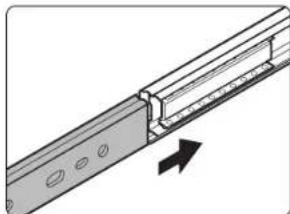
natural_image
Technical diagram of a mechanical assembly with a rod and bracket, showing an arrow indicating direction (no text or symbols present)Ridgefield Park, NJ 07650
• Canada
Samsung Electronics Canada Inc.
2050 Derry Road West, Mississauga.
Ontario L5N 089 Canada
The Dacon Customer Assurance Team
Table des matières
natural_image
Simple line drawing of a two-pin electrical outlet connected to an open terminal (no text or symbols)natural_image
Isometric line drawing of a metal rack or cage structure (no text or symbols)natural_image
Technical line drawing of a mechanical housing or enclosure with two circular components and a central recessed component (no text or symbols)natural_image
Diagram of a mechanical component with an arrow indicating direction (no text or symbols present)natural_image
Pure diagram of a mechanical or structural component with no text, numbers, or symbolsnatural_image
Isometric line drawing of a long rectangular object with a flanged top edge (no text or symbols)
natural_image
Technical diagram of a mechanical assembly with a rod and bracket, showing an arrow indicating direction (no text or symbols present)Dépannage
Dépannage
- - USA
- - Canada
- The Dacor Customer Assurance Team
- Contents
- Important safety information 3
- Overview 6
- Before you start 7
- Using the Warming drawer 7
- Maintenance 9
- Troubleshooting 11
- Warranty and Service 11
- Important safety information
- READ ALL INSTRUCTIONS BEFORE USING THIS APPLIANCE
- Symbols used in this manual
- California Proposition 65 Warning
- WARNING
- DANGER
- NOTE
- General safety
- Overview
- Before you start
- Preheating
- Using the Warming drawer
- Operation
- To turn the unit on:
- Using the Sabbath feature
- Warming Serving Containers
- Maintenance
- Control Panel
- Drawer Handle
- Glass Surfaces
- Brass and Chrome Surfaces
- Painted Surfaces
- Gasket
- Drawer Slides
- Rack
- Removing the Drawer
- Re-installing the Drawer
- Troubleshooting
- Warranty and Service
- Getting Help
- Warranty
- PLEASE DO NOT DISCARD.
- What Is Covered
- FULL TWO-YEAR WARRANTY
- LIMITATIONS OF COVERAGE
- OUTSIDE THE FIFTY STATES OF THE U.S.A., THE DISTRICT OF COLUMBIA AND CANADA:
- LIMITED TWO-YEAR WARRANTY
- What Is Not Covered
- Memo
- Out of Warranty
- Cajón calentador
- dacor
- Contenido
- • Canada
- The Dacon Customer Assurance Team
- Table des matières
- Dépannage
Brand : Dacor
Model : DWR30U900WM/DA
Category : Warming drawers and cabinets