
CBK-WA101 - Wi-Fi Antenna SONY - Free user manual and instructions
Find the device manual for free CBK-WA101 SONY in PDF.


Pick your language and provide your email: we'll send you a specifically translated version.
| Product type | WiFi antenna (wireless adapter) |
| Dimensions (W × H × D) | 84 mm × 95 mm × 55 mm |
| Weight | Approx. 220 g |
| Power supply | 6.5 V DC to 17 V DC (via IF anchor connector) |
| Power consumption | Approx. 4.5 W (adapter only) |
| Operating temperature | 0 °C to 40 °C |
| Operating humidity | 20 % to 90 % |
| Storage temperature | -20 °C to +60 °C |
| Wireless connectivity | Wireless LAN (AP or STA mode), via optional USB module |
| Cellular connectivity | 3G/4G/LTE via optional USB modem |
| Wired connectivity | Wired LAN via optional USB-RJ45 adapter |
| Main functions | Creation and recording of proxy files, download, video streaming, remote control |
| Supported video formats | Proxy: XAVC Proxy (AVC/H.264), streaming: H.264, AAC-LC |
| Connectors | USB type A, mini-USB type B, SD card slot, IF anchor connector |
| Camcorder compatibility | PMW-400, PXW-X320, and others with appropriate firmware |
| Management and configuration | Via web interface, browser or Content Browser Mobile application |
| Maintenance | Factory reset via RESET button; firmware update via SD card |
| Security | WPA/WPA2, WPS; password configuration recommended |
| Spare parts and repairability | Spare parts available from Sony; adapter not user-repairable |
| Supplied accessories | USB cable, screws, protection bracket, cushions, hook-and-loop straps, case, manuals |
Frequently Asked Questions - CBK-WA101 SONY
How to connect the adapter in access point (AP) mode?
Set the WIRELESS switch to AP, turn on the adapter. On your device, select the adapter's SSID (e.g. DIRECT_taP0:WA100-...) and enter the password printed on the label. Open a browser and go to http://192.168.1.1:8080/. Log in with username admin and the default password (SSID key).
Which camcorders are compatible with the CBK-WA101?
The CBK-WA101 is specifically designed for the PMW-400 and PXW-X320. Other models such as the PMW-500, PMW-300, PMW-200, PMW-160, PMW-150, the PMW-50 recorder and the PDW-850 are compatible with an appropriate firmware update.
How to record a proxy file on an SD card?
Insert a compatible SD card (SDHC/SDXC class 4 or higher) into the slot. Recording happens automatically by locking to the camcorder (if configured) or manually via the web interface by pressing Rec in the Device Status screen. The proxy file is created in XAVC Proxy format.
How to download a file to a server?
Connect the adapter to the internet (modem, access point or wired LAN). In the web interface, go to Media Info, select the file (SD card or camcorder), press Transfer, choose the registered server and confirm. The download can resume if interrupted (resume function).
How to transmit live video (streaming)?
In the web interface, go to Settings > Streaming Format. Select a preset or modify it (type, size, bitrate, destination address). Set Streaming to On. The video will be streamed in MPEG2-TS/UDP or RTP format.
What to do if the STATUS indicator blinks red?
A fast red blink (0.2 s intervals) indicates an initial configuration error or an incompatible USB module. Check that the wireless LAN module or modem is compatible with the adapter. A slow blink (0.5 s) indicates no SDI signal or that the camcorder is off.
How to reset the adapter to factory settings?
Use the RESET button on the adapter. Press it with a pointed object to restore factory settings. All custom settings will be lost.
Can I use a USB-RJ45 adapter and a modem at the same time?
No. The USB-RJ45 adapter (for wired LAN) and the USB modem (for 3G/4G/LTE) cannot be used simultaneously. Only one USB device can be connected at a time on the USB type A connector.
What are the recommended security measures?
It is highly recommended to change the default password of the web interface (user admin). Use long and complex passwords, enable WPA/WPA2 encryption for wireless LAN, and change passwords regularly. Close the browser after configuration to prevent unauthorized access.
How to update the adapter firmware?
Download the update file (.bin file) from the Sony website onto a formatted SD card. Insert the card into the adapter, turn it on, then in the web interface go to System Settings > Firmware Update and follow the instructions. Do not turn off the power during the update.
User questions about CBK-WA101 SONY
0 question about this device. Answer the ones you know or ask your own.
Ask a new question about this device
No questions yet. Be the first to ask one.
Download the instructions for your Wi-Fi Antenna in PDF format for free! Find your manual CBK-WA101 - SONY and take your electronic device back in hand. On this page are published all the documents necessary for the use of your device. CBK-WA101 by SONY.
USER MANUAL CBK-WA101 SONY
Remarks
"Size"
"Host Name"
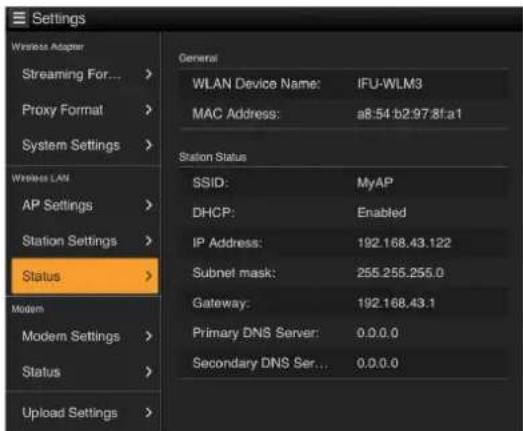
STA mode
Modem settings
Note
"Show Password"
Table of contents
Click a title to access it
Manual assistant
Powered by Anthropic
Waiting for your message
Product information
Brand : SONY
Model : CBK-WA101
Category : Wi-Fi Antenna