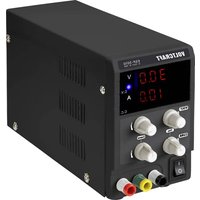
ESP-3010 - Electrical measuring device VOLTCRAFT - Free user manual and instructions
Find the device manual for free ESP-3010 VOLTCRAFT in PDF.


| Product Type | Laboratory Power Supply |
| Brand | Voltcraft |
| Model | ESP-3010 |
| Input Voltage | 230 V/AC (±10%), 50 Hz (±2 Hz) |
| Output Voltage | 0 - 30 V DC, adjustable |
| Output Current | 0 - 10 A, adjustable |
| Display Accuracy | ±0.5% ±1 digit |
| Display Type | Red LED, 3 digits (voltage and current) |
| Protections | Against overloads and polarity reversals |
| Protection Class | I |
| Fuse | F 5.0 A / 250 V, 5 x 20 mm |
| Dimensions (W x H x D) | 226 x 82 x 138 mm |
| Weight | 1.8 kg |
| Operating Temperature | 0 to +40 °C |
| Operating Humidity | <80% relative humidity |
| Continuous Operation Time | 24 hours max. |
| Power Cord Length | 1.5 m |
| Maintenance | Clean with a soft, dry cloth; replace fuse with identical model |
| Safety | Do not open the device; observe safety instructions to avoid electric shock |
Frequently Asked Questions - ESP-3010 VOLTCRAFT
User questions about ESP-3010 VOLTCRAFT
0 question about this device. Answer the ones you know or ask your own.
Ask a new question about this device
Download the instructions for your Electrical measuring device in PDF format for free! Find your manual ESP-3010 - VOLTCRAFT and take your electronic device back in hand. On this page are published all the documents necessary for the use of your device. ESP-3010 by VOLTCRAFT.
USER MANUAL ESP-3010 VOLTCRAFT
Abmessungen (B × H × T)....226 × 82 × 138 mm
Gewicht 1,8 kg
a) Ausgangsspannung
Leerlauf....≤0,3% ±100 mV
Last....≤1%
Restwelligkeit ....≤200 mVp-p
b) Ausgangsstrom
Leerlauf....≤0,3% ±100 mA
Last....≤1%
Restwelligkeit....≤200 mVp-p
VOLTCRAFT
GB Operating instructions
CE
ESP-3010 Laboratory Power Supply
Item no. 2568196
Operating Instructions for download
Use the link www.conrad.com/downloads (alternatively scan the QR code) to download the complete operating instructions (or new/current versions if available). Follow the instructions on the web page.
Intended use
This laboratory power supply functions as a potential-free source of power for the operation of low-voltage units. It has been developed for universal use in the research, development, manufacturing, service and training fields. The units to be operated are connected via the sockets on the front of the device. All operating controls and indicators have been neatly arranged to simplify use. The corresponding power and voltage values are easily visible on the high-contrast LED display. The control dial on the front of the device is used to set current and voltages values. The current consumption of a connected unit may not exceed the maximum amperage as listed under technical data.
The laboratory power supply has a protection against overload and voltage reversal. The device conforms with protection class I. It has been approved for connection only to a grounded power outlet and alternating voltage of 230 V/AC, 50 Hz.
Operation under adverse ambient conditions is not permitted. Adverse ambient conditions are defined as such:
- wetness or high humidity
- dust and flammable gases, vapors or solvents
- thunder storms and/or similar conditions (avoid strong electrostatic fields in general)
For safety and approval purposes, you must not rebuild and/or modify this product. If you use the product for purposes other than those described above, the product may be damaged. In addition, improper use can cause hazards such as short circuiting, fire, electric shock etc.
Read the instructions carefully and keep them. Make this product available to third parties only together with its operating instructions.
This product complies with the statutory national and European requirements. All company names and product names are trademarks of their respective owners. All rights reserved.
Delivery content
• Laboratory power supply
- Mains cable
- Operating instructions
Explanation of symbols

This symbol indicates a health hazard, e.g. electric shock.

The exclamation mark indicates specific risks associated with handling, function and use.

The arrowsymbol indicates special tips and operating information.

The product is intended for use only in indoor dry spaces, it may not become moist or wet.

This device is CE compliant and fulfills all applicable European guidelines.

Ground potential

Protective ground wire connection; do not loosen this screw.
Safety instructions
Read the operating instructions carefully and especially observe the safety information. If you do not follow the safety instructions and information on proper handling in this manual, we assume no liability for any resulting personal injury or damage to property. Such cases will invalidate the warranty/guarantee.
- The laboratory power supply conforms with protection class I and is suited for connection only to a grounded power outlet (230 V/AC, 50 Hz). Make sure that the ground connection is not defective/interrupted as there is a risk of fatal injury in case of malfunction.
- This product is not a toy, keep it out of the reach of children.
Children cannot recognize the dangers that may arise when handling electrical devices. Children may alter settings or insert objects into the air vents on the lab power supply. This poses a risk of fatal injury due to electric shock! Always use the product out of the reach of children.
- Do not leave packaging material lying around carelessly. These may become dangerous playing material for children.
- The laboratory power supply may be set up and used only in dry, closed indoor spaces. It may not become moist or wet. The power supply may not be exposed to extreme temperatures, direct sunlight, vibrations or mechanical stress.
- Use the laboratory power supply only in mild climates, never in the tropics. Review the section on "Technical data" to see the permitted ambient conditions for operation.
- Choose a location for the laboratory power supply that is stable, even, clean and sufficient in size.
- Do not have any open flames in the direct vicinity of the laboratory power supply and do not place any containers with liquids on or near the device.
- When you carry the laboratory power supply from a cold to a warm room, condensation may form. This poses the risk of fatal injury due to electric shock. Thus, always allow the laboratory power supply to reach room temperature before connecting it to the power outlet and turning it on and/or using it.
- Before and during use, make sure that your hands, shoes, clothing, the floor and the device itself are dry.
- Make sure that the insulation of the laboratory power supply, of the safety plugs, of all connected cables and of the mains cable is not damaged or destroyed. Avoid using unprotected wires.
- The mains outlet must be located near to the device and be easily accessible.
- Never pull the mains plug from the socket by pulling at the cable. Always pull it from the mains socket using the intended grips.
- Unplug the mains plug from the mains socket if you do not use the device for an extended period of time.
- Disconnect the mains plug from the mains socket in thunderstorms for reasons of safety.
- Make sure that the mains cable is not squeezed, bent, damaged by sharp edges or put under mechanical stress. Avoid excessive thermal stress on the mains cable from extreme heat or cold. Do not modify the mains cable. Otherwise the mains cable may be damaged. A damaged mains cable can cause a deadly electric shock.
- Do not touch the mains cable if it is damaged. First, power down the respective mains socket (e.g. via the respective circuit breaker) and then carefully pull the mains plug from the mains socket. Never use the product if the mains cable is damaged.
- A damaged mains cable may only be replaced by the manufacturer, a workshop commissioned by the manufacturer or a similarly qualified person, so as to prevent any danger.
- Never plug in or unplug the mains plug when your hands are wet.
- Never pour any liquids over electrical devices or put objects filled with liquid right next to the device. If liquid or an object enters the interior of the device nevertheless, first power down the respective socket (e.g. switch off circuit breaker) and then pull the mains plug from the mains socket. Do not operate the product anymore afterwards, but take it to a specialist workshop.
- When using the device, do not carry any conductive metal objects or jewelry such as chains, bracelets, rings, etc.
- Never leave the laboratory power supply unattended during use.
- Shield all connected units from malfunction and from excess voltage.
- Connecting several devices in in series may cause dangerous voltage which can pose a risk of fatal injury. Heed the low voltage guideline.
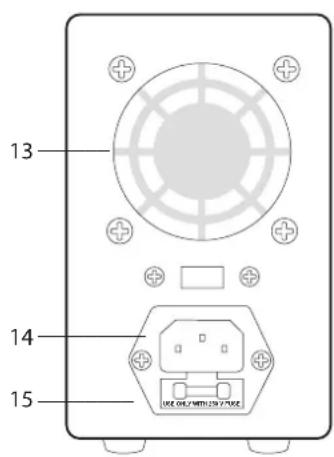
- The lab power supply generates heat during operation. Do not obstruct the ventilation in any way. The power supply is cooled by an air outlet (13). Therefore, never cover the lab power supply.
- In case safe operation is no longer guaranteed, cease use of the device immediately and shield it from unintended use. Safe operation is no longer guaranteed when:
- the power supply is visibly damaged,
- the power supply no longer functions,
- the power supply was stored for an extended period under adverse conditions or
- if the product was damaged during transport.
- Do not use the laboratory power supply as a charger.
- The laboratory power supply is not approved for use on persons or animals.
- Opening any covers on the product or removing parts – unless this is possible by hand – may expose voltage-carrying components. This poses the risk of fatal injury due to electric shock!
- Disconnect the device from the power outlet before opening it.
- Capacitors located in the laboratory power supply may still be charged even when the device is unplugged.
- Only use fuses of the specified type and rated current. The use of mended fuses is not permitted as this poses a fire hazard!
- For installations in industrial facilities, follow the accident prevention regulations for electrical systems and equipment of the government safety organization or the corresponding authority for your country.
- In schools and educational institutions, hobby and do-it-yourself workshops, the use of the laboratory power supply must be supervised by trained staff.
- Please handle the product carefully. Jolts, impacts or a fall even from a low height can damage the product.
- Also observe the safety and operating instructions of any other devices which are connected to the product.
- Consult an expert when in doubt about operation, safety or connection of the device.
- Maintenance, modifications and repairs are to be performed exclusively by an expert or at a qualified shop.
- If you have questions which remain unanswered by these operating instructions, contact our technical support service or other technical personnel.
Operating elements
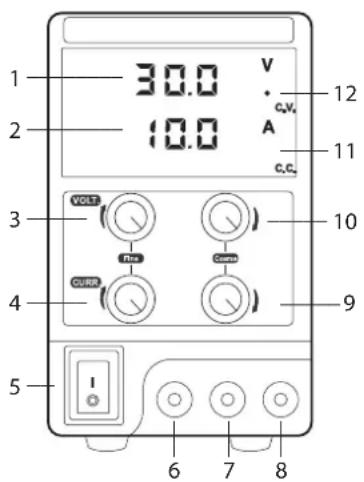
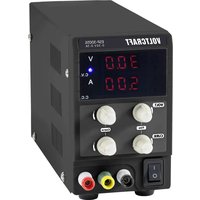
1 "V" LED display for the output voltage
2 "A" LED display for the output current
3 "VOLT Fine" knob for fine voltage adjustment
4 "CURR Fine" knob for fine current adjustment
5 "ON/OFF" switch (ON = switched on, OFF = switched off)
6 "Minus" connection socket for the DC output
7 Connection socket for grounding (yellow-green)
8 "Plus" connection socket for the DC output
9 "CURR Coarse" knob for coarse current adjustment
10 "VOLT Coarse" knob for coarse voltage adjustment
11 "CC" LED display for output current control
12 "CV" LED display for output voltage control
13 Air outlet
14 Power input socket
15 Fuse holder
Getting started and operation
a) Connection and Start-Up
- Place the lab power supply on an sturdy and even surface.
- Initially, the on/off switch (5) should be in the "OFF" position.
- Plug the IEC connector of the supplied power cord into the power input (14) on the back of the unit and plug the power cord into a 230 V/AC, 50 Hz AC outlet.
- Now switch on the lab power supply by pressing the on/off switch (5) ("ON" position).
- The two LED displays (1 and 2) will be lit showing the currently set current value and the voltage value.
- Depending on the position of the "CURR Coarse" knob (9), which limits the output current, either the "CV" LED display (12) for the output voltage control or the "CC" LED display (11) for the output current control will light up.
- The lab power supply is now ready and you can set the output voltage and the current limit.
b) Setting the output voltage
The output of the lab power supply must be in the voltage-controlled state in order to set the correct output voltage.
- Turn the "CURR Coarse" knob (9) clockwise from the left stop to the output current limit until the current limit LED display "CC" (11) turns off and the voltage control LED "CV" (12) goes on.
- Check the "VOLT Fine" knob (3) for fine voltage adjustment. This control knob should be in the mid-position.
- Turn the "VOLT Coarse" knob (10) to roughly the desired output voltage. The "V" LED display (1) shows the currently set voltage. Voltage increases, when the knob is rotated CW and decreases when the knob is rotated CCW.
- The output voltage is then adjusted to an exact value with the "VOLT Fine" knob (3).
If you need to turn the "VOLT Fine" knob (3) all the way to the stop, move it back to the middle position and adjust the voltage using the "VOLT-Coarse" knob (10). Then adjust further by means of the fine adjustment.
c) Setting the current limit
Read section "d) Connecting loads" before attempting to set any current limits. You have to switch on a connected load and the lab power supply to be able to set the exact current limit.
You can only read the current limit value, which is shown in the "A" LED display (1), during operation.
Adjust first the permissible operating voltage of the load to be operated with the two voltage controls "VOLT Coarse" (10) and "VOLT Fine" (3) (see chapter "b) Setting the output voltage").
- Check the "CURR Fine" knob (4) for fine current adjustment. This control knob should be in the mid-position.
- With the "CURR Coarse" knob (9) adjust the output current limit roughly to the desired current strength.
- The current value increases, when the knob is rotated CW and decreases when the knob is rotated CCW.
If both voltage adjustment knobs (3 and 10) are turned all the way to the left, the voltage display shows "00.0" volts. The lab power supply is in the current-controlled state if after that also the output current limit knobs "CURR Coarse" (9) and "CURR Fine" (4) are turned all the way to the left.
d) Connecting the loads
Make sure that the total power of all loads together is not exceeding the maximum power of the lab power supply.
- The loads must be switched off when connecting the loads to the lab power supply. If this is not the case, possible sparking can damage the output sockets and also the plugs.
- Turn the lab power supply off.
- Connect the positive terminal (+) of the load to the red positive terminal (8) of the lab power supply and the minus terminal (-) of the load to the black negative terminal (6) of the lab power supply. For this you should use adequately dimensioned cables with 4 mm banana plugs or standardized lab cables.
- You can attach cable strands using screw terminals. To this end, the socket heads can be screwed on.
- Use the dedicated ground connection (7) of the lab power supply to earth the load.
- Then switch on the lab power supply and the load.
As soon as voltage is applied to the output sockets and the load is switched on, the current values for current limit and voltage will be shown on the LED displays (1 and 2). Depending on the operating mode of the lab power supply (current- or voltage-controlled), the "CC" LED display (11) for current limit or the "CV" LED display for voltage control (12) will be lit.
- If necessary, you can also readjust the current limit or the value for the voltage control, if the output sockets are disconnected from the mains.
• Always switch off loads and lab power supply before disconnecting the loads.

The lab power supply has a protection circuit which will limit the current in the event of a short circuit. Always switch off the lab power supply immediately in the event of a short circuit to avoid overheating and disconnect the loads. Let the lab power supply cool down and make sure that the air can circulate freely. The air outlet (13) should always be clean and dust-free; do not cover the openings of the housing.
The maximum uninterrupted operating time of the lab power supply is 24 hours. After that the lab power supply should be switched off until it has cooled down to ambient temperature.
Maintenance and cleaning
a) General care
- Disconnect the product from the mains socket and disconnect all connected devices before you start cleaning it.
- The product requires no maintenance; Do not take it apart.

Live components may be exposed, if the covers are opened or parts removed (unless this can be done without tools).
- Do not use scouring, chemical or aggressive cleaning agents such as benzene, alcohol or similar chemicals. These might attack the surface of the device. Furthermore, the fumes are explosive and hazardous to your health. Moreover, you should not use sharp-edged tools, screwdrivers or metal brushes, or the like for cleaning
- Clean the product with a soft, clean and dry cloth. Do not apply too much pressure to avoid scratching the housing when cleaning. You can easily remove dust using a clean brush with long, soft bristles.
b) Fuse Replacement

Switch off the lab power supply first, then remove all connection cables from the lab power supply and remove the mains plug from the rear IEC connector (14). Remove the mains plug of the lab power supply from the mains socket.
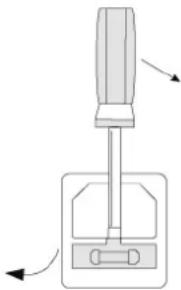
- Remove the rear fuse holder (17) with a suitable screwdriver from the bracket, as displayed.
- Replace the faulty fuse with a new fuse of the same type and with the same rated current (see chapter "Technical data").
- Squeeze the fuse cartridge carefully into the fuse holder.
- Then check that the lab power supply is working properly.
natural_image
Diagram of a screwdriver pressing a button on a base, with directional arrows indicating motion (no text or symbols)Malfunctions
The lab power supply does not work, the displays are blank.
- Check the power switch.
- Check if the IEC socket is properly connected to the power cord connector (14) at the rear of the unit.
- Check the functionality of the mains connection (sockets, fuses, circuit breaker, etc.).
- Check that the proper mains voltage is applied.
Connected loads don't work.
- Check polarity of the connection sockets (5 and 7).
- Check if the current limit is activated.
- Reduce the lab power supply load by removing a load.
- Check the specifications of the loads.
Disposal

This symbol must appear on any electrical and electronic equipment placed on the EU market. This symbol indicates that this device should not be disposed of as unsorted municipal waste at the end of its service life.
Owners of WEEE (Waste from Electrical and Electronic Equipment) shall dispose of it separately from unsorted municipal waste. Spent batteries and accumulators, which are not enclosed by the WEEE, as well as lamps that can be removed from the WEEE in a non-destructive manner, must be removed by end users from the WEEE in a non-destructive manner before it is handed over to a collection point.
Distributors of electrical and electronic equipment are legally obliged to provide free take-back of waste. Conrad provides the following return options free of charge (more details on our website):
• in our Conrad offices
• at the Conrad collection points
- at the collection points of public waste management authorities or the collection points set up by manufacturers or distributors within the meaning of the ElektroG
End users are responsible for deleting personal data from the WEEE to be disposed of.
It should be noted that different obligations about the return or recycling of WEEE may apply in countries outside of Germany.
Technical data
Operating voltage 230 V/AC (±10%)
Frequency....50 Hz (±2 Hz)
Control range of output voltage 0 – 30 V/DC
Control range of output current.... 0 - 10 A
Display accuracy .... ±0,5% ±1 digits
Operating time without interruption....max. 24 h
Fuse..... F, 5.0 A / 250 V, 5 x 20 mm
Protection class ....I
Power cord length....1.5 m
Display.... 3-digit, red LED (voltage) and red LED (current)
Operating temperature/ humidity....0 bis +40 °C, <80% rF
Storage temperature/ humidity .... 0 bis +40 °C, <80% rF
Dimensions (W x H x D) 226 x 82 x 138 mm
Weight 1.8 kg
a) Output voltage
No-load .... ≤0.3 % ±100 mV
Load....≤1 %
Residual ripple....≤200 mVp-p
b) Output current
No-load .... ≤0.3 % ±100 mA
Load.... ≤1 %
Residual ripple....≤200 mVp-p
This is a publication by Conrad Electronic SE, Klaus-Conrad-Str. 1, D-92240 Hirschau (www.conrad.com). All rights including translation reserved. Reproduction by any method, e.g. photocopy, microfilming, or the capture in electronic data processing systems require the prior written approval by the editor. Reprinting, also in part, is prohibited. This publication represents the technical status at the time of printing.
Copyright 2024 by Conrad Electronic SE.
*2568196_v2_0324_02_dm_mh_en_(1)
VOLTCRAFT
F Mode d'emploi
CE
d) Raccordement des charges
natural_image
Diagram of a screwdriver pressing a button on a mechanical component (no text or symbols)Dysfonctionnements
natural_image
Diagram of a screwdriver pressing a button (no text or symbols)Storingen
Zekering.....F, 5,0 A / 250 V, 5 x 20 mm
Veiligheidsklasse ....I
Netkabellengte....1,5 m
Weergave .... 3-stellig, rode LED (Spanning) en rode LED (Stroom)
- a) Ausgangsspannung
- b) Ausgangsstrom
- VOLTCRAFT
- ESP-3010 Laboratory Power Supply
- Operating Instructions for download
- Intended use
- Delivery content
- Explanation of symbols
- Safety instructions
- Getting started and operation
- a) Connection and Start-Up
- b) Setting the output voltage
- c) Setting the current limit
- d) Connecting the loads
- Maintenance and cleaning
- a) General care
- b) Fuse Replacement
- Malfunctions
- Connected loads don't work.
- Disposal
- Technical data
- a) Output voltage
- b) Output current
- d) Raccordement des charges
- Dysfonctionnements
- Storingen
Brand : VOLTCRAFT
Model : ESP-3010
Category : Electrical measuring device