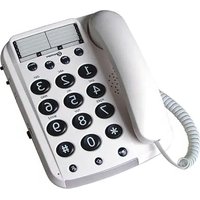
DALLAS10 - Telephone GEEMARC - Free user manual and instructions
Find the device manual for free DALLAS10 GEEMARC in PDF.


| Product type | Large key telephone with volume adjustment |
| Brand | Geemarc |
| Model | DALLAS10 |
| Power supply | Telephone line (minimum line current 18 mA) |
| Direct memory keys | 3 (M1, M2, M3) |
| Indirect memory keys | 10 (0 to 9) |
| Memory capacity | Maximum 16 digits per memory |
| Last number redial | Yes (key ○) |
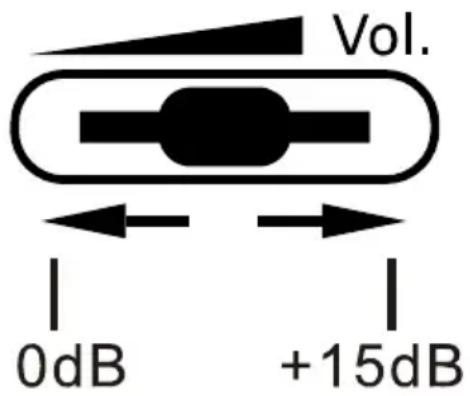
| Reception volume adjustment | 0 dB to +15 dB (VOL button) |
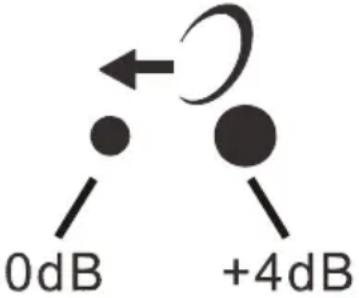
| Transmission volume adjustment | 0 dB to +4 dB (switch ♦) |
| Ringer | On/Off (side switch) |
| Ringer indicator light | Yes |
| Frequency compatibility | Tone (T) and pulse (P) - T/P switch |
| Hearing aid compatibility | Yes (T position) |
| Special keys | R, *, # (access to France Telecom services) |
| Wall mounting | Yes (85 mm spacing) |
| Maintenance | Soft cloth, no cleaning products |
| Operating temperature | 5°C to 45°C |
| Warranty | 2 years parts and labor (France) |
| Standards | RTTE 2014/53/UE, EN60950 (TRT-3) |
| Recycling | WEEE directive - do not dispose of with household waste |
Frequently Asked Questions - DALLAS10 GEEMARC
User questions about DALLAS10 GEEMARC
0 question about this device. Answer the ones you know or ask your own.
Ask a new question about this device
Download the instructions for your Telephone in PDF format for free! Find your manual DALLAS10 - GEEMARC and take your electronic device back in hand. On this page are published all the documents necessary for the use of your device. DALLAS10 by GEEMARC.
USER MANUAL DALLAS10 GEEMARC
If you are using this telephone with a hearing aid, set your hearing aid to the «T» setting.
natural_image
Warning symbol: black exclamation mark inside a triangle (no text or numbers)English:
!!! Please refer to our website: www.geemarc.com for an up to date user guide, as there may be important updates and changes you need to be aware of.!!!

Français:
(*) Classified TNV-3 according to EN60950 standard.
(**) Please note that this switch is not to be moved after setting.
SETTING UP
1 - CONNECTING TELEPHONE
1 - Connect the handset cord.
2 - Connect the line cord to the socket located at rear of telephone then connect the PTT plug*.
2 - RINGER SETTINGS
A switch located on right side allows the ringer to be switched On (☐) or Off (☐).
3 - WALL MOUNTING
To wall-mount your telephone, slide out the clip turn around and slide back into the wall mounting position (located in the base unit, just below the ear piece). This will ensure that the handset stays firmly in position. Make 2 holes in the wall 85mm apart, insert the wall plugs and the wall mounting screws. The screws should protrude from wall by 6-7mm. Place the phone onto the screw-heads and slide down to secure.
4 - TONE/PULSE SWITCH (T/P)\*\*
The Tone/Pulse switch is factory pre-set to Tone position (T). In the UK, all telephone exchanges now use Tone dialing. If your phone does not dial out it is probably being used from an older private switch board (PBX). In this case, the Tone/Pulse switch must be moved to Pulse (P).
USING THE PHONE
1 - ANSWERING INCOMING CALL
- When an incoming call is received the phone will ring and flash. To answer the call lift the handset and speak.
- On completion of the call, carefully replace the handset in the cradle to release the line.
2 - VOLUME RECEIVING ADJUSTMENT
You can increase the volume according to your own hearing requirements.
Use the VOL button, located on the right side, to adjust the level according to your own hearing requirements.
3 - MAKING A CALL
- Lift the handset.
- Await the dial tone and dial required number.
- On completion of the call, carefully replace the handset in the cradle.
USING THE PHONE
4 - SENDING LEVEL ADJUSTMENT
If your voice is quiet or called parties have difficulty hearing you, you can increase the sending level volume with the switch located on the right side.
5 - LAST NUMBER REDIAL
- Lift the handset.
- Await the dial tone and press ○● button.
- The previously dialled number will be automatically redialled (not in use for memory numbers).
6 - R, \* & # BUTTONS
These are used with the new services provided on digital exchanges. For details please contact your network operator.
7 - STORING TELEPHONE NUMBERS
Your phone can store 3 direct and 10 indirect memories (16 digits maximum for each memory).
- Lift the handset.
- Press → button.
- Dial the telephone number you wish to store.
USING THE PHONE
- Press

button.
- Press one of the direct memory buttons, M1, M2, M3.
Or press MEM and any button 0 to 9 on the key pad under which you wish to store the telephone number in indirect memory. - Replace the handset.
Note: Numbers will be lost if you disconnect your phone. Entering a new number in memory will automatically erase the previous number.
8 - DIALLING STORED NUMBER
- Lift the handset and await the dial tone.
- Press appropriate direct memory button M1, M2, or M3. The stored number will be dialled out automatically.
Or press the MEM button followed by the keypad 0 to 9 button under which the desired number is stored. The stored number will be dialled out automatically.
To register your stored phones numbers, use the index located on the base.
SAFETY INFORMATION
General
Do not open the unit. Contact the helpline for all repairs.
The phone is capable of amplifying sounds to a loud volume. It is important to instruct all potential users of its proper operation. It is advised to adjust the volume control to its minimum level (Low) when not in use and alert other users that hearing damage can potentially result from misuse.
Cleaning
Clean the telephone with a soft cloth. Never use polishes or cleaning agents - they could damage the finish or the electrics inside.
Environmental
Do not expose to direct sunlight.
Always ensure there is a free flow of air over the surfaces of the telephone.
Do not place any part of your product in water and do not use it in damp or humid conditions e.g. bathrooms.
Do not expose your product to fire or other hazardous conditions.
Unplug your phone from the telephone socket during thunderstorms because it could damage your telephone. Your guarantee does not cover thunderstorm damage.
The telephone is designed for working within a temperature range of 5irc C to 45irc C.
GUARANTEE
From the moment your Geemarc product is purchased, Geemarc guarantee it for the period of two years. During this time, all repairs or replacements (at our discretion) are free of charge. Should you experience a problem then contact our help line or visit our website at
www.geemarc.com. The guarantee does not cover accidents, negligence or breakages to any parts. The product must not be tampered with or taken apart by anyone who is not an authorized Geemarc representative. The Geemarc guarantee in no way limits your legal rights.
IMPORTANT: YOUR RECEIPT IS PART OF YOUR GUARANTEE AND MUST BE RETAINED AND PRODUCED IN THE EVENT OF A WARRANTY CLAIM.
Please note: The guarantee applies to the United Kingdom only
DECLARATION: Geemarc Telecom SA hereby declares that this product is in compliance with the essential requirements and other relevant provisions of the Radio and Telecommunications Terminal Equipment Directive 2014/53/UE and in particular article 3 section 1a, 1b and section 2. The telephone does not operate if the line current is lower than 18 mA.
The declaration of conformity may be consulted at www.geemarc.com
RECYCLING DIRECTIVES
Telephone connection: Voltages present on the telecommunication network are classified TNV-3 (Telecommunication Network Voltage) according to the EN60950 standard.
The WEEE (Waste Electrical and Electronic Equipment) has been put in place for the products at the end of their useful life are recycled in the best way.
When this product is finished with, please do not put it in your domestic waste bin.
Please use one of the following disposal options:
- Remove the batteries and deposit them in an appropriate WEEE skip. Deposit the product in an appropriate WEEE skip.
- Or, hand the old product to the retailer. If you purchase a new one, they should accept it.
Thus if you respect these instructions you ensure human health and environmental protection.


For product support and help visit our website at
www.geemarc.com
Telephone 01707 387602
Or fax 01707 832529
INSTALLATION
General Description
UGDallas10_EnFrGe_V1.7
geemarc™ United Kingdom Telecom SA
5B Swallow Court
Swallowfields
Welwyn Garden City
Hertfordshire, AL7 1SB
For product support:
01707 387602
www.geemarc.com
geemarc™ FRANCE Telecom SA
Parc de l'Etoile
2 rue Galilée
59791 Grande-Synthe Cedex



- English:
- Français:
- SETTING UP
- - CONNECTING TELEPHONE
- - RINGER SETTINGS
- - WALL MOUNTING
- - TONE/PULSE SWITCH (T/P)\*\*
- USING THE PHONE
- - ANSWERING INCOMING CALL
- - VOLUME RECEIVING ADJUSTMENT
- - MAKING A CALL
- - SENDING LEVEL ADJUSTMENT
- - LAST NUMBER REDIAL
- - R, \* & # BUTTONS
- - STORING TELEPHONE NUMBERS
- - Press
- - DIALLING STORED NUMBER
- SAFETY INFORMATION
- General
- Cleaning
- Environmental
- GUARANTEE
- RECYCLING DIRECTIVES
- INSTALLATION
- General Description
Brand : GEEMARC
Model : DALLAS10
Category : Telephone