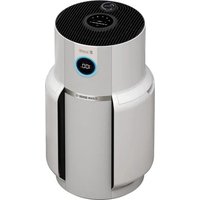
NeverChange5 HP300 - Air purifier SHARK - Free user manual and instructions
Find the device manual for free NeverChange5 HP300 SHARK in PDF.


| Product Type | Air Purifier |
| Brand | Shark |
| Model | NeverChange5 HP300 |
| Power Supply | Mains 220-240 V, 50 Hz |
| Filtration Technology | HEPA filter (non-washable, up to 5 years), washable mesh dust filters, optional Anti-Odor Technology |
| Recommended Cleaning Area | 28 m² (according to standard GB/T18801-2015) |
| Fan Speeds | 5 (Quiet, Low, Medium, High, Max) + Auto Mode |
| Auto Mode | Adjusts speed in real time based on air quality |
| Eco Mode | Fan stops if quality at 100% for 5 min in Auto Mode |
| Timer | 1 to 12 hours, auto shut-off |
| Air Quality Display | Front screen with percentage, particle sizes PM1/PM2.5/PM10, light ring (blue/orange/red) |
| Anti-Odor Technology | Optional cartridge with intensity dial (Off, Low, Medium, High) |
| Control | Top touch panel + infrared remote control |
| Child Lock | Key lock by pressing and holding for 2 seconds |
| Maintenance of mesh dust filters | Wash with running water (dry 28h) or vacuum; indicator on screen |
| Maintenance of HEPA filter | Non-washable; replace approximately every 5 years |
| Exterior Cleaning | Damp microfiber cloth (soapy water), every 2 months |
| Power Consumption | Not specified |
| Noise Level | Not specified |
| Commercial Warranty | 2 years (online registration within 28 days) |
| Customer Service | +33 (800) 908874, toll-free, Mon-Sun 8am-8pm |
| Weight | Approximately 5.5 kg (estimated) |
| Dimensions (W x D x H) | Approximately 30 x 30 x 50 cm (estimated) |
Frequently Asked Questions - NeverChange5 HP300 SHARK
User questions about NeverChange5 HP300 SHARK
0 question about this device. Answer the ones you know or ask your own.
Ask a new question about this device
Download the instructions for your Air purifier in PDF format for free! Find your manual NeverChange5 HP300 - SHARK and take your electronic device back in hand. On this page are published all the documents necessary for the use of your device. NeverChange5 HP300 by SHARK.
USER MANUAL NeverChange5 HP300 SHARK
natural_image
Exterior view of a modern white electric air fryer with a digital display showing 100% power (no text or symbols on the device itself)IMPORTANT SAFETY INSTRUCTIONS
HOUSEHOLD USE ONLY
WARNING
TO REDUCE THE RISK OF FIRE, ELECTRIC SHOCK, OR INJURY:
GENERAL WARNINGS
- DONOT operate any unit with a damaged cord or plug. Consult your local waste authority for information regarding available recycling and/or disposal options.
- DO NOT run cord under carpeting. DO NOT cover cord with throw rugs, runners, or similar coverings. DO NOT route cord under furniture or appliances. Keep cord away from high-traffic areas where it will not be tripped over.
- If the power cord is damaged, it must be replaced by the manufacturer, its service agent, or similarly qualified persons in order to avoid a hazard.
- This appliance should only be placed on flat and dry surfaces.
- This appliance is not intended for use by anyone (including children) with reduced physical, sensory or mental capabilities, or lack of experience and knowledge, unless they have been given supervision or instruction concerning use of the appliance by a person responsible for their safety.
- Children should be supervised to ensure that they DO NOT play with the appliance.
- Cleaning and user maintenance shall not be made by children without supervision.
- Prior to cleaning or other maintenance, the appliance must be unplugged from the electrical outlet.
- DO NOT handle plug or appliance with wet hands.
- DO NOT use without filters in place.
- Only use Shark® branded filters and accessories.
- DO NOT damage the power cord:
a) DO NOT pull or carry appliance by the cord or use the cord as a handle.
b) DO NOT unplug by pulling on cord. Grasp the plug, not the cord.
c) DO NOT stand the appliance on the power cord, close a door on the cord, pull the cord around sharp corners, or leave the cord near heated surfaces. - DO NOT use with any opening blocked; keep free of dust, lint, hair, and anything that may reduce airflow.
- DO NOT use if airflow is restricted. If the air paths become blocked, turn the appliance off and unplug from electrical outlet. Remove all obstructions before you plug in and turn on the unit again.
- DO NOT use if appliance is not working as it should, or has been dropped, damaged, left outdoors, or dropped into water.
- DO NOT place appliance on unstable surfaces such as chairs or tables.
-
DO NOT use in the following areas:
a) Wet or damp surfaces
b) Outdoor areas
c) Spaces that are enclosed and may contain explosive or toxic fumes or vapors (lighter fluid, gasoline, kerosene, paint, paint thinners, mothproofing substances, or flammable dust) -
Turn off all controls before plugging in or unplugging the appliance.
- Unplug from electrical outlet when not in use and before general maintenance or cleaning. For mesh dust filter maintenance, please refer to the mesh dust filter maintenance section.
- Hand wash exterior/hard plastic/non-electronic parts with a damp cloth only. Do not immerse. Cleaning with chemicals could damage the unit.
- Make sure filters are in place after routine maintenance.
ANTI-ODOUR TECHNOLOGY
- Observe the following when interacting with the Anti-Odour Technology cartridge.
a) DO NOT attempt to disassemble Anti-Odour Technology cartridge.
b) Avoid direct contact with the fragrance pod in the cartridge.
c) DO NOT directly inhale from the anti-odour technology cartridge.
d) Keep away from children and pets.
e) Keep away from heat, sparks, and open flame.
f) DO NOT place in direct sunlight.
g) Avoid contact with fabrics and finished surfaces.
FRAGRANCE CARTRIDGE FIRST AID
a) Eye contact: Remove contact lenses if present. Rinse continuously with water for several minutes
b) Skin contact: Wash hands thoroughly after handling. If irritation or rash develops, seek medical advice/attention.
c) Inhalation: Move person to fresh air if they are experiencing any respiratory symptoms. If symptoms persist, seek medical advice/attention.
d) Ingestion: DO NOT induce vomiting. Seek medical advice/attention.
- Dispose of batteries properly. Keep batteries away from children at all times. Even used batteries can cause injury.
WARNING: Chemical Burn Hazard. Keep batteries away from children.
This product contains a lithium button/coin cell battery. If a new or used lithium button/coin cell battery is swallowed or enters the body, it can cause severe internal burns and can lead to death in as little as 2 hours. When not changing batteries, keep the battery compartment completely closed. If the battery compartment does not close securely, stop using the product, remove the batteries, and keep them away from children. If you think batteries might have been swallowed or placed inside any part of the body, seek immediate medical attention.
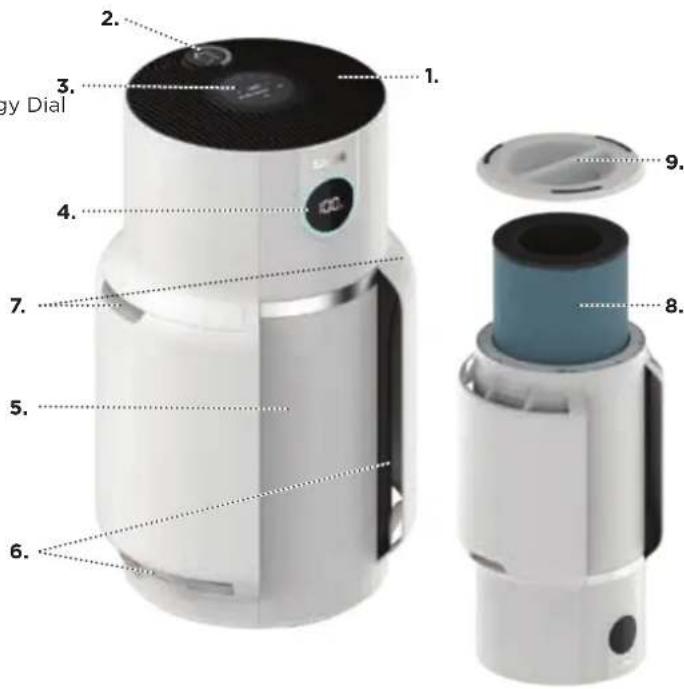
Parts:
- Air Output Vents
- Anti-Odour Technology Dial
- Control Panel
- Front Display
- Air Purifier Body
- Air Intake Vents
- Mesh Dust Filters
- HEPA Filter
- HEPA Filter Door
• Make sure the front panel of the air purifier faces away from the closest wall.
- Do not move the unit while it is running. Turn off the power and unplug the air purifier before moving it.
• Make sure the air intake vents are not blocked.
- Do not place anything on the air purifier.
- Do not place the air purifier near heaters or radiators.
- Keep the air purifier out of direct sunlight and away from water or other liquid.
- Keep all nearby doors and windows closed when operating the air purifier.
- Avoid using in very humid environments.
Note: Anti-Odour Technology is not included on all Shark HP300 series products.
natural_image
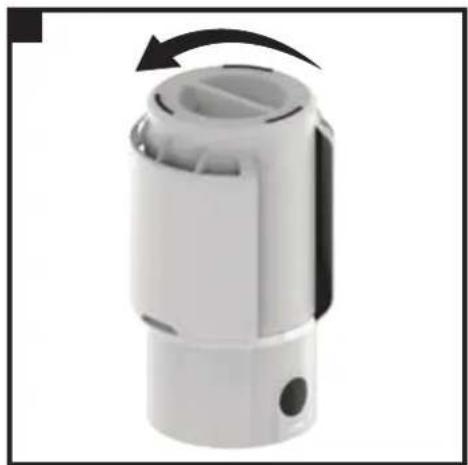
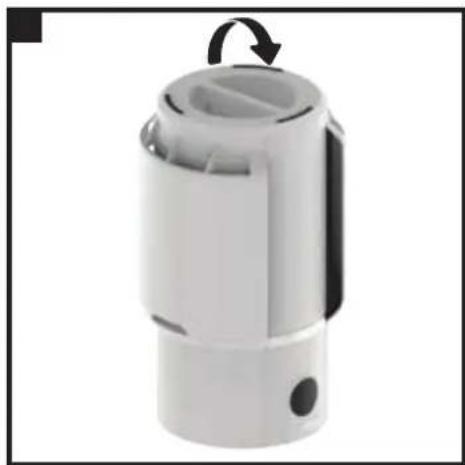
White plastic mechanical component with a black arrow indicating rotation (no text or symbols visible)- DO NOT plug in the air purifier. First, carefully turn the air purifier upside down and place it on a level floor surface. Rotate the filter door counterclockwise to unlock it, then lift it off to access the HEPA filter.
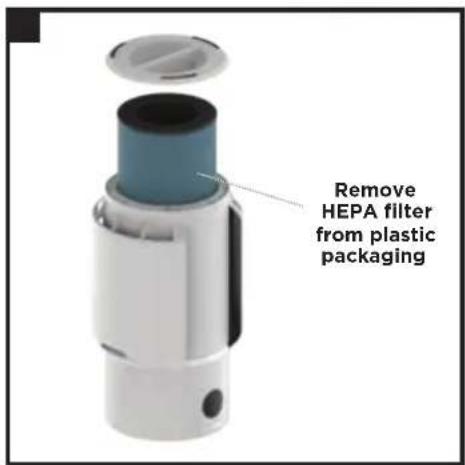
- Take the HEPA filter out of its plastic packaging. Reinstall the HEPA filter in either orientation.
natural_image
White plastic mechanical component with a circular arrow indicating rotation (no text or symbols visible)- With the HEPA filter reinstalled, rotate the filter door clockwise until it clicks into place.
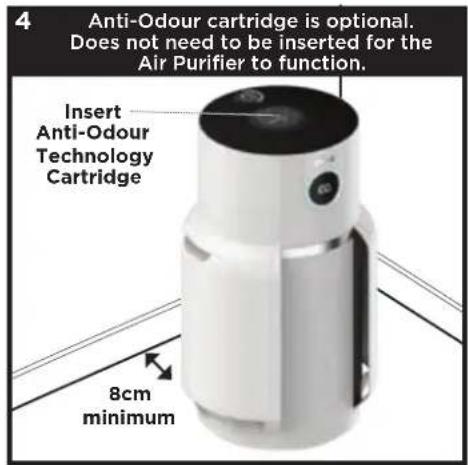
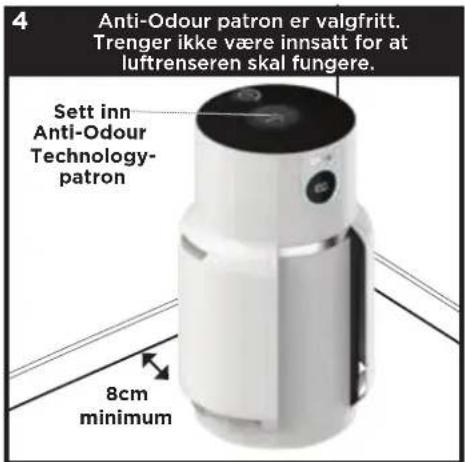
- Set up the air purifier on a flat, level, floor surface, at least 3 inches (8 cm) away from walls and objects. If Anti-Odour Technology is included with your air purifier, find the odour cartridge and follow the instructions to install it.
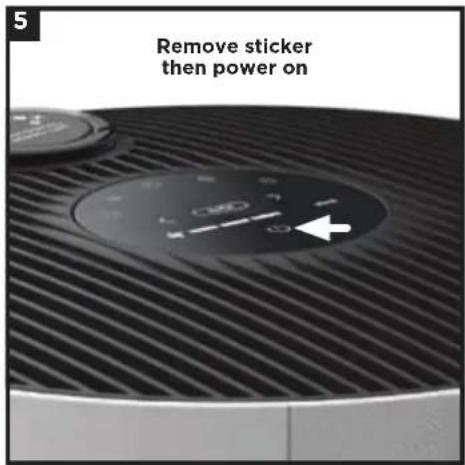
- Carefully remove the yellow sticker on the top of the air purifier to access the control panel.
Plug the air purifier into an electrical outlet and press the power button on the top control panel.
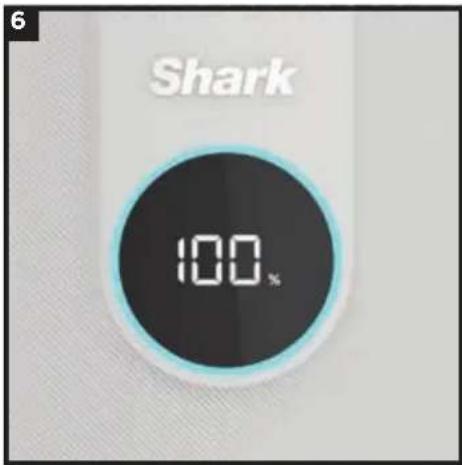
- When the air purifier power is on, the air purifier will begin to analyse the air quality, indicated by the rotating lights. After a few seconds, the air purifier will display the current air purification status.
CONTROL PANEL
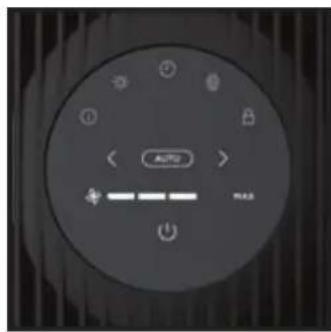
There is a control panel on the top of the air purifier and a display screen on the front.
TOP CONTROL PANEL
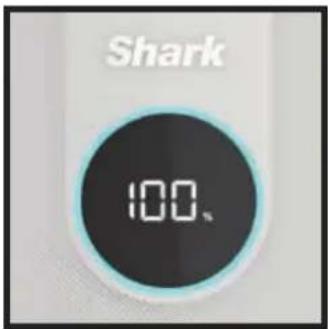
FRONT DISPLAY SCREEN
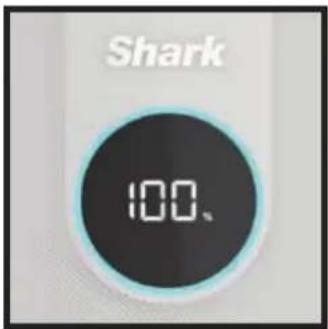
Displays the current air purification status based on the Air Info mode selected on the top control panel.
TOP CONTROL PANEL BUTTONS

On/Off: Press to turn the power on or off.

Auto Mode: Press to turn on Auto Mode. In this setting the fan speed automatically adjusts based on real-time air quality readings. As the air quality improves, the fan speed will decrease. If air quality worsens, the fan speed will increase. Leave your unit in Auto Mode for optimal filter life and performance.

Fan Speed: Adjusts the speed of the fan. Select one of 5 settings: 1 Quiet, 2 Low, 3 Medium, 4 High, 5 Maximum. Select by using the arrows on the control panel. Note: If fan speed is manually changed, Auto Mode will be deactivated. For tips and more information, see the Optimising Fan Speed section.

Air Info: Press to switch between air purification display options. See the Air Info Settings section for more information.

Shut-Off Timer: Set the number of hours for the air purifier to run before it automatically shuts off. Timer can be set from 1 to 12 hours.

Brightness: Adjusts the brightness of both the front display screen and the top control panel. Switch between 3 options: full brightness, partially dim, fully dim. In fully dim mode, the air purifier will continue to run with the LED light off—perfect for nighttime.

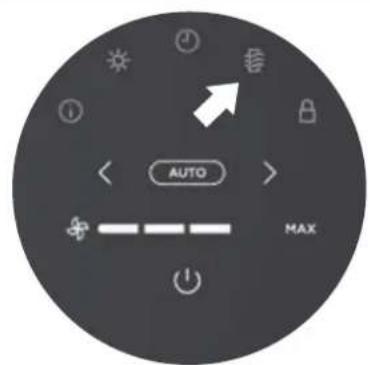
Dust Filter Life: Press to show the remaining life of the mesh dust filters before additional maintenance is required. When Dust Filter Life reaches 0%, the filter icon will flash to indicate the mesh dust filters need to be checked for debris buildup. See Mesh Dust Filter Maintenance section for more information.

Child Lock: Press and hold for two seconds to lock the top control panel buttons. To unlock, press and hold for two seconds again.
Tips and Tricks:

Optimise Performance In Eco Mode: If 100% air purification status is achieved for 5 minutes in Auto Mode, your air purifier will enter Eco Mode. Your unit's filter life will be optimised.

= Turn Off Beeping: To turn off notification sounds, press and hold the Air Info and Child Lock buttons at the same time for two seconds. To resume, press and hold both buttons again.
AIR INFO SETTINGS
The built-in sensor detects your air purification status to give you real-time information. Use the AIR INFO button ⓘ to switch between air status display options.
| INFO | FRONT DISPLAY SCREEN | REAL-TIME READING |
| % STATUS | 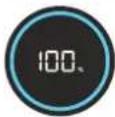 | Displays the air purification status rating:· Poor: 0%-69% · Fair: 70%-84% · Good: 85%-100%% STATUS uses particulate matter (PM) air purification standards as determined by the EPA (United States Environmental Protection Agency) to calculate the status rating. |
| PARTICLE SIZES | The PM (particulate matter) value is the amount of particulate in your air, measured in micrograms (μg) per cubic metre. Your air purifier measures three particle sizes, PM1, PM2.5, and PM10. | |
| PM1 | 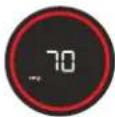 | Displays the number of PM1-sized particles in your air, including ultra-fine allergens. |
| PM2.5 | 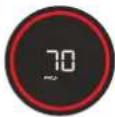 | Displays the number of PM2.5-sized particles in your air, including smoke. |
| PM10 | 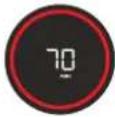 | Displays the number of PM10-sized particles in your air, including dust, and pollen. |
UNDERSTANDING YOUR AIR QUALITY
The rings on the front display will change colour as your air purification status changes, allowing you to easily monitor the purification even when the air purifier is across the room.
GOOD
85-100%
0-25
particles
A blue ring means your air purification status is good, with a low level of particle concentration.
FAIR
70-84%
26-80
particles
An amber ring means your air purification status is fair, with a moderate level of particle concentration. For better results, increase fan speed or select Auto Mode.
POOR
0-69%
81-430+
particles
A red ring means your air purification status is poor, with a high level of particle concentration. For better results, increase fan speed or select Auto Mode.
Note: The air purification status sensor uses a cumulative particle count across all particle sizes to determine air purification status.
OPTIMISING FAN SPEED
Your air purifier is equipped with 5 fan speed settings. Adjust fan speed to Optimise your cleaning performance.
DISPLAY SPEED BEST FOR
| MAX | AUTO Optimising HEPA filter life |
| 1-2 Quiet operation | |
| 3-4 Reducing odours. | |
| 5 (MAX) Maximum purification and debris capture. |
TROUBLESHOOTING AND FREQUENTLY ASKED QUESTIONS
| Product | What are the recommended settings? | We recommend using this air purifier in Auto Mode. Auto Mode leverages your air purifier's particle sensor, and this adjusts the fan speed automatically. Higher fan speeds work best for reducing odours and capturing debris most effectively. |
| Where should I set up my air purifier? | We recommend setting up the air purifier in the room of your home where there is the most activity. This will help to clear the air of pollutants and odours as they are introduced. | |
| What is Eco mode? | If 100% status is achieved for 5 minutes in Auto Mode, your air purifier will enter Eco Mode. The fan will turn off until a significant number of particles are detected, optimising your HEPA filter's life. | |
| Can I mute the air purifier, so it doesn't beep when pressing the buttons? | To turn off notification sounds, press and hold the Air Info 1 and Child Lock 2 buttons at the same time for two seconds. To reactivate sounds, press and hold both buttons for 2 seconds again. | |
| Why are the top control panel buttons not working? | Your air purifier may have the child lock setting activated. Press and hold the Child Lock 3 button for two seconds to turn this setting on or off. | |
| Air Quality | Why is my air purification status always at 100%? | If your air purifier displays a blue ring, your air purification status is good. However, air purification status will fluctuate as you introduce pollutants into your home. Activities like smoking, cooking, dusting, or spraying cleaning products (among other things) can add pollutants to your air. Our Auto IQ technology tracks this fluctuation in real time and adjusts as it detects particles. To determine if the sensor is working correctly, spray a small amount of perfume or aerosol cleaning product near the sensor on the back of the air purifier. Please visit sharkclean.eu for more information. |
| Why is my air purification status never at 100%? | If your air purification status never reaches 100%, make sure that the HEPA filter is properly installed and that its original plastic packaging has been removed. Activities like smoking, burning candles, running a humidifier, opening windows, and cooking (among other things) can add more pollutants to your air. Make sure to survey your environment and remove anything that could be causing low air purification status. We also recommend turning off the unit and unplugging. Then locating the air status sensor on the back side of the air purifier and using a hand vacuum hose with attachment to clean the area around the air status sensor. | |
| Mesh Dust Filter | What are these filters on both sides of the air purifier for? | These easy-to-clean mesh dust filters capture large debris like hair, dust, and lint to protect the 3-layer HEPA filter. Maintenance is required on these mesh dust filters when indicated on the front display. Refer to the Mesh Dust Filter Maintenance section for more information. |
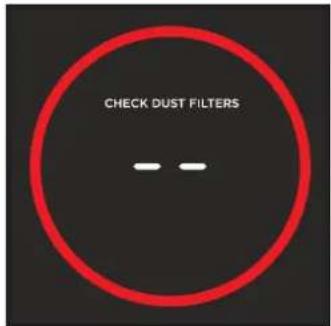
| How do I know when to clean these 2 filters? | When the mesh dust filters need maintenance, the front display will show a pulsing red ring along with the text “check dust filters.” Refer to the Mesh Dust Filter Maintenance section for more information. | |
| HEPA Filter | Can I wash the HEPA filter? | No, the HEPA filter is not washable. Keep filter away from water. |
Checking the Mesh Dust Filters:
When the mesh dust filters need maintenance, the front display will show the following screen with a pulsing red ring:
Cleaning the Mesh Dust Filters:
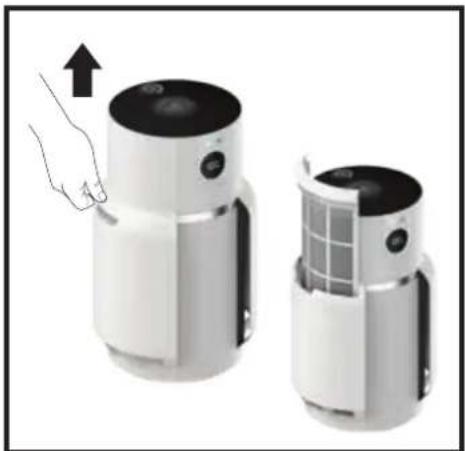
When the Check Dust Filters message appears on the front display, remove the dust filters and inspect them for debris. If maintenance is required, be sure to KEEP THE AIR PURIFIER PLUGGED IN and running, and complete the following steps:
natural_image
Two white industrial devices with control knobs and ventilation grilles, one being lifted by a hand (no text or symbols visible)- LOCATE AND REMOVE MESH DUST FILTERS
Gently slide up the filters to remove them. Check the screens for dust and debris buildup.
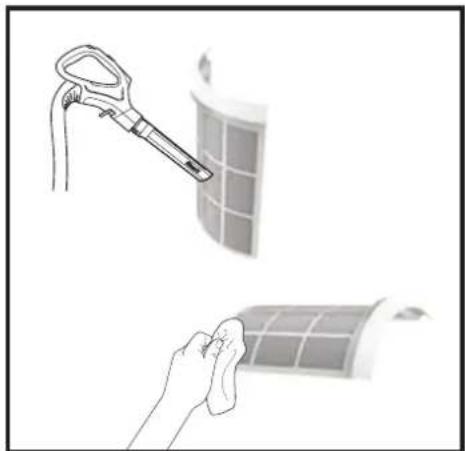
natural_image
Illustration showing a hand cleaning a grid panel with a tool and a magnified view of the device (no text or symbols present)- CLEAN DUST FILTERS
Use a vacuum cleaner on low power with a soft brush attachment OR a cloth/towel to remove debris from the mesh screens. DO NOT use abrasive chemical cleaners.
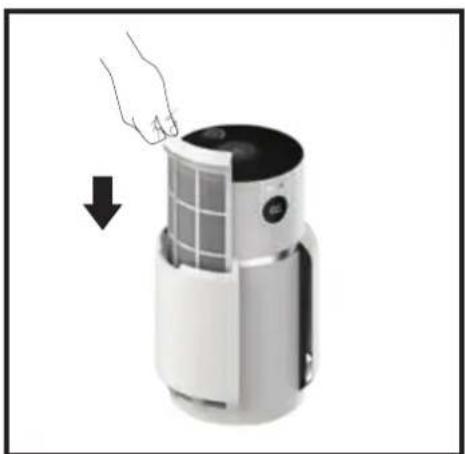
natural_image
Hand placing a small panel into a white cylindrical device with a grid window, showing a downward arrow (no text or symbols visible)- REINSTALL MESH DUST FILTERS
Ensure that the air purifier is switched on and gently reinsert the mesh dust filters into the slots on the sides. Be sure to push each dust filter into place until it is flush with the air purifier body.
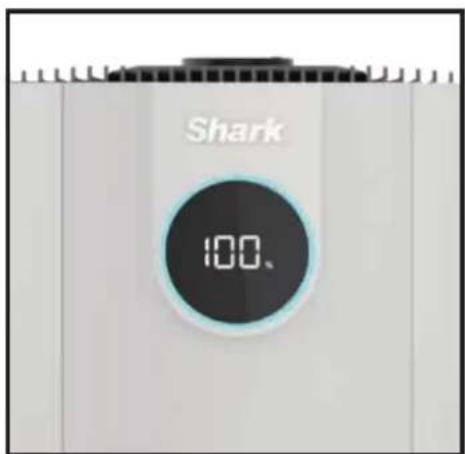
- RECALIBRATION
Once both mesh dust filters have been cleaned and reinstalled, the air purifier will recalibrate and begin to analyse air purification status, indicated by the rotating lights.
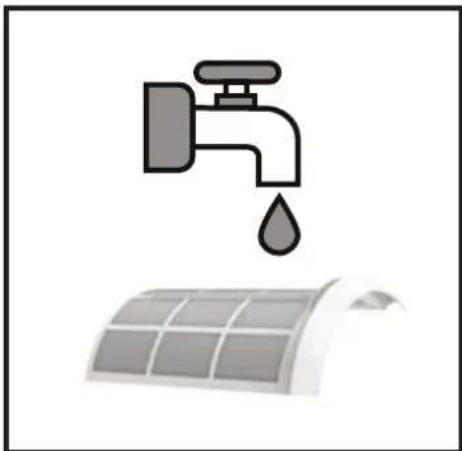
natural_image
Illustration of a faucet with a water droplet above a solar panel array (no text or symbols)- ADDITIONAL CLEANING (NOT REQUIRED)
If additional cleaning is required, switch off the air purifier and rinse the mesh dust filters with room temperature tap water. Be sure to completely dry the screens for 12 hours before reinstalling. DO NOT USE the air purifier when mesh filters are wet.
Note: To manually reset the Check Dust Filters indicator, press and hold the filter icon on the top control panel for 1-2 seconds.
MAINTAINING YOUR AIR PURIFIER
NOTE: Unplug the air purifier whenever doing any cleaning or maintenance (other than checking the mesh dust filters.)
Exterior Cleaning:
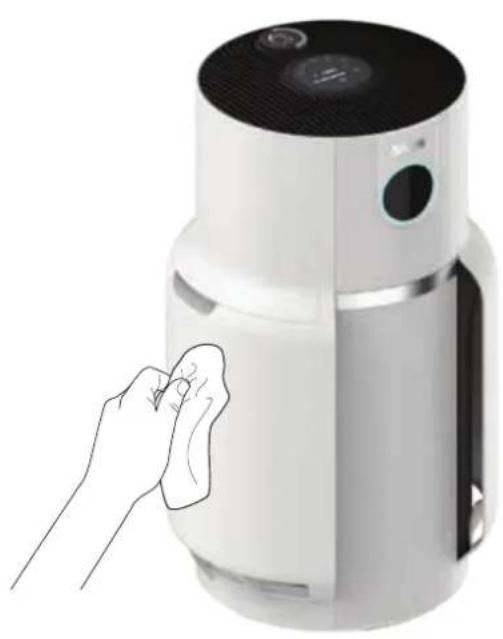
For best results, clean the exterior every two months or as needed. Use a microfiber cloth to remove dust. To clean, wipe down the exterior with a microfiber cloth dampened with warm, soapy water. Avoid excess water and abrasive chemical cleaners to prevent damage.
Interior Cleaning:
For best results, clean the interior of the air purifier every two months or as needed. Remove the filter door, take out the HEPA filter, and use a vacuum cleaner or a microfiber cloth to remove dust and debris from the interior. DO NOT use abrasive chemical cleaners or water on the inside of the air purifier.
natural_image
Hand cleaning a white air purifier with a cloth, no text or symbols visible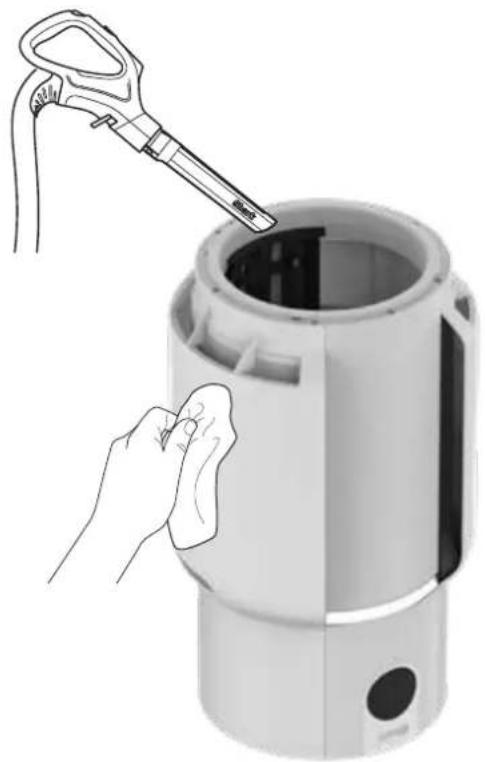
natural_image
Illustration of a hand cleaning a cylindrical device with a tool, no text or symbols presentANTI-ODOUR TECHNOLOGY
NOTE: Anti-Odour Technology is not included on all Shark HP300 series products.
- OPEN THE PACKAGED ODOUR CARTRIDGE ASSEMBLY
Remove the odour cartridge assembly from the cardboard box and can.
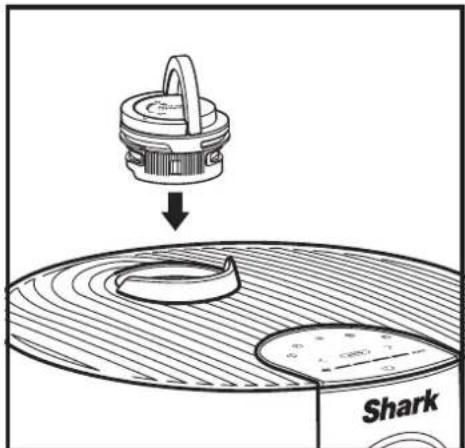
- INSERT ODOUR CARTRIDGE ASSEMBLY INTO AIR PURIFIER
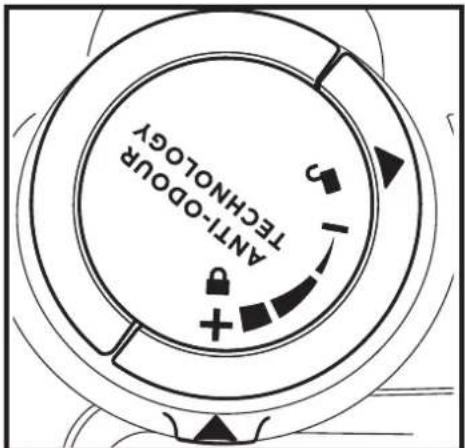
Flip up the handle on the odour dial, align the arrows, then insert the assembly into the air purifier.
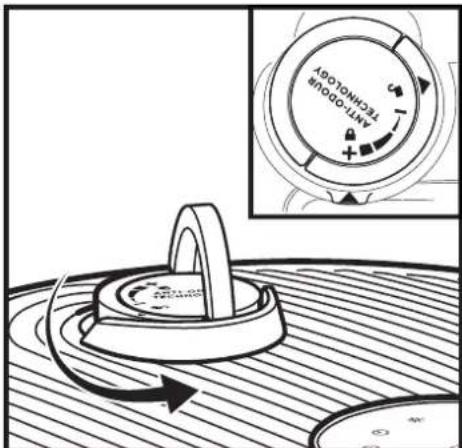
- ROTATE UNTIL CLICK
To lock and engage the odour cartridge assembly, rotate it counterclockwise until it clicks at least once. Continue to rotate the dial toward the high position to increase the intensity.
SETTINGS
Settings: The Anti-Odour Technology dial has 4 intensity settings: Low, Medium, High, and Off.
| ODOUR DIAL POSITION | CLICKS SETTING RECO | MMENDED FOR |
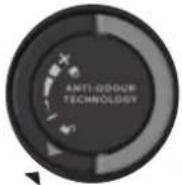 | 1 OFF | |
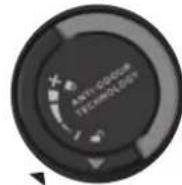 | 2 LOW | When you are not actively looking to reduce odours. This will extend the life of the odour cartridge.Mild odour events such as bin smells.Small spaces like a bathroom or entryway. |
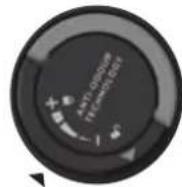 | 3 MEDIUM | Strong odour events such as cooking or pet smells.Mid-sized spaces like a bedroom or kitchen. |
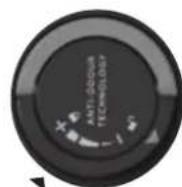 | 4 HIGH | Optimal odour-reducing performance.Extreme odour events such as smoke or lingering burnt smells.Large spaces like a living room. |
Note: Adjusting the fan speed is another way to control Anti-Odour Technology intensity. See the Optimising Fan Speed section for more information.
LOW
Rotate the dial to the Low position to decrease intensity to the lowest level when in use.
HIGH
Rotate the dial to the High position to increase intensity to the highest level when in use.
TIPS
Odour Cartridge Removal
- The odour cartridge can be removed if you don't want to use the Anti-Odour Technology.
- To remove the cartridge, first remove the odour cartridge assembly from the air purifier. Flip up the handle on the odour cartridge assembly and rotate clockwise until the two arrows are aligned. Pull the handle up and remove from the air purifier.
- Hold the odour cartridge assembly so that the coloured base is visible and rotate the cartridge anticlockwise in the dial housing to remove.
- The dial housing can then be inserted into the air purifier.
Maintenance Required
- Replace the cartridge as recommended under Odour Cartridge Replacement.
- Visit sharkclean.eu to learn more and purchase replacements.
Fragrance Strength Over Time
- The intensity of the Anti-Odour Technology's fragrance may diminish over time. It may also have no noticeable fragrance at all. This is natural and does not indicate that the technology is not working. Follow replacement instructions to ensure continued performance.
ANTI-ODOUR TECHNOLOGY REPLACEMENT
NOTE: Anti-Odour Technology is not included on all Shark HP300 series products.
natural_image
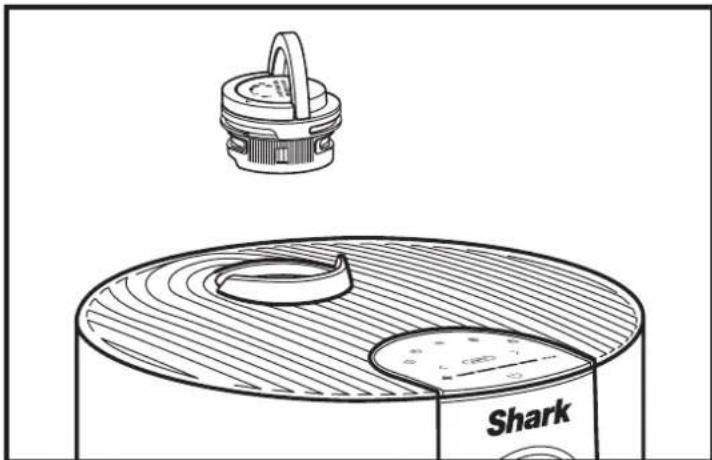
Technical line drawing of a Shark-shaped device with a circular base and top component (no text or symbols)- REMOVE THE ODOUR CARTRIDGE ASSEMBLY
Flip up the handle and rotate the dial counterclockwise until the two arrows are aligned. Pull the handle to remove the dial from the air purifier.
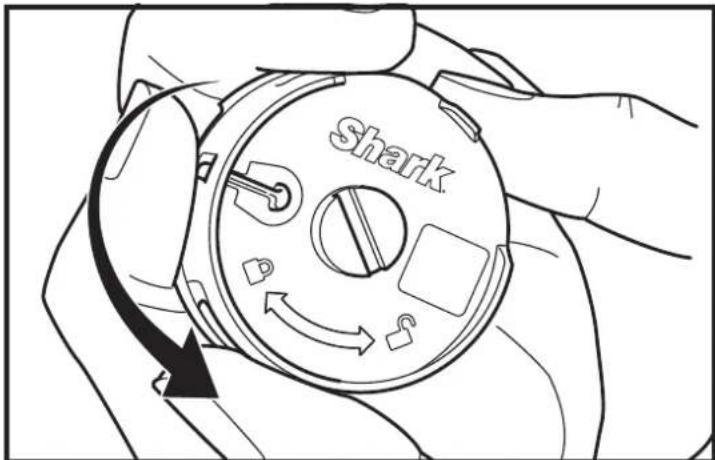
- REMOVE OLD ODOUR CARTRIDGE
Rotate the cartridge counterclockwise in the dial housing and pull out the cartridge to remove it.
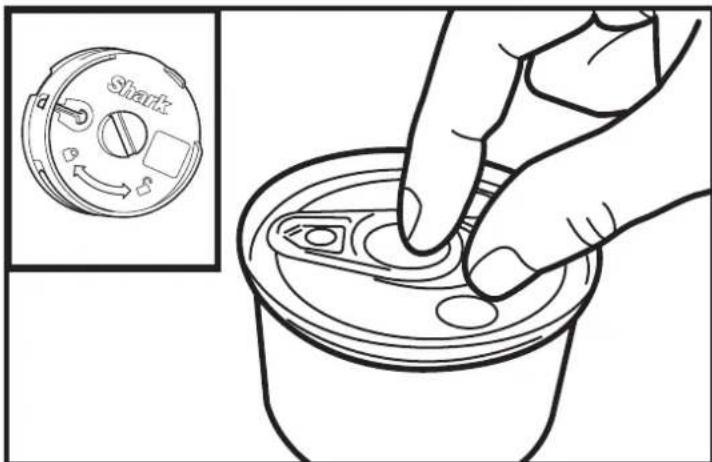
natural_image
Line drawing of a hand pressing down on a can with a small inset showing the shaker's internal components (no text or symbols)- REMOVE NEW CARTRIDGE FROM CAN
Remove the new odour cartridge from the sealed packaging. To maintain the life of the cartridge, keep it in the sealed packaging until you are ready to install it.
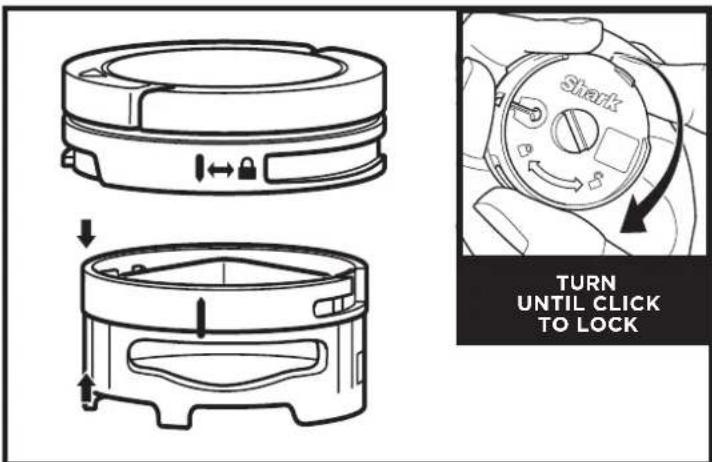
- INSTALL NEW CARTRIDGE IN DIAL
Align the yellow arrow on the side of the cartridge with the yellow arrow on the side of the dial cover, then insert the cartridge into the dial. Rotate the cartridge clockwise to lock it in place.
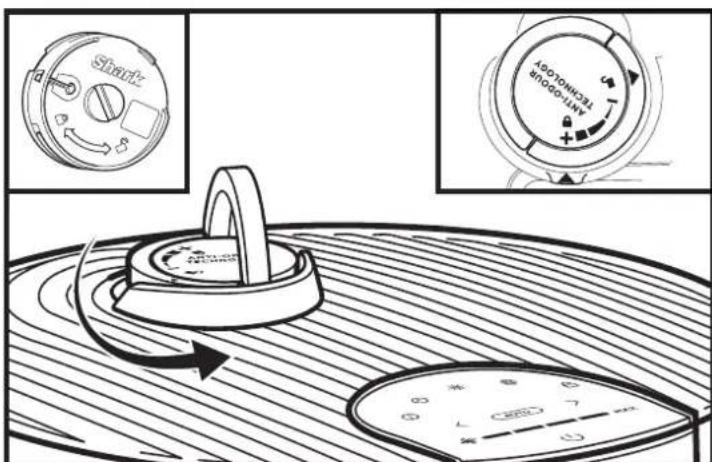
- INSTALL THE ODOUR DIAL ASSEMBLY
Align the arrow on the dial cover with the arrow on the air purifier, then reinsert the dial into the air purifier. Rotate the dial counterclockwise until it clicks into an intensity setting to engage. Rotate further to change the intensity setting.
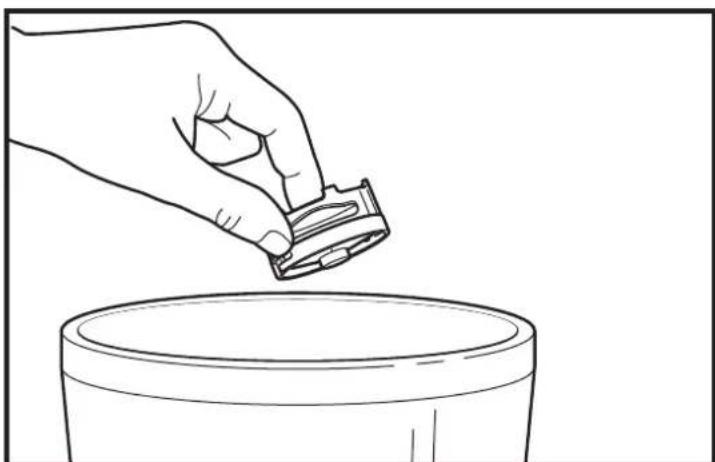
natural_image
Line drawing of a hand pouring liquid from a container into a basin (no text or symbols)- USED CARTRIDGE DISPOSAL
Dispose of the old cartridge by dropping it into the bin.
Note: Odour cartridges should be replaced every 3 months or as needed for optimal Anti-Odour Technology performance.
Additional accessories and replacement filters are available on sharkclean.eu
natural_image
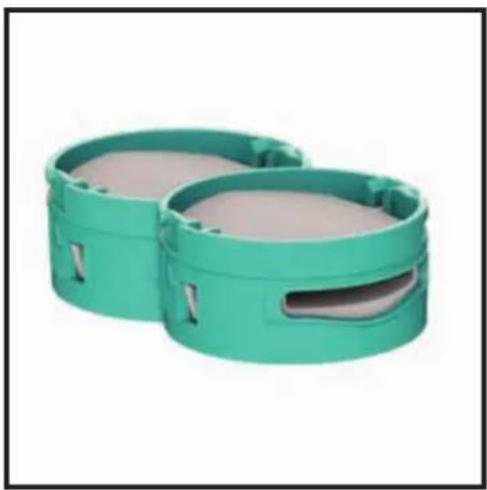
Two green plastic cylindrical enclosures with slots and a slot, no text or symbols visibleAnti-Odour Technology Cartridges (2)
Two replacement cartridges that guard against bad odours for a fresher-smelling home. We recommend replacing cartridges every 3 months or as needed in your air purifier. Anti-Odour Technology intensity dial sold separately.
natural_image
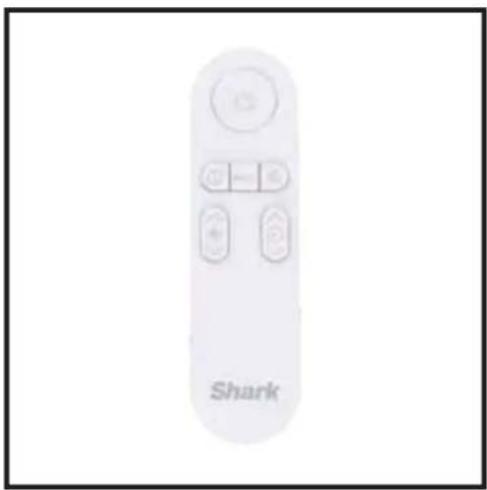
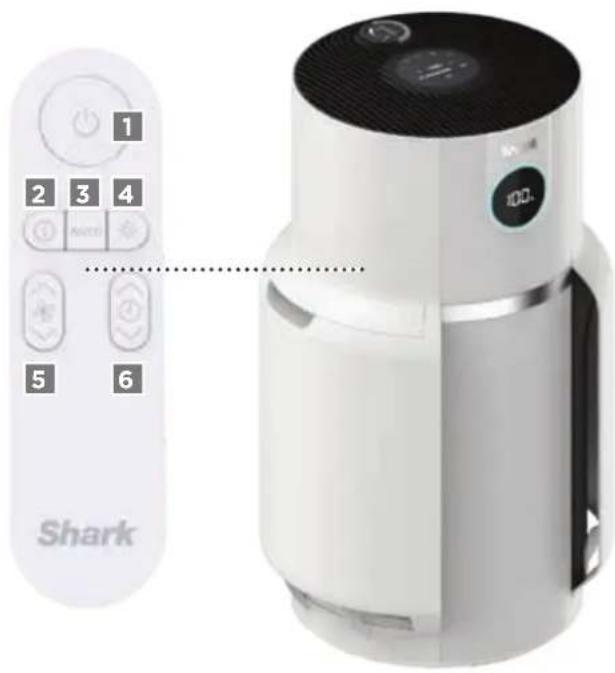
White remote control device with 'Shark' branding and control buttons (no additional text or symbols visible)Remote Control
Use the remote control to operate your air purifier from a distance.
REMOTE CONTROL BUTTONS
- On/Off: Turns the air purifier on/off.
2.AirInfo:Switch between air purification status display options. - Auto: Enables Auto Mode.
4.Brightness:Adjusts brightness.
5.FanSpeed:Adjusts fan speed.
6.Shut-OffTimer:Sets shut-off timer.
TWO (2) YEAR LIMITED GUARANTEE
When a consumer buys a product in Europe, they get the benefit of legal rights relating to the quality of the product (your statutory rights). You can enforce these rights against your retailer. However, at Shark ^5 we are so confident about the quality of our product that we give you an additional manufacturer's guarantee of two years. These terms and conditions relate to our manufacturer's guarantee only - your statutory rights are unaffected.
The conditions below describe the prerequisites and scope of our guarantee. They do not affect your statutory rights or the obligations of your retailer and your contract with them.
Shark ^® Guarantees
Your Shark unit constitutes a sizeable investment. Your new air purifier needs to work properly for as long as possible. The guarantee it comes with is an important consideration - and reflects how much confidence the manufacturer has in its product and manufacturing quality.
Every Shark machine comes with a free parts and labour guarantee. You'll also find online support at sharkclean.eu
How do I register my Shark guarantee?
You can register your guarantee online within 28 days of purchase. To save time, you'll need the following information about your air purifier:
- Date you purchased the unit (receipt or delivery note).
• To register online, please visit sharkclean.eu
IMPORTANT:
- The guarantee will only cover your product from the date of purchase.
- Please keep your receipt at all times. Should you need to use your guarantee we will need your receipt to verify the information you have supplied to us is correct. The inability to produce a valid receipt may invalidate your guarantee.
What are the benefits of registering my free Shark guarantee?
When you register your guarantee we'll have your details to hand if we ever need to get in touch. You can also receive tips and advice on how to get the best out of your Shark unit and hear the latest news about new Shark® technology and launches. If you register your guarantee online, you'll get instant confirmation that we've received your details.
How long are new Shark machines guaranteed for?
Our confidence in our design and quality control means that your new Shark unit is guaranteed for a total of two years.
What is covered by the free Shark guarantee?
Repair or replacement of your Shark machine (at Shark's discretion), including all parts and labour. A Shark guarantee is in addition to your legal rights as a consumer.
What is not covered by the free Shark guarantee?
- Normal wear and tear of wearable parts (such as accessories). Replacement parts are available for purchase at sharkclean.eu
-
Damage caused by misuse, abuse, negligent handling, failure to perform required maintenance or damage due to mishandling in transit.
-
Damage caused by maintenance not authorised by Shark.
Where can I buy genuine Shark spares and accessories?
Shark spares and accessories are developed by the same engineers who developed your Shark unit. You'll find a full range of Shark spares and replacement parts/accessories for all Shark machines at sharkclean.eu
Please remember that damage caused by the use of non-Shark spares may not be covered under your guarantee.
IMPORTANT INFORMATION
REGISTER YOUR PURCHASE

sharkclean.eu/register-guarantee
RECORD THIS INFORMATION
Model Number: ____
Serial Number:
Date of Purchase: ____
(Keep receipt)
Store of Purchase: ____
TECHNICAL SPECIFICATIONS
Voltage: 220-240V 50-60Hz
Watts: 54W
Benefits of registering your product and creating an account:
- Get easier, faster product support and access to warranty information
- Access troubleshooting and product care instructions
- Be among the first to know about exclusive product promotions
TIP: You can find the model and serial numbers on the QR code label on the bottom of the unit.
BATTERY REMOVAL AND DISPOSAL
This product's remote control uses a lithium button battery. When the battery no longer has a charge, it should be removed from the remote and recycled. DO NOT incinerate or compost the battery.
When your lithium battery needs to be replaced, dispose of it or recycle it in accordance with local ordinances or regulations. In some areas, it is illegal to place spent lithium batteries in the bin or in a municipal solid waste stream. Return spent battery to an authorised recycling center or to retailer for recycling. Contact your local recycling center for information on where to drop off the spent battery.
natural_image
White plastic mechanical component with a black arrow indicating rotation, no visible text or symbolsnatural_image
White plastic cylindrical device with a black knob and circular arrow indicating rotation (no text or symbols)natural_image
Close-up of a black circular device with ventilation grilles and a control panel, no visible text or symbolsnatural_image
Two white industrial air purifiers with control knobs and a hand pointing to the leftmost device (no text or symbols visible)- LOKALISIEREN UND ABNEHMEN DER STAUBFILTER
natural_image
Hand placing a component into a device with a downward arrow indicating motion (no text or symbols visible)- WIEDEREINSETZEN DER MESH-STAUBFILTER
natural_image
Illustration showing a hand cleaning a flexible solar panel with a tool (no text or symbols present)- REINIGEN DER STAUBFILTER
- NEUKALIBRIERUNG
natural_image
Illustration of a faucet with a water droplet falling from its side, next to a solar panel (no text or symbols)natural_image
Hand cleaning a white air purifier with a cloth (no text or symbols visible)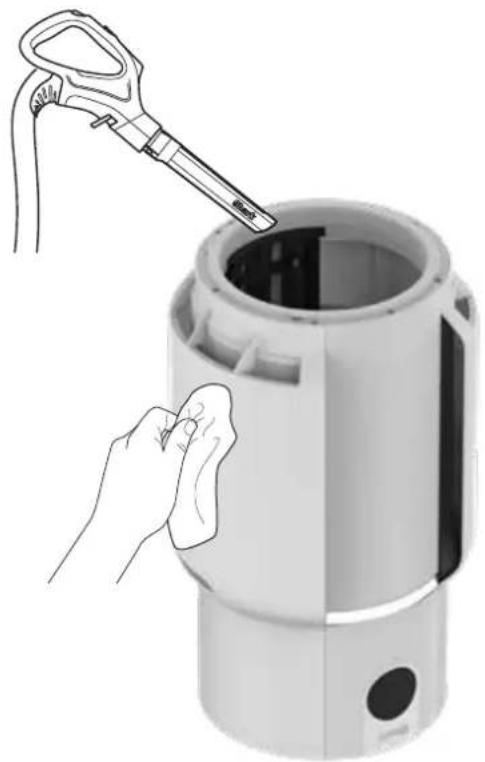
natural_image
Illustration of a hand cleaning a cylindrical device with a tool, no text or symbols presentGERUCHSNEUTRALISIERENDE TECHNOLOGIE
natural_image
Technical line drawing of a Shark component with a circular base and a small inset showing a handle (no text or symbols)natural_image
Line drawing of a hand pouring liquid from a container into a cylindrical tank (no text or symbols)natural_image
Two green plastic cylindrical enclosures with slots and a slot, no text or symbols visiblenatural_image
White remote control device with 'Shark' branding and control buttons (no additional text or symbols visible)Fernbedienung
CONSEILS D'INSTALLATION DE VOTRE PURIFICATEUR D'AIR
natural_image
White plastic mechanical component with a black arrow indicating rotation (no text or symbols visible)natural_image
White plastic cylindrical device with a black arrow indicating rotation and a black dot at the bottom (no text or symbols visible)natural_image
Close-up of a black appliance's grille with a circular control dial and directional arrow indicator (no text or symbols)TOUCHES DU PANNEAU DE COMMANDE SUPÉRIEUR
natural_image
Two white cylindrical devices with black control knobs and a hand pointing to the leftmost device (no text or symbols visible)natural_image
Illustration showing a tool interacting with a grid panel and a hand cleaning a curved surface (no text or symbols)natural_image
Hand placing a component into a cylindrical device with a grid window, showing a downward arrow (no text or symbols visible)- PROCÉDER AU RECALIBRAGE
natural_image
Illustration of a faucet with a water droplet falling from its side, next to a solar panel (no text or symbols)- NETTOYAGE SUPPLÉMENTAIRE (FACULTATIF)
natural_image
Hand cleaning a white air purifier with a cloth, no text or symbols visible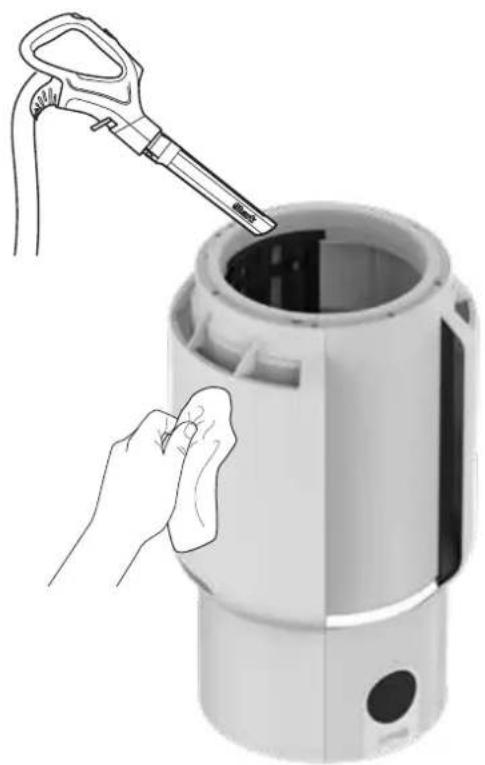
natural_image
Illustration of a hand cleaning a cylindrical device with a tool, no text or symbols presentTECHNOLOGIE ANTI-ODEUR
- TOURNER JUSQU'AU DÉCLIC
natural_image
Technical line drawing of a Shark component with a circular base and a small inset showing a handle (no text or symbols)- RETIRER LE BOÎTIER DE LA CARTOUCHE ANTI-ODEUR
natural_image
Illustration of a hand pressing down on a beverage can with a small inset showing the same container (no text or symbols)- SORTIR LA NOUVELLE CARTOUCHE DE SON EMBALLAGE
natural_image
Line drawing of a hand pouring liquid from a container into a cylindrical tank (no text or symbols)- ÉLIMINER LES CARTOUCHES USAGÉES
natural_image
Two green plastic cylindrical enclosures with slots and a slot, shown against a white background (no text or symbols)natural_image
White remote control device with 'Shark' branding and control buttons (no additional text or symbols visible)Télécommande
natural_image
Close-up of a white plastic cylindrical device with a black arrow indicating rotation (no text or symbols visible)natural_image
White plastic mechanical component with a circular arrow indicating rotation (no text or symbols visible)natural_image
Two white industrial air purifiers with control knobs, one showing a hand pressing down and the other with a grid pattern (no text or symbols visible)natural_image
Illustration showing a tool applying material to a grid-patterned panel, with a hand cleaning the surface (no text or symbols)- LIMPIAR LOS FILTROS DE POLVO
natural_image
Hand placing a component into a cylindrical device with a grid window, showing a downward arrow (no text or symbols visible)- RECALIBRAR
natural_image
Illustration of a faucet with a water droplet falling from its side, next to a solar panel (no text or symbols)- HACER UNA LIMPIEZA A FONDO (OPCIONAL)
natural_image
Hand cleaning a white air purifier with a cloth (no text or symbols visible)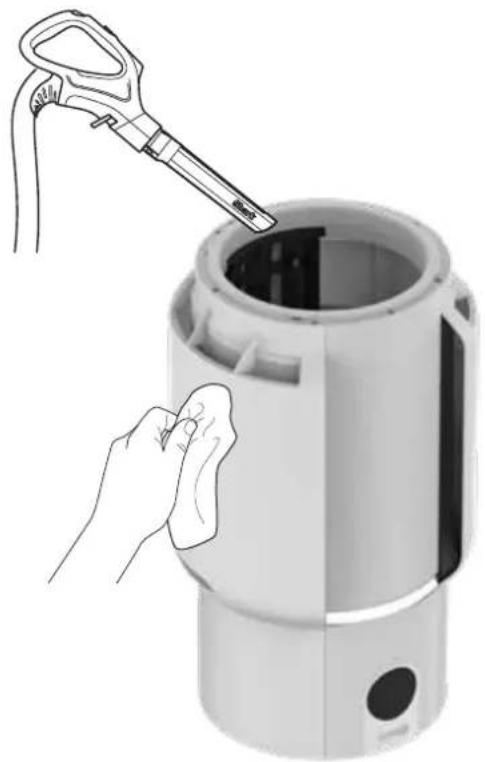
natural_image
Illustration of a hand cleaning a cylindrical device with a tool, no text or symbols presentTECNOLOGÍA ANTIOLORES
- GIRA HASTA QUE HAGA CLIC
natural_image
Technical line drawing of a Shark component with a circular base and a small inset showing a handle (no text or symbols)- RETIRA EL CARTUCHO ANTILOLORES
natural_image
Line drawing of a hand pressing down on a can with a small inset showing the shaker's internal components (no text or symbols)- SACA EL CARTUCHO NUEVO DE LA LATA
natural_image
Line drawing of a hand pouring liquid from a container into a cylindrical tank (no text or symbols)natural_image
Two green plastic cylindrical enclosures with slots and a slot, no text or symbols visiblenatural_image
White remote control device with 'Shark' branding and control buttons (no additional text or symbols visible)Mando a distancia
CONSIGLI PER LA CONFIGURAZIONE DEL PURIFICATORE D'ARIA
natural_image
White cylindrical mechanical component with a black arrow indicating rotation, no visible text or symbolsnatural_image
White plastic mechanical component with a circular arrow indicating rotation (no text or symbols visible)SCHERMO DISPLAY FRONTALE
PULSANTI DEL PANNELLO DI CONTROLLO SUPERIORE
natural_image
Two white industrial air purifiers with control knobs and a hand pointing to the leftmost device (no text or symbols visible)-
- INDIVIDUARE E RIMUOVERE I FILTRI ANTIPOLVERE
natural_image
Illustration showing a hand cleaning a grid-patterned object with a tool and a magnified view of the object (no text or symbols present)- PULIZIA DEI FILTRI ANTIPOLVERE
natural_image
Hand placing a component into a cylindrical device with a grid window, showing a downward arrow (no text or symbols visible)- REINSTALLARE I FILTRI ANTIPOLVERE
- RICALIBRAZIONE
natural_image
Illustration of a faucet with a water droplet falling from a solar panel array (no text or symbols)- PULIZIA EXTRA (NON RICHIESTA)
natural_image
Hand cleaning a white air purifier with a cloth (no text or symbols visible)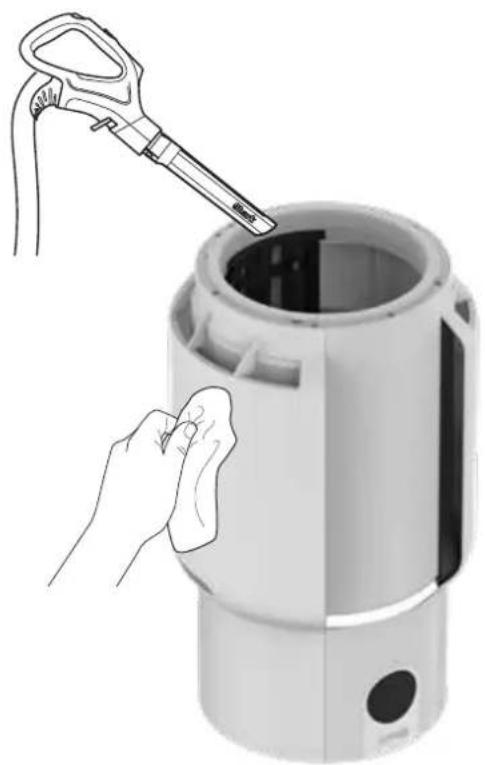
natural_image
Illustration of a hand cleaning a cylindrical device with a tool, showing no text or symbols.TECNOLOGIA ANTI-ODORE
- GIRARE FINCHÉ NON SI SENTE UN CLIC
natural_image
Technical line drawing of a Shark component with a circular base and top view (no text or symbols)- RIMUOVERE IL GRUPPO CARTUCCIA ANTI-ODORE
natural_image
Illustration of a hand pressing down on a beverage can with a small inset showing the same container (no text or symbols)- INSTALLARE IL GRUPPO MANOPOLA ANTI-ODORE
natural_image
Line drawing of a hand pouring liquid from a container into a cylindrical tank (no text or symbols)- SMALTIMENTO DELLA CARTUCCIA USATA
natural_image
Two green plastic cylindrical enclosures with slots and a slot, shown against a white background (no text or symbols)natural_image
White remote control device with 'Shark' branding and control buttons (no additional text or symbols visible)Telecomando
TIPS TIL OPSÆTNING AF DIN LUFTRENSER
natural_image
White cylindrical mechanical component with a black arrow indicating rotation, no visible text or symbolsnatural_image
White plastic mechanical component with a circular arrow indicating rotation (no text or symbols visible)natural_image
Two white industrial air purifiers with control knobs and a hand pointing to the leftmost device (no text or symbols visible)- FIND OG FJERN NET-ST∅VFILTRE
natural_image
Illustration showing a hand cleaning a solar panel with a tool and a magnified view of the screen (no text or symbols)- RENG∅RING AF ST∅VFILTRE
natural_image
Illustration of a faucet with a water droplet falling from its side, next to a solar panel (no text or symbols)- YDERLIGERE RENG∅RING (IKKE PÅKRÆVET)
natural_image
Hand placing a component into a white cylindrical device with a grid window, showing a downward arrow (no text or symbols visible)- GENINSTALLER NET-ST∅VFILTRENE
- OMKALIBRERING
natural_image
Hand cleaning a white digital air purifier with a cloth (no text or symbols visible)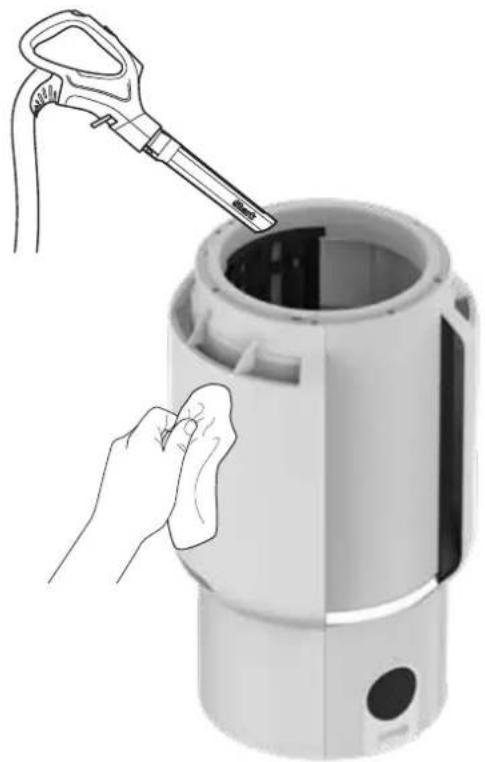
natural_image
Illustration of a hand cleaning a cylindrical device with a tool, no text or symbols presentANTI-LUGT TEKNOLOGI
natural_image
Technical line drawing of a Shark component with a circular base and top view (no text or symbols)- FJERN LUGTPATRONENS SAMLING 2. FJERN DEN GAMLE LU
natural_image
Line drawing of a hand pouring liquid into a container (no text or symbols)- BORTSKAFFELSE AF BRUG PATRON
Bortskaf den gamle patron ved at smide den i skraldespanden.
natural_image
Two green plastic cylindrical enclosures with slots and a slot, no text or symbols visiblePatron med antilugt-teknologi (2)
natural_image
White remote control device with 'Shark' branding and control buttons (no additional text or symbols visible)Fjernbetjening
Brug fjernbetjeningen til at styre din luftrenser på afstand.
FJERNBETJENINGSKNAPPER
ALGEMENE WAARSCHUWINGEN
ANTI-ODOUR TECHNOLOGY
TIPS VOOR HET INSTELLEN VAN UW LUCHTREINIGER
natural_image
Close-up of a white plastic mechanical component with a black arrow indicating rotation (no text or symbols visible)natural_image
White plastic mechanical component with a circular arrow indicating rotation (no text or symbols visible)natural_image
Two white industrial air purifiers with control knobs and a hand pointing to the leftmost device (no text or symbols visible)natural_image
Illustration showing a hand cleaning a solar panel with a tool and a close-up of the screen (no text or symbols)- REINIG DE FILTERS
natural_image
Illustration of a faucet with a water droplet falling from its side, next to a solar panel (no text or symbols)- EXTRA SCHOONMAAK (NIET VERPLICHT)
natural_image
Hand placing a component into a white appliance with a grid window, showing a downward arrow (no text or symbols visible)- GAASSTOFFILTERS TERUGPLAATSEN
- HERKALIBRATIE
natural_image
Hand cleaning a white air purifier with a cloth, no visible text or symbols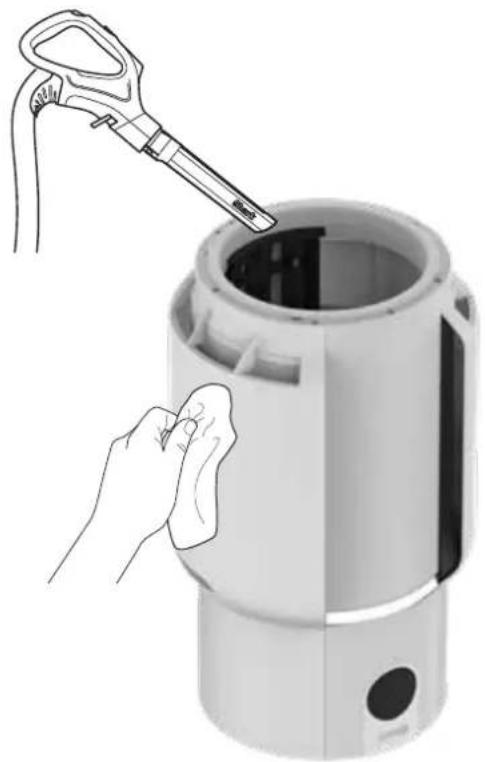
natural_image
Illustration of a hand cleaning a cylindrical device with a tool, no text or symbols presentANTI-ODOUR TECHNOLOGY
natural_image
Line drawing of a Shark-shaped device with a circular base and top component (no text or symbols)- DE GEURDRAAIKNOP PLAATSEN
natural_image
Line drawing of a hand pouring liquid into a container (no text or symbols)- GEBRUIKTE CARTRIDGE WEGGOOIEN
Gooi de oude cartridge in de vuilnisemmer.
natural_image
Two green plastic cylindrical enclosures with slots and a slot, shown against a white background (no text or symbols)Anti-Odour Technology-cartridges (2)
natural_image
White remote control device with 'Shark' branding and control buttons (no additional text or symbols visible)Afstandsbediening
ANTI-ODOUR TECHNOLOGY
TIPS FOR OPPSETT AV LUFTRENSEREN DIN
natural_image
White cylindrical mechanical component with a black arrow indicating rotation, no visible text or symbolsnatural_image
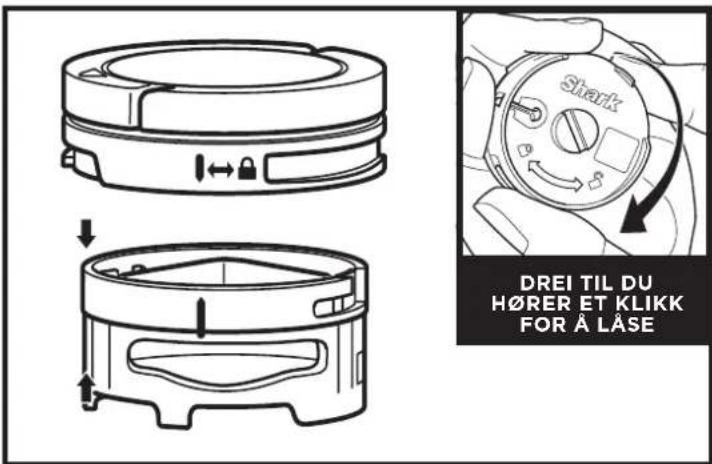
White plastic mechanical component with a circular arrow indicating rotation (no text or symbols visible)- Med HEPA-filteret installert på nytt, roter filterdøren med klokken inntil den klikker på plass.
FREMRE DISPLAYSKJERM
Viser gjeldende luftrensingsstatus basert på Air Info-modus valgt på kontrollpanelet på toppen.
KNAPPER PÅ KONTROLLPANEL PÅ TOPPEN
OPTIMALISERE VIFTEHASTIGHET
natural_image
Two white industrial devices with black lids and control panels, one being lifted by a hand (no text or symbols visible)- FINN OG FJERN NETTST∅VFILTRE
natural_image
Illustration showing a hand cleaning a solar panel with a tool and a magnified view of the screen (no text or symbols)- RENGJ∅RE FILTRENE
natural_image
Illustration of a faucet with a water droplet falling from its side, next to a solar panel (no text or symbols)- YTTERLIGERE RENGJ∅RING (IKKE PÅKREVD)
natural_image
Hand placing a small panel into a device with a grid pattern, showing a downward arrow (no text or symbols visible)- INSTALLER NETTST∅VFILTRE PÅ NYTT
- REKALIBRERING
natural_image
Hand cleaning a white air purifier with a cloth, no visible text or symbols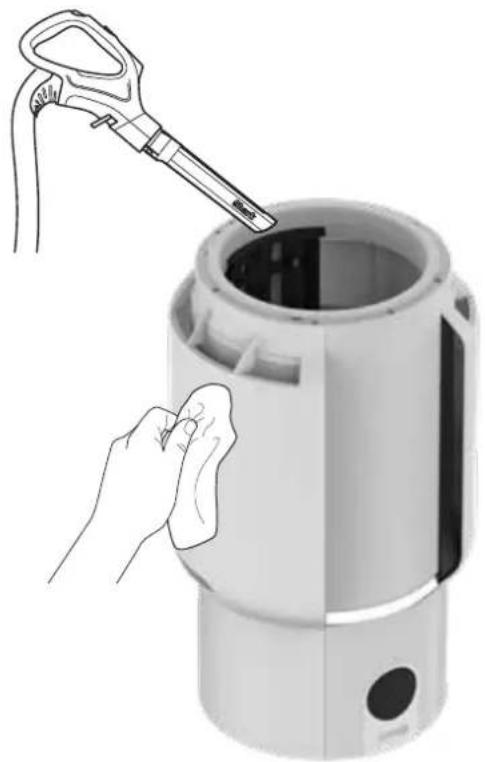
natural_image
Illustration of a hand cleaning a cylindrical device with a tool, no text or symbols presentANTI-ODOUR TECHNOLOGY
UTSKIFTING AV ANTI-ODOUR TECHNOLOGY
natural_image
Technical line drawing of a Shark component with a circular base and top view (no text or symbols)- FJERN LUKTPATRONENHETEN 2. FJERN GAMMEL LUKT
- FJERN NY PATRON FRA BOKSEN
Fjern den nye luktpatronen fra den forseglede emballasjen. For å opprettholde levetiden til patronen, behold den i den forseglede emballasjen inntil du er klar til å installere den.
- INSTALLER NY PATRON I INNSTILLINGSHJULET
- INSTALLER LUKTINNSTILLINGSHJULENHETEN
natural_image
Line drawing of a hand pouring liquid into a container (no text or symbols)- AVHENDING AV BRUKT PATRON
Avhend den gamle patronen ved å kaste den i søppelkassen.
natural_image
Two green plastic cylindrical enclosures with slots and a slot, no text or symbols visibleAnti-Odour Technology-patroner (2)
natural_image
White remote control device with 'Shark' branding and control buttons (no additional text or symbols visible)Fjernkontroll
APENAS PARA USO DOMÉSTICO
!AVISO
PARA REDUZIR O RISCO DE INCÊNDIO, CHOQUE ELÉTRICO OU FERIMENTOS:
AVISOS GERAIS
DICAS PARA CONFIGURAR O SEU PURIFICADOR DE AR
natural_image
White cylindrical mechanical component with a black arrow indicating rotation, no visible text or symbolsnatural_image
White plastic mechanical component with a circular arrow indicating rotation (no text or symbols visible)natural_image
Two white cylindrical devices with black lids and control buttons, one being lifted by a hand (no text or symbols visible)natural_image
Illustration showing a hand cleaning a curved panel with a tool and a magnified view of the screen (no text or symbols)- LIMPAR OS FILTROS DE PÓ
natural_image
Illustration of a faucet with a water droplet falling from its side, next to a solar panel (no text or symbols)natural_image
Hand placing a small panel into a device with a grid pattern, showing a downward arrow (no text or symbols visible)- REINSTALAR OS FILTROS DE PÓ DE MALHA
- RECALIBRAÇÃO
natural_image
Hand cleaning a white digital kitchen appliance with a cloth (no text or symbols visible)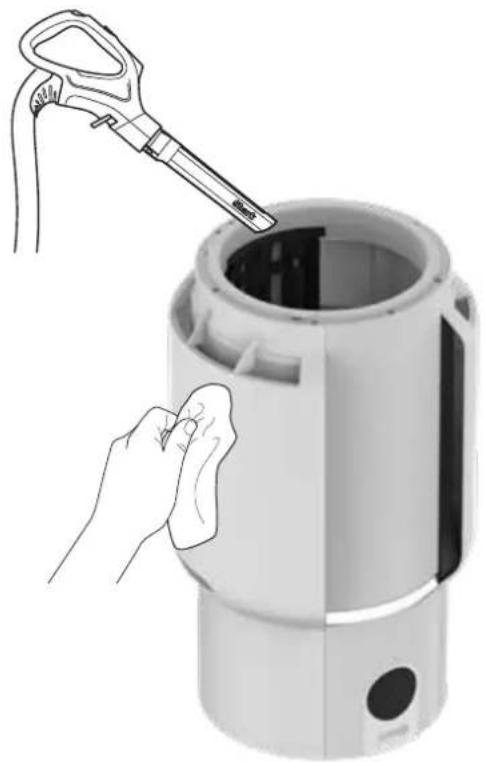
natural_image
Illustration of a hand cleaning a cylindrical device with a tool, no text or symbols presentTECNOLOGIA ANTIODOR
- ABRIR O CONJUNTO DO CARTUCHO ANTIODOR EMBALADO
- RODAR ATÉ OUVIR UM CLIQUE
natural_image
Technical line drawing of a Shark-shaped device with a circular base and top component (no text or symbols)- RETIRE O CONJUNTO DO CARTUCHO ANTIODOR
natural_image
Illustration of a hand pressing down on a can with a small inset showing the shaker's internal components (no text or symbols)- RETIRAR O CARTUCHO NOVO DA LATA
natural_image
Line drawing of a hand pouring liquid from a container into a cylindrical tank (no text or symbols)natural_image
Two green plastic cylindrical enclosures with slots and a slot, shown against a white background (no text or symbols)natural_image
White remote control device with 'Shark' branding and control buttons (no additional text or symbols visible)Controlo remoto
natural_image
Close-up of a white cylindrical mechanical component with a black arrow indicating rotation (no text or symbols visible)natural_image
Close-up of a white cylindrical mechanical component with a black arrow indicating rotation (no text or symbols visible)natural_image
Close-up of a smart air conditioner grille with control panel and indicator lights (no readable text or symbols)natural_image
Two white cylindrical devices with black control knobs and a hand pointing to the leftmost device (no text or symbols visible)- PAIKANNA JA IRROTA VERKKOSUODATTIMET
natural_image
Illustration showing a hand cleaning a flexible solar panel with a tool and a flame (no text or symbols)- PUHDISTA PÖLYSUODATTIMET
natural_image
Illustration of a faucet with a water droplet falling from its side, next to a solar panel (no text or symbols)- TEHOSTETTU PUHDISTUS (EI PAKOLLINEN)
natural_image
Hand placing a small air conditioner into a cylindrical device with a grid window, showing a downward arrow (no text or symbols visible)- ASENNA VERKKOSUODATTIMET PAIKALLEEN
- UUDELLEENKALIBROINTI
natural_image
Hand cleaning a white air purifier with a cloth (no text or symbols visible)
natural_image
Illustration of a hand cleaning a cylindrical device with a tool, no text or symbols presentHAJUNPOISTOTEKNOLOGIA
natural_image
Technical line drawing of a Shark-shaped device with a circular base and top component (no text or symbols)- POISTA HAJUNPOISTOPATRUUNAKOKOONPANO
natural_image
Line drawing of a hand pressing down on a can with a small inset showing the shaker's internal components (no text or symbols)- OTA UUSI PATRUUNA TÖLKISTÄ 4. ASENNA UUSI PATRUV
natural_image
Line drawing of a hand pouring liquid from a container into a basin (no text or symbols)- HÄVITÄ KÄYTETTY PATRUUNA
natural_image
Two green plastic cylindrical enclosures with slots and a slot, no text or symbols visibleHajunpoistoteknologian patruunat (2)
natural_image
White remote control device with 'Shark' branding and control buttons (no additional text or symbols visible)Kaukosäädin
TIPS FÖR ATT INSTALLERA DIN LUFTRENARE
natural_image
White cylindrical mechanical component with a black arrow indicating rotation, no visible text or symbolsnatural_image
Close-up of a white plastic mechanical component with a circular arrow indicating rotation (no text or symbols visible)KNAPPAR PÅ DEN ÖVRE KONTROLLPANELEN

DISPLAY HASTIGHET BÄST FÖR
natural_image
Two white industrial air purifiers with control knobs and a hand pointing to the leftmost device (no text or symbols visible)- LOKALISERA OCH AVLÄGSNA DAMMFILTREN I NÄT
natural_image
Illustration showing a hand cleaning a grid panel with a tool and a magnified view of the panel (no text or symbols)- RENGÖR DAMMFILTREN
natural_image
Illustration of a faucet with a water droplet falling from its side, next to a solar panel (no text or symbols)- EXTRA RENGÖRING (BEHÖVS INTE)
natural_image
Hand placing a component into a white cylindrical device with a grid window, showing a downward arrow (no text or symbols visible)- SÄTT TILLBAKA DAMMFILTREN I NÄT
- ÅTERKALIBRERING
natural_image
Hand cleaning a white digital air purifier with a cloth (no text or symbols visible)
natural_image
Illustration of a hand cleaning a cylindrical device with a tool, no text or symbols presentANTI-ODOUR-TEKNIK
natural_image
Technical line drawing of a Shark-shaped device with a circular base and top component (no text or symbols)- AVLÄGSNA LUKTPATRONEN
natural_image
Illustration of a hand pressing down on a can with a small inset showing the shaker's internal components (no text or symbols)- TA UT DEN NYA PATRON FRÅN BURKEN
natural_image
Line drawing of a hand pouring liquid from a container into a cylindrical tank (no text or symbols)- BORTSKAFFANDE AV ANVÄND PATRON
natural_image
Two green plastic cylindrical enclosures with slots and a slot, shown against a white background (no text or symbols)Anti-Odour-teknikpatroner (2)
natural_image
White remote control device with 'Shark' branding and control buttons (no additional text or symbols visible)Fjärrkontroll
PLEASE READ CAREFULLY AND KEEP FOR FUTURE REFERENCE.
This Instruction Guide is designed to help you get a complete understanding of your new Shark® Air Purifier
SharkNinja Europe Limited,
1st/2nd Floor Building 3150, Thorpe Park,
Century Way, Leeds, England, LS15 8ZB
+44 (0)800 862 0453
www.sharkclean.co.uk
SharkNinja Germany GmbH,
Rotfeder-Ring 9,
60327 Frankfurt am Main,
Germany
www.sharkclean.eu
Illustrations may differ from actual product. We are constantly striving to improve our products; therefore the specifications contained herein are subject to change without notice.
© 2024 SharkNinja Operating LLC. SHARK is a registered trademark in the European Union of SharkNinja Operating LLC.
BITTE AUFMERKSAM DURCHLESEN UND ZUR INFORMATION AUFBEWAHREN.
SharkNinja Europe Limited,
1st/2nd Floor Building 3150, Thorpe Park,
Century Way, Leeds, England, LS15 8ZB
+44 (0)800 862 0453
www.sharkclean.co.uk
SharkNinja Europe Limited,
1st/2nd Floor Building 3150, Thorpe Park,
Century Way, Leeds, England, LS15 8ZB
+44 (0)800 862 0453
www.sharkclean.co.uk
SharkNinja Europe Limited,
1st/2nd Floor Building 3150, Thorpe Park.
Century Way, Leeds, England, LS15 8ZB
+44 (0)800 862 0453
www.sharkclean.co.uk
SharkNinja Europe Limited,
1st/2nd Floor Building 3150, Thorpe Park,
Century Way, Leeds, England, LS15 8ZB
+44 (0)800 862 0453
www.sharkclean.co.uk
SharkNinja Europe Limited,
1st/2nd Floor Building 3150, Thorpe Park,
Century Way, Leeds, England, LS15 8ZB
+44 (0)800 862 0453
www.sharkclean.co.uk
SharkNinja Germany GmbH,
Rotfeder-Ring 9,
60327 Frankfurt am Main,
Germany
www.sharkclean.eu
SharkNinja Europe Limited,
1st/2nd Floor Building 3150, Thorpe Park,
Century Way, Leeds, England, LS15 8ZB
+44 (0)800 862 0453
www.sharkclean.co.uk
SharkNinja Germany GmbH,
Rotfeder-Ring 9,
60327 Frankfurt am Main,
Germany
www.sharkclean.eu
SharkNinja Europe Limited,
1st/2nd Floor Building 3150, Thorpe Park,
Century Way, Leeds, England, LS15 8ZB
+44 (0)800 862 0453
www.sharkclean.co.uk
SharkNinja Germany GmbH,
Rotfeder-Ring 9,
60327 Frankfurt am Main,
Germany
www.sharkclean.eu
SharkNinja Europe Limited,
1st/2nd Floor Building 3150, Thorpe Park,
Century Way, Leeds, England, LS15 8ZB
+44 (0)800 862 0453
www.sharkclean.co.uk
SharkNinja Germany GmbH,
Rotfeder-Ring 9,
60327 Frankfurt am Main,
Germany
www.sharkclean.eu
SharkNinja Europe Limited,
1st/2nd Floor Building 3150, Thorpe Park,
Century Way, Leeds, England, LS15 8ZB
+44 (0)800 862 0453
www.sharkclean.co.uk
SharkNinja Germany GmbH,
Rotfeder-Ring 9,
60327 Frankfurt am Main,
Germany
www.sharkclean.eu
SharkNinja Europe Limited,
1st/2nd Floor Building 3150, Thorpe Park,
Century Way, Leeds, England, LS15 8ZB
+44 (0)800 862 0453
www.sharkclean.co.uk
SharkNinja Germany GmbH,
Rotfeder-Ring 9,
60327 Frankfurt am Main,
Germany
www.sharkclean.eu
- IMPORTANT SAFETY INSTRUCTIONS
- WARNING
- GENERAL WARNINGS
- ANTI-ODOUR TECHNOLOGY
- FRAGRANCE CARTRIDGE FIRST AID
- WARNING: Chemical Burn Hazard. Keep batteries away from children.
- Parts:
- CONTROL PANEL
- TOP CONTROL PANEL BUTTONS
- Tips and Tricks:
- AIR INFO SETTINGS
- UNDERSTANDING YOUR AIR QUALITY
- GOOD
- FAIR
- POOR
- OPTIMISING FAN SPEED
- TROUBLESHOOTING AND FREQUENTLY ASKED QUESTIONS
- Checking the Mesh Dust Filters:
- Cleaning the Mesh Dust Filters:
- MAINTAINING YOUR AIR PURIFIER
- Exterior Cleaning:
- Interior Cleaning:
- SETTINGS
- LOW
- HIGH
- TIPS
- Odour Cartridge Removal
- Maintenance Required
- Fragrance Strength Over Time
- ANTI-ODOUR TECHNOLOGY REPLACEMENT
- Anti-Odour Technology Cartridges (2)
- Remote Control
- REMOTE CONTROL BUTTONS
- TWO (2) YEAR LIMITED GUARANTEE
- Shark ® Guarantees
- How do I register my Shark guarantee?
- IMPORTANT:
- What are the benefits of registering my free Shark guarantee?
- How long are new Shark machines guaranteed for?
- What is covered by the free Shark guarantee?
- What is not covered by the free Shark guarantee?
- Where can I buy genuine Shark spares and accessories?
- IMPORTANT INFORMATION
- REGISTER YOUR PURCHASE
- RECORD THIS INFORMATION
- TECHNICAL SPECIFICATIONS
- BATTERY REMOVAL AND DISPOSAL
- GERUCHSNEUTRALISIERENDE TECHNOLOGIE
- Fernbedienung
- CONSEILS D'INSTALLATION DE VOTRE PURIFICATEUR D'AIR
- TECHNOLOGIE ANTI-ODEUR
- Télécommande
- TECNOLOGÍA ANTIOLORES
- Mando a distancia
- CONSIGLI PER LA CONFIGURAZIONE DEL PURIFICATORE D'ARIA
- PULSANTI DEL PANNELLO DI CONTROLLO SUPERIORE
- TECNOLOGIA ANTI-ODORE
- Telecomando
- TIPS TIL OPSÆTNING AF DIN LUFTRENSER
- ANTI-LUGT TEKNOLOGI
- Patron med antilugt-teknologi (2)
- Fjernbetjening
- FJERNBETJENINGSKNAPPER
- ALGEMENE WAARSCHUWINGEN
- TIPS VOOR HET INSTELLEN VAN UW LUCHTREINIGER
- Anti-Odour Technology-cartridges (2)
- Afstandsbediening
- TIPS FOR OPPSETT AV LUFTRENSEREN DIN
- OPTIMALISERE VIFTEHASTIGHET
- UTSKIFTING AV ANTI-ODOUR TECHNOLOGY
- Anti-Odour Technology-patroner (2)
- Fjernkontroll
- !AVISO
- AVISOS GERAIS
- DICAS PARA CONFIGURAR O SEU PURIFICADOR DE AR
- TECNOLOGIA ANTIODOR
- Controlo remoto
- HAJUNPOISTOTEKNOLOGIA
- Hajunpoistoteknologian patruunat (2)
- Kaukosäädin
- TIPS FÖR ATT INSTALLERA DIN LUFTRENARE
- KNAPPAR PÅ DEN ÖVRE KONTROLLPANELEN
- ANTI-ODOUR-TEKNIK
- Anti-Odour-teknikpatroner (2)
- Fjärrkontroll
- PLEASE READ CAREFULLY AND KEEP FOR FUTURE REFERENCE.
- BITTE AUFMERKSAM DURCHLESEN UND ZUR INFORMATION AUFBEWAHREN.
Brand : SHARK
Model : NeverChange5 HP300
Category : Air purifier