USER MANUAL CBT7719EW CANDY
Discover extra contents and create your inventory list


Summary
PRODUCT DESCRIPTION 2
USE....3
Use 3
Display StandBy....4
Mode....4
Fridge Temp Setting 4
Freezer Temp Setting 4
Customized temperature 5
Super Cool function....5
Super Freeze function 6
Eco mode....6
Holiday function....7
Defrosting....7
Demo mode....7
Error codes....7
In app pairing procedure....8
Wi-Fi Use 9
TROUBLESHOOTING....10
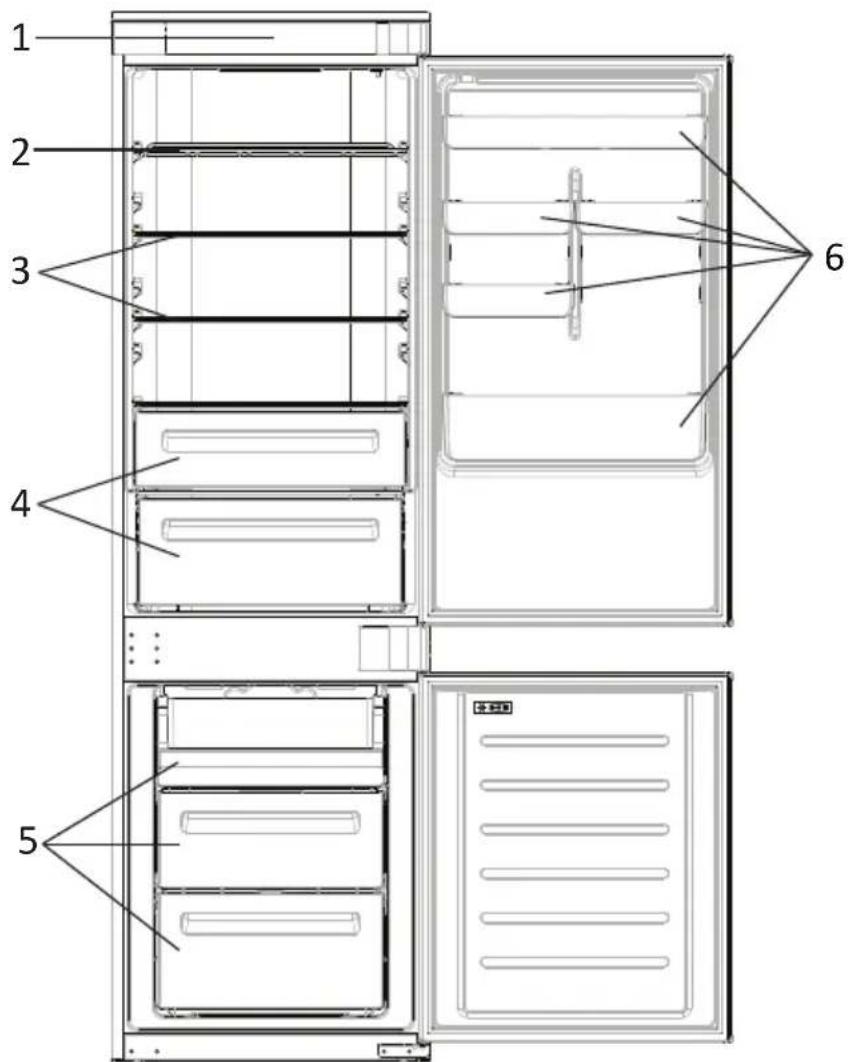
PRODUCT DESCRIPTION
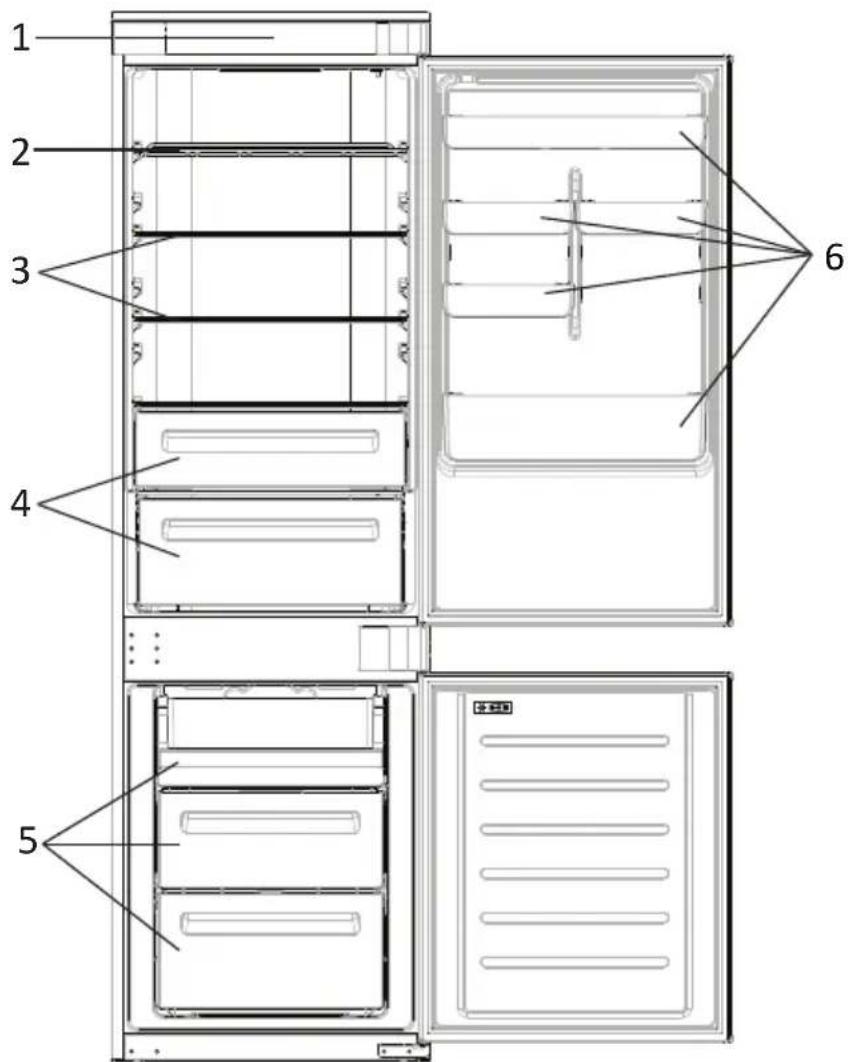
- Control Panel
- Wine Rack
- Shelves
- Crisper
- Freezer Boxes
- Door Rack
* The most energy-saving configuration requires drawers, food box and shelves to be positioned in the product and fan to be off, please refer to the above pictures.
** The pictures above are only for reference. The actual configuration will depend on the physical product or statement by the distributor.
Space requirements
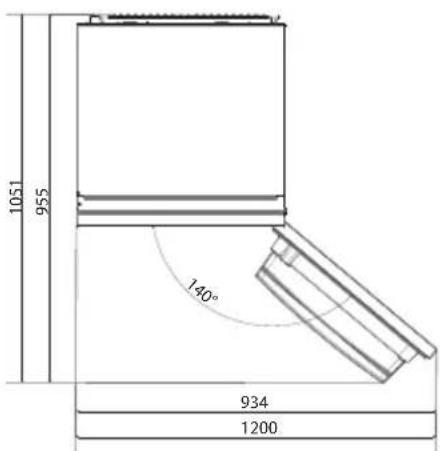
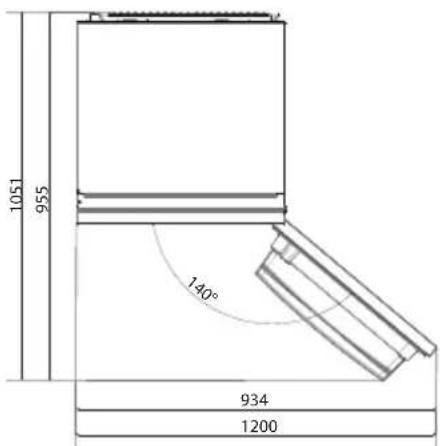
The unit's door must be able to fully open as shown. Spare enough space for convenient opening of the doors and drawers.
Keep a distance of at least 50 mm between the side walls of the product and adjacent parts.
540 mm Cabinet: Width: 934 mm
Depth: 955 mm
700 mm Cabinet: Width: 1200 mm
Depth: 1051 mm
USE
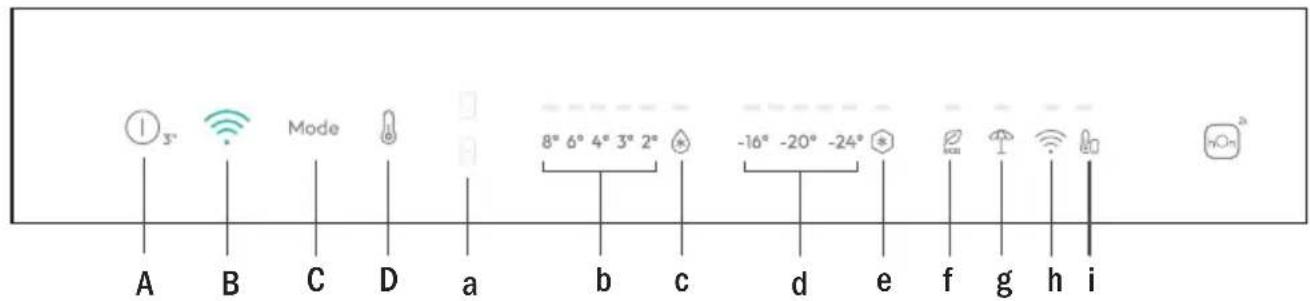
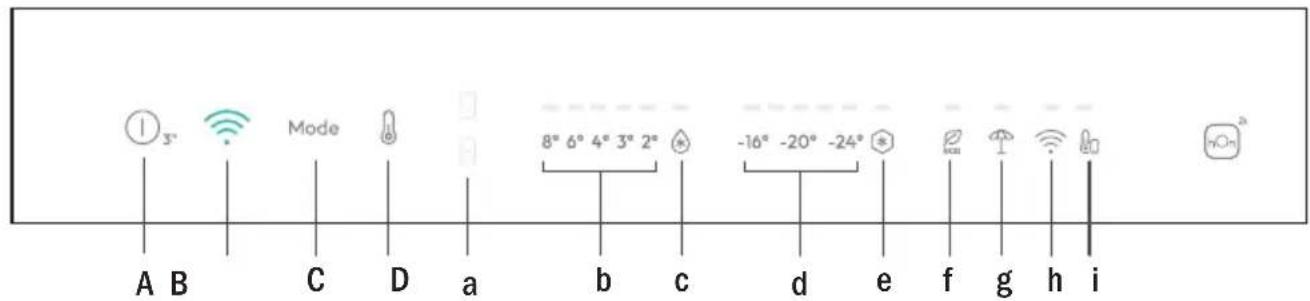
A. ON/OFF key, push for 3 seconds. Appliance turns on with a long acoustic feedback (1sec)
B. Wi-Fi key, used to connect the appliance
C. Mode key, used to select between Fridge, Freezer, Eco and Holiday
D. TEMP key, used to select between temperatures levels (also Super Cool and Super Freeze)
a. Fridge/Freezer area icon, shows which compartment of the appliance is selected
b. Fridge temperature levels, shows which is the selected temperature
c. Super Cool icon, shows if the Super Cool function is activated
d. Freezer temperature levels, shows which is the selected temperature in the freezer
e. Super Freeze icon, shows if the Super Freeze function is activated
f. Eco mode icon, shows whether the Eco mode is activated
g. Holiday function icon, shows whether the holiday function is activated
h. Wi-Fi icon, shows whether the Wi-Fi is working and the appliance is connected
i. Customized temperature icon, shows if the temperature has been selected by app
Use • Plug in the appliance and it automatically turns on with a long acoustic feedback (1 sec) All LEDs turn on (1 sec), then the Fridge temperature LED and Freezer LED turn on fixed.
- The temperature will automatically set at 4 °C in the fridge and -18 °C in the freezer.
NOTE: wait at least 2/3 hours before putting food in the appliance, so as to ensure the temperature inside the fridge.
• In case of power loss, the last cooling level set will be restored.
• To restore the default setting, keep pressed the door switch inside the refrigerator and simultaneously press the ON/OFF key for 5 seconds.
- Under the normal operating condition (in spring and autumn), it is recommended to set the temperature at 4 °C. In summer when the ambient temperature is high, it is recommended to set temperature at 6\~8 °C, so as to guarantee the fridge and freezer temperatures and reduce the refrigerator continuous running time; and in winter when the ambient temperature is low, it is recommended to set temperature at 3\~4 °C to avoid frequent start/stop of the refrigerator.
Display stand by mode management
- If the door is closed -> display in standby (all LEDs switched off)
- If the door is open -> current fridge temperature LED and freezer temperature LED are turned on (fixed).
- ECO mode LED + Holiday mode LED are turned on (fixed) if previously selected.
- Display is ready to receive inputs (no need to activate it by touch).
Mode
The mode button is used to switch between the different modes.
The related LED turns on and selection is immediately confirmed (no blink).
Short acoustic feedback confirms the selection.
Fridge temperature setting
When display panel is on, select the "fridge temperature setting" pushing the MODE button. The fridge area LED turns on. Push the "TEMP" button until the desired temperature is set.
The temperature value changes in this way: 8^ 6^ 4^ 3^ 2^ super cooling >8^ ...
The related LED turns on and selection is immediately confirmed (no blink).
Short acoustic feedback confirms the selection.
Freezer temperature setting
When display panel is on, select the "freezer temperature setting" pushing the MODE button. The freezer area LED turns on.
Push the "TEMP" button until the desired temperature is set.
The temperature value changes in this way: -16^ -18^ -20^ -22^ -24^ Super freezing- >-16^ ...
The related LED turns on and selection is immediately confirmed (no blink).
Short acoustic feedback confirms the selection.
Note
Switching from fridge to freezer areas and vice versa is immediate when the user pushes the MODE button, and the selection is immediately active.
Temperature LEDs do not blink.
Customized temperature
From the app it is possible to customize the temperature for both fridge and freezer. The temperature can be set with 1 °C sensitivity. It is possible to select a temperature from 2 °C to 8 °C in the fridge, and from -16 °C to -24 °C in the freezer.
When the temperature is selected by the app, the customized temperature icon turns on, while all the temperature LED lights of the affected compartment are turned off (i.e. if the refrigerator temperature is selected from the app, LEDs from 2 °C to 8 °C are turned off. If the freezer temperature is selected from the app, LEDs from -16 °C to -24 °C are turned off).
If only a single area (freezer or fridge) has the customized temperature, the temperature selection of the other area is not changed and the LED light of the selected temperature of that area remains on. An acoustic signal is made every time the temperature is changed.
Long acoustic feedback (1 sec) confirms connection is completed.
Super Cool function
It is suggested to switch on the Super Cool function if a large quantity of food should be stored (for example after the purchase). The Super-Cool function accelerates the cooling of fresh food and protects the goods already stored from undesirable warming. When the function is activated, the temperature of the fridge is automatically set at 2 °C.
How to use the Super Cool function:
- The function can be activated by long pressing TEMP key to select the fridge compartment, and then quick pressing the TEMP key until the Super Cool icon led is turned on, or it can be turned on from the app. When the function is activated, the Super Cool LED is always ON.
• To exit the Super Cool function, press the TEMP key or turn it off from the app.
- The Super Cool function automatically ends when the function has lasted for more than 12 hours.
- When the Super Cool ends, the icon of the control panel is switched off and the previously set cooling level is restored.
Note: Super Cool and Super Freeze function cannot be activated simultaneously.
Super Freeze function
The super freezing function accelerates the freezing of fresh food and protects the goods already stored from undesirable warming. If a large amount of food has to be freeze, it is recommended to set the Super-Freeze function on 24h before the usage. When the function is activated, the temperature is automatically set at -28 °C.
How to use the Super Freeze function:
- The function can be launched by long pressing TEMP key to select the freezer compartment, and then quick pressing TEMP key until the Super Freeze icon led is turned on, or it can be turned on from the app. When the function is activated, the Super Freeze LED is always ON.
• To exit the Super Freeze function, press the TEMP key or turn it off from the app.
- The Super Freeze function automatically ends when the function has lasted for more than 50 hours.
- When the Super Freeze ends, the icon of the control panel is switched off and the previously set freezing level is restored.
Note: Super Cool and Super Freeze function cannot be activated simultaneously.
Eco mode
The Eco mode can be activated to optimize the performance of the appliance, whereas obtaining the best food storage. The Eco mode will automatically set the temperature at 4 °C in fridge and at -18 °C in the freezer.
How to use the Eco mode:
- The function can be activated from control panel by pressing the “mode” key until the Eco mode icon turns on (an acoustic signal confirms the selection), or by selecting the function from the app. When the function is activated, the Eco mode icon is always ON.
- To exit the Eco turn it off from the app or chose another function from the control panel.
- When the Eco Mode ends, the icon of the control panel is switched off and the previously set cooling levels are restored.
Holiday function
The Holiday function can be used to reduce the energy consumption of the appliance, when it is not used regularly. When the function is on, the LED lights will be off (even if the door is open) and the fridge will work on low power consumption mode, whereas the freezer will keep working normally.
How to use the Holiday function:
- The function can be activated from control panel by pressing the “mode” key until the Holiday icon turns on (an acoustic signal confirms the selection), or by selecting the function from the app. When the function is activated, the Holiday icon is always ON.
- To exit the Holiday function, turn it off from the app or chose another function from the control panel.
- When the Holiday function ends, the icon of the control panel is switched off and the previously set cooling levels are restored.
Defrosting
The defrosting of the refrigerator and freezer compartment are done automatically: no manual operation is needed.
Slider
Near the vegetable basket there is a slider that allows you to adjust the humidity inside it: moving it to the right decreases the humidity, moving it to the left increases the humidity.
Demo mode
To enter the demo mode, with the display unlocked, keep pressed the Wi-Fi key (B) and press the MODE key (C) 5 times within 5 seconds. To exit the demo mode, perform the same operation or power off the refrigerator.
Error Codes
Communication error
[-16°C;-18°C;-20°C;-22°C;-24°C] Lights in the fridge turn on sequentially, it means there has been a communication error between the main control board and the display board. Please, contact the technical assistance to help solve the problem
Fan
[-16°C;-20°C;-22°C;-24°C] lights in the fridge flashing simultaneously if the fan is not working properly. Please, contact the technical assistance to help solve the problem
WI-FI USE
In app pairing procedure
Step 1
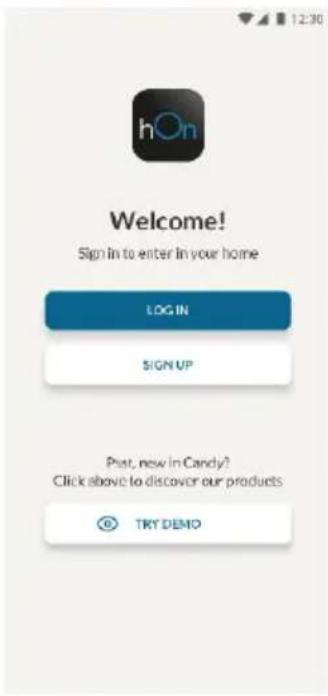
- Download the hOn app on the stores


Step 2
- Create your account on the hOn App or log in if you already have an account
Step 3
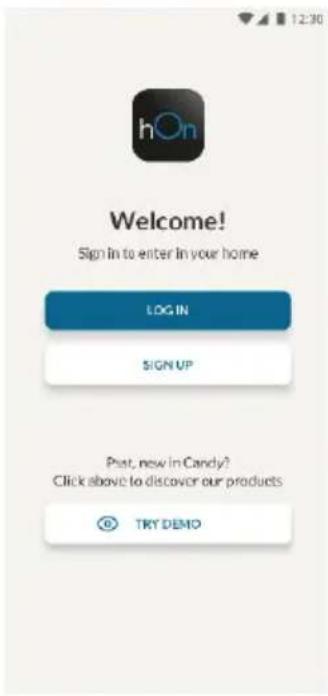
- Follow pairing instructions in the hOn App
Wi-Fi Use
When display panel is on, a short push of the Wi-Fi button starts the sync and Wi-Fi LED starts blinking. Follow instructions on the App to complete the connection.
Long acoustic feedback (1 sec) confirms that the connection is established and the LED stays on fixed.
If the Wi-Fi has not been configured yet, when the refrigerator turns on, it will automatically enter the configuration mode and keep this status for 30 minutes. To use the configuration mode:
- Press the Wi-Fi key for 2s, the refrigerator enters the Wi-Fi configuration mode and an acoustic signal is made. The Wi-Fi icon starts blinking.
- Follow in app instructions to configure the Wi-Fi (see above).
- Once the Wi-Fi is configured and the connection established, the Wi-Fi icon is on and fixed.
- After 30 minutes without performing any operation, the Wi-Fi will automatically exit the configuration mode.
- If the Wi-Fi has already been configured, it will automatically reconnect according to the configuration information.
To reset the Wi-Fi, long press the Wi-Fi key and Mode for 2s, the Wi-Fi is reset and an acoustic signal is made. After this, the Wi-Fi will automatically enter the configuration state (Wi-Fi icon will start blinking again).
To turn off the Wi-Fi, press the Wi-Fi key for 3s.
Radio-module - Technical data
| Frequency rate (OFR) | 2400 MHz-2843.5 MHz |
| Channel frequencies | 2412...2472 MHz(step size 5 MHz) |
| Maximum power(EIRP) | 100 mW |
Radio equipment type is in compliance with Directive 2014/53/EU.
TROUBLESHOOTING
| The inside light bulb does not turn on. | No electricity. | The power cable is not properly plugged in.Check if the appliance is switched off (see Temperature Adjustment).Check the power socket is working correctly (e.g. with another electric device). |
| Holiday Mode is activated. | Deactivate Holiday mode. |
| The internal temperature of the refrigerator and/or freezer is not cold enough. | The doors are not closed. | Check that the door and gaskets close properly. |
| The doors are frequently opened. | Avoid opening the doors unnecessarily for some time. |
| Incorrect temperature setting. | Check the temperature setting and, if possible, set a lower temperature (see Temperature Adjustment). |
| The refrigerator and/or freezer are too full. | Wait for the temperature of the refrigerator/ freezer to stabilise.Avoid filling the refrigerator and freezer excessively. |
| The surrounding temperature is too low. | Move the unit to a warmer place or heat the current room. |
| Warm items have been stored. | Always allow items to cool before storing them. |
| The food in the refrigerator freezes. | Incorrect temperature setting. | Check the temperature setting and, if possible, increase the temperature. |
| Food in contact with the back wall. | Keep the food away from the refrigerator's back wall. |
| The bottom of the refrigerator compartment is wet or water droplets are present. | The drain hose could be clogged. | Clean the drain hose with a stick or similar item to allow the water to drain. |
| Presence of drops of water or frost on the rear wall of the refrigerator. | Depending on the function, drops of water or frost form on the rear wall of the refrigerator during operation. | It is not a defect. |
| Warm items have been stored. | Always allow items to cool before storing them. |
| There are open food containers or liquids. | Always cover food and liquids. |
| The doors are not closed. | Check that the door and gaskets close properly. |
| The doors are frequently opened. | Avoid opening the doors unnecessarily for some time. |
| Presence of water in the vegetable drawer. | Lack of air circulation. | Verify that your appliance is not too full. |
| Vegetables and fruit with too much moisture. | Wrap the fruit and vegetables in plastic materials, e.g. cling film, bags or containers. |
| The motor runs continuously. | The doors are not closed. | Make sure the doors are closed and check the seals close properly. |
| The doors are opened frequently. | Avoid opening the doors unnecessarily for some time. |
| Ambient temperature is very high. | Verify that the ambient temperature is in the range set out in the specifications on the appliance tag.Set the display screen/thermostat to a warmer temperature. |
| The appliance has been off (no power) for some time. | It normally takes the appliance 8-12h to cool completely. |
| The frozen food is thawing. | Surrounding temperature is too low. | Move the unit to a warmer place or heat the current room. |
| The freezer door is not closed. | Make sure the door is closed and that the gasket is sealing properly. |
| Fridge door alarm. | Fridge door alarm (acoustic beep) activates whenever the door is left open for more than 3 minutes. | Avoid leaving the door open when not needed. The beep ceases when the door is closed. |
| The appliance makes noises such as gurgling, buzzing, clicking, creaking. | No breakdowns. An engine is running, e.g. refrigeration unit, fan. The refrigerant flows into the pipes. Motor, switches and solenoid valves are switched on or off. | No action needed. |
| The appliance is not located on level ground. | Adjust the feet to level the appliance. |
| The appliance touches an object around it. | Remove objects around the appliance. |
| The appliance does not cool, the temperature and lighting indicators are on. | Demo mode is activated. | Deactivate DEMO mode. |
| Strong ice and frost in the freezer compartment. | The items were not adequately packaged. | Always pack the items well. |
| A door/drawer of the appliance is not tightly closed. | Close the door/drawer. |
| The door/drawer has been opened too frequently or for too long. | Do not open the door/drawer too frequently. |
| The door/drawer gasket is dirty, worn, cracked or mismatched. | Clean the door/drawer gasket or replace it with a new one. |
| Something on the inside prevents the door/drawer from closing properly. | Reposition the shelves, door racks or internal containers to allow the door/drawer to close. |
| The sides of the appliance are warm. | This is normal. | |
Резюме
ОПИСАНИЕ НА ПРОДУКТА 2
УПОТРЕБА 3
Употреба .... 3

Стъпка 2
Стъпка 3

Krok 2
Krok 3

Trin 2
Trin 3

Schritt 2
Schritt 3

Βήμα 2
Βήμα 3

Paso 2
Paso 3

Vaihe 2
Vaihe 3
DÉPANNAGE

2. korak
3. korak
- Pridržavajte se uputa za uparivanje u aplikaciji hOn
Uporaba mreže Wi-Fi
Kada je zaslon uključen, kratkim pritiskom tipke Wi-Fi započinje sinkronizacija i LED indikator Wi-Fi-a počinje treptati. Slijedite upute u aplikaciji kako biste dovršili povezivanje.

2. lépés
3. lépés

Fase 2
Fase 3
PRODUCTBESCHRIJVING.... 2
GEBRUIK 3
Gebruik.... 3

Stap 2
Stap 3
Temperaturinnstilling for fryseren....4
Tilpasset temperatur....5
I app-paringsprosedyren....8
Wi-Fi-bruk 9
FEILS∅KING 10
PRODUKTBESKRIVELSE
- Kontrollpanel
- Vinstativ
- Hyller
- Sprøere
- Fryserbokser
- Dørstativ
I app-paringsprosedyren
Trinn 1

Trinn 2
- Opprett kontoen din på hOn-appen, eller logg på hvis du allerede har en konto
Trinn 3

Krok 2
Krok 3

Passo 2
Passo 3
540 mm Dulap: Latime: 934 mm
Adâncime: 955 mm
700 mm Dulap: Latime: 1200 mm
Adâncime: 1051 mm
UTILIZAREA

Pasul 2
Pasul 3

War 2
War 3

Krok 2
Krok 3

2. korak
3. korak
C. Taster Mode, koji se koristi za used to select between Fridge, Freezer, Eco and Holiday
D. Taster TEMP, koji se koristi za odabir između nivoa temperature (takođe Super Cool i Super Freeze)
UPOTREBA WI-FI MREŽE
U postupku uparivanja aplikacija
1. korak
- Preuzmite hOn aplikaciju sa prodavnica


2. korak
3. korak
- Pratite uputstva za uparivanje u hOn aplikaciji
Upotreba Wi-Fi mreže
Kada je displej uključen, kratkim pritiskom na dugme za Wi-Fi se pokreće sinhronizacija i LED lampica za Wi-Fi počinje da treperi. Pratite uputstva u aplikaciji da biste dovršili povezivanje.
Dug zvučni signal (1 sek) potvrđuje da je veza uspostavljena i LED lampica neprekidno svetli.

Steg 2
Steg 3

Крок 2
Крок 3

2 alخطوة
3 الخطة
• تتران في تطبيق
Wi-Fi استخدام

Adım 2
Adım 3