PMPRA213BL - Megaphone Pyle - Free user manual and instructions
Find the device manual for free PMPRA213BL Pyle in PDF.


| Product Type | Megaphone |
| Brand | Pyle |
| Model | PMPRA213BL |
| Dimensions (L x W x H) | 13.8 x 13.8 x 22 cm (5.43 x 5.43 x 8.66 inches) |
| Weight | 436 g (0.96 lb) |
| Construction Material | ABS |
| Power Supply | 4 D (LR20) batteries (not included) |
| Output Power | 20 W MAX |
| Range | Up to 365 m (400 yards) |
| Horn Width | 22 cm (8.66 inches) |
| Main Functions | Speech, siren, music, whistle, 60s recording, MP3 playback |
| Auxiliary Input | 3.5 mm jack for external devices (iPhone, Android, etc.) |
| Recording | Up to 60 seconds, loop playback |
| Volume Control | Adjustment knob |
| Siren | Automatic, dedicated button |
| Microphone Type | Handheld microphone with connector |
| Included Accessories | Adjustable shoulder strap, ergonomic pistol grip |
| Usage | Indoor and outdoor |
| Care and Cleaning | Wipe with a dry, soft cloth. Do not use abrasive products. |
| Safety | Observe battery polarity, do not leave children unattended, remove batteries if not used for extended periods. |
| Spare Parts and Repairability | Contact Pyle customer support for any repairs or parts. |
| General Information | Warranty subject to product registration at PyleUSA.com/register |
Frequently Asked Questions - PMPRA213BL Pyle
User questions about PMPRA213BL Pyle
0 question about this device. Answer the ones you know or ask your own.
Ask a new question about this device
Download the instructions for your Megaphone in PDF format for free! Find your manual PMPRA213BL - Pyle and take your electronic device back in hand. On this page are published all the documents necessary for the use of your device. PMPRA213BL by Pyle.
USER MANUAL PMPRA213BL Pyle
This user manual contains important information for safe operation and optimal megaphone performance. Please carefully read and follow safety notes and instructions. Save this manual for future reference. Ensure it is available to all persons using this device.
PRECAUTIONS
- Ensure correct polarity of cells used. Insert the batteries correctly by aligning the (-) marks on the batteries with the spring in the back cover.
- Use new batteries/cells whenever possible.
- When the megaphone is not in use for a long period, remove the dry cells and replace them. Drained cells or rechargeable batteries may result in insufficient sound volume.
SAFETY
This megaphone is intended to be used only as described in this user manual. Any other use or use under different operating conditions is considered improper and may result in personal injury or device damage. Please use the megaphone as described and supervise its use when used by children or minors.
- Ensure that plastic bags, packaging, etc., are removed.
- Never let children use electrical devices unattended.
- Observe proper polarity when inserting batteries. Incorrectly inserted batteries may cause damage & the risk of fire.
- Leaking batteries can cause permanent damage to the device.
- Remove batteries if the megaphone will not be used for long periods.
Battery Insertion
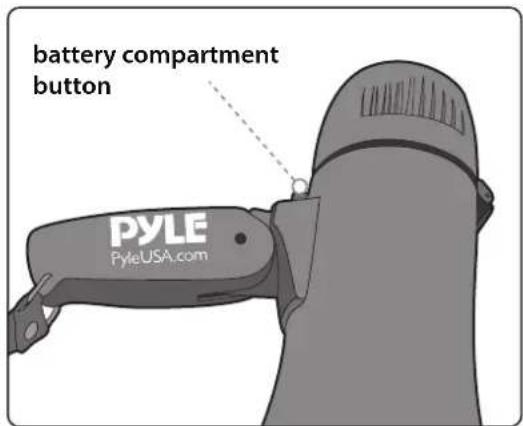
Press the button located near the back, underside of the megaphone. The button will release the lid to reveal the battery compartment. Observe the correct battery direction placement on the top side of the opening battery compartment lid. Insert batteries, close the cover, and secure the clip to lock it in place.
NOTE:
Make sure the batteries are inserted correctly, observing the correct polarity.
WARNING:
Cancer and Reproductive Harm - www.P65warnings.ca.gov
OPERATING INSTRUCTIONS
- Open the back cover by pressing down on the 'battery compartment button'.
- Insert (4) x 'D' Batteries, then close the back cover until it locks into position. Your megaphone is now ready to operate.
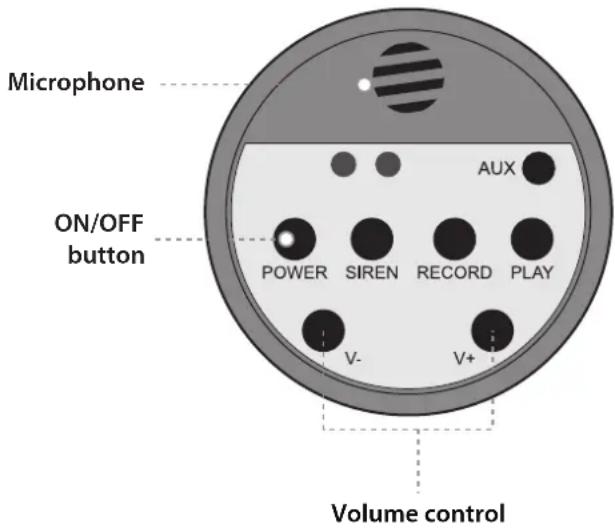
- To activate the megaphone, press the 'ON/OFF' button on the back cover.
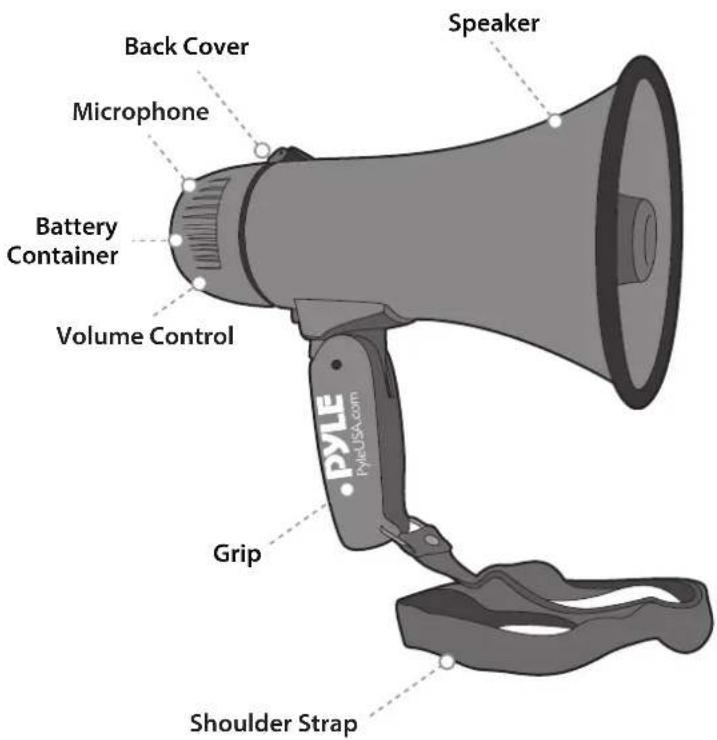
- When using the megaphone, place your lips as close as possible to the megaphone when speaking. Adjust the 'Volume Control' to the desired level without causing howling or feedback.
- Press the 'SIREN' button to activate emergency siren/alarm.
- Adjust the volume control to the min. before recording.
- To record, press the RECORD button. Now your megaphone is ready for recording. The longest record time is about 60 seconds.
Press the RECORD button again after recording is done. - Press the PLAY button to activate the recorded materials circularly.
Voice Mode
- Slide the switch on the rear of the megaphone to voice.
- Adjust the desired volume level using the rear slider switch on the megaphone.
Siren Mode
- Slide the switch on the rear of the megaphone to siren.
- Adjust the desired volume level using the rear slider switch on the megaphone.
Features:
• Audio Modes: Talk, Siren, Music, Whistle, Record 60 seconds
• Aux (3.5mm) Input Connector Jack
• Stream MP3 & Digital Aud
- Includes Plug-in Handheld Microphone
- Button Activated Automatic Siren Alarm
- Adjustable Volume Control and Shoulder Strap
- Ergonomic Pistol Grip and Lightweight Chassis For Indoor/Outdoor Use
• Built-in Automatic Siren Function
• Talk, Music, and Siren Switch
- Ability to Connect External Devices
(iPhone, Android, Smartphone, iPad, Tablet, etc.)
Technical Specs:
• Constructional Materials: ABS
• Power Output: 20-Watt MAX
• Bell Width: 8.66" inches / 22 centimeter
• Projection Range: Up to 400 Square Yards
- Battery Powered: Requires 4 x 'C' Batteries, Not Included
• Number of Battery: 4 pcs.
• Item Weight: 0.96 lbs. (0.43 kg)
• Product Dimensions (L x W x H):
5.43" x 5.43" x 8.66" inches (13.8 x 13.8 x 22 cm)
Register Product
Thank you for choosing PyleUSA. By registering your product, you ensure that you receive the full benefits of our exclusive warranty and personalized customer support.
Complete the form to access expert support and to keep your PyleUSA purchase in perfect condition.

PyleUSA.com/register
PYLE

Questions or Comments?
We are here to help!
Phone: 1.718.535.1800
PyleUSA.com/ContactUs
(iPhone, Android, Smartphone, iPad, Tablet, etc.)
Phone: 1.718.535.1800
PyleUSA.com/ContactUs
Phone: 1.718.535.1800
PyleUSA.com/ContactUs
Phone: 1.718.535.1800
PyleUSA.com/ContactUs
Phone: 1.718.535.1800
PyleUSA.com/ContactUs
Phone: 1.718.535.1800
PyleUSA.com/ContactUs
Brand : Pyle
Model : PMPRA213BL
Category : Megaphone