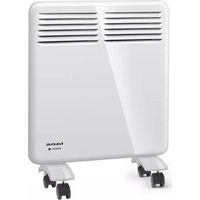
CHTA1000 - Heating TAURUS - Free user manual and instructions
Find the device manual for free CHTA1000 TAURUS in PDF.


| Product type | Electric wall convector |
| Brand | Taurus |
| Model | CHTA1000 |
| Category | Heating |
| Power supply | 220-240 V ~ 50/60 Hz |
| Rated power | 1000 W |
| Dimensions (approx.) | 60 x 40 x 10 cm |
| Weight (approx.) | 5 kg |
| Heating modes | Confort, Éco, Frost protection, Programs P1/P2/P3 |
| Comfort temperature range | 5 to 35 °C |
| Eco temperature range | 1 to 31 °C |
| Frost protection temperature | 7 °C (fixed) |
| Timer | 0 to 24 hours |
| Weekly programming | Yes (P3 adjustable hour by hour) |
| Window open function | Yes |
| Clock and day of the week | Yes, adjustable |
| Display | LED digital |
| Legs with castors | Yes, included |
| Safety | Overheat protection |
| Cleaning | Damp cloth, do not immerse |
| Warranty | According to current legislation |
| After-sales service | Taurus authorized centers |
Frequently Asked Questions - CHTA1000 TAURUS
User questions about CHTA1000 TAURUS
0 question about this device. Answer the ones you know or ask your own.
Ask a new question about this device
Download the instructions for your Heating in PDF format for free! Find your manual CHTA1000 - TAURUS and take your electronic device back in hand. On this page are published all the documents necessary for the use of your device. CHTA1000 by TAURUS.
USER MANUAL CHTA1000 TAURUS
Wall panel convector
Convecteur mural
Wandpaneel Konvektor
Wandpaneel convector
Konwektor ścienny
natural_image
Line drawing of a portable air conditioner unit with two wheels and ventilation grilles (no text or symbols)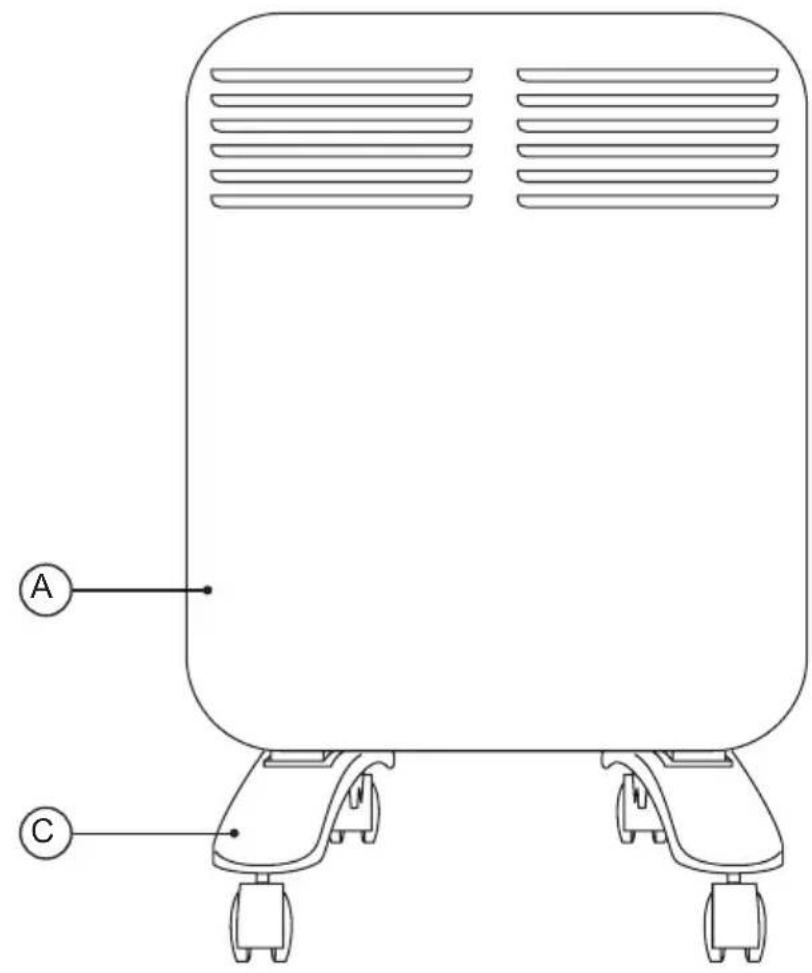
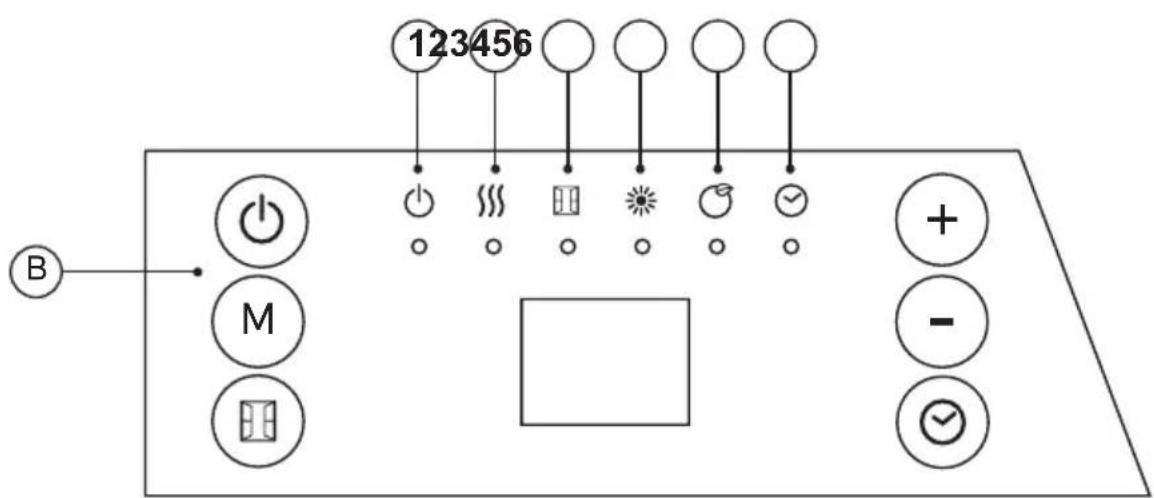
Fig.1 Instalación
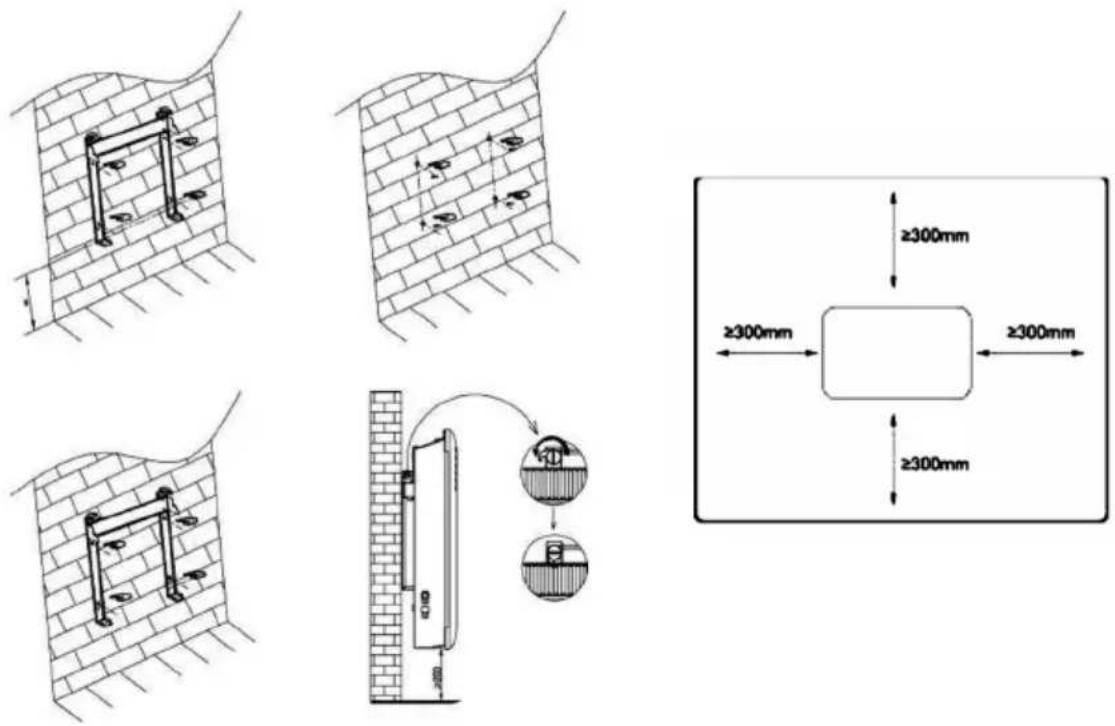
Fig.2
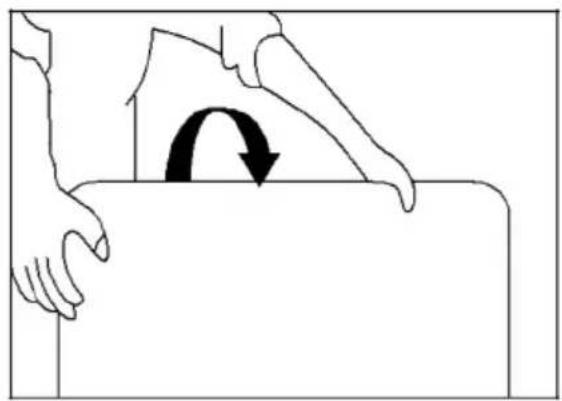
natural_image
Illustration of a hand pressing down on a surface with a curved arrow indicating rotation (no text or symbols)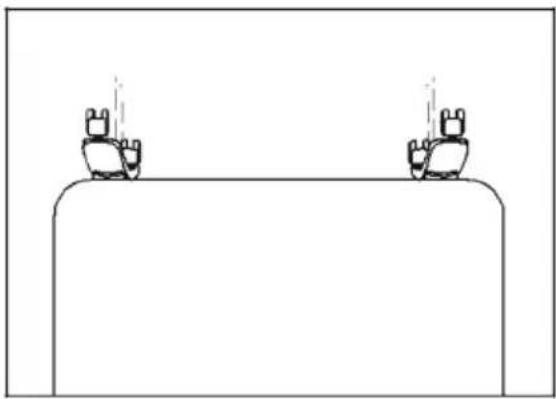
natural_image
Simple line drawing of two identical figures standing on a rectangular platform with dashed lines indicating motion or vibration (no text or symbols)Español
Convector de pared
CHTA500
CHTA1000
CHTA1500
CHTA2000
DESCRIPCIÓN
A Panel frontal
B Display digital
C Pies
PANEL DE MANDOS
Wall panel convector
CHTA500
CHTA1000
CHTA1500
CHTA2000
DESCRIPTION
A Front panel
B Control panel
C Feet
CONTROL PANEL
 | Standby |
 | Mode selection |
 | Open window function |
 | Increase function |
 | Decrease function |
 | Timer |
1 Standby: on/off
2 Heating condition
3 Open window function
4 Comfort mode
5 ECO mode
6 Timer
FITTING THE BASE FEET (WHEELS):
- To assemble the base feet, place the appliance face down (fig2)
- Position the base feet on the body of the appliance.
- Position the base feet on the body of the appliance using the screws. (Provided with the appliance).
-
Stand the appliance up again so as to check that the base feet work properly.
-
Instructions for use
- Before use:
- Make sure that all products' packaging has been removed.
- Some parts of the appliance have been lightly greased. Consequently, the first time the appliance is used a light smoke may be detected. After a short time, this smoke will disappear.
- To eliminate the smell given off by the appliance when used for the first time, it is recommended to have it on at full power for 2 hours in a well-ventilated room.
- Prepare the appliance according to the function you wish to use.
HOW TO USE:
- Connect the appliance to the mains.
- The indicator light is on.
- Press to turn on the heater, which is in state of factory default when first time use.
- Factory default:
- Heating mode: comfort mode
- Target temperature setting: 22 °C
- Date: 1(Monday); Time: 00:00 (Off)
- Window open function: Off
- Timer: Off
- To stop the heater working, press ⏻ to turn off the heater,
- Unplug the product when it's not in use.
- Clock and day of week setting:
- Press down 3 secs to enter clock and day of week setting
- The screen displayd, press + and - to choose day from 1-7.
| 1 Monday |
| 2 Tuesday |
| 3 Wednesday |
| 4 Thursday |
| 5 Friday |
| 6 Saturday |
| 7 Sunday |
- Press ☑ during few seconds to confirm day setting and enter the clock hour setting, with the screen display: H
- Press + and - to set the current hour
- Press during few seconds to confirm hour setting and enter the minute setting, with the screen display:
- Press + and - to set the current minute
- Press ☑ to confirm all settings
- Note: The clock and calendar will be reset to factory default if without power supply.
HEATING MODE:
- Press M to enter mode selection. By pressing M, heating mode runs in a continuous cycle as below:
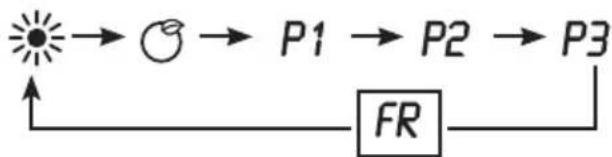
flowchart
graph LR
    A["Sun"] --> B["O"]
    B --> C["P1"]
    C --> D["P2"]
    D --> E["P3"]
    E --> F["FR"]
    F --> A
- Comfort mode: Press + and - to set the temperature from 5-35°C.
ECO mode: Press + and - to set the temperature from 1-31°C.
- Note: ECO mode=Comfort mode - 4°C
- Anti-frost mode: the screen display FRThe target temperature is 7°C. The temperature can't be adjusted.
- P1/P2/P3: Pre-set heating program.
- Note: If the clock and day setting are not finished, the first time to enter P1/P2/P3 program setting, it is requested to set day and clock setting in advance.
P1: (Monday-Sunday) unadjustable program

P2:(Monday-Friday) unadjustable program

P2:(Saturday-Sunday) unadjustable program

P3:(Monday-Friday) Adjustable program

P3:(Saturday-Sunday) Adjustable program

P3 adjustable program setting
-
- When under P3 mode, press Ⓜ over 3 secs to enter day setting.
-
- The screen displays ^d press + and - to set from d (Monday-Sunday). Press M to confirm and enter hour setting
-
- The screen displays press + and - to set from 00-24). Press M to choose heating mode for every hour (Comfort mode or ECO mode of anti-frost mode for no indicators on)
-
- Repeat the operation until you have completed the schedule of every hour and every day.
- Note: After setting heating mode for hour 23, press + to come back to day setting.
- Note: when screen displays press finish all setting with display of P3
TIMER OFF FUNCTION
- Press one time, the screen display "OH" and keeps flashing. press + and - to set timer from 0-24 hours. Press again to confirm setting, then the indicator light is on.
OPEN WINDOW FUNCTION
- Press one time and the indicator light is on. If open window function is activated, the indicator light keeps flashing and stops heating.
- Press again to quit open window function and back to previous working situation.
ONCE YOU HAVE FINISHED USING THE APPLIANCE:
- Turn the appliance off using the on/off button.
- Unplug the appliance from the mains.
- Clean the appliance.
- Safety thermal protector:
- The appliance has a safety device, which protects the appliance from overheating.
- When the appliance switches itself on and off repeatedly, for reasons other than the thermostat control, check to ensure that there are no obstacles that impede correct air entry or expulsion.
- If the appliance turns itself off and does not switch itself on again, disconnect it from the mains supply, and wait for approximately 15 minutes before reconnecting. If the machine does not start again seek authorised technical assistance.
CLEANING
- Disconnect the appliance from the mains and allow it to cool before undertaking any cleaning task.
- Clean the equipment with a damp cloth with a few drops of washing-up liquid and then dry.
- Do not use solvents, or products with an acid or base pH such as bleach, or abrasive products, for cleaning the appliance.
- Do not let water or any other liquid get into the air vents to avoid damage to the inner parts of the appliance.
- Never submerge the appliance in water or any other liquid or place it under running water.
- If the appliance is not in good condition of cleanliness, its surface may degrade and inexorably affect the duration of the appliance's useful life and could become unsafe to use.
- Remark: When the appliance is used as a heater after long periods in storage or after having been used solely as a fan a small amount of smoke may be produced. This is not important and is due to the heater burning dust deposits which have accumulated on the heating element. This phenomenon may be avoided by cleaning the inside of the appliance beforehand through the grill with a vacuum cleaner or pressurised air.
Français
Convecteur mural
CHTA500
CHTA1000
CHTA1500
CHTA2000
DESCRIPTION
Wandpaneel convector
CHTA500
CHTA1000
CHTA1500
CHTA2000
OMSCHRIJVING
A Voorpaneel
B Bedieningspaneel
C Poten
BEDIENINGSPANEEEL
This product enjoys the recognition and protection of the legal guarantee in accordance with current legislation. To enforce your rights or interests you must go to any of our official technical assistance services.
You can find the closest one by accessing the following web link: http://taurus-home.com/
You can also request related information by contacting us.
You can download this instruction manual and its updates at http://taurus-home.com/
Français
GARANTIE ET ASSISTANCE TECHNIQUE
COUNTRY ADDRESS PHONE
| Algeria Zone d'Activite, N° 62, Constantine 213770777756 | ||
| Argentina Av. del Libertador 1298,(B1638BEY), Vicente López (Pcia. Buenos Aires) | 541153685223 | |
| Belgium Mariëndonkstraat 5, 5154 EG, Elshout 31620401500 | ||
| Benin 359 Av. Steinmetz, 1930, Cotonou 0299-21313798 | ||
| Bulgaria | 265,Okolovrasten Pat, Mladost 4, 1766, Sofia | 35929211120 / 35929211193 |
| Burkina Faso Avenue Bassawarga, 01 BP915, Ouagadougou 226 25301038 | ||
| Congo (Republic of) 98 Blvd General Charles de Gaulle, Pointe Noire 242066776656 | ||
| Cyprus | 20, Bethlehem Str. / P.O.Box 20430, 2033, Strovolos | 35722711300 |
| Czech Republic | Milady Horakove 357/4, 568 02, Svitavy | 420 461 540 130 |
| Democratic Republic of the Congo | AV. Pont Canale N° 3440, Kinshasa | 00243-991223232 |
| Equatorial Guinea | SN Av Patricio Lumumba y C/ Jesus B, Bata | 00240 333 082958 / 00240 333 082453 |
| Equatorial Guinea | Calle de las Naciones Unidas, PO box 762, Malabo | 240333082958 / 240333082453 |
| España Avda Barcelona, S/N, 25790 Oliana (Lleida) atencioncliente@taurus.es | 902 118 050 | |
| Ethiopia Lideta Sub City Kebele 10 H.NO 124, Addis Ababa | +251 11 5518300 | |
| France | Za les bas musats 18, 89100, Malay-le-Grand | 03 86 83 90 90 |
| Gabon | BP 574, Port-Gentil Centre-ville | 24101552689 / 24101560698 |
| Ghana | Ederick Place, Accra-Ghana | 302682448 / 302682404 |
| Gibraltar 11 Horse Barrack Lane, 54000, Gibraltar 00350 200 75397 / 00350 200 | ||
| 41023 | ||
| Greece Sapfous 7-9, 10553, Athens +30 21 0373 7000 | ||
| Guinea BP 206, GN, Conakry (224) 622204545 | ||
| Hong Kong Unit H,13/F., World Tech Centre, Hong kong (852) 2448 0116 / 9197 3519 | ||
| Hungary Késmárk utca 11-13, 1158, Budapest +36 1 370 4519 | ||
| India C-175, Sector-63, Noida, Gautam Budh Nagar - 201301, Delhi | (+91) 120 4016200 | |
| Ivory Coast 01 Rue Des Carrossiers-Zone 3, B.P 3747, Abidjan 01 (RCI) | 22521251820 / 225 21 353494 | |
| Jordan 28 Basman St Down town, Amman +962 6 46 222 68 | ||
| Kuwait | P.O. BOX 3379 hawally, 32034, Hawally | +965 2200 1010 |
| Lebanon Damascus Highway; Sciale Building, Jamhour | 9615922963 | |
| Luxembourg | Mariëndonkstraat 5, 5154 EG, Elshout 31620401500 | |
| Mali | BP E2900, Dravela Bolibana | 223227216 / 223227259 |
| Marruecos | Big distribution society 4 Rue 13 Lot. Smara Oulfa, Casablanca | (+212) 522 89 40 21 |
| Mauritania | 134 Avenue Gamal Abdener Ilot D, Nouakchott | 2225254469 / 2225251258 |
| Mexico Rosas Moreno N° 4-203 Colonia de San Rafael C.P. 06470 – Delegación Cuauhtémoc, Ciudad de México | (+52) 55 55468162 | |
| Montenegro | Rastovac bb, 81400, Niksic | +382 40 217 055 |
| Netherlands | Mariëndonkstraat 5, 5154 EG, Elshout 31620401500 | |
| Nigeria 8, Isaac; John Str,G.R.A Ikeja Lagos | 23408023360099 | |
| Paraguay | Denis Roa 155 c/ Guido Spano, Asunción | 21665100 |
| Peru | Calle los Negocios 428, Surquillo, Lima | (511) 421 6047 |
| Portugal Avenida Rainha D. Amélia, n°12-B, 1600-677, Lisboa | +351 210966324 | |
| Romania | Dudesti Pantelimon 23, 410554, Bucharest | 031.805.49.58 |
| Serbia | Rastovac bb, 81400, Niksic | +382 40 217 055 |
| Slovakia Milady Horakove 357/4, 568 02, Svitavy | 420 461 540 130 | |
| Southafrica | Unit 25 & 26, San Croy Office Park, Die Agora Road, Croydon, Kempton Park, 1619, Johannesburg | (+27) 011 392 5652 |
| Tunisia | 2, Rue de Turquie, Tunis | 21671333066 |
| Ukraine | Block 6, Ap Housing Estate Topol-2, B, 49000, Dnepropetrovsk | 380563704161 / 380563704161 |
| United Arab Emirates | P.O.BOX 8543, Dubai | 14506246200 |
| Uruguay | Luis Alberto de Herrera 3468, 11600, Montevideo | 598 2209 28 00 |
| Vietnam Lot 7 Ind. Zone for, Ha Noi | 84437658111 / 84437658110 | |

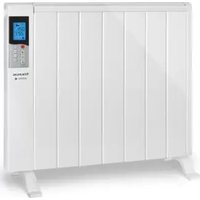


- Español
- Convector de pared
- DESCRIPCIÓN
- Wall panel convector
- DESCRIPTION
- FITTING THE BASE FEET (WHEELS):
- HOW TO USE:
- HEATING MODE:
- TIMER OFF FUNCTION
- OPEN WINDOW FUNCTION
- ONCE YOU HAVE FINISHED USING THE APPLIANCE:
- CLEANING
- Français
- Convecteur mural
- Wandpaneel convector
- OMSCHRIJVING
- BEDIENINGSPANEEEL
- GARANTIE ET ASSISTANCE TECHNIQUE
Brand : TAURUS
Model : CHTA1000
Category : Heating