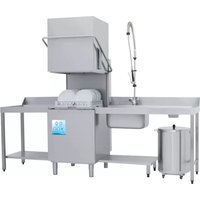
Fast 80 - Dishwasher Elettrobar - Free user manual and instructions
Find the device manual for free Fast 80 Elettrobar in PDF.


| Brand | Elettrobar |
| Model | Fast 80 |
| Product type | Professional dishwasher |
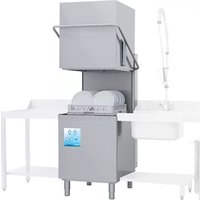
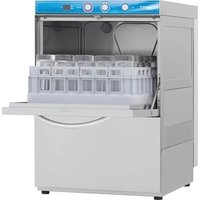
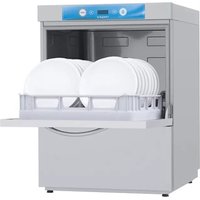
| Configuration | Under-counter or hood (depending on version) |
| Power supply | Three-phase 400 V or single-phase 230 V (depending on version) |
| Maximum water pressure | 4 bar (400 kPa) |
| Maximum incoming water temperature | 50 °C |
| Wash programs | Short wash, long wash, medium wash, glass wash, drain cycle, resin regeneration |
| Tank material | Stainless steel |
| Filtration system | Removable integral filter (two half-filters) |
| Spray arms | Removable for cleaning nozzles |
| Water softener | Integrated optional |
| Resin regeneration | Possible via dedicated cycle with regenerating salt (250-300 g) |
| Safety | Safety thermostats, pressure switch, self-diagnosis system with error codes |
| Noise level | Under-counter: LpA max 55 dB; Hood: LpA max 65 dB |
| Routine maintenance | Daily filter cleaning, periodic arm cleaning and disinfection |
| Installation | Fixed water and electrical connection, to be performed by a qualified professional |
| Warranty | Subject to compliance with instructions and use of original parts |
| Repairability | Original spare parts, authorized technical assistance |
Frequently Asked Questions - Fast 80 Elettrobar
User questions about Fast 80 Elettrobar
0 question about this device. Answer the ones you know or ask your own.
Ask a new question about this device
Download the instructions for your Dishwasher in PDF format for free! Find your manual Fast 80 - Elettrobar and take your electronic device back in hand. On this page are published all the documents necessary for the use of your device. Fast 80 by Elettrobar.
USER MANUAL Fast 80 Elettrobar
| Fig.2 |  | 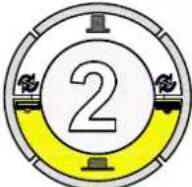 | 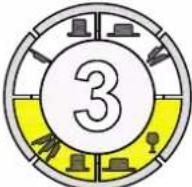 |

natural_image
Diagram of a mechanical assembly with rollers and a downward arrow, no text or symbols present

natural_image
Diagram of a microplate with a black arrow pointing downward (no text or symbols)

Fig.3
| Fig.2 |  |  |
natural_image
Technical diagram of a mechanical assembly with directional arrows indicating movement or force (no text or symbols present)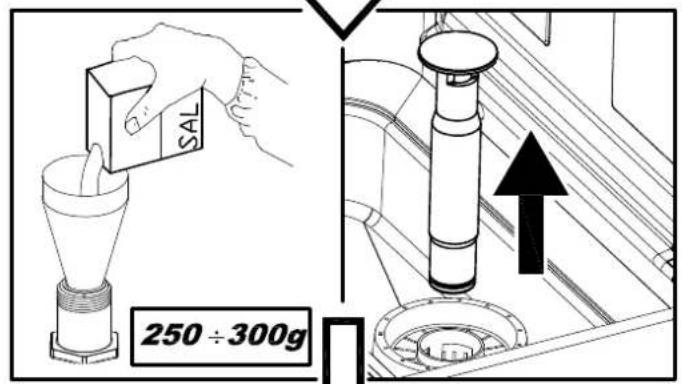
flowchart
graph TD
    A["OFF"] --> B["5s"]
    B --> C["4 START"]
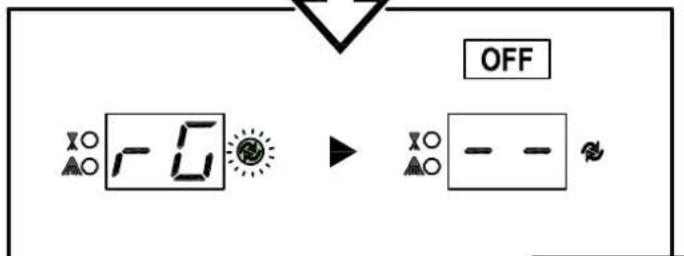
Fig.6
INSTRUCTION MANUAL FOR DISHWASHERS
TRANSLATION FROM THE ORIGINAL INSTRUCTIONS
CONTENTS
CHAP 1 RISKS AND IMPORTANT WARNINGS....2
1.1 NORMAL OPERATING CONDITIONS 3
CHAP 2 PREFACE ....4
CHAP 3 INSTALLATION ....4
3.1 UNPACKING 4
3.2 POSITIONING....4
3.3 ELECTRICAL CONNECTION....5
3.4 WATER CIRCUIT HOOKUP 6
3.5 CONNECTION TO THE DRAIN LINE 6
3.6 RINSE AID AND DETERGENT....6
CHAP 4 USING THE MACHINE....7
4.1 KEY AND SYMBOLS 7
4.2 SWITCHING THE DISHWASHER ON 7
4.3 FILLING THE RACK 7
4.4 CYCLE SELECTION AND START-UP 7
4.4.1 Under-counter dishwashers 7
4.4.2 Hood dishwashers 8
4.5 PROGRAMMES 8
4.6 REMOVING THE INTEGRAL FILTER 8
4.7 EMPTYING THE DISHWASHER....8
4.7.1 Appliances with no drain pump 8
4.7.2 Appliances with drain cycle (*optional)......8
4.8 RESIN REGENERATION (*OPTIONAL)....9
4.8 RESIN REGENERATION (*OPTIONAL)....9
4.9 LIST OF VIEWABLE MESSAGES 9
4.10 END OF SHIFT....9
CHAP 5 MAINTENANCE....10
5.1 GENERAL RULES 10
5.2 CLEANING....10
5.3 CLEANING THE FILTER UNIT 10
5.4 CLEANING THE ARMS 10
CHAP 6 SELF DIAGNOSTICS....11
CHAP 7 SETTINGS....12
CHAP 8 SCRAPPING....12
CHAP 9 ENVIRONMENT....13
In legal terms, the manufacturer reserves the property of this document. It is forbidden to reproduce it or divulge it with any means without prior written authorisation.
The manufacturer reserves the right to introduce changes in order to achieve the improvements it deems necessary without prior notice.

Read the instruction manual carefully before starting the machine. The warnings contained in the manual provide important information on safety and installation, use and maintenance. Failure to observe the instructions in the enclosed documentation may compromise the safety of the appliance and immediately voids the warranty.
Chap 1 RISKS AND IMPORTANT WARNINGS
- This appliance is intended solely for the use for which it was designed. Any other use is improper and therefore hazardous.
- The specialised technician responsible for installing the appliance must instruct the user on its operation and any attendant safety measures, including practical demonstrations.
- Only the manufacturer or an authorised service centre with qualified staff may work on the machine, even in case of malfunction, using only original spare parts.
- Always disconnect or isolate the machine from its power and water supplies before servicing, repairing or cleaning it.
- The machine may NOT be used by persons untrained in its use.
- The appliance may be used by children aged at least 8 years old or persons with reduced physical, sensory or mental capacities, or with no experience or knowledge, provided they are supervised or after they have received training in the safe use of the appliance.
• Children must not play with the appliance. - Cleaning and maintenance by the user must not be performed by unsupervised children.
- The machine must NOT be kept powered up when not in use.
- If the machine is not fitted with a plug or other device for completely disconnecting all contacts, these disconnection devices must be incorporated in the power supply, in compliance with the installation rules.
- If the power cable is damaged, it must be replaced by the manufacturer or an authorised technical assistance service, or in any case by a person with similar qualifications, to prevent all associated risks.
- The screw on the appliance marked with the IEC 60417 standard symbol 5021 represents the equipotential connection.
- NEVER open the machine quickly if it has not completed its cycle.
- NEVER use the machine with the guards installed by the manufacturer removed.
- NEVER use the machine to wash objects of any form, size or material not guaranteed to be machine-washable or not in good condition.
- NEVER use the machine or any of its assemblies as steps or support for persons, property or animals.
- NEVER overload the open door of front-loading machines, which is rated only to support the basket loaded with dishes.
-
NEVER place your bare hands in the wash solution.
-
NEVER overturn the machine after it has been installed.
- If you notice any malfunction or fluid leak, immediately disconnect the power supply and shut off the water supply.
- Do not install the dishwasher in the vicinity of heat sources over 50^ .
- NEVER leave the dishwasher exposed to the weather (rain, direct sunlight, etc.)
- The dishwasher may not be installed outdoors without proper cover.
- Never start a wash programme without the overflow in the tub, as applicable.
- Never place magnetic objects in the vicinity of the machine.
- Do not use the top of the machine as a table or support.
- The installer is responsible for checking that the grounding system is full operational.
- At the end of testing, the installer must issue a written declaration stating that the machine has been installed and tested in accordance with established legislation and good practice.
- DO NOT change the position or tamper with the elements of the machine, as this could compromise the machine safety.
- Noise pressure level according to EN ISO 4871
○ LpA Max = 55db Kpa=2.5db for undercounter versions
○ LpA Max = 65db Kpa=2.5db for hood versions
○ LpA Max = 76db Kpa=1.5db for utensil washer versions
• Max inlet water temperature: 50°C
• Max inlet water pressure: 4bar (400kPa)
- Appliance designed for permanent connection to the water supply
- Do not clean the appliance with steam or water jets.
- Max loading height
- On the ground in the versions with overflow
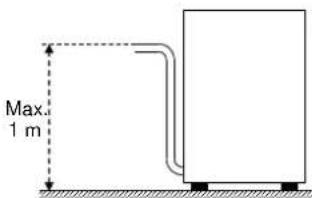
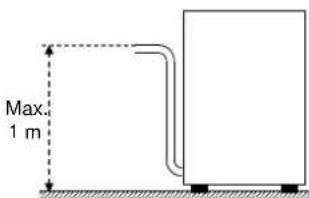
○ Maximum height 1 m in versions with discharge pump
1.1 Normal operating conditions
Ambient temperature: 40°Cmax /4°Cmin (average 30°C)
Altitude : up to 2000 metres
Relative humidity : Max 30% at 40°C / max 90% at 20°C
Chap 2 PREFACE
Warnings:
Keep all documentation in the vicinity of the appliance; make it available to the technicians and operators charged with operating it and keep it in good condition in a safe place, along with extra copies for frequent reference
The operator must read, understand and familiarise himself with the contents of this manual before working on or with the appliance.
The appliance is intended solely for professional heavy duty dishwashing applications and must be installed, operated and serviced only by qualified persons according to the manufacturer's instructions.
Warranty:
The manufacturer is not liable for any damage or injury resulting from failure to observe the instructions or improper use of the machine
Failure to observe the instructions in the enclosed documentation may compromise the safety of the appliance and immediately voids the warranty
Installation and repair by unauthorised technicians and the use non-original spare parts immediately void the warranty.
Storage:
Transport and storage: -10°C to 55°C with peaks up to 70°C (for no longer than 24 hours)
Chap 3 INSTALLATION
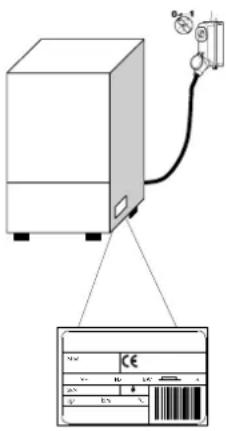
Proper installation is essential to the good operation of the appliance. Some of the data required for installation of the appliance are given on the nameplate on its RH body panel, and a copy is included on the cover page of this manual.

The appliance may only be installed by qualified persons authorised to do so.
For Australia and New Zealand this machine must be installed in accordance with AS/NZS3500.1 and PCA.
3.1 Unpacking
Check the condition of the packaging, and note any evident damage on the shipping bill. Remove the packaging and check that the appliance is in good condition; immediately report any damage to the reseller and the shipping agent by fax or registered letter with return receipt. If the damage is such as to compromise the safety of the appliance, do not install or operate it until it has been inspected by a qualified technician.

The packaging (plastic bags, expanded polystyrene, nails, etc.) are hazardous and must not be left within the reach of children or pets.
3.2 Positioning
- Check that there are no objects or materials in the installation area which may be damaged by the steam emitted by the appliance during operation, or if there are, make sure they are properly protected.
- Before positioning the appliance, set up the electrical power supply, water supply and drain connections.
- For flush-mounting single panel machines, leave a space of at least 10 mm between the machine walls and the adjacent surfaces.
- The floor or build-in unit must be rated to support the weight of the appliance
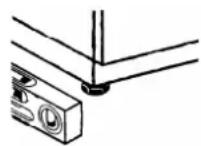
- To ensure that it is stable, level the appliance with its four feet.
- The appliance is intended for fixed installation only; any other approaches must be agreed with and approved by the manufacturer.
- Remove the protective film from its body panels before operating the dishwasher.
3.3 Electrical connection
- The power supply must be fitted with a omnipolar circuit breaker (master power switch) to break all contacts including neutral, with a contact gap of at least 3 mm and thermal cutout or fuses, which must be set or rated to the power indicated on the machine's nameplate.
- The master power switch must be fitted to the power line in the vicinity of the installation and may be connected to only one machine at a time.
- The mains voltage and frequency must match the nameplate ratings.
- The installation must include a grounding system conforming with established electrical safety legislation, to protect the operator and the appliance itself
- This appliance conforms to EN/IEC 61000-3-11 certification if the system impedance Z_sys is less than or equal to Z_max in the point of interface between the user's supply system and the pub system. The installer or appliance user is responsible for checking that the appliance is connected exclusively to a supply with system impedance Z_sys less than or equal to Z_max
| Z_max | |
| Utensil washers | 0.21 |
| Hood | 0.24 |
| Undercounter | 0.41 |
- The power cable, which must be exclusively type H07RN-F with current capacity at 60°C on the cable:
- Three-phase machine
- -5x2.5 mm^2 up to 20 A
-5x4 mm^2 up to 30 A - -5x6 mm^2 up to 38 A
-5x10 mm^2 up to 54 A
- Single-phase machines
-3x1.5 mm^2 up to 16 A
-3x2.5 mm^2 up to 25 A
- Must not be stretched or crushed during normal operation or routine maintenance.
- The appliance must also be connected to an equipotential system, connected by a screw marked by the symbol 5021 - IEC 60417.
- The equipotential cable must have a cross section of 10 ~mm^2 .
- Respect the polarities indicated in the wiring diagram.
- For further information, refer to the wiring diagram.

Do not use multi-sockets, adapters, cables of an inadequate cross section or type or with extensions not conforming to established electrical installation regulations.
natural_image
Simple line drawing of a vertical pipe with a curved outlet, no text or symbols present3.4 Water circuit hookup
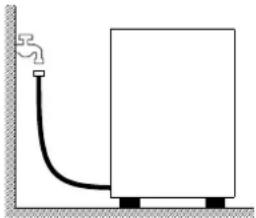
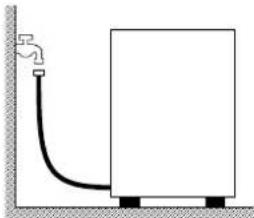
The appliance must be connected to its water supply with a flexible hose. A shut off valve (cock) must be installed between the water supply line and the appliance's solenoid valve. The cock must be close to the appliance.
- The water supply, temperature and pressure must be compatible with the ratings shown on the technical data plate on the machine.
• Make sure that the water supply flow rate is no less than 20 l/min - If the water hardness is greater than 14 °f (8 °dH), we recommend using an internal water softener. If the water hardness is greater than 35 °f (19.5 °dH), install an external water softener upline of the solenoid valve
- For machines without water softener: if the water hardness is greater than 14 °f (8 °dH), install an external water softener upline of the solenoid valve.
- If the water has a very high residual concentration of high conductivity minerals, we recommend installing a demineralisation system.
- Machines intended for use with desalinated water or in any case with high sodium chloride concentration must be ordered specifically, as they require specific construction materials
- Do not supply fully demineralised water to machines with a heat recovery unit with batteries with copper pipes. In this case, request the version with batteries with stainless steel pipes.
natural_image
Simple line drawing of a rectangular container connected to a small water tank (no text or symbols)Free drain
With pump (available on request)
3.5 Connection to the drain line
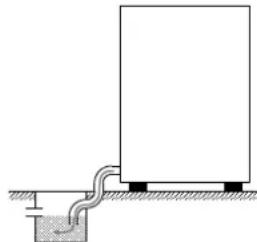
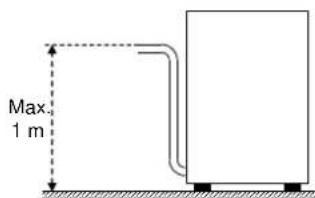
- The drain line must consist of a free drain sump with siphon suited to the flow capacity of the drain hose supplied with the appliance. The hose must be able to reach the sump without stretching, restriction, folding, crushing, pressing or forcing in any way.
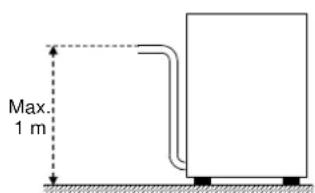
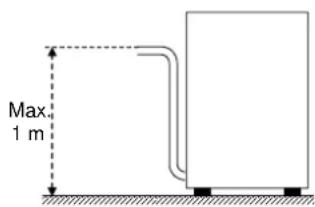
- The tub drains under gravity, so the drain sump must be lower than the machine's base.
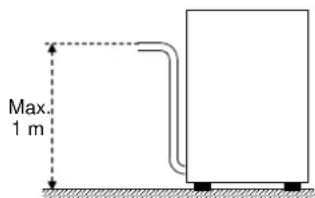
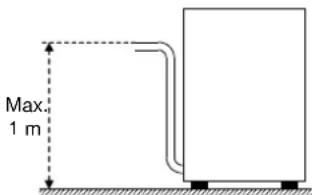
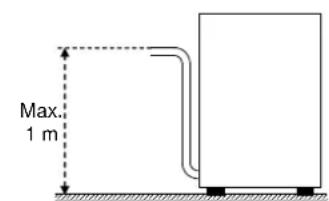
- if the drain is not lower than the base of the appliance, you can use the version with drain pump (available on request).
- In this case, the drain connection may be no higher than 1 m.
- Always check that the drain works properly and is not blocked.
- Any other solution must be approved by the manufacturer in advance.
3.6 Rinse aid and detergent
- The rinse aid and detergent are dispensed by the machine's integral dispenser (depending on model).
- The dose is set by the installer in relation to the hardness of the water, and he also calibrates the dispensers themselves.
• Before calibrating them, fill the dispenser supply tubes with their respective product. - The units are calibrated with the adjuster screws, or directly with the control panel (as applicable).
- The level of fluid in the container must be sufficient for priming; do not allow it to drain completely or top it up with corrosive or impure product.
NEVER use CHLORINE or HYPOCHLORITE based detergents.
We recommend installing an automatic detergent dispenser.
Chap 4 USING THE MACHINE
4.1 Key and symbols
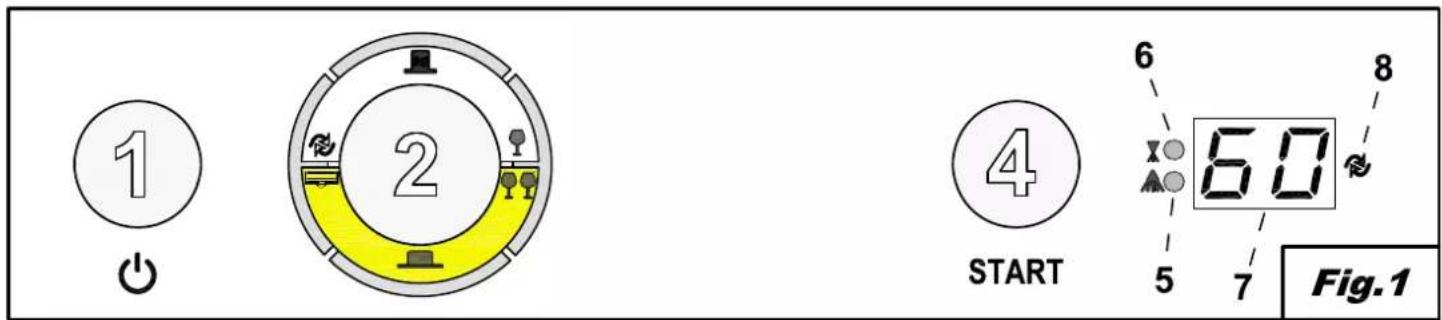
Referring to Fig.1:
| 1 | ON/OFF BUTTON | 5 | WASHING LED |
| 2 | STATUS SELECTION BUTTON | 6 | RINSE LED |
| 3 | PROGRAMME SELECTION BUTTON | 7 | INFORMATION DISPLAY |
| 4 | START BUTTON | 8 | REGENERATION LED |
The arrangement of buttons and leds may vary according to the machine type
4.2 Switching the dishwasher on
- Turn on the main power switch and open the external water tap.
- The two lines on the DISPLAY (7) show that the mains power is on.
- Check the presence of the overflow.
- Press ON/OFF (1).
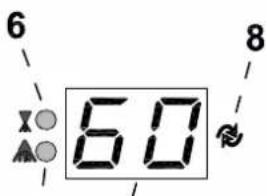
- The water filling and heating stage starts automatically; LEDs (5) and (6) flash alternately and the boiler temperature is shown on the DISPLAY (7).
- When the LEDs (5) and (6) stop flashing and stay steadily illuminated, this indicates that the optimum conditions to start washing have been reached.
4.3 Filling the rack
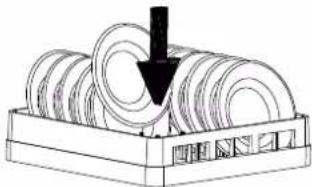
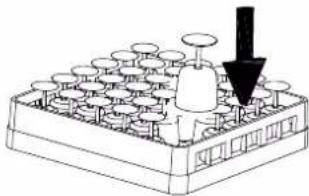
Referring to Fig.3, to ensure the correct operation of the dishwasher follow the rules described below:
- Use a suitable rack, fill without overloading and without overlapping the dishes.
- Always wipe the dishes before placing in the dishwasher; do not put dishes with dry or solid residues in the washer.
- Place the empty dishes in the rack facing downwards.
- Place plates and the like in the sloping rack, with the inner surface facing upwards.
- Place the cutlery in the cutlery basket, handle end down.
- Do not place silver and stainless steel cutlery in the same cutlery basket as this will turn the silver brown and may corrode the steel.
- Wash the dishes immediately after use, in order to prevent any residue from hardening and sticking on them.
- Use only solid, dishwasher-proof dishes.
4.4 Cycle selection and start-up
4.4.1 Under-counter dishwashers
- Select the appropriate washing cycle for the dishes using the buttons STATUS SELECTION (2) and PROGRAMME SELECTION (3); these buttons are used in combination to select the desired cycle, as shown in Fig.2.
- To start the programme, press the START button (4). The WASHING LED (5) will start flashing and the DISPLAY will show the washing temperature. Subsequently the RINSE LED (6) will start flashing and the DISPLAY will show the rinse temperature. (Fig.1).
- At the end of the cycle, the WASHING (5) and RINSE (6) LEDs will flash simultaneously for a few seconds.
- For rapid drying, remove the rack from the machine as soon as the cycle finishes.
- To stop a wash cycle early, press down and hold the START (4) button for a few seconds.
4.4.2 Hood dishwashers
- Select the appropriate washing cycle for the dishes using the buttons STATUS SELECTION (2) and PROGRAMME SELECTION (3); these buttons are used in combination to select the desired cycle, as shown in Fig.2.
- Press the START button (4) to activate the automatic start. The WASHING LED (5) will start flashing and the DISPLAY will show the washing temperature. Subsequently the RINSE LED (6) will start flashing and the DISPLAY will show the rinse temperature.
- At the end of the cycle, the WASHING (5) and RINSE (6) LEDs will flash simultaneously for a few seconds.
- Subsequent cycles will start automatically on closing the hood.
- For rapid drying, remove the rack from the machine as soon as the cycle finishes.
• To stop a wash cycle early, press START (4).
(Fig.1).
4.5 Programmes
| Glasswashers | Dishwashers | ||
 | Short wash | [K&HX] | Short wash |
 | Long wash |  | Medium wash |
 | Drain cycle. |  | Long wash |
 | Resin regeneration |  | Glass wash |
 | Drain cycle. | ||
 | Resin regeneration | ||
4.6 Removing the integral filter
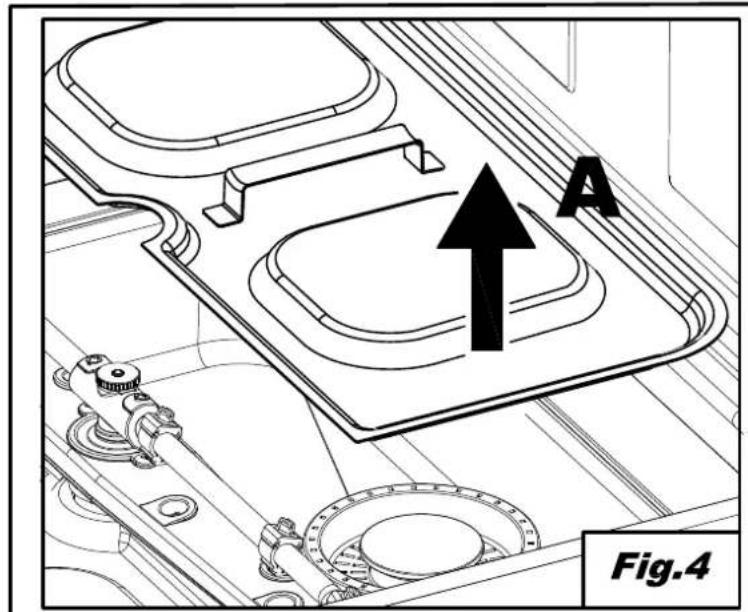
- Move the washing and rinsing arms at right angles to the edge of the door (Fig.4).
- Lift each semi-filter by the relative handle.
4.7 Emptying the dishwasher
4.7.1 Appliances with no drain pump
- Switch the dishwasher off.
• If present, remove the integral filter (Fig.4 A).
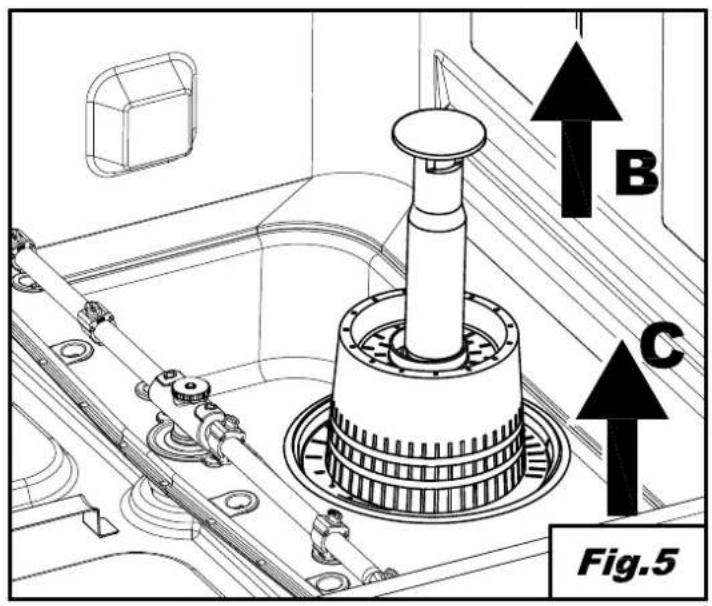
• Pull up and remove the overflow pipe (Fig. 5 B). - Wait for the tub to empty completely.
• If necessary, extract the tub filter and clean (Fig. 5 C).
4.7.2 Appliances with drain cycle (\*optional)
- Turn off the machine by pressing the ON/OFF button (1).
• If present, remove the integral filter (Fig.4 A). - Withdraw the overflow, if present, by pulling it upwards (Fig.5 B); the overflow is not present on partial drain versions.
- Close the door.
- Select the drain cycle by pressing STATUS SELECTION (2).
- Press the START button (4) for 2 seconds to activate the drain cycle.
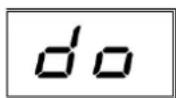
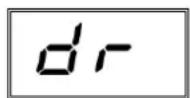
- The drain cycle is indicated on the DISPLAY (7) by the letters dr.
- The machine runs a drain cycle and then switches off.
• If necessary, extract the tub filter and clean (Fig. 5 C).
4.8 Resin regeneration (\*optional)
In machines with internal water softener, a regeneration cycle should be run periodically to ensure the correct operation of the softener. The number of cycles between one resin regeneration and the next depends on the hardness of the local water, and should be set in accordance with the following table.
| dH | °F | No. Cycles |
| 6 | 10 | 160 |
| 7 | 12 | 150 |
| 8 | 14 | 140 |
| 9 | 16 | 130 |
| 10 | 18 | 120 |
| 11 | 20 | 110 |
| 12 | 21 | 100 |
| dH | °F | No. Cycles |
| 13 | 23 | 90 |
| 14 | 25 | 80 |
| 15 | 27 | 70 |
| 16 | 29 | 60 |
| 17 | 30 | 50 |
| 18 | 32 | 40 |
| 19 | 34 | 30 |
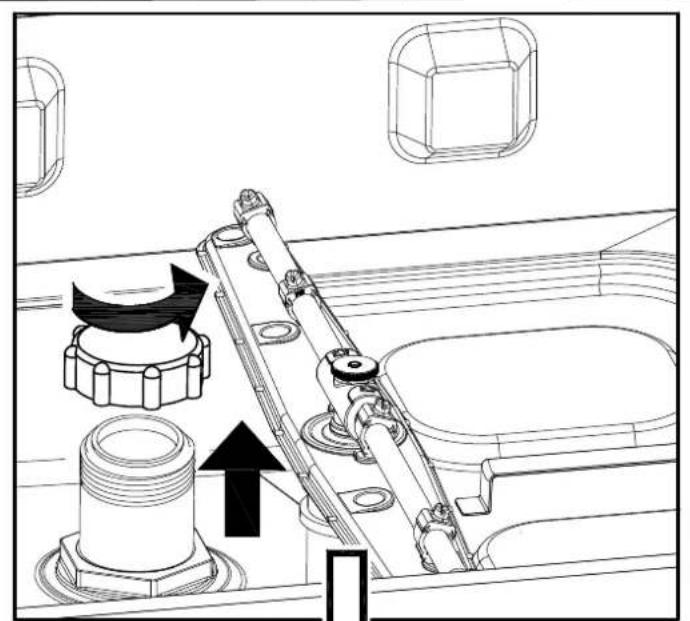
Proceed as follows (Fig. 6):
- Switch the dishwasher off
• Empty and clean it. - Remove the integral filter and open the salt container in the tub.
- Pour in 250-300g of regeneration salt (1 or 2mm grain size kitchen salt with no additives).
- Close the container firmly.
- Make sure the overflow has been removed.
- Select the regeneration cycle by pressing STATUS SELECTION (2).
• To start the cycle, with the machine off, press the START button (4) for a few seconds. - The start of the cycle will be signalled by illumination of the REGENERATION LED (8).
- The regeneration cycle lasts around 20 minutes.
- The dishwasher will switch off when the cycle has completed.
N.B. Do not switch the machine off during the regeneration cycle
Door open
4.9 List of viewable messages
Drain cycle.
4.10 End of shift
- At the end of the day always drain the machine as described in the section Machine draining.
- Disconnect the power supply by means of the main switch and close the external water cock.
- Perform routine maintenance and clean the machine as described in the section Maintenance.
- If possible, leave the door ajar to prevent bad odours building up inside the machine.
Chap 5 MAINTENANCE
5.1 General rules

Before doing any maintenance, completely drain out all water, shut off the power supply and close the water supply cock.
Do not use water under pressure - it can damage the electrical equipment.
Only wash the body panelling when it is cold, using only product specifically designed for steel.
If there is a risk of ice forming, drain the water from the boiler and wash pump.
5.2 Cleaning
To keep the machine in good working order, it must be maintained regularly as explained below. We recommend periodically running a sanitising treatment with suitable non-corrosive commercial products.
5.3 Cleaning the filter unit
Run this procedure at the end of the day or when you see the filters are dirty:
- Remove and clean the baskets.
- Empty out the tub as explained in "Machine draining".
- Remove and carefully clean all the filters.
- Do not use abrasive products to clean the tub.
- Restore all removed parts when finished.
5.4 Cleaning the arms
The wash and rinse arms are easily removed in order to clean their nozzles and prevent blockage/encrustations.
Proceed as follows:
- Remove the spray arms by unscrewing the retaining nuts or by unclipping the quick-fit attachments on machines so equipped.
- Wash all parts under a jet of running water and clean the nozzles thoroughly, using a toothpick or pointed tool if necessary.
- Clean the arm rotation pins inside the machine and the wash and rinse water drainage area.
- Restore the arms and check that they rotate freely.
Chap 6 SELF DIAGNOSTICS
The machine is equipped with a self-diagnosis system that registers and warns of a number of malfunctions.
| Fault | Description and possible remedies | |
| Er-01 | No rinsing. The rinsing cycle was not completed correctly. Make sure that the rinsing nozzles are clean. | |
| Er-02 | No drainage. The water was not drained or drained incorrectly. Check that the drain pipe is not bent or crushed and that the siphon and filters are not blocked. In machines fitted with an overflow pipe, remove this before starting the drainage cycle. | |
| Er-03 | Rinsing temperature reset fault. The boiler temperature did not reset in the set time during the washing cycle. Switch the machine off and then on and run a new cycle. | |
| SAFE | Er-04 | Water filling in tank fault. Make sure the pipes are connected correctly, and that the water tap is open. Where foreseen, check the presence of the overflow. Switch the dishwasher off and then on and fill again. |
| Er-05 | Tank thermometer fault. (Probe open) The machine does not read the tank temperature value. Switch the dishwasher off and then on. | |
| Er-06 | Tank thermometer fault. (Probe short circuited) The machine does not read the tank temperature value. Switch the dishwasher off and then on. | |
| Er-07 | Boiler thermometer fault. (Probe open) The machine does not read the boiler temperature value. Switch the dishwasher off and then on. | |
| Er-08 | Boiler thermometer fault. (Probe short circuited) The machine does not read the boiler temperature value. Switch the dishwasher off and then on. | |
| Er-09 | Boiler loading time out: boiler not filled. Impossible to carry out rinse cycle. Check that the water tap is open. Switch the dishwasher off and then on and run a new cycle. | |
| Er-21 | Insufficient rinse: the right amount of rinsing did not take place; make sure the rinse nozzles are clean. The error does not stop machine operation. | |
| Er-22 | Tank temperature reset fault: The tank temperature did not reset in the set time during the washing cycle. Switch the machine off and then on and run a new cycle. | |
| SAFE | Er-5F | Electro-mechanical safety device: the boiler or tub safety thermostats have cut in, or the tub safety pressure switch has been triggered. |
| SAFE | Er-5L | Level safety switch: Incorrect water level in the tank. |
| WARNING! Switching the dishwasher off and then on again "resets" the signals, if after carrying out the instructions given the problem persists, contact an Authorised Service Centre. | ||

The following settings should only be configured by a qualified technician.
The parameters listed below can be set during installation or afterwards, accessing the settings menu as follows:
- With the machine on and the door open.
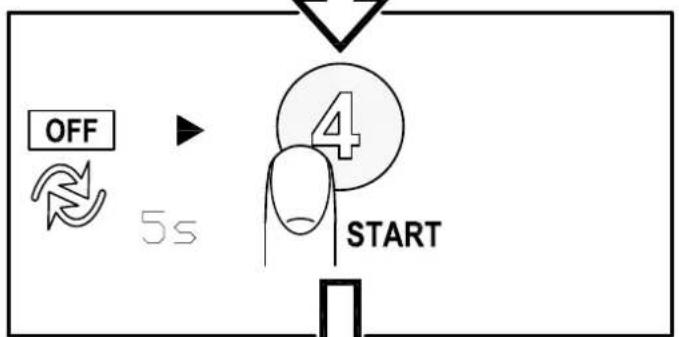
- Hold pressed START (4) for 5 seconds; the boiler temperature will appear on the DISPLAY (7).
- It will then be possible to change the value indicated by repeatedly pressing START (4).
- Once you have selected the desired value, hold pressed START (4) to confirm and move to the next parameter.
- The parameters will be displayed in the order indicated in the table below.
| Tank Temperature | Tub temperature setting.The change will only be applied to the programme at the moment selected. | |
| Boiler Temperature | Boiler temperature setting.The change will only be applied to the programme at the moment selected. | |
| Dosage Detergent | Detergent dosing time. | |
| Dosage Rinse Aid | Rinse aid dosing time. |
The list of parameters may vary according to the type of machine.
Chap 8 SCRAPPING
Our machines do not contain materials requiring special handling.
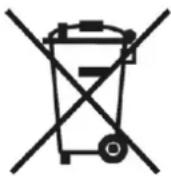
(Applicable in the EU and countries with sorted waste disposal)
The mark applied to the product or its documentation indicates that it must not be
due to improper scrapping, keep this product separate from other waste and recycle it so as to promote sustainable use of materials.
Corporate users are requested to contact their supplier and check the terms and conditions of the purchase contract.
The product may not be scrapped together with other commercial waste.
| Symbols | Object | Material | % | ||
| Recyclable directly | Sheet | Steel | 80 | ||
| Cardboard packaging | PAP | ||||
| Wooden pallet | ISPM15 | ||||
| Plastic parts | PP, PP+FV | ||||
| Compounds | W E E | Motors | Assemblies | 20 | |
| Electric parts | |||||
| Electronic parts | |||||
| Rubber parts | EPDM | ||||
Chap 9 ENVIRONMENT
RESPECT FOR THE ENVIRONMENT
Proper use of the dishwasher can improve its environmental footprint, if the following simple rules are observed:
Only wash full baskets.
Switch the dishwasher off when not using it.
Keep the machine closed when it is in standby.
Use wash programmes suited to the amount of soiling.
Supply the machine with hot water, if gas heated.
Make sure the drains flow into a suitable sewer.
Do not exceed the recommended dose of detergent.
The manufacturer reserves the right to modify the electrical, technical and aesthetic features of this appliance and replace any of its parts without notice, as he deems necessary to offer a reliable product with a long service life and advanced technology.
KAP 3 INSTALLATION ....4
3.1 AUSPACKEN....4
natural_image
Simple line drawing of a vertical pipe with a curved pipe extending from a rectangular block (no text or symbols)3.4 Wasseranschluss
natural_image
Simple line drawing of a rectangular container connected to a small pipe at the bottom, with no text or symbols present.Freier Abfluss
CHAP 3 INSTALLATION ....4
3.1 DEBALLAGE 4
3.2 EMPLACEMENT....4
3.3 BRANCHEMENT ELECTRIQUE 5
3.4 BRANCHEMENT A L'ARRIVEE D'EAU 6
3.5 BRANCHEMENT A L'EVACUATION DES EAUX USEES....6
3.6 LIQUIDE DE RINÇAGE ET DETERGENT 6
CHAP 4 UTILISATION DE LA MACHINE....7
4.1 LEGENDE ET SYMBOLES....7
4.2 ALLUMAGE....7
4.3 PREPARATION DU PANIER 7
4.4 SELECTION ET DEMARRAGE DU CYCLE....7
natural_image
Simple line drawing of a vertical pipe connected to a rectangular block with base, no text or symbols presentnatural_image
Simple line drawing of a rectangular container connected to a pipe with a small tank below, no text or symbols present.Évacuation libre
natural_image
Simple line drawing of a vertical pipe with a curved outlet and base, no text or symbols presentnatural_image
Simple line drawing of a vertical pipe connected to a rectangular block with base, no text or symbols presentnatural_image
Simple line drawing of a rectangular container connected to a small gray tank on a horizontal surface (no text or symbols)Desagüe libre
natural_image
Simple line drawing of a vertical pipe with a curved outlet and a rectangular block, no text or symbols present.HANDLEIDING VOOR AFWASMACHINES
VERTALING VAN DE ORIGINELE INSTRUCTIES
INHOUD
HFDST 1 RISICO'S EN BELANGRIJKE MEDEDELINGEN ....2
1.1 NORMALE BEDRIJFSOMSTANDIGHEDEN 3
HFDST 2 VOORWOORD....4
HFDST 3 INSTALLATIE 4
3.1 UITPAKKEN 4
3.2 PLAATSING 4
3.3 ELEKTRISCHE AANSLUITING 5
3.4 AANSLUITING OP HET WATERNET 6
3.5 VERBINDING MET DE AFVOERLEIDING....6
3.6 GLANSMIDDEL EN VAATWASMIDDEL 6
HFDST 4 GEBRUIK VAN DE MACHINE....7
4.1 LEGENDA EN SYMBOLEN 7
4.2 AANZETTEN 7
4.3 VOORBEREIDING REK 7
4.4 PROGRAMMAKEUZE EN -START 7
HFDST 6 ZELFDIAGNOSE....11
HFDST 7 REGELINGEN EN INSTELLINGEN....12
HFDST 8 AFVALVERWERKING....12
HFDST 9 MILIEU 13
HANDLEIDING VOOR AFWASMACHINES
natural_image
Simple line drawing of a vertical pipe with a curved outlet and base, no text or symbols presentnatural_image
Simple line drawing of a rectangular container connected to a small pipe at the bottom, with no text or symbols present.Vrije afvoer
Hfdst 8 AFVALVERWERKING
1.1 NORMALE DRIFTSFORHOLD 3
KAP 2 FORORD....4
KAP 3 INSTALLATION ....4
3.1 UDPAKNING 4
3.2 PLACERING 4
3.3 ELTILSLUTNING 5
3.4 HYDRAULISK TILSLUTNING....6
3.5 TILSLUTNING TIL AFL∅B 6
3.6 AFSPÆNDINGSMIDDEL OG VASKEMIDDEL....6
KAP 4 BRUG AF MASKINEN 7
4.1 OVERSIGT OG SYMBOLER 7
4.2 TÆNDING....7
4.3 FORBEREDELSE AF KURVEN 7
4.4 VALG OG START AF CYKLUS....7
4.4.1 Opvaskemaskine under bordet 7
4.4.2 Hætte opvaskemaskine 8
4.5 PROGRAMMER 8
4.6 FJERN INTEGRERET FILTER....8
4.7 T∅MNING AF MASKINEN 8
3.3 Eltilslutning
natural_image
Simple line drawing of a vertical pipe with a curved outlet and base, no text or symbols present3.4 Hydraulisk tilslutning
natural_image
Simple line drawing of a rectangular container connected to a small pipe at the bottom, with no text or symbols present.Frit afløb
natural_image
Symbol of a trash bin with crossed lines indicating no waste or restriction, plus a solid black rectangle below (no text or symbols)INNEHÅLLSFÖRTECKNING
KAP 1 RISKER OCH VIKTIGA VARNINGAR ...... 2
1.1 NORMALA ANVÄNDNINGSVILLKOR 3
KAP 2 FÖRORD....4
KAP 3 INSTALLATION ....4
3.1 UPPACKNING 4
3.2 UPPSTÄLLNING....4
3.3 ELEKTRISK ANSLUTNING 5
3.4 VATTENANSLUTNING....6
3.5 ANSLUTNING TILL AVLOPPET 6
3.6 GLANSMEDEL OCH DISKMEDEL 6
KAP 4 ATT ANVÄNDA MASKINEN....7
4.1 TECKENFÖRKLARING OCH SYMBOLER 7
4.2 PÅSLAGNING....7
4.3 ATT LASTA DISKKORGEN 7
4.4 VAL OCH START AV PROGRAM 7
4.4.1 Underbyggd diskmaskin....7
4.4.2 Huvdiskmaskin....8
4.5 PROGRAM....8
4.6 ATT TA LOSS INTEGRALFILTRET 8
4.7 TÖMNING AV MASKINEN 8
4.7.1 Maskiner utan tömningspump 8
4.7.2 Maskiner med tömningspump (*tillval) 8
4.8 REGENERERING AV HARTSER (*TILLVAL) 9
4.8 REGENERERING AV HARTSER (*TILLVAL) 9
4.9 LISTA ÖVER MEDDELANDEN SOM KAN VISAS 9
4.10 VID ARBETSDAGENS SLUT 9
KAP 5 UNDERHÅLL 10
5.1 ALLMÄNNA REGLER 10
5.2 RENGÖRING....10
5.3 RENGÖRING AV FILTERENHETEN....10
5.4 RENGÖRING AV DISK- OCH SKÖLJARMARNA....10
KAP 6 SJÄLVDIAGNOS 11
KAP 7 INSTÄLLNINGAR OCH JUSTERINGAR 12
KAP 8 AVFALLSHANTERING....12
KAP 9 MILJÖ 13
3.3 Elektrisk anslutning
natural_image
Simple line drawing of a vertical pipe connected to a rectangular block (no text or symbols)3.4 Vattenanslutning
4.1 SELITYS JA MERKIT 7
4.2 TOIMINTAAN KYTKENTÄ....7
4.3 KORIN VALMISTELU....7
4.4 JAKSON VALINTA JA KÄYNNISTÄMINEN....7
3.3 Sähköliitäntä
natural_image
Simple line drawing of a vertical pipe with a curved outlet and base, no text or symbols present3.4 Vesiliitäntä
natural_image
Simple line drawing of a rectangular container connected to a ground anchor with a pipe (no text or symbols)Ελεύθερη αποχέτευση
natural_image
Simple line drawing of a vertical pipe with a curved outlet and base, no text or symbols presentnatural_image
Simple line drawing of a rectangular container connected to a water tank, with no text or symbols present.Свободный слив
3.4 VANNTILKOBLING....6
3.5 KOBLING TIL AVL∅PET 6
3.6 SKYLLEMIDDEL OG VASKEMIDDEL 6
KAP. 4 BRUKE MASKINEN....7
4.1 FORKLARING OG SYMBOLER....7
4.2 SLÅ OPPVASKMASKINEN PÅ 7
4.3 FYLLE KURVEN....7
4.4 VALG AV SYKLUS OG IGANGSETTING 7
4.4.1 Underbenk-oppvaskmaskin....7
4.4.2 Hetteoppvaskmaskin....8
4.5 PROGRAMMER 8
4.6 FJERNE DET INTEGRERTE FILTERET 8
4.7 T∅MME OPPVASKMASKINEN 8
4.10 SKIFTETS SLUTT 9
KAP. 5 VEDLIKEHOLD....10
5.1 GENERELLE REGLER....10
5.2 RENGJ∅RING 10
5.3 RENGJ∅RING AV FILTERENHETEN 10
5.4 RENGJ∅RING AV ARMENE 10
KAP. 6 SELVDIAGNOSE....11
KAP. 7 JUSTERINGER OG INNSTILLINGER....12
KAP. 8 SKROTING....12
KAP. 9 MILJ∅ET....13
3.3 Elektrisk tilkobling
natural_image
Simple line drawing of a vertical pipe with a curved outlet and base, no text or symbols present3.4 Vanntilkobling
Apparatet må kobles til vannforsyningen med en slange. En stengeventil (kran) må installeres mellom vannforsyningen og apparatets elektroventil. Kranen må være i nærheten av apparatet.
natural_image
Simple line drawing of a rectangular container connected to a water tank (no text or symbols)Fritt avløp
natural_image
Simple line drawing of a vertical pipe with a curved outlet and base, no text or symbols presentnatural_image
Simple line drawing of a rectangular container connected to a pipe with a small liquid level, no text or symbols present.Szabad kifolyás
- INSTRUCTION MANUAL FOR DISHWASHERS
- TRANSLATION FROM THE ORIGINAL INSTRUCTIONS
- CONTENTS
- CHAP 1 RISKS AND IMPORTANT WARNINGS....2
- CHAP 2 PREFACE ....4
- CHAP 3 INSTALLATION ....4
- CHAP 4 USING THE MACHINE....7
- CHAP 5 MAINTENANCE....10
- CHAP 6 SELF DIAGNOSTICS....11
- CHAP 7 SETTINGS....12
- CHAP 8 SCRAPPING....12
- CHAP 9 ENVIRONMENT....13
- Chap 1 RISKS AND IMPORTANT WARNINGS
- Normal operating conditions
- Chap 2 PREFACE
- Warnings:
- Warranty:
- Storage:
- Chap 3 INSTALLATION
- Unpacking
- Positioning
- Electrical connection
- Water circuit hookup
- Connection to the drain line
- Rinse aid and detergent
- Chap 4 USING THE MACHINE
- Key and symbols
- Switching the dishwasher on
- Filling the rack
- Cycle selection and start-up
- Under-counter dishwashers
- Hood dishwashers
- (Fig.1).
- Removing the integral filter
- Emptying the dishwasher
- Appliances with no drain pump
- Appliances with drain cycle (\*optional)
- Resin regeneration (\*optional)
- Proceed as follows (Fig. 6):
- N.B. Do not switch the machine off during the regeneration cycle
- List of viewable messages
- End of shift
- Chap 5 MAINTENANCE
- General rules
- Cleaning
- Cleaning the filter unit
- Cleaning the arms
- The following settings should only be configured by a qualified technician.
- Chap 8 SCRAPPING
- Chap 9 ENVIRONMENT
- RESPECT FOR THE ENVIRONMENT
- KAP 3 INSTALLATION ....4
- Wasseranschluss
- CHAP 4 UTILISATION DE LA MACHINE....7
- HANDLEIDING VOOR AFWASMACHINES
- VERTALING VAN DE ORIGINELE INSTRUCTIES
- INHOUD
- HFDST 1 RISICO'S EN BELANGRIJKE MEDEDELINGEN ....2
- HFDST 6 ZELFDIAGNOSE....11
- HFDST 7 REGELINGEN EN INSTELLINGEN....12
- HFDST 8 AFVALVERWERKING....12
- HFDST 9 MILIEU 13
- Hfdst 8 AFVALVERWERKING
- KAP 2 FORORD....4
- KAP 4 BRUG AF MASKINEN 7
- Eltilslutning
- Hydraulisk tilslutning
- INNEHÅLLSFÖRTECKNING
- KAP 1 RISKER OCH VIKTIGA VARNINGAR ...... 2
- KAP 2 FÖRORD....4
- KAP 4 ATT ANVÄNDA MASKINEN....7
- KAP 5 UNDERHÅLL 10
- KAP 6 SJÄLVDIAGNOS 11
- KAP 7 INSTÄLLNINGAR OCH JUSTERINGAR 12
- KAP 8 AVFALLSHANTERING....12
- KAP 9 MILJÖ 13
- Elektrisk anslutning
- Vattenanslutning
- Sähköliitäntä
- Vesiliitäntä
- Elektrisk tilkobling
- Vanntilkobling
Brand : Elettrobar
Model : Fast 80
Category : Dishwasher