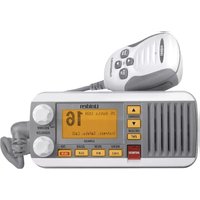
UM435 - Radio UNIDEN - Free user manual and instructions
Find the device manual for free UM435 UNIDEN in PDF.


| Product Type | Marine VHF Radio with Digital Selective Calling (DSC) Class D |
| Brand | Uniden |
| Model | UM435 |
| Dimensions (without heat sink) | 75 mm (H) x 167 mm (W) x 129 mm (D) |
| Weight | 1 kg (2.2 lb) |
| Power Supply | 13.8 V DC nominal (10.5 V to 16 V DC), negative ground |
| Power Consumption | 360 mA (standby) / 920 mA (full audio power) at 13.8 V DC |
| Transmit Power | 1 W or 25 W (selectable) |
| Display | Matrix LCD screen with adjustable backlight |
| Frequency Range | 156 to 163 MHz (transmit and receive) |
| Channels | All USA, Canada and International marine VHF channels |
| DSC Functions | Individual, group, all ships, automatic distress, position request/send, test call |
| Weather Monitoring | 10 NOAA channels with alert and FIPS code filtering |
| Scan Mode | Memory channel scan with activity pause |
| Triple/Watch Mode | Monitoring channels 16 and 9 (tri) or 16 only (dual) |
| GPS Input | NMEA 0183 (4800 baud) for automatic position |
| NMEA Output | Outputs DSC/DSE frames for received calls |
| Directory | Up to 20 names and MMSI numbers |
| Call Log | Last 10 distress calls, last 20 general calls |
| Waterproof Rating | IPX8 (submersible up to 1.5 m for 30 minutes) |
| Operating Temperature | -20 °C to +50 °C |
| Antenna | PL-259 connector, 50 Ω impedance |
| Built-in Speaker | 1.77 inch, 8 Ω, audio power 2.5 W |
| Warranty | 3 years limited |
Frequently Asked Questions - UM435 UNIDEN
User questions about UM435 UNIDEN
0 question about this device. Answer the ones you know or ask your own.
Ask a new question about this device
Download the instructions for your Radio in PDF format for free! Find your manual UM435 - UNIDEN and take your electronic device back in hand. On this page are published all the documents necessary for the use of your device. UM435 by UNIDEN.
USER MANUAL UM435 UNIDEN
| Uniden® | UM435 |
| SUBMERSIBLE DSC MARINE RADIORADIO MARITIME ASN SUBMERSIBLE | |
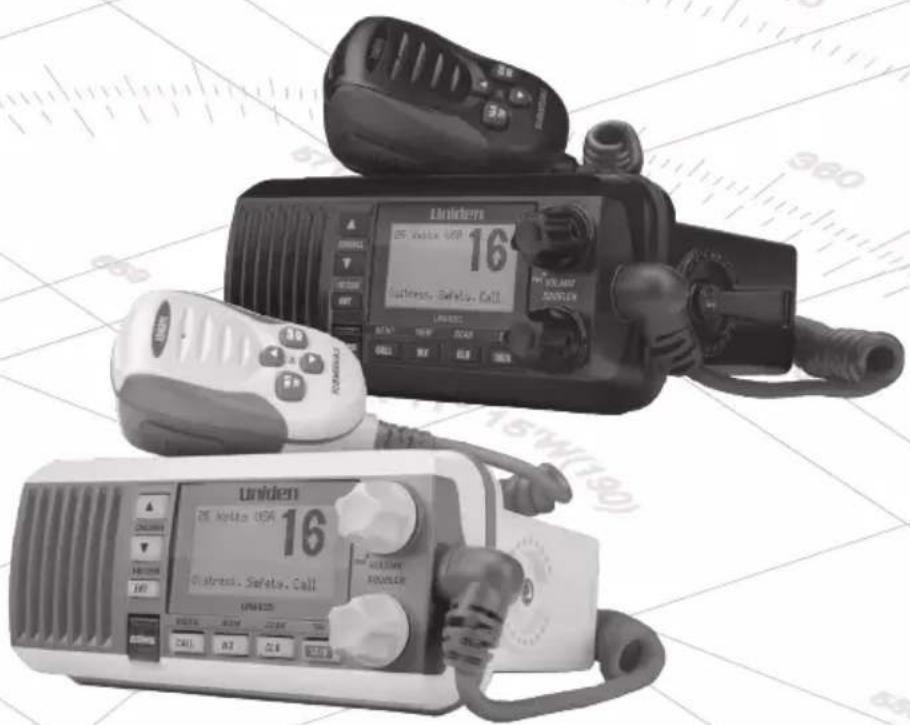 OWNER'S MANUALGUIDE D'UTILISATION OWNER'S MANUALGUIDE D'UTILISATION | |
MAKING A DISTRESS CALL
Lift the red cover. Press and hold the DISTRESS button for three seconds. Your radio transmits your boat's location every few minutes until you receive a response.

NOTE: If the radio displays Enter User MMSI, cancel the automatic distress call and make a normal voice distress call.
MAKING A VOICE DISTRESS CALL
Speak Slowly — Clearly — Calmly.
For future reference, write your boat's name & call sign here:
- Make sure your radio is on.
- On the microphone, press the 16/9-TRI button to switch to Channel 16 (156.8 MHz). (If the corner of the display does not show 16, press the 16/9-TRI button again until it does.)
- Press the PUSH TO TALK button on the microphone and say: MAYDAY - MAYDAY - MAYDAY."
- Say "THIS IS {name or call sign of your boat}."
- Say "MAYDAY {name or call sign of your boat}."
- Tell where you are: (what navigational aids or landmarks are near, or read the latitude and longitude from your GPS).
- State the nature of your distress, e.g. are you sinking, medical emergency, man overboard, on fire, adrift, etc.
- State the type of assistance you need (medical, towing, pumps, etc.).
- Give number of persons aboard and conditions of any injured persons.
- Estimate present seaworthiness of your ship (e.g. how immediate is the danger due to flooding or fire or proximity to shore).
- Briefly describe your ship (length, type, color, hull).
- Say: "I WILL BE LISTENING ON CHANNEL 16."
- End message by saying "THIS IS {name or call sign of your boat}, OVER."
- Release the PUSH TO TALK button and listen.
If you do not get an answer after 30 seconds, repeat your call, beginning at step 3, above.
FAIRE UN APPEL DE DÉTRESSE
MAKING A VOICE DISTRESS CALL....ii
FAIRE UN APPEL DE DÉTRESSE VOCAL....III
CÓMO HACER UNA LLAMADA DE APURO POR VOZ......IV
INTRODUCTION 1
CARACTÉRISTIQUES....1
EXPLICATION DES TERMES .... 1
COMMENT DÉBUTER....2
INCLUS DANS L'EMBALLAGE....2
NOMENCLATURE DES PIÈCES DE LA RADIO.... 3
NOMENCLATURE DES PIÈCES DU MICROPHONE....5
METTRE LA RADIO EN FONCTION .... 5
COMMENT FONCTIONNE LA RADIO ....6
FONCTIONNEMENT EN MODE NORMAL 7
RACCORDER AU CÂBLE ACCESSOIRE....35
natural_image
Technical line drawing of a mechanical support bracket with two separate components (no text or symbols)natural_image
Technical line drawing of a mechanical bracket with screws and gear (no text or symbols)natural_image
Illustration of various bolt and nut components including hex nuts, washers, and hex nuts (no text or labels)natural_image
Coiled cable with two connectors and a black tie (no text or symbols)natural_image
Illustration of a coiled cable with a connector (no text or symbols)NOMENCLATURE DES PIÈCES DE LA RADIO

flowchart
graph TD
    A["CALL MENU"] --> B["Setup"]
    B --> C["ENT 1W/25W"]
    C --> D["USA/CAN/INT"]
    D --> E["ENT 1W/25W"]
    E --> F["UIC Channels USA Mode Canada Mode Intl Mode Back[CLR"] Select["ENT"]]
flowchart
graph TD
    A["CALL MENU"] --> B["Setup"]
    B --> C["ENT 1W/25W"]
    C --> D["USA/CAN/INT Dual/TriWatch GPS Setup FIPS Codes Auto CH SW POS Reply Test Reply Channel Name Group MMSI User MMSI WX Alert Mode [Exit"]]
    A --> E["System"]
    E --> F["ENT 1W/25W"]
    F --> G["Contrast Lamp Adjust Key Beep [Exit"]]
    A --> H["[Exit"]]
    H --> I["ENT 1W/25W"]
    I --> J["(Fermer le menu)"]
Utilisation du menu
flowchart
graph TD
    A["CALL MENU"] --> B["Setup"]
    B --> C["ENT 1W/25W"]
    C --> D["User MMSI"]
    D --> E["ENT 1W/25W"]
    E --> F["[New"]]
    F --> G["ENT 1W/25W"]
    G --> H["Back[CLR"] 0]
    G --> I["Forward[ENT"] 16]
RACCORDER AU CÂBLE ACCESSOIRE
Your radio supports an external speaker with the following specifications:
| No. can. É.-U. INT CAN TRANS RÉCEP Type de canal/Nom | |||||
| 01 x x 156 | .050 16 | 0.650 | Public Correspondence (Marine Operator) | ||
| 01A* x | 156.050 | 156.0500 | Port Operation and Commercial (VTS (Vessel Traffic System) in some areas. | ||
| 02 x x 156 | .100 16 | 0.700 | Public Correspondence (Marine Operator) | ||
| 03 x x 156 | .150 16 | 0.750 | Public Correspondence (Marine Operator) | ||
| 04 x | 156.200 | 160.800 | Public Correspondence (Marine Operator) | ||
| No. can. É.-U. INT CAN TRANS RÉCEP Type de canal/Nom | ||||||
| 04A x 156.200 | 156.200 | Canadian Coast Guard: West CoastCommercial Fishing: East Coast | ||||
| 05 x 156.250 | 160.850 | Public Correspondence (Marine Operator). Ship Movement, Port Operations | ||||
| 05A x x 156.250 | 156.250 | Port Operations, Ship Movement, VTS in some areas | ||||
| 06 x x | x 156.300 | 156.300 | Inter-ship | safety | ||
| 07 x 156.350 | 160.950 | Public Correspondence (Marine Operator) | ||||
| 7A | x x 156.350 | 156.350 | 50 Commercial | |||
| 08 | x | x | 156.400 | 156.400 | Commercial (Inter-Ship Only) | |
| 09 x x | x 156.450 | 156.450 | Boater Calling, Commercial and Non-Commercial | |||
| 10 x x | x 156.500 | 156.500 | Commercial | |||
| 11 x x | x 156.550 | 156.550 | Commercial, VTS in selected areas | |||
| 12 x x | x 156.600 | 156.600 | Port Operations, VTS in selected areas | |||
| 13 x x | x 156.650 | 156.650 | Intership Navigation Safety (Bridge-to-Bridge). Ships >20m length maintain a listening watch on this channel in US waters. | |||
| 14 x x | x 156.700 | 156.700 | Port Operation, VTS in some areas | |||
| 15 | x | INHIBIT | 156.750 | Environmental (Receive Only) | ||
| 15 x | x 156.750 | 156.750 | Inter-ship, Port Operations, Commercial, Non-Commercial, Ship Movement (1 Watt Only) | |||
| 16 x x | x 156.800 | 156.800 | Distress, Safety, Calling | |||
| 17 x x | x 156.850 | 156.850 | State and Local Govt Maritime Control (1 Watt Only) | |||
| 18 x 156.900 | 161.500 | Port Operations, Ship Movement | ||||
| 18A x x 156.900 | 156.900 | CommercialCanada: Towing West Coast | ||||
| 19 x 156.950 | 161.550 | Commercial | ||||
| 19A x x 156.950 | 156.950 | Commercial | ||||
| No. can. É.-U. INT CAN TRANS RÉCEP Type de canal/Nom | |||||
| 20 x x x 157.000 | 161.600 | Port OperationsCanada: 1 Watt Only | |||
| 20A x 157.000 157.000 | 7.000 | Port Operation | |||
| 21 x | 157.050 161.650 | Port Operations | |||
| 21A x | x 157.050 157.050 Coast Guard Only | ||||
| 21B | x INHIBIT 161.650 | Canadian CG ContinuousMarine Broadcast (CMB)Service | |||
| 22 x | 157.100 161.700 | Port Operations, ShipMovement | |||
| 22A x | x 157.100 157.100 | US and Canadian CoastGuard Liaison and AirtimeSafety Information BroadcastsAnnounced on Channel 16 | |||
| 23 x x 157.150 161.750 | Public Correspondence(Marine Operator) | ||||
| 23A x 157.150 157.150 | 7.150 | US Coast Guard Only | |||
| 23B | x INHIBIT 161.750 | Canadian CG ContinuousMarine Broadcast (CMB Service | |||
| 24 x x x 157.200 | 161.800 | Public Correspondence(Marine Operator) | |||
| 25 x x x 157.250 | 161.850 | Public Correspondence(Marine Operator) | |||
| 25B | x INHIBIT 161.850 | Canadian CG ContinuousMarine Broadcast (CMB)Service | |||
| 26 x x x 157.300 | 161.900 | Public Correspondence(Marine Operator) | |||
| 27 x x x 157.350 | 161.950 | Public Correspondence(Marine Operator) | |||
| 28 x x x 157.400 | 162.000 | Public Correspondence(Marine Operator) | |||
| 28B | x INHIBIT 162.000 | Canadian CG ContinuousMarine Broadcast (CMB)Service | |||
| 60 x x 156.025 160.625 | Public Correspondence(Marine Operator) | ||||
| 61 x | 156.075 160.675 | Public Correspondence(Marine Operator) | |||
| No. can. | É.-U. INT CAN TRANS RÉCEP | Type de canal/Nom | ||||
| 61A x 156 | .075 15 | 6.075 | Canadian Coast Guard: West CoastCommercial Fishing: East Coast | |||
| 62 x 156.1 | 25 160 | 725 | Public Correspondence (Marine Operator) | |||
| 62A x 156 | .125 15 | 6.125 | Canadian Coast Guard | |||
| 63 x 156.1 | 75 160 | 775 | Public Correspondence (Marine Operator) | |||
| 63A x x 15 | 6.175 | 156.175 | VTS, | Port Operations | ||
| 64 x x 15 | 6.225 | 160.825 | Public Correspondence (Marine Operator) | |||
| 64A x 15 | 6.225 | 156.225 | Canada: Commercial Fishing Only | |||
| 65 x 156.2 | 75 160 | 875 | Public Correspondence (Marine Operator) | |||
| 65A x x 15 | 6.275 | 156.275 | Port OperationsCanada: Towing West Coast | |||
| 66 x 156.3 | 25 160 | 925 | Public Correspondence (Marine Operator) | |||
| 66A x x 15 | 6.325 | 156.325 | Port OperationsCanada: 1 Watt Only | |||
| 67 | x | xx | 156.375 | 156.375 | US: Commercial, Bridge-to-Bridge, VTS in some areasCanada: Search and Rescue, Commercial in some areas, Non-Commercial on West Coast | |
| 68 | x | xx | 156.425 | 156.425 | Non -Commercial | |
| 69 | x | xx | 156.475 | 156.475 | Non-CommercialCanada: Commercial East Coast. Non-Commercial West Coast | |
| 70 | x | xx | 156.525 | 156.525 | DSC (Digital Selective Calling) Only. No Voice Communications Allowed | |
| 71 | x | xx | 156.575 | 156.575 | US: Non-CommercialCanada: Ship Movement West Coast, Non-Commercial East Coast | |
| 72 | x | xx | 156.625 | 156.625 | Non-Commercial (Ship-to-Ship) | |
| No. can. | É.-U. | INT CAN | TRANS RÉCEP | Type de canal/Nom | |
| 73 x x x 1 | 56.675 | 156.675 | Port Operations | ||
| 74 x x x | 156.725 | 156.7 | 25 Port Operations | ||
| 75 x x x 1 | 56.775 | 156.775 | Port Operations (1 Watt Only) | ||
| 76 x x x 1 | 56.825 | 156.825 | Port Operations (1 Watt Only) | ||
| 77 x x x 1 | 56.875 | 156.875 | Port Operations (Ship-to-Ship) | ||
| 78 x 156.9 | 25 161 | 525 Port Operations | |||
| 78A x | x 156 | 925 156.925 Non-Commercial, Inter-Ship | |||
| 79 x 156.9 | 75 161 | 575 Port Operations | |||
| 79A x | x 156 | 9750 156.975 Commercial, Inter-Ship | |||
| 80 x 157.0 | 25 161 | 625 Port Operationsx | |||
| 80A x | x 157 | 025 157.025 Commercial, Inter-Ship | |||
| 81 x 157.0 | 75 161 | 675 Port Operations | |||
| 81A x | x 157 | 075 157.075 | Government, Canadian Coast Guard | ||
| 82 x 157.1 | 25 161 | 725 Port Operations | |||
| 82A x | x 157 | 125 157.125 | Government, Canadian Coast Guard | ||
| 83 x 157.1 | 75 161 | 775 Port Operations | |||
| 83A x | x 157 | 175 157.175 Coast Guard | |||
| 83B | x INHIBIT 161.775 | Canadian CG Continuous Marine Broadcast (CMB) Service | |||
| 84 x x x | 157.225 | 161.825 | Public Correspondence (Marine Operator) | ||
| 85 x x x 1 | 57.275 | 161.875 | Public Correspondence (Marine Operator) | ||
| 86 x x x 1 | 57.325 | 161.925 | Public Correspondence (Marine Operator) | ||
| 87A x x x | 157.375 | 157.375 | Public Correspondence (Marine Operator) | ||
| 88A x x 1 | 57.425 | 157.425 | Public Correspondence (Marine Operator) | ||
| 1019 | x x 1 | 56.950 | 156.950 Commercial | ||
| 1020 | x x 1 | 57.000 | 157.000 Port Operations | ||
| 1078 | x x 1 | 56.925 | 156.925 Non-Commercial, Inter-Ship | ||
| 1079 | x x 1 | 56.975 | 156.975 Commercial, Inter-Ship | ||
| 2019 | x 161.550 | 161.550 Commercial | |||
| 2020 | x 161.600 | 161.600 Port Operations | |||
| 2078 | x 161.525 | 161.525 Port Operations | |||
| 2079 | x 161.575 | 161.575 Port Operations | |||
CANAUX ET FRÉQUENCES MÉTÉOROLOGIQUES (ÉTATS-UNIS, CANADA, ET INTERNATIONAL)
| No. can. | Fréq. récep. | Non affiché |
| WX01 162. | 5500 162.550 MHz | |
| WX02 162. | 4000 162.400 MHz | |
| WX03 162. | 4750 162.475 MHz | |
| WX04 162. | 4250 162.425 MHz | |
| WX05 162. | 4500 162.450 MHz | |
| WX06 162. | 5000 162.500 MHz | |
| WX07 162. | 5250 162.525 MHz | |
| WX08 161. | 6500 161.650 MHz | |
| WX09 161. | 7750 161.775 MHz | |
| WX10 163. | 2750 163.275 MHz |
CODES DES ÉVÉNEMENTS "S.A.M.E." (ENCODAGE DES MESSAGES D'UNE RÉGION SPÉCIFIQUE)
Types d'événements
QUESTIONS? Visit our website at www.uniden.com.
- MAKING A DISTRESS CALL
- MAKING A VOICE DISTRESS CALL
- FAIRE UN APPEL DE DÉTRESSE
- NOMENCLATURE DES PIÈCES DE LA RADIO
- Utilisation du menu
- RACCORDER AU CÂBLE ACCESSOIRE
- CANAUX ET FRÉQUENCES MÉTÉOROLOGIQUES (ÉTATS-UNIS, CANADA, ET INTERNATIONAL)
- CODES DES ÉVÉNEMENTS "S.A.M.E." (ENCODAGE DES MESSAGES D'UNE RÉGION SPÉCIFIQUE)
- Types d'événements
Brand : UNIDEN
Model : UM435
Category : Radio