
VRR 84314 VB - Vacuum Cleaner BEKO - Free user manual and instructions
Find the device manual for free VRR 84314 VB BEKO in PDF.
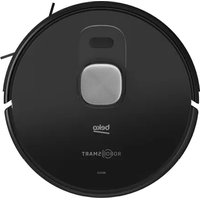



| Product type | Robot vacuum and mop |
| Brand | Beko |
| Model | VRR 84314 VB |
| Power supply | AC adapter 100-240 V~, 50/60 Hz, output 24 V / 1 A |
| Battery | Li-ion 14.4 V / 5.0 Ah |
| Charging time | 6 to 7.5 hours |
| Runtime | Up to 250 min (silent mode), 180 min (standard), 120 min (powerful), 65 min (max) |
| Dust bin capacity | 0.4 L |
| Water tank capacity | 0.3 L |
| Suction power | 4 levels: silent, standard, powerful, maximum (adjustable via app) |
| Navigation | Lidar with real-time mapping |
| Connectivity | Wi-Fi 2.4 GHz (IEEE 802.11 b/g/n), HomeDirect-SDA app |
| Main functions | Automatic cleaning, room/zone cleaning, spot cleaning, auto-return to base, scheduling, vacuuming + mopping |
| Brushes | Main rolling brush + 1 side brush (removable and washable) |
| Filtration | Washable and replaceable HEPA filter |
| Maintenance and cleaning | Regular cleaning of dust bin, filter, main brush, and sensors; washing of the mop cloth |
| Safety | Anti-drop sensors, front bumper, automatic stop in case of jamming, overheat protection |
| Spare parts and repairability | HEPA filter, side brush, mop cloth, battery (replacement only by authorized service) |
| General information | Household use only; complies with CE standards; built-in lithium-ion battery |
Frequently Asked Questions - VRR 84314 VB BEKO
User questions about VRR 84314 VB BEKO
0 question about this device. Answer the ones you know or ask your own.
Ask a new question about this device
Download the instructions for your Vacuum Cleaner in PDF format for free! Find your manual VRR 84314 VB - BEKO and take your electronic device back in hand. On this page are published all the documents necessary for the use of your device. VRR 84314 VB by BEKO.
USER MANUAL VRR 84314 VB BEKO
Robot Vacuum Cleaner
User Manual

VRR 84314 VB
EN - FR - IT - PL - RO - SR
Please read this guide first!
Dear Customer,
Thank you for choosing a Beko product. We would like you to achieve the optimal efficiency from this high quality product which has been manufactured with the state of the art technology. Please make sure you read and understand this guide and supplementary documentation fully before use and keep it as a reference. Include this guide with the unit if you hand it over to someone else. Observe all warnings and information herein and follow the instructions.
Symbols and their meanings
The following symbols have been used throughout this guide:

Important information and beneficial advice regarding the usage of the device.

WARNING: Warnings about dangerous situations regarding safety of life and property.

Protection class against electric shock.
CONTENTS
ENGLISH 04-31
| FRANÇAIS | 32-58 |
| ITALIANO | 59-88 |
| POLSKI | 89-118 |
| ROMANIAN | 119-148 |
| SRPSKI | 149-173 |
1 Important safety and environmental instructions
This section contains safety instructions to prevent hazards that can result in injury or property damage.
Any warranty is void if these instructions are not followed.
1.1 General safety
- This appliance complies with international safety standards.
- This appliance can be used by children aged 8 years and above, and by persons with reduced physical, sensory, or mental capabilities, or lack of experience and knowledge, provided they have been given supervision or instruction concerning use of the appliance in a safe way and understand the hazards involved. Children shall not play with the appliance. Cleaning and user maintenance shall not be made by children without supervision.
- Do not use the appliance if the power cord or the appliance is damaged. Contact authorized service.
- Keep the appliance and its cable out of the reach of children under 8 years of age.
- Do not power your device with a multi-socket.
- Your mains power supply should be in accordance with the specified information on the type tag of the appliance.
- Do not use the appliance with an extension cord.
- To prevent damage to the power cord, prevent it from being pinched, crimped, or rubbed against sharp edges.
- Do not touch the plug of the appliance with damp or wet hands while the appliance is plugged in.
- Do not pull on the cord while unplugging the appliance.
- Do not vacuum flammable materials and ensure that cigarette ashes are cooled down before vacuuming them.
- Do not vacuum water and other fluids.
1 Important safety and environmental instructions
- Protect the appliance against precipitation, humidity and heat sources.
- Do not use the appliance in or near explosive or flammable environments and substances.
- Unplug the appliance before cleaning and maintenance.
- This product is not designed for commercial use, it is intended for use at home and in applications as follows:
- In the staff kitchens of the stores, offices and other working environments,
– In farm houses, - By customers in hotels, motels or other accommodation facilities; - In hostels, or environments.
- Sleeping places and breakfast environments
- Do not immerse the appliance or its power cord in water for cleaning.
- Do not disassemble the appliance.
- Use only original parts or parts recommended by the manufacturer.
- To prevent blockage of the filter or damage to the motor, do not vacuum cement, plaster or fragments of compressed paper.
- Use the appliance with the adapter delivered with the appliance only.
- Do not use the appliance without filters, it may get damaged.
- If you keep the packaging materials, keep them out of the reach of children.
- This appliance is not intended for use by persons, including children, with physical, sensory, or mental disabilities, or those lacking adequate experience and knowledge of similar use, unless they are supervised by a person responsible for their safety or have been instructed on the appliance's operation.
- Children should be supervised to ensure they do not play with the appliance.
1 Important safety and environmental instructions
- Unplug the adapter and remove the battery pack before any cleaning or maintenance procedure.
- To avoid any risk of hazard, a damaged adapter must be replaced by the manufacturer, the manufacturer's authorized representative, or a similarly qualified technician.
- Keep your fingers, hair, and loose clothing away from moving parts or clearances while vacuuming.
- Please dispose of used batteries in accordance with local laws and regulations.
- The batteries in this appliance may only be replaced by authorized service personnel.
- Do not use batteries of different types or mix old and new batteries.
- Do not short-circuit the supply terminals.
- Shall be used only with ME1XXFG CM 5000 mAh batteries.
- This appliance should not be operated by children or persons with limited physical, sensory, or cognitive abilities, or those lacking experience and knowledge, unless they are supervised or have been given relevant instructions.
- Children should be supervised to ensure they do not play with the appliance.
- Do not place weight on the appliance. Ensure that children and domestic animals do not climb on it.
- Do not operate the appliance on elevated surfaces such as tables or chairs.
1.2 Compliance with the WEEE regulations and waste disposal
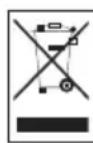
This product complies with EU WEEE Directive (2012/19/EU). This product bears a classification symbol for waste electrical and electronic equipment (WEEE).
This symbol indicates that this product shall not be disposed with other household wastes at the end of its service life. Used device must be returned to official collection point for recycling of electrical and electronic devices. To find these collection systems please contact to your local authorities or retailer where the product was purchased. Each household performs important role in recovering and recycling of old appliance. Appropriate disposal of used appliance helps prevent potential negative consequences for the environment and human health.
1 Important safety and environmental instructions
1.3 Packaging information

The product's packaging is made of recyclable materials, in accordance with the National Legislation.
Do not dispose of the packaging waste with the household waste or other wastes, dispose it to the packaging collection areas specified by local authorities.
1.4 Waste batteries
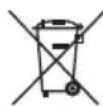
This symbol on rechargeable batteries/batteries or on the packaging indicates that the rechargeable battery/battery may not be disposed of with regular house hold rubbish. For certain rechargeable batteries/batteries, this symbol may be supplemented by a chemical symbol. Symbols for mercury (Hg) or lead (Pb) are provided if the rechargeable batteries/batteries contain more than 0,0005 % mercury or more than 0,004 % lead.
Rechargeable batteries/batteries, including those which do not contain heavy metal, may not be disposed of with household waste. Always dispose of used batteries in accordance with local environmental regulations. Make enquiries about the applicable disposal regulations where you live.
1.5 What to do for energy saving
- When using your appliance, adjust the speed settings according to the surface, in order to save energy.
- Normally, lower speeds are used when cleaning hard surfaces while high speeds are used for cleaning carpets.
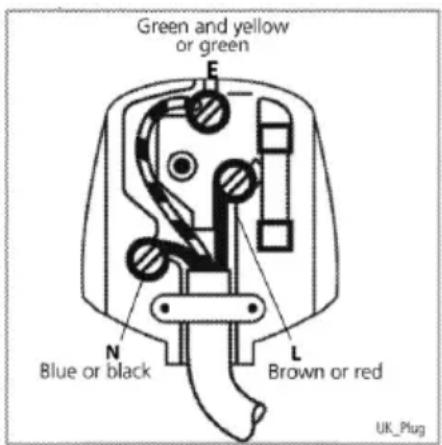
1.5 Plug Wiring
The moulded plug on this appliance incorporates a 13 A fuse. Should the fuse need to be replaced an ASTA approved BS1362 fuse of the same rating must be used. Do not forget to refit the fuse cover. In the event of losing the fuse cover, the plug must not be used until a replacement fuse cover has been fitted. Colour of the replacement fuse cover must be the same colour as that visible on the pin face of the plug Fuse covers are available from any .good electrical store
Fitting a different plug
- As the colours of the wires in the mains lead of this appliance may not correspond with the coloured markings identifying the terminals on your plug, proceed as follows:
- Brown cable = L (Live)
- Blue cable = N (Neutral)
- Green/yellow cable must be connected to ground (E)
- With the alternative plugs a 13 A fuse must be fitted either in the plug or adaptor or in the main fuse box. If in doubt contact a qualified electrician.
2 Box content
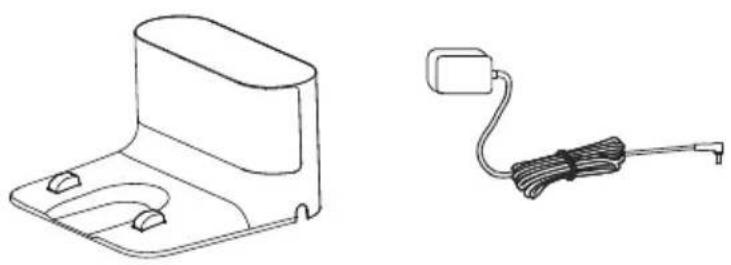
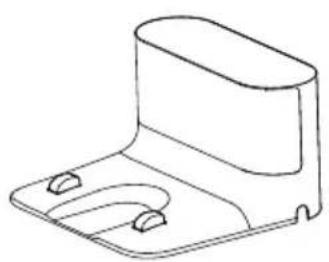
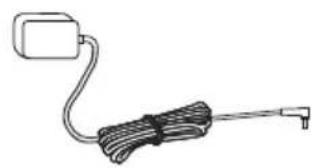
Robot Vacuum Charging dock Charge adaptor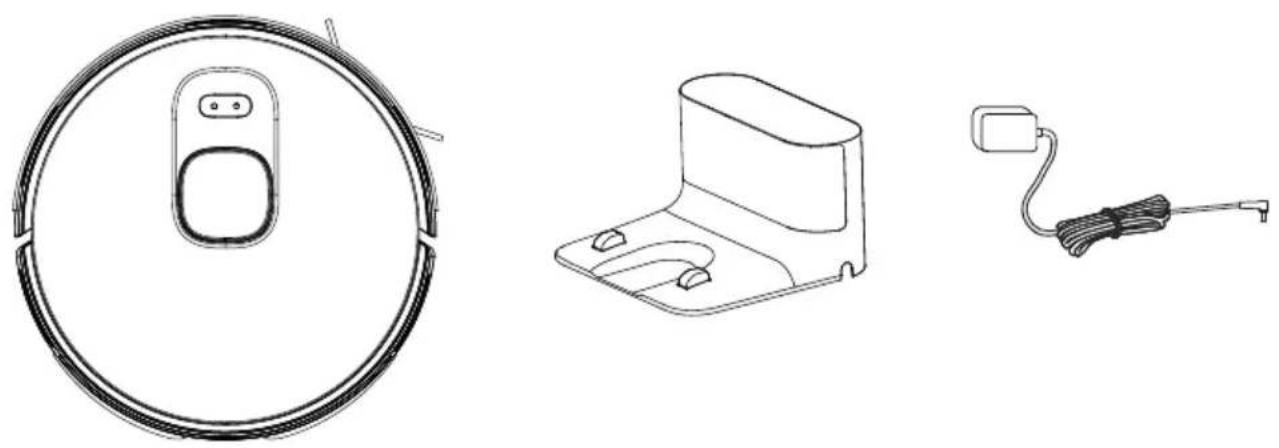
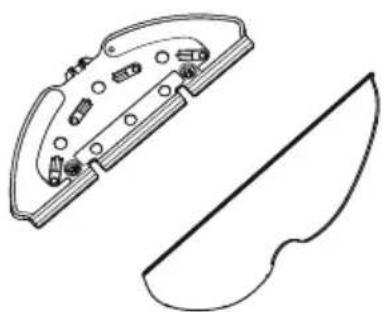
User's manual and product Mopping clothMopping tool documentation (2 pcs) Cleaning brush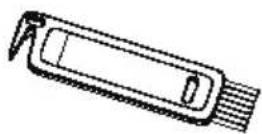
Spare accessories supplied
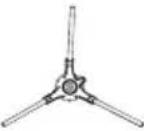 | 1 side brush |
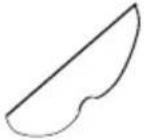 | 1 mopping cloth |
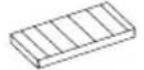 | 1 filter |
3 Overview
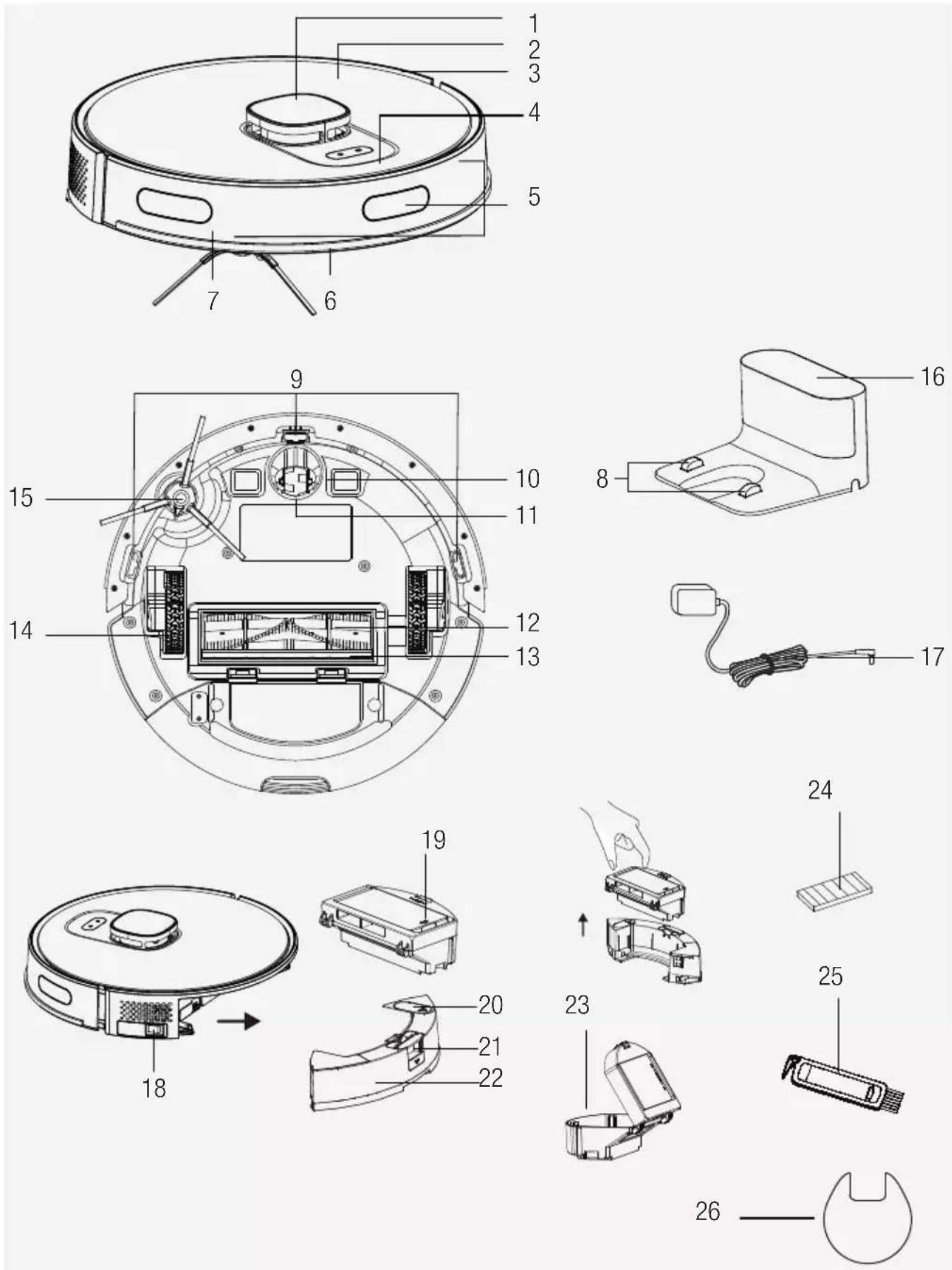
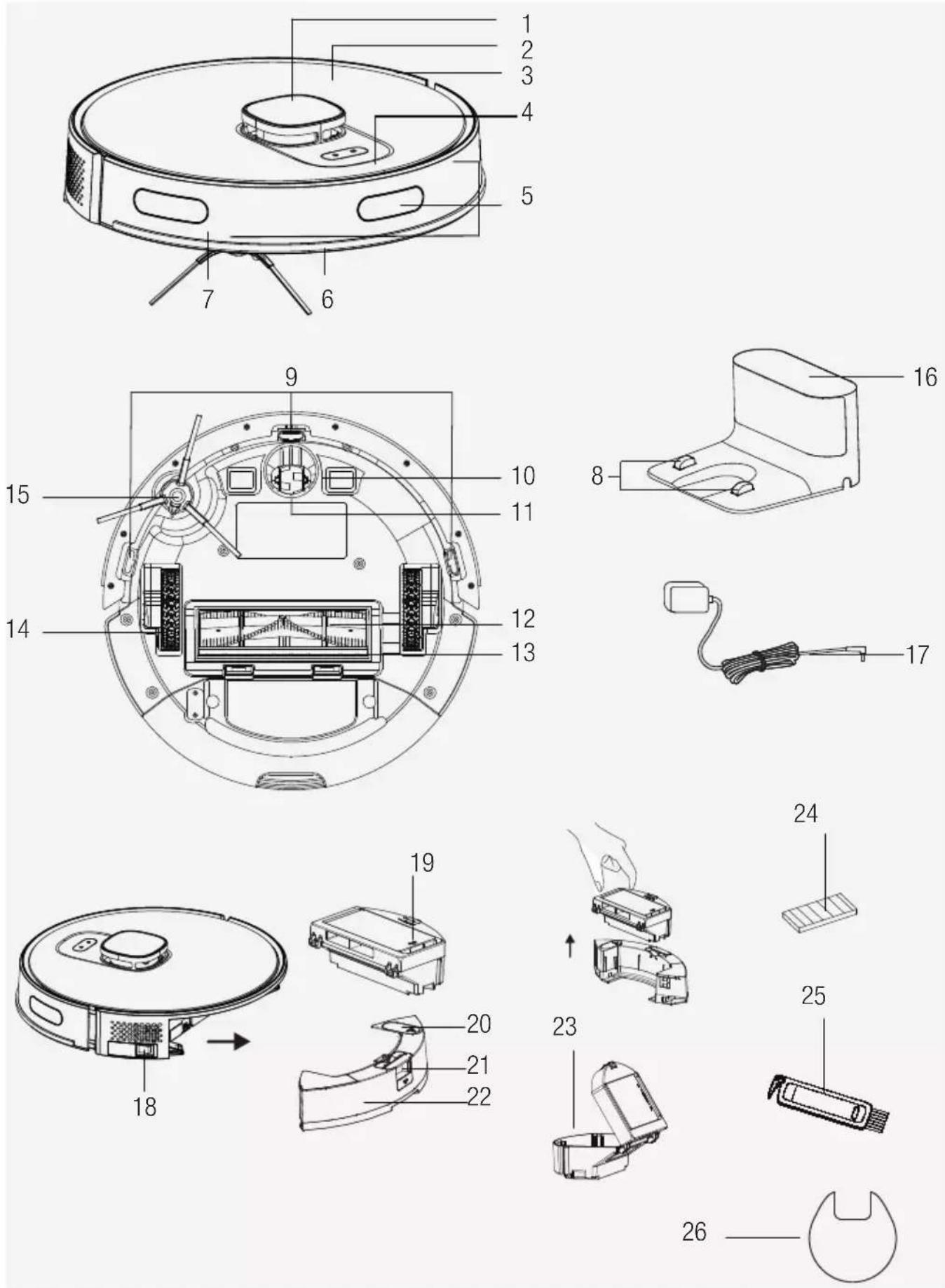
2.1 Checks and components
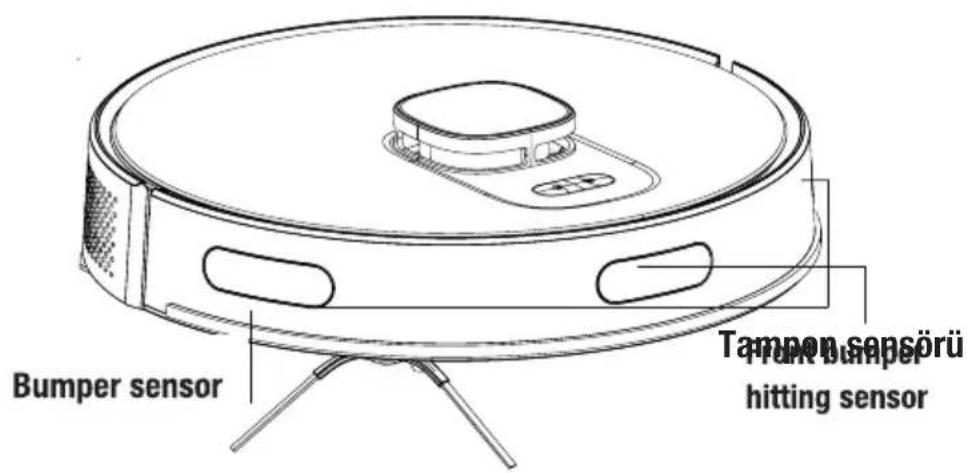
- Lidar
- Upper body
- Central body
- Start Cleaning-Pause Button / Sending to Charging Stand button
- Bumper sensor
- Front bumper
- Front bumper hitting sensor
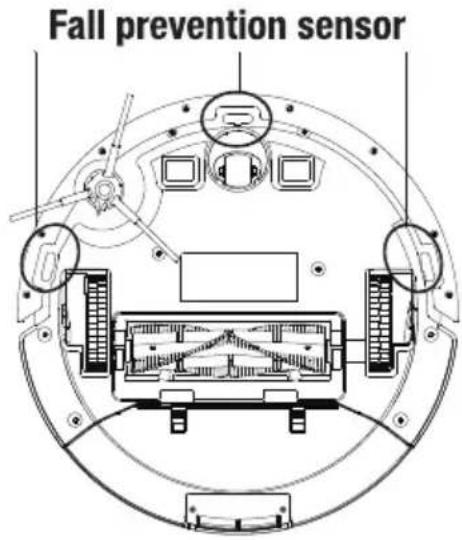
- Charging pins
- Fall prevention sensor
- Charging pins
- Front rotating wheel
- Rotating brush
- Rotating brush cover
- Rear wheel
- Side brush
- Charging dock
- Charge adaptor
- On/Off button
- Robot vacuum container EPA filter opening lid
- Mop water container filling lid
- Robot vacuum dust container ejection button
- Mop water container
- Dust container
- EPA filter
- Cleaning brush
- Floor protection pad from wetness
2.2 Conformity declaration for CE
Arçelik A.Ş. hereby declares that this appliance complies with Directive 2014/53/EU. The complete text of the EU declaration of conformity is available at the following internet address: – Products, from :beko.com
2.2 Technical data
| Adapter voltage 100-240V~, 50-60 Hz | |
| Adapter output 24 V 1.0 A | |
| Battery Li-ion: 14.4V / 5.0 Ah | |
| Charging period: 6 – 7.5 hours | |
| Operation time | Up to 250 minutes (in mute position) |
| Dust container capacity 0.4 L | |
| Water tank capacity 0.3 L | |
| 2.4G Wi-Fi frequency range | 2412-2472 MHz |
| Supported Connections | WLAN IEEE 802.11 b/g/n wireless |
| 2.4G Wi-Fi maximum RF output power | 20 dBm |
| RF exposure information 2.4G Wi-Fi maximum | |
| 2.4G Wi-Fi maximum RF output power | 20 dBm |
| Operating time | Maximum: 65 minsPowerful: 120 minsStandard: 180 minsQuiet: 250 mins |
RF exposure information: The maximum allowed exposure level is calculated according to the 20 cm distance between the appliance and the human body. To comply with the RF exposure condition, a distance of 20 cm should be maintained between the appliance and the person.
The rights to make technical and design changes are reserved.
3 Overview
| Manufacturer E-TEK Electronics Manufactory Co., LTD | |
| Model ID: ZD024D240100EU / ZD024D240100BS | |
| Input Voltage: 100-240V~ | |
| Input Frequency 50-60Hz | |
| Input Current 0.8A | |
| Output Voltage 24.0V DC | |
| Output Current 1.0A | |
| Output Power: 24.0W | |
| Average active efficiency 87.91% | |
| Efficiency at low load (10%) 84.01% | |
| Power under no load: 0.1W | |
4 Installation
1- Remove the protective sponges.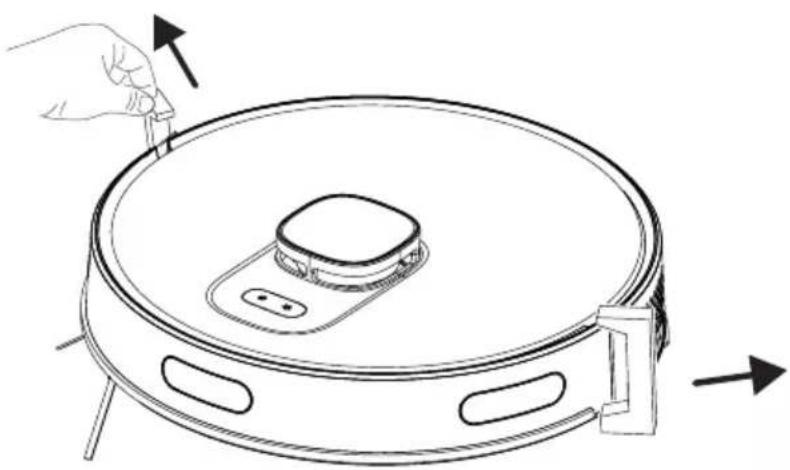
4 Installation
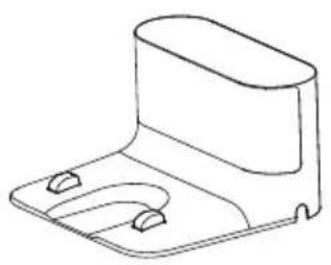
2- Install the charging station.
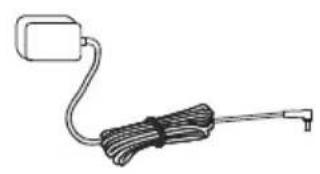
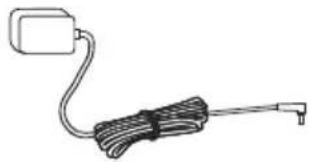
Install the adaptor plug to the charging station and set the cables up to prevent the adaptor cable from wrapping around the machine during vacuuming.
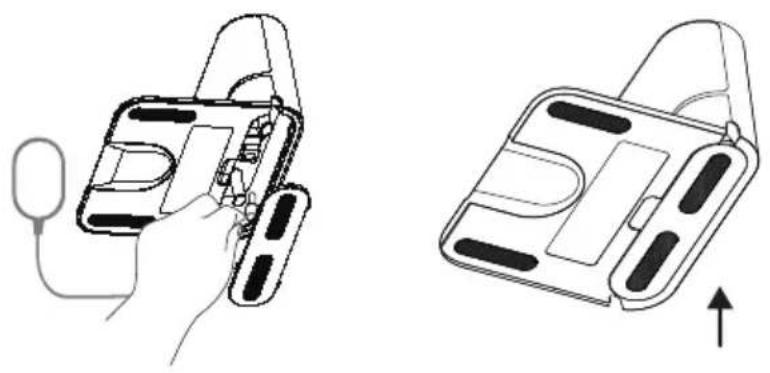

Install the charging station in a location where it can easily be accessed by the vacuum cleaner. Install the charging station on a hard and level ground rather than a carpet.
To ensure a smooth operation of the robot, it is advised that no obstacles are present within 1.5 m on the front and within 0.5 m on the left and right sides.
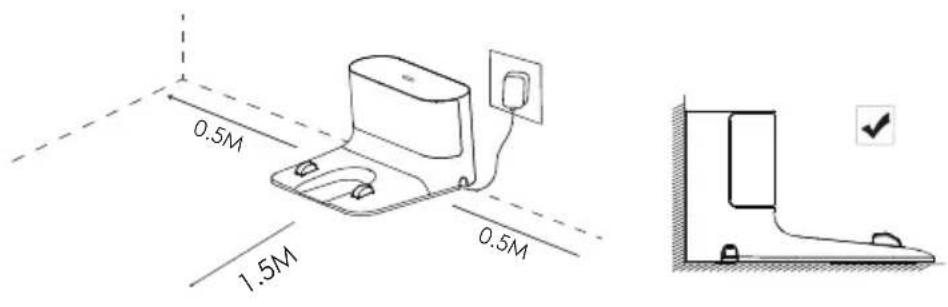

Always keep the charging station plugged, otherwise the robot vacuum cleaner cannot return to the charging station automatically.

For a smooth charging operation, do not move the charging station. When the location is changed, it may delete the available map and create a new map due to the positioning error.
5 Operation

Please charge the machine before first use.

If the product will not be used for a long period of time; fully charge it then turn off the power switch to preserve battery life.
The product should be recharged at least once every three months.
5.1 Intended use
This appliance is intended for household use and it is not suitable for industrial use.
5.2 Charging the appliance
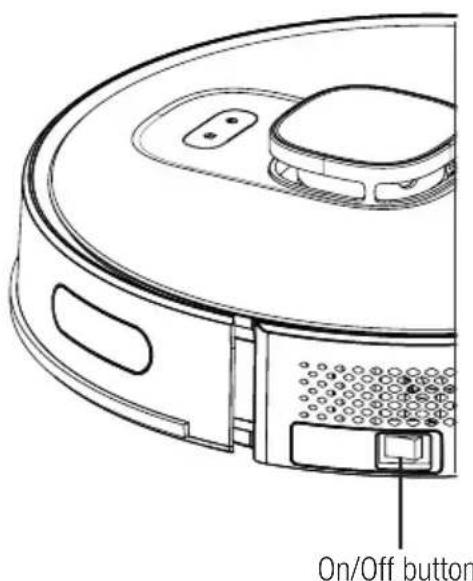
- Bring the on-off button on the side to the on position for the initial power up.
- Place the appliance on the dust collection station so that it aligns with the charging communication pins.
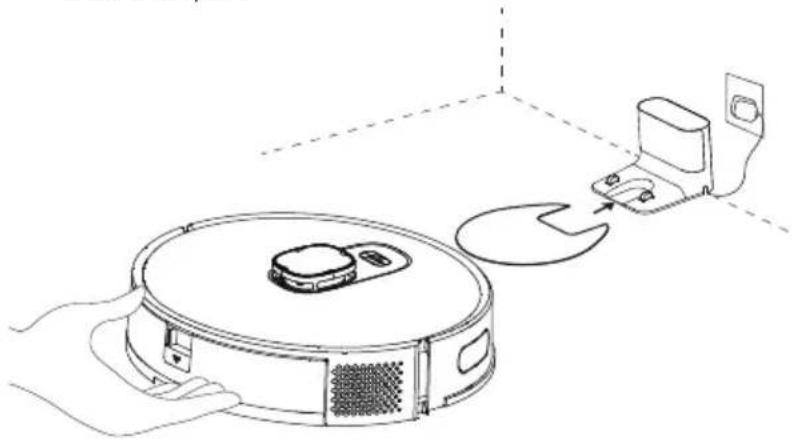

Charging starts after the charging station's lighting indicator flashes 3 times and then turns off completely.
5.3 Operation
For the first operation, move the ON/OFF button on the side from "O" to "I" position. Press the Ⓟ button on the robot vacuum cleaner for 3 seconds to turn it on.
- Do not turn off the appliance using the ON/OFF button directly during cleaning; otherwise, the data of the robot vacuum cleaner cannot be saved.
- If the ON/OFF button is in the OFF position, the robot vacuum cleaner will turn on automatically when placed on the charging dock and turn off automatically when removed from the charging dock.
- If the robot vacuum cleaner will not be used for a long period, move the ON/OFF button to the off position.
Starting the cleaning
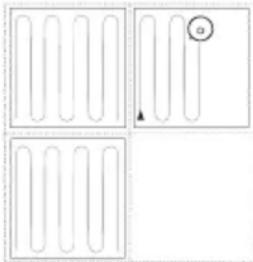
Press the ① button to start the automatic cleaning mode. When started, the robot vacuum cleaner removes itself from the charging dock, performs an automatic scan to create a map, determines the cleaning route intelligently, and divides the area into several regions. The cleaning route is planned along the wall, and the robot vacuum cleaner moves forward and backward to clean different regions in order.

WARNING: If the charging level is too low, cleaning cannot be started. Please charge the appliance before starting the cleaning.

WARNING: Before cleaning, tidy up all cables to prevent disconnections due to entanglement or pulling of the cables and to prevent damage to furniture.

WARNING: In automatic cleaning mode, if the area to be cleaned is less than 10 square meters, the cleaning is performed twice by default.

WARNING: Do not move the charging dock during cleaning and ensure that the station is plugged in; otherwise, the robot vacuum cleaner may not be able to return for recharging.
Pausing
Press the “①” button on the body to stop the robot vacuum cleaner while it is operating. The robot vacuum cleaner switches to pause mode.
5 Operation
Automatic charging: The robot vacuum cleaner returns automatically to recharge after the cleaning is completed.
Manual charging: The robot vacuum cleaner returns automatically to the charging station when you press the "button" on the upper body when it is in the pause position.
A. If the operation is paused, press the "button" to recharge automatically.
B. If the robot vacuum cleaner is caught up anywhere and cannot find the charging dock, please move the robot vacuum cleaner to the charging station yourself to allow it to be charged.
Point cleaning
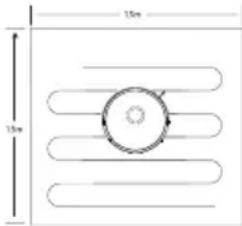
Bring the robot vacuum cleaner to the area to be cleaned and press the "💡" button twice. When the mode is activated, the robot vacuum cleaner shall clean a square area of 1.5 x 1.5 m by considering itself as the center.
- It cannot start the point cleaning operation from the charging dock. When the point cleaning is completed, it does not return to the charging station and remains in its position. Bring it to the charging stand or move it to the charging stand by pressing the "Button" on the upper body.
Vacuum power selection
(Supported with the relevant mobile application only) You may select the desired cleaning power from the application:
- Quiet
- Standard
- Powerful • Maximum
Remote controlled cleaning
(Supported with the relevant mobile application only) You may direct the robot vacuum cleaner to the area to be cleaned by using the manual remote control mode through the application.
Sleep
The robot vacuum cleaner switches to sleep mode automatically if it remains stationary for 10 minutes. The robot vacuum cleaner switches to sleep mode automatically 10 minutes after it is completely recharged. The sleep mode deactivates the current task.
Resetting the system
For APP account deletion, the customer can press the “remove the product and clear the account” button on the APP to delete all the data on the APP and cloud, such as maps, cleaning histories, shared machine, WIFI account password, etc.
5 Operation
Press the “①” button for 15 seconds in standby position to reset the system. When the system is reset, the map and the original settings (including virtual limits) on the robot vacuum cleaner are deleted.
5.3.1 Operation with the application
Download the application
To download the application, search for the “HomeDirect-SDA” application in the mobile app store. Review the mobile application manual for detailed information.
Reset Wi-Fi
Press the “①” and “♡” buttons simultaneously until you hear the aural warning and see the light blinking.
Add a device
- Open the app, create a new account, and follow the instructions in the application.
- Before setting up the Wi-Fi, ensure that the robot vacuum cleaner and the Wi-Fi network meet the following requirements.
A. Robot Vacuum Cleaner:
- The charging level of the robot vacuum cleaner shall be over 20% or the robot vacuum cleaner shall be placed on the charging dock.
B. Wi-Fi network:
- Make sure the password of your wireless network (modem) is correct.
- Do not use any VPN (Virtual Private Network).
- Wi-Fi router shall support 802.11b/g/n and IPv4 protocols.
- The router shall be in the 2.4GHz frequency band or a dual-band router that supports the 2.4GHz band shall be used. The robot vacuum cleaner does not support the 5GHz frequency band.
- If the robot vacuum cleaner cannot connect to the 2.4/5GHz dual-band Wi-Fi network, please select the 2.4GHz network for Wi-Fi settings. You may switch back to the other frequency band when the setting is completed.
- If you are connecting to a hidden network, please ensure that you enter the network name [SSID (sensitive to capitalization)] correctly and that you are connected to a 2.4GHz wireless network.
- If you are using a wireless network extender, please ensure that the network name (SSID) and the password are the same as the main network.
5 Operation
Wi-Fi connection error
| Wi-Fi Status Root Cause | Solution | |
| White light is illuminated continuously. | The robot vacuum cleaner is connected to the router (modem), but it cannot connect to the network. | ·Ensure that the modem is connected to the network.·Contact your network operator to see if there is a problem in the internet data. |
| White light is flashing rapidly | The robot vacuum cleaner can-not connect to the modem | ·Ensure that the network name and the password are not changed.·Reset the Wi-Fi connection, if required. Please refer to the “Resetting Wi-Fi” section in the “Downloading the Application and Resetting the Wi-Fi” part of this manual. |
| White light is flashing slowly. Wi-Fi is reset. | ·Ensure the Wi-Fi connection of the robot vacuum cleaner. Please review the Mobile Application Manual for detailed directions. Reset the Wi-Fi connection, if required. Please refer to the “Resetting the Wi-Fi” section of this manual | |
5 Operation
Network security requirements:
Use TKIP, PSK and AES/CCMP encrypted WPA and WPA2 networks.
5.3.2 Operation modes
Map Management
A. Real time mapping
Real time creation of a house map may help you understand the cleaning route and the cleaning environment easily. A map of the house is created after cleaning. The map is updated in real time during each vacuuming operation to ensure a normal navigation. To create a complete house map:
a. Open the doors of your rooms for the robot vacuum cleaner to map each room; b. Remove any objects that may cause obstruction or blockage of the robot vacuum cleaner; c. Do not change the location of the charging dock or unplug it after the map is created.
B. Repositioning and remapping
If the robot vacuum cleaner is relocated or significant changes are made in the environment, the robot vacuum cleaner tries to reposition to adapt to the new environment and may create the relevant map again. The details are as follows:
a. If repositioning is successful, the robot vacuum cleaner continues on cleaning; b. If repositioning is unsuccessful, the robot vacuum cleaner starts over to scan in order to make the mapping again.

WARNING: Ensure that the robot vacuum cleaner always starts the cleaning operation from the charging dock.
During cleaning, do not intervene in the robot vacuum cleaner or change its location.
5 Operation
Room cleaning mode (Supported by the relevant mobile application only)
You may specify the rooms you want to be cleaned with the mobile application, then the robot vacuum cleaner cleans only the room(s) that is/are marked in the map.
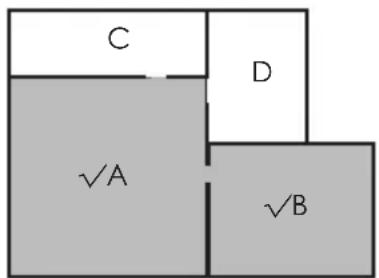
- The robot vacuum cleaner may also enter the areas other than the selected area after it starts cleaning; thus please remove the obstacles on the ground around the selected area. Area selection does not provide a secure isolation.
- Regional cleaning may only be started after the robot vacuum cleaner successfully creates a map.
Regional cleaning mode (Supported by the relevant mobile application only)
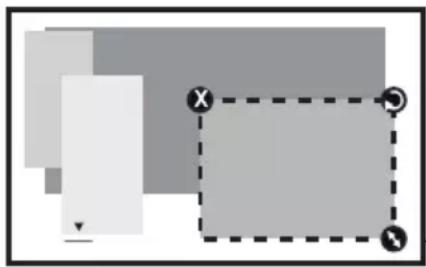

The dimensions of the region can be determined by holding from the right bottom corner. In the meantime, the dimensions of the displayed area are written on the screen with the dotted line.
Select regional cleaning mode in the application and then specify a cleaning area. The robot vacuum cleaner only cleans the selected area and then returns to the charging dock.
- Regional cleaning may only be started after the robot vacuum cleaner successfully creates a map.

Refer to the mobile application operation manual for detailed usage tips.
5 Operation
5.4 Operation of the mop
 | WARNING: Do not use the mopping mode on a carpet. |
 | WARNING: Do not put bleach or detergent in the water tank. These chemicals may damage the liquid channels that ensure the water flow in the robot vacuum cleaner or the pump. |
 | WARNING: Remove the mopping unit while the robot vacuum cleaner is being charged or when it is not operated. |
 | WARNING: Remove the mopping unit immediately after the mopping operation is completed to prevent damage to your wooden floors. |
 | WARNING: The robot vacuum cleaner cuts off the water automatically when mopping is paused or ended. However, the mop remains wet and thus it shall not be kept at this condition for a long period and removed without delay. |
5.4.1 Installation of the wet mopping unit
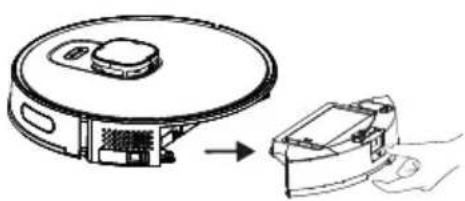
Remove the dust container and the water tank assembly (2 in 1).
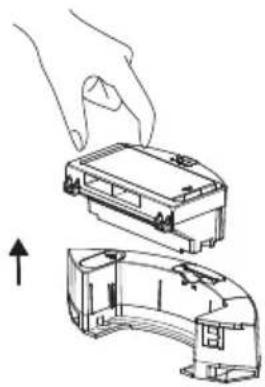
Remove the dust container.
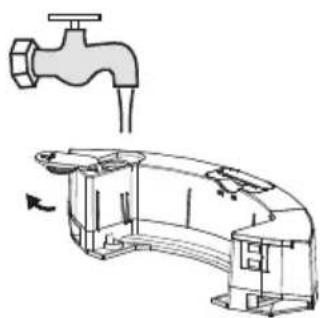
Remove the rubber plug and add water to the water tank from the water inlet.
5 Operation
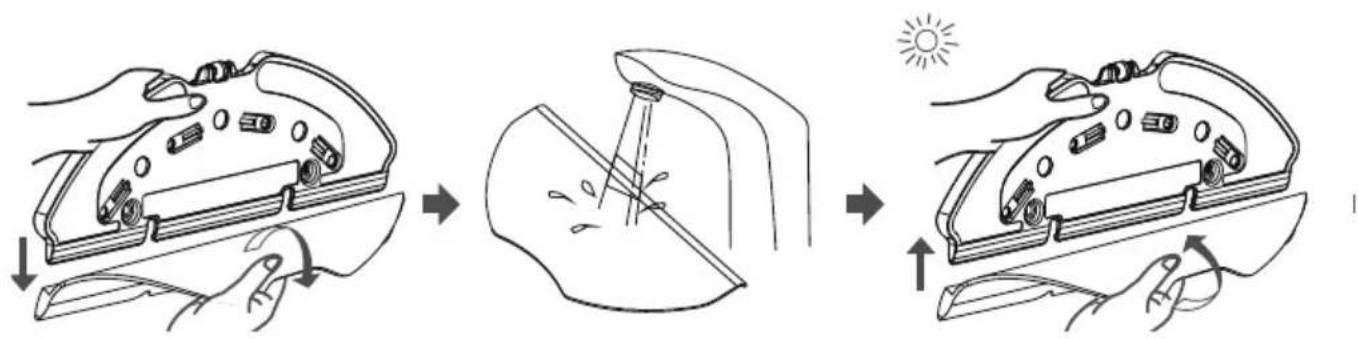
Remove the swab on the mop retainer as it is shown.
Moisten the swab before each mopping.
Place the swab to the mop retainer.
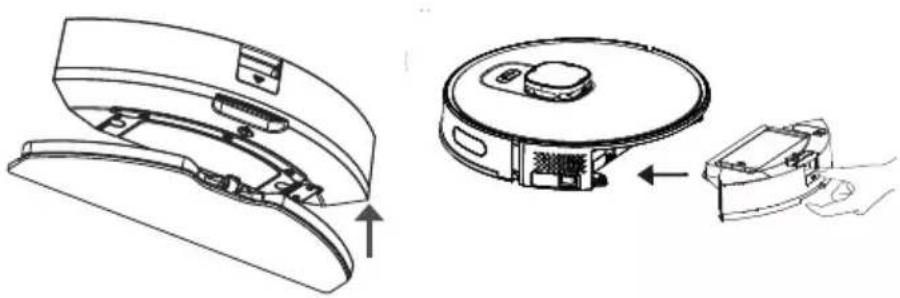
Install the mop retainer to the dust container and the water tank assembly (two in one) in the direction of the arrow.
Install the dust container and the water tank assembly (two in one) to the appliance, in their places in the direction of the arrow.
5.4.2 Wet mopping setting
You may start the cleaning operation by selecting the cleaning mode and set the level of wetness during mopping as desired in the application.
It is advised that you remove your carpets or you add a virtual wall (mop prohibited area) to the carpet area on the application in order to keep the vacuum cleaner away from the carpet to prevent the wetting of the carpet by the robot vacuum cleaner during the mopping operation.
6 Cleaning and maintenance
Turn off the appliance and unplug it before cleaning it.

WARNING: Never use gasoline, solvent, abrasive cleaners, metal objects or hard brushes to clean the appliance.
6.1 Cleaning the dust container and filters

You may call our call center to order a new filter when your filter reaches the end of its expected life, is deformed or needs to be replaced for a reason.

To achieve the maximum performance with EPA filter, clean it with a brush after each cleaning.
EPA filter is a replaceable accessory.
If you performed a cleaning operation in a space where there is construction dust and dust with very tiny particles, replace your filter with a new one in order not to experience a loss of performance.
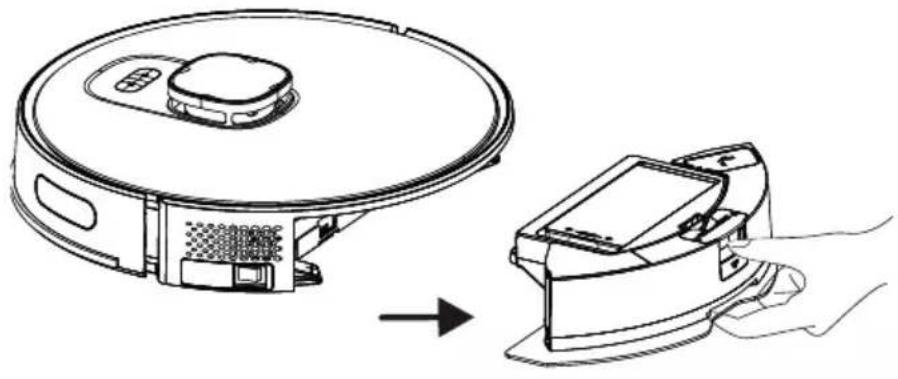
- Remove the dust container and the water tank assembly (2 in 1) by pressing the button as shown below.
6 Cleaning and maintenance
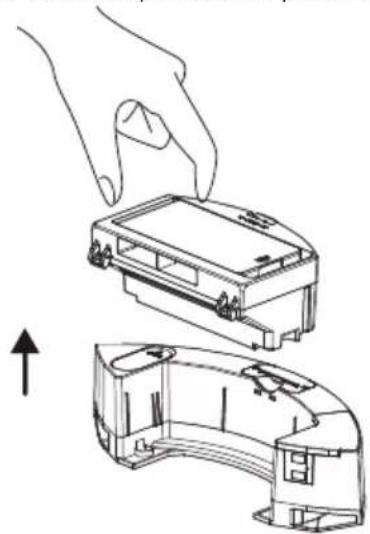
- Remove the dust container by pulling it in the direction of the arrow.
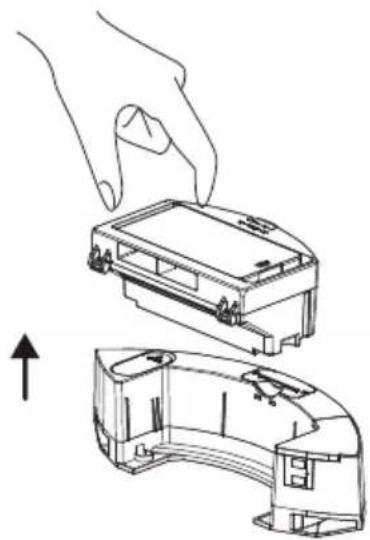
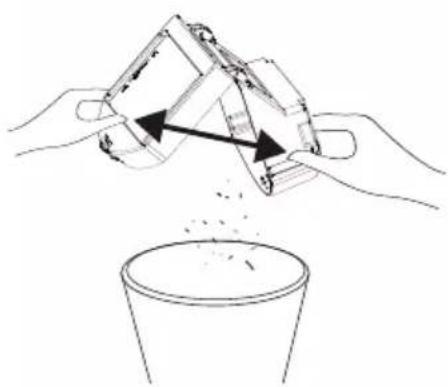
- Open the dust container as shown below and empty it as illustrated.
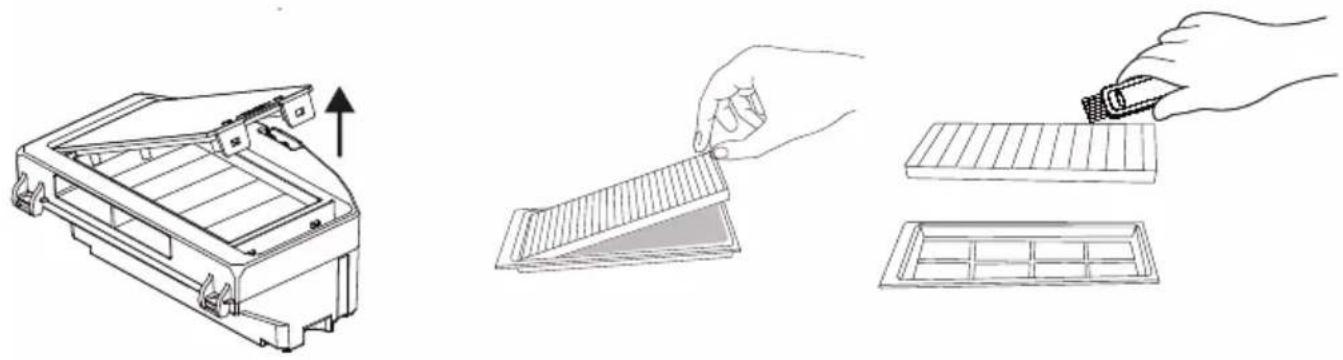
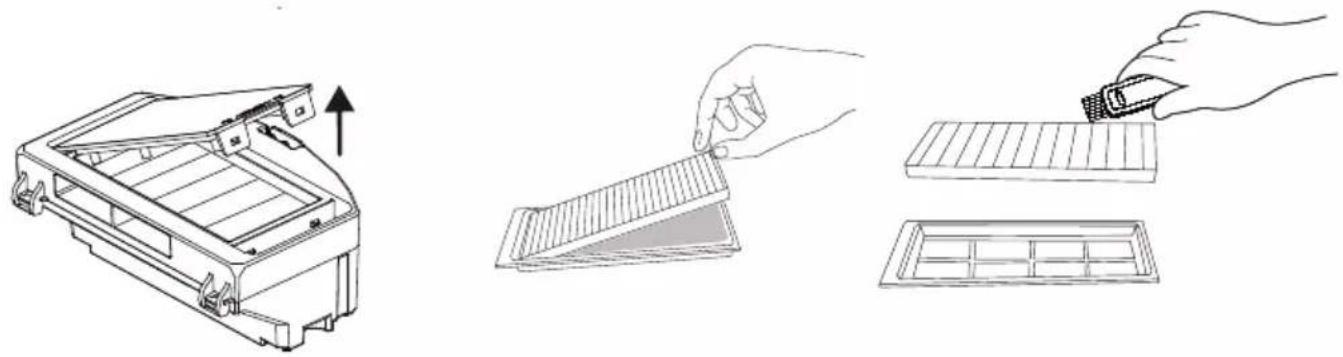
- Remove the high-performance filter and clean it using the cleaning brush provided with the appliance.
6 Cleaning and maintenance
- Periodically wash the water tank, dust container, and filter assembly with cold water as needed, depending on the frequency of use.
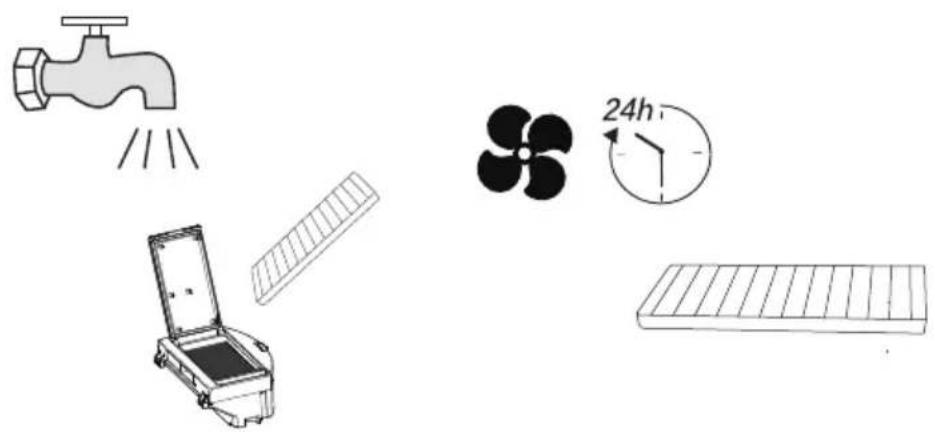
- After washing, leave the water tank, dust container, and filter assembly to dry, and ensure they are completely dry.

Drying may take 24 to 48 hours.
- After drying, reassemble the water tank, dust container, and filter assembly, then install the assembly back into the vacuum cleaner.

WARNING: Do not operate the robot vacuum cleaner without installing the filter assembly. Otherwise, the appliance may be damaged.
6.2 Cleaning the brush
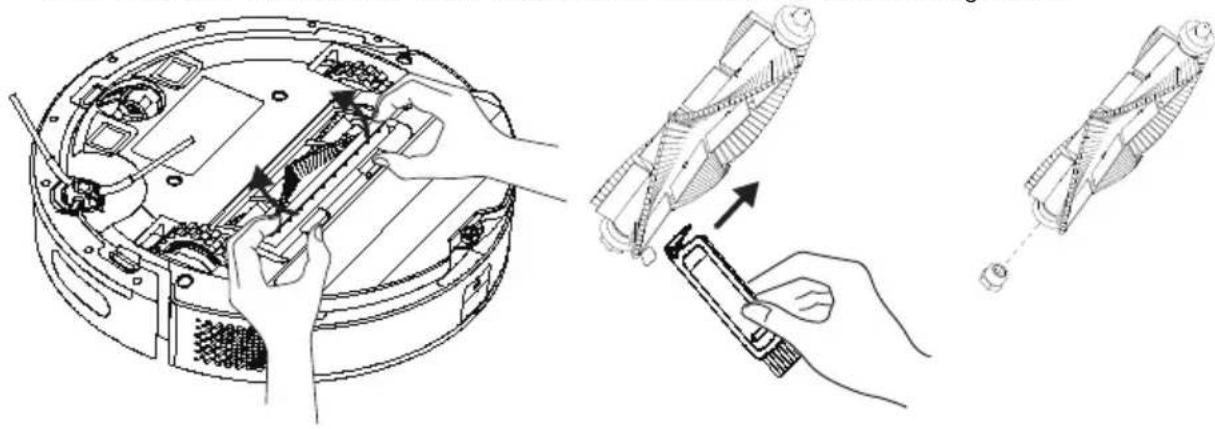
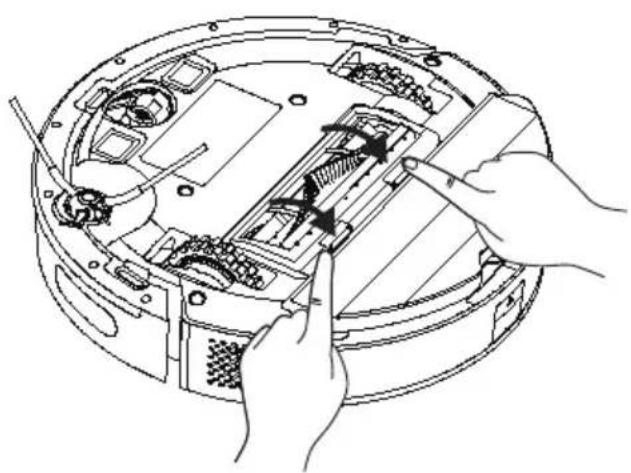
- Open the upper cover of the main brush by pressing the tabs. Pull and remove the main roller upwards. Cut any hair wrapped around the roller brush using the cutting and sharp side of the cleaning brush. Then clean the dust off the roller brush with the bristles of the cleaning brush.
6 Cleaning and maintenance
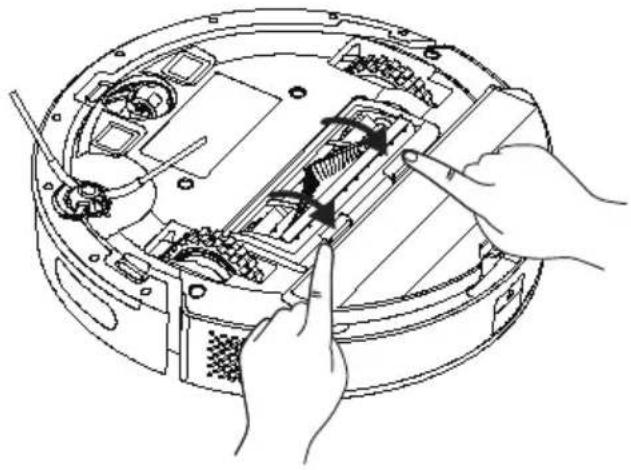
- After cleaning, replace the brush and close the cover in the direction of the arrow.
6.3 Cleaning and installing the side brush
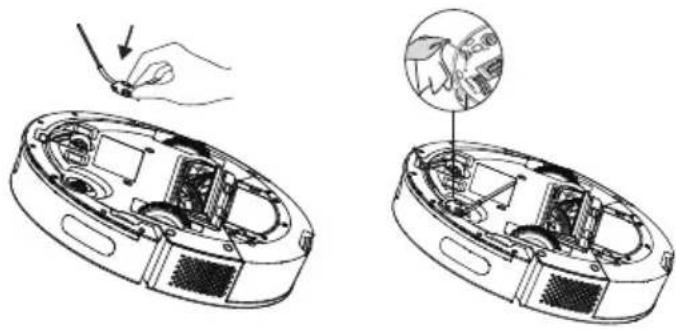
With long-term use, wash the side brush with warm water to eliminate shape deformation. After it has dried, install it onto the robot as shown.
6.4 Cleaning of the sensors
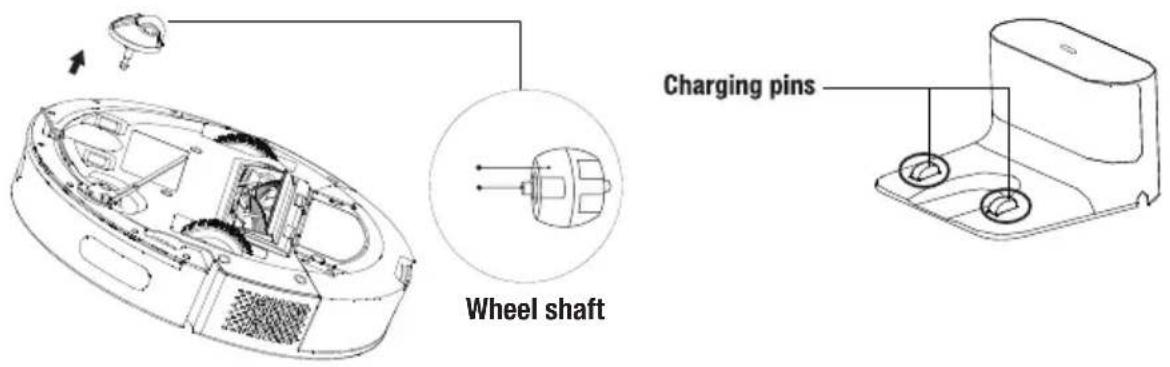
Clean the sensors and charging pins/electrodes regularly and remove the dust using a dry and soft cloth or a cleaning brush.
Information: You get a notification via the application when sensor cleaning is required.
6 Cleaning and maintenance
6 Cleaning and maintenance
6.5 Cleaning of the mopping unit
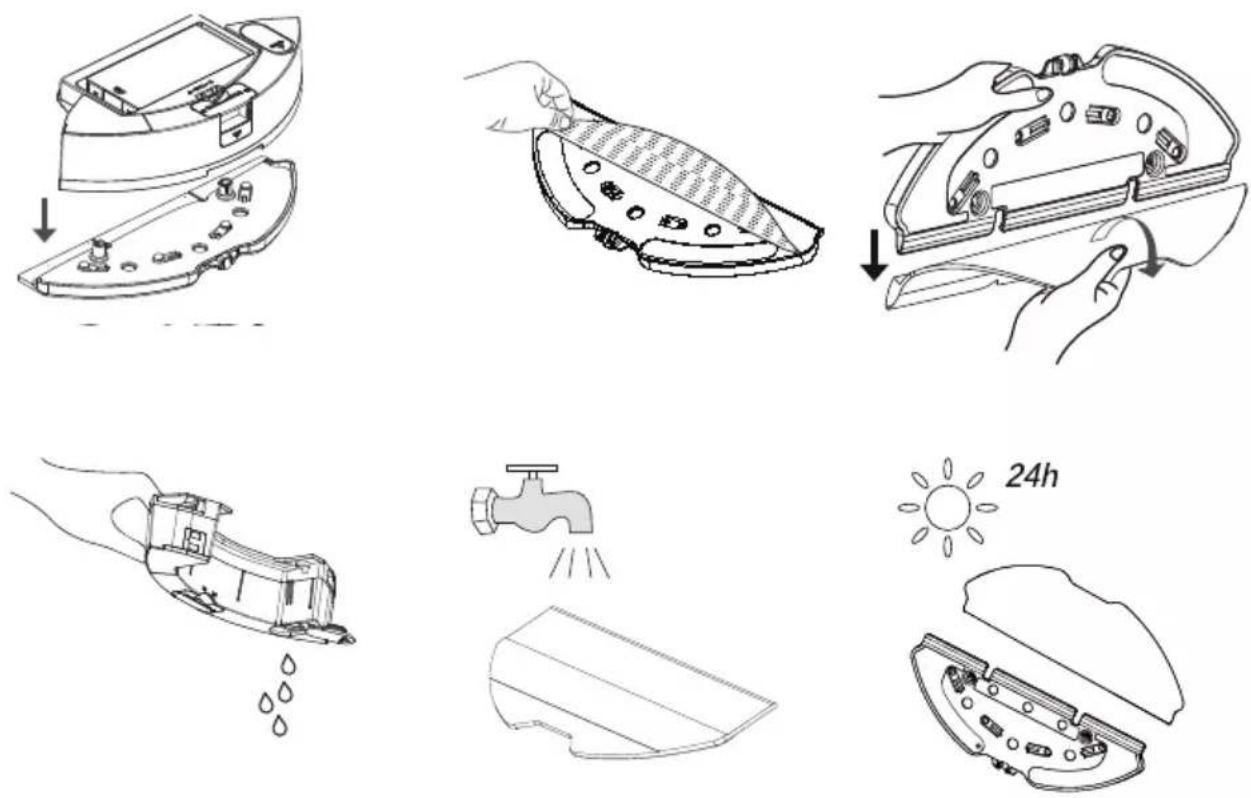
We recommend that you remove the mop holder from one side, drain the water tank, rinse the mop with water and then leave it to dry after each operation of the mopping unit.
You may wash the mop in a washing machine.
General Error Conditions
| Failure Cause and remedy | |
| Cannot be operated | 1. Charging level is low. Place the robot vacuum cleaner to the charging dock so that it shall be aligned with the charging poles. Bring the button on the left of the robot vacuum cleaner to position “I”; and the vacuum cleaner shall be operated automatically (When the robot vacuum cleaner is completely discharged, you shall need to charge for a while for automatic operation).2. The ambient temperature is very low (under 0 °C) or very high (above 50 °C). Please use the robot vacuum cleaner at an ambient temperature from 0 to 40 °C.3. Please ensure that the on/off button on the side of the robot vacuum cleaner is brought to position “I”. |
| Battery not charging | 1. Please remove the robot vacuum cleaner and check if the indicator light on the charging dock station is illuminated and ensure that both ends of the power adaptor of the charging dock are connected.2. Loose contact. Please clean the spring contacts on the charging dock and the charging contacts on the robot vacuum cleaner.3. Please ensure that the on/off button on the side of the robot vacuum cleaner is brought to position “I”. |
| Does not return to the dock/ station for charging | 1. There are too many obstacles around the charging dock. Please place the charging dock to an area free of obstacles.2. The robot vacuum cleaner is too far away from the charging dock. Bring the robot vacuum cleaner closer to the charging dock and try again.3. Make sure that the charging stand station is plugged and there is energy. |
| Abnormal operation Turn off | and on again. |
| Operates with abnormal noise. | Foreign materials may have entered to the main brush, side brushes and the wheels. Please turn off the robot vacuum cleaner and clean it. |
| Cleaning performance is low / dust leaks | 1. Dust container is full. Please clean the dust container.2. Filter is clogged. Please clean or replace the filter.3. Foreign materials may have entered to the main brush. Please clean the main brush. |
7 Troubleshooting
| Cannot connect to the Wi-Fi network. | 1. Wi-Fi signal is weak. Make sure that the Wi-Fi signal in the location of the robot vacuum cleaner is strong.2. There is a cutoff in Wi-Fi connection. Please reset Wi-Fi, download the latest mobile application and try again.3. Password is not entered correctly.4. The router used is a model that operates in 5G frequency band (this robot vacuum supports the 2.4G frequency band only). |
| Timed cleaning feature does not operate | Charging level is low. Timed cleaning can only be started when the charge level is higher than 20%. |
| The vacuum cleaner consumes power while it is in the charging dock | The vacuum cleaner consumes very little amount of power while it is in the charging dock; this feature allows to keep the battery performance in the best level. |
Failure List
When the robot vacuum cleaner switches to the error position, the illuminated home button on the upper body starts to blink red and gives an audible warning. Follow the audible warning to resolve the fault.
| Audible Warning Solution | |
| Error 1: Battery error. Please refer to the manual or the application. | Battery temperature is very high or very low. Wait until the battery temperature reaches the normal values (0 °C~40 °C/32 °F~104 °F). |
| Error 2: Wheel error. Please refer to the manual or the application. | Please check for any foreign material stuck in the wheels and restart the vacuum cleaner. |
| Error 3: Side brush error. Please refer to the manual or the application. | Please check for any foreign material stuck in the side brush and restart the vacuum |
| Error 4: Main motor error. Please refer to the manual or the application. | Please check whether there is any foreign material stuck at the rear of the rotating brush (in the air flow path) and restart the vacuum cleaner.Please check the dust container and the filter, and restart the vacuum cleaner. |
| Error 5: Turbo brush error. Please refer to the manual or the application. | Please remove the rotating brush, and clean the connection part of the rotating brush, rotating brush cover and the dust nozzle. Restart the vacuum cleaner after cleaning. |
7 Troubleshooting
| Error 6: Water pump error. Please refer to the manual or the application. | ·Please clean the water tank and the water flow under the vacuum cleaner and check the mopping module. Please try to restart the vacuum cleaner after cleaning. |
| Error 7: Laser sensor error. Please refer to the manual or the application. | ·Please check for any foreign material inside the laser sensor, clean if required and restart the vacuum cleaner. |
| Error 9: Charging operation error. Please clean the charging contact area. | ·Please check for any contamination in the charging area and clean the charging poles. |
| Error 10: Software error. Please turn off and restart again. | ·Please bring the main button to position 0 and back to position 1 and restart the vacuum cleaner |
| Error 12: Abnormal operation. Please make sure that the main button is turned on. | ·Please bring the main button to on position initially |
12 months breakdown and repair guarantee
Guarantor: Beko plc, 1 Greenhill Crescent, Watford, Hertfordshire. WD18 8UF
The guarantee does not in any way diminish your statutory or legal rights.
Your appliance has the benefit of our manufacturer's guarantee which covers the product for 12 months from the date of original purchase.
This gives you reassurance that if within that time, your appliance is proven to be defective because of either workmanship or materials, we will at our discretion either repair or replace your appliance.
The appliance must be correctly installed, located and operated in accordance with the instructions contained in the user manual. The guarantor disclaims any liability for accidental or consequential damage.
The Guarantee is subject to the following conditions:
Documentary proof of the original purchase date is provided. The appliance has been installed and operated correctly and in accordance with our operating and maintenance instructions. The appliance is used only on the electricity supply on the rating plate. The appliance has only been used for normal domestic purposes. The appliance has not been altered, serviced, dismantled or otherwise interfered with by any person. The appliance is used in the United Kingdom or Republic of Ireland. Any parts removed during repair work or any product that has been replaced becomes our property. The guarantee is not transferrable if the product is resold.
The Guarantee does not cover:
Transit, installation or delivery damage. Accidental damage. Misuse or abuse. Replacement of any consumable item or accessories. These include but are not limited to: plugs, cables, light bulbs, knobs, filters and flaps. Repairs or replacements required as a result of unauthorised repairs or inexpert installation that fails to meet the requirements contained in the user guide or instruction book. Repairs to products used in commercial or non-residential household premises.
How to obtain after sales service, help or general advice
Please keep your purchase receipt or other proof of purchase in a safe place as you will need to show us this document if your product requires attention within the guarantee period.
Please also record your product details below, which will allow you to access our services more quickly and help us identify your product. The model number is printed on the front of the user guide and the serial and model number is shown on your products rating plate.
| Model number | Serial number | Purchased from | Date of purchase |
Please call our UK based Customer Service department if you need help or advice from us:
United Kingdom and Northern Ireland: 0333 207 9710
Republic of Ireland: 01 862 3411
You can also contact us through our website: www.beko.co.uk
Dear Customer,
4 Installation
2- Install the charging station


4 Installation


5 Operation

Robot vacuum
4 Installation


ROBOT VACUUM
4 Installation


Robot vacuum
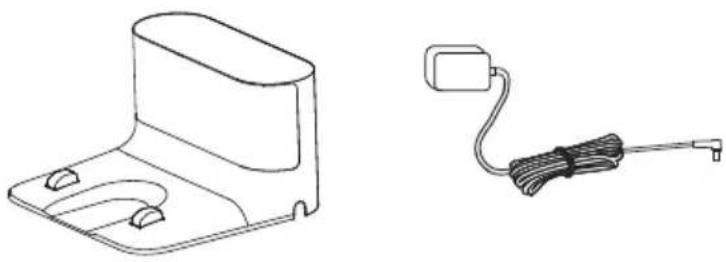
Charging station Charging adapter
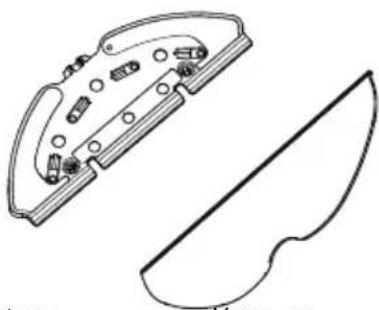
Cleaning tool Cleaning cloth
User manual and product documentation (2 pcs)
Cleaning brush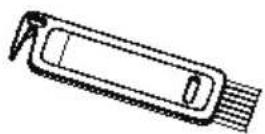
Spare accessories are supplied
 | 1 bočna četka |
 | 1 krpa za brisanje |
 | 1 filter |
3 Overview
3 Overview
2.1 Checks and components
- Lidar
- Top of the housing
- Central housing
- Start cleaning-pause button / Send to charging dock button
- Bumper sensor
- Front bumper
- Front bumper impact sensor
- Charging pins
- Drop sensor
- Charging pins
- Front caster wheel
- Rotating brush
- Rotating brush cover
- Rear wheel
- Side brush
- Charging station
- Charging adapter
- On/off button
- Cover for opening the EPA filter of the robot vacuum container
- Water tank filling cover
- Button for ejecting the dust container of the robot vacuum
- Water tank for mopping
- Dust collection container
- EPA filter
- Cleaning brush
- Floor moisture protection pad
2.2 Technical specifications
| Napon adaptera 100-240V~, 50-60 Hz | |
| Izlazna snaga adaptera 24.0V / 1.0 A | |
| Baterija Li-ion: 14.4V / 5.0 Ah | |
| Vreme punjenja 6 – 7.5 sati | |
| Vreme rada Do 250 minuta (u nemoj poziciji) | |
| Kapacitet spremnika za prašinu | 0.4 L |
| Kapacitet posude za vodu 0.3 L | |
| Frekvencijski opseg za Wi-Fi 2.4G | 2412-2472 MHz |
| Podržane veze | WLAN IEEE 802.11 b/g/n bežični |
| 2,4G WiFi maksimalna izlazna snaga radio-frekvencije | 20 dBm |
| Informacije o izloženosti radio-frekvencijama | 2.4G Najviše Wi-Fi od: |
| Vreme rada | Maksimalna snaga: 65 minSnažno: 120 minStandardno: 180 minTiho: 250 min |
Radio frequency exposure information:
The maximum permissible exposure level is calculated based on a 20 cm distance between the device and the human body. To comply with radio frequency exposure conditions, a distance of 20 cm should be maintained between the device and people.
| Proizvođač E-TEK Electronics Manufactory Co., LTD | |
| Identifikacioni broj modela: ZD024D240100EU | |
| Ulazni napon: 100-240V~ | |
| Ulazna frekvencija 50-60Hz | |
| Ulazna struja 0.8A | |
| Izlazni napon 24.0V DC | |
| Izlazna struja 1.0A | |
| Izlazna snaga: | 24.0W |
| Prosečna aktivna efikasnost | 87.91% |
| Efikasnost pri malom opterećenju (10%) | 84.01% |
| Potrošnja energije bez opterećenja: | 0.1W |
4 Installation

4 Installation
Place the station and charging dock on a hard, flat surface with the back facing the wall, then plug it in.


Charging begins after the blue indicator on the charging dock blinks 3 times and then turns off completely.
5.3 Operation
Press the button to start the automatic cleaning mode. When started, the vacuum removes itself from the charging dock, performs an automatic scan to create a map, intelligently determines the cleaning route, and divides the area into several regions. The cleaning route is planned along the wall, and the vacuum moves back and forth to clean different regions in order.

WARNING: If the battery level is too low, cleaning cannot be started. Charge the device before starting cleaning.
5 Operation

- The vacuum may enter areas other than the selected area after cleaning begins; therefore, please remove obstacles on the floor around the selected area. Selecting an area does not ensure safe isolation.
- Cleaning a specific area can only begin after the vacuum has successfully created a map.
5 Operation
Cleaning mode for a specific area (supported only by the relevant mobile app)
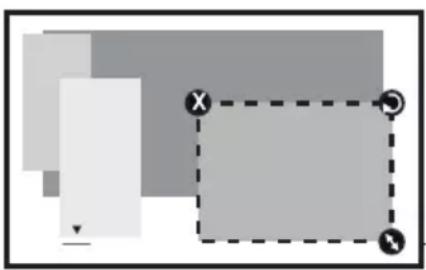

The dimensions of the region can be determined by holding from the bottom right corner. Meanwhile, a dashed line on the screen displays the dimensions of the shown area.
Select a cleaning mode for a specific area in the app, then define the cleaning area. The vacuum cleans only the selected area and then returns to the charging dock.
* Cleaning a specific area can only start after the vacuum has successfully created a map.

Refer to the user manual in the mobile app for detailed usage tips.
5.4 Working with the mop attachment

WARNING: Do not use the mopping mode on carpets.

Remove the dust container and the water tank assembly (2-in-1).
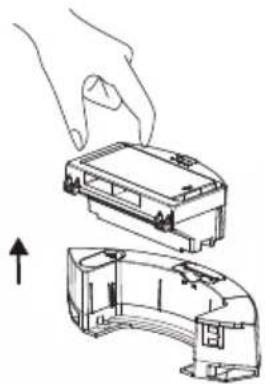
Remove the dust container.
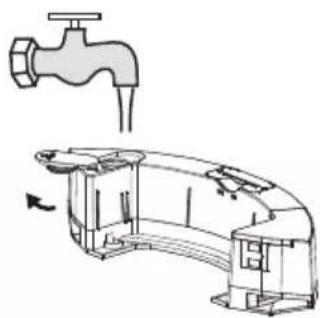
Remove the rubber stopper and add water to the water tank through the water inlet.
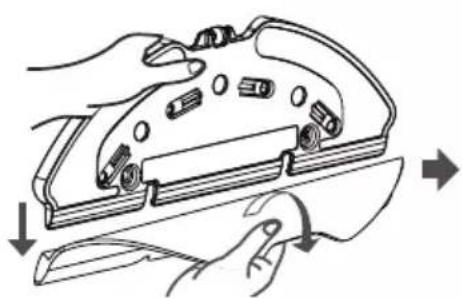
Remove the mop pad from the mop holder as shown.
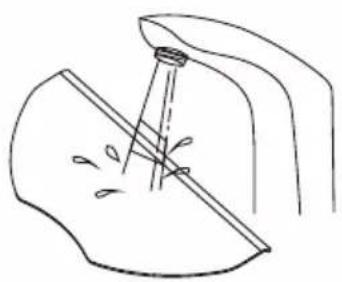
Moisten the mop pad before each mopping session.
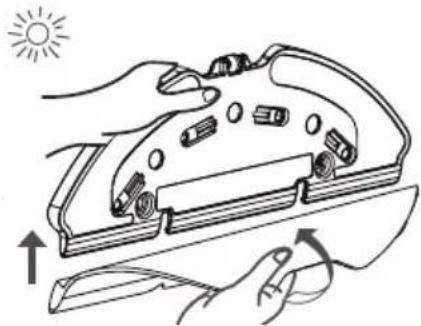
Attach the mop pad to the mop holder.
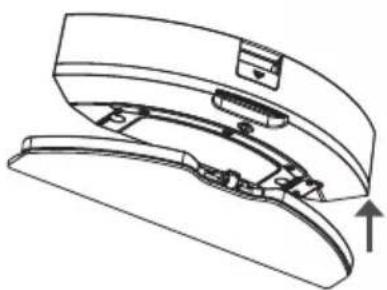
Place the dust container and the water tank assembly (2-in-1) in the direction of the arrow.
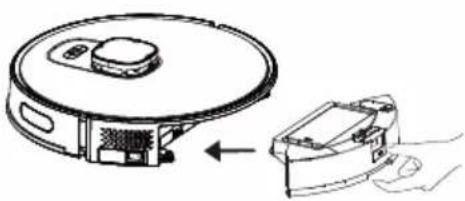
Place the dust container and the water tank assembly (2-in-1) onto the device, in the direction of the arrow.
- Remove the dust container by pulling it in the direction of the arrow.
- Remove the high-performance filter and clean it using the cleaning brush provided with the device.
- Periodically wash the water tank, dust container, and filter assembly with cold water, depending on how often the appliance is used.
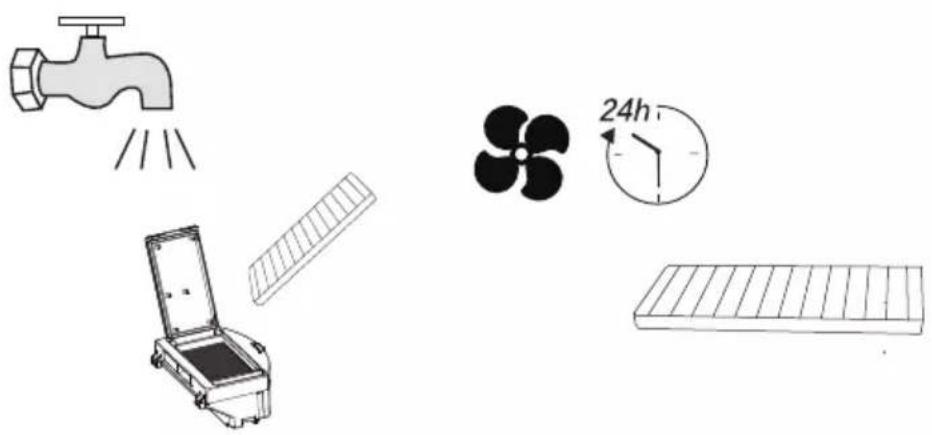
- After washing, leave the water tank, dust container, and filter assembly to dry, and make sure they are completely dry.

Drying may take 24 to 48 hours.
- Replace the brush after cleaning and close the cover in the direction of the arrow.
6.5 Cleaning the mopping units
We recommend removing the mop holder from one side, emptying the water tank, rinsing the mop with water, and then leaving it to dry after each use of the mopping unit.
- ROBOT VACUUM CLEANER
- PLEASE READ THIS GUIDE FIRST
- SYMBOLS AND THEIR MEANINGS
- CONTENTS
- IMPORTANT SAFETY AND ENVIRONMENTAL INSTRUCTIONS
- GENERAL SAFETY
- COMPLIANCE WITH THE WEEE REGULATIONS AND WASTE DISPOSAL
- PACKAGING INFORMATION
- WASTE BATTERIES
- WHAT TO DO FOR ENERGY SAVING
- PLUG WIRING
- FITTING A DIFFERENT PLUG
- BOX CONTENT
- OVERVIEW
- CHECKS AND COMPONENTS
- CONFORMITY DECLARATION FOR CE
- INSTALLATION
- INSTALL THE CHARGING STATION
- OPERATION
- INTENDED USE
- CHARGING THE APPLIANCE
- STARTING THE CLEANING
- PAUSING
- POINT CLEANING
- VACUUM POWER SELECTION
- REMOTE CONTROLLED CLEANING
- SLEEP
- RESETTING THE SYSTEM
- OPERATION WITH THE APPLICATION
- DOWNLOAD THE APPLICATION
- RESET WI-FI
- ADD A DEVICE
- WI-FI NETWORK
- NETWORK SECURITY REQUIREMENTS
- OPERATION MODES
- MAP MANAGEMENT
- REAL TIME MAPPING
- REPOSITIONING AND REMAPPING
- ROOM CLEANING MODE (SUPPORTED BY THE RELEVANT MOBILE APPLICATION ONLY)
- REGIONAL CLEANING MODE (SUPPORTED BY THE RELEVANT MOBILE APPLICATION ONLY)
- OPERATION OF THE MOP
- INSTALLATION OF THE WET MOPPING UNIT
- WET MOPPING SETTING
- CLEANING AND MAINTENANCE
- CLEANING THE DUST CONTAINER AND FILTERS
- CLEANING THE BRUSH
- CLEANING AND INSTALLING THE SIDE BRUSH
- CLEANING OF THE SENSORS
- CLEANING OF THE MOPPING UNIT
- TROUBLESHOOTING
- FAILURE LIST
- MONTHS BREAKDOWN AND REPAIR GUARANTEE
- HOW TO OBTAIN AFTER SALES SERVICE, HELP OR GENERAL ADVICE
- SPARE ACCESSORIES ARE SUPPLIED
- TECHNICAL SPECIFICATIONS
- RADIO FREQUENCY EXPOSURE INFORMATION
- CLEANING MODE FOR A SPECIFIC AREA (SUPPORTED ONLY BY THE RELEVANT MOBILE APP)
- WORKING WITH THE MOP ATTACHMENT
- CLEANING THE MOPPING UNITS
Brand : BEKO
Model : VRR 84314 VB
Category : Vacuum Cleaner