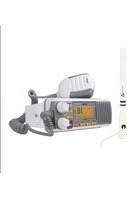
UM385 - Radio UNIDEN - Free user manual and instructions
Find the device manual for free UM385 UNIDEN in PDF.


| Product Type | Fixed Marine VHF Radio |
| Brand | Uniden |
| Model | UM385 |
| Dimensions (H x W x D) | 66.6 x 162.6 x 130.1 mm |
| Weight | 1 kg |
| Power Supply | 13.8 V DC (10.5-16 V), negative ground |
| Transmit Power | 1 W or 25 W selectable |
| Frequency Range | 156 to 163 MHz |
| Supported Channels | US, Canada, International Marine VHF |
| Digital Selective Calling (DSC) | Class D, individual, group, all ships, distress calls |
| Weather Monitoring | NOAA with alert, FIPS filtering |
| Waterproof Rating | IPX4 (splash resistant) |
| Display | Full matrix, backlit |
| Microphone | Robust condenser with coiled cord |
| Speaker | 1.77 inch, 8 Ω |
| GPS Connectivity | NMEA0183 input/output for external GPS receiver |
| Scan Mode | Memory for fast channel scanning |
| Triple/Watch Monitoring | Monitoring channels 16 and 9 (or 16 only) |
| Warranty | 3-year limited, repair by authorized center |
| Included Accessories | Mounting bracket, microphone, cables, fuse |
Frequently Asked Questions - UM385 UNIDEN
User questions about UM385 UNIDEN
0 question about this device. Answer the ones you know or ask your own.
Ask a new question about this device
Download the instructions for your Radio in PDF format for free! Find your manual UM385 - UNIDEN and take your electronic device back in hand. On this page are published all the documents necessary for the use of your device. UM385 by UNIDEN.
USER MANUAL UM385 UNIDEN
MAKING A DISTRESS CALL
Lift the red cover. Press and hold the DISTRESS button for three seconds. Your radio transmits your boat's location every few minutes until you receive a response.


Lift the red cover and press the DISTRESS button.
NOTE: IF the radio displays Enter User MMSI, cancel the automatic distress call and make a normal voice distress call.
MAKING A VOICE DISTRESS CALL
SPEAK SLOWLY — CLEARLY — CALMLY.
For future reference, write your boat's name & call sign here:
- Make sure your radio is on.
- On the microphone, press the 16/9-TRI button to switch to Channel 16 (156.8 MHz). (If the corner of the display does not show 16, press the 16/9-TRI button again until it does.)
- Press the PUSH TO TALK button on the microphone and say: MAYDAY – MAYDAY – MAYDAY."
- Say "THIS IS {name or call sign of your boat}."
- Say "MAYDAY {name or call sign of your boat}."
- Tell where you are: (what navigational aids or landmarks are near, or read the latitude and longitude from your GPS).
- State the nature of your distress, e.g. are you sinking, medical emergency, man overboard, on fire, adrift, etc.
- Give number of persons aboard and conditions of any injured persons.
- Estimate present seaworthiness of your ship (e.g. how immediate is the danger due to flooding or fire or proximity to shore).
- Briefly describe your ship (length, type, color, hull).
- Say: "I WILL BE LISTENING ON CHANNEL 16."
- End message by saying "THIS IS {name or call sign of your boat}, OVER."
- Release the PUSH TO TALK button and listen.
If you do not get an answer after 30 seconds, repeat your call, beginning at step 3, above.
FAIRE UN APPEL DE DÉTRESSE
MAKING A VOICE DISTRESS CALL ......II
FAIRE UN APPEL DE DÉTRESSE VOCAL ....III
CÓMO HACER UNA LLAMADA DE SOCORRO POR VOZ IV
INTRODUCTION ....1
CARACTÉRISTIQUES .... 1
EXPLICATION DES TERMES .... 1
COMMENT DÉBUTER ...... 2
Entering MMSI Numbers 19
METTRE LA RADIO EN MARCHE
Entering MMSI Numbers
flowchart
graph TD
    A["MENU"] --> B["Receive Log"]
    B --> C["ENT 1W/25W"]
    C --> D["Distress"]
    D --> E["ENT 1W/25W"]
    E --> F["Distress Log 123456789 88A"]
    F --> G["Back[CLR"] Select["ENT"]]
| No. can. | É.-U. | INT CAN TRAN | RÉCEP | Type de canal/Nom | |
| 01 x x | 56.050 | 160.650 | Public Correspondence (Marine Operator) | ||
| 01A* x | 156.050 | 156.050 | Port Operation and Commercial (VTS (Vessel Traffic System) in some areas. | ||
| 02 x x | 156.100 | 160.700 | Public Correspondence (Marine Operator) | ||
| 03 x x | 156.150 | 160.750 | Public Correspondence (Marine Operator) | ||
| 04 x 15 | 6.200 | 160.800 | Public Correspondence (Marine Operator) | ||
| 04A | x 156.200 | 156.200 | Canadian Coast Guard: West CoastCommercial Fishing: East Coast | ||
| 05 x 15 | 6.250 | 160.850 | Public Correspondence (Marine Operator). Ship Movement, Port Operations | ||
| 05A | x | x 156.250 | 156.250 | Port Operations, Ship Movement, VTS in some areas | |
| 06 | x | x | x | 156.300 | 156.300 |
| 07 x 15 | 6.350 | 160.950 | Inter-ship safety | ||
| 7A | x | x 156.350 | 156.350 | Commercial | |
| 08 | x | x | x | 156.400 | 156.400 |
| 09 | x | x x | 156.450 | 156.450 | |
| 10 | x | x x | 156.500 | 156.500 | Commercial |
| No. can. | É.-U. | INT CAN TRAN | RÉCEP | Type de | canal/Nom |
| 11 x x x | 156.5 | 50 15 | 6.550 | Commercial, VTS in selected areas | |
| 12 x x x | 156.6 | 00 15 | 6.600 | Port Operations, VTS in selected areas | |
| 13 x x x | 156.6 | 50 15 | 6.650 | Intership Navigation Safety (Bridge-to-Bridge). Ships >20m length maintain a listening watch on this channel in US waters. | |
| 14 x x x | 156.7 | 00 15 | 6.700 | Port Operation, VTS in some areas | |
| 15 x Inhibit | 156.750 | Environmental (Receive Only) | |||
| 15 x x 1 | 56.750 | 156.750 | Inter-ship, Port Operations, Commercial, Non-Commercial, Ship Movement (1 Watt Only) | ||
| 16 x x x | 156.8 | 00 15 | 6.800 Distress, Safety, Calling | ||
| 17 x x x | 156.8 | 50 15 | 6.850 | State and Local Govt Maritime Control (1 Watt Only) | |
| 18 x 15 | 6.900 | 161.500 | Port Operations, | Ship Movement | |
| 18A x | x | 156.900 | 156.900 | CommercialCanada: Towing West Coast | |
| 19 x 15 | 6.950 | 161.550 | Commercial | ||
| 19A x | x | 156.950 | 156.950 Commercial | ||
| 20 x x x | 157.000 | 161.600 | Port OperationsCanada: 1 Watt Only | ||
| 20A x 1 | 57.000 | 157.000 | Port Operation | ||
| 21 x 15 | 7.050 | 161.650 | Port Operations | ||
| 21A x | x | 157.050 | 157.050 Coast Guard | Only | |
| 21B | x INHIBIT 161.650 | Canadian CG Continuous Marine Broadcast (CMB) Service | |||
| 22 x 15 | 7.100 | 161.700 | Port Operations, | Ship Movement | |
| 22A x | x | 157.100 | 157.100 | US and Canadian Coast Guard Liaison and Airtime Safety Information Broadcasts Announced on Channel 16 | |
| 23 x x 1 | 57.150 | 161.750 | Public Correspondence (Marine Operator) | ||
| 23A x 1 | 57.150 | 157.150 | US Coast Guard Only | ||
| 23B | x INHIBIT 161.750 | Canadian CG Continuous Marine Broadcast (CMB Service | |||
| 24 x x x | 157.200 | 161.800 | Public Correspondence (Marine Operator) | ||
| 25 x x x | 157.2 | 50 16 | 1.850 | Public Correspondence (Marine Operator) | |
| 25B x INHIBIT | 161.850 | Canadian CG Continuous Marine Broadcast (CMB) Service | |||
| 26 x x x | 157.3 | 00 16 | 1.900 | Public Correspondence (Marine Operator) | |
| 27 x x x | 157.3 | 50 16 | 1.950 | Public Correspondence (Marine Operator) | |
| 28 x x x | 157.4 | 00 16 | 2.000 | Public Correspondence (Marine Operator) | |
| 28B x INHIBIT | 162.000 | Canadian CG Continuous Marine Broadcast (CMB) Service | |||
| 60 x x 1 | 56.025 | 160.625 | Public Correspondence (Marine Operator) | ||
| 61 x 15 | 6.075 | 160.675 | Public Correspondence (Marine Operator) | ||
| 61A x 1 | 56.075 | 156.075 | Canadian Coast Guard: West CoastCommercial Fishing: East Coast | ||
| 62 x 15 | 6.125 | 160.725 | Public Correspondence (Marine Operator) | ||
| 62A x 1 | 56.125 | 156.125 | Canadian Coast Guard | ||
| 63 x 15 | 6.175 | 160.775 | Public Correspondence (Marine Operator) | ||
| 63A x | x | 156.175 | 156.175 VTS, Port Operations | ||
| 64 x x 1 | 56.225 | 160.825 | Public Correspondence (Marine Operator) | ||
| 64A x 1 | 56.225 | 156.225 | Canada: Commercial Fishing Only | ||
| 65 x 15 | 6.275 | 160.875 | Public Correspondence (Marine Operator) | ||
| 65A x | x | 156.275 | 156.275 | Port OperationsCanada: Towing West Coast | |
| 66 x 15 | 6.325 | 160.925 | Public Correspondence (Marine Operator) | ||
| 66A x | x | 156.325 | 156.325 | Port OperationsCanada: 1 Watt Only | |
| 67 x x x | 156.3 | 75 15 | 6.375 | US: Commercial, Bridge-to-Bridge, VTS in some areasCanada: Search and Rescue, Commercial in some areas, Non-Commercial on West Coast | |
| No. can. | É.-U. | INT CAN TRANS RÉCEP Type de canal/Nom | ||||
| 68 x x x | 156.4 | 25 15 | 6.425 Non -Commercial | |||
| 69 x x x | 156.4 | 75 15 | 6.475 | Non-CommercialCanada: Commercial East Coast.Non-Commercial West Coast | ||
| 70 x x x | 156.5 | 25 15 | 6.525 | DSC (Digital Selective Calling)Only. No Voice Communications Allowed | ||
| 71 x x x | 156.5 | 75 15 | 6.575 | US: Non-CommercialCanada: Ship Movement West Coast, Non-Commercial East Coast | ||
| 72 x x x | 156.6 | 25 15 | 6.625 Non-Commercial (Ship-to-Ship) | |||
| 73 x x x | 156.6 | 75 15 | 6.675 Port Operations | |||
| 74 x x x | 156.7 | 25 15 | 6.725 Port Operations | |||
| 75 x x x | 156.7 | 75 15 | 6.775 Port Operations (1 Watt Only) | |||
| 76 x x x | 156.8 | 25 15 | 6.825 Port Operations (1 Watt Only) | |||
| 77 x x x | 156.8 | 75 15 | 6.875 Port Operations (Ship-to-Ship) | |||
| 78 x 15 | 6.925 | 161.5 | 25 Port Operations | |||
| 78A x x | 156.9 | 25 15 | 6.925 Non-Commercial, Inter-Ship | |||
| 79 x 15 | 6.975 | 161.5 | 75 Port Operations | |||
| 79A x x | 156.9 | 750 1 | 56.975 Commercial, Inter-Ship | |||
| 80 x 15 | 7.025 | 161.6 | 25 Port Operations | |||
| 80A x x | 157.0 | 25 15 | 7.025 Commercial, Inter-Ship | |||
| 81 x 15 | 7.075 | 161.6 | 75 Port Operations | |||
| 81A x x | 157.0 | 75 15 | 7.075 | Government, Canadian Coast Guard | ||
| 82 x 15 | 7.125 | 161.7 | 25 Port Operations | |||
| 82A x x | 157.1 | 25 15 | 7.125 | Government, Canadian Coast Guard | ||
| 83 x 15 | 7.175 | 161.7 | 75 Port Operations | |||
| 83A x x | 157.1 | 75 15 | 7.175 Coast Guard | |||
| 83B | x INHIBIT 16 | 1.775 | Canadian CG Continuous Marine Broadcast (CMB) Service | |||
| 84 x x x | 157.2 | 25 16 | 1.825 | Public Correspondence (Marine Operator) | ||
| 85 x x x | 157.2 | 75 16 | 1.875 | Public Correspondence (Marine Operator) | ||
| 86 x x x | 157.3 | 25 16 | 1.925 | Public Correspondence (Marine Operator) | ||
| 87A x x | x 157. | 375 1 | 57.375 | Public Correspondence (Marine Operator) | ||
| 88A x x | 157.425 | 157.425 | Public Correspondence (Marine Operator) | |||
| 1019 x | x 156.950 | 156.950 | Commercial | |||
| 1020 x | x 157.000 | 157.000 | Port Operations | |||
| 1078 x | x 156.925 | 156.925 | Non-Commercial, Inter-$hip | |||
| 1079 x | x 156.975 | 156.975 | Commercial, Inter-Ship | |||
| 2019 x | 161.550 | 161.550 | Commercial | |||
| 2020 x | 161.600 | 161.600 | Port Operations | |||
| 2078 x | 161.525 | 161.525 | Port Operations | |||
| 2079 x | 161.575 | 161.575 | Port Operations | |||
CANAUX ET FRÉQUENCES MÉTÉOROLOGIQUES (ÉTATS-UNIS, CANADA, ET INTERNATIONAL)
| No. can. | Fréq. récep. Non affiché | |
| WX01 | 162.5500 | 162.550 MHz |
| WX02 | 162.4000 | 162.400 MHz |
| WX03 | 162.4750 | 162.475 MHz |
| WX04 | 162.4250 | 162.425 MHz |
| WX05 | 162.4500 | 162.450 MHz |
| WX06 | 162.5000 | 162.500 MHz |
| WX07 | 162.5250 | 162.525 MHz |
| WX08 | 161.6500 | 161.650 MHz |
| WX09 | 161.7750 | 161.775 MHz |
| WX10 | 163.2750 | 163.275 MHz |
CODES DES ÉVÉNEMENTS "S.A.M.E." (ENCODAGE DES MESSAGES D'UNE RÉGION SPÉCIFIQUE)
Types d'événements
• \$CDDSC,12,3081234000,,07,00,0354013946,0657,,,S,E*6D
• \$CDDSE,1,1,A,3081234000,00,60875646*13
RÉGLEMENTATION ET AVERTISSEMENTS RELATIFS À LA SÉCURITÉ
FONCTIONNEMENT DES SERVICES DE LA RADIO MARITIME
QUESTIONS? Visit our website at www.uniden.com.
- MAKING A DISTRESS CALL
- MAKING A VOICE DISTRESS CALL
- FAIRE UN APPEL DE DÉTRESSE
- METTRE LA RADIO EN MARCHE
- Entering MMSI Numbers
- CANAUX ET FRÉQUENCES MÉTÉOROLOGIQUES (ÉTATS-UNIS, CANADA, ET INTERNATIONAL)
- CODES DES ÉVÉNEMENTS "S.A.M.E." (ENCODAGE DES MESSAGES D'UNE RÉGION SPÉCIFIQUE)
- Types d'événements
- RÉGLEMENTATION ET AVERTISSEMENTS RELATIFS À LA SÉCURITÉ
- FONCTIONNEMENT DES SERVICES DE LA RADIO MARITIME
Brand : UNIDEN
Model : UM385
Category : Radio