Pad 6 Keyboard - Cellphone Xiaomi - Free user manual and instructions
Find the device manual for free Pad 6 Keyboard Xiaomi in PDF.



| Product Type | Tablet Keyboard |
| Brand | Xiaomi |
| Model | Pad 6 Keyboard |
| Compatibility | Xiaomi Pad 6 only |
| Power | Via tablet (input 3.4-4.5 V, 30 mA) |
| Operating temperature | 0 °C to 40 °C |
| Storage temperature | -20 °C to 45 °C |
| Dimensions (L x W x H) | Approx 260 x 170 x 5 mm |
| Weight | Approx 300 g |
| Material | Plastic |
| Connectivity | Magnetic connectors (pogo pins) |
| Key type | Chiclet, optional backlight |
| Keyboard layout | AZERTY (France) / QWERTY (others) |
| Special features | Shortcut keys for Pad 6 |
| Package contents | Keyboard, quick start guide |
| Warranty | 2 years (according to EU legislation) |
| Maintenance | Clean with a soft dry cloth |
| Safety precautions | Do not expose to moisture, do not open |
| Recycling | Do not dispose of with household waste (EU) |
| Emission class | Compliant with EMC Directive 2014/30/EU |
Frequently Asked Questions - Pad 6 Keyboard Xiaomi
User questions about Pad 6 Keyboard Xiaomi
0 question about this device. Answer the ones you know or ask your own.
Ask a new question about this device
Download the instructions for your Cellphone in PDF format for free! Find your manual Pad 6 Keyboard - Xiaomi and take your electronic device back in hand. On this page are published all the documents necessary for the use of your device. Pad 6 Keyboard by Xiaomi.
USER MANUAL Pad 6 Keyboard Xiaomi
Xiaomi Pad 6 Keyboard
Quick Start Guide
Contents
English 01
Français 04
Deutsch 07
Italiano 10
Español 13
Русский ....16
Türkçe 19
日本語 22
繁體中文 24
العربية 29
EN
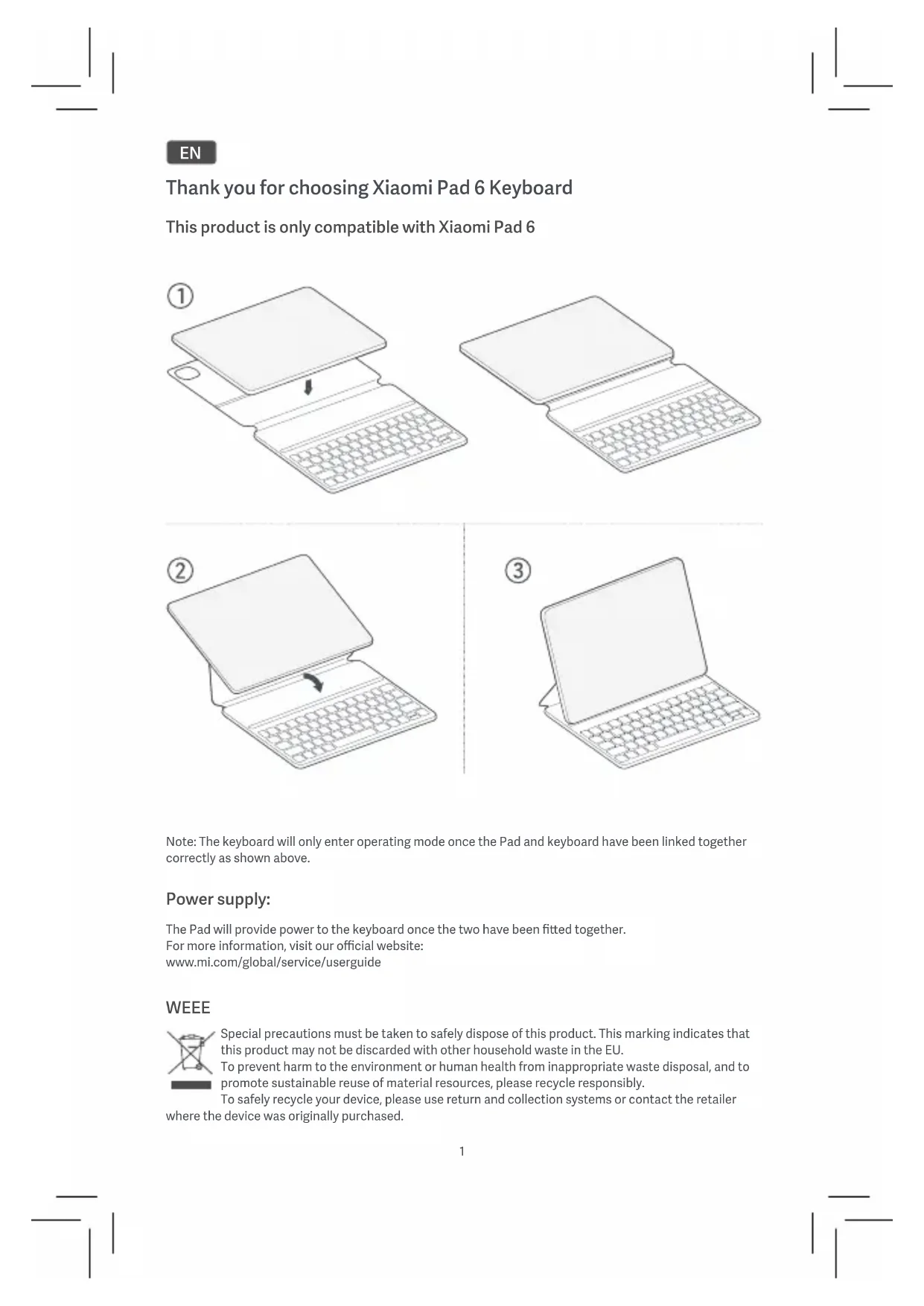
Thank you for choosing Xiaomi Pad 6 Keyboard
This product is only compatible with Xiaomi Pad 6
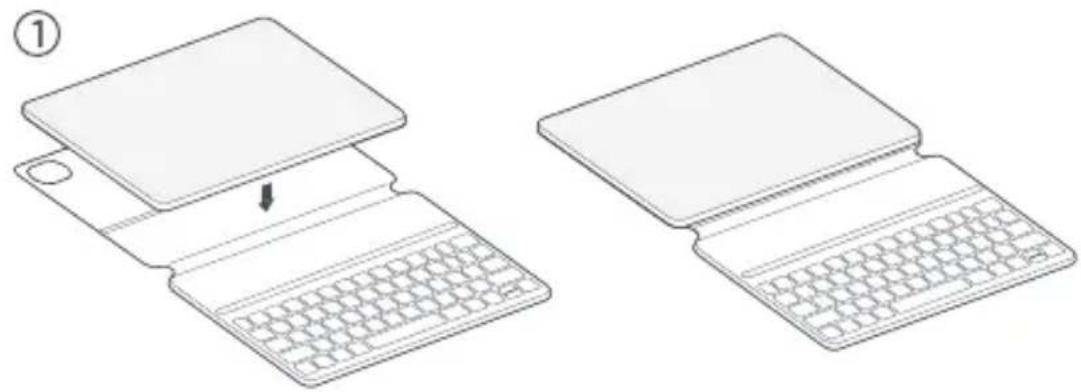
natural_image
Two line drawings of a laptop with a keyboard, showing the open and closed states (no text or symbols)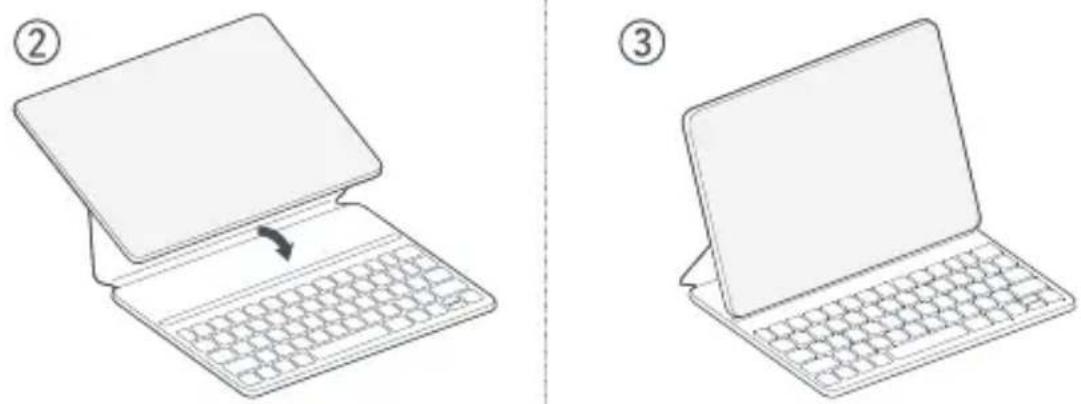
Note: The keyboard will only enter operating mode once the Pad and keyboard have been linked together correctly as shown above.
Power supply:
The Pad will provide power to the keyboard once the two have been fitted together.
For more information, visit our official website:
www.mi.com/global/service/userguide
WEEE
Special precautions must be taken to safely dispose of this product. This marking indicates that this product may not be discarded with other household waste in the EU.
To prevent harm to the environment or human health from inappropriate waste disposal, and to promote sustainable reuse of material resources, please recycle responsibly.
To safely recycle your device, please use return and collection systems or contact the retailer
where the device was originally purchased.
Important Safety Information
Read all safety information below before using your device:
- Use only authorized accessories which are compatible with your device.
- Input: 3.4\~4.5V =30mA.
- This device's operating temperature range is 0ircC to 40ircC . The storage temperature range of the equipment is -20ircC to 45ircC . Using this device in an environment outside of this temperature range may damage the device.
- Keep your device dry.
- Do not try to repair the device yourself. If any part of the device does not work properly, contact Mi customer support or bring your device to an authorized repair center.
- Connect other devices according to their instruction manuals. Do not connect incompatible devices to this device.
- Your device is not a toy. As with all electrical products, precautions should be observed during handling and using of electrical products to reduce the risk of electric shock. If parents choose to allow children to use the device, they should caution his or her child about the potential hazard while using and handling the device.

Safety Precautions
- Observe all applicable laws and rules restricting use of device in specific situations and environments.
- Do not use your device in hospital operating rooms, emergency rooms, or intensive care units. Always comply with all rules and regulations of hospitals and health centers. If you have a medical device, please consult your doctor and the device manufacturer to determine whether your device may interfere with the device's operation. To avoid potential interference with a pacemaker, always maintain a minimum distance of 15cm between your device and the pacemaker. To avoid interference with medical equipment, do not use your device near hearing aids, cochlear implants, or other similar devices.
- Do not use your device in places with high humidity, such as bathrooms. Doing so may result in electric shock, injury, fire, and charger damage.
EU Regulations
EMCD Declaration of Conformity

Xiaomi Communications Co., Ltd. hereby declares that this product
23046KBD9S is in compliance with the essential requirements and other relevant provisions of the EMC Directive 2014/30/EU.
The full text of the EU declaration of conformity is available at the following internet address: www.mi.com/en/certification
Manufacturer's Authorized EU Representative
Name: Xiaomi Technology Netherlands B.V
Address: Prinses Beatrixlaan 582, 2595BM, The Hague, The Netherlands
Legal Information
This device may be operated in all member states of the EU.
Observe national and local regulations where the device is used.
UK Regulations
Declaration of Conformity
Xiaomi Communications Co., Ltd. hereby declares that this product 23046KBD9S is in compliance with requirements: Electromagnetic Compatibility Regulations 2016. The full text of the UK declaration of conformity is available at the following internet address: www.mi.com/en/certification

Manufacturer's Authorized UK Representative
Name: Xiaomi Technology UK Limited
Address: Part Ground Floor, North Wing, 100 Brook Drive, Green Park, Reading
Disclaimer
This quick start guide is published by Xiaomi or its local affiliated company. Improvements and changes to this guide necessitated by typographical errors, inaccuracies of current information, or improvements to programs and/or equipment, may be made by Xiaomi at any time and without notice. Such changes will, however, be incorporated into new online editions of the quick start guide (please see details at www.mi.com/global/service/userguide). All illustrations are for illustration purposes only and may not accurately depict the actual device.
FR
natural_image
Two line drawings of a laptop keyboard, one showing the open top and the other the closed bottom, with no text or symbols present.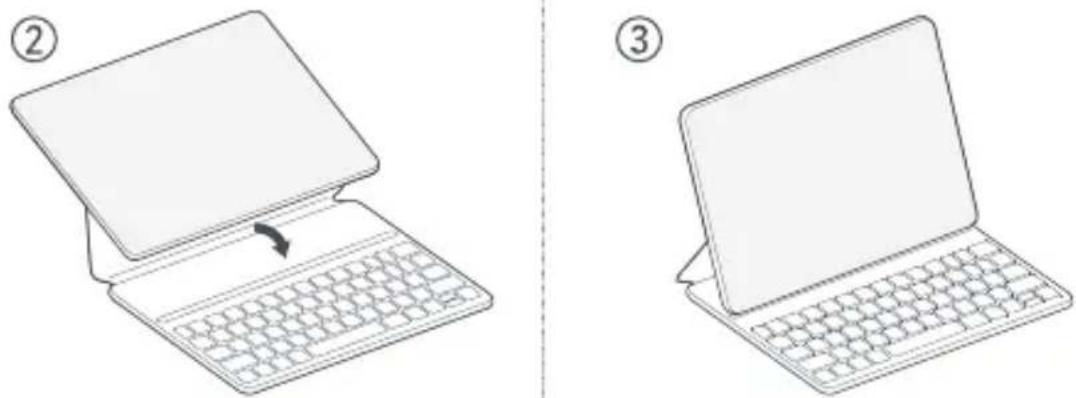
www.mi.com/global/service/userguide
DEEE
natural_image
Two line drawings of a laptop keyboard, one showing the open top and the other the closed bottom, with no text or symbols present.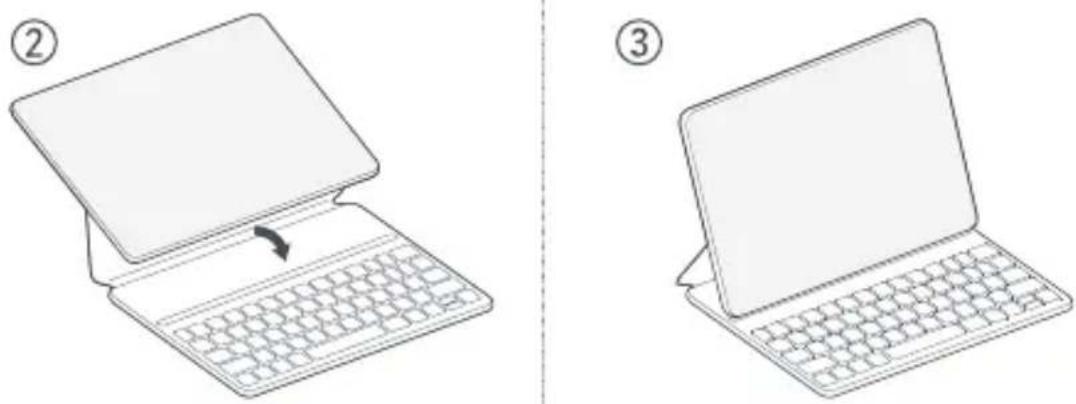
natural_image
Two line drawings of a laptop keyboard, one showing the open top and the other the closed bottom, with no text or symbols present.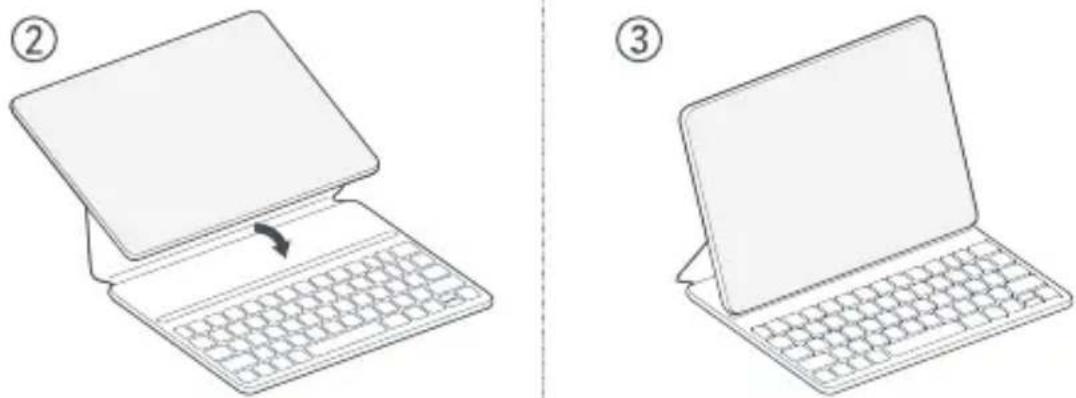
www.mi.com/global/service/userguide
WEEE
natural_image
Line drawings of two laptops with one keyboard inserted, showing the open and closed states (no text or symbols)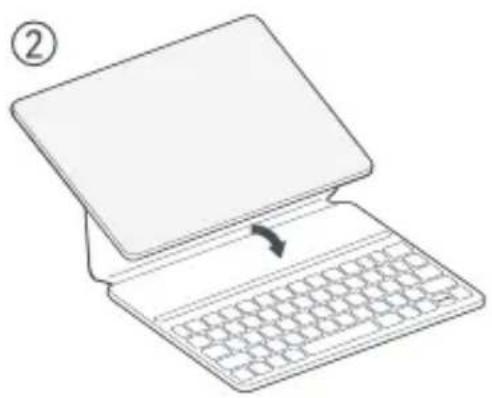
natural_image
Line drawing of a laptop with a keyboard and an arrow indicating the typing position (no text or symbols)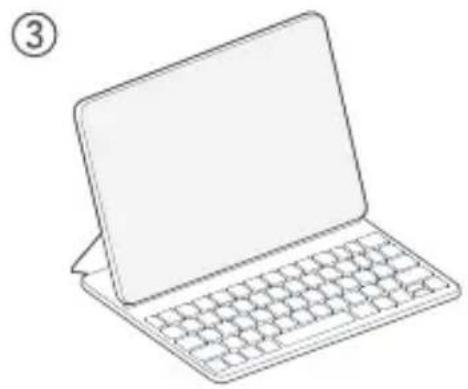
natural_image
Line drawing of a laptop with a blank screen and keyboard (no text or symbols)www.mi.com/global/service/userguide
使用が終了した本製品の廃棄方法
https://www.mi.com/jp
ZH-TW
感謝您選擇 Xiaomi Pad 6 Keyboard
natural_image
Two line drawings of a laptop keyboard, one open and one closed, with no text or symbols present.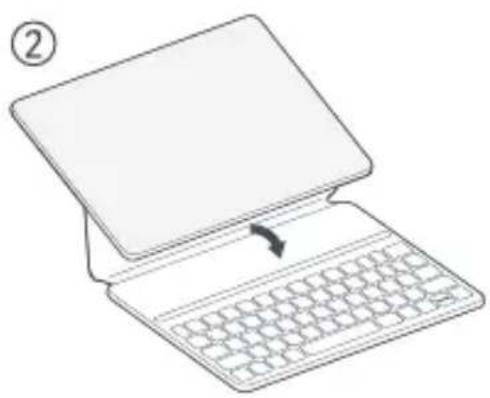
natural_image
Line drawing of a laptop with a keyboard and an arrow indicating the typing process (no text or symbols)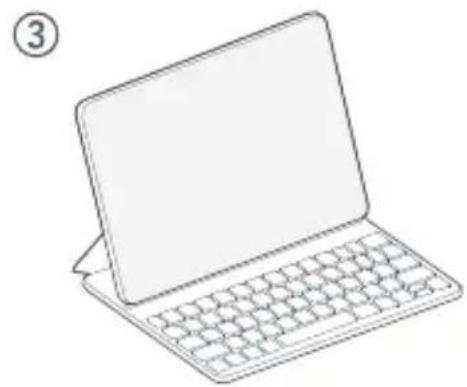
natural_image
Line drawing of a laptop with a blank screen and keyboard (no text or symbols)www.mi.com/global/service/userguide
WEEE
www.mi.com/en/certification
法律資訊
本裝置可在歐盟所有會員國中操作。
請遵守使用本裝置的國家及當地法規。
限用物質含有情況聲明
| 設備名稱Equipment name | 平板鍵盤式雙面保護殼 | 型號(型式)Type designation (Type) | 23046KBD9S | ||||
| 單元Unit | 限用物質及其化學符號Restricted substances and its chemical symbols | ||||||
| 鉛Lead(Pb) | 汞Mercury(Hg) | 鎘Cadmium(Cd) | 六價鉻Hexavalent chromium( Cr+ ) | 多溴噁苯Polybrominated biphenyls(PBB) | 多溴二苯醚Polybrominated diphenyl ethers(PBDE) | ||
| 外殼 | ○ | ○ | ○ | ○ | ○ | ○ | |
| 鋁板 | - | ○ | ○ | ○ | ○ | ○ | |
| 印刷電路板 | - | ○ | ○ | ○ | ○ | ○ | |
| 電膜 | - | ○ | ○ | ○ | ○ | ○ | |
| 備考1.“超出0.1 wt %”及“超出0.01 wt %”係指限用物質之百分比含量超出百分比含量基準值。Note 1: “Exceeding 0.1 wt %” and “exceeding 0.01 wt %” indicate that the percentage content of the restricted substance exceeds the reference percentage value of presence condition.備考2.“○”係指該項限用物質之百分比含量未超出百分比含量基準值。Note 2: “○” indicates that the percentage content of the restricted substance does not exceed the percentage of reference value of presence.備考3.“-”係指該項限用物質為排除項目。Note 3: The “-” indicates that the restricted substance corresponds to the exemption. | |||||||
免責聲明
www.mi.com/en/certification
معلومات قانOUNGE
Manufacturer: Xiaomi Communications Co., Ltd.
Manufacturer Address:
019, 9th Floor, Building 6, 33 Xi'erqi Middle Road,
Haidian District, Beijing, China, 100085
Brand: Xiaomi Model Name: 23046KBD9S
© Xiaomi Inc. All rights reserved.


- Contents
- EN
- Thank you for choosing Xiaomi Pad 6 Keyboard
- Power supply:
- WEEE
- Important Safety Information
- Safety Precautions
- EU Regulations
- EMCD Declaration of Conformity
- Legal Information
- UK Regulations
- Declaration of Conformity
- Disclaimer
- FR
- DEEE
- 使用が終了した本製品の廃棄方法
- ZH-TW
- 法律資訊
- 免責聲明
- معلومات قانOUNGE
- 019, 9th Floor, Building 6, 33 Xi'erqi Middle Road,
Brand : Xiaomi
Model : Pad 6 Keyboard
Category : Cellphone