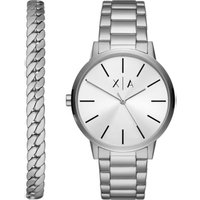
Exchange AX7138SET - Watch Armani - Free user manual and instructions
Find the device manual for free Exchange AX7138SET Armani in PDF.


| Product Type | Wristwatch |
| Brand | Armani Exchange |
| Model | Exchange AX7138SET |
| Movement | Quartz (battery) |
| Main Functions | Analog display of hours, minutes, seconds; chronograph with 1/10 sec, minutes and seconds counters; date display; 24-hour hand |
| Case Material | Stainless steel |
| Glass Material | Mineral |
| Strap | Metal link (stainless steel) |
| Water Resistance | 5 ATM (50 meters) – suitable for shower, bathing, swimming, snorkeling |
| Case Diameter | Approximately 42 mm (estimate) |
| Case Thickness | Approximately 10 mm (estimate) |
| Weight | Approximately 150 g (estimate) |
| Power | Button cell battery (type SR621SW or equivalent) |
| Warranty | 2 years (material and workmanship defects) |
| Repairability | Repair by authorized center; spare parts available |
| Maintenance and Cleaning | Wipe with a soft dry cloth; avoid contact with chemicals |
| Usage Precautions | Do not operate crown or pushers underwater; avoid magnetic shocks |
| Package Contents | Watch, instruction manual, warranty card |
Frequently Asked Questions - Exchange AX7138SET Armani
User questions about Exchange AX7138SET Armani
0 question about this device. Answer the ones you know or ask your own.
Ask a new question about this device
Download the instructions for your Watch in PDF format for free! Find your manual Exchange AX7138SET - Armani and take your electronic device back in hand. On this page are published all the documents necessary for the use of your device. Exchange AX7138SET by Armani.
USER MANUAL Exchange AX7138SET Armani
BAHASA INDONESIA.....177
POLSKI 179
РУССКИЙ 181
日本語 184
中文....186
繁體中文 187
한국어 189
SERVICE CENTERS 191
CERTIFICATE OF WARRANTY ... 195
NOTICES 197
ENGLISH
ANALOG INSTRUCTIONS
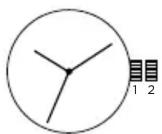
Time Setting
- Pull crown out to position 2.
- Turn crown to set hour and minute hands to desired time.
- Return crown to position 1.
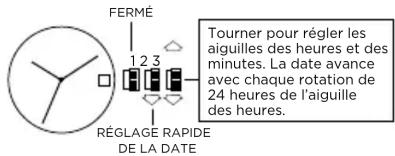
DATE MODELS
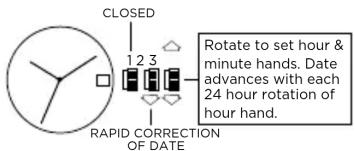
Date Setting
- Pull crown out to position 2.
- Turn the crown either clockwise or counter-clockwise and set the date for the previous day. The direction that moves the date varies on different watch models.
Time Setting
- Pull crown out to position 3.
- Turn counter-clockwise to advance the time and continue until the day changes to the present day.
- Set to the correct time.
Do not change the date between the hours of 10pm and 2am. This is the time when the movement is in position to carry out the automatic date change, and any interference may cause damage to the movement.
2 EYE DAY/DATE MULTI-FUNCTION VX36
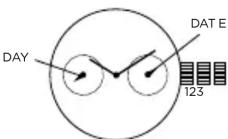
Date Setting
- Pull crown out to position 2.
- Turn clockwise to advance date hand.
- Push crown back to position 1.
Date and Time Setting
- Pull crown out to position 3.
- Turn clockwise to advance hour and minute hands.
The hand showing days of the week will also move with the hour and minute hands. Keep turning until you have reached the desired day.
MULTIFUNCTION 6P23
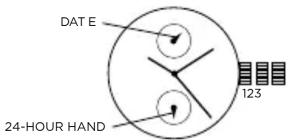
Time Setting
- Pull crown out to position 3.
- Turn clockwise to advance hour and minute hands. 24-hour hand will move with hour and minute hands. Keep turning to reach desired time.
- Return crown to position 1.
Date Setting
- Pull crown out to position 2.
- Turn crown counter-clockwise to set date.
- Return crown to position 1.
THREE EYE MULTI-FUNCTION 6P29/6P79
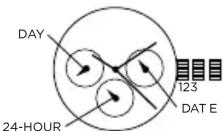
Date Setting
- Pull crown out to position 2.
- Turn clockwise to advance the date hand.
- Push crown back to position 1.
Day and Time Setting
-
Pull crown out to position 3.
-
Turn clockwise to advance hour and minute hands.
The hand showing days of the week will also move with the hour and minute hands.
Keep turning until you have reached the desired day.
24-Hour Sub-Dial Setting
The 24-hour hand moves correspondingly with the hour and minute hands. When setting the time be sure to check that the 24-hour hand is set properly.
CHRONOGRAPH STOPWATCH VD55 (with date-VD57)
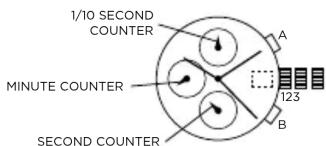
Time and Date Setting
- Before setting the time, make sure the chronograph is stopped and set to zero (12:00) position
- Pull crown out to position 2 and turn crown clockwise to set date to the previous day.
- Pull crown out to position 3 when the second hand is at the 12:00 position, and turn clockwise until the present date is displayed. Continue turning crown to set the correct a.m./p.m. time.
- Return crown to position 1.
NOTE: When crown is in position 2, do not press the pushers. Otherwise the chronograph hands will move.
NOTE: To ensure accuracy, do not set the date between 9:00 p.m. and 1:00 a.m.
Chronograph Functions
Basic Function
- Press A to start/stop the chronograph.
- Press B to reset to zero.
Interval Timing
- Press B while the chronograph is running.
- Press B again to return to the chronograph.
- Press A to finalize timing.
- Press B to reset.
Adjusting the Chronograph Hands to Zero Position
If one or more chronograph hands are not in their correct zero (12:00) positions after pressing B (for example, following a battery change):
- Pull crown out to position 3.
- Press A to move the chronograph 1/10 second counter one increment; press and hold A for fast advance.
- Press B to reset the second and minute counters one increment; press and hold B for fast advance.
- Return crown to position 1.
CHRONOGRAPH STOPWATCH JS25/VD54 (with date-VD53)
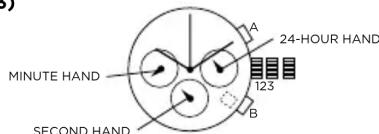
Time and Date Setting
- Before setting the time, make sure the chronograph is stopped and set to zero (12:00) position.
- Pull crown out to position 2.
- Turn crown clockwise until the previous day's date is displayed.
- Pull crown out to position 3 when the second hand is at the 12:00 position.
- Turn crown to set time.
NOTE: 24-hour hand moves correspondingly with the hour and minute hands. When setting the time be sure to check that the 24-hour hand is set properly. - Return crown to position 1.
NOTE: When the crown is in position 2, do not press the pushers. Otherwise the chronograph hands will move.
Chronograph
-
Press A to start/stop the chronograph.
-
Press B to reset to zero.
Split Time (VD53/VD54)
- Press B while the chronograph is running.
- Press B again to return to the chronograph.
- Press A to finalize timing.
- Press B to reset.
Chronograph Zero Reset
- If either of the chronograph hands is not at the zero (12:00) position, pull crown out to position 3.
- Press A to move hands clockwise; press B to move hands counter-clockwise.
- Return crown to position 1.
AUTOMATIC 82SO/2189
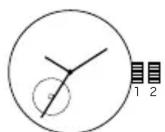
82S0
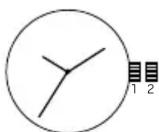
2189
- Pull crown out to position 2.
- Turn crown clockwise to advance hour and minute hands.
- Push crown back to position 1.
NOTE: A timepiece with an automatic winding movement obtains the power to wind itself by the movement of your wrist, there is no battery. Therefore, not wearing the timepiece for several consecutive days could exhaust the power reserve. If your watch stops, it is recommended that you manually wind the movement by rotating the crown clockwise at position 1 to achieve the necessary power reserve.
It is important your timepiece is adjusted to match the size of your wrist. A loose fit may result in a loss in capacity of the timepiece to wind itself. When fully wound, your timepiece has a power reserve of approximately 36 hours.
DIGITAL LED - BJ-3470
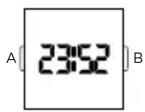
Normal Time Display
- Press B to display time; press B again to change display mode. Mode sequence is time, date and seconds.
- LED automatically turns off after 5 seconds.
Time / Calendar Setting
- In time display mode, press and hold A for 2 seconds to enter setting mode. 12/24-hour format will begin flashing.
- Press B to choose 12 or 24-hour format. For 12-hour setting, "P" will be displayed for afternoon/evening hours. For 24-hour setting, no symbol will be displayed.
- Press A to advance to hour.
- Press B to increase digits; press and hold B for fast advance.
- Press A to advance to next setting value.
- Setting sequence is: 12/24-hour format, hour, minutes, seconds, year, month, date, and exit setting mode.
NOTE: In setting mode, if no pusher is operated for 5 seconds, all changes will be saved and the watch will automatically turn off.
DIGITAL UPCR-992A
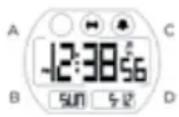
Time Mode
- Press B to change modes.
- Press A for EL.
- Press C to select 12/24 hour format.
- Press D to enable/disable hourly chime.
Time Setting
- In time mode, press and hold A for 2 seconds to enter time setting.
- Press C to increase setting value. Press D to decrease setting value.
- Press B to enter next setting field.
- Press pusher A to exit setting mode.
Alarm Mode
- Press B to enter alarm mode.
- Press A for EL.
- Press C to select alarm 1 or alarm 2.
- Press D to enable/disable alarm.
Alarm Setting
- Press and hold A for 2 seconds to enter alarm setting.
- Press C to increase setting value. Press D to decrease setting value.
- Press B to enter next setting field.
- Repeat steps 2 and 3 until desired time is selected.
- Press A to exit setting mode.
NOTE: Alarm turns on automatically when exiting setting mode.
Chrono Mode
- Press B to enter chrono mode.
- Press C to start chrono.
- Press D to stop chrono.
- Press and hold D for 2 seconds to reset chrono.
NOTE: Maximum chrono time is 23 hours, 59 minutes and 59 seconds. When chrono
reaches maximum time, it will stop running. Press and hold D to reset value to
run chrono. 1/00s resolution for first 59 minutes and 59.99 seconds.
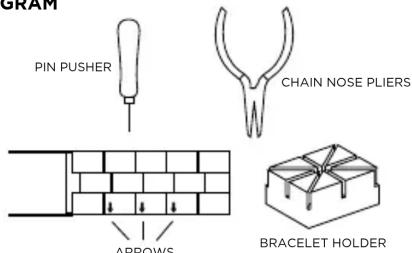
PIN LINK DIAGRAM
Link Removal
To remove a link from a pin link bracelet, you will need the bracelet holder, pin pusher, and chain nose pliers (see pin link diagram).
- Open the clasp on the bracelet.
- Look on the inside of the bracelet and locate the arrows near the clasp (see diagram).
- Place the band into the appropriate size slot of the bracelet holder with the arrows pointing down (see diagram).
- Center the desired pin to be removed over one of the holes in the bottom of the bracelet holder.
- With the pin pusher, push the pin, as far as possible, through the link.
- Remove the watch from the bracelet holder and simply finish pulling out the pin with the chain nose pliers.
NOTE: Two pins hold each link in place and must be taken out before a link can be removed. Please note that the pins are partially split down the center.
USE PRECAUTIONS - RESISTANCE TO WATER
| Water Resistance Water-related Use | |||||
| Caseback Marking | Depth | ||||
| Washing Hands | Shower, Bathing | Swimming, Snorkeling | Scuba Diving | ||
| - | - | X | X | X | X |
| WR | - | √ | X | X | X |
| 3 ATM | 3 Bar, 30 Meters | √ | X | X | X |
| 5 ATM | 5 Bar, 50 Meters | √ | √ | X | X |
| 10 ATM | 10 Bar, 100 Meters | √ | √ | √ | X |
| 20 ATM | 20 Bar, 200 Meters | √ | √ | √ | √ |
| 30 ATM | 30 Bar, 300 Meters | √ | √ | √ | √ |
| 50 ATM | 50 Bar, 500 Meters | √ | √ | √ | √ |
| Always set the crown in closed position (the normal position). Tighten screw-lock crown completely. | |||||
DEUTSCH
MODÈLES AVEC INDICATION DE LA DATE
Your ARMANI EXCHANGE watch is warranted by Armani Exchange Watches* for a period two (2) years from the original date of purchase under the terms and conditions of this warranty. The Armani Exchange warranty covers materials and manufacturing defects. A copy of the receipt or dealer stamp in the warranty booklet is required for proof of purchase.
During the warranty period the watch movement, hands and dial are the only components covered under this warranty. A covered component will be repaired or the watch will be replaced free of repair charges, if it proves to be defective in material or workmanship under normal use.
In case of replacement, Armani Exchange cannot guarantee that you will receive the same model watch. If your model is not available, a watch of equal value and similar style will be provided. The warranty for the replacement watch ends two (2) years from the date the replacement watch is received.
This Warranty Does Not Cover:
- Any defects in materials and workmanship of battery, case, crystal, strap or bracelet.
- Damage resulting from improper handling, lack of care, accidents, or normal wear and tear.
• Water damage unless marked water-resistant.
This warranty is void if the watch has been damaged by accident, negligence of persons other than authorized Armani Exchange sales or services agents, unauthorized service, or other factors not due to defects in materials or workmanship.
The foregoing warranties and remedies are exclusive and in lieu of all other warranties, terms or conditions, express, implied or statutory, as to any matter whatsoever, including, without limitation, warranties of merchantability, fitness for a particular purpose, accuracy, satisfactory quality, title, and non-infringement, all of which are expressly disclaimed by Armani Exchange. Armani Exchange shall not be liable for incidental, consequential, indirect, special or punitive damages or liabilities of any kind arising out of or in connection with the sale or use of this product, whether based in contract, tort (including negligence), strict product liability or any other theory, even if Armani Exchange has been advised of the possibility of such damages and even if any limited remedy specified herein is deemed to have failed of its essential purpose. Armani Exchange's entire liability shall be limited to 166167
replacement or repair of the purchase price paid, at Armani Exchange's sole option.
Some countries, states, or provinces do not allow the exclusion or limitation of implied warranties or the limitation of incidental or consequential damages so the above limitations and exclusions may be limited in their application to you. When implied warranties may not be excluded in their entirety, they will be limited to the duration of the applicable written warranty. This warranty gives you specific legal rights; you may have other rights that may vary depending on local law. Your statutory rights are not affected.
FOR AUSTRALIAN CUSTOMERS: Our goods come with guarantees that cannot be excluded under the Australian Consumer Law. You are entitled to a replacement or refund for a major failure and for compensation for any other reasonable foreseeable loss or damage. You are also entitled to have the goods repaired or replaced if the goods fail to be of acceptable quality and the failure does not amount to a major failure.
Requesting Warranty and Other Watch Repair
Should you require work under warranty, please send in your watch, a copy of your sales receipt and/or the warranty booklet with dealer stamp and a description of the problem to the authorized international watch service center closest to you (see enclosed list of addresses).
For service work that is not covered under this warranty, the service center may perform the services you request for a charge dependent on watch style and type of work requested. These charges are subject to change.
Do not send original packaging, as it will not be returned. Armani Exchange highly recommends you insure your parcel and adequately protect the watch during shipment. Armani Exchange is not responsible for product lost or damaged during shipment.
For repairs of your ARMANI EXCHANGE watch we recommend that you contact an authorized Armani Exchange dealer or the authorized international watch service center closest to you (see enclosed list of addresses).
In the U.S., there is a \$8.50 handling charge to cover return shipping, insurance and handling to U.S. addresses. International addresses will have a higher shipping charge.
*901 South Central Expressway, Richardson, Texas 75080 USA
DEUTSCH
INTERNATIONALE ZWEI (2)-JAHRES-GARANTIE
*901 South Central Expressway, Richardson, Texas 75080 USA
FRANÇAIS
GARANTIE INTERNATIONALE DE DEUX (2) ANS
*901 South Central Expressway, Richardson, Texas 75080 USA
ESPAÑOL
GARANTÍA SÓLO PARA ESPAÑA
Col. Pío XII, Santa Catarina N.I.
C.P. 66362 México
Tel: (0181) 88 88 70 00 Fax Ext 102
R.E.C. FME0508241S3
*901 South Central Expressway, Richardson, Texas 75080 USA
PORTUGUÊS
GARANTIA VÁLIDA APENAS PARA PORTUGAL
*901 South Central Expressway, Richardson, Texas 75080 USA
BAHASA INDONESIA
JAMINAN INTERNASIONAL 2 TAHUN
*901 South Central Expressway, Richardson, Texas 75080 USA
POLSKI
*901 South Central Expressway, Richardson, Texas 75080 USA
РУССКИЙ
*901 South Central Expressway, Richardson, Texas 75080 USA (CWA)
日本語
2年間の国際保証
*901 South Central Expressway, Richardson, Texas 75080 USA
中文
两(2)年国际保证
*901 South Central Expressway, Richardson, Texas 75080 USA
繁體中文
兩(2)年國際保證
*901 South Central Expressway, Richardson, Texas 75080 USA
한국어
2년 국제 보증
*901 South Central Expressway, Richardson, Texas 75080 USA
AUTHORIZED ARMANI EXCHANGE WATCH SERVICE CENTERS
ANDORRA
Avda. del Pesebre, 1 LOC.2
AD700 Escaldes-Engordany
T: +376869400 E: escaire@andornet.ad
AUSTRALIA
Metro Service Centre
P.O. Box 6277 Frenchs Forest
Frenchs Forest 2000 Australia
T: 02 8977 8086
T: 1800 818 853 (toll free)
F: 02 9939 0526
E: customercare.au@fossil.com
BELGIUM / LUXEMBOURG
DHL
Attn. Warranty & Repairs
Woluwelaan 15
1831 Diegem
1: +31 (0) 314 799062
E: customerservice@fossil.nl
BRAZIL
Grupo Technos
Rua Julio Gonzalez, number 1s2,
27th floor
Barra Funda São Paulo 01156 060
São Paulo Oni56-000
Brazil
T. +55 (11) 3003-1076
1: 0800-721-0108
K and K Time Studio Uvista, Ralshey, Ctr. 47
Hinsto Belchev Str. 47
1000 Solla
E: stoyanov.k@gmail.com
BULGARIA
Vreme
Dimitar Konstantinov Str. 23A
5800 Pleven
E: martsev@abv.bg
CANADA
Metro Service Centre - Canada
214 King Street West - Suite #601
Toronto, Ontario
M5H 3S6
1: 1-800-699-0556
E: service@
metroservicecentrecanada.ca
CHILE
Attn: Carlos Rosales (manager) and
Maria Estelia Nuñez
Xu Hui District, Shanghai 200050
China
- (86)400-820-5120
F. (8621)-6448-2733
E. shanghai customer service group 2 @fossil.com
(2) 10000000
COLOMBIA
San Jose, Costa Rica
T: 222-0804
1:2256-5/16
1:2257-2349
F: 2256-5340
E: gulaisa@polarcr.com
DENMARK
Fossil Denmark A/S
Midtager 29
DK - 2605 Broendaby
Denmark
1: +45 45883460
E: Salesdenmark@Fossil.com
ECUADOR
Grupo Viertina
Tomás Bermur N39-242 y Francisco
Urrutia
Quito, Ecuador
1: (593) 2 352 0537
FRANCE
SAV Fossil France
Rue du Martelberg
BP 80023 Monswiller
67701 Saverne Cedex
France
T: 33 3.88.02.52.52
E: contact@fossil.fr
GERMANY
FESCO GmbH
Service
DHL Logistiklager/ LDB
Werkstrasse 17
D-77815 Bühl
T: 49 8661 - 622 6054
F: 49 8661 - 622 7000
E: service@fossil.de
GUATEMALA
Watch it!
Attn: Evelyn Guacamaya / Alfredo
Marroquin
Diagonal 6, 13-01 zona 10 Oakland
Mall
T: 502 23167777
E: serviciotecnico@timexguatemala.
com
HONG KONG
Tsuen Wan
17/F, CDW Building
388 Castle Peak Road
Tsuen Wan, New Territories
Hong Kong
T:(852)2437 8566
E: FossilAsia-AfterSales@fossil.com
192 193
INDIA
Fossil India Pvt. Ltd
621, 12th Main
HAL II Stage, Indiranagar
Bangalore 560 008
India
1: +18604253747
F: +9180 25216399
E: service.in@rossii.com
INDONESIA
Watch Care Centre
Menara Sudirman Level 8
Jl. Menara Sudirman Kav. 60
Jakarta 12190
Indonesia
1: +62 21 29272744
F: +62 21 29272745
IRELAND
Transalliance TS
FAST (Fossil After Sales Team)
Suite 8-9
Faraday Court - Centrum 100
Burton Upon Trent
DE14 2WX Saffordshire
T: +44 03444 123 277
F: 4 403 444 123 281
E: ukenquiries@fossil.com
JAPAN
Fossil Japan Repair Center
Yasuda A building 2F, 3-9
Moriya-cho Kanagawa-ku
Yokonama, 221-0022
Japan T. 01
- 61-3-3992-4011
F: 81-45-450-6243
E. shop.jp@rossrn.com
KOREA
Fossil (Korea) Limited
6F Samik B/D,50
Nonhyun-dong, Kangnam-ku
Seoul, Korea
1:02-2156-0600
E: korcs@fossil.com
KUWAIT
Al Yasra Fashion Ontime Service
Center
Marina Mall
Salmiya, Kuwait
T: +965-2-2244515
F: +965-2-2249301
E: a.mullachery@alyasra.com
LEBANON
Romance
P.O. Box 773
Fattal building, Jisr el-Wati (Sin
el-Fll)
Lebanon / Beirut
1: +9611512002 ext 337-340
E: nadine.sfeir@fattal.com.lb
MACAU
Tsuen Wan
17/F, CDW Building
388 Castle Peak Road
Isuen Wan, New Territories
Hong Kong
1: (852) 2437 8566
E: FossilAsia-AnterSales@fossil.com
MALAYSIA
Fossil Time Malaysia - Service
Centre
Unit L2-2-7, 2nd Floor
Wisma Kemajuan
No.2 Jalan 19/1B
46300 Petaling Jaya, Selangor
T: 60 379 691 900
F: 60 379 691 909
E: tmycs@fossil.com
MEXICO
Metro Service Center México
Carretera Monterrey - Saltillo
1249 -
Col. Pio XII
Santa Catarina, N.L. Mexico C.P.
66362
1: 01 800 236 7745
E: reparaciones@fossil.com.mx
E: servicio@fossil.com.mx
NETHERLANDS
Team for Logistics
Attn. Warranty & Repairs
Lireweg 114
E: customerservice@fossil.nl
NEW ZEALAND
Watch World Ltd
45a Arrenway Drive
Albany
Auckland
New Zealand
T: 09 475 6103
PANAMA
El Relojero
Attn: Saulo
Plaza Concordia, Piso 2
Time Check Service Center
G/F 6750 Retail Arcade, Ayala
Center
Ayala Avenue, Makati City
Philippines
1: (632) 478-6167
F: (632) 478-6169
E: timecheck.6750@gmail.com
POLAND
FAST
C/O Expeditors Warehouse
Al. Krakowska 106
02-256 Warsaw
T: +48 22 574 28 88
Expeditors Portugal C/O
Espaçotrans
Estrada Nacional 10
Terminal Te
Armazem B
2815-051 Alverca
1: 214232000
E: customerservice.pt@fossii.com
RUSSIA
Russia
Bern-Art
Kastanaevskaja St, 42, building 2
Moscow, Russia, 121108
1: 7 495 234 0017
F: 7 495 799 9960
E: Bern-art@yandex.ru
SAUDI ARABIA
Alyasra Fashion (OnTime)
Prince Naser Bin Abdul Aziz Street
Behind Guthmi Furniture
Khurals Road, Rawda Dist.
Riyadh, KSA
1: +966 12572095
E: anwarul@alyasra.com
SAUDI ARABIA
Al Yasra Trading
Villa No 19, Al Faysaleyyah Dist 6
Omar Al Khayyam St. 29, Near
Aziz Mall
idah, KSA
-966 12 698 7255
E: info-watches@alyasra.com
E: Jeddanwatchworkshop@
alyasra.com
SAUDI ARABIA
Al Yasra Trading
Rahmaniya Mall, Ground Fl., Gate
4, Shop # 10
3286 Custodian of The Two Holy
Mosques Rd., Al Khobar Al
Shamalia
34429 Al Khobar, KSA
-966 13 899 5857
E: info-watches@alyasra.com
E: Dammamwatchworkshop@
SINGAPORE
Fossil Singapore Pte Ltd.
51 Bras Basah Road
08-07 Manulife Centre
Singapore 189554
T: 65 6431 8100
E: customerservice.sg@fossil.com
SOUTH AFRICA
Fossil Accessories South Africa
Unit 5A, Somerset Square
Off Highfield Rd, Green Point
8005, Cape Town
South Africa
T: +27 21 4180045
E: contact@keren.co.za
E: shamentha@keren.co.za
SPAIN - CANARIAS
Naeko Logistics S.A. c/o Expeditors
International
Zhongyiao East Rd. Soc 4
Zhongxiao East Rd., Sec.4
Taipei, Taiwan
T: (886)2 8773 9911
F:(886)2 8771 4477
E: service.tw@fossil.com
THAILAND
Thong Sia (Thailand) Limited
347, 349 Muang Thong Thani
7,549 Muang Thong Mani, Bondstreet Road
Bangpood Subdistrict, Pakkred
District
Nonthaburi 11120 Thailand
Nonhaburn in20 Thailand T: 1663 084 0888
1: +662 984 0888 5: +662 984 0776
F: +662 984 0779
Al Yasra Fashion Ontime Service
Center
Ontime Dubai Festival City
Online Dubai Festival City
First Floor, Shop No. SC227
Dubai
T: +971 4285 5455
E: info-watches@alyasra.com
UNITED ARAB EMIRATES
AL Yasra Fashion Optime Service
Fusia1 Center
Ontime Marina Mall
Ground Floor Unit No 21 Marina
Ground Floor, Unit No 21, Hanna Mall
Mall
Abu Dhabi
T: +971 2681 8134
E: info-watches@alyasra.com
UNITED ARAB EMIRATES
Time Bridge fzco
Dubai Airport Free Zone. Unit G21
PO 207706 Duba
PO 293706 Dubai T: +271 4 208 77 00
1: +9714 299 33 00
F: + 971 4 299 33
E: info@timebridge.ae
UNITED KINGDOM
Transalliance TS
Transamance 15 EAST (5 April After 3 Jun 2024)
FAST (FC
Suite 8-9
Faraday
Burton Upon Trent
DE14 2WX Saffordshire
T: +44 07444 127 277
- +44 03444 123 277 5: 4 407 444 127 281
F: 4 403 444 123 281
E: ukenquiries@fossil.com
UNITED STATES OF AMERICA
Metro Service Center - Attn: Repairs
10615 Sanden Drive
10015 Sanden Drive Dallas, Texas 75238-1720
Dallas, Texas 752
T: 800-277-4013
E: service@metroservicecenter.com
URUGUAY
Service Oficial
Attn: Florencia Sanchis
Thanh Bac Fashion Co. Ltd
58 Ba Thang Hai Street District 10
Ho Chi Minh City
Ho Chi Minh City
T: +84-838634344
T:+84-902347534
E: customerservice@watchmecorp.
com
CERTIFICATE OF WARRANTY
The CERTIFICATE OF WARRANTY that follows below is to be completed at time of purchase by the retail store where you purchased your watch.
Disposal of Old Electrical and Electronic Equipment
The symbol indicates that this product shall not be mixed with unsorted municipal waste when disposed of. There is a separate collection system for waste electrical and electronic equipment. Usually old electrical and electronic equipment can be returned free of charge. For further information please contact the competent municipal authorities or the shop where you purchased the product. Correct disposal ensures that waste electrical and electronic equipment is recycled and reused appropriately. It helps avoid potential damage for the environment and human health and to preserve natural resources.
NOTE: Certain watch styles are fitted with lithium batteries which may contain perchlorate material - special handling may apply, see www.dtsc.ca.gov/hazardouswaste/perchlorate for more information.
ENGLISH: Any diamonds used in our products have been purchased from legitimate sources not involved in funding conflict and in compliance with United Nations resolutions. We hereby guarantee that these diamonds are conflict free, based on personal knowledge and/or written guarantees provided by the supplier of these diamonds.
- ENGLISH
- ANALOG INSTRUCTIONS
- Time Setting
- DATE MODELS
- Date Setting
- EYE DAY/DATE MULTI-FUNCTION VX36
- Date and Time Setting
- MULTIFUNCTION 6P23
- THREE EYE MULTI-FUNCTION 6P29/6P79
- Day and Time Setting
- 24-Hour Sub-Dial Setting
- CHRONOGRAPH STOPWATCH VD55 (with date-VD57)
- Time and Date Setting
- Chronograph Functions
- Basic Function
- Interval Timing
- Adjusting the Chronograph Hands to Zero Position
- Chronograph
- Split Time (VD53/VD54)
- Chronograph Zero Reset
- Normal Time Display
- Time / Calendar Setting
- DIGITAL UPCR-992A
- Time Mode
- Alarm Mode
- Alarm Setting
- Chrono Mode
- Link Removal
- DEUTSCH
- MODÈLES AVEC INDICATION DE LA DATE
- This Warranty Does Not Cover:
- Requesting Warranty and Other Watch Repair
- INTERNATIONALE ZWEI (2)-JAHRES-GARANTIE
- FRANÇAIS
- GARANTIE INTERNATIONALE DE DEUX (2) ANS
- ESPAÑOL
- GARANTÍA SÓLO PARA ESPAÑA
- PORTUGUÊS
- GARANTIA VÁLIDA APENAS PARA PORTUGAL
- BAHASA INDONESIA
- JAMINAN INTERNASIONAL 2 TAHUN
- POLSKI
- РУССКИЙ
- 日本語
- 2年間の国際保証
- 中文
- 两(2)年国际保证
- 繁體中文
- 兩(2)年國際保證
- 한국어
- 2년 국제 보증
- AUTHORIZED ARMANI EXCHANGE WATCH SERVICE CENTERS
- ANDORRA
- AUSTRALIA
- BELGIUM / LUXEMBOURG
- BRAZIL
- BULGARIA
- CANADA
- CHILE
- COLOMBIA
- DENMARK
- ECUADOR
- FRANCE
- GERMANY
- GUATEMALA
- HONG KONG
- INDIA
- INDONESIA
- IRELAND
- JAPAN
- KOREA
- KUWAIT
- LEBANON
- MACAU
- MALAYSIA
- MEXICO
- NETHERLANDS
- NEW ZEALAND
- PANAMA
- POLAND
- RUSSIA
- SAUDI ARABIA
- 4, Shop # 10
- SINGAPORE
- 08-07 Manulife Centre
- SOUTH AFRICA
- SPAIN - CANARIAS
- THAILAND
- UNITED ARAB EMIRATES
- UNITED KINGDOM
- UNITED STATES OF AMERICA
- URUGUAY
- CERTIFICATE OF WARRANTY
- Disposal of Old Electrical and Electronic Equipment
Brand : Armani
Model : Exchange AX7138SET
Category : Watch