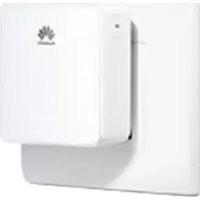
WS331c - Router HUAWEI - Free user manual and instructions
Find the device manual for free WS331c HUAWEI in PDF.



| Product Type | Wi-Fi Repeater (Router per manual) |
| Brand | Huawei |
| Model | WS331c |
| Dimensions (approx.) | 120 x 70 x 35 mm |
| Weight (approx.) | 150 g |
| Power Supply | 5V/1A power adapter |
| Connectivity | Wi-Fi 2.4 GHz, 802.11 b/g/n standard |
| Ethernet Interface | 1 RJ45 port |
| Main Functions | Wi-Fi extension, WPS, SSID synchronization |
| Management | Web interface via 192.168.33.1 or mediarouter.home |
| Security | WPA/WPA2, WEP |
| Operating Temperature | 0°C to 40°C |
| Minimum Distance to Body | 20 cm |
| Standards | CE, REACH, RoHS |
| Box Contents | WS331c, power adapter, quick start guide |
| Reset | Hold the Reset button for 2 seconds with a paperclip |
| Cleaning | Dry cloth, unplug before |
| Indicator Light | Solid white (good location), Solid orange (bad location) |
Frequently Asked Questions - WS331c HUAWEI
User questions about WS331c HUAWEI
0 question about this device. Answer the ones you know or ask your own.
Ask a new question about this device
Download the instructions for your Router in PDF format for free! Find your manual WS331c - HUAWEI and take your electronic device back in hand. On this page are published all the documents necessary for the use of your device. WS331c by HUAWEI.
USER MANUAL WS331c HUAWEI
WS331c 300Mbps Wireless Range Extender
Quick Start
Kurzanleitung
Démarrage rapide
Avvio rapido
Início rápido
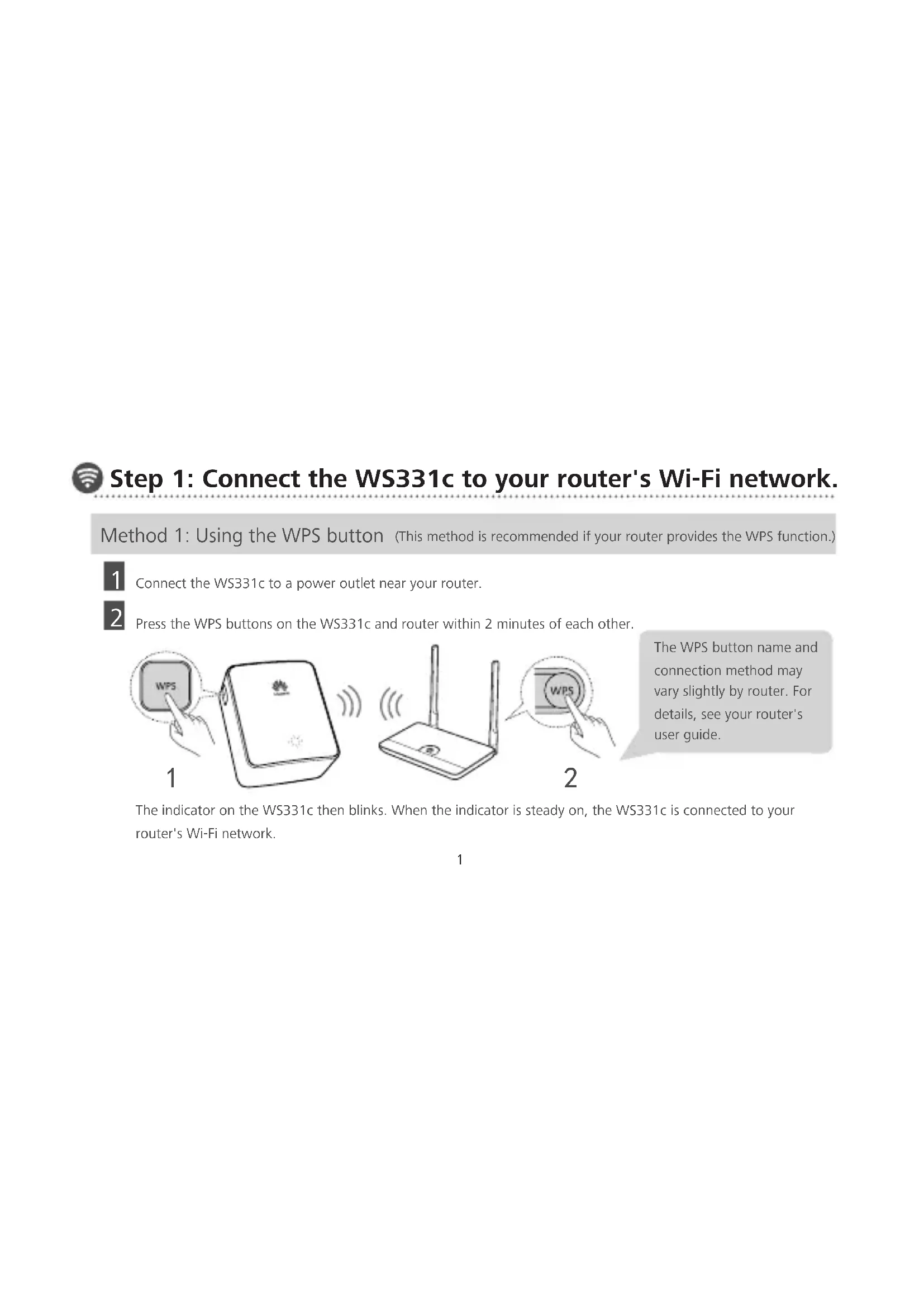
Step 1: Connect the WS331c to your router's Wi-Fi network.
Method 1: Using the WPS button (This method is recommended if your router provides the WPS function.)
1
Connect the WS331c to a power outlet near your router.
2
Press the WPS buttons on the WS331c and router within 2 minutes of each other.
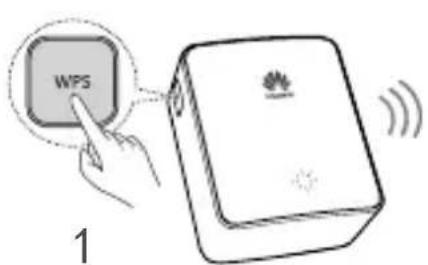
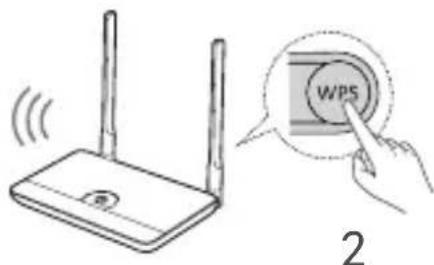
The WPS button name and connection method may vary slightly by router. For details, see your router's user guide.
The indicator on the WS331c then blinks. When the indicator is steady on, the WS331c is connected to your router's Wi-Fi network.
Method 2: Using a phone (Use this method if your router does not provide the WPS function.)
You can configure the WS331c using a phone, tablet, or laptop. This guide uses a phone as an example.
1 Check the SSID and WLAN Key on the label affixed to the back of the WS331c. Connect the WS331c to a power outlet near your router. Then use the SSID and WLAN key to connect the phone to the WS331c's Wi-Fi network.
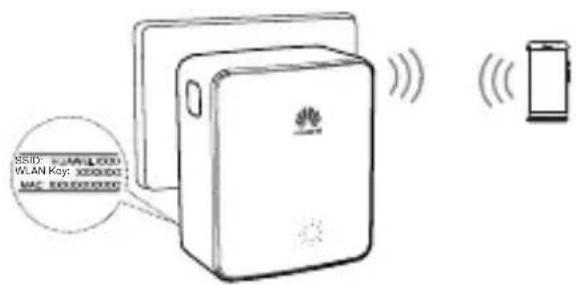
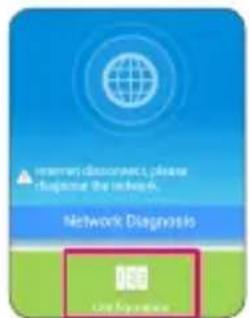
2 Using your phone's browser, visit 192.168.33.1 or mediarouter.home and log in with the password admin. 3 Touch Configuration. Follow the onscreen instructions to complete the settings.

Step 2: Move the WS331c to a suitable location.
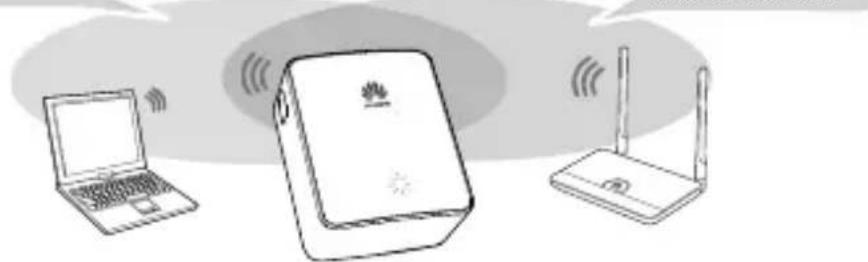
The WS331c indicator light will change colors based on its location.
(Steady white: in a suitable location. Steady orange: too close or too far from the router.)
Wi-Fi coverage area extended by the WS331c
Wi-Fi coverage area of the router
natural_image
Illustration of a laptop, Wi-Fi router, and wireless router connected via wireless signals (no text or symbols)By default, the SSID and WLAN key of the Wi-Fi network extended by the WS331c are automatically synchronized with the router's Wi-Fi network SSID and WLAN key.
Now the WS331c has extended your router's Wi-Fi network.
? FAQs
Q: After I use the WS331c to extend a Wi-Fi network, I cannot access the WS331c's web management page using the 192.168.33.1 address. What can I do?
A: You can use the mediarouter.home address instead.
Q: After I use the WS331c to extend a Wi-Fi network, my device fails to find the WS331c's Wi-Fi network. What can I do?
A: By default, the SSID and WLAN key of the Wi-Fi network extended by the WS331c are automatically synchronized with the router's Wi-Fi network SSID and WLAN key. You can search for the router's Wi-Fi network and connect your device to it.
Q: How can I restore the WS331c to its default settings?
A: When the WS331c is powered on, use the end of a paper clip to press and hold the Reset key for 2 seconds or more until the indicator blinks.
Safety information
This section contains important information about the operation of your device. It also contains information about how to use the device safely. Read this information carefully before using your device.
Electronic device
Do not use your device if using the device is prohibited. Do not use the device if doing so causes danger or interference with other electronic devices.
Interference with medical equipment
Follow rules and regulations set forth by hospitals and health care facilities. Do not use your device where prohibited.
Some wireless devices may affect the performance of hearing aids or pacemakers. Consult your service provider for more information.
Pacemaker manufacturers recommend that a minimum distance of 15 cm be maintained between a device and a pacemaker to prevent potential interference with the pacemaker. If using a pacemaker, hold the device on the side opposite the pacemaker and do not carry the device in your front pocket.
Areas with flammables and explosives
Do not use the device where flammables or explosives are stored (in a gas station, oil depot, or chemical plant, for example). Using your device in these environments increases the risk of explosion or fire. In addition, follow the instructions indicated in text or symbols.
Do not store or transport the device in containers with flammable liquids, gases, or explosives.
Operating environment
Avoid dusty, damp, or dirty environments. Avoid magnetic fields. Using the device in these environments may result in circuit malfunctions.
Before connecting and disconnecting cables, stop using the device and disconnect it from the power supply. Ensure that your hands are dry during operation.
During thunderstorms, power off your device and remove all cables connected to protect against lightning strikes.
Do not use your device during thunderstorms to protect your device against any danger caused by lightning.
Ideal operating temperatures are 0°C to 40°C. Extreme heat or cold may damage your device or accessories.
Keep the device and accessories in a well-ventilated and cool area away from direct sunlight. Do not enclose or cover your device with towels or other objects. Do not place the device in a container with poor heat dissipation, such as a box or bag.
To protect your device or accessories from fire or electrical shock hazards, avoid rain and moisture.
Keep the device away from sources of heat and fire, such as a heater, microwave oven, stove, water heater, radiator, or candle.
Observe local laws and regulations, and respect the privacy and legal rights of others.
Do not block device openings. Reserve a minimum of 10 cm around the device to dissipate heat.
Stop using your device or applications for a while if the device is overheated. If skin is exposed to an overheated device for an extended period, low temperature burn symptoms, such as red spots and darker pigmentation, may occur.
Do not touch the device's antenna. Otherwise, communication quality may be reduced.
Do not allow children or pets to bite or suck the device or accessories. Doing so may result in damage or explosion.
The device should be installed and operated with a minimum distance of 20 cm between the radiator and your body.
Keep the device in a place with good reception. The distance between the device and other metal materials (such as metal brackets or metal doors and windows) should be greater than 25 cm and the distance between the device should be greater
than 30 cm.
Child's safety
Comply with all precautions with regard to child's safety. Letting children play with the device or its accessories may be dangerous. The device includes detachable parts that may present a choking hazard. Keep away from children.
The device and its accessories are not intended for use by children. Children should only use the device with adult supervision.
Power adapter safety
The power plug is intended to serve as a disconnect device.
For pluggable devices, the socket-outlet shall be installed near the devices and shall be easily accessible.
Unplug the power adapter from electrical outlets and the device when not in use.
Do not drop or cause an impact to the power adapter. If it is damaged, take it to an authorized service center for inspection.
If the power cable is damaged (for example, the cord is exposed or broken), or the plug loosens, stop using it at once. Continued use may lead to electric shocks, short circuits, or fire.
Do not touch the device or the power adapter with wet hands. Doing so may lead to short circuits, malfunctions, or electric shocks.
If your power adapter has been exposed to water, other liquids, or excessive moisture, take it to an authorized service center for inspection.
Cleaning and maintenance
During storage, transportation, and operation of the device, keep it dry and protect it from collision.
Keep the device and accessories dry. Do not attempt to dry it with an external heat source, such as a microwave oven or hair dryer.Do not expose your device or accessories to extreme heat or cold. These environments may interfere with proper function and may lead to fire or explosion.
Avoid collision, which may lead to device malfunctions, overheating, fire, or explosion.
If the device is not going to be used for an extended period of time, power it off, and remove all cables connected to it.
If anything unusual occurs (for example, if the device emits smoke or any unusual sound or smell), immediately stop using it, power it off, remove all cables connected to it, and contact an authorized service center.
Before you clean or maintain the device, stop using it, stop all applications, and disconnect all cables connected to it.
Do not use any chemical detergent, powder, or other chemical agents (such as alcohol and benzene) to clean the device or accessories. These substances may cause damage to parts or present a fire hazard. Use a clean, soft, and dry cloth to clean the device and accessories.
Do not place magnetic stripe cards, such as credit cards and phone cards, near the device for extended periods of time. Otherwise the magnetic stripe cards may be damaged.
Do not dismantle or remanufacture the device and its accessories. This voids the warranty and releases the manufacturer from liability for damage. In case of damage, contact an authorized service center for assistance or repair.
Disposal and recycling information
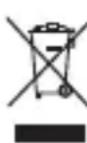
This symbol (with or without a solid bar) on the device, batteries (if included), and/or the packaging, indicates that the device and its electrical accessories (for example, a headset, adapter, or cable) and batteries should not be disposed of as household garbage. These items should not be disposed of as unsorted municipal waste and should be taken to a certified collection point for recycling or proper disposal.
For more detailed information about device or battery recycling, contact your local city office, household waste disposal service, or retail store.
Disposal of the device and batteries (if included) is subject to WEEE Directive Recast (Directive 2012/19/EU) and Battery
Directive (Directive 2006/66/EC). The purpose of separating WEEE and batteries from other waste is to minimize the potential environmental impacts and human health risk of any hazardous substances that may be present.
Reduction of hazardous substances
This device is compliant with the REACH Regulation [Regulation (EC) No 1907/2006] and RoHS Directive Recast (Directive 2011/65/EU). Batteries (if included) are compliant with the Battery Directive (Directive 2006/66/EC). For up-to-date information about REACH and RoHS compliance, please visit the web site http://consumer.huawei.com/certification.
EU regulatory conformance
Statement
Hereby, Huawei Technologies Co., Ltd. declares that this device is in compliance with the essential requirements and other relevant provisions of Directive 1999/5/EC.
For the declaration of conformity, visit the web site http://consumer.huawei.com/certification.
The following marking is included in the product:
CE0678
This device may be operated in all member states of the EU.
Observe national and local regulations where the device is used.
This device may be restricted for use, depending on the local network.
Restrictions in the 2.4 GHz band:
Norway: This subsection does not apply for the geographical area within a radius of 20 km from the centre of Ny-Ålesund.
FCC Regulatory Compliance
FCC statement
This equipment has been tested and found to comply with the limits for a Class B digital device, pursuant to Part 15 of the FCC Rules. These limits are designed to provide reasonable protection against harmful interference in a residential installation. This equipment generates, uses and can radiate radio frequency energy and, if not installed and used in accordance with the instructions, may cause harmful interference to radio communications. However, there is no guarantee that interference will not occur in a particular installation. If this equipment does cause harmful interference to radio or television reception, which can be determined by turning the equipment off and on, the user is encouraged to try to correct the interference by one or more of the following measures:
--Reorient or relocate the receiving antenna.
--Increase the separation between the equipment and receiver.
--Connect the equipment into an outlet on a circuit different from that to which the receiver is connected.
--Consult the dealer or an experienced radio/TV technician for help.
This device complies with Part 15 of the FCC Rules. Operation is subject to the following two conditions: (1) this device may not cause harmful interference, and (2) this device must accept any interference received, including interference that may cause undesired operation.
Caution: Any changes or modifications to this device not expressly approved by Huawei Technologies Co., Ltd. for compliance could void the user's authority to operate the equipment.
This device is intended to be attached to a receiver that is not used to receive over-the-air broadcast signals. Connection of this device in any other fashion may cause harmful interference to radio communications and is in violation of the FCC Rules, part 15.
Legal Notice
Copyright © Huawei Technologies Co., Ltd. 2014. All rights reserved.
No part of this manual may be reproduced or transmitted in any form or by any means without prior written consent of Huawei Technologies Co., Ltd. and its affiliates ("Huawei").
The product described in this manual may include copyrighted software of Huawei and possible licensors. Customers shall not in any manner reproduce, distribute, modify, decompile, disassemble, decrypt, extract, reverse engineer, lease, assign, or sublicense the said software, unless such restrictions are prohibited by applicable laws or such actions are approved by respective copyright holders.
Trademarks and Permissions


HUAWEI, Huawei are trademarks or registered trademarks of Huawei Technologies Co., Ltd.
Other trademarks, product, service and company names mentioned may be the property of their respective owners.
Notice
Some features of the product and its accessories described herein rely on the software installed, capacities and settings of local network, and therefore may not be activated or may be limited by local network operators or network service providers.
Thus, the descriptions herein may not exactly match the product or its accessories which you purchase.
Huawei reserves the right to change or modify any information or specifications contained in this manual without prior notice and without any liability.
DISCLAIMER
ALL CONTENTS OF THIS MANUAL ARE PROVIDED "AS IS". EXCEPT AS REQUIRED BY APPLICABLE LAWS, NO WARRANTIES OF ANY KIND, EITHER EXPRESS OR IMPLIED, INCLUDING BUT NOT LIMITED TO, THE IMPLIED WARRANTIES OF MERCHANTABILITY AND FITNESS FOR A PARTICULAR PURPOSE, ARE MADE IN RELATION TO THE ACCURACY, RELIABILITY OR CONTENTS OF THIS MANUAL.
TO THE MAXIMUM EXTENT PERMITTED BY APPLICABLE LAW, IN NO E VENT SHALL HUAWEI BE LIABLE FOR ANY SPECIAL, INCIDENTAL, INDIRECT, OR CONSEQUENTIAL DAMAGES, OR LOSS OF PROFITS, BUSINESS, REVENUE, DATA, GOODWILL SAVINGS OR ANTICIPATED SAVINGS REGARDLESS OF WHETHER SUCH LOSSES ARE FORSEEABLE OR NOT.
THE MAXIMUM LIABILITY (THIS LIMITATION SHALL NOT APPLY TO LIABILITY FOR PERSONAL INJURY TO THE EXTENT APPLICABLE LAW PROHIBITS SUCH A LIMITATION) OF HUAWEI ARISING FROM THE USE OF THE PRODUCT DESCRIBED IN THIS MANUAL SHALL BE LIMITED TO THE AMOUNT PAID BY CUSTOMERS FOR THE PURCHASE OF THIS PRODUCT.
Import and Export Regulations
Customers shall comply with all applicable export or import laws and regulations and be responsible to obtain all necessary governmental permits and licenses in order to export, re-export or import the product mentioned in this manual including the software and technical data therein.
Privacy Policy
To better understand how we protect your personal information, please see the privacy policy at http://consumer.huawei.com/privacy-policy.
For More Help
Please visit http://consumer.huawei.com/en/support/hotline for recently updated hotline and email address in your country or region.

natural_image
Illustration of three electronic devices: a laptop, a network device with Wi-Fi signal, and a router (no text or symbols present)
natural_image
Illustration of a Huawei router connected to a laptop and wireless router (no text or symbols)natural_image
Illustration of a laptop, a network device with Wi-Fi signal, and a router (no text or symbols)natural_image
Illustration of a Huawei router connected to a laptop and a wireless router, with no visible text or symbols.
natural_image
Illustration of a laptop, a Wi-Fi router, and a router with wireless signals (no text or symbols)

- WS331c 300Mbps Wireless Range Extender
- Step 1: Connect the WS331c to your router's Wi-Fi network.
- Method 2: Using a phone (Use this method if your router does not provide the WPS function.)
- Step 2: Move the WS331c to a suitable location.
- ? FAQs
- Safety information
- Electronic device
- Interference with medical equipment
- Areas with flammables and explosives
- Operating environment
- Child's safety
- Power adapter safety
- Cleaning and maintenance
- Disposal and recycling information
- Reduction of hazardous substances
- EU regulatory conformance
- Statement
- CE0678
- FCC Regulatory Compliance
- FCC statement
- Legal Notice
- Notice
- DISCLAIMER
- Import and Export Regulations
- Privacy Policy
- For More Help
Brand : HUAWEI
Model : WS331c
Category : Router