ManualGo.com
43FV210 - TV SALORA - Free user manual and instructions
Find the device manual for free 43FV210 SALORA in PDF.



Download the instructions for your TV in PDF format for free! Find your manual 43FV210 - SALORA and take your electronic device back in hand. On this page are published all the documents necessary for the use of your device. 43FV210 by SALORA.
USER MANUAL 43FV210 SALORA
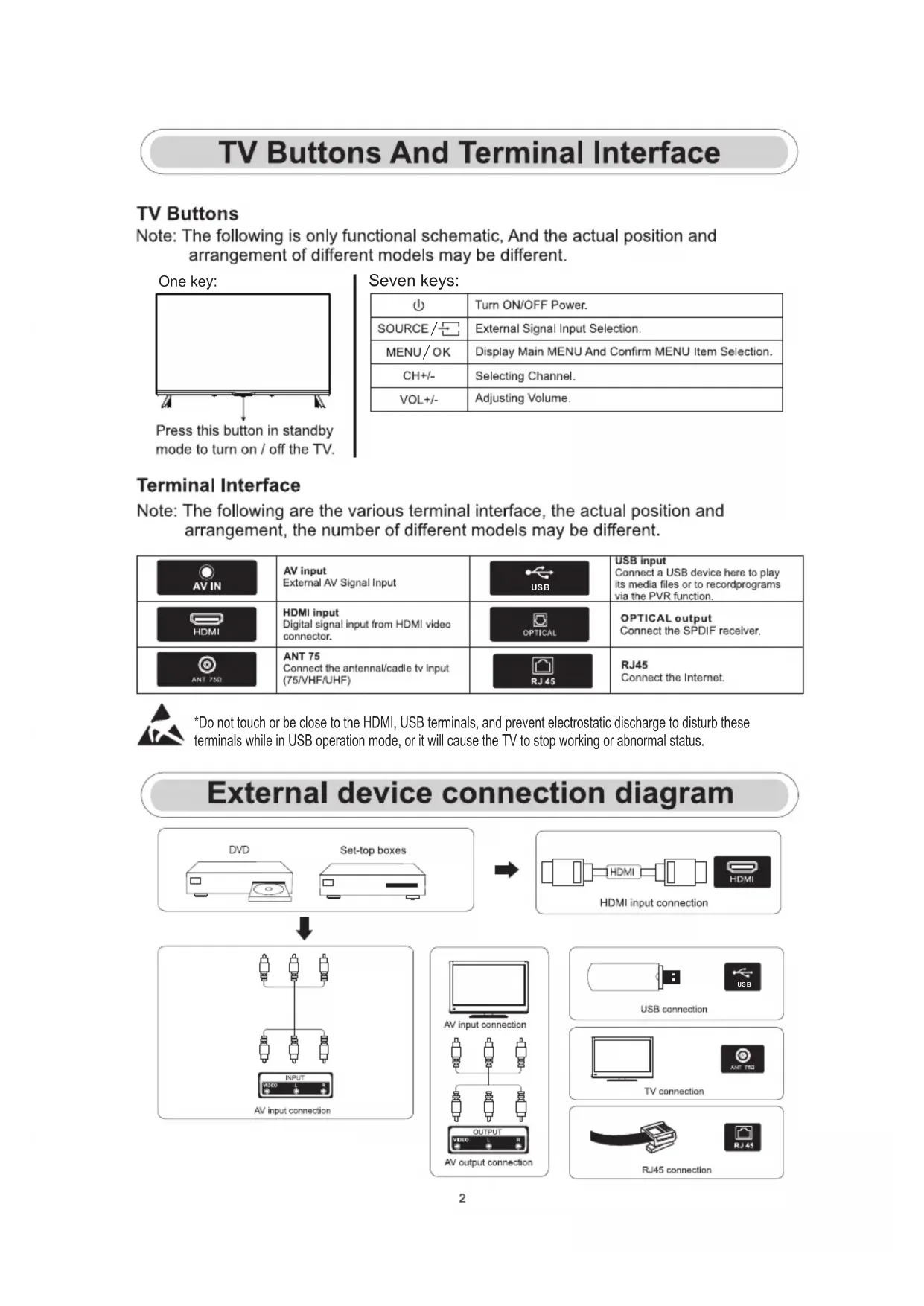
*Do not touch or be close to the HDMI, USB terminals, and prevent electrostatic discharge to disturb these terminals while in USB operation mode, or it will cause the TV to stop working or abnormal status. Seven keys: USB
X X X Note : If the model has a CI card slo t on its to p, a sil icone plu g for th e CI card slot can be found in th e accessory bag (fo r models wit hout CI card slo t, there is no such sil icone plu g), ple ase in sert th e silicone plu g into th e slo t when th e CI card is not in use.First Time Installation Please according to the Text Tip to First Time Setup. Press 【▼】 / 【▲】 button to select Language. Please make sure the device has connected, then press【▼ 】/【▲】/【◄】/【► 】button to select the primary input source First Time Installationloading-circle-1Initial Setup Picture Press【MENU】to enter the main menu,press【▼ 】/【▲】 to select picture menu. 1.Press【▼】/【▲】button to select the option that you want to adjust in the PICTURE menu. 2.Press Enter button to adjust. 3.After finishing your adjustment, Press Enter button to save and return to the previous menu Picture Mode Press 【▼ 】/【▲】 button to select Picture Mode, then press【▼ 】/【▲】&Enter button to select. (Optional: Standard/Cinema day/Cinema night/Dynamic/Sports). Aspect Ratio Adjust the Aspect Ratio to stretch or zoom in on your picture. Press ▼ / ▲ button to select Aspect Ratio. Press ◄ / ► button to select Automatic/16:9/4:3/Panoramic/Movie Zoom/Direct. Game Mode Press【▼ 】/【▲】to select,and press【◄】/【► 】to select On/Off. Picture Mode Settings Press【▼ 】/【▲】to select,and press 【► 】 & ENTER to enter.Sound Press MENU button to display the main menu.Press 【▼ 】/【▲】 button to select SOUND in the main menu, 1.Press 【▼ 】/【▲】 button to select the option that you want to adjust in the SOUND menu. 2.Press Enter button to adjust. 3.After finishing your adjustment, Press Enter button to save and return to the previous menu. Speakers Press 【▼ 】/【▲】 button to select Speakers. Press ENTER/【►】button to enter sub-menu Network Press MENU button to display the main menu.Press【▼】/【▲】 button to select Network in the main menu Initial Setup Audio Output Press【▼ 】/【▲】 button to select Speakers and enter, then press【▼ 】/【▲】button to select BT Sound Bar/ARC/TV Speaker/SPDIF OnlyPress【▼】/【▲】button to select :Network Configuration/Internet Connection/Bluetooth/ Wake on Wireless Network/Wake on LAN. Channel Press MENU button to display the main menu. Press【 】/【 】 button to select Channel. 1.Press 【▼】 / 【▲】 button to select the option that you want to adjust in the Channel menu 2.Press Enter button to adjust. 3.After finishing your adjustment, Press Enter button to save and return to the previous menu.
Media Image Press 【▼】 / 【▲】button to select Image or All,and press 【▼】 / 【▲】/ 【 】 / 【 】 button to select Picture. ◄ ►HDMIThis user manual for reference only WARNING Never place a television set in an unstable location. A television set may fall, causing serious personal injury or death. Many injuries, particularly to children, can be avoided by taking simpleprecautions such as:1.Using cabinets or stands recommended by the manufacturer of the television set.2.Only using furniture that can safely support the television set.3.Ensuring the television set is not overhanging the edge of the supporting furniture.4.Not placing the television set on tall furniture (for example, cupboards or bookcases).without anchoring both the furniture and the television set to a suitable support.5.Not placing the television set on cloth or other materials that may be located between the television set and supporting furniture,6.Educating children about the dangers of climbing on furniture to reach the television set or its controls.If your existing television set is being retained and relocated, the same considerations as above should be applied. Note:don't hang at an angle to avoid the risk of falling off. Wall-mounted screw:22-24 M4, 28-70 M6, 75 M8inch inch inch LIFE TIME : 60,000 Hrs power Consumption 30W/36W 40W/56W 60W/70W Screen Size 24” 32” 39” Main accessories User's manual x1 Remote controller x1 Power cord x1 AAA Batteries x2 (Optional) 65W/70W/90W 70W/80W/90W 100W/108W/120W 110W/118W/135W 42” 43” 50” 55” 120W/135W/160W 160W/165W/190W 230W/250W/260W/270W 58” 65” 75” 60W/70W/90W 40” Manufactured under license from Dolby Laboratories. Dolby,Dolby Audio, and the double-D symbol are trademarks of Dolby Laboratories Licensing Corporation.Menu:Displays the OSD (On Screen Display) menu.App customization:press under the home page)App customization (long
POWER:Switches the TV between on and standby mode. No effect. MUTE:Mute or restore your TV sound. FREE:Connects to FREE. INFO:Displays the present channel information such as the current time and channel name. MEDIA:Connects to MEDIA Inputs:Display/Select signal source options. Navigation buttons:Cursor UP/LEFT/RIGHT/DOWN. BACK:Press to move back through menus. EXIT:Exit the OSD menu. HOME:Displays the home screen. YouTube: Connects to YouTube (internet connection required). NETFLIX: Connects to NETFLIX for viewing online TV shows and films (internet connection required). Prime video: Connects to Prime video (internet connection required). 0-9:Figures “0-9” are used to directly input channel number. SUBT:SUBT. TXT: Press to enter Teletext when play the program.
deezer:Connects to deezer. BROWSER:Connects to BROWSER. PLEX:Connects to PLEX.
VOL+/-:Press to increase / decrease the sound level. CH+/-:Press to scan through channels.
COLOR BUTTONS:There are related functions under EPG.