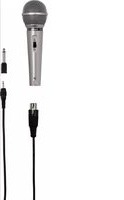
DM40 - Microphone HAMA - Free user manual and instructions
Find the device manual for free DM40 HAMA in PDF.


| Brand | Hama |
| Model | DM40 |
| Category | Dynamic microphone |
| Polar pattern | Unidirectional |
| Frequency response | 100 - 10,000 Hz |
| Impedance | 600 ohms |
| Sensitivity | -75 dB +/- 3 dB |
| Weight | 218 g |
| Cable length | 3 m |
| Microphone connector | Female XLR |
| Output connector | 3.5 mm mono jack |
| Adapter included | 3.5 mm to 6.3 mm jack |
| Signal type | Mono |
| Power supply | None (dynamic microphone) |
| On/off switch | Yes |
| Usage | Household, non-commercial |
| Cleaning | Slightly damp, lint-free cloth |
| Safety | Avoid moisture, shocks, do not open |
| Warranty | Exclusion if instructions not followed |
| Phone support | +49 9091 502-115 (German/English) |
| Website | www.hama.com |
| Recycling | Compliant with WEEE, do not dispose of in household waste |
Frequently Asked Questions - DM40 HAMA
User questions about DM40 HAMA
0 question about this device. Answer the ones you know or ask your own.
Ask a new question about this device
Download the instructions for your Microphone in PDF format for free! Find your manual DM40 - HAMA and take your electronic device back in hand. On this page are published all the documents necessary for the use of your device. DM40 by HAMA.
USER MANUAL DM40 HAMA
OperatingInstructions
Bedienungsanleitung
Moded'emploi
Instruccionesdeuso
PykoBOIDCTBONO3KcNlyatauIN
Istruzioniperl'uso
Gebruiksaanwijzing
O8nyiecxpnonc
Instrukcjaobslugi
Hasznalatiutmutato
Návodk p oužití
Návodnapoužitie
Manualdeinstruções
Kullanmakilavuzu
Manualdeutilizare
Bruksanvisning
Käyttoohje


Thankyouforchoosinga H amaproduct. Takeourtimeandreadthefollowinginstructions andinformationcompletely.P leasekeepthese instructions in a safe place for future reference.If yousellthedevicepleasepasstheseseoperating instructionsontothewowner.
1.ExplanationoftheNotes

Note
Thissymbolisusedtoindicateadditional informationorimportantnotes.
2.PackageContents
D M-40microphone
- 3 m XLR microphone cable - 3.5 mm mono jack
- 3.5-6.3mmmonojackadapter
- T hisoperatinginstruction
3.SafetyNotes
T heproductisintendedforprivate,non-commercialuseonly.
- P rotectheproductfromdirt, moisture and overheating and useitindryroomsonly.
- A swithallelectricaldevices, this devices should be keptoutofthereachofchildren.
- D o n otdroptheproductanddonotexposeitto anymajorshocks.
- Dō n otopenthedeviceorcontinuetooperateitif itbecomesdamaged.
- Do not modify the device in any way. Doing so voidsthewarranty.
4. StartupandOperation
- Ensure t hatthemicrophoneisswitchedoff.
- I nserttheXLRconnectorintothemicrophone's XLRportandmakesure t hatthesocketprotection clicksfirmlyintoplace(Pic.1).
- C onnectthe3.5mmmonojackplugwithyour terminaldevice's m icrophoneinput(Pic.2a).If yourterminaldevicehasa 6 .3mmjackinputfor microphones,usetheincluded6.3mmmonojack adapter(Pic.2b).
- S witchonthemicrophone(Pic.3).

Note-A FewTips
- A lwayspositionyourmicrophonesothatisas closetoandasdirectlyconnectedtotheaudiosourceaspossible.
- H oldyourmicrophoneasstillaspossibleto preventinterferenceandwindnoise.
- Checkthefunctionalityandthetransmitted volume(soundcheck)beforeusingthe microphone.
- I n c aseoffeedback(LOUDSCREEING) immediately switch offthemicrophoneusing theintegratedon/offswitch. Theneliminate thecauseofthefeedback, e.g.byreducingthe volumeofthespeakersortheinputsensitivity (gainorpad, where a pplicable) of your microphoneinput, and/ormovingsomewhat behindyourspeaker(s) before s witchingthe microphonebackon.
5.CareandMaintenance
- O nlycleanthisproductwitha s lightlydamp, lint-freeclothhanddonotuseaggressivecleaning agents.
6.WarrantyDisclaimer
Hama GmbH & Co KG assumes no liability and providesnowwarrantyfordamageresultingfrom improperinstallation/mounting,improperuseof theproductorfromfailure to o bservetheoperating instructionsand/orsafetynotes.
7. Service and Support
PleasecontactHamaProductConsultingifyouhave anyquestionsaboutthisproduct.
Hotline: +499091502-115 (German/English)
Furthersupportinformationcanbefoundhere: www.hama.com
8. Technical Data
| Impedance6000hm | |
| Sensitivity-75dB+/−3 dB | |
| Weight218g | |
| Frequency100- 1 0.000Hz | |
| LengthofCable3 m | |
| DesignMono | |
| Connection3,5mm(mono) | |
| ConnectionXLRSocket | |
| Adapter3,5mm/ 6 ,3mm | |
| CharacteristicUnidirectional |
9.RecyclingInformation
Noteonenvironmentalprotection:

AftertheimplementationoftheEuropean Directive2002/96/EUand2006/66/EUn thenationallegalsystem,thefollowing applies:Electricandecronicdevicesas wellasbatteryismustnotbedisposed of
withhouseholdwaste. Consumers are bligedbylaw toreturnelectricalandecronicdevicesaswellas batteriesattheendoftheirservicelivestothepublic collectingpointssetupforthispurposeorpointof sale. Details to this are defined by the national law of therespectivecountry. Thissymbolontheproduct, theinstructionmanualorthepackageindicatesthat a p roductissubjecttotheseregulations.By recycling,reusingthematerialsorotherformsof utilisingolddevices/Batteries,youare m akingan importantcontributiontoprotectingour environment.
Hotline: +499091502-115(Alm/ing)
Brand : HAMA
Model : DM40
Category : Microphone