50CF630 - Television TCL - Free user manual and instructions
Find the device manual for free 50CF630 TCL in PDF.



| Product Type | LED TV |
| Brand | TCL |
| Model | 50CF630 |
| Screen Size | 50 inches (127 cm) |
| Resolution | Full HD (1920 x 1080) |
| Connectivity | HDMI, USB, Wi-Fi 2.4/5 GHz, Bluetooth 5.0, Ethernet, Antenna input |
| Operating System | Smart TV (Fire TV built-in) |
| Main Features | Alexa voice control, channel guide, teletext, subtitles, USB recording (PDR) |
| Power Supply | 100-240 V ~ 50/60 Hz |
| Power Consumption (max) | 120 W |
| Net Weight (with stand) | 13.5 kg |
| Dimensions (without stand) | 112.5 x 65.3 x 8.2 cm |
| Dimensions (with stand) | 112.5 x 70.8 x 24.6 cm |
| VESA Wall Mount Standard | 200 x 200 mm |
| Operating Temperature | 0 to 35 °C |
| Maximum Humidity | 75 % |
| Care and Cleaning | Soft cloth dampened with water or mild detergent for the screen; dust ventilation openings regularly |
| Safety | Double insulation (Class II); do not open; unplug during storms or if burning smell |
| Spare Parts and Repairability | Contact a certified technician; GPL source code available on request |
| General Information | Manual available in multiple languages; quarterly software updates (minimum 3 years) |
Frequently Asked Questions - 50CF630 TCL
User questions about 50CF630 TCL
0 question about this device. Answer the ones you know or ask your own.
Ask a new question about this device
Download the instructions for your Television in PDF format for free! Find your manual 50CF630 - TCL and take your electronic device back in hand. On this page are published all the documents necessary for the use of your device. 50CF630 by TCL.
USER MANUAL 50CF630 TCL
Safety
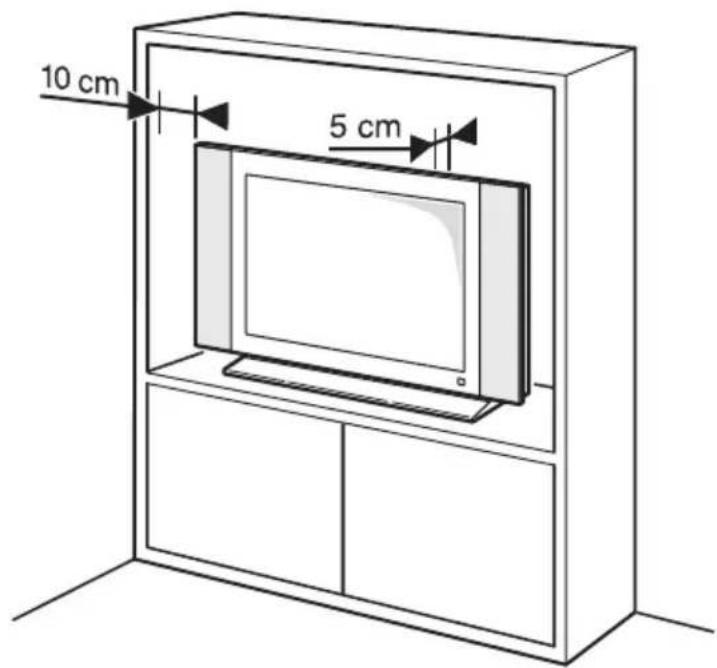
Ensure that your domestic mains supply voltage matches the voltage indicated on the identification sticker located at the back of your set. Where the mains plug, AC inlet or an appliance coupler is used as disconnect device, it shall remain readily operable.
On certain models, the light indicator is located at the side of the TV set. The absence of a light indication at the front does not mean that the TV set is fully disconnected from the mains. To disconnect the TV set completely, the mains plug must be pulled out.
The TV set's components are sensitive to heat. The maximum ambient temperature should not exceed 35°C. Celsius. Do not cover the vents at the back or sides of the TV set. Leave sufficient space around it to allow adequate ventilation. Install the appliance away from any source of heat (fireplace, etc.) or appliances creating strong magnetic or electric fields.
Moisture in rooms where the set is installed should not exceed 75% humidity. Moving the set from a cold place to a warm one can cause condensation on the screen (and on some components inside the TV set). Let the condensation evaporate before switching the TV set on again.
The ☑ or POWER/☐ button on the TV set or the ☑ button on the remote control can be used to switch it on and put it into standby mode. If you are not going to be watching the TV for a lengthy period of time, switch it off completely by removing the plug from the mains power socket.
During thunderstorms, we recommend that you disconnect the TV set from the mains and aerial so that it is not affected by electrical or electromagnetic surges that could damage it. For this reason, keep the mains and aerial sockets accessible so they can be disconnected, if necessary.
Unplug the TV set immediately if you notice it giving off a smell of burning or smoke. You must never, under any circumstances, open the TV set yourself, as you run the risk of an electric shock in doing so.
WARNINGS
This appliance is intended for domestic household use only and should not be used for any other application, such as for non-domestic use or in a commercial environment.
If the external flexible cable or cord of this product is damaged, it shall be replaced by the manufacturer or his service agent or a similar qualified person in order to avoid a hazard.
Leave more than 10cm clearance around the television to allow adequate ventilation. The ventilation should not be impeded by covering the ventilation openings with items, such as newspapers, table-cloths, curtains, etc.
The apparatus shall not be exposed to dripping or splashing and no objects filled with liquids, such as vases shall be placed on the apparatus.
Batteries (battery pack or batteries installed) shall not be exposed to excessive heat such as sunshine, fire or the like.
To reduce the risk of fire or electric shock, do not expose this apparatus to rain or moisture.
A television set may fall, causing serious personal injury or death. Many injuries, particularly to children, can be avoided by taking simple precautions such as:
- ALWAYS use cabinets or stands or mounting methods recommended by the manufacturer of the television set.
- ALWAYS use furniture that can safely support the television set.
- ALWAYS ensure the television set is not overhanging the edge of the supporting furniture.
- ALWAYS educate children about the dangers of climbing on furniture to reach the television set or its controls.
- ALWAYS route cords and cables connected to your television so they cannot be tripped over, pulled or grabbed.
- NEVER place a television set in an unstable location.
- NEVER place the television set on tall furniture (for example, cupboards or bookcases) without anchoring both the furniture and the television set to a suitable support.
- NEVER place the television set on cloth or other materials that may be located between the television set and supporting furniture.
- NEVER place items that might tempt children to climb, such as toys and remote controls, on the top of the television or furniture on which the television is placed.
If the existing television set is being retained and relocated, the same considerations as above should be applied.

Equipment with this symbol is a Class II or double insulated electrical appliance. It has been designed in such a way that it does not require a safety connection to electrical earth.
Equipment without this symbol is a Class I electrical appliance. It shall be connected to a mains socket outlet with a protective earthing connection.

To prevent the spread of fire, keep candles or other open flames away from this product at all times.

This symbol indicates that high voltage is present inside. It is dangerous to make any kind of contact with any internal part of this product.

This symbol indicates that the fuse may be in the neutral, and that the mains shall be disconnected to de-energize the phase conductors.
To prevent injury, this apparatus must be securely attached to the floor/wall in accordance with the installation instructions.
To reduce the risk of RF exposure, the use distance of this apparatus should be at least 100cm.
If an outside antenna or cable system is connected to the product, be sure the antenna or cable system is grounded by a skilled person so as to provide some protection against voltage surges and built-up static charges.
TV screen
The TV screen used in this product is made of glass. Therefore, it can break when the product is dropped or impacted upon by other objects.
The TV screen is a very high technology product, giving you finely detailed pictures. Occasionally, a few nonactive pixels may appear on the screen as a fixed point of blue, green or red. This does not affect the performance of your product.
Care
Use a glass-cleaning product to clean the screen and a soft cloth and mild detergent to clean the rest of the set.
Important: Using strong detergents, alcohol-based and abrasive products may damage the screen.
Dust the vents at the back and sides regularly. Using solvents, abrasive or alcohol-based products could damage the TV set. If an object or liquid enters the appliance, unplug it immediately and have it checked by an authorized engineer. Never open the appliance yourself since this may put you at risk or damage the appliance.
ESD regulation
This apparatus meets ESD performance criteria. In case the apparatus does not recover in Ethernet connection mode or USB playing mode due to electrostatic discharge, user intervention is required.
Bluetooth function notice
Bluetooth® technology (if available in your TV) uses 2.4GHz frequency thus close proximity to Wi-Fi access points, routers or microwave ovens might interfere with Bluetooth audio streaming. If you face interruptions in audio reception, you should restart your Bluetooth device to find frequency with less interferences and if you continue to face issues you should move closer to TV or increase space between TV and source of interferences.
Bluetooth declaration ID: D058931
Hanging the TV set on the wall
Warning: This operation requires at least two people depending on your TV dimension.
To ensure a safe installation, observe the following safety notes:
- Check that the wall can support the weight of the TV set and wall mount assembly.
- Follow the mounting instructions provided with the wall mount. For certain models, make sure to screw the hexagonal VESA wall mounting screw bosses (and screws) provided with the set into the nuts for the wall mount at the back of your set before your wall mounting.
- The TV set must be installed on a vertical wall.
- Make sure to use only screws suitable for the material of the wall.
- Make sure that the TV set cables are placed so that there is no danger of tripping over them.
All other safety instructions about our TV sets are also applicable here.
Multi product user manual
The features described in this manual are common to most models. Some features may not be available on your TV and/or your TV may include features that are not described in this user manual. The illustrations in this manual may differ from the actual product. Please refer to the actual product.
Remote control buttons
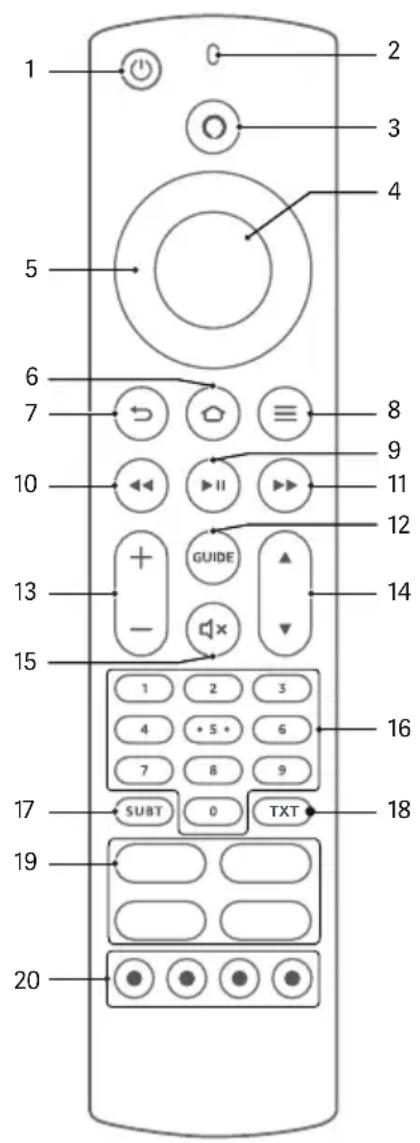
- Standby: Standby / On.
- Microphone opening: Speak into the microphone when using Alexa, including voice search.
- Voice button: Activates the microphone on the remote.
- Select: Confirms selections, enters sub-menu.
- Direction: Navigate up/down or left/right through content. (Navigates menus, setting options, moves the focus or cursor etc. Follow the on-screen instructions)
-
Home: Opens the Home screen. Press and hold to display quick settings menu.
-
Back/Return: Returns to previous menu screen, goes one step back, closes open windows, returns to main screen or Home tab.
-
Options: Displays setting options (where available).
-
Pause/play: Pauses/Plays the selected media.
-
Rewind: Moves frames backwards in media such as movies, scrolls back a day in the channel guide.
-
Fast forward: Moves frames forward in media such as movies, scrolls forward a day in the channel guide.
-
Guide: Displays the channel guide.
-
Volume +/-: Increases/decreases the volume level.
-
Programme +/-: Increases/Decreases channel number in Live TV mode.
-
Mute: Completely turns off the volume of the TV.
-
Numeric buttons: Switches the channel in Live TV mode, enters a number or a letter in the text box on the screen.
-
Subtitle: Displays audio and subtitle options, where you can change the language, size and style preference. (where available).
-
TXT: Opens and closes teletext. (where available in Live TV mode).
-
Featured channel shortcut: lets you directly access featured channels.
Note: Apps are subject to the actual remote control.
- Coloured buttons: Follow the on-screen instructions for coloured button functions.
* To pair remote with the TV
When TV is turned on for the first time, a pairing process for your remote will be performed during the initial setup. Your remote control should automatically pair with your TV at this point, but if it didn't, follow the on screen instructions to pair it. If you experience difficulties in pairing your remote with your TV you can turn off other wireless devices and try again.
Radio Information
- Bluetooth® transmitter frequency range: 2402–2480MHz
- Bluetooth® transmitter power: <10dBm
• 2.4G Wi-Fi transmitter frequency range: 2412–2472MHz
• 2.4G Wi-Fi transmitter power: <20dBm - 5G Wi-Fi transmitter frequency range:
- Band 1: 5150–5250MHz (<20dBm)
- Band 2: 5250–5350MHz (<20dBm)
- Band 3: 5470–5725MHz (<20dBm)
- Band 4: 5725–5850MHz (<14dBm)
• DVB-C tuner frequency range: 50–862MHz
• DVB-T/T2 tuner frequency range: 470–862MHz
• DVB-S/S2 tuner frequency range: 950–2150MHz
* In all EU member states, operation of 5150–5350MHz is restricted to indoor use only.
| BE | BG | CZ | DK | DE | EE | IE | |||
| EL | ES | FR | HR | IT | CY | LV | |||
| LT | LU | HU | MT | NL | AT | PL | |||
| PT | RO | SI | SK | FI | SE | UK( | NI) |
OSS Notice
This product uses the GPL (Version 2 and 3) and LGPL (version 2.1) and MPL (version 1.1).
To send inquiries and requests for questions regarding open source, contact nearest TCL office.
This product uses some software programs which are distributed under the Independent JPEG Group.
This product uses some software programs which are distributed under the libpng Project.
This product uses some software programs which are distributed under the Freetype Project.
This product uses some software programs which are distributed under the zlib Project.
This product uses some software programs (libxml2, curl, expat, c-areas) which are distributed under the MIT.
This product uses CyberLink for C which is distributed under the Open Source Project.
This product uses opensl, xerces which is distributed under the Apache License Project.
GPL software: Linux Kernel, glib, libiconv, gcc libgcc, gcc libstdc++, u-Boot loader, ffmpeg, util-linux-ng, e2fsprogs, wget, iptables
LGPL software: DFB (DirectFB), gstreamer, gst-plugins-base, gst-plugins-good, gst-plugins-bad, gst-plugins-ugly, gst-ffmpeg, glibc, wpa_supplicant
BSD software: webp, mng, uriparser
GNU software: dosfstools
[Legal Statement] of TCL - manufacturer of this TV set
Due to the various capabilities of products featuring the SmartTV - Services, as well as limitations in the available content, certain features, applications, and services may not be available on all devices or in all territories. Some features
on SmartTV may also require additional peripheral devices or membership fees that are sold separately. Please visit our website for more information on specific device information and content availability. The services and availability of content through SmartTV are subject to change from time to time without prior notice.
All content and services accessible through this device belong to third parties and are protected by copyright, patent, trademark and/or other intellectual property laws. Such content and services are provided solely for your personal noncommercial use. You may not use any content or services in a manner that has not been authorized by the content owner or service provider. Without limiting the foregoing, unless expressly authorized by the applicable content owner or service provider, you may not modify, copy, republish, upload, post, transmit, translate, sell, create derivative works, exploit, or distribute in any manner or medium any content or services displayed through this device.
YOU EXPRESSLY ACKNOWLEDGE AND AGREE THAT USE OF THE DEVICE IS AT YOUR SOLE RISK AND THAT THE ENTIRE RISK AS TO SATISFACTORY QUALITY, PERFORMANCE AND ACCURACY IS WITH YOU. THE DEVICE AND ALL THIRD PARTY CONTENT AND SERVICES ARE PROVIDED "AS IS" WITHOUT WARRANTY OF ANY KIND, EITHER EXPRESS OR IMPLIED. TCL EXPRESSLY DISCLAIMS ALL WARRANTIES AND CONDITIONS WITH RESPECT TO THE DEVICE AND ANY CONTENT AND SERVICES, EITHER EXPRESS OR, IMPLIED, INCLUDING BUT NOT LIMITED TO, WARRANTIES OF MERCHANTABILITY, OF SATISFACTORY QUALITY, FITNESS FOR A PARTICULAR PURPOSE, OF ACCURACY, OF QUIET ENJOYMENT, AND NON-INFRINGEMENT OF THIRD PARTY RIGHTS. TCL DOES NOT GUARANTEE THE ACCURACY, VALIDITY, TIMELINESS, LEGALITY, OR COMPLETENESS OF ANY CONTENT OR SERVICE MADE AVAILABLE THROUGH THIS DEVICE AND DOES NOT WARRANT THAT THE DEVICE, CONTENT OR SERVICES WILL MEET YOUR REQUIREMENTS, OR THAT OPERATION OF THE DEVICE OR SERVICES WILL BE UNINTERRUPTED OR ERROR-FREE. UNDER NO CIRCUMSTANCES, INCLUDING NEGLIGENCE, SHALL TCL BE LIABLE, WHETHER IN CONTRACT OR TORT, FOR ANY DIRECT, INDIRECT, INCIDENTAL, SPECIAL OR CONSEQUENTIAL DAMAGES, ATTORNEY FEES, EXPENSES, OR ANY OTHER DAMAGES ARISING OUT OF, OR IN CONNECTION WITH, ANY INFORMATION CONTAINED IN, OR AS A RESULT OF THE USE OF THE DEVICE, OR ANY CONTENT OR SERVICE ACCESSED BY YOU OR ANY THIRD PARTY, EVEN IF ADVISED OF THE POSSIBILITY OF SUCH DAMAGES.
Third party services may be changed, suspended, removed, terminated or interrupted, or access may be disabled at any time, without notice, and TCL makes no representation or warranty that any content or service will remain available for any period of time. Content and services are transmitted by
third parties by means of networks and transmission facilities over which TCL has no control. Without limiting the generality of this disclaimer, TCL expressly disclaims any responsibility or liability for any change, interruption, disabling, removal of or suspension of any content or service made available through this device. TCL may impose limits on the use of or access to certain services or content, in any case and without notice or liability. TCL is neither responsible nor liable for customer service related to the content and services. Any question or request for service relating to the content or services should be made directly to the respective content and service providers.
Device update
Typically, some devices are updated quarterly, but not always so specific. Some devices, especially those that went on sale more than three years ago, will only be updated if a critical vulnerability is found and fixed.

Products

Pb
Battery
Notice:
The sign Pb below the symbol for batteries indicates that this battery contains lead.
Information for Users on Disposal of Old Equipment and Batteries
[European Union]
These symbols indicate that the electrical and electronic equipment and the battery with this symbol should not be disposed of as general household waste at their end-of-life. Instead, the products should be handed over to the applicable collection points for the recycling of electrical and electronic equipment as well as batteries for proper treatment, recovery and recycling in accordance with your national legislation and the Directive 2012/19/EU, 2006/66/EC and 2008/12/EC.
By disposing of these products correctly, you will help to conserve natural resources and will help to prevent potential negative effects on the environment and human health which could otherwise be caused by inappropriate waste handling of these products.
For more information about collection points and recycling of these products, please contact your local municipal office, your household waste disposal service or the shop where you purchased the product.
Penalties may be applicable for incorrect disposal of this waste, in accordance with national legislation.
[Business users]
If you wish to dispose of this product, please contact your supplier and check the terms and conditions of the purchase contract.
[Other Countries outside the European Union]
These symbols are only valid in the European Union. If you wish to dispose of these items, please do so in accordance with applicable national legislation or other rules in your country for the treatment of old electrical equipment and batteries.
Amazon, Fire and all related marks are trademarks of Amazon.com, Inc. or its affiliates.
This television is a product of TCL, which is not affiliated with Amazon.com, Inc. or any Amazon affiliate.
You need to be signed in to an Amazon account in order to use online services.
Dear Customer,
Hereby, TCL declares that this device is in compliance with Directive 2014/53/EU. The full text of the EU declaration of conformity is available at the following internet address: www.tcl.com
TCL Operations Polska Sp. z o.o.
Email address: zyeee@tcl.com
Figures and illustrations in this User Manual are provided for reference only and may differ from actual product appearance. Product design and specifications may be changed without notice.
Sécurité
- Safety
- WARNINGS
- TV screen
- Care
- ESD regulation
- Bluetooth function notice
- Hanging the TV set on the wall
- Warning: This operation requires at least two people depending on your TV dimension.
- Multi product user manual
- Radio Information
- OSS Notice
- [Legal Statement] of TCL - manufacturer of this TV set
- Device update
- Notice:
- Information for Users on Disposal of Old Equipment and Batteries
- [European Union]
- [Business users]
- [Other Countries outside the European Union]
- Dear Customer,
- Sécurité
Brand : TCL
Model : 50CF630
Category : Television