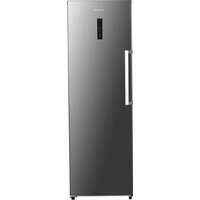
THFZ272NFIX - Freezer THOMSON - Free user manual and instructions
Find the device manual for free THFZ272NFIX THOMSON in PDF.



| Product Type | Upright Freezer |
| Brand | Thomson |
| Model | THFZ272NFIX |
| Dimensions (H x W x D) | 1850 x 600 x 700 mm |
| Net weight | 68 kg |
| Total volume | 274 L |
| Energy efficiency class | E |
| Annual energy consumption | 246 kWh/year |
| Autonomy in case of power cut | 9 hours |
| Freezing capacity | 17 kg/24h |
| Refrigerant | R600a (74 g) |
| Insulating gas | Cyclopentane |
| Climate class | SN-T (10 °C to 43 °C) |
| Noise level | 39 dB(A) - Class C |
| Defrost type | Automatic (No Frost) |
| Cooling system | Fan (No Frost) |
| Power supply | 220-240 V ~ 50 Hz |
| Rated current | 1.3 A |
| Adjustable temperature range | -14 °C to -22 °C |
| Super freezing | Yes (automatic deactivation after 50 h) |
| ECO energy saving mode | Yes |
| Door open alarm | Yes (after 90 seconds) |
| Interior lighting | LED (class G, replaceable by a professional) |
| Touch panel lock | Yes (automatic after 25 seconds) |
| Repairability and spare parts | Parts available within 15 working days via FNAC DARTY after-sales service; 2-year warranty |
Frequently Asked Questions - THFZ272NFIX THOMSON
User questions about THFZ272NFIX THOMSON
0 question about this device. Answer the ones you know or ask your own.
Ask a new question about this device
Download the instructions for your Freezer in PDF format for free! Find your manual THFZ272NFIX - THOMSON and take your electronic device back in hand. On this page are published all the documents necessary for the use of your device. THFZ272NFIX by THOMSON.
USER MANUAL THFZ272NFIX THOMSON
Frost-Free Upright Freezer
natural_image
Interior view of a modern stainless steel refrigerator with open doors and a red bowl on the front (no visible text or symbols)TABLE DES MATIÈRES
AVERTISSEMENTS ...... 2
INSTRUCTIONS IMPORTANTES DE SÉCURITÉ ....8
NOMS DES PIÈCES ....8
AVANT D'INSTALLER L'APPAREIL....10
INSTALLATION 10
TEMPÉRATURE AMBIANTE....10
AVANT DE PLACER DES ALIMENTS DANS L'APPAREIL....10
COUPURE DE COURANT 10
RÉGLAGE DES TEMPÉRATURES ET FONCTIONS....11
DÉPLACEMENT DE VOTRE PRODUIT....12
CONGÉLATION ET CONSERVATION DES ALIMENTS DANS LE COMPARTIMENT DU CONGÉLATEUR 13
FABRICATION DE GLAÇONS 14
DÉGIVRAGE....14
INVERSION DE PORTE 14
CONSEILS D'ÉCONOMIE D'ÉNERGIE....18
BRUITS DE FONCTIONNEMENT ....19
DÉPANNAGE 20
SPÉCIFICATIONS 21
FICHE D'INFORMATION SUR LE PRODUIT 22
SERVICE DE RÉ PARATION ET PIÈ CES DE RECHANGE 24
MISE AU REBUT 25
natural_image
Pure technical line drawing of a mechanical assembly (no text or symbols)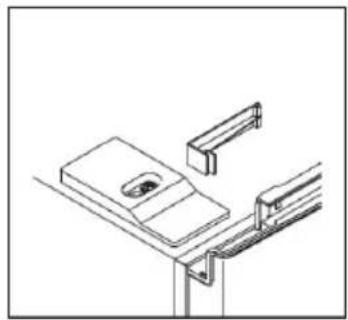
natural_image
Isometric line drawing of a mechanical assembly or mounting bracket (no text or symbols)natural_image
Technical line drawing of a mechanical assembly with a screw and bracket (no text or symbols)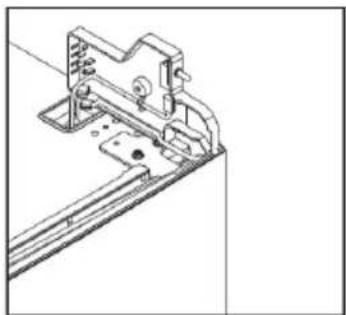
natural_image
Technical line drawing of a mechanical assembly with mounting brackets and a bracket (no text or symbols)natural_image
Technical line drawing of a mechanical component with mounting holes and a bracket (no text or symbols)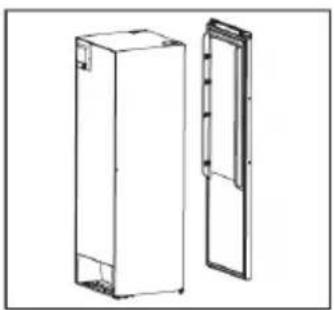
natural_image
Technical line drawing of two rectangular panels or storage units, one open and one closed, with no visible text or symbols.natural_image
Simple line drawing of a mechanical clamp or bracket with a plus symbol at the end (no text or labels)
natural_image
Simple line drawing of a mechanical component with a curved handle and circular features (no text or symbols)natural_image
Technical line drawing of a mechanical bracket with mounting holes and a small component below (no text or symbols)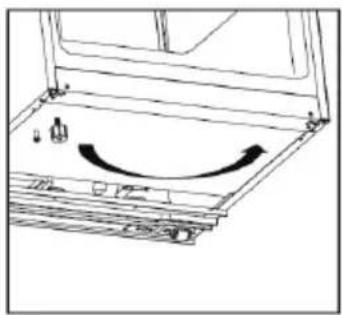
natural_image
Diagram of a mechanical assembly with an arrow indicating rotational motion (no text or symbols present)natural_image
Mechanical assembly diagram showing a bolted joint with a black arrow indicating direction (no text or symbols)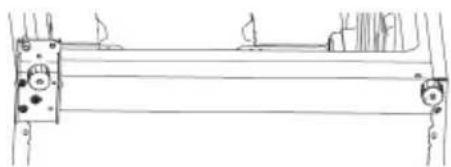
natural_image
Pure technical line drawing of a mechanical assembly without any text, numbers, or symbolsnatural_image
Technical line drawing of a mechanical bracket with two cylindrical components and a curved arrow indicating rotation (no text or symbols)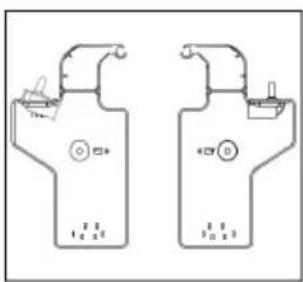
natural_image
Simple line drawing of a vehicle on a roof with a small object near the corner (no text or symbols)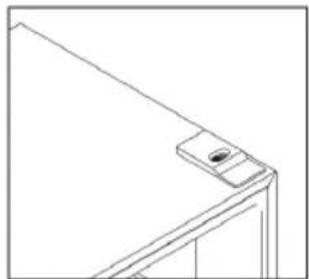
natural_image
Line drawing of a corner-mounted device with a small inset component (no text or symbols)natural_image
Line drawing of a simple metal frame structure with no text or symbols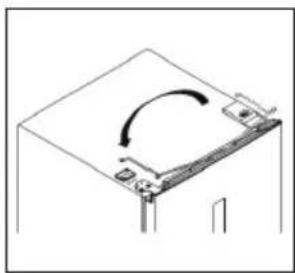
natural_image
Simple line drawing of a mechanical or architectural component with an arrow indicating rotation (no text or symbols)natural_image
Technical line drawing of a mechanical bracket or mounting bracket with mounting holes and a small inset component (no text or symbols)natural_image
Technical line drawing of a mechanical assembly with no visible text or symbols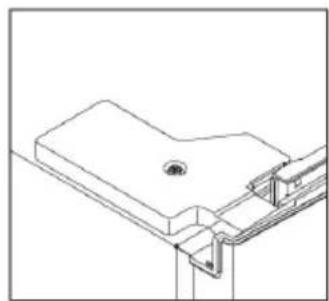
natural_image
Technical line drawing of a mechanical bracket or mounting structure (no text or symbols)natural_image
Technical line drawing of a mechanical bracket assembly (no text or symbols)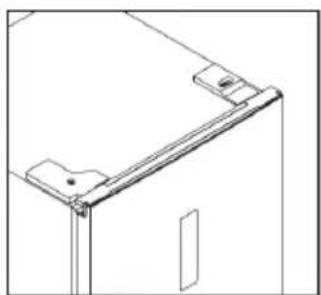
natural_image
Technical line drawing of a mechanical bracket or mounting bracket (no text or symbols)natural_image
Simple circular diagram with two vertical lines and a small circle inside, no text or symbols present.natural_image
Pure technical line drawing of a mechanical assembly inside a circular frame (no text or symbols)CONSEILS D'ÉCONOMIE D'ÉNERGIE
natural_image
Technical line drawing showing a hand holding a shelf and a mechanical component with two upward arrows (no text or symbols)DÉPANNAGE
https://eprel.ec.europa.eu/screen/product/refrigeratingappliances2019/321407
https://eprel.ec.europa.eu/screen/product/refrigeratingappliances2019/321400

SERVICE DE RÉPARATION ET PIÈCES DE RECHANGE
IMPORTANT SAFETY INSTRUCTIONS....7
NAMES OF PARTS 7
BEFORE INSTALLING THE APPLIANCE....9
INSTALLATION 9
AMBIENT TEMPERATURE....9
BEFORE PLACING FOOD IN THE APPLIANCE 9
POWER FAILURE....9
ADJUSTING THE TEMPERATURES AND FUNCTIONS 10
MOVING YOUR APPLIANCE ....11
FREEZING AND STORING FOOD IN THE FREEZER COMPARTMENT ....11
DOOR CONVERSION 13
TIPS FOR SAVING ENERGY 16
OPERATING NOISES 16
CLEANING AND MAINTENANCE....16
TROUBLESHOOTING 17
SPECIFICATIONS 18
PRODUCT INFORMATION SHEET 19
REPAIR AND SPARE PARTS SERVICE 21
DISPOSAL....22
Please read the following instructions carefully before using the appliance and keep for future reference.
WARNINGS
This appliance is intended to be used in household and similar applications such as
—staff kitchen areas in shops, offices and other working environments;
—farm houses and by clients in hotels, motels and other residential type environments;
—bed and breakfast type environments;
—catering and similar non-retail applications.
If the supply cord is damaged, it must be replaced by the manufacturer, its service agent or similarly qualified persons in order to avoid a hazard.
This appliance can be used by children aged from 8 years and above and persons with reduced physical, sensory or mental capabilities or lack of experience and knowledge if they have been given supervision or instruction
concerning use of the appliance in a safe way and understand the hazards involved. Children shall not play with the appliance. Cleaning and user maintenance shall not be made by children without supervision.
Regarding the instructions for cleaning surfaces in contact with food, refer to the section “Cleaning and Maintenance” on page EN-16 of the manual.
The appliance shall not be exposed to rain.
WARNING: Keep ventilation openings, in the appliance enclosure or in the built-in structure, clear of obstruction.
WARNING: Do not use mechanical devices or other means to accelerate the defrosting process, other than those recommended by the manufacturer.
WARNING: Do not damage the refrigerant circuit.
WARNING: Do not use electrical appliances inside the food storage compartments of the appliance, unless they are of the type recommended by the manufacturer.
Do not store explosive substances such as aerosol cans with a flammable propellant in this appliance.
WARNING: For making ice (ice cubes), use potable water only
CAUTION: The cooling system is under high pressure. Do not touch it. Contact qualified maintenance services before disposal.
INSTALLATION: DO NOT INSTALL THIS APPLIANCE IN AREAS THAT ARE TOO HUMID OR TOO COLD, SUCH AS THE OUTBUILDINGS, GARAGES OR WINE CELLARS.
Never freeze defrosted food except if they have been cooked before, in order to eliminate harmful bacteria. Never refreeze seafood that has been defrosted.
For disposal of the appliance:
To prevent possible harm to the environment or human health from uncontrolled waste disposal, recycle the appliance responsibly to promote the sustainable reuse of material resources, the refrigerants and the flammable insulation blowing gases. The disposal should only be done through public collection points; contact the waste treatment center nearest your home for more details on the correct procedures for disposal.
For installation, servicing:
Appliance should be placed on a horizontal floor and keep the ventilation freely. Don’t try to replace or repair any components by yourself, ask the service agency for help if necessary.
For handling:
Always handle the appliance to avoid any damage.
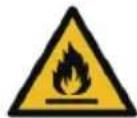
Warning; Risk of fire / flammable materials
- WARNING: When positioning the appliance, ensure the supply cord is not trapped or damaged.
- WARNING: Do not locate multiple portable socket-outlets or portable power supplies at the rear of the appliance.
• Children aged from 3 to 8 years are allowed to load and unload refrigerating appliances. -
To avoid contamination of food, please respect the following instructions:
-
Opening the door for long periods can cause a significant increase of the temperature in the compartments of the appliance.
- Clean regularly surfaces that can come in contact with food and accessible drainage systems.
- Store raw meat and fish in suitable containers in the refrigerator, so that it is not in contact with or drip onto other food.
- Two-star frozen-food compartments are suitable for storing pre-frozen food, storing or making ice cream and making ice cubes.
- One-, two- and three-star compartments are not suitable for the freezing of fresh food.
- If the refrigerating appliance is left empty for long periods, switch off, defrost, clean, dry, and leave the door open to prevent mould developing within the appliance.
- Regarding the instructions for the blub replacement, refer to page EN-16.
IMPORTANT SAFETY INSTRUCTIONS
- If you are discarding an old appliance with a lock / catch fitted to the door, ensure that it is left in a disabled condition to prevent the entrapment of young children when playing.
- Unplug the appliance from the mains socket when not in operation and before cleaning. Remove food before cleaning the appliance.
- Do not insert oversized food as this could cause incorrect operation.
- Extreme caution must be used when moving the appliance.
- Do not give children ice-cream and water ices direct from the freezer compartment as the low temperature may cause 'freezer burns' on the lips.
- Do not stand or support yourself on the base or doors, etc.
- Effervescent drinks should not be stored in the freezer compartment.
Dispose of your old appliance
Fridges or freezers contain refrigerant and gases in the insulation.
Refrigerant and blowing gases must be disposed of professionally. Ensure that tubing of the refrigerant circuit is not damaged prior to proper disposal.
NAMES OF PARTS
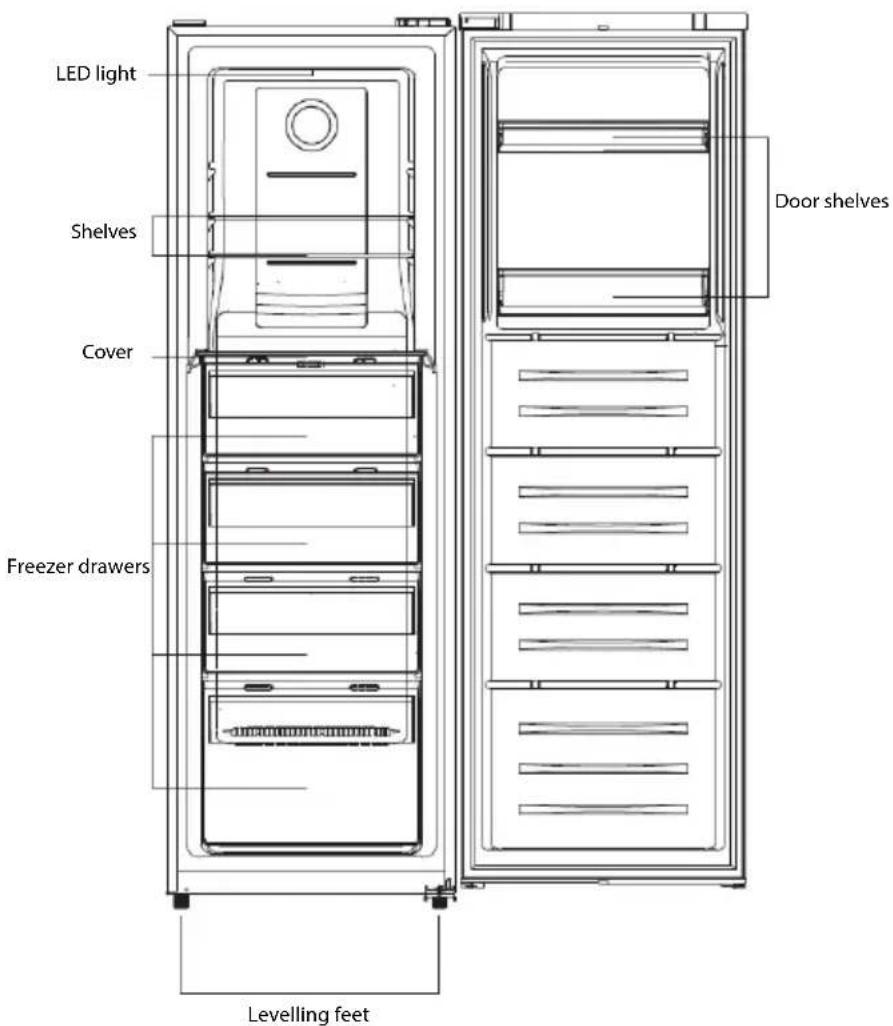
Recommended Food Arrangement
Freezer compartment (-14°C \~22°C)
| Freezing, storage of frozen food | |
| Freezer compartment | Freezing, storage of frozen food |
| Freezer shelves | Leftovers such as soups, stews, cooked meat and fish, potato dishes, soufflés and desserts. Vegetables, fruits |
| Top/middle drawers | Cakes and pastriesDairy products such as cheese and butter |
| Bottom drawer | cooked meat and fish |
| Freezer door shelves | Preserve small packaged frozen foodMinced meat, biscuits |
BEFORE INSTALLING THE APPLIANCE
Before connecting your appliance to the power supply, check that the voltage stated on the rating label of your appliance corresponds to the voltage in your home. A different voltage could damage the appliance.
The plug is the only way to unplug the appliance and should therefore be accessible at all times. To turn off main power to the appliance, turn it off and then detach the plug from the outlet.
The appliance must be grounded. The manufacturer is not responsible for damages that may occur as a result of usage without grounding.
INSTALLATION
Install the appliance in a dry, well ventilated room. The installation location should neither be exposed to direct sunlight nor near a heat source, e.g. a cooker, radiator, etc.
To ensure adequate ventilation for the appliance, allow a minimum of 10 cm of airspace on each side of the cabinet.
For uneven surfaces, front feet can be aligned.
AMBIENT TEMPERATURE
This appliance is designed to operate in ambient temperature between 10^ C and 43^ C. If these temperatures are exceeded, i.e. colder or warmer, the appliance will not operate correctly. If the ambient temperatures are exceeded for long periods, the temperature in the freezer compartment will rise above -18^ C and food spoilage may occur.
BEFORE PLACING FOOD IN THE APPLIANCE
- Remove all packaging.
- Allow the appliance to run empty for 2 – 3 hours so the compartments can cool to the appropriate temperature.
- Clean the inside of the appliance with warm water and a little liquid detergent to remove manufacturing and transportation dust.
POWER FAILURE
If there is a power failure, do not open the doors of the appliance. Frozen food should not be affected if the power failure lasts for less than 9 hours.
Do not refreeze frozen foods that have thawed completely. The food may be dangerous to eat.
ADJUSTING THE TEMPERATURES AND FUNCTIONS
Control Panel and Display
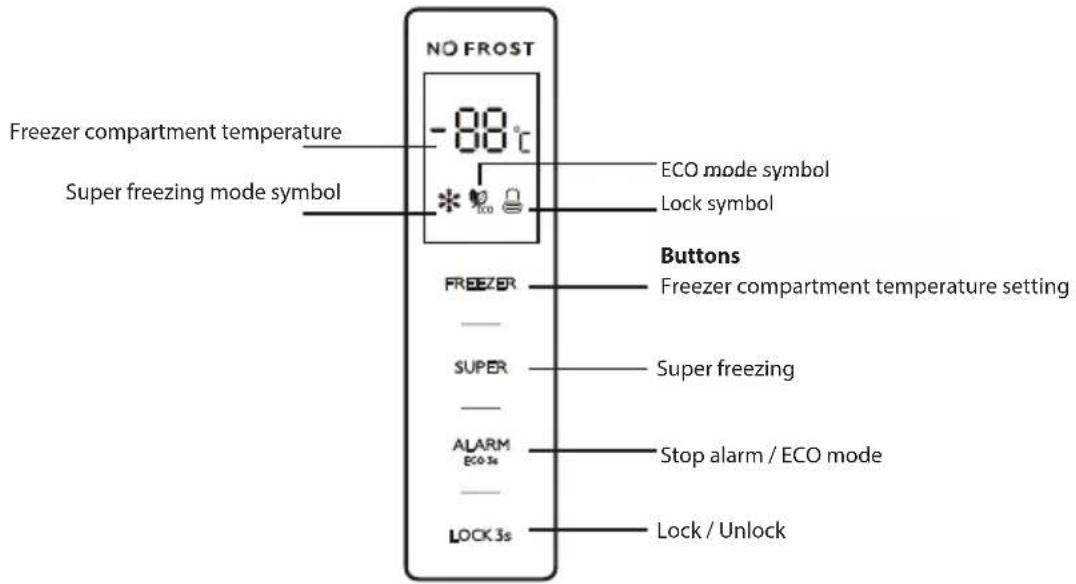
Setting the Freezer Compartment Temperature
The temperature of the freezer compartment can be set between -22°C and -14°C.
Repeatedly press to set the desired temperature.
Super freezing
This mode will help food to freeze quickly and retain its nutrients, vitamins, flavours and appearance.
- To activate this function, press SUPER. When this mode is activated, the display will show the symbol *. The display will show -25°C.
- This mode will be automatically deactivated after about 50 hours of operation. You can repeatedly press SUPER to manually deactivate this mode. The symbol will disappear from the display.
ECO energy saving function
This function makes the freezer work in a power saving mode by reducing the energy consumption, which is useful when you are away on holiday for example.
• To activate this function, press and hold ALARM ECO is for about 3 seconds. When this mode is activated, the display will show the symbol
- The display will show different preset temperatures, depending on the ambient temperature (Ta) of where the appliance is placed, as below.
| Ambient Temperature (Ta) | Ta≤13°C | 14°C < Ta ≤20°C | 21°C < Ta ≤27°C | 28°C < Ta ≤34°C | Ta>35°C |
| Preset Temperature | -18°C | -18°C | -18°C | -16°C | -15°C |
• To deactivate this function, press and hold for about 3 seconds.
Lock/Unlock
This function allows you to disable the buttons.
• To activate this function, press and hold LOCK3s for about 3 seconds. The symbol will appear on the display.
• To deactivate this function, press and hold LOCK3s again for 3 seconds. The symbol will appear on the display.
IMPORTANT! In the unlock state, if there is no operation of any button about 25 seconds, the system will automatically enter the lock state.
Door open alarm
When the door is left open or has not been closed properly for about 90 seconds, an alarm will beep.
To stop the alarm, press or close the door properly.
Temperature alarm
If high internal temperature of the appliance is detected, high temperature alarm will sound, the display will show "ht" and the detected temperature alternately.
ALARM To stop the alarm, press . ECO 36
High temperature display will disappear automatically only when detected temperature goes back to normal.
MOVING YOUR APPLIANCE
If the appliance is turned off for any reason, wait for 10 minutes before turning it back on. This will allow the refrigeration system pressures to equalize before restarting.
- Turn off the appliance and unplug it from the mains socket. Remove all food. Also remove all mobile parts (shelves, accessories, etc.) or fix them into the appliance to avoid any shock.
- Relocate and install. If the appliance has been left on its side for any length of time, leave it standing upright for at least 10 minutes before turning on.
Your appliance uses isobutane (R600a) as a refrigerant. Although R600a is an environmentally friendly and natural gas, it is explosive. Therefore you should be careful during shipment and installation to prevent your appliance's cooler elements from being damaged. In the event of a leak caused by damage to the cooler elements, move your appliance from open flame or heat sources and ventilate the room where the appliance is located for a few minutes.
FREEZING AND STORING FOOD IN THE FREEZER COMPARTMENT
Using the freezer compartment
• To store deep-frozen food.
• To make ice cubes.
- To freeze food.
Note: Ensure that the freezer compartment door has been closed properly.
Purchasing frozen food
- Packaging must not be damaged.
- Use by the 'use by /best before/best by/' date.
- If possible, transport deep-frozen food in an insulated bag and place quickly in the freezer drawers.
Storing frozen food
Store at -18°C or colder. Avoid opening the freezer compartment door unnecessarily.
Freezing fresh food
Freeze fresh and undamaged food only.
To retain the best possible nutritional value, flavour and colour, vegetables should be blanched before freezing.
Aubergines, peppers, zucchini and asparagus do not require blanching.
Note: Keep food to be frozen away from food which is already frozen.
- The following foods are suitable for freezing:
Cakes and pastries, fish and seafood, meat, game, poultry, vegetables, fruit, herbs, eggs without shells, dairy products such as cheese and butter, ready meals and leftovers such as soups, stews, cooked meat and fish, potato dishes, soufflés and desserts.
- The following foods are not suitable for freezing:
Types of vegetables, which are usually consumed raw, such as lettuce or radishes, eggs in shells, grapes, whole apples, pears and peaches, hard-boiled eggs, yoghurt, soured milk, sour cream, and mayonnaise.
Packing frozen food
To prevent food from losing its flavour or drying out, place food in airtight packaging.
-
Place food in packaging.
-
Remove air.
-
Seal the wrapping.
-
Label packaging with contents and dates of freezing.
Suitable packaging:
Plastic film, tubular film made of polyethylene, aluminium foil, freezer containers.
These products are available from specialist outlets.
Recommended storage times of frozen food in the freezer compartment
These times vary depending on the type of food. The food that you freeze can be preserved from 1 to 12 months (minimum at -18°C).
| Food | Storage time |
| Bacon, casseroles, milk | 1 month |
| Bread, ice cream, sausages, pies, prepared shellfish, oily fish | 2 months |
| Non-oily fish, shellfish, pizza, scones and muffins | 3 months |
| Ham, cakes, biscuits, beef and lamb chops, poultry pieces | 4 months |
| Butter, vegetables (blanched), eggs whole and yolks, cooked crayfish, minced meat (raw), pork (raw) | 6 months |
| Fruit (dry or in syrup), egg whites, beef (raw), whole chicken, lamb (raw), fruit cakes | 12 months |
Never forget:
- When you freeze fresh foods whit a 'use by /best before/best by/' date, you must freeze them before the expiry of this date.
- Check that the food was not already frozen. Indeed, frozen food that has thawed completely must not be refrozen.
- Once defrosted, food should be consumed quickly.
MAKING ICE CUBES
Fill the ice cube tray (not supplied) with 34 full of drinking water and place in the freezer drawer.
If the ice cube tray is stuck to the freezer drawer, loosen with a blunt tool only.
To loosen the ice cubes, twist the ice cube tray slightly or hold briefly under flowing water.
DEFROSTING
This appliance is equipped with a frost free system.
This system enables the freezer compartment to remain permanently ice-free, however, the food stored in the freezer drawers will not defrost.
Door Conversion
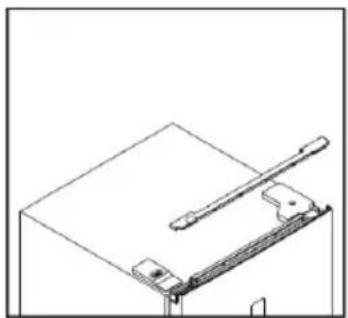
- Remove upper wire box covers.
natural_image
Pure technical line drawing of a mechanical assembly without any text, numbers, or symbols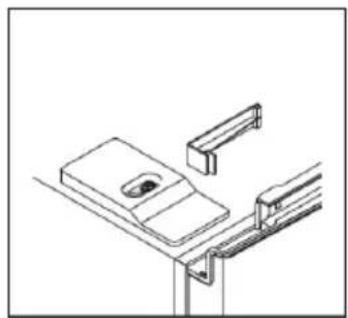
natural_image
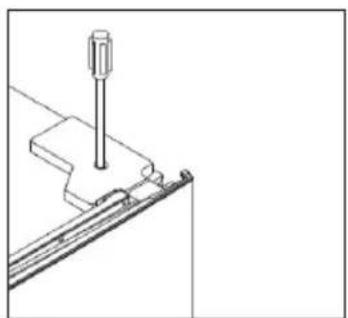
Pure technical line drawing of a mechanical assembly or mounting bracket (no text or symbols)- Unscrew right top hinge cover, and disconnect connectors of door switch and display.
natural_image
Technical line drawing of a mechanical assembly with a screw and bracket (no text or symbols)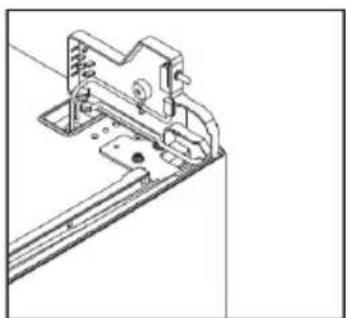
natural_image
Technical line drawing of a mechanical bracket assembly (no text or symbols)- Unscrew and remove the top hinge, and then remove the door.

natural_image
Diagram of a device with labeled components and connectors (no text or symbols)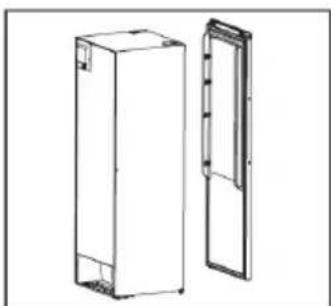
natural_image
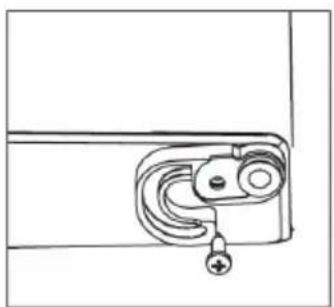
Technical line drawing of two rectangular metal enclosure units, one open and one closed, with no visible text or symbols.- Remove the right aid-closer block, and take out left aid-closer block from the accessory bag and install it to the left side.
natural_image
Simple line drawing of a door handle with a curved lock and plus symbol (no text or labels)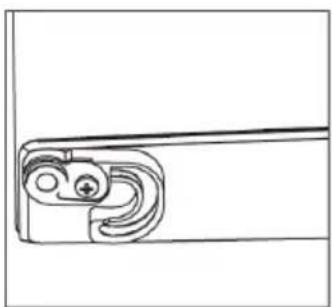
natural_image
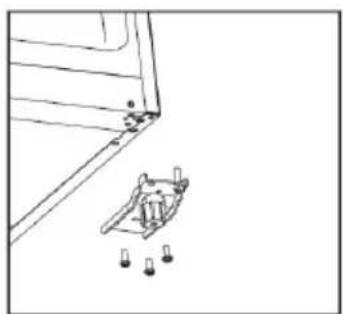
Simple line drawing of a mechanical component with curved and straight ends (no text or symbols)- Unscrew the bottom hinge and remove the adjustable foot and fix it to the opposite side.
natural_image
Simple line drawing of a mechanical assembly with a bracket and mounting holes (no text or symbols)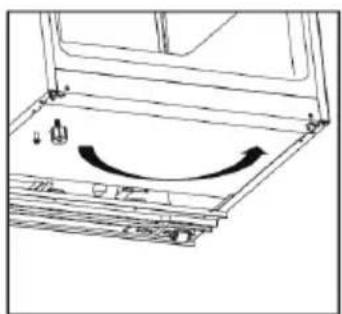
natural_image
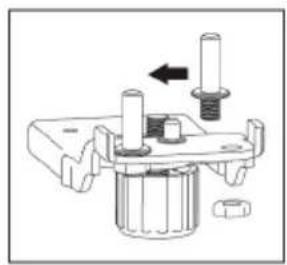
Diagram of a mechanical assembly with an arrow indicating rotational motion (no text or symbols present)- Unscrew the bottom hinge pin and fit it to the opposite side. Then install the bottom hinge on the opposite side.
natural_image
Mechanical assembly diagram showing a bolted joint with a nut and shaft (no text or symbols)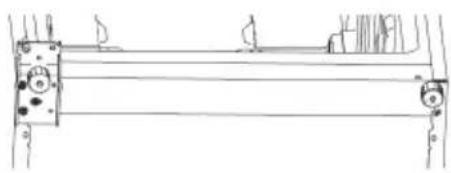
natural_image
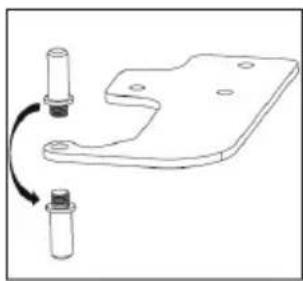
Pure technical line drawing of a mechanical assembly without any text, numbers, or symbols- Unscrew the top hinge pin and fit it from the bottom side to the upper side. Remove the door switch from the right hinge cover and then install it in left hinge cover.
natural_image
Technical line drawing of a mechanical bracket with two cylindrical components and a curved arrow indicating rotation (no text or symbols)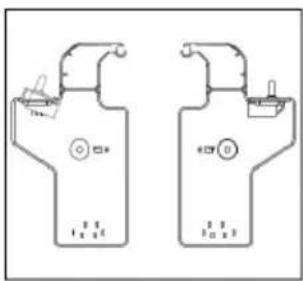
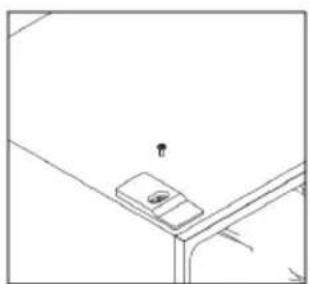
- Remove the screw and then remove the top decorative cover. Then install the cover on the opposite side with the screw.
natural_image
Simple line drawing of a junction table corner with a small object on top (no text or symbols)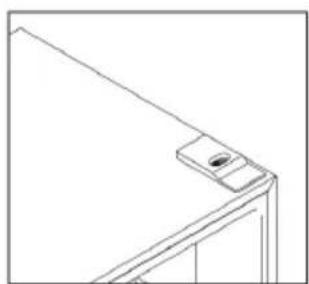
natural_image
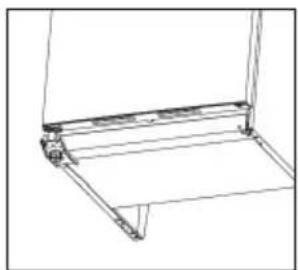
Line drawing of a corner-mounted device with a small inset component (no text or symbols)- Install the door, and move the connecting wires from right to the left side.
natural_image
Line drawing of a mechanical bracket or support structure (no text or symbols)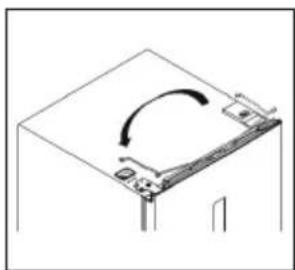
natural_image
Pure mechanical diagram showing a curved arrow on a rectangular component (no text or symbols)- Install the top hinge to the left side. Slightly adjust the top hinge while installing to make sure the gasket is well sealed.
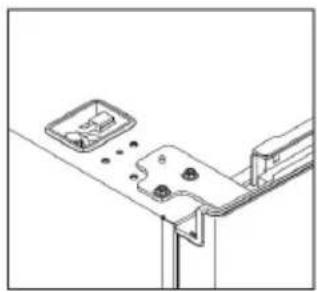
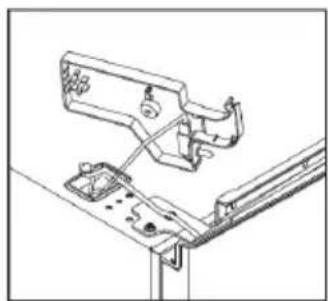
natural_image
Technical line drawing of a mechanical bracket or mounting bracket with mounting holes and a small inset component (no text or symbols)- Connect connectors of door switch and display, and install the left top hinge cover.
natural_image
Technical line drawing of a mechanical assembly with no visible text or symbols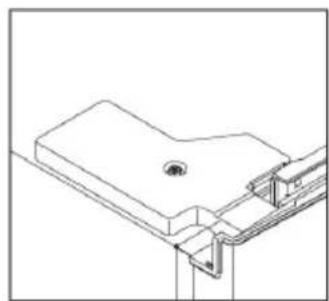
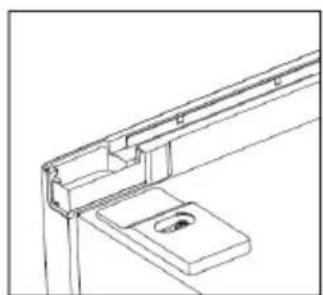
natural_image
Technical line drawing of a mechanical bracket or mounting structure (no text or symbols)- Install the upper wire box covers to the right side.
natural_image
Technical line drawing of a structural bracket assembly (no text or symbols)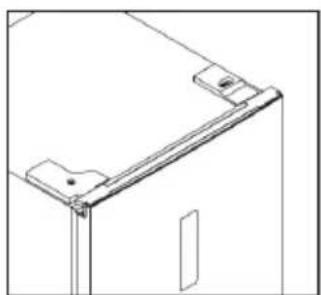
natural_image
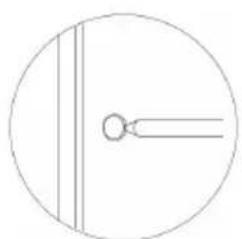
Technical line drawing of a mechanical bracket or frame assembly (no text or symbols)Easy open handle installation
- Remove the screw hole covers.
natural_image
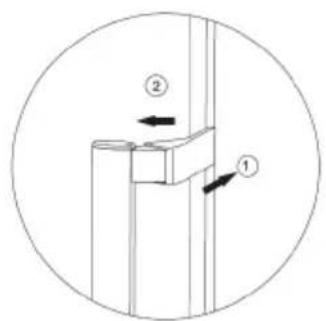
Simple circular diagram with two vertical lines and a small circle inside, no text or symbols present.- Install the easy open handle covers.
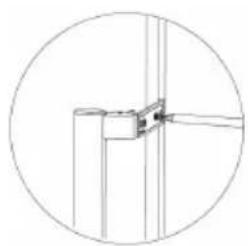
- Install the easy open handle.
natural_image
Pure technical line drawing of a mechanical joint or bracket (no text or symbols)TIPS FOR SAVING ENERGY
For the most energy efficient use of your appliance:
- Ensure your appliance has adequate ventilation as recommended in the installation instructions.
- Allow warm food and drinks to cool down before placing in the appliance.
- Thaw frozen food in the refrigerator compartment and use the low temperature of the frozen food to cool refrigerated food.
- Keep door openings to a minimum.
- Open the appliance as briefly as possible.
- Ensure that the fridge and freezer doors are always closed properly.
OPERATING NOISES
Normal noises
- Motors are running.
- Refrigerant is flowing through the tubing.
CLEANING AND MAINTENANCE

Do not use abrasive cleaning agents or solvents.
- Disconnect the mains plug from the mains socket.
- Take out the food and store in a cool location.
- Clean the appliance with a soft cloth, warm water and detergent.
- Wipe the door seal with clear water only and then wipe dry thoroughly.
- After cleaning reconnect and set the temperature as desired.
- Put the food back into the appliance.
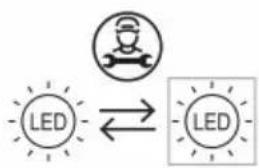
The LED light in the freezer cannot be replaced by the user. If the LED light stops working, please contact the local authorised service agent.
Dissemble the bottom drawer
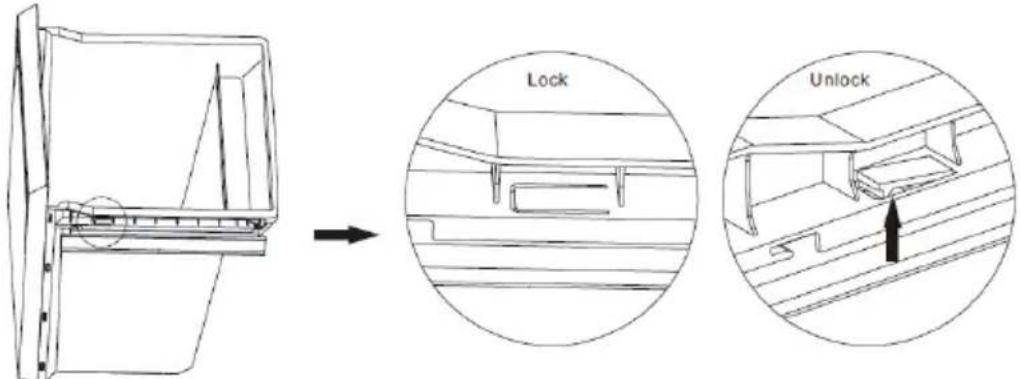
- Pull out the bottom drawer to the stopper position.
- Push up the elastic buckles on both sides of the bottom drawer.
- Pull out the bottom drawer.
Cleaning Tips
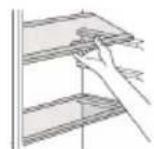
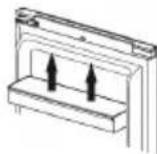
- Remove all shelves, door shelves and drawers from the appliance. Wash them in warm soapy water with a soft sponge. Rinse and dry thoroughly.
- Wipe the interior parts (including door switch and lamp cover) with a damp cloth soaked in a mixture of warm water and dishwashing liquid. For stubborn stains, use baking soda.
- Wipe down the doors, including edges, with a microfiber cloth dampened with a mild dishwashing liquid and water. Use a wet sponge and soft brush (such as toothbrush) to remove any stuck-on food.
- Wipe all drainage area and water evacuation port with a damp cloth.
TROUBLESHOOTING
If there is a problem with your appliance, please check the following points before contacting customer service.
| Problem | Possible causes | Possible solution |
| Appliance does not operate. | No electricity at power outlet. | Check that the plug is correctly connected and power switched on. |
| Noises | Cabinet not stable or level. | See installation section. |
| Appliance not cool | Temperature setting not correct.Frequent door openings.Large amount of food recently added. | See Adjusting the Temperatures and Functions section.Minimise door openings to allow temperatures to stabilise. |
SPECIFICATIONS
| Temperature rise time | Power cut safe 9 h |
| Noise emissions 42 dB (A) re 1 pW | |
| Electric shock protection class Class I | |
| Rated voltage and frequency 220-240V~ 50Hz | |
| Rated current 1.3A | |
| Total input power 140W | |
| Defrost power 160W | |
| Insulation blowing gas Cyclopentane | |
| Refrigerant/Amount R600a/ 74g | |
| Net weight | 68 kg |
| Maximum lamp power | 2.5W |
Thomson and the Thomson logo are trademarks of Technicolor (S.A.) or its affiliates and are used under license by Fnac Darty (S.A.).
flowchart
graph TD
    A["LED"] <--> B["LED"]
Replaceable (LED only) light source by a professional
This product contains a light source of energy efficiency class G.
| Product Information Sheet COMMISSION DELEGATED REGULATION (EU) 2019/2016 with regard to energy labelling of refrigerating appliances | |||||
| Supplier's name or trade mark: Etablissements Darty & fils © | THOMSON | |||||
| Supplier's address: 9 Rue des Bateaux-Lavoirs, 94200 Ivry-sur-Seine, France | |||||
| Model identifier: THFZ272NFWH THFZ272NFSL | |||||
| Type of refrigerating appliance: | |||||
| Low-noise appliance: | no | Design type: | freestanding | ||
| Wine storage appliance: | no | Other refrigerating appliance: | yes | ||
| General product parameters: | |||||
| Parameter | Value | Parameter | Value | ||
| Overall dimensions (millimeter) | Height | 1850 | Total volume (dm3 or l) | 274 | |
| Width | 600 | ||||
| Depth | 700 | ||||
| EEI | 100 | Energy efficiency class | E | ||
| Airborne acoustical noise emissions (dB(A) re 1 pW) | 39 | Airborne acoustical noise emission class | C | ||
| Annual energy consumption (kWh/a) | 246 | Climate class: | extended temperate/temperate/subtropical/tropical | ||
| Minimum ambient temperature (°C), for which the refrigerating appliance is suitable | 10 | Maximum ambient temperature (°C), for which the refrigerating appliance is suitable | 43 | ||
| Winter setting | no | ||||
| Compartment Parameters: | |||||
| Compartment type | Compartment parameters and values | ||||
| Compartment Volume (dm3 or l) | Recommended temperature setting for optimised food storage (°C) | Freezing capacity (kg/24 h) | Defrosting type (auto-defrost = A, manual defrost = M) | ||
| Pantry | no | — | — | — | — |
| Wine storage | no | — | — | — | — |
| Cellar | no | — | — | — | — |
| Fresh food no — — — | |||||
| Chill no — — — — | |||||
| 0-star or ice-making | no — — — — | ||||
| 1-star no — — — — | |||||
| 2-star no — — — — | |||||
| 3-star no — — — — | |||||
| 4-star | yes | 274,0 | -18 | 17,0 | A |
| 2-star section | no — — — — | ||||
| Variable temperature compartment | no — — — — | ||||
| For 4-star compartments | |||||
| Fast freeze facility | yes | ||||
| For wine storage appliances | |||||
| Number of standard wine bottles — | |||||
| Light source parameters (a): | |||||
| Type of light source | LED | ||||
| Energy efficiency class | G | ||||
| Minimum duration of the guarantee offered by the manufacturer : 24 months | |||||
| Additional information: | |||||
| Weblink to the supplier's website, where the information in point 4 of Annex II of Commission Regulation (EU)2019/2019 is found : www.darty.com | |||||
^(a) as determined in accordance with Commission Delegated Regulation (EU) 2019/2015.
Climate class:
- Extended temperate: 'this refrigerating appliance is intended to be used at ambient temperatures ranging from 10 °C to 32 °C'.
- Temperate: 'this refrigerating appliance is intended to be used at ambient temperatures ranging from 16 °C to 32 °C'.
- Subtropical: 'this refrigerating appliance is intended to be used at ambient temperatures ranging from 16 °C to 38 °C'.
- Tropical: 'this refrigerating appliance is intended to be used at ambient temperatures ranging from 16 °C to 43 °C'.
This refrigerating appliance is not intended to be used as a built-in appliance.
To find the model information in the product database :
Click the link
https://eprel.ec.europa.eu/screen/product/refrigeratingappliances2019/321407
https://eprel.ec.europa.eu/screen/product/refrigeratingappliances2019/321400

REPAIR AND SPARE PARTS SERVICE
Do not disassemble or repair the appliance by yourself. Failure to do so may result in an electric shock or personal injury.
To access to professional repair and order spare parts, please get the support from FNAC DARTY after-sales service.
Spare parts for your appliances will be delivered within 15 working days after having received the order.
Please Note!
All appliances have a 2-year warranty.
Warranty does not cover damages caused due to improper installation, unauthorized modification, self-repair or non-professional repair.
Contact us at :
 www.darty.com0978 970 97024 Hours7 Days a week9 Rue des Bateaux-Lavoirs,94200 Ivry-sur-Seine,France www.darty.com0978 970 97024 Hours7 Days a week9 Rue des Bateaux-Lavoirs,94200 Ivry-sur-Seine,France | Vanden Borrein alle vertrouwenwww.vandenborre.be 02 334 00 008 AM – 6 PMMon to Sat[DSBT]Slesbroekstraat 1011600 Sint-Pieters-LeeuwBelgium 02 334 00 008 AM – 6 PMMon to Sat[DSBT]Slesbroekstraat 1011600 Sint-Pieters-LeeuwBelgium |
Vanden Borre
DISPOSAL
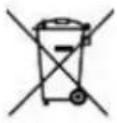

As a responsible retailer we care about the environment.
As such we urge you to follow the correct disposal procedure for the appliance and packaging materials. This will help conserve natural resources and ensure that it is recycled in a manner that protects health and the environment.
You must dispose of this appliance and its packaging according to local laws and regulations. Because this appliance contains electronic components, the appliance and its accessories must be disposed of separately from household waste when the appliance reaches its end of life.
Contact your local authority to learn about disposal and recycling.
The appliance should be taken to your local collection point for recycling. Some collection points accept appliance free of charge.
We apologise for any inconvenience caused by minor inconsistencies in these instructions, which may occur as a result of product improvement and development.
UW APPARAAT VERPLAATSEN....11
LEVENSMIDDELEN IN HET VRIESVAK INVRIEZEN EN BEWAREN ....11
ONTDOOIEN 13
PROBLEEMOPLOSSING....17
PRODUCTINFORMATIEBLAD....19
SERVICE VOOR REPARATIES EN RESERVEONDERDELEN 21
VERWIJDERING 22
UW APPARAAT VERPLAATSEN
natural_image
Pure technical line drawing of a mechanical assembly without any text, numbers, or symbols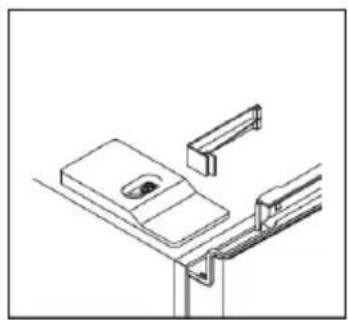
natural_image
Pure technical line drawing of a mechanical assembly or mounting bracket (no text or symbols)natural_image
Technical line drawing of a mechanical assembly with a screw and bracket (no text or symbols)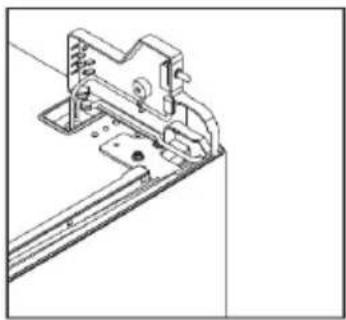
natural_image
Technical line drawing of a mechanical assembly with mounting brackets and a bracket (no text or symbols)natural_image
Diagram of a device with labeled components and mounting points (no text or symbols)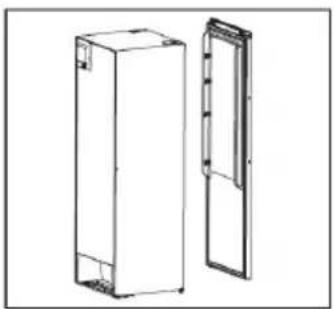
natural_image
Technical line drawing of two rectangular metal enclosure units, one open and one closed, with no visible text or symbols.natural_image
Simple line drawing of a mechanical clamp or bracket with a plus symbol at the end (no text or labels)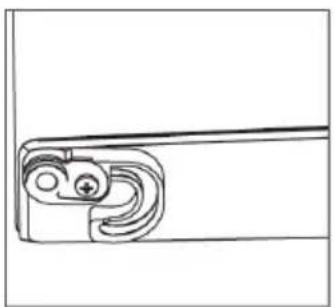
natural_image
Pure mechanical component diagram without any text, numbers, or symbolsnatural_image
Simple line drawing of a mechanical assembly with a bracket and mounting holes (no text or symbols)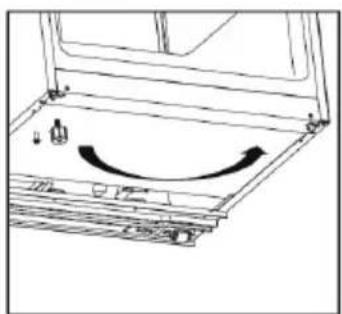
natural_image
Diagram of a mechanical assembly with an arrow indicating rotational motion (no text or symbols present)natural_image
Mechanical assembly diagram showing a shaft and housing with a bolt and nut (no text or symbols)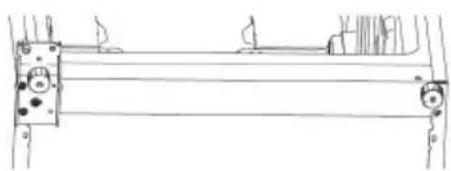
natural_image
Pure technical line drawing of a mechanical assembly without any text, numbers, or symbolsnatural_image
Technical line drawing of a mechanical bracket with two cylindrical components and a curved arrow indicating rotation (no text or symbols)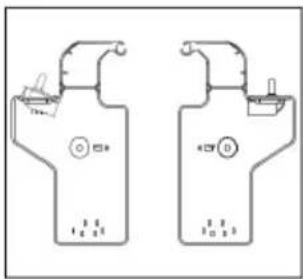
natural_image
Simple line drawing of a corner-mounted device with a small object on top (no text or symbols)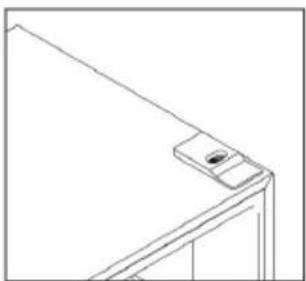
natural_image
Line drawing of a corner-mounted device with a small screen on top (no text or symbols)natural_image
Line drawing of a simple metal frame structure with no text or symbols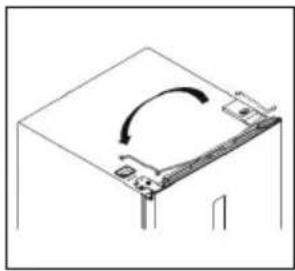
natural_image
Diagram of a computer monitor with an open lid and scroll wheel, showing no text or symbolsnatural_image
Technical line drawing of a mechanical bracket assembly with mounting holes and a small inset component (no text or symbols)natural_image
Technical line drawing of a mechanical assembly with no visible text or symbols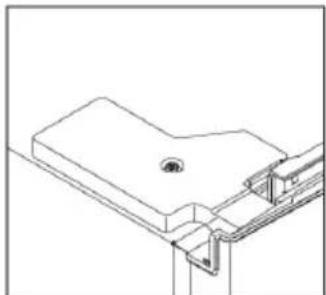
natural_image
Pure technical line drawing of a mechanical bracket or mounting structure without any text, numbers, or symbolsnatural_image
Technical line drawing of a mechanical bracket assembly (no text or symbols)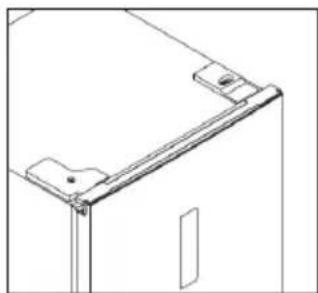
natural_image
Technical line drawing of a door frame with mounting bracket (no text or symbols)natural_image
Simple circular diagram with a vertical line and a horizontal line inside, no text or symbols present.opening.
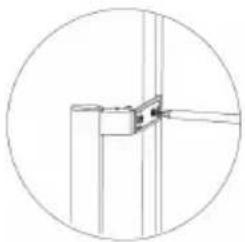
natural_image
Pure technical line drawing of a mechanical joint or bracket (no text or symbols)ENERGIEBESPARINGSTIPS
https://eprel.ec.europa.eu/screen/product/refrigeratingappliances2019/321407
https://eprel.ec.europa.eu/screen/product/refrigeratingappliances2019/321400
EU Declaration of Conformity
Product Description:
Frost-Free Upright Freezer
natural_image
Front view of a white refrigerator with a black door and indicator light (no visible text or symbols)Marque -
Brand /Merk /Marca:
THOMSON
The object of the declaration described above is in conformity with the relevant Union harmonisation legislation:
Low Voltage Directive (LVD)
Eco design requirements for energy-related products (ErP)
RoHS
EMC:
EN 55014-1:2017/A11:2020
EN IEC 61000-3-2:2019
EN 61000-3-3:2013/A1:2019
EN IEC 55014-1:2021
EN IEC 61000-3-2:2019/A1:2021
EN 55014-2:2015
EN IEC 55014-2:2021
LVD :
EN 60335-1:2012/A2:2019
EN 60335-2-24:2010/A2:2019
EN 62233:2008
ErP :
(EU) 2019/2016
(EU) 2019/2019
(EU) 2021/340
(EU)2021/341
EN 62552-1:2020
EN 62552-2:2020
EN 62552-3:2020
EN 60704-1:2010+A11:2012
EN 60704-2-14:2013+A11:2015+A1:2019
(EU) 2019/2015
(EU) 2019/2020
This declaration of conformity is drawn up under the sole responsibility of the manufacturer.
The person responsible for this declaration is:
Place, Date / Lieu :
Ivry-sur-Seine, mars 21, 2022
DocuSigned by:
Pndrag Petricevic
EA30F3FB8F314D0...




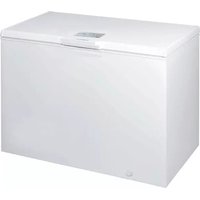
- TABLE DES MATIÈRES
- CONSEILS D'ÉCONOMIE D'ÉNERGIE
- DÉPANNAGE
- SERVICE DE RÉPARATION ET PIÈCES DE RECHANGE
- WARNINGS
- For disposal of the appliance:
- For installation, servicing:
- For handling:
- IMPORTANT SAFETY INSTRUCTIONS
- Dispose of your old appliance
- NAMES OF PARTS
- Recommended Food Arrangement
- BEFORE INSTALLING THE APPLIANCE
- INSTALLATION
- AMBIENT TEMPERATURE
- BEFORE PLACING FOOD IN THE APPLIANCE
- POWER FAILURE
- ADJUSTING THE TEMPERATURES AND FUNCTIONS
- Control Panel and Display
- Setting the Freezer Compartment Temperature
- Super freezing
- ECO energy saving function
- Lock/Unlock
- Door open alarm
- Temperature alarm
- MOVING YOUR APPLIANCE
- FREEZING AND STORING FOOD IN THE FREEZER COMPARTMENT
- Using the freezer compartment
- Purchasing frozen food
- Storing frozen food
- Freezing fresh food
- Packing frozen food
- Recommended storage times of frozen food in the freezer compartment
- Never forget:
- MAKING ICE CUBES
- DEFROSTING
- Door Conversion
- Easy open handle installation
- TIPS FOR SAVING ENERGY
- OPERATING NOISES
- Normal noises
- CLEANING AND MAINTENANCE
- Do not use abrasive cleaning agents or solvents.
- Cleaning Tips
- TROUBLESHOOTING
- REPAIR AND SPARE PARTS SERVICE
- Please Note!
- Vanden Borre
- DISPOSAL
- UW APPARAAT VERPLAATSEN
- ENERGIEBESPARINGSTIPS
- Marque -
- EMC:
- LVD :
- ErP :
Brand : THOMSON
Model : THFZ272NFIX
Category : Freezer