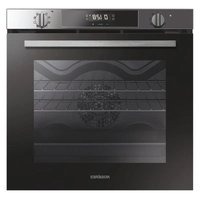
RFC3O3351IN - Oven ROSIERES - Free user manual and instructions
Find the device manual for free RFC3O3351IN ROSIERES in PDF.


| Product type | Built-in electric oven |
| Brand | Rosieres |
| Model | RFC3O3351IN |
| Dimensions (W x H x D) | 595 x 595 x 548.5 mm |
| Approximate weight | 30 kg |
| Power supply | 220-240 V ~ 50/60 Hz |
| Cooking modes | Fan-assisted, Natural convection, Grill, Bottom heat, Defrost, Master Bake, Lower heating element + fan |
| Usable capacity | Approximately 70 L |
| Cleaning | Manual (soapy water, no steam cleaner) |
| Interior lighting | Bulb G energy efficiency class |
| Child safety | Yes, with function lock |
| Timer | Yes with automatic shut-off and cooking end programming |
| Side racks | Yes, removable for cleaning |
| Supplied accessories | Grill, drip tray, baking sheet |
| Installation | Built-in, requires adequate ventilation |
| Energy consumption | Not specified (energy class not indicated) |
| Repairability | Spare parts available through after-sales service |
Frequently Asked Questions - RFC3O3351IN ROSIERES
User questions about RFC3O3351IN ROSIERES
0 question about this device. Answer the ones you know or ask your own.
Ask a new question about this device
Download the instructions for your Oven in PDF format for free! Find your manual RFC3O3351IN - ROSIERES and take your electronic device back in hand. On this page are published all the documents necessary for the use of your device. RFC3O3351IN by ROSIERES.
USER MANUAL RFC3O3351IN ROSIERES
natural_image
Simple diagram with two dots above a calendar-like frame containing three diagonal lines (no text or symbols)User Instructions
OVENS
EN
2
Mode d'emploi
FOURS
FR
15
3 Safety Indications
7 General Instructions
9 Product description
10 Display description
12 Cooking Modes
13 General notes on cleaning
13 Maintenance
14 Troubleshooting
28 Installation
Safety Indications
- During cooking, moisture may condense inside the oven cavity or on the glass of the door. This is a normal condition. To reduce this effect, wait 10-15 minutes after turning on the power before putting food inside the oven. In any case, the condensation disappears when the oven reaches the cooking temperature.
- Cook the vegetables in a container with a lid instead of an open tray.
- Avoid leaving food inside the oven after cooking for more than 15/20 minutes.
- WARNING: the accessible parts can become hot when the oven is in use. Young children should be kept at a safe distance.
- WARNING: the accessible parts can become hot when the grill is in use. Children should be kept at a safe distance.
- Disconnect the appliance from the mains electricity supply before carrying out any work or maintenance.
- WARNING: in order to avoid any danger caused by the accidental resetting of the thermal interruption device, the appliance should not be powered by an external switching device, such as a timer, or be connected to a circuit that is regularly switched on and off.
- Children under 8 should be kept at a safe distance from the appliance if not continuously supervised.
• Children should not play with the appliance. - The appliance can be used by those aged 8 or over and by those with limited physical, sensorial or mental capacities, without experience or knowledge of the product, only if supervised or provided with instruction as to the operation of the appliance, in a safe way with awareness of the possible risks.
- Cleaning and maintenance should not be carried out by unsupervised children.
- Do not use rough or abrasive materials or sharp metal scrapers to clean the oven door glasses, as they can scratch the surface
and cause the glass to shatter.
- The oven must be switched off before removing the removable parts. After cleaning, reassemble them according the instructions.
- Only use the meat probe recommended for this oven.
- Do not use a steam cleaner or high pressure spray for cleaning operations.
- IF THE OVEN IS PROVIDED BY THE MANUFACTURER WITHOUT PLUG:
THE APPLIANCE MUST NOT BE CONNECTED TO THE POWER SOURCE USING PLUG OR SOCKETS, BUT MUST BE DIRECTLY CONNECTED TO THE SUPPLY MAINS. The connection to the power source must be carried out by a suitably qualified professional. In order to have an installation compliant to the current safety legislation the oven must be connected only placing an omnipolar breaker, with contact separation compliant to the requirements for overvoltage category III, between the appliance and the power source. The omnipolar breaker must bear the maximum connected load and must be in line with current legislation. The yellow-green earth cable should not be interrupted by the breaker. The omnipolar breaker used for the connection must be easily accessible when the appliance is installed.
The connection to the power source must be carried out by a suitably qualified professional considering the polarity of the oven and of the power source.
The disconnection must be achieved incorporating a switch in the fixed wiring in accordance with the wiring rules
- IF THE OVEN IS PROVI ED BY THE MANUFACTURER WITH PLUG:
The socket must be suitable for the load indicated on the tag and must have ground contact connected and in operation. The earth conductor is yellow-green in colour. This operation should be carried out by a suitably qualified professional. In case
of incompatibility between the socket and the appliance plug, ask a qualified electrician to substitute the socket with another suitable type. The plug and the socket must be conformed to the current norms of the installation country. Connection to the power source can also be made by placing an omnipolar breaker, with contact separation compliant to the requirements for overvoltage category III, between the appliance and the power source that can bear the maximum connected load and that is in line with current legislation. The yellow-green earth cable should not be interrupted by the breaker. The socket or omnipolar breaker used for the connection should be easily accessible when the appliance is installed.
The disconnection may be achieved by having the plug accessible or by incorporating a switch in the fixed wiring in accordance with the wiring rules.
- If the power cable is damaged, it should be substituted with a cable or special bundle available from the manufacturer or by contacting the customer service department. The type of power cable must be H05V2V2-F. This operation should be carried out by a suitably qualified professional. The earth conductor (yellow-green) must be approximately 10 mm longer than the other conductors. For any repairs, refer only to the Customer Care Department and request the use of original spare parts.
- Failure to comply with the above can compromise the safety of the appliance and invalidate the guarantee.
- Any excess of spilled material should be removed before cleaning.
- A long power supply failure during an occurring cooking phase may cause a malfunction of the monitor. In this case contact customer service.
- The appliance must not be installed behind a decorative door in order to avoid overheating.
- When you place the shelf inside, make sure that the stop is directed upwards and in the back of the cavity. The shelf must be
inserted completely into the cavity.
- When inserting the grid tray pay attention that the anti-slide edge is positioned rearwards and upwards.
- WARNING: Do not line the oven walls with aluminium foil or single-use protection available from stores. Aluminium foil or any other protection, in direct contact with the hot enamel, risk melting and deteriorating the enamel of the insides.
- WARNING: Never remove the oven door seal.
- CAUTION: Do not refill the cavity bottom with water during cooking or when the oven is hot.
- No additional operation/setting is required in order to operate the appliance at the rated frequencies.
- The oven can be located high in a column or under a worktop. Before fixing, you must ensure good ventilation in the oven space to allow proper circulation of the fresh air required for cooling and protecting the internal parts. Make the openings specified on last page according to the type of fitting.
- For a correct use of the oven it is advisable not to put the food in direct contact with the racks and trays, but to use oven papers and / or special containers.
General Instructions
We thank you for choosing one of our products. For the best results with your oven, you should read this manual carefully and retain it for future reference. Before installing the oven, take note of the serial number so that you can give it to customer service staff if any repairs are required. Having removed the oven from its packaging, check that it has not been damaged during transportation. If you have doubts, do not use the oven and refer to a qualified technician for advice. Keep all of the packaging material (plastic bags, polystyrene, nails) out of the reach of children. When the oven is switched on for the first time, strong smelling smoke can develop, which is caused by the glue on the insulation panels surrounding the oven heating for the first time. This is absolutely normal and, if it occurs, you should wait for the smoke to dissipate before putting food in the oven. The manufacturer accepts no responsibility in cases where the instructions contained in this document are not observed.
NOTE: the oven functions, properties and accessories cited in this manual will vary, depending on the model you have purchased.
Safety Indications
Only use the oven for its intended purpose, that is only for the cooking of foods; any other use, for example as a heat source, is considered improper and therefore dangerous. The manufacturer cannot be held responsible for any damage resulting from improper, incorrect or unreasonable usage.
The use of any electrical appliance implies the observance of some fundamental rules:
- do not pull on the power cable to disconnect the plug from the socket;
- do not touch the appliance with wet or damp hands or feet;
- in general the use of adaptors, multiple sockets and extension cables is not recommended;
- in case of malfunction and/or poor operation, switch off the appliance and do not tamper with it.
Electrical Safety
ENSURE THAT AN ELECTRICIAN OR QUALIFIED TECHNICIAN MAKES THE ELECTRICAL CONNECTIONS. The power supply to which the oven is connected must conform with the laws in force in the country of installation. The manufacturer accepts no responsibility for any damage caused by the failure to observe these instructions. The oven must be connected to an electrical supply with an earthed wall outlet or a disconnector with multiple poles, depending on the laws in force in the country of installation. The electrical supply should be protected with suitable fuses and the cables used must have a transverse section that can ensure correct supply to the oven.
CONNECTION
The oven is supplied with a power cable that should only be connected to an electrical supply with 220-240 Vac power between the phases or between the phase and neutral. Before the oven is connected to the electrical supply, it is important to check:
- power voltage indicated on the gauge;
- the setting of the disconnector.
The grounding wire connected to the oven's earth terminal must be connected to the earth terminal of the power supply.
WARNING
Before connecting the oven to the power supply, ask a qualified electrician to check the continuity of the power supply's earth terminal. The manufacturer accepts no responsibility for any accidents or other problems caused by failure to connect the oven to the earth terminal or by an earth connection that has defective continuity.
NOTE: as the oven could require maintenance work, it is advisable to keep another wall socket available so that the oven can be connected to this if it is removed from the space in which it is installed. The power cable must only be substituted by technical service staff or by technicians with equivalent qualifications.
A low light around the central main switch could be present when the oven is off. This is a normal behavior. I can be removed just turning the plug upside down or swapping the supply terminals.
Recommendations
After each use of the oven, a minimum of cleaning will help keep the oven perfectly clean.
Do not line the oven walls with aluminium foil or single-use protection available from stores. Aluminium foil or any other protection, in direct contact with the hot enamel, risks melting and deteriorating the enamel of the insides. In order to prevent excessive dirtying of your oven and the resulting strong smokey smells, we recommend not using the oven at very high temperature. It is better to extend the cooking time and lower the temperature a little. In addition to the accessories supplied with the oven, we advise you only use dishes and baking moulds resistant to very high temperatures.
Installation
The manufacturers have no obligation to carry this out. If the assistance of the manufacturer is required to rectify faults arising from incorrect installation, this assistance is not covered by the guarantee. The installation instructions for professionally qualified personnel must be followed. Incorrect installation may cause harm or injury to people, animals or belongings. The manufacturer cannot be held responsible for such harm or injury.
The oven can be located high in a column or under a worktop. Before fixing, you must ensure good ventilation in the oven space to allow proper circulation of the fresh air required for cooling and protecting the internal parts. Make the openings specified on last page according to the type of fitting.
Product description
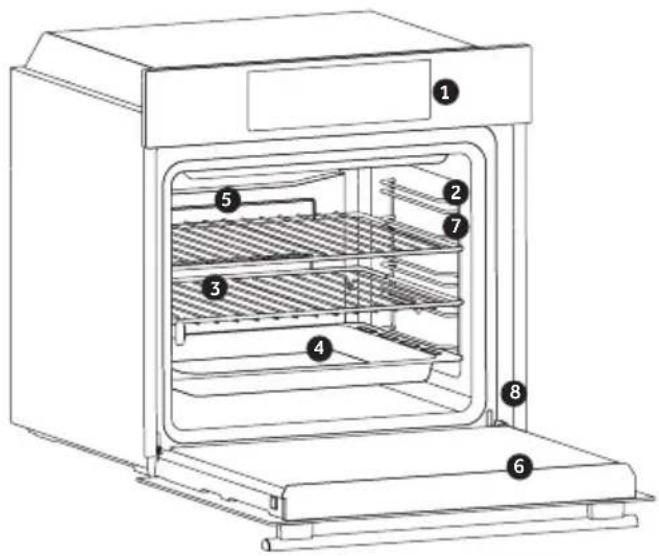
ACCESSORIES
- Control panel
- Shelf positions (lateral wire grid if included)
- Grids
- Trays
- Fan (if present)
- Oven door
-
Lateral wire grids (if present: only for flat cavity)
-
Serial number
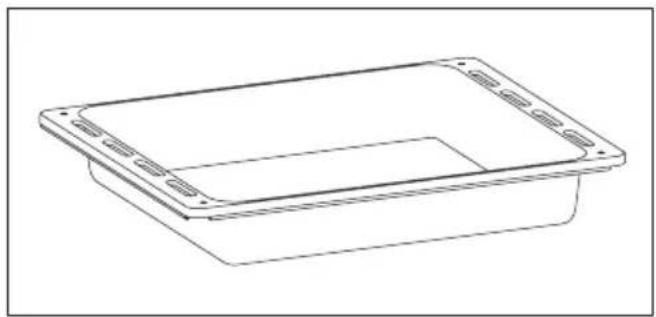
Drip tray
natural_image
Line drawing of a rectangular container with side slots and a recessed opening (no text or symbols)Collects residues that drip when cooking food on the grills.
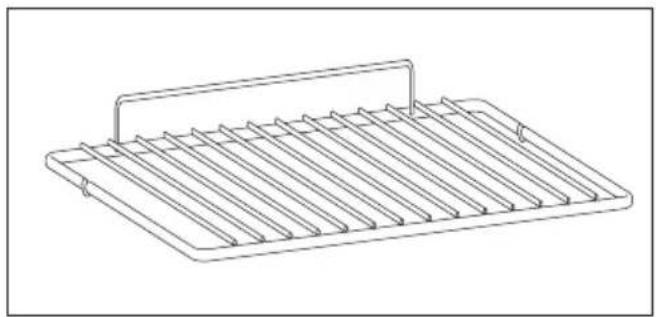
Metal grid
natural_image
Line drawing of a rectangular metal tray with vertical slats and a handle (no text or symbols)Holds baking trays and plates.
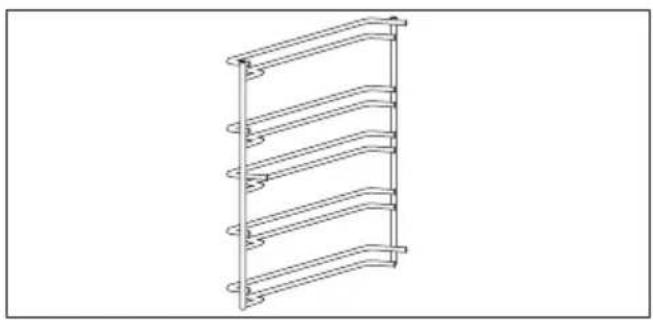
Lateral wire grids (only if present)
natural_image
Line drawing of a multi-tiered ladder structure with no text or symbolsLocated on both sides of the oven cavity, holds metal grills and drip pans.
First Use
PRELIMINARY CLEANING; Clean the oven before using for the first time. Wipe over external surfaces with a damp soft cloth. Wash all accessories and wipe inside the oven with a solution of hot water and washing up liquid. Set the empty oven to the maximum temperature and leave on for about 1 hour, this will remove any lingering smells of newness.
Display description

- Minute minder
- Clock setting
- Cooking time
- Child Lock
- Temperature or clock display
- LCD display adjustment controls
- Thermostat selector knob
- Function selector knob
WARNING: the first operation to carry out after the oven has been installed or following the interruption of power supply (this is recognizable the display pulsating and showing 12:00) is setting the correct time. This is achieved as follows.
- Push the central button 4 times
- Set time with "-" "+" buttons.
- Release all buttons.
ATTENTION: The oven will only operate providing the clock is set.
| FUNCTION HOW TO ACTIVATE | HOW TO DEACTIVATE | WHAT IT DOES WHY | IT IS NEEDED | |
| KEY LOCK | Child Lock function is activated by touching Set (+) for a minimum of 5 seconds. From this moment on all other function are locked and the display will flash STOP and preset time intermittently. From this moment on all other functions are locked, LED of child lock turn on, the display will flash STOP and present time intermittently | Child Lock function is deactivated by touching touchpad Set (+) again for a minimum of 5 seconds. From this moment on all functions are selectable again. From this moment LED of child lock turn off and all functions are selectable again. | ||
MINUTE MINDER | Push the central button 1 timesPress the buttons “-” “+” to set the required timeRelease all the buttons | When the set time as elapsed an audible alarm is activated (this alarm will stop on its own, however it can be stopped immediately by pressing the button) SELECT. | Sounds an alarm at the end of the set time.During the process, the display shows the remaining time. | Allows to use the oven as alarm clock (could be activated either with operating the oven or with out operating the oven) |
COOKING TIME | Push the central button 2 timesPress the buttons “-” or “+” to set the lenght of cooking requiredRelease all buttonsSet the cooking function with the oven function selector | Push any button to stop the signal. Push the central button to return to the clock function. | It allows to preset the cooking time required for the recipe chosen.To check how long is left to run press the SELECT button 2 Times.To alter/change the preset time press SELECT and “-” “+” buttons. | When the time is elapsed the oven will switch off automatically.Should you wish to stop cooking earlier either turn the function selector to 0, or set time to 0:00 (SELECT and “-” “+” buttons) |
END OF COOKING | Push the central button 3 timesPress the buttons “-” “+” to set the time at which you wish the oven to switch offRelease the buttonsSet the cooking function with the oven function selector. | At the time set, the oven will switch off. To switch off manually, turn the oven function selector to position O. | Enables you to set the end of cooking timeTo check the preset time push the central button 3 timesTo modify the preset time press buttons SELECT + “-” “+” | This function is typically used with “cooking time” function. For example if the dish has to be cooked for 45 minutes and needs to be ready by 12:30, simply select the required function, set the cooking time to 45 minutes and the end of cooking time to 12:30.At the end of the cooking set time, the oven will switch off automatically and an audible alarm will ring.Cooking will start automatically at 11:45 (12:30 minus 45 mins) and will continue until the pre-set end-of-cooking-time, when the oven will switch itself off automatically.WARNING.If the END of cooking is selected without setting the length of cooking time, the oven will start cooking immediately and it will stop at the END of cooking time set. |
| Symbol | T°C de-fault | T°C range | Function |
 | LAMP: Turns on the oven light. | ||
 | DEFROST: When the dial is set to this position. The fan circulates air at room temperature around the frozen food so that it defrosts in a few minutes without the protein content of the food being changed or altered. | ||
 | 180 50 ÷ MAX | MULTI-LEVEL: We recommend you use this method for poultry, pastries, fish and vegetables. Heat penetrates into the food better and both the cooking and preheating times are reduced. You can cook different foods at the same time with or without the same preparation in one or more positions. This cooking method gives even heat distribution and the smells are not mixed.Allow about ten minutes extra when cooking foods at the same time. | |
 | 190 50 ÷ MAX | * MASTER BAKE: This function allows to cook in a healthier way, by ducing the amount of fat or oil required. The combination of heating elements with a pulsating cycle of air ensures a perfect baking result. | |
 | 210 50 ÷ MAX | BOTTOM HEATING + FAN: The bottom heating element is used with the fan circulating the air inside the oven. This method is ideal for juicy fruit flans, tarts, quiches and pâté.It prevents food from drying and encourages rising in cakes, bread dough and other bottom-cooked food.Place the shelf in the bottom position. | |
 | 220 50 ÷ MAX | * CONVENTIONAL: Both top and bottom heating elements are used. Preheat the oven for about ten minutes. This method is ideal for all traditional roasting and baking. For seizing red meats, roast beef, leg of lamb, game, bread, foil wrapped food (papillotes), flaky pastry. Place the food and its dish on a shelf in mid position. | |
 | 230 50 ÷ MAX | GRILL: use the grill with the door closed.The top heating element is used alone and you can adjust the temperature. Five minutes preheating is required to get the elements red-hot.Success is guaranteed for grills, kebabs and gratin dishes. White meats should be put at a distance from the grill; the cooking time is longer, but the meat will be tastier. You can put red meats and fish fillets on the shelf with the drip tray underneath. | |
 | 220 50 ÷ MAX | PIZZA - With this function hot air circulated in the oven to ensure perfect result for dishes such as pizza or cake. | |
General notes on cleaning
The lifecycle of the appliance can be extended through regular cleaning. Wait for the oven to cool before carrying out manual cleaning operations. Never use abrasive detergents, steel wool or sharp objects for cleaning, so as to not irreparably damage the enamelled parts. Use only water, soap or bleach-based detergents (ammonia).
GLASS PARTS
It is advisable to clean the glass window with absorbent kitchen towel after every use of the oven. To remove more obstinate stains, you can use a detergent-soaked sponge, well wrung out, and then rinse with water.
OVEN WINDOW SEAL
If dirty, the seal can be cleaned with a slightly
damp sponge.
ACCESSORIES
Clean accessories with a wet, soapy sponge before rinsing and drying them: avoid using abrasive detergents.
DRIP PAN
After using the grill, remove the pan from the oven. Pour the hot fat into a container and wash the pan in hot water, using a sponge and washing-up liquid.
If greasy residues remain, immerse the pan in water and detergent. Alternatively, you can wash the pan in the dishwasher or use a commercial oven detergent. Never put a dirty pan back into the oven.
Maintenance
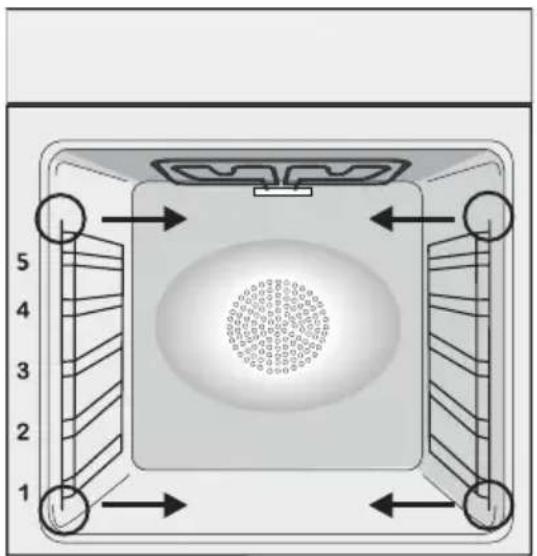
REMOVAL AND CLEANING OF THE SIDE RACKS
- Remove the wire racks by pulling them in the direction of the arrows (see below)
- To clean the wire racks either put them in the dishwasher or use a wet sponge, ensuring that they are dried afterwards.
- After the cleaning process install the wire racks in reverse order."
natural_image
Top-down diagram of a square room with circular pattern on the wall and numbered arrows indicating directions (no text or symbols)CHANGING THE BULB
- Disconnect the oven from the mains supply.
- Undo the glass cover, unscrew the bulb and replace it with a new bulb of the same type.
- Once the defective bulb is replaced, replace the glass cover.
This product contains one or more light sources of energy efficiency class G (Lamp) /F (10 Led).
Waste management and environmental protection
natural_image
Symbol of a trash bin crossed with two crossed lines, no text or labels presentThis appliance is labelled in accordance with European Directive 2012/19/EU regarding electric and electronic appliances (WEEE). The WEEE contain both polluting substances (that can have a negative effect on the environment) and base elements (that can be reused). It is important that WEEE undergo specific treatments to correctly remove and dispose of the pollutants and recover all the materials. Individuals can play an important role in ensuring that the WEEE do not become an environmental problem; it is essential to follow a few basic rules:
- the WEEE should not be treated as domestic waste;
- the WEEE should be taken to dedicated collection areas managed by the town council or a registered company.
In many countries, domestic collections may be available for large WEEEs. When you buy a new appliance, the old one can be returned to the vendor who must accept it free of charge as a one-off, as long as the appliance is of an equivalent type and has the same functions as the purchased appliance.
SAVING AND RESPECTING THE ENVIRONMENT
Where possible, avoid pre-heating the oven and always try to fill it. Open the oven door as infrequently as possible, because heat from the cavity disperses every time it is opened. For a significant energy saving, switch off the oven between 5 and 10 minutes before the planned end of the cooking time, and use the residual heat that the oven continues to generate. Keep the seals clean and in order, to avoid any heat dispersal outside of the cavity. If you have an electric contract with an hourly tariff, the “delayed cooking” programme makes energy saving more simple, moving the cooking process to start at the reduced tariff time slot.
Troubleshooting
| Problem Possible cause Solution | ||
| the oven does not heat up | The clock is not set Set the clock | |
| The oven does not heat up | A cooking function and temperature has not been set | Ensure that the necessary settings are correct |
| No reaction of the touch user interface | Steam and condensation on the user interface panel | Clean with a microfiber cloth the user interface panel to remove the condensation layer |
ACCESSOIRES
natural_image
Line drawing of a rectangular container with side slots and a recessed top (no text or symbols)natural_image
Line drawing of a multi-tiered ladder structure with curved supports (no text or symbols)natural_image
Line drawing of a rectangular metal tray with vertical slats and a handle (no text or symbols)natural_image
Top-down diagram of a square appliance with numbered corners and internal structure (no text or symbols)REEMPLACEMENT DE L'AMPOULE
natural_image
Symbol of a trash bin crossed with two crossed lines, no text or labels presentEN If the furniture is coverage with a bottom at the back part, provide an opening for the power supply cable.
EN If the mounting of the plinth does not allow air circulation, it is necessary to create an opening of 500x10 mm or the same surface in 5000 mm ^2 .
EN If the oven does not have a cooling fan, create an opening 460 mm x 15 mm
EN The manufacturer will not be responsible for any inaccuracy resulting from printing or transcript errors contained in this brochure. We reserve the right to carry out modifications to products as required, including the interests of consumption, without prejudice to the characteristics relating to safety or function.
- Safety Indications
- General Instructions
- Electrical Safety
- CONNECTION
- WARNING
- Recommendations
- Installation
- Product description
- First Use
- Display description
- General notes on cleaning
- GLASS PARTS
- OVEN WINDOW SEAL
- ACCESSORIES
- DRIP PAN
- Maintenance
- REMOVAL AND CLEANING OF THE SIDE RACKS
- CHANGING THE BULB
- Waste management and environmental protection
- SAVING AND RESPECTING THE ENVIRONMENT
- ACCESSOIRES
- REEMPLACEMENT DE L'AMPOULE
Brand : ROSIERES
Model : RFC3O3351IN
Category : Oven