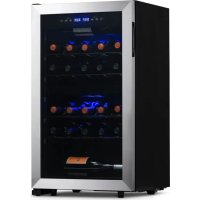
NWC028SS01 - Wine cellar NewAir - Free user manual and instructions
Find the device manual for free NWC028SS01 NewAir in PDF.



| Product Type | Wine Cellar |
| Brand | NewAir |
| Model | NWC028SS01 |
| Capacity | 28 bottles |
| Temperature Zones | 2 zones |
| Upper Zone Temperature Range | 5 °C to 12 °C (41 °F to 54 °F) |
| Lower Zone Temperature Range | 12 °C to 18 °C (54 °F to 64 °F) |
| Interior Volume | 2.86 ft³ (81 L) |
| Power Supply Voltage | 110-120 V |
| Frequency | 60 Hz |
| Power Consumption | 90 W |
| Noise Level | 43 dB |
| Refrigerant | R600a (isobutane) - 52 g (1.84 oz) |
| Interior Lighting | LED |
| Control Type | Touch panel |
| Defrost | Automatic |
| Door Material | Glass |
| Temperature Display | °C / °F (switchable) |
| Ventilation | Back and sides (5 inches of space required) |
| Finish | Stainless Steel |
Frequently Asked Questions - NWC028SS01 NewAir
User questions about NWC028SS01 NewAir
0 question about this device. Answer the ones you know or ask your own.
Ask a new question about this device
Download the instructions for your Wine cellar in PDF format for free! Find your manual NWC028SS01 - NewAir and take your electronic device back in hand. On this page are published all the documents necessary for the use of your device. NWC028SS01 by NewAir.
USER MANUAL NWC028SS01 NewAir
28 Bottle Dual Zone Wine Cooler
natural_image
Technical line drawing of a multi-level industrial oven or refrigerator with no visible text, labels, or symbols.OWNER'S MANUAL
A Name You Can Trust
Trust should be earned and we will earn yours. Customer happiness is the focus of our business.
From the factory to the warehouse, from the sales floor to your home, the whole NewAir family promises to provide you with innovative products, exceptional service, and support when you need it the most.
Count on NewAir.
As a proud NewAir owner, welcome to our family. There are no robots here, real people shipped your product and real people are here to help you.
Contact Us:
For questions regarding your product, please contact us at:
Call: 1-855-963-9247
Email: support@newair.com
Online: www.newair.com
Connect with Us:

Facebook.com/newairusa

Instagram.com/newairusa

YouTube.com/newairusa

Twitter.com/newairusa
READ AND SAVE THESE INSTRUCTIONS.
TABLE OF CONTENTS
Specifications 5
Register Your Product Online....6
Safety Information & Warnings 7
Parts List....10
Assembly & Installation 11
Before Using Your Appliance 11
Installation Of Your Appliance 11
Electrical Connection 12
Extension Cord....12
Operating Instructions....13
Control Panel (Touch Control) 13
On/Off Power.... 13
Light Setting 13
Temperaturesetting....13
Defrosting 14
Shelves 14
Cleaning & Maintenance.... 15
Cleaning Your Appliance 15
Power Failure 15
Vacations.... 15
Moving Your Appliance....15
Energy-Saving Tips 16
Troubleshooting.... 17
Limited Manufacturer's Warranty 18
SPECIFICATIONS
| MODEL NO. | NWC028SS01 |
| VOLTAGE: | 110V-120V |
| NOISE LEVEL: | 43 dB |
| FREQUENCY: | 60Hz |
| POWER CONSUMPTION: | 90W |
| BOTTLE CAPACITY: | 28 bottles |
| STORAGE CAPACITY: | 2.86 cu. ft. |
| TEMPERATURE RANGE: | 41°F - 54°F (upper zone) 54°F - 64°F (lower zone) |
| REFRIGERANT: | R600a (1.84 oz) |
REGISTER YOUR PRODUCT ONLINE
Register Your NewAir Product Online Today!
Take advantage of all the benefits product registration has to offer:

Service and Support
Diagnose troubleshooting and service issues faster and more accurately

Recall Notifications
Stay up to date for safety, system updates and recall notifications

Special Promotions
Opt-in for NewAir promotions and offers
Registering your product information online is safe & secure and takes less than 2 minutes to complete:
newair.com/register
Alternatively, we recommend you attach a copy of your sales receipt below and record the following information, located on the manufacturer's nameplate on the rear of the unit. You will need this information if it becomes necessary to contact the manufacturer for service inquiries.
Date of Purchase: ____
Serial Number: ____
Model Number: ____
SAFETY INFORMATION & WARNINGS
Your safety and the safety of others are very important.
We have provided many important safety messages in this manual and on your appliance. Always read and obey all safety messages.

This is the Safety Alert Symbol. The symbol alerts you to potential hazards that can kill or injure you and others. All safety messages will follow the Safety Alert Symbol and either the words "DANGER" or "WARNING"
DANGER: Danger means that failure to heed this safety statement may result in severe injury or death.
WARNING: Warning means that failure to heed this safety statement may result in extensive product damage, serious personal injury, or death.
All safety messages will alert you about the potential hazard, tell you how to reduce the chance of injury, and let you know what can happen if the instructions are not followed.

IMPORTANT SAFEGUIDES
Before the appliance is used, it must be properly positioned and installed as described in this manual, so read the manual carefully. To reduce the risk of fire, electrical shock or injury when using the appliance, follow basic precautions, including the following:
- Plug into a grounded 3-prong outlet, do not remove grounding prong, do not use an adapter, and do not use an extension cord.
- Replace all panels before operating.
- It is recommended that a separate circuit, serving only your appliance, be provided. Use receptacles that cannot be turned off by a switch or pull-chain.
- Never clean appliance parts with flammable fluids. These fumes can create a fire hazard or explosion. And do not store or use gasoline or other flammable vapors and liquids in the vicinity of this or any other appliance. The fumes can create a fire hazard or explosion.
-
Before proceeding with cleaning and maintenance operations, make sure the power line of the unit is disconnected.
-
Do not connect or disconnect the electric plug when your hands are wet.
- Unplug the appliance or disconnect power before cleaning or servicing. Failure to do so can result in electrical shock or death.
- Do not attempt to repair or replace any part of your appliance unless it is specifically recommended in this manual. All other servicing should be referred to a qualified technician.
-
This appliance is CFC- and HFC-free and contains small quantities of Isobutane (R600a) which is environmentally friendly, but flammable. It does not damage the ozone layer, nor does it increase the greenhouse effect. Care must be taken during transportation and setting up of the appliance that no parts of the cooling system are damaged. Leaking coolant can ignite and may damage the eyes.
• In the event of any damage: -
Avoid open flames and anything that creates a spark,
- Disconnect from the electrical power line,
- Air the room in which the appliance is located for several minutes, and
- Contact the Service Department for advice.
- The more coolant there is in an appliance, the larger the room it should be installed in. In the event of a leakage, if the appliance is in a small room, there is the danger of combustible gases building up. For every ounce of coolant, at least 325 cubic feet of room space is required. The amount of coolant in the appliance is stated on the data plate on the back of the appliance. It is hazardous for anyone other than an authorized Service Person to carry out servicing or repairs to this appliance.
- Take serious care when handling, moving, and using the appliance to avoid either damaging the refrigerant tubing or increasing the risk of a leak.
- Replacing component parts and servicing shall be done by factory authorized service personnel so as to minimize the risk of possible ignition due to incorrect parts or improper service.

FOLLOW WARNING CALL OUTS BELOW ONLY WHEN APPLICABLE TO YOUR MODEL
- Use two or more people to move and install appliance. Failure to do so can result in back or other injury.
- To ensure proper ventilation for your appliance, the front of the unit must be completely unobstructed. Choose a well-ventilated area with temperatures above 50irc F ( 10irc C) and below 100irc F ( 38irc C). (Optimum operation occurs within the range 72irc to 78irc F, or 23irc-26irc C.). This unit must be installed in an area protected from the elements, such as wind, rain, water spray or drips.
-
The appliance should not be located next to ovens, grills or other sources of high heat.
-
The appliance must be installed with all electrical, water and drain connections in accordance with state and local codes. A standard electrical supply (115 V AC only, 60 Hz), properly grounded in accordance with the National Electrical Code and local codes and ordinances is required.
- Do not kink or pinch the power supply cord of appliance.
- The fuse (or circuit breaker) size should be 15 amperes.
- It is important for the appliance to be leveled in order to work properly. You may need to make several adjustments to level it.
- Never allow children to operate, play with or crawl inside the appliance.
- Do not use solvent-based cleaning agents or abrasives on the interior. These cleaners may damage or discolor the interior.
- Use this appliance only for its intended purpose as described in this User Manual.
- Keep fingers out of the “pinch point” areas. Clearances between the door and between the door and cabinet are necessarily small. Be careful closing doors when children are in the area.
- Do not store explosive substances such as aerosol cans with a flammable propellant in this appliance.
- Keep ventilation openings, in the appliance enclosure or in the built-in structure, clear of obstruction.
- Do not use mechanical devices or other means to accelerate the defrosting process, other than those recommended by the manufacturer.
- Do not damage the refrigerant circuit.
- Do not use electrical appliances inside the food storage compartments of the appliance, unless they are of the type recommended by the manufacturer.
Risk of child entrapment!

Keep children away from refrigerators, freezers, dryers or coolers still in use. Lock the door to your utility room and warn children not to play inside these appliances.
Childproof old refrigerators and other appliances you plan to discard or leave in storage. Use a screwdriver to take off the door of an old refrigerator or appliance completely.
- SAVE THESE INSTRUCTIONS -
PARTS LIST
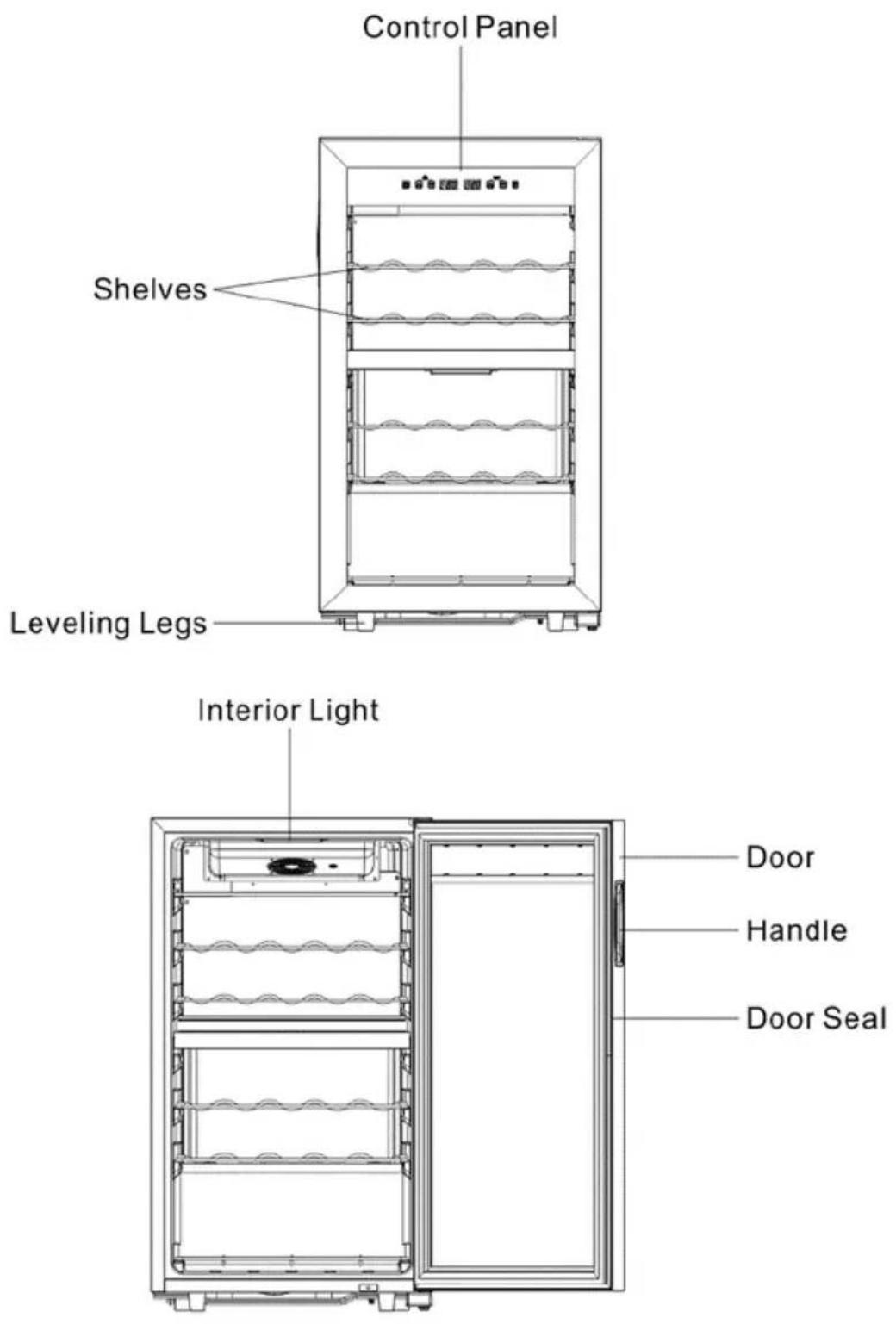
ASSEMBLY & INSTALLATION
BEFORE USING YOUR APPLIANCE
- Remove the exterior and interior packing.
- Before connecting this appliance to the power source, let it stand upright for approximately 2 hours. This will reduce the possibility of a malfunction in the cooling system from handling during transportation.
- Clean the interior surface with lukewarm water using a soft cloth.
INSTALLATION OF YOUR APPLIANCE
• The appliance is designed for free-standing installation only.
- WARNING: Do not store or install the appliance outdoors.
- CAUTION: This appliance is designed for storing and cooling beverages and drinks. Do not store perishable food, medicine or other medical products.
- Place your Wine Cooler on a floor that is strong enough to support it when it is fully loaded. To level the unit, adjust the front leveling legs.
- For free-standing installation, leave 5 inches (127mm) of space around the back and sides of the unit to allow proper air circulation to cool the compressor and condenser.
NOTE: It is recommended that you do not install the appliance near an oven, radiator or other heating source. Direct sunlight may affect the acrylic coating and heat sources may increase electrical consumption. Don't install in a location where the temperature will fall below 64ircF (18°C). For best performance, do not install the appliance behind a cabinet door or block the base grille.
- Avoid locating the unit in moist areas.
- Plug the Wine Cooler into an exclusive, properly grounded wall outlet. Do not under any circumstances cut or remove the third (ground) prong from the power cord. Any questions concerning power and/or grounding should be directed toward a certified electrician or an authorized service center.
ELECTRICAL CONNECTION
WARNING
Improper use of the grounded plug can result in electrical shock. If the power cord is damaged, contact customer service immediately at support@newair.com.
This appliance should be properly grounded for your safety. The power cord of this appliance is equipped with a three-prong plug which mates with standard three prong wall outlets to minimize the possibility of electrical shock.
Do not under any circumstances cut or remove the third ground prong from the power cord supplied. For personal safety, this appliance must be properly grounded.
This appliance requires a standard three-prong 115/120 Volt AC \~/60Hz electrical ground wall outlet. Have the wall outlet and circuit checked by a qualified electrician to make sure the outlet is properly grounded. When a standard 2-prong wall outlet is encountered, it is your responsibility and obligation to have it replaced with a properly grounded 3-prong wall outlet.
To prevent accidental injury, the cord should be secured behind the appliance and not left exposed or dangling.
The appliance should always be plugged into its own individual electrical outlet which has a voltage rating that matches the rating label on the appliance. This provides the best performance and also prevents overloading house wiring circuits that could cause a fire hazard from overheating. Never unplug the appliance by pulling on the power cord. Always grip the plug firmly and pull straight out from the receptacle. Repair or replace immediately all power cords that have become frayed or otherwise damaged. Do not use a cord that shows cracks or abrasion damage along its length or at either end. When moving the appliance, be careful not to damage the power cord.
EXTENSION CORD
Because of potential safety hazards under certain conditions, it is strongly recommended that you do not use an extension cord with this appliance. However, if you must use an extension cord it is absolutely necessary that it be a UL/CUL-Listed, 3-wire grounding type appliance extension cord having a grounding type plug and outlet and that the electrical rating of the cord be 115 volts and at least 10 amperes.
OPERATING INSTRUCTIONS
It is recommended you install the appliance in a place where the ambient temperature is between 64° and 100°F (18°-38°C). If the ambient temperature is above or below the recommended temperatures, the performance of the unit may be affected. For example, placing your unit in extremely cold or hot conditions may cause interior temperatures to fluctuate. The range of 41-64°F (5-18°C) may not be reached.
Temperature range:
Upper zone 5-12°C (41-54°F)
Lower zone 12-18°C (54-64°F)
CONTROL PANEL (TOUCH CONTROL)

flowchart
graph TD
    A["Power"] --> B["Lock"]
    B --> C["Display"]
    D["Load"] --> E["+"]
    F["Downward Arrow"] --> G["Downward Arrow"]
    H["Balance"] --> I["+"]
    J["Balance"] --> K["+"]
    L["+"] --> M["+"]
    N["+"] --> O["+"]
    P["+"] --> Q["+"]
ON/OFF POWER
Press 📍 button for 3 seconds to turn on or turn off the appliance.
LIGHT SETTING
Press 📄 button to turn on or turn off the light.
TEMPERATURESETTING
Press lower zone temperature UP & DOWN button together for 5 seconds to change temperature display from Celsius to Fahrenheit. All the controls will be locked after no operation for 20 seconds, press upper zone temperature UP & Down button together for 5 seconds to unlock it. You can set the desired temperature by pressing or the temperature selected will increase/decrease by 1 degree with each press of the buttons.
NOTE:
- If the unit is unplugged, or power is lost or turned off, you must wait 3 to 5 minutes before restarting the unit. If you attempt to restart before this time delay, the unit will not start.
- When you use the unit for the first time or restart the unit after it has been shut off for a long time, there could be a few degrees variance between the temperature you select and the one indicated on the LED readout. This is normal and is due to the length of the activation time. There should not be a problem once the unit has been running for a few hours.
DEFROSTING
This appliance requires no manual defrosting. During the operation of the compressor, ice will build up on the evaporator plate which is at the back of inner cabinet. During the compressor's off-cycle, the ice will melt, drip down, and collect in a tray above the compressor, where the compressor's heat evaporates the water. If you notice excessive ice build-up on the evaporator, try setting the temperature slightly higher. Also, be sure that the door gasket is sealing well.
SHELVES
To take out a shelf, first remove its contents, then raise the back of the shelf slightly and pull the shelf out.
HOW TO USE YOUR MOISTURE TRAY
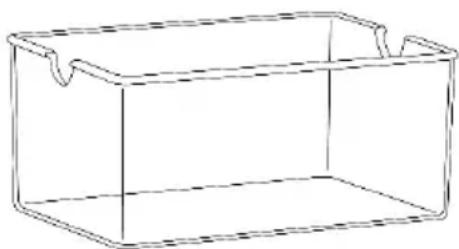
Your unit comes with a small water tray to help moisturize corks and or wooden shelves so they don't dry out. Fill the tray halfway and place it on the middle shelf— horizontally and towards the back —so moisture is evenly distributed throughout the inside of the cabinet. Refill the tray when it is a quarter of the way empty and exercise caution when removing or restocking bottles so water does not spill out.
natural_image
Simple line drawing of a rectangular container with handles (no text or symbols)CLEANING & MAINTENANCE
CLEANING YOUR APPLIANCE
- Turn off the power, unplug the appliance, and remove all items, including shelves.
- Wash the inside surfaces with a solution of warm water and baking soda (about 2 tablespoons of baking soda to a quart of water).
- Wash the shelves with a mild detergent solution.
- Wring excess water out of the sponge or cloth when cleaning the area where the controls are located, or any electrical parts.
- Wash the outside cabinet with warm water and mild liquid detergent. Rinse well and wipe dry with a clean soft cloth.
- Do not use steel wool or a steel brush on the stainless steel
POWER FAILURE
Most power failures are corrected within a few hours and should not affect the temperature of your appliance if you minimize the number of times the door is opened. If the power is going to be off for a longer period of time, you need to take the proper steps to protect the contents.
VACATIONS
Short vacations: Leave the appliance operating during vacations of less than three weeks.
Long vacations: If the appliance will not be used for several months, remove all items and turn off the appliance. Clean and dry the interior thoroughly. To prevent odor and mold growth, leave the door open slightly, blocking it open if necessary.
MOVING YOUR APPLIANCE
- Remove all stored items.
- Securely tape down all loose items (shelves) inside your appliance.
- Turn the adjustable legs up to the base to avoid damage.
- Tape the door shut.
- Be sure the appliance stays secure in the upright position during transportation. Also, protect the outside of the appliance with a blanket or similar item.
ENERGY-SAVING TIPS
- The appliance should be located in the coolest area of the room, away from heat producing appliances and out of direct sunlight.
- Ensure that the unit is adequately ventilated.
- Do not keep the door open any longer than necessary.
CAUTION: Failure to unplug the appliance during cleaning could result in electrical shock or other personal injury.
TROUBLESHOOTING
You can solve many common problems easily, saving you the cost of a possible service call. Try the suggestions below to see if you can solve the problem before calling the service technician.
| Problem | Possible Causes and Solution |
| Appliance is not running | ·Appliance is not plugged in.·Appliance is not turned on.·Check voltage of the installation.·Check if the circuit breaker or the fuse has blown. |
| Appliance is not cold enough | ·Check the temperature control setting.·Check if ambient temperature is beyond appliance operating temperature.·The door is opened too frequently.·The door is not closed properly.·The door is not sealing properly.·Insufficient free space around the appliance. |
| The compressor starts and stops frequently | ·The external temperature is high.·A large quantity of bottles has been put into the cellar.·The appliance is opened frequently.·The door is not properly closed.·The cellar has not been correctly set. |
| LED lights do not operate | ·The appliance is not plugged in.·The fuse has blown.·LED lights are broken.·The light switch is off. |
| Vibration | ·Check and ensure that the appliance is level |
| The appliance mates a lot of noise | ·The rattling noise may come from the flow of the refrigerant, which is normal.·At the end of a cooling cycle, you can hear the noise of water circulating.·Expansion and contraction of the internal walls may cause a cracking sound.·The appliance is not level.·Check if fan is in good condition. |
| The door does not close properly | ·The appliance is not level.·The door seal is dirty or damaged.·The shelves are not positioned correctly.·A part of the contents is preventing the door from closing. |
LIMITED MANUFACTURER'S WARRANTY
This appliance is covered by a limited manufacturer's warranty. For one year from the original date of purchase, the manufacturer will repair or replace any parts of this appliance that prove to be defective in materials and workmanship, provided the appliance has been used under normal operating conditions as intended by the manufacturer.
Warranty Terms:
During the first year, any components of this appliance found to be defective due to materials or workmanship will be repaired or replaced, at the manufacturer's discretion, at no charge to the original purchaser. The purchaser will be responsible for any removal or transportation costs.
Warranty Exclusions:
The warranty will not apply if damage is caused by any of the following:
- Power failure
• Damage in transit or when moving the appliance - Improper power supply such as low voltage, defective household wiring or inadequate fuses
- Accident, alteration, misuse or abuse of the appliance such as using non-approved accessories, inadequate air circulation in the room or abnormal operating conditions (extreme temperatures)
• Use in commercial or industrial applications - Fire, water damage, theft, war, riot, hostility or acts of God such as hurricanes, floods, etc.
• Use of force or damage caused by external influences
• Partially or completely dismantled appliances - Excess wear and tear by the user
Obtaining Service:
When making a warranty claim, please have the original bill of purchase with the purchase date available. Once confirmed that your appliance is eligible for warranty service, all repairs will be performed by a NewAir™ authorized repair facility. The purchaser will be responsible for any removal or transportation costs. Replacement parts and/or units will be new, re-manufactured or refurbished and is subject to the manufacturer's discretion. For technical support and warranty service, please email support@newairusa.com.
Un nom de confiance
Instagram.com/newairusa

YouTube.com/newairusa

Twitter.com/newairusa
LISEZ ET CONSERVEZ CES INSTRUCTIONS.
TABLE DES MATIÈRES
Caractéristiques 21
natural_image
Simple line drawing of a rectangular container with side handles (no text or symbols)NETTOYAGE ET ENTRETIEN
NETTOYAGE DE VOTRE APPAREIL
Email: support@newair.com
Instagram.com/newairusa

YouTube.com/newairusa

Twitter.com/newairusa
LEA Y GUARDE ESTAS INSTRUCCIONES.
INDICE
flowchart
graph TD
    A["Power"] --> B["Lock"]
    B --> C["Directional"]
    D["Pressure Gauge"] --> E["Control Panel"]
    F["Directional Arrow"] --> G["Directional Arrow"]
    H["Pressure Gauge"] --> I["Directional Arrow"]
    J["Pressure Gauge"] --> K["Directional Arrow"]
    L["Pressure Gauge"] --> M["Directional Arrow"]
    N["Pressure Gauge"] --> O["Directional Arrow"]
ENCENDIDO / APAGADO
natural_image
Simple line drawing of a rectangular container with handles (no text or symbols)LIMPIEZA Y MANTENIMIENTO
LIMPIEZA DE SU APARATO
- Bottle Dual Zone Wine Cooler
- OWNER'S MANUAL
- A Name You Can Trust
- Count on NewAir.
- Contact Us:
- Connect with Us:
- READ AND SAVE THESE INSTRUCTIONS.
- TABLE OF CONTENTS
- REGISTER YOUR PRODUCT ONLINE
- Register Your NewAir Product Online Today!
- Service and Support
- Recall Notifications
- Special Promotions
- newair.com/register
- SAFETY INFORMATION & WARNINGS
- IMPORTANT SAFEGUIDES
- FOLLOW WARNING CALL OUTS BELOW ONLY WHEN APPLICABLE TO YOUR MODEL
- Risk of child entrapment!
- - SAVE THESE INSTRUCTIONS -
- PARTS LIST
- ASSEMBLY & INSTALLATION
- BEFORE USING YOUR APPLIANCE
- INSTALLATION OF YOUR APPLIANCE
- ELECTRICAL CONNECTION
- WARNING
- EXTENSION CORD
- OPERATING INSTRUCTIONS
- CONTROL PANEL (TOUCH CONTROL)
- ON/OFF POWER
- LIGHT SETTING
- TEMPERATURESETTING
- NOTE:
- DEFROSTING
- SHELVES
- HOW TO USE YOUR MOISTURE TRAY
- CLEANING & MAINTENANCE
- CLEANING YOUR APPLIANCE
- POWER FAILURE
- VACATIONS
- MOVING YOUR APPLIANCE
- ENERGY-SAVING TIPS
- TROUBLESHOOTING
- LIMITED MANUFACTURER'S WARRANTY
- Warranty Terms:
- Warranty Exclusions:
- Obtaining Service:
- Un nom de confiance
- LISEZ ET CONSERVEZ CES INSTRUCTIONS.
- TABLE DES MATIÈRES
- NETTOYAGE ET ENTRETIEN
- NETTOYAGE DE VOTRE APPAREIL
- LEA Y GUARDE ESTAS INSTRUCCIONES.
- INDICE
- ENCENDIDO / APAGADO
- LIMPIEZA Y MANTENIMIENTO
- LIMPIEZA DE SU APARATO
Brand : NewAir
Model : NWC028SS01
Category : Wine cellar