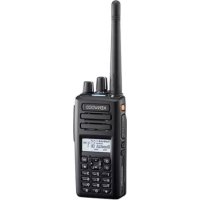
NX3420 - Walkie-talkie KENWOOD - Free user manual and instructions
Find the device manual for free NX3420 KENWOOD in PDF.



| Brand | KENWOOD |
| Model | NX3420 |
| Product Type | Digital portable two-way radio |
| Power Supply | Rechargeable battery pack or 6 AA alkaline batteries (LR6) |
| Water Resistance | IP67 (immersion 1 meter / 30 minutes) |
| Bluetooth | Yes |
| Display | Backlit LCD |
| Channels | Programmable by zones |
| Transmit Power | Adjustable (high / low / medium) |
| Connectivity | Universal connector for speaker/microphone or headset |
| Antenna | Removable (screw type) |
| Belt Clip | Included |
| Included Accessories | Universal connector cover, speaker/mic jack cover, locking bracket, stopper, user guide |
| Special Features | Scanning, encryption (AES/DES/ARC4), GPS (optional), VOX, vibrator, monitor, noise cancellation |
| Maintenance | Clean with a soft cloth, dry after immersion, do not use solvents |
| Safety | Do not disassemble, do not expose to extreme temperatures, use only specified charger |
| Certification | Compliant with directive 2014/53/EU |
| Countries of Use | AT, BE, DK, FI, FR, DE, GR, IS, IE, IT, LI, LU, NL, NO, PT, ES, SE, CH, GB, CY, CZ, EE, HU, LV, LT, MT, PL, SK, SI, BG, RO, HR, TR |
| Compatibility | NX-3000 series (accessories) |
Frequently Asked Questions - NX3420 KENWOOD
User questions about NX3420 KENWOOD
0 question about this device. Answer the ones you know or ask your own.
Ask a new question about this device
Download the instructions for your Walkie-talkie in PDF format for free! Find your manual NX3420 - KENWOOD and take your electronic device back in hand. On this page are published all the documents necessary for the use of your device. NX3420 by KENWOOD.
USER MANUAL NX3420 KENWOOD
JVCKENWOOD Corporation
Importeur
JVCKENWOOD Europe B.V.
Authorised Representative in Europe
JVCKENWOOD Europe B.V.
Amsterdamseweg 37, 1422 AC Uithoorn, THE NETHERLANDS
Manufacturer
JVCKENWOOD Corporation
3-12 Moriyacho, Kanagawa-ku, Yokohama-shi, Kanagawa, 221-0022, JAPAN
VHF DIGITAL TRANSCEIVER
NX-3200/ NX-3220
UHF DIGITAL TRANSCEIVER
NX-3300/ NX-3320
USER GUIDE
This User Guide covers only the basic operations of your radio. Ask your dealer for information on any customized features they may have added to your radio. For using details User Manual, refer to the following URL.
http://manual.kenwood.com/en_contents/search/keyword
NOTIFICATION
This equipment complies with the essential requirements of Directive 2014/53/EU.
This equipment requires a licence and is intended for use in the countries as below.
| AT | BE | DK | FI | FR | DE | GR | IS | IE | IT | LI | LU | |||||
| NL | NO | PT | ES | SE | CH | GB | CY | CZ | EE | HU | LV | |||||
| LT | MT | PL | SK | SI | BG | RO | HR | TR |
THANK YOU
We are grateful you have chosen KENWOOD for your Digital Transceiver applications.
CONTENTS
NOTICES TO THE USER 3
PRECAUTIONS 4
UNPACKING AND CHECKING EQUIPMENT 11
SUPPLIED ACCESSORIES 11
PREPARATION 12
INSTALLING/ REMOVING THE (OPTIONAL) BATTERY PACK 12
INSTALLING/ REMOVING ALKALINE BATTERIES (OPTIONAL BATTERY CASE) 13
INSTALLING THE (OPTIONAL) ANTENNA 14
INSTALLING THE BELT CLIP 14
INSTALLING THE CAP OVER THE UNIVERSAL CONNECTOR
INSTALLING THE (OPTIONAL) SPEAKER/ MICROPHONE OR HEADSET
ADJUSTING THE VOLUME 23
SELECTING A ZONE AND CHANNEL 23
TRANSMITTING 24
RECEIVING 24
INFORMATION ON SOFTWARE LICENSE 25
NOTICES TO THE USER
- Government law prohibits the operation of unlicensed radio transmitters within the territories under government control.
- Illegal operation is punishable by fine and/or imprisonment.
• Refer service to qualified technicians only.
Safety: It is important that the operator is aware of, and understands, hazards common to the operation of any transceiver.
The AMBE+2™ voice coding Technology embodied in this product is protected by intellectual property rights including patent rights, copyrights and trade secrets of Digital Voice Systems, Inc. This voice coding Technology is licensed solely for use within this Communications Equipment. The user of this Technology is explicitly prohibited from attempting to extract, remove, decompile, reverse engineer, or disassemble the Object Code, or in any other way convert the Object Code into a human-readable form. U.S. Patent Nos. #8,315,860, #8,595,002, #6,199,037, #6,912,495, #8,200,497, #7,970,606 and #8,359,197
Information on Disposal of Old Electrical and Electronic Equipment and Batteries (applicable for countries that have adopted separate waste collection systems)
Products and batteries with the symbol (crossed-out wheeled bin) cannot be disposed as household waste.
Old electrical and electronic equipment and batteries should be recycled at a facility capable of handling these items and their waste byproducts.
Contact your local authority for details in locating a recycle facility nearest to you.
Proper recycling and waste disposal will help conserve resources whilst preventing detrimental effects on our health and the environment.
Notice: The sign "Pb" below the symbol for batteries indicates that this battery contains lead.
Bluetooth®
The Bluetooth ^® word mark and logo are registered trademarks owned by Bluetooth SIG, Inc. and any use of such marks by JVC KENWOOD Corporation is under license. Other trademarks and trade names are those of their respective owners.
Firmware Copyrights
The title to and ownership of copyrights for firmware embedded in KENWOOD product memories are reserved for JVC KENWOOD Corporation.
PRECAUTIONS
- Do not charge the transceiver and battery pack when they are wet.
- Ensure that there are no metallic items located between the transceiver and the battery pack.
- Do not use options not specified by KENWOOD.
- If the die-cast chassis or other transceiver part is damaged, do not touch the damaged parts.
- If a headset or headphone is connected to the transceiver, reduce the transceiver volume. Pay attention to the volume level when turning the squelch off.
- Do not place the microphone cable around your neck while near machinery that may catch the cable.
- Do not place the transceiver on unstable surfaces.
- Ensure that the end of the antenna does not touch your eyes.
- When the transceiver is used for transmission for many hours, the radiator and chassis will become hot. Do not touch these locations when replacing the battery pack.
- Always switch the transceiver power off before installing optional accessories.
- When water gets into the microphone opening or the speaker grill, the voice level may become incoherent or distorted. Lightly shake the transceiver to remove the water from the speaker and/or microphone before operating the transceiver.
- The charger is the device that disconnects the unit from the AC mains line. The AC plug should be readily accessible.
- To dispose of batteries, be sure to comply with the laws and regulations in your country or region.

WARNING
Turn the transceiver power off before entering the following locations:
• Near explosives or blasting sites.
- In aircrafts. (Any use of the transceiver must follow the instructions and regulations provided by the airline crew.)
- Where restrictions or warnings are posted regarding the use of radio devices, including but not limited to medical facilities.
• Near persons wearing pacemakers.
- In explosive atmospheres (inflammable gas, dust particles, metallic powders, grain powders, etc.).
• While pumping on fuel or while parked at gasoline service stations.

WARNING
- Do not remove the black sheet from the reverse side of the transceiver (refer to the illustration below). Removal of this sheet decreases the waterproof efficiency of the transceiver and may cause malfunctions if water seeps into the transceiver.

natural_image
Technical line drawing of a mobile phone casing with an arrow indicating a component (no text or symbols present)
CAUTION
- Do not disassemble or modify the transceiver for any reason.
- Do not place the transceiver on or near airbag equipment while the vehicle is running. When the airbag inflates, the transceiver may be ejected and strike the driver or passengers.
- Do not transmit while touching the antenna terminal or if any metallic parts are exposed from the antenna covering. Transmitting at such a time may result in a high-frequency burn.
- If an abnormal odor or smoke is detected coming from the transceiver, switch the transceiver power off immediately, remove the battery pack from the transceiver, and contact your KENWOOD dealer.
- Use of the transceiver while you are driving may be against traffic laws. Please check and observe the vehicle regulations in your area.
- Do not expose the transceiver to extremely hot or cold conditions.
- Do not carry the battery pack (or battery case) with metal objects, as they may short the battery terminals.
- Danger of explosion if the battery is incorrectly replaced; replace only with the same type.
- When attaching a commercial strap to the transceiver, ensure that the strap is durable. In addition, do not swing the transceiver around by the strap; you may inadvertently strike and injure another person with the transceiver.
- If a commercially available neck strap is used, take care not to let the strap get caught on nearby machine.
- When operating the transceiver in areas where the air is dry, it is easy to build up an electric charge (static electricity). When using an earphone accessory in such conditions, it is possible for the transceiver to send an electric shock through the earphone and to your ear. We recommend you use only a speaker/microphone in these conditions, to avoid electric shocks.
- Do not expose the transceiver to long periods of direct sunlight, nor place it near heating appliances.
Information concerning the battery pack:
The battery pack includes flammable objects such as organic solvent. Mishandling may cause the battery to rupture producing flames or extreme heat, deteriorate, or cause other forms of damage to the battery. Please observe the following prohibitive matters.

DANGER
- Do not disassemble or reconstruct the battery!
The battery pack has a safety function and protection circuit to avoid danger. If they suffer serious damage, the battery may generate heat or smoke, rupture, or burst into flame.
• Do not short-circuit the battery!
Do not join the + and – terminals using any form of metal (such as a paper clip or wire). Do not carry or store the battery pack in containers holding metal objects (such as wires, chain-necklaces or hairpins). If the battery pack is short-circuited, excessive current will flow and the battery may generate heat or smoke, rupture, or burst into flame. It will also cause metal objects to heat up.
- Do not incinerate or apply heat to the battery!
If the insulator is melted, the gas release vent or safety function is damaged, or the electrolyte is ignited, the battery may generate heat or smoke, rupture, or burst into flame.
- Do not leave the battery near fires, stoves, or other heat generators (areas reaching over 80°C/176°F)!
If the polymer separator is melted due to high temperature, an internal short-circuit may occur in the individual cells and the battery may generate heat or smoke, rupture, or burst into flame.
- Avoid immersing the battery in water or getting it wet by other means!
If the battery becomes wet, wipe it off with a dry towel before use. If the battery's protection circuit is damaged, the battery may charge at extreme current (or voltage) and an abnormal chemical reaction may occur. The battery may generate heat or smoke, rupture, or burst into flame.

DANGER
- Do not charge the battery near fire or under direct sunlight! If the battery's protection circuit is damaged, the battery may charge at extreme current (or voltage) and an abnormal chemical reaction may occur. The battery may generate heat or smoke, rupture, or burst into flame.
- Use only the specified charger and observe charging requirements!
If the battery is charged in unspecified conditions (under high temperature over the regulated value, excessive high voltage or current over regulated value, or with a remodeled charger), it may overcharge or an abnormal chemical reaction may occur. The battery may generate heat or smoke, rupture, or burst into flame.
- Do not pierce the battery with any object, strike it with an instrument, or step on it!
This may break or deform the battery, causing a short-circuit. The battery may generate heat or smoke, rupture, or burst into flame.
• Do not jar or throw the battery!
An impact may cause the battery to leak, generate heat or smoke, rupture, and/or burst into flame. If the battery's protection circuit is damaged, the battery may charge at an abnormal current (or voltage), and an abnormal chemical reaction may occur.
- Do not use the battery pack if it is damaged in any way!
The battery may generate heat or smoke, rupture, or burst into flame.
- Do not solder directly onto the battery!
If the insulator is melted or the gas release vent or safety function is damaged, the battery may generate heat or smoke, rupture, or burst into flame.
- Do not reverse the battery polarity (and terminals)!
When charging a reversed battery, an abnormal chemical reaction may occur. In some cases, an unexpected large amount of current may flow upon discharging. The battery may generate heat or smoke, rupture, or burst into flame.

DANGER
- Do not reverse-charge or reverse-connect the battery!
The battery pack has positive and negative poles. If the battery pack does not smoothly connect with a charger or operating equipment, do not force it; check the polarity of the battery. If the battery pack is reverse-connected to the charger, it will be reverse-charged and an abnormal chemical reaction may occur. The battery may generate heat or smoke, rupture, or burst into flame.
• Do not touch a ruptured and leaking battery!
If the electrolyte liquid from the battery gets into your eyes, wash your eyes with fresh water as soon as possible, without rubbing your eyes. Go to the hospital immediately. If left untreated, it may cause eye-problems.

WARNING
- Do not charge the battery for longer than the specified time!
If the battery pack has not finished charging even after the regulated time has passed, stop it. The battery may generate heat or smoke, rupture, or burst into flame.
- Do not place the battery pack into a microwave or high pressure container!
The battery may generate heat or smoke, rupture, or burst into flame.
- Keep ruptured and leaking battery packs away from fire!
If the battery pack is leaking (or the battery emits a bad odor), immediately remove it from flammable areas. Electrolyte leaking from battery can easily catch on fire and may cause the battery to generate smoke or burst into flame.
• Do not use an abnormal battery!
If the battery pack emits a bad odor, appears to have color changes, is deformed, or seems abnormal for any other reason, remove it from the charger or operating equipment and do not use it. The battery may generate heat or smoke, rupture, or burst into flame.
NOTIFICATION OF WATER-RESISTANT MODEL
Water Resistance and Maintenance
Water-Resistant Model transceiver conforms to the following standards.
IP67: The IP standard is the protection level specified by the international standard IEC 60529. The first numeral indicates the “dust-resistant level” and the second numeral indicates the “water-resistant” level.
Note:
- Initial water-resistant tests and procedures are performed products upon being ordered from KENWOOD.
PRECAUTIONS
- The applicable standards listed above do not assure that the transceiver can be used in water. The transceiver may be damaged in a situation in which the maximum depth is over 1 meter or the maximum submersion time exceeds 30 minutes.
- Observe the following precautions to maintain the transceiver's water-resistant performance:
a) Do not drop or apply strong physical shocks to the transceiver.
b) Do not disassemble or attempt to modify the transceiver. (If it is disassembled or modified, its performance is not guaranteed.)
c) Do not soak the transceiver in water that contains a solvent or surfactant, such as detergent or alcohol.
- If it is soaked in muddy water or salt water (including sea water), it may become corroded. Immediately flush with fresh water and then wipe dry with a soft cloth.
- If water is splashed onto the microphone, the battery, or the antenna terminal, clean and dry them with a soft cloth before reconnecting to the transceiver.
- When water gets into the microphone opening or the speaker grill, the voice level may become low or distorted. Lightly shake the transceiver to remove the water from the speaker and/or microphone before operating the transceiver.
- Use of any option on the transceiver not specified by KENWOOD, may reduce or void the water resistant and dust resistant performance.
UNPACKING AND CHECKING EQUIPMENT
Note:
- The following unpacking instructions are for use by your KENWOOD dealer, an authorized KENWOOD service facility, or the factory.
Carefully unpack the transceiver. We recommend that you identify the items listed below before discarding the packing material. If any items are missing or have been damaged during shipment, file a claim with the carrier immediately.
SUPPLIED ACCESSORIES
Belt clip 1
- Screws for belt clip (M3 x 8 mm) .... 2
Universal connector cap
Speaker/ microphone jacks cap
Speaker/ microphone locking bracket
Stopper
User Guide 1
PREPARATION
INSTALLING/ REMOVING THE (OPTIONAL) BATTERY PACK

CAUTION
- Do not short the battery terminals or dispose of the battery by fire.
• Never attempt to remove the casing from the battery pack.
• Install the battery pack after cleaning the battery pack contacts and the transceiver terminals. - Before charging a battery pack that is attached to the transceiver, ensure that the safety catch is firmly closed.
- If the release latch is tilted and the battery pack is not attached to the transceiver, return the release latch to its original position using your finger.

1 Match the guides of the battery pack with the corresponding grooves on the upper rear of the transceiver, then firmly press the battery pack to lock it in place.
2 Lock the safety catch to prevent accidentally pressing the release latch and removing the battery pack.
3 To remove the battery pack, lift the safety catch, press the release latch, then pull the battery pack away from the transceiver.

INSTALLING/ REMOVING ALKALINE BATTERIES (OPTIONAL BATTERY CASE)

WARNING
- Do not install batteries in a hazardous environment where sparks could cause an explosion.
- Never discard batteries in fire; extremely high temperatures can cause batteries to explode.
- Do not short circuit the battery case terminals.
• Do not use rechargeable batteries.
Note:
- If you do not plan to use the transceiver for a long period, remove the batteries from the battery case.
- This battery case has been designed for transmitting at a power of approximately 1 W (the low power setting on your transceiver). If you want to transmit a stronger signal (using the high power setting on your transceiver), use an optional rechargeable battery pack.
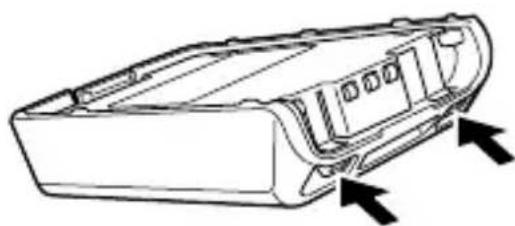
1 To open the battery case, press on the two tabs on the upper rear of the case, then pull the two halves apart.
natural_image
Technical line drawing of a vehicle front panel with directional arrows indicating components (no text or symbols)2 Insert 6 AA (LR6) Alkaline batteries into the battery case.
- Be sure to match the polarities with those marked in the bottom of the battery case.

natural_image
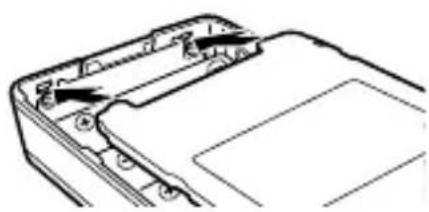
Technical line drawing of a mechanical device with internal components and a highlighted cylindrical part (no text or symbols)3 Align the tabs of the cover with the base, then push down on the cover until it locks in place.
natural_image
Technical line drawing of a mechanical component with no visible text or symbolsINSTALLING THE (OPTIONAL) ANTENNA
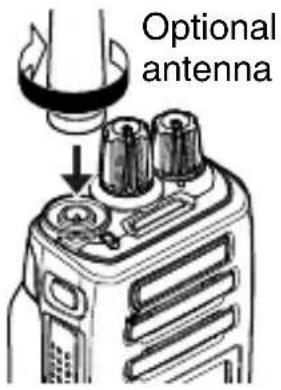
Screw the antenna into the connector on the top of the transceiver by holding the antenna at its base and turning it clockwise until secure.
INSTALLING THE BELT CLIP
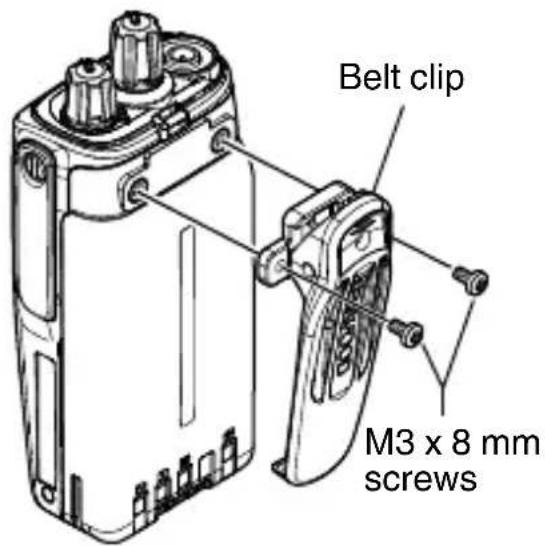
If necessary, attach the belt clip using the two supplied M3 x 8 mm binding screws.
Note:
- If the belt clip is not installed, its mounting location may get hot during continuous transmission or when left sitting in a hot environment.

CAUTION
Do not use glue which is designed to prevent screw loosening when installing the belt clip, as it may cause damage to the transceiver. Acrylic ester, which is contained in these glues, may crack the transceiver's back panel.
INSTALLING THE CAP OVER THE UNIVERSAL CONNECTOR
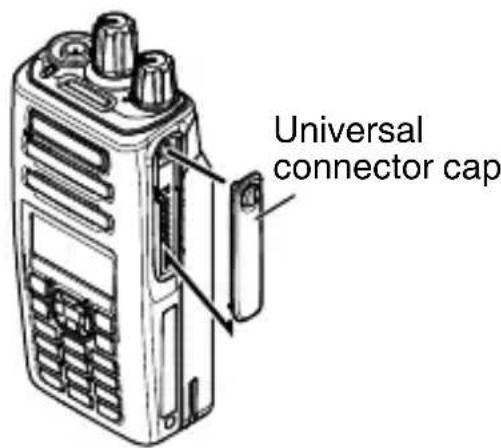
1 If you are not using an optional speaker/ microphone or headset, install the cap over the universal connector.
2 Secure the cap in place using the dressing screw.
INSTALLING THE (OPTIONAL) SPEAKER/ MICROPHONE OR HEADSET
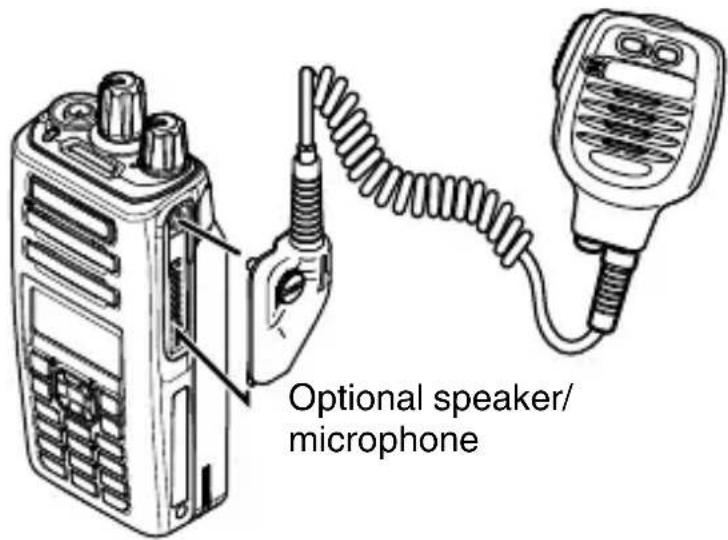
1 Insert the guide of the speaker/ microphone or headset connector into the groove of the universal connector.
2 Secure the connector in place using the attached screw.
Note:
- When not using an optional speaker/ microphone or headset, install the cap over the universal connector.
- The noise canceling function on KMC-54WD Speaker Microphone works using the built-in DSP of the transceiver, and can be used only with the NX-3000 series Portable models.
• To keep the transceiver water resistant, you must cover the speaker/microphone jacks with the supplied cap.
1 If you are not using an optional speaker/ microphone or headset, install the cap over the speaker/ microphone jacks.
2 Secure the cap in place using the dressing screw.
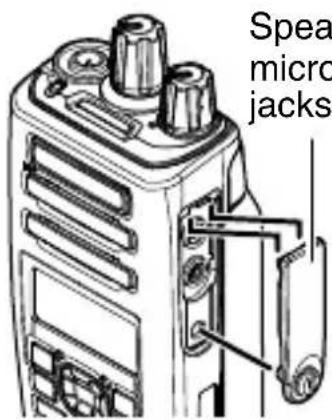
Speaker/ microphone jacks cap
INSTALLING THE (OPTIONAL) SPEAKER/ MICROPHONE OR HEADSET
1 Insert the speaker/ microphone plugs into the speaker/ microphone jacks of the transceiver.
2 Place the locking bracket over the speaker/ microphone plugs so that the locking tabs insert into the transceiver grooves.
3 Secure the locking bracket in place using the dressing screw.
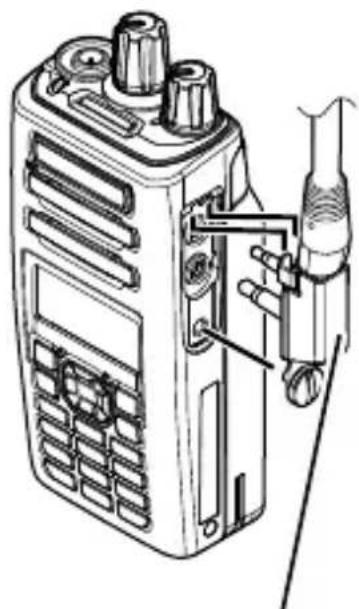
natural_image
Line drawing of a walkie-talkie device with attached sensor and antenna (no text or symbols)Speaker/ microphone locking bracket
ORIENTATION
BUTTONS AND CONTROLS

Full button model Standard button model Basic button model
① Selector
Rotate this control to activate its programmable function. The default setting is [Channel Select].
② Power switch/ Volume control
Turn clockwise to switch the transceiver ON. To switch the transceiver OFF, turn counterclockwise fully. Rotate to adjust the volume level.
③ Transmit/Receive/Battery low indicator
The indicator lights in different colors to indicate the current status of the transceiver.
Lights red while transmitting and green while receiving.
Flashes red when the battery power is low while transmitting. Replace or recharge the battery pack when the battery power is low.
Note:
• This indicator can be disabled by your dealer.
④ Light bar
Lights up when selecting or receiving a channel.
Note:
• This indicator can be disabled by your dealer.
⑤ Auxiliary (orange) button
Press to activate its programmable function.
⑥ PTT (Push To Talk) switch
Press and hold, then speak into the microphone to call a station.
⑦ Side 1 button
Press to activate its programmable function. The default button setting is [Squelch Off Momentary].
⑧ Side 2 button
Press to activate its programmable function. The default button setting is [Backlight].
⑨ LCD display
Refer to the display. {p. 20}
⑩ [ ] button
Press to activate its programmable function. The default button setting is [Menu].
⑪ [O] button
Press to activate its programmable function. The default button setting is [Function].
⑫ 4-way D-pad (Full Button Model/ Standard Button Model)
Press to activate its programmable function.
[◀]: The default setting is [None].
[▶] : The default setting is [None].
[▲]: The default setting is [Zone Up].
[▼] : The default setting is [Zone Down].
⑬ [→] button
Press to activate its programmable function. The default button setting is [None].
⑭ [ ] button
Press to activate its programmable function. The default button setting is [Clear].
⑮ Keypad (Full button model only)
Press the buttons on the keypad to send DTMF tones. The keypad buttons can also be programmed with secondary functions if a programmable function button is programmed as Function.
For details on programming functions to the buttons on your transceiver, please contact your dealer or refer to the “User Manual” available from the following URL.
http://manual.kenwood.com/en_contents/search/keyword
![KENWOOD NX3420 - ⑪ [O] button - 1](/content/2026/04/623344/images/99b9355378c69261bf79a8903242ea22bdd583edc8cc3e36ddfe2c6e45d7530d.jpg)
DISPLAY
Basic Frame

| Display Area Description | |
| Function Indicator Area | Displays the various function indicators, signal strength indicator, battery power indicator and clock. |
| Main Area | Displays the information of the transceiver such as Channel number and Zone number. |
| Button Guide Area | Displays the button functions for [ ][▲] and [→]. |
Function Indicator
| Indicator Description | ||
| Displays the signal strength. | ||
| Displays the battery power. | ||
| The channel is using high transmit power. | ||
| The channel is using medium transmit power. | ||
| The channel is using low transmit power. | ||
| In Digital mode (Digital Channel) | ||
| In Analog mode (Analog Channel) | ||
| In Digital mode (Mixed Channel) | ||
| In Analog mode (Mixed Channel) | ||
| Connected to a Bluetooth device. | ||
| Indicator | Description | |
 | The Bluetooth function is activated. Blinks in the process of turning on Bluetooth. | |
 | The GPS position is determined. Blinks when the GPS is unable to determine the position. | |
 | Scan, Priority Scan or Voting/ Site Roaming is in progress. Blinks when the scan is paused. | |
 | Indicates Priority channel 1 or Priority Monitor ID 1. | |
 | Indicates Priority channel 2 or Priority Monitor ID 2. | |
 | Indicates Priority Monitor ID 3. | |
 | Indicates Priority Monitor ID 4. | |
 | The current channel is added to the scanning sequence. | |
 | The current zone is added to the Multi-Zone scanning sequence. | |
 | The Scrambler function is activated. | |
 | The Encryption function is activated. Blinks when receiving an encrypted carrier. | |
 | The Encryption (AES) function is activated. Blinks when receiving an encrypted carrier. | |
 | The Encryption (DES) function is activated. Blinks when receiving an encrypted carrier. | |
 | The Encryption (ARC4) function is activated. Blinks when receiving an encrypted carrier. | |
 | The Talk Around function is activated. | |
 | The Monitor or Squelch Off function is activated. | |
 | The External Speaker is activated. | |
 | Blinks when an incoming call matches your Optional Signaling. | |
 | The Vibrator function is activated. Blinks when the Vibrator is not functioning. | |
| Indicator | Description | |
 | A message is stored in the memory. Blinks when a new message is received. | |
 | The VOX function is activated. | |
 | The Site Lock function is activated. | |
 | The Broadcast Call function is activated. | |
 | The Surveillance function is activated. | |
 | The System Lock function is activated. | |
 | The auxiliary port is activated. | |
 — — | Appears when the selected group is programmed as telephone IDs. | |
 | The Tactical Zone is activated. | |
 | The Lone Worker function is activated. | |
 | The OVCM function is activated. | |
 | The Activity Detection function is activated. | |
 | The Operator Selectable Tone function is activated. | |
 | Blinks during Auto Recording. | |
BASIC OPERATIONS
SWITCHING POWER ON/ OFF
Turn the Power switch/ Volume control clockwise to switch the transceiver power ON.
Turn the Power switch/ Volume control counterclockwise to switch the transceiver power OFF.
ADJUSTING THE VOLUME
Rotate the Power switch/ Volume control to adjust the volume.
SELECTING A ZONE AND CHANNEL
1 Select the desired zone using the Selector, 4-way D-pad or the buttons programmed as [Zone Up]/ [Zone Down]. Each zone contains a group of channels.
2 Select the desired channel using the Selector, 4-way D-pad or the buttons programmed as [Channel Up]/ [Channel Down]. Each channel is programmed with settings for transmitting and receiving.
- The default setting for the Selector is [Channel Select].
- The transceiver may have names programmed for zones and channels. The zone name and channel name can contain up to 12 and 14 characters respectively. While selecting a zone, the zone name will appear above the channel name.
- If programmed by your dealer, your transceiver will announce the zone and channel numbers as you change them.
TRANSMITTING
1 Select the desired zone and channel using the Selector or 4-way D-pad and the [Zone Up]/ [Zone Down] or [Channel Up]/ [Channel Down] buttons.
2 Press the PTT switch and speak into the microphone. Release the PTT switch to receive.
- The LED indicator lights red while transmitting and green while receiving a signal. This indicator can also be disabled by your dealer.
- For best sound quality at the receiving station, hold the microphone approximately 3 cm to 4 cm (1.5 inches) from your mouth.
RECEIVING
Select the desired zone and channel. If signaling has been programmed on the selected channel, you will hear a call only if the received signal matches your transceiver settings.
INFORMATION ON SOFTWARE LICENSE
This transceiver uses a software according to the following license agreements.
\*zlib LICENSE
Copyright (C) 1995-2013 Jean-loup Gailly and Mark Adler
This software is provided 'as-is', without any express or implied warranty. In no event will the authors be held liable for any damages arising from the use of this software.
Permission is granted to anyone to use this software for any purpose, including commercial applications, and to alter it and redistribute it freely, subject to the following restrictions:
- The origin of this software must not be misrepresented; you must not claim that you wrote the original software. If you use this software in a product, an acknowledgment in the product documentation would be appreciated but is not required.
- Altered source versions must be plainly marked as such, and must not be misrepresented as being the original software.
- This notice may not be removed or altered from any source distribution.
Jean-loup Gailly (jloup@gzip.org)
Mark Adler (madler@alumni.caltech.edu)
\*libpng LICENSE
This copy of the libpng notices is provided for your convenience. In case of any discrepancy between this copy and the notices in the file png.h that is included in the libpng distribution, the latter shall prevail.
COPYRIGHT NOTICE, DISCLAIMER, and LICENSE:
If you modify libpng you may insert additional notices immediately following this sentence.
This code is released under the libpng license.
libpng versions 1.2.6, August 15, 2004, through 1.6.8, December 19, 2013, are Copyright (c) 2004, 2006-2013 Glenn Randers-Pehrson, and are distributed according to the same disclaimer and license as libpng-1.2.5 with the following individual added to the list of Contributing Authors
Cosmin Truta
libpng versions 1.0.7, July 1, 2000, through 1.2.5 - October 3, 2002, are Copyright (c) 2000-2002 Glenn Randers-Pehrson, and are distributed according to the same disclaimer and license as libpng-1.0.6 with the following individuals added to the list of Contributing Authors
Simon-Pierre Cadieux
Eric S. Raymond
Gilles Vollant
and with the following additions to the disclaimer:
There is no warranty against interference with your enjoyment of the library or against infringement. There is no warranty that our efforts or the library will fulfill any of your particular purposes or needs. This library is provided with all faults, and the entire risk of satisfactory quality, performance, accuracy, and effort is with the user.
libpng versions 0.97, January 1998, through 1.0.6, March 20, 2000, are Copyright (c) 1998, 1999 Glenn Randers-Pehrson, and are distributed according to the same disclaimer and license as libpng-0.96, with the following individuals added to the list of Contributing Authors:
Tom Lane
Glenn Randers-Pehrson
Willem van Schaik
libpng versions 0.89, June 1996, through 0.96, May 1997, are Copyright (c) 1996, 1997 Andreas Dilger
Distributed according to the same disclaimer and license as libpng-0.88, with the following individuals added to the list of Contributing Authors:
John Bowler
Kevin Bracey
Sam Bushell
Magnus Holmgren
Greg Roelofs
Tom Tanner
libpng versions 0.5, May 1995, through 0.88, January 1996, are Copyright (c) 1995, 1996 Guy Eric Schalnat, Group 42, Inc.
For the purposes of this copyright and license, “Contributing Authors” is defined as the following set of individuals:
Andreas Dilger
Dave Martindale
Guy Eric Schalnat
Paúl Schmidt
Tim Wegner
The PNG Reference Library is supplied “AS IS”. The Contributing Authors and Group 42, Inc. disclaim all warranties, expressed or implied, including, without limitation, the warranties of merchantability and of fitness for any purpose. The Contributing Authors and Group 42, Inc. assume no liability for direct, indirect, incidental, special, exemplary, or consequential damages, which may result from the use of the PNG Reference Library, even if advised of the possibility of such damage.
Permission is hereby granted to use, copy, modify, and distribute this source code, or portions hereof, for any purpose, without fee, subject to the following restrictions:
- The origin of this source code must not be misrepresented.
- Altered versions must be plainly marked as such and must not be misrepresented as being the original source.
- This Copyright notice may not be removed or altered from any source or altered source distribution.
The Contributing Authors and Group 42, Inc. specifically permit, without fee, and encourage the use of this source code as a component to supporting the PNG file format in commercial products. If you use this source code in a product, acknowledgment is not required but would be appreciated.
A "png_get_copyright" function is available, for convenient use in "about" boxes and the like:
printf("%s", png_get_copyright(NULL));
Also, the PNG logo (in PNG format, of course) is supplied in the files "pngbar.png" and "pngbar.jpg" (88x31) and "pngnow.png" (98x31).
Libpng is OSI Certified Open Source Software. OSI Certified Open Source is a certification mark of the Open Source Initiative.
Glenn Randers-Pehrson glennrp at users.sourceforge.net December 19, 2013
\*Md5
Copyright (C) 1999, 2000, 2002 Aladdin Enterprises. All rights reserved.
This software is provided 'as-is', without any express or implied warranty. In no event will the authors be held liable for any damages arising from the use of this software.
Permission is granted to anyone to use this software for any purpose, including commercial applications, and to alter it and redistribute it freely, subject to the following restrictions:
- The origin of this software must not be misrepresented; you must not claim that you wrote the original software. If you use this software in a product, an acknowledgment in the product documentation would be appreciated but is not required.
- Altered source versions must be plainly marked as such, and must not be misrepresented as being the original software.
- This notice may not be removed or altered from any source distribution.
L. Peter Deutsch ghost@aladdin.com
ÉMETTEUR-RÉCEPTEUR NUMÉRIQUE VHF
NX-3200/ NX-3220
ÉMETTEUR-RÉCEPTEUR NUMÉRIQUE UHF
NX-3300/ NX-3320
GUIDE DE L'UTILISATEUR
POSE/ DÉPOSE DU BLOC PILES (EN OPTION) 12
MISE EN PLACE/ RETRAIT DES PILES ALCALINES (BOÎTIER DE PILES EN OPTION) 13
INSTALLATION DE L'ANTENNE (OPTIONNELLE) 14
INSTALLATION DU CROCHET DE CEINTURE 14
INSTALLATION DU CAC HE SUR LE CONECTEUR UNIVERSEL
INSTALLATION DU HAUT-PARLEUR ET MICROPHONE (EN OPTION) OU LE CASQUE TÉLÉPHONIQUE
INSTALLATION DU BOUCHON SUR LES PRISES DU HAUT-PARLEUR ET MICROPHONE
INSTALLATION DU HAUT-PARLEUR ET MICROPHONE (EN OPTION) OU LE CASQUE TÉLÉPHONIQUE
ORIENTATION 17
BOUTONS ET COMMANDES 17
AFFICHEUR 20
FONCTIONNEMENT DE BASE 23
MISE SOUS/ HORS TENSION 23
RÉGLAGE DU VOLUME 23
SÉLECTION D'UNE ZONE ET D'UN CANAL 23
TRANSMISSION 24
RÉCEPTION 24
natural_image
Technical line drawing of a device casing with internal components and a downward arrow indicating a component (no text or symbols present)
MISE EN GARDE
POSE/ DÉPOSE DU BLOC PILES (EN OPTION)

MISE EN GARDE
natural_image
Line drawing of a vehicle front panel with arrows indicating movement or force (no text or symbols)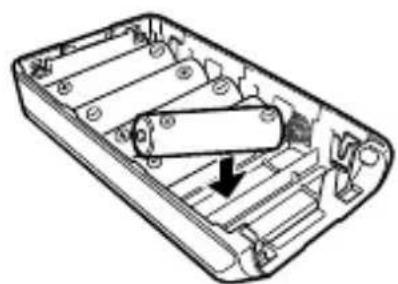
natural_image
Technical line drawing of a mechanical device with internal components and a downward arrow indicating a component (no text or symbols present)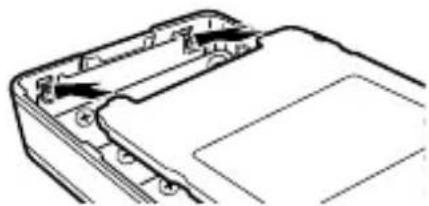
natural_image
Technical line drawing of a mechanical component with mounting holes and internal structure (no text or symbols)INSTALLATION DE L'ANTENNE (OPTIONNELLE)
natural_image
Technical line drawing of a walkie-talkie device with attached sensor and antenna (no text or labels)MISE SOUS/ HORS TENSION
TRANSCEPTOR DIGITAL VHF
NX-3200/ NX-3220
TRANSCEPTOR DIGITAL UHF
NX-3300/ NX-3320
GUÍA DEL USUARIO
natural_image
Technical line drawing of a device casing with an arrow pointing to a component (no text or symbols present)
PRECAUCIÓN
natural_image
Line drawing of a vehicle chassis frame with two arrows indicating directional movement (no text or symbols)natural_image
Technical line drawing of a mechanical device with a cylindrical component inserted into a housing (no text or symbols)natural_image
Technical line drawing of a mechanical component with no visible text or symbolsnatural_image
Line drawing of a walkie-talkie device with attached sensor and antenna (no text or symbols)natural_image
Technical line drawing of a handheld electronic device casing with a black arrow pointing to a component (no text or symbols present)
ATTENZIONE
natural_image
Line drawing of a vehicle chassis frame with directional arrows indicating movement or force (no text or symbols)natural_image
Technical line drawing of an electronic device casing with a cylindrical component inserted (no text or symbols)natural_image
Technical line drawing of a mechanical component with no visible text or symbolsnatural_image
Technical line drawing of a walkie-talkie device with attached sensor and antenna (no text or labels)natural_image
Technical line drawing of a device casing with an arrow indicating a component (no text or symbols present)
VORSICHT
natural_image
Technical line drawing of a vehicle front panel with directional arrows indicating components (no text or symbols)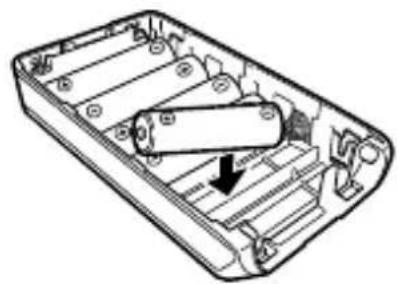
natural_image
Technical line drawing of a mechanical device with internal components and a black arrow indicating a specific part (no text or symbols present)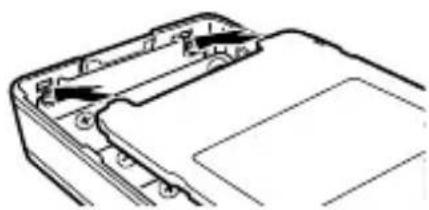
natural_image
Technical line drawing of a mechanical component with mounting holes and internal structure (no text or symbols)ANTENNE (OPTION) INSTALLIEREN
natural_image
Technical line drawing of a walkie-talkie device with attached sensor and antenna (no text or labels)⑥ PTT-Schalter (Push To Talk)
natural_image
Technical line drawing of a handheld electronic device casing with a black arrow pointing to a component (no text or symbols present)
LET OP
natural_image
Technical line drawing of a vehicle chassis frame with directional arrows indicating components (no text or symbols)natural_image
Technical line drawing of a mechanical device with internal components and a black arrow indicating a specific part (no text or symbols present)natural_image
Technical line drawing of a mechanical component with no visible text or symbolsPLAATSEN VAN DE (OPTIONELE) ANTENNE
natural_image
Line drawing of a walkie-talkie device with attached wires and ports (no text or symbols)⑥ PTT (Push-to-Talk) schakelaar
natural_image
Technical line drawing of a device casing with an arrow indicating a component (no text or symbols present)
DIKKAT
natural_image
Technical line drawing of a vehicle chassis frame with two arrows indicating directional components (no text or symbols)natural_image
Technical line drawing of a mechanical device with internal components and a highlighted cylindrical component (no text or symbols)natural_image
Technical line drawing of a mechanical component with no visible text or symbols(OPSIYONEL) ANTEN KURULUMU
natural_image
Line drawing of a walkie-talkie device with attached sensor and antenna (no text or labels)natural_image
Technical line drawing of a mobile phone casing with an arrow pointing to a component (no text or symbols present)
ΠΡΟΣΟΧΗ
natural_image
Technical line drawing of a vehicle chassis frame with two directional arrows indicating movement or force (no text or symbols present)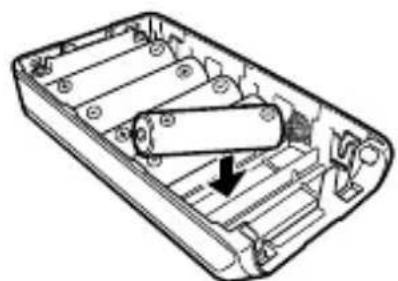
natural_image
Technical line drawing of a mechanical device with internal components and a downward arrow indicating a component (no text or symbols present)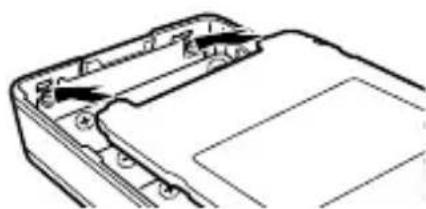
natural_image
Technical line drawing of a mechanical component with no visible text or symbolsnatural_image
Line drawing of a walkie-talkie device with attached sensor and antenna (no text or labels)natural_image
Technical line drawing of a device casing with an arrow indicating a component (no text or symbols present)
CUIDADO
natural_image
Technical line drawing of a vehicle chassis frame with directional arrows indicating components (no text or symbols)natural_image
Diagram of an electronic device casing with internal components and a black arrow indicating a component (no text or symbols present)natural_image
Technical line drawing of a mechanical component with no visible text or symbolsINSTALAR O ALTIFALANTE/MICROFONE OU AURICULAR (OPCIONAL)
1 Insira a guia do conector de altifalante/microfone ou auxiliar na ranhura do conector universal.
natural_image
Line drawing of a walkie-talkie device with attached sensor and antenna (no text or symbols)

- Importeur
- JVCKENWOOD Europe B.V.
- Authorised Representative in Europe
- Manufacturer
- JVCKENWOOD Corporation
- NOTIFICATION
- THANK YOU
- CONTENTS
- NOTICES TO THE USER
- Bluetooth®
- Firmware Copyrights
- PRECAUTIONS
- WARNING
- Turn the transceiver power off before entering the following locations:
- CAUTION
- Information concerning the battery pack:
- DANGER
- NOTIFICATION OF WATER-RESISTANT MODEL
- Water Resistance and Maintenance
- Note:
- UNPACKING AND CHECKING EQUIPMENT
- SUPPLIED ACCESSORIES
- PREPARATION
- INSTALLING/ REMOVING THE (OPTIONAL) BATTERY PACK
- INSTALLING/ REMOVING ALKALINE BATTERIES (OPTIONAL BATTERY CASE)
- INSTALLING THE (OPTIONAL) ANTENNA
- INSTALLING THE BELT CLIP
- INSTALLING THE CAP OVER THE UNIVERSAL CONNECTOR
- INSTALLING THE (OPTIONAL) SPEAKER/ MICROPHONE OR HEADSET
- ORIENTATION
- ③ Transmit/Receive/Battery low indicator
- ④ Light bar
- ⑤ Auxiliary (orange) button
- ⑥ PTT (Push To Talk) switch
- ⑦ Side 1 button
- ⑧ Side 2 button
- ⑨ LCD display
- ⑩ [ ] button
- ⑪ [O] button
- DISPLAY
- Basic Frame
- Function Indicator
- BASIC OPERATIONS
- SWITCHING POWER ON/ OFF
- ADJUSTING THE VOLUME
- SELECTING A ZONE AND CHANNEL
- TRANSMITTING
- RECEIVING
- INFORMATION ON SOFTWARE LICENSE
- \*zlib LICENSE
- \*libpng LICENSE
- Cosmin Truta
- \*Md5
- MISE EN GARDE
- POSE/ DÉPOSE DU BLOC PILES (EN OPTION)
- INSTALLATION DE L'ANTENNE (OPTIONNELLE)
- MISE SOUS/ HORS TENSION
- PRECAUCIÓN
- ATTENZIONE
- VORSICHT
- ANTENNE (OPTION) INSTALLIEREN
- ⑥ PTT-Schalter (Push To Talk)
- LET OP
- PLAATSEN VAN DE (OPTIONELE) ANTENNE
- ⑥ PTT (Push-to-Talk) schakelaar
- DIKKAT
- (OPSIYONEL) ANTEN KURULUMU
- ΠΡΟΣΟΧΗ
- CUIDADO
- INSTALAR O ALTIFALANTE/MICROFONE OU AURICULAR (OPCIONAL)
Brand : KENWOOD
Model : NX3420
Category : Walkie-talkie