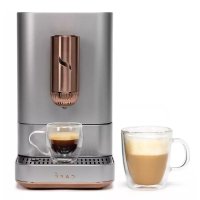
C7CEBAS2RS3 - Coffee machine GE - Free user manual and instructions
Find the device manual for free C7CEBAS2RS3 GE in PDF.


| Product type | Automatic espresso coffee machine |
| Brand | GE (Coffee) |
| Model | C7CEBAS2RS3 |
| Power supply | 120 V, 60 Hz |
| Power | Not specified |
| Pressure | Not specified |
| Water tank | Removable, capacity not specified |
| Coffee bean capacity | Integrated compartment, capacity not specified |
| Integrated grinder | Yes, adjustable while grinding |
| Functions | Espresso, Americano, Lungo, My Cup (Ristretto), Hot water |
| Steam wand | No (model without frother) |
| Connectivity | Wi-Fi, SmartHQ app |
| Control panel | Touch screen with physical buttons |
| Customizable settings | Via SmartHQ app (temperature, volume, etc.) |
| Descaling program | Automatic, integrated alert |
| Cleaning | Removable brew unit, manual cleaning of parts |
| Safety | Automatic shut-off, hot surface, safety lock |
| Warranty | 1 year limited |
| Repairability | Parts available by order, repair by professional |
Frequently Asked Questions - C7CEBAS2RS3 GE
User questions about C7CEBAS2RS3 GE
0 question about this device. Answer the ones you know or ask your own.
Ask a new question about this device
Download the instructions for your Coffee machine in PDF format for free! Find your manual C7CEBAS2RS3 - GE and take your electronic device back in hand. On this page are published all the documents necessary for the use of your device. C7CEBAS2RS3 by GE.
USER MANUAL C7CEBAS2RS3 GE
It's time appliances had a personality. Yours.
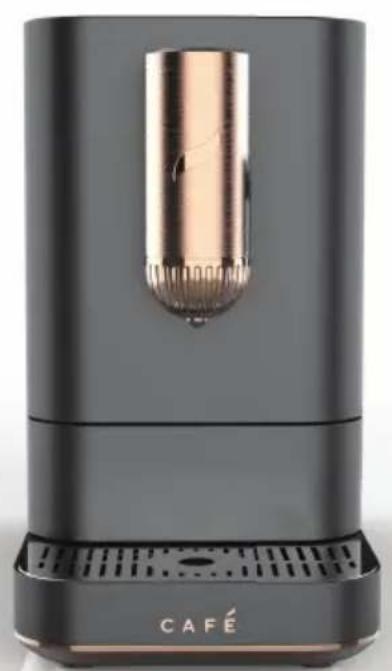
natural_image
Black and gold product device with a cylindrical lens and 'CAFÉ' branding (no additional text or symbols visible)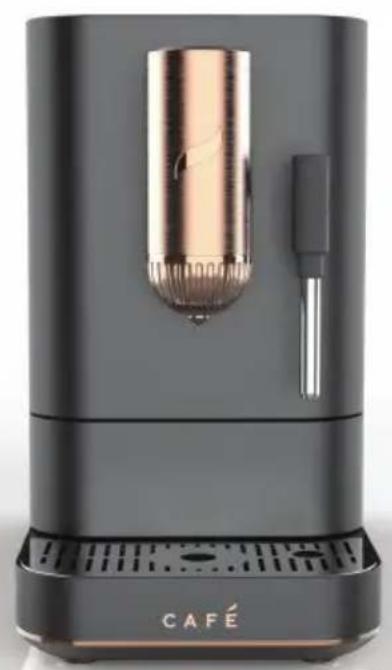
natural_image
Black and white photo of a modern café brush rester with a cylindrical lens and handle, labeled 'CAFÉ' at the base (no other text or symbols visible)AFFETTO-Cafe Automatic Espresso Machine + Frother
OWNER'S MANUAL
ENGLISH/FRANÇAIS
THANK YOU FOR MAKING CAFÉ A PART OF YOUR HOME.
We take pride in the craftsmanship, innovation and design that goes into every Café product, and we think you will too. Among other things, registration of your appliance ensures that we can deliver important product information and warranty details when you need them.
Register your Café appliance now online. Helpful websites are available in the Consumer Support section of this Owner's Manual. You may also mail in the pre-printed registration card included in the packing material.

DISTINCT BY DESIGN™
Table of Contents
Models: C7CEBBS3RD3, C7CEBBS4RW3, C7CEBBS2RS3, C7CEBAS3RD3, C7CEBAS4RW3, C7CEBAS2RS3
SAFETY INFORMATION 4
GETTING STARTED 6
COMPONENTS....7
ACCESSORIES 8
CONTROL PANEL 9
FUNCTIONS 10
USING YOUR ESPRESSO MACHINE....11
CARE AND CLEANING 14
TIPS 16
TROUBLESHOOTING....17
WiFi CONNECT SMART HQ APP 19
FCC STATEMENT 20
LIMITED WARRANTY 22
CONSUMER SUPPORT 23
Product Registration
Write the model and serial numbers here:
Model # ____
Serial # ____
Find these numbers on a label on the back of the unit.
IMPORTANT SAFETY INFORMATION READ ALL INSTRUCTIONS BEFORE USING THE APPLIANCE
WARNING
Read the instructions carefully before using the appliance for the first time. Save these instructions for reference. The appliance is designed for domestic use and may only be operated in accordance with these instructions for use. Always handle with care and warn other users of potential danger.
IMPORTANT SAFEGUARDS
Always follow these safety precautions when using this appliance.
- Read all instructions before using
- Use only a 120 V, 60 Hz standard electrical supply that is properly grounded in accordance with the National Electric Code and local codes and ordinances.
• Make sure the appliance is set up on a flat and steady surface. - Turn the appliance OFF, then unplug from the outlet when not in use, before assembling or disassembling parts and before cleaning. To unplug, grasp the plug and pull from the outlet. Never pull from the power cord.
- Do not use outdoors. Household use only.
- Use this product only for its intended purpose as described in this user manual.
• Use of any accessories not recommended by the manufacturer can cause injuries. - This appliance is not intended for use by persons (including children) with reduced physical, sensory, or mental capabilities, or lack of experience and knowledge, unless they are closely supervised and instructed concerning use of the appliance by a person responsible for their safety. Close supervision is necessary when any appliance is used by or near children. Children should be supervised to ensure that they do not play with the appliance.
- Allow to cool before putting on or taking off parts, and before cleaning the appliance. DO NOT touch the steam wand after use. Doing so can cause serious burns.
• Make sure the drip tray is always present during use. - Always use cold water to make coffee in your espresso machine. Warm water or other liquids could cause damage to the coffee maker.
• DO NOT put any liquid other than water in the water tank. - To reduce the risk of fire or electric shock, do not attempt to disassemble, repair, modify, or replace any part of your product.
- If the power cord is damaged, it must be replaced by the manufacturer. DO NOT replace the power cord on your own.
- Do not operate any appliance with a damaged cord or plug or after the appliance malfunctions, or is dropped or damaged in any manner. Contact GE Appliances at the website listed in the Contact Us section for information on examination, repair, or adjustment.
- Use the coffee grinder to grind coffee beans only. DO NOT put coffee grounds in the espresso machine, only put whole coffee beans in the coffee bean container.
- Do not allow children to touch the appliance or the power cord during the operation
SAVE THESE INSTRUCTIONS
IMPORTANT SAFETY INFORMATION READ ALL INSTRUCTIONS BEFORE USING THE APPLIANCE
WARNING
Read the instructions carefully before using the appliance for the first time. Save these instructions for reference. The appliance is designed for domestic use and may only be operated in accordance with these instructions for use. Always handle with care and warn other users of potential danger.
IMPORTANT SAFEGUARDS
Always follow these safety precautions when using this appliance.
• DO NOT use the espresso machine if the drip tray is out of position.
- DO NOT immerse the appliance in water or any other liquids. This will damage the appliance and be a risk of an electric shock.
- Do not let cord hang over edge of table or counter.
- Do not let cord contact hot surface, including the stove.
- The use of accessories not included in the box is not recommended. It might be dangerous and should be avoided.
- Do not operate the hot water function continuously for more than one tank of water.
- Check hopper for presence of foreign objects before usage.
- Avoid contacting moving parts. Do not attempt to defeat any safety interlock mechanisms.
- Do not touch hot surfaces. Use handles or knobs.
- Do not place on or near a hot gas or electric burner, or in a heated oven.
- To disconnect, turn any control to "off," then remove plug from wall outlet.
WARNING
To avoid the risk of injury, do not open the brew chamber during the brew process.
Power Cord
a) A short power-supply cord (or detachable power-supply cord) is provided to reduce risks resulting from becoming entangled in or tripping over a longer cord.
b) Longer detachable power-supply cords or extension cords are available and may be used if care is exercised in their use.
c) If a long detachable power-supply cord or extension cord is used:
1) The marked electrical rating of the detachable power-supply cord or extension cord should be at least as great as the electrical rating of the appliance;
2) If the appliance is of the grounded type, the extension cord should be a grounding-type 3-wire cord; and
3) The longer cord should be arranged so that it will not drape over the counter top or table top where it can be pulled on by children or tripped over.
WARNING

K OF FIRE OR ELECTRIC SHOCK
■ TO REDUCE THE RISK OF FIRE OR ELECTRIC SHOCK, DO NOT REMOVE COVER (OR BACK).
Do not attempt to repair or replace any part of your espresso machine unless it is specifically recommended in this manual. All other servicing should be performed by authorized service personnel.
SAVE THESE INSTRUCTIONS
Getting Started
Drip Tray
■ Remove the drip tray from the packaging and attach it to the front of the espresso machine, under the coffee spout.
NOTE: There are magnets that will allow the drip tray to attach to the machine.
Water Tank
■ Remove the water tank and fill it with water. Replace in the machine before using any functions.
■ Rinsing Cycle: The machine will rinse automatically at every power ON. After the machine is preheated, it will dispense a small amount of hot water directly into the drip tray. This is to keep the machine clear of coffee residue. Machine will only rinse if it was Powered ON from cold state.
■ NOTE: DO NOT add hot water to the water tank. This could damage the appliance.
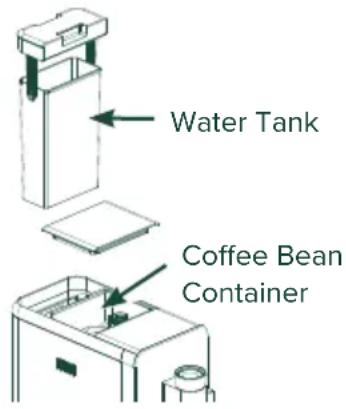
Coffee Bean Container
■ Lift the lid located on the top of the espresso machine and fill it with coffee beans. Close the lid tightly when finished. Make sure rubber seal is closed completely.
NOTE: When grinding is in process, turn the coffee bean dial to your desired grind size.

natural_image
Simple diagram showing a circle rotating around a circular object with arrows indicating rotation (no text or symbols)NOTE: It may take several tries to get a grind size that best fits your taste.
Ready to Use!
- Plug in your espresso machine. The Power button will flash. Press the power button.
- Choose your desired function and enjoy! See the "Using the Espresso Machine" section for instructions of each function.
Components
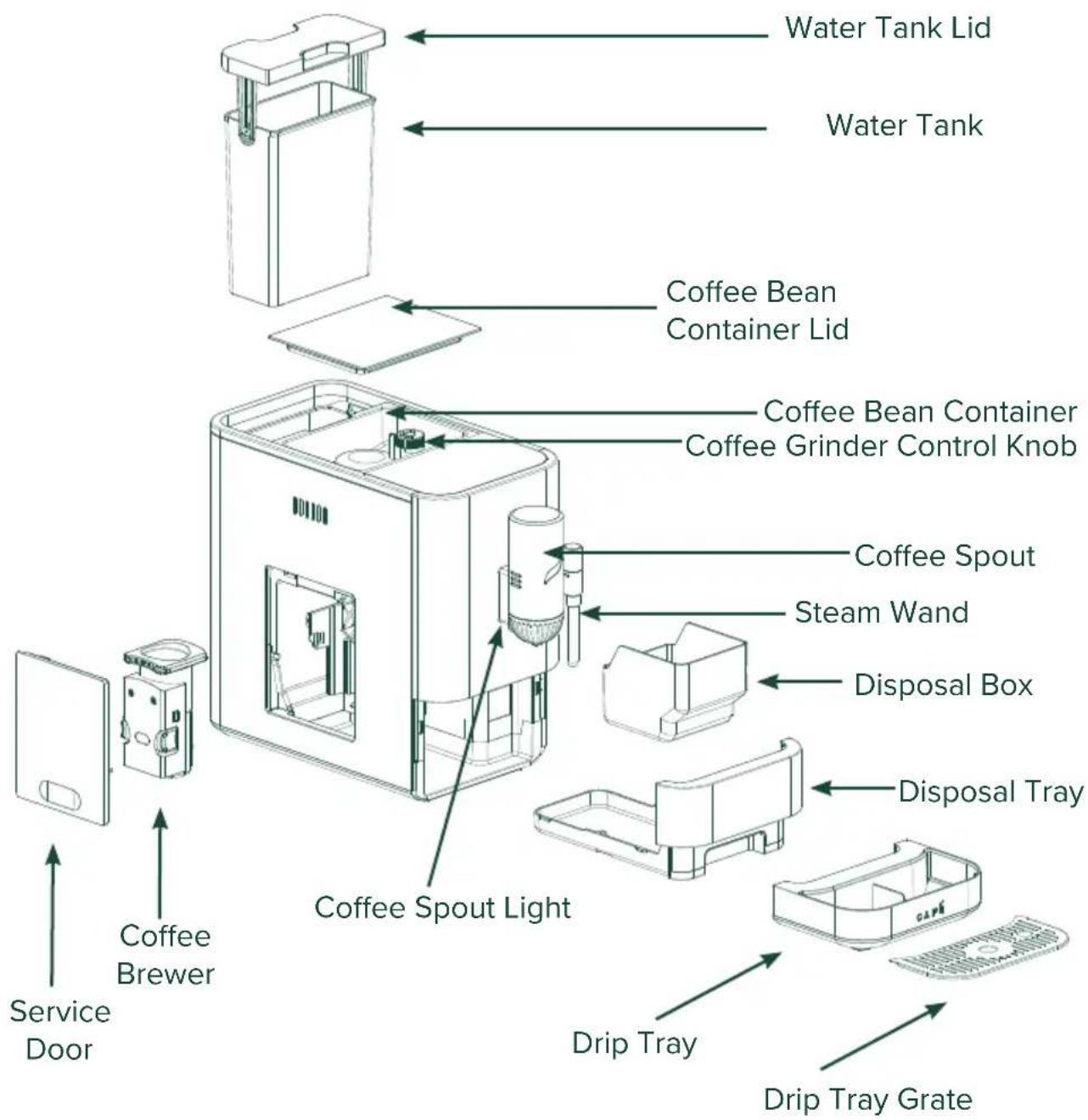
Steam wand only available with models C7CEBBS3RD3, C7CEBBS4RW3, and C7CEBBS2RS3
Accessories
Cleaning Kit
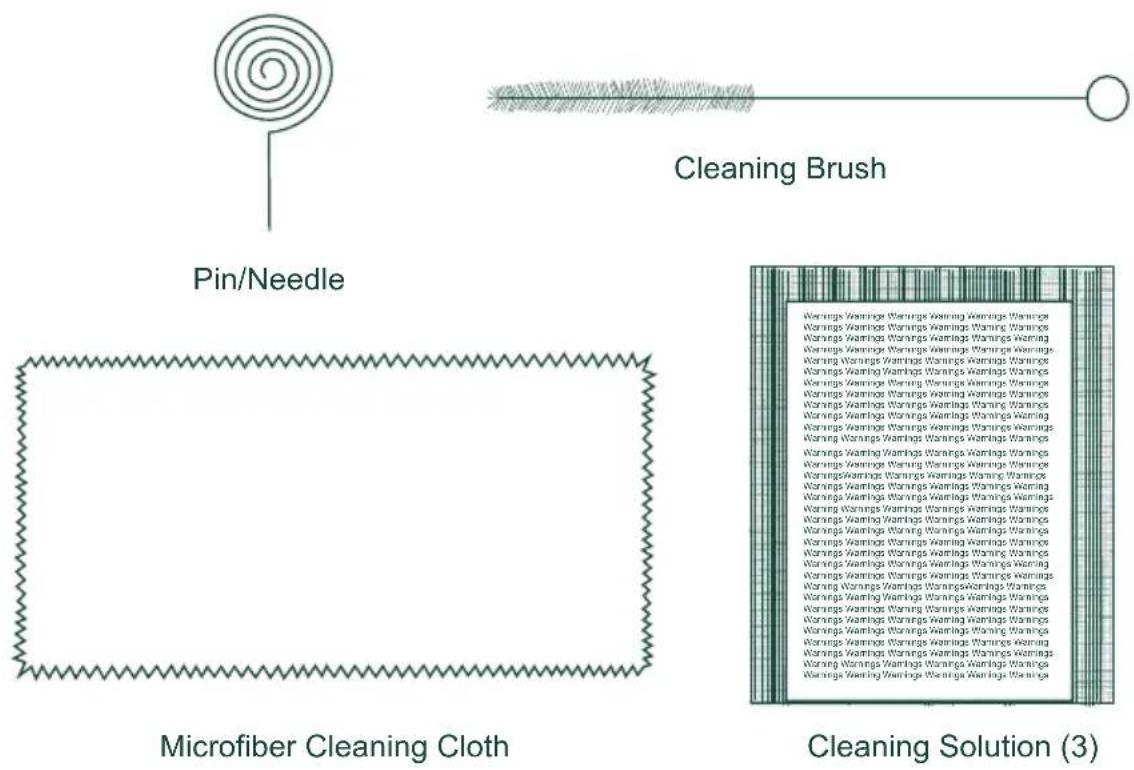

Water Hardness Strips
Milk Pitcher
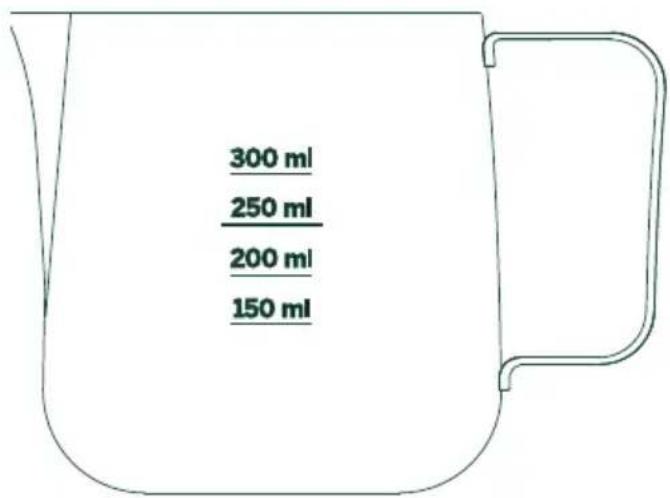
NOTE: Milk Pitcher is only included with model C7CEBBS3RD3, C7CEBBS4RW3, C7CEBBS2RS3
Control Panel
Functions
Buttons
NOTE: All settings have a default and can be changed through the SmartHQ App.
NOTE: Coffee ground amounts and espresso volumes may vary depending on bean type and machine settings.
Espresso
Espresso is a full-flavored coffee drink served as a concentrated shot. Cappuccinos, Flat Whites, and Lattes are all made with an espresso shot.
Default setting: \~ 8-12-grams of coffee yields \~ 30 mL of espresso (1oz).
Lungo
The Lungo, or "long". This will create a cup that has double the water and extraction time.
Default setting: \~ 8-12 grams of coffee yields \~ 100 mL of espresso (3.5oz)
Lungo is only included with model C7CEBAS3RD3, C7CEBAS4RW3, C7CEBAS2RS3.
You can change My Cup in the SmartHQ app to Lungo if desired.
Americano
This is a coffee brew sized drink. It is made by the addition of hot water over the single shot of espresso. Your machine will brew espresso first, dispose of the used grounds, and pour hot water on top through the same coffee spout. Please wait for all cycles to complete before enjoying your Americano.
Default Setting: Brew Espresso ( ^ 8-12 grams of coffee yields 50 mL [1.5oz]) Add hot water on top ( 100 mL [3.5oz]).
My Cup
When using the "My Cup" setting, the default is set to a Ristretto. This is similar to an espresso shot but is half the water volume. Often called a "short" espresso.
Default Setting: 8-12 grams of coffee yields 15 mL of espresso (½ oz).
The My Cup function can only be updated within the SmartHQ app.
Steam
Steam is used to heat up milk (or alternatives) and create microfoam for frothed milk drinks like Lattes and Cappuccinos.
Steam is only included with model C7CEBBS3RD3, C7CEBBS4RW3, C7CEBBS2RS3
CAUTION
To avoid possible burns to
body parts and/or other injury from hot steam, do not touch liquids or steam wand during or after steaming. Do not remove pitcher until steaming is complete. Hold milk pitcher by the handle.
NOTE: The steam wand rotates to fit your preferred cup size.
Hot Water
The Hot Water function dispenses hot water from the spout or steam wand (C7CEBBS3RD3, C7CEBBS4RW3, C7CEBBS2RS3). Use this function when hot water is desired. No coffee is used during this function.
Alerts
WiFi
Your espresso machine is WiFi compatible. See page 19 for how to connect and use the SmartHQ app.
Add Water
The Add Water indicator appears when there is no water left in the tank or the tank is removed from the unit. If this occurs during a cycle, simply add water then press the button of the desired function to continue the current cycle.
Add/Stir Beans
The Add/Stir Beans indicator appears when there are no beans left in the coffee bean container. Add ONLY whole coffee beans to the container.
NOTE: Oily beans are not recommended for automatic espresso machines. If beans do not easily slide down into the grinder, it means oil is present. Please stir beans in the hopper.
NOTE: If machine runs out of coffee beans in the middle of the cycle, it might terminate the brew or produce a drink of reduced strength. An alert will clear after the beans are refilled and the user restarts a new brew.
Check Brew Unit
Coffee Brewer and/or Service door are not in place or not properly installed.
Empty Waste
Empty Waste appears after 8 brews. Empty the waste basket and the alert will turn off. If the disposal drawer is open for more than 5 seconds, the counter is reset.
NOTE: Clean out, wash, and dry the Disposal Tray and Drip Tray before long periods of no use.
Descale
Descale alert will appear when it is time to run a descale cycle for best operation and life span of the machine.
Rinsing
An alert is on during automatic rinsing function which occurs on power ON after complete cool down.
Using your Espresso Machine
NOTE: Appearance may vary slightly by model.
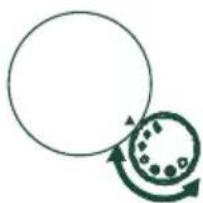
Coffee Grinder Knob
Add coffee beans to the coffee bean container. While grinding is occurring, adjust the coffee grinder knob to desired grind size. Align the desired grind circle to the arrow on the grinder top.
The smallest circle is the smallest grind size and the largest circle is the largest grind size. The smaller the grind, the stronger the coffee. This may change if the grind settings are changed in the app.
NOTE: If machine runs out of coffee beans in the middle of the cycle it might terminate the brew or produce a drink of reduced strength. An alert will clear after the beans are refilled and the user restarts a new brew.
natural_image
Simple diagram showing a circle rotating around a circular object with arrows indicating rotation (no text or symbols)Removable Steam Wand
The steam wand is removable for easier cleaning. First unscrew, then pull down. The stainless steel cover is also removable from the steam wand.
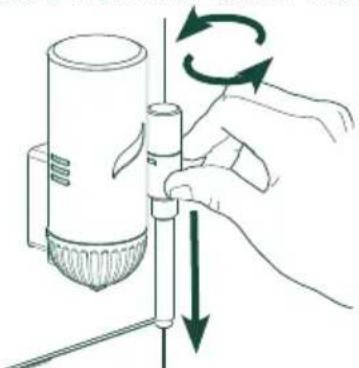
natural_image
Illustration of a hand using a pipette to lift a cylindrical device with rotating arrows (no text or symbols)Adjustable Steam Wand and Coffee Spout
The steam wand moves from side to side for easier use.
The coffee spout moves up and down to accommodate different size cups.
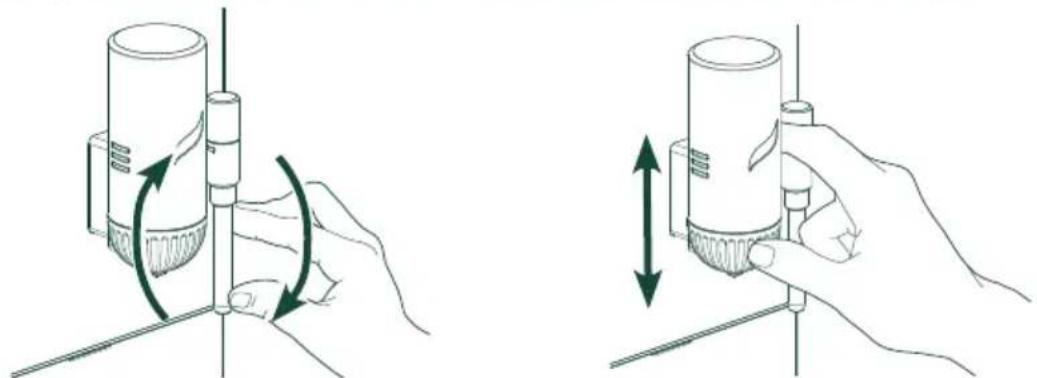
natural_image
Two-step diagram showing hand positioning of a cylindrical device with rotating arms and directional arrows (no text or symbols)Using your Espresso Machine
How to Turn on the Machine
Press the Power button to turn on the machine. The other buttons will appear after the Power button is pressed.
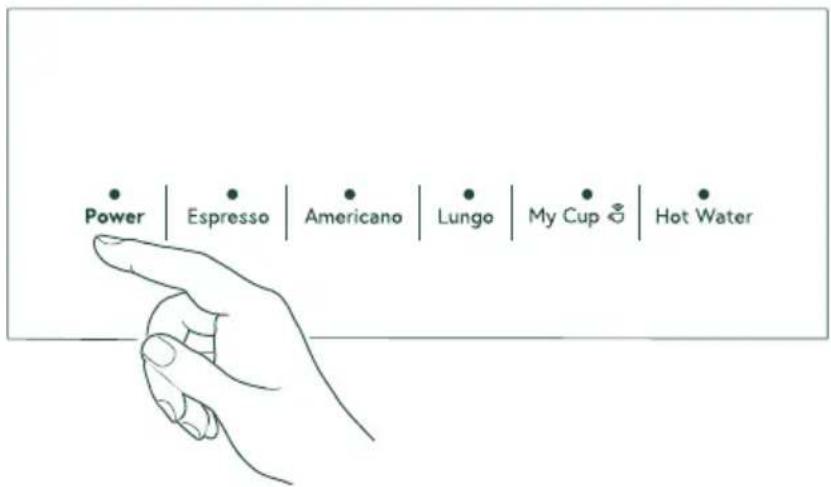
Espresso, Lungo, Americano, and My Cup Functions
NOTE: Make sure you have a coffee cup or container placed under the dispenser before using any function.
To use any function, press the desired button. All other buttons on the control panel will go dark, leaving the desired function and Power buttons illuminated. The espresso machine will start to grind the coffee beans. When the beans are ground, the espresso machine will dispense coffee.
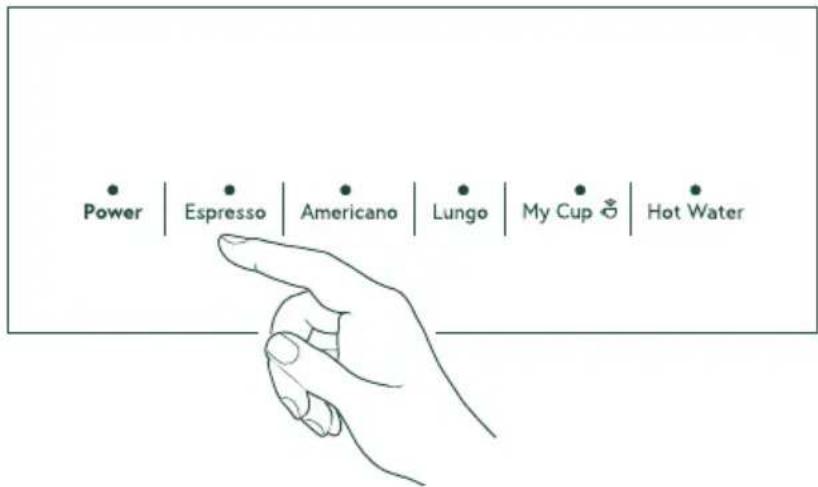
NOTE: Lungo is only available with model C7CEBAS3RD3, C7CEBAS4RW3, C7CEBAS2RS3.
NOTE: The My Cup function can only be adjusted through the SmartHQ app. The default setting is Ristretto. See page 19 for more information on the Smart HQ app and how to connect to the WiFi.
Using your Espresso Machine
Steam and Hot Water
CAUTION
To avoid possible burns to body parts and/or other injury from hot steam,
do not touch liquids or steam wand during or after steaming. Do not remove pitcher until steaming is complete. Hold milk pitcher by the handle.
NOTE: The Steam function is only available with model C7CEBBS3RD3, C7CEBBS4RW3, C7CEBBS2RS3.
NOTE: Make sure you have a coffee cup or container placed under the steam wand before using either function.
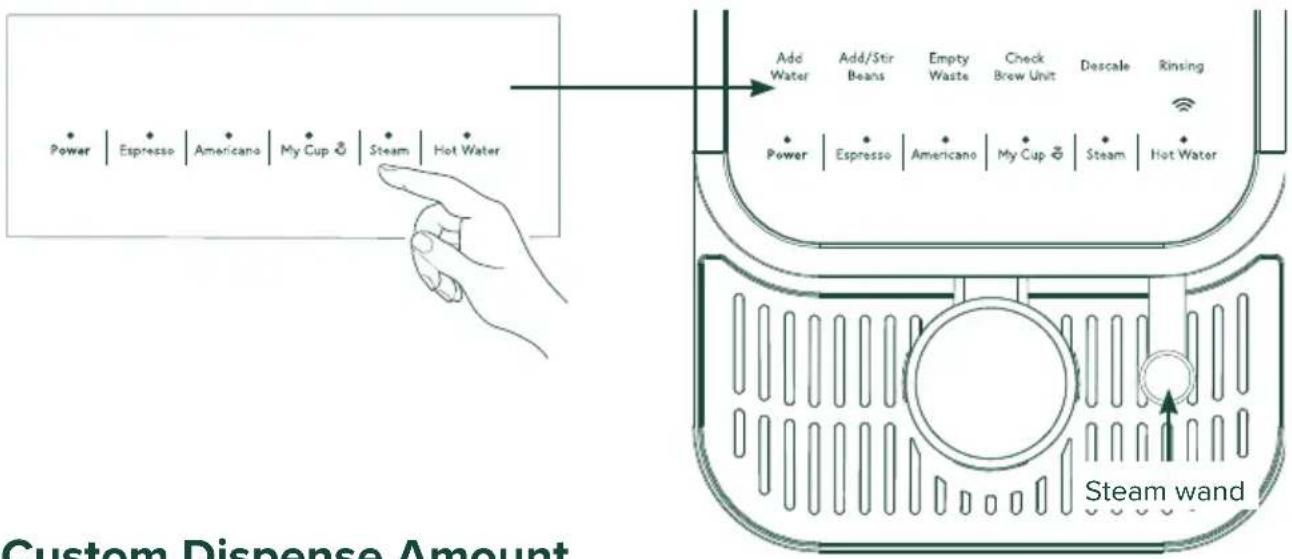
Hot water will dispense when the Hot Water button is pressed.
To use the Steam function, press the Steam button to initiate the process. The Steam Wand Light will start flashing. When the water is preheated, the Steam Wand Light will go steady and the Steam button will flash. Insert the Steam Wand into the milk then press the Steam button to dispense.
NOTE: No coffee beans are used for this function.
NOTE: Hot Water comes out of steam wand if present. Hot water comes out of spout for models without the steam wand.
Custom Dispense Amount
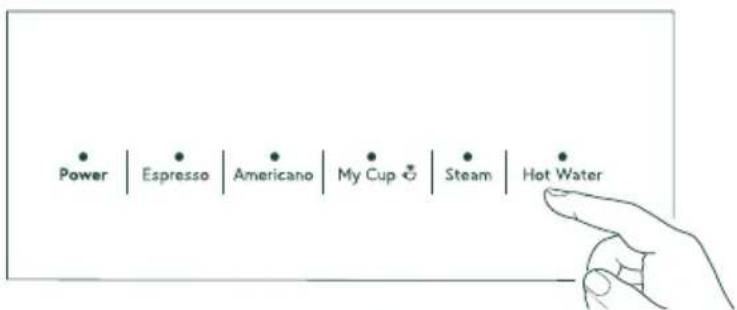
Press and hold any of the function buttons for 3 seconds until 2 beeps sound.
The machine will begin to dispense for the selected function.
To choose a new dispense volume, press the function button again. The machine will stop. 2 more beeps will sound and the new dispense volume will be set. The machine will return to idle state.
NOTE: If no custom dispense amount is set, the maximum volume will be the custom dispense amount.
Care and Cleaning
WARNING
Allow heating element to completely cool to avoid risk of fire or injury over prior to cleaning or service.
CAUTION
To avoid possible burns to body parts and/or other injury from hot steam, do not touch liquids or steam wand during or after steaming. Do not remove pitcher until steaming is complete. Hold milk pitcher by the handle.
Cleaning the Espresso Machine
■ Unplug the espresso machine from the wall.
■ Pour out all leftover water and wash and dry the water tank, drip tray, and disposal tray.
■ Wipe down appliance using the provided microfiber cloth and non-abrasive cleaner.
■ DO NOT place any part of the espresso machine in the dishwasher. Hand wash only.
NOTE: When not in use for long periods of time, such as vacation, run system empty cycle, dry water tank, and open water tank lid.
Cleaning the Coffee Brewer and Service Area
The service area will get dirty over time with excess coffee grounds.
■ Unplug the espresso machine from the wall.
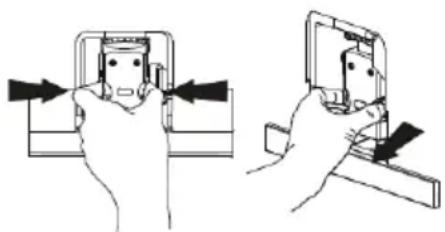
■ Remove the service door located on the side of the appliance by pressing the bottom of the service door.
■ To take out the brewer, pinch both orange tabs to release.
■ Use cleaning brush and microfiber cloth provided to wipe away access grounds from the service area and coffee grinder chute as shown.
■ Wash coffee brewer in the sink with warm water. Make sure to air dry or wipe with microfiber cloth before returning to unit.
■ Make sure to air dry the service area before reassembling the coffee brewer.
- Replace the brewer by pressing the orange tabs again until it locks in place.
- Replace service door before using machine. The service door will click into place.
natural_image
Two-step diagram showing hand positioning of a mechanical component, no text or symbols present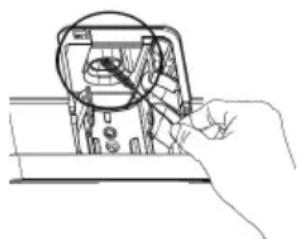
natural_image
Hand holding a device with a magnified inset showing internal components (no text or symbols visible)Care and Cleaning
Descaling Process
DO NOT use any cleaning agents not provided with the product or recommended in this manual.
It is recommended to descale once a month or more depending on the water hardness. Water hardness strip can be used to measure your water hardness and adjust the frequency of the descale alert accordingly under SmartHQ app.
■ Descale process consists of 2 stages. Descale alert will turn off after the second stage is completed. The whole process is expected to last 30-40 minutes start to finish.
STAGE 1:
- Fully fill the water tank.
- Add one pack of cleaning solution in the water tank and mix well.
- Remove the drip tray and place a 45 oz or larger container under the spout (spouts for Steam units).
- Press and hold the Hot Water and Steam (for Steam machines) and My Cup and Hot Water for Coffee only Machines for 3 seconds to initiate the descaling process. A single beep sounds, all buttons turn off and Descale alert starts to flash.
- Water starts dispensing into the container.
- After all water is dispensed, Descale alert stops flashing, but stays ON. Add Water alert flashes.
STAGE 2:
- After Stage 1 is complete, remove, rinse, fully refill, and reinstall the water tank. Add Water alert will go off.
- Repeat steps 3 to 5 from Stage 1.
- After all water is dispensed, Descale alert turns OFF. Add Water alert turns ON.
- Refill the water tank again. Unit is ready for normal operation.
NOTE: As an alternative, a 1:1 ratio of water and white vinegar can be used as a cleaning solution for the descaling process.
System Emptying
The System Emptying process empties the system of all water. Use this function when storing the machine for long periods.
■ Press and hold the Hot Water and Power buttons together for 3 seconds the initiate the emptying process. Water will empty into the drip tray.
■ Remove the water tank. Place a small bowl under both spouts.
- When the cycle ends, the Rinsing button will stop flashing and the machine will return to the Powered ON state.
Checking Your Water Hardness
Included with the unit is a Water Hardness Test Kit. Please follow the instructions on the package using the water you plan to use to make espresso. Once you have gathered your results, please refer to the SmartHQ app to set your water hardness level.
Tips
Espresso is often mistakenly thought of as a drink made with darker roast beans. Some coffee roasters even mark their product as "Espresso Coffee". This is misleading because espresso is mainly distinguished from other coffee drinks by the correct grind size and brew process, not the type, origin, or roast of the coffee beans. Any coffee bean can be used in making your espresso!
However, in automatic espresso machines it is not recommended to use oily beans that most often come from darker roasts. Oil coats the inside components and may affect the usability and life span of the machine.
■ Use the hot water button to heat up your espresso cup before brewing. Espresso has a very small volume and will cool quicker if brewed in a cold cup.
■ Some functions can be adjusted within the SmartHQ App to meet your specific preferences or coffee type. Reference the SmartHQ section on page 19.
Your espresso machine can be used to make an unlimited number off espresso-based drinks. Frothed milk drinks like Cappuccinos and Lattes are classics enjoyed by many.
Make sure to brew espresso BEFORE using steam. Steam function requires higher temperatures than espresso and brewing espresso immediately after Steaming will affect the taste of espresso.
Cappuccino
This drink is made with espresso, milk, and large amount of microfoam. Do not fill the milk pitcher above half way to avoid microfoam overflow during steaming. Frothed milk may be as much as double in volume.
Latte
This drink uses espresso and steamed milk with a smaller head of foam.
■ How to steam milk:
NOTE: Steam function is only included with model C7CEBBS3RD3, C7CEBBS4RW3, C7CEBBS2RS3.
- After steam is preheated and ready, place the tip of the steam wand right under the surface of the milk at the edge of the milk pitcher at approximately a 45^ angle to create a vortex. Start steaming. The longer milk is steamed under the surface the more microfoam is created. Once desired amount of microfoam is reached, dip the steam wand lower into the milk and continue to steam until desired temperature is reached. Place a hand under the pitcher to feel the change in temperature. Once the bottom is warm enough to feel uncomfortable, optimal temperature is achieved.
- Large bubbles can be broken into smaller bubbles by light tapping of the milk pitcher on the edge of the counter.
NOTE: To heat up milk, you want to position the steam wand lower into the pitcher to prevent air from entering the milk and creating bubbles. This will result in a steamed milk with a smaller head of foam.
Troubleshooting
| Problem | Cause Solution | |
| Appliance does not work/does not turn on. | No power is connected to the appliance. ■ | Check cable and plug are connected to power and press the "on" button. ■ Check GSI plug. |
| No or delayed response from pressing buttons on control panel. | Panel may be dirty or wet. Unplug the unit and clean the panel with cloth provided and ensure panel is dry. | |
| Electromagnetic interference. Unplug the machine. Wait a few minutes then plug back in. | ||
| Coffee is not hot enough. | Cup is not preheated. Run hot water into the cup and swirl it lightly around to heat up the cup before brewing espresso. | |
| The coffee brewer is too cold. Dispense hot water to warm up the coffee brewer. | ||
| Temperature is set too low. Connect appliance to SmartHQ app and raise temperature to preferred setting. | ||
| Coffee is too hot. Temperature is set too high. Connect appliance to SmartHQ app and raise temperature to preferred setting. | ||
| Coffee does not come out of spout. | Excessive scale has built up. Descale the appliance as directed on page 15. | |
| Empty system function may have been used. | Run the hot water function until water starts dispensing. | |
| Pump airlock (air in the water pump). Run the hot water function until water starts dispensing. | ||
| Something is blocking the spout. Run the hot water function until water starts dispensing. | ||
| Coffee is dispensing slower than normal | The coffee grounds are too fine. Adjust the coffee grinder so the grounds are slightly larger or until the water flow is back to normal. | |
| Espresso shot has no crema. | Coffee ground is too coarse. | Adjust coffee bean grind size to a smaller setting during grinding operation. |
| Coffee beans are not fresh. | Change or use appropriate coffee beans. | |
| Brew temperature is incorrect for this type of coffee. | Connect appliance to SmartHQ app and change temperature. | |
| Steam wand is not making enough microfoam | The steam wand is dirty or something is blocking the output. | Refer to Care and Cleaning section. |
| The unit needs to be descaled. | Follow the directions to descale the appliance on page 15. | |
| Improper form or technique. | Refer to the Tips section on page 16. | |
| Appliance takes too long to heat up. | Excessive scale has built up. Follow the directions to descale the appliance on page 15. | |
| Water tank is empty but "Add Water" alert does not show up. | Water sensor is detecting water on the outside of the water tank. | ■ Wipe the exterior of the water tank and interior of the water tank housing completely dry. ■ Avoid pouring water directly into the water tank. It is recommended to pull out water tank, fill, then replace in the unit. |
| Internal Drip Tray is filled with large amount of water. | Coffee powder is too fine, coffee can not pass through grounds. | Adjust coffee bean grind size to a larger setting during grinding operation. |
| Restriction in the coffee or steam nozzle. Check for restrictions. | ||
| Too much hard water scale building on the internal tubing. | Descale the appliance. | |
Troubleshooting
| Problem | Cause Solution | |
| "Add/Stir Coffee Beans" indicator on but hopper still contains lots of coffee beans. | Internal coffee outlet is blocked. Clean the coffee grinder shoot. Refer to the "Cleaning the Coffee Brewer and Service Area" on page 14. | |
| Beans are too oily and do not slide freely into the grinder. | Stir the beans in the container to allow them to slide down and avoid using oily beans if possible. | |
| Grinder is making a very loud sharp noise. | There are foreign objects in the grinder. Stop operations and call service. | |
| Appliance disposes of unused coffee grounds without brewing coffee. | The function was canceled before completing or power outage during brew cycle. | |
| Bean container is empty and grind amount did not meet standards for good strength espresso. The shot was disposed. | Refill coffee bean container. | |
| Coffee dispensed is watery. | Commonly occurs on first brewing cycle. Optimize the coffee extraction with the next brew. | |
| Brew module is dirty. Remove the brew unit and clean. | ||
| Grinder setting is too coarse. ■ Adjust coffee bean grind size to a smaller setting during grinding operation. ■ Go to the SmartHQ app and adjust coffee settings. | ||
| Low on coffee beans. Refill coffee bean container. | ||
| Brew unit cannot be removed. | Brew unit not in neutral position. ■ Machine is still in function mode, wait until function is complete before removing, Replace service door to ensure continuous function. ■ If appliance is not running, ensure all parts are in place, and press the ON/OFF button to turn the appliance OFF. Wait until you hear no more sounds and press the ON/OFF button to turn the appliance back ON. Open the service door to try and remove again. Remove the brew module and clean. | |
| Disposal Drawer cannot be removed. | Disposal Drawer can only be removed when the appliance is not mid-function. | Turn off the machine or wait until current function is complete before attempting to remove the disposal drawer. |
| Internal drip tray is filled with water | The coffee grounds are too fine. Adjust the coffee grinder so the grounds are larger. | |
| No steam or hot water is coming out of the steam wand. | The hole in the spout is clogged. Stop the cycle, unplug the unit, clear the steam wand spout using the cleaning tool as directed. | |
| Steam or hot water have stopped dispensing mid-process. | Water tank is empty. Refill the water tank to continue process. | |
| The function was cancelled early. Restart the function. | ||
WiFi Connect – SmartHQ
WiFi Connect
Press and hold the Espresso and Americano buttons simultaneously for 3 seconds to turn on the WiFi function. The espresso maker will beep to confirm the action and the WiFi icon will appear on the screen.
Follow the directions in the SmartHQ app to continue WiFi setup.
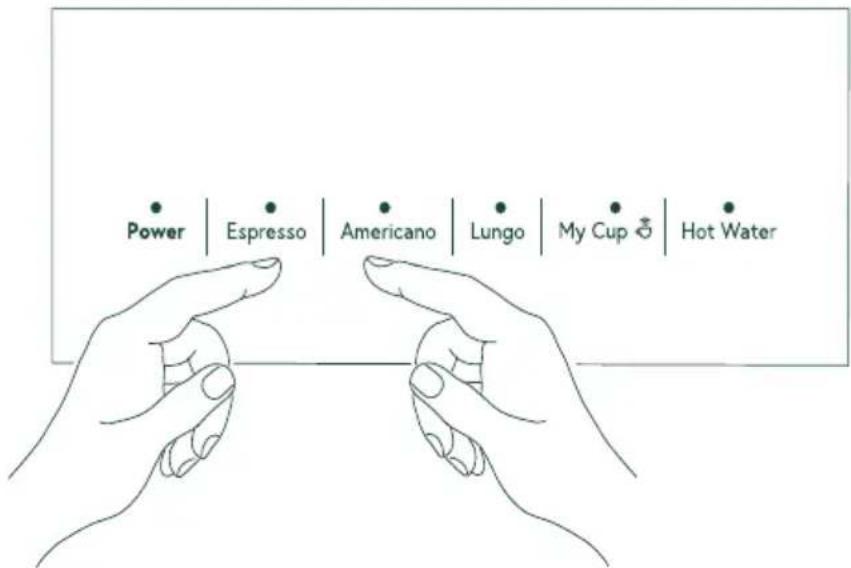
NOTE: To disconnect from WiFi, follow the same steps. The WiFi icon will disappear.
SmartHQ App
Your Espresso Maker is WiFi Connect Enabled. A WiFi communication card is built into the product allowing it to communicate with your Smart Phone for remote monitoring, control, and notifications.
Please visit geappliances.com/ge/connected-appliances/ to learn more about connected appliance features and to learn what connected appliance App's will work with your Smart Phone.
FCC/IC COMPLIANCE STATEMENT
FCC/IC COMPLIANCE STATEMENT:
This device complies with Part 15 of the FCC Rules. Operation is subject to the following two conditions:
- This device may not cause harmful interference, and
- This device must accept any interference received, including interference that may cause undesired operation.
Any changes or modifications not expressly approved by the party responsible for compliance could void the user's authority to operate the equipment.
NOTE: This equipment has been tested and found to comply with the limits for a Class B digital device, pursuant to Part 15 of the FCC Rules. These limits are designed to provide reasonable protection against harmful interference in a residential installation. This equipment generates uses and can radiate radio frequency energy and, if not installed and used in accordance with the instructions, may cause harmful interference to radio communications. However, there is no guarantee that interference will not occur in a particular installation. If this equipment does cause harmful interference to radio or television reception, which can be determined by turning the equipment off and on, the user is encouraged to try to correct the interference by one or more of the following measures:
- Reorient or relocate the receiving antenna.
- Increase the separation between the equipment and receiver.
- Connect the equipment into an outlet on a circuit different from that to which the receiver is connected.
- Consult the dealer or an experienced radio/television technician for help.
This device complies with Industry Canada licence-exempt RSS standard(s).
Operation is subject to the following two conditions: (1) This device may not cause interference, and (2) This device must accept any interference, including interference that may cause undesired operation of the device.
Labeling: Changes or modifications to this unit not expressly approved by the manufacturer could void the user's authority to operate the equipment.
ConnectPlus module only (or similar communication module)
RF Exposure - This device is only authorized for use in a mobile application. At least 20 cm of separation distance between the ConnectPlus device and the user's body must be maintained at all times.
FCC ID: ZKJ-WCATA006
IC ID: 10229A-WCATA006
Notes
Limited Warranty
If your appliance fails to operate properly while in use under normal household conditions within the warranty period, visit cafeappliances.com/support for product care/maintenance self-help.
In Canada, visit service.geappliances.ca/servicio/en_CA/.
To initiate a warranty claim, please visit cafeappliances.com/support/returns/, or call 1-800-430-
- Please have your model number and serial number available. Return and packing instruction information will be provided at that time.
In Canada, contact us at cafeappliances.ca
For the Period of: Café Appliances Covers
| One YearFrom the dateof the originalpurchase | If the Espresso Machine fails due to a defect in materials or workmanship,during the limited one-year warranty, GE Appliances will either replace orrefurbish your product with a new or remanufactured product, or refundthe purchase price of the product at GE Appliances sole discretion. |
What Café Appliances Will Not Cover:
■ Improper installation, delivery or maintenance.
■ Failure of the product if it is abused, misused, or used for other than the intended purpose or used commercially.
■ Damage caused after delivery.
■ Damage to the product caused by accident, fire, floods or acts of God.
■ Incidental or consequential damage caused by possible defects with this appliance.
■ Software bugs that can be corrected with an update via the Café App
■ Labor and other charges to install and/or remove the product
EXCLUSION OF IMPLIED WARRANTIES
Your sole and exclusive remedies are product exchange or refund as provided in this Limited Warranty. Any implied warranties, including the implied warranties of merchantability or fitness for a particular purpose, are limited to one year or the shortest period allowed by law.
For sale in the 50 United States, District of Columbia, and Canada only:
This limited warranty is extended to the original purchaser for products purchased for home use within the USA. In Alaska and Hawaii, the limited warranty does not include the costs of shipping units. California residents may gave additional return options. Please ask call center for additional information.
Some states do not allow the exclusion or limitation of incidental or consequential damages. This warranty gives you specific legal rights, and you may also have other rights which vary from state to state. To know what your legal rights are, consult your local or state consumer affairs office or your state's Attorney General.
Warrantor: GE Appliances, a Haier company Louisville, KY 40225
For Customers in Canada: This limited warranty is extended to the original purchaser and any succeeding owner for products purchased in Canada for home use within Canada. In-home warrant service will be provided in areas where it is available and deemed reasonable by Mabe to provide. For extended warranty information, visit geappliances.ca/purchase-extended-warranty
Warrantor Canada: MC Commercial, Burlington, Ontario, L7R 5B6
Consumer Support
CAFÉ WEBSITE
Have a question or need assistance with your appliance? Try the Café Appliances Website 24 hours a day, any day of the year! You can also shop for more great Café Appliances products and take advantage of all our on-line support services designed for your convenience. cafeappliances.com
In Canada: cafeappliances.ca
REGISTER YOUR APPLIANCE
Register your new appliance on-line at your convenience! Timely product registration will allow for enhanced communication and prompt service under the terms of your warranty, should the need arise. You may also mail in the pre-printed registration card included in the packing material. cafeappliances.com/register
In Canada, service.geappliances.ca/servicio/en_CA/
PARTS AND ACCESSORIES
Individuals qualified to service their own appliances can have parts or accessories sent directly to their homes
(VISA, MasterCard and Discover cards are accepted). Order on-line today 24 hours every day. cafeappliances.com/parts
In Canada: geappliances.ca/parts-filters-accessories
Instructions contained in this manual cover procedures to be performed by any user. Other servicing generally should be referred to qualified service personnel. Caution must be exercised, since improper servicing may cause unsafe operation.
CONTACT US
If you are not satisfied with the service you receive from Café Appliances, contact us on our Website with all the details including your phone number, or write to: General Manager,
General Manager, Customer Relations | GE Appliances, Appliance Park | Louisville, KY 40225 cafeappliances.com/contact
In Canada: Director, Consumer Relations, Mabe Canada Inc. | Suite 310, 1 Factory Lane | Moncton, N.B. E1C 9M3
cafeappliances.ca/support/contact-us
49-9000016 Rev. 0 02-21 GEA
CAFE
DISTINCT BY DESIGN™
CAFE
DISTINCT BY DESIGN™
natural_image
Black and gold product resembling a coffee maker with a vertical cylindrical tube, labeled 'CAFÉ' at the base (no other text or symbols visible)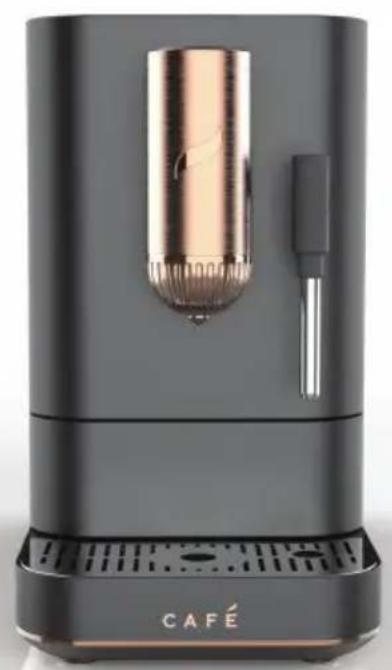
natural_image
Black and white photo of a modern café brush rester with a cylindrical lens and handle, labeled 'CAFÉ' at the base (no other text or symbols visible)natural_image
Simple diagram showing a circle rotating around a circular object with arrows indicating rotation (no text or symbols)The image contains no discernible text or characters. The horizontal line is a stylistic or background element and must be ignored according to the rules.
Brosse de nettoyage
Broche de nettoyage
Solution learning voyage(3(B)

Fonctions
Boutons
Hot Water (eau chaude)
natural_image
Simple diagram showing a circle rotating around a circular object with arrows indicating rotation (no text or symbols)natural_image
Illustration of a hand using a pipette to measure a cylindrical device with rotating arrows (no text or symbols)natural_image
Two-step diagram showing hand positioning of a cylindrical device with arrows indicating rotation and size, no text or symbols present.natural_image
Two-step diagram showing hand positioning of a device with arrows indicating movement (no text or symbols)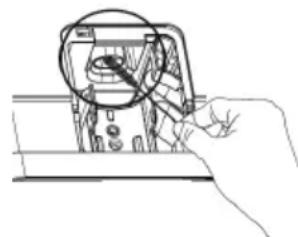
natural_image
Hand holding a tool interacting with an electronic device component (no visible text or symbols)Au Canada, visitez service.geappliances.ca/servicio/fr_CA/.
Garantr: GE Appliances, a Haier company
Louisville, KY 40225
In Canada: cafeappliances.ca
ENREGISTREZ VOTRE ÉLECTROMÉNAGER
cafeappliances.com/parts
Au Canada: geappliances.ca/parts-filters-accessories
General Manager, Customer Relations | GE Appliances, Appliance Park | Louisville, KY 40225
CafeAppliances.com/contact
cafeappliances.ca/support/contact-us
49-9000016 Rev. 0 02-21 GEA
CAFE
DISTINCT BY DESIGN™
- THANK YOU FOR MAKING CAFÉ A PART OF YOUR HOME.
- Table of Contents
- Product Registration
- IMPORTANT SAFETY INFORMATION READ ALL INSTRUCTIONS BEFORE USING THE APPLIANCE
- WARNING
- IMPORTANT SAFEGUARDS
- SAVE THESE INSTRUCTIONS
- Power Cord
- K OF FIRE OR ELECTRIC SHOCK
- Getting Started
- Drip Tray
- Water Tank
- Coffee Bean Container
- Ready to Use!
- Components
- Accessories
- Control Panel
- Functions
- Buttons
- Espresso
- Lungo
- Americano
- My Cup
- Steam
- CAUTION
- Hot Water
- Alerts
- WiFi
- Add Water
- Add/Stir Beans
- Check Brew Unit
- Empty Waste
- Descale
- Rinsing
- Using your Espresso Machine
- Coffee Grinder Knob
- Removable Steam Wand
- Adjustable Steam Wand and Coffee Spout
- How to Turn on the Machine
- Espresso, Lungo, Americano, and My Cup Functions
- Steam and Hot Water
- Custom Dispense Amount
- Care and Cleaning
- Cleaning the Espresso Machine
- Cleaning the Coffee Brewer and Service Area
- Descaling Process
- STAGE 1:
- STAGE 2:
- System Emptying
- Checking Your Water Hardness
- Tips
- Cappuccino
- Latte
- ■ How to steam milk:
- WiFi Connect – SmartHQ
- WiFi Connect
- SmartHQ App
- FCC/IC COMPLIANCE STATEMENT
- FCC/IC COMPLIANCE STATEMENT:
- Notes
- Limited Warranty
- What Café Appliances Will Not Cover:
- EXCLUSION OF IMPLIED WARRANTIES
- For sale in the 50 United States, District of Columbia, and Canada only:
- Consumer Support
- CAFÉ WEBSITE
- REGISTER YOUR APPLIANCE
- PARTS AND ACCESSORIES
- CONTACT US
- CAFE
- Fonctions
- Boutons
- Hot Water (eau chaude)
- ENREGISTREZ VOTRE ÉLECTROMÉNAGER
- CafeAppliances.com/contact
Brand : GE
Model : C7CEBAS2RS3
Category : Coffee machine