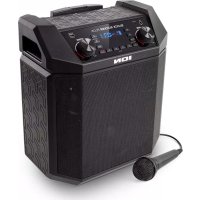
Block Rocker Plus - Speaker ION - Free user manual and instructions
Find the device manual for free Block Rocker Plus ION in PDF.


| Product type | Portable Bluetooth speaker with AM/FM radio |
| Brand | ION |
| Model | Block Rocker Plus |
| Power source | Mains (adapter included) and rechargeable lead-acid battery |
| Battery | Rechargeable lead-acid |
| Connectivity | Bluetooth, NFC, 3.5 mm auxiliary input, USB charging port |
| Main functions | AM/FM radio with presets, Bass Boost, microphone with volume control |
| Inputs | 6.35 mm (1/4") microphone (mono), 3.5 mm stereo auxiliary, USB (charging only) |
| Radio | FM1, FM2, AM (North America/Canada model only) |
| Radio presets | 5 for AM, 5 for FM1, 5 for FM2 |
| Box contents | Speaker, microphone with cable, auxiliary cable, power/charging cable, quick start guide, safety booklet |
| Safety instructions | Booklet included |
| Maintenance | Clean with a dry cloth; avoid extreme temperatures (0°C to 32°C) |
| Repairability | Replaceable fuse near the power input |
| Support | iona audio.com/support |
Frequently Asked Questions - Block Rocker Plus ION
User questions about Block Rocker Plus ION
0 question about this device. Answer the ones you know or ask your own.
Ask a new question about this device
Download the instructions for your Speaker in PDF format for free! Find your manual Block Rocker Plus - ION and take your electronic device back in hand. On this page are published all the documents necessary for the use of your device. Block Rocker Plus by ION.
USER MANUAL Block Rocker Plus ION
Appendix English (39)
Quickstart Guide (English)
Introduction
Thank you for purchasing the Block Rocker Plus. At ION, your entertainment is as important to us as it is to you. That's why we design our products with one thing in mind—to make your life more fun and more convenient.
Box Contents
Block Rocker Plus
Microphone with Cable
1/8" (3.5 mm) Stereo Aux Cable
Power/Charging Cable
Quickstart Guide
Safety & Warranty Manual
Support
For the latest information about this product (documentation, technical specifications, system requirements, compatibility information, etc.) and product registration, visit ionaudio.com.
For additional product support, visit ionaudio.com/support.
Rechargeable Batteries
Rechargeable lead-acid batteries are the same type used in automobiles. As with your car battery, how you use this battery has a significant impact on its lifespan. With proper use and treatment, a lead-acid battery can last for years. Here are some recommendations for getting the longest life from the internal battery.
General Usage Fully charge the battery before using it.
Charge the battery completely after each use.
Storage For best product longevity, do not store at exceedingly hot (greater than 90^ F/ 32^ C) or exceedingly cold (less than 32^ F/ 0^ C) temperatures.
It is acceptable to leave your sound system plugged in. This will not overcharge the battery.
If you leave the battery level low and do not charge it for 6 months, it may permanently lose capacity.
Repair If the battery fails to charge, check your fuse near the power cable input. If your fuse is intact and it still will not charge, contact ION Audio at ionaudio.com.
Disposal Bring the unit to a recycling center or dispose of in accordance with local ordinances.
Quick Setup
- Make sure all items listed in the Box Contents are included in the box.
- Read the Safety & Warranty Manual before using the product.
- Make sure the battery is completely charged prior to first use for maximum battery life.
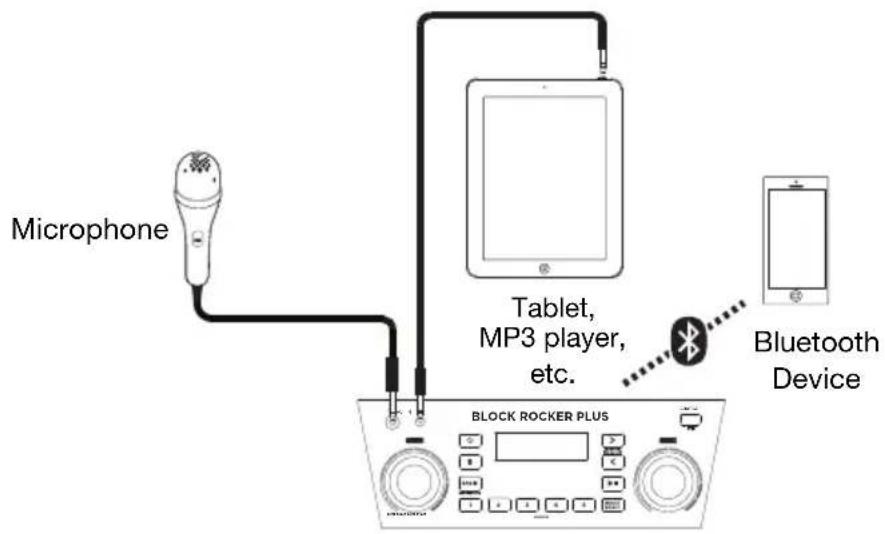
- Study the Connection Diagram.
- Ensure the Master Volume on Block Rocker Plus is at zero.
- Connect your devices.
- Raise the volume to a comfortable level.
- Return the Master Volume to zero when you are finished using Block Rocker Plus.
Setup
Items not listed under Introduction > Box Contents are sold separately.
Note: North America/Canada model shown here.
Front Panel
Rear Panel
Features
Front Panel
Note: North America/Canada model shown here.
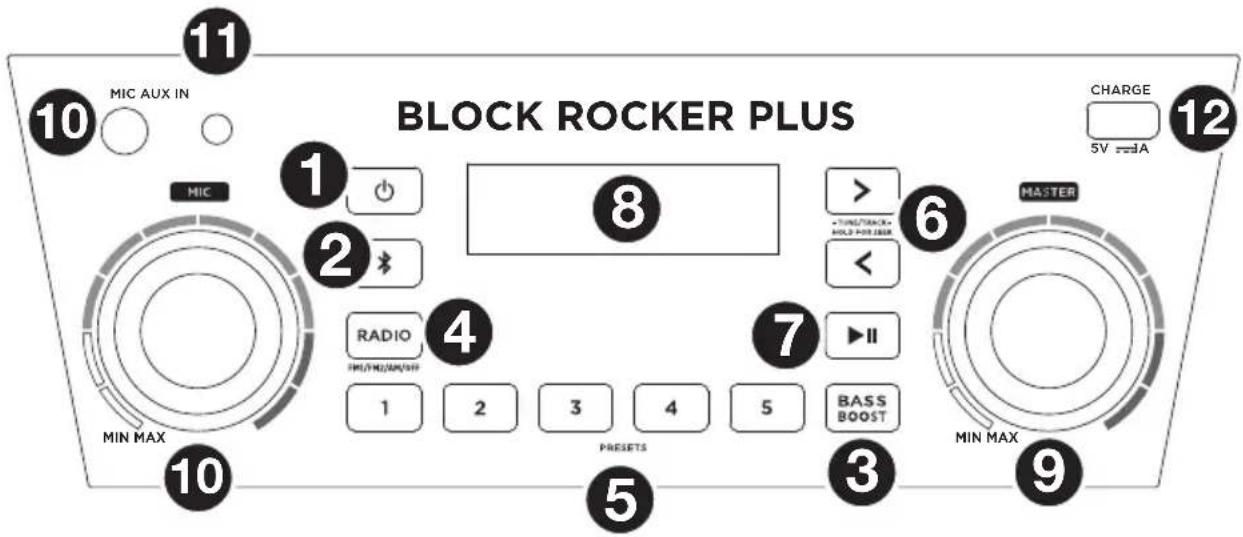
- Power Button: Turns Block Rocker Plus on or off. Please note that while Block Rocker Plus is connected to a power source, it does not need to be powered on to charge the battery. When the power is on, the display will show the power indicator.
- Bluetooth Button: Press the Bluetooth button to disconnect a paired Bluetooth device.
- Bass Boost: Press this button to enhance the overall bass frequency response.
- Radio Selector: This button sets the Radio to FM1, FM2, AM (North America/Canada only) or turns the radio off.
- AM/FM Presets: Store a favorite radio station and quickly tune to a preset radio station. There are 5 numeric positions to store AM band presets and 2 banks of 5 numeric positions each to store FM1 and FM2 band presets.
To add a preset:
i. Select FM1, FM2, or the AM band and then use the Tune/Track buttons to select the desired radio station.
ii. Press and hold a numeric preset button to assign the current station to that preset number. The display will show "SAV" to show the station has been saved. To use an added preset, press a preset number once lightly to go to the stored radio station.
-
Tune/Track Buttons: Tap these buttons to tune in a radio station or go to the previous/next track on a Bluetooth connected device. To "seek" (jump to the next available station), hold either button down for a few seconds until it starts to seek a station. The unit will remember the last station it was on and start at that station when powered off and on again.
-
Play/Pause: Press to play or pause a track from a connected Bluetooth device.
-
Display: Displays the current radio station, battery status, and Bluetooth status.
- Charging Indicator:
- When the power cable is connected, movement of the battery segments shows the battery is charging. When fully charged, all battery segments will be lit without blinking.
- When the power cable is disconnected, the battery segment shows the level of the battery.
- When the battery level is low, the bottom battery segment will blink.
-
If a front panel button is not pressed within 60 seconds, the battery level indicator will turn off (to save energy). The battery level indicator will reappear when any button is pressed. Also, when the battery gets to the lowest battery icon segment, the battery level indicator will turn back on.
-
Lightning Bolt Icon: The lightning bolt icon will illuminate when the power cable is connected to wall power.
- Bluetooth Icon: The Bluetooth icon will be lit solid when a device is paired to Block Rocker Plus.
- Power Icon: The power icon will be lit when Block Rocker Plus is powered on. The power icon will not be lit when Block Rocker Plus is powered off.
-
Bass Boost Icon: The Bass Boost icon will be on when the Bass Boost function is activated. The icon will be off when the function is deactivated.
-
Master Volume Control: This adjusts the speaker's main mix volume, which includes the Microphone Input, Auxiliary Input, Radio, and the audio of a paired Bluetooth device.
-
Microphone Input with Volume Control (1/4"): This mono input accepts a 1/4" (6.35 mm) input such as a microphone, guitar, or other musical instrument.
-
Auxiliary Input: This stereo 1/8" (3.5 mm) input can be used to connect a CD player, MP3 player, or other audio source.
-
USB Charging Port: Connect your device's charge cable here to charge it. USB charging only functions when the unit's power is turned on.
Top Panel
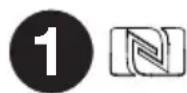
- NFC: Tap your NFC (near-field communication) supported and enabled device here to pair your phone by gently bumping on the 'N' logo.
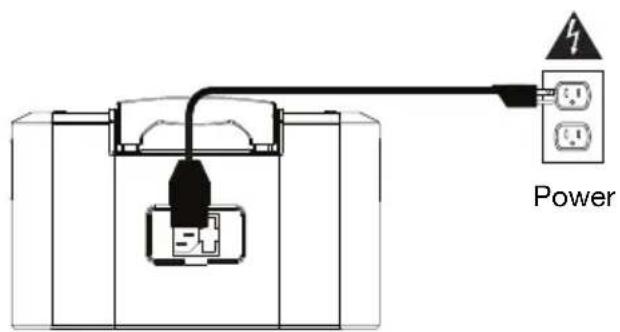
Rear Panel
-
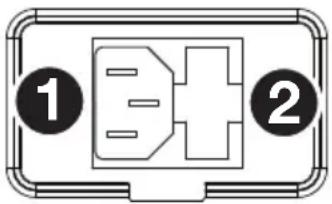
Power Cable Input: Insert the included power cable here to charge the unit. Note that the Block Rocker Plus can be used with the power cable while it simultaneously charges the battery.
-
Fuse Cover: If the unit's fuse is broken, use a screwdriver or other tool to lift this tab to replace the fuse. Replace it with a fuse of the same rating. Using a fuse with an incorrect rating can damage the unit and/or fuse.
Operation
Using the Radio
Selecting a radio station:
- Press the Radio button to select FM1, FM2, or AM (North America/Canada only).
- Press either of the Tune/Track buttons to select a radio station. To "seek" (jump to the next available station), hold either button down for a few seconds until it starts to seek a station.
Saving a radio station as a preset:
- Press the Radio button to select FM1, FM2, or AM (North America/Canada only).
- Press either of the Tune/Track buttons to select a radio station.
- Press and hold a numeric preset button to assign the current station to that preset number. The display will show "SAV" to show the station has been saved.
Recalling a saved radio station preset:
- Press the Radio button to select FM1, FM2, or AM (North America/Canada only).
- To use an added preset, press a preset number once lightly to go to the stored radio station.
Pairing a Bluetooth Device
- Turn on your Bluetooth device.
- Power on Block Rocker Plus. The speaker will automatically enter pairing mode. If you have previously connected to another Bluetooth device, Block Rocker Plus will reconnect. To disconnect pairing if the Bluetooth icon is lit solid, press and release the Bluetooth button.
- Navigate to your Bluetooth device's setup screen, find "Block Rocker Plus" and connect. The Bluetooth icon will be lit solid when paired.
Note: If your Bluetooth device prompts for a pairing code, enter "0000". - To disconnect pairing, press and release the Bluetooth button.
- To connect to another Bluetooth device, repeat step 3.
Pairing a Bluetooth Device Using NFC
NFC (near-field communication) allows data exchange from devices, such as pairing, by gently bumping them together. Check in your device's manual to see if this feature is supported.
To use NFC to pair with Block Rocker Plus:
- In order to use NFC, your device must be turned on and unlocked.
- Enter your device's Settings menu and check that NFC is turned On (one-time step).
- Power on Block Rocker Plus.
- Touch and briefly hold your device to the NFC logo.
- Follow the pairing instructions that appear on your phone. If a passcode is required, enter "0000".
- To unpair, gently bump your device against the NFC logo located on Block Rocker Plus's top panel.
Troubleshooting
If the sound is distorted: Try lowering the volume control of your sound source, musical instrument, or microphone. Also, try to reduce the overall volume of Block Rocker Plus using the Master Volume knob.
If there is too much bass: Try adjusting the tone or EQ control on your sound source to lower the bass level. This will allow you to play the music louder before clipping (distortion) occurs.
If there is a high-pitched whistling noise when using microphones: This is probably feedback. Point the microphone away from the speaker.
If there is poor AM reception: To adjust AM reception (North America/Canada only), move entire unit.
If you can't hear the microphone over the music volume: Turn down the music volume from your source.
If you can't play music from a flash drive: The USB port is only for charging USB devices.
natural_image
Pure electrical connector pinout diagram without any text or symbolsFuncionamiento
Cómo usar la radio
Caractéristiques
Panneau avant
Technical Specifications
| Output Power | 100 W (peak) | |
| Drivers | Low-Frequency: 8.0" / 203.2 mm wooferHigh-Frequency: 3.0" / 76.2 mm tweeter | |
| Frequency Response | 70 Hz - 20 kHz (+/- 3 dB) | |
| Bluetooth Specifications Profile: A2DP, AVRCPRange: up to 100 feet / 30.5 meters | ||
| Microphone Type | Dynamic microphone (included) | |
| Radio Frequency Range US: 520-1710 kHz (AM), 87.5-107.9 MHz (FM)Europe: 522-1629 kHz (AM), 87.5-108 MHz (FM)Japan: 522-1710 kHz (AM), 75.5-108 MHz (FM) | ||
| USB Charging Port 1 USB, +5 V, 1 A | ||
| Battery | Battery | life: up to 50 hours |
| Recharge time: 8 hoursType: SLA, 12V 4AH | ||
| Power | Input | Voltage: 100-240V 50/60Hz, 70 W |
| Dimensions(width x depth x height) | 14.57" x 9.84" x 17.36"370 x 250 x 441 mm | |
| Weight | 20.7 lbs.9.4 kg | |
Specifications are subject to change without notice. Bluetooth and wireless reception and range are affected by walls, obstructions, and movement. For optimal performance, place the product in the center of the room so it is unobstructed by walls, furniture, etc. Battery life may vary based on temperature, age, and volume usage of product.
Trademarks & Licenses
ION Audio is a trademark of ION Audio, LLC, registered in the U.S. and other countries. The Bluetooth word mark and logos are owned by the Bluetooth SIG, Inc. and any use of such marks by ION Audio is under license. The N Mark is a trademark or registered trademark of NFC Forum, Inc. in the United States and in other countries. All other product names, company names, trademarks, or trade names are those of their respective owners.
ionaudio.com
- Quickstart Guide (English)
- Introduction
- Box Contents
- Support
- Rechargeable Batteries
- Quick Setup
- Setup
- Features
- Front Panel
- Top Panel
- Rear Panel
- Operation
- Using the Radio
- Selecting a radio station:
- Saving a radio station as a preset:
- Recalling a saved radio station preset:
- Pairing a Bluetooth Device
- Pairing a Bluetooth Device Using NFC
- To use NFC to pair with Block Rocker Plus:
- Troubleshooting
- Funcionamiento
- Cómo usar la radio
- Caractéristiques
- Panneau avant
- Trademarks & Licenses
Brand : ION
Model : Block Rocker Plus
Category : Speaker