AMST21BC - Television LG - Free user manual and instructions
Find the device manual for free AMST21BC LG in PDF.



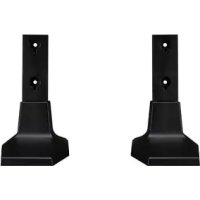
| Product type | LED TV with stand |
| Brand | LG |
| Stand model | AMST21BC |
| Compatible TV model | 55UR762H |
| Screen size | 55 inches |
| Resolution | 4K Ultra HD |
| Stand dimensions (W x D x H) | 570 x 303 x 244 mm |
| Stand weight | 3.2 kg |
| Rotation angle | 20° left/right |
| Tilt | Adjustable for optimal viewing comfort |
| Wall mounting | Compatible with wall mount (eye bolts, safety cord not included) |
| Included accessories | Stand, power cable, fixing screws, cable tie |
| Power supply | 100-240 V AC, 50/60 Hz |
| Maintenance | Wipe with a soft cloth, do not use abrasive products |
| Safety | Requires two people to move; install on a flat and stable surface |
| Repairability | Spare parts available through LG after-sales service |
Frequently Asked Questions - AMST21BC LG
User questions about AMST21BC LG
0 question about this device. Answer the ones you know or ask your own.
Ask a new question about this device
Download the instructions for your Television in PDF format for free! Find your manual AMST21BC - LG and take your electronic device back in hand. On this page are published all the documents necessary for the use of your device. AMST21BC by LG.
USER MANUAL AMST21BC LG
Please read this manual carefully before operating your set and retain it for future reference.
AM-ST21BB AM-ST21BC AM-ST21EB
* Image shown may differ from your product.
Safety instructions

This symbol is intended to alert the user to the presence of important operating and maintenance (servicing) instructions in the literature accompanying the appliance.
Please read these safety precautions carefully before using the product.

- When lifting or moving the product, at least two people are required due to the heavy weight of the product.
- The product may fall down, causing a malfunction or injury.
• Do not let children hang on or climb onto the product.
- The product may fall down, causing an injury or even death.
- Do not install the product in a place which is unstable or vibrating or a place where the product is not completely supported such as a shaky shelf or a tilted place.
- The product may fall down or overturn, causing an injury or malfunction.
• Put the product on a flat and firm floor.
- The product may fall and cause an injury.
- When moving or handling a product assembled with the Stand, be cautious about damaging the exterior of the product.
- When there is a stain or fingerprint left on the surface, wipe it off gently.
- When removing a stain, do not use excessive force. Wiping with excessive force may cause scratches or discoloration on the product.
Assembling and Preparing
Accessories
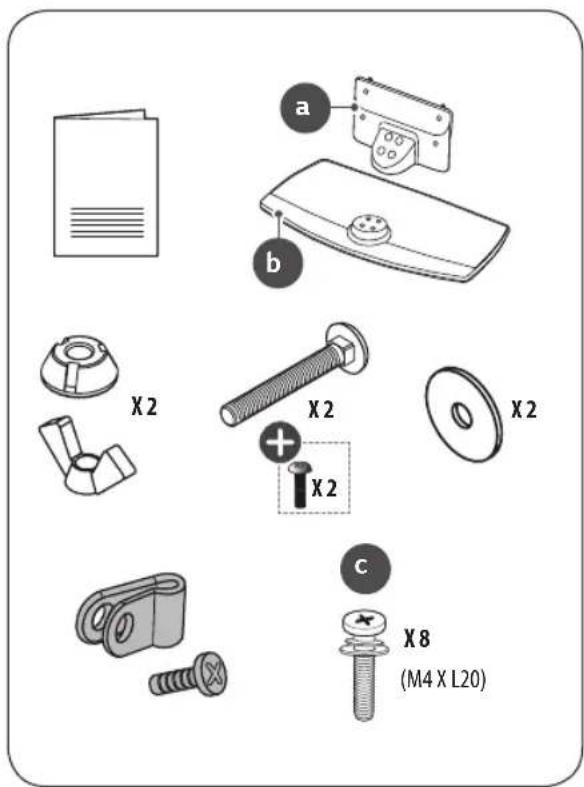

Depending on country
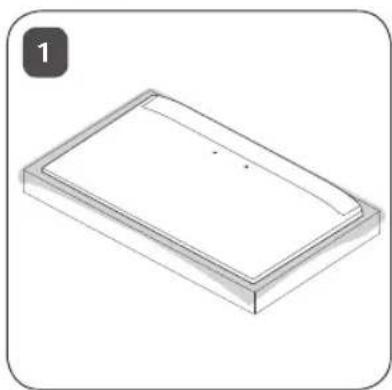
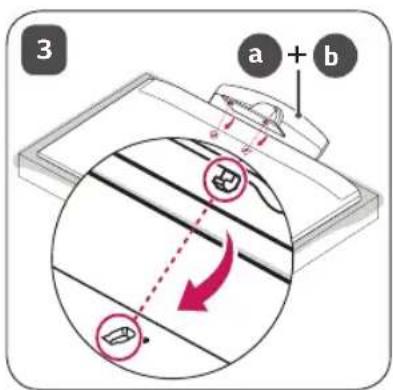
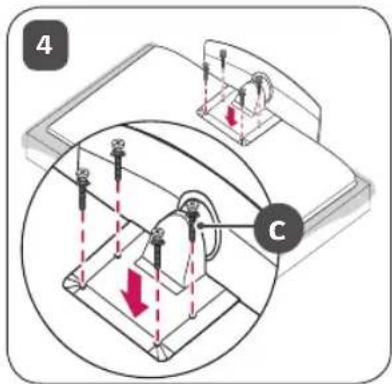
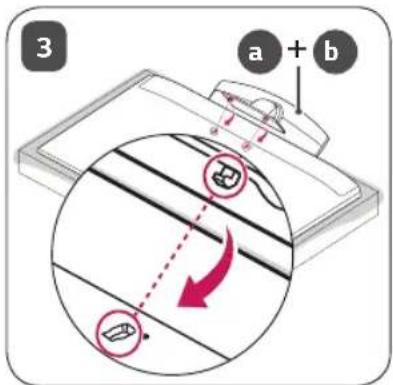
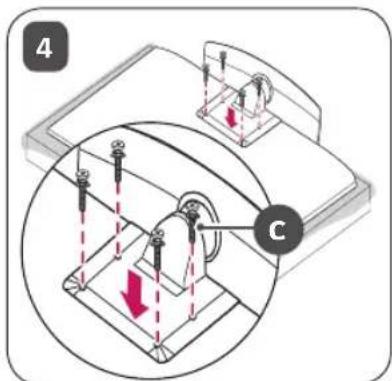
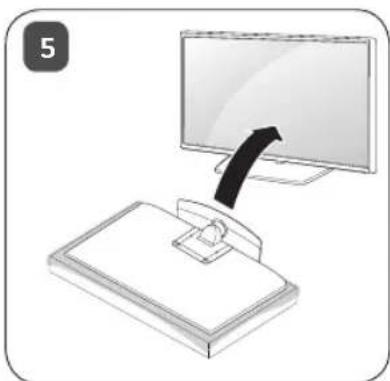
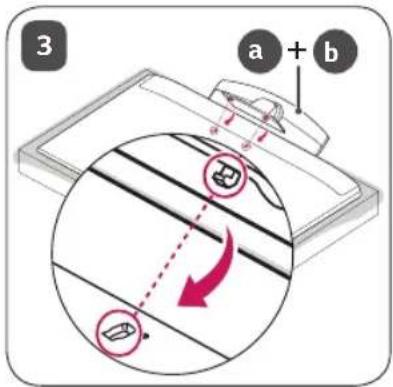
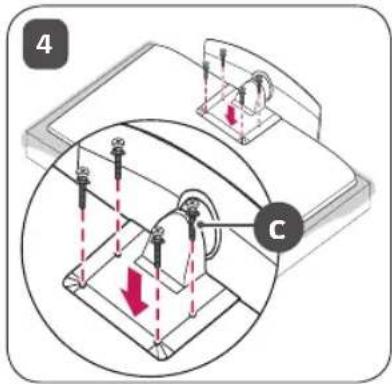
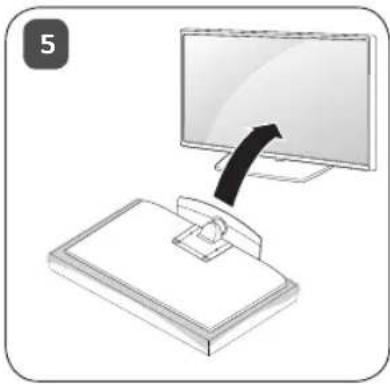
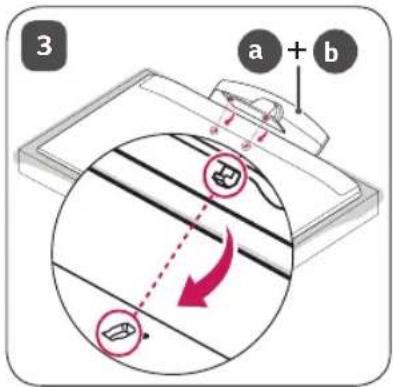
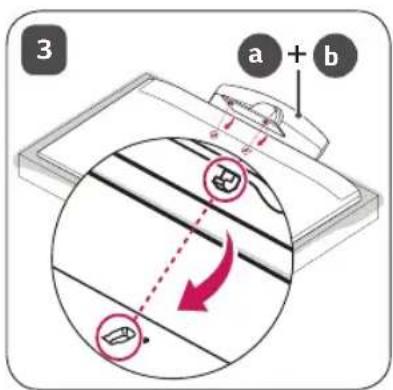
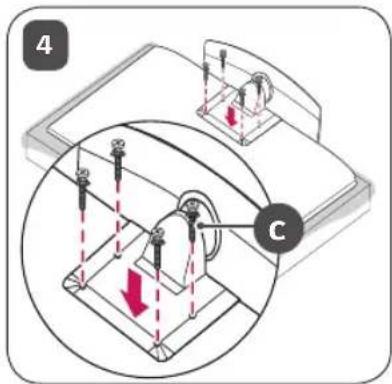
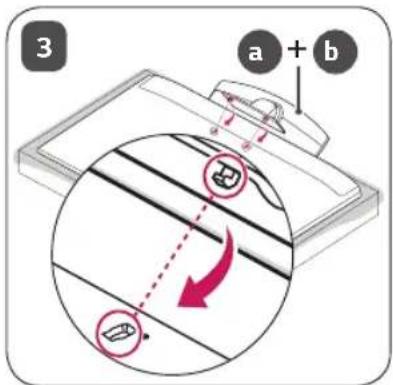
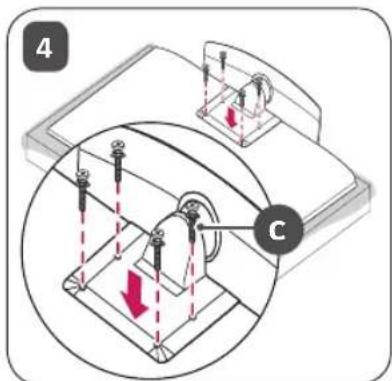
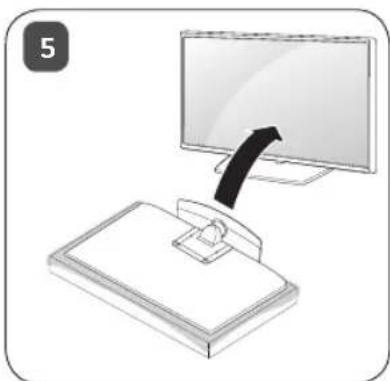
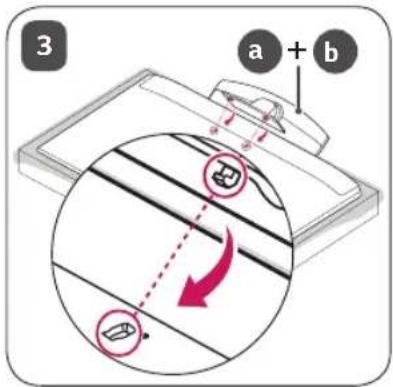
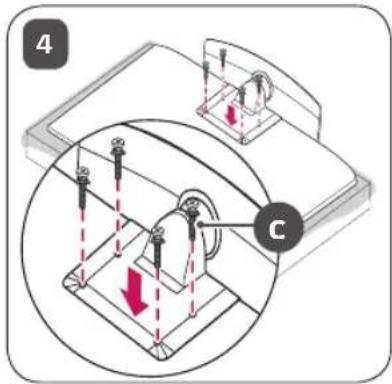
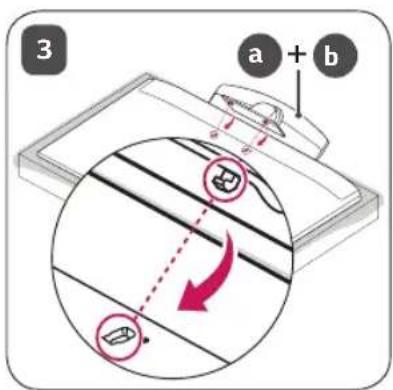
How to Assemble the Stand

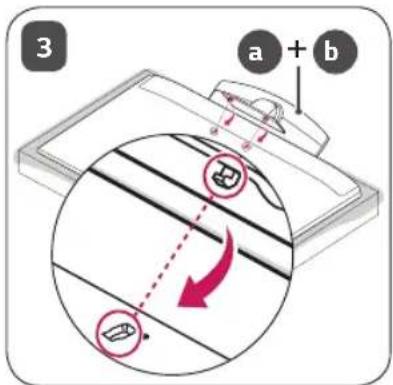
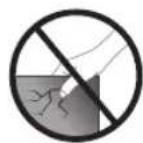
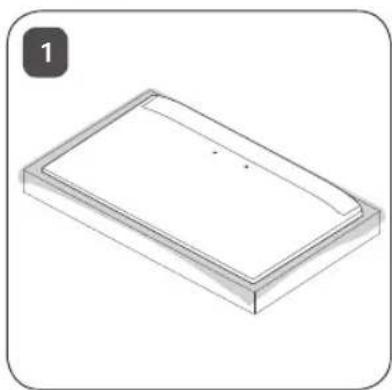
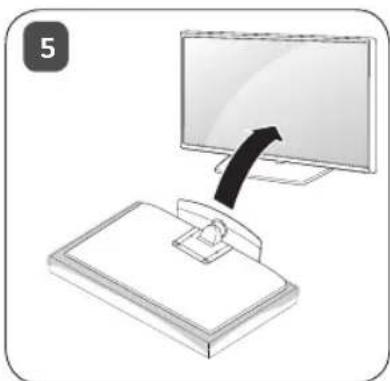
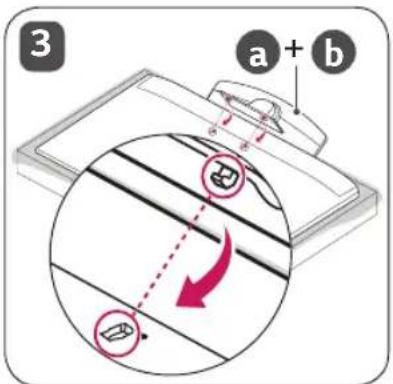
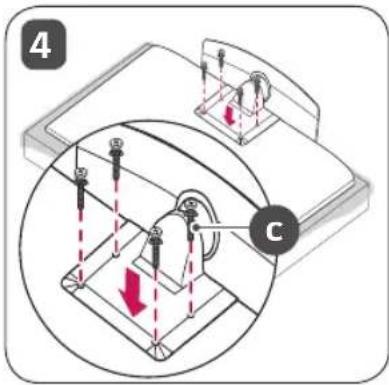
- When assembling the stand, put the product on a table or a flat floor with its screen facing downward. Here, first put a soft and fluffy cloth on the place, and then put the product on top of it to prevent the screen from being damaged.
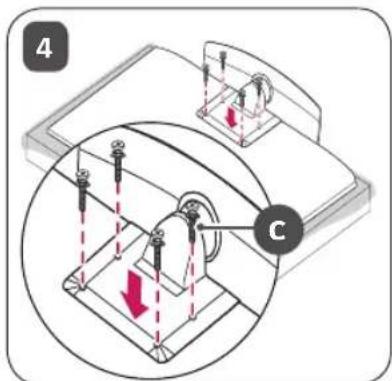
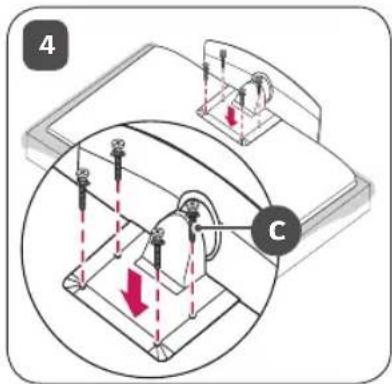
- When assembling the stand, check if the screws are completely fastened. (If they are not completely fastened, the product may lean forward after being installed.) Avoid fastening the screws with excessive force because otherwise the joint part of the screws may be worn out, and the screws might come off.
- When assembling the product, do not use foreign substances (oil, lubricant, etc.) on the screws.
- It may cause damage to the product.
- Before installing a wall mount support, disassemble the Stand by conducting the method to assemble the stand in a reverse order.
natural_image
Isometric view of a rectangular frame with a curved top edge and a small dot on the side (no text or symbols)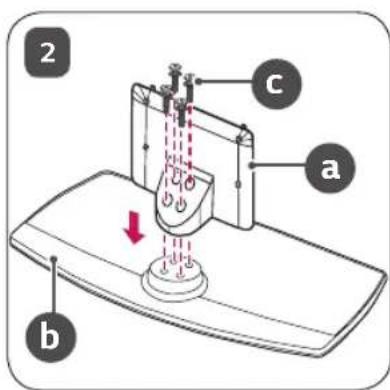
natural_image
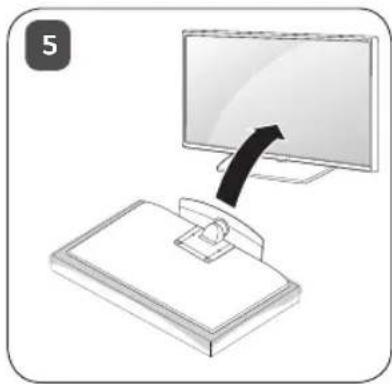
Illustration of a computer monitor with an attached stand and a black arrow pointing to it (no text or symbols)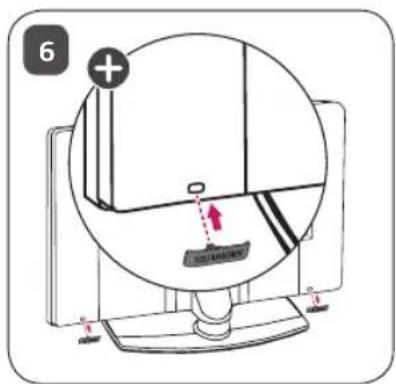
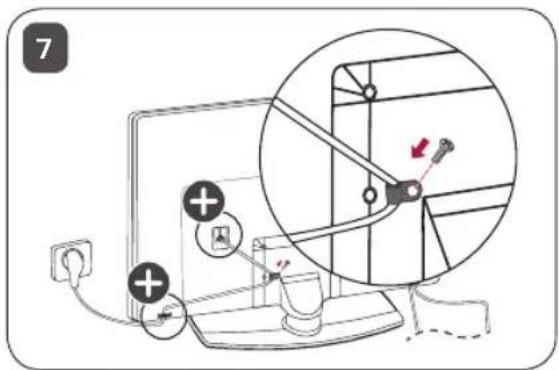

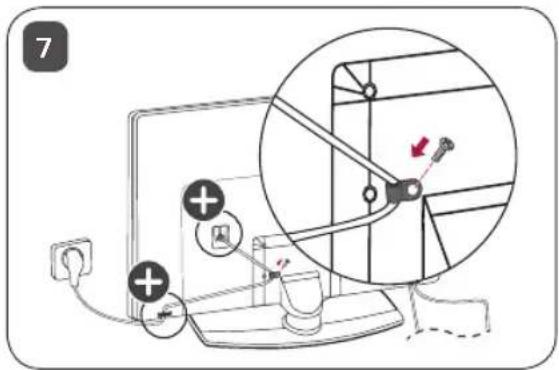
The cover and cable holder are provided as TV accessories. (Depending on Model.)
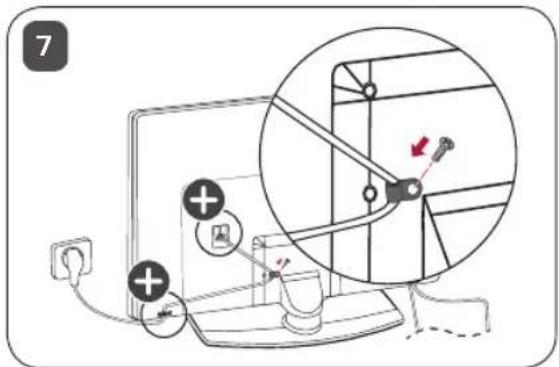
Mounting on a Table
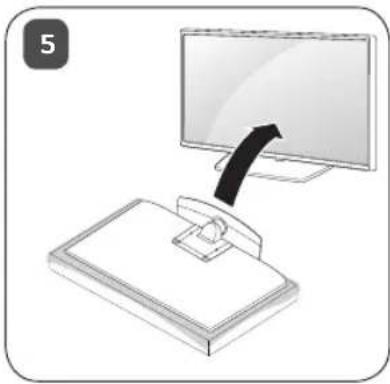
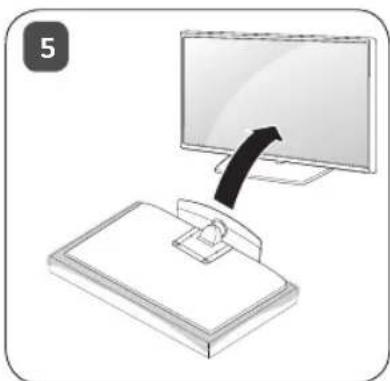
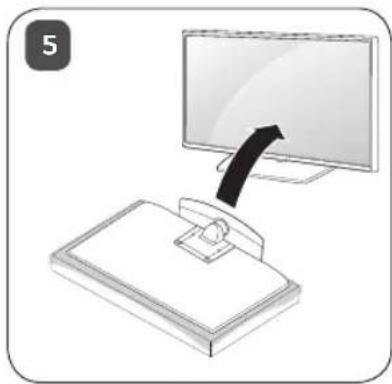
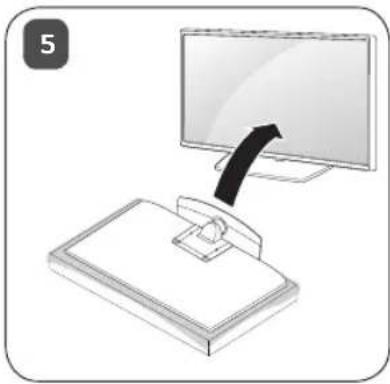
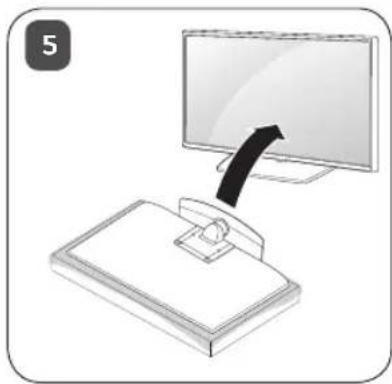
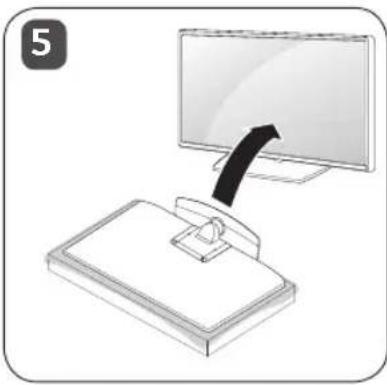
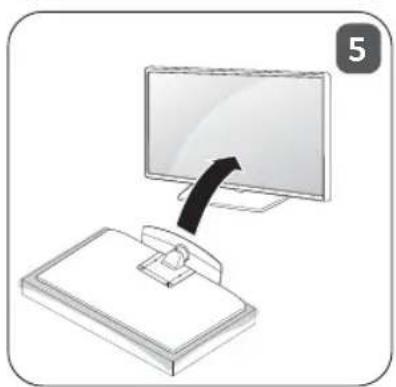
1 Lift and tilt the TV into its upright position on a table.
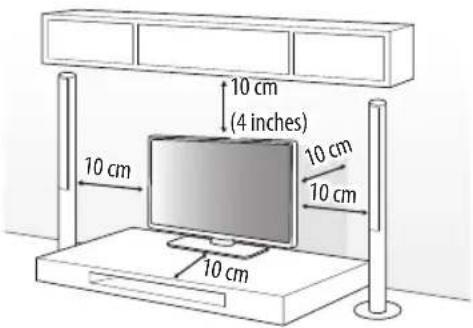
- Leave a 10 cm (4 inches) (minimum) space from the wall for proper ventilation.
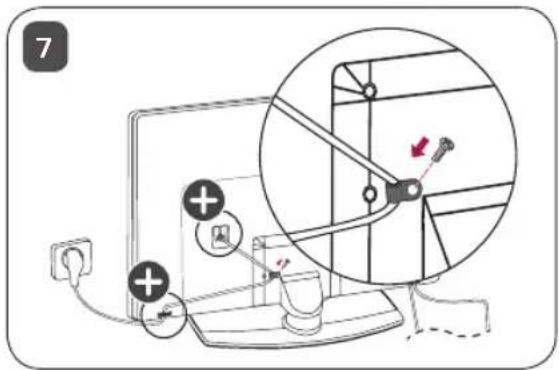
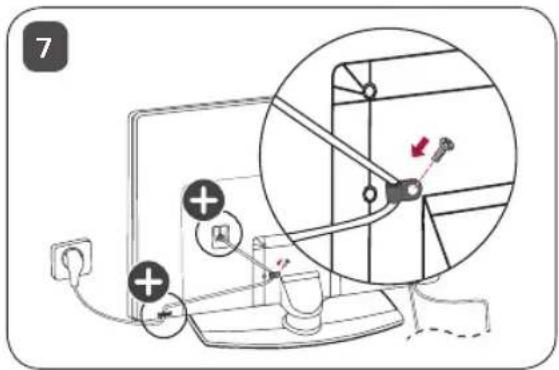
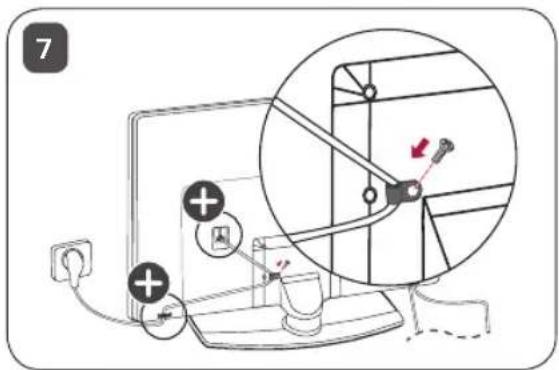
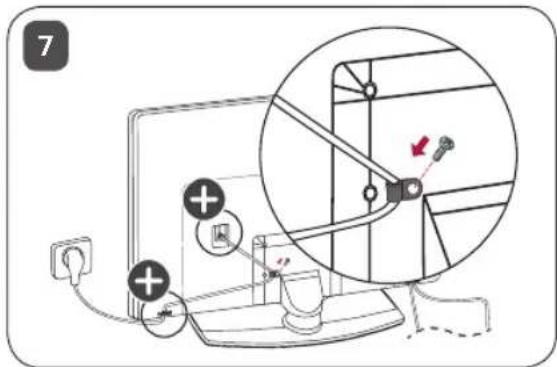
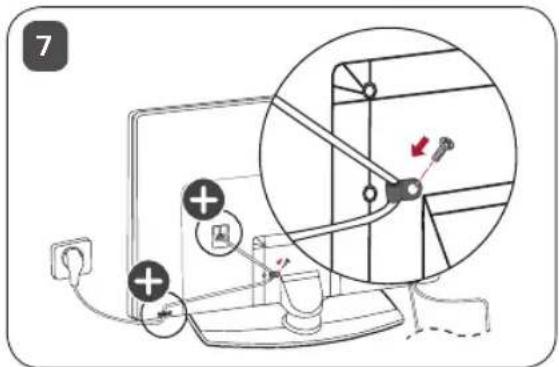
2 Connect the power cord to a wall outlet.

- Do not apply foreign substances (oils, lubricants, etc.) to the screw parts when assembling the product. (Doing so may damage the product.)
- If you install the TV on a stand, you need to take actions to prevent the product from overturning. Otherwise, the product may fall over, which may cause injury.
- Do not use any unapproved items to ensure the safety and product life span.
- Any damage or injuries caused by using unapproved items are not covered by the manufacturer's warranty.
- Make sure that the screws are inserted correctly and fastened securely. (If they are not fastened securely enough, the TV may tilt forward after being installed.) Do not use too much force and over tighten the screws; otherwise screw may be damaged and not tighten correctly.
- Only use the authorized stand and wall mounting bracket made specifically for LG products.
- Pursuant to Consumer Protection Law, LG Electronics will not be held responsible for any product malfunction, material damage or injury caused by using products not authorized by LG Electronics.
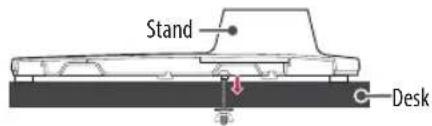
Attaching the TV to a Desk
(Depending on model)
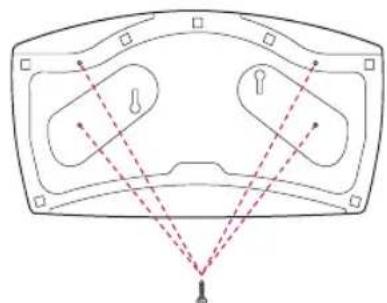
The TV should be attached to a desk so it cannot be pulled in a forward/ backward direction, potentially causing injury or damaging the product.
A type
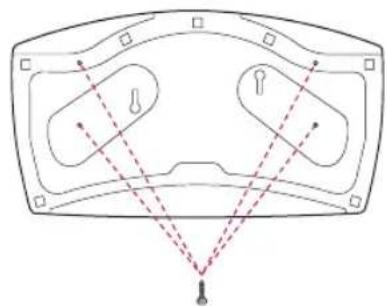
natural_image
Diagram of a medical device with internal components and alignment lines (no text or labels)4-Screws
(Not supplied with TV)
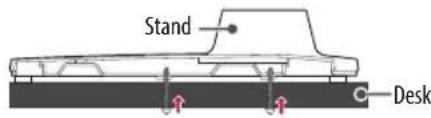
- Screw: M5 x L (*L: Table depth + 8\~10 mm (0.31\~0.39 inches)) ex) Table depth: 15 mm (0.5 inches), Screw: M5 x L25
B type
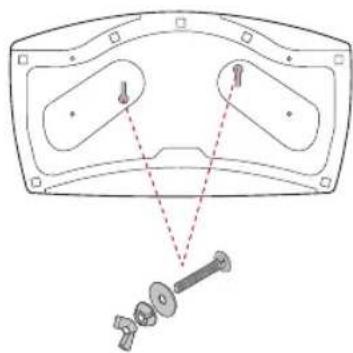
natural_image
Technical diagram of a mechanical assembly with two oval components and a separate screw (no text or labels)2-Screws for Stand Fixing,
2-Washers for Stand Fixing,
2-Nuts for Stand Fixing
(Supplied with TV)
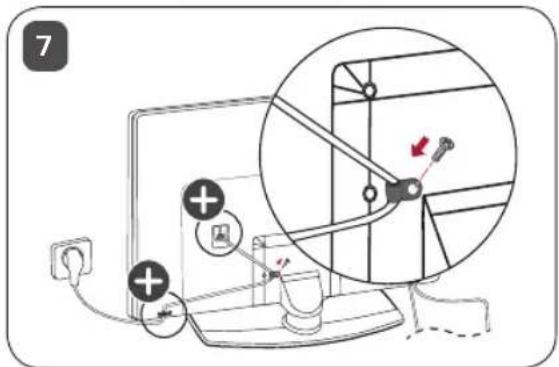
Securing the TV to a Wall
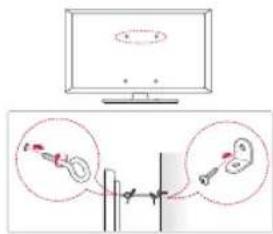
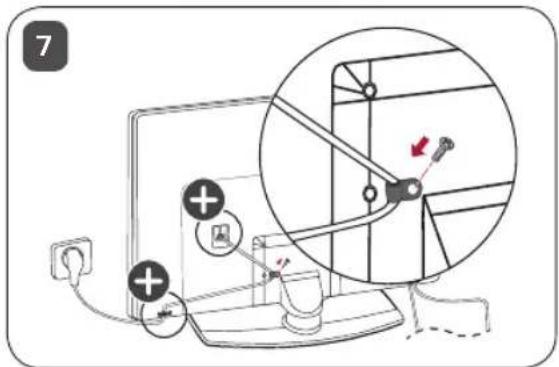
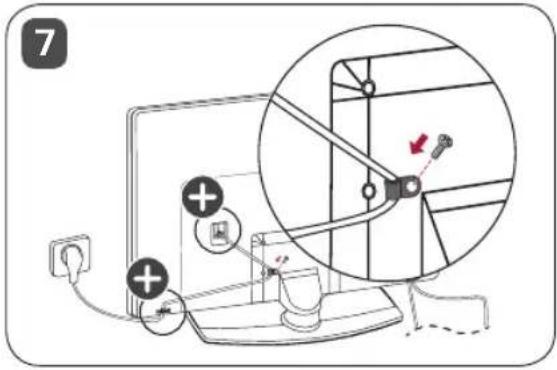
1 Insert and tighten the eye-bolts, or TV brackets and bolts on the back of the TV.
- If there are bolts inserted at the eye-bolts position, remove the bolts first.
2 Mount the wall brackets with the bolts to the wall.
Match the location of the wall bracket and the eye-bolts on the rear of the TV.
3 Connect the eye-bolts and wall brackets tightly with a sturdy rope.
Make sure to keep the rope horizontal with the flat surface.
- Use a platform or cabinet that is strong and large enough to support the TV securely.
- Brackets, bolts and ropes are not provided. You can obtain additional accessories from your local dealer.
Adjusting the Angle of the TV to suit view
Swivel 20 degrees to the left or right and adjust the angle of the TV to suit your view.
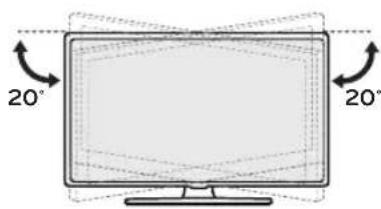

- When adjusting the angle of the product, watch out for your fingers.
- Personal injury may occur if hands or fingers are pinched. If the product is tilted too much, it may fall, causing damage or injury.
Specifications
| AM-ST21BB | ||
| Model 50UR762H | ||
| Width x Depth x Height | (mm) | 570 x 303 x 244 |
| (inches) 22.4 x 11.9 x 9.6 | ||
| Weight | (kg) | 3.2 |
| (lbs) 7.0 | ||
| AM-ST21BC | ||
| Model 55UR762H | ||
| Width x Depth x Height | (mm) | 570 x 303 x 244 |
| (inches) 22.4 x 11.9 x 9.6 | ||
| Weight | (kg) | 3.2 |
| (lbs) 7.0 | ||
| AM-ST21EB | ||
| Model | 50/55UR767H50/55UR777H | |
| Width x Depth x Height | (mm) | 570 x 303 x 232 |
| (inches) | 22.4 x 11.9 x 9.1 | |
| Weight | (kg) | 3.2 |
| (lbs) 7.0 | ||

LG
Life's Good
The model and serial number of the product are located on the back and on one side of the product. Record them below in case you ever need service.
Model
Serial no.
MANUEL D'UTILISATION
Support

Selon le pays
Comment assembler le support

natural_image
Isometric view of a rectangular frame with a curved top and bottom edge, no text or symbols present.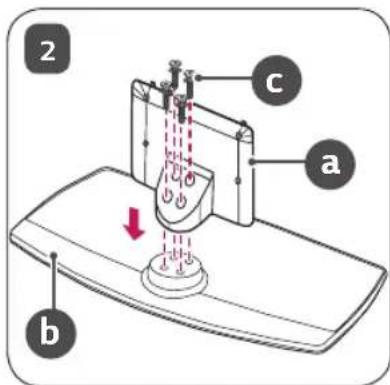
natural_image
Illustration of a computer monitor with an attached clip, no text or symbols present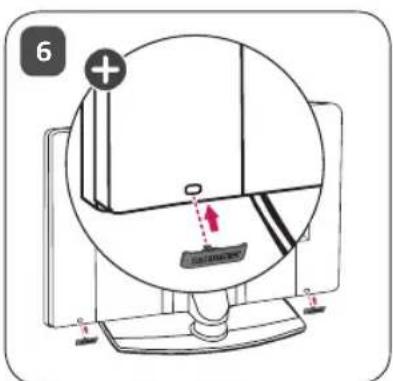


Abhängig vom Land
natural_image
Isometric view of a rectangular frame with a recessed top and inner edge, no text or symbols present.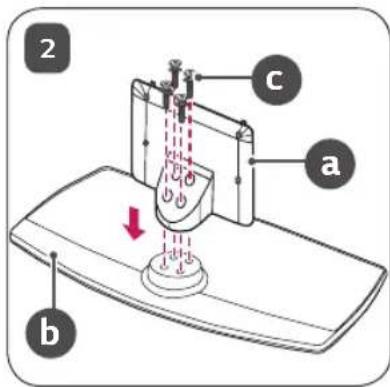
natural_image
Illustration of a computer monitor with an attached device (no text or symbols)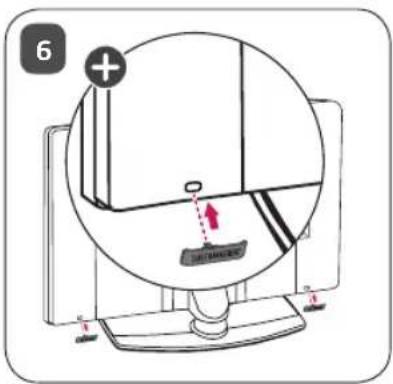

natural_image
Diagram of a medical device with internal components and dashed lines indicating alignment or measurement (no text or labels)4 Schrauben
natural_image
Technical diagram of a mechanical assembly with no visible text or symbols
A seconda del paese
natural_image
Isometric view of a rectangular frame with a flat top and bottom edge, no text or symbols present.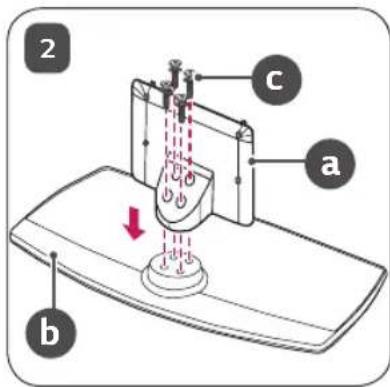

natural_image
Illustration of a computer monitor with an attached device (no text or symbols)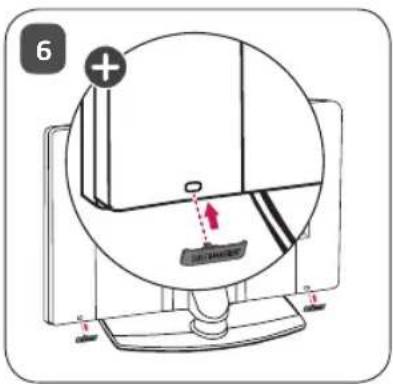

natural_image
Diagram of a medical device with internal components and alignment lines (no text or symbols)4 viti
natural_image
Technical diagram of a mechanical assembly with labeled parts and a close-up view of a bolt (no text or symbols present)
En función del país
natural_image
Isometric view of a rectangular frame with a flat top and rounded bottom, no text or symbols present.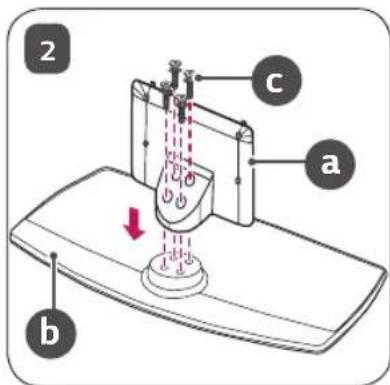
natural_image
Illustration of a computer monitor with an attached clip, no text or symbols present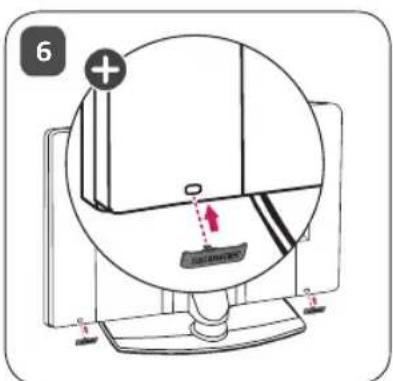

natural_image
Diagram of a medical device with internal components and alignment lines (no text or symbols)4 tornillos
natural_image
Technical diagram of a mechanical assembly with two components and a separate screw assembly (no text or labels)
: Selon le pays
natural_image
Isometric view of a rectangular frame with a flat top and a flat bottom, no text or symbols present.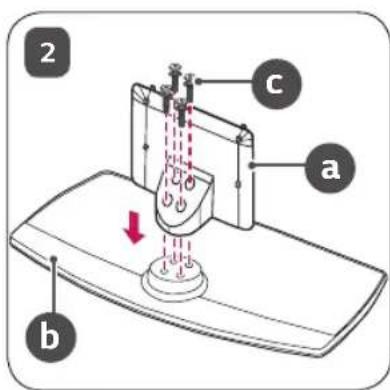
natural_image
Illustration of a computer monitor with a black cable inserted, mounted on a stand (no text or symbols)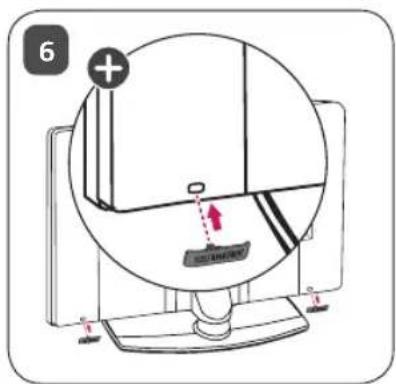

natural_image
Technical diagram showing a mechanical assembly with two circular components and a separate bolted component (no text or labels)
Según del país
natural_image
Isometric view of a rectangular frame with a flat top and rounded bottom, no text or symbols present.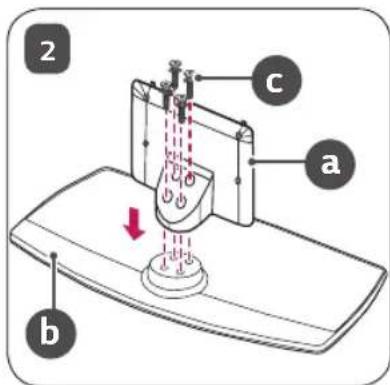
natural_image
Illustration of a computer monitor with an attached clip, no text or symbols present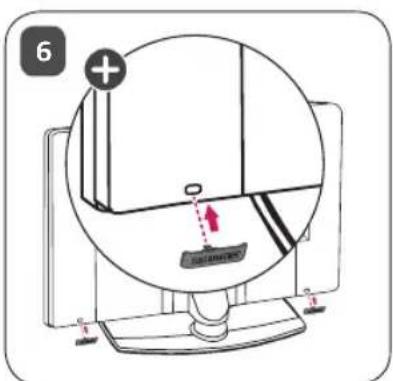

natural_image
Diagram of a vehicle's front view with dashed lines indicating perspective or perspective alignment (no text or symbols)4-Tornillos

natural_image
Isometric view of a rectangular frame with a flat top and bottom edge, no text or symbols present.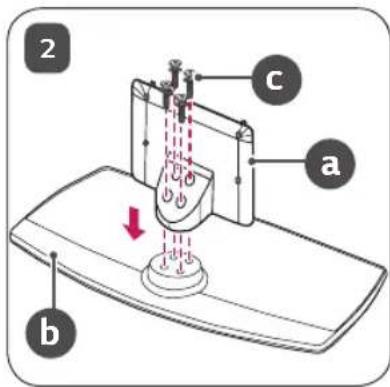
natural_image
Illustration of a computer monitor with an attached device (no text or symbols)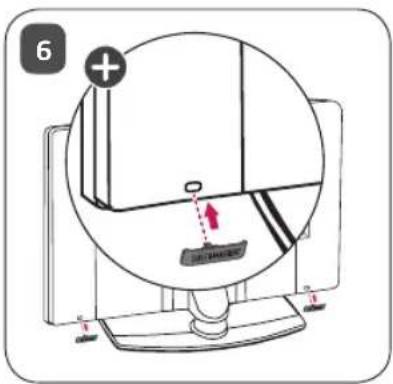

natural_image
Diagram of a medical device with internal components and alignment lines (no text or symbols)4 винта
natural_image
Technical diagram showing a mechanical assembly with two components and a separate bolted component (no text or labels)
Mamlakatga bog'liq
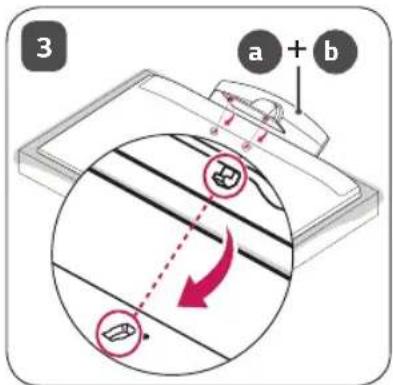
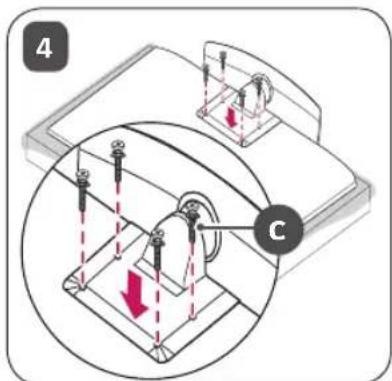
Taglikni yig'ish bo'yicha ko'rsatmalar

- Taglikni yig'ishda mahsulotni ekrani pastga qaragan holatda stolga yoki tekis polga joylashtiring. Bunda, avval yumshoq va tukli mato yozing, keyin ekranga zarar bermaslik uchun mahsulotni uning ustiga qo'ying.
- Taglikni yig'ayotganda vintlar to'liq qotirilganligiga ishonch hosil qiling. (Agar ular to'liq qotirilmagan bo'lsa, mahsulot o'rnatilganidan keyin oldinga egilishi mumkin.) Vintlarni ortiqcha kuch bilan qotirishdan saqlaning, aks holda, vintlarning qo'shilgan qismi yeyilishi mumkin va vintlar chiqib ketishi mumkin.
- Mahsulotni yig'ishda vintlarda begona moddalarni (moy, lubrikantlar va boshqalarni) ishlatmang.
- U mahsulotga zarar yetkazishi mumkin.
• Devorga o'rnatgich tutqichini o'rnatishdan avval, taglikni yig'ish usuliga teskari tartibda amal qilgan holda Stendni qismlarga ajrating.
natural_image
Isometric view of a rectangular frame with a curved top and bottom edge, no text or symbols present.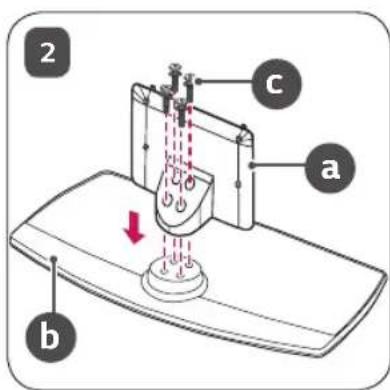
natural_image
Illustration of a monitor with an arrow pointing to it, mounted on a base (no text or symbols)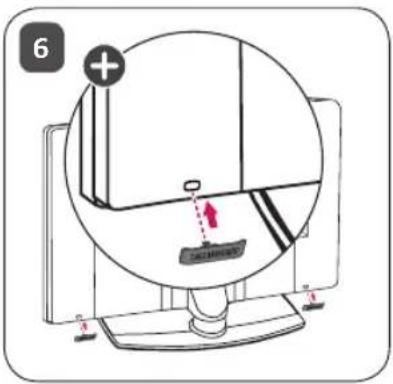

Qopqoq va kabel ushlagichi televizor aksessuari sifatida yetkazib beriladi. (Rusumga qarab.)
Stol ustiga o'rnatish
1 Televizorni ko'taring va uni vertikal holatga keltirgan holda stol ustiga qo'ying.
- Yetarlicha havo aylanib turishi uchun devor bilan televizor orasida (eng kamida) 10 sm masofa goldiring.

2 Quvvat manbai shnurini rozetkaga ulang.

- Mahsulotni yig'ish paytida burama mix qismlariga begona moddalarni (moylar, moylash materiallari, va hokazolar) qo'llamang. (Bunday qilish mahsulotga shikast yetkazishi mumkin.)
- Agar siz televizorni tayanchga o'rnatmoqchi bo'lsangiz, mahsulotning ag'darilib ketishining oldini olish bo'yicha choralar ko'rishingiz kerak bo'ladi. Aks holda, televizor tushib ketishi, bu esa shaxsiy zarar xavfiga olib kelishi mumkin.
- Xavfsizlik va mahsulotning xizmat ko'rsatish davomiyligini kafolatlash uchun ruxsatnomaga ega bo'Imagan buyumlardan foydalanmang.
- Ruxsat berilmagan buyumlardan foydalanish orqali yetkazilgan har qanday zarar yoki shikastlanishlar ishlab chiqaruvchi kafolati orqali qoplanmaydi.
- Burama mixlarning to'g'ri kiritilganligi va mahkam qotirilganligiga ishonch hosil qiling. (Agar ular yetarli darajada mahkam qotirilmagan bo'lsa, TV o'rmatilgandan keyin oldinga qulab ketishi mumkin.) Ortiqcha ko'p kuch ishlatmang yoki burama mixlarni ortiqcha qotirib yubormang; aks holda burama mix shikastlanishi va to'g'ri qotirilmasligi mumkin.
- Faqat maxsus LG mahsulotlari uchun ishlab chiqarilgan ruxsat berilgan taglik va devorga mahkamlanadigan tayanchdan foydalaning.
- Iste'molchilar huquqlarini himoya qilish to'g'risidagi qonunga binoan LG Electronics kompaniyasi LG Electronics tomonidan ruxsat berilmagan mahsulotlardan foydalanish natijasida kelib chiqadigan har qanday nosozlik, moddiy zarar yoki shikastlanish uchun javobgar bo'lmaydi.
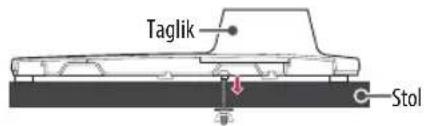
Televizorni stolga mahkamlash
(Rusumga qarab)
TV oldinga/orqaga surilmasligi va buning natijasida mahsulotga zarar yetmasligi uchun u stol ustiga mahkamlanishi zarur.
A tur
natural_image
Diagram of a device's internal components with dashed lines indicating alignment or measurement points (no text or symbols present)4 ta vint
natural_image
Technical diagram of a mechanical assembly with two components and a separate screw (no text or labels)Taglikni qotirish uchun 2 ta vint, Taglikni qotirish uchun 2 ta bolt, Taglikni qotirish uchun 2 ta gayka (TV bilan birga taqdim etiladi)


LG
Life's Good

Залежно від країни
natural_image
Isometric view of a rectangular frame with a flat top and a curved bottom, no text or symbols present.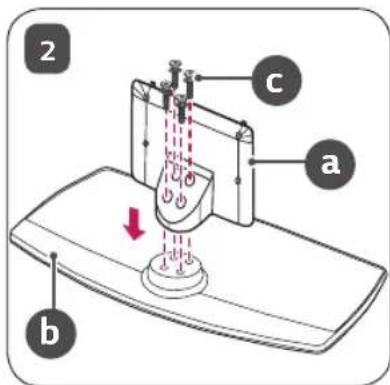
natural_image
Illustration of a computer monitor with an attached clip, no text or symbols present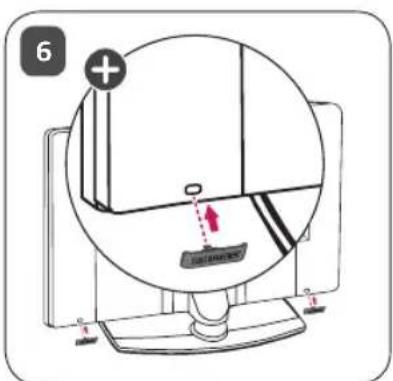

natural_image
Diagram of a medical device with internal components and alignment lines (no text or labels)4 ГВИНТИ
natural_image
Technical diagram of a mechanical assembly with two components and a separate bolt (no text or labels)natural_image
Isometric view of a rectangular object with a curved top surface and a flat base, labeled with number 1 (no text or symbols on the object itself)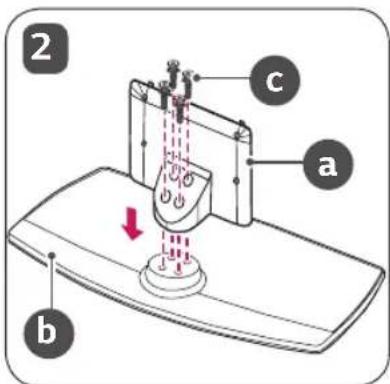
natural_image
Illustration of a monitor with a black cable inserted into a base, no text or symbols present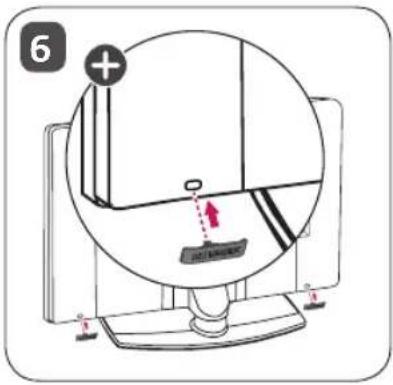
natural_image
Technical diagram of a mechanical assembly with two components and a separate bolted component (no text or labels)Model ____ Seri No. ____

LG
Life's Good
natural_image
Diagram of a device's front view with dashed lines indicating alignment or measurement points (no text or symbols present)natural_image
Technical diagram of a mechanical assembly with no visible text or symbolsnatural_image
Isometric view of a rectangular frame with a curved top and bottom edge, no text or symbols present.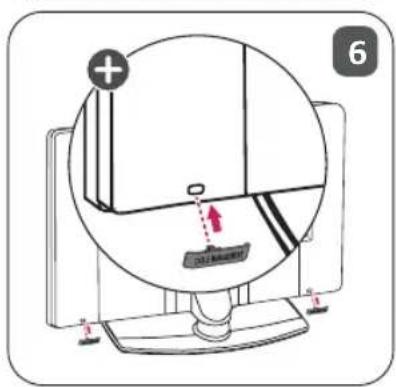
natural_image
Illustration of a monitor with a black cable being inserted into a base (no text or symbols)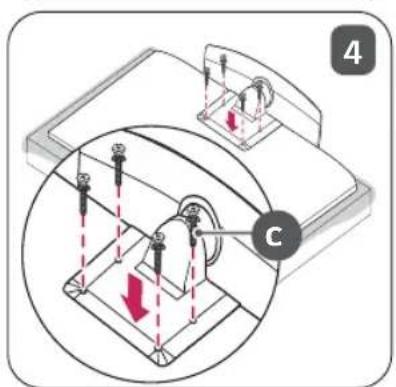
التجمع والتحضير
- Safety instructions
- Assembling and Preparing
- Accessories
- How to Assemble the Stand
- Mounting on a Table
- Attaching the TV to a Desk
- Securing the TV to a Wall
- Adjusting the Angle of the TV to suit view
- Specifications
- MANUEL D'UTILISATION
- Support
- Comment assembler le support
- Taglikni yig'ish bo'yicha ko'rsatmalar
- Stol ustiga o'rnatish
- Televizorni stolga mahkamlash
Brand : LG
Model : AMST21BC
Category : Television