BABYLISS Pro FX7880E - Beard trimmer

Pro FX7880E - Beard trimmer BABYLISS - Free user manual and instructions

Find the device manual for free Pro FX7880E BABYLISS in PDF.

📄 76 pages English EN Download 💬 AI Question
Notice BABYLISS Pro FX7880E - page 6
Pick your language and provide your email: we'll send you a specifically translated version.

User questions about Pro FX7880E BABYLISS

0 question about this device. Answer the ones you know or ask your own.

Ask a new question about this device

The email remains private: it is only used to notify you if someone responds to your question.

No questions yet. Be the first to ask one.

Download the instructions for your Beard trimmer in PDF format for free! Find your manual Pro FX7880E - BABYLISS and take your electronic device back in hand. On this page are published all the documents necessary for the use of your device. Pro FX7880E by BABYLISS.

USER MANUAL Pro FX7880E BABYLISS

natural_image Black and white photo of a baby ear Grenada-branded hairbrush (no text or symbols visible on body)

TONDEUSE DE FINITION PROFESSIONNELLE

PROFESSIONAL TRIMMER

EDM TECHNOLOGY

FRANCAIS

TONDEUSE DE FINITION PROFESSIONNELLE EDM TECHNOLOGY

FX7880E

natural_image Diagram of a regular device with handle and screwdriver (no text or symbols)
natural_image Illustration of a hand holding a digital blood glucose meter with a pen inserted (no text or symbols visible)

Etape n°2.

natural_image Diagram of a device's internal structure with no visible text or symbols

Etape 3.

natural_image Illustration of hands installing or adjusting a device into a circular component with a pen (no text or symbols visible)

Etape 5.

natural_image Illustration of a hand holding a computer flash drive (no text or symbols visible)

NORMAL (REGULAR)

Réinitialiser la position de la lame

Etape 1.
natural_image Illustration of a hand using a tool to adjust a digital device with a ruler (no text or symbols visible)

BABYLISS Pro FX7880E - Etape 1. - 1

natural_image Illustration of a hand inserting a component into a device housing (no text or symbols visible)
natural_image Illustration of hands assembling a device into a circular housing with a screwdriver (no text or symbols visible)

Etape 3.

natural_image Line drawing of a hand holding a compact floppy disk with a screw and central slot (no text or symbols)

NETTOYAGE ET ENTRETIEN

This heavy-duty trimmer features a choice of 2 interchangeable Japanese steel blades with zero gap adjustment for precision and control. Long-life lithium battery and super-fast charging guarantees sustained performance for the ultimate in precision detailing. A high torque digital motor delivers high power performance for clean, close cutting.

FEATURES

• High power cord or cordless control
- Precision engineered Japanese steel blades with super sharp V cutting angle
- Interchangeable 30mm ("U") and 40mm ("T") zero gap adjustable cutting blades
• Lithium technology for sustained power performance
• High-torque digital motor for long-lasting power and speed
- Absolutely balanced for superior handling
- 6mm and 10mm comb guides
- Robust all metal housing design
- Charging and storage stand
- Oil and cleaning brush

INSTRUCTIONS FOR USE

  • Charging the appliance - Before using the appliance for the first time, charge the battery continuously for 3 hours. Maximum battery capacity will only be reached after 3 completed charging and discharging cycles.
  • Plug the charging adapter into a suitable mains power socket. The red LED indicator light will flash when correctly connected to the mains power and will continuously flash until the battery has fully charged. When the battery is fully charged the LED indicator light will stop flashing but remain on.

NOTE: Always place the trimmer in the base with the '1/0' switch in the OFF (0) position.

- When the clipper is running low on charge, the LED indicator light will flash, warning there is approximately 3 minutes of battery use remaining. A 3 hour charge will provide approximately 2 hours use. A 30 minute quick charge will provide approximately 30 minutes use.

- If the charging light starts to flash rapidly (more than 4 flashes per second) then the appliance is faulty. If this happens then please stop charging and remove the adapter from the mains and contact the after-sales service.

- Preserving the batteries - In order to maintain the optimum capacity of the rechargeable batteries, the appliance should be recharged for 3 hours approximately every 3 months.

- Using the trimmer on the mains - ensure that the trimmer is switched off. Plug into a suitable

mains socket. Wait for approximately a minute, and then switch on.

IMPORTANT: Do not use the trim-mer in this mode for more than 20 minutes.

USE OF THE COMB GUIDES

This trimmer is supplied with 2 comb guides.

No.1 - 6mm

No.2 - 10mm

To attach a comb, hold it by the sides and clip it over the teeth of the blade. To remove the comb, simply push off.

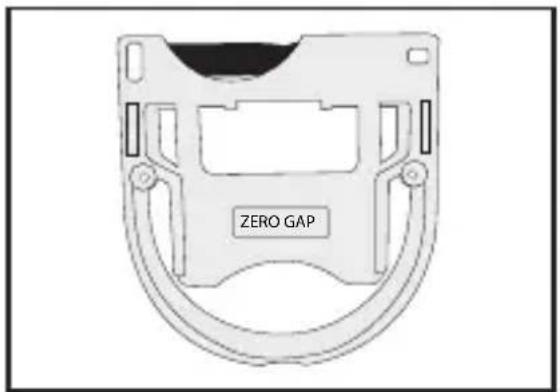
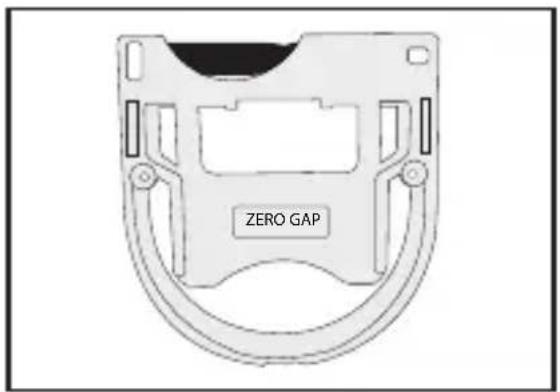
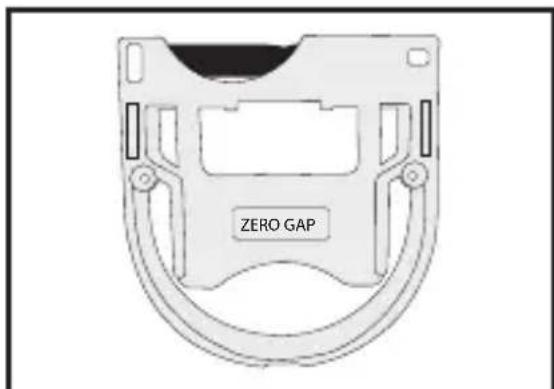
ZERO GAP ADJUSTMENT TOOL

IMPORTANT! Only ever attempt to zero gap the blades using the adjustment tool, following the instructions very precisely.

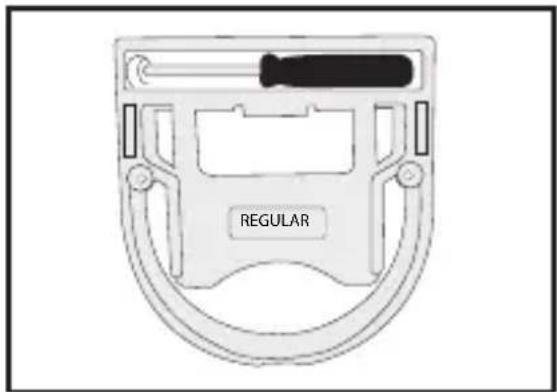
The adjustment tool is required to adjust the blades to zero gap, to achieve a closer, more precise cut.

Regular
BABYLISS Pro FX7880E - ZERO GAP ADJUSTMENT TOOL - 1

natural_image Diagram of a mechanical device with a labeled 'REGULAR' component (no other text or symbols)

Zero Gap

BABYLISS Pro FX7880E - ZERO GAP ADJUSTMENT TOOL - 2

text_image ZERO GAP

ZERO GAP

Step 1.

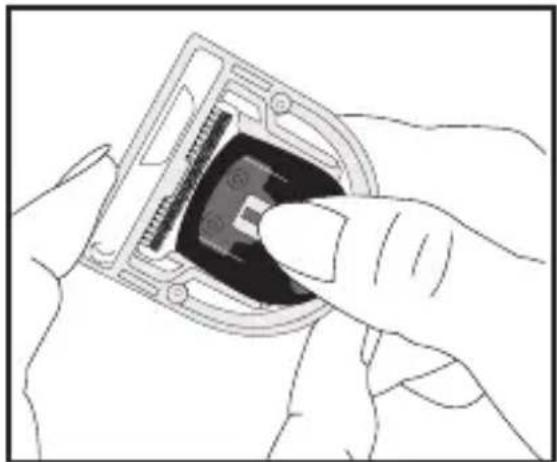
Before placing the blade into the adjustment tool, use the screwdriver provided to loosen the tension screws, without removing them completely from the blade holder.
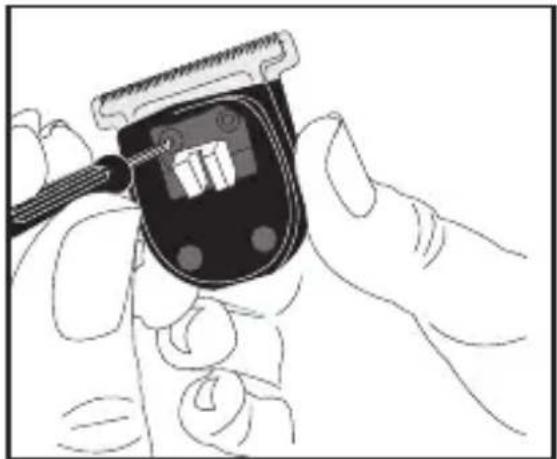
BABYLISS Pro FX7880E - Step 1. - 1

natural_image Illustration of a hand using a digital glucose meter to adjust the血糖 (no text or symbols visible)

Step 2.

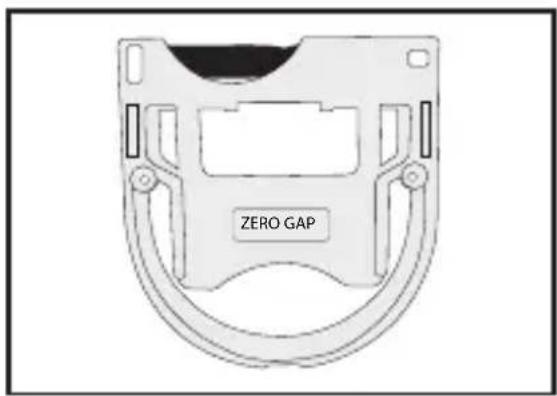
Place the blade into the adjustment tool in the side labelled 'Zero Gap'.
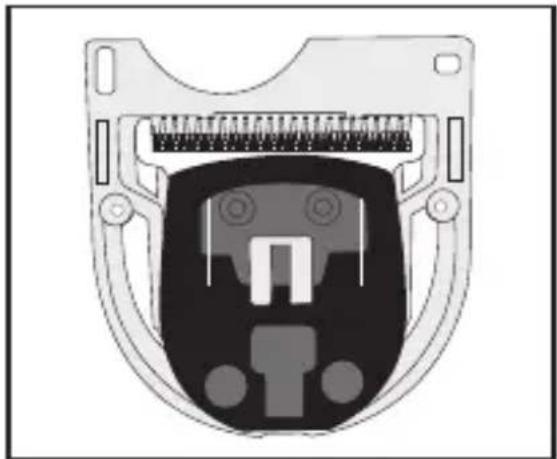
BABYLISS Pro FX7880E - Step 2. - 1

natural_image Diagram of a mechanical component with internal structure and mounting holes (no text or symbols)

Step 3.

Push the blade guide up as far as the adjustment tool allows, so the moving blade sits closely with the top of the adjustment tool. The blades will now be flush with each other.
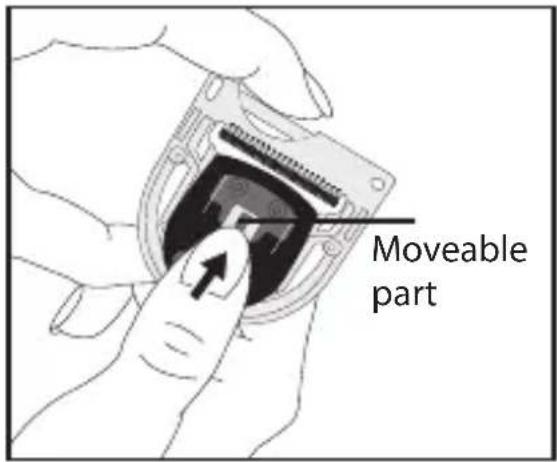
BABYLISS Pro FX7880E - Step 3. - 1

text_image Moveable part

Step 4.

Using the screwdriver, tighten the tension screws to hold the blade in place.
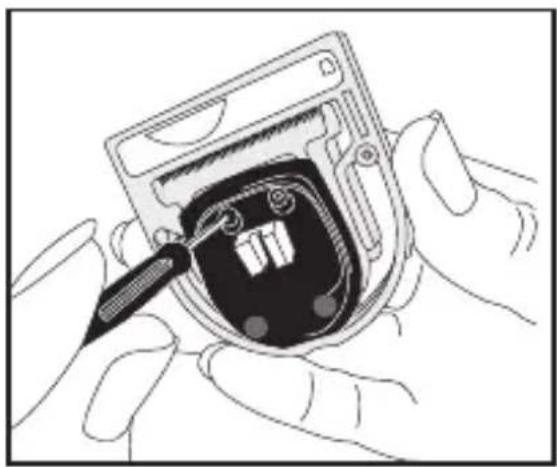
BABYLISS Pro FX7880E - Step 4. - 1

natural_image Illustration of hands installing or adjusting a device component with a screwdriver (no text or symbols visible)

Step 5.

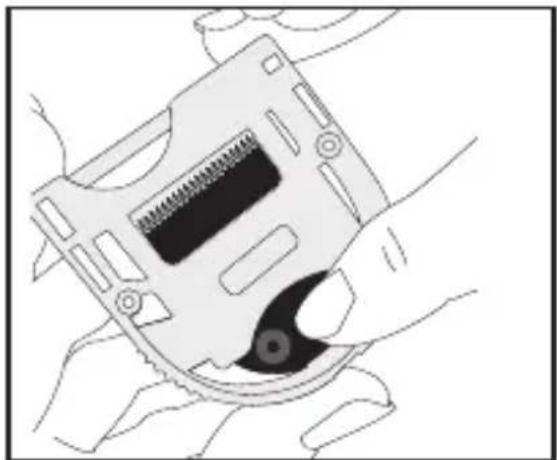
Remove the blade from the adjustment tool by gently pushing the blade from the opposite side.
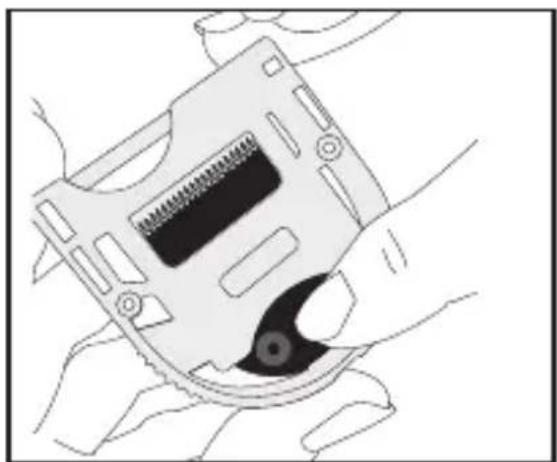
BABYLISS Pro FX7880E - Step 5. - 1

natural_image Illustration of a hand holding a computer flash drive (no text or symbols visible)

REGULAR - Resetting the blade for regular use

Step 1

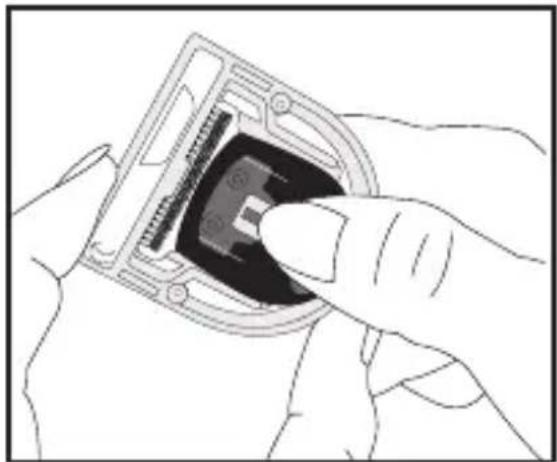
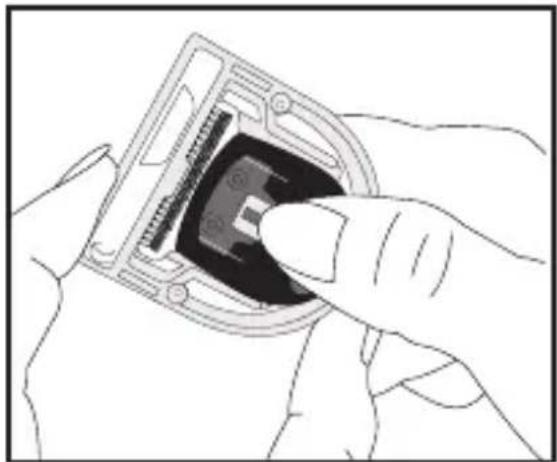
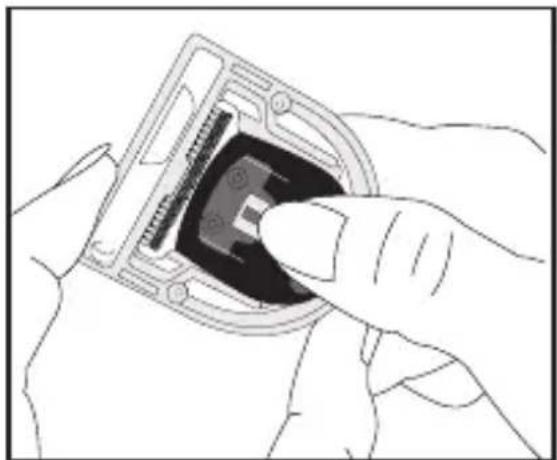
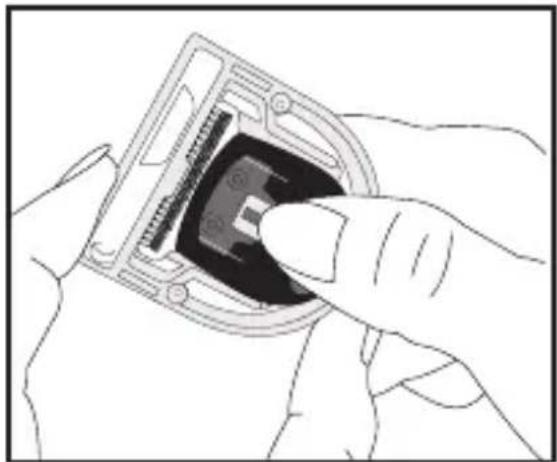
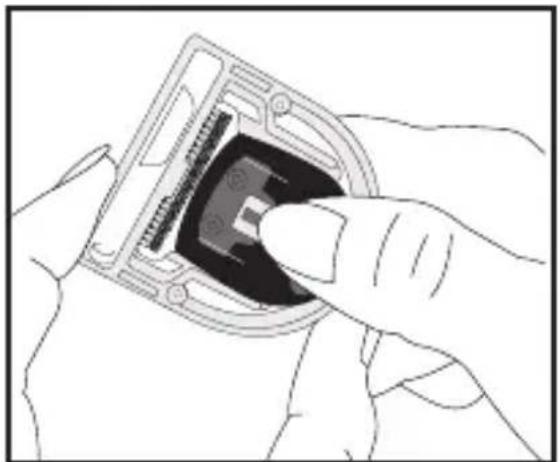
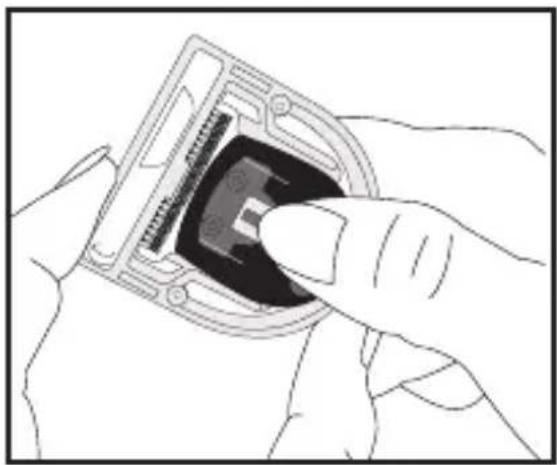
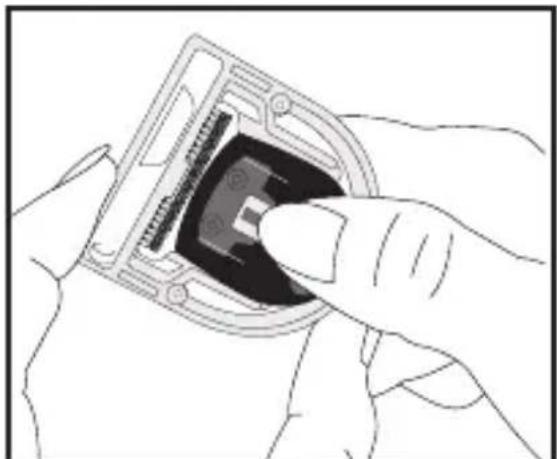
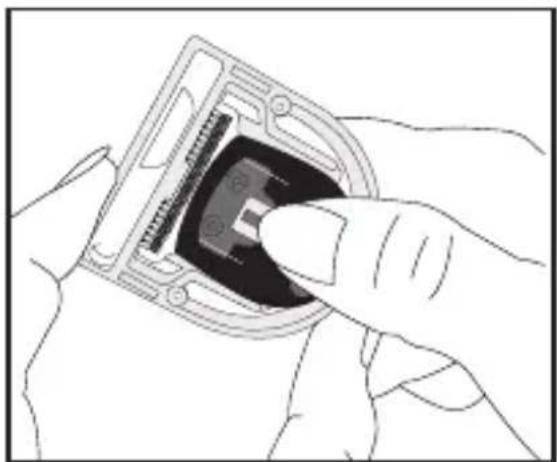
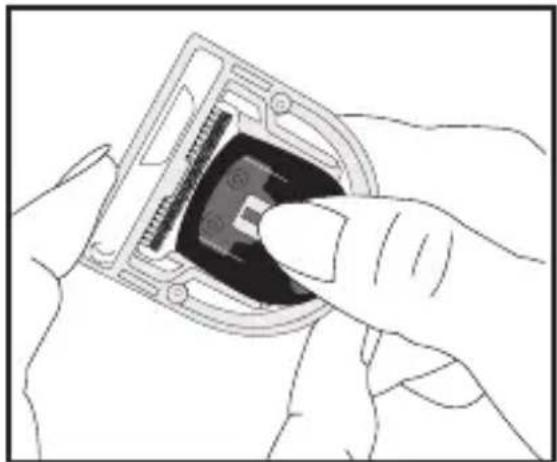
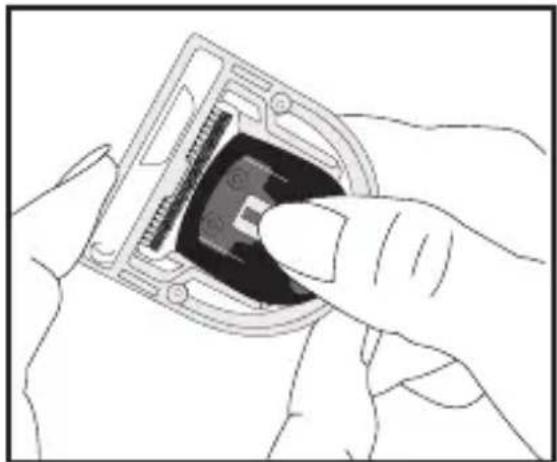
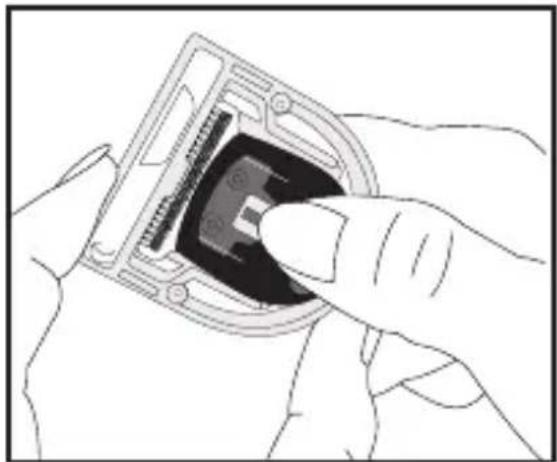
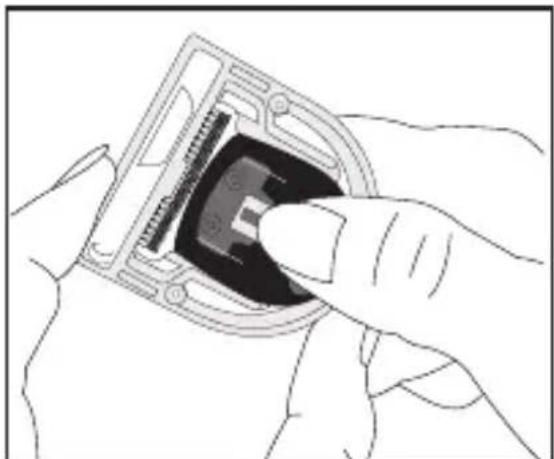
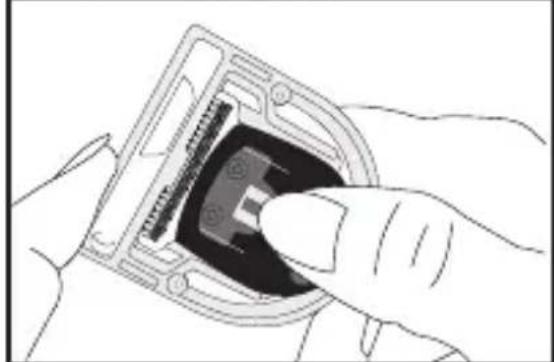
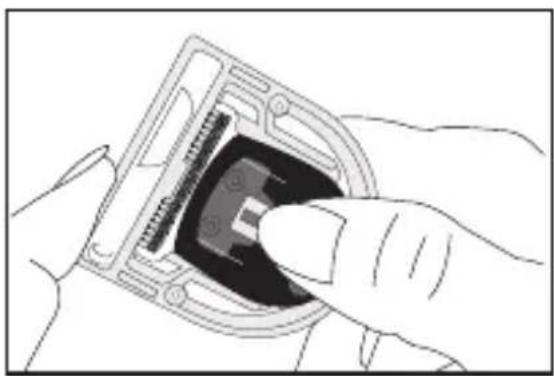
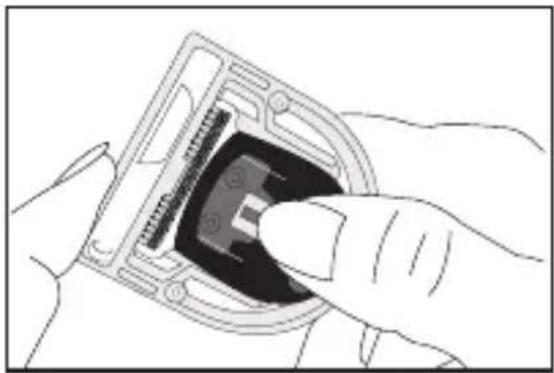
Before placing the blade into the adjustment tool, use the screwdriver provided to loosen the tension screws, without removing them completely from the blade holder. Place the blade into the adjustment tool in the side marked Regular.
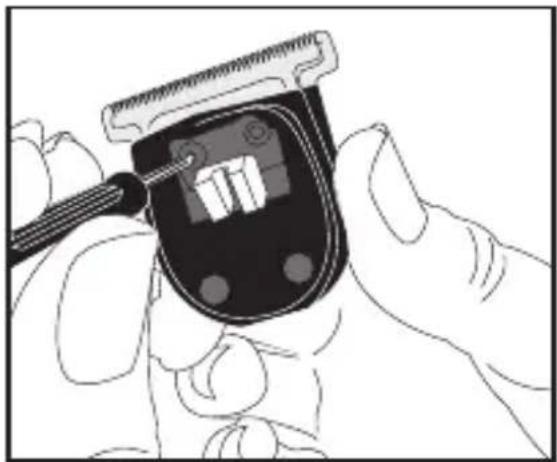
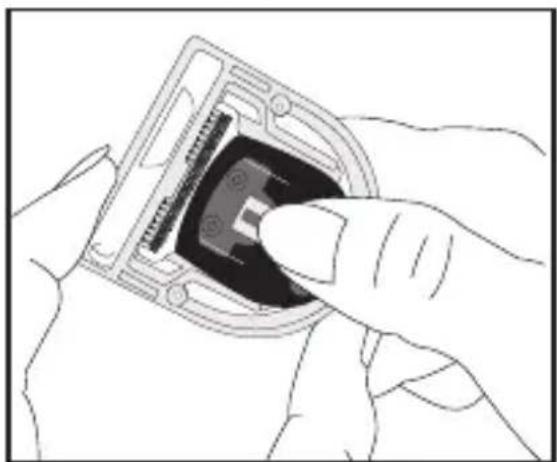
BABYLISS Pro FX7880E - Step 1 - 1

natural_image Illustration of a hand holding a digital blood glucose meter with a pen inserted (no text or symbols visible)

BABYLISS Pro FX7880E - Step 1 - 2

natural_image Illustration of a hand inserting a device into a component (no text or symbols visible)

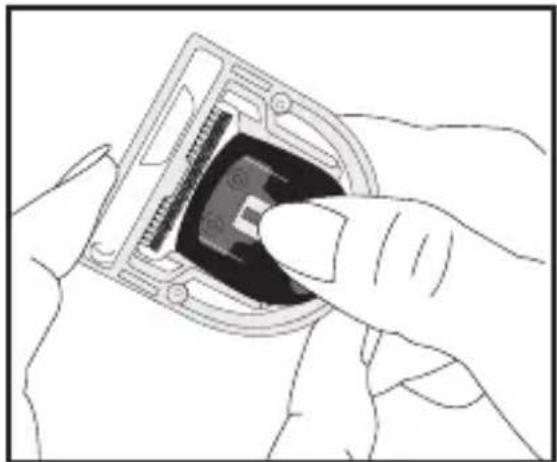
The tool will automatically push the moving blade down to its regular position.

Step 2.

Tighten the tension screws to hold the blade in place.
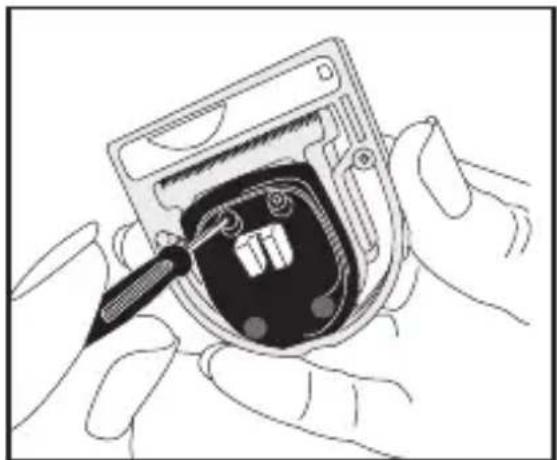
BABYLISS Pro FX7880E - Step 2. - 1

natural_image Illustration of hands installing or adjusting a device into a circular component with a screwdriver (no text or symbols visible)

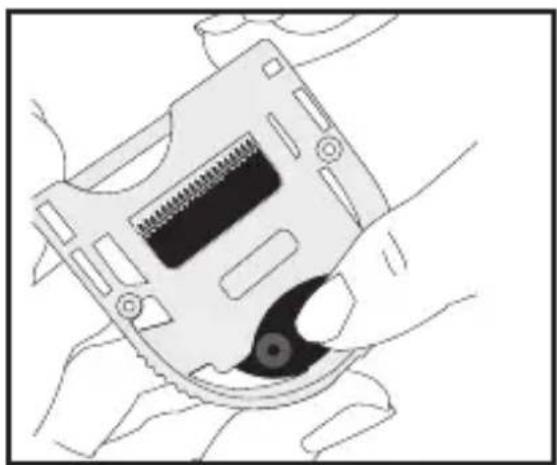
Step 3.

Remove the blade from the adjustment tool by gently pushing the blade from the opposite side.
BABYLISS Pro FX7880E - Step 3. - 1

natural_image Illustration of hands holding a computer flash drive (no text or symbols visible)

CLEANING AND MAINTENANCE

To maintain correct performance, the blades must be regularly cleaned and oiled. They are removable for easy cleaning.

- With the trimmer facing you, push the blade up and away from the trimmer to remove.

- Brush away the hair from the blades and the interior of the cutting head with the cleaning brush.

- It is recommended to oil the blades every time that the trimmer is used, using the oil provided. Never use any other

product: this oil was formulated for high speed trimmers, it does not evaporate or slow down the blades.

• After cleaning click the blade frame back in place.

DEUTSCH

PROFESSIONELLER HAARTRIMMER EDM TECHNOLOGY FX7880E

NULLSPALT (BUZZ-CUT)

Schritt 1

natural_image Illustration of a hand using a digital blood glucose meter to measure the amount (no text or symbols visible)

Schritt 2

natural_image Cross-sectional diagram of a mechanical component with internal structure (no text or symbols)

Schritt 3

natural_image Illustration of hands installing or adjusting a device component with a pencil (no text or symbols visible)

Schritt 5

natural_image Illustration of a hand holding a compact floppy disk with a screw slot (no text or symbols)

NORMAL (REGULAR)

natural_image Illustration of a hand using a tool to adjust a digital device with a ruler (no text or symbols visible)

BABYLISS Pro FX7880E - NORMAL (REGULAR) - 1

natural_image Illustration of a hand inserting a component into a device housing (no text or symbols visible)
natural_image Illustration of hands installing or adjusting a device into a circular component with a pen (no text or symbols visible)

Schritt 3

natural_image Illustration of a hand holding a CD or DVD disc with a spring and screwdriver (no text or symbols)
natural_image Diagram of a mechanical device with a labeled 'REGULAR' component (no other text or symbols)

Zero gap

BABYLISS Pro FX7880E - Schritt 3 - 1

text_image ZERO GAP

ZERO GAP

Stap 1.

natural_image Illustration of a hand holding a digital blood glucose meter with a pen inserted (no text or symbols visible)

Stap 2.

natural_image Cross-sectional diagram of a mechanical component with internal structure (no text or symbols)

Stap 3.

natural_image Illustration of hands installing or adjusting a device component with a pencil (no text or symbols visible)

Stap 5.

natural_image Illustration of a hand holding a compact floppy disk with a screw slot (no text or symbols)

NORMAAL (REGULAR)

natural_image Illustration of a hand using a tool to adjust a digital device with a ruler (no text or symbols visible)

BABYLISS Pro FX7880E - NORMAAL (REGULAR) - 1

natural_image Illustration of a hand inserting a component into a device housing (no text or symbols visible)
natural_image Illustration of hands installing or adjusting a device into a circular component with a pen (no text or symbols visible)

Stap 3.

natural_image Illustration of a hand holding a CD or DVD disc with a spring and screwdriver (no text or symbols)

REINIGING EN ONDERHOUD

natural_image Illustration of a hand using a digital blood glucose meter to adjust the product (no text or symbols visible)

Fase 2.

natural_image Cross-sectional diagram of a mechanical component with internal structure (no text or symbols)

Fase 3.

natural_image Illustration of hands installing or adjusting a device component with a pencil (no text or symbols visible)

Fase 5.

natural_image Illustration of hands holding a computer flash drive (no text or symbols visible)

NORMAL (REGULAR)

natural_image Illustration of a hand using a tool to adjust a digital device with a ruler (no text or symbols visible)

BABYLISS Pro FX7880E - NORMAL (REGULAR) - 1

natural_image Illustration of a hand inserting a component into a device housing (no text or symbols visible)
natural_image Illustration of hands installing or adjusting a device into a circular component with a screwdriver (no text or symbols visible)

Fase 3.

natural_image Line drawing of a hand holding a compact floppy disk with a screw and central slot (no text or symbols)
natural_image Illustration of a hand holding a digital device with a tool, no text or symbols visible

Etapa 2

natural_image Diagram of a mechanical component with internal structure and mounting holes (no text or symbols)

Etapa 3

natural_image Illustration of hands installing or adjusting a device into a circular component with a pen (no text or symbols visible)

Etapa 5

natural_image Line drawing of a hand holding a compact electronic device with a black screw and a black hole (no text or symbols)

NORMAL (REGULAR)

natural_image Illustration of a hand using a tool to adjust a digital glucose meter (no text or symbols visible)

BABYLISS Pro FX7880E - NORMAL (REGULAR) - 1

natural_image Illustration of hands inserting a component into a device housing (no text or symbols visible)
natural_image Illustration of hands installing or adjusting a device with a screwdriver (no text or symbols visible)

Etapa 3

natural_image Line drawing of a hand holding a compact floppy disk with a screw and central slot (no text or symbols)

LIMPIEZA Y MANTENIMIENTO

natural_image Illustration of a hand holding a blood glucose meter with a pen inserted (no text or symbols visible)

Etapa n°2.

natural_image Diagram of a mechanical component with internal structure and mounting holes (no text or symbols)

Etapa n°3.

natural_image Illustration of hands assembling a device into a circular housing with a screwdriver (no text or symbols visible)

Etapa n° 5.

natural_image Illustration of a hand holding a compact computer flash drive (no text or symbols visible)

NORMAL (REGULAR)

natural_image Illustration of a hand using a tool to adjust a digital device with a ruler (no text or symbols visible)

BABYLISS Pro FX7880E - NORMAL (REGULAR) - 1

natural_image Illustration of a hand inserting a component into a device housing (no text or symbols visible)
natural_image Illustration of hands installing or adjusting a device into a circular component with a screwdriver (no text or symbols visible)

Etapa n°3.

natural_image Line drawing of a hand holding a compact floppy disk with a screw and central slot (no text or symbols)
natural_image Illustration of a hand holding a digital glucose meter with a pen inserted (no text or symbols visible)

Trin nr. 2.

natural_image Diagram of a device's internal structure with no visible text or symbols

Trin 3.

natural_image Illustration of hands installing or adjusting a device into a circular component with a screwdriver (no text or symbols visible)

Trin 5.

natural_image Illustration of a hand holding a computer floppy disk with a screwdriver inserted (no text or symbols visible)

NORMAL (ALMINDELIG)

natural_image Illustration of a hand using a handheld device to adjust a digital display (no text or symbols visible)

BABYLISS Pro FX7880E - NORMAL (ALMINDELIG) - 1

natural_image Line drawing of a hand inserting a component into a device housing (no text or symbols)
natural_image Illustration of hands installing or adjusting a device into a circular component with a tool (no text or symbols visible)

Trin 3.

natural_image Illustration of hands holding a computer flash drive (no text or symbols visible)

RENG∅RING OG

VEDLIGEHOLDELSE

natural_image Illustration of a hand holding a digital blood glucose meter with a pen inserted (no text or symbols visible)

Steg 2.

natural_image Diagram of a device's internal structure with connector pins and ports (no text or symbols)

Steg 3.

natural_image Illustration of hands installing or adjusting a device into a circular component with a pencil (no text or symbols visible)

Steg 5.

natural_image Illustration of a hand holding a compact computer flash drive (no text or symbols visible)

NORMALLÄGE (REGULAR)

natural_image Illustration of a hand using a digital measuring device to adjust a battery (no text or symbols visible)

BABYLISS Pro FX7880E - NORMALLÄGE (REGULAR) - 1

natural_image Illustration of a hand inserting a component into a device housing (no text or symbols visible)
natural_image Illustration of hands installing or adjusting a device into a circular component with a screwdriver (no text or symbols visible)

Steg 3.

natural_image Illustration of hands holding a computer flash drive (no text or symbols visible)

RENGÖRING OCH UNDERHÅLL

natural_image Illustration of a hand using a handheld device to adjust a digital display (no text or symbols visible)

Trinn nr. 2.

natural_image Diagram of a device's internal structure showing connector pins and ports (no text or labels)

Trinn nr. 3.

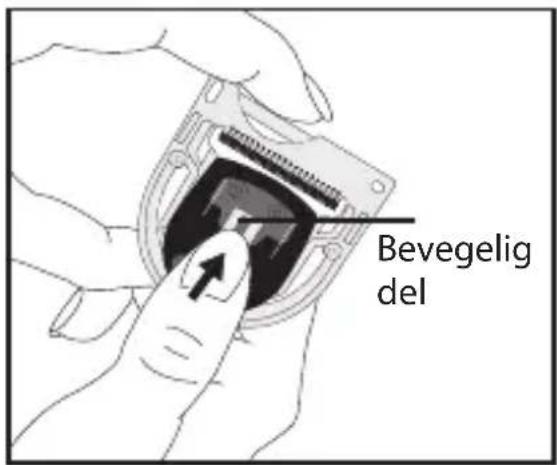
Skyv bladets bevegelige del oppover, så langt som justeringsverktøyet tillater det, så det bevegelige bladet er på nivå med toppen av justeringsverktøyet. Bladene vil då være på linje med hverandre.
BABYLISS Pro FX7880E - Trinn nr. 3. - 1

text_image Bevegelig del

Trinn nr. 4.

natural_image Illustration of hands installing or adjusting a device into a circular component with a pencil (no text or symbols visible)

Trinn nr. 5.

natural_image Illustration of a hand holding a computer floppy disk with a screw and key (no text or symbols)

NORMAL (REGULAR)

natural_image Illustration of a hand using a digital glucose meter to adjust it (no text or symbols visible)

BABYLISS Pro FX7880E - NORMAL (REGULAR) - 1

natural_image Line drawing of a hand inserting a component into a device housing (no text or symbols)
natural_image Illustration of hands installing or adjusting a device into a circular component (no text or symbols visible)

Trinn nr. 3.

natural_image Illustration of hands holding a computer flash drive (no text or symbols visible)

RENGJ∅RING OG VEDLIKEHOLD

natural_image Diagram of a medical device labeled 'REGULAR' with no other text or symbols

Nollataso (Zero Gap)
BABYLISS Pro FX7880E - RENGJ∅RING OG VEDLIKEHOLD - 1

text_image ZERO GAP

NOLLATASO (ZERO GAP)

Vaihe 1.

natural_image Illustration of a hand holding a digital blood glucose meter with a pen inserted (no text or symbols visible)

Vaihe 2.

natural_image Diagram of a device's internal structure with no visible text or symbols

Vaihe 3.

natural_image Illustration of hands installing or adjusting a device into a circular component with a pen (no text or symbols visible)

Vaihe 5.

natural_image Illustration of hands holding a hard disk drive with a screw and nut (no text or symbols)

NORMAALI (REGULAR)

natural_image Illustration of a hand using a digital thermometer to adjust a device (no text or symbols visible)

BABYLISS Pro FX7880E - NORMAALI (REGULAR) - 1

natural_image Illustration of a hand inserting a device into a plastic housing (no text or symbols visible)
natural_image Illustration of hands installing or adjusting a device into a circular component with a screwdriver (no text or symbols visible)

Vaihe 3.

natural_image Line drawing of a hand holding a computer flash drive (no text or symbols)

PUHDISTUS JA HUOLTO

natural_image Illustration of a hand holding a digital blood glucose meter with a pen inserted (no text or symbols visible)

Βήμα 2

natural_image Diagram of a device's internal structure showing connector pins and ports (no text or labels)

Βήμα 3

natural_image Illustration of hands installing or adjusting a device component with a pencil (no text or symbols visible)

Βήμα 5

natural_image Illustration of a hand holding a computer flash drive (no text or symbols visible)

KANONIKO KENO (REGULAR)

natural_image Illustration of a hand using a tool to adjust a digital device with a ruler (no text or symbols visible)

BABYLISS Pro FX7880E - PUHDISTUS JA HUOLTO - 1

natural_image Illustration of a hand inserting a component into a device housing (no text or symbols visible)
natural_image Illustration of hands installing or adjusting a device into a circular component with a screwdriver (no text or symbols visible)

Βήμα 3

natural_image Illustration of a hand holding a computer flash drive with a screw and key (no text or symbols)
natural_image Illustration of a hand holding a small electronic device with a cable inserted (no text or symbols visible)

2. lépés

natural_image Diagram of a device's internal structure showing connector pins and ports (no text or symbols)

3. lépés

natural_image Illustration of hands installing or adjusting a device component with a pencil (no text or symbols visible)

5. lépés

natural_image Illustration of hands holding a compact electronic device with a black screw and a circular button (no text or symbols)

NORMÁL (REGULAR)

natural_image Illustration of a hand using a tool to adjust a digital device with a ruler (no text or symbols visible)

BABYLISS Pro FX7880E - NORMÁL (REGULAR) - 1

natural_image Line drawing of a hand holding a compact electronic device with a screw and central slot (no text or symbols)

BABYLISS Pro FX7880E - NORMÁL (REGULAR) - 2

natural_image Illustration of a hand inserting a component into a device housing (no text or symbols visible)
natural_image Illustration of hands installing or adjusting a device into a circular component with a tool (no text or symbols visible)

3. lépés

PROFESJONALNY TRYMER PRECYZYJNY EDM TECHNOLOGY FX7880E

natural_image Diagram of a medical device casing with a labeled 'REGULAR' button (no other text or symbols)
natural_image Illustration of a hand holding a digital glucose meter with a pen inserted (no text or symbols visible)

Etap 2.

natural_image Diagram of a mechanical component with internal structure and mounting holes (no text or symbols)

Etap 3.

natural_image Illustration of hands installing or adjusting a device component with a screwdriver (no text or symbols visible)

Etap 5.

natural_image Illustration of hands holding a compact computer drive with a screw and indicator lights (no text or symbols)

NORAMLNIE (REGULAR)

natural_image Illustration of a hand using a tool to adjust a digital device with a ruler (no text or symbols visible)

BABYLISS Pro FX7880E - NORAMLNIE (REGULAR) - 1

natural_image Illustration of a hand inserting a component into a device housing (no text or symbols visible)
natural_image Illustration of hands installing or adjusting a device into a circular component with a pen (no text or symbols visible)

Etap 3.

natural_image Illustration of hands holding a compact electronic device with a screw and central slot (no text or symbols visible)

CZYSZCZENIE I KONSERWACJA

natural_image Illustration of a hand holding a digital device with a screwdriver, no text or symbols visible

2. krok

natural_image Diagram of a device's internal structure with no visible text or symbols

3. krok

natural_image Illustration of hands installing or adjusting a device component with a pencil (no text or symbols visible)

5. krok

natural_image Illustration of a hand holding a compact floppy disk with a screw and central slot (no text or symbols)

BĚŽNÉ NASTAVENÍ –

natural_image Illustration of a hand holding a digital glucose meter with a screwdriver (no text or symbols visible)

BABYLISS Pro FX7880E - BĚŽNÉ NASTAVENÍ – - 1

natural_image Illustration of a hand inserting a device into a plastic housing (no text or symbols visible)
natural_image Illustration of hands installing or adjusting a device into a circular component with internal wiring (no text or symbols visible)

3. krok

natural_image Line drawing of a hand holding a CD or DVD disc with a screw and central slot (no text or symbols)

ČIŠTĚNÍ A ÚDRŽBA

natural_image Illustration of a hand holding a digital glucose meter with a pen inserted (no text or symbols visible)

Этап №2

natural_image Diagram of a device's internal structure showing connector pins and ports (no text or symbols)

Этап №3

natural_image Illustration of hands installing or adjusting a device into a circular component with a screwdriver (no text or symbols visible)

Этап №5

natural_image Line drawing of a hand holding a compact floppy disk with a screw and central slot (no text or symbols)
natural_image Illustration of a hand using a digital thermometer to adjust a device (no text or symbols visible)

BABYLISS Pro FX7880E - Этап №5 - 1

natural_image Illustration of a hand inserting a component into a device housing (no text or symbols visible)
natural_image Illustration of hands installing or adjusting a device into a circular component with a tool (no text or symbols visible)

Этап 3.

natural_image Line drawing of a hand holding a device with a screw and circular button (no text or symbols)

УХОД И ОЧИСТКА

natural_image Diagram of a medical device labeled 'REGULAR' with no other text or symbols

Sifir Boşluk
BABYLISS Pro FX7880E - УХОД И ОЧИСТКА - 1

text_image ZERO GAP

SIFIR BOŞLUK

1.Adim

natural_image Illustration of a hand holding a digital blood glucose meter with a pen inserted (no text or symbols visible)

2.Adim

natural_image Diagram of a mechanical component with internal structure and mounting holes (no text or symbols)

3.Adim

text_image Mobil kısim

4.Adim

natural_image Illustration of hands installing or adjusting a device into a circular component with a pen (no text or symbols visible)

5.Adim

natural_image Line drawing of a hand holding a compact electronic device with a screw slot and a circular button (no text or symbols)
natural_image Illustration of a hand using a digital glucose meter to adjust the blood glucose level (no text or symbols visible)

BABYLISS Pro FX7880E - 5.Adim - 1

natural_image Illustration of a hand inserting a device into a plastic housing (no text or symbols visible)
natural_image Illustration of hands installing or adjusting a device into a circular component with a screwdriver (no text or symbols visible)

3.Adim

natural_image Line drawing of hands holding a computer flash drive (no text or symbols)

TEMİZLİK VE BAKIM

natural_image Illustration of a hand holding a digital blood glucose meter with a pen, no text or symbols present

2 žingsnis.

natural_image Cross-sectional diagram of a device with internal components (no text or symbols)

3 žingsnis.

natural_image Illustration of hands installing or adjusting a device into a circular component with a pen (no text or symbols visible)

5 žingsnis.

natural_image Illustration of a hand holding a computer flash drive (no text or symbols visible)

NORMALUS TARPAS

natural_image Illustration of a hand holding a digital blood glucose meter with a pen, no text or symbols present

BABYLISS Pro FX7880E - NORMALUS TARPAS - 1

natural_image Illustration of a hand inserting a component into a device housing (no text or symbols visible)
natural_image Illustration of hands installing or adjusting a device into a battery pack (no text or symbols visible)

3 žingsnis.

natural_image Line drawing of a hand holding a computer flash drive (no text or symbols)

VALYMAS IR PRIEŽIŪRA

CE DECLARATION OF CONFORMITY

We the undersigned, hereby certify the conformity of the following product:

Type of product : Metal trimmer

Type Number : T149a

Trademark : BaByliss / CPL

with following characteristics : 100-240V\~ 50/60Hz 4.5VDC 1000mA

Country of origin : China

Within the essential requirements of the CE Directives:

2014/30/EU ElectroMagnetic Compatibility Directive

2014/35/EU Low Voltage Directive

2011/65/EC RoHS Directive

2009/125/EC Ecodesign Directives implemented by the Commission

Regulations (EC) No. 1275/2008 and (EC) No. 278/2009

(where applicable) amended by 2008/28/EC

2006/42/EC Machinery Directive

In accordance with the following standards:

LVD EN 60335-1 2012 A11; AC (2014)

EN 60335-2-8 2015 A1

(including EMF) EN 62233 2008

Ecodesign EN 50564 2011

EMC EN 55014-1 2006 A1; A2

EN 61000-3-2 2014

EN 61000-3-3 2013

EN 55014-2 1997 A1;A2

CE mark first affixed: June 2017

BABYLISS FACO S.P.R.L.

(authorised by BABYLISS S.A.R.L. and Conair Group Ltd)

BABYLISS Pro FX7880E - CE DECLARATION OF CONFORMITY - 1

text_image C€

BaByliss FACO s.p.r.l.

Manual assistant
Powered by Anthropic
Waiting for your message
Product information

Brand : BABYLISS

Model : Pro FX7880E

Category : Beard trimmer