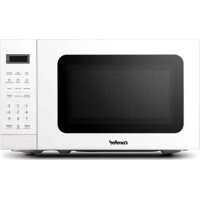
CMM201KC - Microwave Oven COMFEE - Free user manual and instructions
Find the device manual for free CMM201KC COMFEE in PDF.


| Product Type | Microwave Oven |
| Brand | Comfee |
| Model | CMM201KC (CM-M201K(BK)/CM-M201K(WH)) |
| Capacity | 0.7 cu ft (20 L) |
| External Dimensions (W x D x H) | 17.3 x 13.1 x 10.2 inches (44 x 33.3 x 25.9 cm) |
| Net Weight | Approximately 20.2 lb (9.2 kg) |
| Power Supply | 120 V ~ 60 Hz |
| Input Power (Microwave) | 1050 W |
| Output Power (Microwave) | 700 W |
| Turntable Diameter | 10 inches (25.4 cm) |
| Number of Power Levels | 11 (0 to 100%) |
| Built-in Clock | Yes, 12-hour format |
| Kitchen Timer | Yes, up to 99 min 99 sec |
| Auto Functions | Popcorn, Potato, Frozen Vegetables, Beverage, Dinner Plate, Pizza |
| Defrost | By weight (4-100 oz) and by time |
| Multi-stage Cooking | Up to 2 stages |
| Memory Function | Yes, 3 programs |
| Child Lock | Yes |
| Cavity Material | Stainless Steel (estimated) |
| Cleaning | Damp cloth with mild non-abrasive detergent |
| Repairability | Repair by qualified personnel only; spare parts available through authorized center |
| Included Accessories | Glass tray, turntable support, user guide |
| Installation Type | Countertop (minimum clearance 7.5 cm on sides, 30 cm above) |
Frequently Asked Questions - CMM201KC COMFEE
User questions about CMM201KC COMFEE
0 question about this device. Answer the ones you know or ask your own.
Ask a new question about this device
Download the instructions for your Microwave Oven in PDF format for free! Find your manual CMM201KC - COMFEE and take your electronic device back in hand. On this page are published all the documents necessary for the use of your device. CMM201KC by COMFEE.
USER MANUAL CMM201KC COMFEE
natural_image
Line drawing of a microwave oven (no text or symbols)INSTRUCTION MANUAL
PRECAUTIONS TO AVOID POSSIBLE EXPOSURE
EXPOSURE TO EXCESSIVE MICROWAVE ENERGY ......EN-2
SPECIFICATIONS...... EN-2
IMPORTANT SAFETY INSTRUCTIONS ...... EN-3
GROUNDING INSTRUCTIONS...... EN-6
UTENSILS EN-9
SETTING UP YOUR OVEN ......EN-12
Read these instructions carefully before using your microwave oven, and keep it carefully.
If you follow the instructions, your oven will provide you with many years of good service.
SAVE THESE INSTRUCTIONS CAREFULLY
PRECAUTIONS TO AVOID POSSIBLE EXPOSURE TO EXCESSIVE MICROWAVE ENERGY
(a) Do not attempt to operate this oven with the door open since open door operation can result in harmful exposure to microwave energy. It is important not to defeat or tamper with the safety interlocks.
(b) Do not place any object between the oven front face and the door or allows soil or cleaner residue to accumulate on sealing surfaces.
(c) Do not operate the oven if it is damaged. It is particular important that the oven door close properly and that there is no damage to the:
(1) DOOR (bent)
(2) HINGES AND LATCHES (broken or loosened)
(3) DOOR SEALS AND SEALING SURFACES
(d) The oven should not be adjusted or repaired by anyone except properly qualified service personnel.
SPECIFICATIONS
| ParameterContent | |
| Model: | CM-M201K(BK)/CM-M201K(WH) |
| Rated voltage : | 120V-60Hz |
| Rated Input Power(Microwave) : | 1050W |
| Rated Output Power(Microwave) : | 700W |
| Oven Capacity : | 0.7 CU.FT. |
| Turntable Diameter : | 10 inch |
| External Dimensions: | 17.3*13.1*10.2 inch |
| Net Weight : | Approx. 20 lbs |

When using electrical appliances basic safety precautions should be followed, including the following:
WARNING - To reduce the risk of burns, electric shock, fire, injury to persons or exposure to excessive microwave energy:
- Read all instructions before using the appliance.
- Read and follow the specific: "PRECAUTIONS TO AVOID POSSIBLE EXPOSURE TO EXCESSIVE MICROWAVE ENERGY" found on page 2.
- This appliance must be grounded. Connect only to properly grounded outlet. See "GROUNDING INSTRUCTIONS" found on page 6
- Install or locate this appliance only in accordance with the provided installation instructions.
- Some products such as whole eggs and sealed containers - for example, closed glass jars - are able to explode and should not be heated in this oven.
- Use this appliance only for its intended use as described in the manual. Do not use corrosive chemicals or vapors in this appliance. This type of oven is specifically designed to heat, cook or dry food. It is not designed for industrial or laboratory use.
- As with any appliance, close supervision is necessary when used by children.
-
Do not operate this appliance if it has a damaged cord or plug, if it is not working properly, or if it has been damaged or dropped.
-
This appliance should be serviced only by qualified service personnel. Contact nearest authorized service facility for examination, repair, or adjustment.
- Do not cover or block any openings on the appliance.
- Do not store this appliance outdoors. Do not use this product near water – for example, near a kitchen sink, in a wet basement, near a swimming pool, or similar location.
- Do not immerse cord or plug in water.
- Keep cord away from heated surface.
- Do not let cord hang over edge of table or counter.
- When cleaning surfaces of door and oven that comes together on closing the door, use only mild, nonabrasive soaps, or detergent applied with a sponge or soft cloth.
-
To reduce the risk of fire in the oven cavity:
(1). Do not overcook food. Carefully attend appliance when paper, plastic, or other combustible materials are placed inside the oven to facilitate cooking.
(2). Remove wire twist-ties from paper or plastic bag before placing bag in oven.
(3). If material inside of the oven ignite, keep oven door closed, turn oven off, and disconnect the power cord, or shut off power at the fuse or circuit breaker panel.
(4). Do not use the cavity for storage purposes. Do not leave paper products, cooking utensils, or food in the cavity when not in use. -
Liquids, such as water, coffee, or tea are able to be overheated beyond the boiling point without appearing to be boiling. Visible bubbling or boiling when the container is removed from the microwave oven is not always present.
THIS COULD RESULT IN VERY HOT LIQUID SUDDENLY BOILING OVER WHEN THE CONTAINER IS DISTURBED OR A UTENSIL IS INSERTED INTO THE LIQUID.
To reduce the risk of injury to persons:
(1) Do not overheat the liquid.
(2) Stir the liquid both before and halfway through heating it.
(3) Do not use straight-sided containers with narrow necks.
(4) After heating, allow the container to stand in the microwave oven for a short time before removing the container.
(5) Use extreme care when inserting a spoon or other utensil into the container.
-
As with any appliance, close supervision is necessary when the microwave oven is used by children.
-
If material inside of the oven should ignite, the oven door should be kept closed, the appliance turned off, the power cord disconnected, or the power shut off at the fuse or circuit breaker panel.
SA E THESE INSTRUCTIONS
This appliance must be grounded. In the event of an electrical short circuit, grounding reduces the risk of electric shock by providing an escape wire for the electric current. This appliance is equipped with a cord having a grounding wire with a grounding plug. The plug must be plugged into an outlet that is properly installed and grounded.

WARNING
Improper use of the grounding can result in a risk of electric shock.
Consult a qualified electrician or serviceman if the grounding instructions are not completely understood, or if doubt exists as to whether the appliance is properly grounded.
If it is necessary to use an extension cord, use only a 3-wire extension cord that has a 3-blade grounded plug, and 3-slot receptacle that will accept the plug on the appliance.
The marked rating of the extension cord shall be equal to or greater than the electrical rating of the appliance.

DANGER
Electric Shock Hazard
Touching some of the internal components can cause serious personal injury or death.
Do not disassemble this appliance.

WARNING
Electric Shock Hazard
Improper use of the grounding can result in electric shock. Do not plug into an outlet until appliance is properly installed and grounded.
- A short power supply cord is provided to reduce the risks resulting from becoming entangled in or tripping over a longer cord.
- Longer cord sets or extension cords are available and may be used if care is exercised in their use.
- If a long cord or extension cord is used:
(1) The marked electrical rating of the cord set or extension cord should be at least as great as the electrical rating of the appliance.
(2) The extension cord must be a grounding-type 3-wire cord.
(3) The longer cord should be arranged so that it will not drape over the counter top or tabletop where it can be pulled on by children or tripped over unintentionally.
- Operation of the microwave oven may cause interference to your radio, TV or similar equipment.
- When there is interference, it may be reduced or eliminated by taking the following measures:
(1) Clean door and sealing surface of the oven
(2) Reorient the receiving antenna of radio or television.
(3) Relocate the microwave oven with respect to the receiver.
(4) Move the microwave oven away from the receiver.
(5) Plug the microwave oven into a different outlet so that microwave oven and receiver are on different branch circuits.
CAUTION
Personal Injury Hazard
Tightly-closed utensils could explode. Closed containers should be opened and plastic pouches should be pierced before cooking.
See the instructions on "Materials you can use in microwave oven or to be avoided in microwave oven."
There may be certain non-metallic utensils that are not safe to use for microwaving. If in doubt, you can test the utensil in question following the procedure below.

Utensil Test:
- Fill a microwave-safe container with 1 cup of cold water (250ml) along with the utensil in question.
- Cook on maximum power for 1 minute.
- Carefully feel the utensil. If the empty utensil is warm, do not use it for microwave cooking.
- Do not exceed 1 minute cooking time.
MATERIALS YOU CAN USE IN MICROWAVE OVEN
Utensils Remarks
| Browning dish | Follow manufacturer's instructions. The bottom of browning dish must be at least 3/16 inch (5mm) above the turntable. Incorrect usage may cause the turntable to break. |
| Dinnerware | Microwave-safe only. Follow manufacturer's instructions. Do not use cracked or chipped dishes. |
| Glass jars | Always remove lid. Use only to heat food until just warm. Most glass jars are not heat resistant and may break. |
| Glassware | Heat-resistant oven glassware only. Make sure there is no metallic trim. Do not use cracked or chipped dishes. |
| Oven cooking bags | Follow manufacturer's instructions. Do not close with metal tie. Make slits to allow steam to escape. |
| Paper plates and cups | Use for short-term cooking/warming only. Do not leave oven unattended while cooking. |
| Paper towels | Use to cover food for reheating and absorbing fat. Use with supervision for a short-term cooking only. |
| Parchment paper | Use as a cover to prevent splattering or a wrap for steaming. |
| Plastic | Microwave-safe only. Follow the manufacturer's instructions. Should be labeled "Microwave Safe". Some plastic containers soften, as the food inside gets hot. "Boiling bags" and tightly closed plastic bags should be slit, pierced or vented as directed by package. |
| Plastic wrap | Microwave-safe only. Use to cover food during cooking to retain moisture. Do not allow plastic wrap to touch food. |
| Thermometers | Microwave-safe only (meat and candy thermometers). |
| Wax paper | Use as a cover to prevent splattering and retain moisture. |
MATERIALS TO BE AVOIDED IN MICROWAVE OVEN
| Utensils Remarks | |
| Aluminum tray | May cause arcing. Transfer food into microwave-safe dish. |
| Food carton with metal handle | May cause arcing. Transfer food into microwave-safe dish. |
| Metal or metaltrimmed utensils | Metal shields the food from microwave energy. Metal trim may cause arcing. |
| Metal twist ties | May cause arcing and could cause a fire in the oven. |
| Paper bags | May cause a fire in the oven. |
| Plastic foam | Plastic foam may melt or contaminate the liquid inside when exposed to high temperature. |
| Wood | Wood will dry out when used in the microwave oven and may split or crack. |
Names of Oven Parts and Accessories
Remove the oven and all materials from the carton and oven cavity.
Your oven comes with the following accessories:
Glass tray x1 Turntable ring assembly x1 Instruction Manual x1
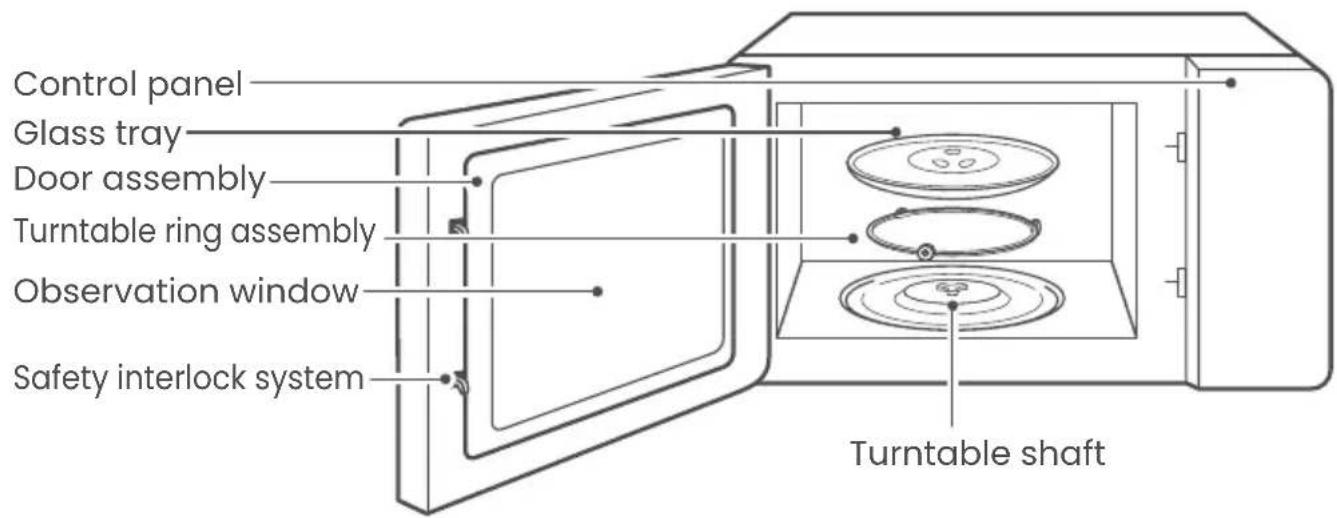
Turntable installation
a. Never place the glass tray upside down. The glass tray should never be restricted.
b. Both glass tray and turntable ring assembly must always be used during cooking.
c. All food and containers of food are always placed on the glass tray for cooking.
d. If glass tray or turntable ring assembly cracks or breaks, contact your nearest authorized service center.

COUNTERTOP INSTALLATION
Remove all packing material and accessories.
Examine the oven for any damage such as dents or broken door. Do not install if oven is damaged.
Cabinet: Remove any protective film found on the microwave oven cabinet surface.
Do not remove the light brown Mica cover that is attached to the oven cavity to protect the magnetron.
INSTALLATION
- Select a level surface that provide enough open space for the intake and/or outlet vents.
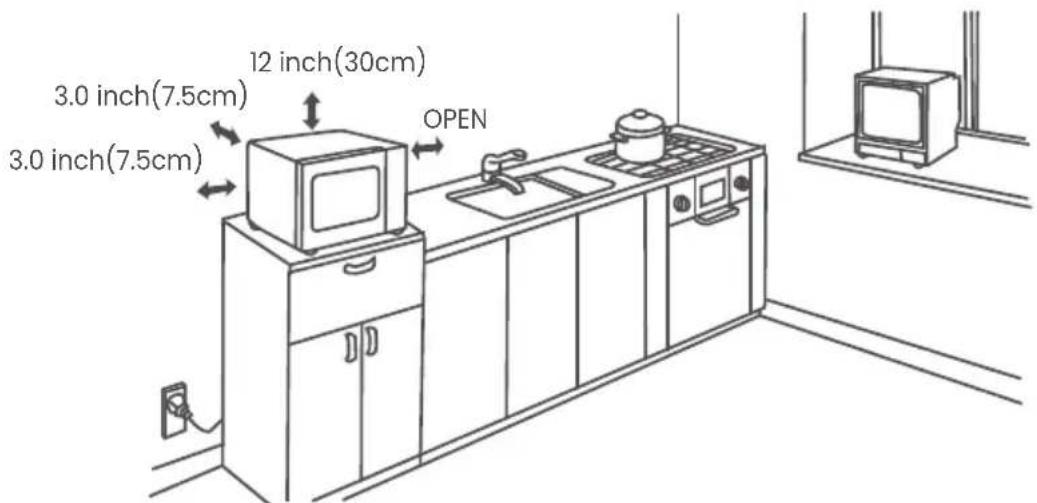
A minimum clearance of 3.0 inches (7.5cm) is required between the oven and any adjacent walls. One side must be open.
(1) Leave a minimum clearance of 12 inches (30cm) above the oven.
(2) Do not remove the legs from the bottom of the oven.
(3) Blocking the intake and/or outlet openings can damage the oven.
(4) Place the oven as far away from radios and TV as possible.
Operation of microwave oven may cause interference to your radio or TV reception.
- Plug your oven into a standard household outlet. Be sure the voltage and the frequency is the same as the voltage and the frequency on the rating label.
WARNING: Do not install oven over a range cooktop or other heat-producing appliance. If installed near or over a heat source, the oven could be damaged and the warranty would be avoid.
1. POWER LEVEL
11 power levels are available.
| Level | 10 | 9 | 8 | 7 | 6 | 5 | 4 | 3 | 2 | 1 | 0 |
| Power | 100% | 90% | 80% | 70% | 60% | 50% | 40% | 30% | 20% | 10% | 0% |
| Display | PL10 | PL9 | PL8 | PL7 | PL6 | PL5 | PL4 | PL3 | PL2 | PL1 | PL0 |
2. CLOCK SETTING
- Press "CLOCK", "00:00" will display.
- Press the number keys and enter the current time. For example, time is 12:10 now, please press "1,2,1,0" in turn.
- Press "CLOCK" to finish clock setting. ":" will flash and the clock will be lighted.
- If the numbers input are not within the range of 1:00--12:59, the setting will be invalid until valid numbers are input.

NOTE
- In the process of clock setting, if the "STOP/CANCEL" button is pressed or if there is no operation within 1 minute, the oven will go back to the former setting automatically.
- If the clock need to be reset, please repeat step 1 to step 3.
3. KITCHEN TIMER
- Press "KITCHEN TIMER", screen will display 00:00, the first hour figure flash.
- Press the number keys and enter the timer time.(the maximum cooking time is 99 minutes and 99 seconds).
- Press " START/+30SEC." to confirm setting.
- When the timer time arrives, the buzzer will ring 5 times. If the clock be set (12-hour system), screen will display the current time.

NOTE
- The kitchen time is differ from 12-hour system, Kitchen Timer is a timer.
- During kitchen timer, any program cannot be set.
4. MICROWAVE COOK
- Press "TIME COOK" once, screen will display "00:00".
- Press number keys to input the cooking time; the maximum cooking time is 99 minutes and 99 seconds.
- Press "POWER" once, screen will display "PL10". The default power is 100% power. Now you can press number keys to adjust the power level.
- Press "START/+30SEC." to start cooking.
Example: to cook the food with 50% microwave power for 15 minutes.
a. Press "TIME COOK" once."00:00" displays.
b. Press "1", "5", "0", "0" in order.
c. Press "POWER" once, then press "5" to select 50% microwave power.
d. Press "START/+30SEC." to start cooking.

NOTE
- In the process of setting, if the "STOP/CANCEL" button is pressed or if there is no operation within 1 minute, the oven will go back to the former setting automatically.
- If "PL0" selected, the oven will work with fan for no power.
- During microwave cooking, "POWER" can be pressed to change the power you need. After pressing "POWER", the current power flash for 3 seconds, now you can press number button to change the power. The oven will work with the selected power for the rest time.
5. SPEEDY COOKING
- In waiting state, instant cooking at 100% power level can be started by select a cooking time from 1 to 6 minutes by pressing number pads 1 to 6.
Press "START/+30SEC." to increase the cooking time; the maximum cooking time is 99 minutes and 99 seconds.
- In waiting state, instant cooking at 100% power level with 30 seconds' cooking time can be started by pressing "START/+30SEC". Each press on the same button will increase cooking time by 30 seconds. the maximum cooking time is 99 minutes and 99 seconds.

NOTE
- during microwave cooking and time defrost, time can be added by pressing "START/+30SEC." button.
6. WEIGHT DEFROST FUNCTION
- Press "WEIGHT DEFROST", screen will display "dEF1".
- Press numerical buttons to input weight to be defrosted. Input the weight ranged between 4\~100 Oz.
- If the weight input is not within 4\~100 Oz, the input will be invalid.
- Press "START/+30SEC." to start defrosting and the cooking time remained will be displayed.
7. TIME DEFROST FUNCTION
- Press "TIME DEFROST", screen will display "dEF2".
- Press number pads to input defrosting time. The effective time range is 00:01\~99:99
- The default microwave power is power level 3. If you want to change the power level, press "POWER" once, and the screen will display "PL 3", then press the number pad of the power level you wanted.
- Press " START/+30SEC." to start defrosting. The remained cooking time will be displayed.
8. POPCORN
- Press "POPCORN" repeatedly until the number you wish appears in the display, "1.75", "3.0", "3.5" Oz will display in order. For example, press "POPCORN" once, "1.75" appears.
- Press "START/+30 SEC." to cook, buzzer sounds once. When cooking finishes, buzzer sounds five times and then turn back to waiting state.
9.POTATO
- Press "POTATO" repeatedly until the number you wish appears in the display, "1", "2", "3" will display in order.
"1" SET : 1 potato (approximate 230 gram)
"2"SETS: 2 potatoes (approximate 460 gram)
"3"SETS: 3 potatoes (approximate 690 gram)
For example, press "POTATO" once, "1" appears.
- Press" START/+30 SEC." to cook, buzzer sounds once. When cooking finishes, buzzer sounds five times and then turn back to waiting state.
10.FROZEN VEGETABLE
- Press" FROZEN VEGETABLE " repeatedly until the number you wish appears in the display, "4.0", "8.0", "16.0" Oz will display in order.
For example, press "FROZEN VEGETABLE" once, "4.0" appears.
- Press " START/+30 SEC." to cook, buzzer sounds once. When cooking finishes, buzzer sounds five times and then turn back to waiting state.
11.BEVERAGE
-
Press "BEVERAGE" repeatedly until the number you wish appears in the display, "1", "2", "3" cup will display in order. One cup is about 120ml. For example, press "BEVERAGE" once, "1" appears.
-
Press "START/+30 SEC." to cook, buzzer sounds once. When cooking finishes, buzzer sounds five times and then turn back to waiting state.
12. DINNER PLATE
- Press "DINNER PLATE" repeatedly until the number you wish appears in the display, "9.0", "12.0", "18.0" Oz will display in order.
For example, press "DINNER PLATE" once, "9.0" appears.
- Press "START/+30 SEC." to cook, buzzer sounds once. When cooking finishes, buzzer sounds five times and then turn back to waiting state.
13.PIZZA
- Press "PIZZA" repeatedly until the number you wish appears in the display, "4.0", "8.0", "14.0" Oz will display in order. For example, press "PIZZA" once, "4.0" appears.
- Press "START/+30 SEC." to cook, buzzer sounds once. When cooking finishes, buzzer sounds five times and then turn back to waiting state.
14. MEMORY FUNCTION
- Press "0/MEMORY" to choose memory 1-3 procedure. The screen will display 1,2,3.
- If the procedure has been set, press "START/ +30 SEC." to use it. If not, continue to set the procedure. Only one or two stages can be set.
- After finishing the setting, press "START/ +30 SEC." once to save the procedure and turn back to the waiting states. If press " START/ +30 SEC." again, it will start cooking.
Example: to set the following procedure as the second memory, that is memory - To cook the food with 80% microwave power for 3 minutes and 20 seconds.
The steps are as follow
a. In waiting states, press "0/MEMORY" twice, stop pressing until the screen displays "2".
b. Press "TIME COOK" once, then press "3", "2", "0" in order.
c. Press "POWER" once, "PL10" display, then press "8" and "PL8" displays.
d. Press "START/+30 SEC." to save the setting. Buzzer sounds once then turn back to waiting states. If you press "START/+30SEC." twice after step c, the procedure will be saved as the memory 2 and operated.
e. If the electricity is not cut off, the procedure will be saved all the time. If it is, the procedure need to reset.
f. If you want to run the saved procedure, in waiting states, press "0/MEMORY" twice, screen displays "2", then press "START/+30SEC." to run.
15. MULTI-STAGE COOKING
At most 2 stages can be set for cooking. In multi-stage cooking, if one stage is defrosting, then defrosting shall be placed at the first stage automatically.

NOTE
- Auto cooking cannot work in the multi-stage cooking.
Example: if you want to cook with 80% microwave power for 5 minutes + 60% microwave power for 10 minutes. The cooking steps are as following:
- Press "TIME COOK" once, then press "5", "0", "0" to set the cooking time;
- Press "POWER" once, then press "8" to select 80% microwave power.
- Press "TIME COOK" once, then press "1", "0", "0", "0" to set the cooking time;
- Press "POWER" once, then press "6" to select 60% microwave power.
- Press "START/ +30 SEC." to start cooking.
16. INQUIRING FUNCTION
- In cooking state, press "CLOCK", the screen will display clock for three seconds.
- In the microwave cooking state, press "POWER" to inquire microwave power level, and the current microwave power will be displayed. After three seconds, the oven will turn back to the previous state. In multi-stage state, the inquiring way can be done by the same way as above.
17. LOCK FUNCTION FOR CHILDREN
Lock: In waiting state, press " STOP/CANCEL " for 3 seconds, there will be a long "beep" denoting the entering into the children-lock state; meanwhile, screen will display "[ : : ]"
Lock quitting: In locked state, press "STOP/CANCEL" for 3 seconds, there will be a long "beep" denoting that lock is released.
18. COOKING END REMINDING FUNCTION
When the cooking is over, the buzzer will sound 5 "beep" to alert user the cooking is finished.
19. OTHER SPECIFICATIONS
- In standby state, if the set clock digital tube displays current time, the icon " : " would flash; otherwise, it shows " 0:00 ".
- In setting function state, screen displays corresponding setting.
- In working or pause state, screen displays surplus cooking time.
Troubleshooting
Check your problem by using the chart below and try the solutions for each problem. If the microwave oven still does not work properly, contact the nearest authorized service center.
| TROUBLE | POSSIBLE CAUSE POSSIBLE REMEDY | |
| Oven will not start | a. Electrical cord for oven is not plugged in.b. Door is open.c. Wrong operation is set. | a. Plug into the outlet.b. Close the door and try again.c. Check instructions. |
| Arcing or sparking | a. Materials to be avoided in microwave oven were used.b. The oven is operated when empty.c. Spilled food remains in the cavity. | a. Use microwave-safe cookware only.b. Do not operate with oven empty.c. Clean cavity with wet towel. |
| Unevenly cooked foods | a. Materials to be avoided in microwave oven were used.b. Food is not defrosted completely.c. Cooking time, power level is not suitable.d. Food is not turned or stirred. | a. Use microwave-safe cookware only.b. Completely defrost food.c. Use correct cooking time, power level.d. Turn or stir food. |
| Overcooked foods | Cooking time, power level is not suitable. | Use correct cooking time, power level. |
| Undercooked foods | a. Materials to be avoided in microwave oven were used.b. Food is not defrosted completely.c. Oven ventilation ports are restricted.d. Cooking time, power level is not suitable. | a. Use microwave-safe cookware only.b. Completely defrost food.c. Check to see that oven ventilation ports are not restricted.d. Use correct cooking time, power level. |
TROUBLE POSSIBLE CAUSE POSSIBLE REMEDY
| Im proper defrosting | a. Materials to be avoided in microwave oven were used.b. Cooking time, power level is not suitable.c. Food is not turned or stirred. | a. Use microwave- safe cookware only.b. Use correct cooking time, power level.c. Turn or stir food. |
Midea America (Canada) Corp.
Markham, ON L3R 8V2
1-866-646-4332
comfee'
FOUR À MICRO-ONDES
natural_image
Line drawing of a microwave oven with front and back panels (no text or symbols)MANUEL D'UTILISATION


- INSTRUCTION MANUAL
- PRECAUTIONS TO AVOID POSSIBLE EXPOSURE
- Read these instructions carefully before using your microwave oven, and keep it carefully.
- SAVE THESE INSTRUCTIONS CAREFULLY
- PRECAUTIONS TO AVOID POSSIBLE EXPOSURE TO EXCESSIVE MICROWAVE ENERGY
- SA E THESE INSTRUCTIONS
- WARNING
- DANGER
- Electric Shock Hazard
- CAUTION
- Utensil Test:
- MATERIALS YOU CAN USE IN MICROWAVE OVEN
- MATERIALS TO BE AVOIDED IN MICROWAVE OVEN
- Names of Oven Parts and Accessories
- Turntable installation
- COUNTERTOP INSTALLATION
- INSTALLATION
- POWER LEVEL
- CLOCK SETTING
- NOTE
- KITCHEN TIMER
- MICROWAVE COOK
- SPEEDY COOKING
- WEIGHT DEFROST FUNCTION
- TIME DEFROST FUNCTION
- POPCORN
- 9.POTATO
- 10.FROZEN VEGETABLE
- 11.BEVERAGE
- DINNER PLATE
- 13.PIZZA
- MEMORY FUNCTION
- The steps are as follow
- MULTI-STAGE COOKING
- INQUIRING FUNCTION
- LOCK FUNCTION FOR CHILDREN
- COOKING END REMINDING FUNCTION
- OTHER SPECIFICATIONS
- Troubleshooting
- comfee'
- FOUR À MICRO-ONDES
Brand : COMFEE
Model : CMM201KC
Category : Microwave Oven