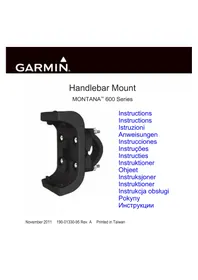
Montana Handlebar Mount - Gps GARMIN - Free user manual and instructions
Find the device manual for free Montana Handlebar Mount GARMIN in PDF.


| Product Type | Handlebar Mount for GPS |
| Brand | Garmin |
| Compatible Models | Garmin Montana 600 series |
| Material | Reinforced plastic and metal |
| Approximate Weight | 100 g |
| Approximate Dimensions | 10 x 8 x 5 cm |
| Main functions | Secure fixation on handlebar, anti-theft system with security screw, quick release |
| Installation type | On handlebar, manual tightening without additional tool |
| Package contents | Mounting bracket, 2 screws, 2 nuts, security tool |
| Security screw included | Yes |
| Security tool included | Yes |
| Operating temperature | -15 °C to 70 °C (compatible with Montana GPS) |
| Warranty | Standard Garmin limited warranty |
| Maintenance and cleaning | Clean with a soft dry cloth |
| Safety | Security screw for theft protection |
Frequently Asked Questions - Montana Handlebar Mount GARMIN
User questions about Montana Handlebar Mount GARMIN
0 question about this device. Answer the ones you know or ask your own.
Ask a new question about this device
Download the instructions for your Gps in PDF format for free! Find your manual Montana Handlebar Mount - GARMIN and take your electronic device back in hand. On this page are published all the documents necessary for the use of your device. Montana Handlebar Mount by GARMIN.
USER MANUAL Montana Handlebar Mount GARMIN
November 2011 190-01330-95 Rev. A Printed in Taiwan
Montana 600 Series Handlebar Mount Instructions

WARNING
See the Important Safety and Product Information in the Montana product box before installing the handlebar mount.
NOTICE
The temperature range for the Montana is from 5ircF to 158ircF (from -15ircC to 70ircC ). Extended exposure to temperatures exceeding this range (in storage or operating conditions) may damage the screen.
Mounting the Bracket Assembly
NOTICE
Do not overtighten the nuts.
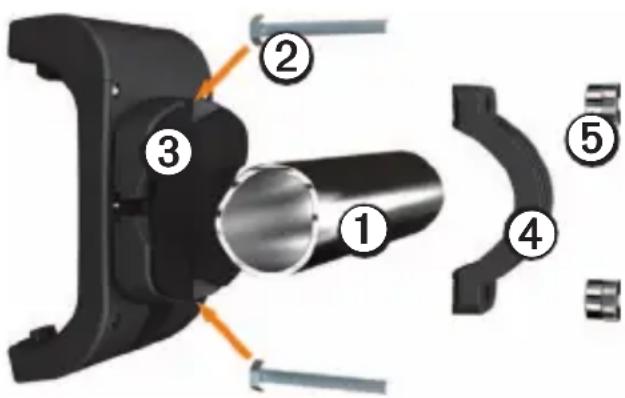
- Select a location on your handlebars ① for the mount.
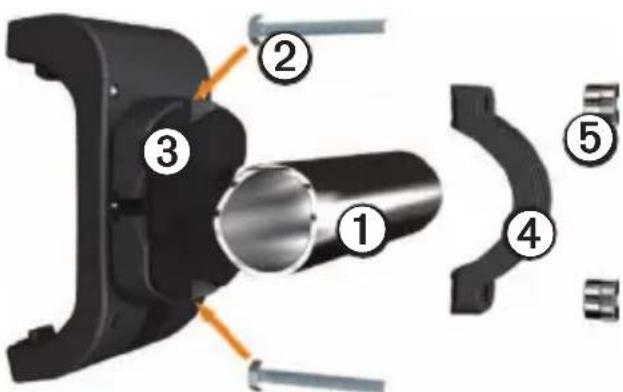
- Place the head of each screw ② in each slot ③ on the back of the mount.
-
With the mount placed on the handlebars, thread the screws through the mount bracket ④.
-
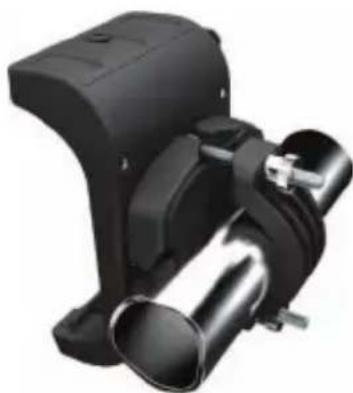
Tighten the nuts ⑤ by hand with the rough-edged end on the outside, until the mount is secure. Do not overtighten.
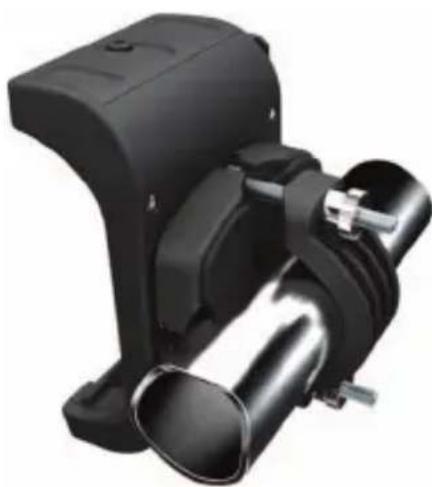
Installing Your Montana in the Mount
NOTE: If reflected light or glare makes the device display difficult to see, apply an anti-glare screen protector to the screen.
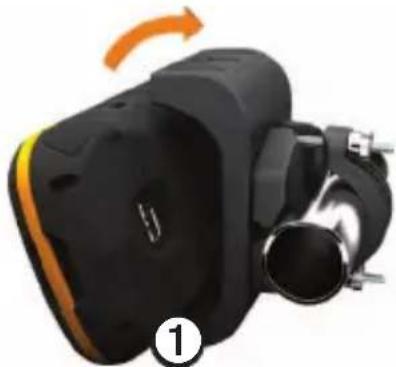
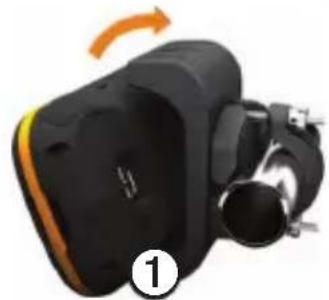
- Fit the bottom of your device into the cradle ①.
-
Tilt the device back until it snaps into place.
-
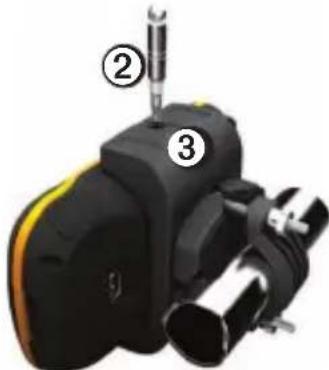
Use the security screw tool to tighten the security screw on the top of the mount to secure the device and deter theft.
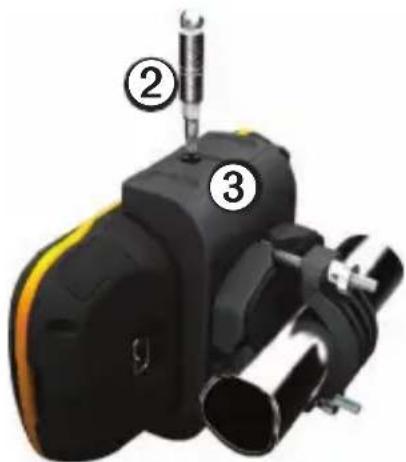
Removing Your Montana from the Mount
- Loosen the security screw.
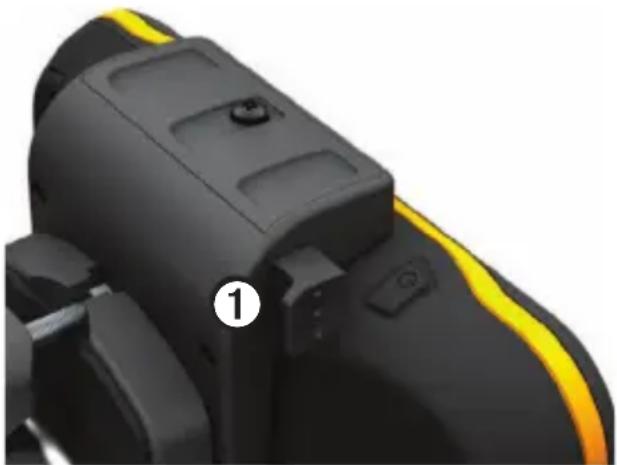
- Press the button ① on the side of the mount to release the device.
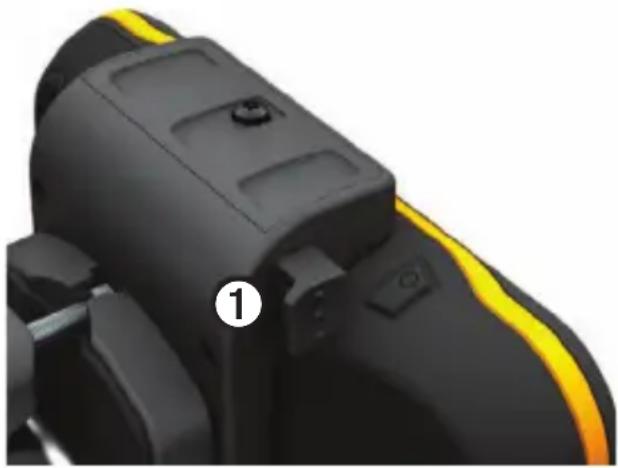
- Tilt the device forward, and lift it out of the mount.
Limited Warranty
Garmin's standard limited warranty applies to this accessory. For more information, see the Important Safety and Product Information in the device product box.
- BbIeHHe Ha pyJIe ①MeTo IJIyCTaHOBKn KpeIIeHHN.
- BCTaBbTe BnHTbI ② B OTBepCTHIA 3 C 3aJHei CTOpOHy I KpeJIeHHIA.
-
YcTaHOBHTe KpeIIJIeHHe Ha pyJIe H BCTaBBTe BnHTbI B OTBepCTnHa cKo6e④.
-
3aTaNITe rAINKnBpyHyo 3a3y6peHHoN cTOpHOH HApJy,IOKA KpeJIiEHe He 3aΦHKcIpyETc. He 3aTaNBaIte CJINIIKOM CNJIbHO.
YcTaHOBka yCTpoIcTba Montana B KpenJIeHne IIPIMEuaHHe. EcJIN H3-3a OTPaKaHOIIeROc CBeta HJIN 6JINKOB HeBO3MOxH0 YBnIDeTB N3O6paKeHHe Ha 3KpaHe, BOCIOJIb3yITecb aHTHOJHKOBbIM IOKpbITHeM.
- BCTaBBTe HNJKHIO YoacTb yCTpOINCTBaB IOINCTaBky ①
- HaKIOHHTe ycTpoIcTBo Ha3aJ IO IIeJIyKa.
3.ДЯHaJeKHOJФHKcaHIN 3aHTbI yCTPOcTBAOT KpaHN C IOMOIIbIO cIEuaJIbHOr O HcTpymeHTa ② 3aTaNITE ceKpeTHbIB BINT ③ B BepxHei Yactn KpeJIeHn.
I3BleueHne yctpoiCTBa Montana n3 KpenJeHn
- OTKpyTHTe KpeIeJHbI BnHT.
- HaxmTe KHOIIky①Ha 6OKOBn IaHeJIN KpeIJIeHn, YTObI N3BJeYb yCTpoIcTBO.
- HaKJIOHnTe ycTpoIcTBo BIIpeE n H3BJIeKHTe eTo H3 KpeIIJIeHHa.
OrpaHnueHHa rapaHTna
Ha 3TOT akceccyap pacnpoctpaHaeTc8 cTaNdaptHa oRpaHnueHHa rapaHTHa Garmin. IOnIOJIHNTeJIbHbIe CBeJeHHa cm.B DOKyMeHTe IIpaBuIa mexHuKu 6e3onacHocMu u cBeDeHua 0b u3deIuu, KOToPbI HaxOJNTcB yIaKOBKe ycTpoNCTBa.
www.garmin.com/support

913-397-8200
1-800-800-1020

003226725254

08082380000
+448708501242

004548105050

1-866-429-9296

00358969379758

43 (0) 3133 3181 0

0033155693399

01805/427646-880
008004412454
+44 2380 662 915

00390236699699

00351214447460

0800-0233937

0034902007097

81569555

0046774452020
Garmin International, Inc
1200 East 151st Street,
Olathe, Kansas 66062, USA
Garmin (Europe) Ltd.
Liberty House, Hounsdown Business Park
Southampton, Hampshire, SO40 9LR UK
Garmin Corporation
No. 68, Zhangshu 2nd Road, Xizhi Dist.
New Taipei City, 221, Taiwan (R.O.C.)
Garmin and the Garmin logo are trademarks of Garmin Ltd. or its subsidiaries, registered in the USA and other countries.
MontanaTM is a trademark of Garmin Ltd. or its subsidiaries.
These trademarks may not be used without the express
permission of Garmin.

M102
Brand : GARMIN
Model : Montana Handlebar Mount
Category : Gps