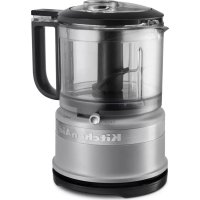
KFC3516FG - Food Processor KITCHENAID - Free user manual and instructions
Find the device manual for free KFC3516FG KITCHENAID in PDF.



| Brand | KitchenAid |
| Model | KFC3516FG |
| Product Type | Food Processor (Chopper) |
| Power Supply | 120 V ~ 60 Hz |
| Work Bowl Capacity | Up to 3 cups (710 ml) |
| Blade Material | Stainless Steel |
| Functions | Chop, Puree, Pulse Slice |
| Included Accessories | Work bowl, lid, blade, sauce bowl with pour spout |
| Cleaning | Bowls, lid and blade dishwasher safe (top rack); wipe base with damp cloth |
| Safety | Lid locking system, sharp blade, do not immerse motor |
| Warranty | 1 year (hassle-free replacement in USA and Canada) |
| Cord Storage | Yes, wrap around base |
| Recommended Uses | Fruits, vegetables, meat, herbs, nuts, bread, emulsified sauces |
| Food Preparation | Cut large foods into 1-inch cubes before processing |
Frequently Asked Questions - KFC3516FG KITCHENAID
User questions about KFC3516FG KITCHENAID
0 question about this device. Answer the ones you know or ask your own.
Ask a new question about this device
Download the instructions for your Food Processor in PDF format for free! Find your manual KFC3516FG - KITCHENAID and take your electronic device back in hand. On this page are published all the documents necessary for the use of your device. KFC3516FG by KITCHENAID.
USER MANUAL KFC3516FG KITCHENAID
natural_image
Exterior view of a modern kitchen air fryer with glass lid and handle (no visible text or symbols)PARTS AND FEATURES
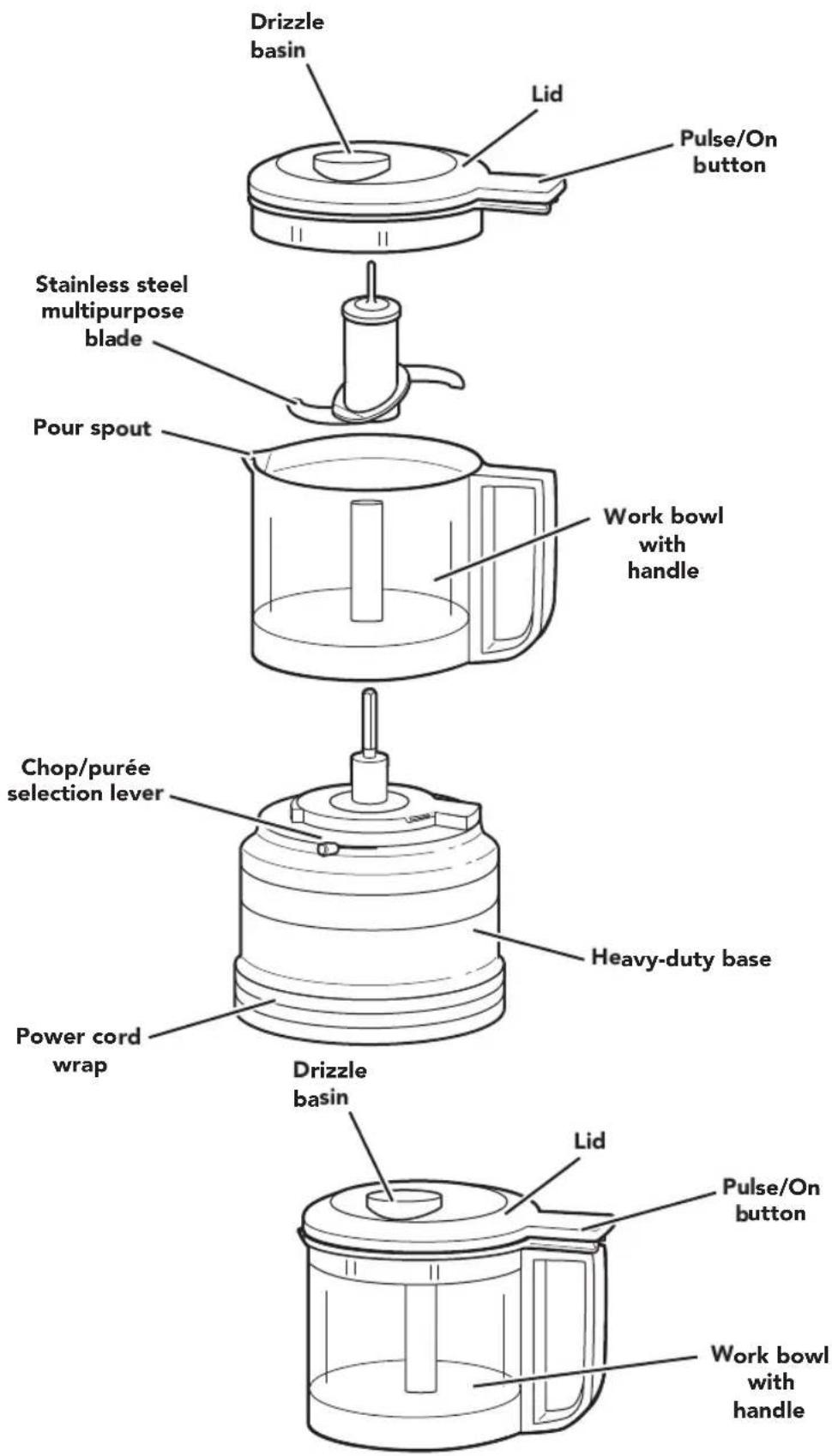
PARTS AND ACCESSORIES
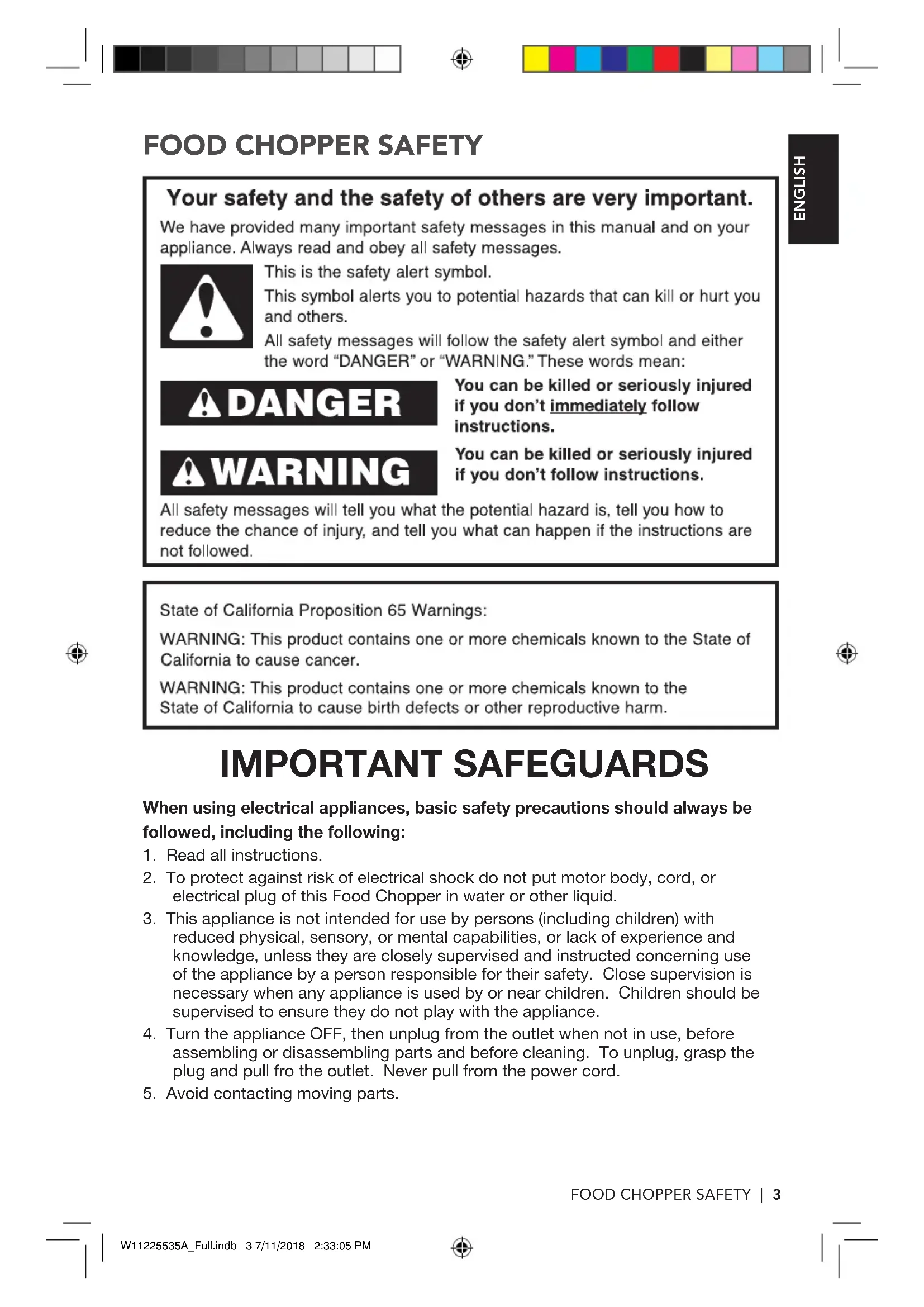
FOOD CHOPPER SAFETY
Your safety and the safety of others are very important.
We have provided many important safety messages in this manual and on your appliance. Always read and obey all safety messages.

This is the safety alert symbol.
This symbol alerts you to potential hazards that can kill or hurt you and others.
All safety messages will follow the safety alert symbol and either the word "DANGER" or "WARNING." These words mean:

You can be killed or seriously injured if you don't immediately follow instructions.

You can be killed or seriously injured if you don't follow instructions.
All safety messages will tell you what the potential hazard is, tell you how to reduce the chance of injury, and tell you what can happen if the instructions are not followed.
State of California Proposition 65 Warnings:
WARNING: This product contains one or more chemicals known to the State of California to cause cancer.
WARNING: This product contains one or more chemicals known to the State of California to cause birth defects or other reproductive harm.
IMPORTANT SAFEGUARDS
When using electrical appliances, basic safety precautions should always be followed, including the following:
- Read all instructions.
- To protect against risk of electrical shock do not put motor body, cord, or electrical plug of this Food Chopper in water or other liquid.
- This appliance is not intended for use by persons (including children) with reduced physical, sensory, or mental capabilities, or lack of experience and knowledge, unless they are closely supervised and instructed concerning use of the appliance by a person responsible for their safety. Close supervision is necessary when any appliance is used by or near children. Children should be supervised to ensure they do not play with the appliance.
- Turn the appliance OFF, then unplug from the outlet when not in use, before assembling or disassembling parts and before cleaning. To unplug, grasp the plug and pull fro the outlet. Never pull from the power cord.
- Avoid contacting moving parts.
FOOD CHOPPER SAFETY
- Do not operate any appliance with a damaged cord or plug or after the appliance malfunctions, or is dropped or damaged in any manner. Return appliance to the nearest Authorized Service Center for examination, repair or adjustment.
- The use of attachments not recommended or sold by the manufacturer may cause fire, electric shock or injury.
- Do not use outdoors.
- Do not let cord hang over edge of table or counter.
- Keep hands and utensils away from the cutting blade while chopping food to reduce the risk of severe injury to person or damage to the Food Chopper. A scraper may be used but only when the Food Chopper is not running.
- Blade is sharp. Handle carefully.
- To reduce the risk of injury, never place cutting blade on base without first putting bowl properly in place.
- Be certain cover is securely locked in place before operating the Food Chopper.
- Do not attempt to defeat the cover interlock mechanism.
SAVE THESE INSTRUCTIONS
This product is designed for household use only
ELECTRICAL REQUIREMENTS
Volts: 120 V
Hertz: 60 Hz
NOTE: This Food Chopper has a polarized plug (one blade is wider than the other). To reduce the risk of electrical shock, this plug will fit in a polarized outlet only one
way. If the plug does not fit fully in the outlet, reverse the plug. If it still does not fit, contact a qualified electrician. Do not modify the plug in any way.
A short power-supply cord is provided to reduce the risk resulting from becoming entangled in or tripping over a longer cord.
USING THE FOOD CHOPPER
CHOP AND PURÉE RECOMMENDATIONS CHART
Use the Food Chopper to chop raw fruits, vegetables, or nuts and mince parsley, chives, or garlic for easy preparation in your favorite recipes. Purée cooked fruit or vegetables to make baby food, or to use as bases for soups or sauces. You can also make bread crumbs, or grind raw meat. Use the drizzle basin and pour spout to easily make mayonnaise or dressings.
NOTE: For best results, larger food items should be cut to approximately 1-inch cubes before processing. This step also allows processing of more food at a single time.
IMPORTANT: Do not process coffee beans or hard spices such as nutmeg, which may damage the Food Chopper.
| SUGGESTED FOOD | PREPARE FOR PROCESSING | AMOUNT SETTING | |
| RAW FRUITS and VEGETABLES | Cut into 1-inch pieces | Up to 3 cups | Chop or Purée |
| COOKED FRUITS and VEGETABLES | Cut into 1-inch pieces | Up to 2.5 cups | Purée |
| LIQUIDS/EMULSIONS (SUCH AS MAYONNAISE OR SALAD DRESSINGS) | Place dry ingredients, or thicker wet ingredients in work bowl; then use the drizzle basin to add oils or liquids to the mixture during use. | Up to 1.5 cups | Purée |
| MEAT | Meat should be raw and cut into 1-inch pieces for best processing results. | Up to 1/2 pound (227g) at one time | Chop or Purée |
| HERBS and SPICES | Add herbs and spices as they are; no preparation needed. | Up to 3 cups | Chop |
| BREAD, COOKIES, OR CRACKERS | Break bread, crackers, or cookies into pieces that fit into the bowl before processing. | Up to 3 cups | Chop |
| NUTS | Add nuts as they are; no preparation needed. | Up to 3 cups | Purée |
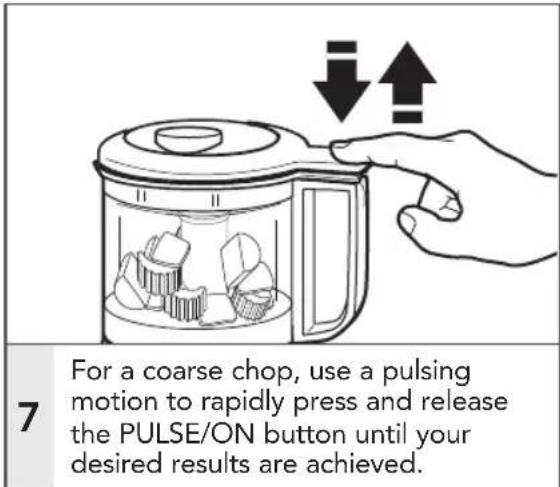
TIP: For better consistency or to achieve coarsely chopped results, use the Pulse operation.
Visit Kitchenaid.com/quickstart for additional Instructions with videos, inspiring recipes, and tips on how to use your Food Chopper.
USING THE FOOD CHOPPER
PREPARING THE FOOD CHOPPER FOR USE
Before first use
Before using the Food Chopper for the first time, wash the work bowls, lids, and blade in hot, soapy water. Work bowls, lids, and blade may also be washed in the top rack of a dishwasher.
For convenient storage, always reassemble the Food Chopper after cleaning.
DISASSEMBLING THE FOOD CHOPPER
Follow these instructions to disassemble the Food Chopper for cleaning and when removing ingredients from the work bowl.
natural_image
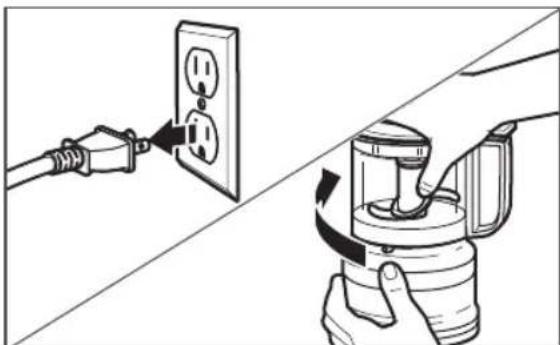
Diagram showing two electrical connections: one with a plug inserted into an outlet, the other with a hand holding a device (no text or symbols present)1 Be sure the Food Chopper is unplugged. Hold the lid as shown, and rotate it clockwise to unlock. Then, lift the lid off of the work bowl.
natural_image
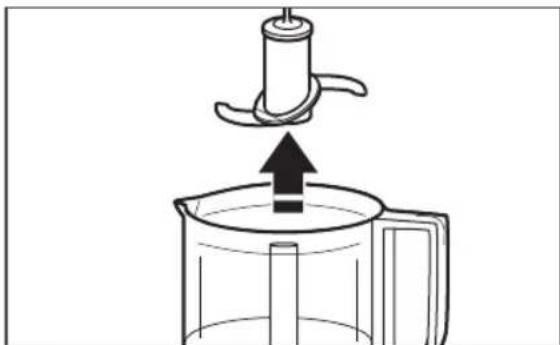
Diagram of a kitchen utensil pressing into a container with an upward arrow (no text or symbols)2 Pull the blade straight up to remove it from the work bowl.
natural_image
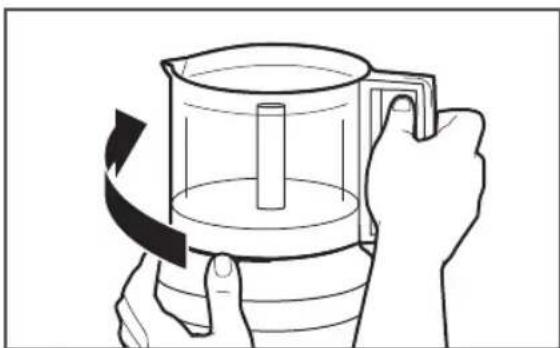
Illustration of hands holding a container with a handle, showing a rotating arrow indicating rotation (no text or symbols)3 Hold the base steady with one hand, and use the other hand to rotate the work bowl clockwise to unlock and lift it off of the base.
USING THE FOOD CHOPPER
ASSEMBLING AND RUNNING THE FOOD CHOPPER
natural_image
Line drawing of a plug inserted into an open electrical outlet (no text or symbols)1
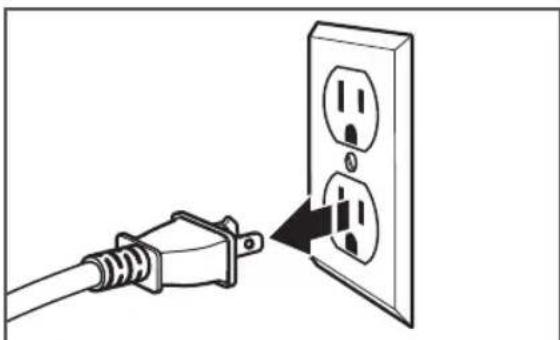
Be sure the Food Chopper is unplugged.
natural_image
Diagram of a coffee maker with a handle and base, showing a downward arrow indicating process (no text or symbols)2
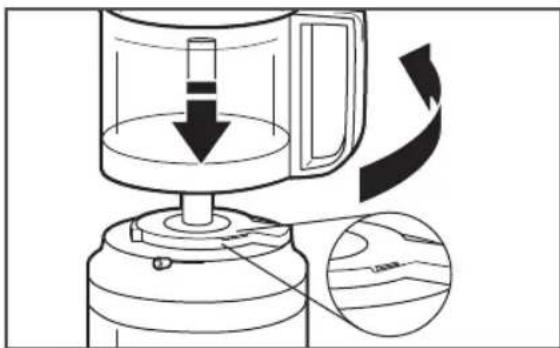
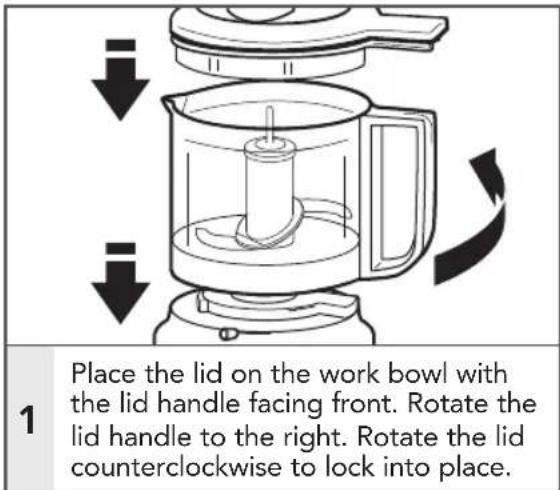
Start with the work bowl handle facing front on the base. Rotate the handle 90° counterclockwise to lock into place. When assembled properly, the handle will face the right side.
natural_image
Simple line drawing of a kitchen utensil being inserted into a container (no text or symbols)3
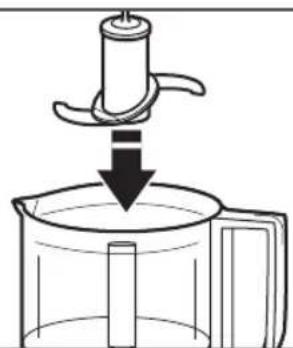
Fit the blade over the shaft in the center of the work bowl, rotate and press down until it rests at the bottom of the work bowl.
natural_image
Line drawing of a hand pouring liquid into a blender with food items inside (no text or symbols)4
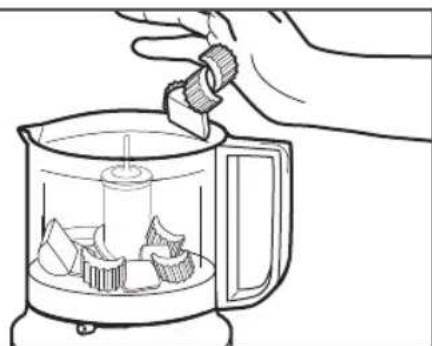
Place ingredients to be processed inside the work bowl. For uniform consistency of processed foods, cut fruits, vegetables, and meats into 1-inch pieces.
IMPORTANT: Do not process coffee beans or hard spices such as nutmeg, which may damage the Food Chopper.
USING THE FOOD CHOPPER
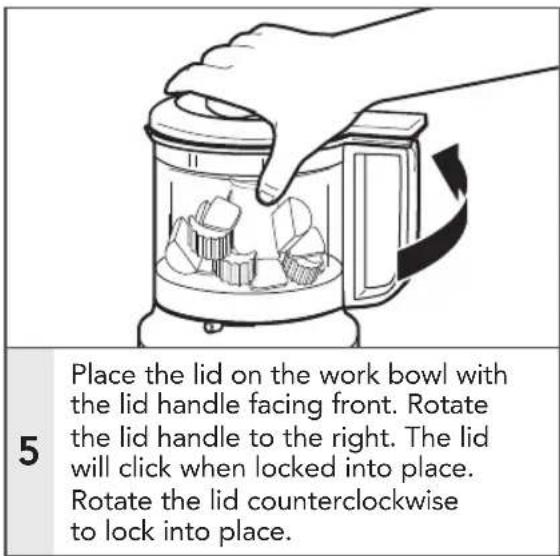
NOTE: The work bowl and lid must be locked into place for the Food Chopper to operate.
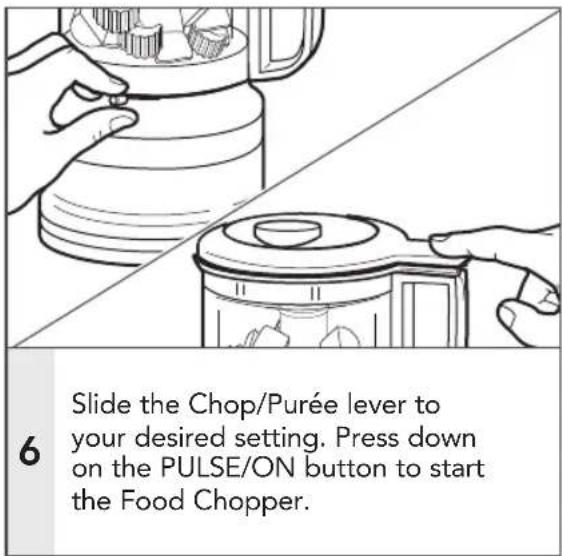
USING THE FOOD CHOPPER
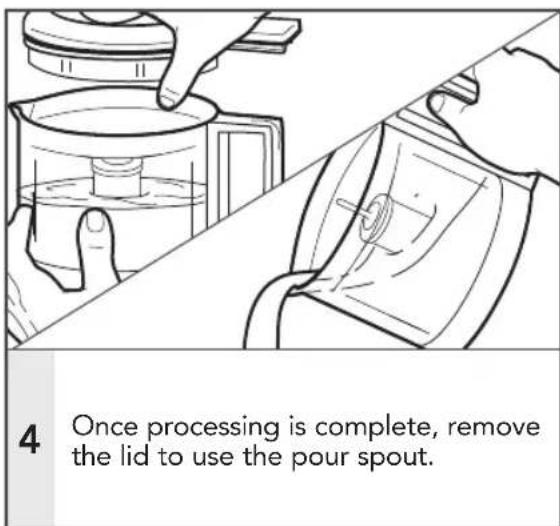
USING THE DRIZZLE BASIN AND POUR SPOUT
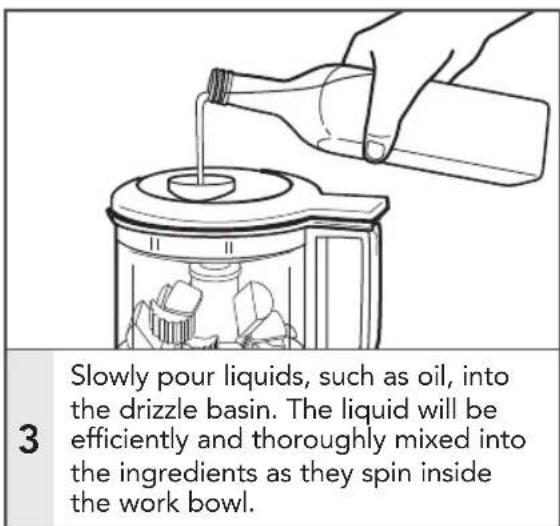
Use the drizzle basin to conveniently add liquid ingredients while processing, to make dressings, mayonnaises, emulsions, sauces, and more. Use the pour spout for easier serving.
FOR DETAILED INFORMATION ON USING THE FOOD CHOPPER:
Visit kitchenaid.com/quickstart for additional instructions with videos, inspiring recipes, and tips on how to use your Food Chopper.
CARE AND CLEANING
natural_image
Diagram showing two electrical connections: one with a power outlet, the other with a mounted device and directional arrows indicating flow (no text or symbols)1
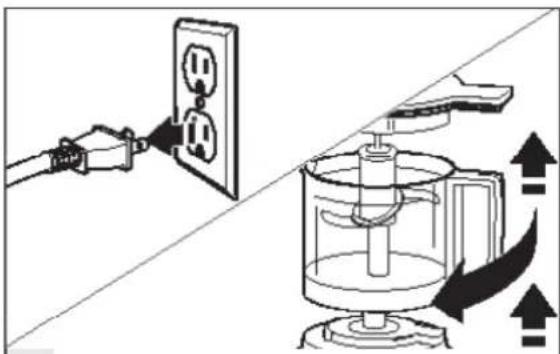
Unplug the Food Chopper. Remove the work bowl, lid, and blade.
2
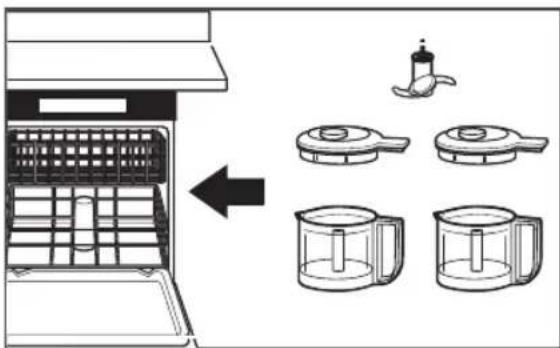
The work bowl, lid and blade can be washed in the top dishwasher rack; or, wash all parts in hot, soapy water. Rinse and dry.
natural_image
Line drawing of a hand cleaning a cylindrical object with a cloth (no text or symbols)3
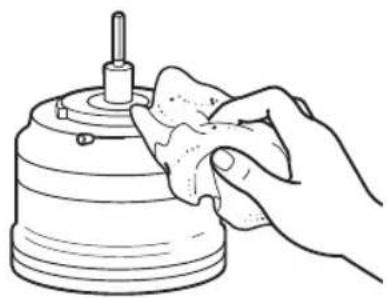
Wipe the base clean with a damp cloth. Do not use abrasive cleaners. Do not immerse the base in water.
natural_image
Line drawing of a hand holding a cylindrical device with a shaft and base, no text or symbols present4
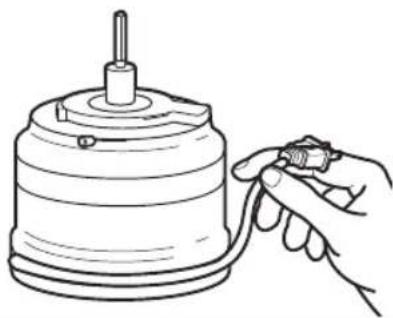
Wrap the cord counterclockwise around the base for easy storage.
NOTE: For convenient storage, always reassemble the Food Chopper after cleaning.
FOR DETAILED INFORMATION ON CLEANING THE FOOD CHOPPER:
Visit kitchenaid.com/quickstart for additional instructions with videos, inspiring recipes, and tips on how to use your Food Chopper.
TROUBLESHOOTING
If your Food Chopper should malfunction or fail to operate, check the following:
- Is the Food Chopper plugged in?
- Make sure that the bowl and lid are properly aligned and locked in place.
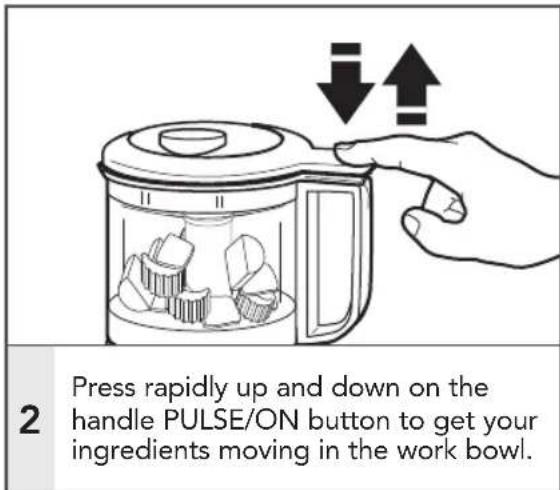
- Press the Pulse/On button with a rapid up and down motion. Do not hold down continuously.
-
Unplug the Food Chopper, then plug it back into the outlet.
-
Is the fuse in the circuit to the Food Chopper in working order? If you have a circuit breaker box, be sure the circuit is closed.
If the problem is not due to one of the above items, see the "Warranty and service" section.
Do not return the Food Chopper to the retailer. Retailers do not provide service.
WARRANTY AND SERVICE
KITCHENAID® FOOD CHOPPER WARRANTY FOR THE 50 UNITED STATES, THE DISTRICT OF COLUMBIA, PUERTO RICO, AND CANADA
This warranty extends to the purchaser and any succeeding owner for Food Choppers operated in the 50 United States, the District of Columbia, Puerto Rico, and Canada.
| Length of Warranty: One Year Full Warranty from date of purchase. | |
KitchenAid Will Pay for Your Choice of: | Hassle-Free Replacement of your Food Chopper. See the next page for details on how to arrange for service, or call the Customer eXperience Center toll-free at 1-800-541-6390.ORThe replacement parts and repair labor costs to correct defects in materials and workmanship. Service must be provided by an Authorized KitchenAid Service Center. |
| KitchenAid Will Not Pay for: | A. Repairs when your Food Chopper is used in other than normal single family home use.B. Damage resulting from accident, alteration, misuse or abuse.C. Any shipping or handling costs to deliver your Food Chopper to an Authorized Service Center.D. Replacement parts or repair labor costs for Food Choppers operated outside the 50 United States, District of Columbia, Puerto Rico, and Canada. |
| DISCLAIMER OF IMPLIED WARRANTIES; LIMITATION OF REMEDIESIMPLIED WARRANTIES, INCLUDING TO THE EXTENT APPLICABLE WARRANTIES OF MERCHANTABILITY OR FITNESS FOR A PARTICULAR PURPOSE, ARE EXCLUDED TO THE EXTENT LEGALLY PERMISSIBLE. ANY IMPLIED WARRANTIES THAT MAY BE IMPOSED BY LAW ARE LIMITED TO ONE YEAR, OR THE SHORTEST PERIOD ALLOWED BY LAW. SOME STATES AND PROVINCES DO NOT ALLOW LIMITATIONS OR EXCLUSIONS ON HOW LONG AN IMPLIED WARRANTY OF MERCHANTABILITY OR FITNESS LASTS, SO THE ABOVE LIMITATIONS OR EXCLUSIONS MAY NOT APPLY TO YOU.IF THIS PRODUCT FAILS TO WORK AS WARRANTED, CUSTOMER'S SOLE AND EXCLUSIVE REMEDY SHALL BE REPAIR OR REPLACEMENT ACCORDING TO THE TERMS OF THIS LIMITED WARRANTY. KITCHENAID AND KITCHENAID CANADA DO NOT ASSUME ANY RESPONSIBILITY FOR INCIDENTAL OR CONSEQUENTIAL DAMAGES. This warranty gives you specific legal rights and you may also have other rights which vary from state to state or province to province. | |
WARRANTY AND SERVICE
HASSLE-FREE REPLACEMENT WARRANTY – 50 UNITED STATES, DISTRICT OF COLUMBIA, AND PUERTO RICO
We're so confident the quality of our products meets the exacting standards of KitchenAid that, if your Food Chopper should fail within the first year of ownership, KitchenAid will arrange to deliver an identical or comparable replacement to your door free of charge and arrange to have your original Food Chopper returned to us. Your replacement unit will also be covered by our one year limited warranty.
If your Food Chopper should fail within the first year of ownership, simply call our tollfree Customer eXperience Center at 1-800-541-6390 Monday through Friday. Please have your original sales receipt available when you call.
Proof of purchase will be required to initiate the claim. Give the consultant your complete shipping address (no P.O. Box numbers, please.).
When you receive your replacement Food Chopper, use the carton, packing materials, and prepaid shipping label to pack up your original Food Chopper and send it back to KitchenAid.
HASSLE-FREE REPLACEMENT WARRANTY - CANADA
We're so confident the quality of our products meets the exacting standards of the KitchenAid brand that, if your Food Chopper should fail within the first year of ownership, we will replace your Food Chopper with an identical or comparable replacement. Your replacement unit will also be covered by our one year limited warranty.
If your Food Chopper should fail within the first year of ownership, simply call our toll-free Customer eXperience Centre at
1-800-807-6777 Monday through Friday. Please have your original sales receipt available when you call. Proof of purchase will be required to initiate the claim. Give the consultant your complete shipping address.
When you receive your replacement Food Chopper, use the carton, packing materials, and prepaid shipping label to pack up your original Food Chopper and send it back to KitchenAid.
ARRANGING FOR SERVICE AFTER THE WARRANTY EXPIRES, OR ORDERING ACCESSORIES AND REPLACEMENT PARTS
In the United States and Puerto Rico:
For service information, or to order accessories or replacement parts, call toll-free at 1-800-541-6390 or write to:
Customer eXperience Center, KitchenAid Small Appliances, P.O. Box 218, St. Joseph, MI 49085-0218
Outside the United States and Puerto Rico:
Consult your local KitchenAid dealer or the store where you purchased the Food Chopper for information on how to obtain service.
For service information in Canada: Call toll-free 1-800-807-6777.
For service information in Mexico: Call toll-free 01-800-0022-767.
®/TM ©2018 KitchenAid. All rights reserved. KITCHENAID and the design of the Stand Mixer are trademarks in the U.S. and elsewhere. Used under license in Canada.
WARRANTY AND SERVICE
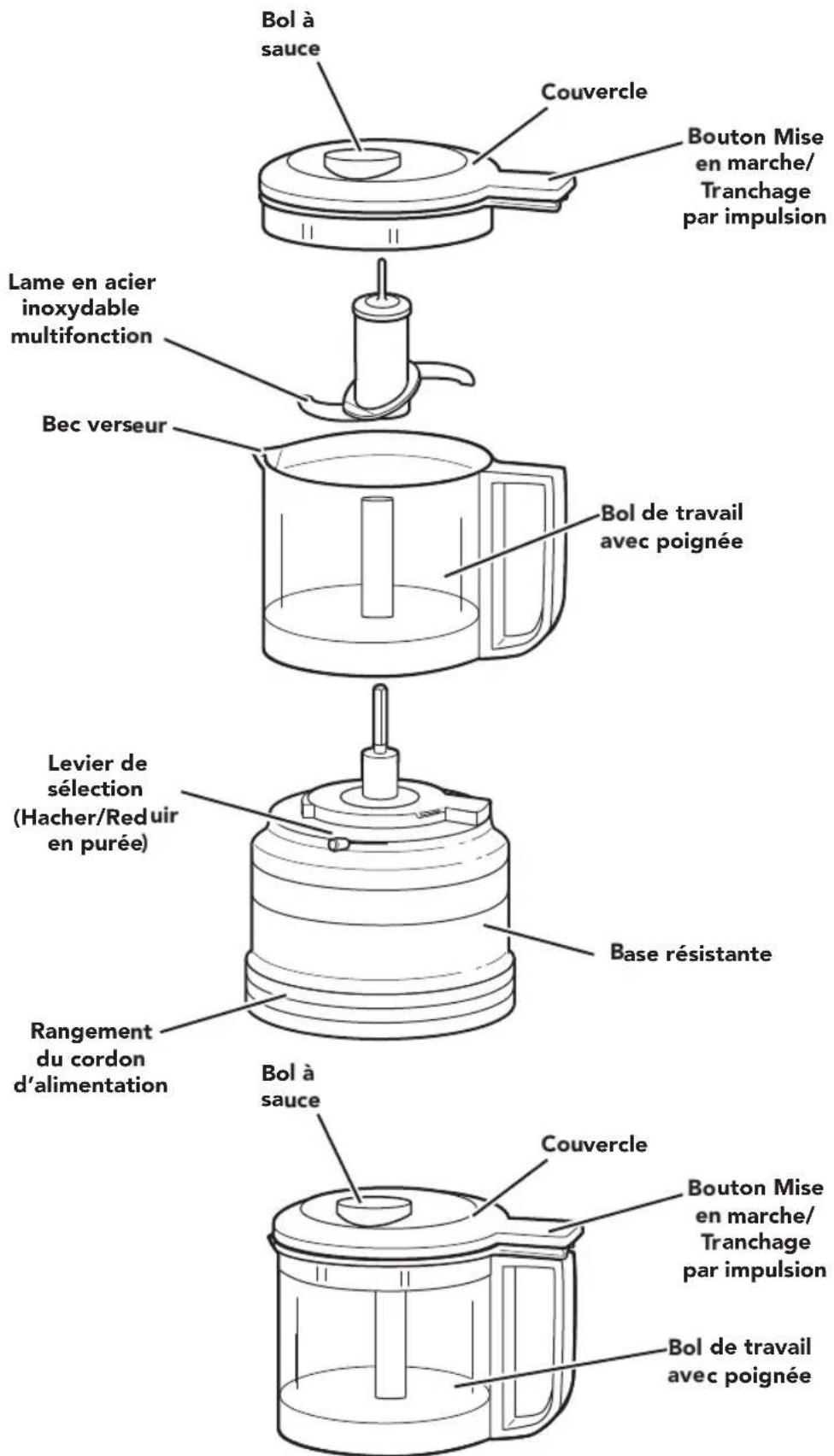
PIÈCES ET CARACTÉRISTIQUES
PIÈCES ET ACCESSOIRES
natural_image
Diagram showing a plug inserted into an electrical outlet and a hand holding a device with a handle, both without any text or symbols.natural_image
Simple line drawing of a kitchen utensil pressing into a container with an upward arrow (no text or symbols)natural_image
Illustration of hands holding a transparent mug with a handle, showing a rotating mechanism (no text or symbols)natural_image
Line drawing of a plug inserted into an open electrical outlet (no text or symbols)natural_image
Diagram of a coffee maker with a handle and base, showing a downward arrow indicating process (no text or symbols present)natural_image
Line drawing of a kitchen utensil being inserted into a beaker, showing a downward arrow (no text or symbols)natural_image
Line drawing of a hand pouring liquid into a blender with food items (no text or symbols)natural_image
Illustration of a hand placing food into a blender jar with food pieces inside (no text or symbols)natural_image
Line drawing showing hands operating a kettle and a blender on a table (no text or symbols)natural_image
Illustration of a hand placing food into a blender jar with cups, showing downward arrows (no text or symbols)natural_image
Diagram of a blender with a side panel and directional arrows indicating process flow (no text or symbols)1
natural_image
Illustration of a hand opening a cupcake lid with arrows indicating downward and upward motion (no text or symbols)natural_image
Line drawing of a hand pouring liquid into a container with ice cubes (no text or symbols)3
natural_image
Line drawing showing a hand pressing down on a coffee maker's side panel, with no text or symbols present.4
1
2
natural_image
Line drawing of a hand cleaning a cylindrical object with a tool (no text or symbols)2
natural_image
Line drawing of a hand holding a small object attached to a cylindrical device (no text or symbols)3
Customer eXperience Center, KitchenAid Small Appliances, P.O. Box 218, St. Joseph, MI 49085-0218
natural_image
Illustration showing a plug inserted into an electrical outlet and a hand holding a device with a handle (no text or symbols)natural_image
Simple line drawing of a kitchen utensil pressing into a container with an upward arrow (no text or symbols)natural_image
Illustration of hands holding a glass mug with a handle, showing a rotating mechanism (no text or symbols)natural_image
Line drawing of a hand placing food into a jar with food items inside (no text or symbols)5
natural_image
Line drawing showing hands operating a kitchen blender with food items (no text or symbols)6
natural_image
Line drawing of a hand opening a cupcake lid with arrows indicating downward and upward motion (no text or symbols)7
natural_image
Diagram of a blender with a side panel and directional arrows indicating process flow (no text or symbols)1
natural_image
Illustration of a hand opening a kettle into a cupcake jar with downward arrows indicating compression or lifting (no text or symbols)natural_image
Line drawing of a hand pouring liquid into a container with ice cubes (no text or symbols)3
natural_image
Line drawing showing a hand pressing down a lid onto a small container, with another hand partially visible in the background (no text or symbols)4
natural_image
Diagram showing a power outlet connected to a computer with directional arrows indicating flow or movement (no text or symbols present)1
2
natural_image
Line drawing of a hand cleaning a cylindrical object with a cloth (no text or symbols)3
natural_image
Line drawing of a hand holding a cylindrical device with a shaft and base (no text or symbols)4
Customer eXperience Center, KitchenAid Small Appliances, P.O. Box 218, St. Joseph, MI 49085-0218.
natural_image
Two horizontal bar segments with grayscale shades and a central crosshair symbol (no text or labels)

DISCOVER MORE. DÉCOUVREZ PLUS. DESCUBRA MÁS. KITCHENAID.COM/QUICKSTART

natural_image
Red square icon with a white telephone handset symbol (no text or numbers)PRODUCT QUESTIONS OR RETURNS QUESTIONS SUR LE PRODUIT OU LES RETOURS PREGUNTAS SOBRE EL PRODUCTO O DEVOLUCIONES
USA: 1.800.541.6390 | KitchenAid.com
CANADA: 1.800.807.6777 | KitchenAid.ca
MEXICO: KitchenAid.com.mx
LATIN AMERICA: KitchenAid-latam.com
natural_image
Silhouette of a kitchen mixer on a bowl (no text or symbols)KitchenAid®
®/™ ©2018 KitchenAid. All rights reserved. KITCHENAID and the design of the stand mixer are trademarks in the U.S. and elsewhere. Used under license in Canada. ®/™ ©2018 KitchenAid. Tous droits réservés. KITCHENAID et la forme du batteur sur socle sont des marques de commerce aux E.-U. et dans d'autres pays. Utilisé sous licence au Canada. ®/™ ©2018 KitchenAid. Todos los derechos reservados. KITCHENAID y el diseño de la batidora con base son marcas registradas en EE.UU. y en otras partes. Usada en Canadá bajo licencia.
W11225535A
06/18

- PARTS AND FEATURES
- FOOD CHOPPER SAFETY
- Your safety and the safety of others are very important.
- IMPORTANT SAFEGUARDS
- When using electrical appliances, basic safety precautions should always be followed, including the following:
- SAVE THESE INSTRUCTIONS
- This product is designed for household use only
- USING THE FOOD CHOPPER
- CHOP AND PURÉE RECOMMENDATIONS CHART
- Before first use
- FOR DETAILED INFORMATION ON USING THE FOOD CHOPPER:
- CARE AND CLEANING
- 1
- 2
- 3
- 4
- FOR DETAILED INFORMATION ON CLEANING THE FOOD CHOPPER:
- TROUBLESHOOTING
- If your Food Chopper should malfunction or fail to operate, check the following:
- WARRANTY AND SERVICE
- HASSLE-FREE REPLACEMENT WARRANTY - CANADA
- ARRANGING FOR SERVICE AFTER THE WARRANTY EXPIRES, OR ORDERING ACCESSORIES AND REPLACEMENT PARTS
- In the United States and Puerto Rico:
- Outside the United States and Puerto Rico:
- PIÈCES ET CARACTÉRISTIQUES
- 5
- 6
- 7
- DISCOVER MORE. DÉCOUVREZ PLUS. DESCUBRA MÁS. KITCHENAID.COM/QUICKSTART
- KitchenAid®
Brand : KITCHENAID
Model : KFC3516FG
Category : Food Processor