PIONEER DDJFLX4 - DJ Equipment

DDJFLX4 - DJ Equipment PIONEER - Free user manual and instructions

Find the device manual for free DDJFLX4 PIONEER in PDF.

📄 168 pages English EN Download 💬 AI Question 10 questions ⚙️ Specs
Notice PIONEER DDJFLX4 - page 166
View the manual : Français FR English EN
Pick your language and provide your email: we'll send you a specifically translated version.
Brand Pioneer
Model DDJ-FLX4
Product type DJ controller
Dimensions (W × D × H) 482 × 272,8 × 59,2 mm
Weight 2,1 kg
Power supply 9 V DC, 3 A (USB power adapter) or 5 V DC, 500 mA (USB cable)
Compatible software rekordbox (Mac/Windows/iOS/Android), Serato DJ Lite, Serato DJ Pro
Connectivity USB Type-C, Bluetooth MIDI, 3.5 mm headphone jack, 6.35 mm microphone jack, RCA outputs
Number of channels 2
Main features Smart Fader, Smart CFX, Beat Sync, Hot Cue, Pad FX, Beat Jump, Sampler, Loop, Key Shift
Display LED level indicators, no built-in display
Maintenance and cleaning Use a soft dry cloth. Do not use solvents or abrasive products.
Safety Follow the safety instructions in the manual. Use only recommended accessories.
Spare parts and repairability Contact an authorized Pioneer service center for any repair or replacement.
Box contents Controller, USB cable, quick start guide, usage precautions, warranty
Operating temperature +5 °C to +35 °C
Operating humidity 5 % to 85 % (without condensation)

Frequently Asked Questions - DDJFLX4 PIONEER

Which DJ software is compatible with the Pioneer DDJ-FLX4?
The DDJ-FLX4 is compatible with rekordbox (Mac/Windows/iOS/Android), Serato DJ Lite and Serato DJ Pro (paid license).
How can I connect the DDJ-FLX4 to a computer?
Use the supplied USB cable (USB-C to USB-C) or a certified USB cable. Connect the cable to the computer's USB port and to the USB port (for device connection) on the back of the controller.
Can I use the DDJ-FLX4 with a mobile device?
Yes, via USB or Bluetooth connection. For USB connection, use a USB power adapter (9V/3A) to power the controller. For Bluetooth, enable Bluetooth on the mobile device and pair it with the controller.
How to activate Smart Fader on the DDJ-FLX4?
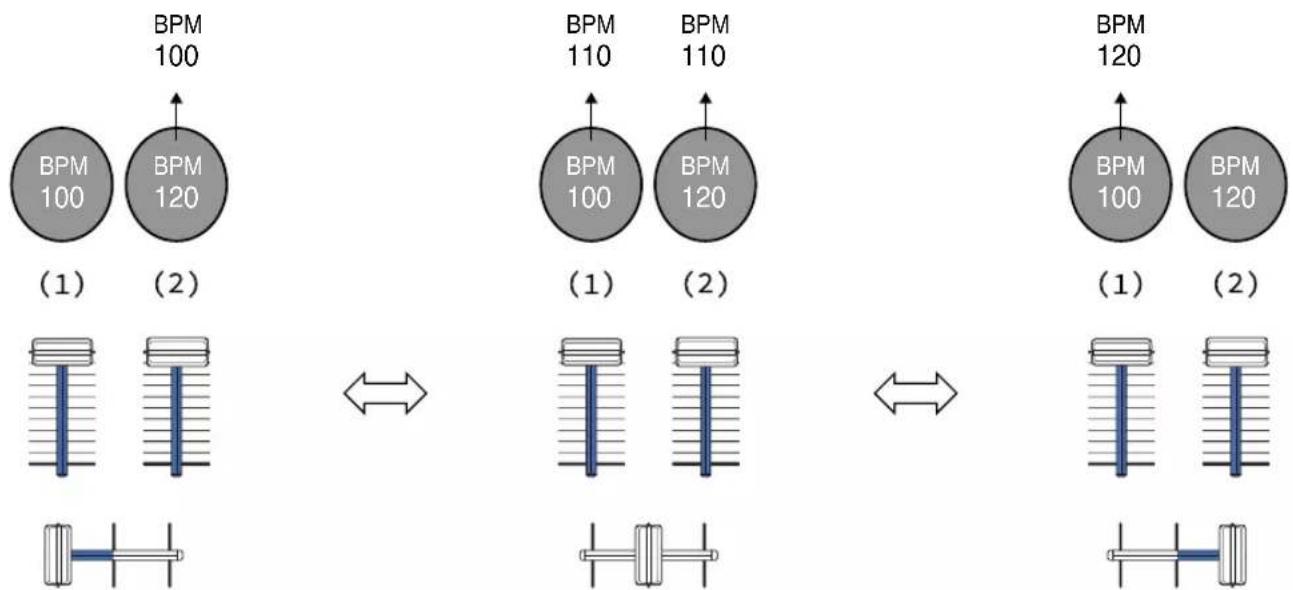
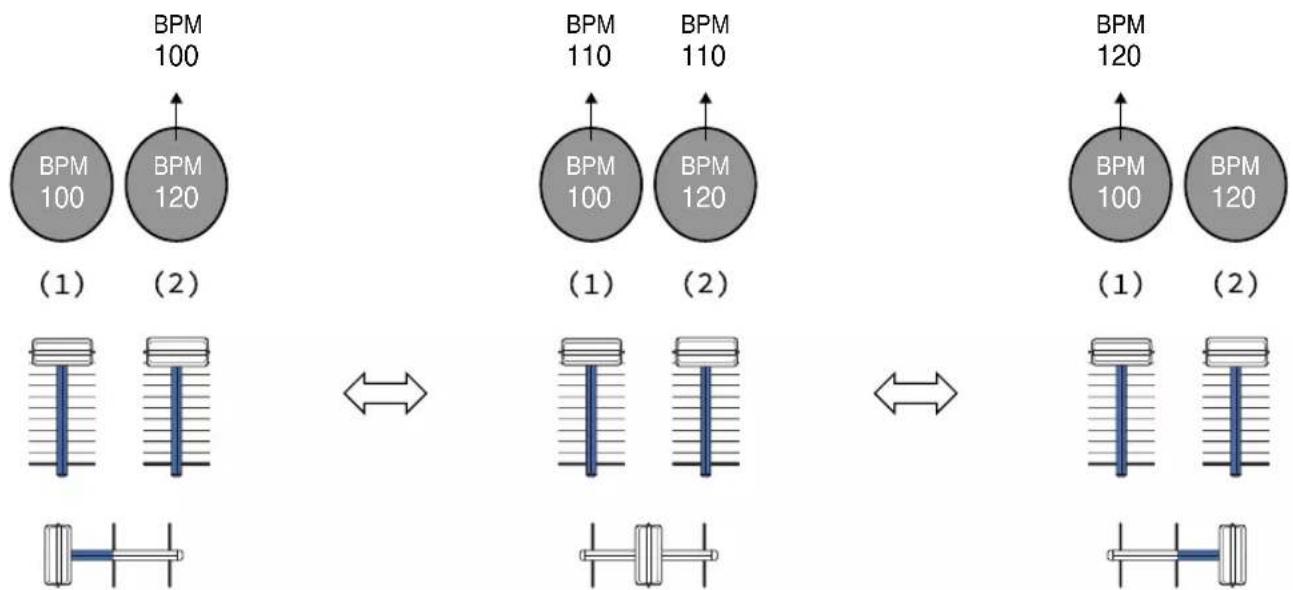
Press the SMART FADER button on the top panel. The Smart Fader automatically adjusts BPM and low-frequency equalizer when mixing with the faders.
What to do if no sound comes out of the speakers?
Check that the cables are properly connected, that the MASTER LEVEL knob and channel faders are set correctly, and that the DJ software is configured to use the DDJ-FLX4 as the audio device.
How to set a Hot Cue on the DDJ-FLX4?
Press the HOT CUE mode button, then press a Performance Pad (1-8) to set a cue point at the current position. Press the pad again to recall that point.
The Bluetooth indicator is flashing, what does it mean?
The Bluetooth MIDI indicator flashes when the device is not connected via Bluetooth. It lights up solid when the connection is established. If it is off, the device is connected via USB cable to a DJ app.
How to use the Fader Start function?
Set a cue point (CUE) on the track. Press and hold the SHIFT button, then move a channel fader or the crossfader. Playback starts at the cue point.
What audio formats are supported by the DDJ-FLX4?
The controller supports audio formats played by rekordbox and Serato DJ Lite, including MP3, AAC, WAV, FLAC, AIFF. Sampling frequencies are 44.1 kHz and 48 kHz with 16 or 24 bit resolution.
How to clean the Pioneer DDJ-FLX4?
Use a soft dry cloth to wipe the surface. Do not use solvents, chemicals, or abrasive cloths that could damage the device.

User questions about DDJFLX4 PIONEER

0 question about this device. Answer the ones you know or ask your own.

Ask a new question about this device

The email remains private: it is only used to notify you if someone responds to your question.

No questions yet. Be the first to ask one.

Download the instructions for your DJ Equipment in PDF format for free! Find your manual DDJFLX4 - PIONEER and take your electronic device back in hand. On this page are published all the documents necessary for the use of your device. DDJFLX4 by PIONEER.

USER MANUAL DDJFLX4 PIONEER

text_image IN OUT 4 BEAT/EXIT CUE/LOOP CALL MASTER OFF OUT SINK ON/OFF ON/OFF MINI TEMP/MASS COMPRESS DDJ-FLX4 @ recordbox serato MCC LEVEL 1 2 Pioneer DJ 1 2 MAX LEVEL/DEPTH MINI MAX ON/OFF MINI TEMP/MASS IN OUT 4 BEAT/EXIT CUE/LOOP CALL MASTER OFF OUT SINK ON/OFF ON/OFF MINI TEMP/MASS COMPRESS OFF OUT SINK ON/OFF ON/OFF MINI TEMP/MASS PIONEER DJ 1 2 MAX LEVEL/DEPTH MINI MAX ON/OFF MINI

Contrôleur pour DJ

DDJ-FLX4

Section Mixer.... 25

Section Effets.... 31

Raccordements ....37

rekordbox Introduction, Instruction Manual

[SHIFT] + pression :

Mac/Windows

[SHIFT] + pression :

Mac/Windows

[SHIFT] + pression :

[SHIFT] + pression :

[SHIFT] + pression :

[SHIFT] + pression :

[SHIFT] + pression :

[SHIFT] + pression :

[SHIFT] + pression :

Passe en mode Keyboard.

[SHIFT] + pression :

[SHIFT] + pression :

[SHIFT] + pression :

Passe en mode Key Shift.

[SHIFT] + pression :

[SHIFT] + pression :

Active/désactive le mode Vinyl.

3 Bouton 4 BEAT/EXIT

Pression :

[SHIFT] + pression :

[SHIFT] + pression :

[SHIFT] + pression :

Ouvre le mode Pitch Play.

[SHIFT] + pression :

[SHIFT] + pression :

[SHIFT] + pression :

Ouvre le mode Key Shift.

[SHIFT] + pression :

[SHIFT] + pression :

text_image PERFORMANCE DJ CONTROLLER DDJ-FLX4 1 2 3 4 5 6 7 8 9 10 11 12 13 MIG LEVEL MIC LEVEL -00 0 -25 0 -25 0 -25 0 -25 0 -25 0 -25 0 -25 0 -25 0 -25 0 -25 0 -25 0 -25 0 -25 0 -25 0 -25 0 -25 0 -25 0 -MID HI MIH HI MID HI MID HI LOW LOW LOW LOW LOW LOW LOW LOW LOW LOW LOW LOW LOW LOW LOW LOW LOW LOW LOW LOW LOW LOW LOW LOW LOW LOW LOW LOW LOW LOW LOW LOW LOW LOW LOW LOW LOW LOW LOW LOW LOW LOW LOW LOW LOW LOW LOW LOW LOW LOW Low CUE CUE Pioneer DJ

◆ Utilisation de rekordbox for Mac/Windows ou de rekordbox for iOS/Android

1 Boutons TRIM

6 Boutons EQ (HI, MID, LOW)

[SHIFT] + pression :

Mac/Windows

[SHIFT] + pression :

6 Boutons EQ (HI, MID, LOW)

[SHIFT] + pression :

[SHIFT] + pression :

[SHIFT] + pression :

[SHIFT] + pression :

5 Bouton BEAT FX LEVEL/DEPTH

[SHIFT] + pression :

Active et désactive Release FX.

[SHIFT] + pression :

[SHIFT] + pression :

5 Bouton FX LEVEL/DEPTH

6 Bouton MIC ATT. (atténuation)

natural_image Technical diagram of a mechanical assembly with multiple cylindrical components and a central pointer labeled 'n' (no text or symbols beyond labels)
text_image Pioneer DJ Android WINS STOCK INDEX MASTER MIC INDIALED ATT. (3)(2)(1)
natural_image Diagram of audio equipment including headphones, speaker, and audio jack (no text or labels)

(1)

Brancher

natural_image Diagram showing audio recording setup with headphones, dials, and a CD-ROM interface (no text or labels)
text_image Android MDC (INSULATED) (Output) R L MIC (INSULATED)
text_image To continue installing the software you must agree to the terms of the software license agreement. Click Agree to continue or click Disagree to cancel the installation and quit the Installer. Read License Disagree Agree NOT AGREES TO ALL OF THE TERMS OF THIS AGREEMENT, YOU ARE NOT AUTHORIZED TO USE THE PROGRAM AND MUST STOP INSTALLING IT OR UNINSTALL IT. AS APPLICABLE. 1. DEFINITIONS 1.1 "Documentation" means written documentation, specifications and help content made generally available by AlphaTheta to aid in installing and using the Program. 1.2 "Program" means all or any part of AlphaTheta's software licensed to You by AlphaTheta under this Agreement. 2. PROGRAM LICENSE 2.1 Limited License, Subject to This Agreement's redeemers, AlphaTheta grants to You a limited, non-reduitive, non-transferable, license (without the right to successor) (a) To install a single copy of the Program in Your computer or mobile device, to use the Program only for Your personal purpose complying with this Agreement and the Documentation ("Authorized Use"); (b) To use the Documentation in support of Your Authorized Use, and (c) To make one copy of the Program solely for backup purposes, provided that all titles and trademarks. Print... Save... Go Back Continue
text_image Install rekordbox The installation was completed successfully. Introduction License Destination Select Installation Type Installation Summary The installation was successful. The software was installed. Go Back Close

Installation (Windows)

text_image REKORDBOX END USER LICENCE AGREEMENT Last Updated: 3220000 ("Effective Date") This Software End User Licence Agreement ("Agreement") is between You (both the individual installing the Program and any single legal entity for which the individual is acting) ("You" or "Your"), and AlphaTheta Corporation a company registered in Japan whose company address is 6F Yokohama i-Mark Place, 4-4-5 Minatomiral, Nishi-ku, Yokohama, Kanagawa 220-0012 Japan. ("AlphaTheta"). Taking any step to set up or install the program means that you accept all of the terms of this Agreement. Permission to download and/or use the program is conditional on you agreeing to and complying with these terms. Written or electronic approval is not required to make this agreement valid and enforceable. If you do not agree to all of the terms of this If you do not accept the terms of the agreements, click [Cancel] to finish. Agree Disagree Print Next > Cancel
text_image Rekordbox Install Completing the rekordbox Install rekordbox was successfully installed. ✓ Run rekordbox e Back Finish Cancel

[Audio] : [DDJ-FLX4 WASAPI]

[Voies de sortie] :

flowchart
graph TD
    A["Signal Flow"] --> B["Load"]
    B --> C["Control Panel 1"]
    B --> D["Control Panel 2"]

Écoute d'un morceau

natural_image Technical diagram of a dual-chamber electronic control panel with no visible text or symbols
text_image Grid of nine empty squares with numbers 7 and 8 in the middle cell, likely for pattern recognition or puzzle solving.
text_image Grid of empty squares with numbers 7 and 8 in the bottom-right cell, likely indicating a puzzle or selection task.

(1): deck 1, (2): deck 2

PIONEER DDJFLX4 - Écoute d'un morceau - 1

flowchart
graph LR
    subgraph Left_BPM_100
        A1["BPM 100"] --> B1["BPM 120"]
    end
    subgraph Right_BPM_110
        C1["BPM 110"] --> D1["BPM 120"]
    end
    subgraph Right_BPM_120
        E1["BPM 120"] --> F1["BPM 120"]
    end
    A1 <--> C1
    B1 <--> E1
    C1 <--> E1
    style Left_BPM_100 fill:#ccc,stroke:#333
    style Right_BPM_120 fill:#ccc,stroke:#333
line | Fréquence | Volume | | --------- | ------ | | Low | Low | | Peak | High | | Mid | Medium-High | | High | Low |
line | Fréquence | Volume | | --------- | ------ | | 0 | Low | | Peak | High | | Peak | Medium | | Peak | Low |

Réglage [SMART FADER]

To continue installing the software you must agree to the terms of the software license agreement.

Click Agree to continue or click Disagree to cancel the installation and quit the Installer.

Read License

Disagree

Agree

text_image Install Serato DJ Lite The installation was completed successfully. Introduction License Destination Select Installation Type Installation Summary The installation was successful. The software was installed. Go Back Close

◆ Installation (Windows)

text_image Serato DJ Lite Setup Welcome to the Serato DJ Lite Installer SERATO - USER LICENSE AGREEMENT ("License Agreement") Serato Limited ("Serato") and its licensor(s) own the Software, being any and all Serato applications, and intellectual property in the Software. By installing or using the Software, you agree to the terms of this License Agreement. 1. Grant of License: Serato grants you a perpetual, non-exclusive, personal license ("License") to install and use the Software on the terms of this License Agreement. ✓ I agree to the license terms and conditions Options Install Close
text_image Serato DJ Lite Setup Welcome to the Serato DJ Lite Installer Setup Successful serato DJ Lite INSTALLER

Opérations de base

text_image Diagram showing a hand pressing a load on a multi-chamber electronic device with control buttons and a circular dial indicator.

Écoute d'un morceau

natural_image Technical diagram of a dual-chamber electronic control panel with no visible text or symbols

serato.com/activation/pitch-n-time

serato.com/activation/pitch-n-time

text_image Diagram showing two electronic instrument setups with labeled controls and a hand pointing to a 'SMART FFX' button.
text_image Diagram showing a hand pressing a button labeled 'MANT FADER' to interact with two identical analog gauges, illustrating the process of measurement or control.

Installation (iOS/iPadOS)

text_image QR code image containing encoded data, no visible human-readable text

https://apps.apple.com/app/id1487048203

2 Installez rekordbox for iOS.

text_image QR code image containing encoded data, no visible human-readable text

https://play.google.com/store/apps/details?id=com.pioneerdj.rekordbox

2 Installez rekordbox for Android.

text_image Jog Bluetooth Tutorial Unlimited DJing Unlock all app features UPGRADE FX 60.184x70 CUE CUE
text_image Connect to MIDI Devices DDJ-FLX4 Input/Output Not Connected When the Bluetooth indicator is lit, it is connected to another device. Please press and hold "BEAT SYNC" of both DECKs as Shown in the figure to make it unconnected.
text_image Diagram of a multi-panel electronic device with labeled components and a circular component with rotation arrow
natural_image Technical diagram of a dual-channel electronic control panel with display and control knobs (no text or labels visible)

text_image Jog Bluetooth Tutorial Unlimited DJing Unlock all app features UPGRADE FX 60.18am CUE CUE
text_image Audio Auto Gain Automatically adjust the volume of each track. MASTER VOLUME Adjust MASTER VOLUME. PRE-CUEING Split Output Split stereo output to 2 mono lines. Left channel: Master out. Right channel: Monitor out.
text_image Audio PRE-CUEING Split Output MIN MAX CUE MASTER Split stereo output to 2 mono lines. Left channel: Master out. Right channel: Monitor out.
text_image A 00:00 B 00:07 C ← 00:15 D 01:21 E 01:40 F ← 02:11 G 02:37 H 03:09 EDIT
text_image Clapsnare Short Clapsnare Drop FX Horn Kick Hat Razer Siren EDIT

PIONEER DDJFLX4 - Installation (iOS/iPadOS) - 1

text_image EDIT 909 Snare 909 Clap 909 Rim 909 Mid Tom 909 Kick Mattack 909 Closed Hat 909 Cymbals 909 Ride Mid
text_image + 4 + 5 + 6 + 7 EDIT 0 + 1 + 2 + 3 A :

(1): deck 1, (2): deck 2

PIONEER DDJFLX4 - Installation (iOS/iPadOS) - 2

flowchart
graph LR
    subgraph Left_BPM_100
        A1["BPM 100"] --> B1["BPM 120"]
    end
    subgraph Right_BPM_110
        C1["BPM 110"] --> D1["BPM 120"]
    end
    subgraph Right_BPM_120
        E1["BPM 120"] --> F1["BPM 120"]
    end
    A1 <--> C1
    B1 <--> E1
    C1 <--> E1
    style Left_BPM_100 fill:#ccc,stroke:#333
    style Right_BPM_120 fill:#ccc,stroke:#333
text_image Diagram illustrating sound wave propagation with labeled components including a microphone and musical note

Fréquence

text_image Diagram illustrating sound wave propagation with labeled components and directional arrows, including a microphone icon and music note.

Fréquence

USB, MIC 20 Hz – 20 kHz

Rapport S/B (sortie nominale, A-WEIGHTED)

USB 103 dB

Copyright (c) 2009-2019 ARM Limited. All rights reserved.

SPDX-License-Identifier: Apache-2.0

Licensed under the Apache License, Version 2.0 (the License); you may not use this file except in compliance with the License.

You may obtain a copy of the License at

www.apache.org/licenses/LICENSE-2.0

Unless required by applicable law or agreed to in writing, software distributed under the License is distributed on an AS IS BASIS, WITHOUT WARRANTIES OR CONDITIONS OF ANY KIND, either express or implied.

See the License for the specific language governing permissions and limitations under the License.

BSD

The BSD-3-Clause License

Copyright (c) 2015, Freescale Semiconductor, Inc.

Copyright 2016-2020 NXP

All rights reserved.

Redistribution and use in source and binary forms, with or without modification, are permitted provided that the following conditions are met:

  1. Redistributions of source code must retain the above copyright notice, this list of conditions and the following disclaimer.
  1. Redistributions in binary form must reproduce the above copyright notice, this list of conditions and the following disclaimer in the documentation and/or other materials provided with the distribution.
  2. Neither the name of the copyright holder nor the names of its contributors may be used to endorse or promote products derived from this software without specific prior written permission.

THIS SOFTWARE IS PROVIDED BY THE COPYRIGHT HOLDERS AND CONTRIBUTORS "AS IS" AND ANY EXPRESS OR IMPLIED WARRANTIES, INCLUDING, BUT NOT LIMITED TO, THE IMPLIED WARRANTIES OF MERCHANTABILITY AND FITNESS FOR A PARTICULAR PURPOSE ARE DISCLAIMED. IN NO EVENT SHALL THE COPYRIGHT HOLDER OR CONTRIBUTORS BE LIABLE FOR ANY DIRECT, INDIRECT, INCIDENTAL, SPECIAL, EXEMPLARY, OR CONSEQUENTIAL DAMAGES (INCLUDING, BUT NOT LIMITED TO, PROCUREMENT OF SUBSTITUTE GOODS OR SERVICES; LOSS OF USE, DATA, OR PROFITS; OR BUSINESS INTERRUPTION) HOWEVER CAUSED AND ON ANY THEORY OF LIABILITY, WHETHER IN CONTRACT, STRICT LIABILITY, OR TORT (INCLUDING NEGLIGENCE OR OTHERWISE) ARISING IN ANY WAY OUT OF THE USE OF THIS SOFTWARE, EVEN IF ADVISED OF THE POSSIBILITY OF SUCH DAMAGE.

© 2022 AlphaTheta Corporation

Manual assistant
Powered by Anthropic
Waiting for your message
Product information

Brand : PIONEER

Model : DDJFLX4

Category : DJ Equipment