CDE6P - Coffee grinder UNIC - Free user manual and instructions
Find the device manual for free CDE6P UNIC in PDF.



| Product type | Automatic coffee tamper |
| Brand | UNIC |
| Model | CDE6P |
| Dimensions (W x D x H) | 160 x 200 x 300 mm |
| Weight | 3.9 kg |
| Power supply | 110-240 VAC, 50-60 Hz |
| Power | 72 W |
| Tamper diameter | See rating plate (according to model) |
| Tamping force | Adjustable via screen (+/-) |
| Cleaning mode | Integrated, dedicated button |
| Filter holder detection | Contactless sensor |
| Filter holder clamp | Adjustable with 4 mm Allen key |
| Safety | Do not insert fingers under the disc |
| Maintenance | Clean the disc with a brush in cleaning mode |
| Spare parts | Tamping disc available |
| Warranty | 1 year (excluding wear and misuse) |
| Year of manufacture | See rating plate |
Frequently Asked Questions - CDE6P UNIC
User questions about CDE6P UNIC
0 question about this device. Answer the ones you know or ask your own.
Ask a new question about this device
Download the instructions for your Coffee grinder in PDF format for free! Find your manual CDE6P - UNIC and take your electronic device back in hand. On this page are published all the documents necessary for the use of your device. CDE6P by UNIC.
USER MANUAL CDE6P UNIC
Precision coffee tamper
For commercial use À usage commercial
EN
FR
PUQ PRESS®
Dear coffee enthusiast,
First off we would like to congratulate you with your very own Puqpress and thank you for showing confidence in our product.
The Puqpress is a fully automatic tamper developed by people with a passion for perfect coffee and elegant technology.
Our specialists have spent all their knowledge and devotion in developing the ultimate tool to standardise the tamping pressure, a crucial parameter for a perfect cup of coffee.
Please investigate this manual closely so you and your customers will enjoy the Puqpress to the fullest and store the manual away safely after reading. If anything remains unclear please feel free to contact your authorized dealer or contact us directly.
We wish you all the fun and perfection with your new Pugpress!
Greetings from Amsterdam,
Barista Technology BV
precision coffee tamper
Table of content
1 Safety 4
1.1 Safety instructions 4
1.2 Personnel requirements 5
2 Technical data 5
3 Description 5
4 Set-up and basic adjustment 7
4.1 Adjustment of port-a-filter clamp 7
4.2 Usage location 9
4.3 Electrical installation 9
5 Operation 10
5.1 Normal operation of the tamper 10
5.2 Tamping force adjustment 10
5.3 Clean modus 11
6 Operating faults 12
7 Service 13
8 Spare parts 13
9 Warranty conditions 14
EN
PUQ PRESS®
1. Safety

Read all instructions and information in this manual and other literature that might be included in the package.
1.1 Safety instructions
-
The appliance is not to be used by persons (including children) with reduced physical, sensory or mental capabilities, or lack of experience and knowledge, unless they have been given supervision or instruction
-
Children being supervised not to play with the appliance
-
This appliance can be used by children aged from 8 years and above and persons with reduced physical, sensory or mental capabilities or lack of experience and knowledge if they have been given supervision or instruction concerning use of the appliance in a safe way and understand the hazards involved
-
Cleaning and user maintenance shall not be made by children without supervision.
-
Do not immerge cables, plugs or the device itself into water or other liquids to avoid electric shock, or injury.
-
Always remove the electrical plug from the outlet prior to conducting maintenance or cleaning work on the tamper.
-
Do not use the device if the cord or plug is damaged or in case of damage or breakage. Any required repairs may only be conducted by authorized service personnel. For this reason, please contact a customer service repair facility or your dealer.
-
Do not make any modifications or alternations to the tamper. The manufacturer holds absolutely no liability for damages occurring from failure to observe these instructions.
-
Do not insert your hand (or other limbs) between the tamper disk and lower clamp.
-
Adjust the lower clamp to optimum working position to block access to dangerous moving parts (tamper base). Check step 4.

precision coffee tamper
1.2 Personnel requirements
No special requirements are necessary for the users of this tamper. Nevertheless it is a prerequisite that these operating instructions have been carefully read and understood and that all instructions provided are observed. In addition, safety-conscious operation is expected.
2 Technical data
| Model number 1-000-11*#-2, 1-000-12*#-21-000-13*#-2, 1-000-14*#-21-000-17*#-2, where 'X' and '#' may be any number 0 - 9. | |
| Voltage / Frequency 110-240 Vac50-60 Hz | |
| Power 72 W | |
| Dimensions [mm] W 160, D | 200 , H300 |
| Weight 3.9 kg (8.6lbs) | |
| Year built See tag plate bottom side | |
| Tamper diameter See tag plate bottom side | |
3 Description
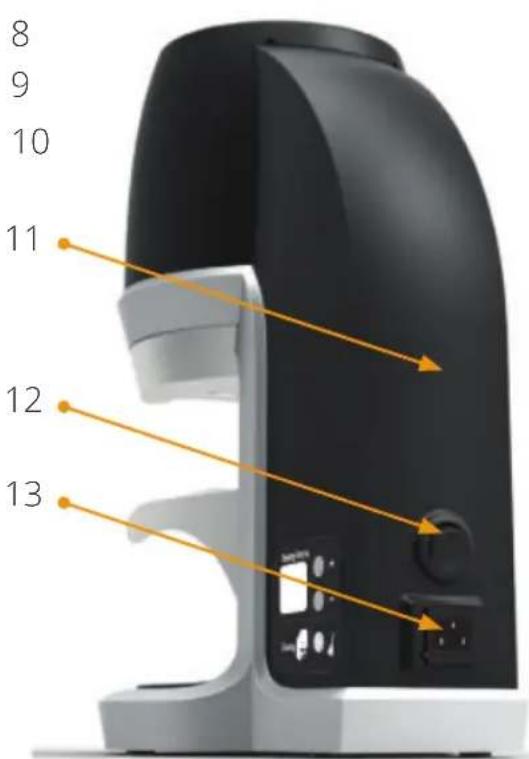
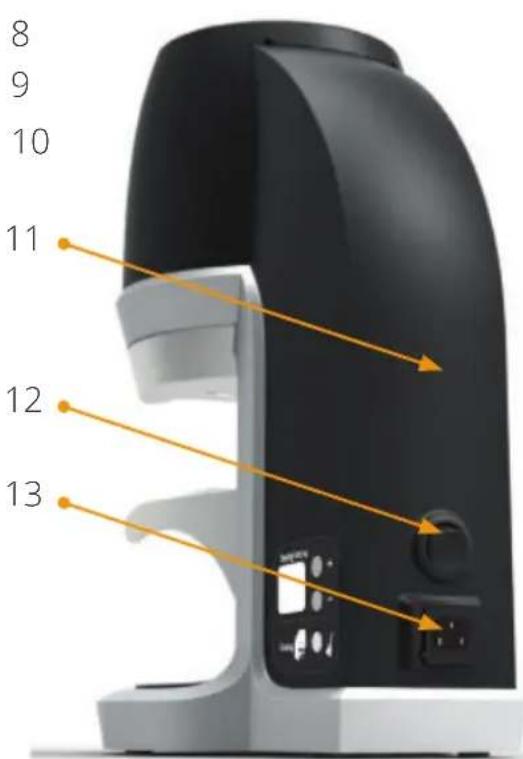
The main components and operating elements are pictured in the illustration.
| Pos. Part name |
| 1 Main housing - top cover |
EN
PUQ PRESS®
| 2 Main housing – middle cover |
| 3 Upper clamp |
| 4 Induction sensor |
| 5 Tamper disk |

precision coffee tamper
| 6 Lower clamp |
| 7 Fastening screw for port-a-filter clamp |
| 8 Display |
| 9 Ground coffee basket |
| 10 Anti-slip foot |
| 11 Main housing – back cover |
| 12 Main switch – on/off |
| 13 Power inlet socket |
4 Set-up and basic adjustment
You have received your tamper in operating condition. Now you only need to adjust the lower clamp. Proceed as follows:
4.1 Adjustment of port-a-filter clamp
The tamper is designed so that all different port-a-filters from various espresso machines fit into the clamp (pos.3 & 6) for even and level tamping.
The lower clamp should be setup correctly. Failure to adjust the lower clamp to optimum working position may allow contact with dangerous moving parts.
Proceed as follows for adjustment of the port-a-filter clamp:
- Retract the power cord from the socket at the back side.
- Lay down the tamper with the back side on a table and secure the tamper.
3.
EN
PUQ PRESS®
- Slightly loosen the Allen key screws (pos. 7) with the provided Allen key wrench size 4mm and pull down the port-a-filter clamp.
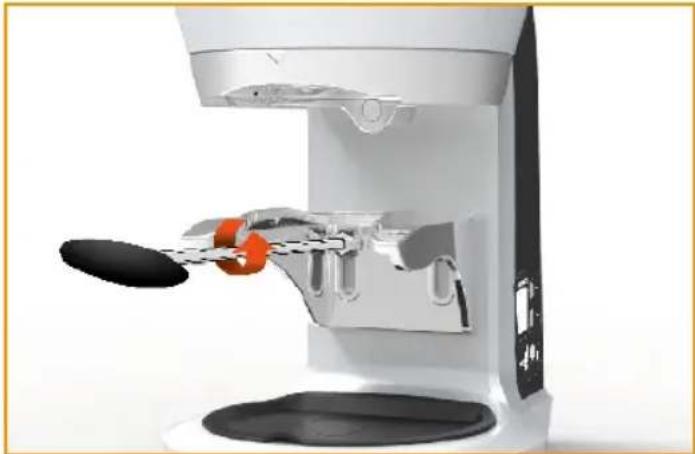
- Insert the port-a-filter in the clamp and push the clamp upwards until the port-a-filter is slightly clamped.

- Refasten the Allen key screws slightly. Do not fasten the screw entirely.

precision coffee tamper
- Remove the port-a-filter and fasten the screws firmly.
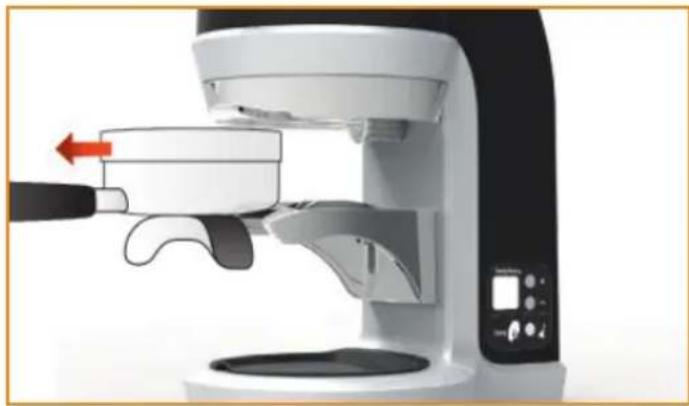
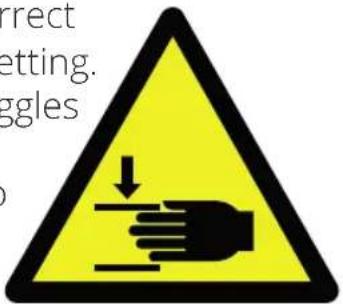
WARNING: Portafilter may not
wiggle with correct lower clamp setting. If portatiler wiggles operator may have access to dangerous moving parts
- Try to insert the port-a-filter in the clamp and check if the port-a-filter slides in the clamp easily. If the adjustment of the clamp is too loose, start again at step 4.
4.2 Usage location
Place the tamper on a level, vibration-free surface.

Never operate the tamper in moist, or even worse, in wet surroundings!
4.3 Electrical installation

A damaged power cable must be replaced immediately. Let the defective cords and plugs be replaced immediately at a customer service repair facility or your dealer.
-
Insert the power cord in the socket at the back side of the tamper.
-
Insert the plug into the corresponding grounded outlet.
EN
PUQ PRESS®
- Switch on the tamper using the main switch at the back side (pos. 12).
5 Operation
5.1 Normal operation of the tamper
- Actuate the main switch on the back side of the tamper (pos. 12).
- Insert the port-a-filter entirely in the clamp after initial levelling of ground coffee in filter basket.
- The tamper automatically detects the metal port-a-filter using the contactless sensor (pos. 4).
- Remove the port-a-filter after a full cycle of approx. 1.5 seconds.
5.2 Tamping force adjustment
The tamping force (kg) can be adjusted on the display at the right side. For force adjustment use the "+" or "-" button. The force setting is presented on the display in kilograms (kg).
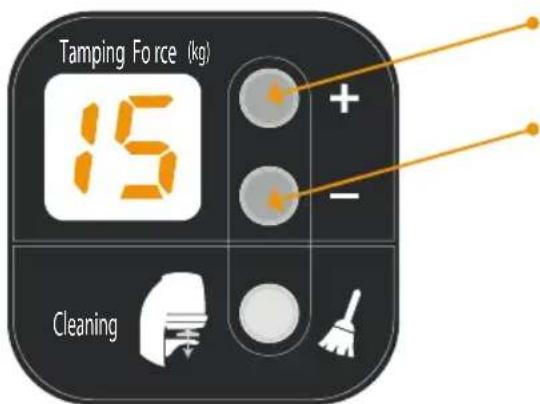
Force setting 'up'
Force setting 'down'
precision coffee tamper
5.3 Clean modus

It is important to clean your tamper disk (pos.5) regularly. Use a brush to clean it. Do not use your fingers / hands.
For cleaning the tamper disk proceed the following:
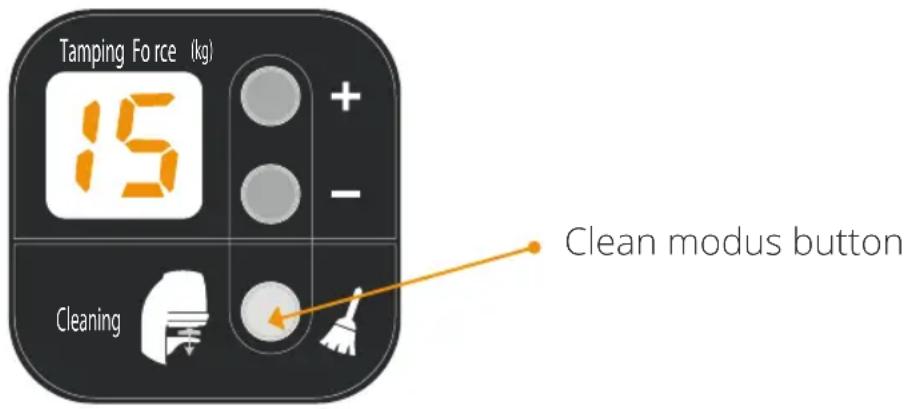
- Press the clean modus button.
- The tamper moves down in final position.
- Clean the tamper disk using a brush or similar object.
- Press the clean modus button again and tamper moves upwards in initial starting position.
EN
PUQ PRESS®
6 Operating faults
| Defect Cause Remedy | ||
| Ground coffee sticks to the tamper disk. | The tamper disk is greasy or dirty. | Use the clean modus and clean the tamper disk. |
| The tamper disk is wet. | Use the clean modus and dry the tamper disk. | |
| The tamper does not start, the display does not work. | The main plug is not inserted. | Insert the main plug in the socket and/or (wall) outlet. |
| The tamping operation does not start while the clean modus is still working. | Sensor does not detect a port-a-filter because it is not inserted completely. | Re-adjust the port-a-filter clamp as is explained in section 4.1. |
| The tamper does not tamp level and even. | The adjustment of the clamp is too loose. | Re-adjust the port-a-filter clamp as is explained in section 4.1. |
| Coffee ground is not levelled before tamping. | Level the ground coffee in filter basket before tamping. |
precision coffee tamper
In the case of other malfunctions or continued faults, please contact your dealer or your authorised customer service centre.
7 Service
Always pull out the main plug from the socket before carrying out maintenance or cleaning work on the tamper!
Any required repairs may only be conducted by authorized specialist personnel. For this reason, please contact a customer service repair facility or your dealer. Please observe the safety instructions under 1.1.
It is advised to conduct all maintenance and repairs by the customer service centre or your dealer.
If you have a new espresso machine with different tamper diameter, please contact your local dealer. They can provide new tamping disk and handle the procedure to interchange the disks.
8 Spare parts
Spare parts can be ordered from your customer service centre or your local dealer. To ensure quick and correct processing of your order, the following information is essential:
1) Serial number
2) Description of the part to be replaced according to section 3.
EN
PUQ PRESS®
9 Warranty Conditions
- The warranty period is 1 year from the date of purchase.
- The warranty covers all damages that can be attributed to inferior materials or defective workmanship. The corresponding tamper will be repaired or replaced free-of-charge, with the exception of transport or freight charges. Proper transport is the responsibility of the customer so please try to avoid damages during a product return by correctly packing the device.
- This warranty does not cover damages which have occurred through: improper usage, improper maintenance, lack of servicing, usage for purposes other than those intended, incorrect installation, breakage, natural wear or for reasons beyond our sphere of influence.
- In order to maintain the warranty, only original spare parts and accessory parts may be used.
- The manufacturer is in no way liable for consecutive or secondary damages.
- The warranty does not cover costs resulting from repairs conducted by non-authorized personnel.
| Pos. Part name |
| 1 Main housing – top cover |
| 2 Main housing – middle cover |
| 3 Upper clamp |

FR
PUQ PRESS®
| 4 Induction sensor | |
| 5 Tamper | disk |
| 6 Lower clamp | |
| 7 Fastening screw for port-a-filter clamp | |
| 8 Display | |
| 9 Ground | coffee basket |
| 10 Anti-slip foot | |
| 11 Main housing – back cover | |
| 12 Main switch – on/off | |
| 13 Power | inlet socket |
FR
PUQ PRESS®
Precision coffee tamper
Puqpress is a product of Barista Technology.

BARISTA
TECHNOLOGY
- PUQ PRESS®
- DEAR COFFEE ENTHUSIAST
- PRECISION COFFEE TAMPER
- TABLE OF CONTENT
- 1 SAFETY 4
- 2 TECHNICAL DATA 5
- 3 DESCRIPTION 5
- 4 SET-UP AND BASIC ADJUSTMENT 7
- 5 OPERATION 10
- 6 OPERATING FAULTS 12
- 7 SERVICE 13
- 8 SPARE PARTS 13
- 9 WARRANTY CONDITIONS 14
- SAFETY
- 1.1 SAFETY INSTRUCTIONS
- 1.2 PERSONNEL REQUIREMENTS
- 2 TECHNICAL DATA
- 3 DESCRIPTION
- 4 SET-UP AND BASIC ADJUSTMENT
- 4.1 ADJUSTMENT OF PORT-A-FILTER CLAMP
- 4.2 USAGE LOCATION
- 4.3 ELECTRICAL INSTALLATION
- 5 OPERATION
- 5.1 NORMAL OPERATION OF THE TAMPER
- 5.2 TAMPING FORCE ADJUSTMENT
- 5.3 CLEAN MODUS
- 7 SERVICE
- 8 SPARE PARTS
- 9 WARRANTY CONDITIONS
Brand : UNIC
Model : CDE6P
Category : Coffee grinder