Style iQ HD120EU - Vacuum Cleaner SHARK - Free user manual and instructions
Find the device manual for free Style iQ HD120EU SHARK in PDF.



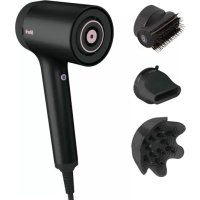
| Product Type | Hair dryer |
| Brand | Shark |
| Model | Style iQ HD120EU |
| Power supply | Mains (220-240 V) |
| Speed settings | Low, medium, high (left button) |
| Temperature settings | Low, medium, high (right button) |
| Cool shot function | Yes (hold down the Cool Shot button) |
| IQ indicator light | IQ logo lights up when accessory is securely attached |
| Included accessories | Small cleaning brush |
| Overheat protection | Thermostat with automatic shut-off |
| Cleaning | Use the maintenance brush for the back of the device |
| Cable length | Approximately 2.5 meters (estimate) |
| Manufacturer warranty | 2 years (after registration within 28 days) |
| Customer service | +33 (800) 908874 (toll-free) |
| Safety instructions | Do not use near water, unplug after use, do not block air openings |
| Storage | Wrap the cord and use the velcro tab |
| Country of use | EU |
Frequently Asked Questions - Style iQ HD120EU SHARK
User questions about Style iQ HD120EU SHARK
0 question about this device. Answer the ones you know or ask your own.
Ask a new question about this device
Download the instructions for your Vacuum Cleaner in PDF format for free! Find your manual Style iQ HD120EU - SHARK and take your electronic device back in hand. On this page are published all the documents necessary for the use of your device. Style iQ HD120EU by SHARK.
USER MANUAL Style iQ HD120EU SHARK
SAFETY | GUARANTEE | TROUBLESHOOTING
SÉCURITÉ | GARANTIE SHARK | DÉPANNAGE
For accessories and replacement parts, visit sharkbeauty.eu/accessories
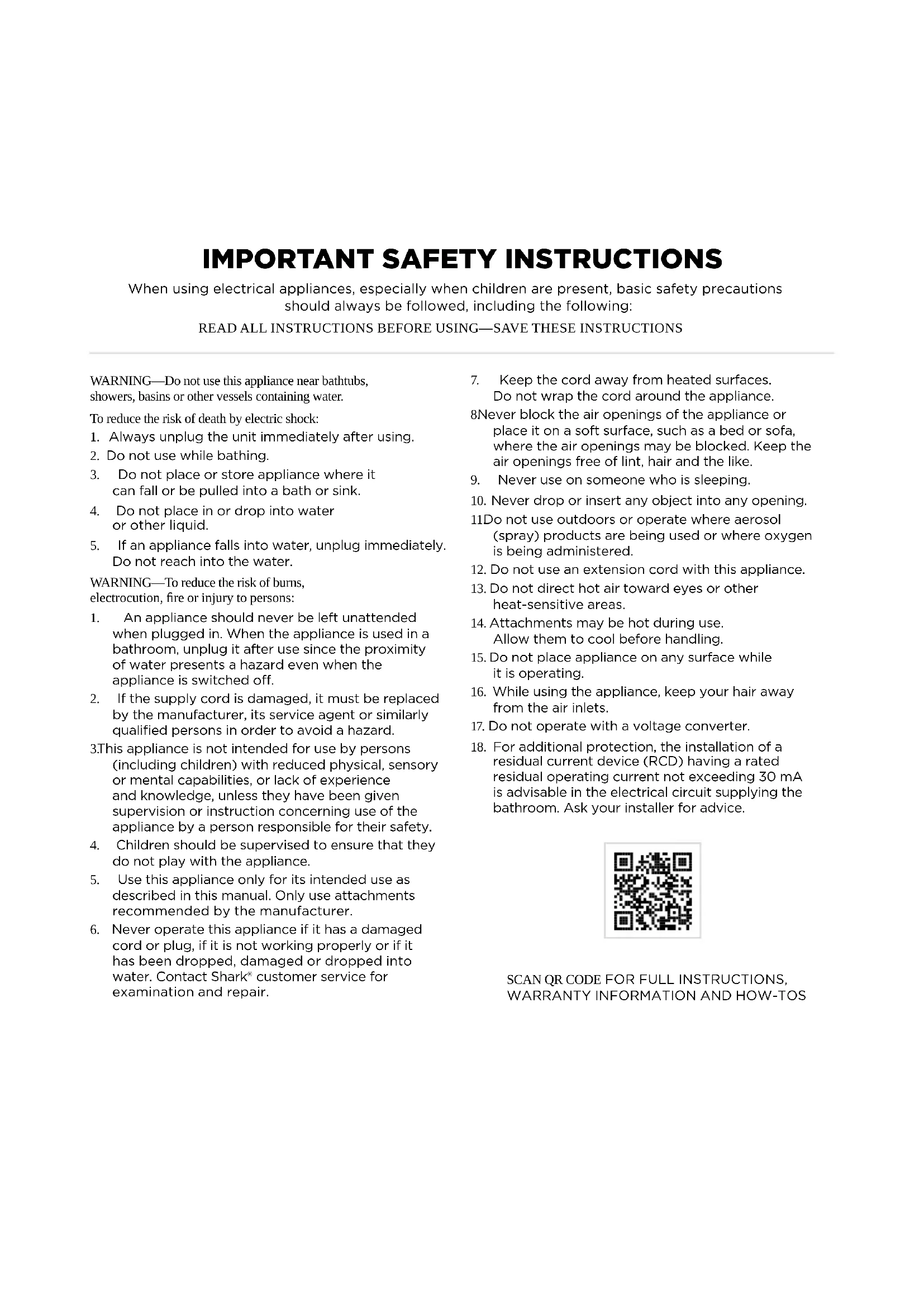
IMPORTANT SAFETY INSTRUCTIONS
When using electrical appliances, especially when children are present, basic safety precautions should always be followed, including the following:
READ ALL INSTRUCTIONS BEFORE USING—SAVE THESE INSTRUCTIONS
WARNING—Do not use this appliance near bathtubs, showers, basins or other vessels containing water.
To reduce the risk of death by electric shock:
- Always unplug the unit immediately after using.
- Do not use while bathing.
- Do not place or store appliance where it can fall or be pulled into a bath or sink.
- Do not place in or drop into water or other liquid.
- If an appliance falls into water, unplug immediately. Do not reach into the water.
WARNING—To reduce the risk of burns, electrocution, fire or injury to persons:
- An appliance should never be left unattended when plugged in. When the appliance is used in a bathroom, unplug it after use since the proximity of water presents a hazard even when the appliance is switched off.
- If the supply cord is damaged, it must be replaced by the manufacturer, its service agent or similarly qualified persons in order to avoid a hazard.
- This appliance is not intended for use by persons (including children) with reduced physical, sensory or mental capabilities, or lack of experience and knowledge, unless they have been given supervision or instruction concerning use of the appliance by a person responsible for their safety.
- Children should be supervised to ensure that they do not play with the appliance.
- Use this appliance only for its intended use as described in this manual. Only use attachments recommended by the manufacturer.
-
Never operate this appliance if it has a damaged cord or plug, if it is not working properly or if it has been dropped, damaged or dropped into water. Contact Shark ^® customer service for examination and repair.
-
Keep the cord away from heated surfaces. Do not wrap the cord around the appliance.
8Never block the air openings of the appliance or place it on a soft surface, such as a bed or sofa, where the air openings may be blocked. Keep the air openings free of lint, hair and the like. - Never use on someone who is sleeping.
- Never drop or insert any object into any opening.
11Do not use outdoors or operate where aerosol (spray) products are being used or where oxygen is being administered. - Do not use an extension cord with this appliance.
- Do not direct hot air toward eyes or other heat-sensitive areas.
- Attachments may be hot during use. Allow them to cool before handling.
- Do not place appliance on any surface while it is operating.
- While using the appliance, keep your hair away from the air inlets.
- Do not operate with a voltage converter.
- For additional protection, the installation of a residual current device (RCD) having a rated residual operating current not exceeding 30 mA is advisable in the electrical circuit supplying the bathroom. Ask your installer for advice.

SCAN QR CODE FOR FULL INSTRUCTIONS, WARRANTY INFORMATION AND HOW-TOS
TWO (2) YEAR LIMITED GUARANTEE
When a consumer buys a product in the Europe, they get the benefit of legal rights relating to the quality of the product (your statutory rights). You can enforce these rights against your retailer. However, at Shark ^® we are so confident about the quality of our products that we give you an additional manufacturer's guarantee of two years. These terms and conditions relate to our manufacturer's guarantee only – your statutory rights are unaffected. The conditions below describe the prerequisites and scope of our guarantee. They do not affect your statutory rights or the obligations of your retailer and your contract with them.
Shark® Guarantees
Your Shark® hairdryer constitutes a sizeable investment. Your new hairdryer needs to work properly for as long as possible. The guarantee it comes with is an important consideration - and reflects how much confidence the manufacturer has in its product and manufacturing quality.
Every Shark ^ machine comes with a free parts and labour guarantee. Our customer service helpline (0800 862 0453) is open from 9.00am to 6.00pm Monday - Friday. It's free to call and you'll be put straight through to a Shark ^ representative. You'll also find online support at
sharkbeauty.eu.
How do I register my Shark ^* guarantee?
You can register your guarantee online within 28 days of purchase. To save time, you'll need the following information about your hairdryer:
- Date you purchased the hairdryer (receipt or delivery note).
To register online, please visit sharkbeauty.eu
IMPORTANT
- The two year guarantee will only cover your product from the date of purchase.
- Please keep your receipt at all times. Should you need to use your extended guarantee we will need your receipt to verify the information you have supplied to us is correct. The inability to produce a valid receipt may invalidate your guarantee.
What are the benefits of registering my free Shark® guarantee?
When you register your guarantee we'll have your details to hand if we ever need to get in touch.
You can also receive tips and advice on how to get the best out of your Shark® hairdryer and hear the latest news about new Shark® technology and launches. If you register your guarantee online, you'll get instant confirmation that we've received your details.
How long are new Shark ^® machines guaranteed for?
Our confidence in our design and quality control means that your new Shark® hair dryer is guaranteed for two years.
What is covered by the free Shark ^® guarantee?
Repair or replacement of your Shark ^ machine (at Shark's discretion), including all parts and labour. A Shark ^ guarantee is in addition to your legal rights as a consumer.
What is not covered by the free Shark® guarantee?
- Normal wear and tear of wearable parts (such as accessories), are not covered by this guarantee. Replacement parts are available for purchase at www.sharkbeauty.eu.
- Damage caused by misuse, abuse, negligent handling, failure to perform required maintenance or damage due to mishandling in transit.
- Damage caused by maintenance not authorised by Shark.
What happens when my guarantee runs out?
Shark ^® does not design products to last for a limited time. We do appreciate that there may be a desire for our customers to want to repair their hairdryer after the guarantee has lapsed. In this case please contact our customer service help line and ask about our guarantee program, on 0800 862 0453.
Where can I buy genuine Shark® spares and accessories?
Shark ^® spares and accessories are developed by the same engineers who developed your Shark ^® hairdryer. You’ll find a full range of Shark ^® spares and replacement parts/accessories for all Shark ^® machines at sharkbeauty.eu.
Please remember that damage caused by the use of non-Shark® spares may not be covered under your guarantee.
OPERATING INSTRUCTIONS
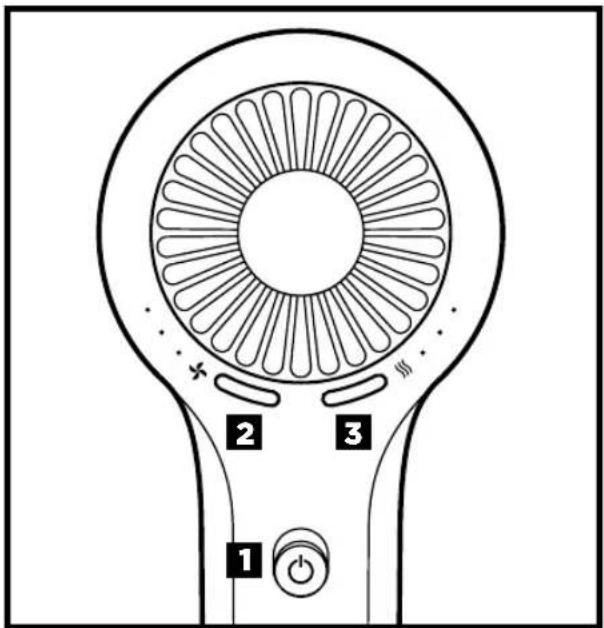
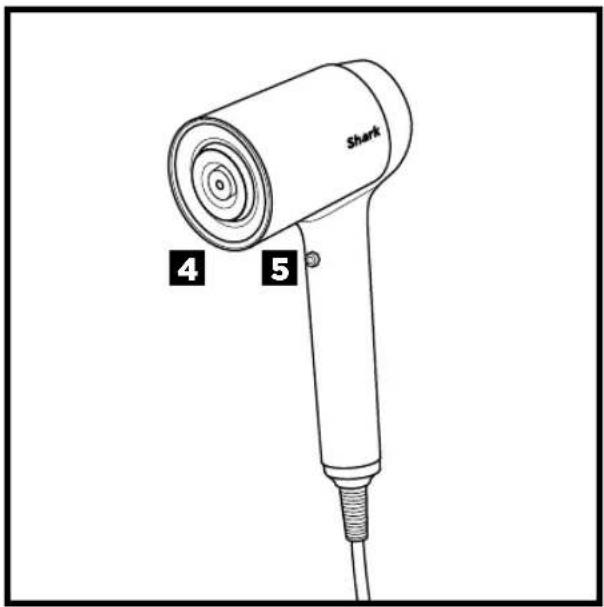
- Turns the dryer on and off.
- Adjusts the airflow. Pressing the left-hand button allows you to choose a low, medium, or high airflow.
- Adjusts the temperature. Pressing the right-hand button allows you to choose a low, medium, or high temperature.
- To attach any accessories included with your model, press them into place on the front of the dryer. You will know they are properly attached if the IQ logo on the back of the dryer illuminates when the dryer is turned on.
- Press and hold the Cool Shot button for a cool burst of air to set your style.
- To attach any accessory included with your model, press them into place on the front of the dryer.
For further operating instructions, please consult the Styling Guide or scan the QR code.
Storage, Cord Safety, and Maintenance/Cleaning:
- Ensure the cord is not knotted, twisted, or wrapped around any nearby objects when in use.
- To store the dryer when not in use, wrap the cord in a circle and use the Velcro cord tag to secure the cord in place.
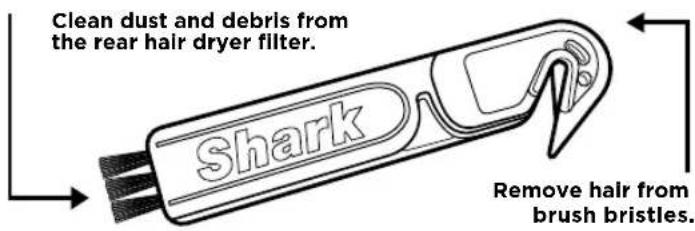
- Use the Small Cleaning Brush included in the box at purchase as needed.
TROUBLESHOOTING & ERROR CODES
MAINTENANCE/CLEANING
Reduction in Airflow, Overheating
A change in airflow or overheating, airflow blockages, overheating and/or visible build up on the back of the unit indicates your unit needs to be cleaned. We recommend using the maintenance brush included with your purchase to clean off the back of your unit.
Note: Cleaning and maintenance should not be done by children without supervision.
OVERHEATING
Hair dryer is overheating or shuts off.
This unit is equipped with a motor-protective thermostat. If for some reason your hair dryer overheats, the thermostat will automatically turn the unit off. To prevent power-down recurrence, unplug the hairdryer and set it aside to cool, or cool down using the cool shot button during use. Overheating may result if the unit is powered on for a long duration or can indicate a blockage or dust build-up. We recommend using the maintenance brush included with your purchase to clean off the back of your unit. If overheating continues to occur, contact customer service at 0800 862 0453.
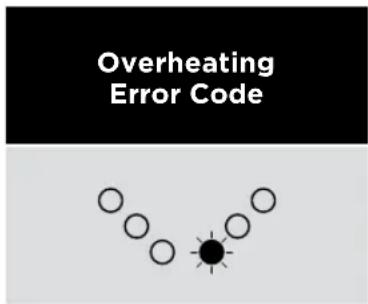
If you are experiencing a different error code, please scan the QR code for additional troubleshooting or contact Customer Service at (0800 862 0453).
CONSIGNES DE SÉCURITÉ IMPORTANTES
SharkNinja Europe Limited,
3150 Century Way,
Thorpe Park, Leeds,
LS15 8ZB, UK
Telephone: +44 (0)800 862 0453
www.sharkbeauty.co.uk
SharkNinja Germany GmbH,
c/o Regus Management GmbH,
Excellent Business Center 10.+11. Stock,
Westhafenplatz 1,
60327 Frankfurt am Main, Germany
www.sharkbeauty.eu
© 2021 SharkNinja Operating LLC.
SHARK is a registered trademark of SharkNinja Operating LLC.
HD100EU_Series_Warning_Insert_211008_MV3



- SAFETY | GUARANTEE | TROUBLESHOOTING
- IMPORTANT SAFETY INSTRUCTIONS
- TWO (2) YEAR LIMITED GUARANTEE
- Shark® Guarantees
- sharkbeauty.eu.
- How do I register my Shark * guarantee?
- IMPORTANT
- What are the benefits of registering my free Shark® guarantee?
- How long are new Shark ® machines guaranteed for?
- What is covered by the free Shark ® guarantee?
- What is not covered by the free Shark® guarantee?
- What happens when my guarantee runs out?
- Where can I buy genuine Shark® spares and accessories?
- OPERATING INSTRUCTIONS
- For further operating instructions, please consult the Styling Guide or scan the QR code.
- Storage, Cord Safety, and Maintenance/Cleaning:
- TROUBLESHOOTING & ERROR CODES
- MAINTENANCE/CLEANING
- OVERHEATING
- CONSIGNES DE SÉCURITÉ IMPORTANTES
Brand : SHARK
Model : Style iQ HD120EU
Category : Vacuum Cleaner